
40 Best Help Desk Software For Amazing Service In 2026

20 Best Helpdesk Software Shortlist
Here's my pick of the 20 best software from the 40 tools reviewed.


Help desk software gives support teams the tools they need to track, prioritize, and resolve customer issues efficiently. Whether you’re managing IT requests, customer service tickets, or internal support needs, the right help desk software improves response times, boosts agent productivity, and keeps customers satisfied.
To help you choose the right tool, I tested and reviewed leading help desk software platforms based on features like automation, multichannel support, reporting, and scalability. This guide highlights the top help desk solutions available in 2026—so you can find a platform that fits your team, customers, and support goals.
What Is Help Desk Software?
Help desk software is a tool that helps businesses manage, track, and resolve customer support inquiries from a centralized platform.
It converts customer questions into support tickets, automates responses to common issues, and ensures nothing slips through the cracks. By streamlining workflows and improving visibility into customer interactions, help desk software boosts support team efficiency and drives better customer satisfaction.
Table of Contents
The Best Help Desk Software Comparison Chart
This is an easy-to-use comparison tool of the best help desk software on the market.
| Tool | Best For | Trial Info | Price | ||
|---|---|---|---|---|---|
| 1 | Best with remote monitoring and management | 30-day free trial + free demo available | From $149/technician/month (billed annually) | Website | |
| 2 | Best for personalized customer support | Free trial available | From $25/user/month (billed annually) | Website | |
| 3 | Best for its automation capabilities | 14-day free trial | Pricing upon request | Website | |
| 4 | Best for centralized ecommerce communication | 14-day free trial | From $39/agent/month | Website | |
| 5 | Best for AI copilot assistance | 14-day free trial available | From $16/user/month (billed annually) | Website | |
| 6 | Best for customizable helpdesk boards | Free trial available | From $26/seat/month (3 seat minimum) | Website | |
| 7 | Best context-aware help desk software with multi-channel capabilities | 15-day free trial + free plan | From $7/user/month (billed annually) | Website | |
| 8 | Best for custom workflow automation | 7-day free trial available | From $24.17/month (billed annually) | Website | |
| 9 | Best for IT service teams | 30-day free trial available | From $17/user/month | Website | |
| 10 | Best helpdesk software for incident management processes | Free demo available | Pricing upon request | Website | |
| 11 | Best help desk software for cloud-based flexibility | Free trial + free demo available | From $25/user/month (billed annually) | Website | |
| 12 | Best help desk software for productivity and customer experience | Free trial + free demo available | From $19/agent/month (billed annually) | Website | |
| 13 | Front - Best help desk software for efficient customer communication | 14-day free trial + free demo available | From $25/user/month (billed annually) | Website | |
| 14 | Best for simplifying IT operations | 14-day free trial + Free demo available | Price upon request | Website | |
| 15 | Best for automating ticket routing | 14-day free trial + free demo available | From $25/seat/month (billed annually) | Website | |
| 16 | Best for creating personalized ticket views | Free demo available | From $13.79/user/month (billed annually) | Website | |
| 17 | Best helpdesk software for ecommerce businesses | 7-day free trial + free demo available | From $10/month | Website | |
| 18 | Best support software for building ITSM workflows | Free demo | Contact for quote | Website | |
| 19 | Best help desk software for enterprises | 14-day free trial | Pricing upon request | Website | |
| 20 | Best customer portal & self-service features | Free trial + free demo available | Pricing upon request | Website |


-

Accelo
Visit WebsiteThis is an aggregated rating for this tool including ratings from Crozdesk users and ratings from other sites.4.4 -
Forecast
Visit WebsiteThis is an aggregated rating for this tool including ratings from Crozdesk users and ratings from other sites.4.6 -
Wrike
Visit WebsiteThis is an aggregated rating for this tool including ratings from Crozdesk users and ratings from other sites.4.2





The 10 Best Help Desk Software Overviews
These are overviews of the best pieces of help desk software from my experience:
Help desk software is a tool that helps businesses manage, track, and resolve customer support inquiries from a centralized platform.
It converts customer questions into support tickets, automates responses to common issues, and ensures nothing slips through the cracks. By streamlining workflows and improving visibility into customer interactions, help desk software boosts support team efficiency and drives better customer satisfaction.


Atera provides a comprehensive IT management solution designed to meet the needs of businesses and IT professionals looking for an efficient helpdesk software. It caters to managed service providers (MSPs) and internal IT departments by offering tools that enhance service delivery and problem resolution.
Why I Picked Atera
I picked Atera for its robust helpdesk and ticketing system, which stands out in the realm of IT management. This system includes email-to-ticket conversion and automated ticket routing, which can significantly improve your team's response time and customer satisfaction. Additionally, Atera's remote monitoring and management capabilities allow you to troubleshoot and resolve issues without being on-site, addressing the challenge of managing multiple client locations. These features make Atera a strong contender for those in need of efficient helpdesk software.
Atera Key Features
In addition to its helpdesk capabilities, Atera offers a variety of features that can enhance your IT management experience.
- Automation Tools: Automate routine tasks such as onboarding and patch management to save time and reduce manual errors.
- AI Tagging: Leverage artificial intelligence to categorize and prioritize tickets automatically, ensuring critical issues are addressed promptly.
- Real-Time Monitoring: Monitor client systems in real-time to detect and address potential problems before they impact operations.
- 24/7 Live Chat Support: Access round-the-clock support to resolve any issues that may arise while using the platform.
Atera Integrations
Integrations include Acronis, AnyDesk, Webroot, Bitdefender, Splashtop, TeamViewer, QuickBooks, Xero, FreshBooks, and Dropbox.
Pros and Cons
Pros:
- Offers comprehensive remote monitoring and management features.
- Integrates multiple IT management tools into one platform.
- Includes AI-driven automation for proactive issue resolution.
Cons:
- Less granular control for highly complex custom workflows or integrations.
- Reporting features may incur additional costs for advanced needs.
New Product Updates from Atera

Atera Enhances IT Autopilot With Automation and File Support
Atera’s IT Autopilot gets three major boosts: you can now attach common files for deeper analysis, automate IT tasks with clear workflows, and choose how the system follows up when users go silent. These updates help streamline IT operations and improve resolution efficiency. For more information, visit Atera’s official site.

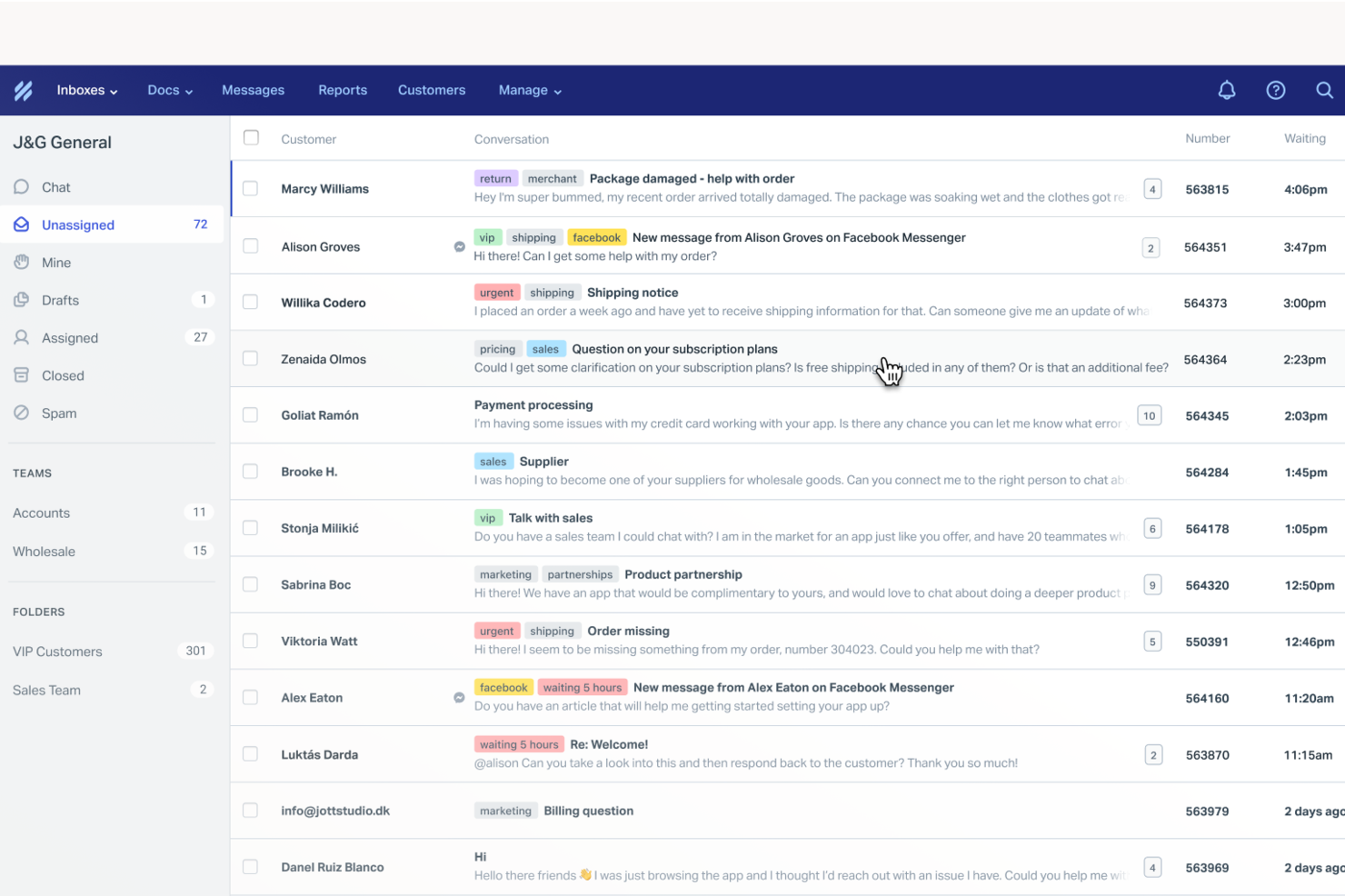
Help Scout is a help desk platform built for SMB support teams. It helps teams deliver personalized, human responses while scaling support across email and chat. By automating routine tasks and providing a shared inbox for streamlined communication, Help Scout addresses common challenges in customer service, ensuring that your team can focus on building meaningful relationships and resolving complex issues efficiently.
Why I Picked Help Scout
I picked Help Scout because of its shared inbox that keeps customer conversations organized and visible for the whole team. Assignment and internal notes make handoffs clean while preserving context. Additionally, the knowledge base empowers your customers to find answers on their own, reducing the volume of incoming queries. Help Scout's live chat functionality enables real-time interaction with customers, offering the immediacy that many businesses need to maintain high satisfaction levels.
Help Scout Key Features
In addition to its standout features, I also found that Help Scout offers:
- AI Drafts: This feature assists your team by suggesting responses to customer inquiries, saving time and ensuring consistent communication.
- Automated Workflows: Streamline your support process by automating repetitive tasks, allowing your team to focus on more critical issues.
- Custom Fields: Organize customer data effectively, enabling your team to provide personalized support tailored to individual needs.
Help Scout Integrations
Integrations include Salesforce, HubSpot, Jira, Slack, Shopify, Mailchimp, WooCommerce, Stripe, Trello, and Google Apps. Users can also create custom apps and integrations using the Help Scout API.
Pros and Cons
Pros:
- Quick to implement and onboard new agents
- Collision detection prevents duplicate replies
- User-friendly interface and design
Cons:
- Knowledge base customization varies by plan
- Pricing increases as mailboxes scale
New Product Updates from Help Scout

Help Scout Enhances Support Management With AI and Integrations
Help Scout introduces smarter routing, WhatsApp and Aircall integrations, and new AI enhancements to help teams manage conversations, automate workflows, and support customers across more channels. For more information, visit Help Scout’s official site.
 .
.

SysAid is an IT Service Management (ITSM), service desk, and help desk software platform that supports core ITIL practices. It provides the essential tools IT teams need to manage incidents, service requests, assets, and workflows in a structured way.
SysAid places a strong emphasis on automation, offering ticket, task, self-service, and workflow automation features that allow you to define rules and reduce manual effort. Ticket automation helps route requests to the appropriate team or queue based on predefined conditions. Task automation supports repetitive actions, such as common IT maintenance tasks, while workflow automation lets you define structured steps for processes like employee onboarding or change approvals.
Additional standout features include remote control capabilities that allow agents to troubleshoot issues directly on a user’s device, asset management that links hardware and software details to tickets, and reporting tools that help you track KPIs and other service desk metrics.
SysAid also offers a marketplace with pre-built integrations, including tools such as Microsoft Teams, Jira, TeamViewer, SolarWinds, Azure, and Slack. You can also connect SysAid to thousands of additional applications through Zapier.
Pricing is available upon request, and SysAid offers a free trial.
New Product Updates from SysAid

SysAid Adds Direct Knowledge Base Linking in Service Records
SysAid now allows linking knowledge base articles directly to service records, enhancing centralized access to information and speeding up issue resolution. For more information, visit SysAid's official site.
 .
.

Designed specifically for online sellers, eDesk offers a suite of features that reduce repetitive tasks and improve response times, making it easier to manage customer queries and enhance engagement. For businesses aiming to boost customer loyalty and sales, eDesk's AI-driven capabilities provide the efficiency and automation needed to transform your support operations.
Why I Picked eDesk
I picked eDesk for its unique ability to centralize customer messages and order details, which is crucial for ecommerce businesses managing high volumes of inquiries. The intelligent ticket routing and smart replies feature enhances response accuracy and speed, allowing your team to focus on more complex issues. Additionally, the AI chatbot, capable of handling over 70% of customer queries, ensures support is available 24/7, addressing the common challenge of providing round-the-clock assistance without increasing headcount.
eDesk Key Features
In addition to centralized ecommerce communication, eDesk offers:
- Unified Inbox: Consolidates all customer messages across various platforms into a single view, simplifying communication management.
- Pre-Sales Support Tools: Provides tools to help convert inquiries into sales, directly impacting your revenue.
- Performance Measurement: Offers insights into customer interactions and team performance to help you refine your support strategy.
- Scalable Integration: Supports integrations with over 300 platforms, ensuring seamless connectivity with your existing systems.
eDesk Integrations
Integrations include Amazon, eBay, Shopify, Walmart, Etsy, BigCommerce, WooCommerce, Allegro, Magento, and Back Market.
Pros and Cons
Pros:
- Reduces switching between inboxes and marketplace portals
- Gives agents full customer context in one view
- Helps manage high ticket volumes during peak sales periods
Cons:
- Setup requires connecting multiple storefronts and channels
- Reporting focuses on operations, not deep analytics


If you manage a team that juggles customer inquiries from multiple channels, SparrowDesk might be the solution you need. It combines AI-driven automation with an intuitive interface to streamline your helpdesk operations. Whether you're in retail, tech, or any customer-centric industry, SparrowDesk aims to reduce manual workload by automating a majority of customer interactions, enhancing both efficiency and customer satisfaction.
Why I Picked SparrowDesk
I picked SparrowDesk for its standout AI capabilities that directly address the needs of modern helpdesk teams. Its AI Agents automate repetitive queries, freeing up your team to focus on complex issues that require a human touch. The AI Copilot further assists by providing agents with real-time summaries and smart replies, making it easier to manage high volumes of inquiries. These features are designed to improve response times and ensure consistent, on-brand communication across all customer interactions.
SparrowDesk Key Features
In addition to its AI capabilities, SparrowDesk offers a suite of features tailored for effective helpdesk management.
- Omnichannel Inbox: Consolidate customer interactions from chat and email into a single, easy-to-manage inbox.
- Service Level Agreements (SLA): Set response and resolution targets to meet customer expectations consistently.
- Interactive Analytics: Gain insights into team performance and customer trends with real-time dashboards.
- Quick-Action Macros: Automate frequent tasks with pre-set macros to boost efficiency.
SparrowDesk Integrations
Native integrations are not currently listed by SparrowDesk.
Pros and Cons
Pros:
- No code workflow builder automates routing and notifications
- Copilot features summarize long conversations inside the agent inbox
- AI agents designed to auto resolve many repetitive tickets
Cons:
- Limited native integrations could hinder seamless connectivity
- Channels currently focus on email and live chat, not voice or social

monday Service is a comprehensive service management platform designed to streamline and enhance service delivery across various organizational functions. It offers out-of-the-box solutions tailored for diverse service use cases, including ticket management, multi-channel support, AI and automations, a service catalog, and managing the employee lifecycle. Caleb Johnstone, SEO Director at Paperstack, shared how impactful the platform has been for his team: “monday.com Help Desk is the solution that has transformed our ticketing system to make our processes easier and quicker to respond. The best thing about it is that it can be tailored to our requirements without overwhelming the staff.”
Key features include an intuitive ticketing system that allows for the efficient management and tracking of customer inquiries. The platform's customizable workflows and automation capabilities can also help reduce manual efforts and improve response times. Additionally, monday Service offers a centralized communication hub, enabling seamless collaboration among support team members.
The tool's user-friendly dashboards and reporting tools also provide valuable insights into support metrics, helping teams to continuously optimize their performance. Overall, monday Service's blend of user-centric design and powerful functionalities makes it an effective solution for delivering exceptional customer support.
monday Service integrates well with several tools, including DocuSign, Gmail, Azure DevOps, Microsoft Teams, Microsoft Outlook, and Slack.

Best context-aware help desk software with multi-channel capabilities

Zoho Desk is a cloud-based customer service application with contextual AI that helps your company build stronger relationships with customers. For organizations handling high volumes of requests, the platform can be a game-changer. Miguel Angel Gongora Meza, Founder & Director of Evolution Treks Peru, explained: “Zoho Desk provided our cooperative with the organization that we required to oversee dozens of requests per day by travelers intending to go to Peru, and I loved how tickets, emails, and follow-ups were all visible in a single transparent perspective.”
Zoho Desk has great features for prioritizing, managing, and closing customer support tickets. Users have control over tickets submitted to the support team via email, phone, chat, social media, a self-service portal, forums, and web forms. All tickets are presented in one place, and team members can set priorities and close tickets in the preferred order.
The tool allows teams to create a Knowledge Base of customer support articles, so your team can quickly find appropriate solutions for customer tickets. Zoho Desk’s Help Center features also allow customers to create a ticket and track it online themselves.
Zoho Desk’s AI and automation features take into account an appropriate resolution time based on your business hours when a customer ticket is created. If those parameters are missed, the ticket will be escalated automatically. Tasks such as ticket assignment, service escalations, notification rules, live chat widget and time-based actions can be automated by setting workflow rules.
The tool provides detailed reports and analytics about your support center performance, such as the average resolution time, the number of tickets closed per agent per day, the number of tickets opened per product and more.
The platform integrates with Zoho customer relationship management (CRM), as well as other Zoho Apps. The tool also offers an API for further integrations.
Pricing starts at $20/agent/month billed annually.


Tidio is a versatile helpdesk software designed to enhance customer interactions and support experiences. It combines live chat, ticketing, and AI-driven automation to manage customer inquiries across multiple channels.
One feature that stands out to me is Tidio's advanced ticketing system, which organizes customer inquiries into tickets for efficient management. This system allows your team to focus on prioritizing and resolving issues without losing track of any communication. The multichannel shared inbox further enhances this by centralizing emails, chats, and social media messages into one platform, ensuring your team never misses a customer query.
Another reason Tidio makes the list is its AI-powered chatbots, which provide immediate responses to common questions. These chatbots handle routine inquiries, freeing up your team to tackle more complex issues. Additionally, Tidio's video call support offers a more personal touch, allowing you to connect with customers directly for more detailed assistance when needed.
With the ability to create custom workflows, Tidio is great automating repetitive tasks and saving time. Tidio's analytics feature provides insights into customer satisfaction and team performance, helping you make informed decisions. Furthermore, order management is integrated for platforms like Shopify, allowing you to handle customer orders directly from the Tidio interface.
The platform also integrates with WordPress, Squarespace, WIX, Adobe Commerce, Google Analytics, Klaviyo, Omnisend, ActiveCampaign, Mailchimp, Hubspot, and Salesforce.
Pros and Cons
Pros:
- Built-in lead collection and chatbot performance
- Integrated live chat and AI features
- Customizable chatbot flow creation without the need for coding skills
Cons:
- Limited customization options for advanced users
- AI and flow features cannot be used simultaneously
New Product Updates from Tidio

Tidio Expands Lyro AI Across Email and Chat
Tidio expands Lyro AI to email ticketing and enhances its chatbot with Claude 3.0 integration. These updates improve automation across support channels and enhance AI-driven interactions. For more information, visit Tidio’s official site.
 .
.

InvGate Service Management is a comprehensive IT service management (ITSM) solution designed to enhance your organization's service delivery. It offers tools for managing incidents, problems, changes, and service requests, all within a single platform.
One thing I like about InvGate Service Management is its robust ticket management system. You can organize and prioritize work based on factors like priority, service level agreements (SLAs), and urgency, ensuring that critical issues are addressed promptly. The platform also highlights actions that can be resolved with minimal effort, helping to prevent bottlenecks and keep operations running smoothly.
With access to over 150 metrics, you can also cross-analyze data to create insightful reports, aiding in faster and more informed decision-making. Sharing custom dashboards with stakeholders enhances transparency, providing visibility into the status of the service desk and fostering improved communication.
Integrations include FileWave, Lansweeper, Microsoft Teams, Microsoft ActiveDirectory, Azure DevOps, Okta, Office 365, OpenAI, Outlook, and Jira.
New Product Updates from InvGate Service Management
InvGate Service Management Enhances Workflows and Usability
InvGate Service Management introduces VSA access from the AI Hub, Microsoft Teams workflow task completion, expanded Okta workflow actions, and custom labels for workflow steps. These updates improve usability and streamline workflow execution across platforms. For more information, visit InvGate Service Management's official site.
 .
.
Best helpdesk software for incident management processes

ServiceDesk Plus is a complete IT Service Management (ITSM) suite with built-in IT Asset Management (ITAM) and Configuration Management Database (CMDB) capabilities. With advanced ITSM functions, powerful automations, smart customizations, and easy-to-use capabilities, ServiceDesk Plus helps IT support teams easily deliver world-class service to end users at lower costs.
Features include strong incident management processes that help resolve incidents swiftly and improve agent productivity; comprehensive problem management features that enable IT teams to classify, analyze, and close issues as well as identify repetitive issues to close tickets faster; and a change management system that allows IT teams to implement IT changes with minimal risk through streamlined planning, approval, and implementation.
The tool also provides integrated knowledge management, virtual assistant, and AI capabilities, as well as effective SLA management with proactive and reactive escalations and escalation actions.
It offers various integration options, including Microsoft Outlook, Microsoft 365, Microsoft Teams, Jira, and more through REST APIs.
Pricing for ManageEngine ServiceDesk Plus starts at $12/per user/month for the standard plan. See further pricing plans on their pricing page.

Best help desk software for cloud-based flexibility
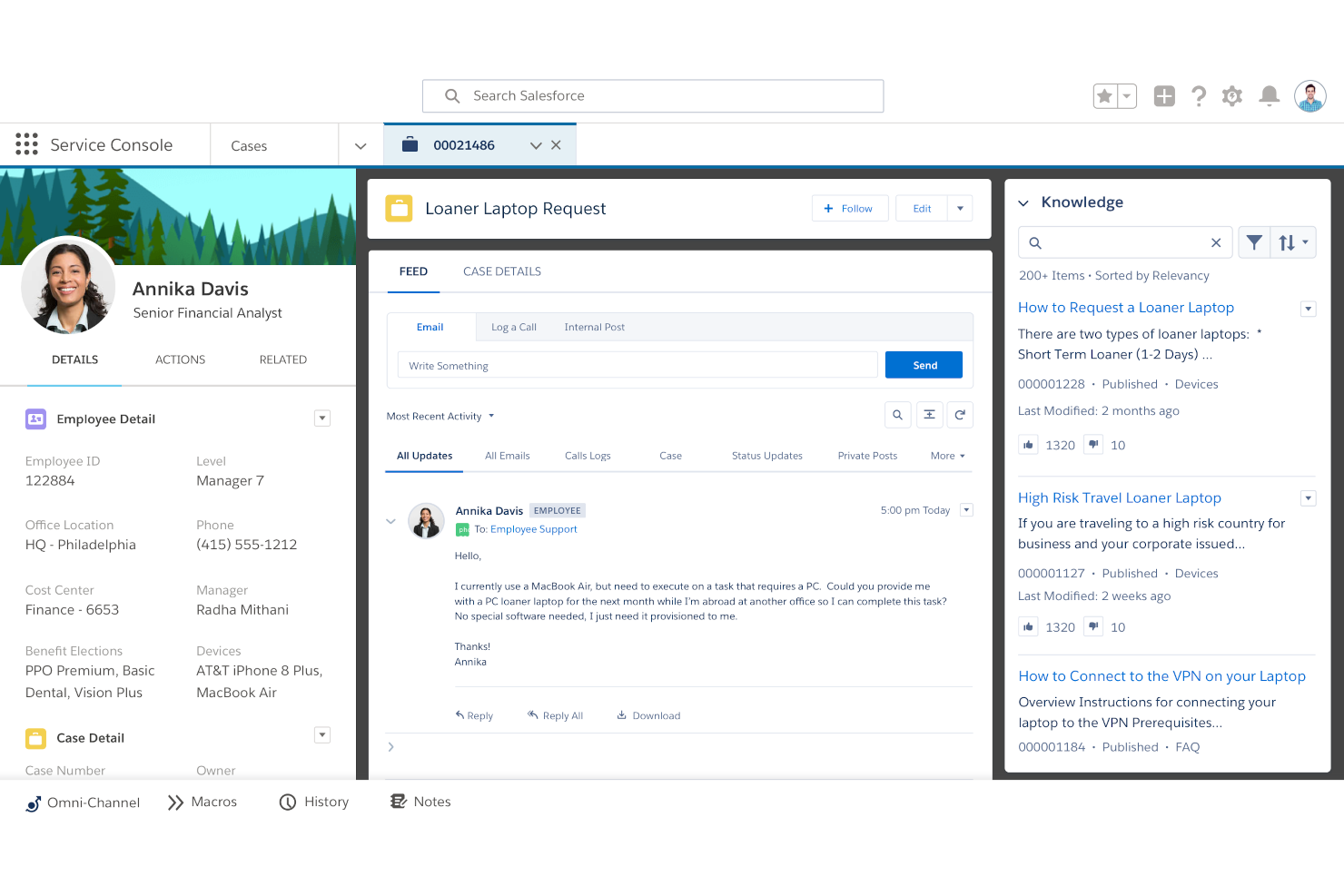
Salesforce Service Cloud is a cloud-based customer service management solution designed for businesses looking to set up a flexible help desk program and initiate their customer service operations from anywhere.
Service Cloud is built on the Salesforce1 platform, and it aims to optimize and centralize customer service agent efforts, giving them the ability to manage cases and handle customer requests with a flexible and mobile approach. It was initially developed to provide proper support mobility for customer service professionals. The solution allows them to not only receive service requests but also provide high-quality support with omnichannel customer experience from anywhere. This means the platform is more than capable of serving as a truly mobile help desk solution for remote and hybrid teams. Using the Service Cloud console, support teams and agents can easily manage all their active cases with relative efficiency.
The platform comes with a Communities tool that empowers customers by giving them the ability to help themselves and others through the self-service approach. Service Cloud works as a help desk solution with self-service capabilities. Other Service Cloud features include a knowledge module that enables organizations to build their knowledge base. This knowledge base can then be utilized by customer support teams and customers alike to look for the answers they need at any given moment.
Salesforce Service Cloud also has a social service function that enables the help desk to be seamlessly integrated with various social media channels, further enhancing the customer service experience.
Pricing for the Salesforce Service Cloud starts from $25 per user/month with the Essentials package. This option supports a maximum of 10 users and is billed annually. A 14-day free trial is available.

Zendesk
Best help desk software for productivity and customer experience

Zendesk is an easy-to-use, AI-powered customer service solution that’s sophisticated enough to meet complex needs and simple enough to let you get set up and running immediately. For many businesses, it’s more than just a support tool—it’s a way to strengthen customer relationships and uncover valuable business insights. Paul Hodges, CEO & Cofounder of Soltech, explained: “Customer service and relations is a core pillar of our business. By managing customer interactions through Zendesk, we can easily provide full support while also gaining valuable insights for our product development and marketing strategies.”
Zendesk makes it easy for desk agents to track, prioritize, and respond to customers with one unified agent workspace that brings all conversations across web, mobile, and social channels together. With complete customer context, including more than 1000+ pre-built integrations from the Zendesk Apps Marketplace, agents have all the relevant customer details and interaction history to provide better, more personalized support.
Your team can customize the support environment based on use cases, such as software support, customer service, troubleshooting, and orders & shipping. Leverage built-in routing and intelligence to collect critical details and reduce data entry, and escalate issues to the agent best suited to help. Zendesk allows users to create knowledge base content for customers and a customized, mobile-responsive, help center.
Zendesk includes a reporting solution for ticket and support teams that allows access to real-time and historical data, and lets you analyze performance using pre-built dashboards populated with useful metrics such as unresolved tickets, reopened tickets, and ticket resolution times. Users can also customize dashboards and charts, and share relevant dashboards to keep stakeholders in the loop about key insights and trends.
Integrations include Asana, Google Workspace, HubSpot, Jira, Microsoft Dynamics, Salesforce, Shopify, Slack, Trello, Zoom, and over 1200 more options on the Zendesk Marketplace.
Zendesk starts at $19/user/month and offers a 14-day free trial.

Front
Front - Best help desk software for efficient customer communication
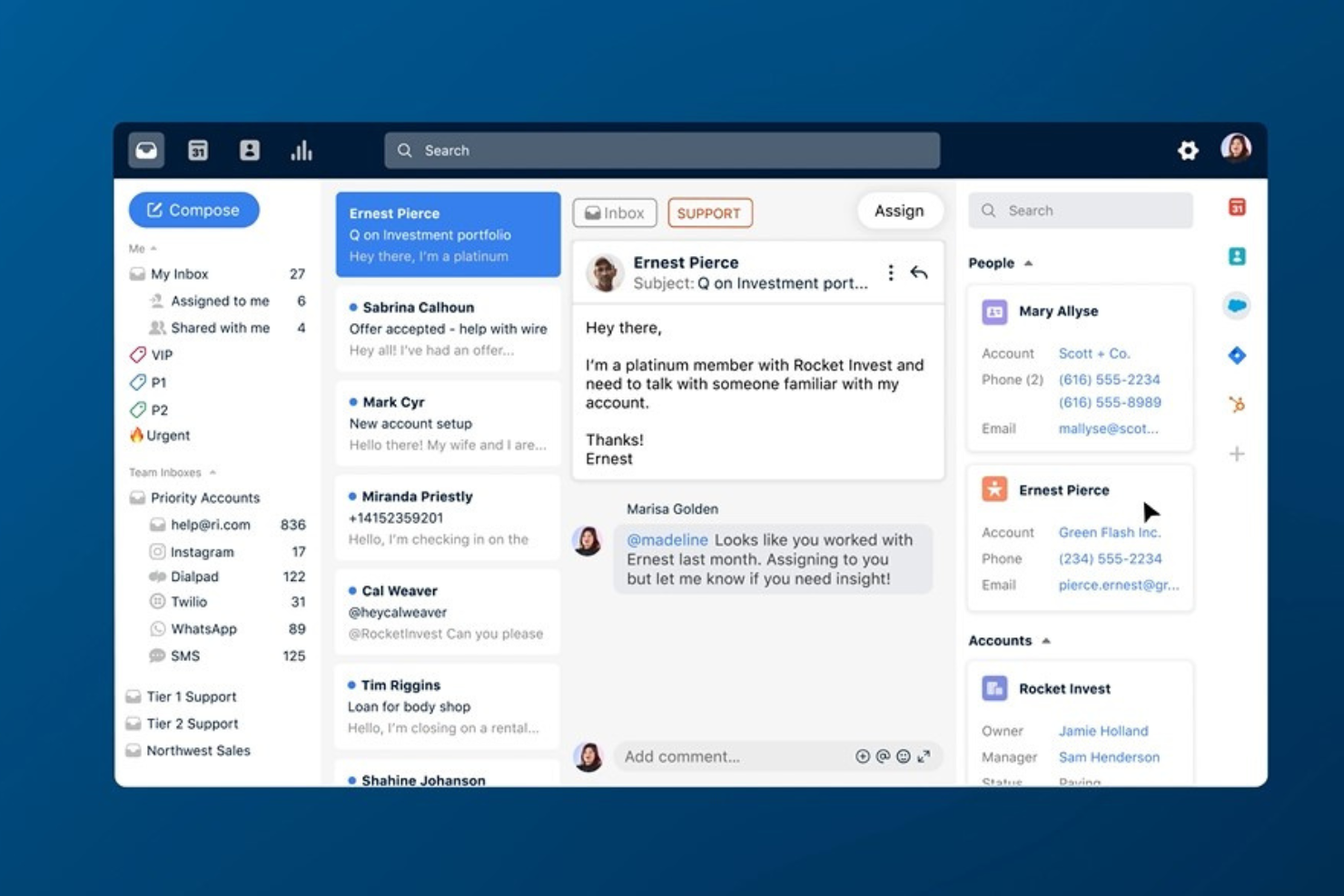
Front is a customer operations and help desk platform that centralizes communication channels to facilitate better customer service and team collaboration. It integrates email with other communication tools to provide a unified platform for managing customer interactions, aiming to improve responsiveness and maintain high-quality customer relationships.
I selected Front as the helpdesk software due to its comprehensive approach to managing customer interactions. It integrates email with other communication channels, enabling a unified platform for team collaboration and customer service. Front's distinctiveness lies in its emphasis on transparency and teamwork, allowing all team members to see the entire context of customer conversations and work together directly within the inbox.
You can use Front's shared inboxes to manage team emails, comments, and tasks in one place, facilitating collaboration. It offers workflow automation to assign, triage, and track messages, ensuring nothing falls through the cracks. The platform also includes analytics for insights into team performance and customer engagement, as well as integrations with other tools to centralize work.
Integrations are available with 100+ software systems, including Calixa, Fullcontact, Gainsight, HubSpot, Microsoft Dynamics, Microsoft Outlook 365, NiceReply, Outreach, Pipedrive, and Salesforce.
Pricing for Front starts at $19/user/month for their Starter plan when billed annually, which supports up to 10 user seats.


NinjaOne is a unified endpoint management (UEM) and IT management platform that provides a suite of tools for managing and monitoring IT infrastructure. What makes NinjaOne different is its ability to automate IT management tasks and provide a fast, flexible ticketing system that caters to the needs of IT teams.
NinjaOne's capabilities in endpoint management and alerting are particularly notable, offering automation and efficiency that cater to the needs of managed service providers (MSPs) and IT departments, which is why it is recognized as a top choice in this area. I chose NinjaOne as a help desk software because of its high customer satisfaction ratings and its comprehensive approach to monitoring and managing IT portfolios.
I believe NinjaOne is best for endpoint management and alerting due to its extensive features, which include patch management best practices and integrations that cover a wide range of IT management needs. Its reputation for simplicity and effectiveness, especially in protecting organizations from ransomware attacks, solidifies its position as a top choice in this category.
NinjaOne is a unified endpoint management (UEM) and IT management platform that caters to the needs of IT departments and managed service providers (MSPs). For IT departments, it offers endpoint management, patch management, remote control, helpdesk ticketing, and endpoint backup. MSPs benefit from features like remote monitoring and management (RMM), MSP backup, ticketing, documentation, and endpoint security. The platform emphasizes the importance of endpoint visibility, control, and automation for secure and efficient device management.
NinjaOne offers a pay-per-device pricing model for their cloud RMM software, which allows customers to pay on a monthly basis and only for the devices they manage. NinjaOne provides a 14-day free trial of their software.

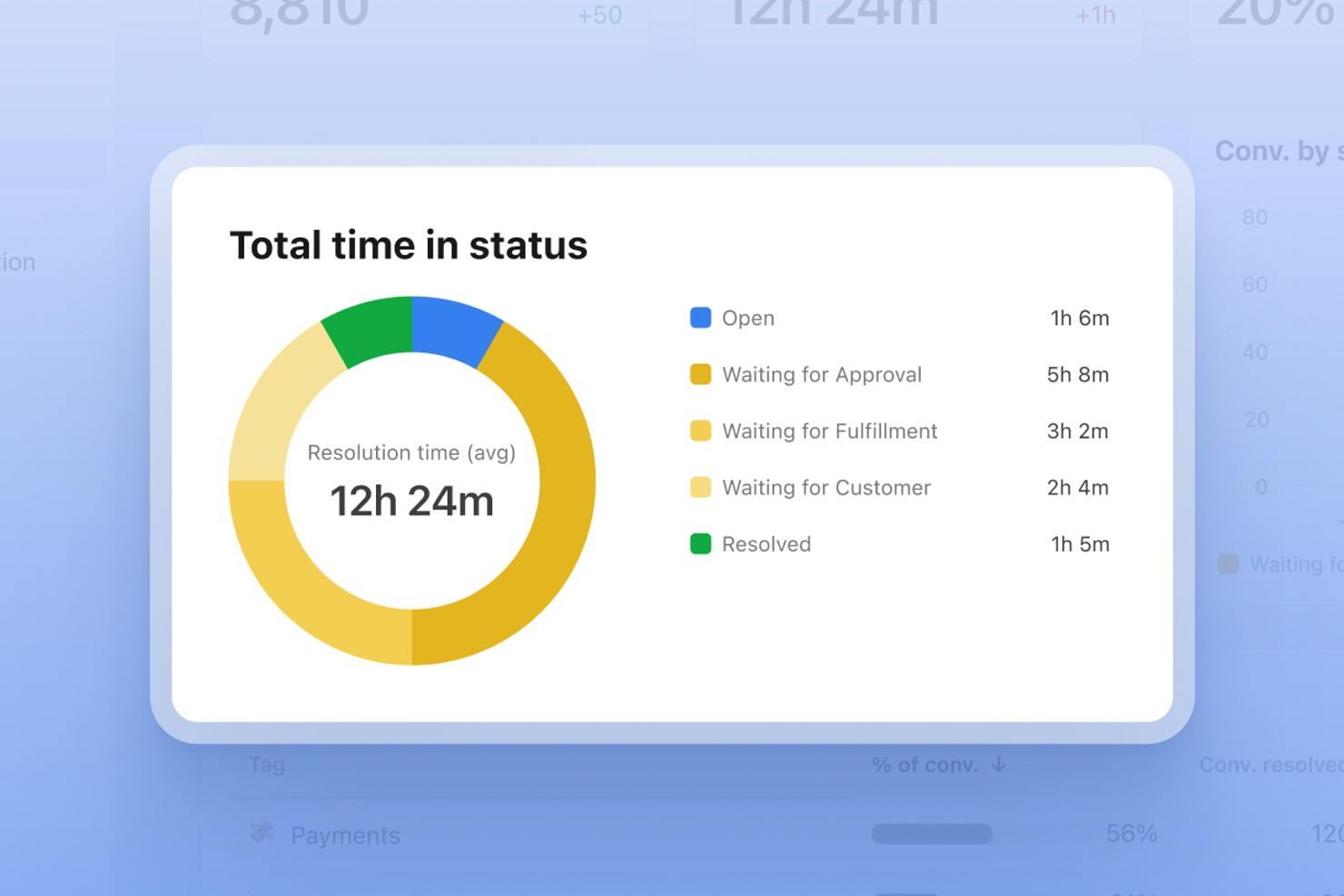
Front brings shared inbox management and collaborative ticketing to customer support teams that need to handle high volumes of inquiries. Its interface blends email, chat, and workflow tools, making it easy for teams in tech, ecommerce, and service industries to stay organized and responsive. If you’re looking for a helpdesk platform that prioritizes team collaboration and workflow customization, Front is worth considering.
Who Is Front Best For?
Front suits customer support and operations teams in mid-sized to large organizations that need shared inbox management and collaborative ticketing.
Why I Picked Front
I picked Front for its ability to connect with over 160 different apps and services, which is especially valuable for teams that rely on multiple tools to manage customer support workflows. This level of integration means you can automate ticket routing, sync customer data, and trigger actions across platforms like Slack, Salesforce, and Shopify without manual effort. I appreciate how Front’s workflow automation builder lets you design custom rules that fit your team’s unique processes. For helpdesk environments where efficiency and cross-platform coordination are essential, these integration capabilities make Front stand out.
Front Key Features
Some other features in Front that help teams manage customer support more efficiently include:
- Shared inbox management: Teams can collaborate on incoming messages from multiple channels in a single, organized inbox.
- Internal comments and mentions: Users can leave private notes and tag teammates directly within conversations to coordinate responses.
- Analytics and reporting dashboard: Track response times, conversation volumes, and team performance with built-in analytics tools.
- Customizable SLA rules: Set and enforce service level agreements to ensure timely responses and accountability across your support team.
Front Integrations
Integrations include Slack, Salesforce, HubSpot, Asana, Aircall, Shopify, Jira, Microsoft Teams, Twilio, and Google Sheets.
Pros and Cons
Pros:
- SLA tracking enforces timely customer responses
- Internal comments streamline agent communication
- Shared inboxes support high-volume team collaboration
Cons:
- Advanced analytics require higher-tier plans
- No built-in knowledge base for self-service


EngageBay offers help desk software in the form of their Service Bay tool. Users can answer unlimited tickets in one place, as well as create a personalized ticket view to suit their needs.
The tool also offers advanced service automation tools so users can automate routine customer service processes and tasks. Users can also create canned responses to common queries and questions to save time and increase productivity.
EngageBay also includes capabilities for grouping and organizing tickets in order to boost efficiency. You can also manage tickets like tasks in order to keep track of closed and open tickets. The tool offers custom reporting and analytics to ensure you make informed decisions about the support process and specific tickets.
EngageBay's Service Bay software is free to use.


Gorgias is a helpdesk software for Shopify, Magento, and BigCommerce merchants that allows retailers to manage all of their customer communication and tickets from email, social media, SMS, and phone in one platform. The tool is powered by machine learning and automations, and seamlessly integrates into existing tech stacks.
In addition to managing email, social media, SMS, and phone support, Gorgias also allows teams to manage live chat conversations and reviews, and view customer communication and order history. Team members can use intelligent templates and refer to customer data points in responding to customer inquiries and tickets.
The tool’s machine learning capabilities assist support teams members with detecting the intent of customers and segmenting interactions into categories such as social leads, negative comments, and social questions for prioritization and organization. Support teams can also set up automation features for responding to and handling customer inquiries, as well as track team member performance and attribute sales to specific team members.
Integrations with Shopify, Magento, and BigCommerce allow teams to update and manage orders in those platforms directly through Gorgias, as well as create orders, cancel orders, process refunds, issue invoices, and update shipping addresses.
Pricing for Gorgias starts at $60 per month.


A division of Zoho Corp., ServiceDesk Plus provides great visibility and central control in dealing with IT issues to minimize business downtime. Features include: best practice ITSM Workflows, powerful integrations with IT management apps, smart automation, extensive reporting capabilities, codeless customizations, and more.
ManageEngine scores well in our value for cost evaluation criteria section in particular because of their straight-forward and relatively inexpensive licensing for this system. Being able to get advanced help desk functionality for free will appeal to small businesses and start-ups.
Integrations listed include Analytics Plus (on-premise) or Zoho Analytics (on-cloud), AD Manager Plus, ADSelfService Plus, PasswordManager Pro, add-in for Microsoft Outlook, Office 365 calendar integration, and more.
A few cons that may be of note: reporting could be a lot more user-friendly and is often confusing to wade through; and the interface was not as smooth or intuitive as others on this list.
ServiceDesk Plus offers customized quotes upon request and has a free demo.

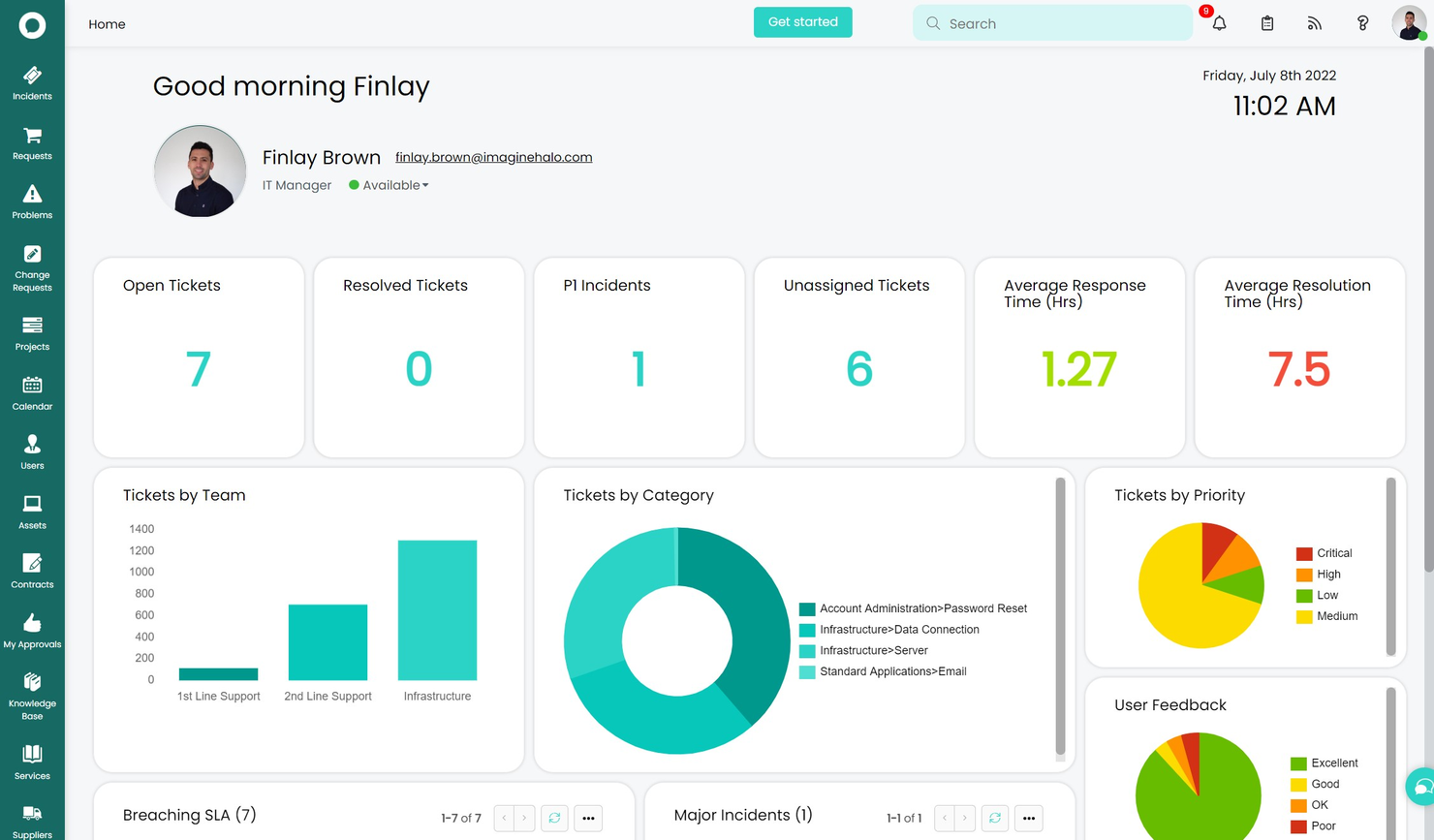
HaloITSM is a help desk solution that helps businesses streamline the incident lifecycle, from ticket creation to issue resolution. It enables professionals to update the status of incidents and view details including ticket ID, priority level, issue summary, and date created.
HaloITSM allows organizations to link new incidents with existing requests and share potential solutions with team members or end-users through the knowledge base. Managers can specify default values such as categories, priority, service-level agreements, or mailboxes before creating requests. Customer service agents can view upcoming tasks on a calendar and streamline approval processes by requesting validation on ticket creation or modifications.
HaloITSM facilitates integration with various third-party applications such as Microsoft Office 365, Azure DevOps, Microsoft Teams, Lansweeper, and more. Other features of HaloITSM include reporting, compliance management, status tracking, a self service portal, collaboration, and auditing. It also helps businesses generate maintenance requests, store asset details, and set validation rules across configuration fields using IP addresses or numeric passwords.
In addition, HaloITSM can serve as an enterprise service management solution allowing you to extend your workflows beyond IT and experience the benefits throughout the organization. HaloITSM enables teams to join together siloed service areas to create seamless processes and a great experience for users.
Best customer portal & self-service features
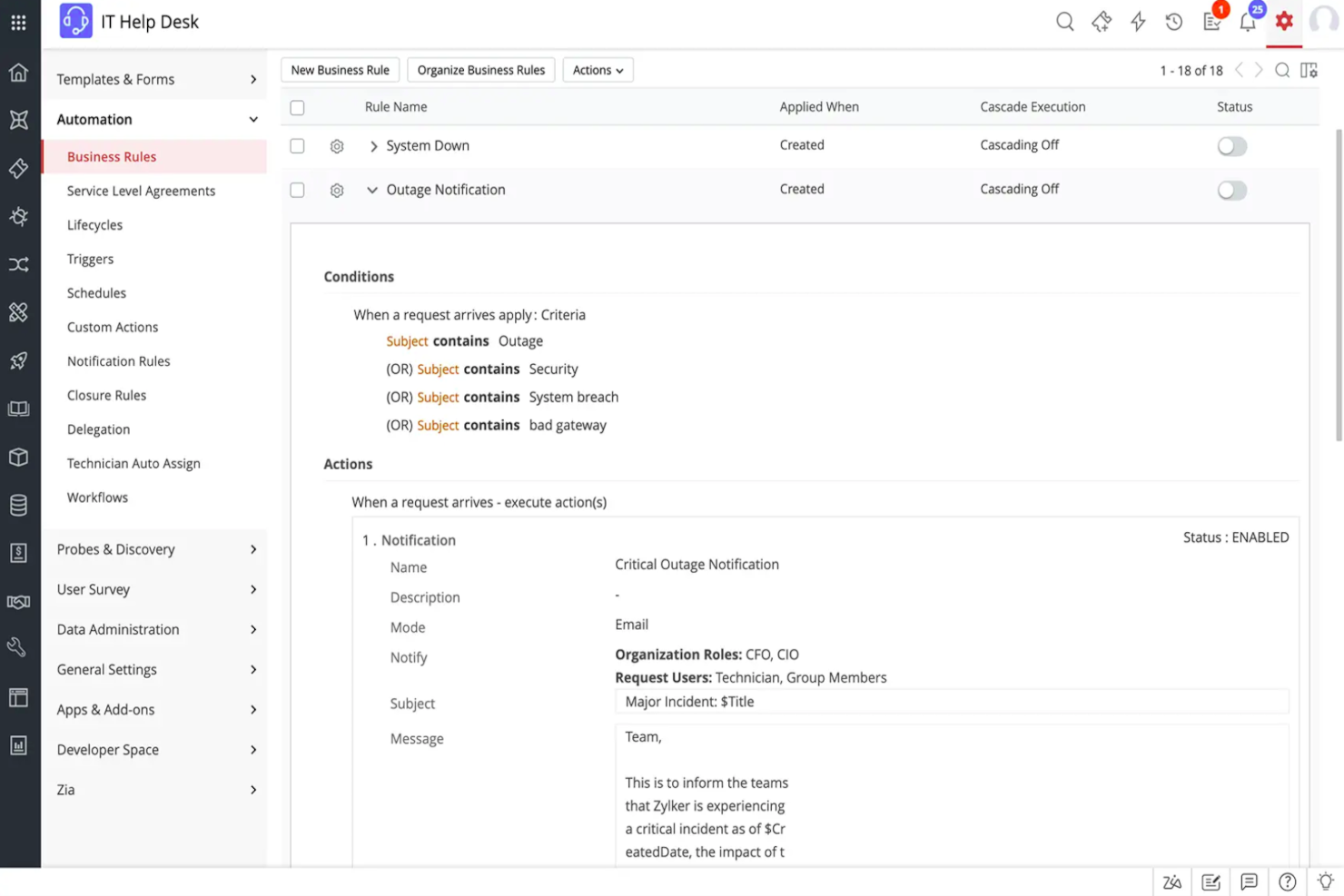
ManageEngine Service Desk Plus is a help desk software with an intuitive self-service portal, advanced reporting capabilities, and seamless integrations with popular third-party applications. It's available in both on-premise and cloud-based versions, with the latter being ideal for businesses looking to reduce their IT costs.
ManageEngine’s incident management feature helps users log incidents, categorize them, assign them to specific technicians, and track their progress. You can also set up escalation rules to resolve incidents promptly. Its ticketing feature allows you to track, prioritize, and resolve all customer queries and requests in one place. It can also route tickets to the relevant agents based on skillset and location.
ManageEngine's asset management module helps users keep track of IT assets and their configurations. Users can monitor their performance and get alerts about any issues. It allows businesses to provide support through multiple channels, including email, phone, chat, and social media.
ManageEngine’s self-service portal allows end users to submit tickets, track their status, and access knowledge base articles without contacting the help desk directly. This further reduces the help desk team's load and helps resolve issues faster. ManageEngine helps users meet SLAs on time by automatically generating reports and alerts based on pre-defined thresholds. This feature ensures that SLAs are always met, and end user satisfaction is guaranteed. The software’s reporting feature allows users to generate reports on various aspects of their IT infrastructure, including tickets, assets, and contracts. The reports can be customized to include specific filters and criteria and can be scheduled to run automatically regularly.
Pricing for ManageEngine Service Desk Plus is available upon request.
Other 10 Best Helpdesk Software
Not keen on any of the above resources? You’re in luck. There are always dozens of other IT support software and helpdesk tools clattering for your business. The helpdesk software options below are just a few more worthy of your analysis.
- Jitbit Helpdesk
Email ticketing system for medium and large businesses
- Salesforce Financial Services Cloud
For all digital end-to-end engagement with your customers.
- ProProfs
Help desk software for email ticketing
- Jira Service Management
Help desk software for DevOps
- Issuetrak
For omnichannel help desks
- SysAid
For its automation capabilities
- Hesk
Open source help desk software
- Hiver
Help desk software for Gmail-based team collaboration
- JivoChat
Free helpdesk software plan for small teams
- CometChat
No-code chat plugin
- Samanage
ITSM help desk
- SAAS First
For AI-driven customer support
- DoneDone
Simple help desk managing support tickets, issues, and tasks
- FocalScope
For social media messaging integration
- Creatio CRM
For customer service management
- ClickUp
For automating your helpdesk workflows
- Freshservice
IT service desk for beginners
- LiveAgent
Help desk software for analytics and reporting
- Zoho Assist
For providing remote access support
- UserGuiding
For creating helpful in-app experiences


How I Picked The Best Help Desk Software
What criteria do we use to determine the best IT help desk solution? First, I carefully researched the top tools on the market, then I compared them against the features that I believe help the most to provide an amazing customer service. Finally, I used the criteria below to analyze my top choices.
- User Interface (UI): How well-designed is the support desk software? Does it offer clear displays and intuitive navigation? Is it aesthetically pleasing or all-business? Who does the UI cater to and do they succeed in addressing their target user?
- Usability: Is this easy to learn and master? Are there tutorials and training? What tech and user support is offered by the software company?
- Integrations: Is it easy to connect with other tools? Any pre-built integrations? How many different integrations are available and how easy (or costly) are they to implement?
- Value for $: How much does it cost? Are there different tiers? What features do you have access to at each stage?
Other types of software you might need
Not looking specifically for helpdesk software today? Here are a few adjacent topics that I think might interest you:
- Bug Tracking: If a lot of your help desk traffic is about bug reports, maybe it’s time to start investing in bug-tracking tools like DoneDone, Trackduck or DebugMe.
- CRMs: Many customer relationship management tools offer modules for customer support—see if you can cut down on the number of tools you’re using by getting a CRM that has helpdesk features included.
- Collaboration Software: you could also look at using online collaboration tools to manage communication between departments in order to resolve issues and keep a searchable record of communication.
Help Desk Software FAQs
Find answers to common questions about this topic.
What software is used for a help desk?
What is meant by help desk software?
Which help desk tools integrate best with CRM and communication platforms?
How do I choose between cloud-based and on-premise help desk solutions?
What KPIs should I track with help desk software?
How do I ensure data security and compliance with help desk software?
Is HelpDesk a CRM software?
What's Next?
Regardless of whether you work at a small business or big corporation, I think we can agree that the help desk platform you choose should be one where a customer query gets routed efficiently. Also, it's important for this platform to invite customer interaction and customer engagement through a notification system.
Now that you've covered the tools, I encourage you to read more about how help desk software can help your business.