

10 Best Time and Expense Tracking Software Picked for 2026

10 Time & Expense Tracking Software Shortlist


Time and expense tracking software helps your team log work hours, track project costs, and manage expenses in one place. If you’re searching for the right tool, you’re likely balancing the need for accurate billing, real-time visibility, and easy reporting—while keeping your team focused on project delivery.
With so many options, it’s tough to know which platform fits your workflow, integrates with your systems, and supports your compliance needs. This guide breaks down the top solutions for 2026, so you can compare features, spot key differences, and choose the best fit for your business.
Why Trust Our Software Recommendations
Our team has been testing and reviewing software since 2012. As project managers ourselves, we know how difficult—and important—it is to choose the right software.
For this guide, we evaluated tools using hands-on testing and independent research, scoring tools using our selection criteria. We also draw on insights from industry thought leaders and practicing project management experts.
Our reviews reflect our human editorial judgment, not a sales pitch.
Expert reviewers:
Time and Expense Tracking Software Comparison Table
This comparison table summarizes pricing details for my top time and expense tracking software selections:
| Tool | Best For | Trial Info | Price | ||
|---|---|---|---|---|---|
| 1 | Best as AI for business | Free demo available | From $8/user/month | Website | |
| 2 | Best for advanced payroll integration | 30-day free trial | From $50/month (billed annually) | Website | |
| 3 | Best for project resource reconciliation | Free plan + 7-day free trial available | From $4.99/user/month | Website | |
| 4 | Best for flexible task-based tracking | Free plan + 14-day free trial + free demo available | From $4/user/month (billed annually) | Website | |
| 5 | Best for detailed productivity analytics | 14-day free trial + free plan + free demo available | From $3.99/user/month (billed annually) | Website | |
| 6 | Best for visual project budget tracking | Free trial + free plan available | From $9/user/month (billed annually) | Website | |
| 7 | Best for receipt scanning automation | Not available | From $5/user/month | Website | |
| 8 | Best for architecture and design firms | 30-day free trial + free demo available | From $99/month | Website | |
| 9 | Best for compliance-driven organizations | Free demo available | From $400/month | Website | |
| 10 | Best for automated expense report creation | Free demo available | Pricing upon request | Website |
Time and Expense Tracking Software Reviews
Below are my detailed summaries of the time and expense tracking software that made it onto my shortlist. My reviews offer a detailed look at the features, integrations, and best use cases of each platform to help you find the best one for you.

Best as AI for business
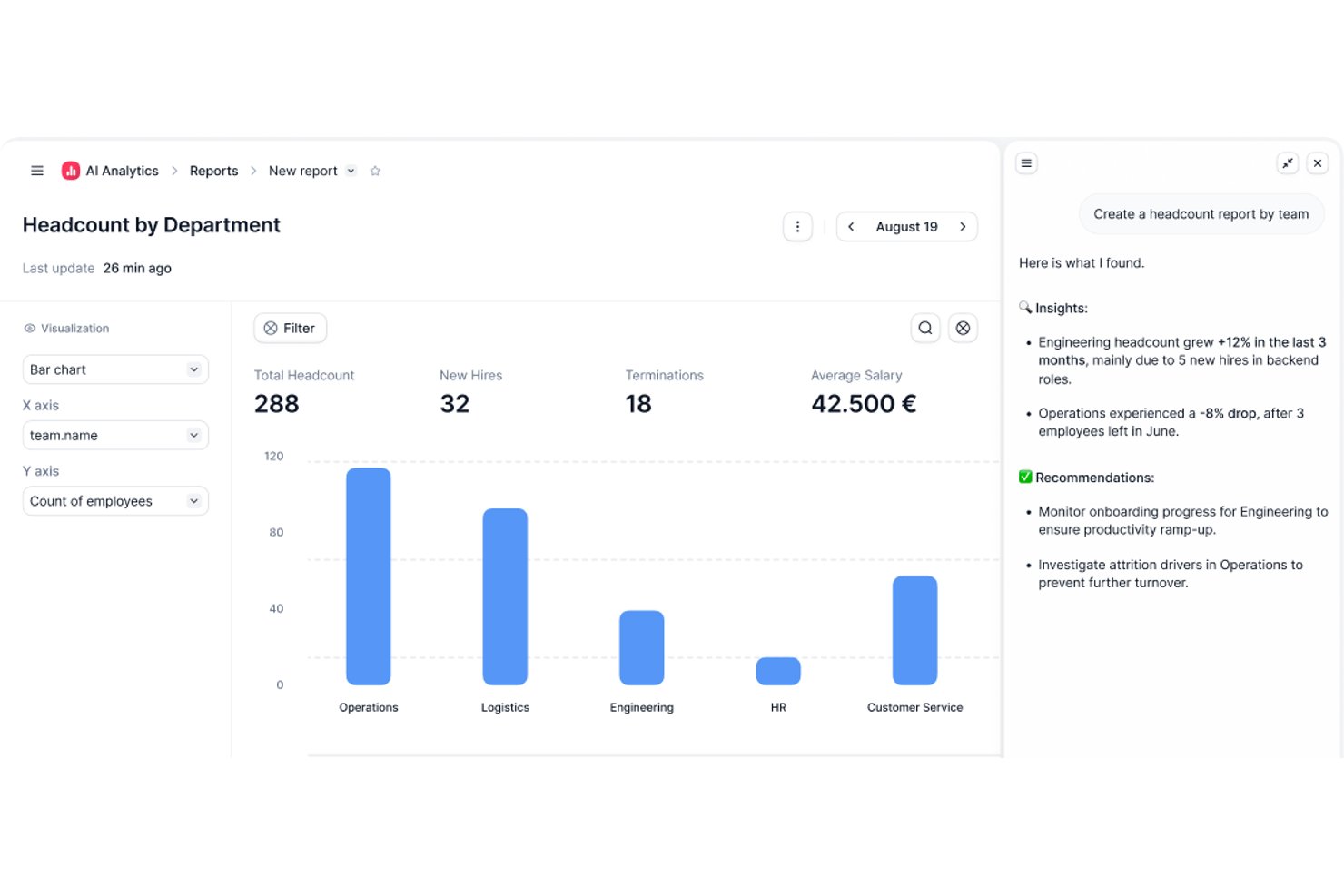
Factorial is an AI-powered HR and finance platform that handles time tracking, expense management, and project oversight alongside broader operations like shift scheduling, reporting, and employee policy Q&A.
Who Is Factorial Best For?
Factorial suits HR and operations teams at growing companies that want AI-assisted tools to handle scheduling, reporting, and employee policy questions alongside time and expense tracking.
Why I Picked Factorial
I've included Factorial in my top picks because it brings AI directly into the day-to-day operations that slow HR and finance teams down most. Its AI assistant, One, can answer employee questions about company policies and pull together expense reports on demand, cutting out a lot of back-and-forth. I also like that the AI handles receipt scanning via OCR, so logging an expense from a mobile photo takes seconds rather than manual data entry.
Factorial Key Features
- Shift scheduling: Managers can set up automated, bulk, and rotating shift schedules for their teams.
- Geolocation tracking: Time records capture where employees are working when they clock in or out.
- Expense policy controls: Automated rules can block expense submissions that fall outside company-defined spending policies.
- Factorial Cards: Companies can issue physical and virtual cards with customizable limits and spending categories, with transactions visible in real time.
Factorial Integrations
Factorial lists marketplace integrations with Microsoft Business Central, SAP Business One, Sage 100, Microsoft Power BI, Slack, Google Workspace, and Zapier. Its API supports API keys, OAuth 2.0, webhooks, and SDKs for custom integrations.
Pros and Cons
Pros:
- Project-linked hours and expenses centralize cost tracking
- OCR cuts manual receipt entry
- Mobile clock-ins help distributed teams log hours
Cons:
- Timesheet approvals lack documented audit history
- Reviewers report limited custom reporting depth

TimeTrex
Best for advanced payroll integration
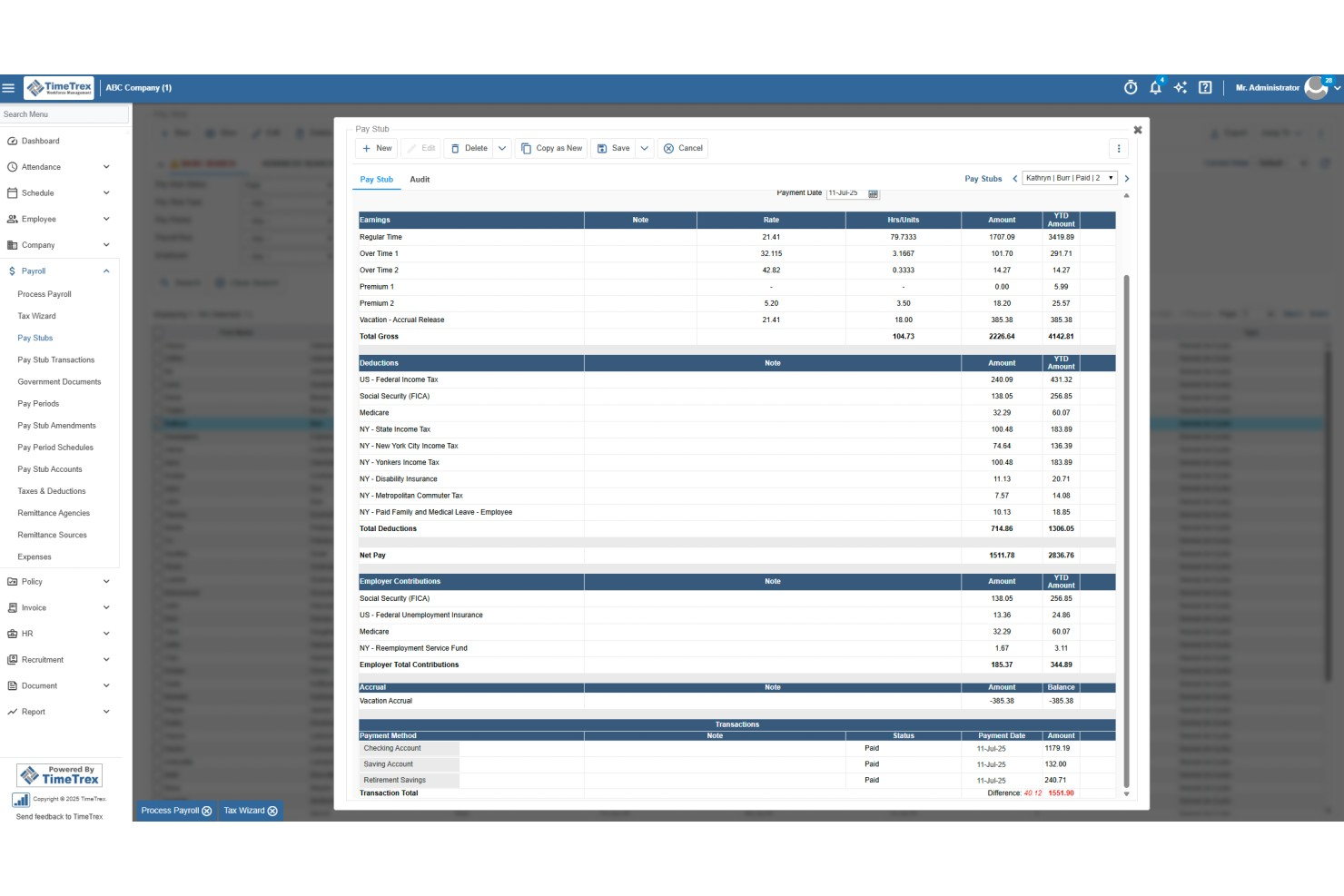
TimeTrex is a workforce management platform that combines time and attendance tracking, employee scheduling, expense management, and payroll processing in a single system.
Who Is TimeTrex Best For?
TimeTrex is a strong fit for mid-sized to enterprise businesses with hourly workforces, multiple locations, and complex payroll or compliance requirements.
Why I Picked TimeTrex
I picked TimeTrex as one of the best for advanced payroll integration because time tracking and payroll processing live in the same system. When your team clocks in and out, that data flows directly into payroll calculations without any manual exports or file transfers. I also like that TimeTrex handles multi-source direct deposit, letting you debit from several bank accounts and route payments to multiple employee accounts in one run. On top of that, the built-in payroll tax engine automatically calculates federal, state, and provincial taxes and generates compliance forms like W-2s, 940s, T4s, and ROEs.
TimeTrex Key Features
- Expense tracking: Log expenses with receipt photo capture, apply expense categories, and route submissions through a configurable approval workflow.
- Job costing: Allocate labor costs across multiple cost centers, departments, branches, and projects within a single time entry.
- Overtime and premium pay rules: Configure custom overtime, holiday, and shift differential pay rules that calculate automatically at payroll.
- Employee self-service portal: Let employees view pay stubs, check accrual balances, and update direct deposit details without HR involvement.
TimeTrex Integrations
TimeTrex offers integrations with payroll and accounting platforms, including ADP, QuickBooks, Sage, Paychex, SurePay, and Ceridian, as well as workforce and HR tools like Meditech, Insync, CompuPay, Tyler Technologies, Vensure Employer Services, Accero, and Chris21. An API is available for custom integrations.
Pros and Cons
Pros:
- Auto reimbursement via built-in payroll
- Mobile receipt capturing on the go
- Job costing tracks labor costs per project
Cons:
- Admin dashboard can feel complex
- Complex initial setup for advanced features
New Product Updates from TimeTrex
TimeTrex Adds Quick Punch App With Offline and QR Support
TimeTrex adds a new Quick Punch app, offline punching, QR code scanning, punch images, configurable messages, and punch warnings or lockouts to improve employee clock-ins across browsers and local computers. For more information, visit TimeTrex’s official site.
 .
.
Clockify
Best for project resource reconciliation
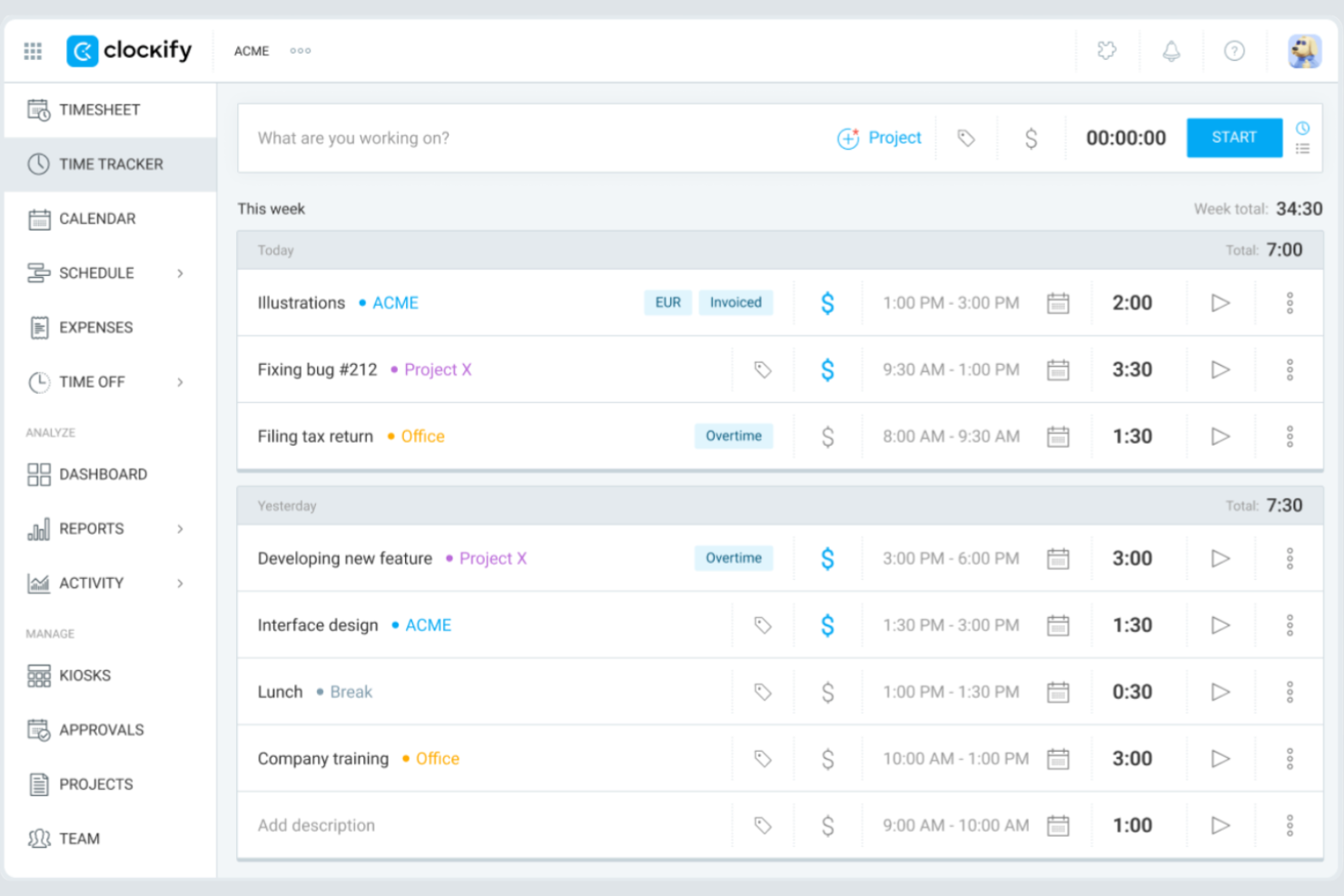
Clockify gives teams of any size a way to track time and expenses without worrying about user limits or hidden costs. It’s especially useful for agencies, consultancies, and distributed teams that need to manage multiple projects and clients on a tight budget. If you want a tool that scales with your team and offers unlimited users on its free plan, Clockify is built for that need.
Why I Picked Clockify
I selected Clockify because it allows digital project managers to reconcile actual task spending against baseline project estimates in real time. Project leads can assign custom billable and cost rates to individual team members or tasks to track gross margins and catch budget overruns before delivery. This makes it ideal for project managers who need to align project resources with strict budget caps while avoiding expensive platform overhead.
Clockify Key Features
Some other features in Clockify that may be useful for teams managing time and expenses include:
- Billable Rates: Assign custom hourly rates to users, projects, or tasks for accurate client billing.
- Expense Tracking: Log and categorize expenses alongside tracked time for each project.
- Timesheet Approvals: Set up workflows for managers to review and approve submitted timesheets.
- Detailed Reporting: Generate exportable reports on time usage, expenses, and project progress.
Clockify Integrations
Integrations include QuickBooks, Jira, Google Calendar, Outlook, Asana, Trello, GitHub, GitLab, Salesforce, and monday.com.
Pros and Cons
Pros:
- Mobile app includes offline time tracking
- Built-in timesheet approval workflows available
- 5 users included in the free plan
Cons:
- No built-in payroll processing tools
- Expense tracking lacks a receipt upload feature

My Hours
Best for flexible task-based tracking

My Hours is designed for teams and freelancers who need flexible, task-level control over their time tracking. The platform lets you organize work by projects and tasks, assign billable rates, and track time in detail for each activity. If your work involves juggling multiple clients or shifting priorities, My Hours gives you the granular tracking needed to keep everything organized and billable.
Why I Picked My Hours
What sets My Hours apart is its focus on flexible, task-based tracking that adapts to different work styles. You can break down projects into individual tasks, assign custom billable rates, and track time for each activity separately. I picked My Hours because it lets you add detailed notes to every time entry, making it easier to justify billable hours and document work for clients. For teams or freelancers who need to manage shifting priorities and multiple clients, this level of task-level control is a strong fit.
My Hours Key Features
Some other features that may be useful for teams and freelancers include:
- Automated Time Reports: Generate detailed reports by project, client, or team member for easy review and export.
- Expense Tracking: Log and categorize expenses alongside time entries for unified project accounting.
- Approval Workflows: Submit timesheets for manager approval before finalizing billable hours.
- Mobile App: Track time and manage tasks from iOS and Android devices.
My Hours Integrations
Integrations include Atlassian Jira, Microsoft Teams, Microsoft Power BI, Asana, Basecamp, monday.com, ClickUp, Microsoft Project, QuickBooks, and Xero.
Pros and Cons
Pros:
- Detailed notes can be added to time entries
- Custom billable rates per project or client
- Task-level time tracking supports granular billing
Cons:
- Lacks automatic time tracking features
- No built-in invoicing or payment processing

TimeCamp
Best for detailed productivity analytics
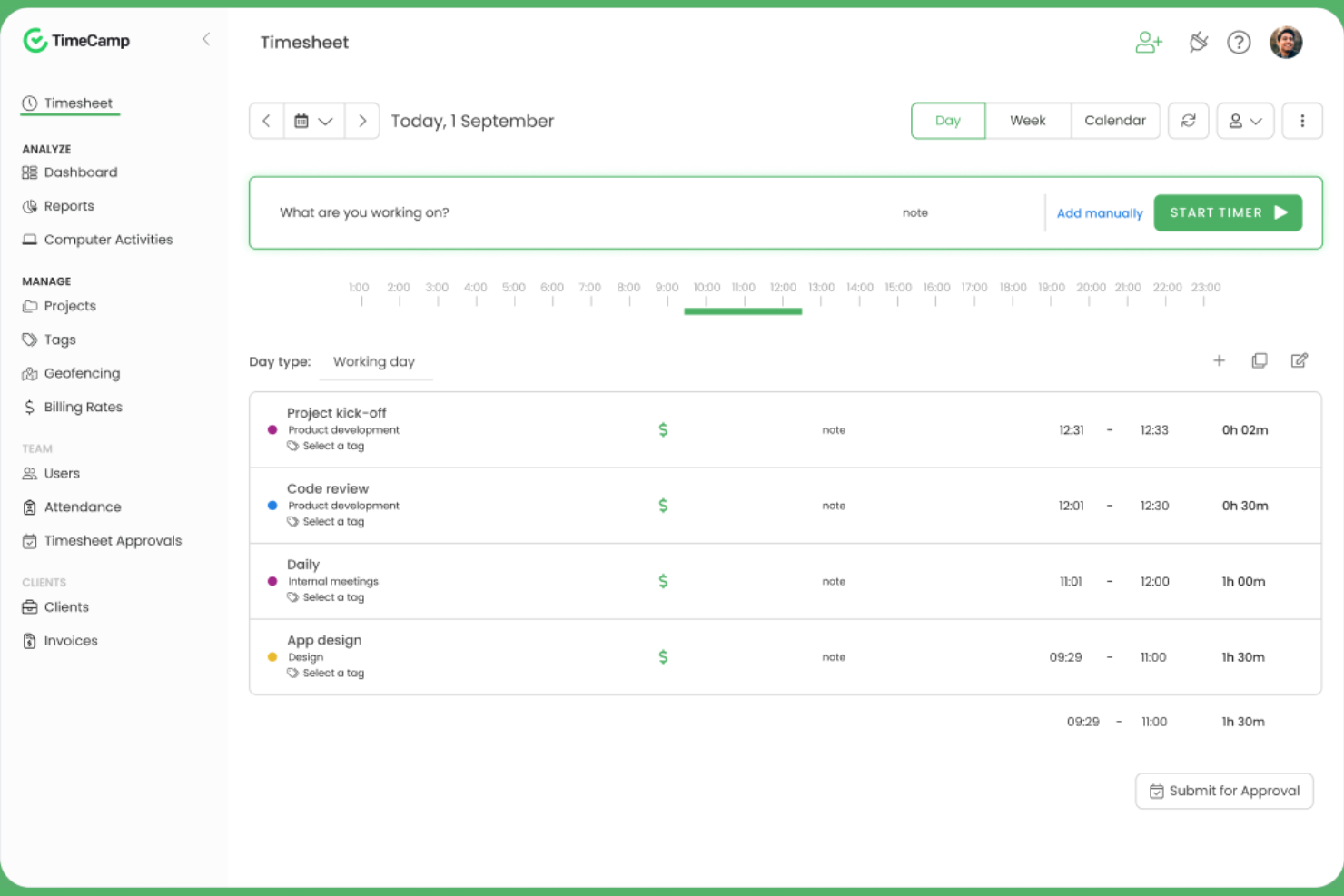
TimeCamp stands out for teams and managers who want to dig deep into how work hours are spent across projects and tasks. Its automatic time tracking and granular productivity analytics help digital agencies, consultancies, and remote teams pinpoint where time goes and identify workflow bottlenecks. If you need detailed reporting to support billing, payroll, or performance reviews, TimeCamp’s analytics-driven approach offers a clear advantage.
Why I Picked TimeCamp
When you need to understand exactly how your team spends their time, TimeCamp’s detailed productivity analytics set it apart from other time tracking tools. The platform automatically tracks time spent on apps, websites, and tasks, then compiles this data into visual reports that highlight trends and inefficiencies. I picked TimeCamp because its reporting features let you break down time usage by project, client, or team member, making it easier to spot bottlenecks and optimize workflows. For teams that want actionable insights from their time tracking data, TimeCamp’s analytics-driven approach is a strong fit.
TimeCamp Key Features
Some other features that may be helpful for teams managing time and expenses include:
- Automatic Attendance Tracking: Monitor employee attendance and time off directly within the platform.
- Billable Hours Calculation: Mark tracked time as billable or non-billable for accurate client invoicing.
- Expense Tracking Module: Log and categorize expenses alongside tracked time for unified reporting.
- Mobile App: Track time and manage tasks from iOS and Android devices.
TimeCamp Integrations
Integrations include Asana, Trello, monday.com, ClickUp, Jira, GitHub, Xero, QuickBooks, Google Calendar, and Slack.
Pros and Cons
Pros:
- Attendance and time-off tracking are built in
- Productivity analysis includes website and app usage
- Automatic time tracking runs in the background
Cons:
- Expense module lacks receipt scanning
- No mileage tracking for field teams

Harvest
Best for visual project budget tracking

Harvest stands out for teams that need to keep a close eye on project budgets with clear, visual insights. It’s a strong fit for agencies, consultancies, and project-based businesses that want to track time, expenses, and budget progress in one place. If you’re looking for a tool that makes it easy to spot budget risks before they become problems, Harvest is designed for that need.
Why I Picked Harvest
Harvest caught my attention because of its strong focus on visual project budget tracking, which is a key need for many project-driven teams. The tool displays budget progress in real time with clear visual indicators, so you can quickly see if a project is at risk of going over budget. I like that you can set budget limits by hours or fees and monitor them as your team logs time and expenses. For anyone who needs to keep budget status front and center, Harvest’s visual approach makes it easy to stay on top of project financials.
Harvest Key Features
Some other features in Harvest that may be useful for teams managing time and expenses include:
- Expense Receipt Uploads: Attach digital receipts directly to expense entries for accurate recordkeeping.
- Automated Reminders: Send automatic reminders to team members to submit timesheets on schedule.
- Invoicing Tools: Generate and send invoices to clients based on tracked time and expenses.
- Mobile Time Tracking: Track time and log expenses from iOS and Android devices.
Harvest Integrations
Integrations include Asana, Jira, Slack, Google Calendar, GitHub, Stripe, Trello, QuickBooks Online, Xero, and Basecamp.
Pros and Cons
Pros:
- Invoicing directly from tracked time and expenses
- Expense receipt uploads for reimbursement tracking
- Visual budget tracking with color-coded alerts
Cons:
- Limited offline functionality on the mobile app
- No mileage tracking for expense entries

Best for receipt scanning automation
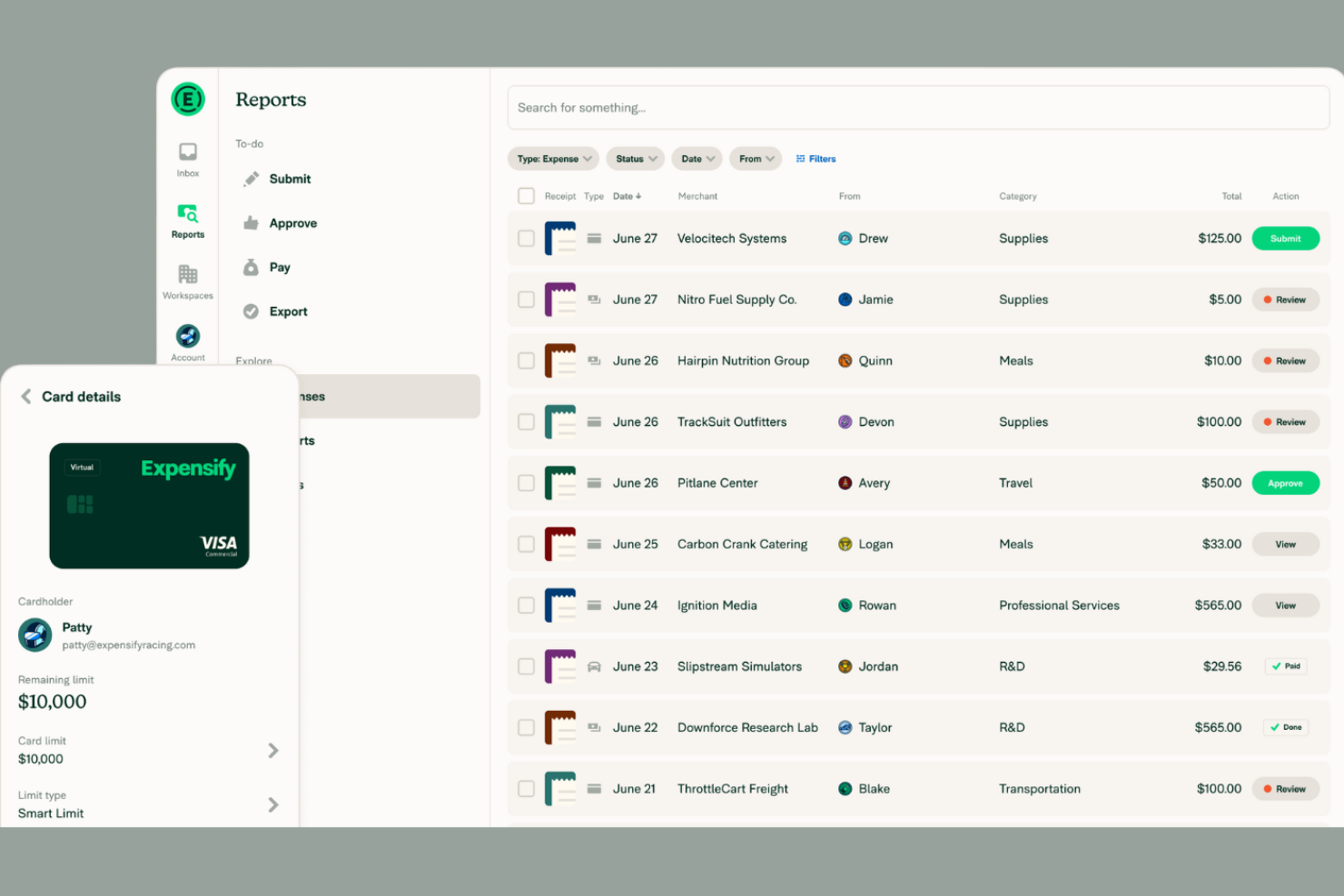
If your team spends too much time manually entering receipts, Expensify offers a way to automate that process with its advanced receipt scanning technology. It’s a strong fit for businesses of any size that want to capture, categorize, and report expenses with minimal manual effort. Expensify’s SmartScan feature quickly turns paper receipts into digital expense entries, helping finance teams and frequent travelers stay organized and audit-ready.
Why I Picked Expensify
Expensify’s receipt scanning automation is a major advantage for teams that process a high volume of expenses. The SmartScan feature reads and extracts data from receipts, automatically matching them to credit card transactions and categorizing expenses. I appreciate that Expensify can also auto-generate expense reports from scanned receipts, reducing manual entry and errors. For businesses that want to speed up reimbursement cycles and improve accuracy, Expensify’s automation tools make it a strong choice.
Expensify Key Features
Some other features that may be useful for teams managing expenses include:
- Corporate Card Management: Issue and manage Expensify Cards for employees with real-time transaction tracking.
- Multi-Level Approval Workflows: Set up custom approval chains for expense reports based on your organization’s policies.
- Mileage Tracking: Log and reimburse business travel mileage directly within the app.
- Policy Enforcement Rules: Automatically flag expenses that violate company spending policies.
Expensify Integrations
Integrations include QuickBooks, Xero, NetSuite, Sage Intacct, Gusto, Workday, ADP, Uber, Lyft, and Oracle.
Pros and Cons
Pros:
- Multi-currency support for global teams
- Corporate card transactions sync in real time
- SmartScan extracts data from receipts automatically
Cons:
- Approval workflow setup can be confusing
- No built-in project time tracking

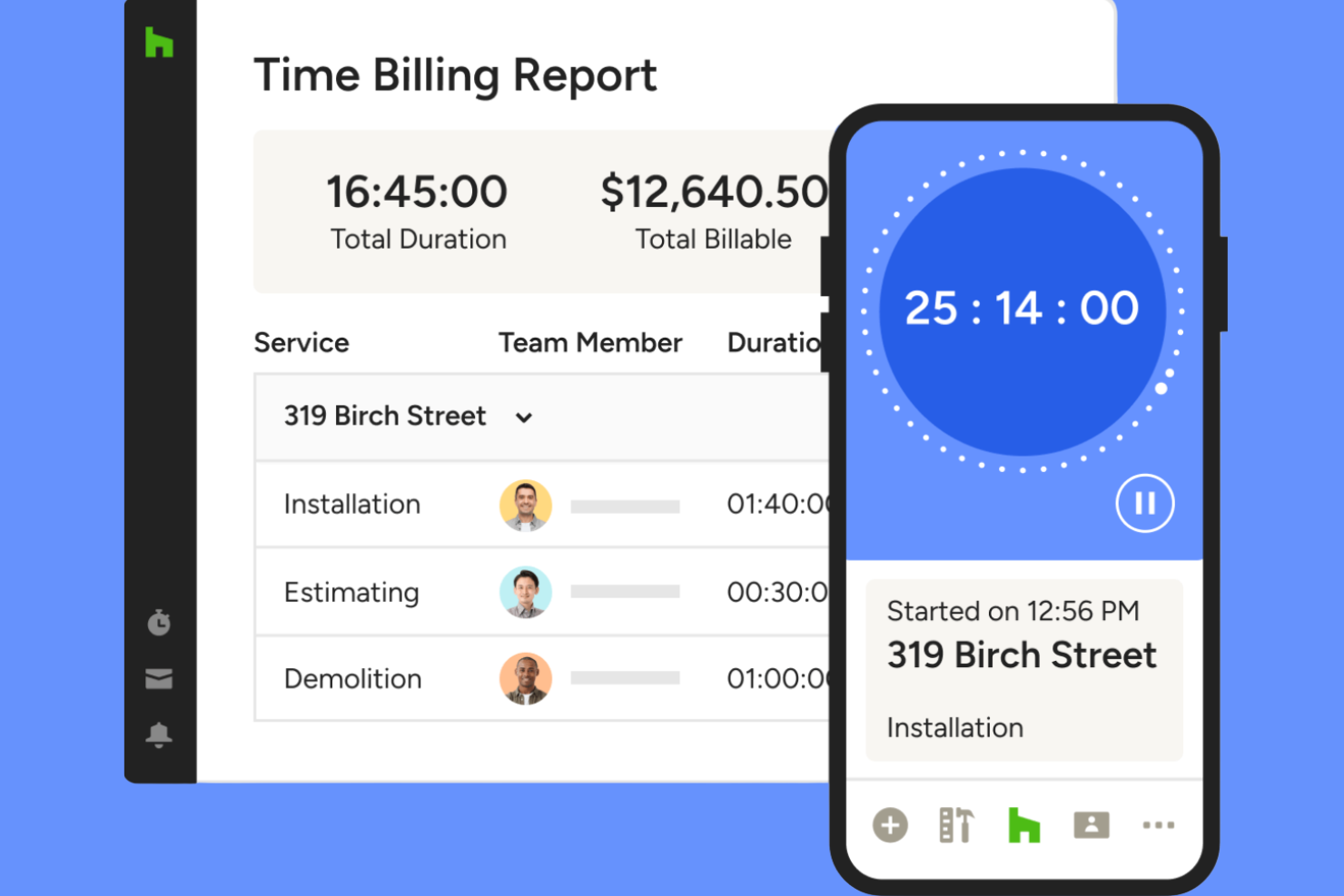
Houzz Pro is tailored for architecture and design firms that need to track project hours and expenses alongside client communications and proposals. It’s especially useful for professionals managing multiple projects, budgets, and client approvals in one place. If your team juggles design work, invoicing, and time tracking, Houzz Pro brings these functions together in a single platform.
Why I Picked Houzz Pro
Houzz Pro stands out for architecture and design firms that need to manage time and expenses within the context of project-based work. The platform lets you log billable hours directly to specific projects and attach expenses to client invoices, which is especially useful for firms handling multiple clients and phases. I like that you can generate branded proposals and invoices from tracked time and expenses, keeping everything client-facing and professional. For teams that need to keep project financials and client communications tightly connected, Houzz Pro offers a focused solution.
Houzz Pro Key Features
Some other features that may be helpful for architecture and design teams include:
- Mobile Time Tracking: Track hours and expenses from any location using the mobile app.
- Customizable Project Templates: Set up repeatable project structures for different types of jobs.
- Client Portal: Give clients access to view project progress, invoices, and shared documents.
- Task Assignment: Assign tasks to team members and monitor their completion within each project.
Houzz Pro Integrations
Integrations include QuickBooks Online, Google Calendar, iCloud, Office 365, Exchange, Outlook, Gmail, and Google Drive.
Pros and Cons
Pros:
- Project-based time tracking for multiple jobs
- Mobile app supports on-site expense capture
- Syncs time entries directly to QuickBooks Online
Cons:
- Limited reporting options for time analysis
- No built-in mileage tracking feature

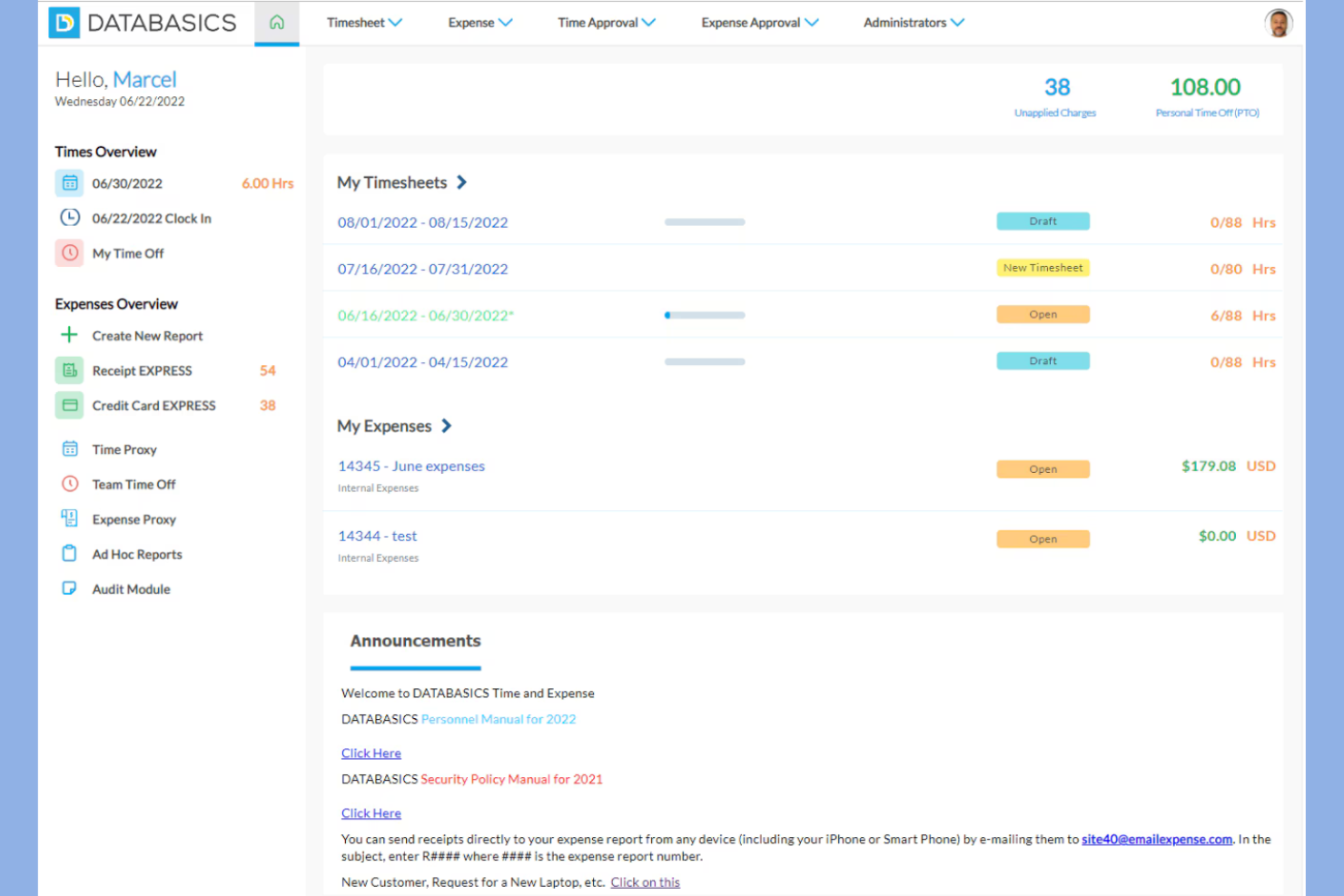
DATABASICS is built for organizations that need to meet strict compliance and audit requirements in their time and expense tracking. It’s especially relevant for government contractors, nonprofits, and enterprises with complex regulatory needs. If your team faces challenges around policy enforcement, audit trails, or multi-level approvals, DATABASICS is designed to address those priorities.
Why I Picked DATABASICS
What sets DATABASICS apart is its focus on compliance-driven organizations that need to meet strict regulatory and audit standards. The platform offers configurable policy enforcement, so you can set up rules that match your organization’s requirements and ensure every entry is compliant. I appreciate that DATABASICS provides detailed audit trails and multi-level approval workflows, which are essential for teams that need to document every step for audits or internal reviews. If your business operates in a highly regulated environment, these features make DATABASICS a strong fit for your time and expense tracking needs.
DATABASICS Key Features
Some other features in DATABASICS that may be useful for compliance-focused teams include:
- Per Diem Management: Set and manage per diem rates for travel expenses based on location and policy.
- Multi-Currency Support: Track and convert expenses in multiple currencies for global teams.
- Mobile App Entry: Submit time and expense entries directly from iOS and Android devices.
- Project-Based Tracking: Allocate time and expenses to specific projects or grants for detailed reporting.
DATABASICS Integrations
Integrations include Sage Intacct, Microsoft Dynamics, Oracle NetSuite, SAP, ADP, Paychex, QuickBooks, Ceridian, UKG, and American Express.
Pros and Cons
Pros:
- Multi-currency support for international teams
- Per diem management for travel compliance
- Audit trails for every time and expense entry
Cons:
- Mobile app interface can feel outdated
- No built-in mileage tracking feature

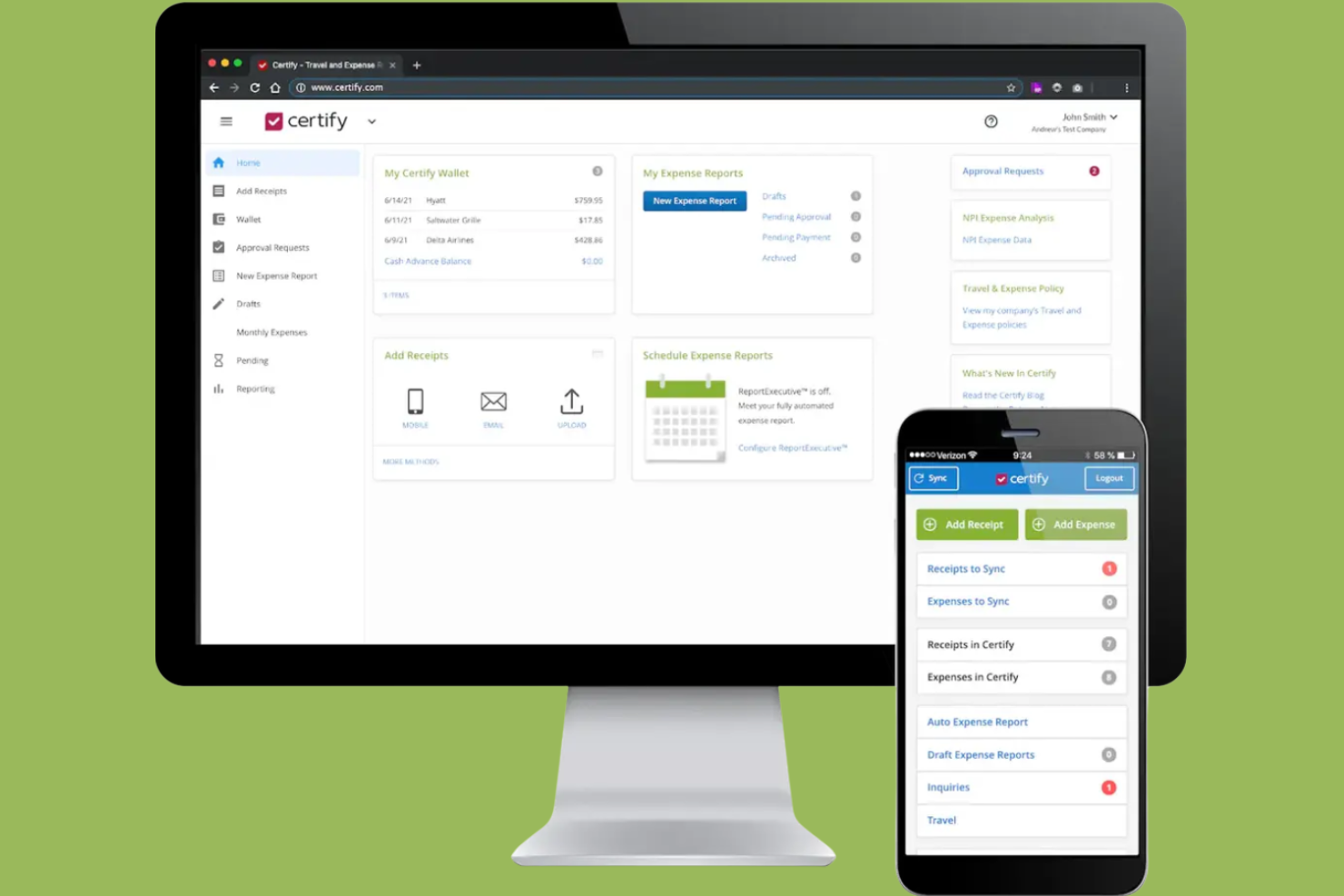
Certify stands out for teams that want to automate expense report creation and approval workflows. It’s especially useful for finance teams and organizations with frequent employee travel or recurring expenses. With features like receipt scanning and policy enforcement, Certify helps reduce manual entry and keeps expense management consistent.
Why I Picked Certify
Automating expense report creation is where Certify really shines for finance teams and frequent travelers. The platform uses receipt scanning and automatic data extraction to build expense reports with minimal manual input. I like that Certify also applies company policy checks during report creation, helping teams avoid compliance issues before submission. If you want to reduce time spent on expense paperwork and improve accuracy, Certify’s automation features are a strong fit.
Certify Key Features
Some other features that may be helpful for finance teams include:
- Automated Reimbursement Processing: Certify can trigger reimbursements directly after expense report approval.
- Credit Card Transaction Import: Syncs corporate card transactions for faster expense matching and reconciliation.
- Multi-Level Approval Routing: Supports custom approval chains based on your organization’s structure.
- Mobile App for Expense Submission: Let users capture and submit expenses from their smartphones.
Certify Integrations
Integrations include Sage Intacct, Amazon Business, Amtrav, Atriis, AWS, CTM, CWT, Direct Travel, Emburse Book, and Egencia.
Pros and Cons
Pros:
- Direct corporate card transaction import is available
- Multi-level approval routing supports complex policies
- Automated receipt scanning reduces manual entry
Cons:
- Limited reporting customization for advanced analytics
- No built-in time tracking functionality
Other Time and Expense Tracking Software
Here are some additional time and expense tracking software options that didn’t make it onto my shortlist, but are still worth checking out:
- Replicon
For global workforce management
- Minute7
For syncing with QuickBooks
- BigTime
For professional services firms
- Zoho Projects
For integrated project collaboration
- Timesheets.com
For tracking billable hours by client
- TMetric
For granular user permission controls


How I Evaluate Time and Expense Tracking Software
I evaluate these tools in two layers—core requirements like project-based time logging and expense approvals, and differentiators that matter for consulting teams, agencies, and PMOs billing clients.
Core Functionality (Table Stakes For This List)
When I'm selecting tools for my list, I rank each one on a scale from 0 (does not offer the functionality) to 5 (excels in this area) for each core functionality listed below. Then, I calculate the tool's total score into a percentage. Each tool needs to achieve a minimum total score of 65% to be considered for inclusion.
- Project-Based Time Tracking: I check whether hours can be logged against specific projects, tasks, and clients with clear billable/non-billable flags—like splitting a week across three retainer accounts.
- Expense Capture & Management: Each tool should let users record expenses, upload receipts, and tag costs to a project or client so nothing gets lost between a site visit and month-end.
- Timesheet & Expense Approvals: I look for configurable approval workflows where managers can review, approve, or reject entries—especially routing rules based on project or team structure.
- Billable Rates & Invoicing Support: Tools like Harvest and Toggl Track handle billing rates differently, so I evaluate whether a platform supports user-, role-, or project-level rates and can produce or export invoices.
- Project Budget & Cost Tracking: I evaluate how well a tool connects logged time and expenses to project budgets, showing burn rate and actuals vs. estimates before a project goes over scope.
- Reporting & Analytics: The tool should generate reports on utilization, project profitability, and expense breakdowns at the project, client, and team level—not just raw time exports.
Once I have a list of tools that meet the criteria, I consider what sets each platform apart.
Differentiating Factors (What Sets Vendors Apart)
Here's how I compare and contrast different vendors:
Standout Features
Automated time capture is a real differentiator. Tools like Harvest and Clockify offer calendar integrations that pre-fill timesheets, saving consultants from reconstructing their week every Friday. I also evaluate resource capacity planning. Knowing who's overbooked before a sprint starts matters more than finding out after. Client-facing portals are worth noting too, especially for agencies where clients want to see retainer burn-down without emailing their account manager.
Beyond Features
Integration depth matters a lot here. I check whether a tool connects natively with project management platforms like Jira or Asana and accounting systems like QuickBooks or Xero, since broken sync between timesheets and invoicing creates real billing headaches. Pricing transparency is another factor I weigh—some vendors gate expense tracking or invoicing behind higher tiers, which changes the total cost picture fast. I also consider firm-type fit, especially whether a tool supports billing models like T&M, retainer, and fixed-fee that professional services teams actually use.
How to Choose Time and Expense Tracking Software
It’s easy to get bogged down in long feature lists and complex pricing structures. To help you stay focused as you work through your unique software selection process, here’s a checklist of factors to keep in mind:
| Factor | What to Consider |
| Scalability | Will the software handle your team size and projected growth? Check user limits and plan flexibility as your organization expands. |
| Integrations | Does it connect natively to your payroll, accounting, or project management tools? Confirm compatibility with your existing tech stack. |
| Customizability | Can you tailor categories, approval flows, and reporting to your workflows? Avoid rigid systems that force you to adapt your process. |
| Ease of use | Will your team adopt it quickly? Look for clear navigation, minimal data entry, and a straightforward interface that matches your team’s habits. |
| Implementation and onboarding | How long will it take to get up and running? Assess the availability of migration support, training resources, and onboarding help. |
| Cost | Are pricing tiers transparent and predictable? Factor in all users, add-ons, and potential overage fees to avoid budget surprises. |
| Security safeguards | Does the vendor offer encryption, role-based access, and audit logs? Ensure compliance with your organization’s data protection standards. |
| Support availability | What support channels are offered and during what hours? Consider if you need 24/7 help or dedicated account management for your team. |
What Is Time and Expense Tracking Software?
Time and expense tracking software is an all-in-one solution that helps businesses track employee time, manage expenses, and support accurate billing in a single platform. These tools are often used alongside accounting software to bill clients, monitor project costs, and maintain financial accuracy.
By combining time tracking software with expense management software, teams can gain better visibility into work hours, costs, and overall performance. Many platforms also support resource management and forecasting, helping businesses plan workloads, allocate resources, and save time across projects.
Features of Time and Expense Tracking Software
When selecting time and expense tracking software, keep an eye out for the following key features:
- Time entry: Lets users log hours worked on specific projects, tasks, or clients, either manually or with timers, to ensure accurate records for payroll or billing.
- Expense logging: Allows users to record and categorize project-related expenses, attach receipts, and track spending against budgets.
- Billable rates: Supports assigning different hourly rates to projects, clients, or roles, making it easier to calculate invoices and analyze profitability.
- Approval workflows: Enable managers to review and approve timesheets and expense reports before they are finalized or billed.
- Reporting and analytics: Generates detailed reports on time usage, expenses, and billable hours, helping teams monitor project costs and productivity.
- Data export: Provides options to export timesheets and expense data to formats like CSV, PDF, or directly into accounting or payroll systems.
- Mobile access: Offers mobile apps or responsive web interfaces, so users can track time and expenses on the go.
- Integration capabilities: Connects with other business tools such as accounting, payroll, or project management platforms to streamline workflows.
- Role-based permissions: Let administrators control who can view, edit, or approve time and expense entries, supporting data security and compliance.
- Notifications and reminders: Send automated alerts to remind users to submit timesheets or flag missing entries, reducing delays and errors.
Benefits of Time and Expense Tracking Software
Implementing time and expense tracking software provides several benefits for your team and your business. Here are a few you can look forward to:
- Accurate billing: Automated time and expense records ensure invoices reflect actual work and costs, reducing disputes and missed revenue.
- Improved project visibility: Real-time tracking and reporting features help teams monitor budgets, timelines, and resource allocation across projects.
- Simplified compliance: Approval workflows and audit trails support adherence to internal policies and external regulations.
- Streamlined payroll and invoicing: Data export and integration capabilities make it easier to transfer information to payroll and accounting systems.
- Enhanced accountability: Role-based permissions and detailed logs clarify who entered, approved, or modified records, supporting transparency.
- Faster approvals: Automated notifications and centralized workflows speed up timesheet and expense report reviews.
- Better resource planning: Analytics and reporting tools provide insights into team capacity and project profitability, informing future planning.
Costs and Pricing of Time and Expense Tracking Software
Selecting time and expense tracking software requires an understanding of the various pricing models and plans available. Costs vary based on features, team size, add-ons, and more. The table below summarizes common plans, their average prices, and typical features included in time and expense tracking software solutions:
Plan Comparison Table for Time and Expense Tracking Software
| Plan Type | Average Price | Common Features |
| Free Plan | $0 | Basic time tracking, manual expense entry, limited reporting, and single-user access. |
| Personal Plan | $5-$10/user/month | Time and expense tracking, basic reporting, mobile access, and limited integrations. |
| Business Plan | $10-$25/user/month | Multi-user support, approval workflows, advanced reporting, integrations, and role-based permissions. |
| Enterprise Plan | $25-$50/user/month | Custom integrations, dedicated support, advanced security, audit trails, and compliance features. |
Time and Expense Tracking Software FAQs
Here are some answers to common questions about time and expense tracking software:
Can time and expense tracking software handle multiple currencies?
Yes, many time and expense tracking software solutions support multiple currencies. This is especially useful for teams working with international clients or remote employees. Always check if the software allows you to set default currencies per project and if it automatically converts expenses for reporting.
How do approval workflows work in time and expense tracking software?
Approval workflows let managers review and approve timesheets or expense reports before they’re finalized. You can usually set up multi-level approvals, assign approvers by project or department, and receive notifications when submissions need attention. This helps prevent errors and ensures compliance with company policies.
What types of reports can I generate with time and expense tracking software?
Most platforms let you generate reports on billable hours, project costs, expense categories, and employee utilization. You can often filter by date range, client, or project, and export reports in formats like CSV or PDF. These reports help with invoicing, payroll, and project analysis.
Is it possible to integrate time and expense tracking software with payroll or accounting systems?
Yes, many solutions offer direct integrations with popular payroll and accounting platforms. This allows you to sync approved timesheets and expenses automatically, reducing manual data entry and minimizing errors. Always confirm integration compatibility with your existing systems before choosing a tool.
What security measures should I look for in time and expense tracking software?
Look for features like data encryption, role-based access controls, and audit logs. These safeguards help protect sensitive employee and financial data. If your organization has specific compliance requirements, check for certifications or third-party security audits.