
15 Best Invoice Approval Software for 2026

Invoice Approval Software Shortlist
Here’s my shortlist of the best invoice approval software:


Invoice approval software automates the review, routing, and authorization of invoices before payment, helping your team control spend and reduce manual errors. If you’re searching for the best invoice approval software, you’re likely facing challenges with slow approvals, lost invoices, or compliance gaps that put your projects and vendor relationships at risk. This list will help you compare leading solutions, understand which features matter most for your workflow, and choose a platform that fits your team’s needs—so you can keep projects moving and maintain financial accuracy.
Why You Can Trust Us
Best Invoice Approval Software Summary
This comparison chart summarizes pricing details for my top invoice approval software selections to help you find the best one for your budget and business needs.
| Tool | Best For | Trial Info | Price | ||
|---|---|---|---|---|---|
| 1 | Best for collaborative invoice communication | Free demo available | Pricing upon request | Website | |
| 2 | Best for global payment compliance | Free demo available | From $99/month | Website | |
| 3 | Best for rapid cloud-based deployment | Free demo available | Pricing upon request | Website | |
| 4 | Best for high-volume invoice processing | Free demo available | Pricing upon request | Website | |
| 5 | Best for secure financial data storage | Free demo available | Pricing upon request | Website | |
| 6 | Best for procurement workflow integration | Free trial + free plan + free demo available | From $225/user/month (billed annually) | Website | |
| 7 | Best with AI-powered exception handling | Free demo available | Pricing upon request | Website | |
| 8 | Best with document management integration | Free demo available | Pricing upon request | Website | |
| 9 | Best for mid-sized finance teams | Free demo available | Pricing upon request | Website | |
| 10 | Best for audit-ready approval trails | 14-day free trial + free demo available | From $49.50/month | Website |
-

Insightful
Visit WebsiteThis is an aggregated rating for this tool including ratings from Crozdesk users and ratings from other sites.4.8 -
Accelo
Visit WebsiteThis is an aggregated rating for this tool including ratings from Crozdesk users and ratings from other sites.4.4 -
Forecast
Visit WebsiteThis is an aggregated rating for this tool including ratings from Crozdesk users and ratings from other sites.4.6




Invoice Approval Software Reviews
Below are my detailed summaries of the invoice approval software that made it onto my shortlist. My reviews offer a detailed look at the features, best use cases, and integrations of each software to help you find the best one for you.


Stampli puts collaborative invoice communication at the center of its platform, making it a strong fit for teams that need to resolve invoice questions quickly. The tool appeals to finance departments and AP teams that deal with frequent back-and-forth between approvers, vendors, and stakeholders. By centralizing conversations and documentation on each invoice, Stampli helps teams reduce delays and confusion during the approval process.
Why I Picked Stampli
What sets Stampli apart is its focus on making invoice communication transparent and actionable for everyone involved. The platform attaches conversations, questions, and supporting documents directly to each invoice, so nothing gets lost in email threads or side chats. I picked Stampli because its collaborative approach helps teams resolve approval issues faster and keeps all stakeholders in the loop. For organizations where invoice questions and clarifications are frequent, Stampli’s communication tools make the approval process much smoother.
Stampli Key Features
In addition to its collaborative communication tools, Stampli offers several other features for invoice approval:
- AI-powered data capture: The platform uses AI to extract invoice details and reduce manual entry.
- Custom approval workflows: Teams can configure multi-level approval paths to match internal policies.
- Audit trail tracking: Every action on an invoice is logged for compliance and transparency.
- Vendor portal: Vendors can submit invoices and track payment status directly through Stampli.
Stampli Integrations
Integrations include NetSuite, Sage Intacct, QuickBooks, Microsoft Dynamics, SAP, and Infor.
Pros and Cons
Pros:
- No changes to existing ERP
- Smart AI coding assistant
- Fast ERP integration rollout
Cons:
- Search function can be slow
- Requires active team training

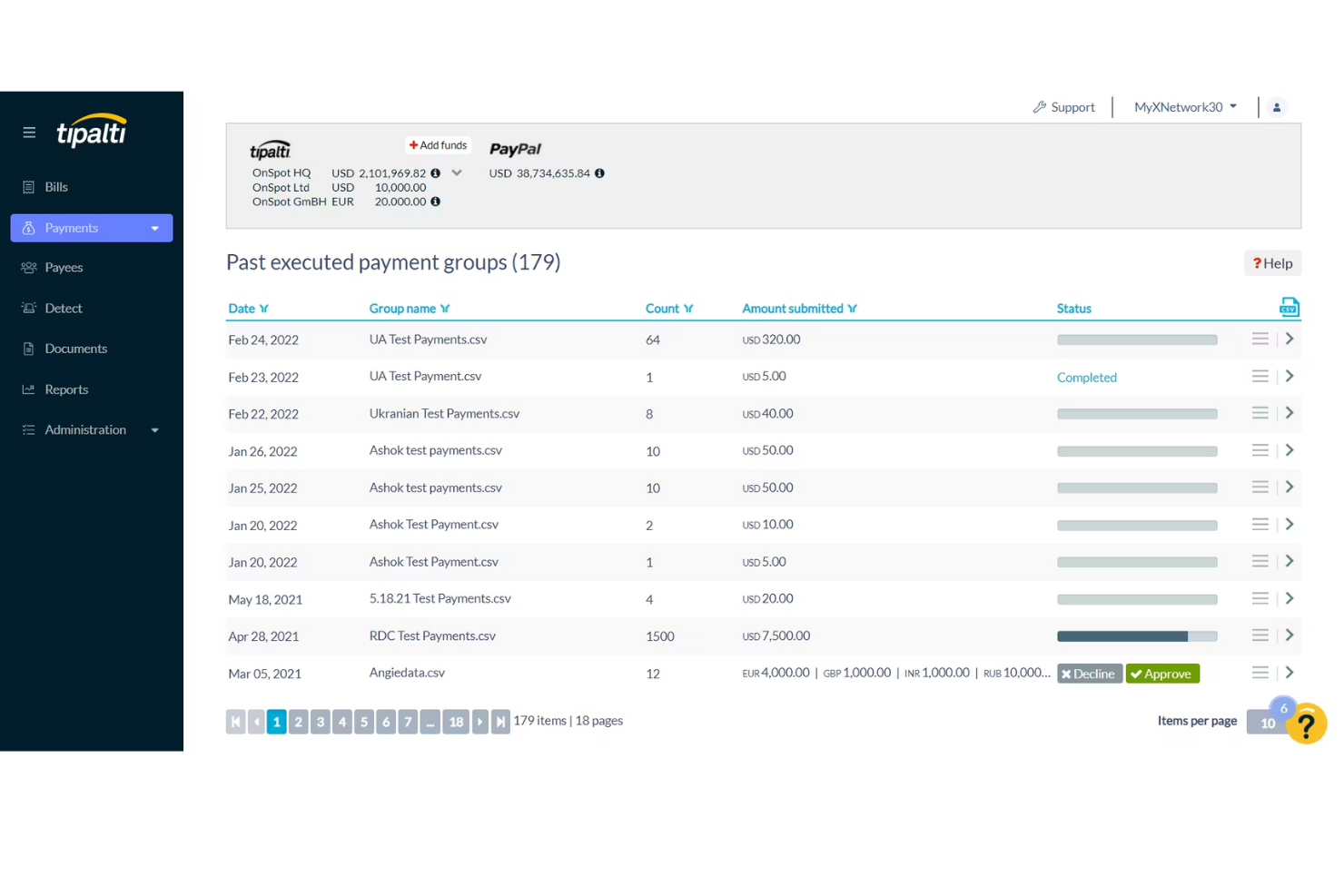
For finance teams handling international payments and compliance, Tipalti offers a specialized solution. It’s designed for organizations that need to manage invoice approvals while meeting complex global tax and regulatory requirements. Tipalti helps you automate approvals and payment processes across multiple countries, reducing the risk of compliance errors.
Why I Picked Tipalti
Tipalti stands out for teams that need to manage invoice approvals while staying compliant with global payment regulations. The platform automates tax form collection and validation, which helps reduce the risk of errors and penalties when paying vendors in different countries. I picked Tipalti because it also screens payees against international watchlists and supports multi-currency payments, making it easier to handle cross-border transactions. These features are especially important for businesses operating internationally or working with a diverse supplier base.
Tipalti Key Features
Some other features that make Tipalti useful for invoice approval include:
- Automated invoice capture: Extracts invoice data automatically to reduce manual entry.
- Customizable approval workflows: Lets you set up multi-step approval processes tailored to your organization’s needs.
- Supplier portal: Provides vendors with a self-service portal to submit invoices and track payment status.
- Real-time payment status tracking: Allows your team to monitor payment progress and resolve issues quickly.
Tipalti Integrations
Integrations include NetSuite, Sage Intacct, QuickBooks, Xero, Microsoft Dynamics, and Workday.
Pros and Cons
Pros:
- Massive ERP integration list
- Reduces payment error rates
- Automates vendor onboarding
Cons:
- Support can be inconsistent
- High monthly minimum fees
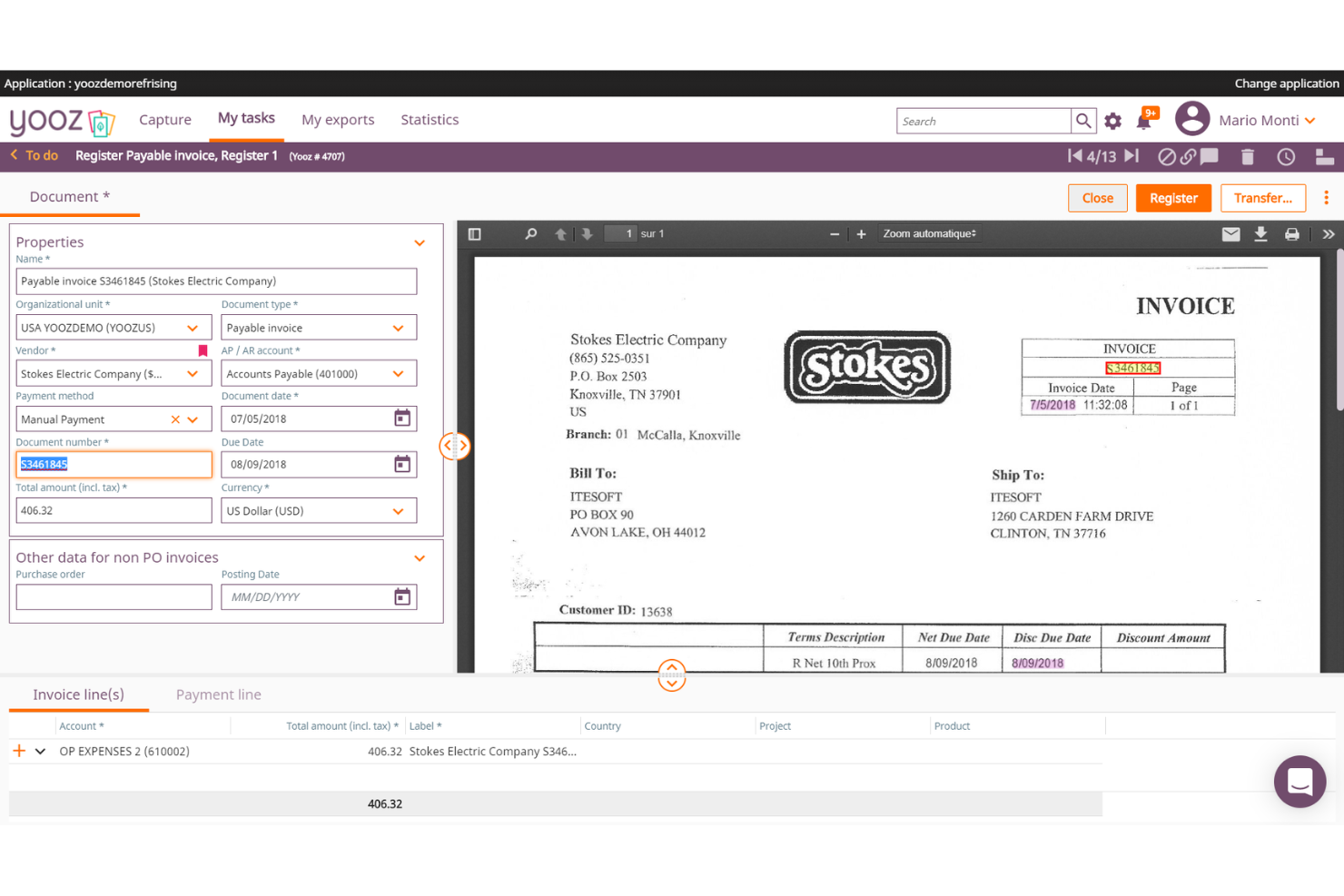
If your team needs to get up and running with invoice approval software quickly, Yooz is built for rapid cloud-based deployment. It’s a strong fit for finance teams in growing businesses that want to automate invoice capture, approval, and payment without a lengthy setup. Yooz helps you digitize accounts payable processes with minimal IT involvement.
Why I Picked Yooz
Yooz caught my attention because it’s designed for teams that need to deploy invoice approval workflows without waiting weeks or months. Its cloud-based platform lets you automate invoice capture and approval routing almost immediately after setup, which is ideal for businesses with limited IT resources or urgent process needs. I picked Yooz for its ability to digitize accounts payable quickly, using features like real-time invoice scanning and configurable approval paths. This makes it a strong choice for organizations that want to modernize their invoice processes with minimal disruption.
Yooz Key Features
Some other features that make Yooz appealing for invoice approval include:
- Mobile approval app: Lets users review and approve invoices from their smartphones.
- Duplicate invoice detection: Flags potential duplicate invoices before they enter the approval workflow.
- Audit trail reporting: Tracks every action taken on each invoice for compliance and transparency.
- Purchase order matching: Automatically matches invoices to purchase orders and receipts to reduce manual checks.
Yooz Integrations
Integrations include Sage, QuickBooks, Microsoft Dynamics, SAP, and Oracle NetSuite.
Pros and Cons
Pros:
- Easy drag-and-drop workflows
- Real-time GL account coding
- Extremely strong AI extraction
Cons:
- Exporting data can be clunky
- UI takes time to master

AvidXchange is built for finance teams that need to process and approve large volumes of invoices quickly and accurately. It’s especially useful for organizations in industries like real estate, construction, and utilities where invoice volume and complexity can overwhelm manual processes. If your business faces bottlenecks or errors with high-volume invoice workflows, AvidXchange offers automation and tracking features designed to keep approvals moving at scale.
Why I Picked AvidXchange
For organizations that handle thousands of invoices each month, AvidXchange stands out for its ability to automate high-volume invoice processing from capture to approval. The platform uses intelligent data capture to extract invoice details and route them through customizable approval workflows, which helps reduce manual entry and errors. I appreciate that AvidXchange also provides real-time tracking and status updates for every invoice, so finance teams can monitor progress and address bottlenecks quickly. These features make it a strong choice for businesses that need to keep large-scale invoice approvals accurate and on schedule.
AvidXchange Key Features
In addition to its automation for high-volume invoice processing, AvidXchange offers several other features that support invoice approval workflows:
- Vendor portal: Vendors can submit invoices and check payment status directly through a dedicated portal.
- Custom approval hierarchies: Set up multi-level approval chains tailored to your organization’s structure.
- Audit-ready reporting: Generate detailed reports that track invoice history and approval actions for compliance.
- Payment scheduling: Schedule payments to vendors directly from the platform, reducing the need for manual intervention.
AvidXchange Integrations
Integrations include QuickBooks, NetSuite, Sage, Microsoft Dynamics, MRI Software, and RealPage.
Pros and Cons
Pros:
- Strong supplier network access
- Paperless invoice conversion
- Automates B2B payment routing
Cons:
- Support response can be slow
- Hard to customize workflows
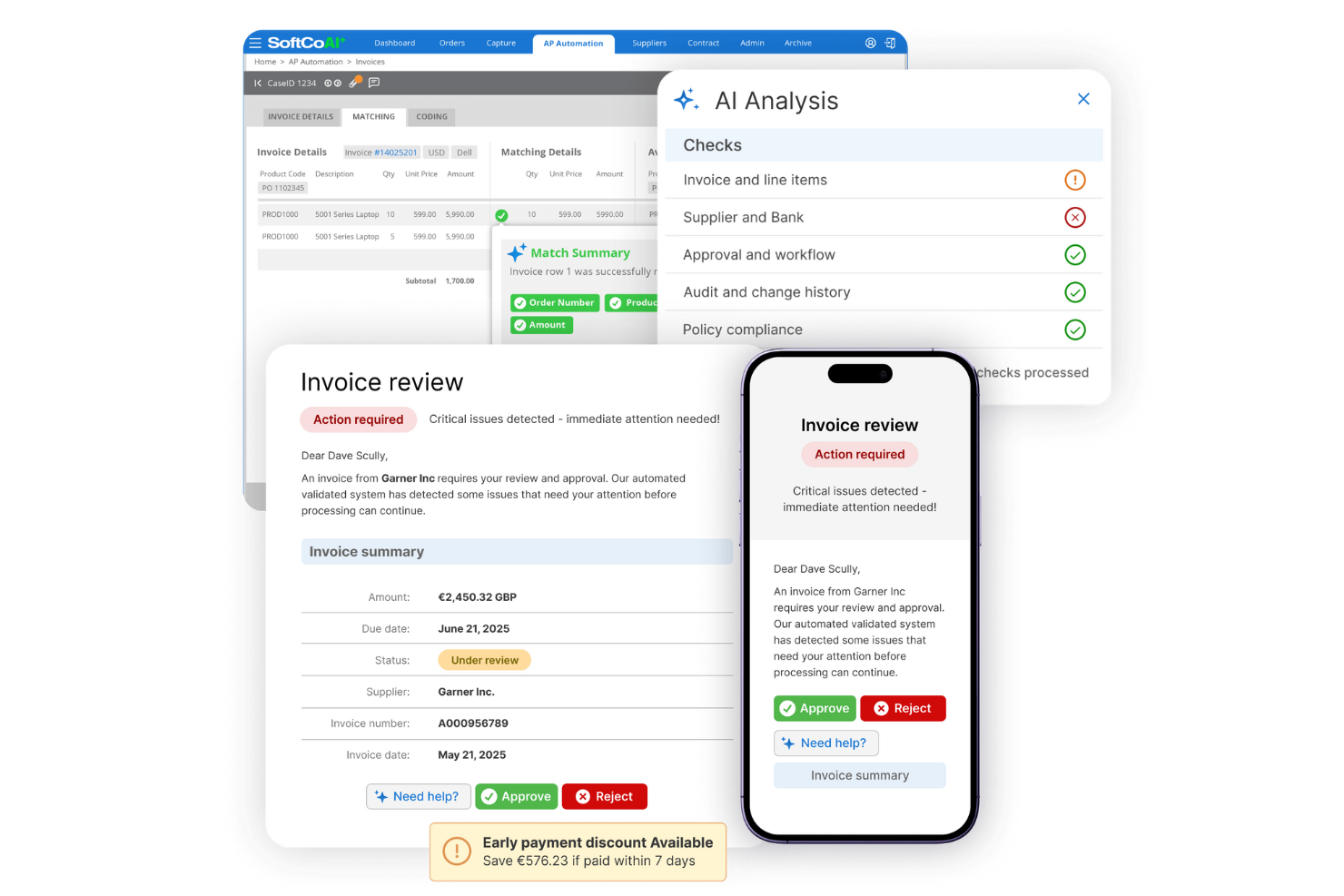
SoftCo is designed to provide AP automation for finance teams that need to prioritize secure storage and management of sensitive financial documents. It’s especially relevant for organizations in regulated industries where compliance and data protection are non-negotiable. With SoftCo, you can optimize your AP process while ensuring all financial data is encrypted and securely archived.
Why I Picked SoftCo
Security is a top concern for many finance teams handling sensitive invoice data, which is why I picked SoftCo for this shortlist. SoftCo offers encrypted document storage and strict access controls, making it a strong choice for organizations with compliance requirements or those operating in highly regulated sectors. The platform also provides automated audit trails, so every action on an invoice is tracked and securely logged. These features help ensure that financial data stays protected throughout the entire invoice approval process.
SoftCo Key Features
In addition to its security-focused capabilities, SoftCo offers several other features for invoice approval:
- Automated invoice capture: Extracts data from invoices using OCR to reduce manual entry.
- Configurable approval workflows: Lets you design multi-level approval paths to match your organization’s policies.
- Supplier portal: Provides vendors with a secure space to submit invoices and track payment status.
- ERP system integration: Connects directly with leading ERP platforms to sync invoice and payment data.
SoftCo Integrations
Integrations include Microsoft Dynamics, SAP, Oracle, NetSuite, and Sage.
Pros and Cons
Pros:
- Automates recurring invoices
- Great vendor management UI
- Strong compliance standards
Cons:
- Mobile app is very basic
- Needs dedicated IT resources

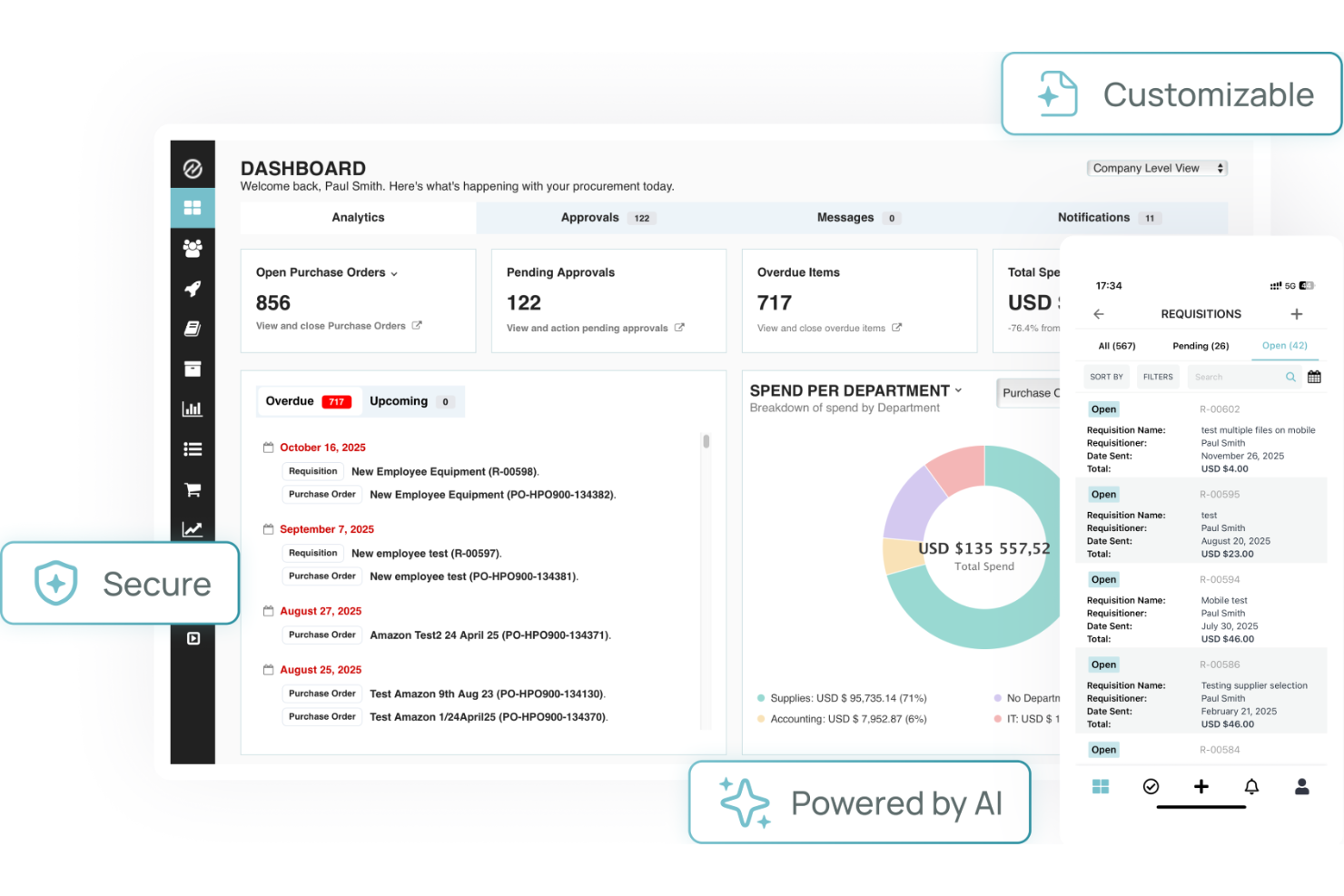
Tradogram stands out for teams that need invoice approval tightly connected to procurement workflows. It’s designed for businesses that want to manage purchasing, contracts, and approvals in one place, making it especially useful for procurement and finance professionals. By linking invoice approvals directly to purchase orders and budgets, Tradogram helps reduce mismatches and manual tracking across the procurement process.
Why I Picked Tradogram
Tradogram’s ability to connect invoice approvals directly to procurement workflows makes it a strong choice for organizations with complex purchasing needs. The platform links invoices to purchase orders, contracts, and budgets, so you can track every approval step in context. I picked Tradogram because it helps teams enforce procurement policies and reduce errors by tying invoice approvals to the original purchasing process. For businesses that want to keep procurement and finance tightly aligned, Tradogram’s workflow integration stands out.
Tradogram Key Features
Some other features that make Tradogram useful for invoice approval include:
- Customizable approval hierarchies: Set up multi-level approval chains to match your organization’s structure.
- Document management: Attach and store supporting documents directly with each invoice.
- Spend analytics dashboard: Monitor and analyze spending patterns across suppliers and departments.
- Supplier management tools: Track supplier performance and maintain a centralized supplier database.
Tradogram Integrations
Integrations include QuickBooks, Xero, Sage, NetSuite, and Microsoft Dynamics.
Pros and Cons
Pros:
- Customizable approval limits
- Good inventory tracking sync
- Easy to adopt across teams
Cons:
- Support is email focused
- Limited accounting sync tools

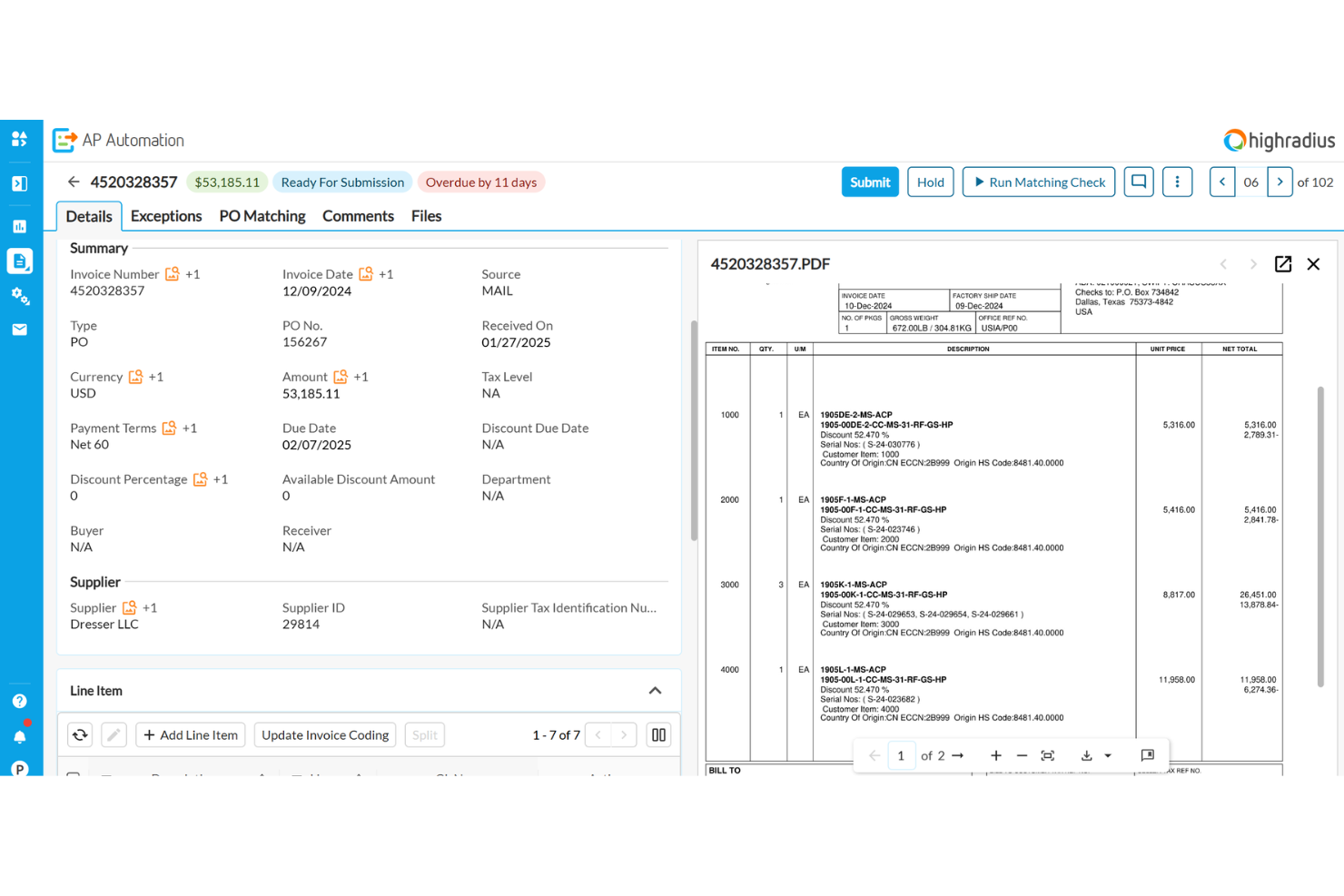
HighRadius uses AI to help finance teams resolve invoice exceptions and approval bottlenecks faster. It’s a strong fit for enterprises and shared services centers that deal with complex, high-volume invoice workflows and frequent exceptions. If your business struggles with manual exception handling or delayed approvals, HighRadius brings automation and intelligence to speed up resolution and keep processes moving.
Why I Picked HighRadius
What sets HighRadius apart is its use of AI to automatically identify and resolve exceptions in invoice approval workflows. The platform analyzes invoice data and flags discrepancies or missing information, then suggests next steps or routes issues to the right approver. I picked HighRadius because its exception management dashboard gives finance teams real-time visibility into bottlenecks and unresolved items. This focus on AI-powered exception handling makes it a strong choice for organizations that need to reduce manual intervention and keep invoice approvals on track.
HighRadius Key Features
In addition to its AI-driven exception handling, HighRadius offers several other features that support invoice approval processes:
- Automated invoice capture: The system extracts invoice data from emails and scanned documents without manual entry.
- Custom workflow design: Configure multi-step approval workflows to match your organization’s policies.
- Role-based access controls: Set permissions for users based on their responsibilities in the approval process.
- Audit trail tracking: Maintain a detailed log of all invoice actions and approvals for compliance and review.
HighRadius Integrations
Integrations include SAP, Oracle, NetSuite, Microsoft Dynamics, Workday, and JD Edwards.
Pros and Cons
Pros:
- Predictive cash flow insights
- Great exception handling rules
- Massive enterprise scalability
Cons:
- Implementation takes months
- Requires heavy IT involvement
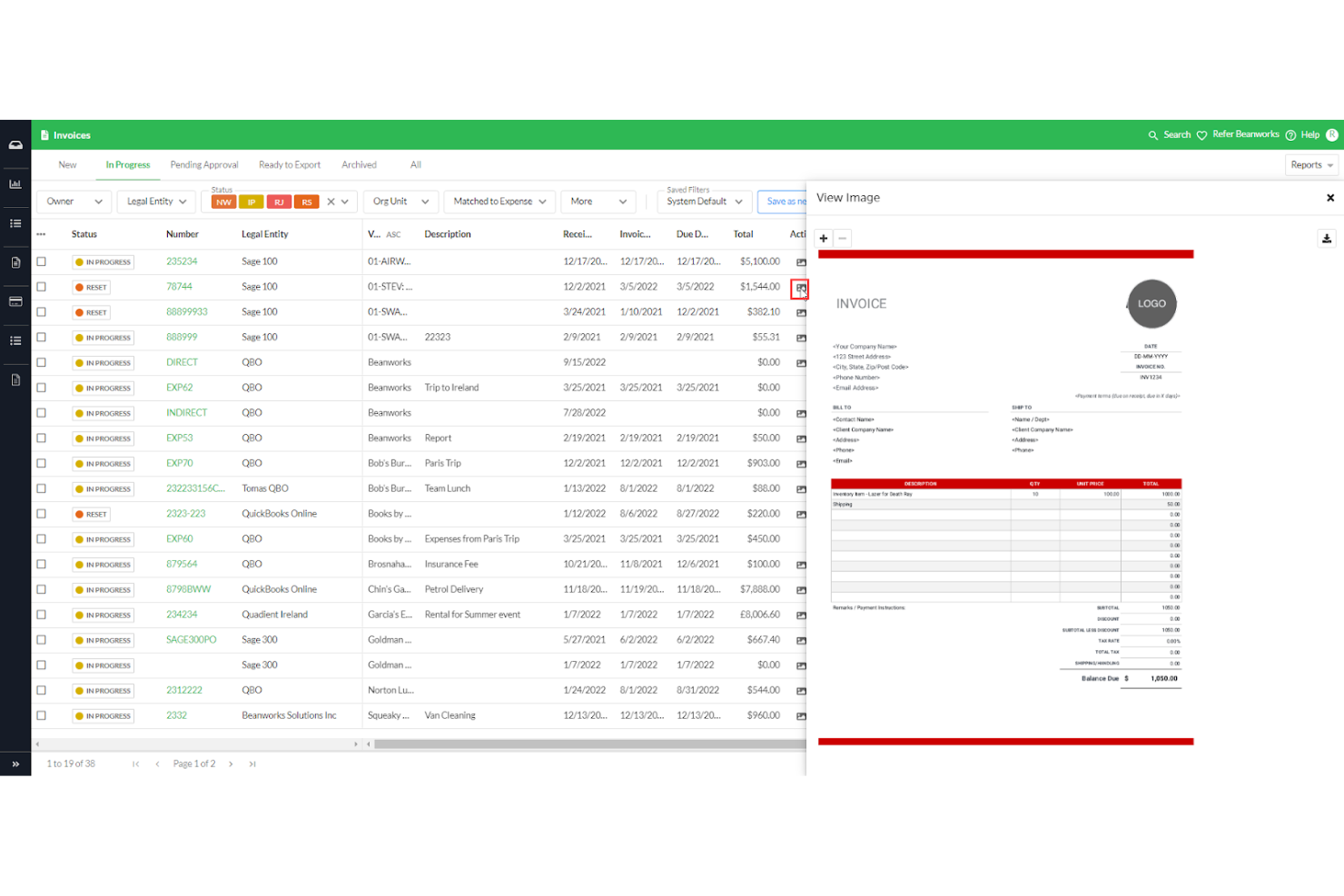
For teams that need invoice approval tightly connected to document management, Quadient offers a specialized solution. It’s designed for organizations that handle large volumes of documents and require seamless integration between approval workflows and document storage. With its focus on document management integration, Quadient helps you keep invoice records organized and accessible throughout the approval process.
Why I Picked Quadient
Quadient stands out for teams that need invoice approval workflows directly connected to document management systems. Its ability to link invoices with supporting documents and maintain a centralized repository makes it a strong fit for organizations with strict record-keeping or compliance needs. I picked Quadient because it lets you manage, retrieve, and audit invoice documents without leaving the approval platform. This integration helps reduce manual document handling and ensures all invoice-related files stay organized and accessible.
Quadient Key Features
Some other features that caught my attention include:
- Automated workflow routing: Route invoices to the right approvers based on custom rules.
- Digital signature support: Capture and store electronic signatures for invoice approvals.
- Real-time status tracking: Monitor the progress of each invoice through the approval process.
- Customizable approval templates: Set up and reuse approval templates tailored to your organization’s needs.
Quadient Integrations
Integrations include Microsoft SharePoint, Salesforce, Microsoft Dynamics 365, SAP, Oracle, DocuSign, Adobe Sign, Box, Dropbox, and Google Drive.
Pros and Cons
Pros:
- Automated duplicate catches
- Strong Sage and Xero sync
- Centralized invoice dashboard
Cons:
- Search filters are cumbersome
- Expense module is quite basic

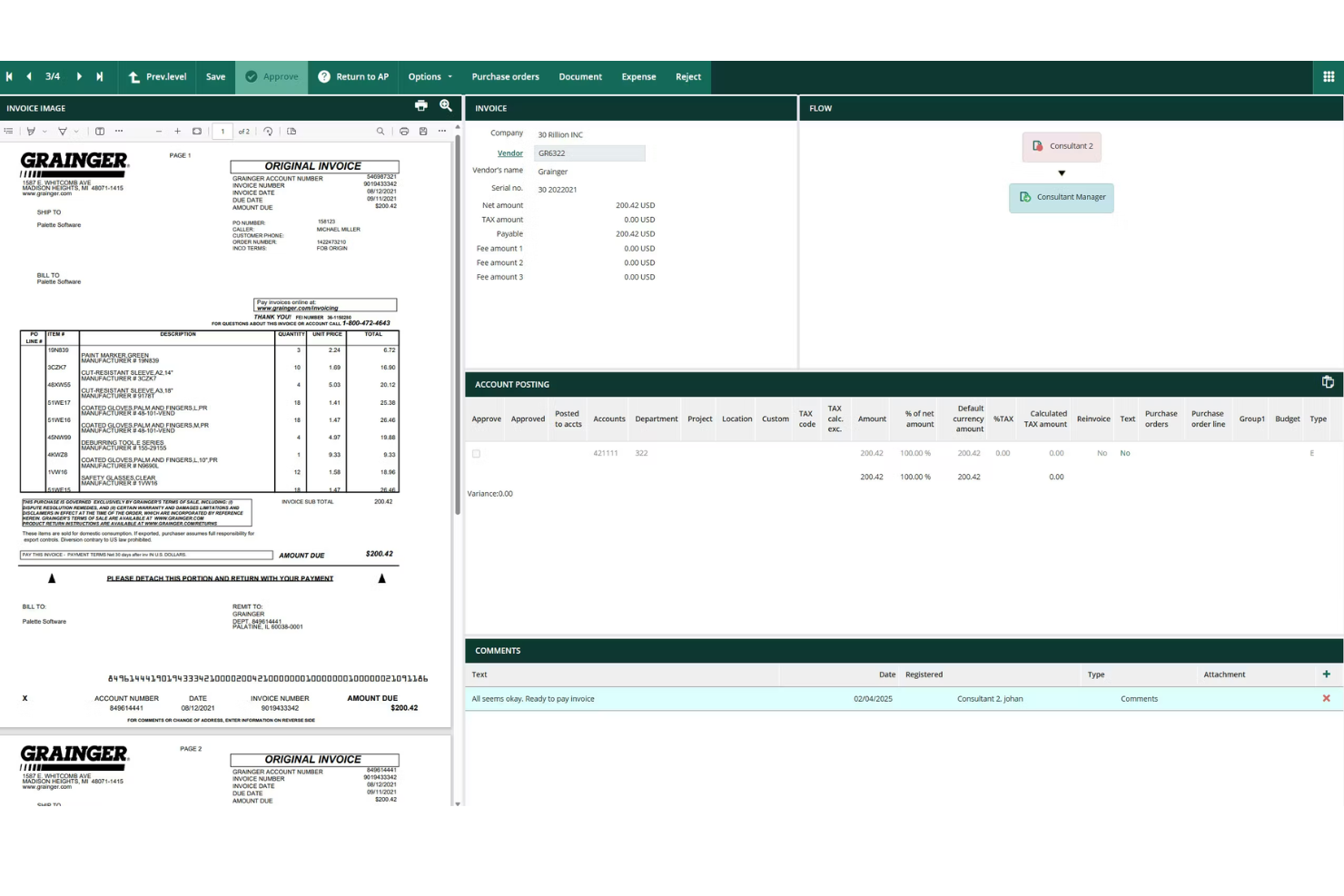
Rillion is designed for mid-sized finance teams that need to manage invoice approvals without adding complexity. The platform offers automated approval workflows and customizable controls that help teams handle growing invoice volumes and distributed approvers. If your organization is outgrowing manual processes but doesn’t need enterprise-level overhead, Rillion provides a focused solution for scaling up invoice management.
Why I Picked Rillion
Rillion stands out for mid-sized finance teams that need structure without the overhead of enterprise systems. The platform offers automated invoice capture and approval routing, which helps teams manage increasing invoice volumes as they grow. I picked Rillion because its customizable approval workflows let you match your organization’s policies and adapt as your team changes. For finance teams that want to move beyond manual processes but don’t need a complex solution, Rillion provides the right balance of automation and control.
Rillion Key Features
Some other features that make Rillion useful for invoice approval include:
- Mobile approvals: Approvers can review and approve invoices directly from their mobile devices.
- Duplicate invoice detection: The system flags potential duplicate invoices before they enter the approval workflow.
- Automated reminders: Rillion sends notifications to approvers when invoices are pending action.
- Document archiving: All invoices and related documents are stored securely for future reference and audits.
Rillion Integrations
Integrations include Microsoft Dynamics, SAP Business One, NetSuite, Monitor ERP, and Visma.
Pros and Cons
Pros:
- Intuitive user dashboard
- Easy PO matching capabilities
- Fast implementation timeline
Cons:
- Limited complex custom routing
- Lacks deep global compliance
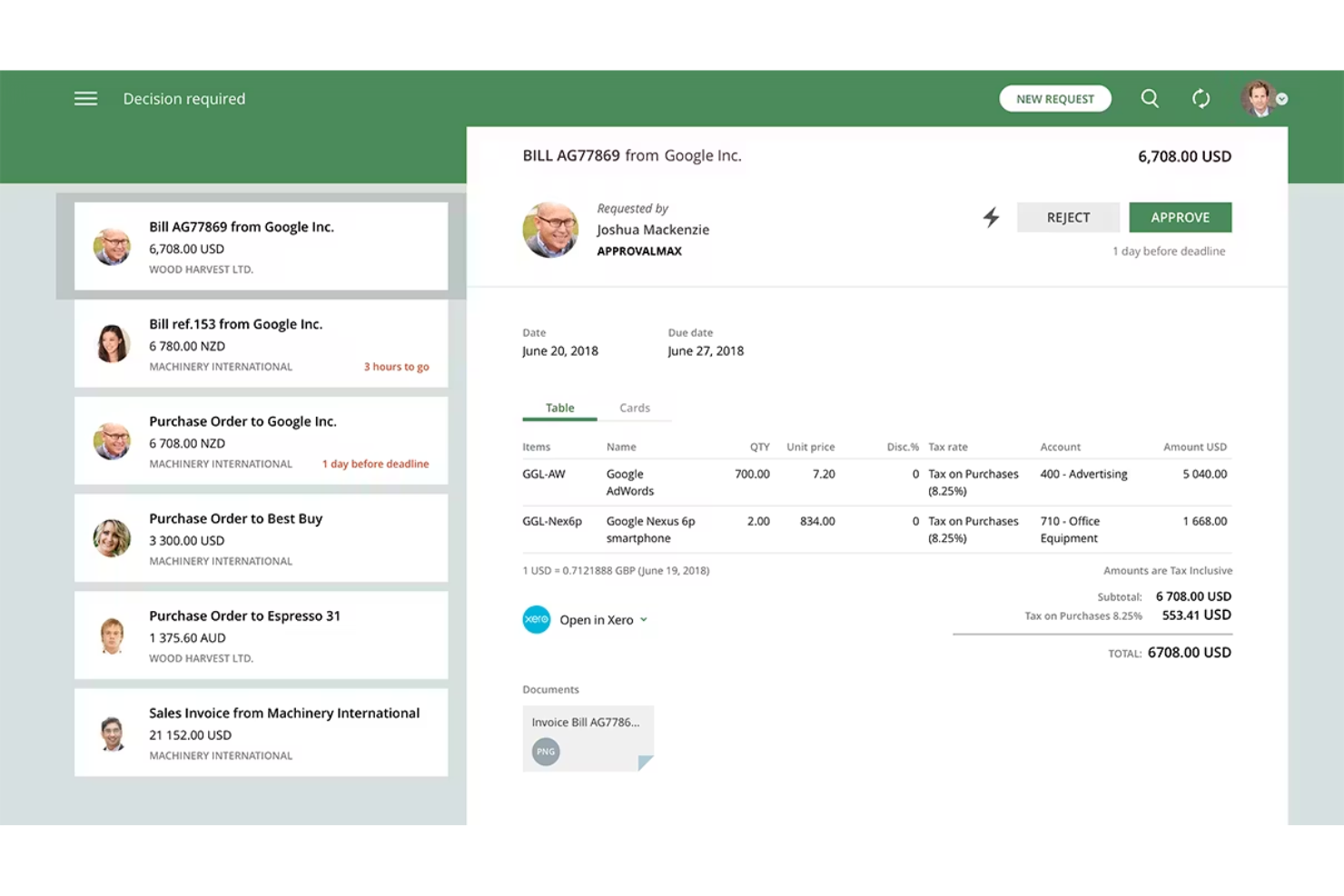
If your team needs detailed, audit-ready approval trails for invoices, Approval Max is built for that purpose. It’s especially useful for finance teams and organizations that face strict compliance or audit requirements. With Approval Max, you can automate multi-step approval workflows and maintain a clear, tamper-proof record of every decision.
Why I Picked Approval Max
What sets Approval Max apart is its focus on creating audit-ready approval trails for every invoice. The platform automatically logs each approval step, capturing who approved what and when, which is essential for organizations with strict audit or compliance needs. I picked Approval Max because it lets you configure multi-level approval workflows and ensures every action is traceable and tamper-proof. This level of transparency and control is especially valuable for finance teams that need to demonstrate compliance during audits.
Approval Max Key Features
Some other features that make Approval Max useful include:
- Integration with Xero and QuickBooks Online: Connects directly to popular accounting platforms for seamless invoice processing.
- Custom approval matrix: Lets you define approval rules based on invoice amount, department, or other criteria.
- Mobile app for approvals: Allows users to review and approve invoices from their mobile devices.
- Automated notifications and reminders: Sends alerts to approvers to keep invoice workflows moving.
ApprovalMax Integrations
Integrations include Xero, QuickBooks Online, Dext, Oracle NetSuite, and Cin7.
Pros and Cons
Pros:
- Complex multi-step approvals
- Perfect Xero and QBO harmony
- Strict audit-ready compliance
Cons:
- Setup logic can be confusing
- No native payment processing
Other Invoice Approval Software
Here are some additional invoice approval software options that didn’t make it onto my shortlist, but are still worth checking out:
- ApprovalSoft
For customizable approval routing
- Procurify
For managing multi-location approvals
- Esker
For AI-driven data capture
- ProcureDesk
For multi-level approval routing
- Concur
With travel and expense integration


Invoice Approval Software Selection Criteria
When selecting the best invoice approval software to include in this list, I considered common buyer needs and pain points like reducing manual invoice processing and ensuring compliance with approval policies. I also used the following framework to keep my evaluation structured and fair:
Core Functionality (25% of total score)
To be considered for inclusion in this list, each solution had to fulfill these common use cases:
- Capture and digitize incoming invoices
- Route invoices for multi-level approval
- Track invoice status and approval history
- Integrate with accounting software or ERP systems
- Maintain audit trails for compliance
Additional Standout Features (25% of total score)
To help further narrow down the competition, I also looked for unique features, such as:
- AI-powered invoice data extraction
- Customizable approval workflow builder
- Supplier self-service portal
- Real-time fraud detection tools
- Mobile app for invoice approvals
Usability (10% of total score)
To get a sense of the usability of each system, I considered the following:
- Clean and intuitive user interface
- Logical navigation between modules
- Minimal clicks to complete key tasks
- Responsive design for different devices
- Clear labeling and helpful tooltips
Onboarding (10% of total score)
To evaluate the onboarding experience for each platform, I considered the following:
- Step-by-step product tours
- Access to training videos and documentation
- Pre-built workflow templates
- Availability of live chat or onboarding specialists
- In-app guidance for first-time users
Customer Support (10% of total score)
To assess each software provider’s customer support services, I considered the following:
- 24/7 support availability
- Multiple support channels (chat, email, phone)
- Fast response times
- Access to a knowledge base or help center
- Proactive customer success outreach
Value For Money (10% of total score)
To evaluate the value for money of each platform, I considered the following:
- Transparent and predictable pricing
- Flexible plans for different team sizes
- No hidden fees or surprise charges
- Features included at each pricing tier
- Free trial or demo availability
Customer Reviews (10% of total score)
To get a sense of overall customer satisfaction, I considered the following when reading customer reviews:
- Positive feedback on invoice automation
- Reports of reliable system uptime
- Comments on ease of integration
- User experiences with customer support
- Insights on time savings and ROI
How to Choose Invoice Approval Software
It’s easy to get bogged down in long feature lists and complex pricing structures. To help you stay focused as you work through your unique software selection process, here’s a checklist of factors to keep in mind:
| Factor | What to Consider |
|---|---|
| Scalability | Will the software handle your current and future invoice volume? Ask about user limits, workflow expansion, and multi-entity support. |
| Integrations | Does it connect natively to your ERP, accounting, or procurement systems? Check for direct integrations, not just API options. |
| Customizability | Can you tailor approval workflows, user roles, and notifications to match your policies? Avoid rigid systems that force process changes. |
| Ease of use | Will your team adopt it quickly? Look for clear navigation, minimal training needs, and a logical approval flow. |
| Implementation and onboarding | How long will the setup take, and what resources are required? Ask about migration support, training, and typical go-live timelines. |
| Cost | Are pricing tiers transparent and predictable? Consider total cost of ownership, including setup, support, and any per-invoice fees. |
| Security safeguards | Does the tool offer encryption, access controls, and audit logs? Confirm it meets your data protection and compliance standards. |
| Compliance requirements | Will the software help you meet industry or regional regulations? Look for features supporting audit trails, retention, and reporting. |
What Is Invoice Approval Software?
Invoice approval software is a digital tool that facilitates automated invoice approval by routing, reviewing, and authorizing invoices for payment within an organization. It centralizes invoice data, enforces approval workflows, and maintains audit trails to support compliance and transparency. Finance teams use these systems to reduce manual errors, speed up approvals, and ensure that only validated invoices are paid.
Features of Invoice Approval Software
When selecting invoice approval software, keep an eye out for the following key features:
- Automated invoice capture: Scans and digitizes incoming invoices, extracting key data fields to reduce manual entry and errors.
- Custom approval workflows: Lets you design and enforce multi-step approval processes that match your organization’s policies and hierarchy.
- Role-based access controls: Restricts user permissions so only authorized team members can view, edit, or approve invoices.
- Audit trails: Tracks every action taken on an invoice, providing a detailed history for compliance and accountability.
- Invoice status tracking: Shows real-time updates on where each invoice is in the approval process, helping teams avoid bottlenecks.
- ERP and accounting integrations: Connects directly with your existing financial systems to sync invoice data and payment status.
- Supplier portals: Gives vendors a secure way to submit invoices, check approval progress, and communicate with your team.
- Duplicate invoice detection: Flags potential duplicate submissions to prevent double payments and reduce fraud risk.
- Document storage: Stores invoices and related documents in a centralized, searchable repository for easy retrieval and audit readiness.
Benefits of Invoice Approval Software
Implementing invoice approval software provides several benefits for your team and your business. Here are a few you can look forward to:
- Faster approvals: Automated workflows and real-time status tracking help invoices move quickly through each approval stage.
- Improved compliance: Audit trails and role-based access controls support adherence to internal policies and regulatory requirements.
- Reduced manual errors: Automated invoice capture and duplicate detection minimize data entry mistakes and prevent double payments.
- Greater visibility: Centralized dashboards and document storage give finance teams a clear view of invoice status and history.
- Enhanced vendor relationships: Supplier portals and transparent communication tools keep vendors informed and reduce payment disputes.
- Stronger security: Encrypted storage and access controls protect sensitive financial data from unauthorized access.
- Easier integration: Direct connections to ERP and accounting systems ensure invoice data stays accurate and up to date across platforms.
Costs and Pricing of Invoice Approval Software
Selecting invoice approval software requires an understanding of the various pricing models and plans available. Costs vary based on features, team size, add-ons, and more. The table below summarizes common plans, their average prices, and typical features included in invoice approval software solutions:
Plan Comparison Table for Invoice Approval Software
| Plan Type | Average Price | Common Features |
|---|---|---|
| Free Plan | $0 | Basic invoice capture, limited approval workflows, single user access, and basic reporting. |
| Personal Plan | $15-$49/user/month | Multi-user support, standard approval workflows, document storage, and email notifications. |
| Business Plan | $150-$899/month | Advanced workflow customization, ERP integrations, audit trails, supplier portals, and priority support. |
| Enterprise Plan | $1000+/user/month | Custom integrations, advanced security, compliance tools, dedicated account management, and SLA-backed support. |
Invoice Approval Software FAQs
Here are some answers to common questions about invoice approval software:
How does invoice approval software integrate with existing accounting systems?
Most invoice approval software connects to accounting or ERP systems through direct integrations or APIs. This allows invoice data, payment status, and vendor information to sync automatically, reducing manual entry and keeping financial records up to date.
Can invoice approval software handle multi-level or conditional approvals?
Yes, most solutions support multi-level and conditional approval workflows. You can set up rules based on invoice amount, department, or project, ensuring the right people review and authorize each invoice before payment.
What security measures should I look for in invoice approval software?
Look for features like data encryption, role-based access controls, and detailed audit trails. These safeguards help protect sensitive financial information and support compliance with internal and external regulations.
How long does it take to implement invoice approval software?
Implementation timelines vary, but most cloud-based solutions can be set up in a few days to a few weeks. Factors like data migration, workflow customization, and user training can affect the overall timeline.
Is it possible to approve invoices from a mobile device?
Yes, many invoice approval platforms offer mobile apps or responsive web interfaces. This lets users review, approve, or reject invoices on the go, which can help prevent approval bottlenecks.