

10 Best Internal Communication Tools in 2026

Best Internal Communication Tools Shortlist


Internal communication tools are apps and platforms that help your team share updates, messages, and files in one digital workspace. If you’re searching for ways to keep everyone connected, no matter where they work, you know how fast things can slip through the cracks. Today’s hybrid and remote teams rely on these tools to replace messy email threads, cut down on meetings, and keep projects moving. In this list, you’ll find the best options for different team needs so you can pick the right one for simple conversations, secure discussions, or full collaboration with shared docs and tasks.
Why Trust Our Software Recommendations
Our team has been testing and reviewing software since 2012. As project managers ourselves, we know how difficult—and important—it is to choose the right software.
For this guide, we evaluated tools using hands-on testing and independent research, scoring tools using our selection criteria. We also draw on insights from industry thought leaders and practicing project management experts.
Our reviews reflect our human editorial judgment, not a sales pitch.
Expert reviewers:
Internal Communication Tools Comparison Table
This comparison table summarizes pricing details for my top internal communication tools selections:
| Tool | Best For | Trial Info | Price | ||
|---|---|---|---|---|---|
| 1 | Best with all-inclusive licensing and onboarding | Free demo available | Pricing upon request | Website | |
| 2 | Best email-style topic headers for async focus | Free plan + free demo available | From $6.67/user/month (billed annually) | Website | |
| 3 | Best free unlimited message history | 7-day free trial + free plan + free demo available | From $2.49/seat/month (billed annually) | Website | |
| 4 | Best AI-powered suggestions for task management | Free plan + free demo available | From $3/user/month (billed annually) | Website | |
| 5 | Best built-in shared to-do lists and reminders | 30-day free trial + free plan available | From $4.50/user/month (billed annually) | Website | |
| 6 | Best for managing secure, self-hosted messaging | 30-day free trial | Pricing upon request | Website | |
| 7 | Best integration with Microsoft 365 apps | Free trial available | From $4.00/user/month (billed annually) | Website | |
| 8 | Best built-in workflow automations | 14-day free trial + free plan + free demo available | From $16.20/month (billed annually) | Website | |
| 9 | Best for open-source communication solutions | Free plan + free demo available | Pricing upon request | Website | |
| 10 | Best threaded messaging to reduce clutter | Free plan available | From $6/user/month (billed annually) | Website |
Best Internal Communication Tools Reviews
Below are my detailed summaries of the best internal communication tools that made it onto my shortlist. My reviews offer a detailed look at the features, integrations, and best use cases of each platform to help you find the best one for you.

Hub
Best with all-inclusive licensing and onboarding
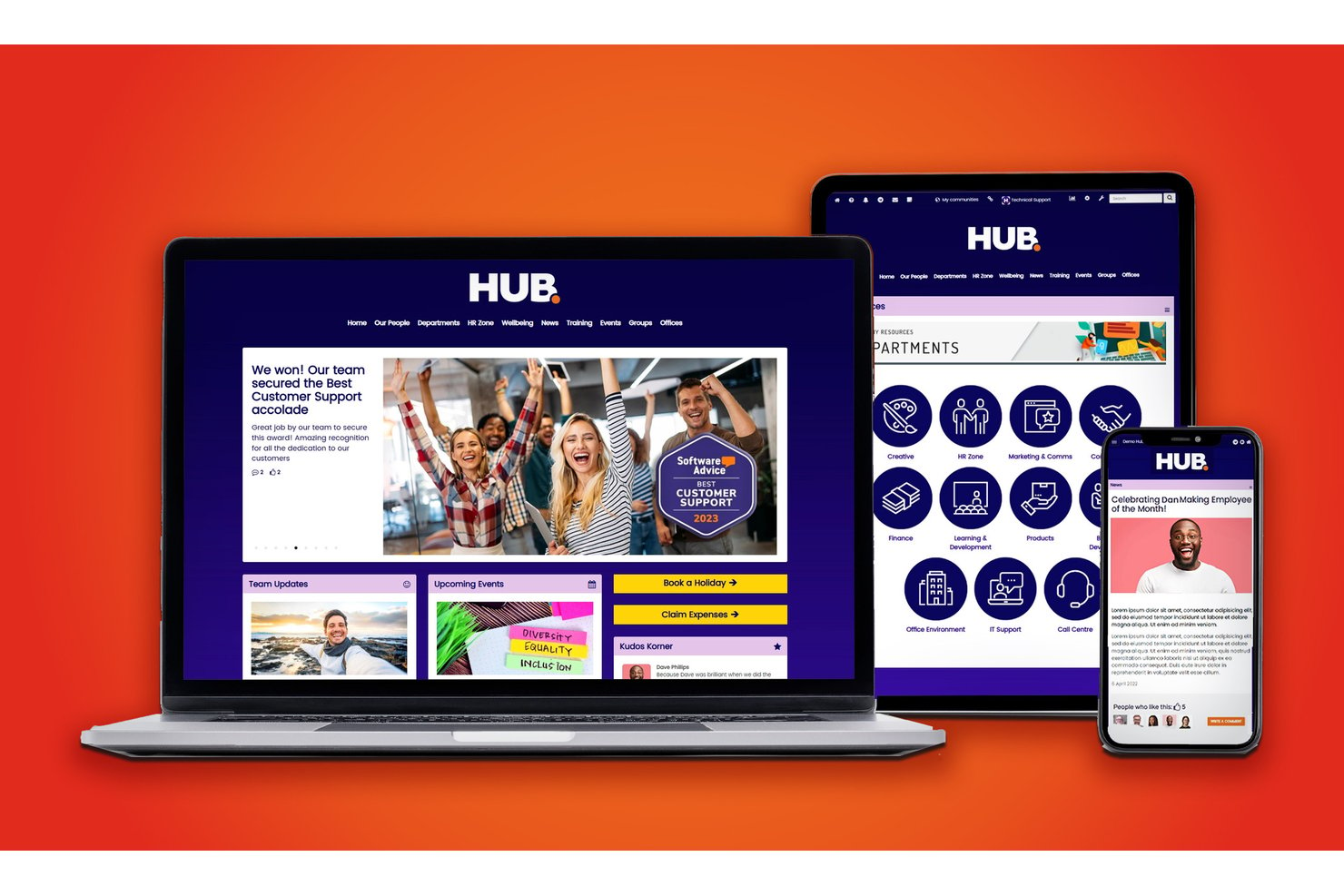
Hub is an employee intranet platform that brings together company news, knowledge management, group forums, digital forms, and AI-powered content tools in one centralized workspace.
Who Is Hub Best For?
Hub is a strong fit for small and mid-sized organizations where internal communications and HR teams are leading the charge on employee engagement and knowledge sharing.
Why I Picked Hub
Hub earns its spot as one of the best on my shortlist because the all-inclusive license model genuinely removes the friction that slows most intranet rollouts. Every feature, from the AI Writing Assistant to pulse polls and must-read receipts, is unlocked from day one with no tier upgrades required. I also love that two full days of personalized 1:1 onboarding are bundled in, so teams aren't left to self-configure a blank workspace from scratch.
Hub Key Features
- Group forums and discussions: Create dedicated forums for teams or topics with threaded conversations and granular permissions.
- Company wiki and document management: Organize policies, FAQs, and company knowledge into searchable wikis with unlimited storage.
- Federated search: Search across news, documents, wikis, and forums using smart tags and content filters.
- Pulse surveys and polls: Gather instant feedback from employees using built-in survey and polling tools.
Hub Integrations
HUB offers native integrations with SharePoint, Google Workspace, Box, Microsoft Teams, Slack, BambooHR, Confluence, and more. An API is available for custom integrations.
Pros and Cons
Pros:
- AI writing assistant speeds up content creation
- Must-read receipts confirm staff have seen updates
- Personalized onboarding included with every plan
Cons:
- Video calling is not natively supported
- Real-time chat is less developed than competitors

Zulip
Best email-style topic headers for async focus

Zulip is a team chat software for internal communication that organizes messages by topic in threaded streams, supports group and private conversations, and provides both web and mobile access.
Who Is Zulip Best For?
Distributed tech teams that need organized, topic-driven internal communication for cross-time-zone projects.
Why I Picked Zulip
I picked Zulip as one of the best because my team relies on its email-style topic headers to keep every conversation organized in threaded topics, even when messages are sent hours apart. I like how quick topic search and structured streams help us stay focused on multiple projects at once.
Zulip Key Features
- Stream permissions: Control who can view or join specific conversation streams.
- Message editing: Edit sent messages for clarity or corrections within a time window.
- Emoji and reactions: Respond quickly to messages with emojis and custom reactions.
- Desktop and mobile apps: Access Zulip conversations across Windows, Mac, Linux, iOS, and Android.
Zulip Integrations
Zulip offers native integrations with GitHub, Jira, Trac, Sentry, Nagios, Jenkins, Travis CI, and GitLab. It also provides an API for custom integrations.
Pros and Cons
Pros:
- Open source with strong admin control options
- Topic search works well with large message volumes
- Threaded topics keep discussions avoidably organized
Cons:
- Lacks automated system health monitoring
- Fewer built-in integrations than major competitors
Pumble
Best free unlimited message history

Pumble is a team communication tool that lets users organize conversations by channels, send direct messages, share files, start voice and video calls, and manage notifications across web and mobile apps.
Who Is Pumble Best For?
Growing teams and startups that want budget-friendly internal communication and collaboration without message limits.
Why I Picked Pumble
I picked Pumble as one of the best because my team can reference every past message without worrying about storage limits. I like starting threaded discussions, managing channel permissions, and using built-in voice and video calls for group projects.
Pumble Key Features
- User roles and permissions: Set specific admin and user permissions for better workspace control.
- Channel-based communication: Organize team conversations by topic, project, or department in dedicated channels.
- Group direct messages: Start private group chats for quick side discussions.
- Message pinning: Pin important messages so everyone in the channel can quickly access them.
Pumble Integrations
Pumble offers native integrations with Google Calendar, Google Drive, and Zapier, and provides an API for custom integrations.
Pros and Cons
Pros:
- Includes built-in voice and video calls
- Granular control over channels and notifications
- Unlimited searchable message history for all users
Cons:
- Lacks automated backup utilities
- Fewer integrations compared to major competitors

Chanty
Best AI-powered suggestions for task management
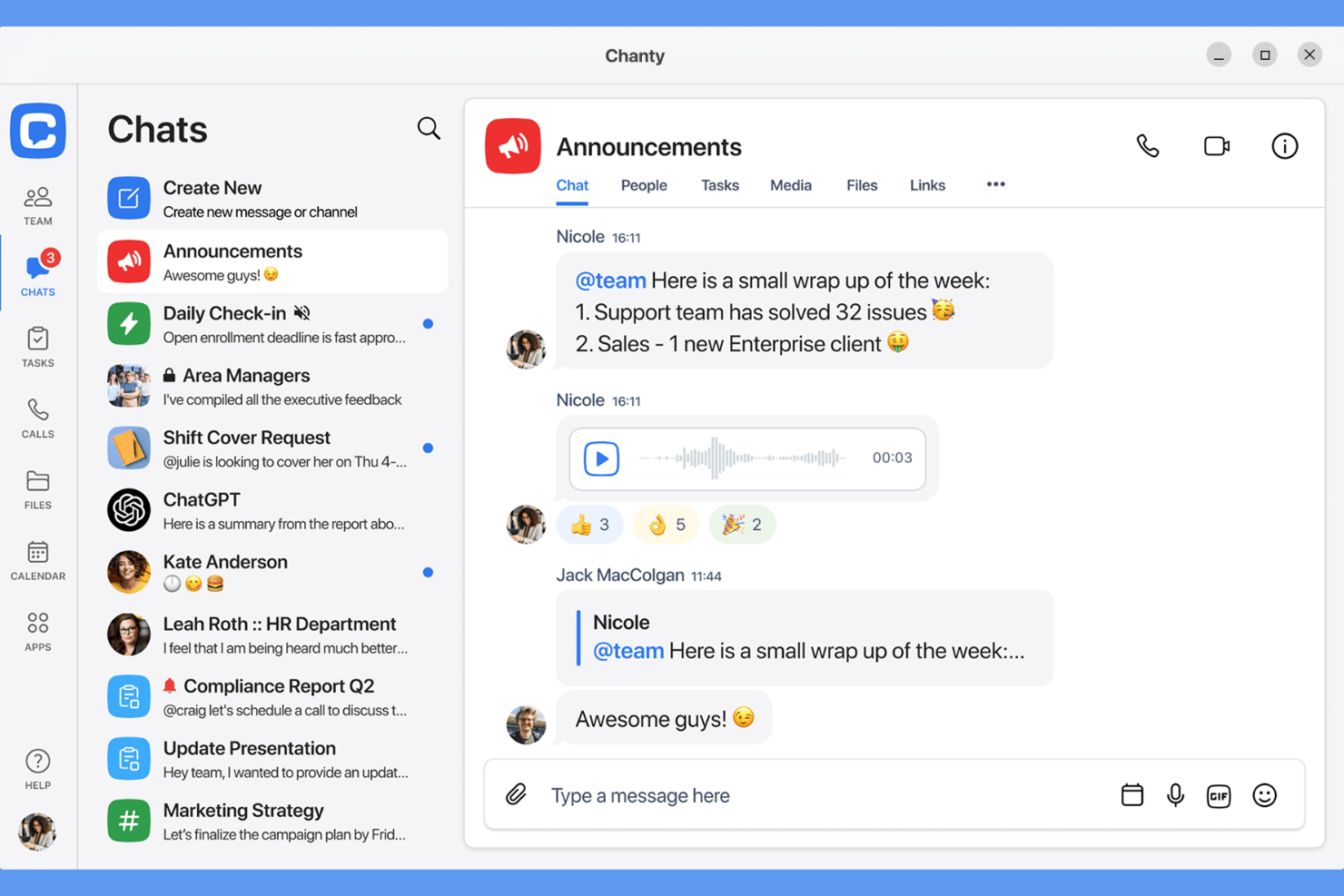
Chanty is a team communication tool for internal collaboration that combines threaded messaging, built-in task management, file sharing, AI-powered suggestions, and searchable conversation history in one app.
Who Is Chanty Best For?
Small businesses and project teams looking for simple, chat-based collaboration with AI-augmented task management features.
Why I Picked Chanty
I picked Chanty as one of the best options because I get AI-generated suggestions that help prioritize tasks in real time. I use Chanty’s chat-to-task feature to turn action items into tasks directly from any conversation, which keeps my collaboration focused.
Chanty Key Features
- Threaded conversations: Keep team messages organized by topic in dedicated threads.
- Audio and video calls: Start direct or group calls instantly within any chat.
- Teambook: View conversations, tasks, and shared files in a single project hub.
- Pin messages: Highlight important messages for easy access at the top of each chat.
Chanty Integrations
Chanty offers native integrations with Google Drive, Dropbox, Trello, GitHub, Asana, Jira, and Zapier. An API is available for custom integrations.
Pros and Cons
Pros:
- Audio and video calling are built into every chat
- Chat-to-task conversion simplifies project tracking
- AI-powered task suggestions
Cons:
- No guest access for non-team collaborators
- Limited admin controls for larger organizations

Flock
Best built-in shared to-do lists and reminders
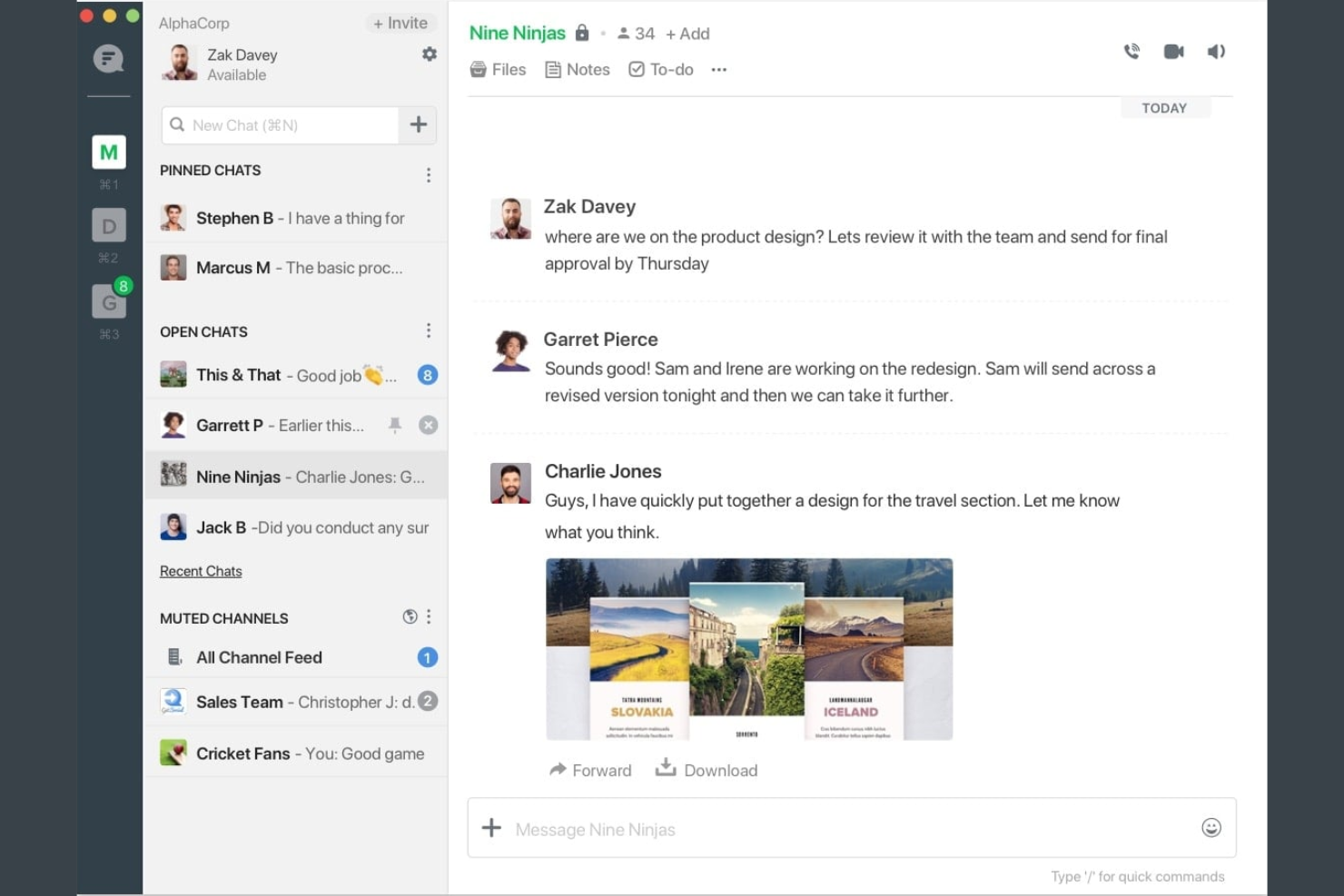
Flock is a team communication platform for internal collaboration that offers group chat, video conferencing, file sharing, polls, notes, and built-in productivity tools all in one app.
Who Is Flock Best For?
Small and midsize teams who want a central hub for messaging, collaboration, and quick shared task management.
Why I Picked Flock
I picked Flock as one of my top tools because I like being able to create shared to-do lists and set reminders right inside a chat. My team quickly runs checklist items without switching between apps, and real-time updates keep everyone aligned.
Flock Key Features
- Channel chat: Communicate with teams in organized public or private channels.
- Video conferencing: Start video calls directly from any chat window.
- File sharing: Upload and share documents, images, and other files within conversations.
- Polls and notes: Create quick polls or collaborative notes to capture feedback and ideas.
Flock Integrations
Flock offers native integrations with Google Drive, Dropbox, Trello, GitHub, Twitter, Asana, and MailChimp. An API is available for custom integrations.
Pros and Cons
Pros:
- Voice, video, and screen sharing in one app
- In-app reminders for group actions and events
- Built-in polls and shared notes for teams
Cons:
- Few advanced controls for large organizations
- Limited search functionality for past conversations


Mattermost is an internal communication platform built for technical and operational teams that need private, self-hosted messaging, channel-based chat, file sharing, workflow automation, and real-time collaboration.
Who Is Mattermost Best For?
IT and DevOps teams who need a secure, self-managed communication solution for collaborating on sensitive projects or in highly regulated industries.
Why I Picked Mattermost
I picked Mattermost as one of the best because I can deploy it entirely on my own servers, control all message retention, and use granular user permissions for sensitive discussions. I like that my team can integrate custom bots to automate workflows, too.
Mattermost Key Features
- Channel-based messaging: Organize conversations and projects into topic-specific channels.
- Threaded discussions: Separate message threads for focused conversations within channels.
- Integrated task management: Assign, track, and manage tasks alongside chat functions.
- Full message search: Instantly search all historical messages, files, and users in one interface.
Mattermost Integrations
Mattermost offers native integrations with GitHub, GitLab, Jira, Jenkins, and ServiceNow. It also supports custom integrations via its API and has marketplace extensions for tools like Zoom and PagerDuty.
Pros and Cons
Pros:
- Fine-grained user and team permissions
- Channel and thread-based messaging
- Full control over deployment and data
Cons:
- Requires dedicated server infrastructure management
- Requires technical resources to maintain servers

Best integration with Microsoft 365 apps

Microsoft Teams is an internal communication platform for businesses that brings together chat, audio and video meetings, shared workspaces, file collaboration, and team channels.
Who Is Microsoft Teams Best For?
Microsoft Teams fits organizations that rely on Microsoft 365 for document collaboration, calendar integration, and unified communications across departments or distributed teams.
Why I Picked Microsoft Teams
I picked Microsoft Teams as one of the best because my team can create, edit, and share Word docs or Excel files in real time during chats or meetings. I like how Teams notifications sync instantly with Outlook, keeping everyone on track with meetings and project updates.
Microsoft Teams Key Features
- Channel-based communication: Segment work conversations into dedicated team or project channels.
- Video conferencing: Host virtual meetings with screen sharing, live captions, and recording options.
- Persistent chat history: Access message threads and file attachments anytime within channels and chats.
- Integrated task management: Assign, track, and manage tasks with built-in tools like Planner and To Do.
Microsoft Teams Integrations
Microsoft Teams has native integrations across the Microsoft ecosystem, including Microsoft 365 and Azure. It also offers native integrations with Trello, Dropbox, Salesforce, ServiceNow, GitHub, and Adobe Creative Cloud. An API is available for custom integrations.
Pros and Cons
Pros:
- Persistent chat history for quick information retrieval
- Threaded replies support focused discussions
- Supports native document editing
Cons:
- Limited file sharing outside Microsoft 365 apps
- Lacks data residency location options

Best built-in workflow automations
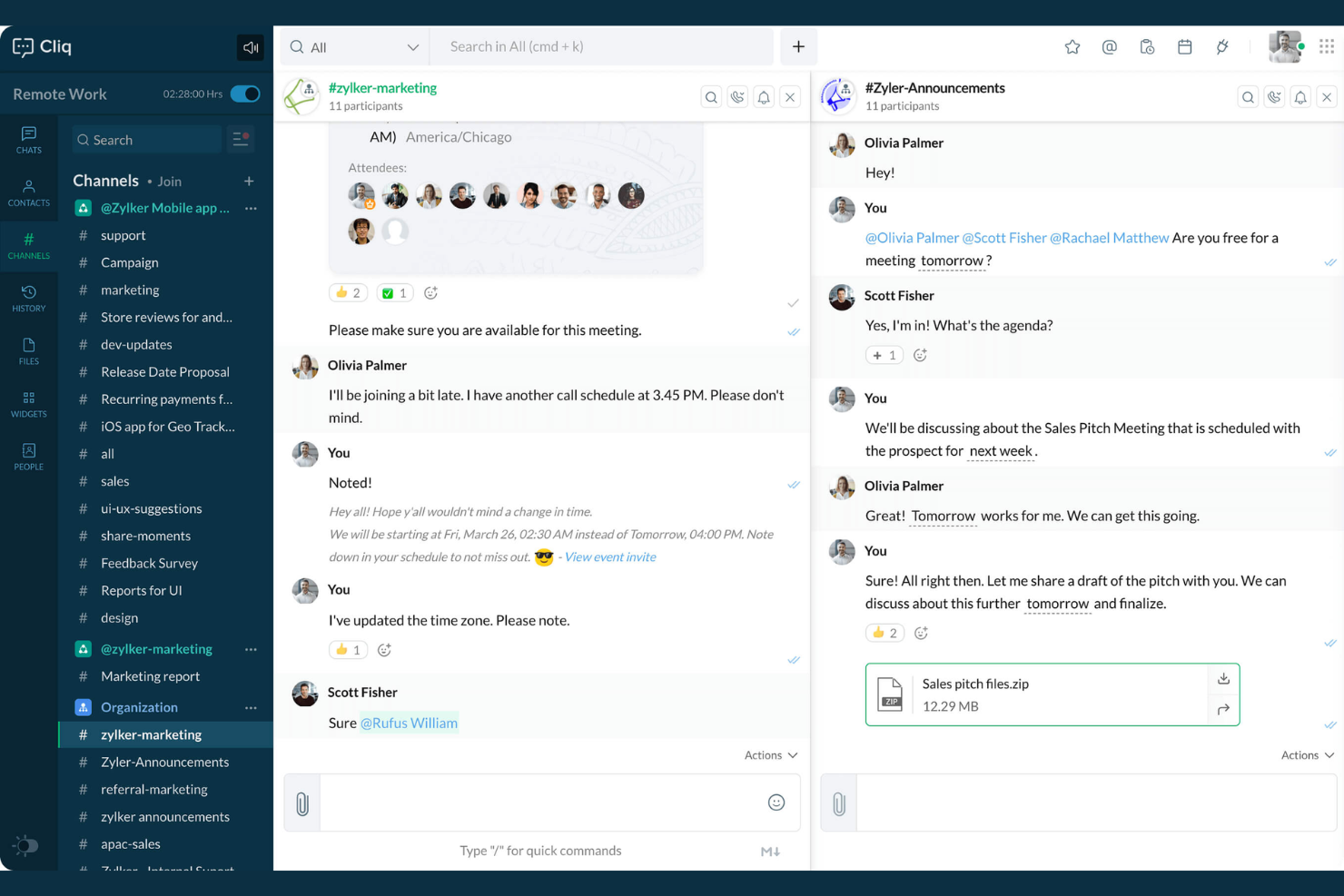
Zoho Cliq is an internal communication software that combines real-time messaging, file sharing, channels, voice and video calls, event scheduling, and built-in tools for team collaboration.
Who Is Zoho Cliq Best For?
Small to mid-sized businesses need centralized chat, automation, and collaboration across distributed or hybrid teams.
Why I Picked Zoho Cliq
I picked Zoho Cliq as one of the best because I can automate repetitive actions with built-in workflows like Bots and Command tasks. My team uses the platform’s message actions and widgets to trigger approval processes and daily reminders right inside our chat streams.
Zoho Cliq Key Features
- Threaded conversations: Organize chat messages by topic for easier navigation.
- Video and audio calls: Start voice or video meetings directly from group or private chats.
- Channel management: Create open or private channels for team and project discussions.
- Message search: Search the full chat history to find any message or file instantly.
Zoho Cliq Integrations
Zoho Cliq offers native integrations with Zoho apps, including Zoho CRM, Zoho Projects, Zoho People, Zoho Desk, and Zoho Connect, plus supports Google Workspace, Trello, GitHub, and Zapier, and provides an API for custom integrations.
Pros and Cons
Pros:
- Built-in video chat for instant meetings
- Channels support structured, topic-based discussions
- Workflow bots automate routine communication tasks
Cons:
- Mobile app notifications are sometimes delayed
- Lacks message archiving tools

Best for open-source communication solutions
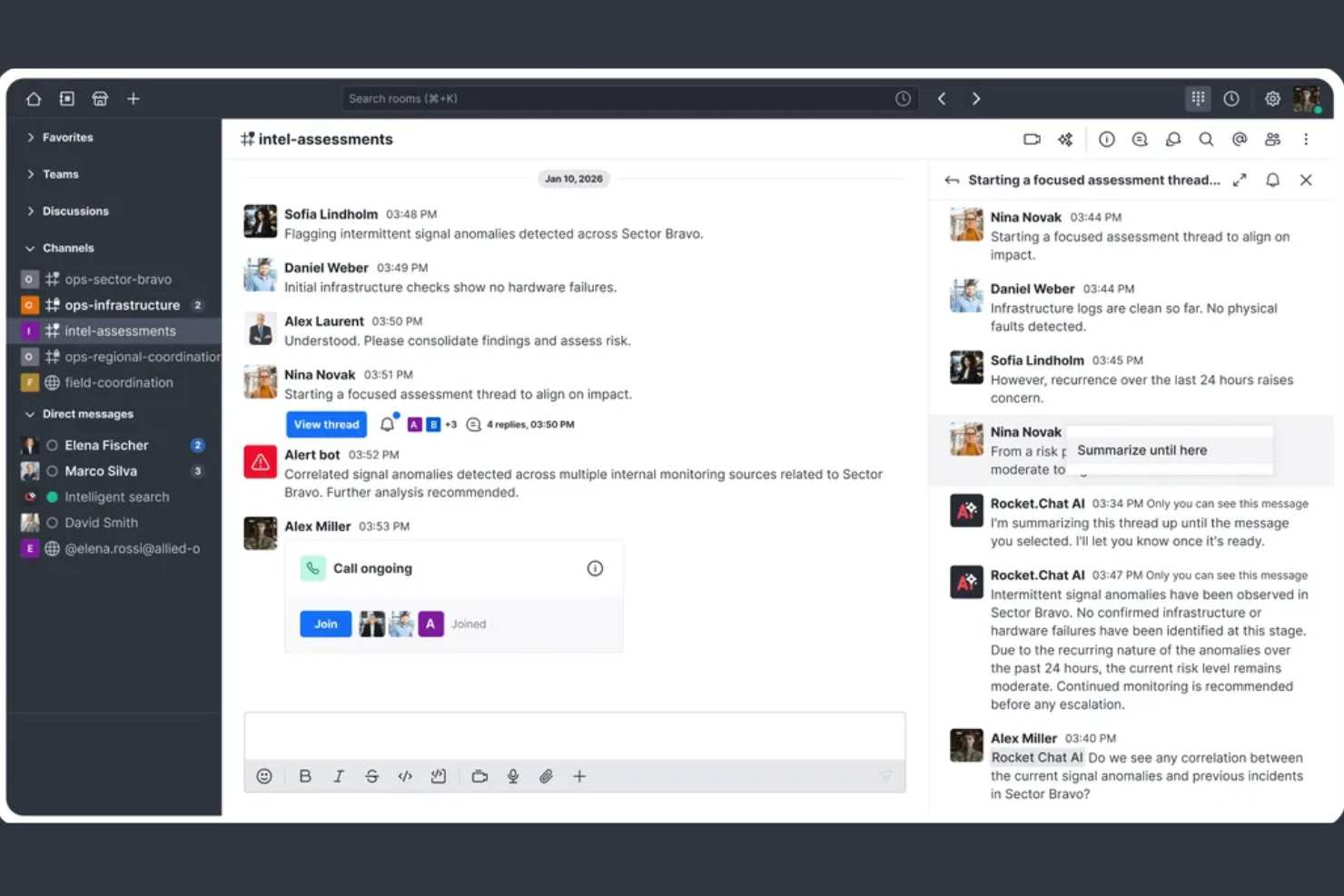
Rocket.Chat is an open-source internal communication platform that enables secure messaging, file sharing, voice and video calls, and extensive customization for teams needing full control over their workplace collaboration.
Who Is Rocket.Chat Best For?
Organizations with strict data privacy needs or those wanting to fully customize their communication environment in highly regulated sectors.
Why I Picked Rocket.Chat
I picked Rocket.Chat as one of the best because I can host it myself, deploy custom extensions, and review the full open-source code. I like having granular data residency control and transparency for sensitive internal messaging.
Rocket.Chat Key Features
- Omnichannel messaging: Manage chat, email, SMS, and social threads from one interface.
- Threaded conversations: Organize discussions and follow-ups within dedicated message threads.
- Role-based permissions: Set specific access and moderation levels for users.
- End-to-end encryption: Protect confidential communications with built-in encryption protocols.
Rocket.Chat Integrations
Rocket.Chat offers native integrations with Atlassian Jira, GitHub, GitLab, Slack, Zapier, Google Workspace, Microsoft 365, Salesforce, and Zendesk. An API is available for custom integrations.
Pros and Cons
Pros:
- Omnichannel inbox for all communications
- Advanced user and workspace permissions
- Open-source platform with self-hosting options
Cons:
- Requires manual server patch management
- Setups and updates require technical expertise

Twist
Best threaded messaging to reduce clutter
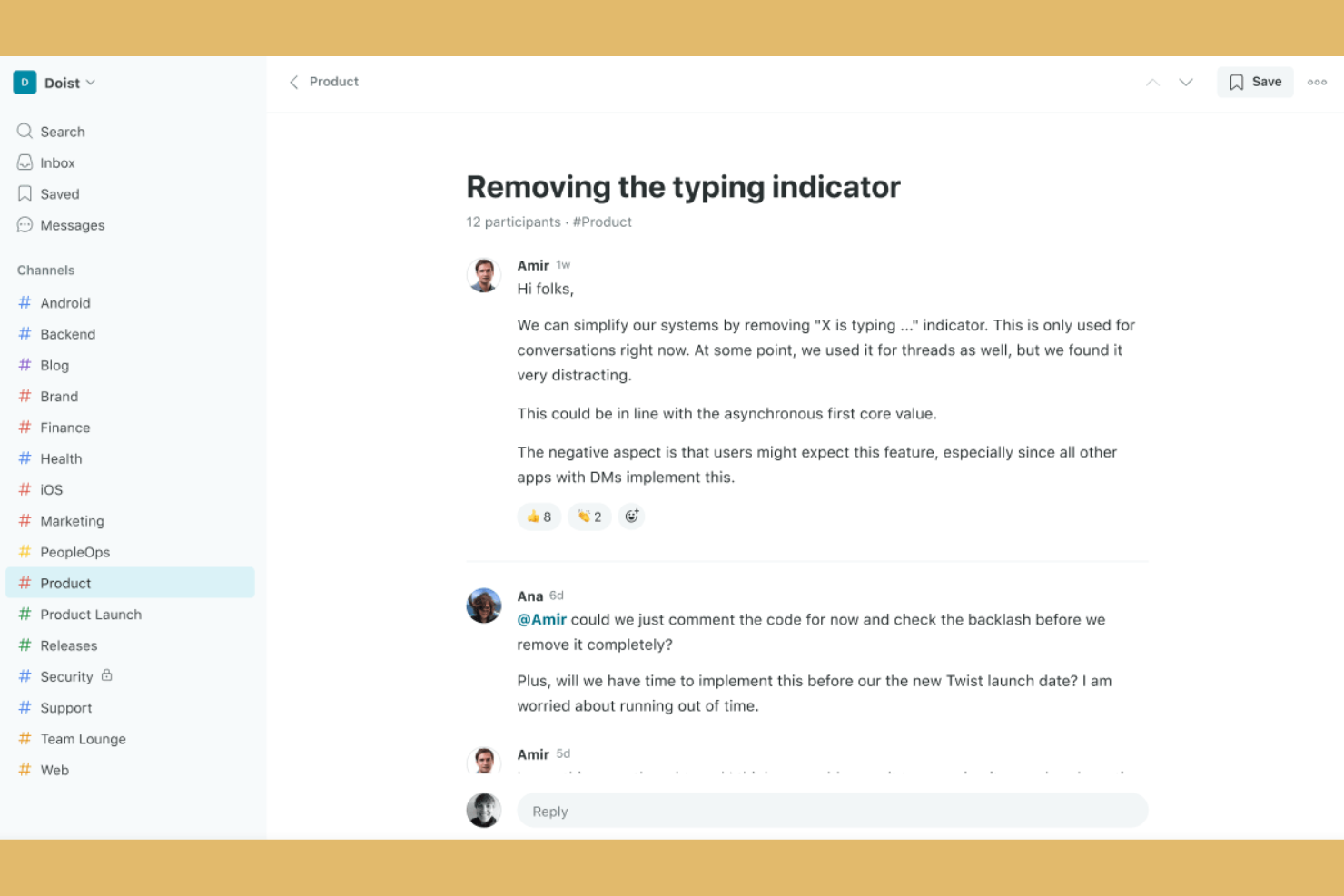
Twist is an internal communication and team collaboration platform that organizes messages in structured threads, enabling focused discussions, sharing of files, and easy cross-team search.
Who Is Twist Best For?
Async-first teams and distributed companies that want organized, distraction-free internal discussions.
Why I Picked Twist
I picked Twist as one of the best because my team can keep conversations clear and organized with persistent threaded messaging. I like how all discussions are broken into threads inside channels, letting us minimize chat noise and track projects with true transparency.
Twist Key Features
- Do not disturb settings: Set notification preferences to block interruptions during focused work.
- Message history search: Instantly search all channels and threads for past conversations and files.
- Guest access: Invite external collaborators to specific channels without giving full workspace access.
- Team directory: View and navigate the organization’s members with searchable team profiles.
Twist Integrations
Twist offers native integrations with Google Drive, GitHub, Todoist, Zapier, and RSS feeds. An API is available for custom integrations.
Pros and Cons
Pros:
- Searchable message history for all threads
- Enables async communication across time zones
- Threaded conversations keep topics organized
Cons:
- Few built-in formatting and emoji options
- Limited notification customization options
Other Internal Communication Tools
Here are some additional internal communication tools options that didn’t make it onto my shortlist, but are still worth checking out:
- Google Chat
For collaborating within Google Workspace
- Zoom Team Chat
Unified experience with video meetings
- Slack
For organizing chats into focused channels
- ProofHub
Collaborative proofing for creative teams
- Webex
Enterprise-grade video and team messaging
- Troop Messenger
Self-destructing messaging for secure data
- Spike
Email chat hybrid for unified conversations
- Element
Encrypted messaging with decentralization
- MangoApps
All-in-one platform for intranet and chat
- Ryver
Built-in task and workflow management


How I Evaluate Internal Communication Tools
I split my evaluation into two layers: the baseline a cross-functional team relies on daily—threaded channels, file sharing, PM integrations—and the differentiators that make one tool the right fit.
Core Functionality (Table Stakes For This List)
When I'm selecting tools for my list, I rank each one on a scale from 0 (does not offer the functionality) to 5 (excels in this area) for each core functionality listed below. Then, I calculate the tool's total score into a percentage. Each tool needs to achieve a minimum total score of 65% to be considered for inclusion.
- Real-Time Messaging: I evaluate whether the tool supports threaded conversations, mentions, and reactions—features that keep a sprint discussion organized instead of buried in a single chat stream.
- Channels and Group Spaces: Project teams need dedicated spaces per workstream, so I look for public/private channels with clear permissions, guest access, and archiving options.
- File Sharing and Collaboration: I check whether teams can share specs, mockups, or docs inline with previews and version tracking rather than bouncing between the chat tool and a separate drive.
- Video and Voice Communication: Quick huddles replace a lot of unnecessary meetings, so I evaluate whether a tool offers screen sharing, recording, and group calls natively or only through add-ons.
- Search and Message History: When a stakeholder asks why a scope decision was made three months ago, search needs to surface that thread fast—I look for filters by date, person, and channel.
- Third-Party Integrations: I check for native connections to PM tools like Jira, Asana, and Trello, so task updates and notifications flow directly into conversations without manual copy-pasting.
Once I have a list of tools that meet this criteria, I consider what sets each platform apart.
Differentiating Factors (What Sets Vendors Apart)
Here's how I compare and contrast different vendors:
Standout Features
AI-powered thread summaries are a major differentiator—when you're juggling three projects and missed a full day of discussion, a channel recap beats scrolling through hundreds of messages. I also evaluate whether a tool lets you turn a chat message into a task directly inside Jira or Asana. Workflow automation matters here too: I look for triggers that post reminders or status updates when a milestone shifts, keeping the team aligned without manual follow-ups.
Beyond Features
Security and compliance certifications like SOC 2 and ISO 27001 matter when your team handles sensitive product roadmaps or client data. I also evaluate how well a tool fits into the broader PM ecosystem—whether it syncs bi-directionally with platforms like Jira or just pushes one-way notifications. Pricing transparency is another factor I weigh, especially guest user policies that can quietly inflate costs when you're looping in contractors or external stakeholders on a regular basis.
How to Choose Internal Communication Tools
It’s easy to get bogged down in long feature lists and complex pricing structures. To help you stay focused as you work through your unique software selection process, here’s a checklist of factors to keep in mind:
| Factor | What to Consider |
|---|---|
| Scalability | Will the tool support your team if you double in size? Ask about user limits, channel caps, and admin controls. |
| Integrations | Does it connect natively to your core systems (e.g., project management, code repos, calendars)? Confirm before purchasing. |
| Customizability | Can you tailor notifications, workflows, and permissions to fit your team’s processes, not just defaults? |
| Ease of use | Will all team members adopt it quickly? Try to demo with people from different departments and technical levels. |
| Implementation and onboarding | What’s required to get everyone on board? Look for guided setup, migration help, and training content. |
| Cost | Are there hidden costs for active users, archives, or premium features? Project your usage over time to avoid surprises. |
| Security safeguards | Does the tool support SSL, SSO, granular permissions, and data encryption? Assess how it protects sensitive conversations. |
| Support availability | When support issues arise, is help available 24/7? Check support channels and response times, especially for critical outages. |
What Are Internal Communication Tools?
Internal communication tools are digital platforms that enable teams to send messages, share files, and collaborate within an organization. These platforms function as modern instant messaging tools that help teams organize discussions, coordinate workflows, and maintain documentation in centralized, searchable channels. They support real-time and asynchronous communication, making it easier to distribute company updates, share corporate podcasts, and keep everyone aligned and informed across projects, departments, or locations.
Features of Internal Communication Tools
When selecting internal communication tools, keep an eye out for the following key features:
- Direct messaging: Enables private, one-on-one conversations between team members for quick questions, sensitive topics, or side discussions without broadcasting messages to a larger group.
- Group chat channels: Let users create channels or rooms for specific teams, projects, or topics, keeping conversations organized and easy to find.
- File sharing: Allows easy uploading, sharing, and accessing of documents, images, or other files directly within the communication platform, often supporting previews and version history.
- Searchable message history: Provides robust search functionality so users can quickly find past messages, documents, or links without sorting through endless chat logs.
- Notifications and mentions: Offers customizable alerts to ensure team members see important updates or get immediate attention when needed.
- Threaded conversations: Supports breaking discussions into topic-specific threads within a channel, helping prevent confusion and keeping conversations more organized.
- Permissions and access controls: Enables administrators to define who can view, post, or manage conversations and files, ensuring privacy and appropriate access levels.
- Cross-platform accessibility: Delivers a consistent experience across web, desktop, and mobile devices, so teams can communicate from anywhere.
- Video and audio calls: Integrates real-time voice and video meeting capabilities, alongside virtual whiteboard tools, to facilitate deeper discussions or quick face-to-face check-ins.
- Integrations with other tools: Connects with calendars, task management, or file storage systems, allowing users to centralize work and receive updates from multiple platforms within the communication tool.
Benefits of Internal Communication Tools
Implementing internal communication tools provides several benefits for your team and your business. Here are a few you can look forward to:
- Faster decision-making: Centralized conversations speed up collaboration and reduce delays compared to traditional email communication threads and standard internal email.
- Clearer team alignment: Topic-based channels and threaded discussions make it easy for everyone to track project updates, replace long town halls, and follow up on action items.
- Improved knowledge retention: Searchable message history and shared files help teams capture ideas, discussions, decisions, and peer-to-peer employee recognition milestones for future reference.
- Greater flexibility for remote work: Cross-platform access and real-time notifications keep distributed or hybrid teams connected from anywhere.
- Stronger information security: Permissions and access controls give administrators confidence that sensitive conversations and files stay protected.
- Reduced communication noise: Features like mentions and granular notifications help team members focus on the most relevant conversations.
- Simplified workflow integration: Native integrations with calendars, task managers, and file storage systems bring workflows together in one place, providing useful data metrics to track engagement.
Costs and Pricing of Internal Communication Tools
Selecting internal communication tools requires an understanding of the various pricing models and plans available. Costs vary based on features, team size, add-ons, and more. The table below summarizes common plans, their average prices, and typical features included in internal communication tools solutions:
Plan Comparison Table for Internal Communication Tools
| Plan Type | Average Price | Common Features |
|---|---|---|
| Free Plan | $0 | Basic group chat, limited file sharing, searchable history with limits, and core mobile and desktop apps. |
| Personal Plan | $5–$8/user/month | Unlimited messaging, expanded file storage, message history search, basic integrations, and limited support. |
| Business Plan | $10–$15/user/month | Advanced search, admin controls, custom permissions, priority support, and more integrations and workflows. |
| Enterprise Plan | $20–$30/user/month | Enhanced security, compliance tools, premium support, advanced admin features, and customizable integrations. |
Internal Communication Tools FAQs
Here are some answers to common questions about internal communication tools:
What are the main challenges teams face when adopting internal communication tools?
Common challenges include overcoming initial resistance to new workflows, setting clear guidelines for channel usage, and managing notification overload. When building an internal communication strategy, organizations often struggle with deep information silos and maintaining strong employee engagement across different departments, especially when coordinating a hybrid work model. Planning training, encouraging regular employee feedback, and setting clear communication norms can make adoption easier while strengthening your overall company culture and improving everyday teamwork.
Do internal communication tools work for organizations of any size?
Yes, most tools scale well from small teams to large enterprises. They are designed to meet diverse communication needs, whether you are managing office staff or frontline workers who don’t sit at a desk. Selecting the right internal communication tools ensures software offers user management, adequate security, and flexible plans suitable for your team’s current and future size, ensuring effective internal communication can happen at every scale.
How can internal communication tools support asynchronous collaboration?
Internal communication tools enable asynchronous work by letting teams leave messages, files, and updates that others can review and respond to when available. This makes it easier to share information across different time zones during day-to-day operations. Threaded discussions, modern collaboration tools, and searchable histories help keep everyone aligned without needing to be online at the same time, turning the platform into a central hub for knowledge sharing and knowledge management.
What should you evaluate in terms of security with internal communication tools?
Check that the tool provides encryption, strong authentication, permissions, and compliance options, especially if you are connecting it to existing platforms like SharePoint or an internal social network. You’ll also want to review how the vendor handles data privacy, how they secure real-time communication, and whether they offer audit logs to protect employee communication and sensitive corporate data.
Can internal communication tools integrate with other business software?
Yes, many internal communication tools offer integrations with project management tools, productivity apps, and file storage platforms. This helps centralize tasks and company news, making it easier for teams to manage work without switching between multiple apps. By connecting your main communication channels to this single user-friendly hub, you can distribute internal comms, publish company-wide announcements, and broadcast critical employee experience updates to the entire team from one place.