
12 Formstack Alternatives in 2026

Formstack Alternatives Shortlist
Here’s my shortlist of Formstack alternatives:


The strongest Formstack alternatives combine flexible form building with workflow automation, powerful integrations, and secure data management. If you’re exploring options, for example, you likely need tools that handle complex forms, automate tasks, and integrate smoothly with your existing stack—while still maintaining usability. In addition, many platforms offer drag-and-drop builders, no-code customization, APIs, and document generation. Moreover, they often include features for payments, lead capture, and feedback. As a result, this list highlights the top options for 2026 to help you choose a scalable, user-friendly solution that fits your needs.
What Is Formstack?
Formstack is an online form builder and workflow automation tool used to create, manage, and automate digital forms and data collection processes. Formstack offers tools to design custom forms, route submissions, and integrate with other software for tasks like approvals, notifications, and reporting. It’s popular among organizations that need secure data handling, compliance features, and the ability to automate manual workflows without coding.
Best Formstack Alternatives Summary
This comparison chart summarizes pricing details for my top Formstack alternative selections to help you find the best one for your budget and business needs.
| Tool | Best For | Trial Info | Price | ||
|---|---|---|---|---|---|
| 1 | Best for GDPR compliance tools | Free plan + free demo available | From $18.50/month (billed annually) | Website | |
| 2 | Best for branded form customization | 7-day free trial + free plan available | From $24/month (billed annually) | Website | |
| 3 | Best for Salesforce integration | 14-day free trial + free demo available | From $59/month | Website | |
| 4 | Best for multi-language support | Free plan available + free demo available | From $10/month (billed annually) | Website | |
| 5 | Best for file upload capabilities | 14-day free trial available | From $21/month (billed annually) | Website | |
| 6 | Best for quick form creation | Free plan available | From $24/month (billed annually) | Website | |
| 7 | Best for unlimited response collection | Free plan available | From $15/month | Website | |
| 8 | Best for complex calculations | 14-day free trial + free plan available | From $19/month | Website | |
| 9 | Best for interactive survey experiences | Free plan available | From $28/month (billed annually) | Website | |
| 10 | Best for advanced conditional logic | Free plan available | From $19.50/month (billed annually) | Website |
Why You Can Trust Us
-

Accelo
Visit WebsiteThis is an aggregated rating for this tool including ratings from Crozdesk users and ratings from other sites.4.4 -
Forecast
Visit WebsiteThis is an aggregated rating for this tool including ratings from Crozdesk users and ratings from other sites.4.6 -
Wrike
Visit WebsiteThis is an aggregated rating for this tool including ratings from Crozdesk users and ratings from other sites.4.2





Formstack Alternatives Reviews
Below are my detailed summaries of the Formstack alternatives that made it onto my shortlist. My reviews offer a detailed look at the features, integrations, and best use cases of each tool to help you find the best one for you.


123FormBuilder gives organizations a way to create complex forms and automate data collection without coding. It’s a strong fit for teams in regulated industries or those handling sensitive information who need advanced compliance and security features. If your business needs to manage workflows and approvals while meeting strict data requirements, 123FormBuilder is worth considering.
Who Is 123FormBuilder Best For?
123FormBuilder suits organizations in the EU or other regulated regions that require GDPR-compliant data collection and processing.
Why 123FormBuilder Is a Good Formstack Alternative
When strict data privacy and compliance are top priorities, 123FormBuilder stands out as a strong alternative to Formstack. I picked it because it offers built-in GDPR compliance tools, including consent checkboxes, data processing agreements, and secure EU-based data storage. You can also configure granular user access and audit trails to support regulatory requirements. For teams that need to demonstrate compliance and protect sensitive data, these features make 123FormBuilder a reliable choice.
123FormBuilder Key Features
Some other features in 123FormBuilder that help teams manage forms and workflows include:
- Conditional logic: Build dynamic forms that show or hide fields based on user responses.
- Drag-and-drop form builder: Create and customize forms without any coding required.
- Multi-language support: Offer forms in multiple languages to reach a broader audience.
- Payment processor integrations: Collect payments directly through forms using Stripe, PayPal, and Square.
123FormBuilder Integrations
Integrations include Salesforce, Google Sheets, MailChimp, Dropbox, PayPal, Stripe, Shopify, Wix, HubSpot, Zendesk, and more.
Pros and Cons
Pros:
- Drag-and-drop builder with advanced field options
- Supports multi-language forms for global teams
- Built-in GDPR compliance and data privacy tools
Cons:
- Fewer automation triggers than Formstack
- Limited analytics and reporting customization

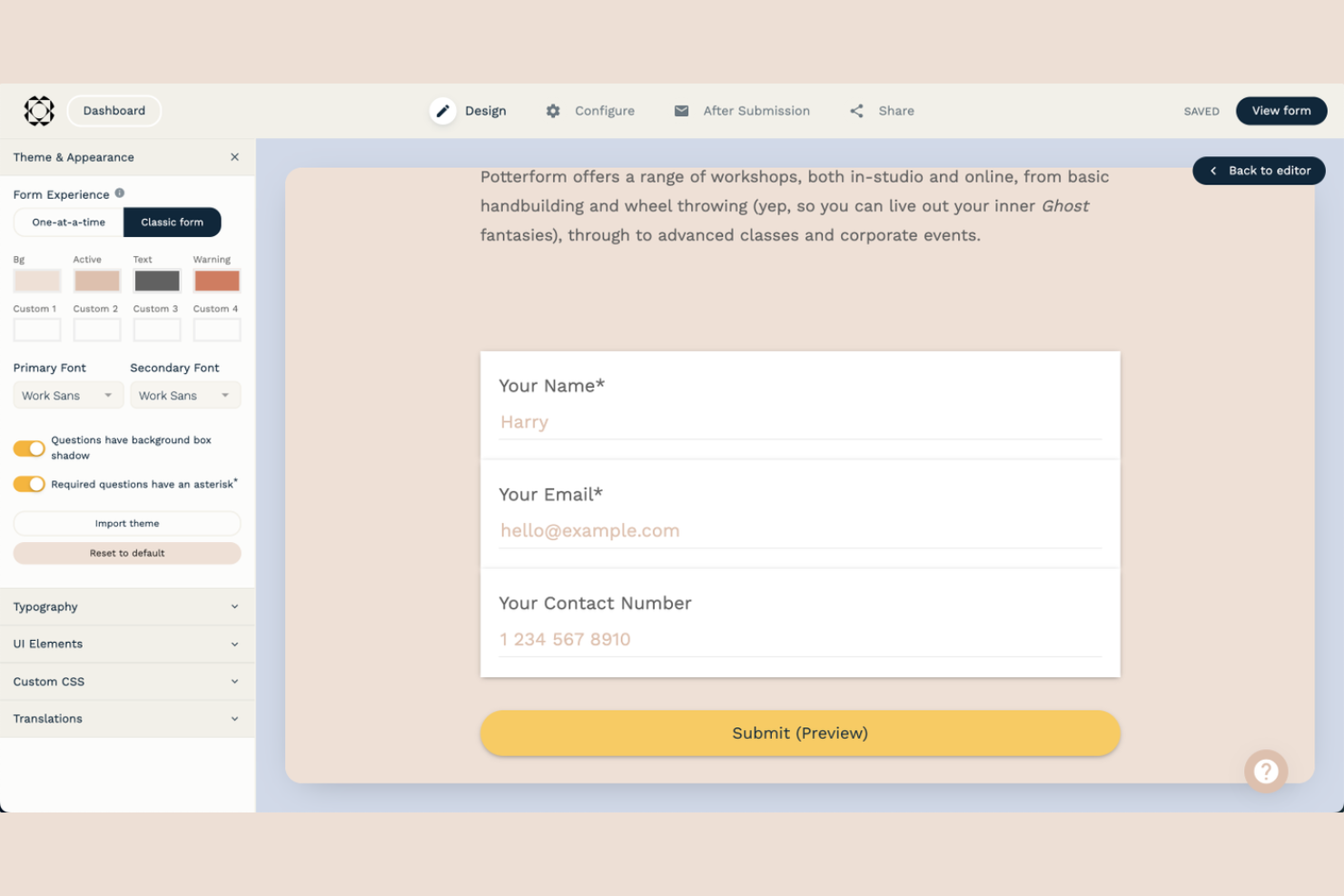
Paperform gives teams a way to create forms that look and feel like part of their brand. It’s a good fit for marketers, agencies, and businesses that want more design flexibility than most form builders offer. If you need to collect data while maintaining a polished, on-brand experience, Paperform is worth a closer look.
Who Is Paperform Best For?
Paperform suits marketing teams and agencies that need advanced branding and design control over their online forms.
Why Paperform Is a Good Formstack Alternative
If you need forms that match your brand’s look and feel, Paperform offers customization options that go far beyond what most form builders provide. I picked Paperform because you can control fonts, colors, backgrounds, and even embed images or videos directly into your forms. The platform also lets you use custom themes and advanced design settings, so every form can reflect your company’s identity. For teams that care about branded experiences, these features make Paperform a strong alternative to Formstack.
Paperform Key Features
Some other features in Paperform that help teams get more from their forms include:
- Conditional logic: Show or hide questions and sections based on user responses for dynamic form experiences.
- Payment integrations: Accept payments directly through forms using Stripe, PayPal, or Square.
- Automated workflows: Trigger actions like emails or integrations when forms are submitted.
- Analytics dashboard: Track submissions, completion rates, and user behavior within a built-in reporting interface.
Paperform Integrations
Integrations include Google Sheets, Mailchimp, ActiveCampaign, Trello, Slack, HubSpot, Asana, Monday.com, Intercom, ConvertKit, and more.
Pros and Cons
Pros:
- Free plan includes most core features
- Custom domains for branded form URLs
- Supports logic jumps and calculations
Cons:
- Fewer pre-built templates than competitors
- Limited analytics and reporting options

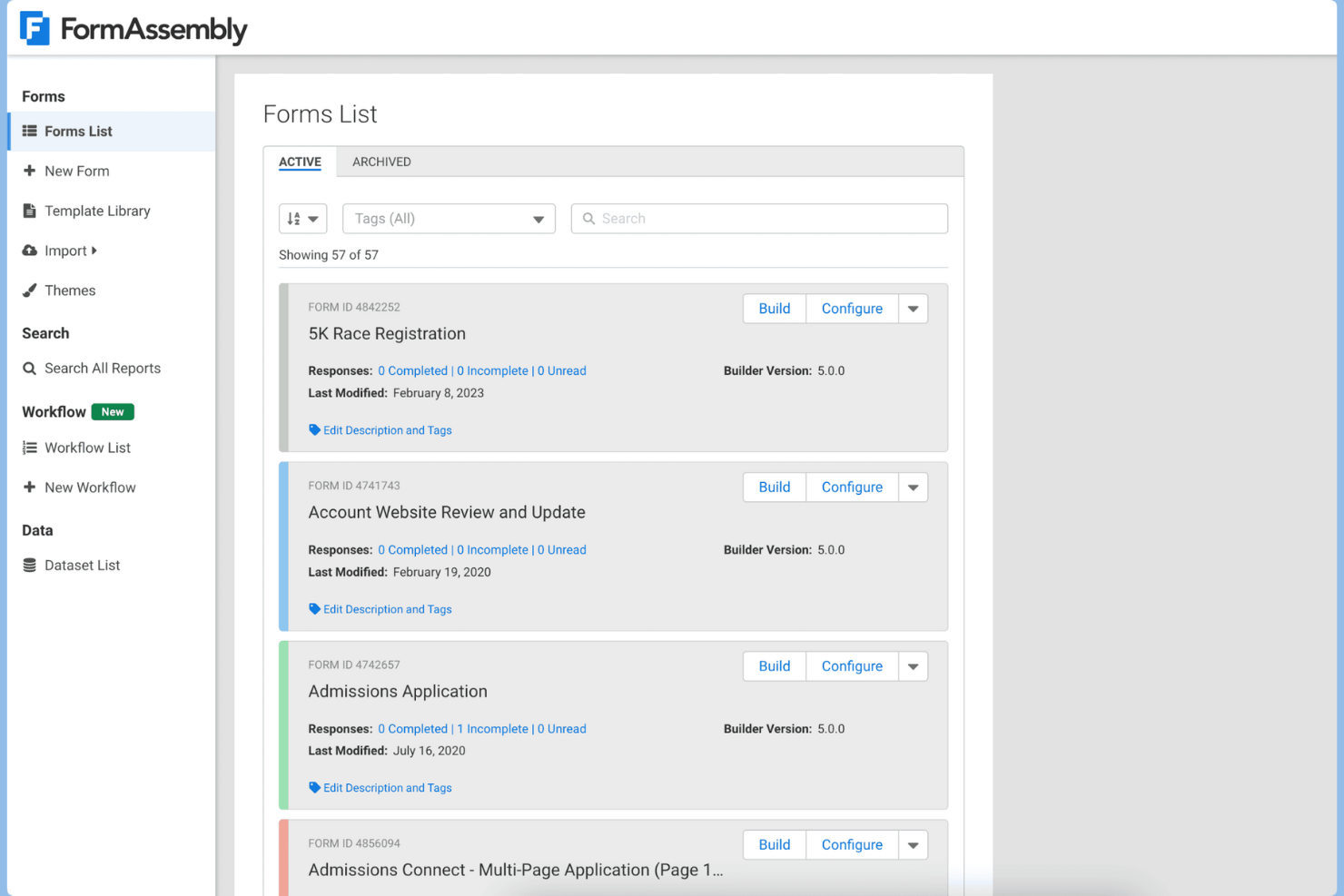
FormAssembly is a data collection platform designed for organizations that need secure, compliant forms and advanced data workflows. It’s a strong fit for teams in regulated industries or those handling sensitive information, like higher education, healthcare, and financial services. If you need to automate complex processes and ensure data privacy, FormAssembly addresses many of the gaps left by basic form builders.
Who Is FormAssembly Best For?
FormAssembly is a strong choice for organizations that rely on Salesforce and need deep, secure integration between their forms and CRM data.
Why FormAssembly Is a Good Formstack Alternative
What makes FormAssembly stand out as a Formstack alternative is its purpose-built Salesforce integration. I picked FormAssembly for teams that need to map form data directly to Salesforce objects, automate record creation, and trigger workflows without manual intervention. The platform also supports advanced data validation and compliance features, which are essential for organizations with strict data governance requirements. If your workflow depends on reliable, secure Salesforce connectivity, FormAssembly offers a level of integration depth that most other form builders can’t match.
FormAssembly Key Features
Some other features in FormAssembly that are valuable for teams building secure, data-driven forms include:
- Drag-and-drop form builder: Create and customize forms visually without coding or technical expertise.
- Conditional logic: Show or hide fields, sections, or pages based on user responses to streamline data collection.
- Data encryption at rest and in transit: Protect sensitive information with enterprise-grade security standards.
- Workflow automation: Route submissions, trigger notifications, and assign tasks automatically based on form responses.
FormAssembly Integrations
Integrations include Salesforce, HubSpot, Microsoft SharePoint, Google Drive, Dropbox, Google Sheets, Microsoft Excel, Stripe, PayPal, Authorize.Net, and more.
Pros and Cons
Pros:
- Built-in data encryption and security controls
- Supports complex data routing and workflows
- Strong compliance features for regulated industries
Cons:
- Fewer pre-built templates than Formstack
- Limited payment processor integrations


Zoho Forms gives businesses a way to build and manage forms with advanced data collection features. It’s a strong choice for organizations that need flexible workflows, approvals, and integrations with other Zoho apps. If your team wants to automate processes and centralize form data, Zoho Forms can help you get there.
Who Is Zoho Forms Best For?
Zoho Forms fits global teams or organizations that need to create and manage forms in multiple languages.
Why Zoho Forms Is a Good Formstack Alternative
What sets Zoho Forms apart is its built-in support for multi-language forms, which is something I rarely see handled as smoothly in other tools. You can create a single form and publish it in over 40 languages, letting respondents choose their preferred language from a dropdown. I appreciate that Zoho Forms also allows you to customize translations for every field and message, so nothing gets lost or misrepresented. For teams working across regions or serving multilingual audiences, these features make Zoho Forms a strong alternative to Formstack.
Zoho Forms Key Features
Some other features in Zoho Forms that stand out for teams managing forms and workflows include:
- Approval workflows: Route form submissions to specific team members for review and sign-off.
- Custom themes: Design forms with branded colors, fonts, and logos for a consistent look.
- Mobile app: Create, edit, and manage forms directly from iOS and Android devices.
- Field rules: Show or hide fields based on user responses to create dynamic, personalized forms.
Zoho Forms Integrations
Integrations include Zoho CRM, Zoho Desk, Zoho Campaigns, Zoho Flow, Google Sheets, Salesforce, Microsoft Teams, Slack, WordPress, Bigin, and more.
Pros and Cons
Pros:
- Custom themes and branding options available
- Built-in approval workflows for submissions
- Supports over 40 languages for forms
Cons:
- Lacks granular user permission controls
- Fewer advanced automation options than peers

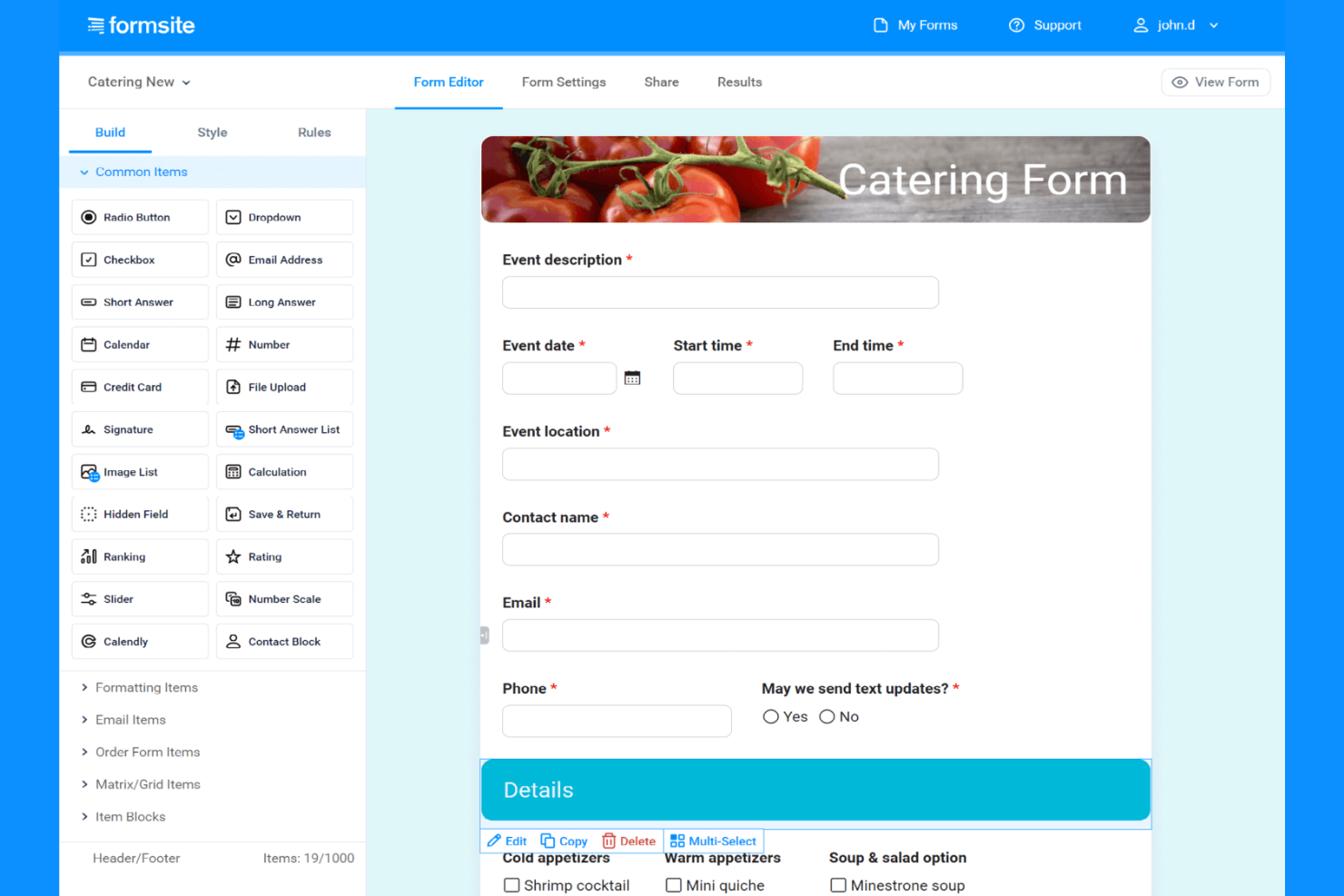
Formsite gives teams a way to build custom online forms with advanced data collection features. It’s a strong fit for organizations that need to gather structured information, manage submissions, and automate workflows. If your business handles complex form requirements or needs to process large volumes of responses, Formsite offers the flexibility and control to support those needs.
Who Is Formsite Best For?
Formsite is a strong choice for HR teams, educators, and service providers that need to collect and manage file uploads securely through online forms.
Why Formsite Is a Good Formstack Alternative
For teams that need to collect files through online forms, Formsite offers more flexibility than many other options. I picked it because you can set file size limits, restrict file types, and allow multiple uploads per submission. The platform also provides secure storage and lets you organize uploaded files within your account. These features make Formsite a practical choice for organizations that rely on gathering documents, images, or other files as part of their workflows.
Formsite Key Features
Some other features in Formsite that help teams manage forms and workflows include:
- Conditional logic: Build dynamic forms that show or hide questions based on user responses.
- Data encryption: Protect sensitive information with encryption for both data at rest and in transit.
- Custom branding: Add your organization’s logo, colors, and styles to match your brand identity.
- Automated notifications: Set up email alerts for form submissions, approvals, or status changes.
Formsite Integrations
Integrations include Salesforce, Google Drive, Google Docs, Dropbox, Mailchimp, Slack, Box, OneDrive, Amazon S3, DocuSign, and more.
Pros and Cons
Pros:
- Allows advanced conditional logic branching
- Offers detailed submission analytics dashboard
- Supports large file uploads per form
Cons:
- Cannot assign granular user permissions
- No built-in workflow automation tools

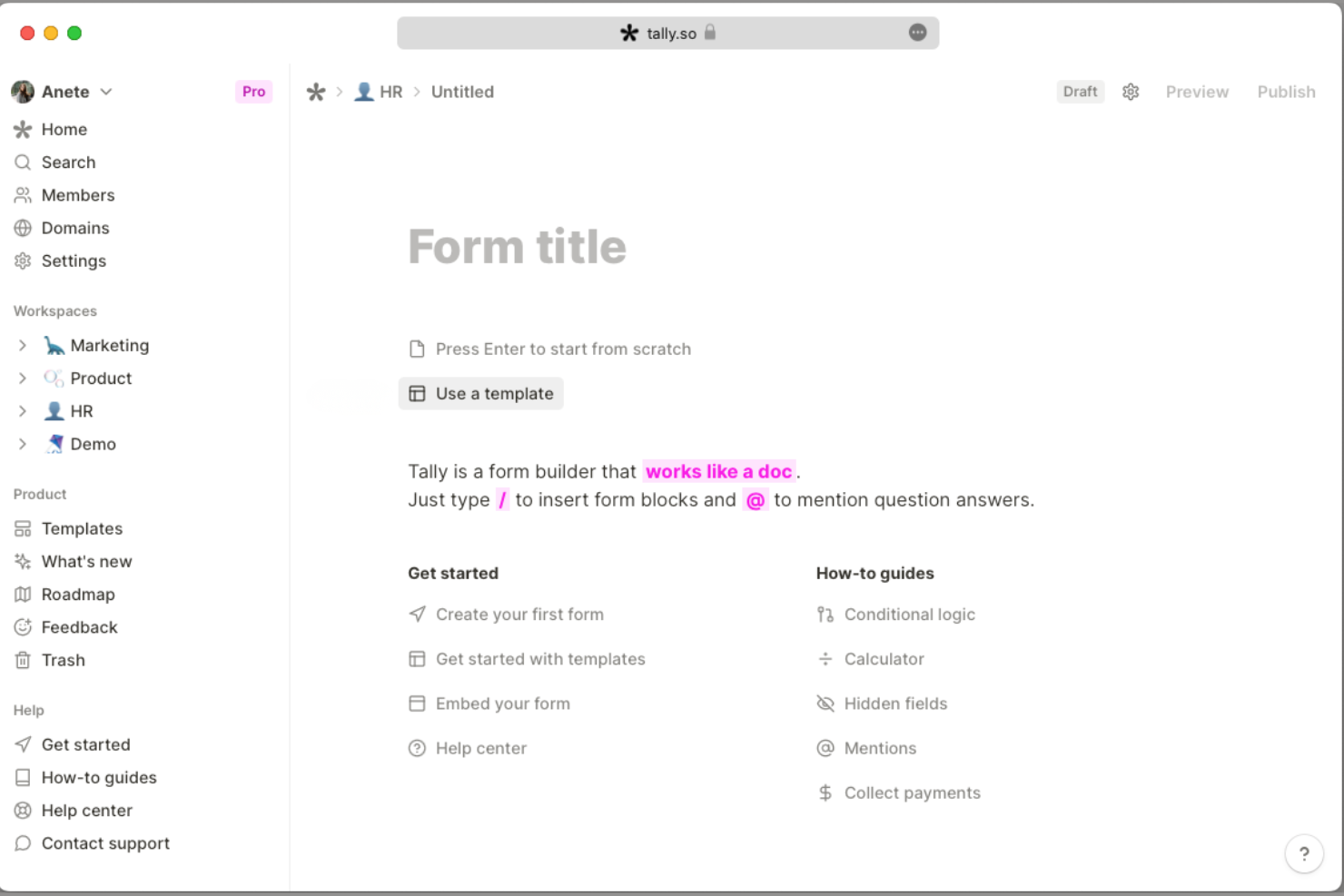
Tally offers a minimalist approach to online form creation that appeals to teams who want to launch forms quickly without technical setup. It’s especially useful for startups, creators, and small businesses that need to collect information or feedback with minimal friction. If you’re looking for a tool that removes unnecessary complexity from form building, Tally is worth considering.
Who Is Tally Best For?
Tally is a strong fit for startups, creators, and small teams that need to launch simple forms quickly without technical barriers.
Why Tally Is a Good Formstack Alternative
When you need to create and publish forms in minutes, Tally stands out for its speed and simplicity. I picked Tally for teams that want to skip complex setup and get straight to collecting responses. The platform lets you build unlimited forms with a Notion-like interface, and you can add logic jumps or payment fields without extra plugins. If your priority is launching straightforward forms fast, Tally delivers a focused experience that’s hard to match.
Tally Key Features
Some other features in Tally that help teams get more from their forms include:
- Custom domains: Publish forms using your own branded URL for a consistent experience.
- Hidden fields: Pass data through forms without displaying it to respondents for tracking or personalization.
- Email notifications: Receive instant alerts for new submissions or set up custom notification rules.
- Response exports: Download form responses as CSV files for further analysis or reporting.
Tally Integrations
Integrations include Notion, Slack, Airtable, Google Sheets, Coda, Linear, Discord, Webhooks, Make, n8n, and more.
Pros and Cons
Pros:
- Custom domains for branded form URLs
- Supports logic jumps and calculations
- Unlimited forms and responses on all plans
Cons:
- Lacks advanced workflow automation tools
- No built-in PDF generation for responses


Fillout offers a modern approach to building online forms for teams that need flexibility and control over data collection. It’s a strong fit for operations, HR, and marketing teams that want to manage high-volume submissions without hitting response caps. If you’re looking for a tool that supports advanced workflows and detailed customization, Fillout addresses many of the limitations found in traditional form builders.
Who Is Fillout Best For?
Fillout suits teams and organizations that need to collect unlimited responses without worrying about hitting submission limits.
Why Fillout Is a Good Formstack Alternative
One thing that sets Fillout apart from other form builders is its unlimited response collection on all paid plans. I picked Fillout for teams that regularly run large-scale surveys or intake forms and can’t afford to be restricted by monthly submission caps. Features like advanced conditional logic and customizable workflows help you manage high volumes of data without sacrificing control or flexibility. If you need a solution that won’t limit your growth as your response numbers climb, Fillout is a strong alternative to Formstack.
Fillout Key Features
Some other features in Fillout that stand out for teams building forms and automations include:
- Custom Branding: Apply your company’s logo, colors, and fonts to every form for a consistent brand experience.
- Prefill and Hidden Fields: Automatically populate form fields or pass data invisibly to streamline user input and data tracking.
- Multi-Page Forms: Break longer forms into multiple pages to improve completion rates and organize complex workflows.
- Team Collaboration: Invite colleagues to co-edit forms, manage permissions, and share access within a centralized workspace.
Fillout Integrations
Integrations include Airtable, HubSpot, Notion, Stripe, Google Docs, Salesforce, Slack, monday.com, SmartSuite, ClickUp, and more.
Pros and Cons
Pros:
- Supports multi-page and conversational forms
- Modern templates with strong visual design
- Advanced conditional logic for dynamic forms
Cons:
- No built-in e-signature feature
- Limited offline form capabilities
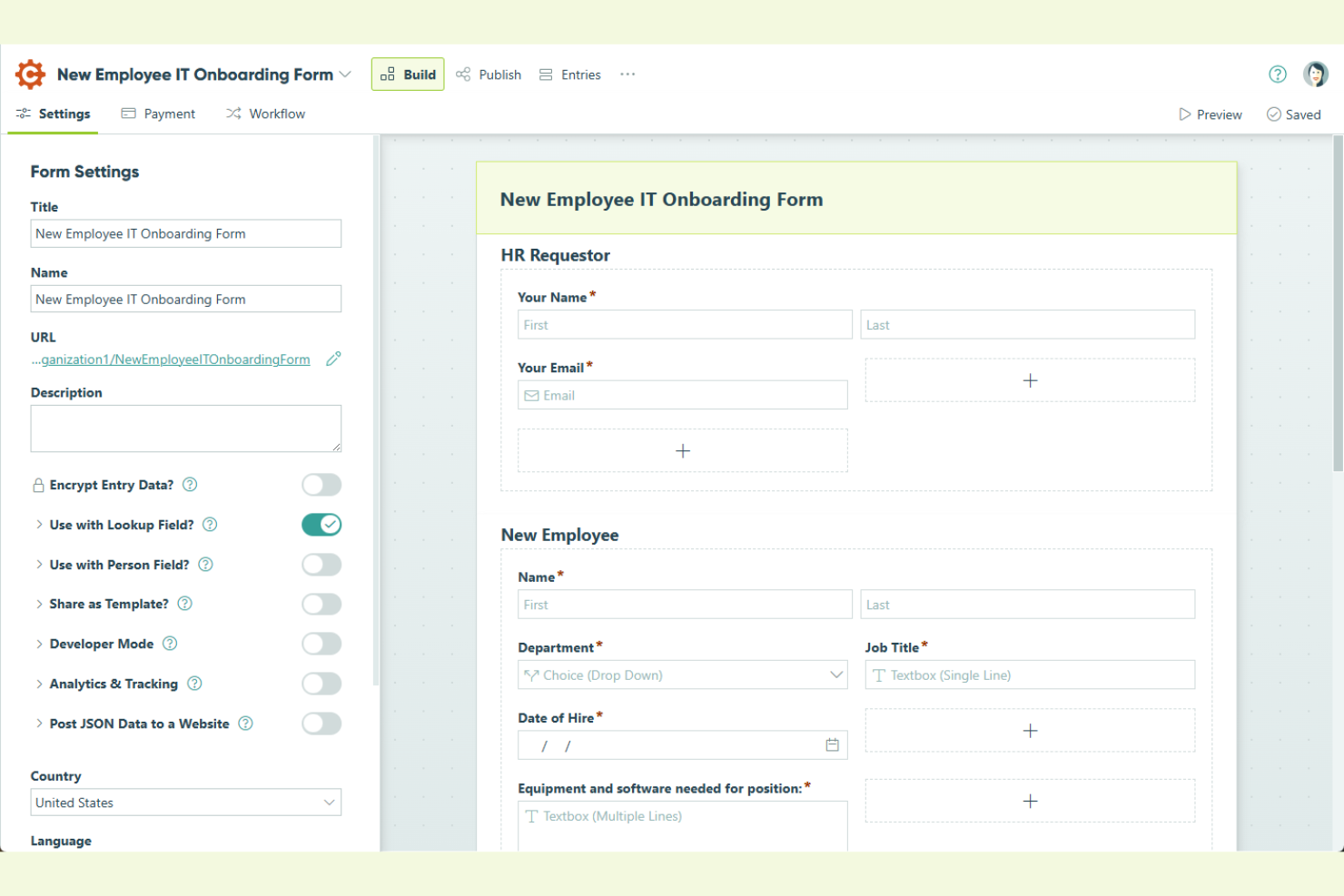
Cognito Forms offers advanced form-building capabilities for teams that need more than just basic data collection. It’s a strong fit for organizations that want to automate calculations, manage complex workflows, or handle detailed data validation within their forms. If you’re looking for a solution that supports intricate logic and dynamic fields, Cognito Forms addresses many of the limitations found in simpler form builders.
Who Is Cognito Forms Best For?
Cognito Forms is a strong choice for finance, education, or operations teams that need to automate complex calculations and logic within their online forms.
Why Cognito Forms Is a Good Formstack Alternative
What sets Cognito Forms apart as a Formstack alternative is its ability to handle advanced calculations directly within forms. I picked Cognito Forms for teams that need to build forms with dynamic fields, conditional logic, and real-time math functions—capabilities that go beyond what most form builders offer. The platform supports calculated fields, repeating sections, and custom validation rules, making it ideal for scenarios like order forms, registrations, or applications that require on-the-fly computations. If your workflow depends on capturing and processing complex data inputs, Cognito Forms delivers flexibility that’s hard to match.
Cognito Forms Key Features
Some other features in Cognito Forms that stand out for teams needing more than just calculations include:
- File uploads: Allow users to attach documents, images, or other files directly through your forms.
- Approval workflows: Set up multi-step approval processes for submissions within the platform.
- Data encryption: Protect sensitive form data both in transit and at rest with built-in encryption.
- Custom branding: Apply your organization’s logo, colors, and styles to maintain a consistent brand experience.
Cognito Forms Integrations
Integrations include ActiveCampaign, Adobe Acrobat Sign, Airtable, Amazon S3, AppSheet, Asana, Azure Blob Storage, Box, Calendly, ClickUp, and more.
Pros and Cons
Pros:
- Allows unlimited form submissions on paid plans
- Offers multi-step approval workflow automation
- Supports advanced calculations and conditional logic
Cons:
- Mobile form customization options are limited
- No built-in payment processor for ACH


Typeform offers a conversational approach to online forms and surveys, making it a strong choice for teams that want to engage respondents in a more interactive way. It’s especially appealing to marketers, UX researchers, and customer experience professionals who need to collect feedback or data without overwhelming users. If you’re looking for a tool that helps boost response rates and delivers a more human survey experience, Typeform is worth considering.
Who Is Typeform Best For?
Typeform fits marketing, research, and customer experience teams that want to create interactive, engaging surveys and forms.
Why Typeform Is a Good Formstack Alternative
When you need to create surveys that feel more like conversations than static forms, Typeform stands out. I picked Typeform because its one-question-at-a-time interface and customizable design options help keep respondents engaged from start to finish. Features like logic jumps and multimedia support let you build interactive experiences that adapt to each user’s answers. If you want to gather richer feedback and reduce survey fatigue, Typeform offers a unique approach compared to traditional form builders like Formstack.
Typeform Key Features
Some other features in Typeform that are useful for teams building forms and automations include:
- Question Bank: Access a library of pre-written questions to speed up form creation and maintain consistency across surveys.
- Hidden Fields: Pass data into forms via URL parameters to personalize questions or track respondents without manual input.
- Response Notifications: Set up automated email alerts for new responses so your team stays updated in real time.
- Collaboration Tools: Invite team members to edit, comment, and manage forms together within a shared workspace.
Typeform Integrations
Integrations include HubSpot, Slack, Mailchimp, monday.com, Google Analytics, Salesforce, Intercom, Klaviyo, Calendly, Notion, and more.
Pros and Cons
Pros:
- Multimedia support for images and video questions
- Advanced logic jumps for personalized question paths
- Conversational forms increase survey completion rates
Cons:
- No HIPAA compliance on any plan
- Limited workflow automation compared to Formstack

Jotform offers a flexible form builder designed for teams that need advanced customization and control over data collection. It’s a strong fit for organizations in healthcare, education, and event management that require HIPAA compliance, payment integrations, or detailed approval workflows. If you’re looking for a solution that goes beyond basic forms and supports complex processes, Jotform is worth considering.
Who Is Jotform Best For?
Jotform suits operations, HR, and IT teams in midsize to large organizations that need to build forms with advanced conditional logic for complex workflows.
Why Jotform Is a Good Formstack Alternative
Jotform stands out for its advanced conditional logic, which lets you create dynamic forms that adapt to user input in real time. I picked Jotform because it allows you to show or hide fields, send custom notifications, and trigger approval flows based on specific responses. These features are especially useful for teams managing complex onboarding, registration, or request processes. If you need forms that can handle branching logic and automate multi-step workflows, Jotform offers the flexibility that Formstack users often look for.
Jotform Key Features
Some other features in Jotform that are useful for teams managing forms and workflows include:
- PDF Form Converter: Convert existing PDF forms into online forms that retain original formatting and collect responses digitally.
- Payment Processor Integrations: Connect with Stripe, PayPal, Square, and other payment gateways to collect payments directly through your forms.
- HIPAA Compliance Tools: Enable HIPAA-compliant forms and data handling for organizations in healthcare or those managing sensitive information.
- Form Analytics Dashboard: Access built-in analytics to track form views, submission rates, and user behavior for ongoing optimization.
Jotform Integrations
Integrations include Google Sheets, PayPal, Google Drive, Mailchimp, Dropbox, Stripe, HubSpot, Google Calendar, Slack, Salesforce, and more.
Pros and Cons
Pros:
- Built-in analytics for form performance tracking
- PDF form conversion for legacy documents
- HIPAA compliance available on higher plans
Cons:
- Branding removal only on paid plans
- Approval workflow features require higher tiers
Other Formstack Alternatives
Here are some additional Formstack alternatives that didn’t make it onto my shortlist, but are still worth checking out:
- Google Forms
With Google Workspace integration
- Feathery
For developer-friendly customization


Formstack Alternatives Selection Criteria
When selecting the best Formstack alternatives to include in this list, I considered common buyer needs and pain points related to online form builder and workflow automation tool products, like collecting structured data from users and automating repetitive form-based processes. I also used the following framework to keep my evaluation structured and fair:
Core Functionality (25% of total score)
To be considered for inclusion in this list, each solution had to fulfill these common use cases:
- Build and customize online forms
- Collect and store form responses
- Export or sync data to other tools
- Set up automated notifications or workflows
- Support conditional logic in forms
Additional Standout Features (25% of total score)
To help further narrow down the competition, I also looked for unique features, such as:
- File upload and storage capabilities
- Advanced data encryption options
- Custom branding and white labeling
- Multi-language form support
- Built-in approval or workflow routing
Usability (10% of total score)
To get a sense of the usability of each system, I considered the following:
- Clean and intuitive user interface
- Drag-and-drop form builder functionality
- Clear navigation and menu structure
- Responsive design for mobile and desktop
- Minimal clicks to complete common tasks
Onboarding (10% of total score)
To evaluate the onboarding experience for each platform, I considered the following:
- Availability of step-by-step product tours
- Access to template libraries for quick setup
- Training videos and documentation resources
- In-app chatbots or guided help
- Webinars or live onboarding sessions
Customer Support (10% of total score)
To assess each software provider’s customer support services, I considered the following:
- Multiple support channels like chat, email, and phone
- Fast response times to inquiries
- Access to a searchable knowledge base
- Availability of onboarding or setup assistance
- Community forums or user groups
Value For Money (10% of total score)
To evaluate the value for money of each platform, I considered the following:
- Transparent and flexible pricing plans
- Free trial or free tier availability
- Features included at each pricing level
- No hidden fees or surprise charges
- Discounts for annual or volume commitments
Customer Reviews (10% of total score)
To get a sense of overall customer satisfaction, I considered the following when reading customer reviews:
- Positive feedback on reliability and uptime
- Comments on ease of use and learning curve
- Reports of helpful and responsive support
- User satisfaction with integrations and features
- Critiques about limitations or missing functionality
Why Look for a Formstack Alternative?
While Formstack is a good choice of online form builder and workflow automation tool, there are a number of reasons why some users seek out alternative solutions. You might be looking for a Formstack alternative because…
- You need more advanced file upload options
- You want deeper customization for branding
- You require integrations not supported by Formstack
- You need more granular user permission controls
- You want better support for multi-language forms
- You require more flexible workflow automation
If any of these sound like you, you’ve come to the right place. My list contains several online form builders and workflow automation tool options that are better suited for teams facing these challenges with Formstack and looking for alternative solutions.
Formstack Key Features
Here are some of the key features of Formstack, to help you contrast and compare what alternative solutions offer:
- Drag-and-drop form builder: Create custom forms by dragging and arranging fields without any coding, making it easy for users of all technical backgrounds to design forms that fit their needs.
- Conditional logic: Show or hide questions, sections, or pages based on user responses, allowing you to build dynamic forms that adapt to each respondent’s input.
- Workflow automation: Automate multi-step processes by routing submissions for approvals, notifications, or follow-up actions, streamlining repetitive tasks and reducing manual work.
- Data encryption: Protect sensitive information with encryption both in transit and at rest, supporting compliance with data privacy regulations.
- E-signature collection: Capture legally binding electronic signatures directly within forms, enabling secure document signing for contracts, waivers, and agreements.
- Payment processing: Accept payments through integrated gateways like Stripe, PayPal, and Authorize.net, making it possible to collect fees, donations, or registrations directly from your forms.
- Custom branding: Apply your organization’s logo, colors, and styles to forms, ensuring a consistent and professional appearance that matches your brand identity.
- Mobile-responsive design: Ensure forms automatically adjust to display correctly on any device, so users can complete forms from smartphones, tablets, or desktops.
- Advanced analytics and reporting: Track form performance, analyze submission data, and generate reports to gain insights into user behavior and form effectiveness.
Integration with third-party tools: Connect forms to popular apps like Salesforce, Google Sheets, and Mailchimp to automate data transfer and extend your workflow capabilities.