
13 Best Engineering Document Management Software for 2026

Engineering Document Management Software Shortlist
Here’s my shortlist of engineering document management software:


Engineering document management software helps your team organize, control, and track technical documents throughout the project lifecycle. If you’re searching for the best engineering document management system to manage drawings, revisions, and compliance records, you know how quickly files can multiply and how critical it is to keep team members aligned. These platforms support change management, improve data management, and help standardize business processes across engineering projects.
This list will help you compare leading solutions and choose software that supports collaboration, compliance, and digital transformation across your engineering workflows.
Why You Can Trust Us
Best Engineering Document Management Software Summary
This comparison chart summarizes pricing details for my top engineering document management software selections to help you find the best one for your budget and business needs.
| Tool | Best For | Trial Info | Price | ||
|---|---|---|---|---|---|
| 1 | Best for large-scale enterprise deployments | Free trial + free demo available | Pricing upon request | Website | |
| 2 | Best for metadata-based organization | Free demo + 30-day free trial available | Pricing upon request | Website | |
| 3 | Best for compliance-driven industries | Free demo available | From $58/user/month | Website | |
| 4 | Best for Microsoft Office integration | Free demo available | Pricing upon request | Website | |
| 5 | Best for controlled revision management | Free demo available | Pricing upon request | Website | |
| 6 | Best with CAD integration workflows | Not available | From $14/user/month (billed annually) | Website | |
| 7 | Best for rapid cloud implementation | Free demo available | From $399/month | Website | |
| 8 | Best for capital project documentation | Free demo available | Pricing upon request | Website | |
| 9 | Best for secure on-premises installations | Free demo available | Pricing upon request | Website | |
| 10 | Best for multi-site collaboration | Free demo available | Pricing upon request | Website | |
| 11 | Best for infrastructure project coordination | Not available | Pricing upon request | Website |
-

Insightful
Visit WebsiteThis is an aggregated rating for this tool including ratings from Crozdesk users and ratings from other sites.4.8 -
Accelo
Visit WebsiteThis is an aggregated rating for this tool including ratings from Crozdesk users and ratings from other sites.4.4 -
Forecast
Visit WebsiteThis is an aggregated rating for this tool including ratings from Crozdesk users and ratings from other sites.4.6




Engineering Document Management Software Reviews
Below are my detailed summaries of engineering document management software that made it onto my shortlist. My reviews offer a detailed look at the features, best use cases, and integrations of each platform to help you find the best one for your team.

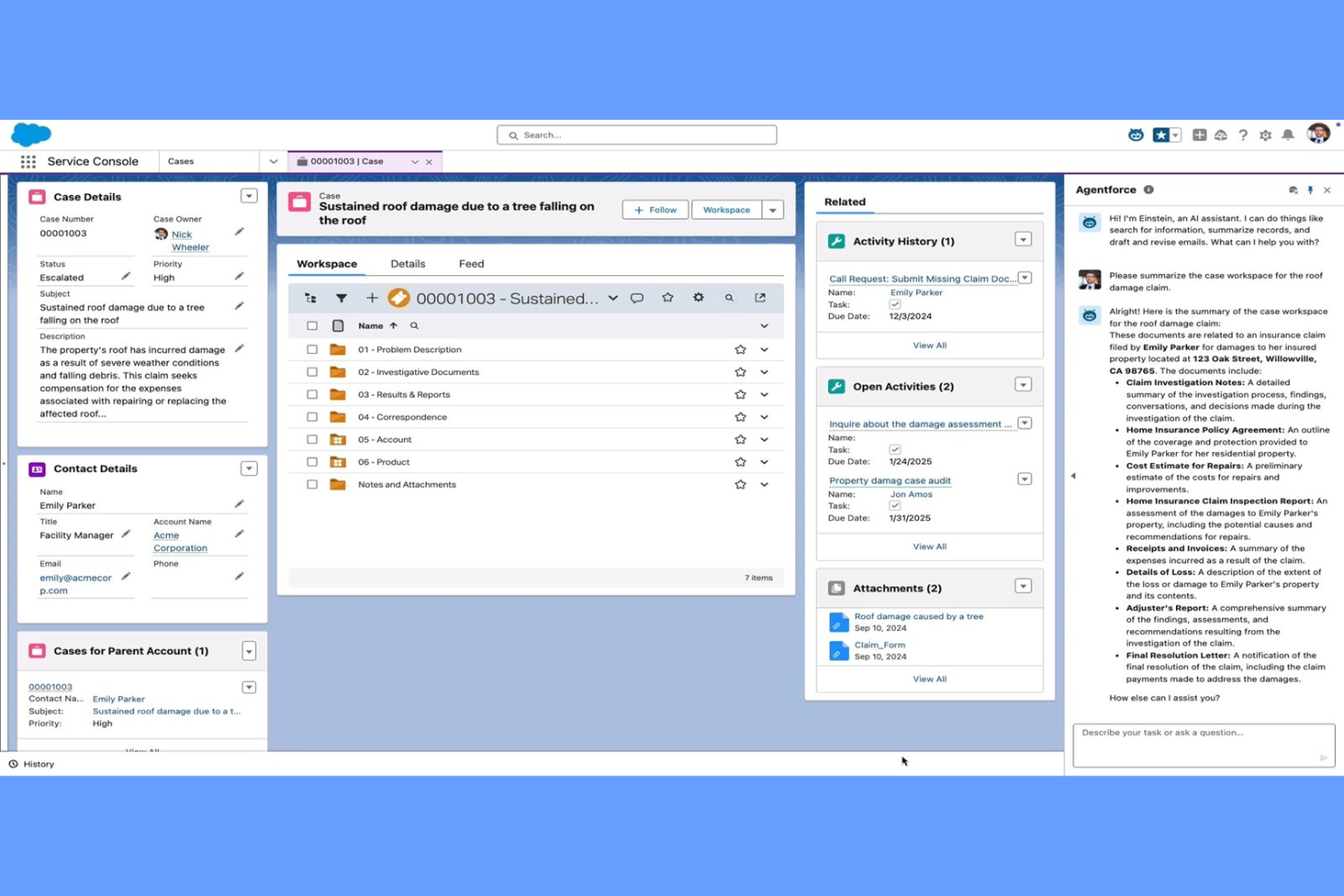
OpenText offers a document management platform designed for organizations handling complex engineering projects at scale. It’s a strong fit for enterprises that need to manage high volumes of technical documents, strict compliance requirements, and global collaboration. Teams in industries like energy, utilities, and manufacturing use OpenText to centralize control over drawings, revisions, and project records, helping team members find the right document quickly through a more user-friendly interface.
Why I Picked OpenText
I chose OpenText for this list because it’s purpose-built to handle the demands of large-scale enterprise deployments. The platform supports advanced document control, including automated versioning and audit trails, which are essential for organizations managing thousands of engineering files across multiple projects. I also appreciate its granular permissions system, which lets teams set access levels for different departments, contractors, or regions. These capabilities make OpenText a strong choice for enterprises that need centralized oversight and compliance across complex engineering environments.
OpenText Key Features
Some other features that engineering teams may find useful include:
- Document Workflow Automation: Set up custom workflows to route documents for review, approval, and distribution.
- Integrated Search Tools: Use advanced search capabilities to quickly locate drawings, specifications, or correspondence by metadata or content.
- Mobile Access: Access, review, and annotate engineering documents from mobile devices in the field or on-site.
- Records Management: Apply retention policies and manage the lifecycle of engineering documents to support compliance and audit readiness.
OpenText Integrations
Integrations include SAP, SAP SuccessFactors, Microsoft 365, Guidewire, Salesforce, and more.
Pros and Cons
Pros:
- Scales for global, multi-site deployments
- Integrates with major enterprise platforms
- Offers granular user and group permissions
Cons:
- Search performance slows with very large archives
- Advanced features may require extra licensing

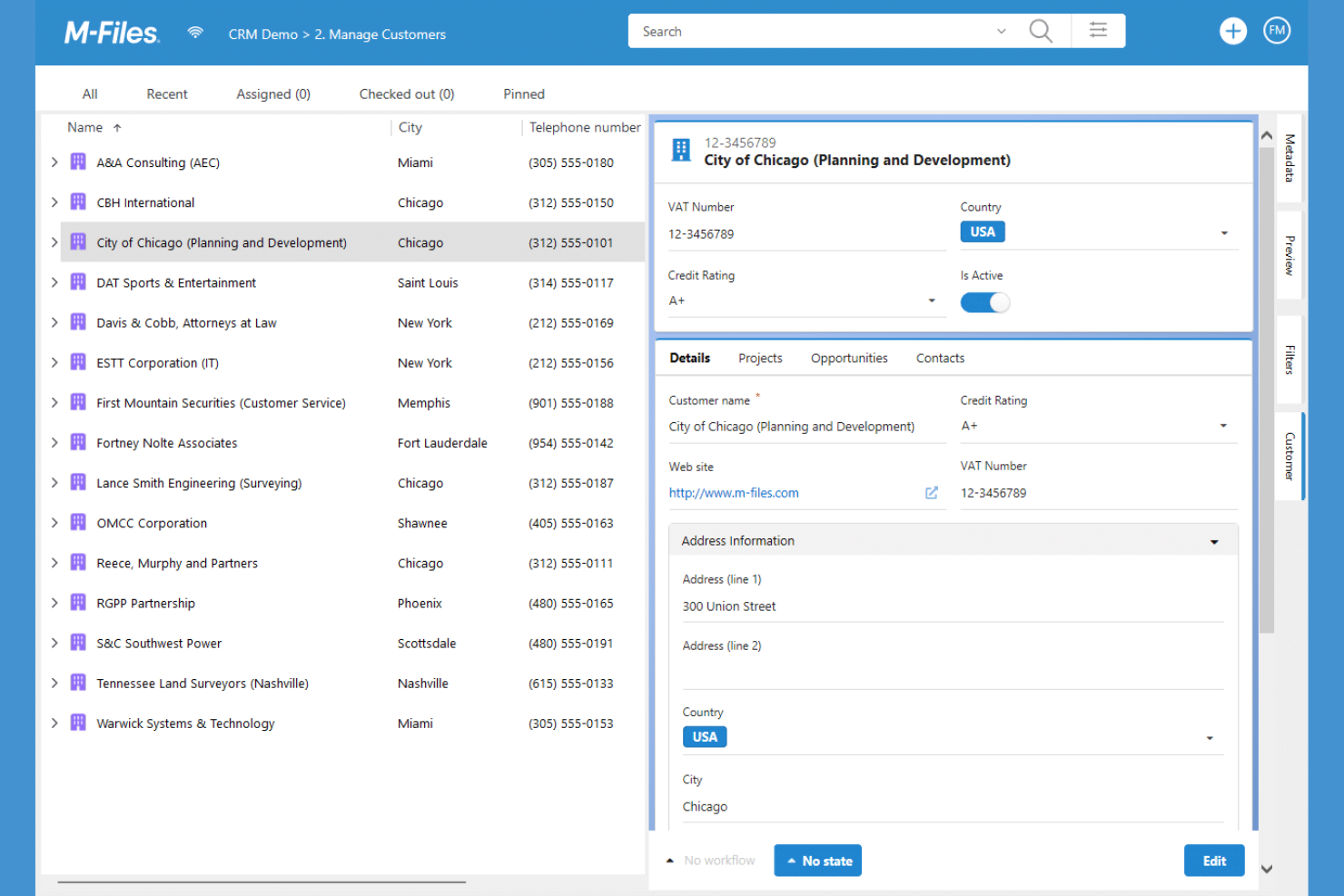
M-Files takes a metadata-driven approach to engineering document management, making it easier for teams to organize and retrieve files based on context rather than folder location. This platform is a strong fit for organizations that handle complex projects and need to track documents by project, asset, or compliance requirement. Its unique structure helps reduce time spent searching for information and supports strict version control across distributed teams.
Why I Picked M-Files
Unlike traditional document management systems that rely on rigid folder structures, M-Files organizes engineering documents using metadata, which means you can find files based on project, asset, or document type. This approach is especially useful for engineering teams that need to manage large volumes of technical documents and drawings across multiple projects. I like that M-Files automatically tags and categorizes documents, making retrieval and compliance tracking much more efficient. Its metadata-based search and dynamic views help ensure everyone is always working with the right version of every file.
M-Files Key Features
Some other features that engineering teams might find useful include:
- Automated Workflow Management: Lets you design and automate document approval and review processes.
- Mobile Access: Provides a mobile app for accessing and managing documents from anywhere.
- Microsoft 365 Integration: Connects with Microsoft Teams, SharePoint, and Outlook for document collaboration.
- Audit Trail Logging: Tracks every action taken on a document for compliance and accountability.
M-Files Integrations
Integrations include Microsoft Teams, Microsoft SharePoint, Microsoft Outlook, Microsoft Word, Microsoft Excel, Microsoft PowerPoint, Adobe Acrobat Sign, Google Workspace, and more.
Pros and Cons
Pros:
- Automated workflows support engineering approvals
- Version control prevents accidental overwrites
- Metadata search finds documents by project context
Cons:
- Limited CAD file preview within the platform
- Initial metadata setup requires significant planning
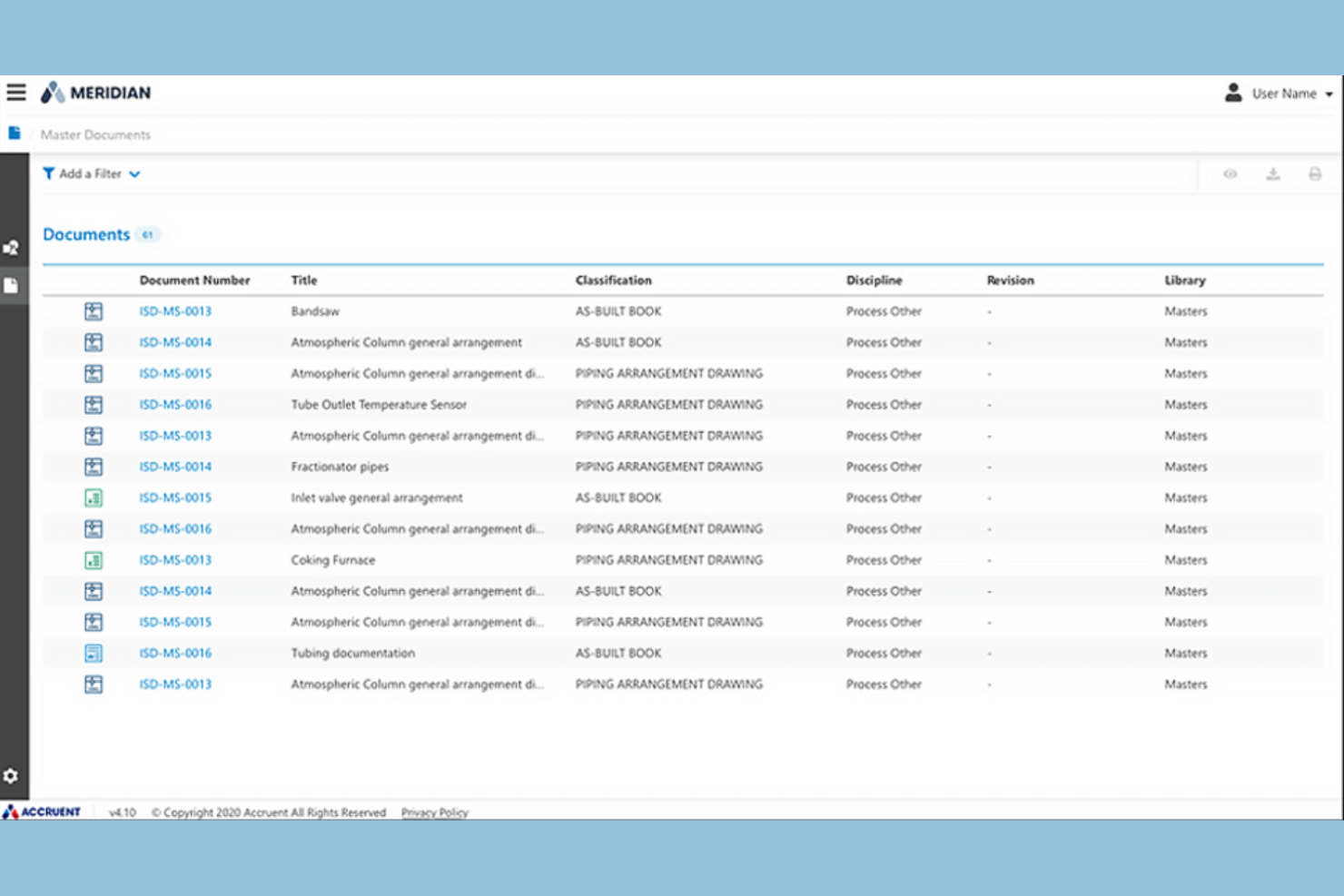
Accruent is designed for organizations in highly regulated industries that need to manage engineering documents with strict compliance requirements. It’s especially relevant for teams in sectors like pharmaceuticals, energy, and healthcare, where audit trails and regulatory alignment are non-negotiable. The platform helps address challenges around document versioning, controlled access, and maintaining up-to-date compliance documentation.
Why I Picked Accruent
For teams working in compliance-driven industries, Accruent offers specialized tools that help meet strict regulatory standards for engineering documentation. The platform provides detailed audit trails and electronic signatures, which are essential for industries where traceability and accountability are required by law. I appreciate that Accruent also supports document control processes, including version management and automated approval workflows, to help ensure every file meets compliance requirements. These features make it a strong fit for organizations that can’t afford to compromise on regulatory alignment.
Accruent Key Features
Some other features in Accruent that you might find useful for managing engineering documents include:
- Version Control: Track document revisions and maintain a complete history of changes for audit and reference purposes.
- Automated Workflow Routing: Set up rule-based workflows to route documents for review, approval, or distribution based on project requirements.
- CAD Integration: Connect directly with CAD applications to manage and update engineering drawings without leaving the platform.
- Role-Based Access Controls: Assign granular permissions to users and groups, ensuring only authorized personnel can view or edit sensitive documents.
Accruent Integrations
Native integrations are not currently listed. However, Accruent does offer an API for custom integrations.
Pros and Cons
Pros:
- Detailed reporting for compliance and usage metrics
- Automated document retention and disposition rules
- Built-in audit trails for regulatory compliance
Cons:
- Customization requires vendor involvement and time
- Limited offline access for remote field teams

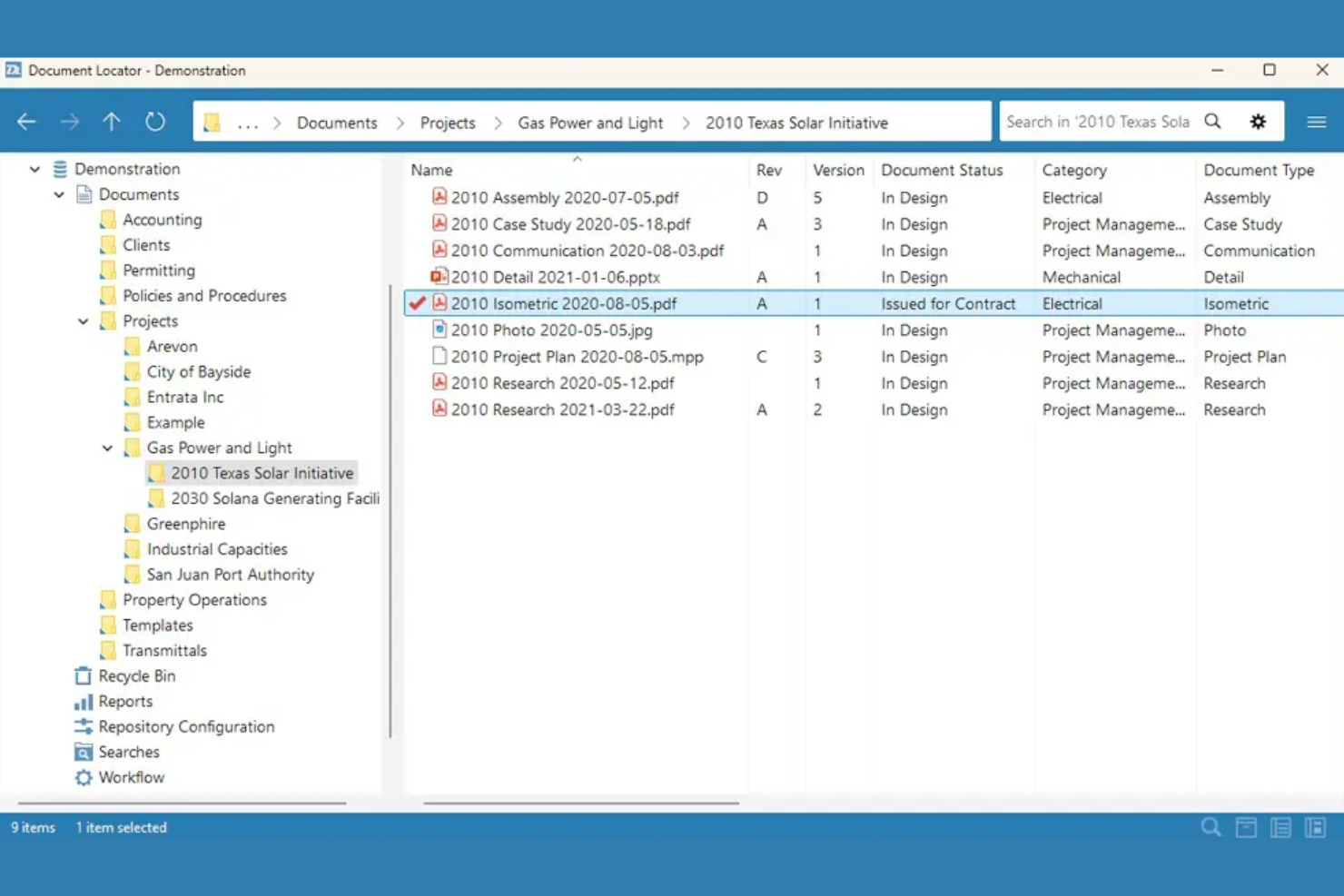
Document Locator is designed for engineering teams that rely heavily on Microsoft Office for their daily workflows. It integrates document management directly into familiar Office applications, making it easier to manage, search, and control engineering files without leaving Word, Excel, or Outlook. This approach helps organizations maintain strict version control and compliance while working within the tools they already use.
Why I Picked Document Locator
For engineering teams that work extensively in Microsoft Office, Document Locator stands out by embedding document management directly into Word, Excel, and Outlook. This tight integration allows users to check documents in and out, track revisions, and apply document controls without leaving their familiar Office environment. I appreciate how this setup supports engineering workflows that depend on Office-based specifications, drawings, and correspondence. Document Locator also enables automated document routing and approval processes, which help maintain compliance and project oversight.
Document Locator Key Features
Some other features that engineering teams might find valuable include:
- Automated Retention Policies: Lets you set rules for document retention and disposal based on project or compliance needs.
- Full-Text Search: Allows you to search the entire content of documents, not just file names or metadata.
- Audit Trail Reporting: Tracks every action taken on documents for accountability and compliance.
- CAD File Support: Supports storage and management of engineering drawings and CAD files alongside Office documents.
Document Locator Integrations
Integrations include Microsoft Office, DocuSign, AutoCAD, Adobe Acrobat, and more.
Pros and Cons
Pros:
- Supports electronic signatures with DocuSign
- CAD file storage and version management
- Full audit trail for compliance tracking
Cons:
- Limited collaboration features for external partners
- Windows-only client limits cross-platform access

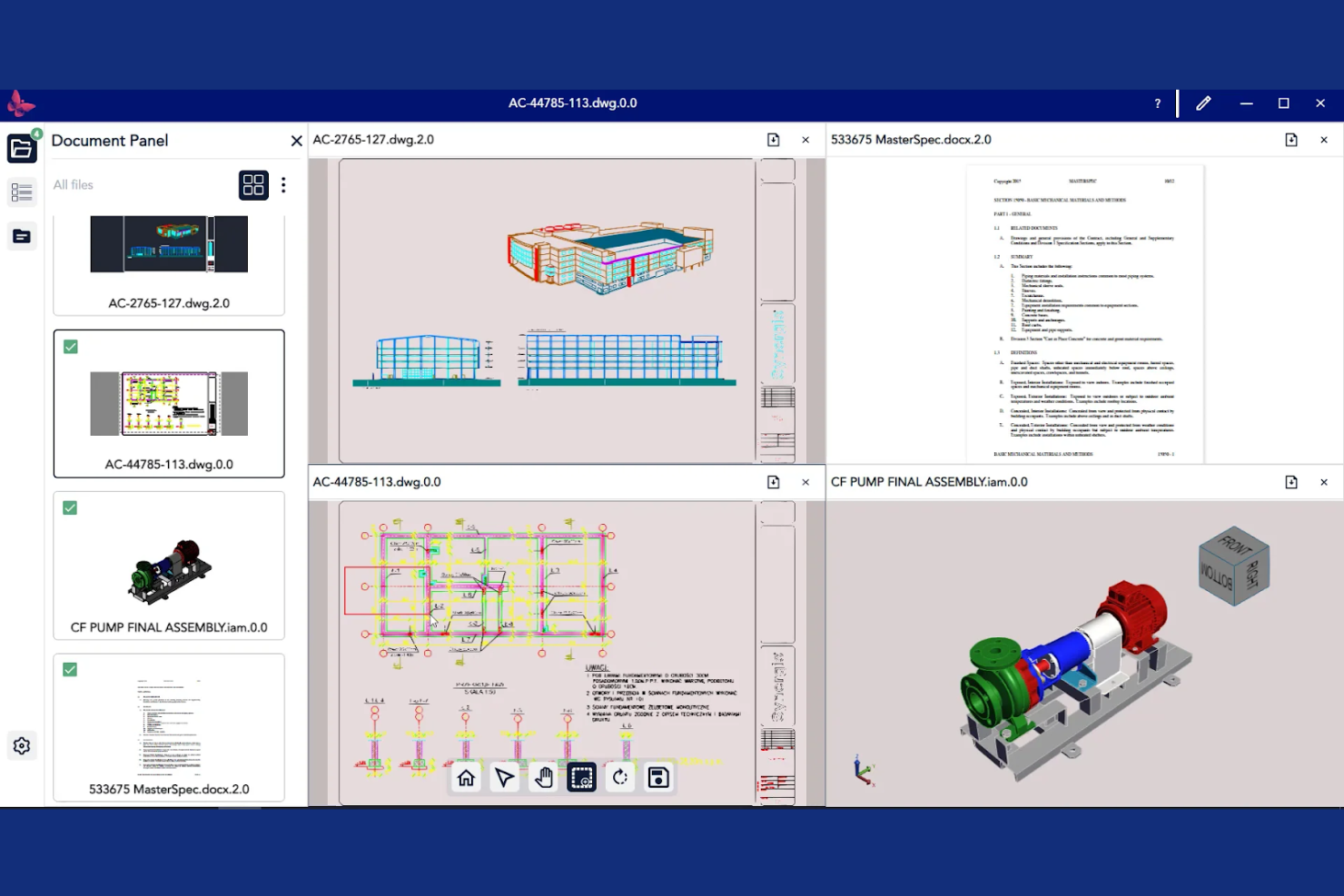
Synergis Software is built for teams that need strict control over engineering document revisions and approvals. It’s especially useful for manufacturers, utilities, and engineering firms that manage frequent design changes and need to maintain a clear audit trail. The platform helps users reduce errors and confusion by automating revision management and ensuring everyone works from the latest version.
Why I Picked Synergis Software
What sets Synergis Software apart is its focus on controlled revision management, which is a top priority for engineering teams handling frequent design updates. The platform offers automated revision tracking, so every change is logged and traceable, reducing the risk of working from outdated files. I like that it includes configurable approval workflows, allowing teams to enforce review steps before documents are released or updated. These features make Synergis Software a strong choice for organizations that need to maintain strict version control and compliance throughout the engineering document lifecycle.
Synergis Software Key Features
In addition to its revision management strengths, Synergis Software offers several other features that support engineering teams:
- CAD Application Integration: Connect directly with popular CAD tools to manage drawings and related files without leaving your design environment.
- Automated Notifications: Set up alerts for document status changes, approvals, or required actions to keep projects moving.
- Document Check-In/Check-Out: Lock files for editing to prevent conflicts and ensure only one person makes changes at a time.
- Audit Trail Reporting: Generate detailed reports on document access, edits, and workflow activity for compliance and oversight.
Synergis Software Integrations
Native integrations are not currently listed.
Pros and Cons
Pros:
- Provides automated notifications for document events
- Offers granular access control for sensitive files
- Supports multi-level document approval workflows
Cons:
- Bulk upload process can be slow
- Interface updates lag behind industry trends
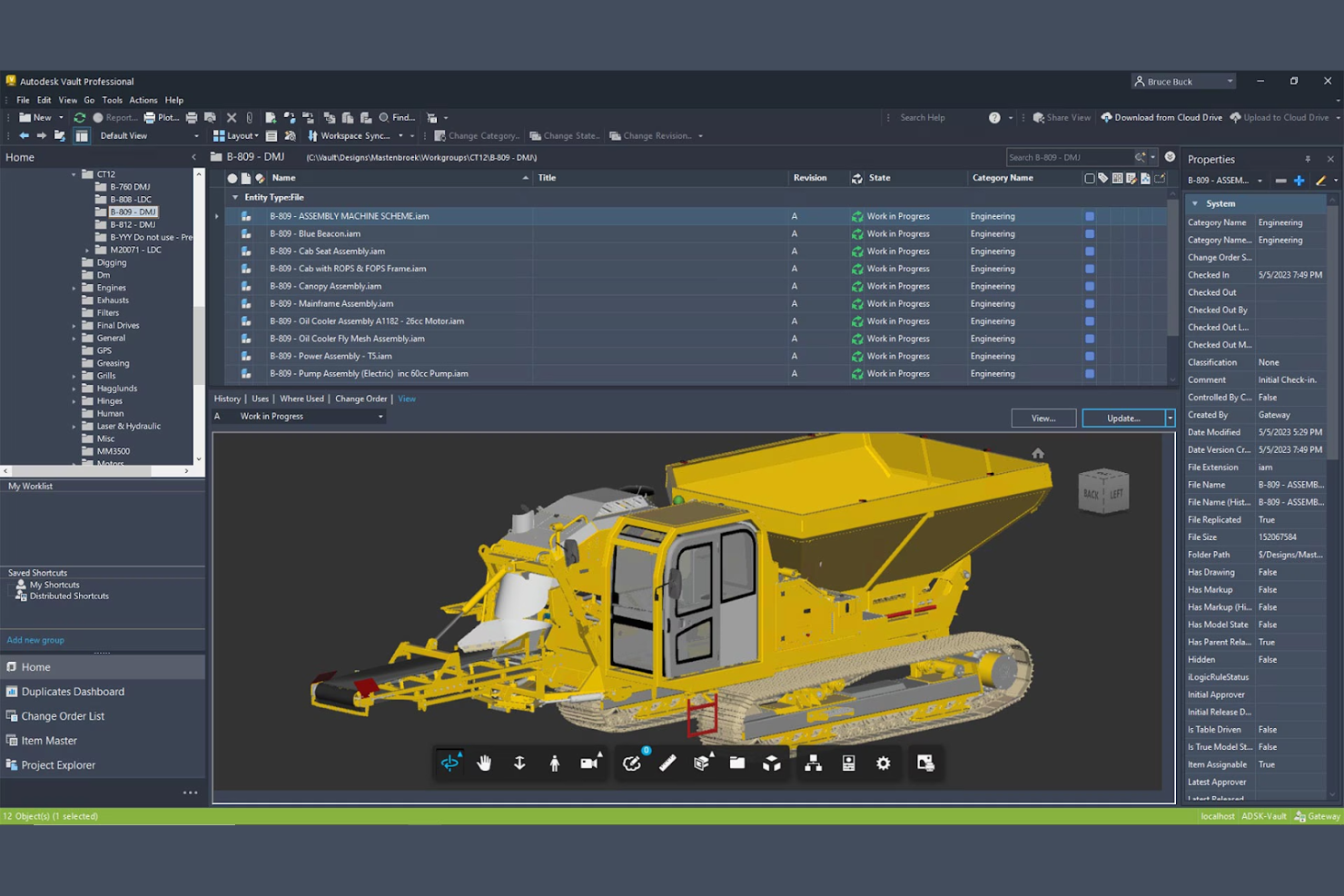
Autodesk Vault is designed for engineering teams that rely heavily on CAD data and need tight integration with Autodesk design tools. It’s a strong fit for manufacturers, product designers, and engineering firms looking to manage complex design files and automate version control. The platform helps teams keep track of design iterations, collaborate on assemblies, and ensure everyone is working from the correct file versions.
Why I Picked Autodesk Vault
For teams that need deep CAD integration, Autodesk Vault stands out as a purpose-built solution. The platform connects directly with Autodesk design tools, allowing users to manage, track, and update CAD files without leaving their familiar environment. I appreciate how Vault automates version control and assembly management, which helps prevent errors and lost work during design changes. These capabilities make it a strong choice for engineering teams that need to coordinate complex design workflows and maintain tight control over file versions.
Autodesk Vault Key Features
Some other features that make Autodesk Vault useful for engineering teams include:
- Automated Lifecycle Management: Define and enforce document states, such as work-in-progress, review, and released, to match your team’s processes.
- Role-Based Permissions: Assign granular access rights to users and groups to control who can view, edit, or approve documents.
- Batch Plotting: Generate and print multiple drawings or documents at once to speed up documentation workflows.
- File Relationship Visualization: View and manage dependencies between files, such as assemblies, parts, and drawings, in a visual interface.
Autodesk Vault Integrations
Integrations include Autodesk Fusion Manage, AutoCAD, Inventor, Revit, Civil 3D, Microsoft Office, Microsoft SharePoint, Power BI, Autodesk Platform Services, and Navisworks.
Pros and Cons
Pros:
- Enforces document lifecycle states and approvals
- Supports batch plotting of multiple drawings
- Visualizes file dependencies and relationships
Cons:
- Requires dedicated server infrastructure
- Limited support for non-Autodesk file formats

DMI WebDocs offers a cloud-based document management system built for organizations that need to get up and running quickly. It’s a practical choice for engineering teams or firms looking to digitize paper-heavy processes without a lengthy deployment. The platform helps users centralize documents, automate retention policies, and enable secure remote access with minimal IT overhead.
Why I Picked DMI WebDocs
When rapid deployment is a top priority, DMI WebDocs offers a straightforward path to cloud-based document management. The platform is designed so engineering teams can digitize, organize, and secure documents without waiting for lengthy IT projects or custom development. I like that WebDocs includes built-in document retention scheduling and automated workflow routing, which help teams quickly establish compliance and approval processes. These features make it a strong fit for organizations that need to modernize document handling with minimal disruption.
DMI WebDocs Key Features
Some other features that make DMI WebDocs practical for engineering teams include:
- Browser-Based Document Access: Users can view, upload, and manage documents from any device with internet access.
- Full-Text Search: Quickly locate documents using keyword searches across all stored files.
- Audit Trail Reporting: Track document activity and user actions for compliance and accountability.
- Barcode Scanning Support: Capture and index documents using barcode technology for faster retrieval.
DMI WebDocs Integrations
Native integrations are not currently listed.
Pros and Cons
Pros:
- Automated document retention scheduling
- Audit trail reporting for compliance tracking
- Barcode scanning for document indexing
Cons:
- No public information on API availability
- Limited support for CAD file preview

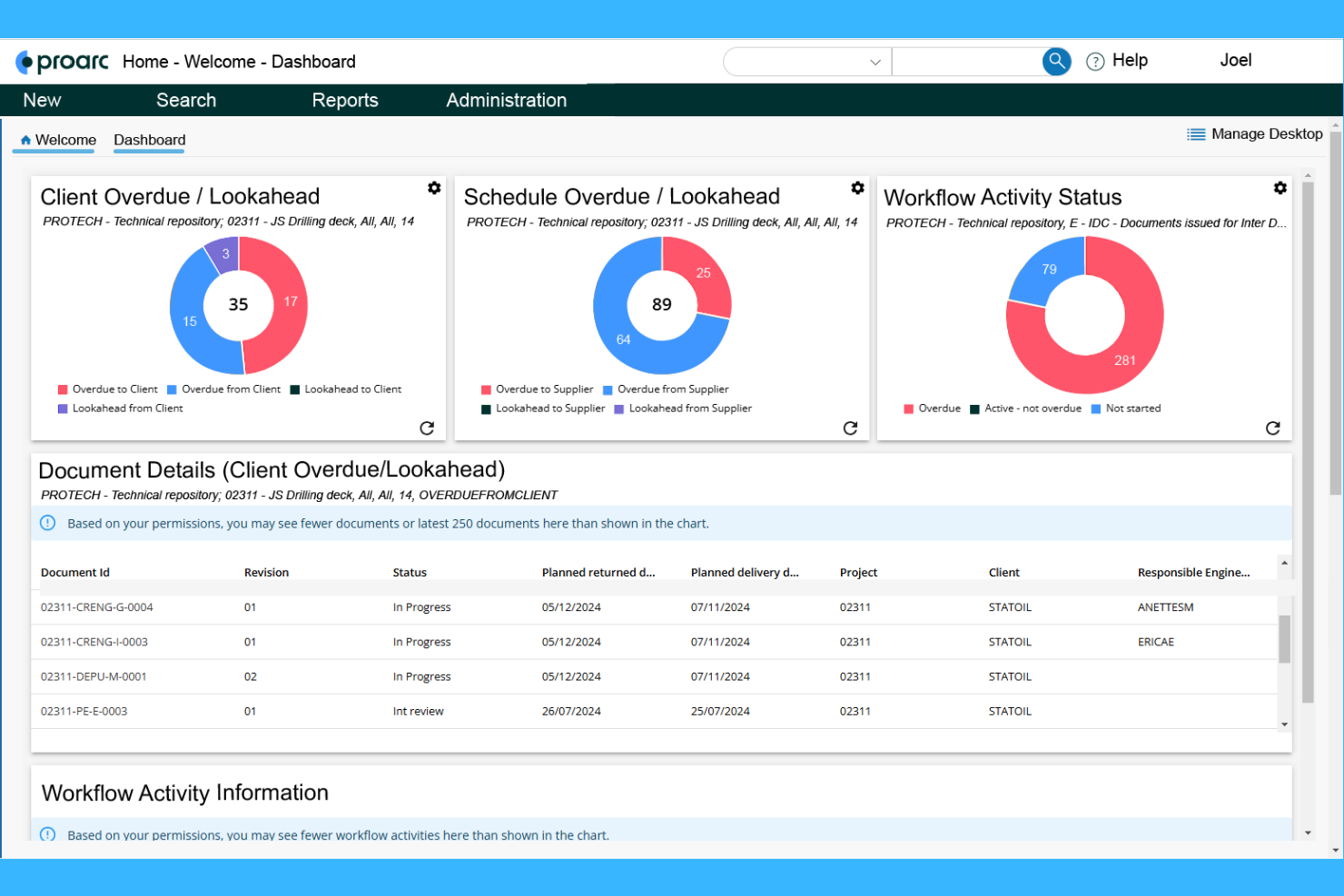
Ascertra Proarc is purpose-built for managing documentation on large-scale capital projects. It’s well-suited for engineering, procurement, and construction teams that need to coordinate complex document workflows across multiple contractors and stakeholders. The platform helps users control revisions, track transmittals, and maintain compliance throughout the project lifecycle.
Why I Picked Ascertra Proarc
For capital project documentation, Ascertra Proarc stands out because it’s designed to handle the scale and complexity of major engineering initiatives. The platform supports advanced document control, including revision management and transmittal tracking, which are essential for projects with multiple contractors and regulatory requirements. I appreciate that Proarc also offers configurable workflows, allowing teams to automate review and approval processes specific to capital projects. These capabilities make it a strong choice for organizations that need to maintain strict oversight and compliance throughout the project lifecycle.
Ascertra Proarc Key Features
Some other features that make Proarc valuable for engineering teams include:
- Document Metadata Management: Capture and organize detailed metadata for every document to support advanced search and reporting.
- Bulk Document Import: Upload and register large volumes of documents at once to accelerate project onboarding.
- Role-Based Access Control: Set granular permissions for users and groups to protect sensitive project information.
- Automated Notifications: Trigger email alerts for document status changes, deadlines, or required actions.
Ascertra Proarc Integrations
Integrations include Microsoft Office 365, AutoCAD, and more.
Pros and Cons
Pros:
- Provides audit trails for compliance needs
- Tracks document transmittals and revisions
- Offers configurable document metadata fields
Cons:
- CAD file viewing capabilities are not specified
- Interface design appears dated in demos
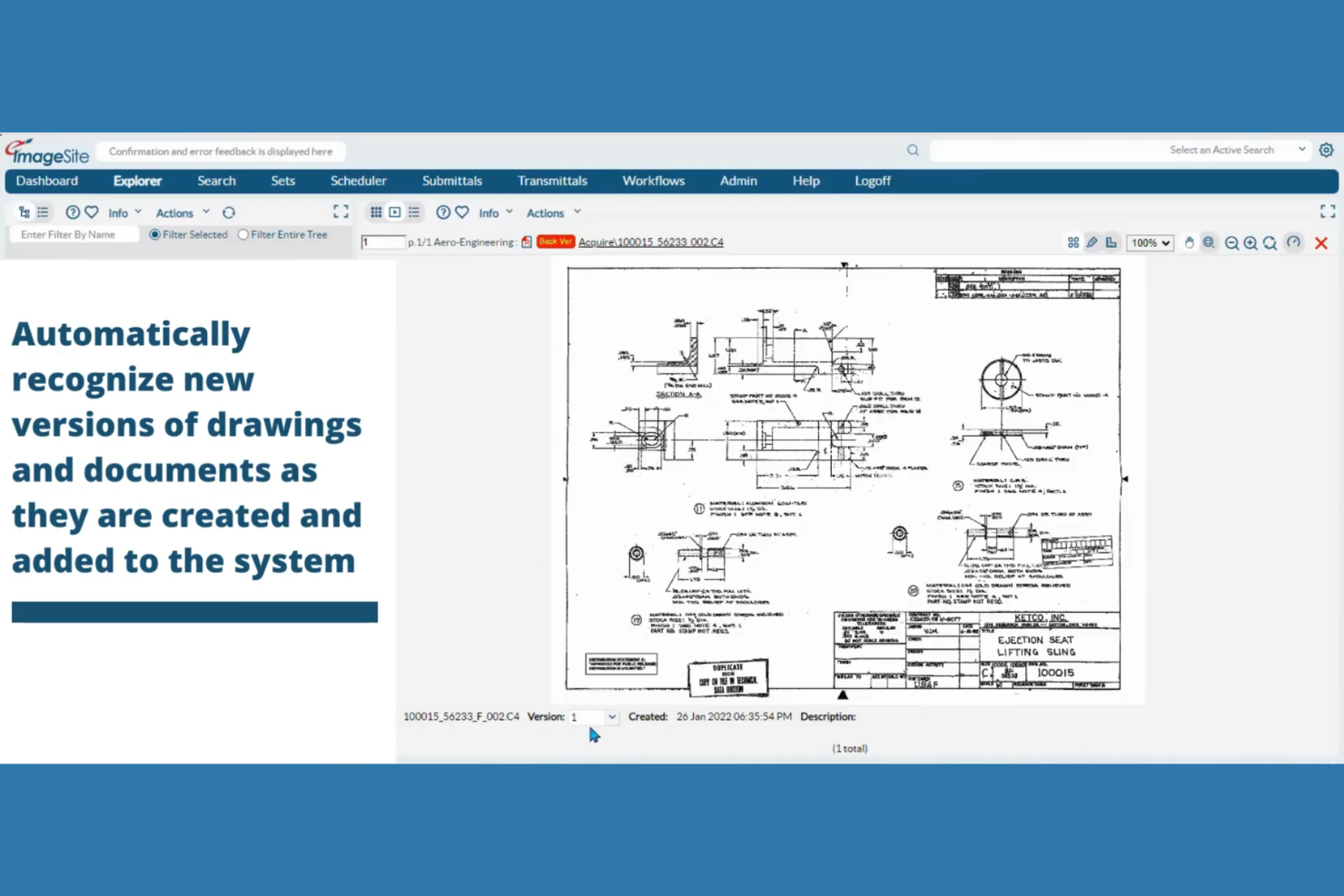
eQuorum offers a document management platform designed for organizations that require secure, on-premises installations. It’s a strong fit for engineering teams in industries with strict data control or regulatory requirements, such as government, utilities, or manufacturing. The system addresses challenges around internal file security, controlled access, and compliance for sensitive engineering documents.
Why I Picked eQuorum
When secure on-premises installations are a top priority, eQuorum stands out as a strong choice for engineering document management. The platform is built to support organizations that need to keep sensitive files within their own IT infrastructure, offering granular access controls and audit trails for compliance. I like that eQuorum includes advanced encryption and user authentication features, which help protect proprietary engineering data from unauthorized access. These capabilities make it especially appealing for teams in regulated industries or those with strict internal security policies.
eQuorum Key Features
Some other features that make eQuorum useful for engineering teams include:
- Version Control: Track and manage multiple versions of engineering documents throughout their lifecycle.
- Batch Printing: Print large sets of drawings or documents directly from the platform.
- Markup and Redlining Tools: Annotate and comment on documents without altering the original files.
- Automated Workflow Routing: Set up custom workflows to route documents for review, approval, or distribution.
eQuorum Integrations
Native integrations are not currently listed.
Pros and Cons
Pros:
- Includes markup and redlining tools
- Offers batch printing for large drawing sets
- Supports secure on-premises and hybrid deployments
Cons:
- Workflow automation setup can be complex
- Limited cloud-native deployment options

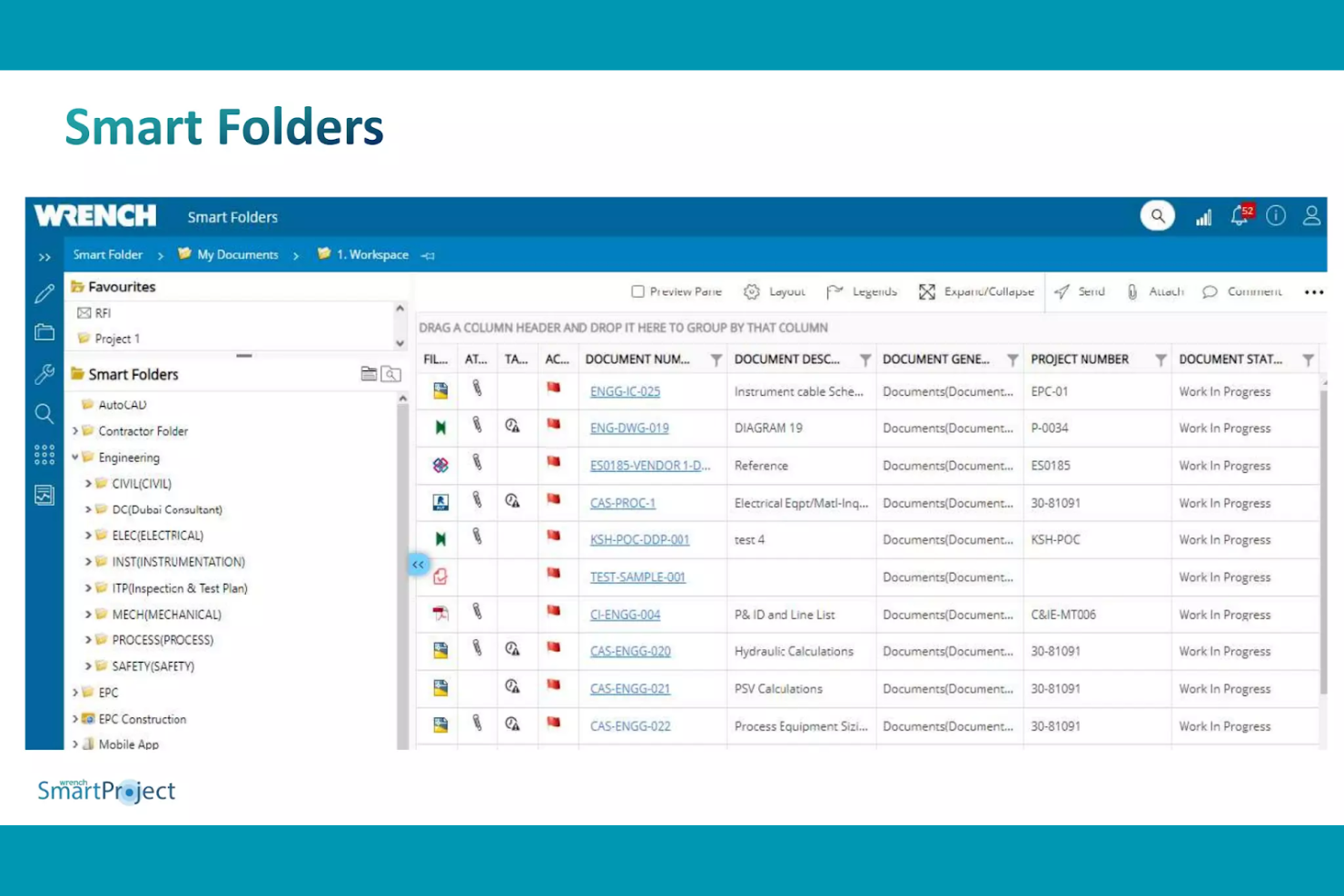
SmartProject EDMS is built for engineering and construction firms managing projects across multiple locations. It centralizes document control, transmittals, and workflows so distributed teams can collaborate on drawings and technical files in real time. This makes it a strong fit for organizations that need to coordinate engineering data and approvals between offices, sites, and external partners.
Why I Picked SmartProject EDMS
When managing engineering projects across multiple sites, SmartProject EDMS offers tools that help teams stay coordinated and in sync. Its centralized document repository ensures everyone is working from the latest version, no matter where they’re located. I like that it supports real-time collaboration on drawings and technical files, which is essential for distributed engineering teams. SmartProject EDMS also includes automated transmittals and workflow routing, making it easier to manage approvals and keep projects moving across locations.
SmartProject EDMS Key Features
Some other features that engineering teams may find useful include:
- Revision Control: Tracks changes and maintains a complete history of document versions.
- Role-Based Access Permissions: Lets you set detailed access rights for users and groups.
- Automated Document Numbering: Assigns unique identifiers to documents for easy tracking and retrieval.
- Mobile Access: Allows users to view and manage documents from mobile devices on site.
SmartProject EDMS Integrations
Native integrations are not currently listed.
Pros and Cons
Pros:
- Built-in revision control for engineering files
- Automated transmittals for drawing and document sharing
- Real-time collaboration for distributed project teams
Cons:
- Reporting features lack advanced analytics options
- Custom workflow setup requires vendor assistance

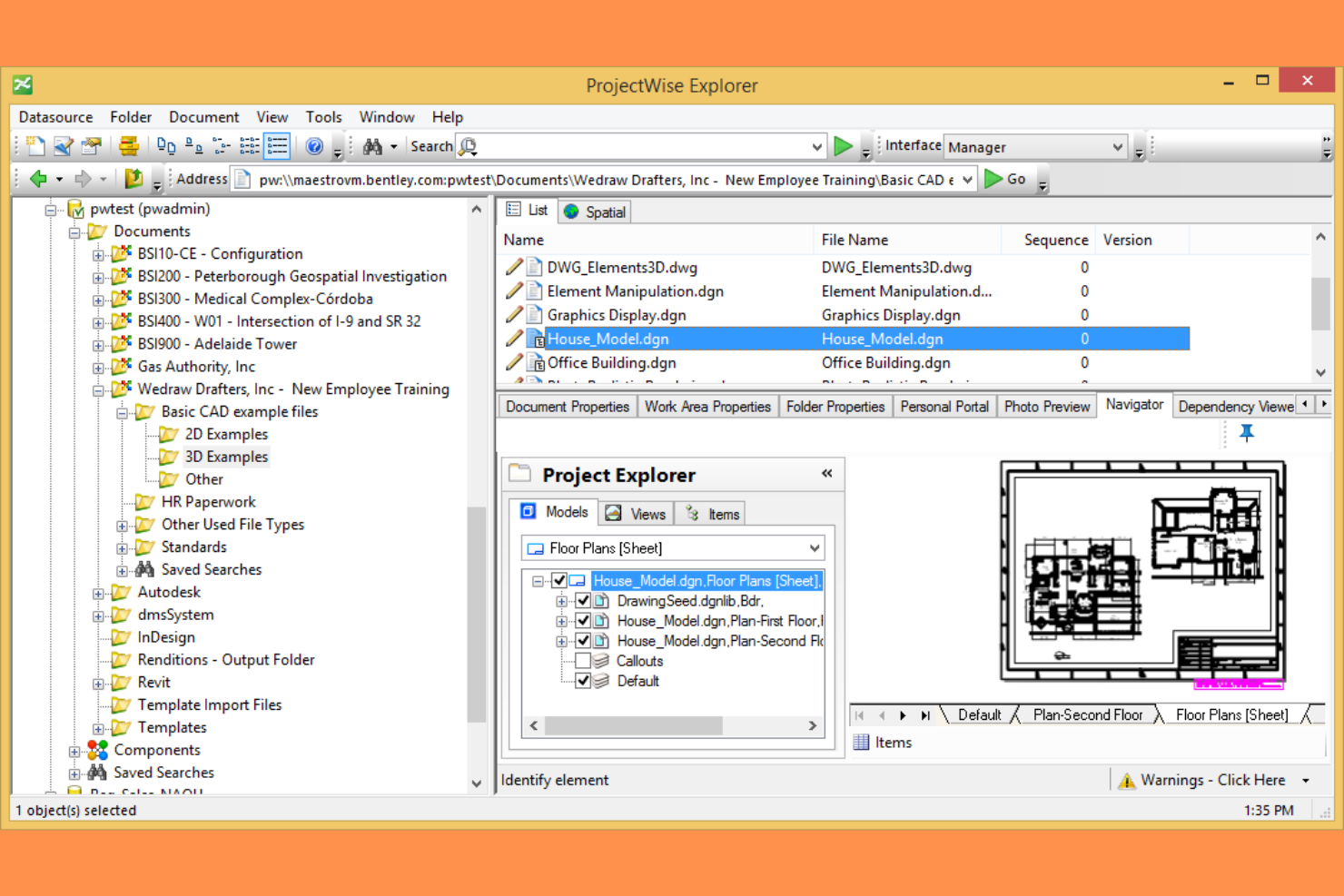
Bentley ProjectWise is purpose-built for infrastructure teams that need to coordinate complex engineering projects across organizations and disciplines. It connects civil, structural, and utility engineers with a shared environment for managing models, drawings, and project data. This makes it especially useful for firms handling large-scale transportation, energy, or public works projects where collaboration and control are critical.
Why I Picked Bentley ProjectWise
For infrastructure project coordination, Bentley ProjectWise stands out by offering a connected data environment that supports multi-disciplinary teams working on large-scale projects. Its federated model management lets civil, structural, and utility engineers collaborate on shared models and drawings without overwriting each other’s work. I appreciate how ProjectWise automates document versioning and approval workflows, which helps maintain control over complex project deliverables. These features make it a strong choice for organizations that need to coordinate infrastructure projects across multiple stakeholders and locations.
Bentley ProjectWise Key Features
Some other features that infrastructure teams may find valuable include:
- Geospatial Data Integration: Connects project documents with GIS and mapping data for location-based context.
- Automated Metadata Tagging: Applies standardized tags to documents for easier search and organization.
- Mobile Field Access: Lets users view and update project files from mobile devices on site.
- Audit Trail Reporting: Tracks all document actions and changes for compliance and accountability.
Bentley ProjectWise Integrations
Native integrations are not currently listed.
Pros and Cons
Pros:
- Handles large infrastructure project file sizes
- Provides detailed audit trails for compliance
- Supports federated models for multi-disciplinary teams
Cons:
- Cloud hosting options are not globally available
- Limited support for non-Bentley file formats
Other Engineering Document Management Software
Here are some additional engineering document management software options that didn’t make it onto my shortlist, but are still worth checking out:
- Siemens Teamcenter
For customizable workflow templates
- ProjectTeam
For customizable workflow templates


Engineering Document Management Software Selection Criteria
When selecting the best engineering document management software to include in this list, I considered common buyer needs and pain points like managing complex version control and ensuring secure access to sensitive engineering documents. I also used the following framework to keep my evaluation structured and fair:
Core Functionality (25% of total score)
To be considered for inclusion in this list, each solution had to fulfill these common use cases:
- Store and organize engineering documents
- Control document versions and revisions
- Set user permissions and access levels
- Track document history and audit trails
- Support collaboration on project files
Additional Standout Features (25% of total score)
To help further narrow down the competition, I also looked for unique features, such as:
- Integration with CAD and BIM tools
- Automated metadata tagging
- Geospatial data linking
- Mobile field access
- Advanced workflow automation
Usability (10% of total score)
To get a sense of the usability of each system, I considered the following:
- Clear and intuitive user interface
- Logical document navigation structure
- Minimal clicks to complete key tasks
- Responsive design for different devices
- Customizable dashboards or views
Onboarding (10% of total score)
To evaluate the onboarding experience for each platform, I considered the following:
- Availability of step-by-step product tours
- Access to training videos and documentation
- Pre-built templates for common workflows
- Guided data migration tools
- Live chat or onboarding webinars
Customer Support (10% of total score)
To assess each software provider’s customer support services, I considered the following:
- 24/7 support availability
- Multiple support channels offered
- Access to a searchable knowledge base
- Fast response times to inquiries
- Dedicated account management
Value For Money (10% of total score)
To evaluate the value for money of each platform, I considered the following:
- Transparent and flexible pricing plans
- Features included at each pricing tier
- No hidden fees or surprise charges
- Discounts for annual commitments
- Free trial or demo availability
Customer Reviews (10% of total score)
To get a sense of overall customer satisfaction, I considered the following when reading customer reviews:
- Positive feedback on reliability and uptime
- Reports of responsive customer support
- Comments on ease of implementation
- User satisfaction with integrations
- Feedback on feature updates and improvements
How to Choose Engineering Document Management Software
It’s easy to get bogged down in long feature lists and complex pricing structures. To help you stay focused as you work through your unique software selection process, here’s a checklist of factors to keep in mind:
| Factor | What to Consider |
|---|---|
| Scalability | Will the system handle your document volume and user growth over the next 3-5 years? Ask about storage limits, user caps, and upgrade paths. |
| Integrations | Does the software connect natively with your CAD, BIM, or project management tools? Check for direct integrations, not just API access. |
| Customizability | Can you tailor workflows, metadata fields, and permissions to match your team’s processes? Avoid rigid systems that force you to adapt. |
| Ease of use | Will your engineers and project teams adopt the tool quickly? Look for clear navigation, minimal training requirements, and logical layouts. |
| Implementation and onboarding | How long will it take to migrate documents and train users? Ask about migration support, onboarding resources, and typical rollout timelines. |
| Cost | Are pricing tiers transparent and predictable as your needs grow? Watch for hidden fees, storage overages, or costly add-ons. |
| Security safeguards | Does the platform offer encryption, granular access controls, and audit trails? Confirm compliance with your industry’s security standards. |
| Support availability | Will you have access to responsive support during critical project phases? Check for 24/7 coverage, live chat, and dedicated account reps. |
What Is Engineering Document Management Software?
Engineering document management software is a digital system designed to store, organize, and control access to technical documents, drawings, and project files. It helps engineering teams manage version control, track changes, and maintain compliance with industry standards. These platforms support collaboration across disciplines and locations, ensuring that everyone works from the most current and accurate information throughout a project’s lifecycle.
Features
When selecting engineering document management software, keep an eye out for the following key features:
- Version control: Tracks document revisions and ensures users always access the latest approved files, reducing errors from outdated information.
- Access permissions: Lets administrators set granular user roles and control who can view, edit, or approve specific documents.
- Audit trails: Records every action taken on a document, providing a transparent history for compliance and accountability.
- Workflow automation: Automates document review, approval, and distribution processes to keep projects moving and reduce manual tasks.
- Metadata tagging: Allows users to assign searchable tags and attributes to documents for faster retrieval and organization.
- Integration with CAD/BIM tools: Connects directly with design software so teams can manage drawings and models without leaving their primary tools.
- Document search: Offers advanced search capabilities, including full-text and attribute-based queries, to quickly locate files.
- Mobile access: Enables users to view, upload, or comment on documents from field locations using smartphones or tablets.
- Document check-in/check-out: Prevents conflicting edits by letting users lock documents while making changes, then release them for team access.
- Secure file storage: Protects sensitive engineering data with encryption, backup, and disaster recovery features to ensure business continuity.
Benefits
Implementing engineering document management software provides several benefits for your team and your business. Here are a few you can look forward to:
- Improved version accuracy: Version control and audit trails ensure everyone works from the most current and approved documents.
- Improved security: Access permissions and secure file storage protect sensitive engineering data from unauthorized access or loss.
- Faster document retrieval: Metadata tagging and advanced search features help teams quickly locate the files they need.
- Simplified collaboration: Integration with CAD/BIM tools and workflow automation supports efficient teamwork across disciplines and locations.
- Regulatory compliance: Audit trails and permission controls help maintain compliance with industry standards and project requirements.
- Reduced project delays: Automated workflows and mobile access keep document reviews and approvals moving, even when teams are distributed.
- Lower risk of errors: Document check-in/check-out and clear revision histories minimize the chance of conflicting edits or outdated information being used.
Costs and Pricing
Selecting engineering document management software requires an understanding of the various pricing models and plans available. Costs vary based on features, team size, add-ons, and more. The table below summarizes common plans, their average prices, and typical features included in engineering document management software solutions:
Plan Comparison Table for Engineering Document Management Software
| Plan Type | Average Price | Common Features |
|---|---|---|
| Free Plan | $0 | Basic document storage, limited version control, simple search, and restricted user access. |
| Personal Plan | $10–$25/user/month | Individual document management, basic permissions, standard support, and limited integrations. |
| Business Plan | $30–$60/user/month | Team collaboration tools, advanced version control, workflow automation, integrations, and audit trails. |
| Enterprise Plan | $70–$150/user/month | Custom workflows, improved security, compliance tools, dedicated support, and unlimited storage. |
Engineering Document Management Software FAQs
Here are some answers to common questions about engineering document management software:
How does engineering document management software support version control?
Engineering document management software tracks every change made to a file, storing previous versions and allowing users to revert or compare revisions. This helps teams avoid confusion, reduces the risk of using outdated documents, and provides a clear audit trail for compliance and accountability.
Can engineering document management software integrate with CAD and BIM tools?
Yes, most engineering document management software offers integrations with popular CAD and BIM platforms. These integrations let users manage drawings and models directly within their design environment, reducing manual uploads and ensuring that project files stay organized and up to date.
What security features should I look for in engineering document management software?
Look for encryption, granular access controls, audit trails, and compliance certifications. These features help protect sensitive engineering data, ensure only authorized users can access or modify documents, and provide transparency for regulatory or client audits.
How long does it take to implement engineering document management software?
Implementation timelines vary, but most teams can expect a process ranging from a few weeks to several months. Factors include the size of your document library, the complexity of your workflows, and the level of support provided by the vendor during migration and onboarding.
Is cloud-based or on-premise deployment better for engineering document management?
The right choice depends on your organization’s IT policies, security requirements, and budget. Cloud-based solutions offer easier access and lower upfront costs, while on-premise deployments provide more control over data and may be preferred for strict compliance needs.