
14 Best Doodle Alternatives Reviewed in 2026

Best Doodle Alternatives Shortlist
Here’s my shortlist of the best Doodle alternatives:


Managing your team's schedules can feel like a juggling act. You may find Doodle lacking in features or flexibility for your specific needs. Calendar software can offer tailored solutions to fit your business and team size.
In my experience, finding the right scheduling software can alleviate workflow headaches and improve team collaboration. That's why I've reviewed and tested a variety of Doodle alternatives to help you make an informed choice.
In this article, you'll discover options that cater to unique requirements, whether it's integration capabilities, privacy concerns, or industry-specific features. Let's find the best fit for your team.
What is Doodle?
Doodle is a calendar software designed to simplify scheduling and coordination for teams. It's often used by professionals such as project managers, event planners, and team leaders who need to coordinate meetings and events efficiently.
Features such as scheduling using a Doodle poll, easy integration with existing calendars, and automated reminders help with reducing the back-and-forth of scheduling and keeping everyone on the same page. Doodle's overall value lies in its ability to make scheduling quick and straightforward for you and your team.
Best Doodle Alternatives Summary
This comparison chart summarizes pricing details for my top Doodle alternative selections to help you find the best one for your budget and business needs.
| Tool | Best For | Trial Info | Price | ||
|---|---|---|---|---|---|
| 1 | Best for customizable scheduling links | 14-day free trial + free plan + free demo available | From $10/seat/month (billed annually) | Website | |
| 2 | Best for customizable shared calendars | Free plan + free demo available | From $12/month (billed annually) | Website | |
| 3 | Best for live collaboration in Google Workspaces | Free to use | Free to use | Website | |
| 4 | Best for marketing and budget management | Free demo available | Pricing upon request | Website | |
| 5 | Best for minimalistic task planning | Free trial available | From $49.99/year | Website | |
| 6 | Best for AI-assisted scheduling | 14-day free trial available | From $16/user/month (billed annually) | Website | |
| 7 | Best for Exchange-based enterprise schedulings | Free plan available | From $12.50/month (billed annually) | Website | |
| 8 | Best for privacy-focused scheduling | Free plan available | From $3.99/month (billed annually) | Website | |
| 9 | Best for timeline-based visual schedule planning | Free 7-day trial available | From $1.99/month | Website | |
| 10 | Best for family-focused scheduling | Free plan available | From $4.99/month | Website |
Why You Can Trust Us
-

Insightful
Visit WebsiteThis is an aggregated rating for this tool including ratings from Crozdesk users and ratings from other sites.4.8 -
Accelo
Visit WebsiteThis is an aggregated rating for this tool including ratings from Crozdesk users and ratings from other sites.4.4 -
Forecast
Visit WebsiteThis is an aggregated rating for this tool including ratings from Crozdesk users and ratings from other sites.4.6




Best Doodle Alternatives Reviews
Below are my detailed summaries of the best paid and free Doodle alternatives that made it onto my shortlist. My reviews offer a detailed look at the key features, pros and cons, integrations, and ideal use cases of each tool to help you find the best one for you.

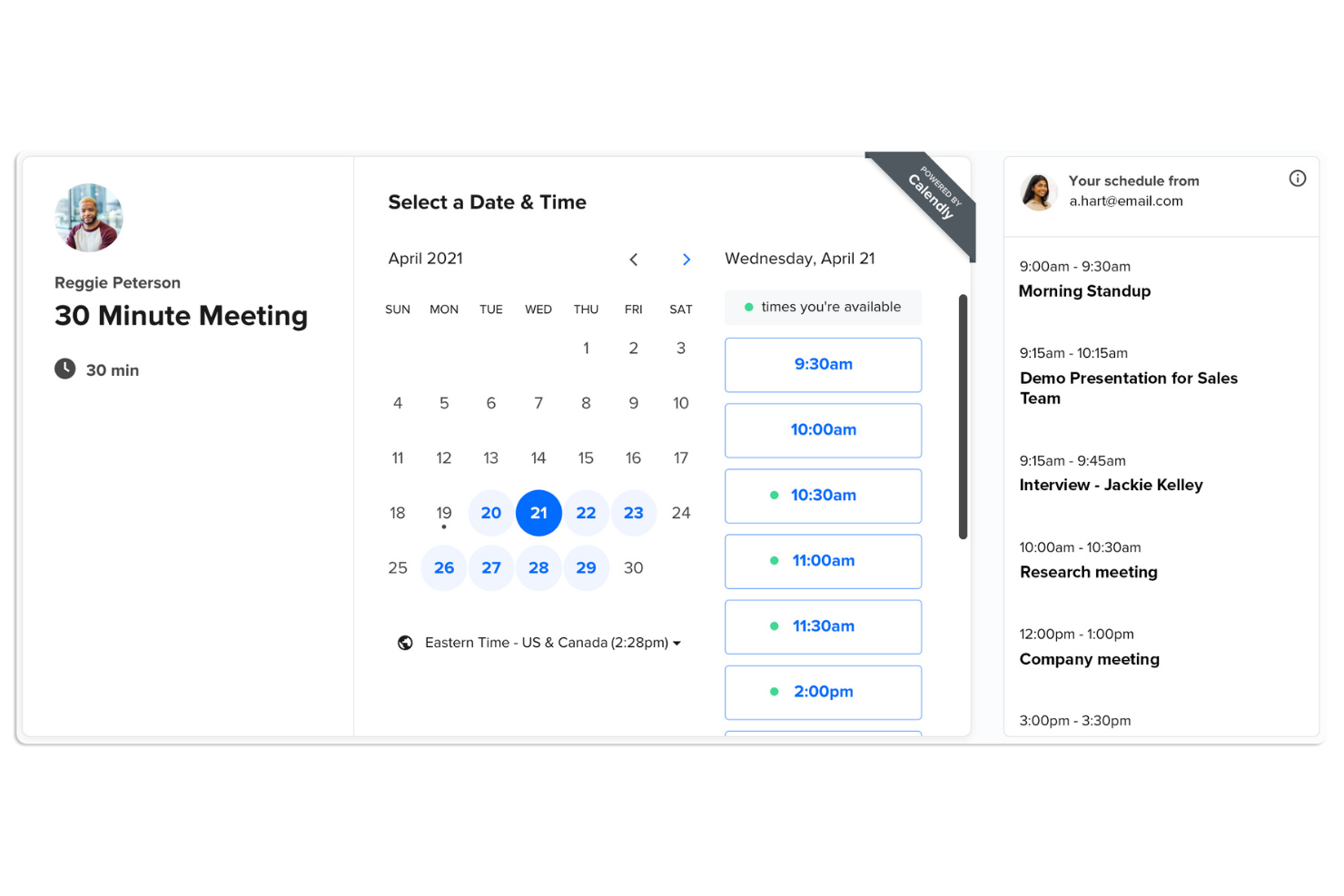
Calendly is a scheduling automation tool designed for professionals and teams to simplify meeting scheduling. It's widely used by businesses looking to eliminate the back-and-forth of email scheduling and simplify their booking process.
Why it's a good Doodle alternative: Calendly offers a scheduling poll feature and customizable scheduling links and booking forms, making client management easy. You can set availability preferences and share your link with others to find a time that works. You can connect Calendly with your CRM for automated notifications, follow-ups, and reminders, which reduce no-shows and keep everyone on track. With its focus on customization, Calendly lets you tailor the scheduling experience to fit your specific needs.
Standout Features and Integrations:
Features include the ability to create buffer times between meetings, ensuring you have time to prepare. You can set daily limits on meetings to prevent burnout. Calendly also allows for round-robin scheduling, distributing meetings evenly among team members. It also comes with an ad-free free tier, a feature normally saved for paid plans.
Integrations include Zoom, Google Calendar, Microsoft Outlook, Salesforce, Zapier, Slack, HubSpot, and more.
Pros and Cons
Pros:
- Supports round-robin scheduling
- Automated SMS reminders and notifications
- Customizable scheduling options
Cons:
- Very limited branding on cheap plans
- Can feel impersonal to some clients

Teamup is a collaborative calendar tool designed for teams and groups to organize schedules and events. It's mainly used by organizations that need a shared calendar solution for managing team activities and resources.
Why it's a good Doodle alternative: Teamup offers customizable shared calendars, making it easy for your team to stay organized and informed. You can create and manage multiple sub-calendars with different access permissions, providing flexibility in how you coordinate your team's schedules. The color-coding helps you quickly identify different activities and meeting types. With its user-friendly interface, Teamup simplifies managing complex scheduling needs.
Standout Features and Integrations:
Features include the ability to assign different access levels to users, ensuring that everyone has the right permissions. You can also view multiple calendars side by side, which is useful for comparing schedules. The calendar link sharing feature lets you share specific calendar views with invitees without needing a login.
Integrations include Slack, Microsoft Outlook, Google Calendar, Apple Calendar, Zapier, Trello, OttoKit, CompanyCam, and more.
Pros and Cons
Pros:
- Easy link sharing
- Multiple customizable sub-calendars
- Flexible access permissions
Cons:
- Mobile app feels very basic
- No built-in video call links

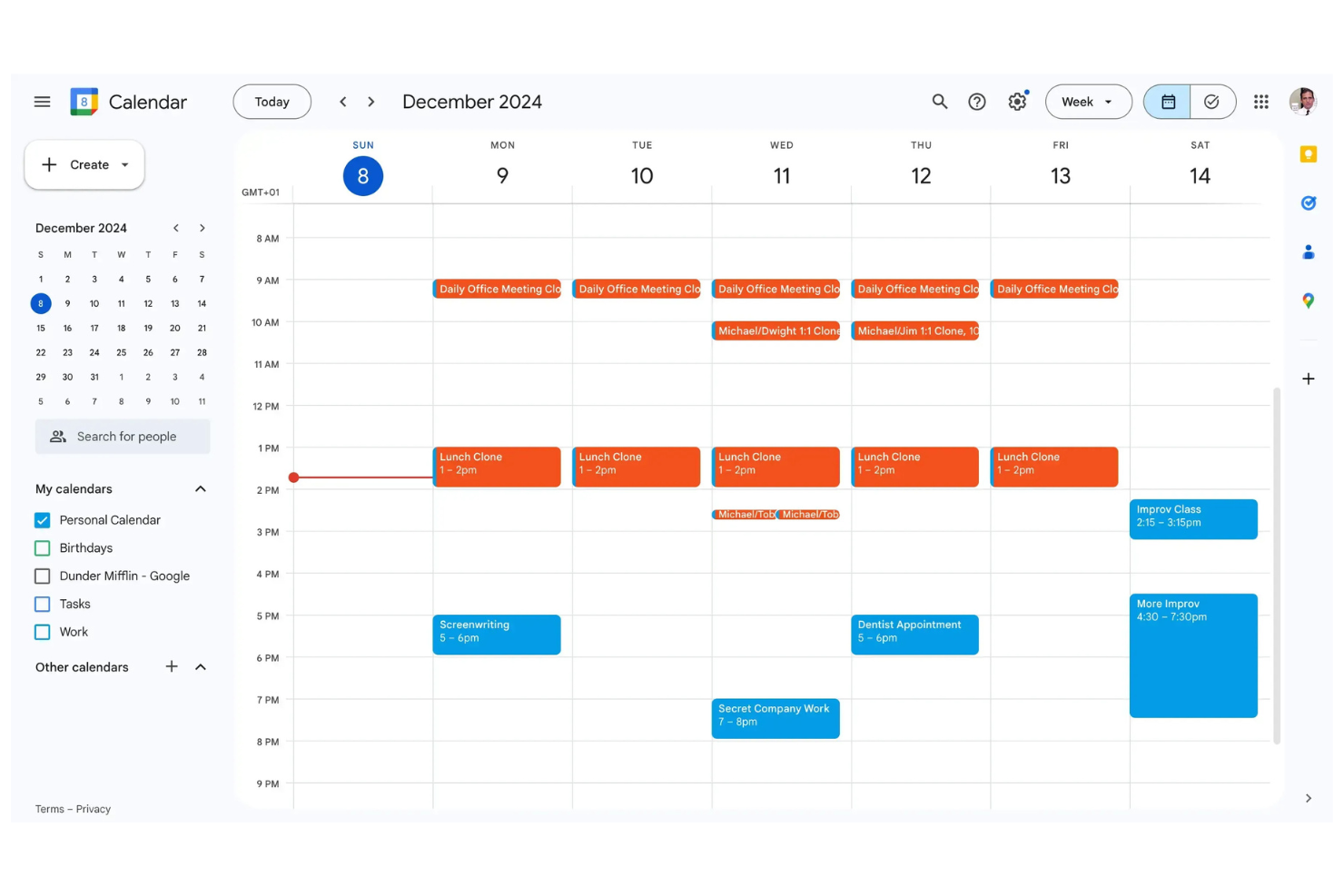
Google Calendar is a digital calendar tool commonly used by professionals and businesses to manage schedules and appointments. It serves as a central hub for scheduling meetings, events, and personal tasks efficiently.
Why it's a good Doodle alternative: Google Calendar integrates with other Google services, making it easy to coordinate your schedule with your email and contacts. With the intuitive interface, you can quickly create and manage events. You can also share calendars with your team, allowing for real-time updates and collaboration. As you can access your calendar from any device, you're always in sync with your schedule.
Standout Features and Integrations:
Features include color-coding events, setting reminders, and creating recurring events. You can also view multiple calendars in one place, so you can manage both personal and professional commitments. The "Find a Time" feature helps you quickly locate available slots for meetings with your team.
Integrations include Google Meet, Gmail, Google Tasks, Google Drive, Microsoft Outlook, Zoom, and more.
Pros and Cons
Pros:
- Supports multiple calendar views
- Real-time synchronization across devices
- Google workplace integration
Cons:
- Restricted offline access functionality
- Lack of native task management


Uptempo is a marketing operations platform designed to help marketing teams manage budgets, campaigns, and resources efficiently. It's aimed at marketers who need to align their activities with business goals and optimize their marketing spend.
Why it's a good Doodle alternative: Uptempo offers specialized features for marketing operations and budget management, making it ideal for teams looking to integrate scheduling with financial planning. The platform allows you to track campaign performance and manage marketing budgets all in one place. Its focus on aligning marketing activities with business objectives helps your team make informed decisions. Uptempo provides insights into resource allocation, ensuring your marketing efforts are both effective and efficient.
Standout Features and Integrations:
Features include extensive budget tracking, which allows you to monitor marketing spend in real-time. You can also set up custom dashboards to visualize key metrics and performance indicators. The resource management feature helps you allocate team members to projects based on availability and skill sets.
Integrations include Salesforce, HubSpot, Adobe Workfront, Marketo, Google Analytics, Microsoft 365, Zapier, and more.
Pros and Cons
Pros:
- Real-time performance insights
- In-depth budget tracking
- Focused on marketing operations
Cons:
- Requires learning for non-marketers
- Frequent login and performance lags


Tweek is a minimalistic calendar tool designed for individuals and teams who prefer a simple approach to scheduling. It's ideal for users who want to focus on task planning without the clutter of complex features.
Why it's a good Doodle alternative: Tweek offers minimalistic task planning, allowing you and your team to focus on what matters most. Its simple interface makes it easy to add tasks and events without distraction. You can quickly prioritize your tasks and see your schedule at a glance. With its focus on simplicity, Tweek helps you manage your time effectively and avoid overwhelm.
Standout Features and Integrations:
Features include customizable themes that let you personalize your calendar's appearance. You can also set up recurring tasks, which saves time on scheduling repeated activities. The app provides a weekly overview, giving you a clear picture of your upcoming commitments.
Integrations include Google Calendar, Apple Calendar, Siri, and more.
Pros and Cons
Pros:
- Clear weekly overview
- Easy task prioritization
- Simple and minimalistic design
Cons:
- Limited color coding for free users
- Sync with Google is only one-way


Calendar is a digital calendar tool that caters to businesses and professionals looking to optimize their scheduling processes. It provides features that help manage appointments, meetings, and events efficiently.
Why it's a good Doodle alternative: Calendar offers AI-assisted scheduling, which helps your team automate meeting arrangements and find optimal meeting times. The analytics feature provides insights into how time is spent, allowing you to make data-driven decisions. Customizable time slots make it easy to set your availability and share it with others. With these capabilities, Calendar supports a more strategic approach to managing your schedule.
Standout Features and Integrations:
Features include time analytics that help you understand your scheduling patterns. You can also set buffer times between meetings to ensure you have breaks throughout the day. The ability to create custom meeting templates saves time when scheduling recurring events. It also features built-in payment processing with Stripe and PayPal integration.
Integrations include Google Calendar, Microsoft Outlook, Slack, Zoom, Salesforce, Zapier, Microsoft Teams, and more.
Pros and Cons
Pros:
- Custom meeting template creation
- Time analytics for strategic insights
- AI-assisted scheduling
Cons:
- Known for frequent syncing delays
- Many features locked behind paywall


Microsoft Outlook Calendar is a digital calendar tool designed for professionals and businesses to manage schedules, group meetings, and tasks. It's commonly used by enterprises and service providers that rely on Microsoft Office and Microsoft Exchange for their business operations.
Why it's a good Doodle alternative: Microsoft Outlook Calendar is tailored for enterprise-level email and scheduling, offering features such as shared calendars and meeting invites that integrate directly with your email account. You can manage complex agendas thanks to the ability to book meetings with detailed scheduling options. With its integration into the Microsoft Office suite, you can coordinate your calendar with other productivity tools. This makes it an ideal choice for businesses that require a unified scheduling and communication platform.
Standout Features and Integrations:
Features include customizable calendar views, color-coded events, and the ability to set reminders. You can also schedule recurring meetings and events to save time. The calendar's integration with tasks and contacts helps you manage your projects and communications in one place.
Integrations include Microsoft Teams, Microsoft OneNote, Microsoft Excel, Microsoft SharePoint, Microsoft To Do, Zoom, and more.
Pros and Cons
Pros:
- Supports shared and group scheduling
- Enterprise-level security features
- Integration with Microsoft Office suite
Cons:
- Poor integration with Gmail
- Dependent on the Microsoft ecosystem
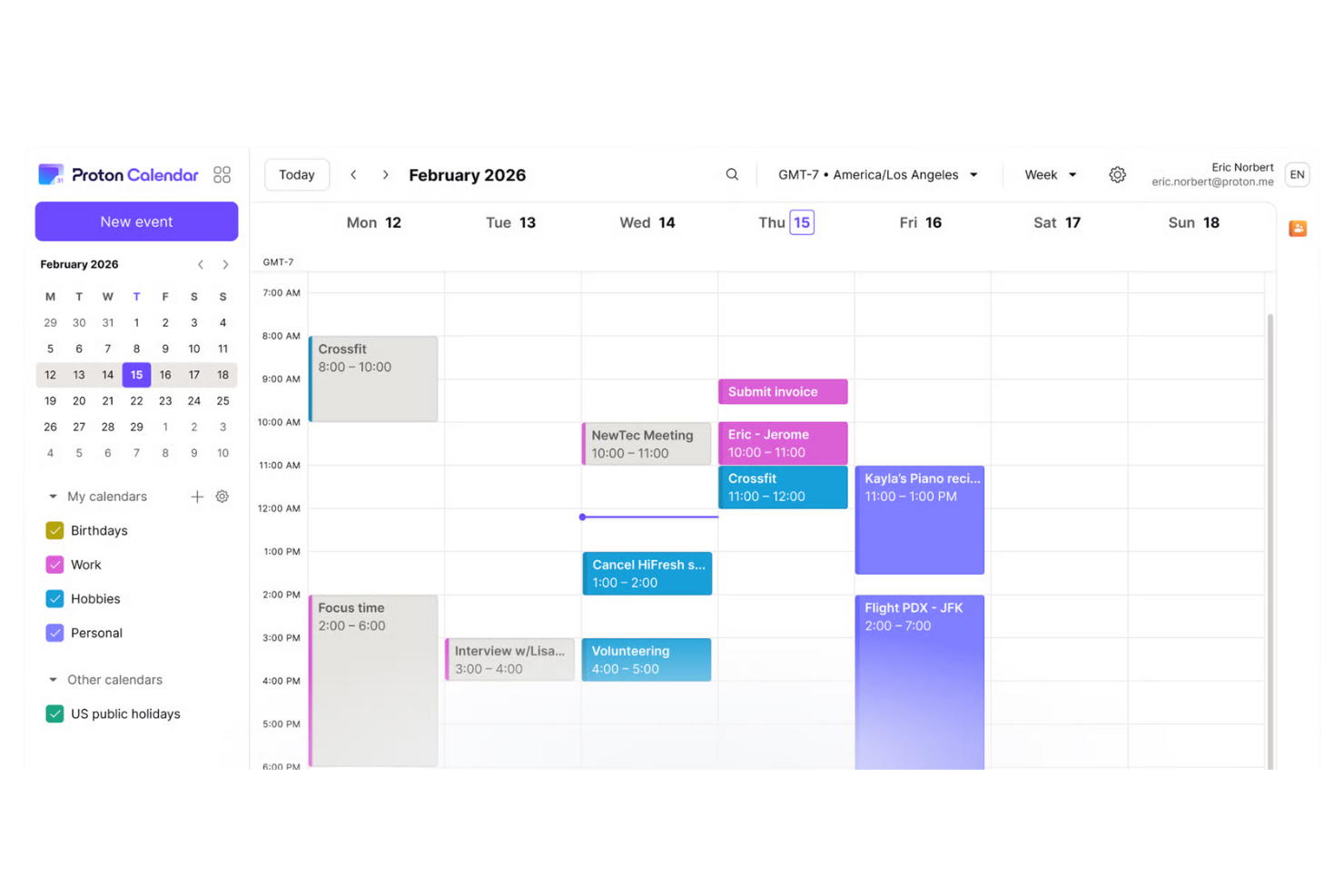
Proton Calendar is a privacy-focused calendar application designed for individuals and businesses that prioritize data security. It's ideal for users who need to manage their schedules while ensuring their information remains private.
Why it's a good Doodle alternative: Proton Calendar offers privacy-focused scheduling, providing end-to-end encryption to keep your events secure. You can manage your schedule confidently, knowing that your data is protected. The app's simple interface allows you to quickly add and organize events without compromising privacy. With features such as encrypted event details, Proton Calendar ensures that your scheduling information stays confidential.
Standout Features and Integrations:
Features include the ability to set recurring events, making it easier to manage appointment scheduling. You can also use the color-coding feature to organize different types of events visually. The app provides notifications to keep you updated on upcoming events.
Integrations include Proton Mail, Proton Drive, Proton VPN, Google Calendar, Zoom, and more.
Pros and Cons
Pros:
- Secure scheduling capabilities
- Strong focus on data privacy
- End-to-end encryption
Cons:
- Free tier limited to 3 calendars
- No official app for Linux/Desktop

Tweek is a minimalistic calendar tool designed for individuals and teams who prefer a simple approach to scheduling. It's ideal for users who want to focus on task planning without the clutter of complex features.
Why it's a good Doodle alternative: Tweek offers minimalistic task planning, allowing you and your team to focus on what matters most. Its simple interface makes it easy to add tasks and events without distraction. You can quickly prioritize your tasks and see your schedule at a glance. With its focus on simplicity, Tweek helps you manage your time effectively and avoid overwhelm.
Standout Features and Integrations:
Features include customizable themes that let you personalize your calendar's appearance. You can also set up recurring tasks, which saves time on scheduling repeated activities. The app provides a weekly overview, giving you a clear picture of your upcoming commitments.
Integrations include Google Calendar, Apple Calendar, Siri, and more.
Pros and Cons
Pros:
- Clear weekly overview
- Easy task prioritization
- Simple and minimalistic design
Cons:
- Limited color coding for free users
- Sync with Google is only one-way

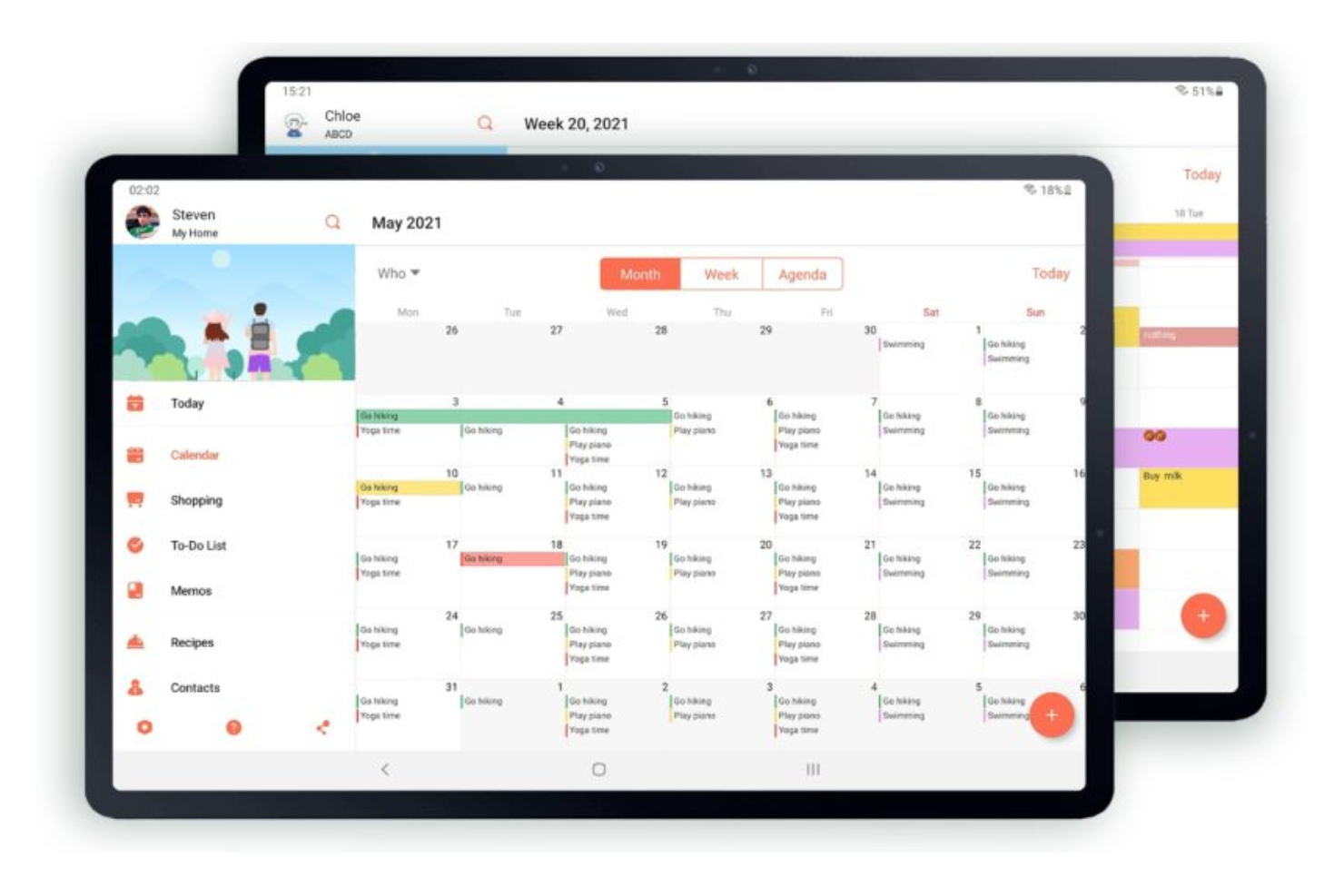
FamCal is a shared calendar app designed for families to manage schedules, tasks, and events collaboratively. It's primarily used by families who want to keep track of everyone's activities in one place.
Why it's a good Doodle alternative: FamCal offers family-focused scheduling, making it easy for your family to coordinate and stay organized. You can share events and tasks with family members, ensuring everyone is on the same page. The shared to-do lists and notes help you manage family activities and responsibilities efficiently. With its focus on collaboration, FamCal provides a central hub for managing your family's schedule.
Standout Features and Integrations:
Features include color-coded events that help you identify different family members' activities. You can also set up shared shopping lists to keep track of household needs. The app provides reminders to ensure you never miss an important family event or task.
Integrations are not publicly listed.
Pros and Cons
Pros:
- Central hub for family activities
- Shared to-do lists and notes
- Family-focused scheduling features
Cons:
- No business-oriented features
- Free version has intrusive ads
Other Doodle Alternatives
Here are some additional Doodle alternatives that didn’t make it onto my shortlist, but are still worth checking out:
- Apple Calendar
For native scheduling on Apple platforms
- Fantastical
For unified multi-account calendar management
- Any.do
For task and calendar integration
- Motion
For AI-driven scheduling


Doodle Alternatives Selection Criteria
When selecting the best Doodle alternatives to include in this list, I considered common buyer needs and pain points related to Calendar Software products, such as integration capabilities and user-friendly interfaces. I also used the following framework to keep my evaluation structured and fair:
Core Functionality (25% of total score)
To be considered for inclusion in this list, each solution had to fulfill these common use cases:
- Schedule events and meetings
- Send reminders and notifications
- Sync across multiple devices
- Share calendars with others
- Set recurring events
Additional Standout Features (25% of total score)
To help further narrow down the competition, I also looked for unique features, such as:
- AI-driven scheduling
- Privacy-focused encryption
- Task and project management integration
- Visual customization options
- Advanced analytics and insights
Usability (10% of total score)
To get a sense of the usability of each system, I considered the following:
- Intuitive interface
- Ease of navigation
- Accessibility on mobile devices
- Speed of the platform
- Customization flexibility
Onboarding (10% of total score)
To evaluate the onboarding experience for each platform, I considered the following:
- Availability of training videos
- Interactive product tours
- Step-by-step guides or templates
- Access to webinars
- Presence of chatbots for assistance
Customer Support (10% of total score)
To assess each software provider's customer support services, I considered the following:
- 24/7 availability
- Multiple contact channels
- Response time
- Help center or knowledge base
- Quality of support provided
Value for Money (10% of total score)
To evaluate the value for money of each platform, I considered the following:
- Pricing transparency
- Range of features offered
- Comparison with competitors
- Free trial availability
- Flexibility of pricing plans
Customer Reviews (10% of total score)
To get a sense of overall customer satisfaction, I considered the following when reading customer reviews:
- Overall satisfaction rating
- Feedback on reliability
- Comments on customer support
- User feedback on ease of use
- Opinions on feature set
Why Look for a Doodle Alternative?
While Doodle is a good choice of Calendar Software, there are a number of reasons why some users seek out alternative solutions. You may be looking for a Doodle alternative because…
- You need more advanced scheduling features
- Your team requires better integration options
- You want stronger privacy and security measures
- You need a more user-friendly interface
- Your team is looking for improved customization
- You require offline access to your calendar
If any of these sound like you, you've come to the right place. My list contains several Calendar Software options that are better suited for teams facing these challenges with Doodle and looking for alternative solutions.
Features
Here are some of the key features of Doodle, to help you contrast and compare what alternative solutions offer:
- Meeting polls: Let your team find the best meeting time for everyone.
- Sign-up sheets: Facilitate easy event registrations for workshops and webinars.
- 1:1 scheduling: Offers your clients a selection of available times for meetings.
- Booking page: Allows you to create custom intake forms to share availability and let clients book appointments.
- Integrations: Connect with various tools for smarter scheduling.
- Payment collection: Automatically collects payments when appointments are booked.
- Security: Ensures your data is safe with enterprise-level security measures.
What's Next:
If you're in the process of researching calendar software, connect with a SoftwareSelect advisor for free recommendations.
You fill out a form and have a quick chat where they get into the specifics of your needs. Then you'll get a shortlist of software to review. They'll even support you through the entire buying process, including price negotiations.