
15 Best Apache Airflow Alternatives Picked for 2026

Apache Airflow Alternatives Shortlist
Here’s my shortlist of Apache Airflow alternatives:


A strong Apache Airflow alternative offers reliable workflow automation, flexible orchestration, and support for complex data pipelines without the operational overhead Airflow can bring. If you’re searching for different ways to replace or move beyond Airflow, you’re likely facing challenges with scalability, maintainability, or integration in your current workflow automation setup.
This list will help you compare leading options, understand their unique strengths, and choose a platform that fits your team’s technical requirements and project demands. Whether you need better Kubernetes support, code-first pipelines, or easier collaboration, you’ll find practical alternatives here to guide your next move.
What Is Apache Airflow?
Apache Airflow is an open-source workflow automation platform for authoring, scheduling, and monitoring complex data pipelines. It lets teams define workflows as code using Python, making it easier to manage dependencies and orchestrate tasks across distributed systems. Airflow is widely used by data engineers and developers who need to automate ETL processes, machine learning pipelines, and other recurring jobs that require visibility and control over execution.
Best Apache Airflow Alternatives Summary
This comparison chart summarizes pricing details for my top Apache Airflow alternative selections to help you find the best one for your budget and business needs.
| Tool | Best For | Trial Info | Price | ||
|---|---|---|---|---|---|
| 1 | Best with Kubernetes-native orchestration | Not available | Free to use | Website | |
| 2 | Best for hybrid cloud orchestration | Free plan + free demo available | From $35/user/month + usage | Website | |
| 3 | Best for low-code automation scripting | Free plan + free demo available | From $10/month | Website | |
| 4 | Best for code-first workflow creation | Free demo available | From $100/month + compute | Website | |
| 5 | Best for event-driven workflow execution | Free plan available | Pricing upon request | Website | |
| 6 | Best for complex stateful workflow management | 90-day free trial available | From $100/month | Website | |
| 7 | Best for collaborative workflow editing | Free plan + free demo available | From $150/fixed user/month | Website | |
| 8 | Best for rapid prototyping in Python | Free to use | Website | ||
| 9 | Best for reproducible data science projects | Not available | Free to use | Website | |
| 10 | Best for modular data pipeline design | 30-day free trial + free demo available | From $10/month | Website | |
| 11 | Best for dependency-based task scheduling | Not available | Free to use | Website |
Why You Can Trust Us
-

Insightful
Visit WebsiteThis is an aggregated rating for this tool including ratings from Crozdesk users and ratings from other sites.4.8 -
Accelo
Visit WebsiteThis is an aggregated rating for this tool including ratings from Crozdesk users and ratings from other sites.4.4 -
Forecast
Visit WebsiteThis is an aggregated rating for this tool including ratings from Crozdesk users and ratings from other sites.4.6




Apache Airflow Alternatives Reviews
Below are my detailed summaries of the best Apache Airflow alternatives that made it onto my shortlist. My reviews offer a detailed look at the features, best use cases, and integrations of each platform to help you find the best one for your team.

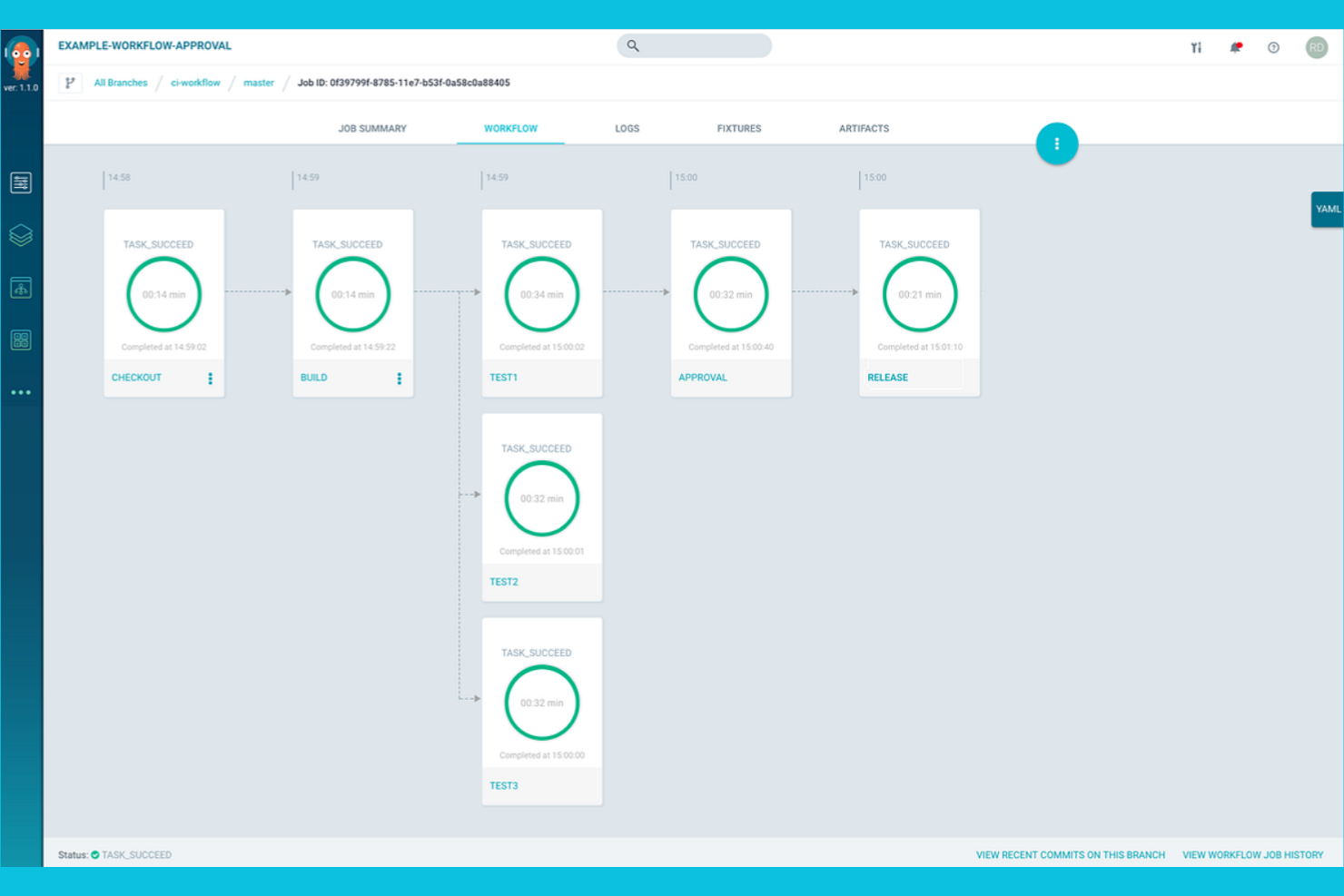
For teams running workloads on Kubernetes, Argo Workflows offers a workflow automation platform designed specifically for cloud-native environments. Platform engineers and DevOps teams use Argo Workflows to define, schedule, and manage complex pipelines as Kubernetes resources. Unlike Apache Airflow, Argo Workflows is built to leverage Kubernetes-native features like container orchestration, scalability, and declarative configuration.
Why Argo Workflows Is a Good Apache Airflow Alternative
If you need a workflow automation platform that’s purpose-built for Kubernetes, Argo Workflows is a strong choice. I picked Argo Workflows because it lets you define workflows as Kubernetes custom resources, so your pipelines run natively within your cluster.
Its container-first approach means every step in your workflow is isolated, reproducible, and scalable using Kubernetes primitives. For teams already invested in Kubernetes, Argo Workflows offers orchestration that feels native and leverages the full power of your cloud infrastructure.
Argo Workflows Key Features
Some other features in Argo Workflows that are worth highlighting include:
- DAG and Step-Based Workflow Support: Define workflows using either directed acyclic graphs or step-based templates for flexible pipeline design.
- Workflow Archiving: Store and retrieve workflow execution history for auditing and debugging.
- Parameterization and Artifact Passing: Pass parameters and artifacts between workflow steps to support dynamic and data-driven pipelines.
- Web-Based User Interface: Monitor, manage, and visualize workflow executions through a dedicated web UI.
Argo Workflows Integrations
Integrations include Argo Events, Couler, Hera, Katib, Kedro, Kubeflow Pipelines, Netflix Metaflow, Onepanel, Orchest, and Seldon.
Pros and Cons
Pros:
- Workflow templates enable reusable pipeline components
- Supports both DAG and step-based workflows
- Native Kubernetes integration for workflow orchestration
Cons:
- Lacks native scheduling outside Kubernetes CronJobs
- No built-in support for non-containerized tasks

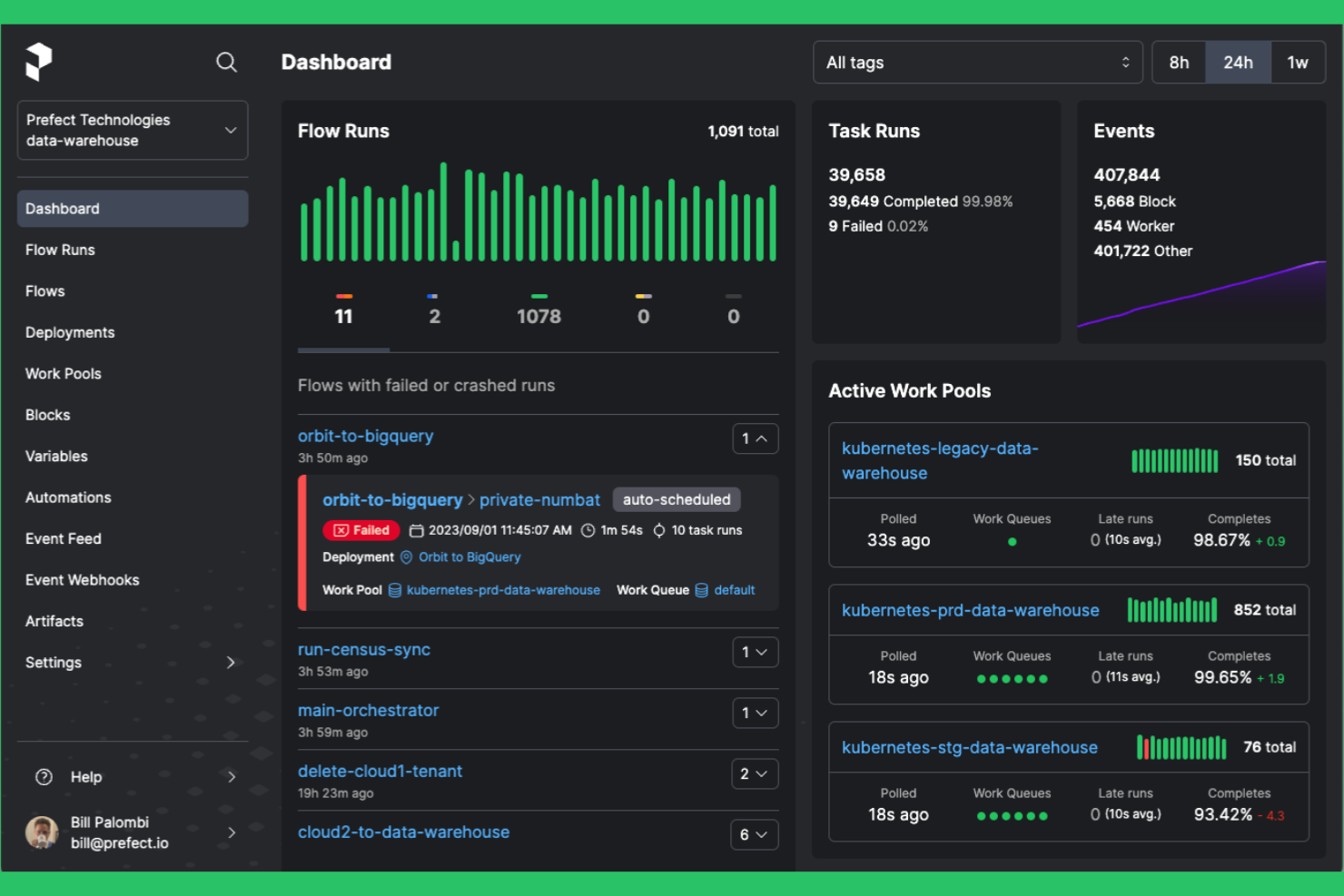
Prefect is designed for teams that need flexible workflow automation across both cloud and on-premises environments. It appeals to data engineers and IT teams looking for a modern alternative to Apache Airflow with easier hybrid deployment and dynamic workflow management. Prefect helps you orchestrate complex data pipelines without the overhead of maintaining a heavy infrastructure.
Why Prefect Is a Good Apache Airflow Alternative
What sets Prefect apart is its strong support for hybrid cloud orchestration, making it a practical choice for teams managing workflows across multiple environments. I picked Prefect because it lets you deploy and run workflows on-premises, in the cloud, or both, without changing your codebase.
Its agent-based architecture allows you to control where and how tasks execute, which is especially useful for organizations with strict data residency or security requirements. Prefect also offers dynamic workflow configuration, so you can adapt pipelines to changing infrastructure needs in real time.
Prefect Key Features
Some other features in Prefect that are useful for workflow automation include:
- Flow Run Scheduler: Schedule and trigger workflow runs based on time, events, or custom conditions.
- Task Mapping: Automatically parallelize tasks across multiple inputs to speed up data processing.
- Result Storage Options: Store workflow results in various backends, including S3, Google Cloud Storage, and Azure Blob Storage.
- Built-In Notifications: Set up alerts and notifications for workflow failures, retries, or completions using email, Slack, or other channels.
Prefect Integrations
Integrations include Amazon S3, Google Cloud Storage, Azure Blob Storage, Databricks, Snowflake, Slack, Kubernetes, Docker, GitHub, and Twilio.
Pros and Cons
Pros:
- Agent-based execution for flexible task placement
- Dynamic workflow configuration with Python
- Hybrid deployment supports both cloud and on-premises
Cons:
- UI can lag with large-scale workflows
- Limited built-in connectors for legacy systems


Windmill enables teams to build, run, and manage automated workflows and internal tools using a mix of code and low-code interfaces. It’s designed for developers and operations teams who want to orchestrate scripts, APIs, and backend jobs without heavy infrastructure overhead. As an open-source, self-hostable platform, Windmill lets you automate processes, create internal apps, and expose workflows as APIs while maintaining full control over deployment and data.
Why Windmill Is a Good Apache Airflow Alternative
Windmill stands out for teams that want to automate workflows with minimal coding effort. I picked Windmill because it lets you build and deploy automation scripts using a low-code editor, so both technical and non-technical users can contribute. The platform supports reusable script templates and version control, making it easy to standardize and update automations across your organization. For teams looking to move quickly from idea to automation, Windmill offers a more accessible and collaborative approach than Apache Airflow.
Windmill Key Features
Some other features in Windmill that are worth noting include:
- Built-in Scheduling Engine: Schedule scripts and workflows to run at specific times or intervals.
- Role-Based Access Control: Manage user permissions and access to scripts and workflows at a granular level.
- Script Marketplace: Access and share pre-built automation scripts with the Windmill community.
- Real-Time Logs and Monitoring: View execution logs and monitor workflow runs in real time for troubleshooting and auditing.
Windmill Integrations
Integrations include Airtable, Discord, GitHub, Google Sheets, HubSpot, Notion, OpenAI, Slack, Stripe, and Supabase.
Pros and Cons
Pros:
- Real-time logs simplify workflow troubleshooting
- Built-in script marketplace for reusable automations
- Visual editor supports low-code workflow creation
Cons:
- Limited scalability for high-throughput workloads
- No support for complex DAG dependencies

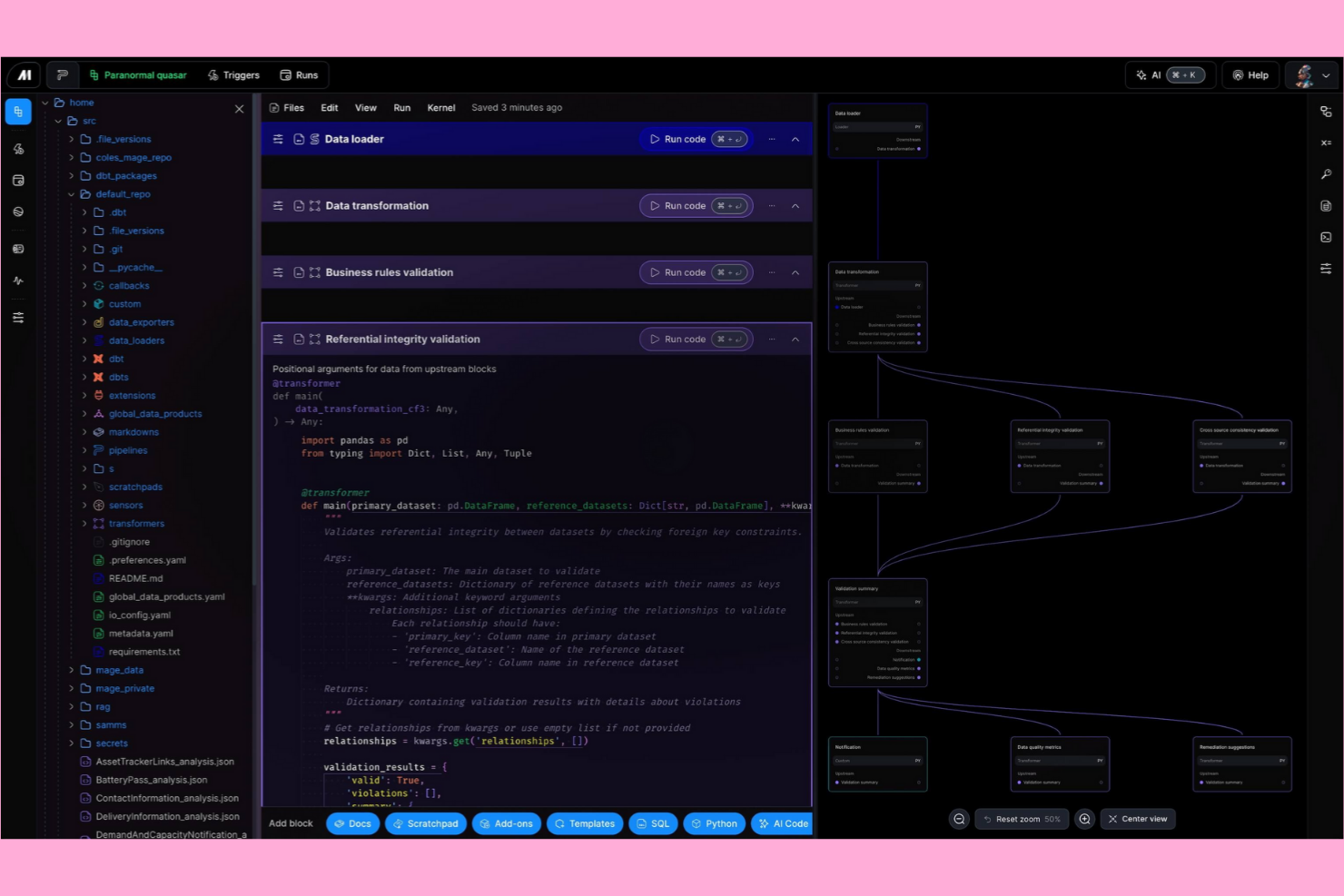
Mage AI gives data engineers and developers a code-first platform for building and managing data workflows. It’s designed for teams that want to work directly in Python and need flexibility to customize pipelines without relying on a visual interface. If you’re looking for a workflow automation solution that prioritizes developer control and scriptability over drag-and-drop tools like Apache Airflow, Mage AI is built for that approach.
Why Mage AI Is a Good Apache Airflow Alternative
Mage AI stands out for teams that want a code-first workflow creation experience, making it a strong alternative to Apache Airflow. I picked Mage AI because it lets you define, test, and deploy pipelines directly in Python, giving developers full control over logic and dependencies.
Its notebook-style interface supports iterative development and debugging, which is especially useful for data engineering and analytics projects. For teams that prefer scripting over visual DAG editors, Mage AI’s approach offers a more flexible and developer-centric workflow automation platform.
Mage AI Key Features
Some other features in Mage AI that are worth highlighting include:
- Real-Time Pipeline Monitoring: Track pipeline execution and view logs as tasks run for immediate feedback.
- Built-In Data Validation: Set up validation checks to ensure data quality at each pipeline step.
- Version Control Integration: Connect with Git to manage pipeline code changes and collaborate with your team.
- Extensible Plugin System: Add custom modules or integrate with external tools using Mage AI’s plugin architecture.
Mage AI Integrations
Integrations include dbt Cloud, Algolia, Athena, Azure Blob Storage, BigQuery, ClickHouse, Databricks, Google Sheets, MongoDB, Snowflake, and Spark.
Pros and Cons
Pros:
- Built-in data validation at each pipeline step
- Native support for Python and SQL tasks
- Notebook interface supports iterative pipeline development
Cons:
- Fewer prebuilt connectors for legacy systems
- Fewer scheduling options than Airflow

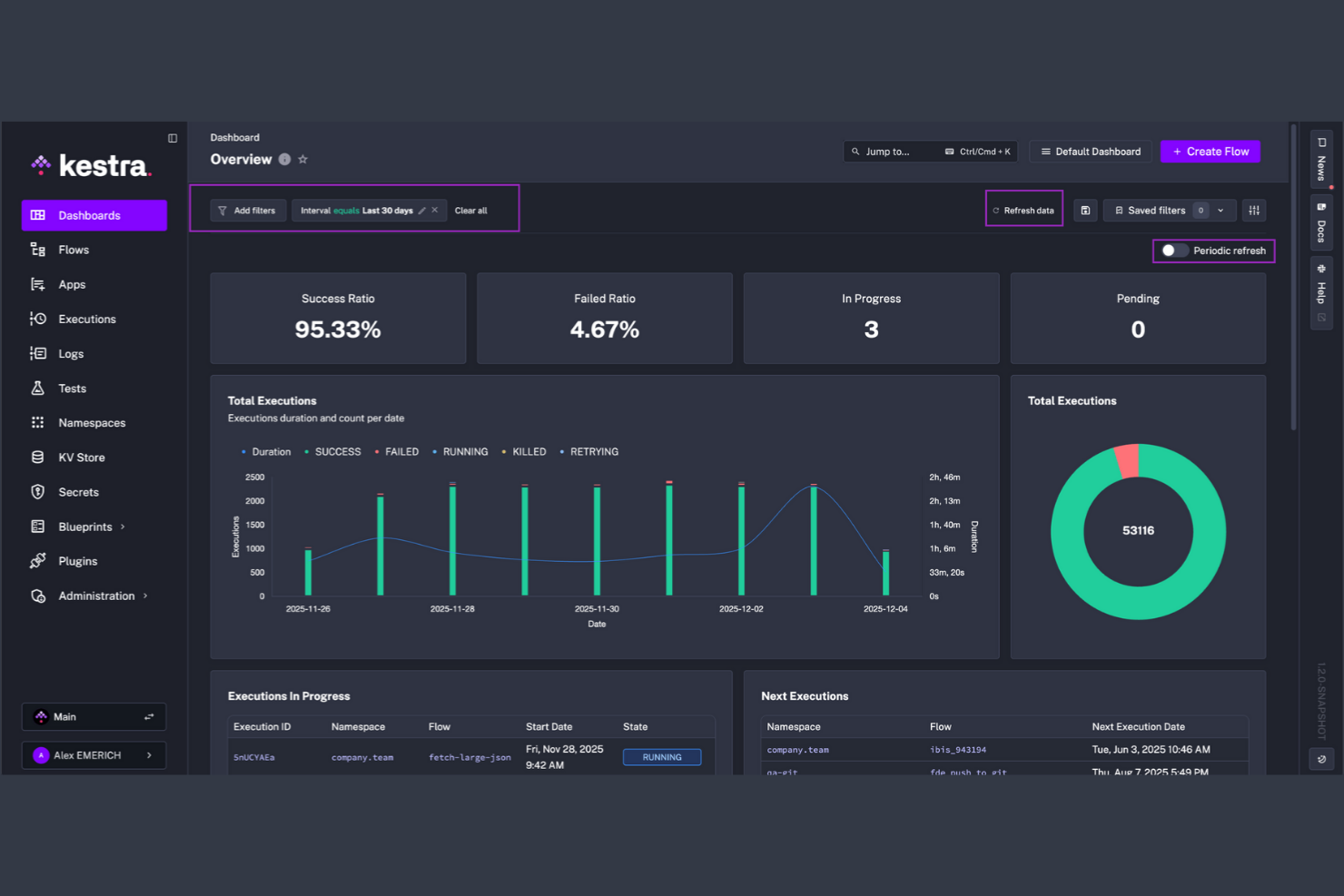
If your team needs to automate workflows triggered by real-time events, Kestra is built for event-driven orchestration at scale. Data engineers, DevOps teams, and SaaS businesses use Kestra to design, schedule, and monitor complex workflows that respond instantly to data changes or external triggers. Unlike Apache Airflow, Kestra’s architecture is optimized for high-throughput event processing and native support for streaming data pipelines.
Why Kestra Is a Good Apache Airflow Alternative
Kestra takes a different approach by focusing on event-driven workflow execution, which is essential for teams handling real-time data and dynamic triggers. I picked Kestra because it natively supports event-based orchestration, letting you build workflows that react instantly to streaming data, webhooks, or external system changes.
Its architecture is designed for high-throughput and parallel processing, so you can manage thousands of concurrent executions without bottlenecks. For teams that need to automate processes based on live events rather than static schedules, Kestra offers a flexible and scalable alternative to Apache Airflow.
Kestra Key Features
In addition to its event-driven architecture, Kestra offers several other features worth highlighting:
- Visual Workflow Designer: Build and modify workflows using a drag-and-drop interface.
- Versioned Workflow Management: Track, manage, and roll back workflow versions as your processes evolve.
- Built-in Secrets Management: Securely store and reference sensitive credentials within your workflows.
- Extensive Plugin Library: Extend functionality with plugins for databases, cloud services, and messaging platforms.
Kestra Integrations
Integrations include Airbyte, Apache Kafka, Apache Spark, Amazon S3, Google BigQuery, dbt, Snowflake, GitHub Actions, Azure Data Lake Storage, and RabbitMQ.
Pros and Cons
Pros:
- Built-in secrets management for secure credentials
- Visual designer enables drag-and-drop workflow creation
- Event-driven workflows support real-time automation
Cons:
- Fewer community resources than Apache Airflow
- YAML-based configuration may deter some users

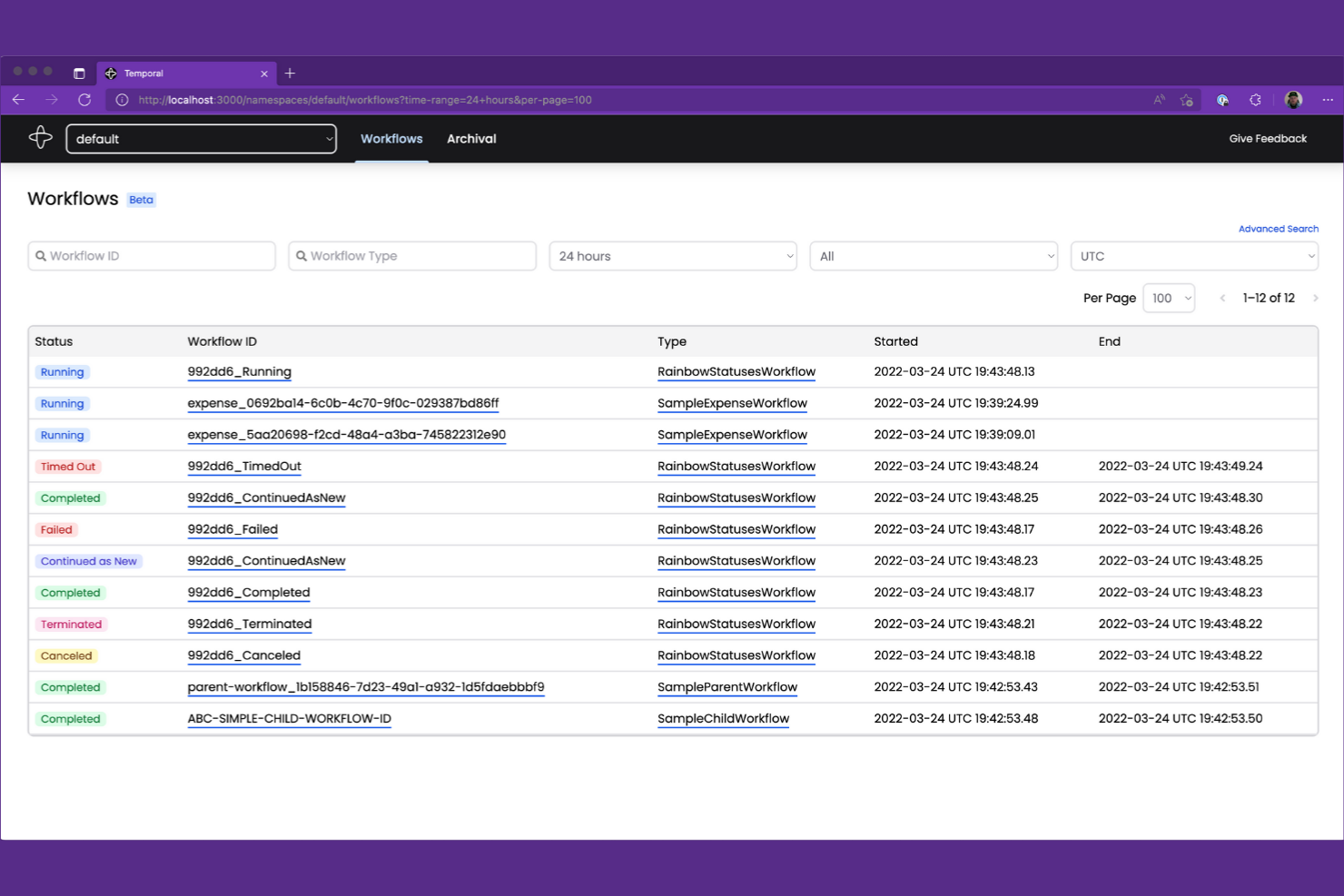
When your team needs to manage complex, long-running workflows with stateful logic, Temporal offers a unique approach. Software engineers and platform teams use Temporal to build, run, and scale distributed workflows that require reliability and precise state management. Unlike Apache Airflow, Temporal is built for handling high-concurrency, event-driven processes where workflow state and execution history must be preserved over time.
Why Temporal Is a Good Apache Airflow Alternative
If you’re looking for a workflow automation platform that can handle complex, stateful processes, Temporal is built for this exact challenge. I picked Temporal because it lets you define workflows as code, with built-in support for managing state, retries, and long-running tasks that can span days or even months.
Temporal’s event sourcing and execution history features ensure that every workflow step is tracked and recoverable, even after failures or restarts. For teams dealing with distributed systems and high-concurrency workloads, Temporal offers a level of reliability and state management that goes beyond what Apache Airflow is designed to provide.
Temporal Key Features
Some other features in Temporal that are worth highlighting include:
- Multi-language SDKs: Build workflows in Go, Java, TypeScript, and Python using official SDKs.
- Dynamic Workflow Scaling: Scale workflow execution dynamically based on system load and demand.
- Visibility APIs: Query workflow status and execution history programmatically for monitoring and reporting.
- Namespace Isolation: Organize and isolate workflows and resources using namespaces for multi-team or multi-tenant environments.
Temporal Integrations
Integrations include OpenAI, GitLab, Cloudflare, Salesforce, Twilio, NVIDIA, GoDaddy, Retool, Checkr, and Descript.
Pros and Cons
Pros:
- Multi-language SDKs for Go, Java, TypeScript, Python
- Guarantees workflow durability and event history
- Supports long-running, stateful workflow execution
Cons:
- No built-in visual workflow designer interface
- Requires dedicated Temporal server infrastructure

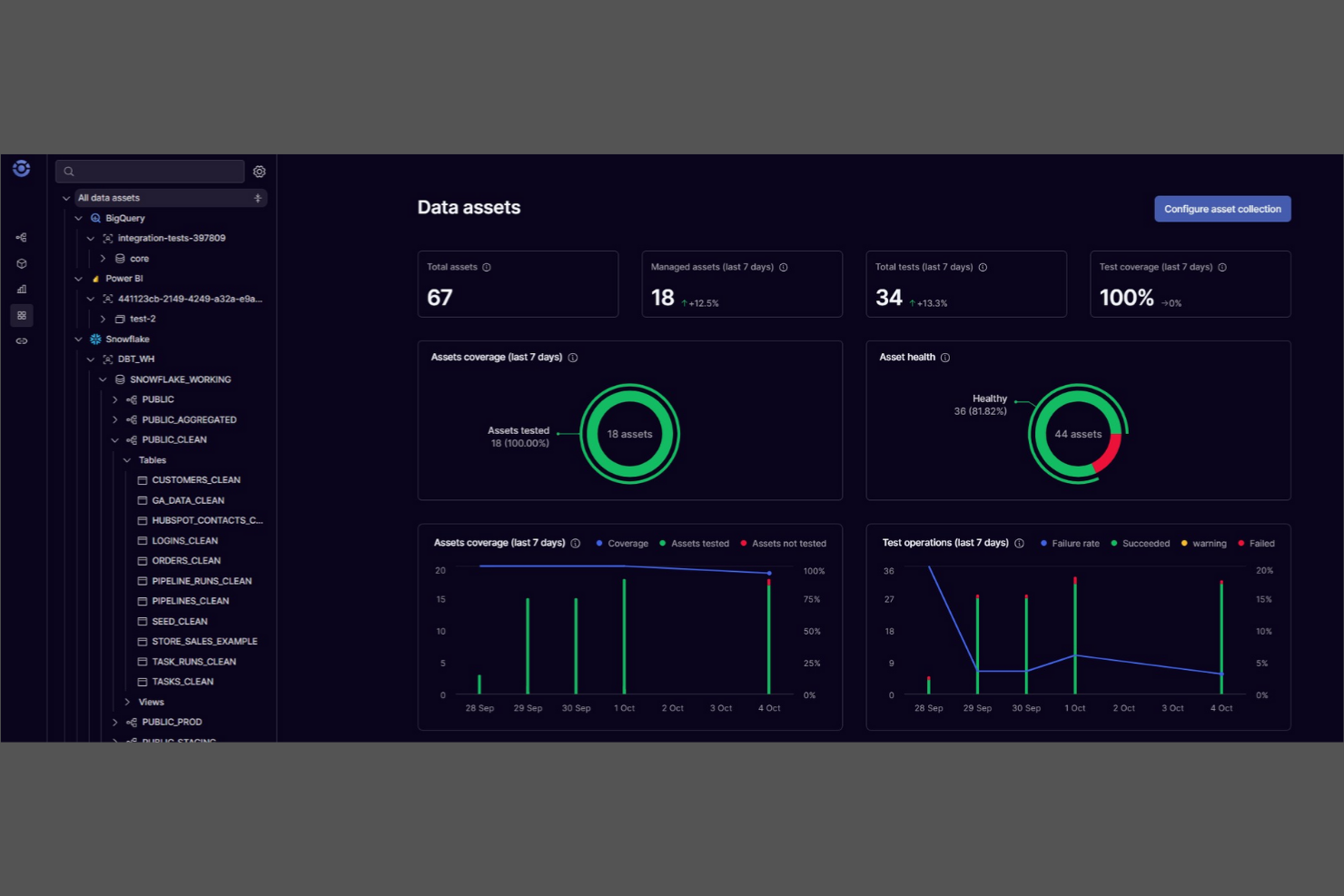
Unlike most workflow automation platforms, Orchestra is designed for teams that need to collaboratively design, edit, and manage workflows in real time. Product managers, operations leads, and cross-functional teams use Orchestra to visually map out and iterate on complex processes together. Its real-time editing and version control features set it apart from Apache Airflow, making it a strong choice for organizations where collaborative workflow design is a priority.
Why Orchestra Is a Good Apache Airflow Alternative
For teams that need to co-design and iterate on workflows together, Orchestra offers collaborative workflow editing that Apache Airflow doesn’t natively support. I picked Orchestra because it lets multiple users edit, comment, and version workflows in real time, which is especially useful for distributed or cross-functional teams.
The platform’s visual workflow builder and built-in version control make it easy to track changes and maintain process clarity as teams collaborate. If your organization values shared ownership and live editing of workflow logic, Orchestra is a strong alternative to Airflow’s code-centric approach.
Orchestra Key Features
Some other features that make Orchestra appealing for workflow automation include:
- Automated Task Assignment: Assign workflow steps to specific team members based on roles or availability.
- Audit Logging: Track every change and action within workflows for compliance and transparency.
- Conditional Logic Blocks: Build workflows that branch or loop based on custom rules and triggers.
- API Integration Builder: Connect external tools and services directly into your workflows using a visual interface.
Orchestra Integrations
Integrations include Snowflake, Databricks, Fivetran, dbt, Coalesce, Iceberg, Estuary, Alteryx, Tableau, and Google Cloud Dataflow.
Pros and Cons
Pros:
- Built-in version control tracks workflow changes
- Visual builder reduces the need for Python scripting
- Real-time workflow editing supports team collaboration
Cons:
- No on-premises deployment for self-hosting needs
- Fewer advanced scheduling options than Airflow

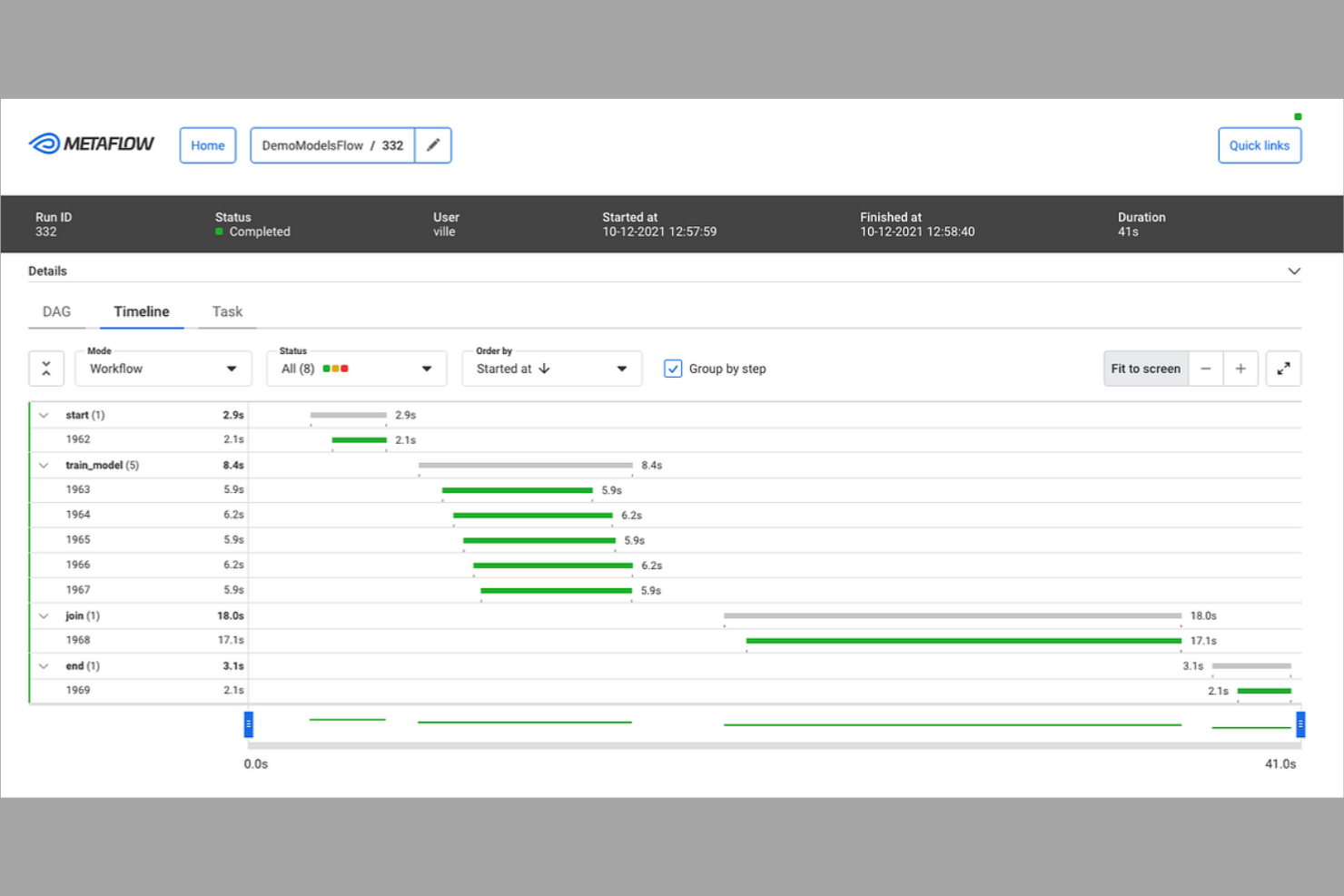
If you’re looking to build and iterate on data workflows quickly in Python, Metaflow is designed for you. Data scientists and machine learning engineers use Metaflow to prototype, deploy, and manage workflows without leaving their Python environment. Unlike Apache Airflow, Metaflow emphasizes rapid development and versioning, making it easier to experiment and scale up from notebooks to production.
Why Metaflow Is a Good Apache Airflow Alternative
For teams who want to move fast with Python-based workflows, Metaflow stands out for rapid prototyping. I picked Metaflow because it lets you define, test, and iterate on workflows directly in Python, so you can go from notebook to production without switching tools.
Its built-in versioning and data lineage features help you track experiments and changes as you refine your pipelines. If you need to quickly prototype and scale data workflows, Metaflow’s Python-first approach offers a flexible alternative to Apache Airflow’s more configuration-heavy model.
Metaflow Key Features
Some other features in Metaflow that are worth noting include:
- Integrated Data Storage: Store and retrieve data artifacts directly within your workflows using built-in data management.
- AWS Step Functions Support: Run and scale workflows on AWS Step Functions with minimal configuration.
- Automatic Retry Logic: Automatically retry failed workflow steps to improve reliability.
- CLI and Notebook Integration: Interact with workflows through both command-line tools and Jupyter notebooks.
Metaflow Integrations
Integrations include AWS S3, AWS Batch, AWS Step Functions, Azure Blob Storage, Azure Kubernetes Service, Google Cloud Storage, Google Kubernetes Engine, Kubernetes, Jupyter, and Python.
Pros and Cons
Pros:
- Direct integration with Jupyter notebooks
- Built-in data versioning and lineage tracking
- Python-native workflow definition for rapid iteration
Cons:
- No built-in web UI for workflow management
- Limited native scheduling and orchestration features

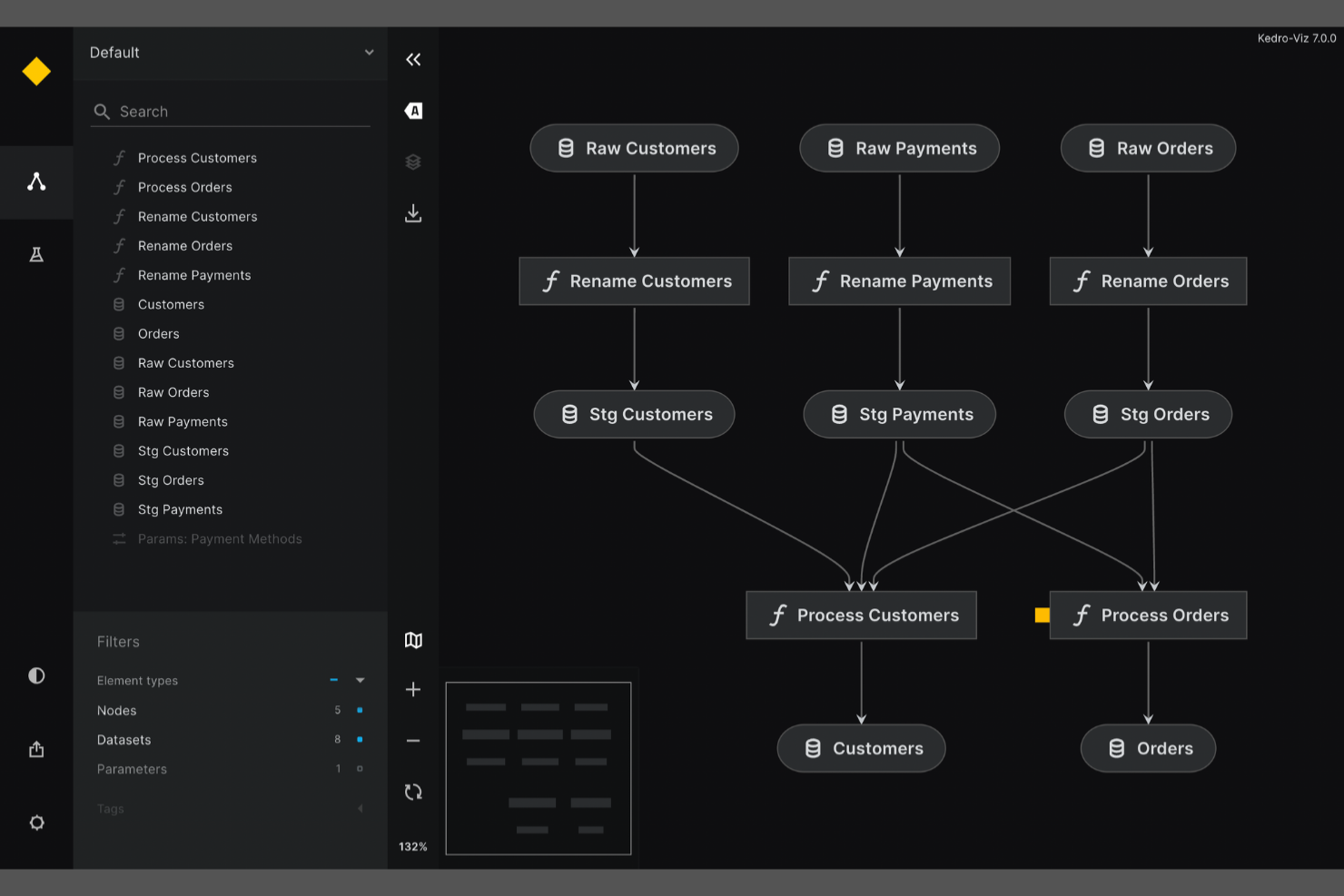
If you need to ensure reproducibility and modularity in your data science workflows, Kedro is built for that purpose. It’s especially useful for data teams and machine learning engineers who want to create maintainable, production-ready pipelines using Python. Unlike Apache Airflow, Kedro emphasizes project structure, data cataloging, and version control to help you deliver consistent, auditable results across projects.
Why Kedro Is a Good Apache Airflow Alternative
Kedro is purpose-built for teams that need reproducible data science projects, which sets it apart from Apache Airflow’s broader workflow focus. I picked Kedro because it enforces a modular project structure and uses a data catalog to track datasets and their versions throughout your pipeline.
Its pipeline abstraction lets you define, reuse, and test pipeline components as standalone units, making collaboration and maintenance much easier. For data science and machine learning teams, Kedro’s focus on reproducibility and code quality directly addresses the challenges of scaling and productionizing analytics workflows.
Kedro Key Features
Some other features in Kedro that are worth noting include:
- Visual Pipeline Editor: Build and modify pipelines using a drag-and-drop interface.
- Jupyter Notebook Integration: Develop and test pipeline nodes interactively within Jupyter environments.
- Built-In Testing Framework: Write and run unit tests for pipeline components directly within your project.
- Extensive Plugin Ecosystem: Extend functionality with plugins for deployment, visualization, and cloud integration.
Kedro Integrations
Integrations include Amazon SageMaker, Apache Airflow, Apache Spark, Azure ML, Dask, Databricks, Docker, Jupyter Notebook, Kubeflow, and MLflow.
Pros and Cons
Pros:
- Supports reproducibility with versioned pipelines
- Built-in data catalog for dataset management
- Enforces modular project structure for pipelines
Cons:
- Fewer connectors for legacy enterprise systems
- No built-in workflow scheduling engine

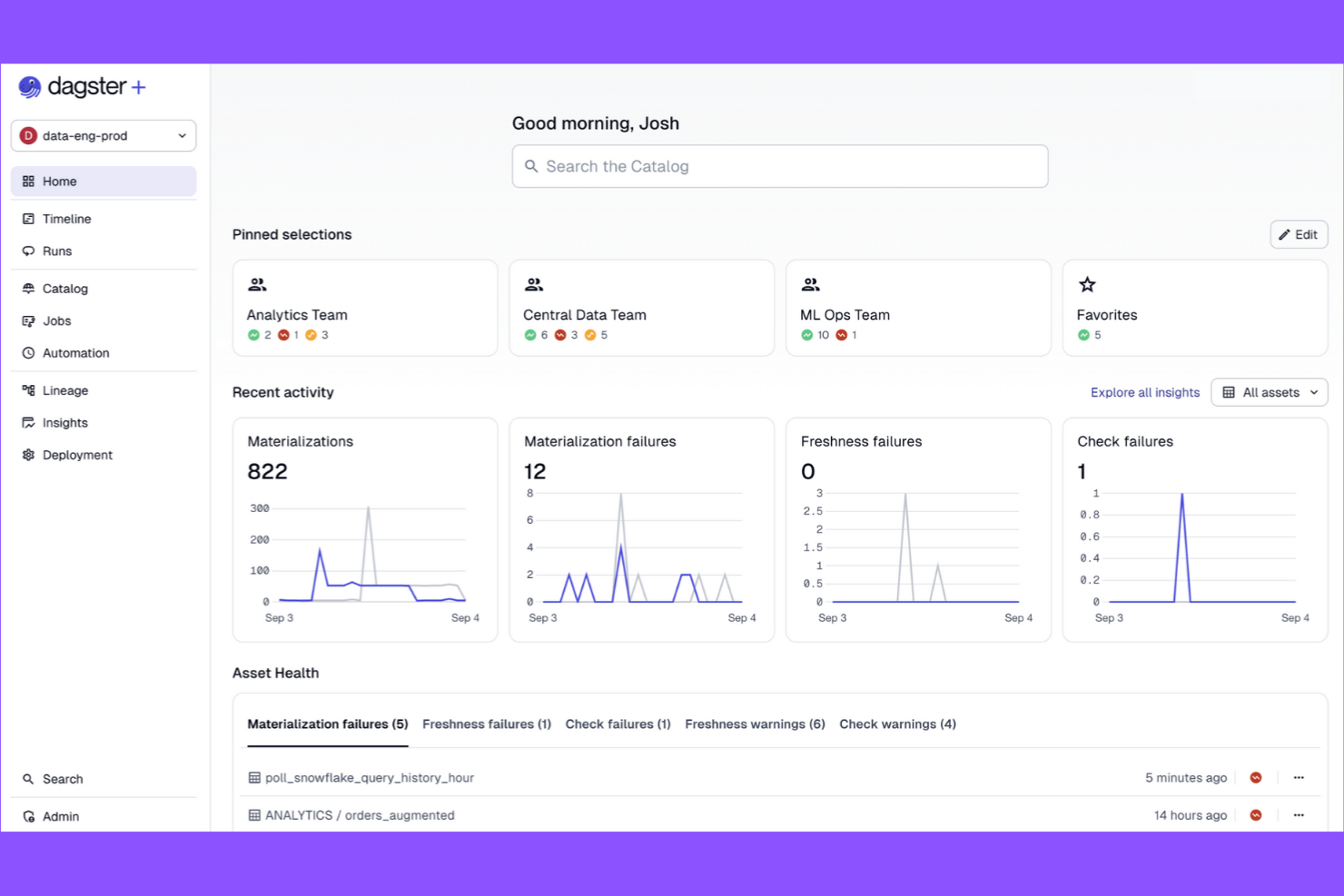
Dagster is a workflow automation platform designed for teams that need modular, testable data pipelines. It appeals to data engineers and analytics teams who want strong pipeline observability and reusable components. If you’re looking for a code-driven solution that emphasizes pipeline structure and maintainability, Dagster offers a clear alternative to Apache Airflow’s DAG-centric approach.
Why Dagster Is a Good Apache Airflow Alternative
What sets Dagster apart is its focus on modular data pipeline design, which gives teams more flexibility in building and maintaining workflows. I picked Dagster because it lets you break pipelines into reusable, testable components called solids and ops, making it easier to manage complex projects.
Its type system enforces data contracts between pipeline steps, reducing errors and improving reliability. For teams that want to iterate quickly and keep pipelines organized, Dagster’s modular approach offers a clear advantage over Airflow’s monolithic DAG structure.
Dagster Key Features
Some other features in Dagster that stand out for workflow automation teams include:
- GraphQL API: Access and control pipeline runs, schedules, and logs programmatically using a robust GraphQL interface.
- Built-in Scheduler: Schedule pipeline executions with cron-like expressions and manage recurring jobs directly from the Dagster UI.
- Asset Catalog: Track, visualize, and manage data assets produced by your pipelines for better lineage and traceability.
- Integrated Testing Tools: Use built-in utilities to test pipeline components in isolation before deploying them to production.
Dagster Integrations
Integrations include dbt, Fivetran, Snowflake, Databricks, AWS S3, GCP BigQuery, Airbyte, Looker, Slack, and Kubernetes.
Pros and Cons
Pros:
- Built-in asset catalog for data lineage
- Strong type system enforces data contracts
- Modular pipeline components support code reuse
Cons:
- Smaller community and ecosystem than Airflow
- Fewer legacy system integrations than Airflow
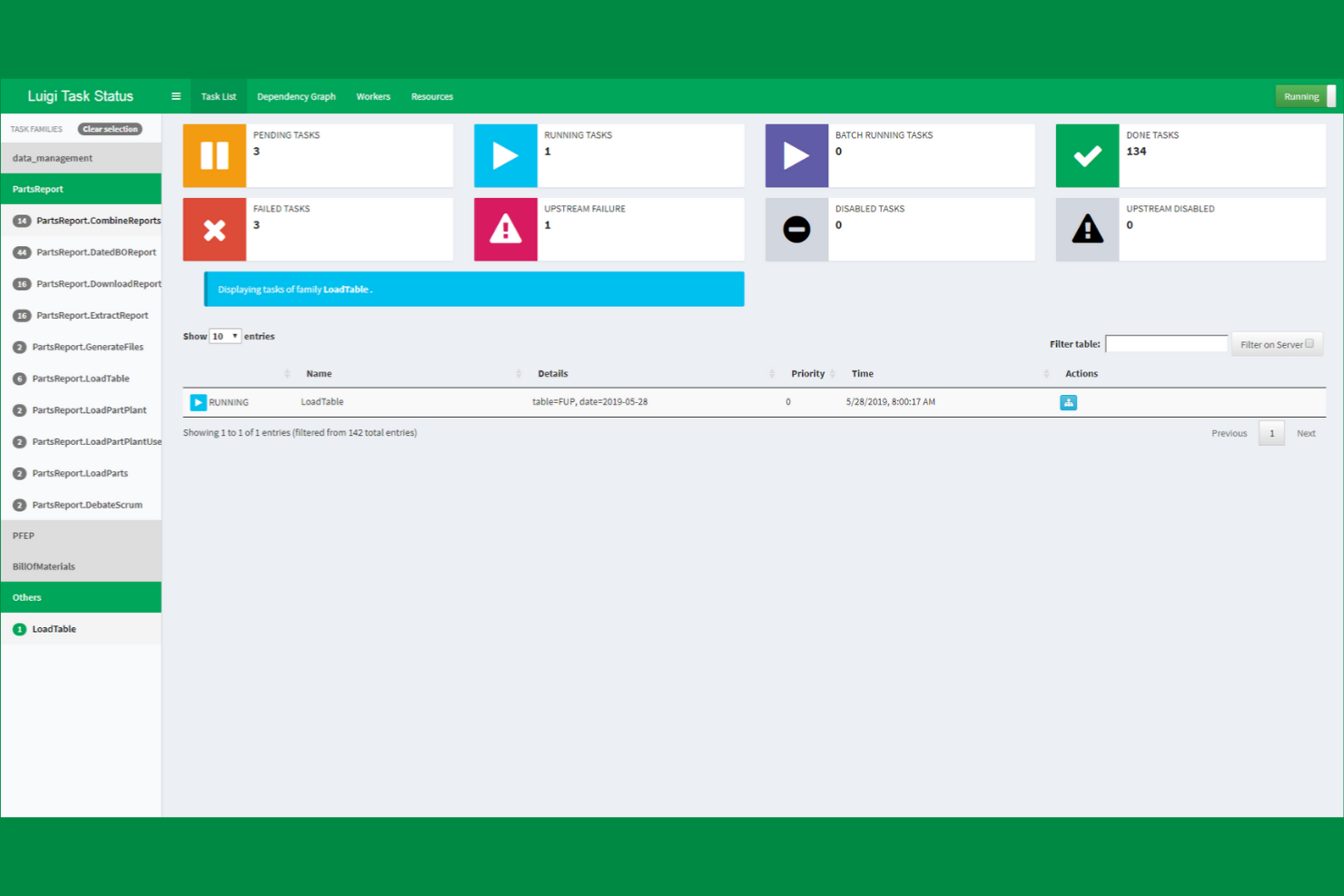
If your team needs precise control over complex task dependencies, Luigi offers a Python-based framework built for that purpose. Data engineers and analytics teams often choose Luigi to manage batch workflows where task order and dependency resolution are critical. Unlike Apache Airflow, Luigi’s approach to dependency-based scheduling is straightforward and code-centric, making it a strong fit for teams that want to define workflows programmatically.
Why Luigi Is a Good Apache Airflow Alternative
Luigi stands out for teams that need granular, code-driven control over task dependencies in their workflows. I picked Luigi because it lets you define complex dependency chains directly in Python, which is ideal for data engineering and ETL scenarios where task order is critical. Its scheduler automatically resolves dependencies and only runs tasks when their prerequisites are met, reducing manual orchestration. If your projects require explicit, programmatic dependency management, Luigi offers a focused alternative to Airflow’s broader DAG-based approach.
Luigi Key Features
Some other features that make Luigi useful for workflow automation include:
- Centralized Scheduler UI: Monitor and manage running tasks through a web-based dashboard.
- Extensible Task Library: Leverage built-in task templates for common data operations and extend them for custom needs.
- Retry and Failure Handling: Configure automatic retries and custom failure logic for individual tasks.
- Filesystem and Database Targets: Use built-in support for tracking task outputs in local filesystems, HDFS, or databases.
Luigi Integrations
Integrations include Hadoop, Hive, Pig, HDFS, Spark, PostgreSQL, MySQL, Redshift, Kubernetes, Prometheus, and Datadog.
Pros and Cons
Pros:
- Lightweight installation with minimal external requirements
- Strong support for complex dependency chains
- Python-native workflow definitions simplify code integration
Cons:
- Lacks a modern web-based workflow editor
- No built-in support for dynamic DAGs
Other Apache Airflow alternatives
Here are some additional Apache Airflow alternatives that didn’t make it onto my shortlist, but are still worth checking out:
- Next Matter
For end-to-end business process automation
- Hevo Data
For automated data pipeline integration
- Camunda
For BPMN-based workflow modeling
- Flowable
With advanced case management


Apache Airflow Alternatives Selection Criteria
When selecting the best Apache Airflow alternatives to include in this list, I considered common buyer needs and pain points related to workflow automation platform products, like managing complex task dependencies and ensuring reliable scheduling. I also used the following framework to keep my evaluation structured and fair:
Core Functionality (25% of total score)
To be considered for inclusion in this list, each solution had to fulfill these common use cases:
- Automate multi-step workflows
- Schedule recurring tasks
- Monitor workflow execution status
- Handle task dependencies
- Provide error and retry management
Additional Standout Features (25% of total score)
To help further narrow down the competition, I also looked for unique features, such as:
- Visual workflow builders
- Native integrations with cloud data services
- Support for dynamic workflow generation
- Built-in version control for workflows
- Advanced access control and permissions
Usability (10% of total score)
To get a sense of the usability of each system, I considered the following:
- Intuitive user interface design
- Clear workflow visualization
- Minimal setup steps required
- Logical navigation and menu structure
- Responsive performance for large workflows
Onboarding (10% of total score)
To evaluate the onboarding experience for each platform, I considered the following:
- Availability of step-by-step tutorials
- Access to pre-built workflow templates
- Interactive product tours or walkthroughs
- Comprehensive documentation and FAQs
- Live or recorded onboarding webinars
Customer Support (10% of total score)
To assess each software provider’s customer support services, I considered the following:
- Availability of live chat or phone support
- Responsiveness to support tickets
- Access to active user communities
- Quality of knowledge base resources
- Availability of dedicated customer success managers
Value For Money (10% of total score)
To evaluate the value for money of each platform, I considered the following:
- Transparent and flexible pricing plans
- Free trial or free tier availability
- Features included at each pricing level
- Cost compared to similar solutions
- Scalability of pricing as needs grow
Customer Reviews (10% of total score)
To get a sense of overall customer satisfaction, I considered the following when reading customer reviews:
- Reported reliability and uptime
- Quality of customer support experiences
- Ease of implementation feedback
- Satisfaction with feature set
- Willingness to recommend to others
Why Look For an Apache Airflow Alternative?
While Apache Airflow is a good choice of workflow automation platform, there are a number of reasons why some users seek out alternative solutions. You might be looking for an Apache Airflow alternative because…
- You need a simpler setup and maintenance process
- Your team prefers a visual workflow builder over code-based DAGs
- You require deeper native integrations with cloud services
- You want more granular access controls and user management
- You need better support for dynamic or event-driven workflows
- You’re looking for a more active or responsive support community
If any of these sound like you, you’ve come to the right place. My list contains several workflow automation platform options that are better suited for teams facing these challenges with Apache Airflow and looking for alternative solutions.
Apache Airflow Key Features
Here are some of the key features of Apache Airflow, to help you contrast and compare what alternative solutions offer:
- Directed acyclic graph (DAG) workflow modeling
- Python-based workflow definitions
- Built-in scheduling and execution engine
- Task dependency management
- Web-based monitoring and management UI
- Support for custom plugins and operators
- Integration with major cloud providers
- Role-based access control
- Automated retry and failure handling
- Extensive logging and audit trails
What’s Next:
If you're in the process of researching Apache Airflow alternatives, connect with a SoftwareSelect advisor for free recommendations.
You fill out a form and have a quick chat where they get into the specifics of your needs. Then you'll get a shortlist of software to review. They'll even support you through the entire buying process, including price negotiations.