



Asana vs. Zoho Projects: Expert Comparison & Reviews 2026



Asana offers a streamlined approach to organizing your team's workflows, while Zoho Projects provides an integrated platform for managing projects with flexibility. Both tools aim to help you improve team productivity, but they differ in user interface and customization options.
I’ve evaluated and compared these tools and their key features, pros and cons, and pricing using my expertise as a project manager. Read my comparison below to find out which project management software is the right tool for your projects and processes.
Asana vs. Zoho Projects: An Overview
Asana

Zoho Projects
Why Trust Our Software Recommendations
Our team has been testing and reviewing software since 2012. As project managers ourselves, we know how difficult—and important—it is to choose the right software.
For this guide, we evaluated tools using hands-on testing and independent research, scoring tools using our selection criteria. We also draw on insights from industry thought leaders and practicing project management experts.
Our reviews reflect our human editorial judgment, not a sales pitch.
Expert reviewers:
Asana vs. Zoho Projects Pricing Comparison
| Asana | Zoho Projects | |
|---|---|---|
| Free Trial | Free plan available | Free plan available |
| Pricing | From $10.99/user/month (billed annually) | From $4/user/month (billed annually) |
Asana vs. Zoho Projects Pricing & Hidden Costs
Asana’s pricing follows a tiered subscription model with a free, basic version and premium plans that scale with added features and more customer support. Zoho Projects’ pricing also follows a tiered approach, with a free plan and paid options that offer more functionality and security measures.
To select the best project management software for you, evaluate your team's specific business needs, consider the project management features you'll actually use, and factor in any potential hidden costs to choose the best fit for your budget and workflow.
Asana vs. Zoho Projects Feature Comparison
With Asana’s task management feature, you can easily organize daily tasks and subtasks and visualize project timelines. This is perfect for teams that need features for clear task assignments and deadlines. Zoho Projects’ integration with other Zoho applications is great for businesses already within the Zoho ecosystem.
| Asana | Zoho Projects | |
|---|---|---|
| API | ||
| Batch Permissions & Access | ||
| Budgeting | ||
| Calendar Management | ||
| Collaboration Support | ||
| Contact Management | ||
| Contact Sharing | ||
| Customer Management | ||
| Dashboard | ||
| Dashboards | ||
| Data Export | ||
| Data Import | ||
| Data Visualization | ||
| Dependency Tracking | ||
| Document Sharing | ||
| Expense Tracking | ||
| External Integrations | ||
| File Sharing | ||
| Gantt Charts | ||
| Kanban Boards | ||
| Multi-User | ||
| Notifications | ||
| Project Management | ||
| Resource Management | ||
| Scheduling | ||
| Task Scheduling/Tracking | ||
| Third-Party Plugins/Add-Ons | ||
| Time Management | ||
| Travel Management | ||
| Workflow Management |
Asana vs. Zoho Projects Integrations
| Integration | Asana | Zoho Projects |
|---|---|---|
| Slack | ✅ | ✅ |
| Microsoft Teams | ✅ | ✅ |
| Google Drive | ✅ | ✅ |
| Dropbox | ✅ | ✅ |
| Salesforce | ✅ | ❌ |
| Zendesk | ✅ | ✅ |
| Evernote | ✅ | ❌ |
| QuickBooks | ❌ | ❌ |
| API | ✅ | ✅ |
| Zapier | ✅ | ✅ |
Asana's integration with Slack lets you easily convert conversations into tasks, which can speed up your workflows and improve communication. Zoho Projects’ integration with Zendesk lets you turn support tickets into tasks, which is useful for managing follow-ups after a launch.
Asana vs. Zoho Projects Security, Compliance & Reliability
| Factor | Asana | Zoho Projects |
|---|---|---|
| Data Privacy | Asana maintains data privacy with GDPR compliance and regular audits. | Zoho Projects offers data privacy via GDPR compliance and encryption. |
| Encryption | Asana uses AES-256 encryption for data at rest and TLS for data in transit. | Zoho Projects employs AES-256 encryption and secure data centers. |
| Uptime | Asana guarantees 99.9% uptime for enterprise customers. | Zoho Projects provides 99.9% uptime with redundant data centers. |
Asana and Zoho Projects both prioritize security and compliance. Consider your team's specific data protection needs, review vendor compliance certifications, and prioritize features that align with your security policies.
Asana vs. Zoho Projects Ease of Use
| Factor | Asana | Zoho Projects |
|---|---|---|
| User Interface | Asana offers a clean, user-friendly interface with drag-and-drop capabilities. | Zoho Projects features a customizable interface with a steeper learning curve. |
| Onboarding | Asana provides interactive tutorials and quick setup guides. | Zoho Projects offers comprehensive onboarding videos and detailed guides. |
| Support | Asana offers extensive online resources, as well as 24/7 support for enterprise customers. | Zoho Projects provides numerous help articles and a knowledge base. |
Asana excels in ease of use with its straightforward interface and quick onboarding. Zoho Projects, while powerful, can be more challenging due to its complex customization options, which may require a bit more time to master.
Asana vs Zoho Projects: Pros & Cons
Asana
- You can easily track tasks and deadlines using Asana's intuitive interface.
- Asana's collaboration tools help your team communicate effectively in real-time.
- There are extensive customization options so you can tailor workflows and views to your specific needs.
- The reporting capabilities are somewhat basic, which may not satisfy teams needing detailed analytics.
- It can feel overwhelming if your team is small or your projects are simple.
- You might find the notification system a bit excessive or distracting.
Zoho Projects
- Task dependencies are highly visual and easy to set up.
- Built-in time tracking integrates smoothly with billing features.
- Customizable project templates support repeatable workflows.
- Reporting customization can be limited for advanced needs.
- Mobile app notifications do not always sync in real time.
- Gantt chart drag-and-drop can feel sluggish with large projects.
Best Use Cases for Asana and Zoho Projects
Asana
- Creative agencies You can manage creative workflows and client projects with Asana’s visual boards and timeline features.
- Tech startups You can coordinate product development and team tasks using Asana’s real-time updates and goal-setting tools.
- Marketing teams You can plan campaigns and track progress with Asana’s clear timelines and task comments.
- Nonprofits Asana lets you manage volunteer tasks, events, and fundraising efforts with clear task assignments and timelines.
- Remote teams You can collaborate effectively with Asana’s real-time updates and communication features.
- Event planners You can organize events easily with Asana’s task management and timeline visualization features.
Zoho Projects
- Small Agencies Kanban boards, time tracking, and client billing streamline project delivery and reporting for agency teams.
- IT Departments Issue tracking, blueprint automations, and strong permission controls provide what IT teams need for complex internal projects.
- Consulting Firms Time sheets, detailed reports, and project-level billing help consultants keep track of client hours and invoicing.
- Remote Teams Robust collaboration tools, document sharing, and project forums help distributed users stay connected.
- Marketing Teams Reusable templates, task dependencies, and timeline tracking make repeated campaigns run smoothly and transparently.
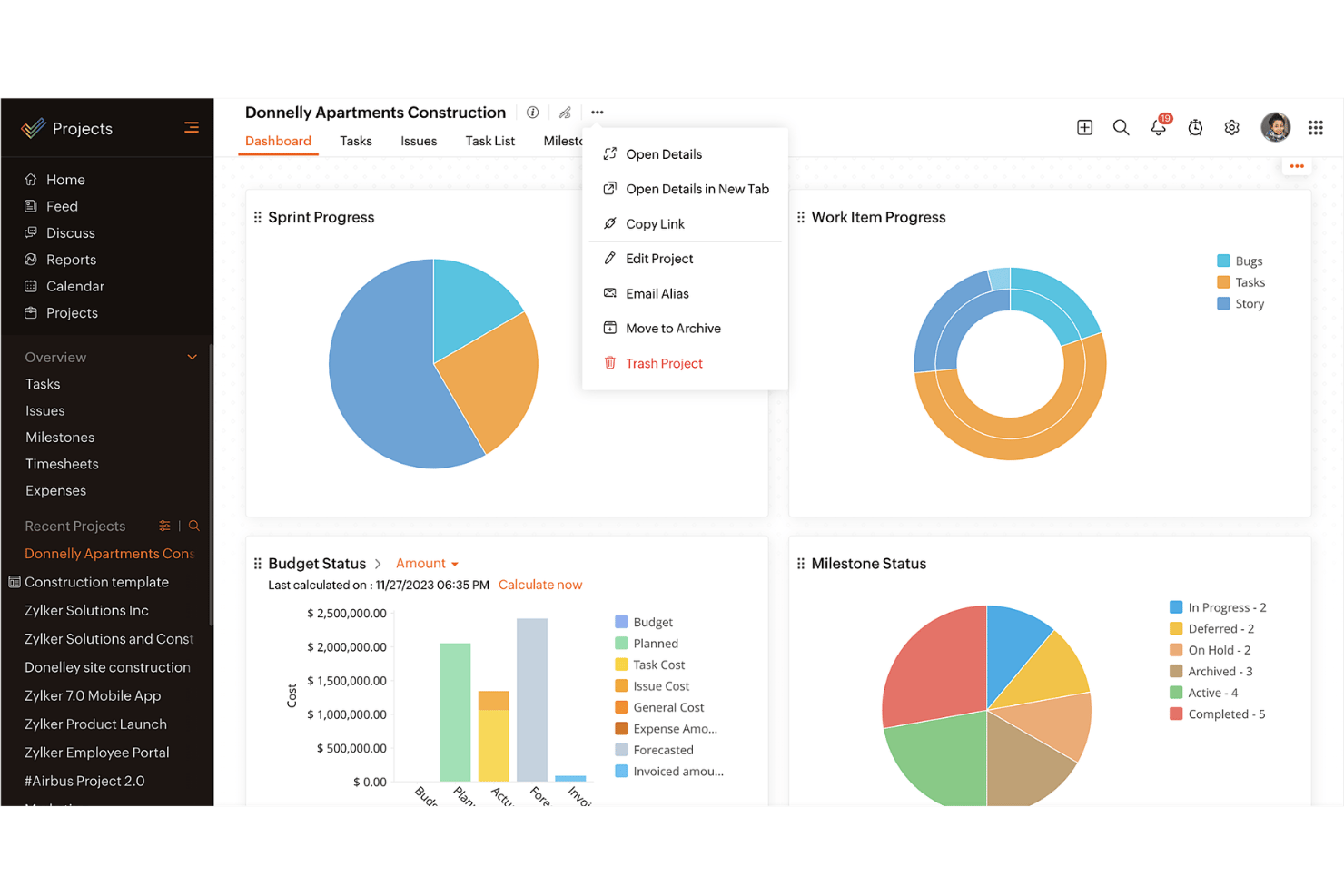
- Construction Projects Gantt charts, milestones, and resource allocation features support the scheduling needs of construction and field project managers.
Who Should Use Asana, and Who Should Use Zoho Projects?
In my opinion, Asana is best for creative teams and startups that need a simple, intuitive tool to manage tasks and collaborate quickly. If you're in a larger organization or industry that requires robust customization and integration with other business tools, Zoho Projects is the better fit.
From my perspective, Asana suits teams that want straightforward task management, while Zoho Projects is ideal for those that need detailed control and extensive project tracking. Zoho Projects also offers more comprehensive features at a competitive price.
Differences Between Asana and Zoho Projects
| Asana | Zoho Projects | |
|---|---|---|
| Automation | Asana provides basic automation for task management. | Zoho Projects offers more advanced automation features for more complex project workflows. |
| Customization | Asana has limited customization and focuses on simplicity. | Zoho Projects offers extensive customization to fit complex needs. |
| User Interface | Asana has a clean, intuitive interface that makes adoption quicker. | Zoho Projects offers a customizable interface that requires more setup. |
| Read Asana ReviewOpens new window | Read Zoho Projects ReviewOpens new window |
Similarities Between Asana and Zoho Projects
| Cloud-Access | Both are cloud-based, so you can access your projects from anywhere. This is essential for remote work setups. |
|---|---|
| Collaboration | Both project management platforms provide team collaboration tools so your team members can communicate and share updates within the platform efficiently. |
| Mobile Apps | Each tool offers a mobile app that helps you manage tasks, stay updated on the go, and be productive outside the office. |
| Reporting | They both include reporting features that let you generate insights and track project performance. |
| Task Management | Both Asana and Zoho Projects offer task management features that let you assign tasks, set deadlines, and track progress easily. |
| Read Asana ReviewOpens new window Read Zoho Projects ReviewOpens new window | |