


Asite Review 2026: Pros, Cons, Features and Pricing



Asite is BIM project management software built around a common data environment for managing project information, documents, drawings, and models. I’d choose it over Autodesk Construction Cloud if your team needs ISO 19650-aligned information management, centralized document control, and automatic version tracking across project stages.
Asite Evaluation Summary
- From $50/user
- Free demo available
Why Trust Our Software Recommendations
Our team has been testing and reviewing software since 2012. As project managers ourselves, we know how difficult—and important—it is to choose the right software.
For this guide, we evaluated tools using hands-on testing and independent research, scoring tools using our selection criteria. We also draw on insights from industry thought leaders and practicing project management experts.
Our reviews reflect our human editorial judgment, not a sales pitch.
Expert reviewers:
Asite Overview
I’d choose Asite for construction teams that need an ISO 19650-aligned common data environment, controlled drawings and documents, and version tracking across project stages. Its browser-based BIM coordination and customizable workflows suit complex, information-heavy projects better than simpler project tools, though the interface can take time to learn. Integrations include AutoCAD and Microsoft Outlook; check your required connections before selecting it. Pricing isn’t publicly clear, so confirm modules and user costs in a demo. Training and support options are broad, but reviews suggest setup help and usability can vary.
pros
-
Standards-based CDE controls revisions and audit trails across project information.
-
Browser-based model coordination supports tracked, status-based BCF issues.
-
Reviewers value searchable documents, in-browser previews, and drawing markups.
cons
-
Classic and Adoddle views have inconsistent features and clunky workflows.
-
Reviewers report slow viewing, freezes, and crashes.
-
Bulk uploads and meaningful reporting can require awkward workarounds.
-

Smartsheet
Visit WebsiteThis rating combines scores from multiple user review sites to reflect overall customer sentiment about the product.4.4 -
Celoxis
Visit WebsiteThis rating combines scores from multiple user review sites to reflect overall customer sentiment about the product.4.5 -
Accelo
Visit WebsiteThis rating combines scores from multiple user review sites to reflect overall customer sentiment about the product.4.4





Our Review Methodology
How We Test & Score Tools
We’ve spent years building, refining, and improving our software testing and scoring system. The rubric is designed to capture the nuances of software selection and what makes a tool effective, focusing on critical aspects of the decision-making process.
Below, you can see exactly how our testing and scoring works across seven criteria. It allows us to provide an unbiased evaluation of the software based on core functionality, standout features, ease of use, onboarding, customer support, integrations, customer reviews, and value for money.
Core Functionality (25% of final scoring)
The starting point of our evaluation is always the core functionality of the tool. Does it have the basic features and functions that a user would expect to see? Are any of those core features locked to higher-tiered pricing plans? At its core, we expect a tool to stand up against the baseline capabilities of its competitors.
Standout Features (25% of final scoring)
Next, we evaluate uncommon standout features that go above and beyond the core functionality typically found in tools of its kind. A high score reflects specialized or unique features that make the product faster, more efficient, or offer additional value to the user.
We also evaluate how easy it is to integrate with other tools typically found in the tech stack to expand the functionality and utility of the software. Tools offering plentiful native integrations, 3rd party connections, and API access to build custom integrations score best.
Ease of Use (10% of final scoring)
We consider how quick and easy it is to execute the tasks defined in the core functionality using the tool. High scoring software is well designed, intuitive to use, offers mobile apps, provides templates, and makes relatively complex tasks seem simple.
Onboarding (10% of final scoring)
We know how important rapid team adoption is for a new platform, so we evaluate how easy it is to learn and use a tool with minimal training. We evaluate how quickly a team member can get set up and start using the tool with no experience. High scoring solutions indicate little or no support is required.
Customer Support (10% of final scoring)
We review how quick and easy it is to get unstuck and find help by phone, live chat, or knowledge base. Tools and companies that provide real-time support score best, while chatbots score worst.
Customer Reviews (10% of final scoring)
Beyond our own testing and evaluation, we consider the net promoter score from current and past customers. We review their likelihood, given the option, to choose the tool again for the core functionality. A high scoring software reflects a high net promoter score from current or past customers.
Value for Money (10% of final scoring)
Lastly, in consideration of all the other criteria, we review the average price of entry level plans against the core features and consider the value of the other evaluation criteria. Software that delivers more, for less, will score higher.
Core Features
Common Data Environment
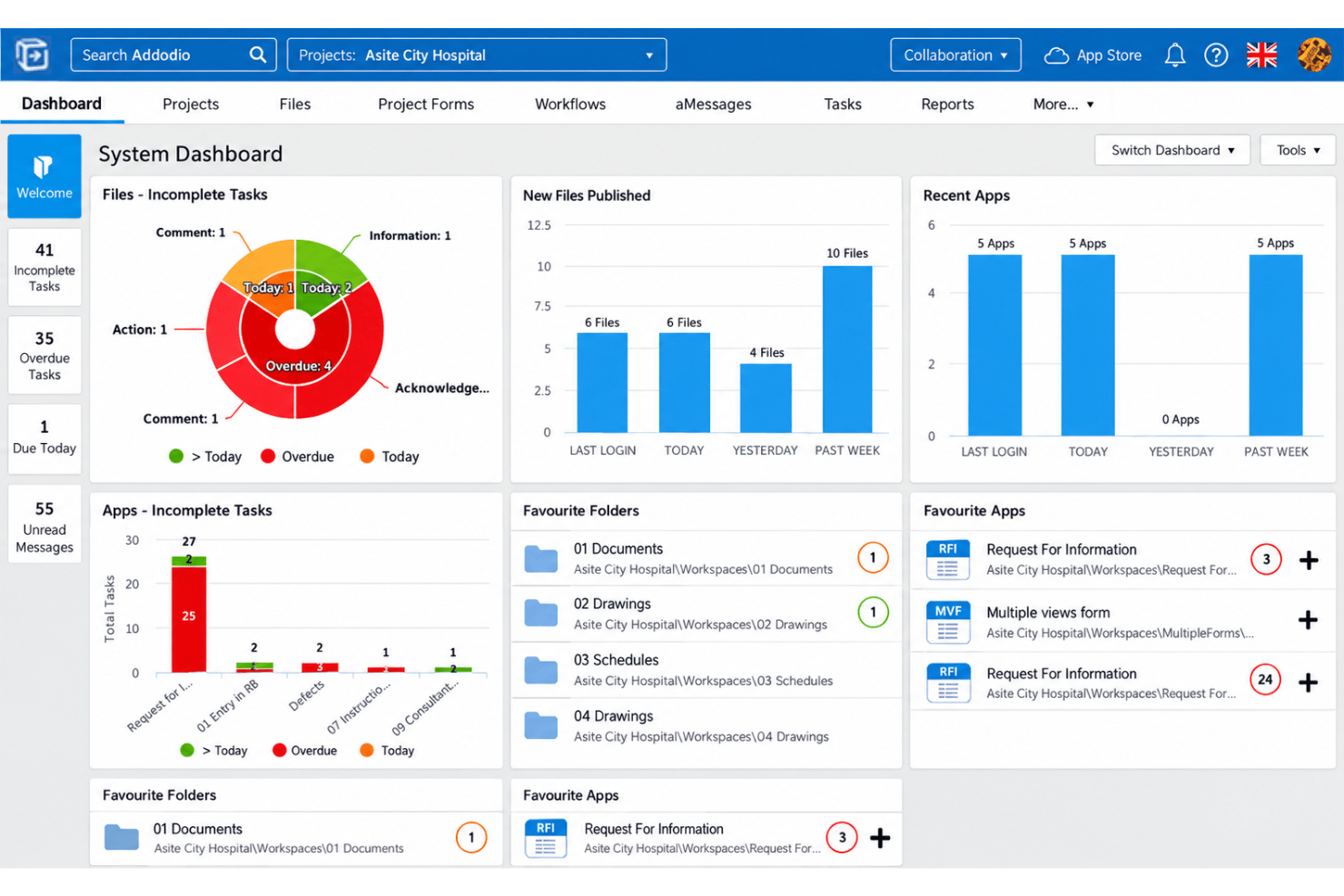
Asite’s CDE stores project information in a shared space with standards-based workflows. Your team can manage drawings, models, and documents in one controlled project record.
Document Version Control
Asite tracks document revisions and applies version control within document workflows. This helps your team identify the current drawing or specification and trace changes.
Browser-Based BIM Coordination
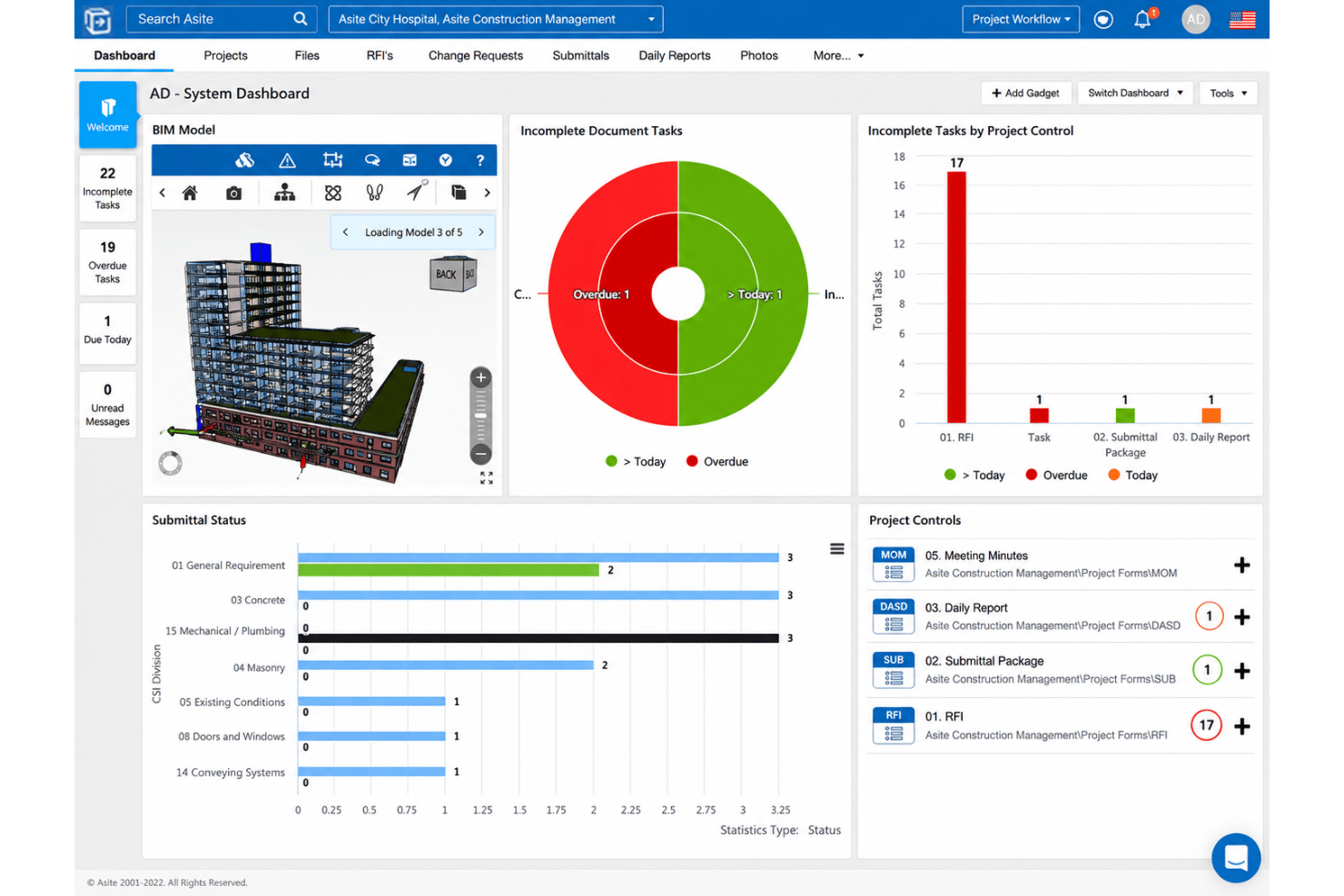
Asite 3D Repo lets teams view, search, and coordinate individual or federated models in a browser. Teams can inspect model objects without relying on separate native authoring applications.
BCF Model Issue Management
Asite lets teams create BCF issues around IFC files, then track each issue by status and priority. Use it to assign and follow up on clashes or design questions with model-based context.
Visual Workflows And Approvals
Asite’s visual workflows assign and track actions, with audit control and document management practices applied automatically. Your team can follow approval status and retain a record of decisions.
Mobile Field Management
Adoddle Field for Site lets teams view models and documents, create tasks, and record defects on mobile devices. Users can capture site updates offline and sync them to Asite when connectivity returns.
Ease of Use
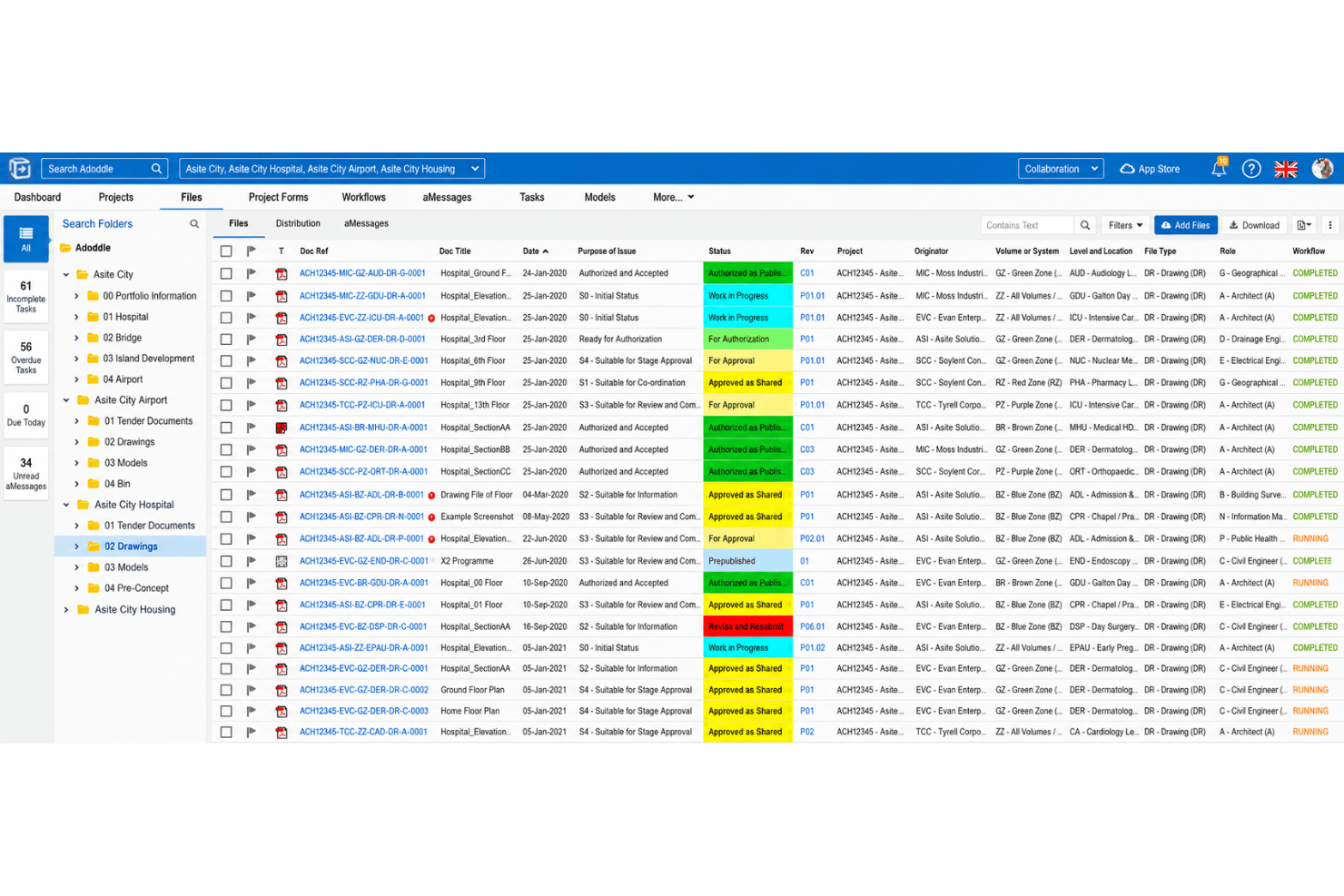
Asite is capable but takes time to learn, and I wouldn’t call it especially intuitive. Its searchable documents, in-browser previews, and drawing markups help reviewers find and comment on project information, while browser-based model coordination keeps BIM review accessible. However, users report clunky workflows across Classic and Adoddle views, plus slow viewing, freezes, and crashes. Expect a learning curve and test key review tasks before rollout.
Integrations
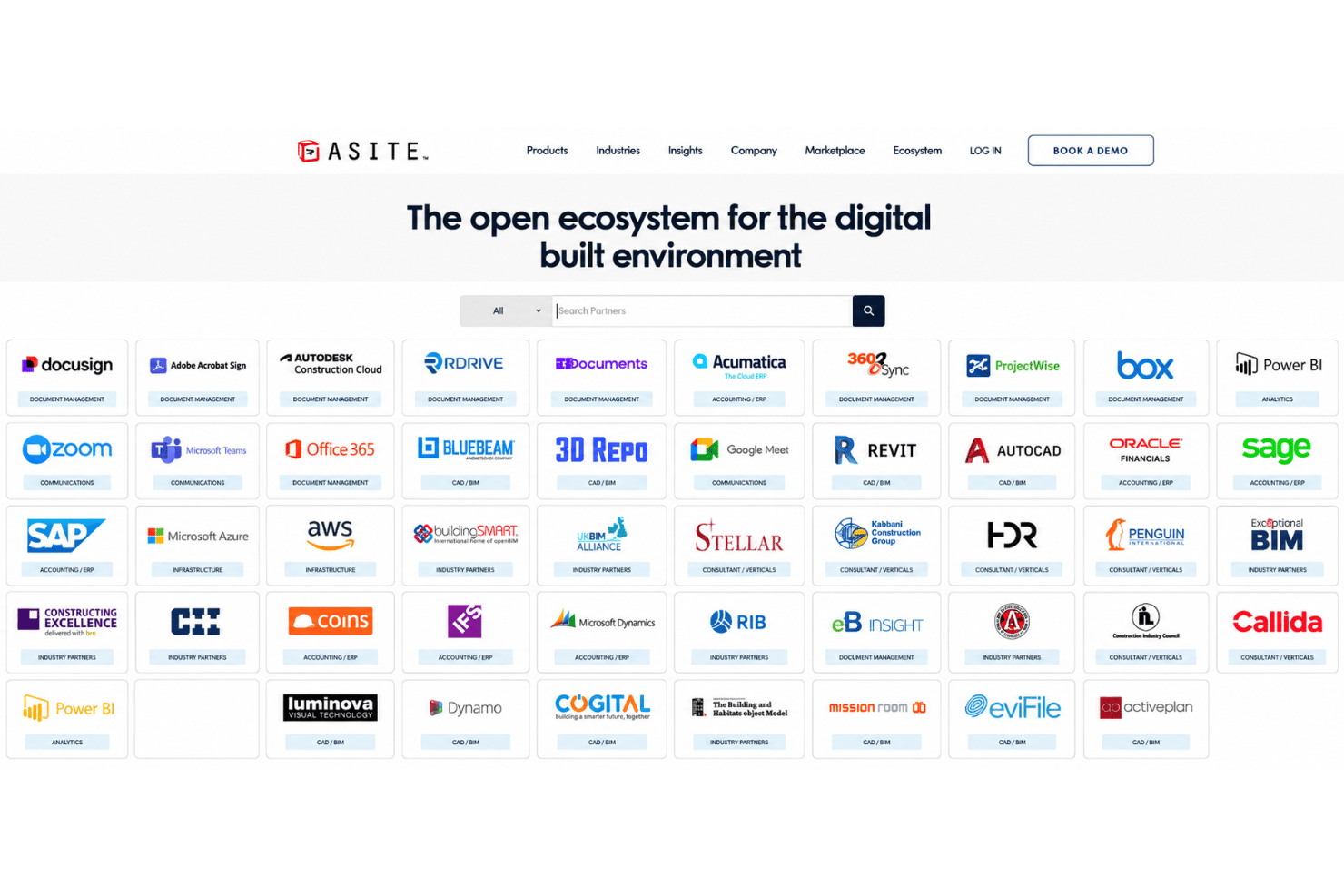
Asite integrates with Autodesk Construction Cloud, Autodesk Revit, Microsoft Teams, Zoom, Google Meet, Bluebeam Studio, Acumatica, Sage Intacct, Sage 300 CRE, and Dokobit, among others.
Asite also offers a REST API for custom integrations and supports third-party connections through Microsoft Power Automate connectors.
Asite Specs
- API
- Batch Permissions & Access
- Budgeting
- Calendar Management
- Collaboration Support
- Contact Management
- Contact Sharing
- Customer Management
- Dashboard
- Dashboards
- Data Export
- Data Import
- Data Visualization
- Dependency Tracking
- Document Sharing
- Expense Tracking
- External Integrations
- File Sharing
- Gantt Charts
- Kanban Boards
- Multi-User
- Notifications
- Project Management
- Resource Management
- Scheduling
- Task Scheduling/Tracking
- Third-Party Plugins/Add-Ons
- Time Management
- Travel Management
- Workflow Management



- 5 Capacity Planning Report ExamplesOpens new window
- Capacity Planning vs Resource Planning: Key DifferencesOpens new window
- How To Calculate Resource Capacity: 5 Key StepsOpens new window
- How to Handle Scope Changes in Project ManagementOpens new window
- Project Managers: How To Deal With Burnout At WorkOpens new window
- Traditional project management is a liability, says VP of Strategy & Project ManagementOpens new window
- What Is Agile Capacity Planning & How It WorksOpens new window
- What Is Kanban Capacity Planning: 8 Steps For Balanced WorkloadsOpens new window
- What Should Be Covered In A Project Kickoff Meeting?Opens new window
- Workload Capacity Planning: Complete How-To Guide + ToolsOpens new window