

10 Melhores Alternativas ao LiquidPlanner para Planeamento em 2026

Melhores alternativas ao LiquidPlanner


Gerir projetos pode tornar-se avassalador, especialmente quando as ferramentas que utiliza atualmente não estão alinhadas com as necessidades da sua equipa. Agora que o LiquidPlanner passou a fazer parte da Tempo e foi rebatizado como Portfolio Manager, poderá descobrir que já não responde totalmente às suas necessidades. Foi por isso que pesquisei alternativas ao LiquidPlanner.
Testei e analisei de forma independente várias opções para o ajudar a encontrar uma solução mais adequada. Neste artigo, vou guiá-lo pelas melhores alternativas ao LiquidPlanner, com foco nas funcionalidades que respondem aos desafios comuns da gestão de projetos. Com os meus conhecimentos, estará preparado para escolher a ferramenta que melhor se adapta às necessidades da sua empresa.
O que é o LiquidPlanner?
O LiquidPlanner é um software de gestão de portefólios de projetos concebido para ajudar as equipas a gerir a incerteza e a definir prioridades para as tarefas. É normalmente utilizado por gestores de projetos, líderes de equipa e profissionais de setores onde é comum gerir vários projetos e prioridades em constante mudança. O LiquidPlanner disponibiliza funcionalidades de agendamento preditivo, gestão dinâmica de projetos e otimização de recursos que ajudam a sua equipa a adaptar-se às mudanças e a tomar decisões informadas. No geral, o LiquidPlanner oferece valor ao ajudá-lo a manter os projetos alinhados com os objetivos e os recursos da sua equipa.
Por que motivo procurar uma alternativa ao LiquidPlanner?
Embora o LiquidPlanner seja uma boa opção de software de gestão de portefólios de projetos, existem vários motivos pelos quais alguns utilizadores procuram soluções alternativas. Poderá estar à procura de uma alternativa ao LiquidPlanner porque…
- Precisa de uma interface mais fácil de utilizar
- A sua equipa necessita de uma melhor escalabilidade
- Pretende preços mais acessíveis (os preços do LiquidPlanner podem ser elevados para algumas equipas)
- Precisa de funcionalidades específicas do seu setor
- A sua equipa necessita de melhores opções de integração
- Precisa de um apoio ao cliente melhor
Se alguma destas situações lhe é familiar, veio ao sítio certo. A minha lista inclui várias opções de software de gestão de portefólios de projetos mais adequadas para equipas que enfrentam estes desafios com o LiquidPlanner e procuram soluções alternativas.
Tabela de comparação de alternativas ao LiquidPlanner
Esta tabela de comparação resume os detalhes de preços das minhas principais alternativas ao LiquidPlanner.
| Tool | Best For | Trial Info | Price | ||
|---|---|---|---|---|---|
| 1 | Best for cross-project capacity planning | 30-day free trial; free demo available | Pricing upon request | Website | |
| 2 | Best for Microsoft-aligned portfolio planning | Free trial available | From $10/user/month (billed annually) | Website | |
| 3 | Best for PMO capacity planning across portfolios | Free demo available | Pricing upon request | Website | |
| 4 | Best for agency resource and budget planning | 14-day free trial | From $10/user/month (billed annually) | Website | |
| 5 | Best for multi-project portfolio visibility | 14-day free trial | From $10/user/month (billed annually) | Website | |
| 6 | Best for highly customizable workflows | Free plan + 14-day free trial + free demo available | From $9/user/month (billed annually) | Website | |
| 7 | Best for marketing and creative team workflows | Not available | Pricing upon request | Website | |
| 8 | Best for cross-departmental workload visibility | Free plan + 14-day trial + demo available | From $10/user/month (billed annually) | Website | |
| 9 | Best for dev team sprint planning and tracking | Free plan + free trial available | From $7.91/user/month | Website | |
| 10 | Best for project financials and billing | 14-day free trial | From $17/user/month | Website |


Why Trust Our Software Recommendations
Our team has been testing and reviewing software since 2012. As project managers ourselves, we know how difficult—and important—it is to choose the right software.
For this guide, we evaluated tools using hands-on testing and independent research, scoring tools using our selection criteria. We also draw on insights from industry thought leaders and practicing project management experts.
Our reviews reflect our human editorial judgment, not a sales pitch.
Expert reviewers:
Análises das melhores alternativas ao LiquidPlanner
Apresento abaixo os meus resumos detalhados das melhores alternativas ao LiquidPlanner que entraram na minha seleção final. As minhas análises oferecem uma visão detalhada das principais funcionalidades, vantagens e desvantagens, integrações e casos de utilização ideais de cada ferramenta, para o ajudar a encontrar a melhor opção para si.

Best for cross-project capacity planning
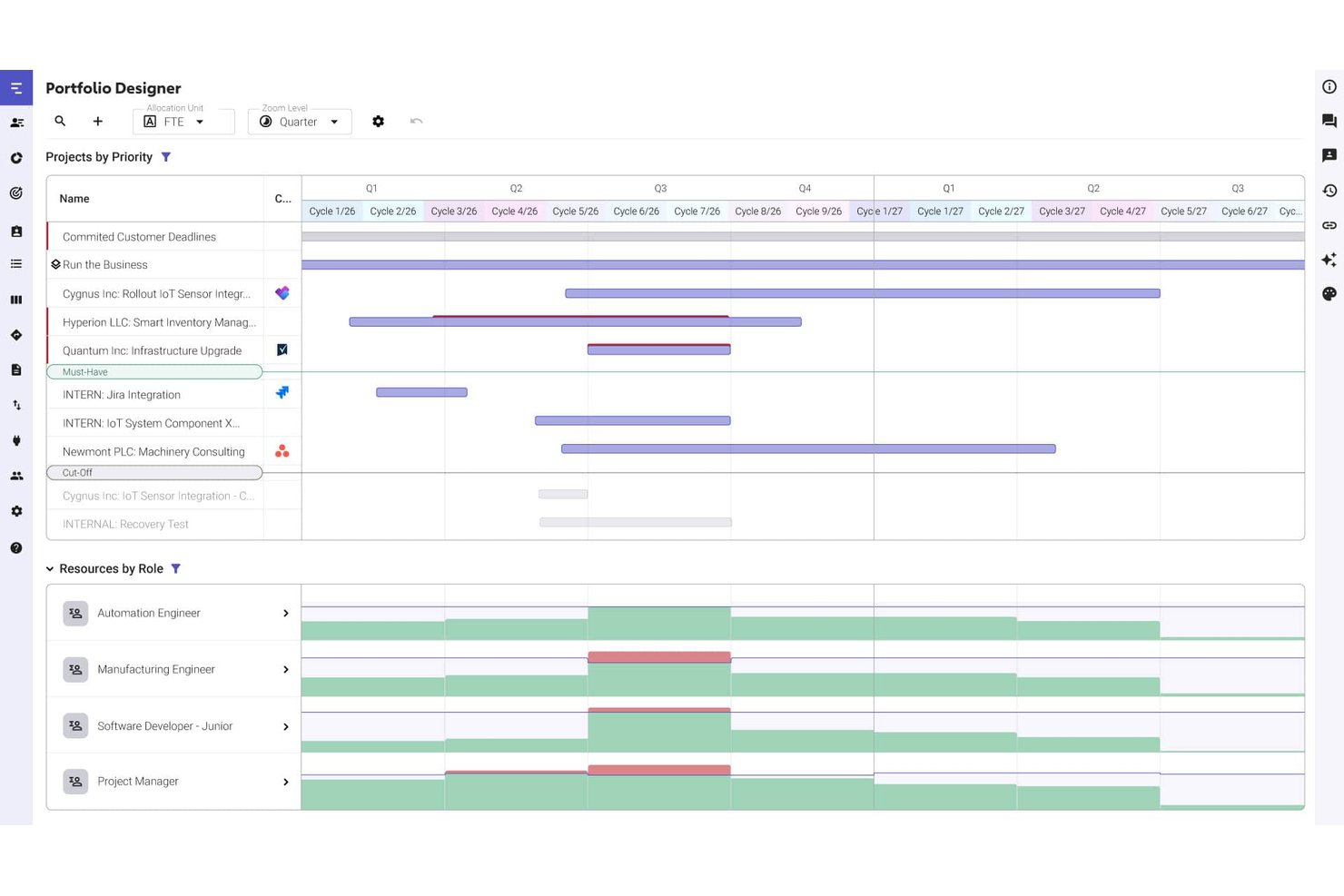
Meisterplan is a project portfolio management platform for organizations that need to prioritize initiatives, coordinate delivery across teams, and make informed project decisions with clearer visibility into workloads and dependencies.
Who Is Meisterplan Best For?
Meisterplan is a good fit for portfolio and resource managers who need to balance team capacity across multiple concurrent projects.
Why I Picked Meisterplan
I picked Meisterplan as a LiquidPlanner alternative because “Best for cross-project capacity planning” describes the gap it can fill. I can prioritize initiatives, review team workloads, and account for dependencies before committing capacity. For example, I can check whether a proposed product launch fits alongside active projects.
Meisterplan Key Features
- Portfolio dashboard: View portfolio KPIs and drill into details.
- Project intake Kanban: Manage proposed initiatives through a portfolio-level intake board.
- Strategic goal mapping: Assign initiatives to company goals in the planning process.
- Roadmap view: Present project progress, deliverables, and milestones in a shareable view.
Meisterplan Integrations
Meisterplan integrates with Jira, Asana, Microsoft Azure DevOps, ClickUp, Microsoft Planner Premium, monday.com, Smartsheet, and Wrike, and supports Microsoft Power Automate and Zapier. Its REST API is available for custom integrations.
Pros and Cons
Pros:
- See portfolio status across separate work tools
- Prioritize initiatives against strategic goals
- Compare capacity scenarios across concurrent projects
Cons:
- No task-level backlog management
- Standard reports can be hard to interpret

OnePlan
Best for Microsoft-aligned portfolio planning
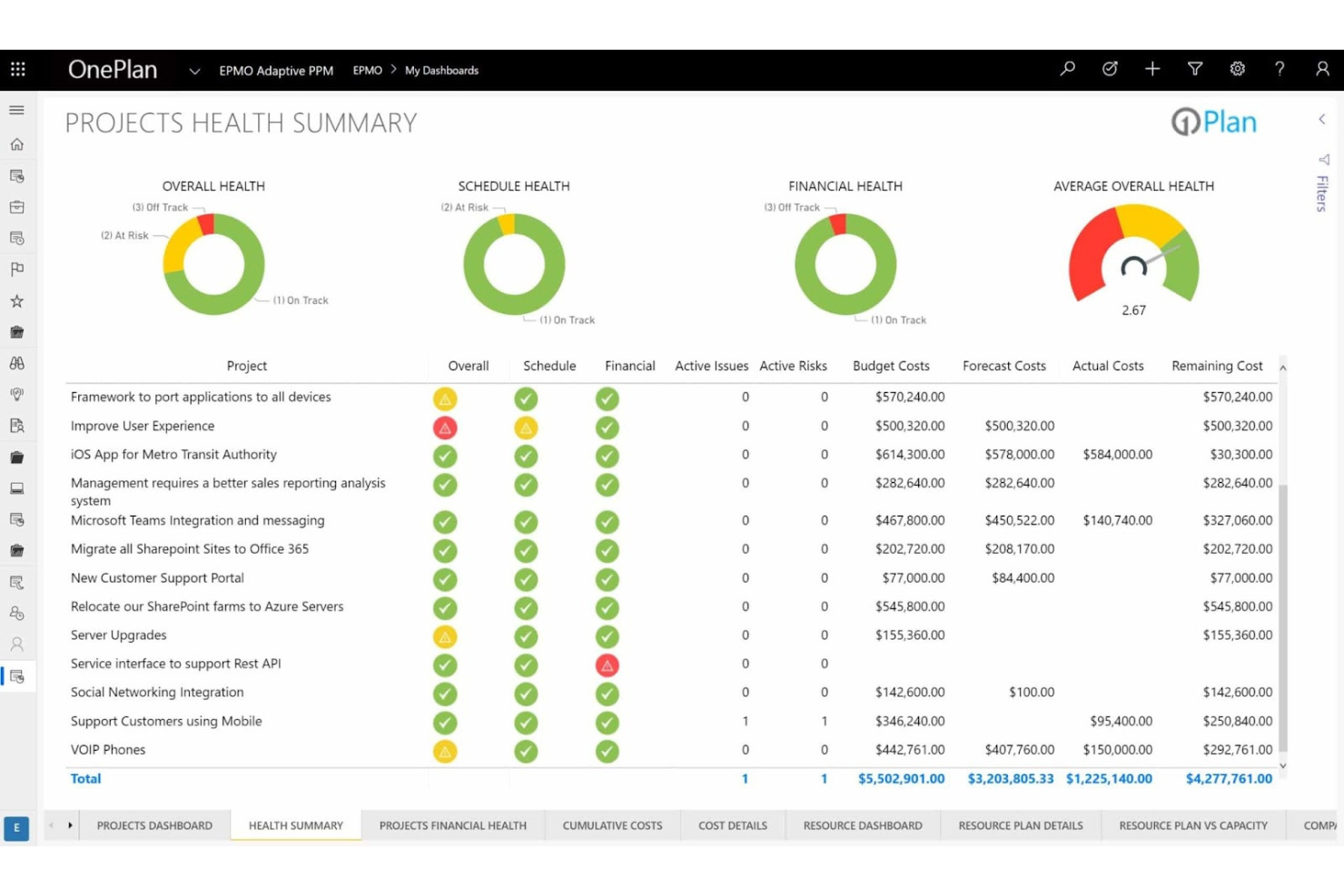
OnePlan is a project and portfolio management platform for organizations coordinating complex work, helping project leaders track priorities, resources, and dependencies across teams.
Who Is OnePlan Best For?
OnePlan suits PMO and portfolio leaders coordinating cross-functional initiatives across teams that rely on Microsoft tools.
Why I Picked OnePlan
I picked OnePlan for the “Best for Microsoft-aligned portfolio planning” use case, especially as an alternative to LiquidPlanner for PMOs managing work across Microsoft tools. I like how it links strategy objectives to portfolios and programs, then supports demand intake and project prioritization. Teams can also bring Project for the web work into portfolios and review portfolio insights in Power BI.
OnePlan Key Features
- Timesheets: Track actual hours against project work.
- Issue and risk tracking: Record and manage project issues and risks.
- Microsoft Teams collaboration: Create project sites with discussions and document management.
- Sofia AI: Ask questions and surface portfolio risks and forecasts.
OnePlan Integrations
OnePlan documents integrations across the Microsoft ecosystem, including Microsoft Teams, Microsoft Project, Microsoft Planner, Azure DevOps, Power BI, and Power Apps, as well as Jira and Asana. It supports Zapier and provides APIs for custom integrations.
Pros and Cons
Pros:
- Configurable intake supports decentralized PMOs
- Capacity heat maps clarify resource constraints
- Connects strategic objectives to delivery outcomes
Cons:
- Some views and hierarchy filters frustrate
- Configuration requires upfront process design

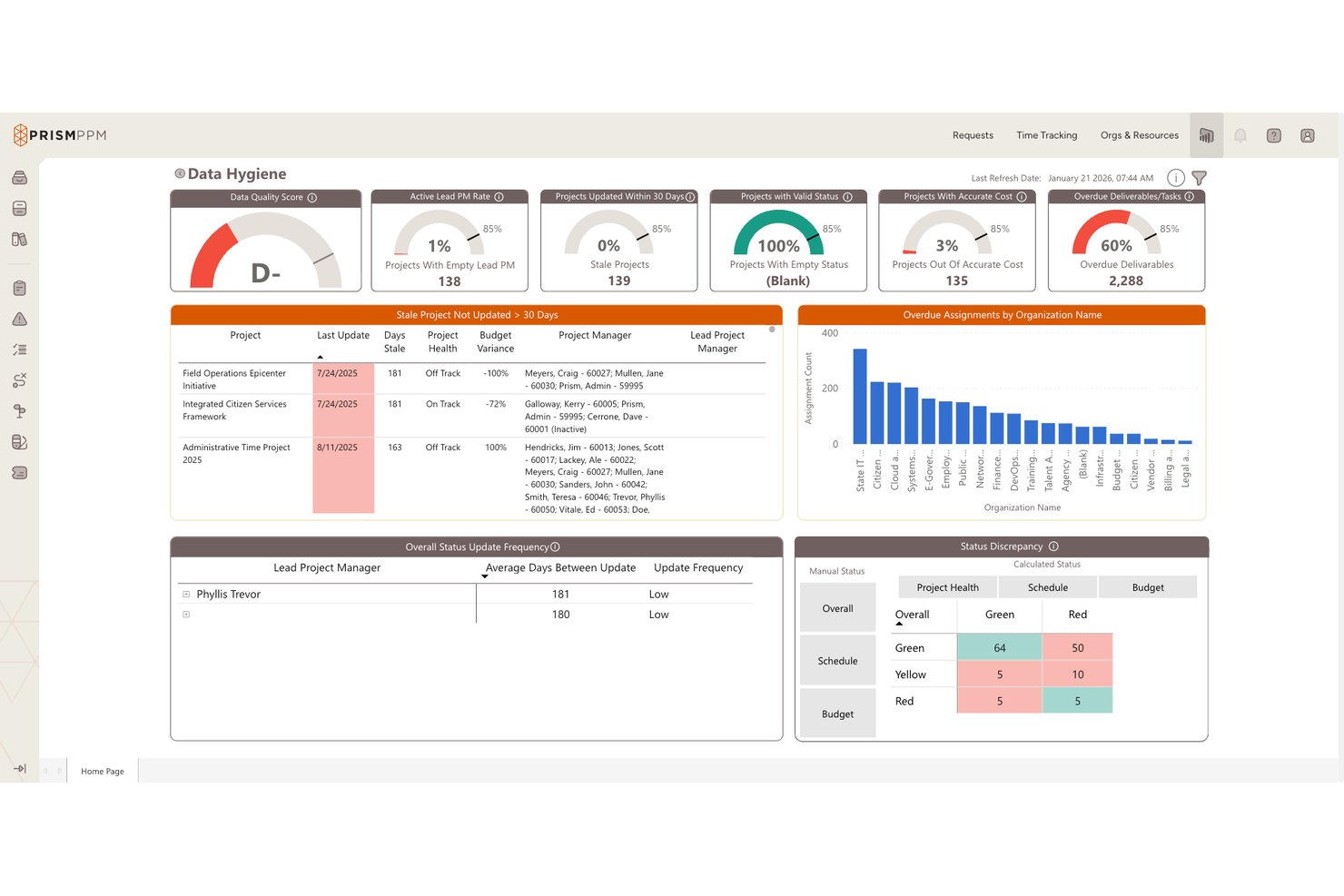
Prism PPM is a project portfolio management platform for PMOs and technology teams that need a clearer view of initiatives, priorities, and delivery progress across the organization.
Who Is Prism PPM Best For?
Prism PPM suits technology PMOs that need to assess resource demand and team capacity across multiple initiatives.
Why I Picked Prism PPM
I picked Prism PPM as a LiquidPlanner alternative for its stated fit: Best for PMO capacity planning across portfolios. Its real-time resource forecasts and What-If scenarios help me test whether shifting engineers across active initiatives would overbook teams before plans change.
Prism PPM Key Features
- Configurable work-request intake: Customize how teams submit and capture project requests.
- Project workplan templates: Use templates to structure project plans.
- Portfolio dashboards: View project and program information in portfolio-level dashboards.
- Project health reports: Review project health, risks, and opportunities.
Prism PPM Integrations
Prism PPM offers Jira integration, with availability varying by plan, plus Power BI Gateway and Databricks Connect options. APIs are also included for custom integrations.
Pros and Cons
Pros:
- Configurable prioritization helps compare competing initiatives
- What-If scenarios test resource shifts before replanning
- Portfolio views connect programs with project detail
Cons:
- Capacity planning can favor percentages over effort
- Some users want leaner project screens

Best for agency resource and budget planning
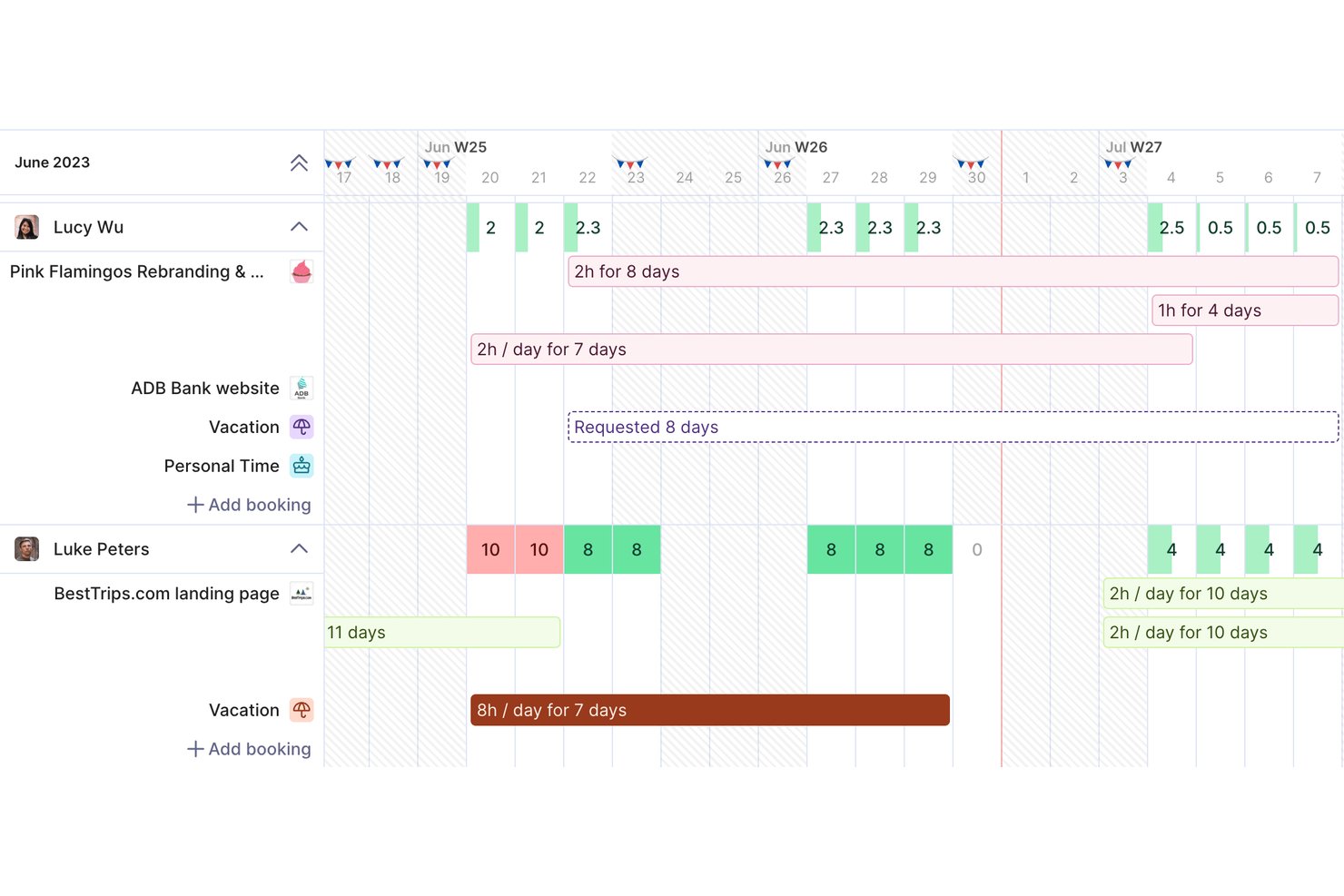
Productive is a project management and professional services platform for agencies that need to coordinate client work, team capacity, timelines, and project finances.
Who Is Productive Best For?
Productive suits project managers and operations teams at client-service agencies overseeing multiple billable engagements.
Why I Picked Productive
I picked Productive because “Best for agency resource and budget planning” describes its appeal to teams comparing LiquidPlanner alternatives. Capacity and utilization tracking help me spot staffing gaps, while logged time connects project work to budgets and profitability. I can check whether assigning a designer to a client project keeps its budget on track.
Productive Key Features
- Task views: Organize project tasks using multiple view options.
- Gantt charts: Visualize project schedules on a timeline.
- Project docs: Create and manage project documentation in Productive.
- Automations: Automate recurring workflows across project work.
Productive Integrations
Productive’s app marketplace lists integrations with Jira, HubSpot, Xero, Google Calendar, Sage, Gmail, Outlook, Slack, and QuickBooks, plus Zapier. It also provides an open API for custom integrations.
Pros and Cons
Pros:
- Projects, resourcing, and finances share one workspace
- Logged time connects project budgets to profitability
- Capacity planning exposes utilization and staffing gaps
Cons:
- Some reviewers report inaccurate resource assignments
- Reporting can feel clunky and resist customization
New Product Updates from Productive
Productive Adds Voice Dictation, Slack Connector, Proposals, and Overtime
Productive adds voice dictation, a Slack Connector, proposal controls, and overtime tracking. These updates support faster AI interactions, client proposals, and time management. For more information, visit Productive’s official site.

Celoxis
Best for multi-project portfolio visibility
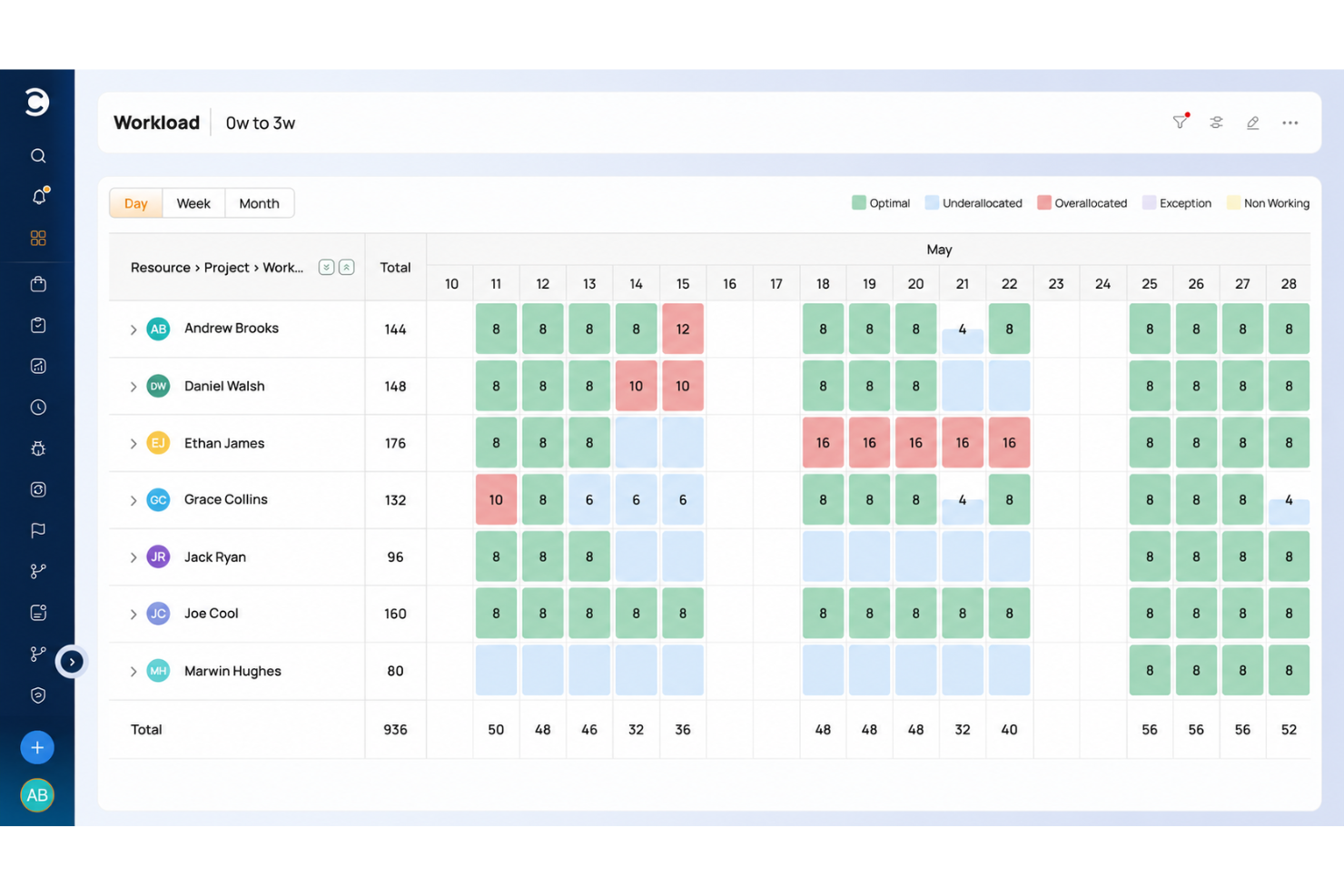
Celoxis helps project managers coordinate complex, cross-functional work by bringing schedules, workloads, budgets, and progress updates into one place, making it easier to spot delays and keep delivery on track.
Who Is Celoxis Best For?
Celoxis suits project and PMO leaders who need to track priorities, resources, and progress across multiple projects.
Why I Picked Celoxis
When I compare LiquidPlanner alternatives, Celoxis earns a place on my list for Best for multi-project portfolio visibility. Its portfolio dashboards bring project health, resource load, budgets, and risks into a shared view. I like that PMO leads can spot overloaded specialists or slipping budgets across initiatives before they disrupt delivery.
Celoxis Key Features
- Gantt scheduling: Map task dependencies, lead and lag time, and critical paths.
- Timesheets: Log time with timers or weekly sheets, then route entries for approval.
- Project intake: Collect requests through forms, email, or spreadsheets and route them for approval.
- Project discussions: Comment on projects and tasks, mention teammates, and manage version-controlled documents.
Celoxis Integrations
Celoxis offers 21 native integrations, including Microsoft Project, Microsoft Excel, Microsoft 365, Google Drive, Jira, Salesforce, QuickBooks Online, Slack, Trello, and GitHub; it also connects with Zapier. A REST API is available for custom integrations.
Pros and Cons
Pros:
- Gantt dependencies account for nonworking days
- Budget and schedule rollups clarify portfolio health
- Cross-project workload alerts expose overallocations
Cons:
- Mobile experience limits detailed project work
- Dense interface takes extra clicks

Best for highly customizable workflows
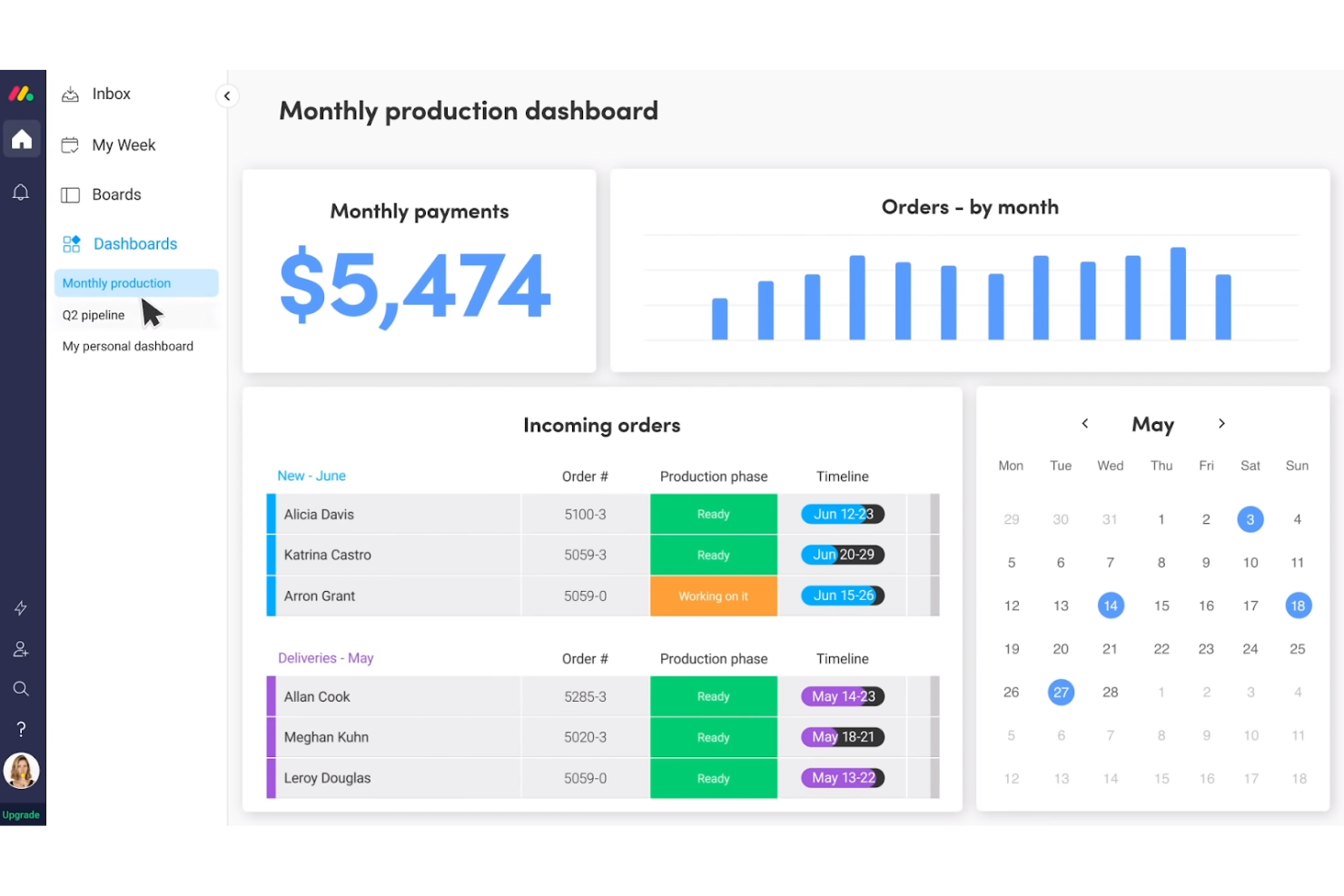
monday AI Workspace is a project management platform for product, engineering, and digital teams that need to coordinate cross-functional work, track deadlines, and adjust plans as priorities shift.
Who Is monday AI Workspace Best For?
Project managers in tech and digital teams can tailor monday AI Workspace to fit different workflows, approval paths, and delivery processes.
Why I Picked monday AI Workspace
I picked monday AI Workspace as one of the best LiquidPlanner alternatives because its USP, “Best for highly customizable workflows,” suits teams with different delivery processes. I can map product launch stages with timelines and milestones, then use customizable live dashboards to track progress across teams.
monday AI Workspace Key Features
- Workload view: See how tasks are distributed across team members.
- Task dependencies: Link tasks to show which work must happen first.
- Automations: Set rules to update task statuses or notify owners.
- Integrations: Connect boards with tools such as Slack and Google Drive.
monday.com Integrations
monday.com lists 850+ integrations and apps, including Slack, Google Calendar, Microsoft Teams, GitHub, and Salesforce. It also offers marketplace apps, connects with Zapier, and provides a GraphQL API for custom integrations.
Pros and Cons
Pros:
- Workload views expose team capacity imbalances
- Cross-board dashboards consolidate project status
- Custom boards adapt to distinct delivery workflows
Cons:
- Lacks LiquidPlanner-style predictive scheduling
- Complex boards require upfront configuration
New Product Updates from monday AI Workspace
monday AI Workspace Adds Human Approval Routing
monday AI Workspace adds a human-in-the-loop approval block to AI Workflows, sending approval requests and routing workflow paths based on responses. For more information, visit monday AI Workspace's official site.

Best for marketing and creative team workflows
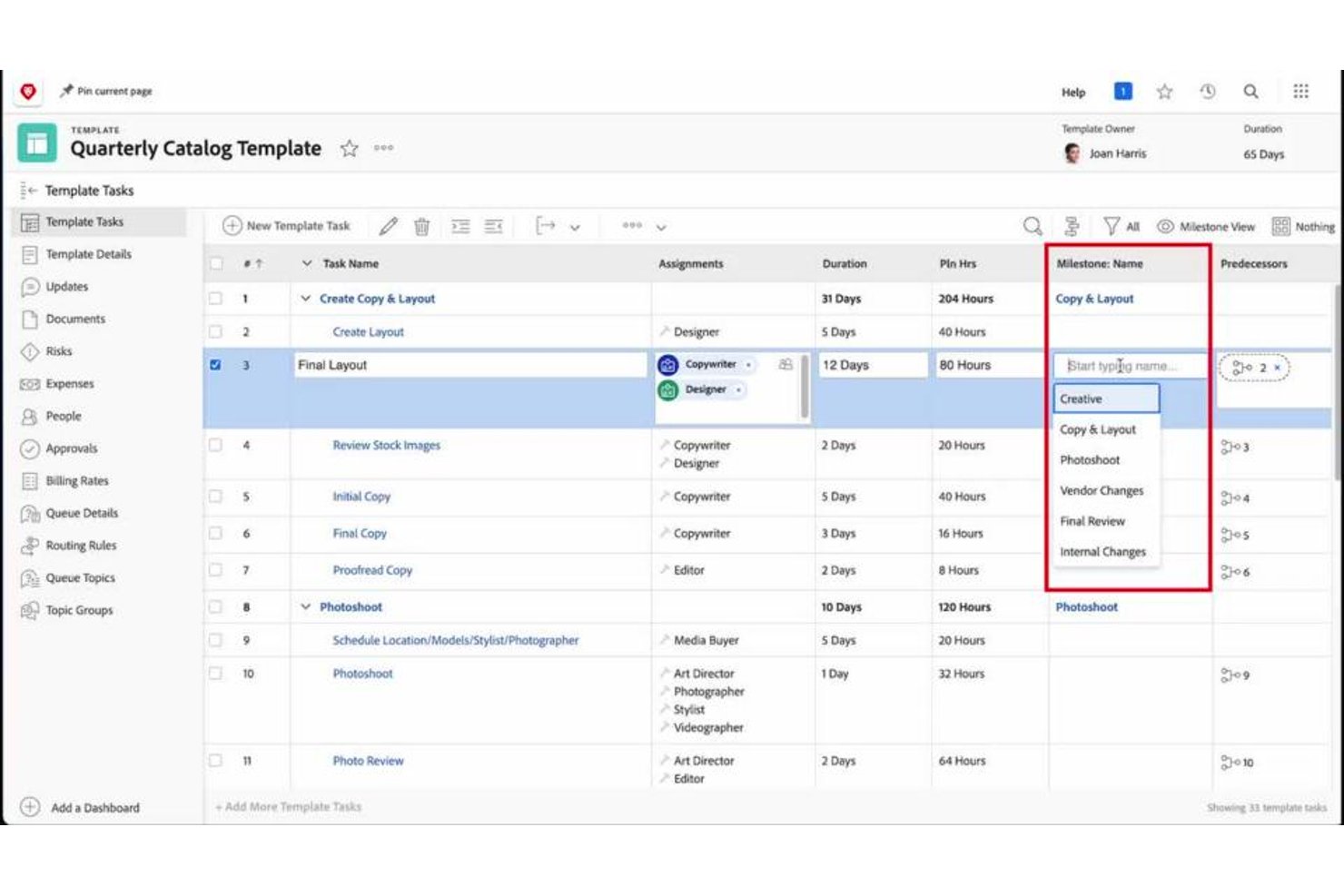
Adobe Workfront gives project managers a centralized work management platform to plan projects, coordinate tasks and approvals, and track cross-team work from intake through delivery.
Who Is Adobe Workfront Best For?
Adobe Workfront suits marketing operations and creative teams managing campaign production and content delivery across departments.
Why I Picked Adobe Workfront
I picked Adobe Workfront because it’s built for marketing and creative team workflows. I like how request queues turn campaign briefs into trackable work, while proofing and approval tools help teams review assets and resolve feedback before launch. That combination suits LiquidPlanner alternative seekers coordinating content projects across departments.
Adobe Workfront Key Features
- Task dependencies: Link tasks to show how one task’s timing affects another.
- Gantt charts: View project tasks and schedules on a timeline.
- Resource planner: Allocate resources across projects and review capacity.
- Reports and dashboards: Build views to track project status and work metrics.
Adobe Workfront Integrations
Adobe Workfront has native integrations with Adobe Creative Cloud, Adobe Experience Manager Assets, Adobe Express, Microsoft Teams, Slack, Box, Dropbox, Google Drive, OneDrive, and SharePoint. Workfront Fusion connects additional apps and services, and its public API supports custom integrations.
Pros and Cons
Pros:
- Capacity views expose cross-project resource conflicts
- Proofing keeps asset feedback tied to approvals
- Campaign intake routes briefs into trackable work
Cons:
- Mobile proofing can frustrate reviewers
- Configuration can burden smaller, simpler projects

Wrike
Best for cross-departmental workload visibility
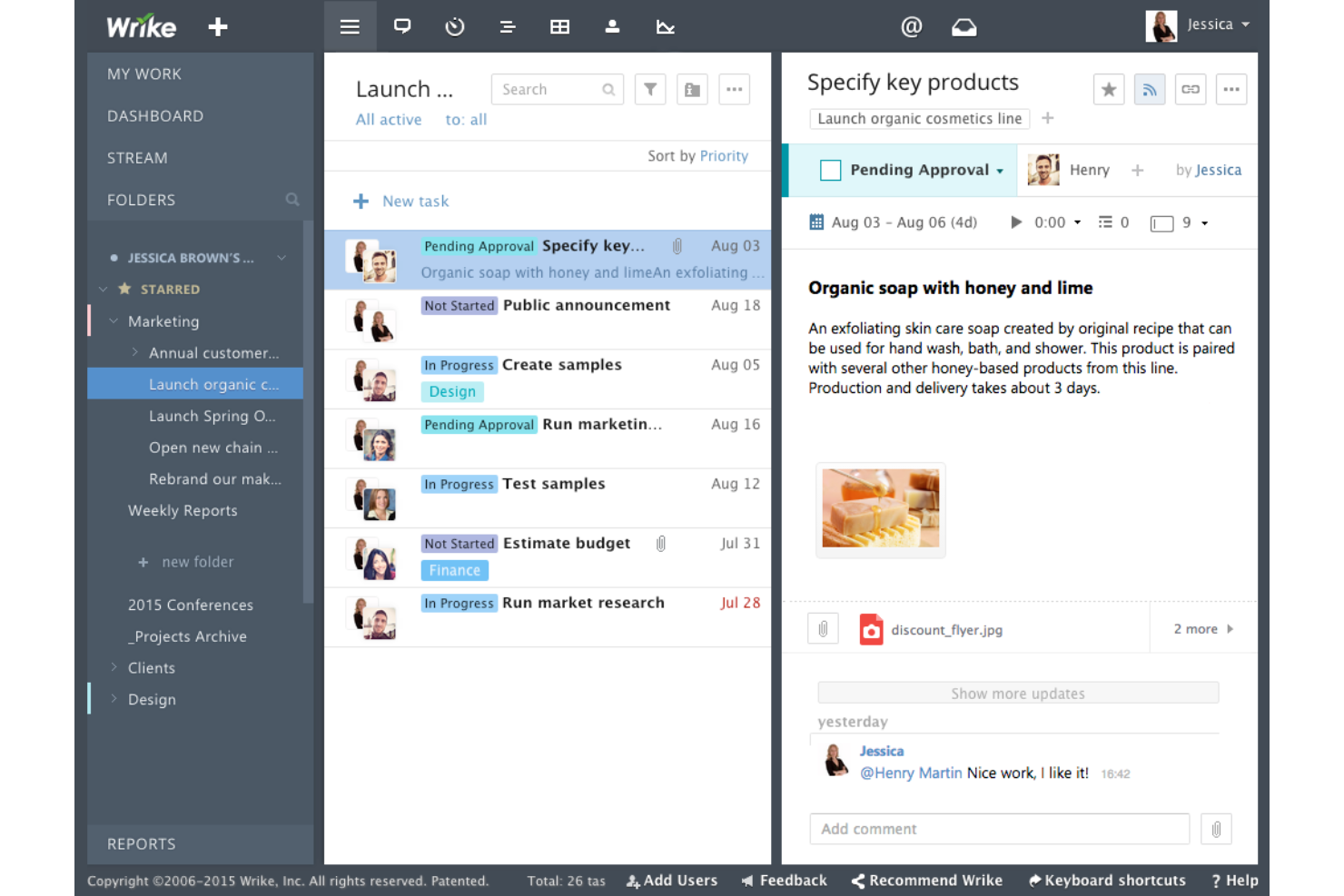
Wrike is a project management platform for product, marketing, and IT teams that need to coordinate complex work, track deadlines, and connect project plans with day-to-day tasks.
Who Is Wrike Best For?
Wrike suits project managers who need to balance workloads and track dependencies across multiple departments.
Why I Picked Wrike
I picked Wrike as Best for cross-departmental workload visibility because its workload charts show assigned effort by person or project, with red indicators flagging capacity overruns. I like that cross-tagging lets teams see the same task in multiple departmental folders, so a shared deliverable stays visible without creating duplicate work.
Wrike Key Features
- Gantt charts: Map tasks on a timeline and adjust dates and dependencies.
- Request forms: Capture project requests through customizable forms.
- Proofing: Add comments and mark up images, videos, and documents.
- Custom workflows: Define workflow stages and status labels for projects.
Wrike Integrations
Wrike has native integrations with Slack and Salesforce, while its Wrike Integrate add-on offers 400+ prebuilt connectors, including Microsoft Teams, Google, Zoom, Jira, GitHub, HubSpot, and QuickBooks. It also supports Zapier and provides an API for custom integrations.
Pros and Cons
Pros:
- Dependencies and Gantt views clarify shifting schedules
- Cross-tagging keeps shared tasks visible across departments
- Workload charts reveal capacity overruns across teams
Cons:
- Cluttered interface slows work on complex projects
- Complex setup can delay onboarding and adoption
New Product Updates from Wrike
Wrike Expands Gantt Planning, Approvals, and AI Work Intake
Wrike adds cross-project Gantt dependencies, flexible approval routing, and AI work intake through Wrike MCP. These updates give teams more control over planning, decision-making, and incoming work. For more information, visit Wrike’s official site.


Jira is a project management platform for software teams that need to coordinate product and engineering work, manage dependencies, and keep delivery plans visible as requirements change.
Who Is Jira Best For?
Jira suits software development teams that plan work in sprints and need shared visibility into backlogs, blockers, and delivery progress.
Why I Picked Jira
I picked Jira as a LiquidPlanner alternative because it’s built for dev team sprint planning and tracking. Scrum boards help me organize a backlog, assign work to a sprint, and track progress as developers update issues. I use sprint reports like burndown charts to spot when scope or pace puts a release at risk.
Jira Key Features
- Custom workflows: Configure statuses and transitions to match your team’s delivery process.
- Automation rules: Set triggers and actions for routine tasks, such as assigning issues or sending notifications.
- Dashboards: Combine gadgets to display project data, filters, and charts in one view.
- Custom fields: Capture project-specific details on issues with fields tailored to your team.
Jira Integrations
Jira links work items with development tools such as Bitbucket, GitHub, and GitLab; Atlassian Marketplace offers 3,000+ integration apps, including Slack, Microsoft Teams, and Zapier. Jira also provides REST APIs and webhooks for custom integrations.
Pros and Cons
Pros:
- Epics and dependencies track engineering delivery
- Custom issue workflows clarify ownership and blockers
- Scrum boards connect backlogs to sprint reports
Cons:
- Portfolio planning can spill into spreadsheets
- Workflow and permission setup demands admin time

Scoro
Best for project financials and billing
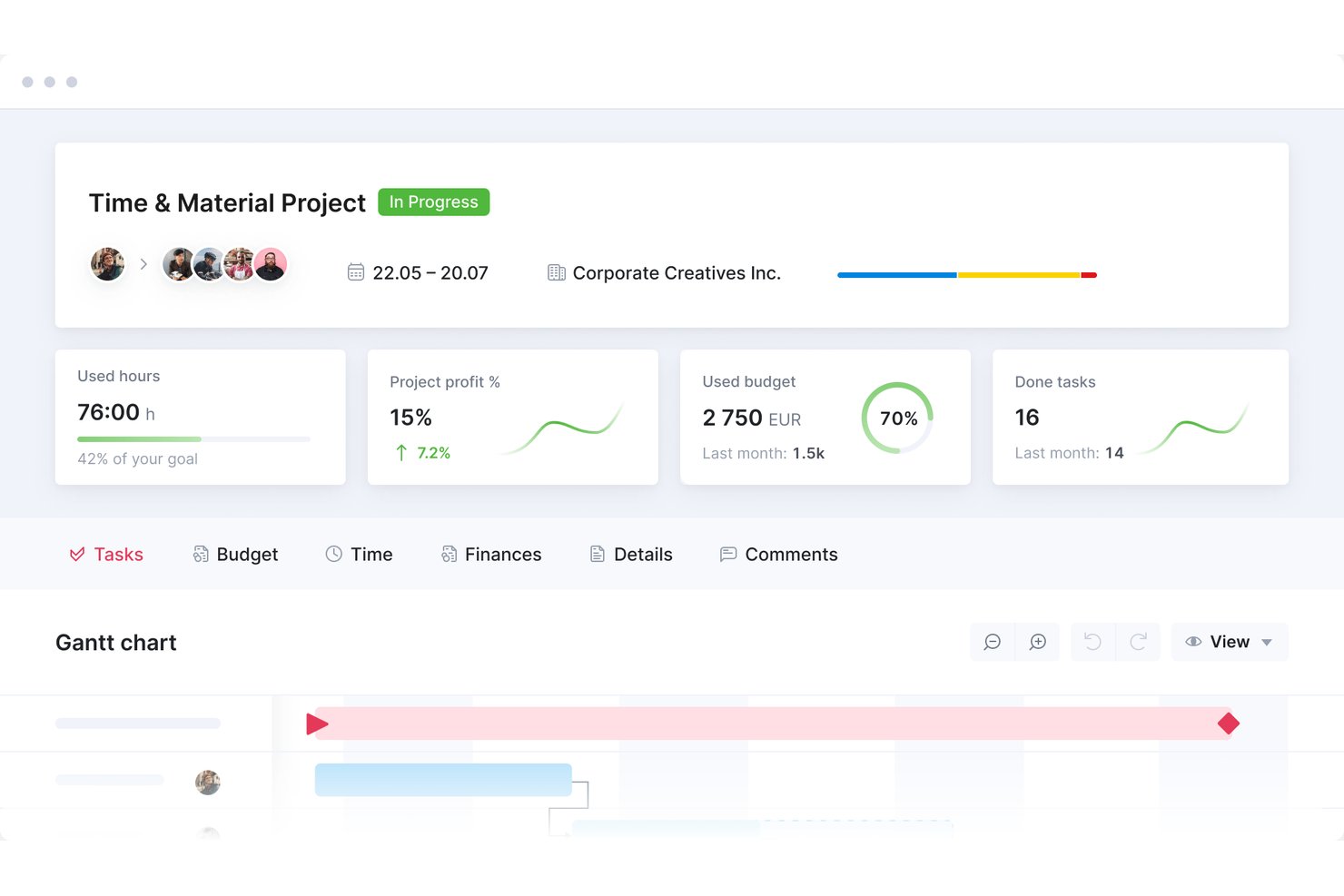
Scoro is work management software for professional services and client-facing teams, combining project planning, collaboration, time tracking, and client work to help you coordinate delivery and keep work visible.
Who Is Scoro Best For?
Scoro suits professional services teams that need to connect project delivery with budgets, time tracking, and client billing.
Why I Picked Scoro
I picked Scoro as a LiquidPlanner alternative for its Best for project financials and billing focus. I can track time, bills, and expenses against a project budget, then use tracked time and costs to create invoices for client work.
Scoro Key Features
- Gantt charts: Map project timelines, assign tasks, and link dependencies.
- Task views: Organize work in Kanban boards, task lists, or calendar view.
- Project templates: Create plans with preset phases, milestones, tasks, and timelines.
- Capacity planning: Assign work based on team availability and existing commitments.
Scoro Integrations
Scoro documents 40+ integrations, including Jira, Slack, Salesforce, Xero, QuickBooks, Sage Intacct, and Google Calendar. It also supports Zapier and provides a REST API and webhooks for custom integrations.
Pros and Cons
Pros:
- Plans team capacity alongside project timelines
- Forecasts project margin from costs and revenue
- Connects estimates, budgets, time, and invoices
Cons:
- Cluttered screens slow day-to-day navigation
- Task setup can require too many steps
New Product Updates from Scoro

Scoro Adds Time Mobile App and ELI Improvements
Scoro adds the Scoro Time mobile app for iOS/Android to track time anywhere and expands ELI with attachments, smarter filtering, and trigger-based actions. For more information, visit Scoro's official site.
Outras alternativas ao LiquidPlanner
Eis algumas alternativas adicionais ao LiquidPlanner que não entraram na minha seleção final, mas que ainda vale a pena conhecer:
- Accelo
For service-to-billing resource tracking
- Asana
For keeping tasks organized across teams
- Zoho Projects
For switching from LiquidPlanner on a budget
- Kantata
For professional services resource planning
- Planview AdaptiveWork
For enterprise PMO portfolio visibility
- Ravetree
For mixing agile and waterfall methods
- ClickUp
For all-in-one project tracking on a budget
- Acuity PPM
For PMO portfolio visibility and governance
- Teamwork
For agency time tracking and billing
- Planisware
For PMO portfolio prioritization


How I Evaluate LiquidPlanner Alternatives
I split my evaluation into three parts. First, I check core functionality: can the tool automatically reschedule across projects as resources shift, and does it give you real workload visibility across your full portfolio? That carries the most weight. Then I look for standout features like ranged estimation modeling or automated resource leveling. Finally, I consider pricing transparency and onboarding support.
Core Functionality (Table Stakes For This List)
When I'm selecting tools for my list, I score each one on a scale from 0 (does not offer the functionality) to 5 (excels in this area) for each core functionality listed below. I then convert the total into a percentage to help assess each tool's overall fit, with extra weight on any functionalities I’ve deemed essential.
- Dynamic Scheduling (Essential): I look for schedules that recalculate across projects when dependencies, scope, or availability change, such as when a specialist becomes unavailable.
- Resource Management (Essential): I assess whether workload and capacity views help managers spot over-allocation and balance assignments across concurrent projects.
- Cross-Project Prioritization: I check whether teams can compare competing work and use ranked priorities to guide what gets scheduled first.
- Predictive Forecasting: I evaluate whether estimates show realistic completion ranges and adapt as task progress or variability changes.
- Portfolio Visibility: I look for consolidated status, timeline, and dependency views that help PMOs track multiple projects together.
- Time Tracking: I check whether task-level time logs roll up into project reports and inform planning, budgeting, or billing.
Once I have a list of tools that meet the criteria, I consider what sets each platform apart.
Differentiating Factors (What Sets Vendors Apart)
Here's how I compare and contrast different vendors:
Standout Features
I look for ranged estimation modeling—tools that accept best-case and worst-case effort inputs and roll them into probabilistic forecasts instead of single fixed dates. That matters when you're quoting delivery windows to clients across several active projects. I also evaluate scenario planning sandboxes, where you can model a priority shift or resource change and preview the downstream impact before committing. Cross-project dependency mapping is another factor I check: if a delayed milestone in one project silently pushes deadlines in another, I want to see that surfaced automatically.
Beyond Features
I check whether a vendor's pricing lets you access forecasting and portfolio views without jumping to an enterprise tier—teams outgrow plans fast when every new resource manager needs a premium seat. Migration support matters too, especially moving historical schedules and estimation data out of LiquidPlanner into a tool with different scheduling logic. I also evaluate vendor stability, looking for a clear product roadmap and active development cadence, since a stalled roadmap is often what drives the switch in the first place.
Principais funcionalidades do LiquidPlanner
Eis algumas das principais funcionalidades do LiquidPlanner, para o ajudar a comparar as soluções alternativas:
- Agendamento preditivo: prevê automaticamente os prazos dos projetos com base nas prioridades e nos recursos, ajudando a sua equipa a manter-se no caminho certo.
- Gestão de recursos: distribui os recursos de forma eficiente pelos projetos, para maximizar a produtividade e evitar a sobrealocação.
- Gestão de tarefas: permite criar, atribuir e acompanhar tarefas, garantindo que todos sabem o que fazer e quando.
- Alinhamento de prioridades: ajuda a concentrar-se nas tarefas mais importantes, alinhando as prioridades com os objetivos da sua equipa.
- Informações em tempo real: fornece informações atualizadas sobre o estado dos projetos, ajudando-o a tomar rapidamente decisões fundamentadas.
- Gestão de portefólios: supervisiona vários projetos numa única vista, permitindo-lhe gerir e definir eficazmente as prioridades do seu portefólio de projetos.
- Registo de tempo: regista o tempo despendido nas tarefas, ajudando-o a gerir as cargas de trabalho e a melhorar a gestão do tempo.
- Ferramentas de colaboração: facilitam a comunicação da equipa através de comentários e notas integrados, mantendo todos a par. Parece que a sua mensagem pode ter sido interrompida. Poderia fornecer mais detalhes ou dizer-me como posso ajudá-lo?