

10 ferramentas alternativas ao Office Timeline para planeamento em 2026

Melhores alternativas ao Office Timeline


Se considera que o Office Timeline não é a ferramenta de gestão de projetos certa para a sua equipa, existem muitas alternativas ao Office Timeline disponíveis que podem ajudar a planear projetos, criar gráficos de Gantt e desenvolver cronogramas.
O Office Timeline pode não ter o conjunto de funcionalidades adequado para satisfazer o seu caso de utilização, por isso testei e analisei dezenas de alternativas ao Office Timeline para ajudar a encontrar uma substituta. Quer precise de mais opções de personalização, funcionalidades colaborativas ou integrações, estas são as minhas recomendações para as melhores alternativas ao Office Timeline.
O que é o Office Timeline?
O Office Timeline é um complemento fácil de utilizar para o Microsoft PowerPoint que permite aos utilizadores criar cronogramas de projetos e gráficos de Gantt visualmente apelativos. Simplifica o processo de transformar dados complexos de projetos em elementos visuais fáceis de compreender para relatórios, reuniões e apresentações.
Why Trust Our Software Recommendations
Our team has been testing and reviewing software since 2012. As project managers ourselves, we know how difficult—and important—it is to choose the right software.
For this guide, we evaluated tools using hands-on testing and independent research, scoring tools using our selection criteria. We also draw on insights from industry thought leaders and practicing project management experts.
Our reviews reflect our human editorial judgment, not a sales pitch.
Expert reviewers:
Tabela de comparação das alternativas ao Office Timeline
Compare os preços e outras especificações de cada uma das minhas escolhas de alternativas ao Office Timeline abaixo:
| Tool | Best For | Trial Info | Price | ||
|---|---|---|---|---|---|
| 1 | Best for brand-consistent timeline design | Free trial + free plan available | From $144/user/year (billed annually) | Website | |
| 2 | Best for diagram-based timeline creation | 7-day free trial available | From $119/year (billed annually) | Website | |
| 3 | Best for product roadmap stakeholder alignment | Free demo available | Pricing upon request | Website | |
| 4 | Best for presentation-ready Gantt chart visuals | Free plan + 14-day free trial available | From $15/month (billed annually) | Website | |
| 5 | Best for end-to-end product roadmap planning | 30-day free trial + free demo available | From $59/user/month (billed annually) | Website | |
| 6 | Best for Jira-connected Gantt roadmaps | Free plan + 14-day free trial available | From $18/user/month (billed annually) | Website | |
| 7 | Best for roadmapping with Jira and Azure DevOps sync | Free trial + free demo available | From $19/user/month (billed annually) | Website | |
| 8 | Best for interactive Gantt charts | 14-day free trial + free demo available | From $7/user/month (billed annually) | Website | |
| 9 | Best for collaborative visual timeline planning | Free plan + 14-day free trial + free demo available | From $8/user/month (billed annually) | Website | |
| 10 | Best for diagramming-first timeline collaboration | Free plan + 7-day free trial available | From $9/month (billed annually) | Website |

Análises das melhores alternativas ao Office Timeline
Eis a minha análise detalhada e visão geral de cada alternativa ao Office Timeline. Abordo as vantagens e desvantagens, as funcionalidades e os cenários ideais para cada ferramenta.
Canva
Best for brand-consistent timeline design
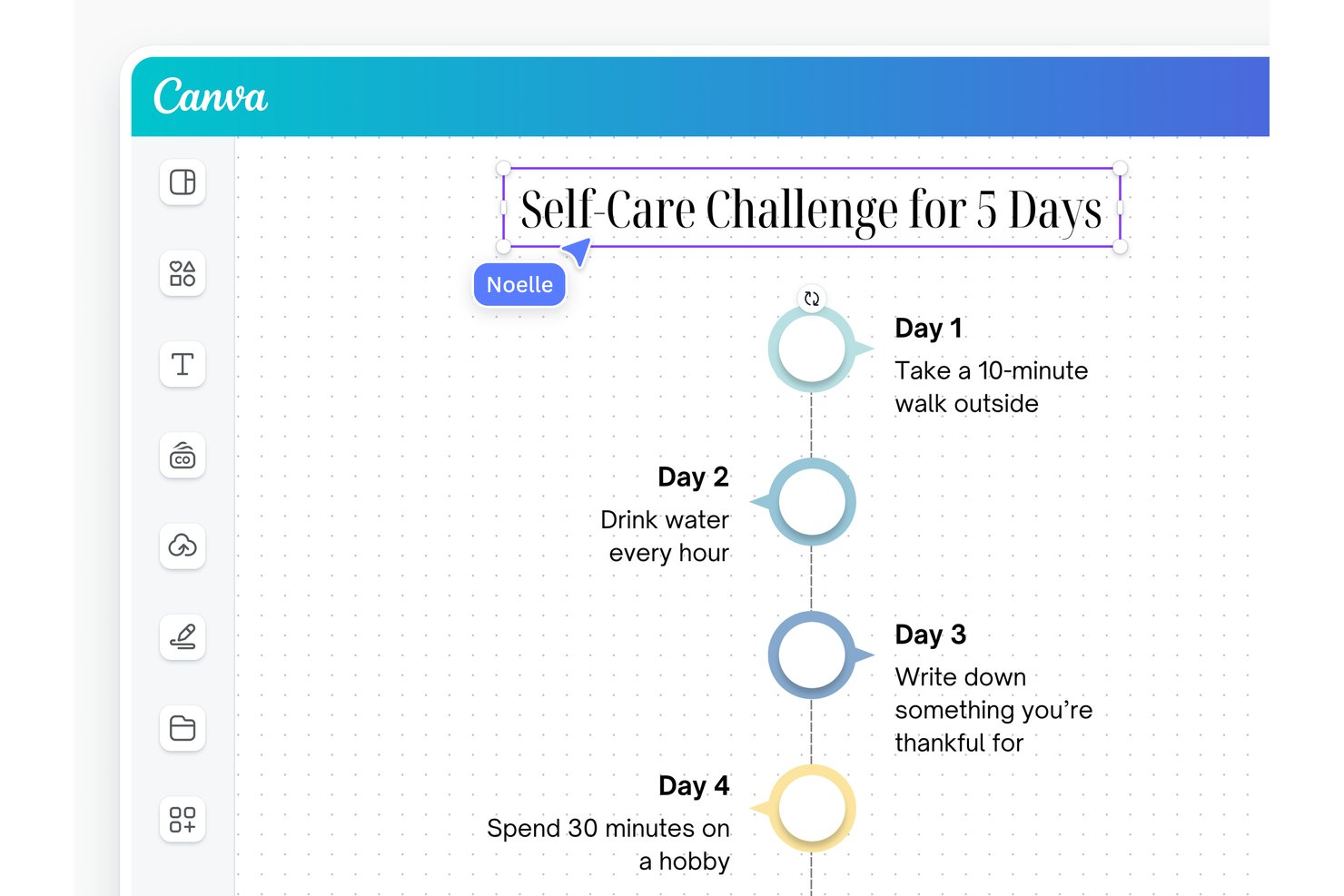
Canva is a visual design platform that lets you build timelines, Gantt charts, roadmaps, and presentation-ready project visuals using drag-and-drop templates across whiteboard, document, infographic, and slide formats.
Who Is Canva Best For?
Canva works well for teams that need to turn project timelines and roadmaps into polished, on-brand visuals without relying on a dedicated designer.
Why I Picked Canva
I've included Canva in my top picks because it's the strongest option on this list for teams that need project timelines to look as polished as the work they represent. Where Office Timeline outputs are largely slide-bound, Canva lets me build the same Gantt or roadmap across whiteboards, infographics, docs, and presentation slides, then apply a Brand Kit to lock in approved colors, fonts, and logos across every format. That consistency is what makes client-facing and exec-level deliverables feel intentional rather than improvised.
Canva Key Features
- Whiteboard Gantt chart builder: Build Gantt charts on an infinite canvas using task bars, dependency arrows, and milestone markers, starting from a template or blank board.
- Multi-format timeline templates: Access timeline designs across infographic, document, poster, whiteboard, and presentation slide formats from a single template library.
- Role-based collaboration controls: Invite team members as Editors, Viewers, or Commenters, lock key design elements, and restore earlier versions using version history.
- Presentation export options: Download finished timelines and Gantt charts as PDF, high-quality PNG, or PPTX, or share them as a live link or embedded Canva Doc.
Canva Integrations
Canva connects to Google Sheets, Salesforce, Google Analytics, HubSpot, and World Bank through Charts and Sheets, with SharePoint available via marketplace integrations. Canva also offers Apps SDK and Connect APIs for custom integrations.
Pros and Cons
Pros:
- Brand Kits keep deliverables consistent
- Shared editing supports stakeholder reviews
- Templates speed polished timeline drafts
Cons:
- PowerPoint exports may shift formatting
- Gantt dates and dependencies need manual updates

EdrawMax
Best for diagram-based timeline creation
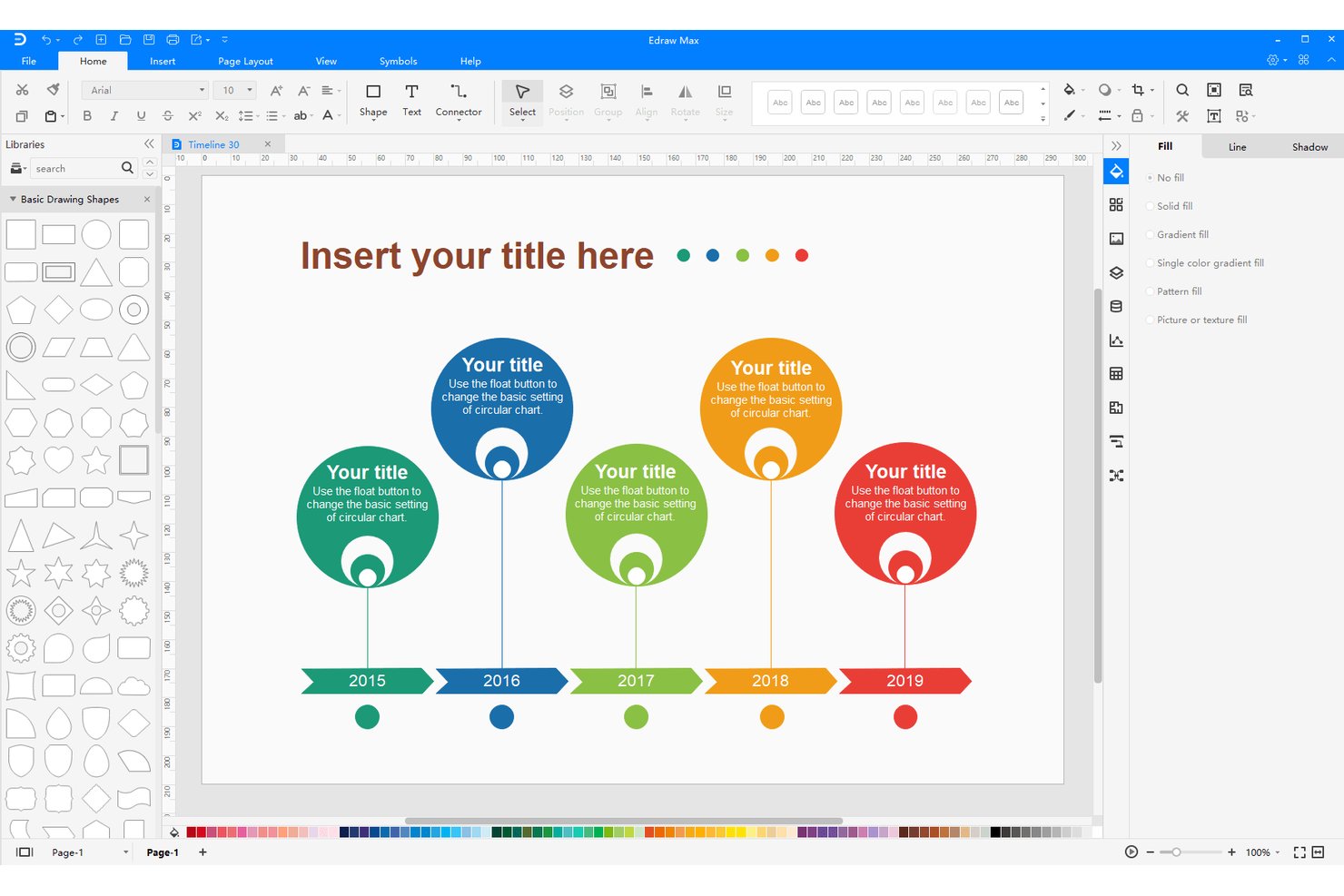
EdrawMax is a diagramming platform that supports timeline creation, Gantt charts, flowcharts, org charts, and over 210 other diagram types, with export to PowerPoint, PDF, Word, and other standard formats.
Who Is EdrawMax Best For?
EdrawMax is a strong fit for business consultants and PMO staff who need to turn project data into polished, presentation-ready diagrams across a wide range of formats.
Why I Picked EdrawMax
I picked EdrawMax as one of the best because it goes beyond basic timeline creation, giving you access to over 210 diagram types alongside dedicated Gantt and timeline tools. I love that you can build a polished horizontal or vertical timeline, adjust milestone styles and spacing, then export it directly as a PPTX slide or push it into PowerPoint via the native add-in with real-time sync. The 20,000-plus community templates, including named Gantt options like Construction and Research, mean I can get to a presentation-ready visual fast without starting from scratch.
EdrawMax Key Features
- Drag-and-drop timeline editing: Adjust milestone positions, spacing, and event shapes directly on the canvas without navigating menus.
- Spreadsheet data import: Load Gantt data from
.csv,.xls, or.xlsxfiles with column mapping for tasks, dates, dependencies, and more. - Custom theme builder: Define and save theme colors, connector styles, and text styles to align diagrams with your brand.
- Link-based sharing with permissions: Share diagrams via link with view-only or edit access, or invite collaborators by email.
EdrawMax Integrations
EdrawMax has documented native integrations with Microsoft Word and Microsoft PowerPoint, including a PowerPoint add-in for inserting and editing diagrams with real-time synchronization.
Pros and Cons
Pros:
- Dragging Gantt bars updates task dates
- Editable Gantt templates simplify schedule visuals
- Horizontal and vertical timeline layouts
Cons:
- Spreadsheet imports don’t keep charts synchronized
- Feature-dense interface can slow first-time editing

Best for product roadmap stakeholder alignment
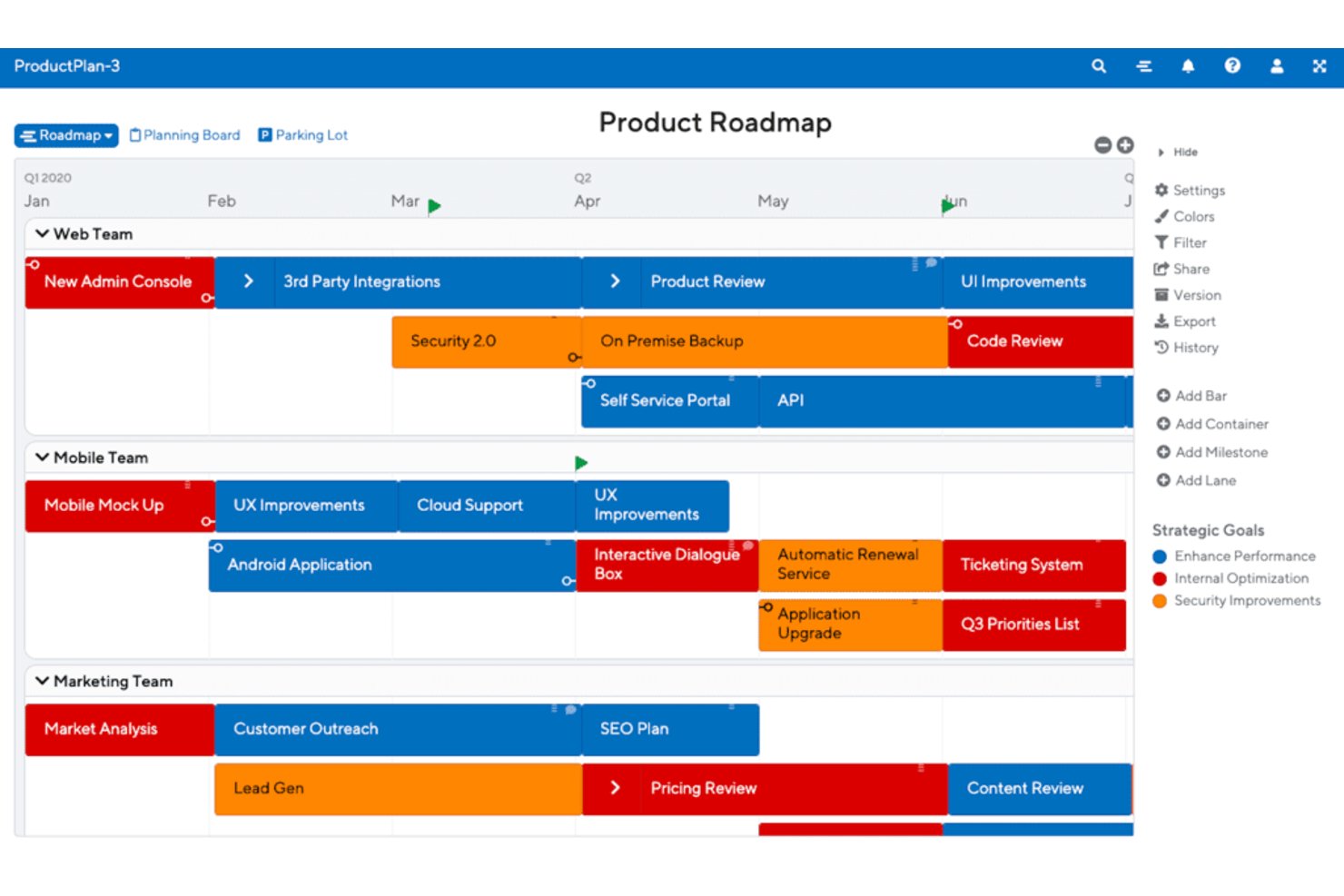
ProductPlan is a product roadmap tool that lets teams build visual timeline roadmaps, manage priorities, track dependencies, and share tailored views with different stakeholder groups.
Who Is ProductPlan Best For?
ProductPlan is a strong fit for product managers who need to build, share, and align stakeholders around visual roadmaps across engineering, go-to-market, and executive teams.
Why I Picked ProductPlan
I picked ProductPlan as one of the best because it solves a real problem I've seen repeatedly: teams building one roadmap and then scrambling to reformat it for five different audiences. With audience-specific saved views, I can tailor exactly what engineering, executives, and sales see from the same underlying data. Private link sharing means stakeholders get a live, always-current roadmap without needing a login, which cuts down the endless "can you send me the latest version?" requests.
ProductPlan Key Features
- Drag-and-drop bar editing: Add, resize, and reposition roadmap items on a timeline by dragging them directly on the canvas.
- Two-way Jira and Azure DevOps sync: Map epics and child stories to roadmap containers and bars, with date and field changes syncing in both directions.
- Spreadsheet import: Bring in existing roadmap data from CSV, XLS, or XLSX files, with automatic column mapping to ProductPlan fields.
- Portfolio view: Consolidate multiple roadmaps into a single filterable view for cross-team or executive-level visibility.
ProductPlan Integrations
ProductPlan offers native integrations with Jira and Azure DevOps, plus integrations with Confluence and Microsoft Teams. It also provides an API for custom integrations and supports Zapier.
Pros and Cons
Pros:
- Visual roadmaps clarify priorities for leadership
- Drag-and-drop edits help teams revise timelines
- Audience-specific views improve stakeholder alignment
Cons:
- No documented Gantt-chart scheduling features
- No native PowerPoint file export
Vizzlo
Best for presentation-ready Gantt chart visuals
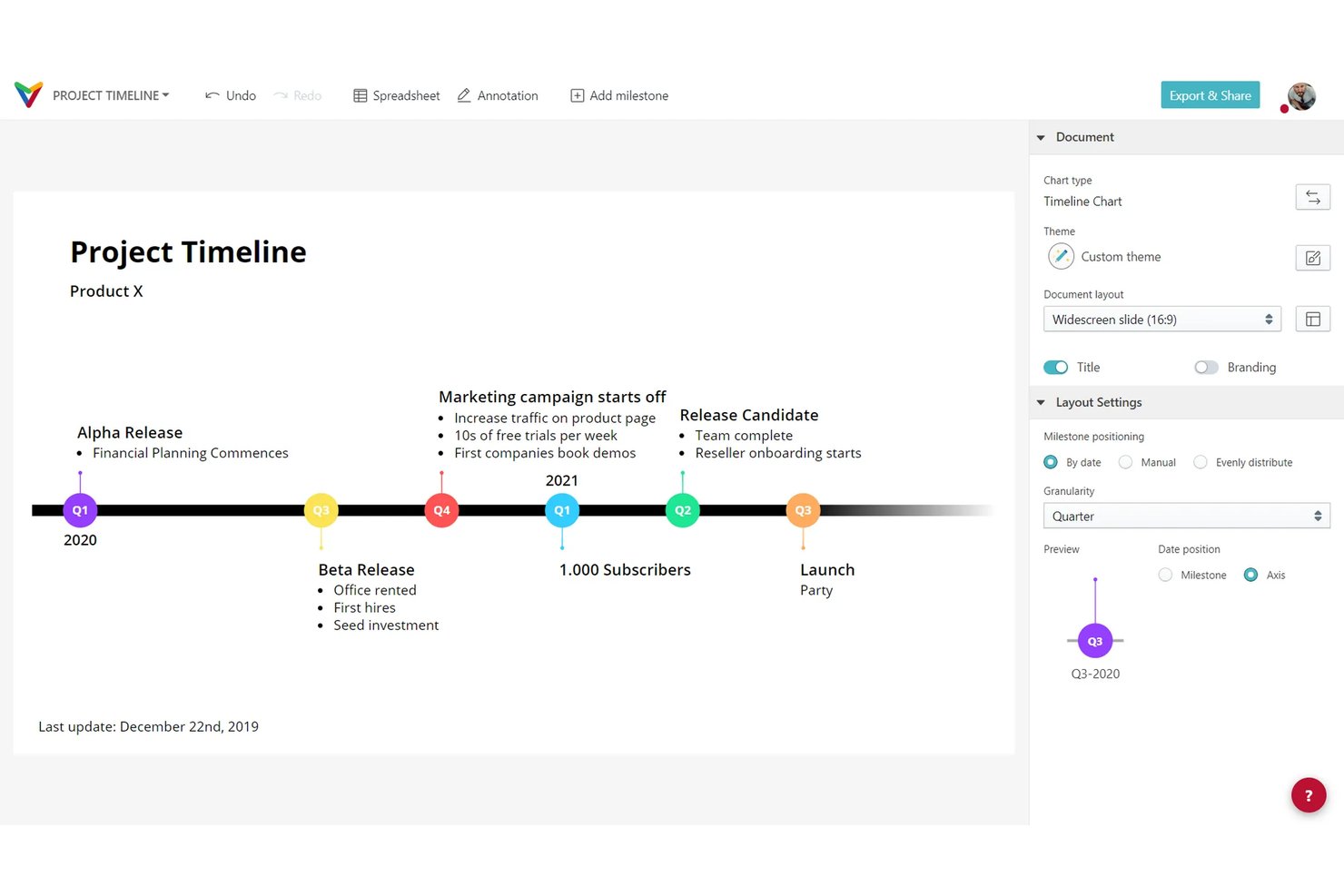
Vizzlo is a chart and data visualization tool that lets you build Gantt charts, timelines, roadmaps, and layered timelines directly inside PowerPoint and Google Slides.
Who Is Vizzlo Best For?
Vizzlo is a strong fit for project managers and consultants who need to turn project schedules into polished, presentation-ready visuals quickly.
Why I Picked Vizzlo
I picked Vizzlo as one of the best because it's purpose-built for turning project schedules into presentation-ready visuals without the usual back-and-forth in PowerPoint. The Gantt editor lets you drag and drop activities, set dependencies, and track progress, then push the finished chart directly into a Google Slides deck or PowerPoint file with one click. I also like that Vizzlo's 13 built-in themes and organization-wide branding controls mean every chart your team produces looks consistent, whether it's a client report or a weekly stakeholder update.
Vizzlo Key Features
- AI chart generation: Chart Vizzard lets you describe a chart in a prompt and generates a ready-to-edit visual you can open directly in the Vizzlo editor.
- Scheduled data refresh: Connected charts can sync with external spreadsheet sources on hourly, daily, or weekly schedules to keep visuals current.
- Organization-wide themes: Teams can share custom color palettes, fonts, and logo settings across all charts to maintain consistent branding.
- Desktop app with offline support: Vizzlo's Windows and macOS apps let you create and edit charts locally without an internet connection.
Vizzlo Integrations
Vizzlo has native integrations with Microsoft PowerPoint and Google Slides, plus connections to Google Sheets, Google Drive, OneDrive, Dropbox, and Box.
Pros and Cons
Pros:
- Shared themes support consistent client branding
- Quick project Gantt creation
- Polished Gantt visuals for stakeholder decks
Cons:
- Large spreadsheets can frustrate importing
- Limited control over font sizing and slide fit

Best for end-to-end product roadmap planning
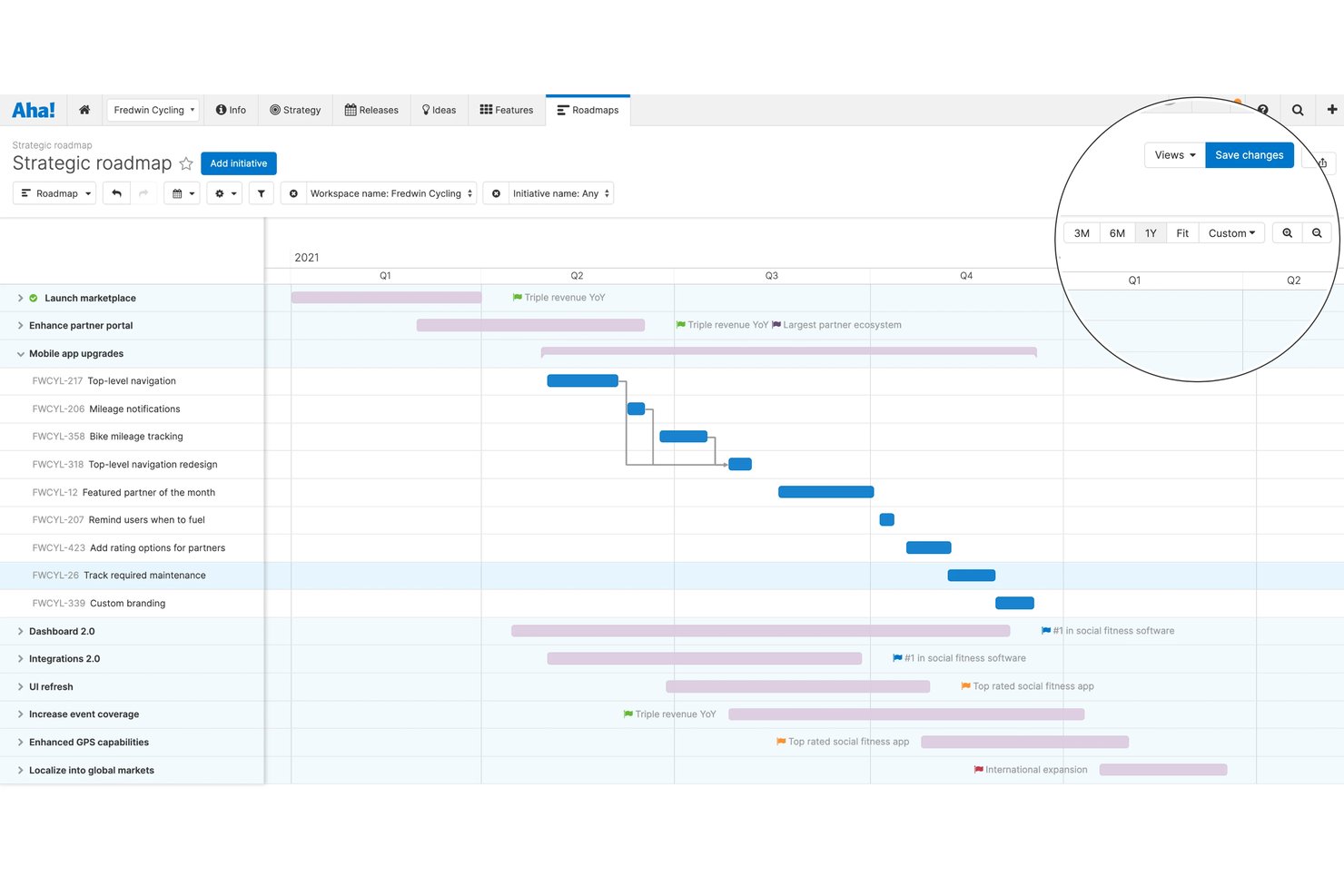
Aha! Roadmaps is a product management platform that covers strategy setting, feature prioritization, visual roadmap creation, Gantt-based release planning, and stakeholder presentation sharing.
Who Is Aha! Roadmaps Best For?
Aha! Roadmaps is a strong fit for product managers on growing tech teams who need to connect strategy, prioritization, and roadmap sharing in one place.
Why I Picked Aha! Roadmaps
Aha! Roadmaps earns its spot on my shortlist because it handles the full arc of roadmap planning, from strategy and prioritization to polished stakeholder presentations, without requiring you to piece together separate tools. I particularly like how its Gantt view lets you manage releases, phases, milestones, and dependencies in one place, then push those views directly into a presentation that auto-updates as plans change. You can also tailor roadmap formats by audience, choosing from portfolio, strategy, or custom views with branded color palettes and logos applied across the account.
Aha! Roadmaps Key Features
- Feature prioritization scoring: Score and rank features by expected impact to align your team around the highest-value work before committing to a release.
- Cross-team dependency tracking: Map relationships between work items across multiple workspaces to surface delivery risks before they affect your timeline.
- Custom color palettes and branding: Apply up to 10 account-wide color palettes and primary or secondary logos to roadmaps, reports, and presentations.
- Scheduled email delivery: Automatically send saved roadmap views and reports to stakeholders on a recurring schedule without manual sharing steps.
Aha! Roadmaps Integrations
Aha! Roadmaps includes 40+ native integrations, including Jira, Azure DevOps, Asana, Confluence, GitHub, GitLab, Slack, Smartsheet, and Trello. It also offers a REST API and Zapier integration.
Pros and Cons
Pros:
- Live roadmap views reduce PowerPoint updates
- Gantt views map releases and dependencies
- Visual roadmaps clarify priorities and milestones
Cons:
- Dense interface complicates navigation for some users
- Presentation templates can take preparation

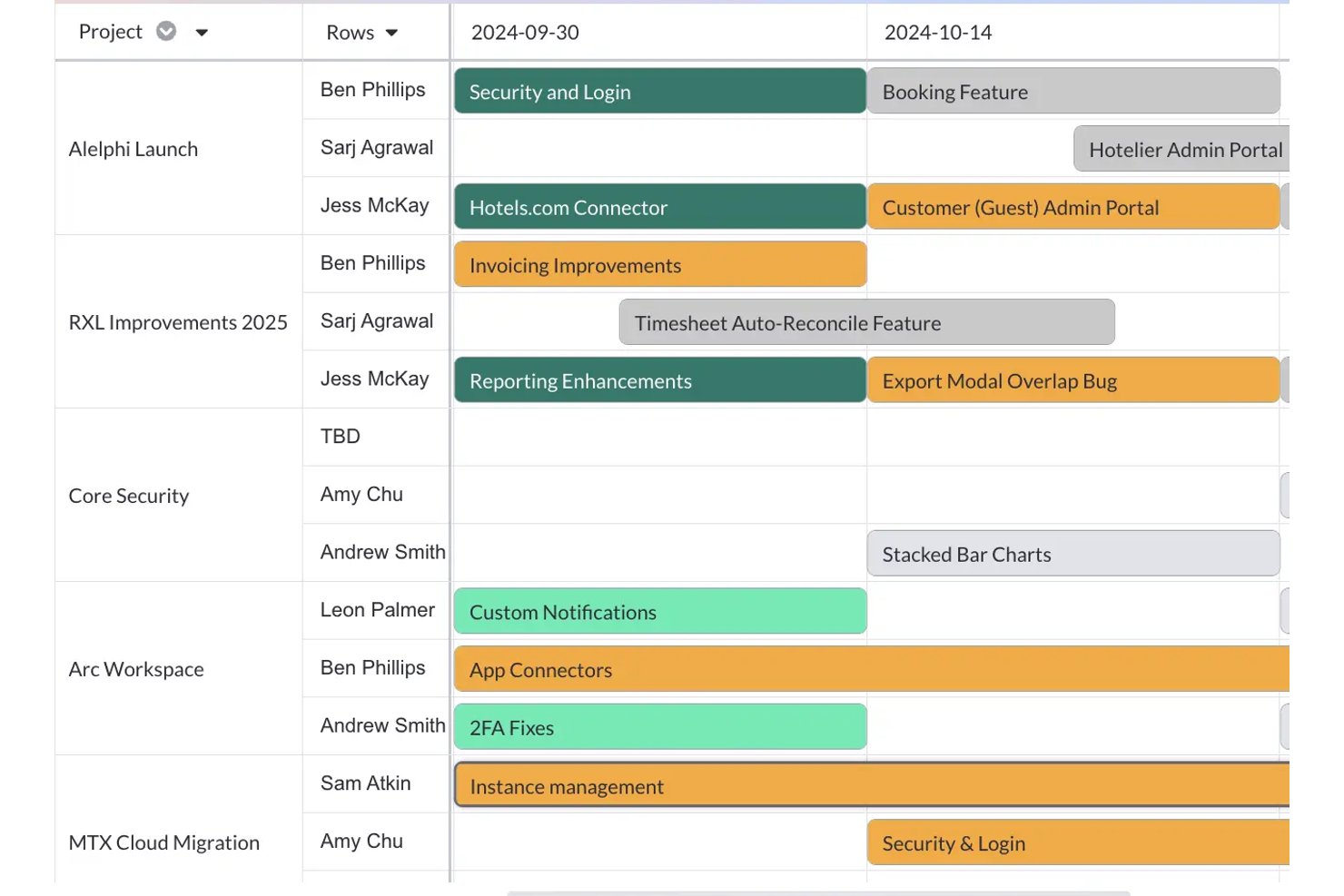
Visor is a project visualization tool that pulls live data from Jira, Asana, and Salesforce to build Gantt charts, roadmaps, timeline views, and dashboards.
Who Is Visor Best For?
Visor is a strong fit for project managers and program managers who live in Jira and need to surface that data as shareable Gantt charts and roadmaps without rebuilding everything manually.
Why I Picked Visor
Visor earns its spot on my shortlist because it solves a specific frustration I've seen over and over: Jira holds all your real project data, but getting that data into a clean, shareable Gantt chart usually means rebuilding everything by hand. With Visor, I can pull live Jira data, including nested issue hierarchies and dependencies, directly into a Gantt view, then drag bars to adjust dates without ever touching Jira directly.
Visor Key Features
- AI Smart Templates: Generate configured Gantt charts, roadmaps, Timeline charts, Board views, and Table views by answering prompts about your project data.
- Milestone markers: Toggle any record between a bar and a milestone in Gantt view using an existing end date field.
- Granular sharing permissions: Invite collaborators as viewers, commenters, editors, or owners, and change or revoke access immediately.
- Multi-format export: Export views as PDF, PNG, JPG, or CSV, or embed a workbook in any iframe-compatible application.
Visor Integrations
Visor offers native integrations with Jira, Asana, Salesforce, and HubSpot.
Pros and Cons
Pros:
- Preserves nested project hierarchies in roadmaps
- Drag-and-drop date edits update other workbook views
- Reviewers praise clear timelines for stakeholder updates
Cons:
- Service retirement was scheduled for July 31, 2026, affecting availability
- Complex portfolio views can become cluttered
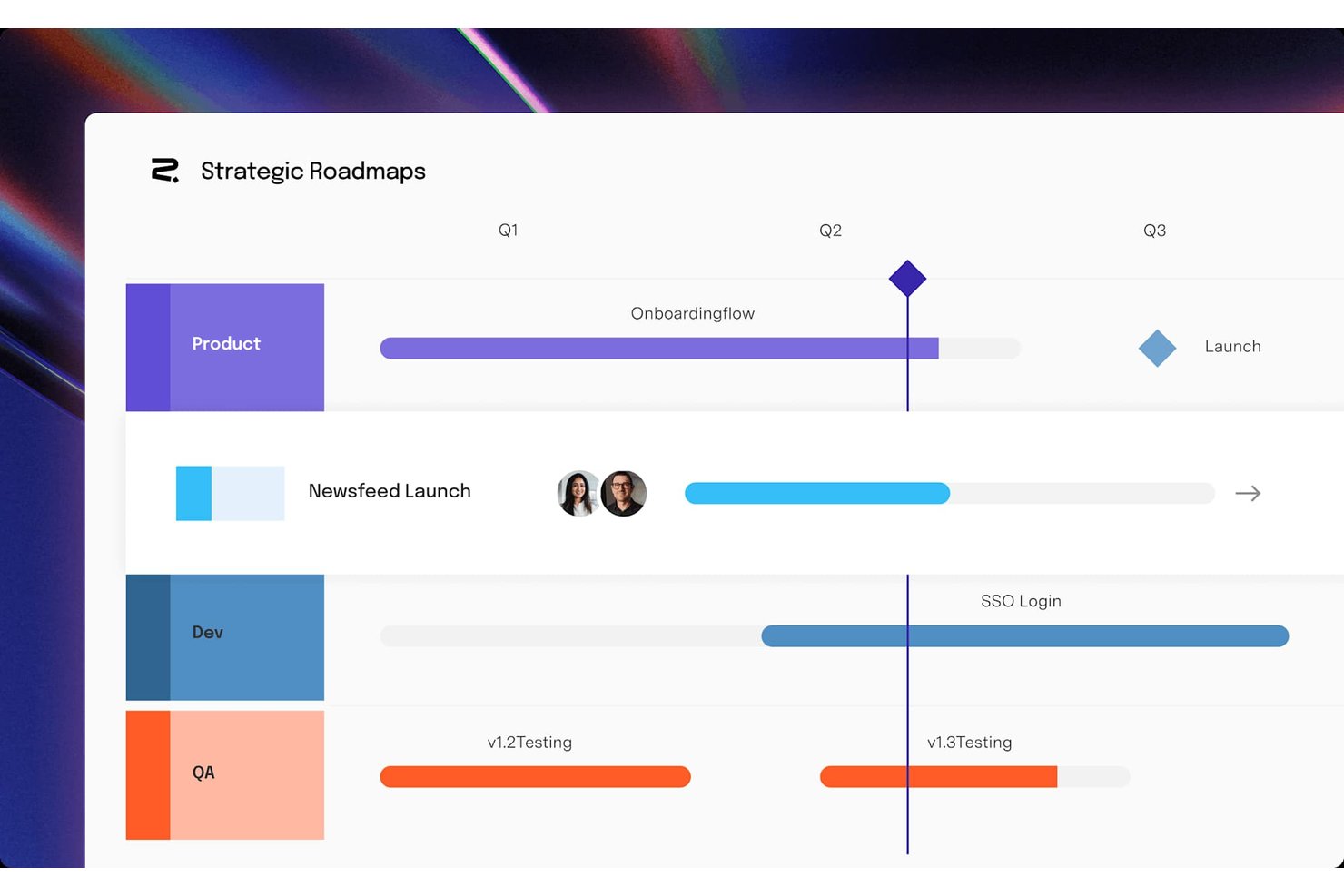
Roadmunk by Tempo is a dedicated roadmapping tool that offers timeline, swimlane, and table views alongside idea management, feedback collection, and native integrations with Jira and Azure DevOps.
Who Is Roadmunk by Tempo Best For?
Roadmunk by Tempo is a strong fit for product and project teams that already run on Jira or Azure DevOps and need a dedicated space to build and share visual roadmaps.
Why I Picked Roadmunk by Tempo
I picked Roadmunk by Tempo because it's purpose-built for teams that live in Jira or Azure DevOps and need their roadmap to stay in sync with actual dev work. I love that you can run one-way sync on the Starter plan and step up to full two-way sync on Professional, so roadmap items update as tickets move in Jira without manual reconciliation. The timeline and swimlane views pull from the same dataset, which means I can generate an executive-ready PNG export in 16:9 format while keeping a live HTML roadmap link for stakeholders who want to drill in.
Roadmunk by Tempo Key Features
- Swimlane view: Organize roadmap items into horizontal lanes grouped by team, product, or category for a structured visual layout.
- Portfolio roadmaps: Roll multiple team roadmaps into a single higher-level view to track cross-team work in one place.
- Feedback portal: Collect stakeholder or customer feedback through a customizable form and link it directly to roadmap ideas.
- PNG export with aspect ratio options: Export any roadmap view as a PNG image in 4:3, 16:9, or 16:10 format for use in presentations.
Roadmunk by Tempo Integrations
Roadmunk by Tempo offers native integrations with Jira, Azure DevOps, Trello, Asana, Monday.com, GitHub, GitLab, Pivotal Tracker, and Shortcut. Its API access tokens support custom integrations on the Business plan.
Pros and Cons
Pros:
- Shareable views help explain plans externally
- Templates support varied strategy roadmaps
- Polished swimlanes clarify roadmap plans
Cons:
- Complex portfolios require upfront structuring
- No PDF or PowerPoint export

GanttPRO
Best for interactive Gantt charts
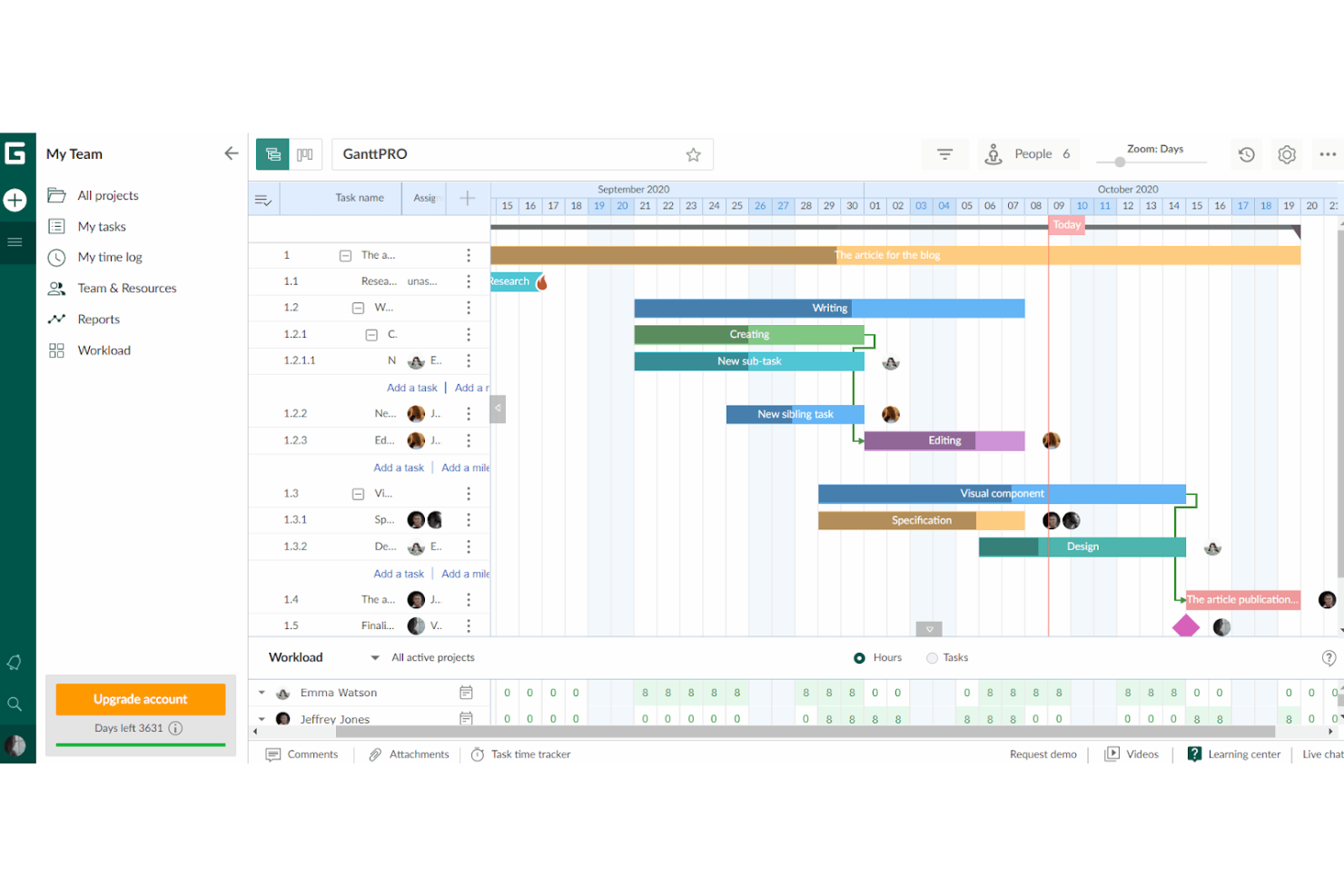
GanttPRO is an online project management tool that leverages Gantt charts for planning and collaboration. It's interactive Gantt charts allow team members to work together synchronously, enhancing overall collaboration.
Why it's a good Office Timeline alternative: GanttPRO emphasizes collaboration and real-time updates, which are essential for dynamic project environments. Its ability to facilitate immediate communication and adjustments among team members makes it a strong alternative to Office Timeline.
Standout features & integrations:
Features include interactive Gantt chart creation, task and milestone tracking, project templates, resource management, custom fields and colors, budget tracking, time tracking, and project baselines for progress comparison.
Integrations include Slack, Google Drive, Jira, and Microsoft Teams.
Pros and Cons
Pros:
- Native integrations with popular tools
- Comprehensive project management features
- Real-time collaboration on Gantt charts
Cons:
- Some advanced features may have a learning curve
- A minimum of 5 seats is required for the starting price

Miro
Best for collaborative visual timeline planning
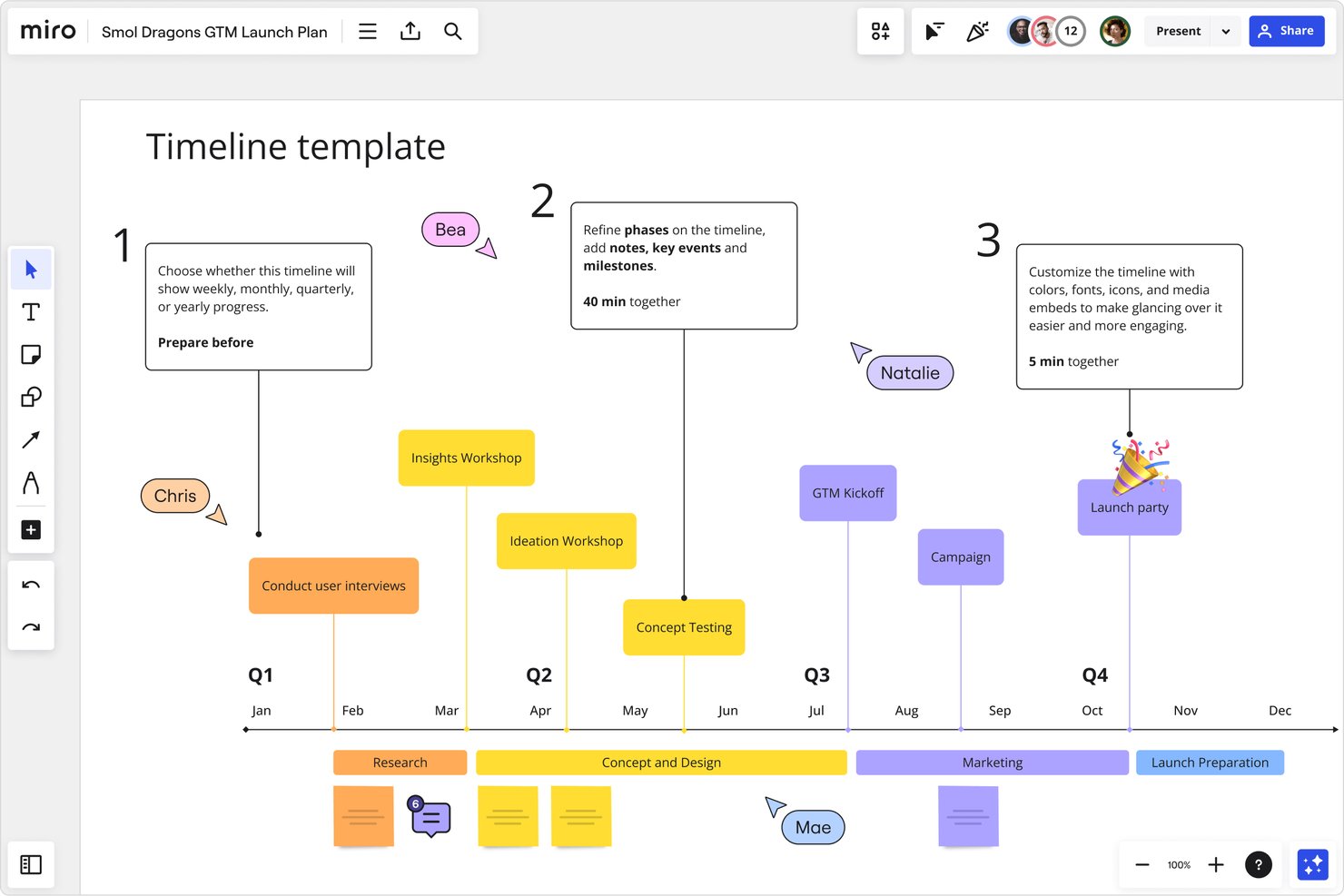
Miro is a collaborative visual canvas platform that combines infinite whiteboarding with structured timeline creation, Gantt charts, Kanban boards, and real-time team collaboration tools.
Who Is Miro Best For?
Miro is a strong fit for cross-functional teams in tech and digital environments that plan and track projects visually alongside design, product, and engineering work.
Why I Picked Miro
I've included Miro in my top picks because its infinite canvas makes visual timeline planning genuinely collaborative in a way Office Timeline can't match. I love that your team can build and edit Timeline widgets together in real time, sync those views across multiple boards, and pull in live Jira or Asana data directly into the timeline on Business plans. The 51 ready-made timeline templates, covering everything from product launches to marketing campaigns, mean you're not starting from scratch every time.
Miro Key Features
- Kanban boards: Teams can organize and track work items using built-in Kanban boards directly on the canvas alongside timelines and other formats.
- Talktrack: Teams can record interactive board walkthroughs for stakeholders to view asynchronously, with comments placed directly on the board.
- Brand Center: Teams can store logos, color palettes, typography, and fonts in a centralized theme to apply consistent styling across boards.
- Spreadsheet import: Tables can be created from uploaded
.xlsx,.csv, or.odsfiles, with Start and End date columns automatically converted into timeline bars.
Miro Integrations
Miro offers 250+ apps, integrations, and AI tools, including native integrations with Jira, Asana, Linear, ClickUp, Azure DevOps, Microsoft 365, Google Workspace, and Slack. Its REST API and Web SDK support custom integrations.
Pros and Cons
Pros:
- Visual boards map project processes clearly
- Templates help teams start visual plans
- Remote teams can update shared plans live
Cons:
- Dense boards can clutter and slow down
- PowerPoint exports aren’t available
New Product Updates from Miro
Miro Adds Japan Data Residency for Enterprise Customers
Miro has introduced Japan data residency for enterprise customers, offering in-region storage for production data, backups, and metadata, plus in-region compute infrastructure. For more information, visit Miro's official site.

Lucidchart
Best for diagramming-first timeline collaboration
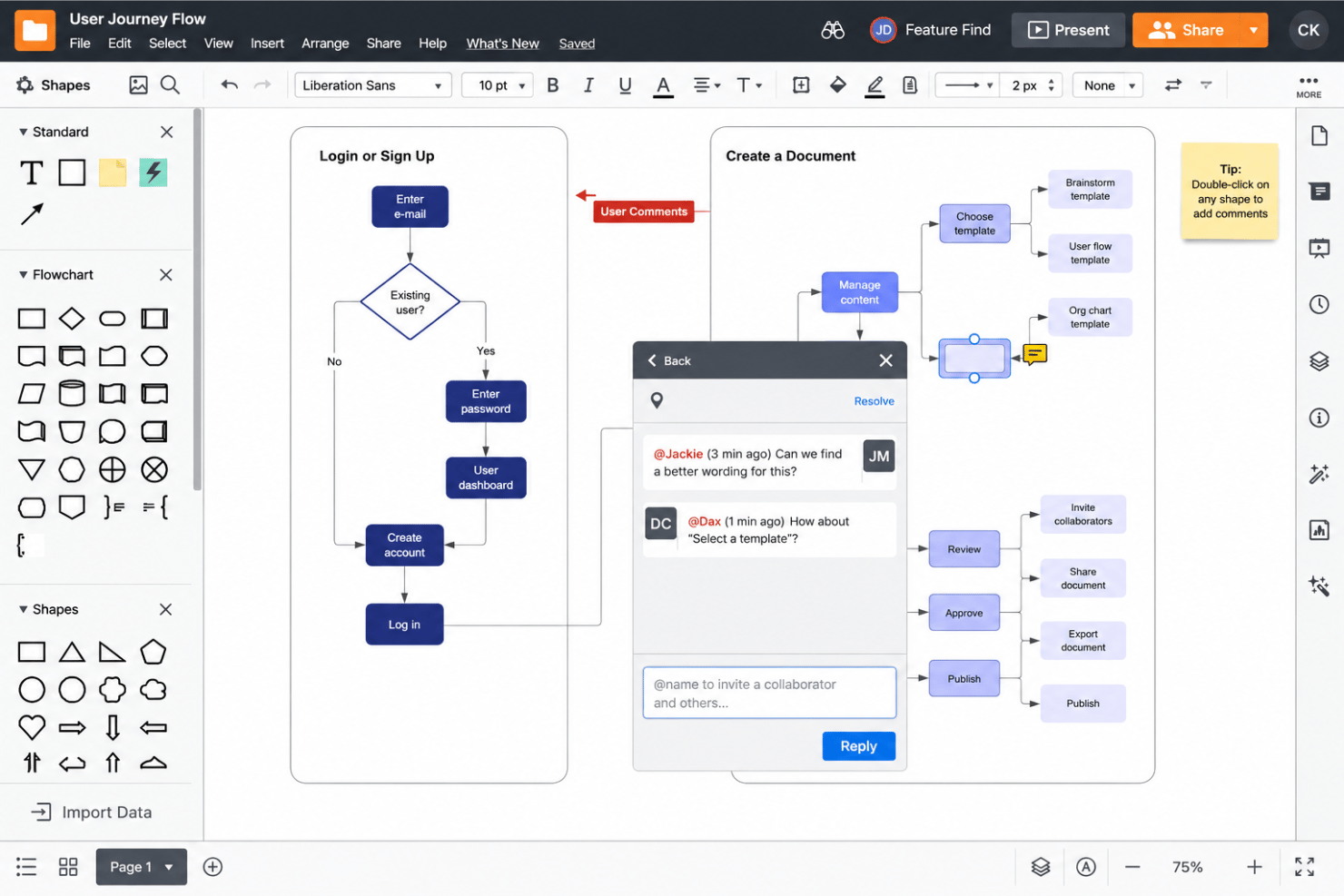
Lucidchart is a cloud-based diagramming tool that lets you create timelines, Gantt charts, flowcharts, and org charts with customizable templates, real-time collaboration, and data import from sources like Google Sheets, Jira, and Azure DevOps.
Who Is Lucidchart Best For?
Lucidchart is a strong fit for project managers and cross-functional teams who want to build and share visual timelines alongside flowcharts, org charts, and architecture diagrams—all in one collaborative workspace.
Why I Picked Lucidchart
Lucidchart earns its spot on my shortlist because it treats diagramming as the primary workflow, which makes timeline creation feel natural rather than bolted on. I particularly like that you can build horizontal, vertical, dynamic, and Gantt-style timelines from the same canvas where your flowcharts and org charts live, so cross-functional teams collaborate on everything in one place. The native PowerPoint add-in is also a genuine time-saver: I can build or edit a timeline in Lucidchart and push it directly into a slide without leaving PowerPoint.
Lucidchart Key Features
- Real-time and asynchronous collaboration: Multiple team members can edit the same diagram simultaneously or leave comments asynchronously, with granular permissions controlling who can view, comment, or edit.
- Data linking from Google Sheets, Excel, and CSV: Connect external data sources to your diagrams so visuals update automatically as your data changes, with refresh options ranging from automatic to manual.
- Jira and Azure DevOps timeline import: Pull work items directly from Jira or Azure DevOps into a Lucidchart timeline and sync updates from your work management system.
- Layered diagram organization: Organize complex visuals into separate layers with individual visibility controls, letting you show or hide detail depending on your audience.
Lucidchart Integrations
Lucidchart offers 100+ custom-built integrations, including native connections with Jira, Confluence, Microsoft 365, Google Sheets, Microsoft Excel, Slack, Microsoft Teams, and Notion. It also supports custom integrations through its API and marketplace integrations for AWS and Azure.
Pros and Cons
Pros:
- PowerPoint add-in avoids rebuilding slide timelines
- Real-time edits support stakeholder feedback
- Templates speed polished timeline creation
Cons:
- Timeline features exclude free plan
- Gantt bars require manual construction
Outras alternativas ao Office Timeline
Eis algumas outras opções de alternativas ao Office Timeline, caso não tenha encontrado acima o que procurava.
- Smartsheet
For spreadsheet-like project views
- Wrike
For managing team workloads
- Zoho Projects
For advanced timeline management
- ProjectManager
For real-time project planning
- Instagantt
For Asana-connected Gantt scheduling
- SmartDraw
For multi-diagram project visualization
- ClickUp
For task versatility
- thinkcell
For AI-assisted Gantt slides in PowerPoint
- TeamGantt
For Gantt-based team schedule sharing
- Timeline Maker Pro
For auto-scheduling features


Análises relacionadas de software de gestão de projetos
Se ainda não encontrou aqui o que procura, consulte estas outras ferramentas relacionadas que testámos e avaliámos:
- Software de gestão de projetos
- Software de gestão de recursos
- Software de automatização de fluxos de trabalho
- Software de controlo de tempo
- Software de gestão de tarefas
- Ferramentas de colaboração
- Criador de gráficos de Gantt
- Ferramentas de produtividade
- Software de acompanhamento de projetos
- Software de calendarização de projetos
How I Evaluate Office Timeline Alternatives
I split my evaluation into three parts, weighting core functionality most: map dates and milestones into timelines or Gantt charts, and export polished visuals to PowerPoint or PDF. Next, I look for differentiators like a PowerPoint add-in or auto-layout for overlapping milestones. Finally, I consider adoption ease, fit with Jira or MS Project, and pricing.
Core Functionality (Table Stakes For This List)
When I'm selecting tools for my list, I score each one on a scale from 0 (does not offer the functionality) to 5 (excels in this area) for each core functionality listed below. I then convert the total into a percentage to help assess each tool's overall fit, with extra weight on any functionalities I’ve deemed essential.
- Timeline & Gantt Views (Essential): I look for clear timeline, roadmap, and Gantt views that show phases, dates, dependencies, and milestone shifts at a glance.
- Presentation-Ready Export (Essential): For a steering update, I check whether PowerPoint, PDF, or image exports preserve labels, colors, and layout.
- Data Import & Sync: I evaluate how spreadsheet or project-plan data populates a timeline, and whether updates sync without extensive re-entry.
- Templates & Styling: I consider whether teams can adjust layouts, colors, and milestone groupings for a client presentation or internal roadmap.
- Milestone & Task Editing: I look for ways to organize and revise tasks, phases, and milestones as dates shift across a project plan.
- Sharing & Collaboration: I check how stakeholders view, edit, or comment on a shared timeline, including when external partners need access.
Once I have a list of tools that meet the criteria, I consider what sets each platform apart.
Differentiating Factors (What Sets Vendors Apart)
Here's how I compare and contrast different vendors:
Standout Features
I check whether a tool includes a native PowerPoint add-in, since building timelines inside the deck itself saves the back-and-forth of exporting and reformatting. Auto-layout intelligence matters just as much—when a quarterly roadmap has dozens of overlapping milestones, I look for tools that rearrange labels and bars automatically so nothing gets buried. I also evaluate one-click date updates, because a single scope change shouldn't force you to rebuild an entire visual from scratch.
Beyond Features
I evaluate how quickly a non-PM user can produce a polished deliverable under deadline pressure. Consultants and executive assistants rarely have time for training, so pre-set defaults and intuitive drag-and-drop editing matter more than deep configurability. I also check how well each tool fits an existing stack—importing an MS Project or Jira schedule should preserve dates, dependencies, and task hierarchy without manual cleanup. Finally, I look at brand consistency controls, because firms producing recurring client reports need custom color palettes, fonts, and logos that stay locked across every timeline.
Porquê procurar uma alternativa ao Office Timeline
Embora o Office Timeline seja uma ferramenta útil, existem vários motivos pelos quais pode estar à procura de uma alternativa. Por exemplo, pode considerar que, tanto para si como para a sua equipa:
- Precisa de mais funcionalidades: O Office Timeline não dispõe das funcionalidades avançadas necessárias para gerir cronogramas de projetos complexos.
- Prefere integrações diferentes: Se depende de ferramentas fora do Microsoft Office, procure software que ofereça opções de integração mais abrangentes.
- Necessita de colaboração avançada: As funcionalidades de colaboração do Office Timeline podem não responder às necessidades da sua equipa.
- Quer mais flexibilidade: As capacidades de personalização do Office Timeline são limitadas.
- Precisa de uma melhor relação qualidade-preço: O preço do Office Timeline pode não se adequar ao seu orçamento nem oferecer o valor que espera.
Principais funcionalidades do Office Timeline
Eis algumas das principais funcionalidades do Office Timeline, para ajudar a comparar as soluções alternativas:
- Integração com o PowerPoint: Permite criar e editar cronogramas diretamente no PowerPoint, facilitando a sua inclusão em apresentações.
- Modelos personalizáveis: Disponibiliza modelos pré-criados que pode modificar de acordo com as necessidades do seu projeto, poupando tempo e esforço.
- Faixas e subfaixas: Ajuda a organizar tarefas e marcos em categorias distintas, para uma maior clareza do projeto.
- Importação a partir do Excel: Permite obter rapidamente dados do Excel para criar cronogramas sem introduzir manualmente os detalhes das tarefas.
- Dependências entre tarefas e caminho crítico: Mostra como as tarefas estão ligadas e destaca o caminho crítico para ajudar a gerir os prazos.
- Várias escalas temporais: Permite apresentar cronogramas diários, semanais, mensais ou anuais, de acordo com as diferentes necessidades do projeto.
- Temas personalizados: Dá-lhe a opção de criar e aplicar um estilo consistente em todos os elementos visuais do projeto.
- Atualização de dados: Atualiza automaticamente os cronogramas quando os dados associados no Excel, no Project ou no Jira são alterados.
- Integração com outras ferramentas: Funciona com o Microsoft Project, o Smartsheet, o Jira e o Wrike para sincronizar os dados do projeto.
- Suporte premium: Disponibiliza suporte técnico prioritário para uma resolução mais rápida dos problemas.