

10 Step Downloadable Project Planning Checklist


Checklist Importance: A project planning checklist helps you get your project organized from the beginning and avoid common project pitfalls.
Key Project Documents: In addition to your project plan, you also need to create a risk management plan, resource plan, project brief, RACI chart, estimate, and comms plan.
Use Project Software Tools: Project management software can simplify project planning by helping you assign tasks to your team and handling manual, repetitive tasks for you.
Planning is the backbone of successful projects. A project planning checklist helps project teams stay organized, avoid common pitfalls, and keep projects on track from the start. Here’s a checklist you can follow when setting up your project (plus a downloadable version) so you can get started quickly and put your project on the path to success.
What is a Project Planning Checklist?
A project planning checklist is a simple, structured tool or template used by project managers and teams to make sure you complete all the key steps needed to kick off and manage a project effectively.
It serves as a repeatable framework that improves consistency, reduces risks, and sets up your projects for success by providing clear direction from the beginning.

Why Use a Project Planning Checklist?
Using a project planning checklist helps you make sure nothing essential is overlooked during the stages of a project. It helps you keep team members aligned, clarify scope, and establish timelines. You’ll also set yourself up to better facilitate communication, engage stakeholders, and manage risk so that you can execute smoother and see more predictable results.
Project Management and Planning Checklist
Here are the 10 steps in my project planning checklist to help you launch your project:

1. Validate Project Viability
Make sure that the project is worth doing. Why waste time and resources on a project that is not needed or wanted? This means confirming there’s a clear need, value, or return on investment, and that it's feasible with the resources, time, and skills available.
Conduct a preliminary feasibility analysis or business case review to determine whether the project is viable and whether there is sufficient project budget.
2. Set Up the Project in Your Project Management Tool
Before execution begins, create a new project space in your project management software (e.g. Asana, Trello, Microsoft Project). Include team members, define basic structure, set up milestones, and assign preliminary roles. Don’t forget to communicate with the team which tool will be used and grant permissions and access if necessary.

You’ll use project management software and project tools such as dashboards to track project progress during project execution.
3. Create a Project Brief

Develop a one-page summary that outlines the project's objectives, key deliverables, timeline, success criteria, and stakeholders. This brief makes sure everyone understands the project’s purpose, scope and priorities. Regardless of the project methodology chosen (Scrum, Kanban, waterfall, or hybrid), a project brief is always good project documentation to have.
4. Create a Project Plan
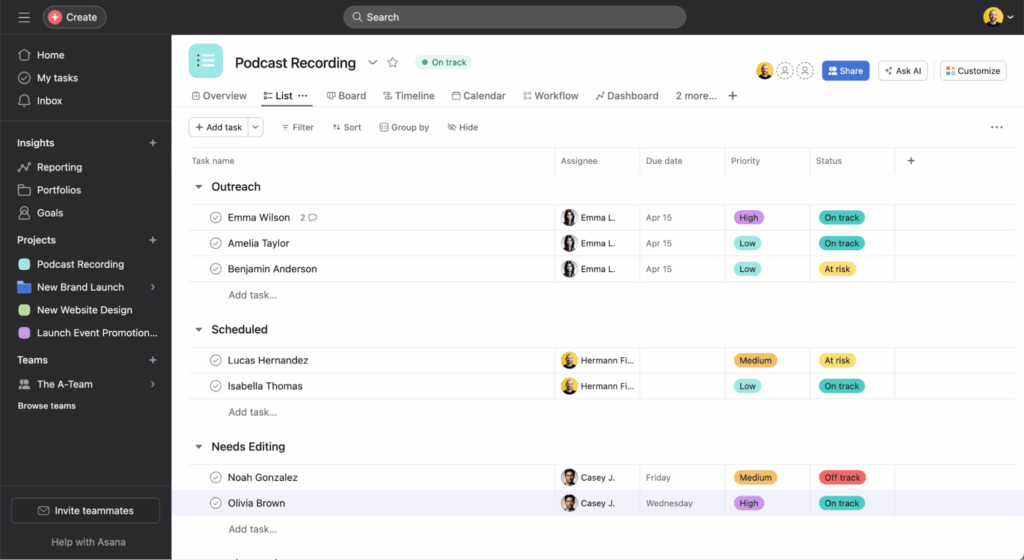
Build a detailed project plan that includes scope, a project schedule, a work breakdown structure (WBS), tasks, dependencies, and deliverables. The plan is your roadmap—it helps keep your team on the same page throughout the project’s lifecycle.
5. Create an Estimate

Estimate how much time, money, and resources the project will require. Use historical data, expert input, or estimation techniques (like bottom-up or analogous estimation) to increase accuracy and set realistic expectations.
6. Create a Resource Plan

Identify who is needed and when. Match available personnel, tools, and materials with the project timeline to prevent bottlenecks and burnout. Consider resource availability, skills, and workload distribution. It can also help to prioritize which resources are needed along with the project schedule and budget.
7. Get Approval
Secure formal approval from key stakeholders or decision-makers before moving forward. This confirms alignment and authorizes the team to begin work on the project. In a waterfall project this may include formal sign-off on project artifacts such as the project charter, or getting a go/no go decision (if you’re running an agile project).
8. Create a Comms Plan and RACI Chart

Define how and when updates will be shared, who needs to be informed, and through which channels. A RACI chart (i.e. who’s responsible, accountable, consulted, informed) clarifies roles and avoids confusion.
9. Create a Risk Management Plan
Identify potential risks, assess their impact and likelihood, and outline mitigation strategies in your project management plan. Proactive risk planning helps teams respond quickly and reduces surprises during the project.
10. Hold a Kickoff
Organize a project kickoff meeting to align the project team, share project goals, clarify roles, review timelines, and address questions. This builds momentum and sets the tone for collaboration. It is also a good opportunity to go over items from the project communication plan so that stakeholders know when and how information will be communicated to them and how they can engage with the project team.
Project Management Checklist Download
This may seem like a lot to remember, but don’t worry. Our project management checklist template is ready to help. Use this checklist to prepare for all the stages of your project’s lifecycle and make sure you don’t forget or overlook anything.

This checklist also contains a list of common daily, weekly and monthly tasks you should perform on a project to maintain smooth execution.
What’s Next?
Want to connect with other digital project managers to share resources and best practices? Join our membership community and get access to 100+ templates, samples, and examples and connect with 100s of other digital project managers in Slack.



