

De 20 beste programvarene for AI-baserte profesjonelle tjenester i 2026

Kortliste over den beste programvaren for AI-baserte profesjonelle tjenester


Programvare for AI-baserte profesjonelle tjenester bruker kunstig intelligens til å hjelpe deg med å administrere prosjekter, fordele ressurser og automatisere arbeidsflyter på tvers av konsulentvirksomheter, byråer og team som leverer tjenester til kunder. Hvis du leter etter de beste verktøyene for å ligge i forkant i en bransje i rask utvikling med sterk konkurranse, trenger du løsninger som øker nøyaktigheten, åpenheten og leveringshastigheten uten å skape nye problemer. Denne veiledningen skreller bort støyen og går gjennom de beste AI-verktøyene – slik at du kan sammenligne alternativer, se hvilke som passer virksomheten din, og ta trygge beslutninger når du planlegger de neste stegene.
Hvorfor du kan stole på våre programvareanbefalinger
Teamet vårt har testet og anmeldt programvare siden 2012. Vi er selv prosjektledere, så vi vet hvor vanskelig og hvor viktig det er å velge riktig programvare.
I denne guiden har vi vurdert verktøyene gjennom praktisk testing og uavhengig research og gitt dem poeng ut fra våre utvelgelseskriterier. Vi bygger også på innsikt fra ledende eksperter i bransjen og erfarne prosjektledere.
Anmeldelsene våre bygger på vår egen redaksjonelle vurdering. De er ikke et salgsargument.
Ekspertanmeldere:
Sammenligningstabell for programvare for AI-baserte profesjonelle tjenester
Denne sammenligningstabellen oppsummerer prisdetaljene for mine utvalgte programmer for AI-baserte profesjonelle tjenester.
| Tool | Best For | Trial Info | Price | ||
|---|---|---|---|---|---|
| 1 | Best for resource and project forecasting | Free demo available | Pricing upon request | Website | |
| 2 | Best for automated team planning | Free plan available | Pricing upon request | Website | |
| 3 | Best for tracking profitability by project | Free trial available | From $10/user/month (billed annually) | Website | |
| 4 | Best for all-in-one business oversight | 14-day free trial + free demo available | From $17/user/month | Website | |
| 5 | Best for time and billing management | Free demo available | From $20/user/month | Website | |
| 6 | Best for unified financial management | 21-day free trial + free demo available | From $17/user/month (billed annually) | Website | |
| 7 | Best for real-time project visibility | Free demo available | Pricing upon request | Website | |
| 8 | Best for native Salesforce integration | Free demo available | Pricing upon request | Website | |
| 9 | Best for enterprise-grade reporting tools | Free demo available | Pricing upon request | Website | |
| 10 | Best for smooth ERP integration | Free demo available | Pricing upon request | Website |


Anmeldelser av den beste programvaren for AI-baserte profesjonelle tjenester
Nedenfor finner du mine detaljerte sammendrag av den beste programvaren for AI-baserte profesjonelle tjenester som kom med på kortlisten min. Anmeldelsene mine gir en grundig gjennomgang av funksjonene, integrasjonene og de beste bruksområdene for hver plattform, slik at du kan ta datadrevne beslutninger og finne den beste løsningen for deg.

Kantata
Best for resource and project forecasting
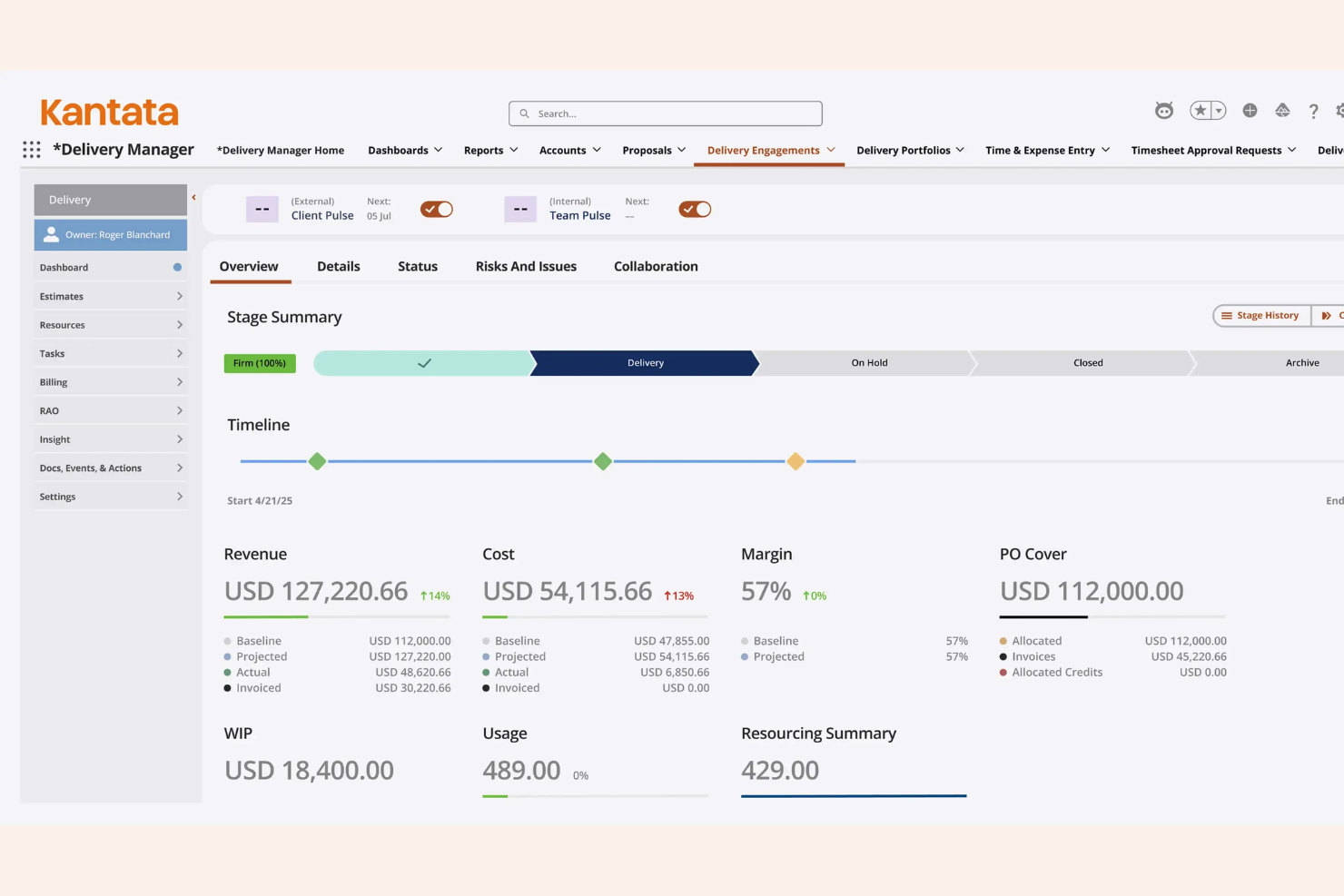
Kantata is an AI-driven professional services automation platform integrating generative AI capabilities to offer advanced project management, resource scheduling, analytics, and financial tools for service-based organizations.
Who Is Kantata Best For?
Kantata suits professional services teams at medium to large organizations that need an AI assistant alongside advanced controls for project and resource management.
Why I Picked Kantata
Kantata is one of my top picks because I get detailed resource planning, scenario modeling, and AI-powered forecasts. I like how I can compare project timelines, track capacity, and adjust allocations before making big commitments.
Kantata Key Features
- Financial management modules: Track budgets, invoices, expenses, and revenue in one place.
- Project accounting tools: Get real-time project financials and margin analysis.
- Skill-based resource matching: Assign team members based on skills and certifications.
- Time and expense tracking: Capture billable hours and expenses across projects.
Kantata Integrations
Kantata offers native integrations with Salesforce, Slack, Jira, HubSpot, QuickBooks, Xero, Microsoft 365, Google Workspace, Expensify, and NetSuite. An API is available for custom integrations.
Pros and Cons
Pros:
- Scenario modeling for future project planning
- Granular resource scheduling and allocation views
- AI-driven project forecasting tools
Cons:
- Custom reporting requires technical expertise
- Complex setup process for new accounts
New Product Updates from Kantata

Kantata Adds Access Group Change History
Kantata adds Access Groups History, letting account administrators track changes to group details, membership, and permissions in Recent History. The update also makes these events available through the Subscribed Events API for broader monitoring. For more information, visit Kantata’s official site.
 .

Mosaic
Best for automated team planning
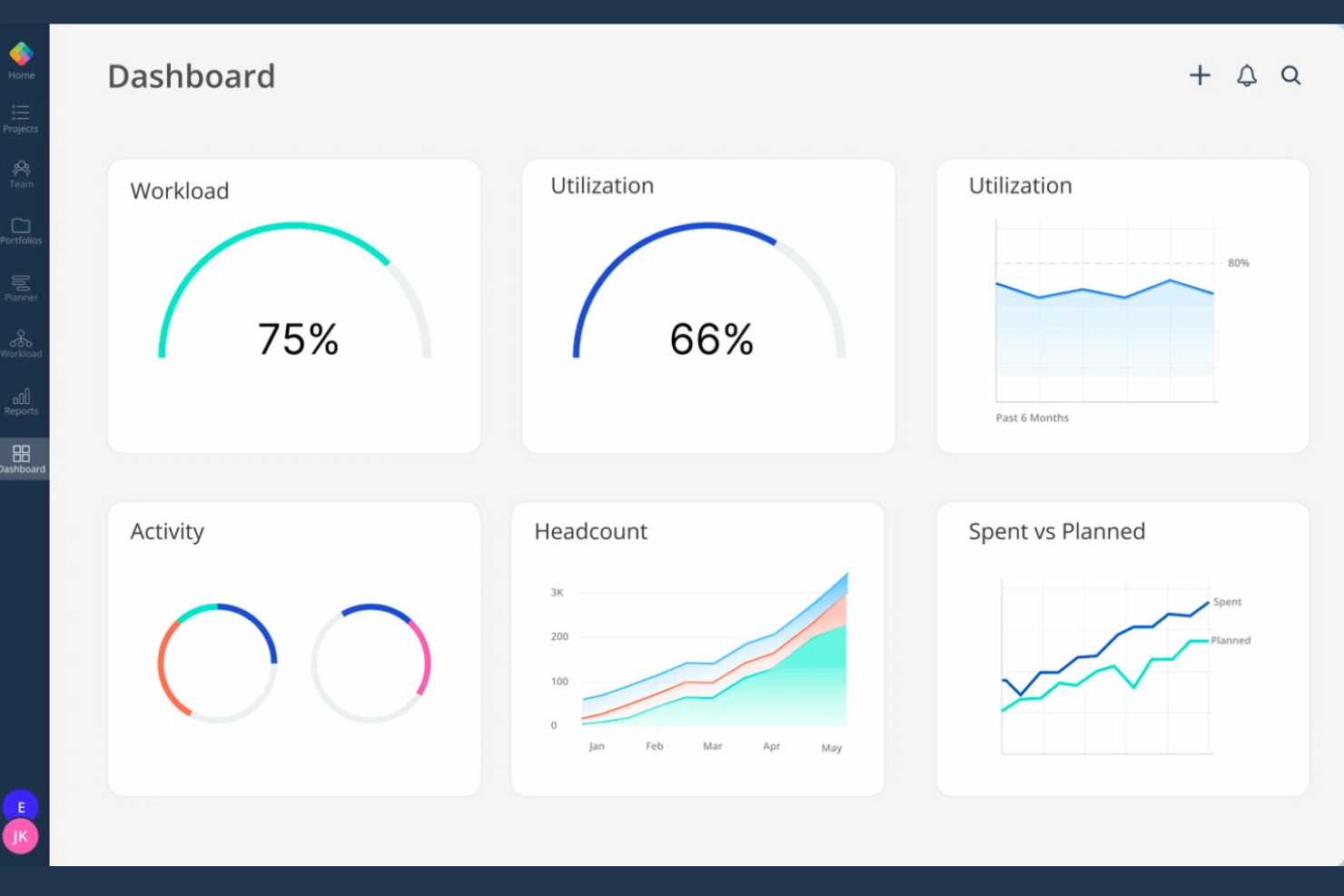
Mosaic is a resource management and team planning platform for professional services teams, leveraging AI agents to offer automated workload forecasting, project scheduling, time tracking, and staffing analytics.
Who Is Mosaic Best For?
Mosaic suits project leads and operations managers in growing professional services firms needing real-world AI-powered resource planning for distributed or hybrid teams.
Why I Picked Mosaic
I picked Mosaic as one of the best because I use its AI-driven scheduling engine to automate team assignments and balance workloads as projects shift. I also rely on its real-time utilization tracking and heatmaps to instantly spot resource constraints.
Mosaic Key Features
- Project request intake: Capture and centralize incoming project requests directly in the platform.
- Skill-based resourcing: Match assignments to team members based on tracked skillsets.
- Visual timeline view: Display projects, phases, and allocations in a single interactive timeline.
- AI forecasting: Predict future resource needs using AI-driven analytics.
Mosaic Integrations
Mosaic offers native integrations with Jira, QuickBooks, Slack, Google Workspace, Microsoft 365, Salesforce, HubSpot, Asana, Capsule, ClickUp, Deel, Gusto, GitHub, HiBob, BambooHR, Procore, and more. Zapier is supported, and an API is available for custom integrations.
Pros and Cons
Pros:
- Visual dashboards for real-time team capacity
- Skill-based matching for project assignments
- AI workload prediction across multiple projects
Cons:
- Initial platform setup requires time
- Custom field configuration is limited

Best for tracking profitability by project
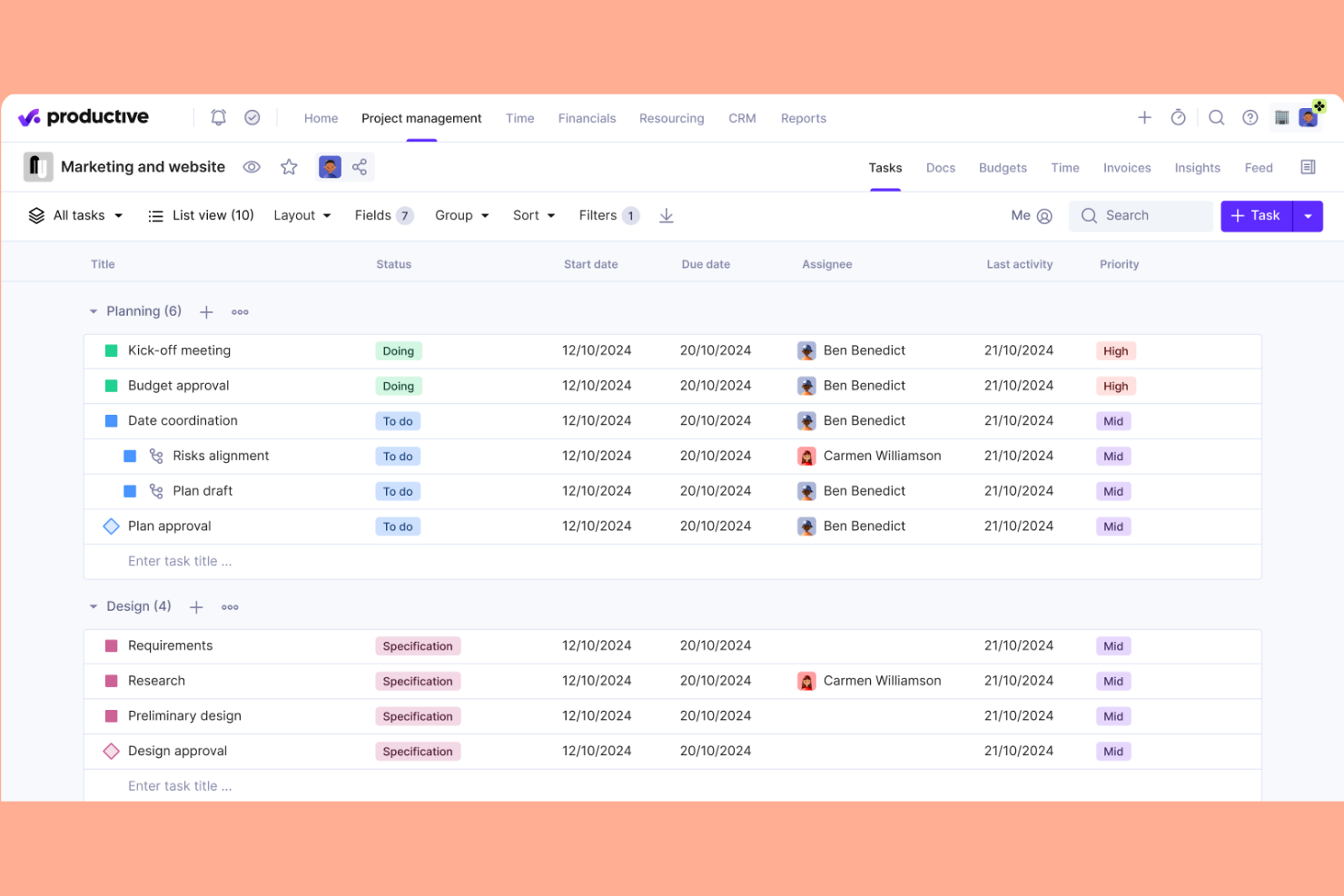
Productive is a professional services automation platform for AI consulting, social media agencies, and digital service firms that covers project management, resource planning, budgeting, time tracking, and invoicing in one unified system.
Who Is Productive Best For?
Productive suits mid-sized and larger digital, creative, or IT services firms that need visibility into project-level financials and resource allocation.
Why I Picked Productive
I picked Productive because tracking profit margins on every project is a core feature, not a reporting afterthought. I use real-time budget tracking and custom cost rates to monitor profitability as delivery progresses. I rely on granular invoicing tied to project progress.
Productive Key Features
- Resource planning: Schedule team members and allocate capacity to projects in a drag-and-drop interface.
- Task management: Organize assignments, set deadlines, and track task status in project boards or lists.
- Custom fields: Add personalized data fields to projects, tasks, and budgets for process flexibility.
- Document storage: Upload, share, and organize project files directly in the platform.
Productive Integrations
Productive offers native integrations with Slack, Jira, Amplitude, Notion, Stripe, QuickBooks, Xero, Google Workspace, and HubSpot. An API is available for custom integrations.
Pros and Cons
Pros:
- Financial and utilization dashboards are built in
- Custom cost rates by person or role
- Project budgets update in real time
Cons:
- Custom field formula options are limited
- Limited automation for multi-step workflows
New Product Updates from Productive
Productive Adds Voice Dictation, Slack Connector, Proposals, and Overtime
Productive adds voice dictation, a Slack Connector, proposal controls, and overtime tracking. These updates support faster AI interactions, client proposals, and time management. For more information, visit Productive’s official site.

Scoro
Best for all-in-one business oversight

Scoro is an all-in-one professional services management platform that supports natural language querying to bring together project management, sales, billing, CRM, and reporting in a unified system for service-based businesses.
Who Is Scoro Best For?
Scoro is ideal for mid-sized professional services teams that need deep data analysis to unify project tracking, sales, and financials in one system.
Why I Picked Scoro
I picked Scoro because I rely on its unified workspace to manage projects, sales, quotes, and invoicing side by side. I use centralized dashboards to connect all operational data, giving full oversight across every business function from a single platform.
Scoro Key Features
- Task automation: Automate recurring tasks with templates and triggers.
- Gantt chart view: Visualize project timelines and dependencies with a drag-and-drop interface.
- Time tracking: Log billable and non-billable hours from desktop or mobile.
- Resource planner: Allocate team capacity and manage workload in real time.
Scoro Integrations
Scoro offers native integrations with Xero, QuickBooks, Avalara, Stripe, Jira, Envoice, Google Calendar, Outlook, Slack, Mailchimp, and Dropbox. Zapier and an API are available for custom integrations.
Pros and Cons
Pros:
- Real-time budget and profitability reporting
- Detailed time tracking across teams and projects
- Highly configurable project and billing templates
Cons:
- Mobile app offers fewer features than the web
- Setting up task hierarchies is rigid
New Product Updates from Scoro

Scoro Adds Time Mobile App and ELI Improvements
Scoro adds the Scoro Time mobile app for iOS/Android to track time anywhere and expands ELI with attachments, smarter filtering, and trigger-based actions. For more information, visit Scoro's official site.

BigTime
Best for time and billing management
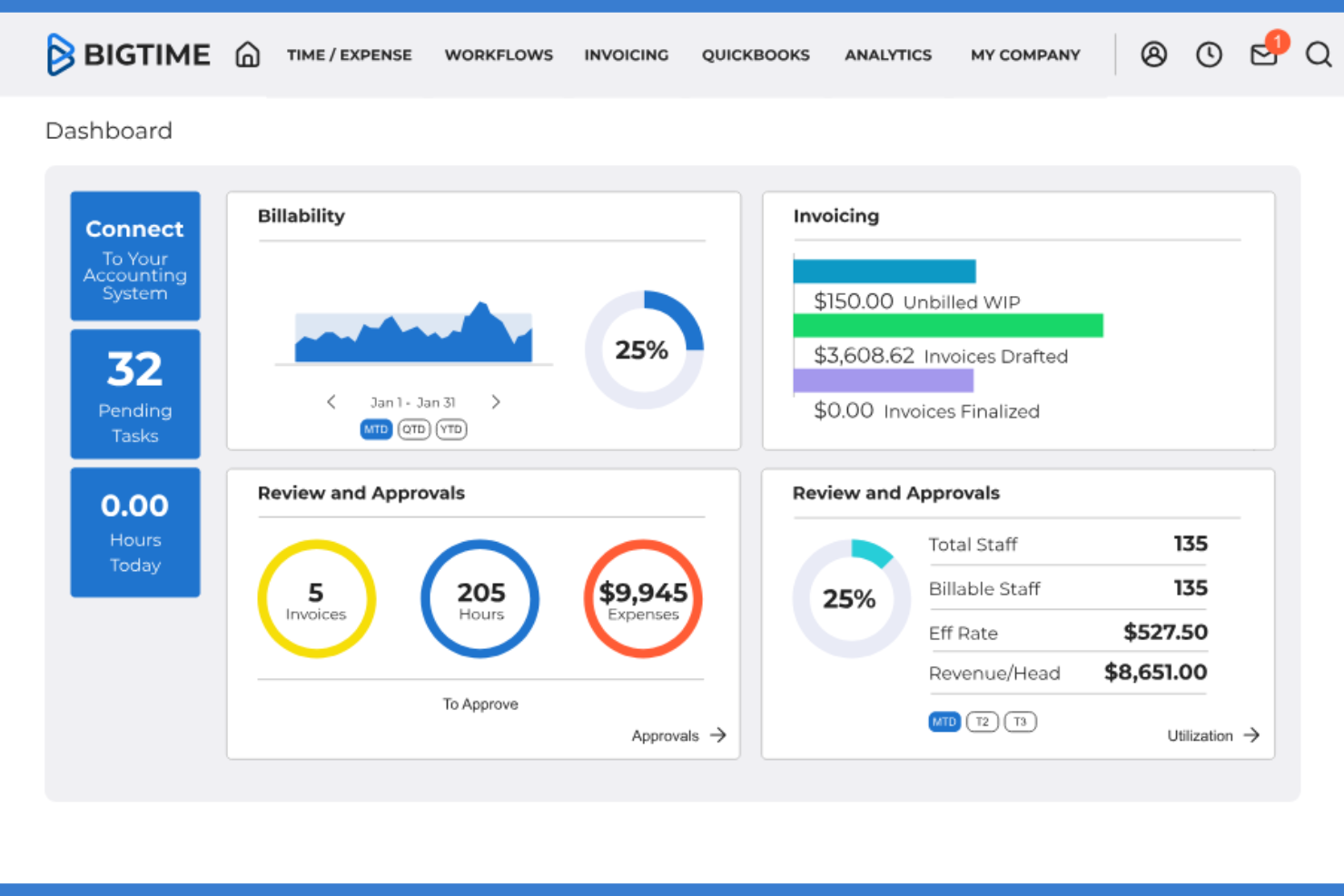
BigTime is a cloud-based time tracking and billing management platform for professional services firms, offering project budgeting, expense tracking, invoicing, and resource management tools.
Who Is BigTime Best For?
BigTime suits midsize professional services firms that need accurate project time tracking and billing tools for client work.
Why I Picked BigTime
I picked BigTime as one of the best because I use its toolset to generate high-quality financial insights, centralized time tracking, and detailed billing tools to optimize project accounting. The platform lets me automate billing cycles and create client-ready, professional invoices.
BigTime Key Features
- Project budgeting and forecasting: Set project budgets, forecast future spend, and monitor progress in real time.
- Resource allocation management: Assign staff to projects based on availability and skill set.
- Customizable dashboard reporting: Build tailored dashboards to track utilization, performance, and project status.
- Mobile time entry app: Submit and review time entries from mobile devices.
BigTime Integrations
BigTime offers native integrations with QuickBooks, Xero, Sage Intacct, Hubspot, Jira, Smartsheet, Zendesk, Okta, Salesforce, Lacerte, Slack, and more, and provides an API for custom integrations.
Pros and Cons
Pros:
- Custom approval workflows for time and expense
- Granular role-based access controls
- AI-driven project time entry suggestions
Cons:
- Limited workflow automation beyond time and billing
- Hard limit on active dashboard views

Best for unified financial management

Projectworks is a professional services automation platform for AI teams, aligning your functional business model with project planning, resource management, timesheets, invoicing, and forecasting in one system.
Who Is Projectworks Best For?
Projectworks is a strong choice for small to mid-sized consulting firms needing centralized financial oversight and project resource management.
Why I Picked Projectworks
I picked Projectworks as one of the best because I can handle project budgets, forecasting, and invoicing all in one view. I use its real-time financial dashboards to spot margin trends and proactively manage client profitability.
Projectworks Key Features
- Resource scheduling: Assign and balance workloads with visual tools for your team.
- Capacity planning dashboard: See staff availability and project allocation in real time.
- Customizable project templates: Set up repeatable project structures for consistent delivery.
- Integrated time tracking: Track time directly within each project and task.
Projectworks Integrations
Projectworks offers native integrations with Xero, QuickBooks Online, Salesforce, Employment Hero, Power BI, BambooHR, and HubSpot. Zapier and an API are available for custom integrations.
Pros and Cons
Pros:
- Role-based access control for sensitive financials
- Forecasting links resource, revenue, and utilization views
- Project margin reporting is highly granular
Cons:
- No built-in AI-driven resource suggestions
- Settings are overly complex initially

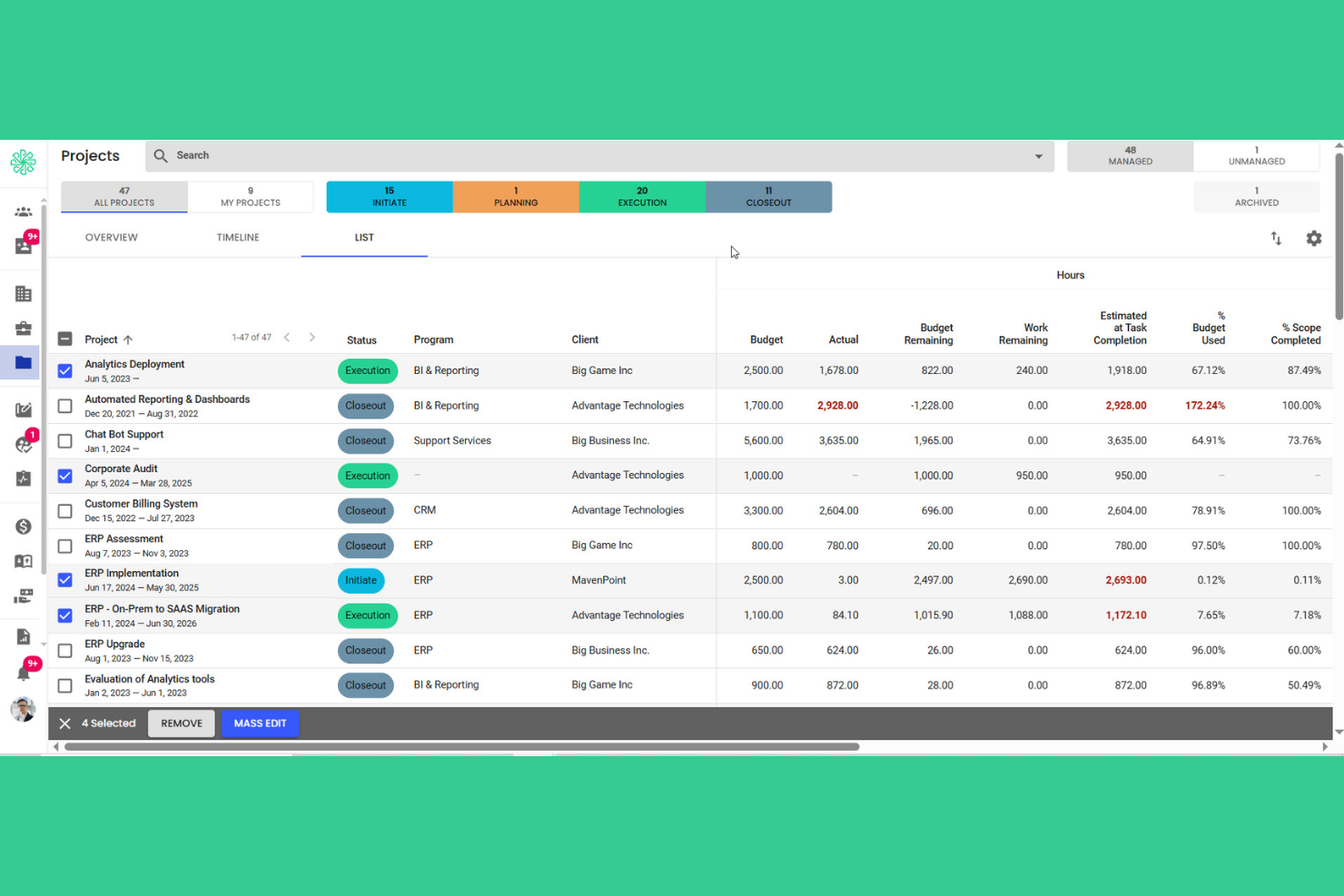
Polaris PSA is a professional services automation platform that utilizes advanced AI models to bring together project planning, resource management, budgeting, and timesheet capabilities for services teams managing complex work.
Who Is Polaris PSA Best For?
Polaris PSA suits any modern corporate law firm or professional services organization needing granular project tracking and resource forecasting across multiple teams.
Why I Picked Polaris PSA
I picked Polaris PSA because it integrates large language models to present project health, resources, and budgets in real time from executive dashboards. I rely on AI-powered SmartBeats for up-to-date project status, plus advanced analytical outputs for informed decision-making as projects evolve.
Polaris PSA Key Features
- Resource management module: Assign people to projects based on roles, skills, and availability.
- Skill tracking database: Catalog and update team member skills for better project staffing.
- Automated timesheet system: Capture, validate, and approve resource hours directly in the platform.
- Configurable project templates: Standardize workflows with reusable templates for project setup and planning.
Polaris PSA Integrations
Polaris PSA offers native integrations with Deltek ERP systems, Salesforce, QuickBooks, Xero, Jira, and Microsoft 365. An API is available for custom integrations.
Pros and Cons
Pros:
- Configurable workflows for resource scheduling and billing
- SmartBeats for automated project status updates
- Real-time project health and financial dashboards
Cons:
- Mobile app sync can lag
- Complex initial configuration and setup process

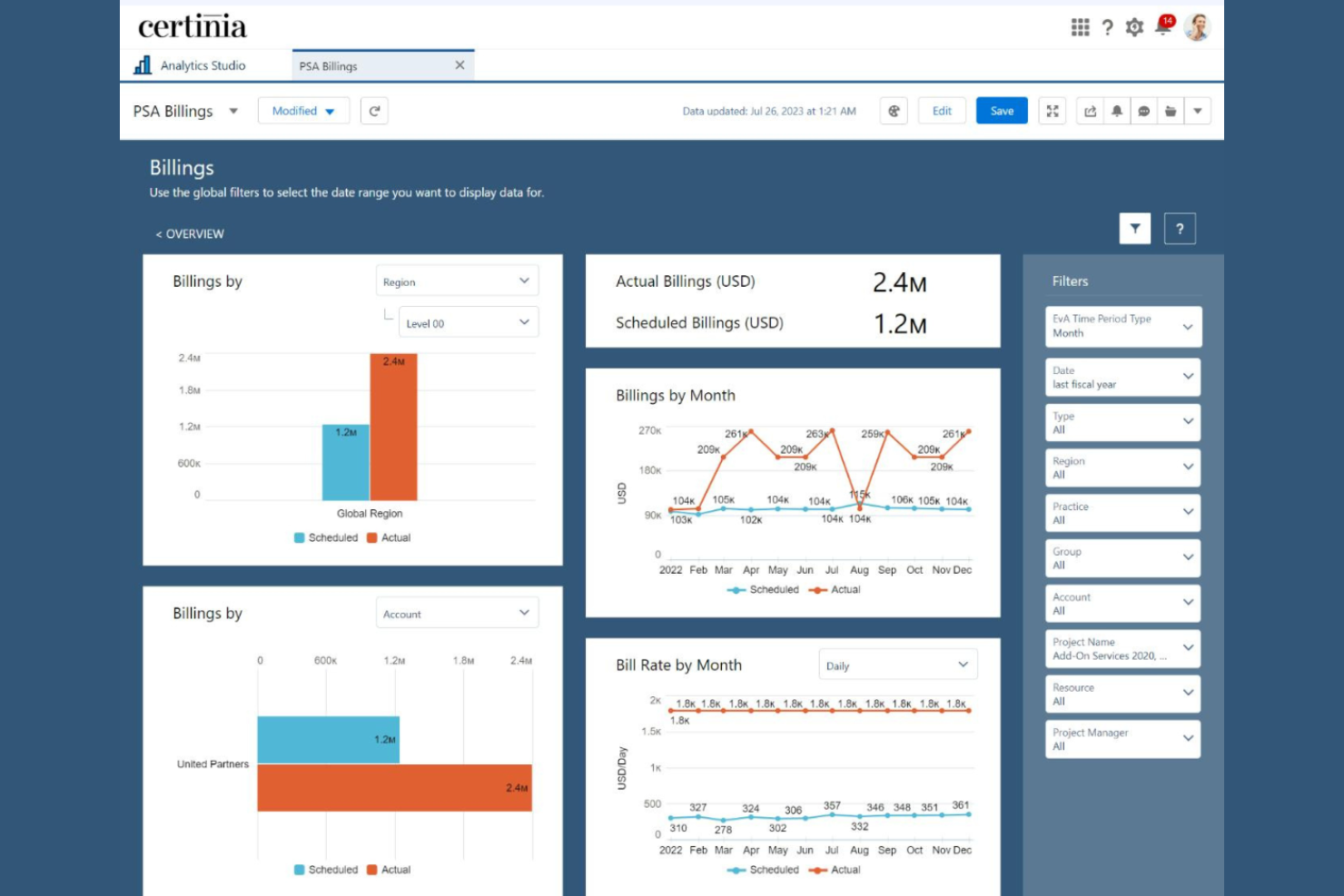
Certinia PS Cloud is a professional services automation platform that prioritizes data privacy while unifying project management, resource planning, time tracking, and financial management for service-based organizations.
Who Is Certinia PS Cloud Best For?
Professional services teams already operating on the Salesforce platform will find Certinia PS Cloud especially aligned to their workflows.
Why I Picked Certinia PS Cloud
I picked Certinia PS Cloud because it allows for hands-on management of project delivery, resources, and billing right inside Salesforce, with real-time project status and revenue data synced to my CRM.
Certinia PS Cloud Key Features
- Resource demand planning: Forecast staffing needs and match resources to projects.
- Timesheet management: Capture and approve project hours within the platform.
- Project risk tracking: Flag and track project risks with configurable risk criteria.
- Flexible billing models: Support milestone, time and materials, or fixed fee invoicing.
Certinia PS Cloud Integrations
Certinia PS Cloud offers native integrations with Salesforce, Jitterbit, Expensify, SAP Concur, Avalara, Celigo, Zankraft, Conga, and DocuSign, and provides an API for custom integrations.
Pros and Cons
Pros:
- Custom workflows for resource management and billing
- Strong native alignment with Salesforce data model
- Real-time project and financial visibility
Cons:
- Dashboard layouts feel overly cluttered
- Initial configuration can be complex


Workday PSA is an enterprise professional services automation platform that leverages fine-tuned LLMs to bring together project management, resource planning, financials, and workforce analytics in one cloud-based system.
Who Is Workday PSA Best For?
Workday PSA is a solid choice for large enterprises and global organizations with complex service delivery and analytics requirements.
Why I Picked Workday PSA
I picked Workday PSA as one of the best because its specialized AI use cases grant access to customizable dashboards, ad hoc analysis, and prebuilt reporting templates. My team can drill into project, resource, and financial data at scale with enterprise-grade reporting tools.
Workday PSA Key Features
- Integrated resource management: Plan and allocate staff across client projects using a unified dashboard.
- Project budgeting tools: Set budgets, monitor spend, and compare projections versus actuals for each engagement.
- Mobile app access: Track projects, expenses, and approvals from any mobile device.
- Workflow automation engine: Automate project approvals, notifications, and task assignments with configurable workflows.
Workday PSA Integrations
Native integrations are not publicly listed. Workday PSA offers an API for custom integrations.
Pros and Cons
Pros:
- Workflow design with customizable approval processes
- Resource allocation tools integrated with project management
- Advanced analytics for financial project visibility
Cons:
- Most adjustments require IT help
- Initial implementation takes significant time

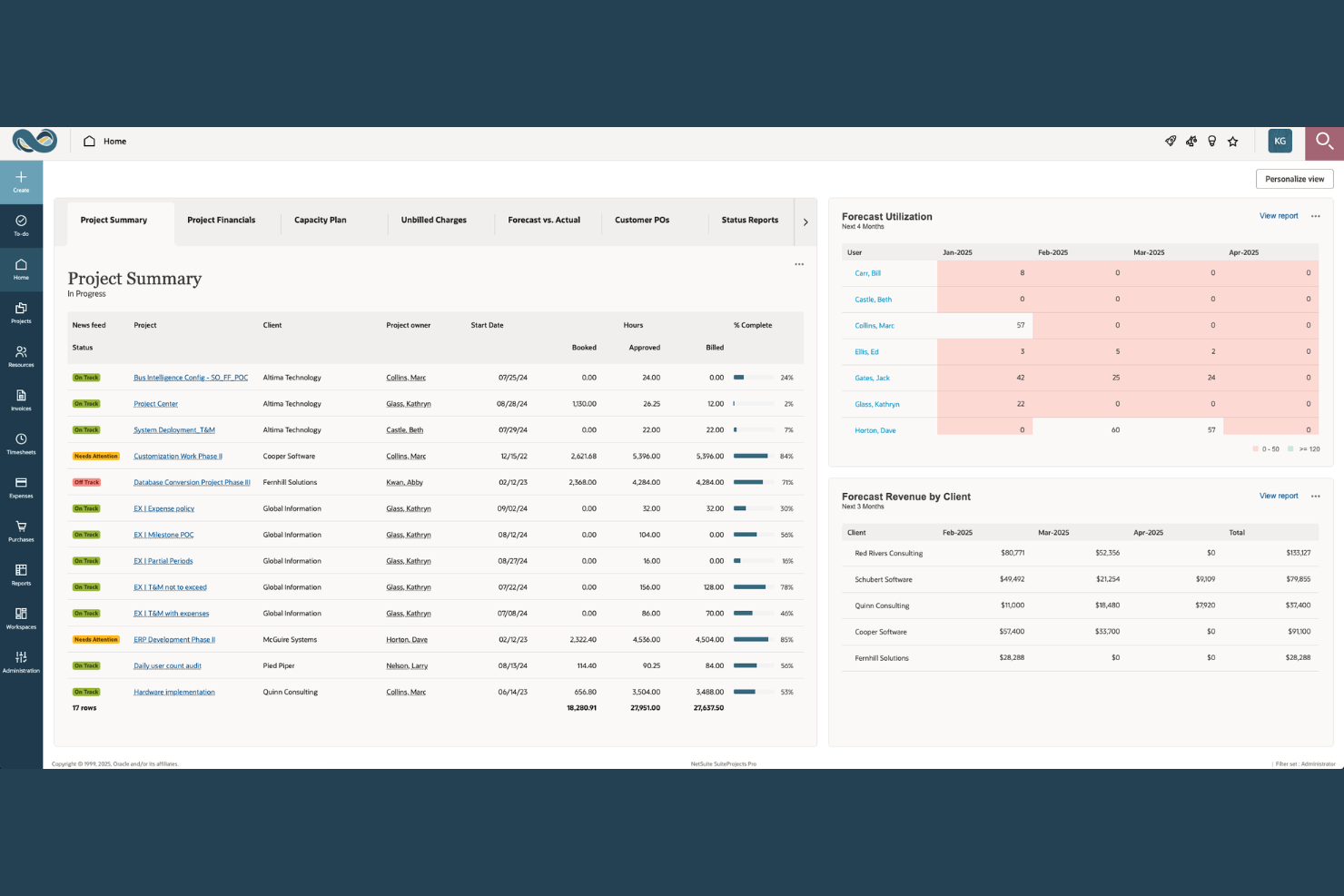
NetSuite SuiteProjects Pro fits global professional services organizations that need to streamline core business processes across finance, project delivery, and resource management.
Who Is NetSuite SuiteProjects Pro Best For?
SuiteProjects Pro fits global professional services organizations that need unified processes across finance, project delivery, and resource management.
Why I Picked NetSuite SuiteProjects Pro
I picked NetSuite SuiteProjects Pro as one of the best because I can manage project delivery, finance, and resource planning within the same ERP. I use its native project accounting for instant updates across billing, revenue, and time tracking. My team benefits from unified project financials and operations.
NetSuite SuiteProjects Pro Key Features
- Resource management dashboard: View real-time staff allocation and project capacity in a visual dashboard.
- Document management: Store and share project files and contracts within the platform.
- Gantt chart project planning: Build and adjust project timelines with interactive Gantt charts.
- Time off request workflows: Submit and approve leave requests in the project context.
NetSuite SuiteProjects Pro Integrations
NetSuite SuiteProjects Pro offers native integrations across the Oracle NetSuite ecosystem, including NetSuite ERP and NetSuite CRM. An API is available for custom integrations.
Pros and Cons
Pros:
- Full project visibility from the ERP dashboard
- Direct project-to-invoice workflow for billing
- Built-in resource forecasting and allocation tools
Cons:
- The outdated user interface feels clunky
- Complex initial setup for project teams
Annen programvare for AI-baserte profesjonelle tjenester
Basert på tilbakemeldinger fra brukere og publiserte kundehistorier er dette noen flere alternativer for programvare for AI-baserte profesjonelle tjenester som ikke kom med på kortlisten min, men som likevel er verdt å undersøke:
- Accelo
For workflow automation
- Dayshape
For AI-driven resource optimization
- Wrike
For customizable project workspaces
- Forecast
For unified project and financial insights
- VOGSY
For workflow-driven quote-to-cash processes
- Runn
For scenario-based capacity planning
- Rocketlane
For collaborative client onboarding
- Parallax
For aligning sales and delivery teams
- Birdview PSA
For cross-project resource coordination
- Klient PSA
For Salesforce-centric service delivery


How I Evaluate AI Professional Services Software
Every tool on this list needs to deliver real AI value—not just rebrand a filter as "intelligent." I split my evaluation into two layers: the core functionality a platform must have to qualify (like AI resource matching, predictive analytics, and quote-to-cash billing) and the differentiating factors that separate good options from great ones.
Core Functionality (Table Stakes For This List)
When I'm selecting tools for my list, I rank each one on a scale from 0 (does not offer the functionality) to 5 (excels in this area) for each core functionality listed below. Then, I calculate the tool's total score into a percentage. Each tool needs to achieve a minimum total score of 55% to be considered for inclusion.
- AI Resource Optimization: I look for ML-driven staffing recommendations that factor in skills, availability, and utilization—not just a filterable roster dressed up as "smart matching."
- Predictive Project Analytics: The platform should surface risks like margin erosion or timeline slippage before they hit, using historical patterns rather than static threshold alerts.
- Project & Engagement Management: I evaluate how well a tool handles the full engagement lifecycle—phases, deliverables, dependencies, and client milestones—across billing models like T&M and fixed fee.
- Time, Expense & Billing: AI-assisted time entry matters here, whether that's auto-suggesting entries from calendar data or flagging missing billable hours at the end of the week.
- PSA Financial Management: I check for services-specific financials like WIP tracking, revenue recognition, and project-level margin analysis rather than generic budget-vs.-actual reporting.
- Demand & Capacity Forecasting: Strong tools pull pipeline data from CRMs to project future resource demand against bench availability, helping leaders plan hiring cycles proactively.
Once I have a list of tools that meet this criteria, I consider what sets each platform apart.
Differentiating Factors (What Sets Vendors Apart)
Here's how I compare and contrast different vendors:
Standout Features
Generative AI assistants are a major differentiator. I look for copilots that draft SOWs, auto-generate weekly status reports, and summarize project notes without manual input. Intelligent time capture adds real value too, especially when AI infers billable hours from calendar events and emails, then routes entries for one-click approval. Real-time profitability dashboards round out what I evaluate—the strongest ones blend actuals, forecasts, and pipeline data so partners spot margin shifts as they happen rather than in a month-end review.
Beyond Features
Integration depth matters a lot in this space. I check whether a platform offers bi-directional sync with CRMs like Salesforce or HubSpot so opportunity data flows into project setup without manual re-entry. AI governance is another factor I weigh—consultancies handle sensitive client data, so I look for clear policies on data residency, LLM training opt-outs, and SOC 2 compliance. Firm size fit also plays a role. A tool that works for a 50-person agency may buckle under multi-entity, multi-currency operations at a global consultancy.
Slik velger du programvare for AI-baserte profesjonelle tjenester
Det er lett å gå seg vill i lange funksjonslister og kompliserte prisstrukturer. For å hjelpe deg med å holde fokus mens du går gjennom den unike utvelgelsesprosessen for programvare, får du her en sjekkliste over faktorer du bør ha i tankene:
| Faktor | Dette bør du vurdere |
|---|---|
| Skalerbarhet | Vil programvaren håndtere vekstplanene dine, for eksempel når du legger til lokasjoner, tjenesteområder eller brukere, uten uforutsigbare kostnader eller kompliserte oppgraderinger? |
| Integrasjoner | Kobler den seg direkte til andre forretningskritiske verktøy, for eksempel CRM-, regnskaps- eller HR-plattformer? Vurder hvilken innvirkning manglende integrasjoner har på arbeidsflytene. |
| Tilpasningsmuligheter | Hvor stor fleksibilitet har du til å tilpasse prosjektstrukturer, tillatelser og rapportering? Kan programvaren tilpasses leveransemodellene dine etter hvert som de utvikler seg? |
| Brukervennlighet | Kan teammedlemmer på tvers av funksjoner komme raskt i gang, eller vil du møte motstand og hyppige forespørsler om brukerstøtte? |
| Implementering og innføring | Hvor lang tid vil det ta å rulle ut løsningen, og hvilke interne ressurser trenger du? Støttes migrering, dataimport og rollebasert opplæring? |
| Kostnad | Er prisnivåene enkle å sammenligne, uten skjulte gebyrer for brukere, integrasjoner eller rapportering? Sørg for at den faktiske kostnaden samsvarer med budsjettet ditt over tid. |
| Sikkerhetstiltak | Støtter programvaren sikkerhetskravene dine, for eksempel datakryptering, rollebasert tilgang og revisjonslogger? Vil den bestå en sikkerhetsgjennomgang? |
| Tilgjengelig brukerstøtte | Er hjelp i sanntid tilgjengelig i arbeidstiden din, og tilbyr leverandøren tydelige eskaleringsrutiner for hastesaker? |
Hva er programvare for AI-baserte profesjonelle tjenester?
Programvare for profesjonelle tjenester med kunstig intelligens er et digitalt verktøy utviklet for å hjelpe virksomheter med å administrere, automatisere og optimalisere kundesentrerte prosjekter ved hjelp av innebygd kunstig intelligens. Disse plattformene støtter funksjoner som ressursallokering, prognoser, økonomisk sporing og rapportering for tjenestebaserte team. Ved å integrere kunstig intelligens hjelper de virksomheter med å forbedre beslutningstakingen, optimalisere arbeidsflyter og få bedre oversikt over prosjektstatus og virksomhetens resultater.
Funksjoner i programvare for profesjonelle tjenester med kunstig intelligens
Når du velger programvare for profesjonelle tjenester med kunstig intelligens, bør du se etter følgende viktige funksjoner:
- Instrumentpanel for prosjektstyring: Gir en oversikt over aktive prosjekter, tidsfrister, budsjetter og teamets fremdrift, slik at det blir enklere å overvåke prosjektstatus på tvers av kundeporteføljen.
- Verktøy for ressursallokering: Lar deg tildele medarbeidere til prosjekter og oppgaver basert på ferdigheter, tilgjengelighet og arbeidsbelastning, slik at du unngår både overbooking og underutnyttelse.
- Tidssporing: Gjør det mulig for teammedlemmer å registrere og kategorisere arbeidstimer på ulike prosjekter, noe som gir nøyaktig innsikt i ressursutnyttelsen og støtter fakturering av kunder.
- Automatisert fakturering: Optimaliserer faktureringen ved å generere fakturaer direkte fra prosjektets timelister, utgifter eller milepæler, noe som reduserer manuelt arbeid og fremskynder inntektsstrømmen.
- Økonomiske prognoser: Bruker historiske data og sanntidsdata til å forutsi prosjektinntekter, kostnader og marginer, slik at ledere kan ta informerte beslutninger om ressursplanlegging og lønnsomhet.
- Tilpassbar rapportering: Lar deg bygge og planlegge skreddersydde rapporter ved å hente data fra flere datasett om prosjektresultater, økonomi og teammålinger, noe som muliggjør datadrevet styring og tydelig kommunikasjon med kunder.
- KI-drevet analyse: Bruker maskinlæring til å avdekke trender, forutsi risikoer og anbefale optimalisering av ressurser eller kostnader i prosjektleveranseporteføljen.
- Dokumenthåndtering: Gir et sikkert sted for lagring, versjonskontroll og deling av prosjektdokumenter, kontrakter og kundekommunikasjon i én sentral løsning.
- Rollebaserte tillatelser: Styrer hvem som kan få tilgang til, redigere eller godkjenne økonomiske data, prosjektinformasjon eller sensitive kundedetaljer, og støtter dermed samsvar med regelverk og interne kontroller.
- Kundeportal: Gir kundene sanntidsinnsyn i tidsplaner, leveranser, fakturaer og godkjenninger, noe som fremmer åpenhet og bygger tillit.
Fordeler med programvare for profesjonelle tjenester med kunstig intelligens
Implementering av programvare for profesjonelle tjenester med kunstig intelligens gir flere fordeler for teamet og virksomheten din. Her er noen av fordelene du kan se frem til:
- Bedre prosjektinnsikt: Sanntidsinstrumentpaneler og rapporter holder alle informert om prosjektstatus, fremdrift og budsjetter.
- Mer nøyaktige prognoser: KI-drevet analyse forutsier ressursbehov, inntekter og potensielle risikoer, slik at du kan planlegge proaktivt.
- Raskere kundefakturering: Automatisert fakturering gjør tidssporings- og utgiftsdata om til fakturaer som er klare til å sendes, noe som reduserer manuelt arbeid og forsinkelser i faktureringen.
- Bedre ressursutnyttelse: Smarte allokeringsverktøy tilpasser teamets kapasitet til prosjektbehovene og forebygger både utbrenthet og lediggang.
- Sentralisert tilgang til informasjon: Dokumenthåndtering og kundeportaler samler kontrakter, prosjektfiler og kommunikasjon på ett sted for teamet og kundene.
- Bedre samsvar med regelverk og sikkerhet: Rollebaserte tillatelser og revisjonsklare oppføringer beskytter sensitive kundedata og støtter regulatoriske krav.
- Bedre kunderelasjoner: Åpne arbeidsflyter, delte tidsplaner og samarbeidsområder for kunder bygger tillit og reduserer misforståelser.
Kostnader og priser for programvare for profesjonelle tjenester med kunstig intelligens
Ved valg av programvare for profesjonelle tjenester med kunstig intelligens er det nødvendig å forstå de ulike prismodellene og abonnementene som er tilgjengelige. Kostnadene varierer basert på funksjoner, teamstørrelse, tillegg og mer. Tabellen nedenfor oppsummerer vanlige abonnementer, gjennomsnittsprisene deres og typiske funksjoner som er inkludert i programvareløsninger for profesjonelle tjenester med kunstig intelligens:
Sammenligningstabell for abonnementer for programvare for profesjonelle tjenester med kunstig intelligens
| Plantype | Gjennomsnittspris | Vanlige funksjoner |
|---|---|---|
| Gratisabonnement | $0 | Grunnleggende prosjektsporing, begrenset antall brukerplasser, enkel tidsregistrering og kundestøtte via e-post. |
| Personlig abonnement | $10-$25/user/month | Individuell prosjektstyring, ressursplanlegging, standardrapportering, begrenset automatisering og grunnleggende integrasjoner. |
| Bedriftsabonnement | $30-$60/user/month | Styring av flere prosjekter, avansert rapportering, automatisert fakturering, tilpassede arbeidsflyter og API-tilgang. |
| Storbedriftsabonnement | $70-$120/user/month | Ubegrenset antall prosjekter, AI-drevet analyse, avansert sikkerhet, kundeportaler, dedikert kundestøtte og verktøy for samsvar. |
Vanlige spørsmål om AI-programvare for profesjonelle tjenester
Her er noen svar på vanlige spørsmål om AI-programvare for profesjonelle tjenester:
Hvordan forbedrer AI programvare for profesjonelle tjenester?
AI forbedrer programvare for profesjonelle tjenester ved å automatisere oppgaver som ressursallokering, prognoser og risikodeteksjon. Dette hjelper teamet ditt med å ta bedre beslutninger, spare tid på manuelle prosesser og reagere proaktivt på endrede prosjektkrav.
Hvilke typer virksomheter har størst nytte av AI-programvare for profesjonelle tjenester?
Virksomheter som leverer profesjonelle tjenester – for eksempel konsulentselskaper, digitale byråer og IT-tjenesteleverandører – med prosjektbasert arbeid rettet mot kunder, har størst nytte av dette. Disse verktøyene passer godt hvis du trenger å administrere flere prosjekter, balansere ressursplaner og følge med på måltall som fakturerbare timer.
Kan AI-programvare for profesjonelle tjenester håndtere komplekse faktureringsstrukturer?
Ja, de fleste løsninger støtter komplekse faktureringsbehov, for eksempel fakturering med fast pris, milepælsbasert fakturering og fakturering etter tid og materialer. Du bør imidlertid kontrollere at plattformens fakturerings- og kontraktslogikk passer med kundeavtalene dine før du går videre.
Er det vanskelig å flytte eksisterende prosjekter til et nytt system?
Ikke nødvendigvis. Mange plattformer tilbyr verktøy for dataimport, sjekklister for oppstart og støtte ved migrering. Du bør likevel planlegge noe innledende arbeid og teste importer for å minimere problemer med datanøyaktighet eller manglende kontekst.
Hvor sikkert er AI-programvare for profesjonelle tjenester?
Moderne løsninger inkluderer effektive sikkerhetsfunksjoner som datakryptering, revisjonslogger og rollebasert tilgangskontroll. Gå alltid gjennom leverandørens samsvarssertifiseringer og diskuter sikkerhetskravene med IT-teamet ditt før implementering.
Finnes det skjulte kostnader eller gebyrer man bør være oppmerksom på?
Ja, du bør undersøke om det påløper ekstra kostnader for integrasjoner, avansert rapportering eller oppgraderinger av brukerplaner. Be alltid om en fullstendig oversikt over inkluderte funksjoner og tilleggsfunksjoner for å unngå overraskelser etter hvert som teamet ditt vokser.