

De 10 beste systemene for innholdsforvaltning i virksomheter i 2026

10 Beste systemer for innholdsforvaltning i virksomheter – kortliste


Med så mange ulike systemer for innholdsforvaltning i virksomheter tilgjengelig er det vanskelig å finne ut hvilket som passer for deg. Du vet at du ønsker å forbedre forretningsprosessene ved å håndtere informasjonsflyten effektivt, men må finne ut hvilket verktøy som er best. Jeg hjelper deg! I dette innlegget gjør jeg valget enklere ved å dele mine personlige erfaringer med bruk av dusinvis av ulike verktøy for innholdsforvaltning med forskjellige team og prosjekter, samt mine anbefalinger av de beste systemene for innholdsforvaltning i virksomheter.
Why Trust Our Software Recommendations
Our team has been testing and reviewing software since 2012. As project managers ourselves, we know how difficult—and important—it is to choose the right software.
For this guide, we evaluated tools using hands-on testing and independent research, scoring tools using our selection criteria. We also draw on insights from industry thought leaders and practicing project management experts.
Our reviews reflect our human editorial judgment, not a sales pitch.
Expert reviewers:
Sammenligningstabell for systemer for innholdsforvaltning i virksomheter
Denne sammenligningstabellen oppsummerer prisopplysningene for mine beste utvalgte systemer for innholdsforvaltning i virksomheter:
| Tool | Best For | Trial Info | Price | ||
|---|---|---|---|---|---|
| 1 | Best for managing content production | Free plan available; 14-day free trial | From $9/user/month (billed annually) | Website | |
| 2 | Best for content teams | 14-day free trial | From $10/user/month (billed annually) | Website | |
| 3 | Best for composable architecture | Free forever plan available | From $15/seat/month | Website | |
| 4 | Best for SAP-integrated records compliance | Free demo available | Pricing upon request | Website | |
| 5 | Best for enterprise multisite management | Free demo available | Pricing upon request | Website | |
| 6 | Best ECM software for security and compliance | 14-day free trial | From CAD$21/user/month (billed annually) | Website | |
| 7 | Best for publishing content across multiple channels | Free plan available | From $300/month | Website | |
| 8 | Best for its multisite support | Free demo available | Pricing upon request | Website | |
| 9 | Best enterprise tool integration | Free demo available | Pricing upon request | Website | |
| 10 | Best for workflow management and collaboration tools | 14-day free trial available | Pricing upon request | Website |


Anmeldelser av de beste systemene for innholdsforvaltning i virksomheter
Her er en kort beskrivelse av hver løsning for innholdsforvaltning i virksomheter, med informasjon om hvert verktøys beste bruksområde, noen bemerkelsesverdige funksjoner og skjermbilder som gir et innblikk i grensesnittet.

Best for managing content production
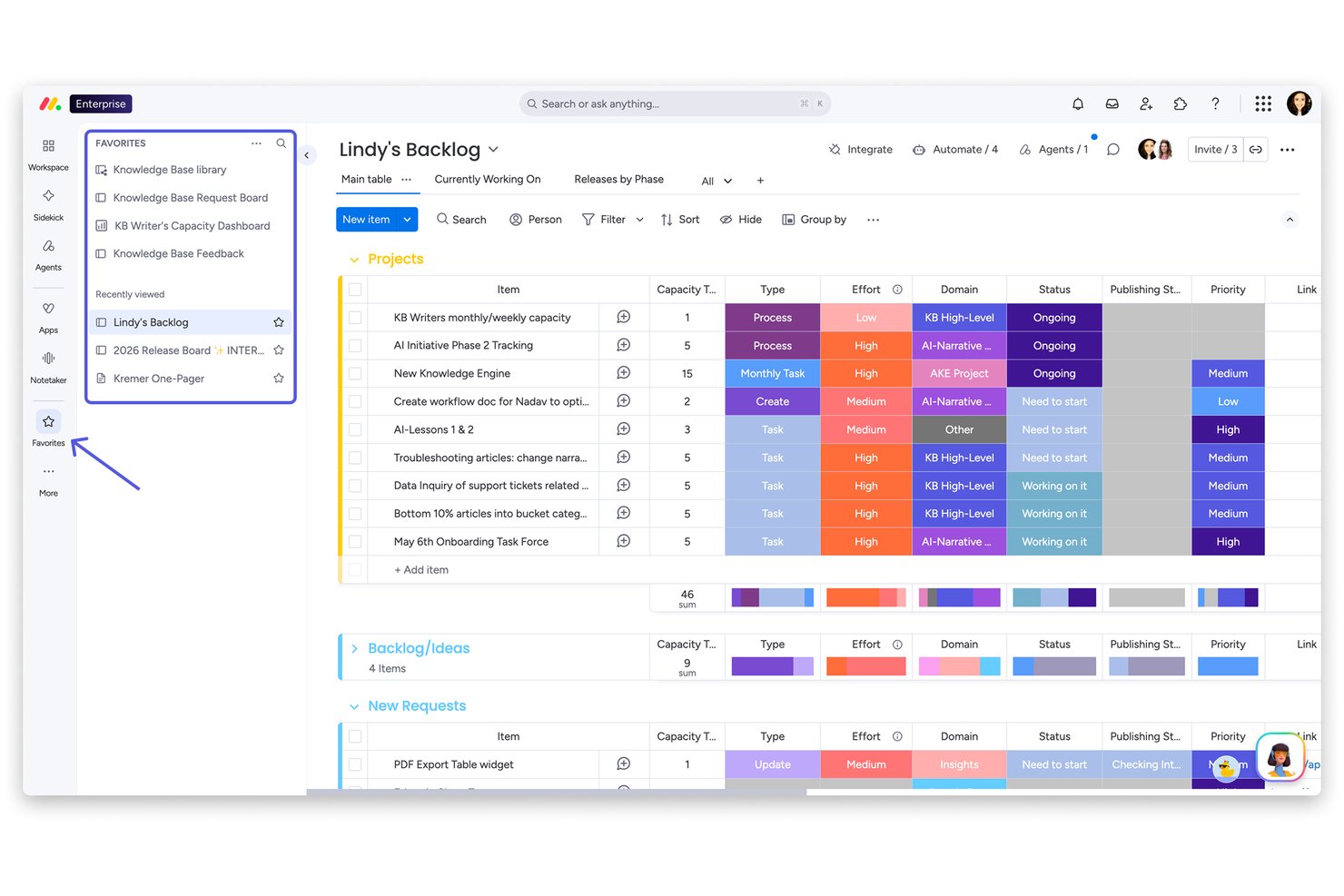
monday AI Workspace is a work management platform that connects project execution with content operations, offering AI-assisted planning, document workflows, automated approvals, and portfolio visibility across distributed teams.
Who Is monday AI Workspace Best For?
It's a strong fit for mid-to-large enterprises where PMO leaders and program managers need to coordinate content workflows across marketing, design, and operations teams.
Why I Picked monday AI Workspace
I picked monday AI Workspace for its ability to manage content production as a structured, trackable operation. The requests and approvals feature gives my team a clear decision log, so every review and sign-off has a documented trail. I also rely on the AI extraction feature, which pulls information from PDFs and documents directly into board columns, eliminating the manual handoff work that typically slows content cycles down.
monday AI Workspace Key Features
- Multi-level permissions: Set granular access controls for boards, folders, and documents within team or department structures.
- Portfolio dashboards: Visualize project progress and resource allocation across multiple projects in customizable portfolio views.
- Custom automations: Trigger automated workflows for recurring actions and project content lifecycle management using flexible no-code rules.
- AI-powered summarization: Use machine learning to generate concise summaries from research, meeting notes, and feedback threads.
monday AI Workspace Integrations
monday AI Workspace offers hundreds of native integrations through its built-in integrations and marketplace, including Slack, Google Workspace, Microsoft 365, Jira, Dropbox, Zoom, HubSpot, Salesforce, GitHub, and Outlook. It also supports Zapier and provides an API for custom integrations.
Pros and Cons
Pros:
- Visual portfolio dashboards across multiple content workstreams
- Structured approval workflows with clear audit trails
- AI extraction pulls data from uploaded documents
Cons:
- Not purpose-built for records retention compliance
- Limited native document versioning and history controls
New Product Updates from monday AI Workspace
monday AI Workspace Adds Human Approval Routing
monday AI Workspace adds a human-in-the-loop approval block to AI Workflows, sending approval requests and routing workflow paths based on responses. For more information, visit monday AI Workspace's official site.

Wrike
Best for content teams
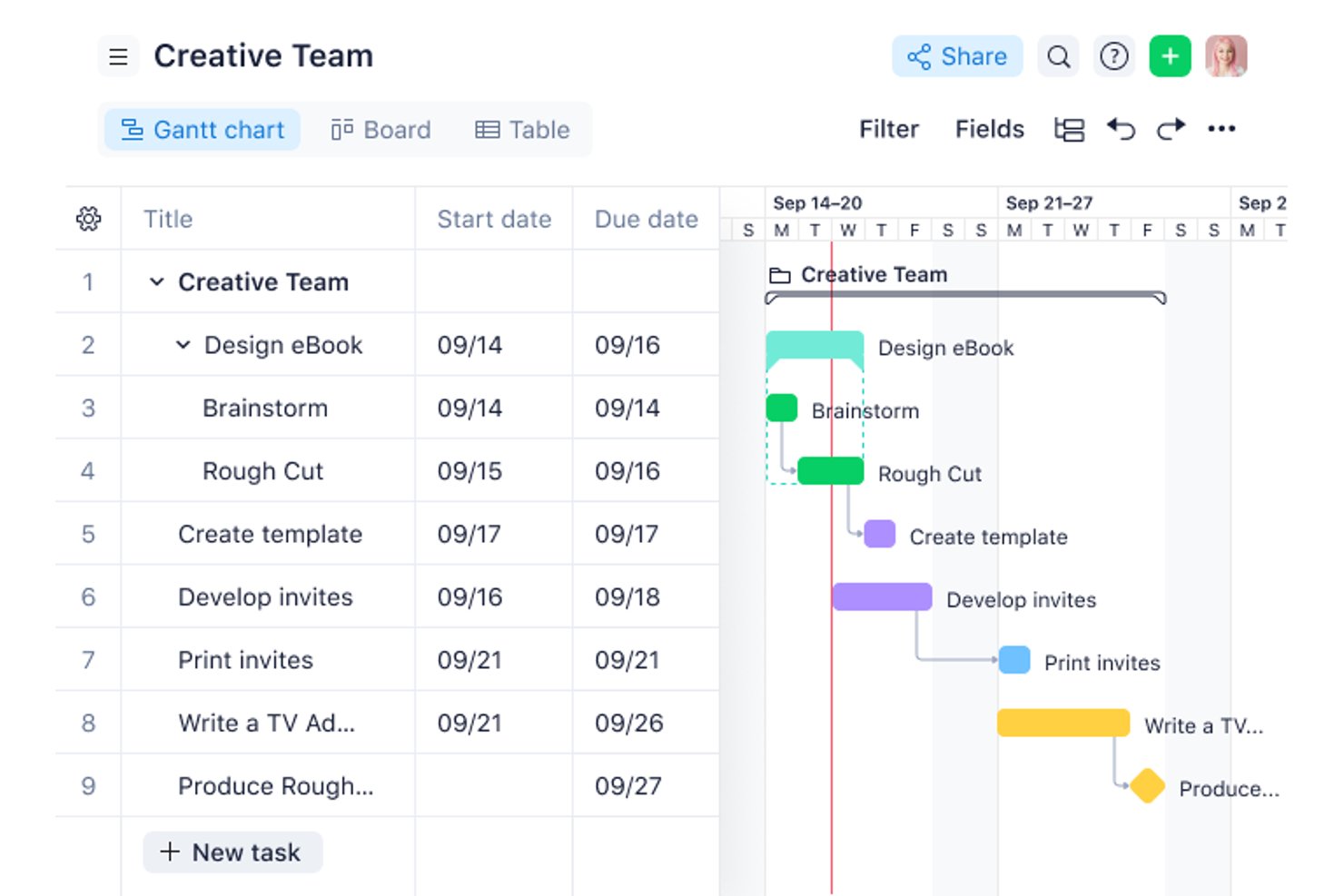
Wrike is a work management platform built around structured content workflows, offering proofing and markup for 30+ file types, custom editorial workflows, approval routing, request intake forms, and integrations with DAM systems and Adobe Creative Cloud.
Who Is Wrike Best For?
Wrike is a strong fit for marketing, creative, and editorial teams at mid-size to enterprise organizations who need to manage content production as a governed workflow—intake, creation, review, approval, and handoff.
Why I Picked Wrike
I've included Wrike in my top picks because it's built specifically around the way content teams actually work—intake, creation, review, approval, and handoff—all in one place. I love the proofing feature in particular: you can mark up and approve 30+ file types, including video and HTML, directly inside tasks, with a full approval routing trail. Request forms that auto-generate and route tasks on submission mean content briefs never get lost in someone's inbox.
Wrike Key Features
- Custom workflows and statuses: Model editorial stages so content moves through defined steps with the right sign-off at each point.
- Digital asset management integration: Connect to Bynder, MediaValet, and other DAM systems, with an Adobe Creative Cloud extension for designers working in-tool.
- Guest access: Add agencies and external contributors to specific projects with controlled permissions, without full licenses.
- Version comparison: Review any two file versions side by side using Wrike's built-in comparison mode, available on all paid plans.
Wrike Integrations
Wrike offers 400+ pre-built native integrations, including MediaValet, SharePoint, OneDrive, Google Workspace, Microsoft Teams, Salesforce, Jira, GitHub, Slack, and Adobe Creative Cloud. Its REST API v4 is available on every plan, including Free, for custom integrations.
Pros and Cons
Pros:
- External contributors participate without full licenses
- Adapts editorial processes without code
- Structured review and approval with audit trails
Cons:
- No records management or retention policy features
- No repository, web publishing, and headless CMS
New Product Updates from Wrike
Wrike Adds Klaxoon MCP Integration
Wrike’s Klaxoon MCP integration is now generally available, enabling AI agents to navigate between Wrike tasks and attached whiteboards, read task context, and manage whiteboard attachments via API. For more information, visit Wrike's official site.

Best for composable architecture

Sanity.io speaks to teams that need a content platform with real flexibility and reach — if you build websites, web apps, or digital experiences across channels, Sanity gives you a backend where content lives as structured data (not locked into rigid templates). It’s especially appealing if your team includes developers or you expect your content to power websites, apps, or different front-ends now and in the future.
Why I Picked Sanity.io
I picked Sanity.io for its composable architecture, which allows enterprises to manage content flexibly across various channels. The platform's headless CMS separates content from presentation, offering greater adaptability to evolving business needs. Additionally, Sanity.io's robust security features, including field-level role-based access controls, ensure that sensitive content is protected, addressing a common concern for large organizations.
Sanity.io Key Features
In addition to its composable architecture, Sanity.io provides several other valuable features for enterprise content management systems:
- Sanity Studio: A customizable UI that allows rapid configuration of content workspaces to meet dynamic business requirements.
- Developer-Friendly APIs: Offers simple APIs and full TypeScript coverage, making it easy for developers to integrate and customize the platform.
- Serverless Webhooks: Enables automation by triggering actions based on content changes, enhancing workflow efficiency.
- Shared Content Database: Facilitates collaboration by providing a single source of truth for content, reducing duplication and inconsistencies.
Sanity.io Integrations
Integrations include Vercel, Shopify Hydrogen, Algolia, Cloudinary, Netlify, Slack, GitHub, AWS S3, Google Analytics, and Salesforce. Sanity.io also offers an API for custom integrations.
Pros and Cons
Pros:
- Customizable to fit tailored workflows and content structures.
- Content is treated as structured data, enabling reuse across multiple platforms (web, mobile, etc.).
- Real-time collaboration enables multiple team members to edit simultaneously.
Cons:
- Requires developer expertise and coding knowledge to set up and customize.
- Out-of-the-box front-end is not provided — you need to build your own front-end or integrate with frameworks.
Doxis
Best for SAP-integrated records compliance
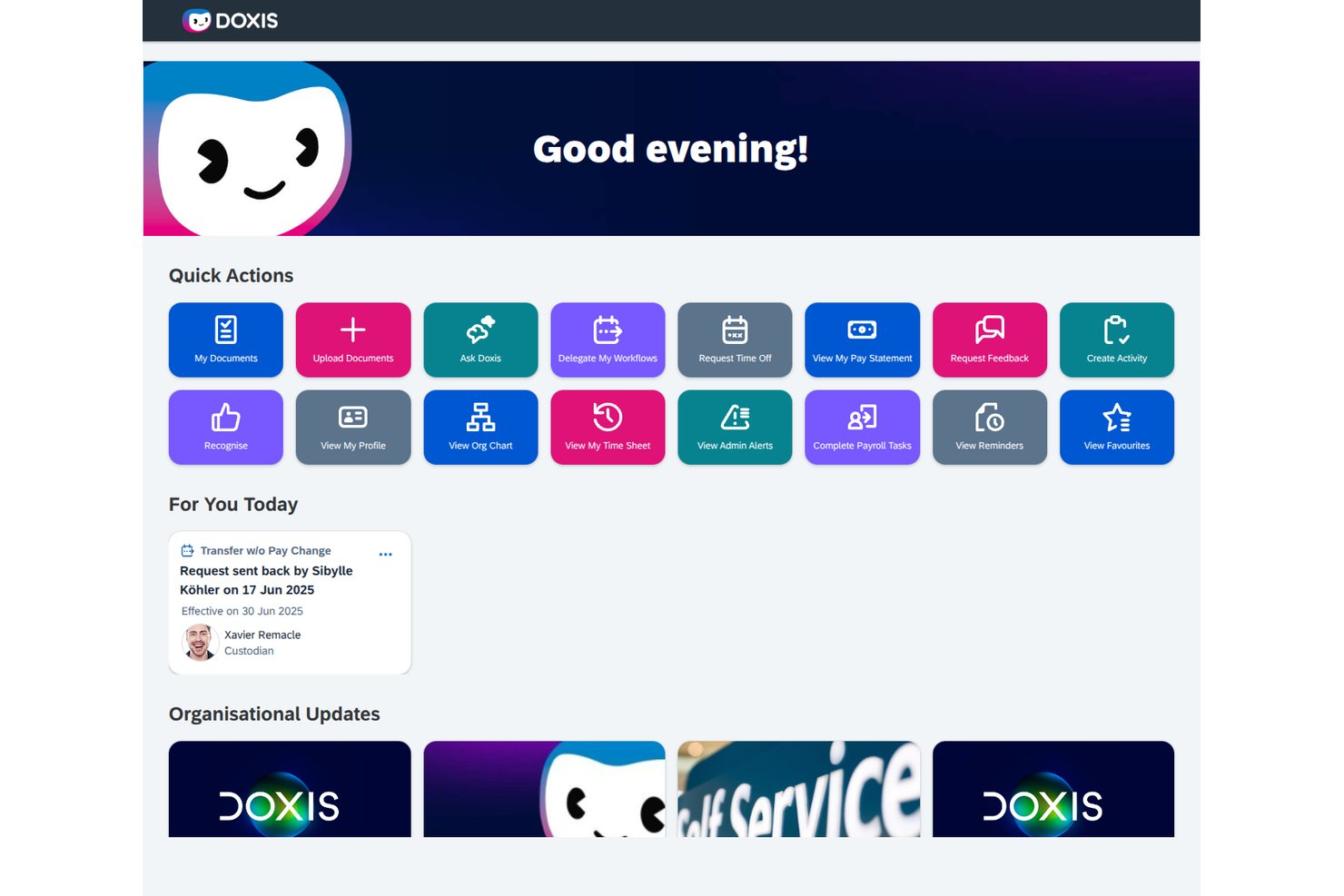
Doxis is an AI-first enterprise content management platform that combines document management, BPMN-based workflow automation, records archiving, and AI-powered search in a single repository.
Who Is Doxis Best For?
Doxis is a strong fit for large enterprises running SAP environments where records compliance, audit-ready archiving, and document-centric workflow automation are non-negotiable.
Why I Picked Doxis
I've included Doxis in my top picks because it's the strongest option I've found for enterprises running SAP that need audit-ready records compliance built into their content platform. Its SAP-certified archiving uses ArchiveLink and ILM interfaces to lock records in WORM storage under IDW PS 880 and ISO 16175, which means retention schedules and legal holds aren't bolted on as an afterthought. I also like that disposition workflows log every deletion or transfer, giving compliance officers a clear, tamper-evident paper trail.
Doxis Key Features
- AI-powered document classification: Doxis AI.dp automatically classifies, sorts, and tags incoming documents using pre-trained or custom models.
- BPMN2 workflow designer: A low-code designer lets you model document-centric approval and routing processes using standard BPMN2 and DMN decision rules.
- Multi-system search: Superhuman Search and Ask Doxi query content across Doxis, SAP, Microsoft 365, and Salesforce in a single, permission-aware search.
- Flexible deployment options: You can run Doxis on-premises, in a private or public cloud, or in a hybrid setup, with the same feature set across all environments.
Doxis Integrations
Doxis offers documented integrations with SAP ERP and S/4HANA, Microsoft 365 and SharePoint, Salesforce, Workday, ServiceNow, and DocuSign. Its API-first architecture supports custom integrations, with SAP ArchiveLink and ILM interfaces for records archiving.
Pros and Cons
Pros:
- Reviewers praise customization and stable performance
- WORM archiving supports audit-ready retention
- Scales across millions of enterprise records
Cons:
- Complex deployments often require specialist expertise
- Reviewers report slow support responses

Best for enterprise multisite management

Adobe Experience Manager is an enterprise content management system designed for large organizations that need to manage digital assets, coordinate content workflows, and deliver consistent experiences across multiple channels. As part of Adobe Experience Cloud, it supports structured content delivery and governance across global digital operations.
Who Is Adobe Experience Manager Best For?
Adobe Experience Manager is best suited for large enterprises and digital teams managing high volumes of content across multiple brands, regions, or channels.
Why I Picked Adobe Experience Manager
I picked Adobe Experience Manager for its combination of enterprise CMS capabilities and digital asset management. It includes automated tagging through Adobe Sensei and supports structured content workflows within Adobe Experience Cloud. Its integrations with analytics and personalization tools allow teams to manage and measure content performance across digital properties.
Adobe Experience Manager Key Features
- Headless CMS: Deliver content to any channel or device using APIs and structured content models.
- Digital asset management: Store, organize, and manage images, videos, and documents in a centralized repository.
- Personalization support: Enable targeted content delivery through integrations within Adobe Experience Cloud.
- Version control: Track revisions, manage updates, and restore previous versions of content.
Adobe Experience Manager Integrations
Integrations include Adobe Analytics, Adobe Commerce, Marketo Engage, Adobe Workfront, Adobe Creative Cloud, and Real-Time CDP.
Pros and Cons
Pros:
- Built-in digital asset management capabilities
- Advanced multisite and multilingual management
- Native integration with Adobe Creative Cloud suite
Cons:
- Complex initial setup and configuration process
- High cost compared to most competitors

Box
Best ECM software for security and compliance

Box is an ECM solution that lets businesses store and share all their files: from multimedia to documents. It has features that enable real-time collaboration and powerful search that helps team members access what they need.
The tool stands out due to its security and compliance features. You have granular access to permission controls to set precisely who can view each file. You can also label files as classified to restrict downloads and add watermarks.
Box Shield is perhaps the most powerful security feature. It is a security platform that has malware detection, the ability to spot compromised accounts, and tools that automatically classify sensitive data.
Box integrates with over 1,500 apps, including Office365, Google Workspace, Slack, Salesforce, and Netsuite ERP. Pricing starts at $20 per user per month and goes up to $47 per user per month for the complete offering.
Best for publishing content across multiple channels

Contentful is a content platform that helps you manage unstructured content and publish it across multiple channels.
The way it works is that you connect your website, mobile app, or any other platform that displays content to the Contentful API. You then upload, create, and edit the content you want to publish within Contentful. When it’s ready to go live, you push the content from Contentful to the relevant platforms.
The benefit is that you only have to create the content once, rather than creating or repurposing one piece of content for different channels. And any changes you make to the content once it is live are reflected across all published channels.
Contentful has several tools that make this easy to do. The editor is easy to use and multiple people can collaborate on a single piece of content. Then there’s the preview that lets you see what content will look like on each platform before publishing. There are also tools for managing and organizing video, images, and other multimedia brand assets.
Contentful integrates with plenty of tools. For example, you can use Netlify to build and preview sites, Dropbox to share files, and Slack to be alerted to content changes. There’s a free version of Contentful you can use to test out the software. Prices for paid plans start at $489 per month.

Best for its multisite support

Brightspot helps companies manage their digital content. It is an enterprise content management system that provides users with a comprehensive suite of tools to create, edit, store, and distribute content. The software enables organizations to quickly create and deploy engaging digital experiences for their customers.
Brightspot has an intuitive dashboard that makes it easy to organize, track, and publish content. You can use the platform to customize the look and feel of your websites and blogs and create custom landing pages or other marketing materials. Brightspot provides detailed analytics and reporting capabilities that allow users to track performance metrics such as page views and unique visitors over time. Its analytics dashboard allows you to view reports filtered by date range or geographic location, making it easy to analyze performance at a granular level.
Additionally, it offers workflow automation capabilities that allow multiple users to collaborate on projects. You can assign tasks, set deadlines, receive notifications about task progress, and comment on drafts from one centralized place. This makes it easier for teams to stay organized and ensure every task is completed on time.
Brightspot has built-in features for versioning content, so you can quickly revert to an earlier version if needed. Its intuitive content editing interface makes it easy to create, manage and publish content quickly. The interface includes a rich text editor with support for WYSIWYG formatting, and drag-and-drop functionality to upload images and other media files. You can preview your work before publishing changes live on their site or app, ensuring accuracy and saving time by avoiding the need to re-edit after publication.
Integrations include Adobe Stock, AP Images, Apple News, AWS Elemental, Coral, Getty Images, FB, Google Drive, Hubspot, Marketo, and Shopify.

OpenText
Best enterprise tool integration

OpenText Enterprise Content Management software helps businesses store, organize, share, and access all their documents.
It comes with intuitive tools to enable content creation and collaboration. For example, the Microsoft integration lets users work and collaborate within Microsoft Office apps while ensuring the files stay connected to the OpenText platform. It also has document capture features that let you store both electronic and paper documents.
Compliance is an issue for enterprises that store content, and OpenText has several features to help. For example, governance policies and content management best practices are automatically applied to information as it is created. It also has records management features to help you comply with external regulations and your company’s internal policy.
OpenText integrates with many other business applications like Microsoft, Salesforce CRM, and SAP. The company doesn’t publicize pricing. But you can contact the sales team on the website to find out more.
Best for workflow management and collaboration tools

Content Workflow by Bynder is a content management platform designed to help you streamline your content creation process and collaborate on content pieces. With it, you can outline various content production workflows and track each piece through the development process. It's well-suited to marketing teams, agencies, publishers, and media companies.
The software's project management tools allow you to design multiple workflows to represent how different types of content are created at your organization. Using these workflows, you can map and track projects through the various stages of development across teams, departments, or your entire organization. You can also set up the software to auto-assign tasks to specific team members, and create an editorial calendar to keep an overview of what's getting published and when.
Beyond managing your content projects, you can also actually create and collaborate on pieces using the software's content editor. This includes the option to build a template library for faster production. To ensure standards are upheld, you can embed your style guide and set guidelines and field rules within the editor. Team members can exchange feedback using the system's inline comments, and a revision history is kept for every document.
The software integrates with other tools like Microsoft Word, Wordpress, Slack, and Adobe Experience Manager, among others. Pricing starts at $109/month, and a free 14-day trial is available.
Andre systemer for innholdsforvaltning i virksomheter
Her er noen flere alternativer for systemer for innholdsforvaltning i virksomheter som ikke kom med på kortlisten min, men som fortsatt er verdt å ta en titt på:
- Artwork Flow by Bizongo
For centralized project tracking
- Alfresco
For cloud, on-premises, or hybrid ECM deployment
- Sanity
For building a custom CMS
- Kontent
Headless CMS
- Bluescape
For collaborating on content
- Brandfolder
For automatically tagging assets
- MediaValet
For powerful search functionality
- Bynder
Digital asset management for content systems
- Agility CMS
For content modeling


How I Evaluate Enterprise Content Management Systems
I split my evaluation into two layers: the core must-haves—like audit trails and granular permissions—and the differentiators that separate the best fits for PMOs and portfolio teams.
Core Functionality (Table Stakes For This List)
When I'm selecting tools for my list, I rank each one on a scale from 0 (does not offer the functionality) to 5 (excels in this area) for each core functionality listed below. Then, I calculate the tool's total score into a percentage. Each tool needs to achieve a minimum total score of 65% to be considered for inclusion.
- Centralized Content Repository: I evaluate whether the platform can organize and store project deliverables, contracts, and specifications in a structured library that scales across portfolios.
- Version Control & Audit Trails: Every project file goes through revisions, so I look for automatic versioning and activity logs that show who changed what and when.
- Access Control & Permissions: Role-based permissions matter when PMOs manage sensitive content, so I check for folder- and document-level controls alongside SSO support.
- Document Workflow Automation: Approval routing for change orders, scope documents, and sign-offs should be configurable with conditional steps and deadline-based notifications.
- Metadata & Enterprise Search: I look at how well the platform tags and indexes content so a program manager can surface a specific deliverable across thousands of project files.
- Integrations & APIs: The tool should connect with platforms teams already use—like Jira, Microsoft 365, or Smartsheet—through native connectors or a well-documented API.
Once I have a list of tools that meet the criteria, I consider what sets each platform apart.
Differentiating Factors (What Sets Vendors Apart)
Here's how I compare and contrast different vendors:
Standout Features
AI-powered content intelligence is a big differentiator. I look for platforms that auto-classify and tag documents, so a PMO doesn't have to manually categorize hundreds of deliverables per program. Co-authoring capabilities also matter—when distributed teams need to edit scope documents or project charters simultaneously, real-time collaboration removes handoff delays. I also evaluate records and retention management, especially for teams in regulated industries where project files must follow strict retention schedules and legal hold policies.
Beyond Features
Deployment flexibility is one of the first things I evaluate. Some project organizations need on-premise hosting for data residency, while others prefer cloud-native setups—so I check whether a platform supports both. Compliance certifications like SOC 2 and ISO 27001 also carry weight, especially for teams managing content in regulated industries like life sciences or government contracting. Finally, I consider implementation complexity, because migrating terabytes of legacy project files from a previous system can derail adoption if the vendor doesn't offer strong migration tooling and onboarding support.
Slik velger du et system for innholdsforvaltning i virksomheter
Det er lett å gå seg vill i lange funksjonslister og komplekse prisstrukturer. For å hjelpe deg med å holde fokus mens du arbeider deg gjennom den unike programvareutvelgelsesprosessen din, får du her en sjekkliste over faktorer du bør ha i tankene:
| Faktor | Hva du bør vurdere |
|---|---|
| Skalerbarhet | Kan systemet vokse med virksomheten din? Vurder brukerbegrensninger og lagringskapasitet. Vil det håndtere økte datamengder og flere brukere uten ytelsesproblemer? |
| Integrasjoner | Integreres det med de eksisterende verktøyene dine? Kontroller kompatibiliteten med programvare som CRM, ERP og produktivitetsverktøy for å sikre smidige arbeidsflyter. |
| Tilpasningsmuligheter | Kan du tilpasse systemet til behovene dine? Se etter alternativer for å tilpasse arbeidsflyter og grensesnitt slik at de passer til teamets prosesser. |
| Brukervennlighet | Er det brukervennlig for teamet ditt? Vurder læringskurven og om det vil være behov for opplæring. Hvor intuitivt er grensesnittet? |
| Implementering og innføring | Hvor lang tid vil det ta å komme i gang? Vurder oppsettprosessen, tilgjengelig veiledning og ressurser som webinarer eller veiledninger for nye brukere. |
| Kostnad | Passer prisen budsjettet ditt? Sammenlign de totale eierkostnadene, inkludert eventuelle skjulte gebyrer, med funksjonene og fordelene du får. |
| Sikkerhetstiltak | Hvor sikre er dataene dine? Bekreft krypteringsstandarder, tilgangskontroller og samsvar med personvernforskrifter som GDPR. |
| Etterlevelseskrav | Oppfyller det bransjestandardene? Vurder spesifikke forskrifter bransjen din må følge, for eksempel HIPAA for helsesektoren eller SOX for finanssektoren. |
Hva er systemer for innholdsforvaltning i virksomheter?
Systemer for håndtering av virksomhetsinnhold er programvareløsninger som hjelper organisasjoner med å håndtere, lagre og organisere digitalt innhold på en effektiv måte. Fagpersoner som prosjektledere, IT-medarbeidere og ansatte med ansvar for etterlevelse bruker vanligvis disse verktøyene for å sikre effektiv innholdshåndtering og overholdelse av regelverk. Funksjoner for dokumentlagring, versjonskontroll og automatisering av arbeidsflyter bidrar til å organisere informasjon, opprettholde dataintegriteten og forbedre samarbeidet. Samlet sett gir disse verktøyene betydelig verdi ved å øke produktiviteten og sikre trygg datahåndtering.
Funksjoner
Når du velger systemer for håndtering av virksomhetsinnhold, bør du se etter følgende nøkkelfunksjoner:
- Dokumentlagring: Gir sentralisert lagring av digitale filer, noe som gjør det enklere å organisere og finne viktige dokumenter.
- Versjonskontroll: Følger endringer i dokumenter over tid og sikrer at teamene kan få tilgang til og gå tilbake til tidligere versjoner ved behov.
- Automatisering av arbeidsflyter: Effektiviserer prosesser ved å automatisere rutineoppgaver, noe som øker effektiviteten og reduserer den manuelle arbeidsmengden.
- Tilgangstillatelser: Gir kontroll over hvem som kan se eller redigere dokumenter, noe som styrker sikkerheten og opprettholder dataintegriteten.
- Samarbeidsverktøy: Tilrettelegger for kommunikasjon og samarbeid ved å la flere brukere arbeide med dokumenter samtidig.
- Etterlevelsesstyring: Sikrer overholdelse av bransjereguleringer og hjelper organisasjoner med å unngå juridiske problemer knyttet til datahåndtering.
- Integrasjonsmuligheter: Kobler seg til eksisterende programvaresystemer for å skape en enhetlig arbeidsflyt og forbedre produktiviteten.
- Sikkerhetstiltak: Beskytter sensitive data med kryptering og tilgangskontroller og sikrer at informasjonen forblir konfidensiell.
- Tilpassbare kontrollpaneler: Lar brukere tilpasse grensesnittet etter bestemte behov, noe som forbedrer brukervennligheten og brukertilfredsheten.
- Redigering i sanntid: Muliggjør umiddelbare oppdateringer og tilbakemeldinger på dokumenter, noe som forbedrer samarbeidet og fremskynder beslutningsprosessene.
Fordeler
Implementering av systemer for håndtering av virksomhetsinnhold gir flere fordeler for teamet og virksomheten din. Her er noen av fordelene du kan se frem til:
- Bedre organisering: Sentralisert dokumentlagring bidrar til å holde filene organiserte og enkle å finne, slik at tiden som brukes på å lete etter informasjon, reduseres.
- Forbedret samarbeid: Redigering i sanntid og samarbeidsverktøy gjør det mulig for teammedlemmer å arbeide mer effektivt sammen, noe som forbedrer kommunikasjonen og prosjektresultatene.
- Økt sikkerhet: Tilgangstillatelser og kryptering beskytter sensitiv informasjon og sikrer at bare autoriserte brukere får tilgang til kritiske data.
- Overholdelse av regelverk: Funksjoner for etterlevelsesstyring hjelper organisasjonen med å oppfylle bransjereguleringer og reduserer risikoen for juridiske problemer.
- Økt effektivitet: Automatisering av arbeidsflyter effektiviserer repetitive oppgaver og frigjør teamet, slik at det kan fokusere på mer strategiske aktiviteter.
- Bedre beslutningstaking: Versjonskontroll og oppdateringer i sanntid gir nøyaktig og oppdatert informasjon som støtter informerte beslutninger.
- Kostnadsbesparelser: Ved å integrere med eksisterende systemer og automatisere prosesser kan du redusere driftskostnadene og forbedre den samlede effektiviteten.
Kostnader & priser
Valg av systemer for håndtering av virksomhetsinnhold krever en forståelse av de ulike prismodellene og abonnementene som er tilgjengelige. Kostnadene varierer basert på funksjoner, teamstørrelse, tillegg og mer. Tabellen nedenfor oppsummerer vanlige abonnementer, gjennomsnittsprisene deres og typiske funksjoner som er inkludert i løsninger for håndtering av virksomhetsinnhold:
Sammenligningstabell for systemer for håndtering av virksomhetsinnhold
| Abonnementstype | Gjennomsnittspris | Vanlige funksjoner |
|---|---|---|
| Gratisabonnement | $0 | Grunnleggende dokumentlagring, begrenset samarbeid og viktige sikkerhetsfunksjoner. |
| Personlig abonnement | $5-$15/bruker/måned | Økt lagringskapasitet, grunnleggende automatisering av arbeidsflyter og versjonskontroll. |
| Bedriftsabonnement | $20-$50/bruker/måned | Avanserte samarbeidsverktøy, integrasjonsmuligheter og tilpassbare kontrollpaneler. |
| Virksomhetsabonnement | $60-$100/bruker/måned | Omfattende sikkerhetstiltak, verktøy for overholdelse av regelverk og omfattende tilpasningsmuligheter. |
Vanlige spørsmål om systemer for virksomhetsinnholdsforvaltning
Her er noen svar på vanlige spørsmål om systemer for virksomhetsinnholdsforvaltning
Hva er forskjellen mellom ECM og programvare for dokumenthåndtering?
Systemer for virksomhetsinnholdsforvaltning (ECM) tilbyr mer enn bare dokumenthåndtering. Mens dokumenthåndtering fokuserer på lagring og organisering av dokumenter, håndterer ECM-systemer alle typer innhold, inkludert e-post, videoer og nettinnhold. ECM tilbyr verktøy for automatisering av arbeidsflyter, etterlevelse av regelverk og samarbeid, noe som gjør det til en mer omfattende løsning for virksomheter.
Hvordan sikrer jeg datasikkerheten med ECM-systemer?
For å sikre datasikkerheten bør du velge et ECM-system med robuste sikkerhetsfunksjoner som kryptering, tilgangskontroller og samsvar med personvernforordninger. Oppdater programvaren regelmessig, og lær opp teamet ditt i beste praksis for sikkerhet. Vurder systemer som tilbyr revisjonsspor, slik at du kan overvåke datatilgang og endringer.
Passer ECM-systemer for små virksomheter?
Ja, ECM-systemer kan passe for små virksomheter. Mange leverandører tilbyr skalerbare løsninger som kan vokse sammen med virksomheten din. Se etter alternativer med fleksible prismodeller og funksjoner som samsvarer med de nåværende behovene dine. En investering i et ECM-system kan forbedre produktiviteten og datahåndteringen, også for mindre team.
Hvor lang tid tar det å implementere et ECM-system?
Implementeringstiden varierer avhengig av systemets kompleksitet og størrelsen på organisasjonen din. Det kan ta alt fra noen uker til flere måneder. For å sikre en problemfri utrulling bør du planlegge grundig, sette av ressurser til opplæring og samarbeide tett med leverandøren for å håndtere eventuelle utfordringer under oppsettet.