10 beste programvarer for brukerstøtte for fantastisk service i 2026

10 Beste programvare for brukerstøtte – utvalgte løsninger


Programvare for brukerstøtte gir supportteam verktøyene de trenger for å spore, prioritere og løse kundeproblemer på en effektiv måte. Enten du håndterer IT-forespørsler, kundeservicesaker eller interne supportbehov, forbedrer riktig programvare for brukerstøtte responstidene, øker produktiviteten til supportmedarbeiderne og holder kundene fornøyde.
For å hjelpe deg med å velge riktig verktøy testet og vurderte jeg ledende plattformer for programvare for brukerstøtte basert på funksjoner som automatisering, støtte i flere kanaler, rapportering og skalerbarhet. Denne veiledningen fremhever de beste løsningene for brukerstøtte som er tilgjengelige i 2026 – slik at du kan finne en plattform som passer teamet, kundene og supportmålene dine.
Hva er programvare for brukerstøtte?
Programvare for brukerstøtte er et verktøy som hjelper bedrifter med å administrere, spore og løse kundehenvendelser fra en sentralisert plattform.
Den gjør kundespørsmål om til supportsaker, automatiserer svar på vanlige problemer og sørger for at ingenting blir oversett. Ved å effektivisere arbeidsflyter og gi bedre oversikt over kundeinteraksjoner øker programvare for brukerstøtte supportteamets effektivitet og bidrar til bedre kundetilfredshet.
Hvorfor du kan stole på våre programvareanbefalinger
Teamet vårt har testet og anmeldt programvare siden 2012. Vi er selv prosjektledere, så vi vet hvor vanskelig og hvor viktig det er å velge riktig programvare.
I denne guiden har vi vurdert verktøyene gjennom praktisk testing og uavhengig research og gitt dem poeng ut fra våre utvelgelseskriterier. Vi bygger også på innsikt fra ledende eksperter i bransjen og erfarne prosjektledere.
Anmeldelsene våre bygger på vår egen redaksjonelle vurdering. De er ikke et salgsargument.
Ekspertanmeldere:
Sammenligningstabell for programvare for brukerstøtte
Dette er et brukervennlig sammenligningsverktøy for den beste programvaren for brukerstøtte på markedet.
| Tool | Best For | Trial Info | Price | ||
|---|---|---|---|---|---|
| 1 | Best with remote monitoring and management | Free trial available | From $149/user/month (billed annually) | Website | |
| 2 | Best for centralized ecommerce communication | Free trial available | From $39/user/month (billed annually) | Website | |
| 3 | Best for personalized customer support | Free plan available | From $25/user/month | Website | |
| 4 | Best IT service desk for beginners | 14-day free trial | From $19/user/month (billed annually) | Website | |
| 5 | Best for its automation capabilities | Free demo available | From $89/agent/month | Website | |
| 6 | Best enterprise helpdesk software | Free trial available | From $19/user/month (billed annually) | Website | |
| 7 | Best for AI copilot assistance | Free plan available; 14-day free trial | From $16/user/month | Website | |
| 8 | Best for MSPs and IT teams | 14-day free trial | Pricing upon request | Website | |
| 9 | Best context-aware help desk software with multi-channel capabilities | 15-day free trial | Pricing upon request | Website | |
| 10 | Best email ticketing system for medium and large businesses | 21-day free trial | From $29/month | Website |


Oversikt over de 10 beste programmene for brukerstøtte
Dette er oversikter over den beste programvaren for brukerstøtte basert på min erfaring:
Programvare for brukerstøtte er et verktøy som hjelper bedrifter med å administrere, spore og løse kundehenvendelser fra en sentralisert plattform.
Den gjør kundespørsmål om til supportsaker, automatiserer svar på vanlige problemer og sørger for at ingenting blir oversett. Ved å effektivisere arbeidsflyter og gi bedre oversikt over kundeinteraksjoner øker programvare for brukerstøtte supportteamets effektivitet og bidrar til bedre kundetilfredshet.

Atera
Best with remote monitoring and management

Atera provides a comprehensive IT management solution designed to meet the needs of businesses and IT professionals looking for an efficient helpdesk software. It caters to managed service providers (MSPs) and internal IT departments by offering tools that enhance service delivery and problem resolution.
Why I Picked Atera
I picked Atera for its robust helpdesk and ticketing system, which stands out in the realm of IT management. This system includes email-to-ticket conversion and automated ticket routing, which can significantly improve your team's response time and customer satisfaction. Additionally, Atera's remote monitoring and management capabilities allow you to troubleshoot and resolve issues without being on-site, addressing the challenge of managing multiple client locations. These features make Atera a strong contender for those in need of efficient helpdesk software.
Atera Key Features
In addition to its helpdesk capabilities, Atera offers a variety of features that can enhance your IT management experience.
- Automation Tools: Automate routine tasks such as onboarding and patch management to save time and reduce manual errors.
- AI Tagging: Leverage artificial intelligence to categorize and prioritize tickets automatically, ensuring critical issues are addressed promptly.
- Real-Time Monitoring: Monitor client systems in real-time to detect and address potential problems before they impact operations.
- 24/7 Live Chat Support: Access round-the-clock support to resolve any issues that may arise while using the platform.
Atera Integrations
Integrations include Acronis, AnyDesk, Webroot, Bitdefender, Splashtop, TeamViewer, QuickBooks, Xero, FreshBooks, and Dropbox.
Pros and Cons
Pros:
- Offers comprehensive remote monitoring and management features.
- Integrates multiple IT management tools into one platform.
- Includes AI-driven automation for proactive issue resolution.
Cons:
- Less granular control for highly complex custom workflows or integrations.
- Reporting features may incur additional costs for advanced needs.
New Product Updates from Atera

Atera Adds Webhook Triggers for Technician Assignment Changes
Atera ticket automation rules now support a webhook trigger when a ticket’s technician assignment changes, expanding automation beyond creation, status updates, and closure/resolution events. For more information, visit Atera's official site.
eDesk
Best for centralized ecommerce communication

Designed specifically for online sellers, eDesk offers a suite of features that reduce repetitive tasks and improve response times, making it easier to manage customer queries and enhance engagement. For businesses aiming to boost customer loyalty and sales, eDesk's AI-driven capabilities provide the efficiency and automation needed to transform your support operations.
Why I Picked eDesk
I picked eDesk for its unique ability to centralize customer messages and order details, which is crucial for ecommerce businesses managing high volumes of inquiries. The intelligent ticket routing and smart replies feature enhances response accuracy and speed, allowing your team to focus on more complex issues. Additionally, the AI chatbot, capable of handling over 70% of customer queries, ensures support is available 24/7, addressing the common challenge of providing round-the-clock assistance without increasing headcount.
eDesk Key Features
In addition to centralized ecommerce communication, eDesk offers:
- Unified Inbox: Consolidates all customer messages across various platforms into a single view, simplifying communication management.
- Pre-Sales Support Tools: Provides tools to help convert inquiries into sales, directly impacting your revenue.
- Performance Measurement: Offers insights into customer interactions and team performance to help you refine your support strategy.
- Scalable Integration: Supports integrations with over 300 platforms, ensuring seamless connectivity with your existing systems.
eDesk Integrations
Integrations include Amazon, eBay, Shopify, Walmart, Etsy, BigCommerce, WooCommerce, Allegro, Magento, and Back Market.
Pros and Cons
Pros:
- Reduces switching between inboxes and marketplace portals
- Gives agents full customer context in one view
- Helps manage high ticket volumes during peak sales periods
Cons:
- Setup requires connecting multiple storefronts and channels
- Reporting focuses on operations, not deep analytics
New Product Updates from eDesk
Closed Tickets automate resolution and follow-ups
eDesk introduced Closed Tickets to auto-close resolved conversations after inactivity and open follow-up tickets with AI summaries when buyers respond. For more information, visit eDesk's official site.
 .
.
Best for personalized customer support
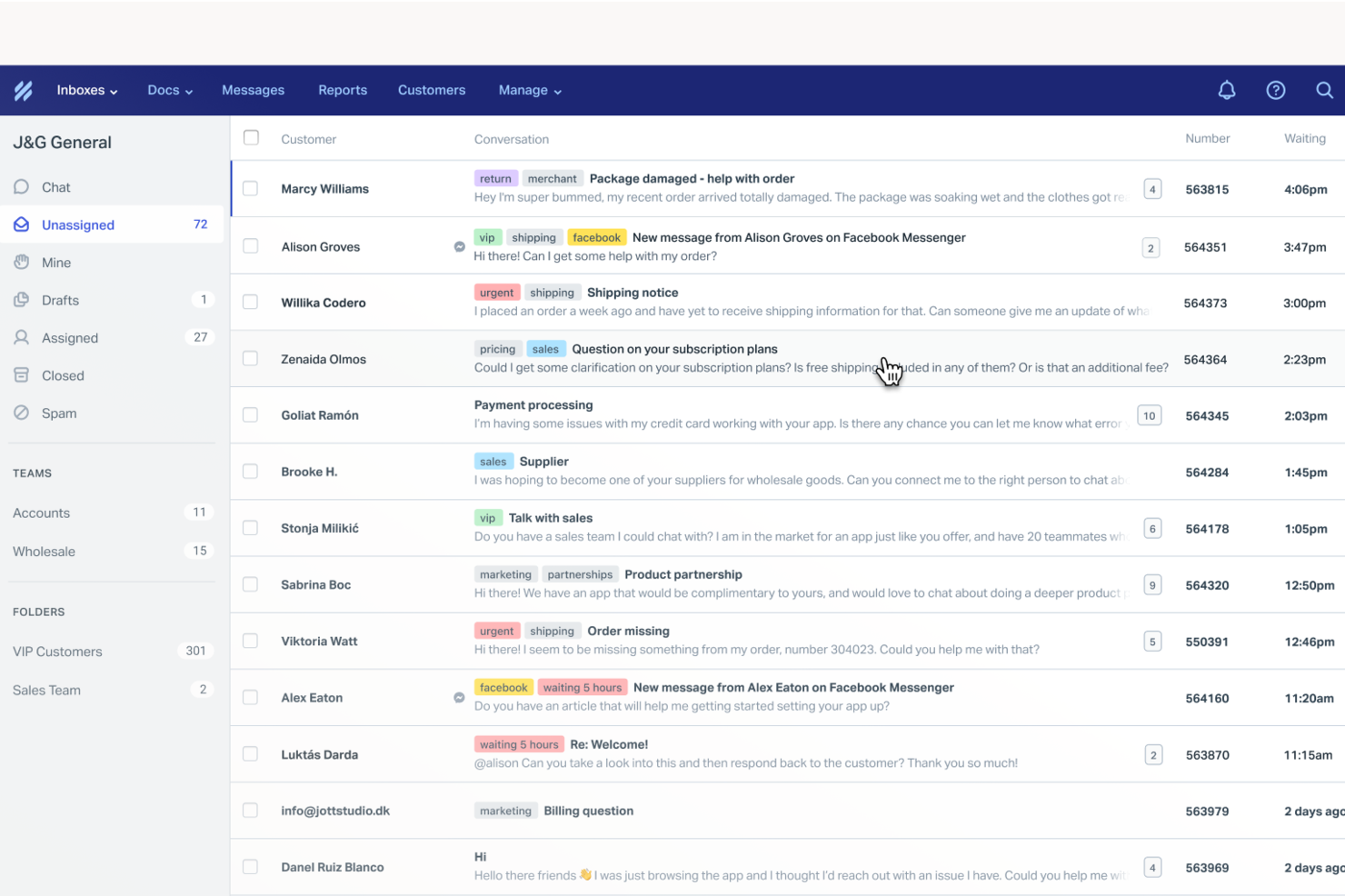
Help Scout is a help desk platform built for SMB support teams. It helps teams deliver personalized, human responses while scaling support across email and chat. By automating routine tasks and providing a shared inbox for streamlined communication, Help Scout addresses common challenges in customer service, ensuring that your team can focus on building meaningful relationships and resolving complex issues efficiently.
Why I Picked Help Scout
I picked Help Scout because of its shared inbox that keeps customer conversations organized and visible for the whole team. Assignment and internal notes make handoffs clean while preserving context. Additionally, the knowledge base empowers your customers to find answers on their own, reducing the volume of incoming queries. Help Scout's live chat functionality enables real-time interaction with customers, offering the immediacy that many businesses need to maintain high satisfaction levels.
Help Scout Key Features
In addition to its standout features, I also found that Help Scout offers:
- AI Drafts: This feature assists your team by suggesting responses to customer inquiries, saving time and ensuring consistent communication.
- Automated Workflows: Streamline your support process by automating repetitive tasks, allowing your team to focus on more critical issues.
- Custom Fields: Organize customer data effectively, enabling your team to provide personalized support tailored to individual needs.
Help Scout Integrations
Integrations include Salesforce, HubSpot, Jira, Slack, Shopify, Mailchimp, WooCommerce, Stripe, Trello, and Google Apps. Users can also create custom apps and integrations using the Help Scout API.
Pros and Cons
Pros:
- Quick to implement and onboard new agents
- Collision detection prevents duplicate replies
- User-friendly interface and design
Cons:
- Knowledge base customization varies by plan
- Pricing increases as mailboxes scale
New Product Updates from Help Scout

Help Scout Adds Automatic Conversation Reassignment
Help Scout can now automatically unassign conversations when the assigned teammate has been away long enough, keeping replies moving so others can pick them up. For more information, visit Help Scout's official site.
 .
.
Best IT service desk for beginners

Freshservice’s modern and intuitive UI requires minimal to no training, and is customizable to IT and non-IT needs. It automates tasks and provides support for issues raised via email, self-service portal, phone, chat, or in-person. Freshservice maintains records of contracts, hardware, software, and other vital customer-data assets.
For organizations managing complex operations, it can make a measurable difference. Logan Jacobson, Manager of Technology Asset Management at Smartsheet, shared his team’s experience: “It used to take up to four hours to provision software. Now we're able to provision it within minutes. Everyone uses Freshservice. It has been instrumental in streamlining our operations not only within the IT department but also across various business functions.”
Built in user-portal, reporting, workflows, and continuous updates mean that you have all the basic functionality you would expect for a helpdesk tool as well as a roadmap for constant improvement.
They offer the whole gamut of helpdesk tools: incident management, change management, release management, vendor relationships all with robust analyzing tools to make sure common problems are tracked and improved.
The biggest cons that I noticed was that it doesn’t work with corrective actions (CAPA) and that it doesn’t manage portfolios or offer product road mapping. These services can be supplemented with another app or service, but that will obviously increase the cost of your overall set-up.
Freshservice scored favorably on our features and functionality evaluation criteria section because it truly is a jack-of-all-trades. The software lets you track assets, manage problems, manage self-service portals, navigate advanced incident management, organize contracts and licenses, and more.
Integrations listed include Slack, DocuSign, Jira, Freshbooks, Google calendar, Survey Monkey, Dropbox, and many more through Zapier.
Freshservice starts at $19/user/month and has a 21-day free trial.
New Product Updates from Freshservice
 Experience)
Freshservice Introduces a Reimagined IT Asset Management (ITAM) Experience
Freshservice introduces a reimagined IT Asset Management (ITAM) experience with continuous infrastructure discovery, dependency mapping, IPAM, and Software License Management. This update helps teams improve asset visibility and manage connected IT environments more effectively. For more information, visit Freshservice’s official site.
SysAid
Best for its automation capabilities

SysAid is an IT Service Management (ITSM), service desk, and help desk software platform that supports core ITIL practices. It provides the essential tools IT teams need to manage incidents, service requests, assets, and workflows in a structured way.
SysAid places a strong emphasis on automation, offering ticket, task, self-service, and workflow automation features that allow you to define rules and reduce manual effort. Ticket automation helps route requests to the appropriate team or queue based on predefined conditions. Task automation supports repetitive actions, such as common IT maintenance tasks, while workflow automation lets you define structured steps for processes like employee onboarding or change approvals.
Additional standout features include remote control capabilities that allow agents to troubleshoot issues directly on a user’s device, asset management that links hardware and software details to tickets, and reporting tools that help you track KPIs and other service desk metrics.
SysAid also offers a marketplace with pre-built integrations, including tools such as Microsoft Teams, Jira, TeamViewer, SolarWinds, Azure, and Slack. You can also connect SysAid to thousands of additional applications through Zapier.
Pricing is available upon request, and SysAid offers a free trial.
New Product Updates from SysAid
SysAid Adds Custom Fields for License Manager Contracts
SysAid adds contract custom fields in License Manager, letting admins capture organization-specific details like cost centers, PO numbers, and approval dates. For more information, visit SysAid's official site.

Best enterprise helpdesk software

Used by over 150,000 businesses, including Panasonic, HP, and Pearson, Freshdesk (a product of Freshworks Inc.) lets you streamline your support channels (email, phone, chat and more) so that you can then notice trends and assign tickets accordingly. Some features include: automation of repetitive tasks, dissemination of tutorials to customers, and community management. For many teams, the biggest advantage is the time saved in managing client communications. Shaun Bettman, CEO and Chief Mortgage Broker of Eden Emerald Mortgages, shared his experience: “Freshdesk has reduced our average response time to less than thirty minutes, so that my team was able to devote all their energies to assisting clients with their finance needs and not get bogged down in emails.”
One of Freshdesk’s standout strengths is the ability to set service-level agreements (SLAs) and track them through advanced reporting tools. This makes it easy to monitor performance, ensure commitments are met, and spot areas for improvement. From knowledge management to reporting and collaboration, these capabilities make Freshdesk an extraordinarily helpful tool for support teams.
Integrations listed include Google Apps, JIRA, various live chat apps, Zoho CRM, FreshBooks, QuickBooks, DropBox, Box, OneDrive, MailChimp, iContact, SurveyMonkey, and many more, including a whole host of selection through a paid Zapier plan.
The app would not accommodate the uploading of larger documents or files, which may not be ideal in many circumstances. Additionally, having the ability to set reminders on tickets would be an asset for anyone whose workload is particularly demanding.
Freshdesk starts at $18/user/month
21 days Free Trial, No Credit card required
Also has a freemium version
New Product Updates from Freshdesk
Freshdesk Adds Analytics Charts to Team Dashboards
Freshdesk now lets teams add existing Analytics report charts to custom team dashboards from the same configuration pane used for live widgets. For more information, visit Freshdesk's official site.

Best for AI copilot assistance

If you manage a team that juggles customer inquiries from multiple channels, SparrowDesk might be the solution you need. It combines AI-driven automation with an intuitive interface to streamline your helpdesk operations. Whether you're in retail, tech, or any customer-centric industry, SparrowDesk aims to reduce manual workload by automating a majority of customer interactions, enhancing both efficiency and customer satisfaction.
Why I Picked SparrowDesk
I picked SparrowDesk for its standout AI capabilities that directly address the needs of modern helpdesk teams. Its AI Agents automate repetitive queries, freeing up your team to focus on complex issues that require a human touch. The AI Copilot further assists by providing agents with real-time summaries and smart replies, making it easier to manage high volumes of inquiries. These features are designed to improve response times and ensure consistent, on-brand communication across all customer interactions.
SparrowDesk Key Features
In addition to its AI capabilities, SparrowDesk offers a suite of features tailored for effective helpdesk management.
- Omnichannel Inbox: Consolidate customer interactions from chat and email into a single, easy-to-manage inbox.
- Service Level Agreements (SLA): Set response and resolution targets to meet customer expectations consistently.
- Interactive Analytics: Gain insights into team performance and customer trends with real-time dashboards.
- Quick-Action Macros: Automate frequent tasks with pre-set macros to boost efficiency.
SparrowDesk Integrations
Native integrations are not currently listed by SparrowDesk.
Pros and Cons
Pros:
- No code workflow builder automates routing and notifications
- Copilot features summarize long conversations inside the agent inbox
- AI agents designed to auto resolve many repetitive tickets
Cons:
- Limited native integrations could hinder seamless connectivity
- Channels currently focus on email and live chat, not voice or social

SuperOps
Best for MSPs and IT teams

SuperOps is a PSA-RMM software designed to help managed service providers (MSPs) and IT teams monitor infrastructure and deliver exceptional support. It offers tools to prioritize issues, centralize communication, and automate routine tasks, enhancing service delivery.
I like SuperOps for its conversational workspace, which provides technicians with all the context they need within each ticket. This setup eliminates the need to switch between tabs, enabling your team to resolve issues faster and more effectively. Additionally, the auto-tracking of time spent on tickets ensures accurate billing for clients.
Another great feature is the platform's automation capabilities through Runbooks. By turning repetitive processes into standardized workflows, tasks are completed more quickly and consistently. Event-based triggers can apply these Runbooks automatically, reducing manual intervention and allowing your team to focus on more complex issues.
One thing I find especially unique is that, aside from its service desk through its PSA suite, you can fully integrate with its RMM product, which includes asset management, policy management, network monitoring, endpoint security, and more. This means that you can get more context around tickets and have more visibility around activities.
Integrations include Acronis, ESET, Sophos, SentinelOne, Emsisoft, Bitdefender, Splashtop, TeamViewer, Connectwise Control, Xero, Quickbooks, and Azure.
New Product Updates from SuperOps

SuperOps Improves Ticket Visibility, Dynamic Forms, and Dashboard Views
SuperOps introduces improvements to ticket visibility, dynamic forms, and dashboard visualizations. These updates help technicians manage customer conversations, simplify ticket creation, and keep dashboard views consistent across teams. For more information, visit SuperOps' official site.
 .
.
Best context-aware help desk software with multi-channel capabilities

Zoho Desk is a cloud-based customer service application with contextual AI that helps your company build stronger relationships with customers. For organizations handling high volumes of requests, the platform can be a game-changer. Miguel Angel Gongora Meza, Founder & Director of Evolution Treks Peru, explained: “Zoho Desk provided our cooperative with the organization that we required to oversee dozens of requests per day by travelers intending to go to Peru, and I loved how tickets, emails, and follow-ups were all visible in a single transparent perspective.”
Zoho Desk has great features for prioritizing, managing, and closing customer support tickets. Users have control over tickets submitted to the support team via email, phone, chat, social media, a self-service portal, forums, and web forms. All tickets are presented in one place, and team members can set priorities and close tickets in the preferred order.
The tool allows teams to create a Knowledge Base of customer support articles, so your team can quickly find appropriate solutions for customer tickets. Zoho Desk’s Help Center features also allow customers to create a ticket and track it online themselves.
Zoho Desk’s AI and automation features take into account an appropriate resolution time based on your business hours when a customer ticket is created. If those parameters are missed, the ticket will be escalated automatically. Tasks such as ticket assignment, service escalations, notification rules, live chat widget and time-based actions can be automated by setting workflow rules.
The tool provides detailed reports and analytics about your support center performance, such as the average resolution time, the number of tickets closed per agent per day, the number of tickets opened per product and more.
The platform integrates with Zoho customer relationship management (CRM), as well as other Zoho Apps. The tool also offers an API for further integrations.
Pricing starts at $20/agent/month billed annually.
Best email ticketing system for medium and large businesses
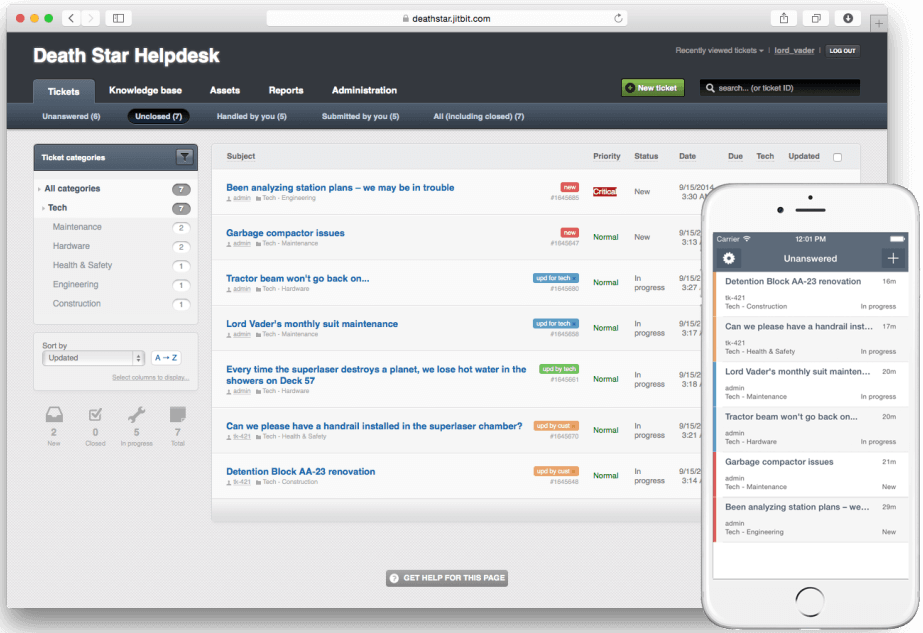
Jitbit Helpdesk is a help desk software that was built to help you provide email support for your customers and users. With its pricing, Jitbit is a great fit for medium and large businesses across different industries. If you want to host the app on your own server and use it internally, Jitbit also offers an on-premise version.
Although email is the primary channel, Jitbit supports various other channels, like live chat, web-portal, API and multiple built-in integrations with third-party apps. Jitbit updates in real-time and offers ways to collaborate on user issues with your team; for example, you can see when other techs are looking at a ticket or typing a reply. You can also assign multiple people to a single ticket.
Automation Rules is a pretty slick feature in this tool, designed to carry out the more boring parts of the job. You can do simple things like “if a ticket comes from this company assign it to this agent” all the way up to something more sophisticated like “if ticket subject contains ‘word’, send an HTTP request to this URL”.
This help desk software offers more than 10 built-in reports and a custom report builder on all aspects of customer support. You can see various metrics, including response speeds, the number of tickets you get per day, and your team performance is broken down by individual techs. Most reports allow you to export data to Excel, too.
They also offer a Knowledge Base with some AI-powered self-service features. So, this means that if you take your time to fill out your Knowledge Base with helpful articles, Jitbit will suggest those articles to your users as they are submitting the tickets. I’m sure you’ve seen this type of support feature on a couple of the sites you have accounts with, and it can be useful as it sometimes takes care of the issue without even needing to open a support ticket.
I’d say that Jitbit has a very small learning curve, thanks to clean design and easy-to-use UI. You can customize both the public-facing and the private parts of your help desk to match your company branding—so you can change colors and add your logo and a favicon. For more customization, you can change pretty much anything else through CSS and JS code.
Jitbit integrates with a lot of apps out of the box. Apps like Slack, Jira, Github, Dropbox and a lot of others are really easy to set up and start using. If that’s not enough you can use Zapier to integrate with 500+ other apps.
Jitbit Helpdesk costs from $29/month. They also offer a free trial and an on-premise version.
Ytterligere 10 gode programmer for brukerstøtte
Er du ikke interessert i noen av ressursene ovenfor? Da har du flaks. Det finnes alltid dusinvis av andre IT-supportprogrammer og brukerstøtteverktøy som konkurrerer om bedriften din. Alternativene for programvare for brukerstøtte nedenfor er bare noen få flere som fortjener en nærmere vurdering.
- ManageEngine ServiceDesk Plus
Helpdesk software for incident management processes
- Agentforce Service (formerly Service Cloud)
Help desk software for cloud-based flexibility
- Zendesk
Help desk software for productivity and customer experience
- ClickUp
For automating your helpdesk workflows
- Tidio
For custom workflow automation
- EngageBay
For creating personalized ticket views
- Halo
Help desk software for enterprises
- monday service
For customizable helpdesk boards
- Gorgias
Helpdesk software for ecommerce businesses
- Front
For automating ticket routing
- ServiceDesk Plus
Support software for building ITSM workflows
- Issuetrak
For omnichannel help desks
- ManageEngine ServiceDesk Plus
Customer portal & self-service features
- InvGate Service Management
For IT service teams
- Salesforce Financial Services Cloud
For all digital end-to-end engagement with your customers.
- ProProfs
Help desk software for email ticketing
- Jira Service Management
Help desk software for DevOps
- SysAid
For its automation capabilities
- Hesk
Open source help desk software
- NinjaOne
For simplifying IT operations
- Hiver
Help desk software for Gmail-based team collaboration
- JivoChat
Free helpdesk software plan for small teams
- CometChat
No-code chat plugin
- Front
Front - Best help desk software for efficient customer communication
- Samanage
ITSM help desk
- SAAS First
For AI-driven customer support
- DoneDone
Simple help desk managing support tickets, issues, and tasks
- FocalScope
For social media messaging integration
- Creatio CRM
For customer service management
- Hiver
Omnichannel shared inbox


How I Evaluate Help Desk Software
My evaluation has two layers: the baseline must-haves—like multi-channel intake, SLA enforcement, and Jira sync—and the differentiators that reveal which tool actually fits your team's workflow.
Core Functionality (Table Stakes For This List)
When I'm selecting tools for my list, I rank each one on a scale from 0 (does not offer the functionality) to 5 (excels in this area) for each core functionality listed below. Then, I calculate the tool's total score into a percentage. Each tool needs to achieve a minimum total score of 65% to be considered for inclusion.
- Ticket Management System: I check whether tickets can carry custom fields, parent-child relationships, and full audit trails—things that matter when a PM needs to trace a change request back to its origin.
- Multi-Channel Intake: Every tool should unify email, chat, web forms, and portal submissions into one queue. I look at whether context (attachments, requester history) carries over across channels.
- Workflow Automation & Routing: I evaluate how tickets get assigned and escalated—whether the tool supports conditional logic like routing bug reports to engineering while sending access requests to IT.
- SLA Management: Teams tracking deliverables against client contracts need configurable SLA policies. I look for business-hour calendars, pause rules during pending states, and breach notifications.
- Self-Service Knowledge Base: A searchable, categorized help center reduces ticket volume for recurring questions. I consider whether the KB supports version control and surfacing suggested articles at submission time.
- PM Tool Integrations: I check for native connections with tools like Jira, Asana, and monday.com—especially bi-directional sync that lets tickets flow into project boards without manual re-entry.
Once I have a list of tools that meet this criteria, I consider what sets each platform apart.
Differentiating Factors (What Sets Vendors Apart)
Here's how I compare and contrast different vendors:
Standout Features
Built-in project views like Kanban boards or timelines make a real difference—PMs can manage tickets alongside sprint tasks without jumping between platforms. I also evaluate embedded time tracking, which client services teams need to tie support hours back to project budgets. AI-powered ticket triage matters for high-volume teams where auto-categorization and suggested responses reduce manual sorting across dozens of daily requests.
Beyond Features
Integration depth is one of the first things I evaluate—a tool that syncs with Slack or Teams but lacks native connections to PM platforms like Jira or ClickUp creates data silos PMs can't afford. Pricing models also vary widely; per-agent licensing works for small PMOs, but larger teams benefit from flat-rate or volume-based plans. I also check for SOC 2 Type II compliance and SSO/SAML support, especially for teams handling client data under strict governance requirements.
Hvordan jeg valgte den beste programvaren for brukerstøtte
Hvilke kriterier bruker vi for å finne den beste IT-løsningen for brukerstøtte? Først undersøkte jeg nøye de beste verktøyene på markedet. Deretter sammenlignet jeg dem med funksjonene jeg mener er viktigst for å levere fantastisk kundeservice. Til slutt brukte jeg kriteriene nedenfor til å analysere de beste alternativene mine.
- Brukergrensesnitt (UI): Hvor godt utformet er programvaren for brukerstøtte? Har den tydelige visninger og intuitiv navigasjon? Er den estetisk tiltalende eller kun funksjonell? Hvem er brukergrensesnittet utviklet for, og lykkes det med å imøtekomme målgruppen?
- Brukervennlighet: Er dette enkelt å lære og bli dyktig på? Finnes det veiledninger og opplæring? Hvilken teknisk støtte og brukerstøtte tilbyr programvareselskapet?
- Integrasjoner: Er det enkelt å koble til andre verktøy? Finnes det ferdigbygde integrasjoner? Hvor mange ulike integrasjoner er tilgjengelige, og hvor enkelt (eller kostbart) er det å implementere dem?
- Verdi for $: Hvor mye koster det? Finnes det ulike nivåer? Hvilke funksjoner får du tilgang til på hvert nivå?
Andre typer programvare du kanskje trenger
Ser du ikke spesifikt etter brukerstøtteprogramvare i dag? Her er noen nærliggende emner som jeg tror kan interessere deg:
- Feilsporing: Hvis mye av trafikken til brukerstøtten din gjelder feilrapporter, er det kanskje på tide å begynne å investere i verktøy for feilsporing som DoneDone, Trackduck eller DebugMe.
- CRM-systemer: Mange verktøy for kunderelasjonshåndtering tilbyr moduler for kundestøtte – se om du kan redusere antallet verktøy du bruker, ved å skaffe et CRM-system som har innebygde funksjoner for brukerstøtte.
- Samarbeidsprogramvare: Du kan også vurdere å bruke nettbaserte samarbeidsverktøy til å håndtere kommunikasjon mellom avdelinger for å løse problemer og oppbevare en søkbar oversikt over kommunikasjonen.
Vanlige spørsmål om brukerstøtteprogramvare
Finn svar på vanlige spørsmål om dette emnet.
Hvilken programvare brukes til brukerstøtte?
Hva menes med programvare for brukerstøtte?
Hvilke verktøy for brukerstøtte integreres best med CRM- og kommunikasjonsplattformer?
Hvordan velger jeg mellom skybaserte og lokale løsninger for brukerstøtte?
Hvilke KPI-er bør jeg følge med på med programvare for brukerstøtte?
Hvordan sikrer jeg datasikkerhet og samsvar med programvare for brukerstøtte?
Er HelpDesk CRM-programvare?