

De 10 beste programvarene for byrårapportering gjennomgått i 2026

10 Beste programvare for byrårapportering – kortliste


Programvare for byrårapportering gir verdifull innsikt i resultatmålinger, slik at byråer kan følge med på fremdriften, identifisere trender og ta informerte, datadrevne beslutninger.
Det kan imidlertid være vanskelig å velge riktig programvare for byrårapportering når det finnes så mange alternativer. Med mange års erfaring med ulike systemer for byrårapportering kan jeg hjelpe deg.
La meg hjelpe deg med å finne de beste programvarealternativene for å løse utfordringene dine med byrårapportering. Her er mine anbefalinger av den beste programvaren for byrårapportering.
Why Trust Our Software Recommendations
Our team has been testing and reviewing software since 2012. As project managers ourselves, we know how difficult—and important—it is to choose the right software.
For this guide, we evaluated tools using hands-on testing and independent research, scoring tools using our selection criteria. We also draw on insights from industry thought leaders and practicing project management experts.
Our reviews reflect our human editorial judgment, not a sales pitch.
Expert reviewers:
Sammenligningstabell for programvare for byrårapportering
Vi har undersøkt priser og tilgjengeligheten av gratis prøveperioder og demoversjoner:
| Tool | Best For | Trial Info | Price | ||
|---|---|---|---|---|---|
| 1 | Best for real-time reporting | 14-day free trial | From $17/user/month | Website | |
| 2 | Best for white-label client reporting | 14-day free trial + free demo available | From $44/month (billed annually) | Website | |
| 3 | Best for spreadsheet-powered custom dashboards | 14-day free trial | From $120/month (billed annually) | Website | |
| 4 | Best for no-code custom dashboard creation | Free plan + 14-day free trial + free demo available | From $71/month (billed annually) | Website | |
| 5 | Best for project reporting | Free 7-day trial available | From $9/user/month (billed annually) | Website | |
| 6 | Best for client-ready marketing reports | 14-day free trial | From $20/month (billed annually) | Website | |
| 7 | Best for data-driven decision making | 14-day free trial | Pricing upon request | Website | |
| 8 | Best for unifying cross-channel marketing data | Free demo available | From $812/month (billed annually) | Website | |
| 9 | Best for social media management | 30-day free trial | From $79/user/month (billed annually) | Website | |
| 10 | Best for advanced enterprise analytics | Free plan available | From $14/user/month (billed annually) | Website |

Anmeldelser av den beste programvaren for byrårapportering
Her finner du en grundig analyse av og oversikt over hver programvare for byrårapportering. Vi går gjennom fordeler og ulemper ved hvert verktøy, funksjonene og de beste bruksområdene.

Scoro
Best for real-time reporting

Scoro is an all-in-one business management software designed for agencies, consultancies, and professional service firms. It combines project management, resource planning, sales, billing, and reporting into a single platform.
Why I Picked Scoro: Scoro's reporting and dashboard features provide a comprehensive view of your agency's performance. You can monitor key metrics in real-time, customize dashboards to display the most relevant data, and generate detailed reports on various aspects of your business. This level of insight enables informed decision-making and helps identify areas for improvement.
Standout Features & Integrations:
Features include project management from quote to cash, Gantt charts, task lists, time tracking, budgeting, invoicing, resource planning, utilization reporting, customizable dashboards, and financial reporting.
Integrations include Gmail, Google Calendar, Microsoft Exchange, QuickBooks, Xero, Stripe, PayPal, Jira, Asana, HubSpot, Salesforce, Dropbox, and Zapier.
Pros and Cons
Pros:
- Robust reporting and analytics
- Good resource planning and utilization management
- Comprehensive project management features
Cons:
- Some time tracking features are limited to higher-tier plans
- Mobile app could be improved
New Product Updates from Scoro

Scoro Adds Time Mobile App and ELI Improvements
Scoro adds the Scoro Time mobile app for iOS/Android to track time anywhere and expands ELI with attachments, smarter filtering, and trigger-based actions. For more information, visit Scoro's official site.

DashThis
Best for white-label client reporting

DashThis is an agency reporting software designed to simplify marketing analytics by automating data collection and report generation. It helps digital marketing agencies create custom, branded dashboards that make it easy to present campaign performance to clients.
Why I Picked DashThis: I chose DashThis for its strong customization options and white-label reporting capabilities, which are especially valuable for agencies managing multiple client accounts. You can tailor dashboards with your own branding, choose from prebuilt templates, and organize data into a clean, client-friendly format. DashThis also makes sharing reports simple by allowing you to schedule automatic email delivery or provide clients with a secure, shareable URL. This flexibility can help agencies maintain transparency while saving significant time on manual reporting.
Standout Features & Integrations
Features include automated reporting, white-label dashboards, AI-powered insights for campaign optimization, and support for unlimited data sources and users, making it well-suited for growing teams.
Integrations include Google Analytics 4, Google Ads, Meta Ads, Facebook Insights, Instagram, TikTok Ads, LinkedIn Ads, HubSpot, Klaviyo, YouTube, and SEMrush.
Pros and Cons
Pros:
- Automated reporting reduces manual data collection
- AI-powered insights for optimizing marketing strategies
- Customizable, white-label dashboards for client branding
Cons:
- Interface design could feel outdated for some users
- Limited advanced customization for report layouts
New Product Updates from DashThis
DashThis Adds Spotify Ads Integration
DashThis adds a Spotify Ads integration for bringing campaign spend, reach, impressions, clicks, and video views into dashboards. This helps teams report on audio campaigns alongside other advertising channels. For more information, visit DashThis’s official site.
 .
.
Best for spreadsheet-powered custom dashboards

Klipfolio is a dashboard and reporting platform that lets you build custom, formula-driven dashboards using spreadsheet logic, pulling data from APIs, files, and connected data sources into a single visual workspace.
Who Is Klipfolio Best For?
Klipfolio is a strong fit for data-oriented marketing teams and analysts who need to build highly customized dashboards beyond what drag-and-drop report builders typically allow.
Why I Picked Klipfolio
I picked Klipfolio as one of the best because of its Klip Editor, which lets you write Excel-like formulas and functions directly against your data to build dashboard components from scratch. Most reporting tools lock you into preset chart configurations, but Klipfolio lets you filter, group, aggregate, and apply conditional logic the same way you would in a spreadsheet. I also like that you can go further with HTML, CSS, and JavaScript customization when a standard chart type won't cut it. It's a genuinely different level of control.
Klipfolio Key Features
- 30+ chart types: Choose from bar, line, pie, gauge, funnel, map, and pictograph charts to match your data to the right visualization.
- Automated reporting: Schedule dashboard snapshots to render as PDFs or images and deliver them via email at a defined frequency.
- Published links: Share dashboards with clients via a public or password-protected link, no login required.
- User and group permissions: Control access at the individual or group level, with view or edit rights and custom roles for each dashboard.
Klipfolio Integrations
Klipfolio offers hundreds of pre-built connectors, including Google Ads, Google Analytics 4, Google Sheets, Facebook Ads, HubSpot, Salesforce, LinkedIn Ads, Shopify, Mailchimp, and Snowflake. It connects with Zapier and provides a REST API for custom integrations with any service that has an accessible API.
Pros and Cons
Pros:
- Excel-like formulas for custom data transformations
- Real-time data refresh for live KPI tracking
- White-label branding for client-facing dashboards
Cons:
- Reports can be slow to load
- Custom dashboards require significant build time

Databox
Best for no-code custom dashboard creation
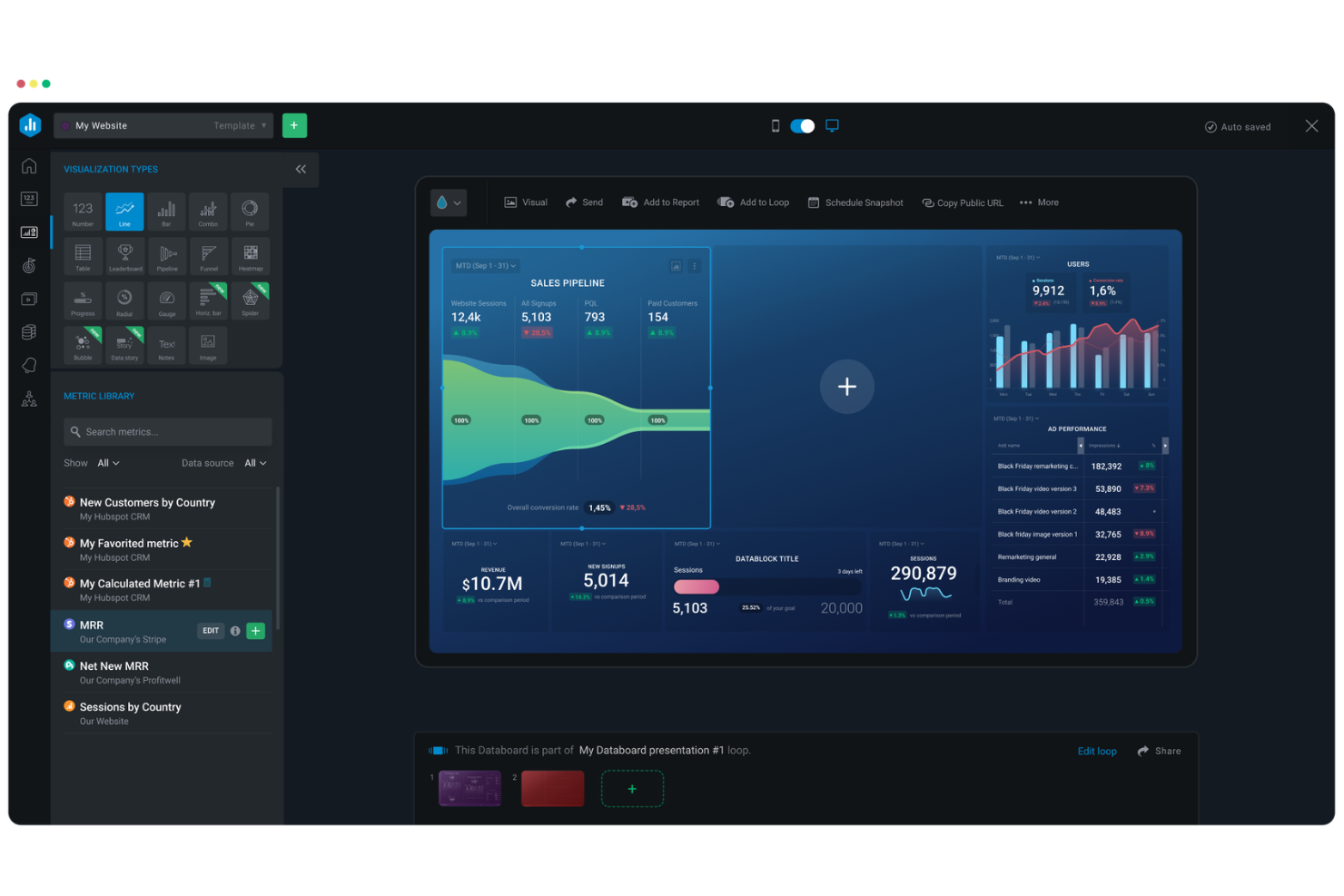
Databox is an analytics and client reporting platform that connects data from 130+ sources to build real-time dashboards, automated reports, and performance snapshots across all your client accounts.
Who Is Databox Best For?
Databox is a good fit for digital marketing agencies that manage multiple client accounts and need a centralized place to track and report on performance data.
Why I Picked Databox
I picked Databox as one of the best because it's genuinely built around the agency workflow, not just adapted for it. I love the Clone Databoards feature, which lets me build a reporting template once and roll it out across every client account with one click, with each client's data populating automatically.
The Looped Databoards feature is also a standout for client-facing work, letting me chain multiple dashboards into a live, streaming presentation that updates in real time.
Databox Key Features
- Scheduled snapshots: Automatically send a Databoard snapshot to clients and internal stakeholders on a daily, weekly, or monthly schedule.
- Annotations: Add context notes directly onto a Databoard so clients can connect your activities to specific performance changes.
- Alerts and notifications: Set threshold-based alerts that trigger when a key metric hits a goal or changes by a set percentage.
- White-label dashboards: Apply your agency's logo and brand colors to every client-facing dashboard you share.
Databox Integrations
Databox offers 130+ native integrations, including Google Analytics 4, Google Ads, HubSpot, Facebook Ads, Salesforce CRM, LinkedIn Ads, Semrush, Shopify, Stripe, and Google Search Console. It also connects to databases and warehouses like Snowflake, Google BigQuery, and PostgreSQL, and supports Zapier. An API is available for custom integrations.
Pros and Cons
Pros:
- Cloneable reports scale across multiple accounts
- Built-in benchmarks for comparing client performance
- Prebuilt dashboard templates speed up client onboarding
Cons:
- Data source caps restrict lower-tier plan users
- Limited text and image formatting in reports
Best for project reporting

Bonsai Agency Software is an all-in-one business management platform designed to help agencies streamline their operations. It offers tools for project management, client relationship management, and financial tracking, all within a single, integrated system.
Why I Picked Bonsai Agency Software: With features like task assignment, time tracking, and budget monitoring, your team can efficiently manage multiple projects while keeping an eye on deadlines and expenses. This level of oversight ensures that projects stay on track and within budget, which is crucial for accurate reporting and maintaining client trust. The platform also provides real-time insights into various metrics, allowing you to generate detailed reports on project performance, team productivity, and financial health. These reports can be customized to highlight the data most relevant to your agency's needs, facilitating informed decision-making and strategic planning.
Standout Features & Integrations:
Features include a client portal, scheduling tools, forms creation, task management, collaboration features, capacity management, budgeting tools, expense tracking, payment processing, client relationship management (CRM), proposal generation, and contract management.
Integrations include QuickBooks Online, Zapier, Calendly, Xero, Google Drive, HubSpot, ClickUp, Slack, and Asana.
Pros and Cons
Pros:
- Efficient time-tracking capabilities
- Client portal enhances transparency and communication
- Can monitor projects across the portfolio
Cons:
- Fewer integrations compared to some competitors
- Mobile app could benefit from additional features

Best for client-ready marketing reports
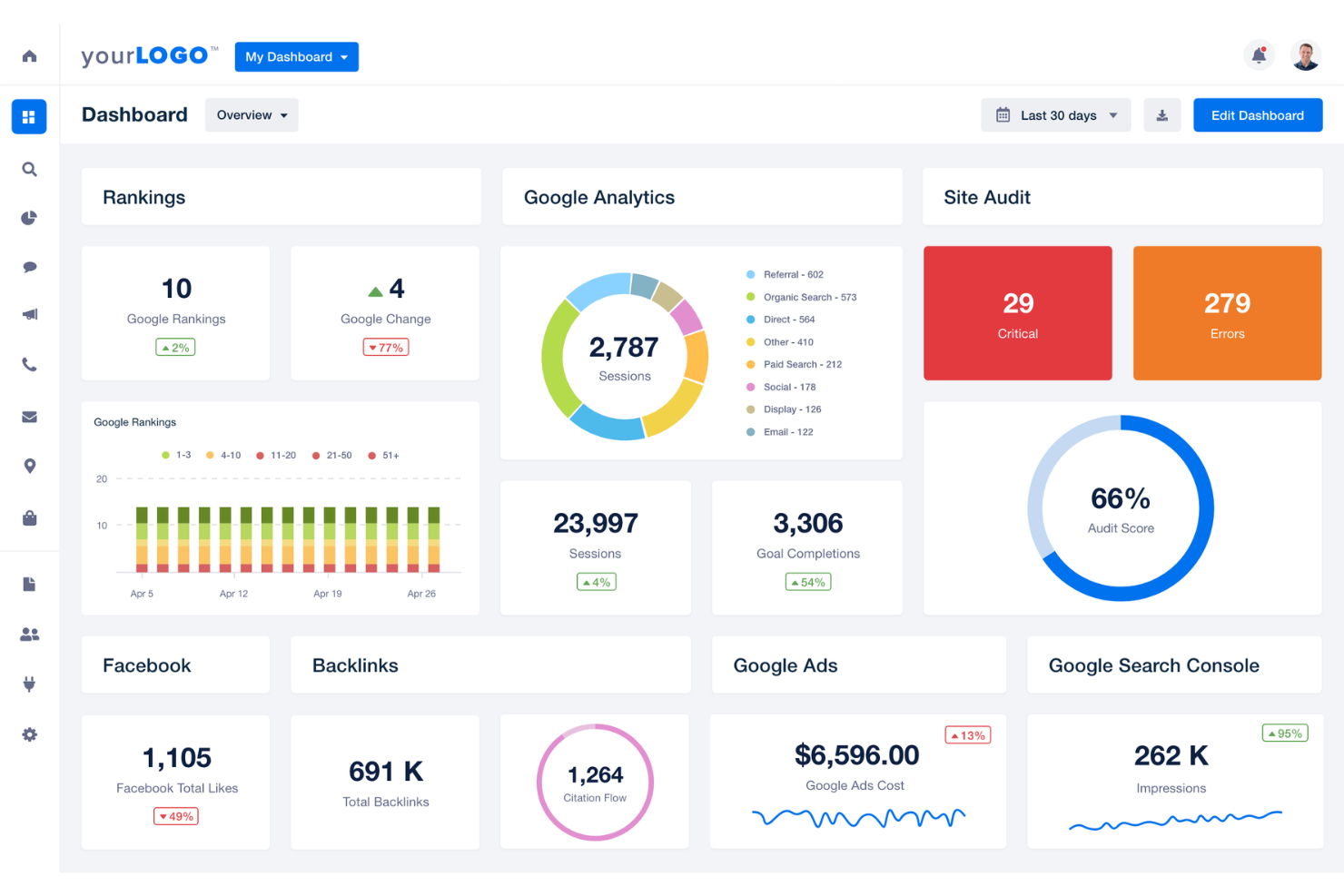
AgencyAnalytics is a reporting and dashboard platform built specifically for marketing agencies, covering automated report generation, live client dashboards, AI-driven insights, and multi-channel campaign performance tracking.
Who Is AgencyAnalytics Best For?
AgencyAnalytics is a strong fit for digital marketing agencies that manage reporting across multiple clients and channels.
Why I Picked AgencyAnalytics
AgencyAnalytics earns its spot on my shortlist because of how well it handles the full client reporting workflow, from data to delivery. I love the white label reporting feature, which lets my team apply custom branding, domain, and color schemes so every report looks like it came directly from us.
The automated report scheduling means client reports go out on time without anyone having to manually trigger them, and the drag-and-drop editor makes it easy to tailor each report to a specific client without starting from scratch every time.
AgencyAnalytics Key Features
- Goal and budget tracking: Monitor campaign spend and progress against predefined targets across client accounts.
- Metric alerts: Receive automatic notifications when key metrics cross set thresholds, so you catch performance shifts early.
- Client portal: Give clients secure, branded access to their live data and reports without requiring a screen share or email attachment.
- Benchmark comparisons: Compare client results against industry averages to add context to performance data in reports.
AgencyAnalytics Integrations
AgencyAnalytics offers 85+ native integrations, including Google Analytics, Google Ads, Meta Ads, Google Search Console, HubSpot, Shopify, LinkedIn, Mailchimp, Semrush, and Salesforce. It also connects to database sources like Google BigQuery, MySQL, PostgreSQL, Amazon Redshift, and Snowflake for pulling in custom data sets. An API is available for custom integrations.
Pros and Cons
Pros:
- Built-in SEO audit and rank tracking
- White label branding on all deliverables
- Automated multi-channel report scheduling saves time
Cons:
- Custom metric creation lacks advanced filtering
- No social media scheduling or publishing tools

Tableau
Best for data-driven decision making

Tableau is agency reporting software that specializes in data visualization and business intelligence. It helps agencies transform raw data into actionable insights through interactive, shareable dashboards.
Why I Picked Tableau: I chose Tableau for this list because of its data visualization tools and ability to handle large datasets efficiently. Tableau stands out from other agency reporting software due to its drag-and-drop interface and customization options. Tableau also provides deep insights through interactive dashboards and real-time data analysis.
Standout Features & Integrations:
Features include data visualization, real-time analytics, and interactive dashboards. Tableau's drag-and-drop interface allows users to create complex visualizations without writing code, making it accessible to users of all skill levels.
Integrations include Amazon Redshift, Google Analytics, Google Sheets, IBM BigInsights, Microsoft Excel, OneDrive, Oracle, Presto, and Salesforce.
Pros and Cons
Pros:
- User-friendly interface
- Real-time analytics
- Powerful data visualization
Cons:
- Steep learning curve
- Can be resource-intensive

Best for unifying cross-channel marketing data

Whatagraph is a marketing intelligence and reporting platform built specifically for agencies, combining cross-channel data consolidation, white-label client reports, and live dashboards in a single workspace.
Who Is Whatagraph Best For?
Whatagraph is purpose-built for digital marketing agencies that manage reporting across multiple client accounts and channels.
Why I Picked Whatagraph
I picked Whatagraph as one of the best because of how it handles cross-channel data unification at the source layer. Instead of reconciling numbers after the fact, I use source blends to combine data from Google Ads, Meta, and other channels into a single unified dataset.
From there, I define custom metrics like blended ROAS or CAC once, and they appear consistently across every report, dashboard, and client deck. That kind of governed data foundation is rare in agency reporting tools.
Whatagraph Key Features
- White-label reports: Apply custom branding, logos, and color schemes to every client-facing report directly within the platform.
- Report templates: Build and save reusable report layouts that can be cloned and applied across multiple client accounts.
- Live shareable dashboards: Generate a shareable link to a live dashboard so clients can view real-time performance data without logging in.
- Multi-account workspace: Organize all client accounts within a single workspace and switch between them without separate logins.
Whatagraph Integrations
Whatagraph offers 65 native integrations focused on marketing data sources, including Google Ads, Facebook Ads, Google Analytics 4, Semrush, Mailchimp, HubSpot, Salesforce, Shopify, LinkedIn Ads, and TikTok Ads. Google Sheets, BigQuery, Snowflake, and a custom API are also available for connecting additional data sources.
Pros and Cons
Pros:
- Automated report scheduling and email delivery
- No analyst needed for setup or daily use
- Drag-and-drop report builder saves hours weekly
Cons:
- Limited widget sizing and layout flexibility
- Data source connectors can drop unexpectedly

Best for social media management

Sprout Social is a social media management platform designed to help businesses simplify their social media efforts. It is recognized as the best tool due to its features that support engagement, publishing, analytics, listening, influencer marketing, and employee advocacy.
Why I Picked Sprout Social: I chose Sprout Social for its all-encompassing approach to social media management, which sets it apart from other agency reporting software. Its ability to integrate various social media functions into one platform makes it a standout choice. Sprout Social is best because it offers a unified solution that enhances strategic decision-making, customer engagement, and brand advocacy.
Standout Features & Integrations:
Features include advanced analytics for strategic decision-making, AI-powered workflows for efficiency, and engagement tools to manage customer interactions. The platform also supports influencer marketing and employee advocacy, making it a versatile tool for social media strategies.
Integrations include Facebook, Instagram, LinkedIn, X (Formerly Twitter), Salesforce, Tableau, Hubspot, Marketo, Shopify, and Zendesk.
Pros and Cons
Pros:
- AI-powered workflows
- Advanced analytics
- Comprehensive social media tools
Cons:
- Can be overwhelming for new users
- Limited customization options

Power BI
Best for advanced enterprise analytics
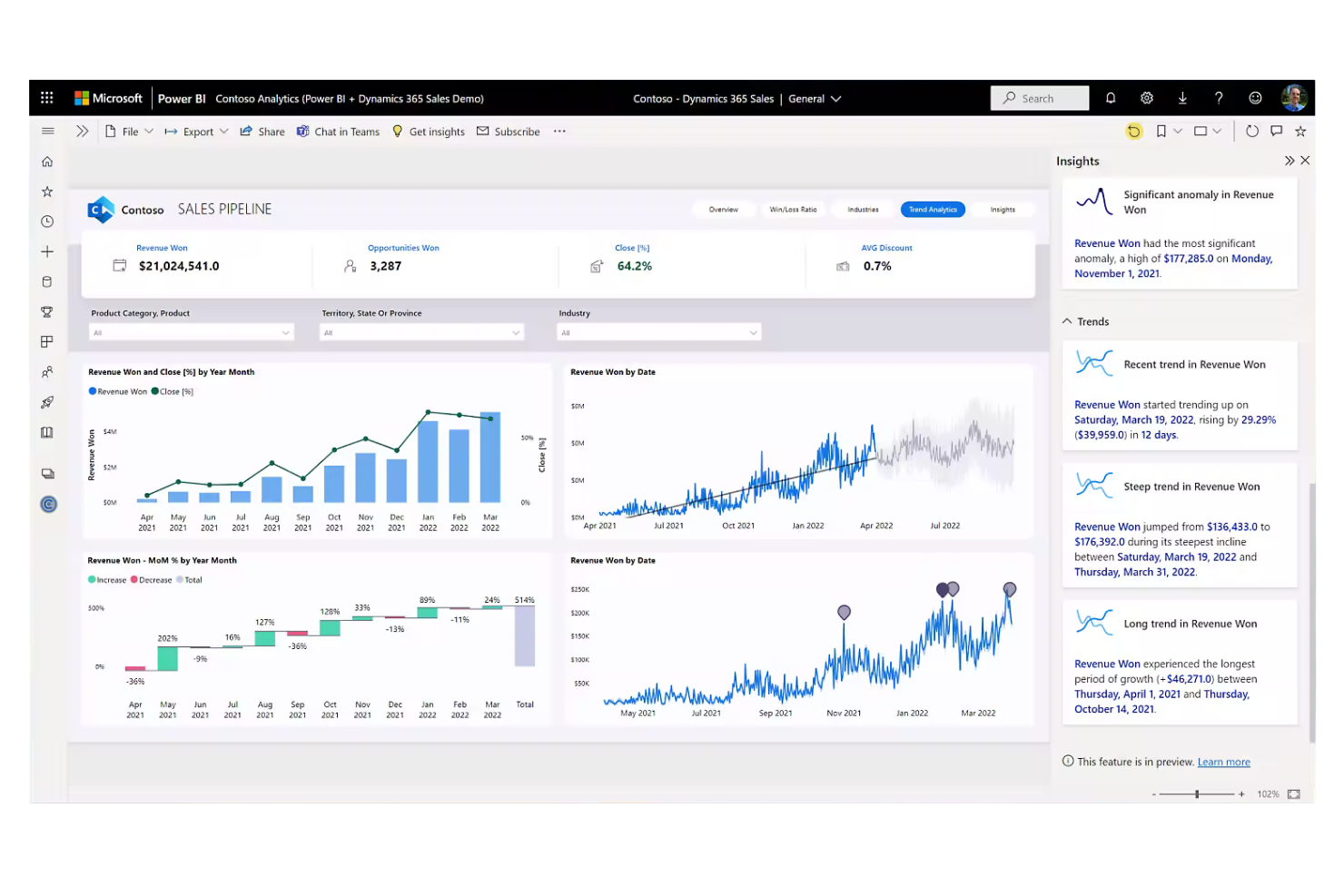
Power BI is Microsoft's business intelligence platform that connects to hundreds of data sources and turns raw data into interactive dashboards, reports, and visual analytics across an organization.
Who Is Power BI Best For?
Power BI is a strong fit for enterprise teams and data analysts who need to model complex datasets and build organization-wide reporting infrastructure.
Why I Picked Power BI
I've included Power BI in my top picks because of how far it goes with enterprise-scale data modeling. I rely on DAX (Data Analysis Expressions) to build custom calculations across complex, multi-table datasets that simpler reporting tools can't handle.
I also use row-level security to control exactly which stakeholders see which data slices, which matters when reporting across multiple clients or business units from a single model.
Power BI Key Features
- Paginated reports: Create pixel-perfect, print-ready reports formatted for PDF or Excel export across fixed layouts.
- Natural language Q&A: Query your data using plain English questions and get auto-generated visuals in response.
- Scheduled data refresh: Set automatic refresh intervals so dashboards always reflect current data without manual updates.
- Power BI Embedded: Embed live reports and dashboards directly into external applications or client-facing portals.
Power BI Integrations
Power BI offers 100+ native data connectors through Power Query, including Salesforce, Google Analytics, Google BigQuery, Google Sheets, Snowflake, Adobe Analytics, Smartsheet, Supermetrics, and Mailchimp (via Funnel), along with native integrations across the Microsoft ecosystem, including Microsoft 365, Azure, Dynamics 365, and SharePoint.
Pros and Cons
Pros:
- Connects to nearly any data source
- AI-powered analytics with Copilot built in
- Daily interactive visual reporting across datasets
Cons:
- Sharing reports requires paid Pro licenses
- DAX formula language has a steep curve
Annen programvare for byrårapportering
Nedenfor finner du en liste over ytterligere programvare for byrårapportering som jeg satte på kortlisten, men som ikke kom med på topplisten. Det er absolutt verdt å ta en titt på dem også!
- NinjaCat
For AI-powered marketing reports
- Productive.io
For all-in-one agency operations insights
- Rankability
For SEO content optimization
- Zoho Analytics
For business intelligence
- Hootsuite
For tracking cross-channel campaign results
- Google Analytics
For web traffic analysis
- Semrush
For competitor research
- ReportGarden
For customizable marketing dashboards
- Looker
For data exploration and visualization
- Moz
For content marketing analysis
- Looker Studio
For data visualization
- Metricool
For unified social and ad campaign reporting
- Cometly
For real-time SaaS marketing attribution


Relatert programvare for prosjektstyring
Hvis du fortsatt ikke har funnet det du leter etter her, kan du ta en titt på disse verktøyene som er nært knyttet til programvare for prosjektstyring, og som vi har testet og evaluert.
- Programvare for ressursstyring
- Programvare for arbeidsflytstyring
- Programvare for tidsregistrering
- Programvare for oppgavestyring
- Samarbeidsverktøy
- Produktivitetsverktøy
How I Evaluate Agency Reporting Software
I evaluate agency reporting tools in two layers: the baseline features a tool must have—like white-label dashboards and profitability tracking—and the differentiators that set the best apart.
Core Functionality (Table Stakes For This List)
When I'm selecting tools for my list, I rank each one on a scale from 0 (does not offer the functionality) to 5 (excels in this area) for each core functionality listed below. Then, I calculate the tool's total score into a percentage. Each tool needs to achieve a minimum total score of 65% to be considered for inclusion.
- Client Reporting Dashboards: I look for configurable dashboards that let you display project timelines, deliverables, and KPIs in a format your clients can actually understand without a walkthrough.
- Multi-Source Data Integration: The tool should pull data from the PM, time tracking, and finance tools your agency already uses—think Asana, Harvest, or QuickBooks—without manual exports.
- White-Label Branding: I check whether you can apply your agency's logo, colors, fonts, and even a custom domain so reports look like they came from your team, not a third-party platform.
- Automated Report Scheduling: I evaluate how easily you can set up recurring report sends—like a weekly status email to a retainer client—without manually exporting and attaching files each time.
- Project Profitability Tracking: Budget vs. actuals, billable hours, and margin data should be reportable at the project or client level so you can spot underperforming accounts before they erode margins.
- Resource & Utilization Reporting: The platform should surface who's overbooked, who has capacity, and how billable vs. non-billable time breaks down across your team and active projects.
Once I have a list of tools that meet this criteria, I consider what sets each platform apart.
Differentiating Factors (What Sets Vendors Apart)
Here's how I compare and contrast different vendors:
Standout Features
I look for client portals that give stakeholders a live, self-service view of project progress—this cuts down on ad hoc status requests. Cross-client portfolio views matter too, especially for agency leaders who need roll-up metrics across dozens of active accounts. A drag-and-drop custom report builder with calculated fields and reusable templates is what separates tools that scale with your client roster from ones you'll outgrow in a year.
Beyond Features
Integrations with agency-staple tools like Asana, Harvest, and QuickBooks matter because a reporting platform is only as useful as the data it can pull in. I also evaluate how well pricing scales with agency growth—whether a platform charges per seat, per client, or per report affects long-term cost as your roster expands. Security is another factor I check closely, since agencies handle sensitive client data and need role-based access controls to keep internal views separate from client-facing ones.
Slik velger du programvare for byrårapportering
Når du går gjennom din egen, unike prosess for valg av programvare, bør du ha følgende punkter i tankene.
- Integrasjonsmuligheter: En av de viktigste vurderingene ved valg av rapporteringsprogramvare for byråer er evnen til å integrere med ulike datakilder. Byråer bruker ofte flere plattformer, som Google Ads, Facebook Ads, LinkedIn Ads og Google Analytics. Programvaren bør hente data fra disse kildene for å gi en oversikt over markedsføringsresultatene.
- Tilpasningsmuligheter: Alle byråer har unike rapporteringsbehov, og muligheten til å tilpasse rapporter er avgjørende. Tilpasning gjør det mulig for byråer å utforme rapporter slik at de fremhever spesifikke måltall som er viktigst for kundene.
- Brukervennlighet: Programvaren bør være brukervennlig, særlig for teammedlemmer med ulik grad av teknisk kompetanse. Et intuitivt grensesnitt reduserer læringskurven og øker bruken i hele byrået.
- Sanntidsrapportering: Muligheten til å få tilgang til oppdaterte rapporter er uvurderlig når det skal tas beslutninger i tide. Databehandling i sanntid gjør det mulig for byråer å se effekten av kampanjene mens de utspiller seg, slik at strategiene raskt kan justeres.
- Support og innføring: Det er viktig å vurdere hvor raskt supportteamet svarer, og hvor enkelt det er å komme i gang. Et responsivt supportteam kan løse problemer raskt, noe som er spesielt viktig i rapporteringsperioder. Programvaren bør dessuten tilby ressurser for innføring for å sikre en smidig implementering.
Trender innen rapporteringsprogramvare for byråer
Rapporteringsprogramvare for byråer er i endring og forvandler måten byråer overvåker dataene sine på. Etter hvert som teknologien utvikler seg, er det viktig å holde seg oppdatert på den siste utviklingen. Her er noen viktige trender du bør følge med på, og som kan påvirke organisasjonen din.
- KI-drevet analyse: KI-drevet analyse blir stadig mer utbredt. Den gir dypere innsikt og prediktive muligheter. Denne trenden er viktig for å kunne ta datadrevne beslutninger.
- Sanntidsdataintegrasjon: Dataintegrasjon i sanntid får stadig større gjennomslag. Det gjør det mulig for byråer å få tilgang til oppdatert informasjon. Dette er viktig for rettidig og nøyaktig rapportering.
- Tilpassbare dashbord: Tilpassbare dashbord blir stadig mer populære. De gjør det mulig for brukere å tilpasse rapporteringsvisningene sine utover det tradisjonelle regnearket. Denne trenden forbedrer brukeropplevelsen og effektiviteten.
- Forbedret datasikkerhet: Forbedrede datasikkerhetstiltak blir innført. Beskyttelse av sensitiv informasjon har høyeste prioritet. Denne trenden svarer på den økende bekymringen for datainnbrudd.
- Tilgjengelighet på mobile enheter: Tilgjengelighet på mobile enheter er økende. Brukere kan nå få tilgang til rapporter fra apper på alle enheter. Denne trenden støtter fjernarbeid og fleksibilitet.
Disse trendene former fremtiden for rapporteringsprogramvare for byråer ved å forbedre brukeropplevelsen, integrere avansert analyse og styrke funksjonene for samarbeid. Etter hvert som byråer søker mer effektive måter å administrere data og formidle innsikt på, legger denne utviklingen grunnlaget for mer effektive rapporteringsløsninger.
Hva er rapporteringsprogramvare for byråer?
Rapporteringsprogramvare for byråer er utviklet for å hjelpe markedsføringsbyråer med å samle inn, analysere og presentere data fra ulike kampanjer og kunder. Den brukes vanligvis av digitale markedsføringsbyråer, reklamebyråer og PR-byråer til å følge med på resultatmålinger, generere rapporter og gi kundene innsikt.
De viktigste komponentene i rapporteringsprogramvare for byråer omfatter dataintegrasjon, tilpassbare rapportmaler og analysedashbord. Disse funksjonene gjør det mulig for brukere å hente data fra flere kilder, opprette skreddersydde rapporter og visualisere viktige resultatindikatorer for å danne grunnlag for beslutninger og synliggjøre verdien for kundene.
Funksjoner i rapporteringsprogramvare for byråer
Rapporteringsprogramvare for byråer hjelper byråer med å synliggjøre verdien de skaper for kundene ved å automatisere og personalisere rapporter. Nedenfor finner du noen av de viktigste funksjonene du bør se etter i rapporteringsprogramvare for byråer.
- Automatiserte rapporter: Automatiserte rapporter sparer tid ved å generere rapporter uten manuell innblanding. Denne funksjonen sørger for at klienter mottar oppdateringer i tide, noe som forbedrer effektiviteten og klienttilfredsheten.
- Tilpassbare dashbord: Tilpassbare dashbord lar byråer skreddersy presentasjonen av data for å oppfylle spesifikke klientbehov. Denne fleksibiliteten bidrar til å levere mer relevante og personlig tilpassede innsikter.
- Hvitmerking: Hvitmerking lar byråer legge til logoer og fargevalg i rapporter. Denne funksjonen forbedrer profesjonaliteten og styrker byråets merkevareidentitet.
- Klient- og personaladministrasjon: Funksjoner for klient- og personaladministrasjon bidrar til å organisere og følge med på brukeraktivitet. Dette sørger for at alle er på samme side og reduserer behovet for oppfølgende kommunikasjon.
- SEO-verktøy: SEO-verktøy gir innsikt i søkeordrangeringer og nettstedsrevisjoner. Disse verktøyene er avgjørende for å optimalisere resultater i søkemotorer og vise effekten av SEO-arbeidet.
- Flere integrasjoner: Flere integrasjoner med ulike markedsføringsplattformer sikrer rask datainnsamling. Denne funksjonen lar byråer hente data fra forskjellige kilder, noe som gir et helhetlig bilde av kampanjeresultatene.
- Rapportbygger med dra og slipp: En rapportbygger med dra og slipp gjør det enklere å lage tilpassede rapporter. Denne funksjonen lar byråer kombinere ulike måleverdier for å fortelle en komplett historie, noe som gjør rapporteringen mer effektiv.
- Forhåndsdesignede maler: Forhåndsdesignede maler for rapporter og dashbord effektiviserer arbeidsflyten. Disse malene sikrer ensartethet i alle klientrapporter og sparer tid ved generering av rapporter.
- Planlegging og godkjenning av rapporter: Funksjoner for planlegging og godkjenning av rapporter lar byråer angi rapporteringsfrekvens og kreve godkjenning før rapporter sendes. Dette sikrer at rapportene er nøyaktige og leveres i tide.
- Avanserte metrikkfiltre: Avanserte metrikkfiltre muliggjør mer detaljert dataanalyse. Denne funksjonen bidrar til å presentere de mest relevante innsiktene og gjør rapportene mer handlingsrettede.
Ved å automatisere oppgaver, tilby tilpasningsmuligheter og integrere med flere plattformer hjelper disse verktøyene byråer med å levere innsiktsfulle rapporter som sparer verdifull tid.
Fordeler med rapporteringsprogramvare for byråer
Rapporteringsprogramvare for byråer er utviklet for å forenkle prosessen med datainnsamling, analyse og presentasjon for markedsføringsbyråer. Nedenfor finner du fem primære fordeler ved å bruke rapporteringsverktøy for brukere og organisasjoner.
- Tidsbesparelse: Automatiserte verktøy for markedsføringsrapportering reduserer tiden som brukes på manuell datainnsamling og generering av rapporter betydelig. Dette lar byråets ansatte fokusere mer på strategisk planlegging og håndtering av klientforhold.
- Forbedret nøyaktighet: Programvaren minimerer risikoen for menneskelige feil ved å automatisere datainnsamling og generering av rapporter, slik at dataene som presenteres, er nøyaktige og pålitelige.
- Forbedret klientrapportering: Programvaren tilbyr detaljerte og tilpassede rapporter som tydelig illustrerer hvor effektive markedsføringsstrategiene er, noe som bidrar til å bygge klientenes tillit og tilfredshet.
- Databehandling i sanntid: Mange rapporteringsverktøy for byråer tilbyr databehandling i sanntid. Dette lar markedsførere se effekten av kampanjene mens de pågår, og gjøre raske justeringer basert på aktuelle datatrender.
- Skalerbarhet og fleksibilitet: Etter hvert som byråer vokser, kan den beste markedsføringsprogramvaren skaleres for å håndtere økt datamengde på tvers av markedsføringskanaler og mer komplekse rapporteringsbehov. Dette sikrer at den forblir et verdifullt verktøy når virksomheten utvides.
Ved å automatisere tidkrevende oppgaver og tilby innsikt i sanntid gir disse verktøyene markedsføringsteam muligheten til å oppnå bedre resultater og beholde et konkurransefortrinn i markedet.
Kostnader og priser for rapporteringsprogramvare for byråer
Når du velger rapporteringsprogramvare for byråer, er det viktig å forstå de tilgjengelige prisplanene og funksjonene. Programvarekjøpere trenger ofte tydelig informasjon om kostnadene og funksjonene de kan forvente på hvert prisnivå.
Nedenfor gir jeg en detaljert oversikt over typiske planalternativer for rapporteringsprogramvare for byråer.
Sammenligningstabell for planer for rapporteringsprogramvare for byråer
| Plantype | Gjennomsnittspris | Vanlige funksjoner |
| Gratisabonnement | $0 | Grunnleggende rapportering, begrensede datakilder og grunnleggende maler |
| Personlig abonnement | $29-79/måned | Flere datakilder, tilpassbare maler og grunnleggende automatisering |
| Bedriftsabonnement | $79-179/måned | Avanserte dataintegrasjoner, fjerning av leverandørens merkevare og automatisert levering av rapporter |
| Storbedriftsabonnement | Tilpasset pris | Full tilpasning, avansert analyse, dedikert brukerstøtte og ubegrensede datakilder |
Kjøpere bør nøye vurdere sine unike behov og sitt budsjett når de vurderer funksjonene og prisnivåene for hvert abonnement, for å velge det mest passende alternativet.