

De 10 beste PMO-verktøyene med kunstig intelligens vurdert i 2026

10 Kortliste over de beste KI-verktøyene for PMO


Det kan være krevende å lede prosjekter. Du må balansere tidsplaner, ressurser og forventninger, samtidig som du prøver å holde teamet på rett spor. Det er her KI-verktøy for prosjektstyringskontor (PMO) kommer inn. De hjelper deg med å automatisere kjedelige oppgavetildelinger, forutsi prosjekttrender og fordele ressurser mer effektivt, slik at du kan fokusere på det som virkelig betyr noe.
Jeg har brukt tid på å teste og vurdere disse verktøyene, slik at du kan stole på vurderingene mine. I denne artikkelen deler jeg mine beste anbefalinger av KI-verktøy for PMO som kan gjøre jobben din enklere. Du får detaljerte sammenligninger og innsikt i de unike KI-funksjonene deres, slik at du kan velge det som passer best for teamet ditt. La oss se nærmere på dem og finne den riktige løsningen for dine behov innen prosjektstyring.
Why Trust Our Software Recommendations
Our team has been testing and reviewing software since 2012. As project managers ourselves, we know how difficult—and important—it is to choose the right software.
For this guide, we evaluated tools using hands-on testing and independent research, scoring tools using our selection criteria. We also draw on insights from industry thought leaders and practicing project management experts.
Our reviews reflect our human editorial judgment, not a sales pitch.
Expert reviewers:
Sammenligningstabell for KI-verktøy for PMO
Denne sammenligningstabellen oppsummerer prisdetaljene for mine beste utvalgte KI-verktøy for PMO.
| Tool | Best For | Trial Info | Price | ||
|---|---|---|---|---|---|
| 1 | Best for AI-powered portfolio planning | 14-day free trial + free demo available | From $10/user/month (billed annually) | Website | |
| 2 | Best for AI-driven risk identification | Free plan available | From $9/user/month (billed annually) | Website | |
| 3 | Best for no-code automation | 14-day free trial | Pricing upon request | Website | |
| 4 | Best for enterprise project management | 14-day free trial + free plan + free demo available | From $39.97/month (billed annually) | Website | |
| 5 | Best for project profitability tracking | 14-day free trial + free demo available | From $9.99/user/month (billed annually) | Website | |
| 6 | Best for remote team collaboration | 30-day free trial | From $15/user/month (billed annually) | Website | |
| 7 | Best for task automation | Free plan available | From $29/user/month (billed annually) | Website | |
| 8 | Best for agile project management | Free trial available | Pricing upon request | Website | |
| 9 | Best for resource allocation | 14-day free trial | Pricing upon request | Website | |
| 10 | Best for scenario planning | Free demo available | From $600/user/month (billed annually) | Website |


Anmeldelser av de beste KI-verktøyene for PMO
Nedenfor finner du mine detaljerte sammendrag av de beste KI-verktøyene for PMO som kom med på kortlisten min. Anmeldelsene mine gir en detaljert gjennomgang av de viktigste funksjonene, fordelene & ulempene, integrasjonene og de ideelle bruksområdene for hvert verktøy, slik at du kan finne det som passer best for deg.

Celoxis
Best for AI-powered portfolio planning

Celoxis is a project portfolio management platform that combines AI-assisted planning, resource management, project intake, financial tracking, and portfolio reporting to help PMOs manage complex project portfolios from a single workspace.
Who Is Celoxis Best For?
Celoxis is a strong fit for mid-sized to enterprise PMOs that oversee multiple projects and need AI-powered insights alongside portfolio planning, resource management, and executive reporting.
Why I Picked Celoxis
I picked Celoxis because its built-in AI assistant, Lex, helps PMOs turn project data into actionable insights without digging through dashboards. Teams can ask questions in natural language, summarize portfolio performance, identify potential risks, and surface key project information more quickly. I also like that these AI capabilities are built into a mature portfolio management platform, so project intake, resource planning, budgets, and reporting all work together instead of relying on separate AI tools.
Celoxis Key Features
- Lex AI assistant: Ask project questions in natural language, generate summaries, and surface portfolio insights using built-in AI.
- Resource workload charts: Monitor team capacity and resource allocation across multiple active projects.
- Custom portfolio dashboards: Build executive dashboards that track budgets, KPIs, milestones, and portfolio performance.
- Risk and issue tracking: Manage project risks through configurable workflows, automated tracking, and centralized reporting.
Celoxis Integrations
Celoxis integrates with Jira, Azure DevOps, Google Drive, Microsoft Project, QuickBooks Online, and Salesforce. It also supports Zapier and provides a REST API for custom integrations.
Pros and Cons
Pros:
- Strong portfolio and resource visibility
- AI simplifies portfolio analysis
- Cloud and on-premise deployment
Cons:
- Interface takes time to learn
- Mobile app is feature-limited

Best for AI-driven risk identification
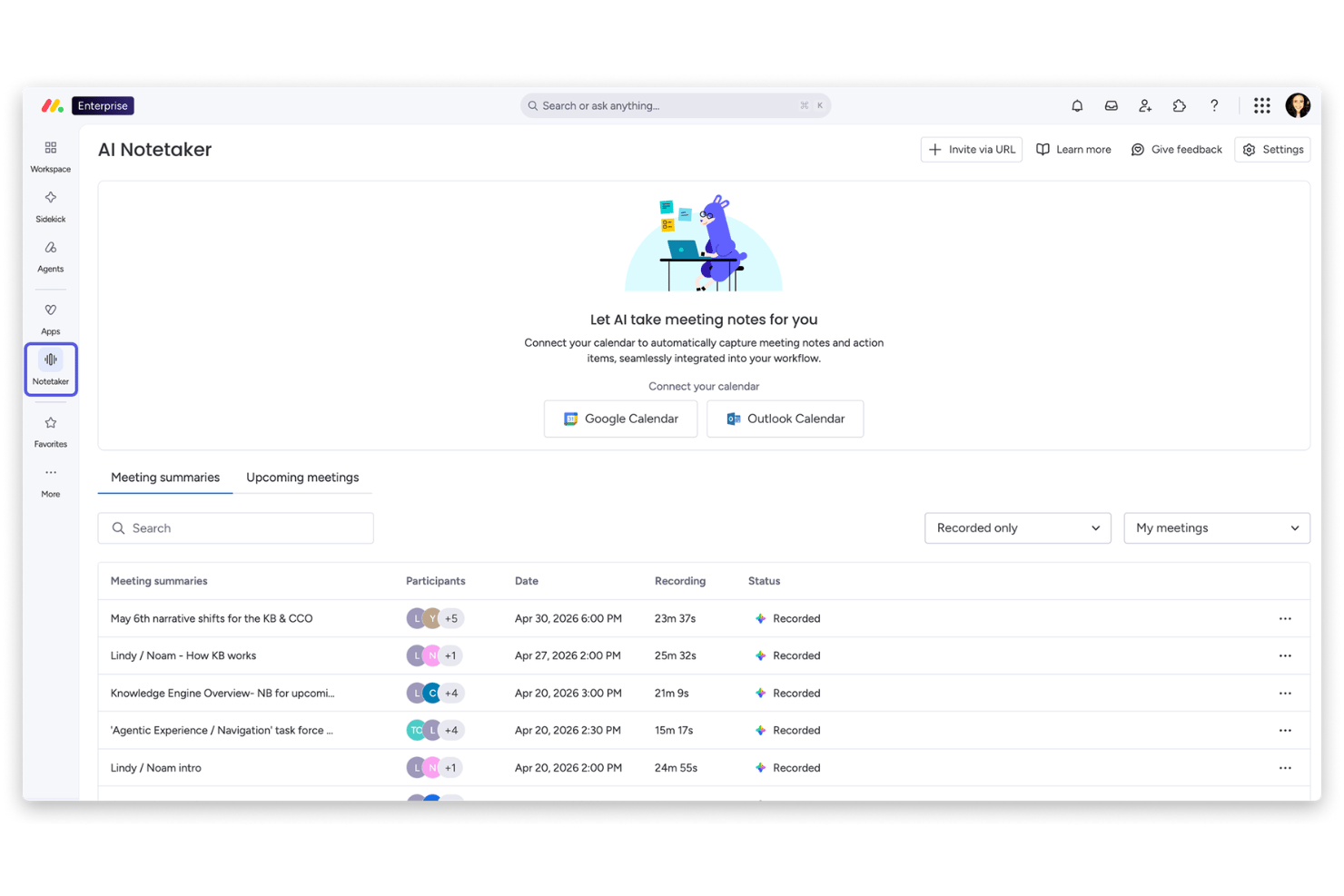
monday AI Workspace is a work management platform that combines AI-driven portfolio oversight, automated risk identification, resource management, cross-project dependency tracking, and executive reporting across multi-project environments.
Who Is monday AI Workspace Best For?
It's a strong fit for enterprise PMO teams managing large, multi-project portfolios who need AI-powered risk visibility without leaving their core work management platform.
Why I Picked monday AI Workspace
I picked monday AI Workspace because of how its Portfolio Risk Insights feature works in practice. Every day, the AI scans each project board for patterns like repeated vendor delays or timeline slippage, then generates a ranked risk list across the entire portfolio. That means I can spot a cascading dependency issue before it hits a delivery date, not after.
monday AI Workspace Key Features
- AI-powered reporting and dashboards: Automatically generates live portfolio dashboards, project health summaries, and executive reports.
- Resource management module: Offers skills-based allocation, workload balancing, and multi-project capacity planning.
- Native integrations with execution tools: Connects with Jira, Salesforce, Microsoft Teams, Slack, and other systems for unified project data.
- Custom AI workflow builder: Lets teams create AI-driven automations and workflow agents tailored to PMO-specific processes.
monday AI Workspace Integrations
monday AI Workspace offers hundreds of native integrations, including Jira, Salesforce, Slack, Microsoft Teams, GitHub, HubSpot, Google Workspace, ServiceNow, Dropbox, and Zoom. It supports Zapier and provides an API for custom integrations.
Pros and Cons
Pros:
- Custom AI workflow builder for PMO processes
- Multi-board dashboards consolidate cross-project data
- AI generates daily ranked portfolio risk insights
Cons:
- Scenario simulation is limited versus PPM leaders
- Advanced portfolio features only on Enterprise
New Product Updates from monday AI Workspace
monday AI Workspace Adds Human Approval Routing
monday AI Workspace adds a human-in-the-loop approval block to AI Workflows, sending approval requests and routing workflow paths based on responses. For more information, visit monday AI Workspace's official site.

Wrike
Best for no-code automation
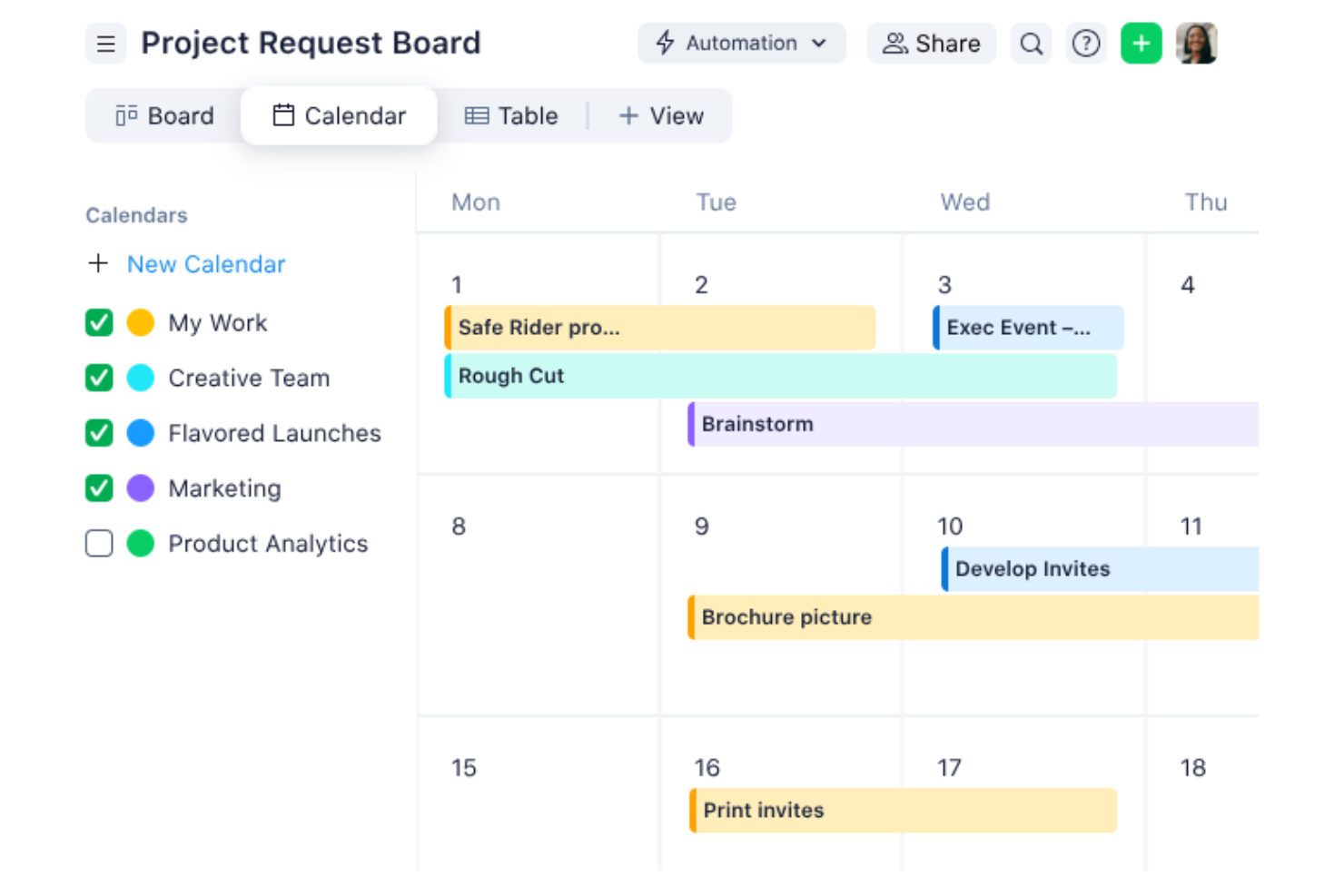
Navigating the complexities of project management becomes seamless with Wrike, a tool designed for teams who value efficiency and collaboration. Ideal for businesses aiming to optimize their project management office (PMO) operations, Wrike leverages automation and AI to minimize routine tasks, allowing your team to focus on strategic objectives. Whether you're in retail, manufacturing, or entertainment, Wrike offers solutions that address common challenges like workflow bottlenecks and communication gaps.
Why I Picked Wrike
I chose Wrike for its standout AI-driven project planning capabilities, which cater specifically to PMO needs. The platform's generative AI assists in creating comprehensive project plans and offers real-time analytics to track project progress. Additionally, Wrike's no-code automation feature streamlines repetitive tasks, freeing up your team’s time for more critical activities. These functionalities are particularly beneficial for teams seeking to enhance productivity and maintain a clear overview of their projects.
Wrike Key Features
In addition to its AI-driven planning and automation, Wrike offers several other features that enhance its utility as a PMO tool.
- Customizable Dashboards: Tailor your project view to suit your team's needs, ensuring everyone stays on the same page.
- In-Platform Communication: Facilitate seamless communication within your team without the need to switch between different tools.
- Time Tracking: Monitor and manage your team's time effectively to ensure project timelines are met.
- Project Blueprints: Utilize pre-defined templates to kickstart your projects and maintain consistency across various initiatives.
Wrike Integrations
Integrations include QuickBooks, Jira, MS Teams, Salesforce, Adobe Creative Cloud, Microsoft Office 365, Google Workspace, Slack, Dropbox, and Box.
Pros and Cons
Pros:
- Time tracking features available
- In-platform communication reduces the need for external tools
- Customizable dashboards
Cons:
- Project timeline tracking may benefit from enhanced features
- Resource tracking and document storage could be improved
New Product Updates from Wrike
Wrike Adds Klaxoon MCP Integration
Wrike’s Klaxoon MCP integration is now generally available, enabling AI agents to navigate between Wrike tasks and attached whiteboards, read task context, and manage whiteboard attachments via API. For more information, visit Wrike's official site.

Best for enterprise project management

ProProfs Project is a project management tool tailored for enterprises seeking to manage complex projects with ease. It serves large teams and organizations, providing automation, time tracking, and reporting features for task scheduling, resource allocation, and project tracking.
Why I picked ProProfs Project: ProProfs Project offers AI capabilities that improve enterprise project management through intelligent scheduling and automated task allocation. Your team can use AI to predict project timelines and manage resources efficiently.
The software's AI-driven analytics provide insights into project performance, ensuring alignment with business goals. These features make it ideal for enterprises handling multiple projects simultaneously.
Standout features & integrations:
Features include time tracking that helps you stay on deadline, task prioritization tools that ensure teams focus on key deliverables, and collaborative workspaces that facilitate team communication and collaboration.
Integrations include Google Drive, Dropbox, QuickBooks, FreshBooks, Box, Outlook, Slack, Trello, Basecamp, and Zapier.
Pros and Cons
Pros:
- Provides project performance insights
- Offers AI-driven task scheduling
- Handles complex enterprise projects
Cons:
- May require training for new users
- Limited customization for reports

Teamwork
Best for project profitability tracking

Teamwork is project management software designed for teams that need to track project profitability and manage resources efficiently. It serves project managers and teams focused on optimizing delivery and financial outcomes, offering tools for time tracking, budgeting, and workload visibility.
Why I picked Teamwork: Teamwork excels in tracking because its reporting and time-tracking tools help teams monitor billable hours, budget usage, and client work profitability. Its financial reports and workload visibility allow teams to understand margins and manage resources effectively.
Standout features & integrations:
Features include time-tracking tools that help you monitor billable hours, task management features that keep your team organized, and client access features that enable transparency and collaboration with stakeholders.
Integrations include Slack, Google Drive, Dropbox, HubSpot, QuickBooks, Xero, Zapier, Microsoft Teams, Outlook, and Trello.
Pros and Cons
Pros:
- Supports client collaboration
- Offers detailed cost analysis
- Tracks project profitability effectively
Cons:
- Limited customization for dashboards
- Requires setup for financial tracking

Best for remote team collaboration

ProjectManager is a cloud-based project management tool designed for PMOs to improve productivity and collaboration. It supports planning, tracking, and reporting with AI-generated summaries that assist decision-making. It works well for remote teams managing projects across time zones.
Why I picked ProjectManager: ProjectManager excels in remote team collaboration by integrating AI-driven insights that offer project summaries and recommendations. Its AI capabilities help your team make informed decisions quickly.
You can utilize features like real-time dashboards and workflow automation to keep everyone on the same page. The tool’s integration of critical path management ensures that your projects stay on track, even when team members are dispersed.
Standout features & integrations:
Features include real-time dashboards that provide instant visibility into project progress, Kanban boards for managing tasks efficiently, and workflow automation that reduces manual work, freeing up your team to focus on high-impact tasks.
Integrations include Gantt charts, portfolio dashboards, workload tracking, task comments, and file sharing with unlimited storage, helping teams coordinate from different locations.
Pros and Cons
Pros:
- Includes real-time dashboards
- Offers AI-driven project insights
- Supports remote team collaboration
Cons:
- Limited customization options for reports
- May require training for new users


Motion is an AI project management tool designed to boost team productivity by automating tasks and predicting project timelines. It is designed for teams wanting to reduce manual coordination, with AI engines that handle timeline updates and capacity adjustments.
Why I picked Motion: Motion excels in task automation, offering AI roles like an Executive Assistant and Project Manager to handle specific productivity areas. Its AI capabilities allow your team to automate project planning and visualize timelines and milestones with Gantt charts, reducing manual work. You also benefit from features like an AI assistant that simplifies scheduling.
Standout features & integrations:
Features include intelligent dashboards that show productivity trends, automatic dependency handling, and AI-driven capacity planning that redistributes workloads as tasks change.
Integrations include Google Calendar, Slack, Trello, Asana, Jira, Microsoft Teams, Outlook, Zoom, Salesforce, and HubSpot.
Pros and Cons
Pros:
- Offers excellent onboarding support
- Provides detailed productivity insights
- Automates task prioritization
Cons:
- May require a learning curve for new users
- Limited customization options


Digital.ai is an agile project management platform designed for teams that need to adapt quickly to changing project requirements. Its main users are agile teams focused on improving workflow efficiencies, using AI to improve project tracking and predictive analytics.
Why I picked Digital.ai: Digital.ai stands out for its AI-driven capabilities that support agile methodologies, offering tools like AI-enhanced sprint planning and backlog prioritization. It helps your team predict project outcomes and adjust plans dynamically.
The platform’s AI analytics tool provides insights into team performance, ensuring that your project stays on track. These features make it a great choice for teams focused on agile project management.
Standout features & integrations:
Features include customizable workflows that adapt to your team's processes, real-time reporting that keeps everyone informed, and sprint retrospectives that help your team learn and improve continuously.
Integrations include Jira, Salesforce, ServiceNow, Microsoft Teams, Slack, GitHub, Jenkins, Azure DevOps, Confluence, and Bitbucket.
Pros and Cons
Pros:
- Provides real-time project insights
- Offers AI-enhanced sprint planning
- Supports agile methodologies
Cons:
- Limited customization for reporting
- May require initial setup time


Forecast App is a project management tool designed for teams that need precise resource allocation and project forecasting. It uses AI to optimize resource management and predict project outcomes, making it ideal for project managers who want to improve efficiency and planning accuracy.
Why I picked Forecast App: Forecast App's AI capabilities are central to its resource allocation, using machine learning to predict project timelines and resource needs. It offers insights into team utilization and helps you make data-driven decisions. The tool's AI-driven financial insights support budgeting and cost management. These features make it perfect for teams that need to manage resources effectively.
Standout features & integrations:
Features include time tracking that ensures project timelines stay on course, project budgeting that helps manage finances, and task management that keeps your team organized and focused on priorities.
Integrations include Jira, Slack, QuickBooks, Xero, Salesforce, HubSpot, Trello, Asana, Microsoft Teams, and Google Calendar.
Pros and Cons
Pros:
- Facilitates accurate project forecasting
- Offers detailed financial insights
- Provides AI-driven resource optimization
Cons:
- Requires setup time for customization
- May have a steep learning curve


Meisterplan is a project portfolio management tool designed for businesses looking to optimize their project planning and execution. Its main users are project managers and teams who need to visualize and manage resources effectively, using AI-driven scenario planning to forecast outcomes and allocate resources.
Why I picked Meisterplan: Its scenario planning tools use AI-driven analytics to show how different project decisions affect resources and timelines. Teams can compare alternatives and anticipate constraints, making it valuable for organizations needing structured, forward-looking planning.
Standout features & integrations:
Features include drag-and-drop project scheduling, capacity planning to manage workloads, and customizable dashboards for portfolio visibility.
Integrations include Jira, Microsoft Project, Smartsheet, Excel, SAP, ServiceNow, Salesforce, Trello, Asana, and Google Workspace.
Pros and Cons
Pros:
- Provides customizable dashboards
- Offers predictive resource analytics
- Supports detailed scenario planning
Cons:
- Requires initial setup and configuration
- Higher price point for smaller teams
Andre KI-verktøy for PMO
Her er noen flere alternativer for KI-verktøy for PMO som ikke kom med på kortlisten min, men som likevel er verdt å se nærmere på:


How I Evaluate PMO AI Tools
Every tool on this list needs to deliver AI that actually moves the needle for PMO teams—think surfacing portfolio risks before a steering committee meeting, not just rebranding dashboards as "intelligent." I split my evaluation into core functionality every PMO AI tool must have to qualify and the differentiating factors that separate good options from great ones.
Core Functionality (Table Stakes For This List)
When I'm selecting tools for my list, I rank each one on a scale from 0 (does not offer the functionality) to 5 (excels in this area) for each core functionality listed below. Then, I calculate the tool's total score into a percentage. Each tool needs to achieve a minimum total score of 65% to be considered for inclusion.
- AI-Driven Project Insights: I look for AI that analyzes project data and surfaces predictions on timelines, budgets, or outcomes—not just static charts repackaged with an AI label.
- Portfolio-Level Management: The tool should support multi-project visibility, governance, and dependency tracking so PMO leads can prioritize across an entire portfolio.
- Automated Status Reporting: I evaluate whether AI can synthesize project data into exec-ready summaries, like generating a weekly portfolio digest without manual copy-pasting.
- AI Resource Optimization: Smart resource allocation matters here—tools like Smartsheet or Planview that suggest staffing moves based on capacity and skills score well.
- Predictive Risk Detection: I check whether the AI proactively flags at-risk projects with clear reasoning, rather than just offering a manual risk register.
- AI Assistant or Copilot: A conversational interface for querying portfolio data, drafting artifacts, or automating routine tasks adds real day-to-day value for PMO teams.
Once I have a list of tools that meet this criteria, I consider what sets each platform apart.
Differentiating Factors (What Sets Vendors Apart)
Here's how I compare and contrast different vendors:
Standout Features
Scenario simulation is a major differentiator—I look for tools that let PMO leaders model what happens if a project gets delayed or a key resource shifts before committing. Cross-tool data aggregation matters just as much, since most PMOs run execution across Jira, Asana, or Azure DevOps and need a unified portfolio view without manual consolidation. I also check whether AI can auto-generate artifacts like project charters or meeting summaries from raw inputs, saving hours of admin work each week.
Beyond Features
AI transparency matters a lot in this space—I evaluate whether a tool explains how it arrives at its predictions and whether PMO leads can override or adjust AI recommendations. Integration depth is equally important, since a PMO AI tool that can't pull live data from Jira, Azure DevOps, or your ERP is just another silo. I also consider implementation support, because rolling out AI-driven portfolio management across a PMO requires real change management, not just a knowledge base link.
Slik velger du KI-verktøy for PMO
Det er lett å gå seg vill i lange funksjonslister og kompliserte prismodeller. For å hjelpe deg med å holde fokus mens du arbeider deg gjennom din unike prosess for valg av programvare, har vi laget en sjekkliste over faktorer du bør ha i bakhodet:
| Faktor | Hva du bør vurdere |
| Skalerbarhet | Kan verktøyet vokse med teamet ditt? Vurder fremtidige behov, som økt prosjektvolum eller større team, og om verktøyet kan håndtere disse endringene. |
| Integrasjoner | Kan det integreres med de eksisterende systemene dine? Sjekk om det støtter de nåværende verktøyene dine, for eksempel CRM-, ERP- eller kommunikasjonsplattformer, for å unngå forstyrrelser i arbeidsflyten. |
| Tilpasningsmuligheter | Kan du tilpasse det til prosessene dine? Se etter muligheter for å endre dashbord, arbeidsflyter og rapporter slik at de samsvarer med teamets unike arbeidsprosesser. |
| Brukervennlighet | Er verktøyet intuitivt for teamet ditt? En bratt læringskurve kan forsinke innføringen, så prioriter brukervennlige grensesnitt og enkel navigering. |
| Implementering og oppstart | Hvor raskt kan du komme i gang? Vurder ressursene som kreves til oppsett og opplæring, inkludert tilgjengelig brukerstøtte og dokumentasjon. |
| Kostnad | Passer det inn i budsjettet ditt? Sammenlign prismodeller, inkludert brukerbaserte avgifter og årlige rabatter, for å sikre at løsningen passer med de økonomiske rammene dine. |
| Sikkerhetstiltak | Er dataene dine beskyttet? Sjekk om løsningen følger bransjestandarder som GDPR eller ISO, og bekreft at den har kryptering og tilgangskontroller. |
| Tilgjengelig brukerstøtte | Får du hjelp når du trenger det? Vurder åpningstider for brukerstøtte, responstider og om det finnes dedikerte kundeansvarlige eller teknisk støtte. |
Hva er KI-verktøy for PMO?
PMO står for prosjektstyringskontor. Dette viser til teamet eller avdelingen som er ansvarlig for å fastsette prosjektstandarder, føre tilsyn med prosesser og sikre at prosjekter er i tråd med organisasjonens mål.
PMO AI-verktøy er prosjektstyringsløsninger som er forbedret med kunstig intelligens for å forbedre prosjektplanlegging, gjennomføring og oppfølging. De brukes vanligvis av prosjektledere og PMO-team for å øke effektiviteten og nøyaktigheten i prosjektstyringen. Funksjoner som prediktiv analyse, automatisert planlegging og ressursoptimalisering støtter bedre beslutningstaking og sterkere prosjektforankring. Disse verktøyene gir betydelig verdi ved å forbedre produktiviteten og hjelpe team med å levere mer konsistente prosjektresultater.
Funksjoner
Når du velger PMO AI-verktøy, bør du se etter følgende viktige funksjoner:
- Prediktiv analyse: Gir prognoser for prosjektresultater og ressursbehov, slik at team kan ta velinformerte beslutninger.
- Automatisert planlegging: Justerer automatisk prosjektets tidslinjer basert på endringer, noe som reduserer behovet for manuelle statusoppdateringer.
- Ressursoptimalisering: Analyserer teamets kapasitet og fordeler ressurser effektivt, slik at prosjektene holder seg på rett spor.
- AI-drevet innsikt: Tilbyr datadrevne anbefalinger for å forbedre prosjektplanlegging og gjennomføring.
- Scenarioplanlegging: Lar team simulere ulike prosjektstrategier og vurdere mulige konsekvenser før implementering.
- Rapportering i sanntid: Gir oppdatert prosjektstatus og resultatmålinger, noe som legger til rette for rettidige beslutninger.
- Automatisering av oppgaver: Automatiserer repetitive oppgaver, slik at teammedlemmer får mer tid til aktiviteter med stor betydning.
- Tilpassbare dashbord: Lar brukere tilpasse visninger for å vise relevante prosjektdata, noe som forbedrer overvåkingen og oppfølgingen.
- Risikostyring: Identifiserer potensielle prosjektrisikoer og foreslår tiltak for å unngå flaskehalser.
- Budsjettstyring: Følger prosjektutgifter og gir innsikt som hjelper med å forvalte økonomiske ressurser effektivt.
Fordeler
Implementering av PMO AI-verktøy gir flere fordeler for teamet og virksomheten din. Her er noen av fordelene du kan se frem til:
- Bedre beslutningstaking: AI-drevet innsikt hjelper teamet med å ta velinformerte valg, redusere gjetting og forbedre prosjektresultatene.
- Økt effektivitet: Automatisert planlegging og oppgavestyring frigjør tid, slik at teamet kan konsentrere seg om mer strategiske oppgaver.
- Bedre ressursstyring: Optimalisert ressursfordeling sikrer at teamet alltid arbeider med optimal kapasitet uten å overbelaste noen.
- Bedre risikostyring: AI-verktøy identifiserer potensielle risikoer tidlig, slik at du får tid til å håndtere problemer før de påvirker prosjektets tidslinjer.
- Nøyaktige prognoser: Prediktiv analyse gir pålitelige prognoser for prosjektets tidslinjer og budsjetter, noe som reduserer overraskelser underveis.
- Innsikt i sanntid: Oppdatert rapportering holder alle informert, noe som gjør det enklere å følge fremdriften og justere planene etter behov.
- Tilpasset innsikt: Tilpassbare dashbord lar deg skreddersy datavisninger etter prosjektets spesifikke behov, noe som forbedrer oversikten og kontrollen.
Kostnader og priser
Valg av PMO AI-verktøy krever en forståelse av de ulike prismodellene og abonnementene som er tilgjengelige. Kostnadene varierer basert på funksjoner, teamstørrelse, tillegg og mer. Tabellen nedenfor oppsummerer vanlige abonnementer, gjennomsnittsprisene deres og typiske funksjoner som er inkludert i PMO AI-verktøyløsninger:
Sammenligningstabell for PMO AI-verktøy
| Abonnementstype | Gjennomsnittspris | Vanlige funksjoner |
| Gratisabonnement | $0 | Grunnleggende oppgavestyring, begrenset rapportering og brukerstøtte fra fellesskapet. |
| Personlig abonnement | $10-$2600/bruker/måned | Oppgavestyring, grunnleggende rapportering og brukerstøtte via e-post. |
| Bedriftsabonnement | $30-$800 bruker/måned | Avansert rapportering, ressursfordeling, teamsamarbeid og brukerstøtte via chat. |
| Virksomhetsabonnement | $80-$3100/bruker/måned | Tilpassede dashbord, AI-drevet innsikt, dedikert brukerstøtte og forbedret sikkerhet. |
Vanlige spørsmål om PMO AI-verktøy
Her er noen svar på vanlige spørsmål om PMO AI-verktøy:
Hvordan integreres PMO AI-verktøy med eksisterende systemer?
Ja, PMO AI-verktøy kan integreres med eksisterende systemer, som CRM, ERP og kommunikasjonsplattformer. Før du kjøper, bør du kontrollere at verktøyet er kompatibelt med de nåværende systemene dine for å unngå forstyrrelser i arbeidsflyten. Se etter integrasjonsmuligheter med populære verktøy som Salesforce, Slack eller Microsoft Teams. Dette sikrer en smidigere overgang og bidrar til å opprettholde teamets produktivitet.
Kan PMO AI-verktøy håndtere flere prosjekter samtidig?
Ja, de fleste PMO AI-verktøy er utviklet for å håndtere flere prosjekter samtidig. De hjelper deg med å følge opp prosjektplaner, ressursallokeringer og budsjetter på tvers av ulike prosjekter. Bruk funksjoner som oversikter og rapportering for å få en oversikt over alle pågående prosjekter. Denne funksjonen er viktig for team som håndterer flere prosjekter samtidig.
Passer PMO AI-verktøy for små team?
Ja, PMO AI-verktøy kan passe for små team og oppstartsbedrifter, avhengig av verktøyets skalerbarhet og pris. Noen verktøy tilbyr abonnementer tilpasset mindre team, med færre funksjoner til en lavere kostnad. Fokuser på brukervennlighet og viktige funksjoner, som oppgavehåndtering og rapportering. Dette sikrer at også et lite team kan dra nytte av verktøyet uten unødvendig kompleksitet.
Hvordan kan AI forbedre prosjektprognoser i PMO-verktøy?
AI forbedrer prosjektprognoser ved å analysere historiske data og forutsi fremtidige prosjektresultater. Det bidrar til å identifisere potensielle risikoer og ressursbehov, slik at du kan ta informerte beslutninger. Bruk AI-drevet innsikt til å justere prosjektplaner og budsjetter proaktivt. Dette fører til mer nøyaktige prognoser og bedre prosjektstyring.
Hva bør jeg vurdere når jeg går over til et PMO AI-verktøy?
Når du går over til et PMO AI-verktøy, bør du vurdere hvor enkelt det er å komme i gang, tilgjengelige opplæringsressurser og støttetjenester. Sørg for at verktøyet tilbyr veiledninger, webinarer og et responsivt supportteam. Vurder hvordan verktøyet integreres med de nåværende systemene dine, og hvor lang tid datamigreringen krever. Denne forberedelsen bidrar til å sikre en smidig overgang og rask innføring i teamet ditt.