

De 10 beste AI-programvarene for prosjektbudsjettering vurdert i 2026

10 Kortliste over den beste AI-programvaren for prosjektbudsjettering


Det kan raskt bli komplisert å håndtere et prosjektbudsjett, særlig når kostnadene endrer seg eller nye utgifter dukker opp. AI-programvare for prosjektbudsjettering gjør prosessen enklere ved å gi deg oppdaterte tall, prognoser og innsikt du kan stole på. Den gir deg et tydeligere bilde, slik at du kan handle før små problemer utvikler seg til overskridelser.
Jeg har testet et bredt utvalg verktøy og fokusert på dem som gir reell verdi for prosjektledere. Vurderingene mine fokuserer på effektivitet, nøyaktighet og hvor godt hvert alternativ støtter det daglige budsjettarbeidet.
I denne artikkelen går jeg gjennom mine beste anbefalinger og forklarer hvordan AI-funksjonene deres kan hjelpe deg med å holde oversikt over budsjettet fra start til slutt.
Why Trust Our Software Recommendations
Our team has been testing and reviewing software since 2012. As project managers ourselves, we know how difficult—and important—it is to choose the right software.
For this guide, we evaluated tools using hands-on testing and independent research, scoring tools using our selection criteria. We also draw on insights from industry thought leaders and practicing project management experts.
Our reviews reflect our human editorial judgment, not a sales pitch.
Expert reviewers:
Sammenligningstabell for AI-programvare for prosjektbudsjettering
Denne sammenligningstabellen oppsummerer prisopplysningene for mine beste utvalgte AI-programmer for prosjektbudsjettering.
| Tool | Best For | Trial Info | Price | ||
|---|---|---|---|---|---|
| 1 | Best for advanced time tracking and invoicing | 14-day free trial | From $17/user/month | Website | |
| 2 | Best for AI-driven project management | 14-day free trial | Pricing upon request | Website | |
| 3 | Best for micro-budgets | Free demo available | Pricing upon request | Website | |
| 4 | Best for AI in project forecasting | Free demo available | Pricing upon request | Website | |
| 5 | Best for integrated accounting features | 30-day free trial | From $38/month | Website | |
| 6 | Best for AI assist tools | Free demo available | Pricing upon request | Website | |
| 7 | Best for team planner optimization | 34-day free trial | From $14.99/month | Website | |
| 8 | Best for AI-automation | 30-day free trial | From $25/user/month (billed annually) | Website | |
| 9 | Best for resource management | Free demo available | Pricing upon request | Website | |
| 10 | Best for scenario planning | Free demo available | Pricing upon request | Website |


Vurdering av den beste AI-programvaren for prosjektbudsjettering
Nedenfor finner du mine detaljerte sammendrag av den beste AI-programvaren for prosjektbudsjettering som kom med på kortlisten min. Vurderingene mine gir et detaljert innblikk i de viktigste funksjonene, fordelene & ulempene, integrasjonene og de ideelle bruksområdene for hvert verktøy, slik at du kan finne det beste alternativet for deg.

Scoro
Best for advanced time tracking and invoicing

For businesses seeking a sophisticated AI project budget software, Scoro offers a compelling solution. This tool is ideally suited for small to medium-sized enterprises across various sectors, such as consultancies, IT, and engineering, that require robust project and financial management capabilities. Scoro helps address the common challenges associated with fragmented project management tools by providing a unified platform that enhances visibility and control over project finances.
Why I Picked Scoro
I picked Scoro for its unique ability to combine AI-driven insights with comprehensive project financial management features. With Scoro, you can track budget burn and forecast profitability in real-time, which is essential for maintaining financial oversight. Additionally, its user-friendly interface paired with advanced time tracking and invoicing capabilities makes it a standout choice for those looking to manage project budgets more effectively.
Scoro Key Features
In addition to its AI-driven insights, Scoro offers several other features that cater to your project budgeting needs:
- Time Tracking: This feature allows you to monitor the time spent on projects, ensuring accurate billing and time management.
- Invoicing: Create and send invoices directly from the platform, simplifying the billing process.
- Cost Management: Keep track of project expenses and budgets in one place, providing clear visibility into financial performance.
- Collaboration Tools: Facilitate teamwork and communication across your organization to enhance project delivery.
Scoro Integrations
Integrations include Google Calendar, Microsoft Exchange, Xero, QuickBooks, Sage Intacct, Expensify, Stripe, and Jira.
Pros and Cons
Pros:
- Strong financial management tools
- Advanced resource planning capabilities
- AI powered business insights
Cons:
- Steep learning curve initially
- Higher pricing for small teams
New Product Updates from Scoro

Scoro Adds Time Mobile App and ELI Improvements
Scoro adds the Scoro Time mobile app for iOS/Android to track time anywhere and expands ELI with attachments, smarter filtering, and trigger-based actions. For more information, visit Scoro's official site.

Wrike
Best for AI-driven project management
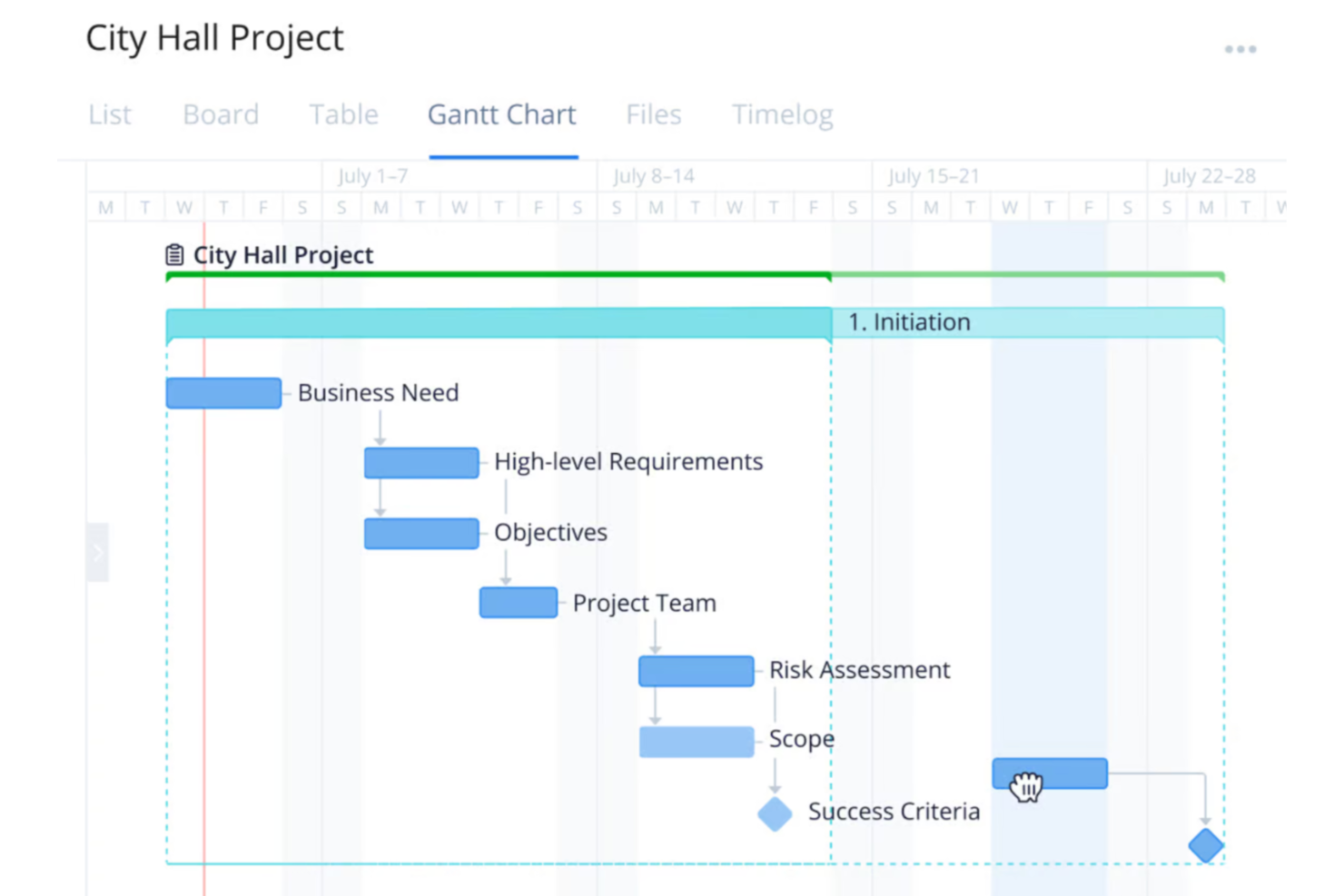
For your team seeking an AI project budget software solution, Wrike presents a compelling choice with its comprehensive project management capabilities. It appeals particularly to businesses and industries that require streamlined workflows and reduced busywork through automation and AI. Wrike addresses the challenge of managing complex projects by offering tools that facilitate efficiency and focus on essential tasks, allowing you to allocate resources effectively and maintain control over project budgets.
Why I Picked Wrike
I picked Wrike because it stands out with its integration of AI capabilities, which are particularly beneficial for project budget management. Wrike's AI tools assist in generating project plans and risk assessments, providing an analytical edge that enhances decision-making. Additionally, its real-time dashboards offer a transparent view of budget allocations and project progress, ensuring your team can quickly adapt to changes. These features align well with the needs of professionals seeking to optimize resource allocation and maintain budget control.
Wrike Key Features
In addition to its AI capabilities, Wrike offers several features that enhance its utility as a project budget software:
- Customizable Workflows: Tailor workflows to fit your team's specific budget management processes, ensuring a personalized approach to project execution.
- Generative AI: Use AI to generate project plans and translate comments, which aids in maintaining clarity and consistency across your team's communications.
- Real-Time Dashboards: Access up-to-date information on project budgets and progress, allowing for informed decision-making and timely adjustments.
- Data Hub: Centralize information access to streamline data management and enhance collaboration across different departments and teams.
Wrike Integrations
Integrations include NetSuite, QuickBooks, Jira, Microsoft Teams, Salesforce, Slack, Google Drive, Dropbox, Box, and GitHub, and the platform supports custom integrations through an API.
Pros and Cons
Pros:
- Integrates with financial accounting tools
- AI supports resource allocation decisions
- Real-time project budget visibility
Cons:
- Advanced budget features cost more
- Not purpose built budgeting software
New Product Updates from Wrike
Wrike Adds Klaxoon MCP Integration
Wrike’s Klaxoon MCP integration is now generally available, enabling AI agents to navigate between Wrike tasks and attached whiteboards, read task context, and manage whiteboard attachments via API. For more information, visit Wrike's official site.
Best for micro-budgets

Datarails is a financial planning and analysis platform designed for finance professionals, offering budgeting, forecasting, and reporting capabilities. Its AI-driven insights help you manage micro-budgets and optimize financial planning with precision.
Why I picked Datarails: The platform's AI capabilities excel in managing micro-budgets through automated data consolidation and real-time analytics. You can efficiently track financial data and generate reports with minimal manual intervention. Its predictive analytics provide insights into spending patterns, enabling you to make informed decisions. Datarails enhances your financial planning by offering detailed budget analysis and scenario planning.
Standout Features & Integrations:
Features include automated data consolidation from multiple sources, customizable dashboards that display key financial metrics, and real-time reporting. The platform offers scenario planning tools to anticipate financial changes. You can benefit from its detailed budget analysis capabilities that break down spending by category.
Integrations include Microsoft Excel, Google Sheets, QuickBooks, Xero, NetSuite, SAP, Oracle, Salesforce, Power BI, and Slack.
Pros and Cons
Pros:
- Supports scenario planning
- Provides detailed budget analysis
- Automates data consolidation
Cons:
- Setup requires time
- Learning curve for advanced features

Anaplan
Best for AI in project forecasting

Anaplan is a cloud-based planning and performance management platform aimed at large enterprises, offering solutions for scenario planning, budgeting, and forecasting. Its AI capabilities provide advanced project forecasting, helping businesses optimize their planning processes.
Why I picked Anaplan: The platform's AI-driven forecasting capabilities allow your team to predict project outcomes with precision. Its predictive analytics and scenario planning tools help you make data-driven decisions. Anaplan's flexible modeling lets you adjust plans in real-time as new data comes in. This ensures you can stay agile and responsive to changing business conditions.
Standout Features & Integrations:
Features include flexible modeling tools that adapt to your business structure, real-time data processing, and scenario planning capabilities. The platform provides advanced analytics to support strategic decision-making. Its collaborative features enhance teamwork by allowing multiple users to work on plans simultaneously.
Integrations include Salesforce, Workday, Microsoft Dynamics, SAP, Oracle, Google Cloud, AWS, Slack, Tableau, and Power BI.
Pros and Cons
Pros:
- Supports collaborative planning
- Provides real-time data
- Offers advanced forecasting
Cons:
- Technical expertise needed for setup
- Complex features require training

Best for integrated accounting features

QuickBooks is an accounting software solution designed for small to medium-sized businesses, providing tools for invoicing, payroll, and expense tracking. Its AI features enhance financial management by automating routine tasks and providing insights into business performance.
Why I picked QuickBooks: The software includes AI features across all its plans, making it accessible for any team size. Its AI-driven automation helps you manage invoices and expenses efficiently. QuickBooks provides predictive insights, allowing you to forecast cash flow and financial trends. This ensures that you can make informed decisions without needing extensive financial expertise.
Standout Features & Integrations:
Features include automated invoicing that sends reminders to clients, payroll management tools, and expense tracking. The software offers detailed financial reporting to help you understand business performance. Its mobile app allows you to manage finances on the go, providing flexibility for your team.
Integrations include PayPal, Shopify, Square, Stripe, HubSpot, Salesforce, Mailchimp, TSheets, Gusto, and BILL.
Pros and Cons
Pros:
- Offers a mobile app
- Provides detailed reporting
- Includes AI in all plans
Cons:
- Setup requires time
- Learning curve for new users

Prophix
Best for AI assist tools

Prophix is a corporate performance management software tailored for finance teams, offering budgeting, forecasting, and financial reporting solutions. Its AI capabilities enhance decision-making by providing predictive analytics and automated insights.
Why I picked Prophix: The software's AI assist tools help your team analyze financial data with precision. Its predictive analytics offer insights into future trends, allowing you to plan effectively. The AI-driven dashboard provides automated reporting, saving you time on manual tasks. You can also benefit from its scenario analysis feature, which helps in evaluating various financial outcomes.
Standout Features & Integrations:
Features include customizable dashboards that adapt to your needs, automated financial reporting that reduces manual work, and scenario analysis tools. The software allows you to create detailed budgets and forecasts tailored to your business. Its interface simplifies data visualization and enhances collaboration within your team.
Integrations include Microsoft Dynamics, NetSuite, Sage Intacct, QuickBooks, SAP, Oracle, Salesforce, Workday, Google Sheets, and Slack.
Pros and Cons
Pros:
- Offers predictive analytics
- Supports scenario analysis
- Provides automated reporting
Cons:
- Implementation takes time
- Learning curve for new users

YNAB
Best for team planner optimization

YNAB is a personal budgeting software designed for individuals and small teams, offering tools to manage finances and track spending. Its AI capabilities help optimize team planning by providing insights into spending habits and budget allocations.
Why I picked YNAB: The software's focus on team planner optimization allows you to manage your budget effectively. Its AI-driven insights help you track spending patterns and adjust your budget accordingly. YNAB's interface facilitates easy access to financial data and planning tools. You can rely on its forecasting features to anticipate future financial needs and make informed decisions.
Standout Features & Integrations:
Features include real-time budget tracking that updates as you spend, customizable spending categories that align with your needs, and goal-setting capabilities. The software offers detailed financial reports to help you understand your spending habits. Its mobile app ensures you can manage your budget on the go.
Integrations include Plaid, Venmo, PayPal, Square, Stripe, Capital One, Chase, Wells Fargo, Bank of America, and American Express.
Pros and Cons
Pros:
- Facilitates goal-setting
- Offers customizable categories
- Provides real-time tracking
Cons:
- Limited business features
- Limited trial available

PSOhub
Best for AI-automation

PSOhub is a project management solution designed for small to mid-sized businesses, offering features like time tracking, project planning, and contract management. Its AI capabilities focus on automating repetitive tasks and providing scenario planning tools to improve efficiency.
Why I picked PSOhub: The software's AI-driven automation helps your team save time by reducing manual data entry and repetitive tasks. Its scenario planning tools allow you to visualize different project outcomes and adapt accordingly. The interface makes it easier to manage projects and resources efficiently. You can rely on its AI features to enhance your team's productivity and decision-making processes.
Standout Features & Integrations:
Features include automated time tracking that captures work hours without manual input, contract management tools, and invoicing capabilities. The software provides project planning tools to help you allocate resources effectively. Its dashboards offer real-time insights into project progress and performance.
Integrations include HubSpot, Salesforce, Microsoft Dynamics, QuickBooks, Xero, Slack, Google Calendar, Outlook, Zapier, and Asana.
Pros and Cons
Pros:
- Provides real-time insights
- Supports scenario planning
- Automates repetitive tasks
Cons:
- Reporting dashboards lack depth compared to some competitors
- Learning curve for advanced features

Best for resource management

Workday Adaptive Planning is a cloud-based business planning software for finance teams, offering capabilities like budgeting, forecasting, and reporting. Its AI-driven analytics provide insights to improve resource management and optimize financial planning.
Why I picked Workday Adaptive Planning: The software's AI features, such as predictive analytics and scenario modeling, assist your team in effective resource management. These tools help you anticipate changes and allocate resources efficiently. The platform's interface makes it easier to visualize data and derive actionable insights. You can rely on its AI to enhance your planning accuracy and decision-making processes.
Standout Features & Integrations:
Features include dashboards that can be customized to display relevant metrics, reporting tools that generate detailed financial analysis, and collaborative planning capabilities. The software allows you to create flexible budgets and forecasts tailored to your needs. Its interface simplifies data visualization and planning tasks.
Integrations include Salesforce, NetSuite, Workday, Oracle, SAP, Microsoft Dynamics, Google Sheets, Slack, QuickBooks, and Xero.
Pros and Cons
Pros:
- Enables collaborative planning
- Offers customizable reports
- Enhances resource allocation and management
Cons:
- Setup can be time-intensive
- Learning curve for advanced features

Planful
Best for scenario planning

Planful is an AI-driven budget software designed for finance professionals to enhance financial management. It supports key business functions like finance, accounting, and operations with features like automated reporting and forecasting.
Why I picked Planful: The platform's AI capabilities, such as the Analyst Assistant, provide instant insights essential for scenario planning. Its AI tools detect anomalies and generate budget projections using historical data. You and your team can use these insights to make informed financial decisions quickly. The platform integrates with existing systems while maintaining data security.
Standout Features & Integrations:
Features include automated reporting tools that reduce manual work, forecasting capabilities that use historical data patterns, and an in-app help system for guidance. The Analyst Assistant delivers instant insights and scenario planning tools that allow you to model different financial outcomes. The platform provides dynamic reporting that adapts to your needs.
Integrations include Salesforce, NetSuite, Microsoft Dynamics, Oracle, SAP, QuickBooks, Xero, Workday, Google Sheets, and Slack.
Pros and Cons
Pros:
- Integrates with major ERPs
- Provides predictive analytics
- Supports scenario modeling
Cons:
- Learning curve for new users
- Setup requires technical knowledge
Annen AI-programvare for prosjektbudsjettering
Her er noen flere alternativer for AI-programvare for prosjektbudsjettering som ikke kom med på kortlisten min, men som likevel er verdt å sjekke ut:
- PlanGuru
For long-range financial modeling
- Cube Software
For pre-filled timesheets
- Budgyt
For AI-resourcing
- Forecast
For real-time project health scoring
- Vena
For integrated planning
- BigTime
For billable hours tracking
- Hive
For AI task management
- Monograph
For architects and designers
- ClickUp
For customizable workflows
- Motion AI
For AI scheduling automation


How I Evaluate AI Project Budget Software
I look for tools where AI genuinely shifts how you handle project budgets—like catching a cost overrun weeks before it blows up your forecast. My evaluation splits into core functionality a tool needs to make the list and differentiating factors that separate the strongest fits.
Core Functionality (Table Stakes For This List)
When I'm selecting tools for my list, I rank each one on a scale from 0 (does not offer the functionality) to 5 (excels in this area) for each core functionality listed below. Then, I calculate the tool's total score into a percentage. Each tool needs to achieve a minimum total score of 65% to be considered for inclusion.
- AI Budget Forecasting: I evaluate whether the tool can generate forward-looking budget projections using historical project data—like predicting a Phase 2 cost overrun based on Phase 1 actuals.
- Automated Cost Tracking: The tool should capture labor, expenses, and resource costs against the budget in real time rather than relying on manual spreadsheet updates.
- AI Variance Detection: I look for proactive alerts when spending drifts from the plan, such as flagging a spike in contractor hours before it erodes your project margin.
- Predictive Estimating: A strong tool pulls from past project data to produce AI-assisted estimates, helping teams scope new projects with more accuracy than gut-feel guesswork.
- Project Financial Reporting: I check for AI-enhanced dashboards that roll up budget health across a portfolio, giving PMO leads a clear picture without hours of manual report building.
- PM Tool Integration: The platform should sync with the PM, accounting, or ERP tools your team already uses so budget data stays connected to tasks, time, and deliverables.
Once I have a list of tools that meet this criteria, I consider what sets each platform apart.
Differentiating Factors (What Sets Vendors Apart)
Here's how I compare and contrast different vendors:
Standout Features
Scenario simulation is a big one—I want to see what happens to the bottom line if a vendor rate increases or a timeline slips by three weeks before I commit to a change. AI risk scoring adds another layer by flagging projects most likely to blow their budget based on live indicators. I also look for tools that go further with auto-generated recommendations, like suggesting where to reallocate underspent funds across a portfolio.
Beyond Features
AI model transparency matters here. When a tool flags a budget overrun, I want to understand what data drove that prediction. Your finance team will ask the same questions during an audit. Integration depth is just as important—budget data in a silo loses value fast. I check whether the tool syncs bidirectionally with your accounting and ERP systems. Security posture is another key factor, since project financials are sensitive and typically require SOC 2 compliance and role-based access controls.
Slik velger du AI-programvare for prosjektbudsjettering
Det er lett å gå seg vill i lange funksjonslister og kompliserte prismodeller. For å hjelpe deg med å holde fokus mens du går gjennom den unike programvarevalgsprosessen din, får du her en sjekkliste over faktorer du bør ha i tankene:
| Faktor | Hva du bør vurdere |
| Skalerbarhet | Kan programvaren vokse sammen med teamet ditt? Vurder om den støtter dagens størrelse og fremtidig utvidelse uten ekstra kostnader eller komplikasjoner. |
| Integrasjoner | Fungerer den med de eksisterende verktøyene dine? Sjekk kompatibiliteten med CRM-systemet, regnskapsprogramvaren og andre viktige plattformer. |
| Tilpasningsmuligheter | Kan du tilpasse verktøyet til prosessene dine? Se etter alternativer for å justere dashbord, arbeidsflyter og rapporter slik at de passer behovene dine. |
| Brukervennlighet | Er grensesnittet intuitivt? Sørg for at teammedlemmene kan navigere i det uten omfattende opplæring eller frustrasjon. |
| Implementering og opplæring | Hvor raskt kan du komme i gang? Vurder oppsettstiden, tilgangen på opplæringsmateriell og støtten under opplæringsprosessen. |
| Kostnad | Passer den inn i budsjettet ditt? Sammenlign prisplanene og sørg for at det ikke finnes skjulte gebyrer som kan belaste økonomien din. |
| Sikkerhetstiltak | Er dataene dine beskyttet? Se etter kryptering, samsvar med bransjestandarder og jevnlige oppdateringer for å holde informasjonen sikker. |
| Tilgjengelig brukerstøtte | Hvilke støttealternativer er tilgjengelige? Sørg for tilgang til chat, e-post og telefonstøtte, særlig i kritiske perioder for driften din. |
Hva er AI-programvare for prosjektbudsjettering?
AI-programvare for prosjektbudsjettering er et verktøy som bruker kunstig intelligens til å hjelpe med å administrere og optimalisere prosjektbudsjetter. Finansanalytikere, prosjektledere og bedriftsledere bruker vanligvis disse verktøyene for å forbedre kostnadsstyring og beslutningstaking.
Prediktiv analyse, automatisert prognostisering og sanntidsinnsikt i data bidrar til nøyaktig budsjettplanlegging og ressursallokering. Disse verktøyene skaper verdi ved å forbedre effektiviteten og nøyaktigheten i økonomisk planlegging.
Funksjoner
Når du velger AI-programvare for prosjektbudsjettering, bør du se etter følgende nøkkelfunksjoner:
- Prediktiv analyse: Bruker kunstig intelligens til å forutsi fremtidige økonomiske trender, slik at du kan planlegge budsjetter mer nøyaktig.
- Automatisert prognostisering: Genererer budsjettprognoser med minimalt manuelt arbeid, noe som sparer tid og reduserer feil.
- Sanntidsinnsikt i data: Gir oppdatert økonomisk informasjon, slik at du kan ta raske beslutninger.
- Scenarioplanlegging: Lar deg modellere ulike økonomiske utfall, slik at du kan forberede deg på forskjellige situasjoner.
- KI-drevne varsler: Varsler deg om budsjettavvik eller potensielle problemer, slik at du kan håndtere dem proaktivt.
- Tilpassbare dashbord: Lar deg tilpasse datavisninger etter spesifikke behov, noe som forbedrer brukervennligheten og fokuset.
- Ressursallokering: Optimaliserer fordelingen av ressurser basert på KI-analyse og forbedrer effektiviteten.
- Integrasjonsmuligheter: Kobler seg til andre verktøy for å gi en sømløs flyt av økonomiske data.
- Sikkerhetstiltak: Beskytter sensitiv økonomisk informasjon med kryptering og tiltak for etterlevelse.
- Samarbeidsfunksjoner: Støtter teamarbeid ved å la flere brukere få tilgang til og arbeide med budsjetter samtidig.
Fordeler
Implementering av AI-programvare for prosjektbudsjettering gir flere fordeler for teamet og virksomheten din. Her er noen av fordelene du kan se frem til:
- Forbedret nøyaktighet: KI-drevet analyse reduserer manuelle feil i budsjettprognoser, noe som fører til mer pålitelige økonomiske planer.
- Tidsbesparelser: Automatisert prognostisering og databehandling frigjør tid for teamet, slik at det kan fokusere på strategiske oppgaver.
- Bedre beslutningstaking: Sanntidsinnsikt og prediktiv analyse gir informasjonen som trengs for velinformerte økonomiske beslutninger.
- Proaktiv styring: KI-varsler informerer deg om potensielle budsjettproblemer, slik at du kan håndtere dem før de eskalerer.
- Ressursoptimalisering: KI-funksjoner hjelper med å fordele ressurser effektivt og sikrer optimal bruk av budsjettet.
- Økt samarbeid: Samarbeidsfunksjoner støtter teamarbeid ved å la flere brukere arbeide med budsjetter sammen.
- Skalerbarhet: Programvaren vokser med virksomheten din og tilpasser seg økte datamengder og større kompleksitet uten ekstra problemer.
Kostnader og priser
Valg av AI-programvare for prosjektbudsjettering krever en forståelse av de ulike prismodellene og abonnementene som er tilgjengelige. Kostnadene varierer basert på funksjoner, teamstørrelse, tillegg og mer. Tabellen nedenfor oppsummerer vanlige abonnementer, gjennomsnittsprisene deres og typiske funksjoner som er inkludert i løsninger for AI-programvare for prosjektbudsjettering:
Sammenligningstabell for AI-programvare for prosjektbudsjettering
| Abonnementstype | Gjennomsnittspris | Vanlige funksjoner |
| Gratisabonnement | $0 | Grunnleggende budsjetteringsverktøy, begrenset rapportering og brukerstøtte fra fellesskapet. |
| Personlig abonnement | $9-$83/bruker/måned | Tilpassbare dashbord, grunnleggende prognostisering, brukerstøtte via e-post og begrensede integrasjoner. |
| Bedriftsabonnement | $45-$75/bruker/måned | Avansert analyse, automatiserte varsler, tilgang for flere brukere og forbedrede sikkerhetsfunksjoner. |
| Virksomhetsabonnement | $80-$5000/bruker/måned | Fullstendige integrasjonsmuligheter, KI-drevet innsikt, prioritert brukerstøtte og scenarioplanlegging. |
Vanlige spørsmål om AI-programvare for prosjektbudsjettering
Her er noen svar på vanlige spørsmål om AI-programvare for prosjektbudsjettering:
Hvordan kan AI-programvare for prosjektbudsjettering forbedre prognosenøyaktigheten?
AI-programvare for prosjektbudsjettering forbedrer prognosenøyaktigheten ved å bruke prediktiv analyse til å analysere historiske data og identifisere trender. Dette gjør det mulig å lage mer informerte prognoser for fremtidige økonomiske resultater. Programvaren kan for eksempel fremheve sesongbaserte utgiftsmønstre, slik at du kan fordele ressurser mer effektivt. Ved å automatisere dataanalysen reduserer den menneskelige feil og gir innsikt i sanntid, slik at prognosene dine blir så nøyaktige som mulig.
Er det vanskelig å integrere AI-programvare for prosjektbudsjettering med eksisterende verktøy?
Nei, de fleste løsninger for AI-programvare for prosjektbudsjettering er utviklet for å integreres enkelt med eksisterende verktøy som CRM-systemer, regnskapsprogramvare og ERP-systemer. Før du velger et verktøy, bør du kontrollere at det er kompatibelt med den nåværende programvarestakken din. Dette sikrer en jevn dataflyt mellom systemene, noe som bidrar til å opprettholde datanøyaktigheten og sparer tid ved å eliminere behovet for manuell dataregistrering.
Kan AI-programvare for prosjektbudsjettering støtte fjernarbeidende team?
Ja, AI-programvare for prosjektbudsjettering er spesielt nyttig for fjernarbeidende team, siden den gir skybasert tilgang til økonomiske data. Dette sikrer at alle i teamet har tilgang til den samme informasjonen i sanntid, uavhengig av hvor de befinner seg. Funksjoner som samarbeidsbasert planlegging og delte oversikter fremmer teamarbeid og holder alle samkjørte med hensyn til budsjettmålene, noe som gjør samarbeid på avstand mer effektivt.
Hvilke sikkerhetstiltak bør jeg forvente fra AI-programvare for prosjektbudsjettering?
AI-programvare for prosjektbudsjettering omfatter vanligvis sikkerhetstiltak som datakryptering, brukerautentisering og samsvar med bransjestandarder som GDPR. Før du velger et verktøy, bør du kontrollere at det oppfyller sikkerhetskravene til organisasjonen din og tilbyr regelmessige oppdateringer for å beskytte mot sårbarheter. Dette bidrar til å beskytte økonomiske data mot uautorisert tilgang og potensielle sikkerhetsbrudd.
Hvordan vurderer jeg avkastningen på investeringen i AI-programvare for prosjektbudsjettering?
For å vurdere avkastningen på investeringen i AI-programvare for prosjektbudsjettering bør du ta hensyn til både kvantitative og kvalitative fordeler. Kvantitativt bør du se på tiden som spares på manuelle oppgaver, og forbedringer i prognosenøyaktigheten. Kvalitativt bør du vurdere hvordan programvaren har forbedret teamsamarbeid og beslutningstaking. Sammenlign disse fordelene med kostnadene for programvaren for å avgjøre om den gir verdi for organisasjonen din.