



Confluence mot Jira: Sammenligning og ekspertanmeldelser for 2026



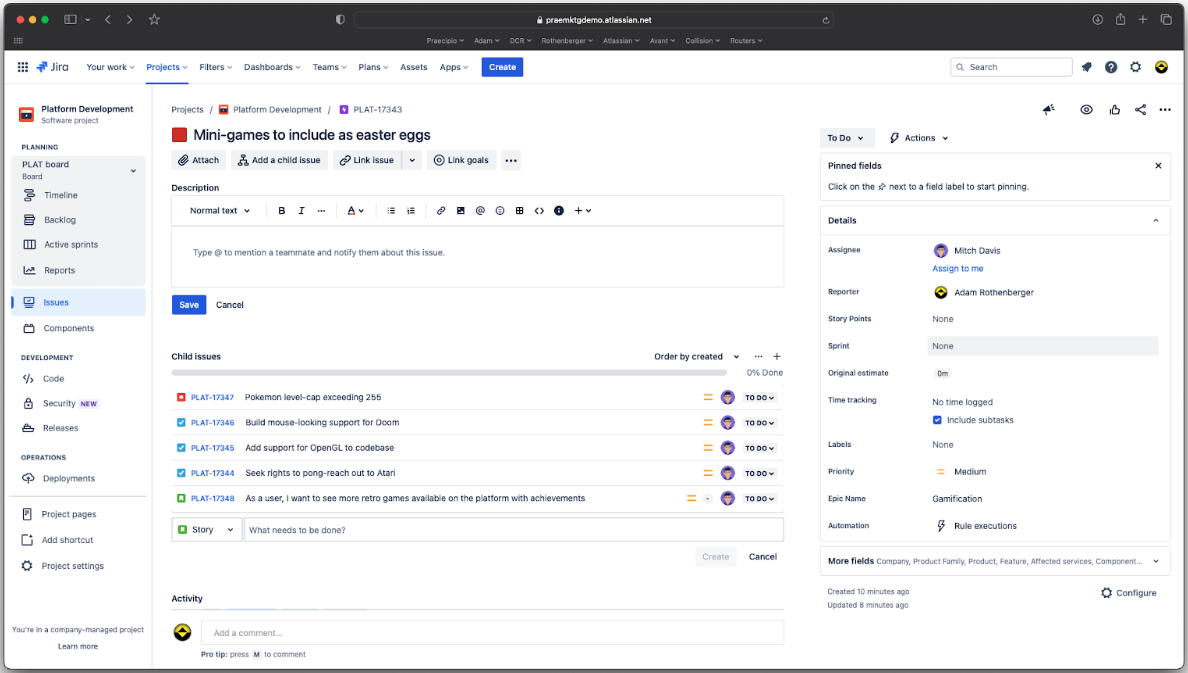
Confluence offers a collaborative workspace for your team, fostering seamless knowledge sharing and project tracking. Jira, on the other hand, is designed to help you manage and track issues and tasks with precision.
While both tools are integral to project management, Confluence excels in documentation and collaboration, whereas Jira is a powerhouse for issue tracking and agile project management. In this article, you'll find a detailed comparison of these tools, exploring their features, pros and cons, and pricing, to help you choose the right project management software for your needs.
Confluence vs. Jira: An Overview
Confluence





Jira
Why Trust Our Software Recommendations
Our team has been testing and reviewing software since 2012. As project managers ourselves, we know how difficult—and important—it is to choose the right software.
For this guide, we evaluated tools using hands-on testing and independent research, scoring tools using our selection criteria. We also draw on insights from industry thought leaders and practicing project management experts.
Our reviews reflect our human editorial judgment, not a sales pitch.
Expert reviewers:
Confluence vs. Jira Pricing Comparison
| Confluence | Jira | |
|---|---|---|
| Free Trial | Free plan available | Free plan available |
| Pricing | From $5.78/user/month | From $8.48/user/month |
Confluence- og Jira-priser samt skjulte kostnader
Confluence-priser er basert på en trinnvis abonnementsmodell, der kostnadene øker etter hvert som teamet ditt vokser, med mulige ekstrakostnader for flere funksjoner eller mer lagringsplass.
Jira-priser følger en lignende trinnvis struktur, der kostnadene er knyttet til antall brukere og mulige tillegg for premiumfunksjoner.
For å velge riktig verktøy for budsjettet ditt bør du vurdere de spesifikke funksjonene teamet ditt trenger, og beregne de totale eierkostnadene, inkludert eventuelle skjulte kostnader. Test ulike abonnementsnivåer og tillegg for å se hva som passer best med arbeidsflyten og vekstplanene dine.
Confluence vs. Jira Feature Comparison
Confluences samarbeidsredigering gjør det mulig for team å opprette og dele prosjektdokumentasjon i sanntid, noe som gjør verktøyet spesielt nyttig under idédugnader. Jiras smidige tavler bidrar til å håndtere komplekse prosjekter ved å spore oppgaver og sprinter effektivt, noe som er særlig nyttig for utviklingsteam.
Hvert verktøy har sine styrker: Confluence er utviklet for samarbeid, mens Jira er utformet for oppgavehåndtering.
| Confluence | Jira | |
|---|---|---|
| API | ||
| Calendar Management | ||
| Data Export | ||
| Data Import | ||
| External Integrations | ||
| Gantt Charts | ||
| Multi-User | ||
| Notifications | ||
| Project Management | ||
| Task Scheduling/Tracking |
Confluence vs Jira-integrasjoner
| Integrasjon | Confluence | Jira |
| Slack | ✅ | ✅ |
| Microsoft Teams | ✅ | ✅ |
| Google Drive | ✅ | ✅ |
| Trello | ✅ | ✅ |
| GitHub | ❌ | ✅ |
| Bitbucket | ✅ | ✅ |
| Dropbox | ✅ | ✅ |
| Salesforce | ❌ | ✅ |
| API | ✅ | ✅ |
| Zapier | ✅ | ✅ |
Confluence integreres med Slack for å holde teamet ditt oppdatert om dokumentendringer i sanntid, noe som er nyttig under møter om prosjektstatus. Selv om både Confluence og Jira støtter et bredt utvalg integrasjoner, er det viktig å merke seg at noen av dem, som GitHub eller Salesforce for Confluence, krever tredjepartsverktøy som Zapier eller apper fra Atlassian Marketplace, i stedet for å være innebygde integrasjoner.
Jira integreres med GitHub, slik at utviklingsteam kan spore kodeendringer direkte i prosjektoppgaver. Confluence forbedrer kommunikasjonen i teamet, mens Jira støtter utviklingsarbeidsflyter.
Confluence vs Jira-sikkerhet, samsvar & pålitelighet
| Faktor | Confluence | Jira |
| Personvern for data | Confluence tilbyr alternativer for datalagring, slik at du kan velge hvor dataene dine lagres. | Jira tilbyr datakryptering under overføring og ved lagring for å beskytte sensitiv informasjon. |
| Regelverksetterlevelse | Confluence overholder GDPR og andre internasjonale standarder. | Jira følger SOC2 og ISO/IEC 27001 for omfattende regelverksetterlevelse. |
| Tilgangskontroll | Confluence tilbyr detaljerte innstillinger for tillatelser for å administrere innsyn i innhold og brukertilgang. | Jira tilbyr detaljerte, rollebaserte tilgangskontroller for å administrere tillatelser på prosjektnivå og brukerroller. |
Confluence og Jira tilbyr begge sterke sikkerhetsfunksjoner, inkludert detaljerte tillatelseskontroller for å administrere tilgang på side- eller prosjektnivå. Jira har et bredere utvalg samsvarssertifiseringer, men begge verktøyene støtter sikkerhetsstandarder på bedriftsnivå. Når du vurderer dem, bør du se på datalagring, kryptering og detaljnivået for tillatelser for å sikre at plattformen samsvarer med teamets behov for sikkerhet og styring.
Confluence vs. Jira – brukervennlighet
| Faktor | Confluence | Jira |
| Brukergrensesnitt | Confluence har et oversiktlig grensesnitt med intuitiv navigasjon for samarbeid om dokumentasjon. | Jiras grensesnitt er mer komplekst og er tilpasset detaljert oppgavehåndtering og arbeidsflyter. |
| Introduksjonsopplevelse | Confluence tilbyr interaktive veiledninger og maler som gjør det enklere for nye brukere å komme i gang med plattformen. | Jira tilbyr introduksjonsrunder, men krever en brattere læringskurve på grunn av de omfattende funksjonene. |
| Støtte | Confluence tilbyr brukerfora og dokumentasjon for rask hjelp. | Jira tilbyr omfattende støtte og detaljert dokumentasjon samt aktive brukerfora. |
Confluence er enkelt å lære, takket være det enkle grensesnittet og de ferdige malene som gjør dokumenthåndtering oversiktlig. Jira har derimot en brattere læringskurve på grunn av kompleksiteten, men egner seg godt for team som trenger avansert prosjekt- og oppgaveoppfølging.
Confluence vs Jira: Pros & Cons
Confluence
- You can easily collaborate with your team through intuitive document sharing.
- It offers powerful search capabilities to quickly find the information you need.
- Your team can benefit from its extensive templates, saving time on setup.
- You might find its interface less visually appealing compared to other tools.
- It can be overwhelming for new users due to its extensive features.
- Your team may experience occasional performance issues with large data sets.
Jira
- Agile workflow management supports Scrum and Kanban and can improve your teams' productivity.
- Automation rules are easy to set up, which helps your team speed up their work.
- Custom filters can be created and accessed quickly, which improves your team's efficiency.
- Field names can be confusing, which might slow down your team's workflow.
- The interface can be too crowded in Scrum projects, which can make it hard for your team to navigate.
- There's a lack of resource management capabilities, which could limit your team's planning.
Best Use Cases for Confluence and Jira
Confluence
- Software development teams Your team can benefit from Confluence's strong document management features, which keep project specs and updates centralized.
- Marketing departments You can streamline campaign planning and content creation with Confluence's templates and collaboration tools.
- Educational institutions Your institution can use Confluence to support faculty collaboration and manage course materials effectively.
- Remote teams You can maintain clear communication and document sharing across distances with Confluence's online capabilities.
- Product management Your product team can track development progress and share feedback efficiently with Confluence's collaborative features.
- Non-profit organizations You can organize and manage volunteer efforts and project documentation with Confluence's easy-to-use interface.
Jira
- Software development Jira’s agile tools like Scrum and Kanban boards make it perfect for managing software projects.
- IT departments Its issue tracking capabilities help your team efficiently handle technical support and bug fixes.
- Tech startups Jira offers customization capabilities that allow your team to scale and adapt as your projects grow.
- Agile teams Sprint planning and backlog management features keep your agile processes organized and effective.
- Large enterprises Jira’s automation rules can streamline your complex workflows and improve team productivity.
- Project managers Its reporting and analytics provide insights that help you make informed decisions quickly.
Differences Between Confluence and Jira
Nedenfor finner du informasjon om hva som skiller disse verktøyene fra hverandre.
| Confluence | Jira | |
|---|---|---|
| Automation | Confluence has no built-in automation but connects with Jira rules. | Jira offers task rules, triggers, and updates to automate workflows. |
| Compliance | Confluence has basic permissions but limited compliance features. | Jira supports audit logs, controls, and setups for strict compliance |
| Pricing | Confluence uses a tiered subscription model based on user count and features | Jira also follows a tiered model, with additional costs for premium features and more users. |
| Scalability | Confluence scales with your team’s need for organized content. | Jira scales with complex projects and large teams handling tasks. |
| User Interface | Confluence offers a clean, intuitive interface for easy navigation and collaboration | Jira has a more complex interface tailored for detailed project management and workflows. |
| Read Confluence ReviewOpens new window | Read Jira ReviewOpens new window |
Similarities Between Confluence and Jira
Nå som du vet hva som skiller dem, kan vi se på likhetene.
| Cloud-Based | Both Confluence and Jira are cloud-based, allowing your team to access them from anywhere, enhancing remote collaboration. |
|---|---|
| Customization | Both tools offer customization features, letting you tailor dashboards and workflows to fit your team’s specific needs. |
| Integrations | Confluence and Jira both integrate with a wide range of third-party apps, enhancing their functionality within your existing tech stack |
| Security | Both platforms prioritize security with features like data encryption and access controls to protect your team’s information |
| Support | Confluence and Jira both provide extensive support through documentation, forums, and active user communities to help you solve issues quickly. |
| Read Confluence ReviewOpens new window Read Jira ReviewOpens new window | |