

10 beste KI-programvarer for oppgavehåndtering – vurdert i 2026

Beste AI-programvare for oppgavehåndtering


Det kan være overveldende å håndtere oppgaver, særlig når du må holde styr på flere prosjekter og tidsfrister. Du kan fort ende opp med å drukne i regneark og huskelapper mens du prøver å holde oversikt over gjøremålslisten. Det er her AI-programvare for oppgavehåndtering kommer inn. Disse verktøyene hjelper deg med å organisere, prioritere og automatisere oppgaver, slik at du får mer tid til det som virkelig betyr noe.
Etter min erfaring kan AI-verktøy endre måten teamet ditt arbeider på ved å redusere manuelt arbeid og øke effektiviteten. Jeg har testet og vurdert ulike programvarer for å gi deg en objektiv oversikt over de beste tilgjengelige alternativene. I denne artikkelen finner du innsikt i funksjonene, fordelene og de unike salgsargumentene til hvert verktøy. Enten du er prosjektleder eller del av et lite team, finnes det noe her som kan hjelpe deg med å lykkes.
Hvorfor du kan stole på våre programvareanbefalinger
Teamet vårt har testet og anmeldt programvare siden 2012. Vi er selv prosjektledere, så vi vet hvor vanskelig og hvor viktig det er å velge riktig programvare.
I denne guiden har vi vurdert verktøyene gjennom praktisk testing og uavhengig research og gitt dem poeng ut fra våre utvelgelseskriterier. Vi bygger også på innsikt fra ledende eksperter i bransjen og erfarne prosjektledere.
Anmeldelsene våre bygger på vår egen redaksjonelle vurdering. De er ikke et salgsargument.
Ekspertanmeldere:
Sammenligningstabell for AI-programvare for oppgavehåndtering
Denne sammenligningstabellen oppsummerer prisopplysningene for mine beste utvalgte programmer for AI-oppgavehåndtering.
| Tool | Best For | Trial Info | Price | ||
|---|---|---|---|---|---|
| 1 | Best for AI-driven task insights | Free plan available; 14-day free trial | From $9/user/month (billed annually) | Website | |
| 2 | Best for agile project management | Free trial + free plan + free demo available | From $13/user/month (billed annually) | Website | |
| 3 | Best for collaborative mind mapping | Free plan available | From $20/month | Website | |
| 4 | Best for team collaboration | Free plan available | From $10.99/user/month (billed annually) | Website | |
| 5 | Best for automated task scheduling | 7-day free trial | From $4.60/user/month (billed annually) | Website | |
| 6 | Best for intuitive task automation | Free trial available | From $19/seat/month (billed annually) | Website | |
| 7 | Best for smart calendar integration | Free plan available | From $10/seat/month | Website | |
| 8 | Best for time blocking | Free plan available and 7-day free trial | From $5/month (billed annually) | Website | |
| 9 | Best for voice-activated task management | Free demo available | From $79.99/year (billed annually) | Website | |
| 10 | Best for IT professionals | 30-day free trial available | Pricing upon request | Website |

Anmeldelser av den beste AI-programvaren for oppgavehåndtering
Nedenfor finner du mine detaljerte sammendrag av den beste AI-programvaren for oppgavehåndtering som kom med på listen min. Anmeldelsene mine gir en detaljert gjennomgang av de viktigste funksjonene, fordeler & ulemper, integrasjoner og ideelle bruksområder for hvert verktøy, slik at du kan finne det som passer best for deg.

Best for AI-driven task insights
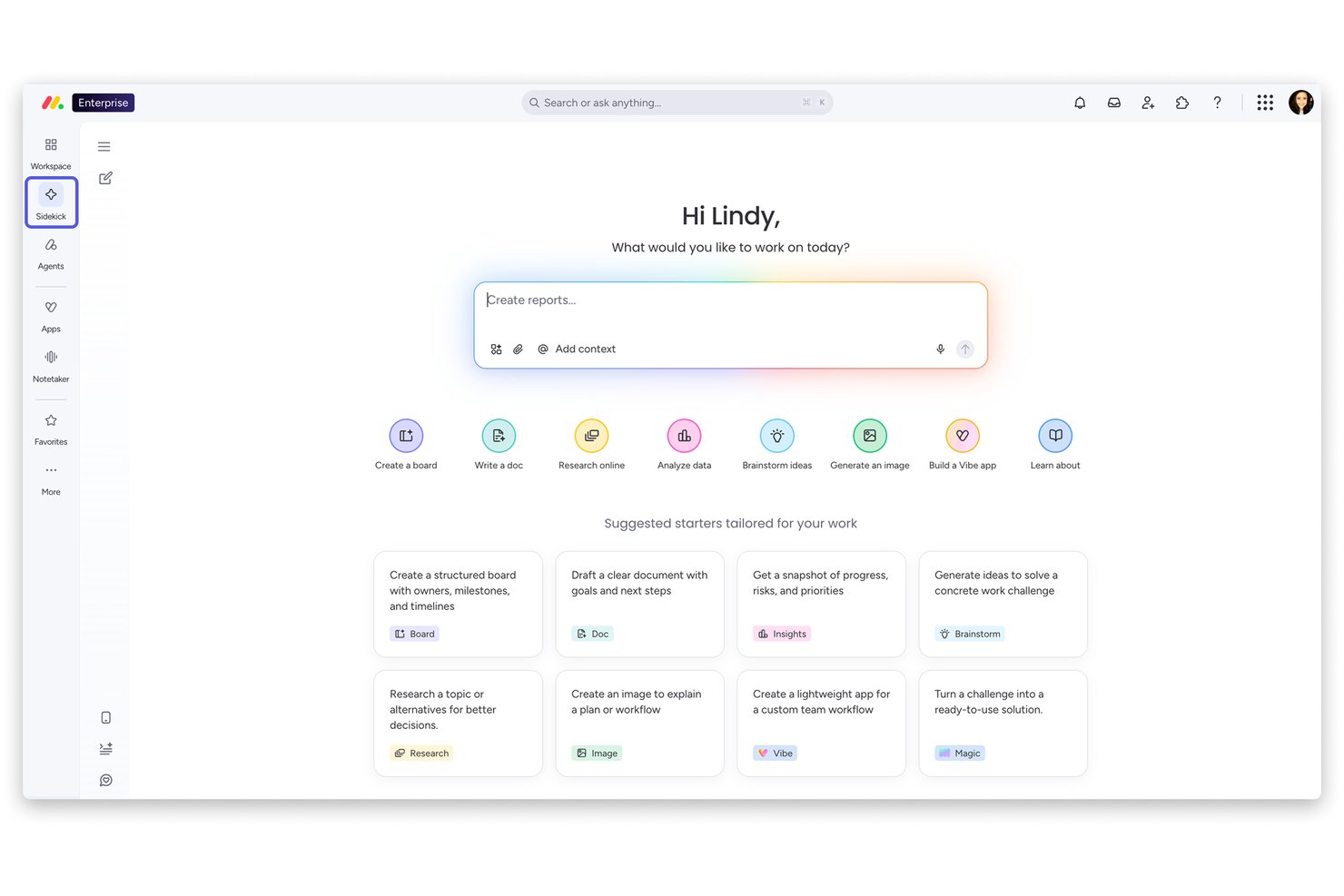
monday AI Workspace is an AI-powered work management platform that combines autonomous AI agents, predictive risk monitoring, smart task automation, and generative reporting across projects, portfolios, and cross-functional teams.
Who Is monday AI Workspace Best For?
It's a strong fit for mid-size to enterprise teams that need AI-driven oversight across multiple concurrent projects, especially in tech, product, and cross-functional environments.
Why I Picked monday AI Workspace
monday AI Workspace earns its spot on my shortlist because of how proactively it surfaces risk before it becomes a problem. I love that its predictive risk engine continuously scans task statuses, dependencies, and team conversations to flag issues in real time, rather than waiting for a missed deadline to trigger a conversation. The Sidekick AI assistant then connects the dots, giving me context-aware recommendations on what to act on next.
monday AI Workspace Key Features
- Custom AI agent builder: Lets you create and configure AI agents for recurring project workflows.
- AI meeting-to-task automation: Transcribes meetings and converts decisions directly into assigned tasks on your boards.
- Cross-project dependency mapping: Visualizes and tracks dependencies between tasks and projects using AI.
- Role-based access controls: Supports granular permissions for AI-generated data, automations, and project boards.
monday AI Workspace Integrations
monday AI Workspace offers hundreds of native integrations, including Slack, Google Workspace, Microsoft 365, Salesforce, Jira, GitHub, Zoom, Dropbox, HubSpot, and Zendesk. It also supports Zapier and provides an API for custom integrations.
Pros and Cons
Pros:
- Sidekick AI generates project summaries on demand
- Predictive risk alerts surface blockers early
- AI agents automate end-to-end task workflows
Cons:
- Heavy board structure slows initial project setup
- AI recommendations lack granular explainability
New Product Updates from monday AI Workspace
monday AI Workspace Adds Human Approval Routing
monday AI Workspace adds a human-in-the-loop approval block to AI Workflows, sending approval requests and routing workflow paths based on responses. For more information, visit monday AI Workspace's official site.
Best for agile project management

MeisterTask is a collaborative task management tool designed for teams that follow agile methodologies. It helps users organize tasks, manage projects, and enhance team collaboration through visual project boards.
Why I picked MeisterTask: MeisterTask is ideal for agile project management with features like Kanban-style boards, customizable workflows, and time tracking. Your team can easily track progress with project timelines and automatic task updates. It also provides a simple interface for managing tasks and projects. In my experience, these features make MeisterTask a strong choice for teams focused on agile practices.
Standout features & integrations:
Features include customizable project boards that adapt to your workflow. You can set up recurring tasks that automatically populate your boards. MeisterTask also offers detailed task tracking with tags and due dates to keep your team organized.
Integrations include Slack, Microsoft Teams, Google Drive, Dropbox, GitHub, Zendesk, Outlook, and Zapier.
Pros and Cons
Pros:
- Automatic task updates
- WIP limits available to help identify bottlenecks early
- Customizable Kanban project boards
Cons:
- May not suit all project types
- Limited advanced reporting

Taskade
Best for collaborative mind mapping

Taskade is a collaborative productivity tool aimed at teams who need a versatile workspace for project management and communication. It serves users by providing tools for task management, mind mapping, and real-time collaboration.
Why I picked Taskade: Taskade is known for its collaborative mind mapping capabilities, which make it ideal for brainstorming sessions and visual project planning. It allows your team to create dynamic mind maps that evolve with your projects. Features like real-time editing, video conferencing, and task tracking ensure that everyone stays on the same page. In my experience, these tools facilitate a more interactive and engaging workflow.
Standout features & integrations:
Features include real-time collaboration, video conferencing, and task management. You can create mind maps that link directly to tasks, allowing for smoother transitions from planning to execution. The platform's design encourages creativity and adaptability in your project workflows.
Integrations include Google Drive, Slack, Zapier, Trello, GitHub, Microsoft Teams, and Evernote.
Pros and Cons
Pros:
- AI assistant can generate templates and restructure notes
- Users can tag nodes with hashtags for quick filtering
- Real-time collaboration allows for dynamic brainstorming
Cons:
- View switching can take time to master for users
- Potential for feature creep as the platform evolves

Asana
Best for team collaboration

Asana is a project management tool designed for teams that need to coordinate work and track projects in a shared space. It serves businesses by providing task management, workflow automation, and project tracking capabilities.
Why I picked Asana: Asana is tailored for team collaboration, offering features like task assignments, progress tracking, and project timelines. Your team can benefit from its ability to create workspaces and organize tasks by project. The timeline feature helps visualize project schedules, ensuring everyone stays informed. In my experience, Asana's focus on collaboration makes it ideal for teams aiming to enhance their productivity.
Standout features & integrations:
Features include custom project templates, workload management, and portfolio tracking. These tools help your team manage multiple projects and ensure resources are allocated effectively. Additionally, Asana offers a user-friendly interface that supports efficient project navigation.
Integrations include Slack, Microsoft Teams, Google Workspace, Dropbox, Salesforce, Zoom, GitHub, Zapier, Trello, and Mailchimp.
Pros and Cons
Pros:
- Customizable project templates
- Shared workspace for project visibility
- In-context communication features
Cons:
- Potential for information silos without dedicated usage
- Overwhelming interface and features for new users

TimeHero
Best for automated task scheduling

Timehero is a task management tool aimed at teams and individuals who need to automate their scheduling processes. It helps users by automatically planning tasks around their existing schedules and deadlines, optimizing time management.
Why I picked Timehero: Timehero excels in automated task scheduling, providing features that adjust tasks based on changing priorities and deadlines. Your team can benefit from its ability to dynamically reschedule tasks as new ones are added. With features like predictive scheduling and calendar syncing, it ensures that you never miss a deadline. In my experience, Timehero's automation capabilities make it a valuable tool for anyone looking to enhance their time management.
Standout features & integrations:
Features include predictive scheduling, which anticipates task completion times based on your workload. You can set recurring tasks that automatically integrate into your schedule. The tool also offers real-time updates, so you're always in the loop with your team's progress.
Integrations include Google Calendar, Zoom, Slack, Trello, Office 365, Gmail, Evernote, Jira, Hubspot CRM, and Asana.
Pros and Cons
Pros:
- Focus time allocation
- Predictive duration estimates for task planning
- Automated task rescheduling
Cons:
- May not suit all workflows
- Accuracy depends on user input

Motion
Best for intuitive task automation

Motion is a productivity platform that provides an "Agentic Work Suite," designed to enhance team efficiency through AI. Its primary users are teams aiming to optimize operations. Key business functions include project management, automated task handling, and sales support.
Why I picked Motion: Motion excels at intuitive task automation, making it a standout choice for teams looking to reduce manual workload. Its AI-driven features, such as automated scheduling and task prioritization, cater to those who seek efficiency. Users can benefit from its ability to handle repetitive tasks, allowing them to focus more on strategic activities. The platform's design is user-friendly, making it accessible for teams of all sizes.
Standout features & integrations:
Features include automatic task prioritization, smart scheduling, and AI-driven project management. These features help your team focus on important tasks, reduce decision fatigue, and improve overall productivity. In my experience, these functionalities are key in managing complex workflows.
Integrations include Google Calendar, Outlook, Slack, Zoom, Microsoft Teams, Salesforce, and HubSpot.
Pros and Cons
Pros:
- Email-to-task automation feature
- AI workflows builder to turn unstructured information into projects
- Automatic prioritization and scheduling
Cons:
- Potential over-automation for some tasks
- Privacy concerns for some employees

Reclaim
Best for smart calendar integration

Reclaim is a task and calendar management tool designed for professionals and teams looking to optimize their schedules. It helps users by automatically scheduling tasks around existing calendar events, ensuring efficient use of time.
Why I picked Reclaim: Reclaim is distinguished by its smart calendar integration, which automatically aligns tasks with your schedule. It allows you to set priorities and adjust task durations based on your availability. The built-in notification system keeps you updated on schedule changes and upcoming deadlines. In my experience, these features make Reclaim an ideal choice for those who need precise control over their schedules.
Standout features & integrations:
Features include intelligent time blocking, where tasks automatically adjust to fit your schedule. You can also set focus time to minimize distractions and boost productivity. Additionally, Reclaim offers flexible task prioritization to help you manage your workload.
Integrations include Google Tasks, Outlook, Slack, Zoom, Microsoft Teams, Asana, Trello, Jira, Todoist, and Zapier.
Pros and Cons
Pros:
- Automatic addition of flexible breaks between meetings
- Dynamic rescheduling and conflict resolution
- AI-powered time blocking
Cons:
- Requires calendar access
- Lack of up-to-date input will result in a flawed schedule


Trevor AI is a productivity tool designed for individuals and teams who need to optimize their schedules through effective time management. It helps users by providing time blocking and task prioritization features to ensure efficient use of time.
Why I picked Trevor AI: Trevor AI is known for its effective time blocking capabilities, allowing you to allocate specific time slots for tasks. It automatically adjusts your schedule based on task priorities and deadlines. You can easily drag and drop tasks into your calendar, making it simple to manage your day. Upgrading to the Pro Plan unlocks advanced scheduling options and deeper integrations. In my experience, these features make Trevor AI a great choice for those looking to enhance their time management skills.
Standout features & integrations:
Features include drag-and-drop task scheduling, which simplifies the process of organizing your day. You can set task reminders to keep you on track throughout the day. Trevor AI also offers a clean and intuitive interface that supports quick task adjustments.
Integrations include Google Calendar, Outlook, Todoist, Microsoft 365, Google Tasks, and Microsoft To Do.
Pros and Cons
Pros:
- AI suggestions for rescheduling overdue tasks
- Platform features facilitate deep work
- AI-powered plan my day feature to schedule multiple tasks at once
Cons:
- Focus on Google and Outlook calendars
- Minimalist reporting and analytics


EchoPal is a voice-powered task management tool designed for professionals who prefer managing tasks through natural language. It helps users refine their workflow by providing voice and chat controls for task management.
Why I picked EchoPal: EchoPal excels in voice-activated task management, letting you manage your task list through voice commands and chat inputs. It features multi-step intelligence that automates complex workflows by understanding dependencies and making context-aware decisions. The tool also includes emotional intelligence, monitoring user stress levels to adjust workflows accordingly. In my experience, these features make EchoPal a unique option for those who value voice integration.
Standout features & integrations:
Features include emotional intelligence, which helps manage stress by adjusting tasks. The tool also supports multi-step workflows, allowing for complex task automation. Additionally, EchoPal offers accessibility features to cater to various user needs.
Integrations include Trello, Jira, Google Calendar, Linear, Slack, Gmail, Asana, Google Workspace, Windows, and Outlook.
Pros and Cons
Pros:
- AI has context awareness
- Initiate multi-step, cross-tool workflows with a single voice command
- Natural language understanding for voice command functionality
Cons:
- Limited to voice and chat inputs
- May require learning for voice commands

Atera
Best for IT professionals

Atera is a remote monitoring and management (RMM) software designed for IT professionals and managed service providers (MSPs). It offers tools to monitor, manage, and support IT networks, helping users efficiently handle IT tasks and client support. You can also categorize assets, alerts, and tickets to simplify workflows and maintain better organization.
Why I picked Atera: Atera is tailored for IT professionals with features like remote monitoring, auto-scheduling, automated patch management, and network discovery. Your team can efficiently manage IT assets and provide remote support with ease. It also features built-in ticketing systems that facilitate client communication. In my experience, Atera's focus on IT management needs makes it a valuable tool for service providers.
Standout features & integrations:
Features include real-time alerts, which notify you of any issues in your network. You can automate routine tasks like patch management to save time. Atera also provides reporting tools to help you analyze performance and make informed decisions.
Integrations include Google Identity Providers, Azure AD, Okta, Zapier, Microsoft Teams, Slack, HubSpot, Salesforce, Dropbox, SAP Business One, OneDrive, and Google Drive.
Pros and Cons
Pros:
- IT automation profiles and execution of scripts
- Automated patch discovery, approval, and deployment
- Broad IT management tools
Cons:
- Support response time variability
- Requires technical knowledge
Annen AI-programvare for oppgavehåndtering
Her er noen flere alternativer innen AI-programvare for oppgavehåndtering som ikke kom med på listen min, men som likevel er verdt å se nærmere på:


How I Evaluate AI Task Management Software
Every tool on this list needs to do more than slap an AI label on basic automations—I look for platforms where AI actually drives decisions like prioritizing tasks, predicting delays, or auto-assigning work based on capacity. I split my evaluation into two layers: the core functionality a tool must have to qualify and the differentiating factors that separate good options from great ones.
Core Functionality (Table Stakes For This List)
When I'm selecting tools for my list, I rank each one on a scale from 0 (does not offer the functionality) to 5 (excels in this area) for each core functionality listed below. Then, I calculate the tool's total score into a percentage. Each tool needs to achieve a minimum total score of 65% to be considered for inclusion.
- AI-Driven Task Automation: I check whether the tool can auto-create and assign tasks from inputs like meeting notes, chat messages, or project briefs rather than requiring manual entry for every item.
- Intelligent Task Prioritization: Each tool should rank or reorder tasks using AI based on factors like deadlines, dependencies, and impact—not just let users drag and drop manually.
- Predictive Project Insights: I look for AI that forecasts completion dates, flags at-risk milestones, or surfaces workload imbalances before they cause missed deadlines across sprints or delivery cycles.
- Generative Summaries & Updates: The platform should produce useful AI-generated content like standup recaps, task descriptions, or weekly status reports that save PMs from writing them from scratch.
- Smart Resource Allocation: I evaluate whether AI recommends task assignments based on team members' capacity, skill sets, or past performance rather than leaving managers to guess who's available.
- Workflow & Tool Integrations: The tool needs to connect with platforms teams already use—like Slack, Jira, GitHub, or Google Workspace—and trigger AI actions across those connected systems.
Once I have a list of tools that meet this criteria, I consider what sets each platform apart.
Differentiating Factors (What Sets Vendors Apart)
Here's how I compare and contrast different vendors:
Standout Features
AI meeting-to-task conversion is a big differentiator—tools that pull action items from a recorded standup or planning call and turn them into assigned tasks save PMs hours of post-meeting cleanup. I also look for cross-project dependency mapping, where AI detects hidden links between workstreams that manual tracking would miss. Custom AI agents stand out for teams running repeatable workflows like sprint triaging or release approvals, letting PMs automate decisions they'd otherwise handle one by one.
Beyond Features
AI transparency matters a lot to me—I check whether a tool explains why it made a recommendation or reprioritized a task, since PMs need to justify those decisions to stakeholders. Data security is equally important, especially around whether customer project data is used to train third-party models. I also evaluate onboarding and adoption support, because rolling out AI-powered workflows to a team of skeptical engineers or designers requires more than a help center article. Guided setup, prompt libraries, and template galleries make a real difference in time-to-value.
Slik velger du AI-programvare for oppgavehåndtering
Det er lett å gå seg vill i lange funksjonslister og komplekse prismodeller. For å hjelpe deg med å holde fokus mens du går gjennom din unike prosess for valg av programvare, får du her en sjekkliste over faktorer du bør ha i mente:
| Faktor | Hva du bør vurdere |
|---|---|
| Skalerbarhet | Kan programvaren vokse sammen med teamet ditt? Vurder om den støtter et økende antall brukere og større prosjekter uten at ytelsen svekkes. Se etter prisplaner på ulike nivåer som samsvarer med veksten. |
| Integrasjoner | Kan programvaren kobles til de eksisterende verktøyene dine? Sørg for at den tilbyr innebygde integrasjoner med de viktigste plattformene dine, for eksempel Slack, Google Workspace eller Trello. Unngå verktøy som krever omveier. |
| Tilpasningsmuligheter | Kan du tilpasse programvaren til arbeidsflytene dine? Sjekk om den tillater egendefinerte felt, visninger og maler. Vær oppmerksom på rigide systemer som begrenser fleksibiliteten. |
| Brukervennlighet | Er grensesnittet intuitivt for teamet ditt? Prioriter verktøy med et enkelt design og kort opplæringstid. Unngå komplekse oppsett som krever omfattende opplæring. |
| Implementering og oppstart | Hvor raskt kan du komme i gang? Se etter programvare med veiledet oppstart, opplæringsmateriell og brukerstøtte. Vurder tilgangen på ressurser som maler og produktvisninger. |
| Kostnad | Passer prisen inn i budsjettet ditt? Sammenlign kostnadene med funksjonene som tilbys. Vær oppmerksom på skjulte gebyrer, og sørg for at avkastningen på investeringen rettferdiggjør utgiften. |
| Sikkerhetstiltak | Er dataene dine beskyttet? Se etter funksjoner som kryptering, tofaktorautentisering og jevnlige sikkerhetsrevisjoner. Ikke gå på kompromiss med datasikkerheten for å spare penger. |
Hva er AI-programvare for oppgavehåndtering?
Programvare for AI-basert oppgavehåndtering er et digitalt verktøy som bidrar til å automatisere og organisere oppgaver ved hjelp av kunstig intelligens. Fagpersoner som prosjektledere, teamledere og frilansere bruker vanligvis disse verktøyene for å øke produktiviteten og forbedre effektiviteten i arbeidsflyten. Automatisert planlegging, prioritering av oppgaver og integrasjonsmuligheter hjelper brukerne med å håndtere arbeidsmengder, fastsette prioriteringer og holde oversikt over fremdriften. Alt i alt sparer disse verktøyene tid og reduserer manuelt arbeid, slik at brukerne kan fokusere på mer strategiske oppgaver.
Funksjoner
Når du velger programvare for AI-basert oppgavehåndtering, bør du se etter følgende viktige funksjoner:
- Automatisert planlegging: Planlegger automatisk oppgaver rundt den eksisterende timeplanen din, noe som sparer tid og reduserer behovet for manuell inntasting.
- Prioritering av oppgaver: Bruker kunstig intelligens til å avgjøre hvilke oppgaver som er viktigst, slik at du kan fokusere på det som betyr mest.
- Integrasjonsmuligheter: Kobler til andre verktøy, for eksempel kalendere og kommunikasjonsapper, for å skape en samlet arbeidsflyt.
- Funksjonalitet for talekommandoer: Lar deg håndtere oppgaver ved hjelp av taleinndata, noe som gir praktisk bruk uten hendene.
- Tilpassbare dashbord: Lar deg tilpasse grensesnittet slik at det passer til dine spesifikke behov for arbeidsflyt og brukervennlighet.
- Sanntidsanalyse: Gir innsikt i produktivitet og fremdrift for oppgaver, slik at du kan ta informerte beslutninger.
- Tidsblokkering: Tildeler bestemte tidsintervaller til oppgaver, noe som forbedrer fokus og tidsstyring.
- Samarbeidsverktøy: Legger til rette for kommunikasjon i teamet og deling av oppgaver, noe som styrker samarbeidet og prosjektkoordineringen.
Fordeler
Implementering av programvare for AI-basert oppgavehåndtering gir flere fordeler for teamet og virksomheten din. Her er noen av fordelene du kan se frem til:
- Økt produktivitet: Automatisert planlegging og prioritering av oppgaver hjelper deg med å fokusere på viktige oppgaver, slik at tiden brukt på manuell planlegging reduseres.
- Bedre samarbeid: Integrasjon med kommunikasjonsverktøy og delte dashbord legger til rette for teamarbeid og prosjektkoordinering.
- Bedre tidsstyring: Funksjoner som tidsblokkering og påminnelser sørger for at oppgaver fullføres i tide, noe som forbedrer den samlede effektiviteten.
- Bedre beslutningstaking: Sanntidsanalyse gir innsikt i fremdrift for oppgaver og produktivitet, slik at du kan ta informerte valg.
- Redusert stress: Automatisering av rutineoppgaver og bruk av talekommandoer reduserer arbeidspresset, slik at du kan konsentrere deg om strategiske aktiviteter.
Kostnader og priser for programvare for AI-basert oppgavehåndtering
Valg av programvare for AI-basert oppgavehåndtering krever en forståelse av de ulike prismodellene og abonnementene som er tilgjengelige. Kostnadene varierer basert på funksjoner, teamstørrelse, tillegg og mer. Tabellen nedenfor oppsummerer vanlige abonnementer, gjennomsnittsprisene deres og typiske funksjoner som er inkludert i løsninger for programvare for AI-basert oppgavehåndtering:
Sammenligningstabell for abonnementer for programvare for AI-basert oppgavehåndtering
| Abonnementstype | Gjennomsnittspris | Vanlige funksjoner |
|---|---|---|
| Gratisabonnement | $0 | Grunnleggende oppgavehåndtering, begrensede integrasjoner og brukerstøtte fra fellesskapet. |
| Grunnleggende abonnement | $4-$20/user/month | Prioritering av oppgaver, kalendersynkronisering og grunnleggende samarbeidsverktøy. |
| Bedriftsabonnement | $10-$25/user/month | Avansert analyse, samarbeid i team og tilpassede arbeidsflyter. |
| Enterprise-abonnement | +$25/user/month - Tilpasset pris | Dedikert brukerstøtte, avansert sikkerhet og fullstendige integrasjonsmuligheter. |
Vanlige spørsmål om programvare for AI-oppgavehåndtering
Her er noen svar på vanlige spørsmål om programvare for AI-oppgavehåndtering:
Hvordan fungerer programvare for AI-oppgavehåndtering?
Programvare for AI-oppgavehåndtering bruker kunstig intelligens til å automatisere og optimalisere planlegging og prioritering av oppgaver. Den analyserer kalenderen din, tidsfrister og avhengigheter mellom oppgaver for å foreslå den beste måten å disponere tiden din på. Dette hjelper deg med å fokusere på det som er viktig, uten at du må planlegge hver detalj manuelt. Ved å lære av tidligere atferd kan programvaren forbedres over tid, slik at arbeidsflyten din blir mer effektiv.
Kan programvare for AI-oppgavehåndtering integreres med verktøyene jeg allerede bruker?
Ja, det meste av programvaren for AI-oppgavehåndtering kan integreres med populære verktøy som Google Kalender, Slack og Trello. Disse integrasjonene bidrar til å skape en samlet arbeidsflyt ved å synkronisere oppgaver og kommunikasjon på tvers av plattformer. Før du kjøper, bør du kontrollere integrasjonsalternativene for å sikre kompatibilitet med verktøyene du bruker nå.
Er programvare for AI-oppgavehåndtering sikker?
Ja, anerkjent programvare for AI-oppgavehåndtering har sikkerhetsfunksjoner som datakryptering og tofaktorautentisering. Når du velger et verktøy, bør du se etter løsninger som følger bransjestandarder og tilbyr regelmessige sikkerhetsoppdateringer. Det er også lurt å lese personvernerklæringen for å forstå hvordan dataene dine håndteres.
Hvordan kan programvare for AI-oppgavehåndtering forbedre teamsamarbeidet?
Programvare for AI-oppgavehåndtering forbedrer samarbeidet ved å tilby delte oversikter, oppdateringer i sanntid og kommunikasjonsverktøy. Den gjør det mulig for teammedlemmer å tildele oppgaver, følge fremdriften og dele filer på ett sted. Denne sentraliserte tilnærmingen reduserer misforståelser og sørger for at alle arbeider mot de samme prosjektmålene.