

10 beste CRM-programmer for profesjonelle tjenester i 2026

Beste CRM-programvare for profesjonelle tjenester – kortliste


Moderne programvare for kunderelasjonshåndtering for profesjonelle tjenester hjelper teamet ditt med å administrere kunderelasjoner, prosjekter og kommunikasjon på ett sted, slik at du får full oversikt over og kontroll over hvert kundeoppdrag. Hvis du ser etter den beste CRM-programvaren for profesjonelle tjenester, håndterer du sannsynligvis komplekse prosjekter, skiftende kundebehov og utfordringer knyttet til samarbeid på tvers av funksjoner. Den rette CRM-løsningen samler kundedata, prosjektdetaljer og salgspipeliner, slik at ingenting går mellom sprekkene.
I denne veiledningen går jeg gjennom de beste plattformene som jeg mener er spesialutviklet for bransjen din, og viser hva som gjør hvert alternativ til et fremragende valg for team innen profesjonelle tjenester i 2026.
Hvorfor du kan stole på våre programvareanbefalinger
Teamet vårt har testet og anmeldt programvare siden 2012. Vi er selv prosjektledere, så vi vet hvor vanskelig og hvor viktig det er å velge riktig programvare.
I denne guiden har vi vurdert verktøyene gjennom praktisk testing og uavhengig research og gitt dem poeng ut fra våre utvelgelseskriterier. Vi bygger også på innsikt fra ledende eksperter i bransjen og erfarne prosjektledere.
Anmeldelsene våre bygger på vår egen redaksjonelle vurdering. De er ikke et salgsargument.
Ekspertanmeldere:
Sammendrag: Beste CRM-programvare for profesjonelle tjenester
Denne sammenligningstabellen oppsummerer prisdetaljene for mine beste valg av CRM-programvare for profesjonelle tjenester, slik at du kan finne den beste løsningen for budsjettet og virksomhetens behov.
| Tool | Best For | Trial Info | Price | ||
|---|---|---|---|---|---|
| 1 | Best for marketing and sales team collaboration | Free plan available | From $7/user/month | Website | |
| 2 | Best for project delivery linked to sales | 14-day free trial | From $29/user/month (billed annually) | Website | |
| 3 | Best for managing agency operations end-to-end | 14-day free trial | From $10/user/month (billed annually) | Website | |
| 4 | Best for tracking project time and expenses | Free demo available | From $20/user/month | Website | |
| 5 | Best for workflow automation in client work | Free demo available | Pricing upon request | Website | |
| 6 | Best for task assignment and time tracking | Free plan available; 14-day free trial | From $9.99/user/month (billed annually) | Website | |
| 7 | Best for visualizing deal progression stages | 14-day free trial | From $14/user/month (billed annually) | Website | |
| 8 | Best for customizing data dashboards and reporting | Free plan + 30-day free trial available | From $25/user/month | Website | |
| 9 | Best for flexible workflow customization | 14-day free trial + free demo available | From $18/seat/month (billed annually) | Website | |
| 10 | Best for integrating with Salesforce ecosystems | Free demo available | Pricing upon request | Website |


Anmeldelser av den beste CRM-programvaren for profesjonelle tjenester
Nedenfor finner du mine detaljerte sammendrag av den beste CRM-programvaren for profesjonelle tjenester som kom med på kortlisten min. Anmeldelsene mine gir en detaljert gjennomgang av funksjonene, de beste bruksområdene og integrasjonene til hver plattform, slik at du kan finne den beste løsningen for deg.
Best for marketing and sales team collaboration
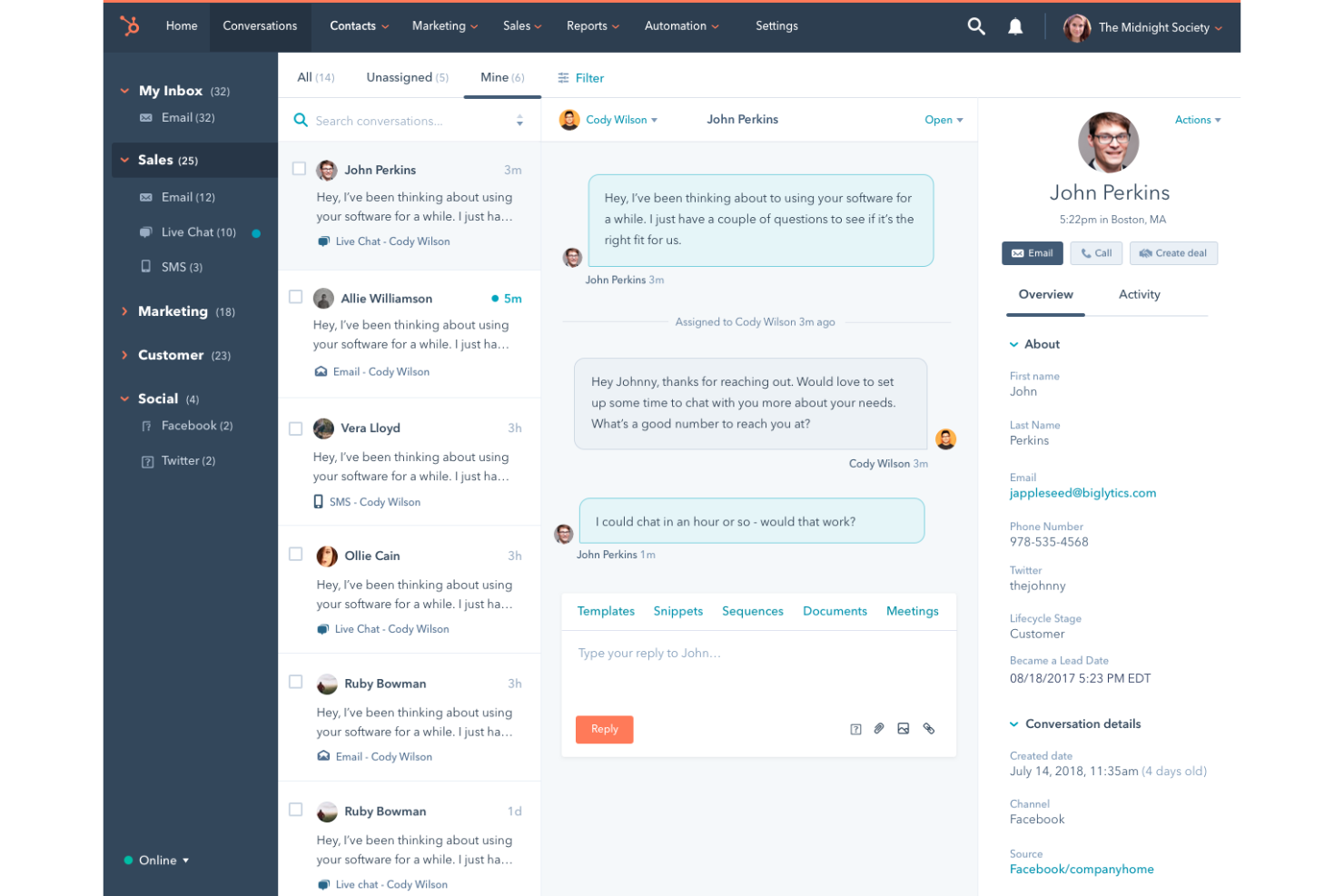
HubSpot CRM is a cloud-based CRM platform that covers contact management, deal tracking, email outreach, meeting scheduling, and sales pipeline management across connected marketing, sales, and service hubs.
Who Is HubSpot CRM Best For?
HubSpot CRM is a natural fit for growing professional services firms where marketing and sales teams need to work from shared contact and pipeline data.
Why I Picked HubSpot CRM
HubSpot CRM earns its spot on my shortlist because the shared contact timeline gives marketing and sales a single view of every touchpoint, from initial lead generation campaign click to closed deal. I particularly like how lead scoring lets marketing define qualification criteria that sales can see before picking up a call. The built-in meeting scheduler and email sequences mean both teams operate from the same tool without duplicating work.
HubSpot CRM Key Features
- Deal pipeline management: Build and customize sales pipelines with drag-and-drop deal stages that reflect your firm's actual sales process.
- Sales forecasting: Project revenue by pipeline stage, deal amount, and close date from a dedicated forecasting dashboard.
- Custom reporting dashboards: Build reports across contacts, deals, and activities using a drag-and-drop report builder.
- Quote generation: Create and send branded quotes directly from a deal record without leaving the CRM.
HubSpot CRM Integrations
HubSpot's App Marketplace is home to over 1,000 integrations, including tools like Salesforce, Slack, Gmail, Google Calendar, Jira, Mailchimp, Calendly, Zendesk, WordPress, and QuickBooks. Zapier is also available for connecting HubSpot to additional apps, and an API is offered for custom integrations.
Pros and Cons
Pros:
- Website visitor tracking identifies anonymous prospects
- Built-in marketing automation alongside sales tools
- Shared data across marketing, sales, and service
Cons:
- Key features locked behind higher-priced tiers
- Workflow automation restricts complex multi-step processes

Best for project delivery linked to sales

Insightly is a CRM platform that combines pipeline management, contact tracking, and built-in project delivery tools so teams can convert closed deals into tracked projects without leaving the platform.
Who Is Insightly Best For?
Insightly suits consulting firms and agencies where account managers oversee both deal-closing and client delivery from the same system.
Why I Picked Insightly
I picked Insightly as one of the best because it's the only CRM I've used where a won opportunity converts into a live project in one click. The project inherits the original contact records, notes, and custom field data captured during the sales cycle. I also like that project pipelines use the same stage-based structure as sales pipelines, so delivery teams work in a familiar environment without a separate tool or handoff process.
Insightly Key Features
- Activity sets: Triggers predefined sequences of tasks and events when a deal or project moves to a new stage.
- Relationship linking: Maps connections between contacts, organizations, and opportunities to show how accounts are related.
- Lead routing: Automatically assigns incoming leads to a specific team member based on defined rules.
- Built-in reporting: Generates dashboards across sales pipeline, project status, and team activity in one view.
Insightly Integrations
Insightly offers dozens of native integrations, including DocuSign, QuickBooks, PandaDoc, Xero, MailChimp, Slack, Zoom, Evernote, and Unbounce, plus Google and Microsoft integrations. Over 1,000 additional integrations are available through Insightly's AppConnect add-on. Insightly also provides an API for custom integrations, and it connects with Zapier.
Pros and Cons
Pros:
- Customizable pipelines for both sales and delivery
- Relationship linking maps contacts across organizations
- Converts won deals into tracked projects instantly
Cons:
- Slowdowns occur when handling larger datasets
- Reporting and automation are gated behind higher tiers

Best for managing agency operations end-to-end

Productive is an agency management platform that covers project management, resource planning, sales CRM, time tracking, budgeting, invoicing, and financial forecasting in a single connected workspace.
Who Is Productive Best For?
Productive is a strong fit for digital, creative, and marketing agencies that need to manage client work, billable hours, and profitability from a single platform.
Why I Picked Productive
I picked Productive as one of the best because it's one of the few tools where a won deal converts directly into a live project, with budget, contacts, and client context already in place. I like that real-time profitability tracking sits at the center of everything: as my team logs time, cost, and margin data updates instantly, so I'm not waiting on monthly reports. The scenario builder also lets me compare pricing and resourcing models before committing to a proposal, which I find especially useful for protecting margins on fixed-fee work.
Productive Key Features
- Resource planning: Schedule team members by availability, skills, and seniority across current and upcoming projects with a visual capacity overview.
- Gantt chart view: Map project timelines, task dependencies, and milestones in a drag-and-drop Gantt interface that updates as work progresses.
- Automated invoice drafting: Generate invoice drafts directly from logged time and approved budgets without manual data entry.
- Revenue recognition: Track recognized versus deferred revenue across active projects and client contracts from within the same platform.
Productive Integrations
Productive offers native integrations with Jira, HubSpot, Xero, QuickBooks, Sage, Google Calendar, Gmail, Microsoft Outlook, Slack, and BambooHR, along with several other accounting and HR connectors. It also connects with Zapier and provides an open API with webhook support for custom integrations.
Pros and Cons
Pros:
- Unifies CRM, time tracking, and invoicing
- Real-time profitability tracking per project
- Deals convert directly into active projects
Cons:
- Interface can feel sluggish at times
- Reporting formulas lack advanced flexibility
New Product Updates from Productive
Productive Adds Voice Dictation, Slack Connector, Proposals, and Overtime
Productive adds voice dictation, a Slack Connector, proposal controls, and overtime tracking. These updates support faster AI interactions, client proposals, and time management. For more information, visit Productive’s official site.

BigTime
Best for tracking project time and expenses

BigTime is a professional services automation (PSA) platform that covers time and expense tracking, project and portfolio management, resource scheduling, scoping and quoting, invoicing, and AI-assisted reporting for your consulting business.
Who Is BigTime Best For?
BigTime is a strong fit for mid-sized professional services firms in consulting, accounting, engineering, and IT services that bill clients by the hour.
Why I Picked BigTime
BigTime earns its spot on my shortlist because of how tightly it connects time and expense tracking to actual billing and project financials. I picked it because the budget vs. actuals view updates in real time, so I can catch a project going over budget before the invoice goes out, not after. I also like the Expense Agent, which captures, categorizes, and routes receipts for approval without manual entry. That kind of detail matters when you're billing clients and need every expense accounted for accurately.
BigTime Key Features
- Resource scheduling: Assign staff to projects by role or department, with conflict detection and utilization tracking across your team.
- Scoping and quoting: Build project quotes using real cost and margin data, with controls for pricing, discounts, and scope.
- Invoicing workflow: Customize invoices per client, sync with QuickBooks or Sage Intacct, and automate billing to reduce errors.
- AI assistant: Query project margins, capacity, and bottlenecks in real time using BigTime's built-in AI reporting tool.
BigTime Integrations
BigTime offers native integrations with QuickBooks, Sage Intacct, Xero, NetSuite, Salesforce, HubSpot, Microsoft Dynamics CRM, Jira, BambooHR, and Zendesk. It also connects with identity providers like Okta and Microsoft Entra ID, and includes a REST API and BigTime DataHub for custom integrations and advanced reporting through tools like Power BI and Tableau.
Pros and Cons
Pros:
- Built-in vendor spend capture per project
- Ties time entries directly to invoices
- Real-time budget vs. actuals project tracking
Cons:
- Mobile app can be clunky on Android
- Only supports two levels of task depth

Accelo
Best for workflow automation in client work
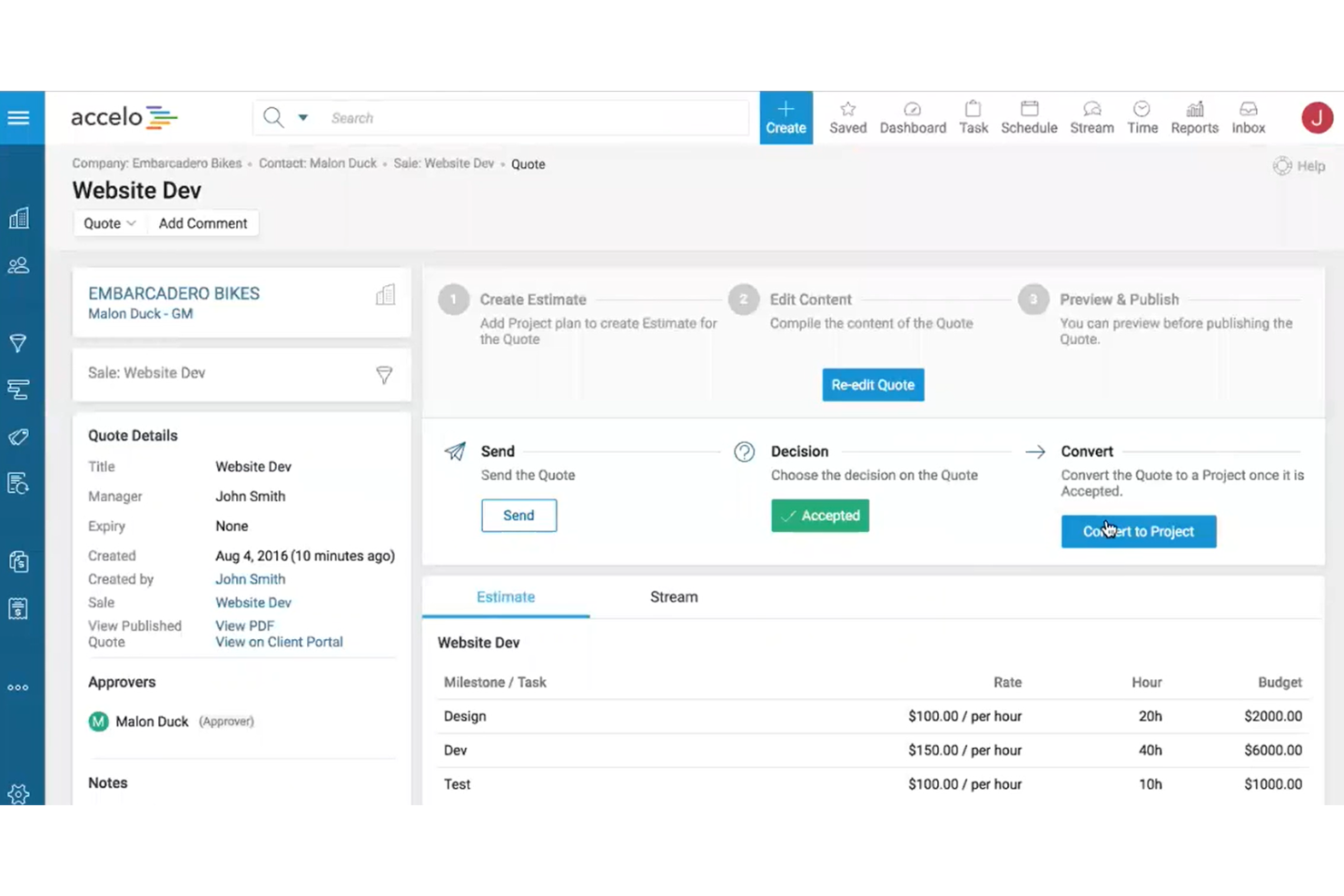
Accelo is an AI-powered professional services automation (PSA) platform that connects pipeline management, project delivery, resource scheduling, and financial tracking in a single system.
Who Is Accelo Best For?
Accelo is a strong fit for small to mid-sized professional services firms in consulting, IT services, and marketing agencies that manage recurring client work.
Why I Picked Accelo
I've included Accelo in my top picks because of how it handles the handoff between sales and delivery. When a deal closes in the CRM, Accelo automatically generates a project from that opportunity, populating tasks, timelines, and budget from a template. I also like its trigger-based workflow automation, which moves work through stages, sends client updates, and reassigns tasks without manual intervention. That keeps recurring client work running without anyone having to chase it.
Accelo Key Features
- Retainer management: Track retainer budgets, hours, and renewal cycles against active client contracts.
- AI-assisted resource scheduling: Match staff to projects by skill, availability, and workload using AI recommendations.
- Scope creep management: Flag and manage out-of-scope work to protect project budgets and margins.
- Custom reporting dashboards: Build reports on utilization, profitability, and financial performance across your project portfolio.
Accelo Integrations
Accelo offers 30+ native integrations, including Salesforce, HubSpot, QuickBooks, Xero, Sage Intacct, Jira, Google Workspace, Microsoft 365, Slack, and Expensify. It also connects with Zapier and provides a REST API for custom integrations.
Pros and Cons
Pros:
- Real-time budget vs. actuals per project
- Retainer tracking with built-in renewals
- Automatic email capture per client record
Cons:
- Mobile app lacks full desktop functionality
- Reports are difficult to customize deeply
New Product Updates from Accelo

Accelo Rebuilds Mobile App for Project and Time Management
Accelo rebuilds its mobile app with task management, new work creation, and mobile timesheets for Forecast customers. This helps teams keep project and time data current while working away from a desktop. For more information, visit Accelo’s official site.

Best for task assignment and time tracking
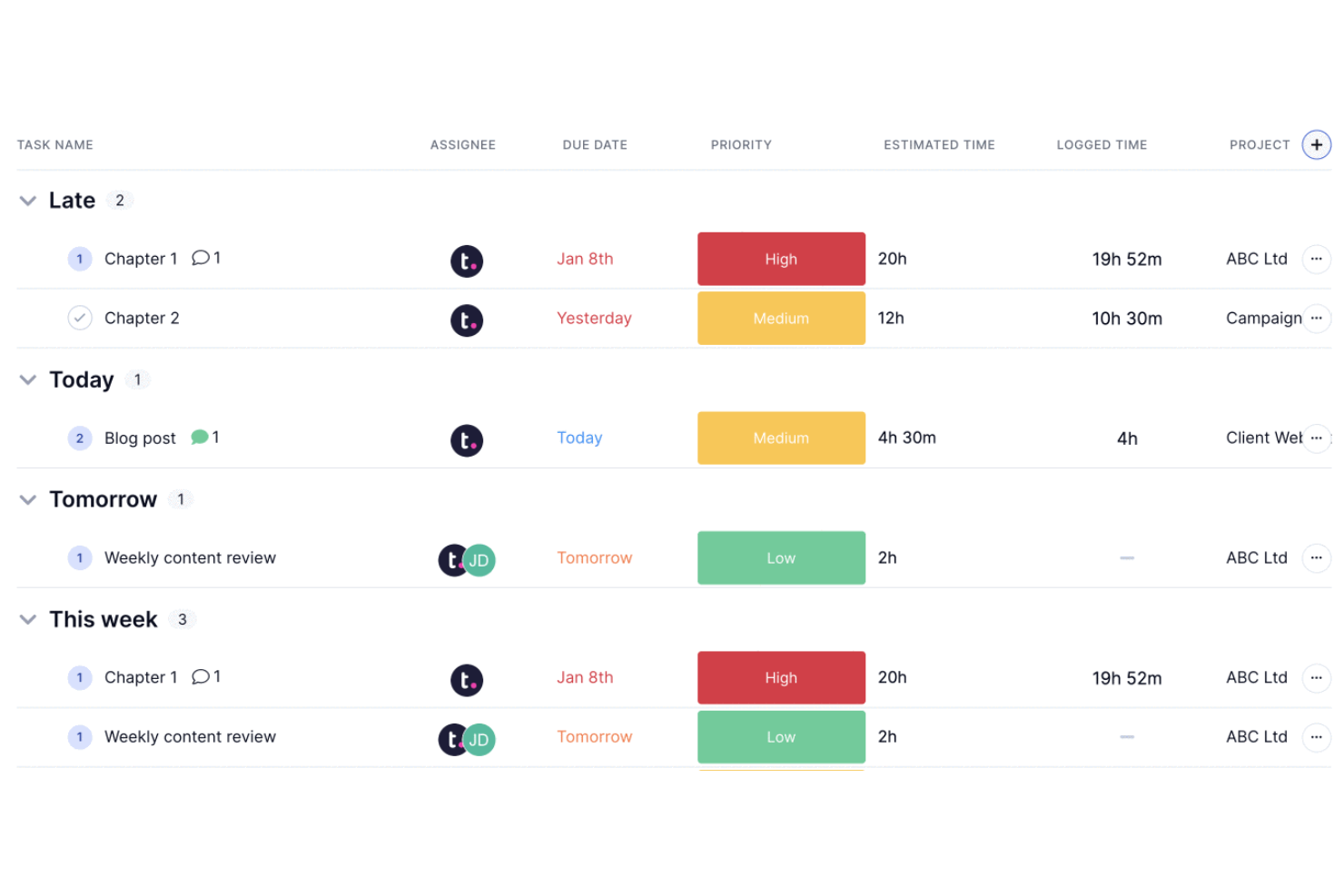
Teamwork.com is a project management and CRM platform built specifically for client-facing professional services teams, combining client management, task tracking, time logging, and resource planning in one place.
Who Is Teamwork.com Best For?
Teamwork.com is a strong fit for agencies and consultancies that manage multiple client projects simultaneously and need tight control over task ownership and billable hours.
Why I Picked Teamwork.com
Teamwork.com is one of my top picks because I love how granular task assignment gets. I can assign tasks and subtasks to specific team members, set dependencies, and attach time estimates directly to each item, so there's no ambiguity about who owns what or how long it should take. The native time tracking lets my team log hours with timers, mark time as billable, and generate timesheets, which feeds directly into budget tracking and invoicing. That end-to-end flow from task assignment to billable time to client invoice is something I haven't found as tightly connected in many other tools in this space.
Teamwork.com Key Features
- Client portal: Give clients a branded view of project progress, files, and messages without exposing internal team activity.
- Workload management: View team capacity across all active projects and reassign tasks when someone is over-allocated.
- Milestone tracking: Set project milestones that tie to task lists, keeping delivery schedules visible at a high level.
- Project templates: Build reusable templates for recurring client engagements to standardize your team's delivery process.
Teamwork.com Integrations
Teamwork.com offers 150+ integrations, including native connections with Slack, Salesforce, HubSpot, Microsoft Teams, QuickBooks, Xero, Harvest, Google Calendar, Dropbox, and SharePoint. It also connects with Zapier and has an API for custom integrations.
Pros and Cons
Pros:
- Billable hours linked to project budgets
- Client-specific permissions for external visibility
- Built-in time tracking per task
Cons:
- Advanced CRM tools require integration
- No dedicated sales pipeline view

Best for visualizing deal progression stages

Pipedrive is a sales-focused CRM built around a visual pipeline interface, with deal tracking, contact management, activity scheduling, and AI-powered sales assistance baked in.
Who Is Pipedrive Best For?
Pipedrive is a strong fit for small to mid-sized businesses with dedicated sales reps who need clear visibility into where every deal stands at any given moment.
Why I Picked Pipedrive
Pipedrive earns its spot on my shortlist because no other CRM makes deal stage visibility this central to the product experience. The kanban-style pipeline board is the default view, so every rep can see exactly where each deal sits and drag it forward when a stage is complete. I also like the forecast view, which filters deals by expected close date so my team stays honest about what's actually closeable this month versus next.
Pipedrive Key Features
- AI sales assistant: Surfaces suggestions and warns you when a deal has gone quiet or a follow-up is overdue.
- Activity scheduling: Logs and tracks calls, meetings, and emails directly against each contact or deal record.
- Smart contact data: Auto-enriches contact profiles by pulling publicly available data based on an email address.
- Workflow automation: Triggers actions like task creation or status updates when a deal moves or a field changes.
Pipedrive Integrations
Pipedrive's Marketplace offers 500+ integrations, including QuickBooks, Trello, Asana, and Slack, along with Google Meet, Microsoft Teams, Xero, DocuSign, Mailchimp, and PandaDoc. It's available on Zapier and has an open API for custom integrations.
Pros and Cons
Pros:
- Activity reminders prevent missed follow-ups
- Custom fields for service-specific data
- Drag-and-drop pipeline for tracking deals
Cons:
- No native project delivery tracking
- Limited built-in reporting depth
Salesforce Sales Cloud is a CRM platform built around deep pipeline visibility, with tools for contact and account management, opportunity tracking, AI-driven forecasting, and highly configurable reporting.
Who Is Salesforce Sales Cloud Best For?
Salesforce Sales Cloud is a strong fit for mid-to-large professional services firms with dedicated sales ops teams who need deep reporting customization.
Why I Picked Salesforce Sales Cloud
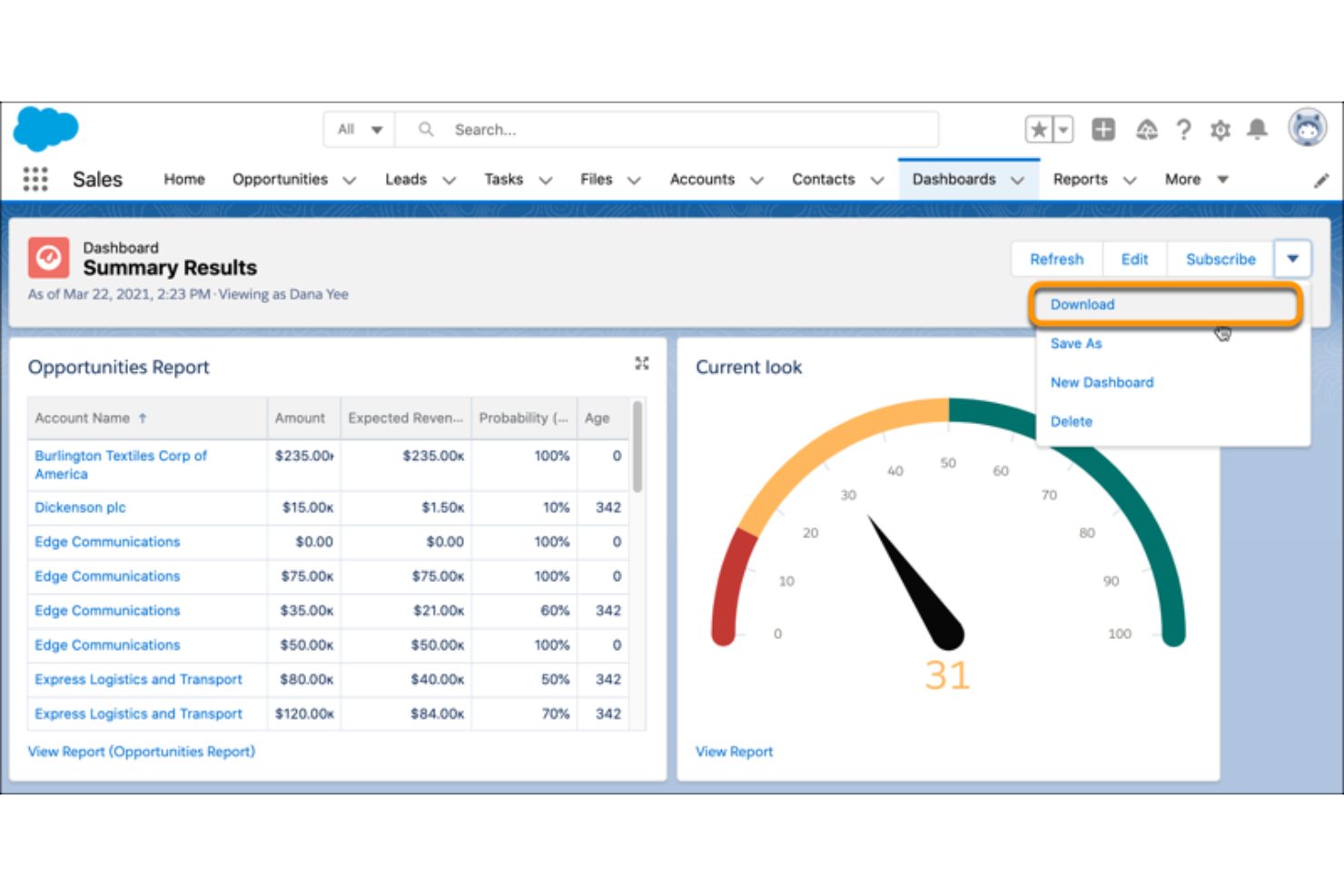
I picked Salesforce Sales Cloud as one of the best because no other CRM gives you the same depth of control over how data is visualized and reported. I love the drag-and-drop report builder, which lets me slice pipeline data by rep, region, stage, or custom field without needing a developer. The dashboard layer goes further with CRM Analytics, where I can build live, drillable charts that surface deal velocity and win-rate trends in real time.
Salesforce Sales Cloud Key Features
- Einstein lead scoring: AI assigns a score to each lead based on historical conversion patterns, helping prioritize outreach.
- Opportunity management: Track every deal through custom stages, with fields for amount, close date, and linked contacts.
- Sales engagement: Build automated outreach cadences with email, call, and LinkedIn steps directly from a contact record.
- Territory management: Define and assign account territories by geography, industry, or custom rules across your sales team.
Salesforce Sales Cloud Integrations
Salesforce Sales Cloud offers thousands of marketplace integrations through its AppExchange, including tools like Slack, Google Workspace, QuickBooks, Jira, DocuSign, Mailchimp, HubSpot, LinkedIn Sales Navigator, Zoom, and Microsoft 365. It's also available on Zapier and provides an API for custom integrations.
Pros and Cons
Pros:
- Handles complex, multi-stage sales processes well
- Flow Builder supports no-code workflow automation
- Reports and dashboards are deeply customizable
Cons:
- Add-on costs accumulate across the platform
- Admin-level setup often requires certified expertise

monday CRM is a sales-focused CRM platform that centralizes lead management, pipeline tracking, contact data, and automated workflows across the full revenue cycle, from prospecting to post-sale.
Who Is monday CRM Best For?
monday CRM is a strong fit for small to mid-sized service teams that need to build and adjust their sales process without relying on a developer.
Why I Picked monday CRM
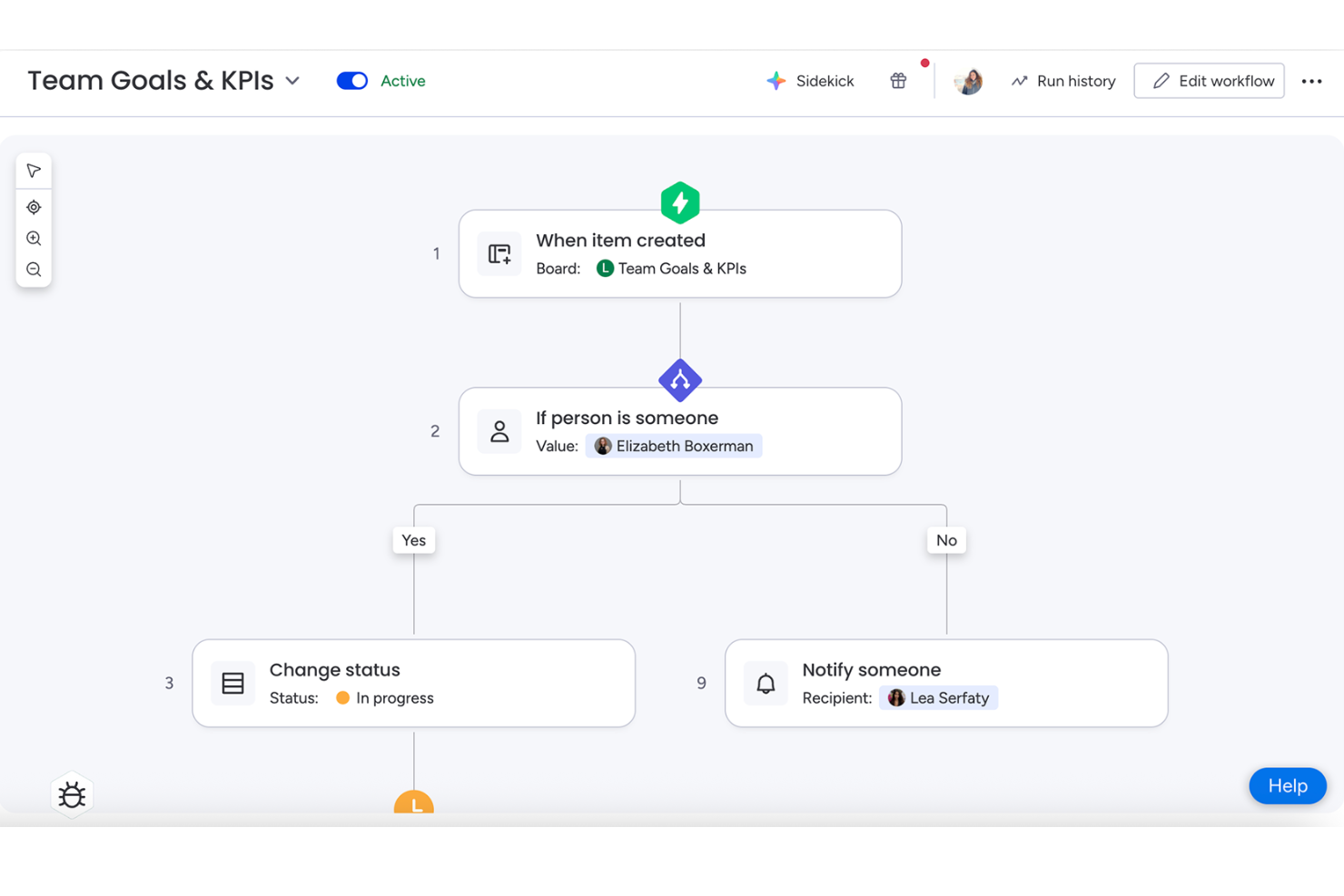
monday CRM earns its spot on my shortlist because the workflow builder gives you real control over how your pipeline runs. I can rename deal stages, add custom column types to capture service-specific data, and build no-code automation recipes that trigger actions like reassigning a contact or flagging a stalled deal. In practice, my team's board reflects how we actually sell, not a rigid default structure.
monday CRM Key Features
- Email sync: Connect Gmail or Outlook to log emails directly against contacts and deals.
- Lead capture forms: Generate web forms that feed submissions straight into your CRM board.
- Sales forecasting dashboard: View projected revenue by deal stage across your active pipeline.
- Activity log: Track every call, meeting, and note against a contact in a single timeline.
monday CRM Integrations
monday CRM offers 850+ integrations and apps through its built-in integrations and marketplace, including Salesforce, QuickBooks, and HubSpot, as well as Slack, Gmail, Google Calendar, Outlook, and Microsoft Teams. It connects with Zapier, and provides APIs and SDKs for building custom integrations.
Pros and Cons
Pros:
- No-code automations reduce repetitive admin tasks
- Won deals convert directly into projects
- Drag-and-drop boards adapt to any workflow
Cons:
- Built-in email composer feels clunky
- Minimum seat requirement raises entry cost

Certinia PS Cloud is a professional services automation (PSA) platform built natively on Salesforce, covering services estimation, resource management, project delivery, billing, and financial management in a single connected system.
Who Is Certinia PS Cloud Best For?
Certinia PS Cloud is a natural fit for mid-to-enterprise professional services organizations already running their CRM on Salesforce.
Why I Picked Certinia PS Cloud
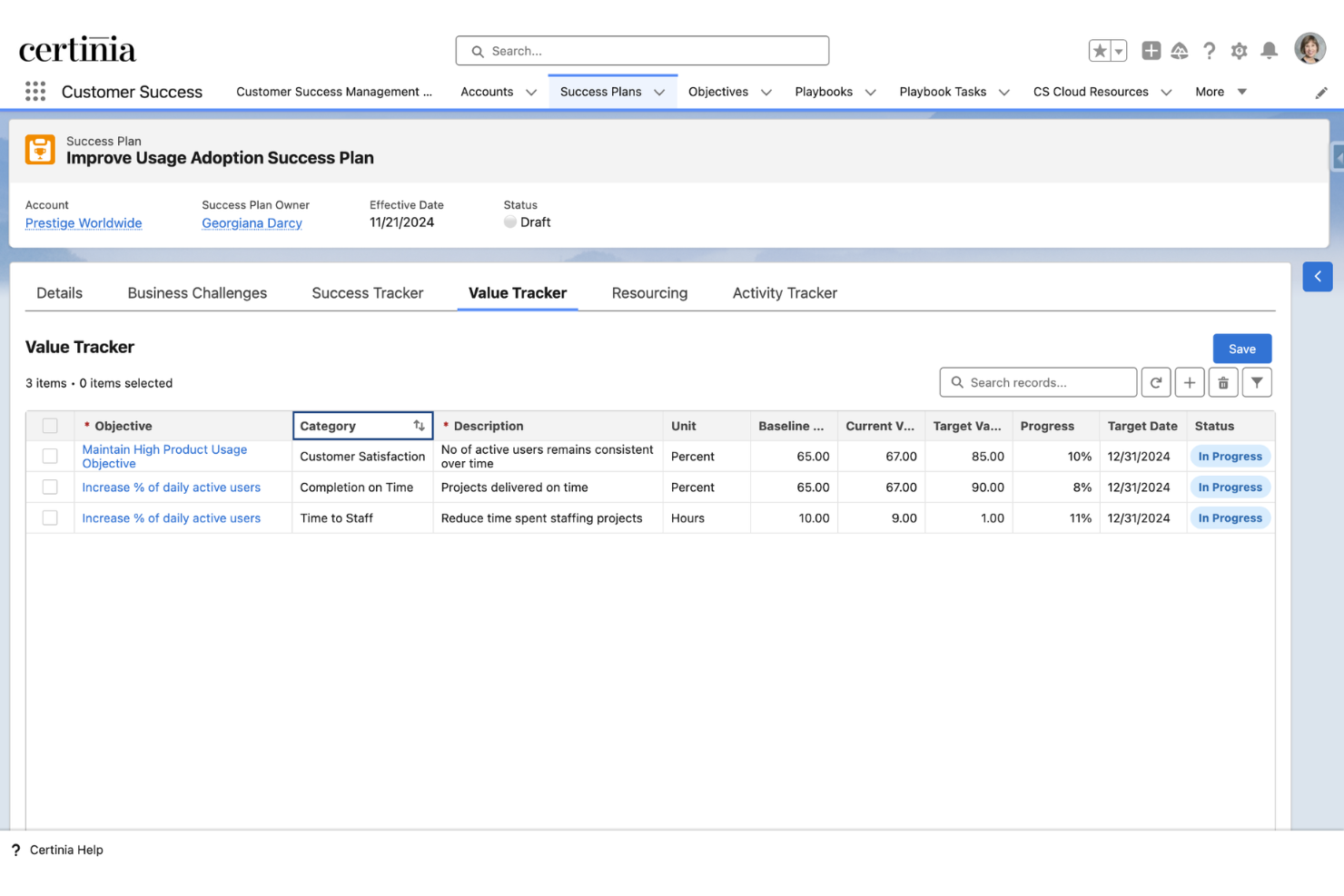
I've included Certinia PS Cloud in my top picks because it's the only PSA built natively on Salesforce, which means your CRM data and services delivery data live in the same system with no sync required. I like how opportunity data from Salesforce flows directly into service estimates and staffing, so there's no handoff gap between what was sold and what gets delivered. The Veda AI layer also generates estimates from historical project data, which I find genuinely useful for tightening bid accuracy.
Certinia PS Cloud Key Features
- Resource management: Search and assign staff to projects by skills, certifications, availability, and role across your entire services organization.
- Milestone and time-based billing: Generate invoices tied directly to project milestones, time logged, or fixed-fee schedules without manual reconciliation.
- Revenue recognition: Automate revenue recognition against contract terms and delivery schedules in compliance with ASC 606 and IFRS 15.
- Customer success workspace: Track renewals, health scores, and engagement history for each account from within the same platform as project delivery.
Certinia PS Cloud Integrations
Built natively on Salesforce, Certinia PS Cloud integrates with other on-platform apps and provides a secure API model for off-platform systems. Its integrations page lists 25 partner integrations, including Jira, DocuSign, SAP Concur, Avalara, Expensify, Microsoft Outlook, Conga, MuleSoft, Celigo, and Plaid. Certinia provides open, standards-based RESTful and SOAP APIs for custom integrations.
Pros and Cons
Pros:
- Real-time scheduling, billing, and forecasting are unified
- Org-wide visibility into consultant time allocation
- Built-in reporting for project tracking and reconciliation
Cons:
- Customizations require dedicated Salesforce admin expertise
- Page loading times can feel slow
Annen CRM-programvare for profesjonelle tjenester
Her er noen flere alternativer innen CRM-programvare for profesjonelle tjenester som ikke kom med på kortlisten min, men som likevel er verdt å se nærmere på:
- Zoho CRM
For multichannel client communications
- Kantata
For resource and capacity planning
- Copper
For Google Workspace integration
- Scoro
For quote-to-project conversion with billing
- BQE Core
For billing and invoicing automation
- Deltek Vantagepoint
For project profitability insights
- Bitrix24
For internal communication and collaboration
- Flowlu
For built-in knowledge base management
- Workamajig
For creative agency resource planning
- Microsoft Dynamics 365 Sales
For advanced sales forecasting tools


How I Evaluate CRM Software for Professional Services
I look at these platforms across two layers: the baseline capabilities a tool must have—like converting won deals into projects without re-entry—and the differentiators that set top picks apart.
Core Functionality (Table Stakes For This List)
When I'm selecting tools for my list, I rank each one on a scale from 0 (does not offer the functionality) to 5 (excels in this area) for each core functionality listed below. Then, I calculate the tool's total score into a percentage. Each tool needs to achieve a minimum total score of 65% to be considered for inclusion.
- Client Lifecycle Management: I check whether a platform tracks accounts from first inquiry through repeat engagements, including custom lifecycle stages and engagement history per client.
- Pipeline & Deal Tracking: Services deals aren't one-size-fits-all, so I look for customizable pipelines with weighted probabilities and fields that reflect T&M, retainer, or fixed-fee models.
- Project Conversion: A won deal should flow into a project without anyone re-entering scope, timelines, or budgets—I evaluate how cleanly that handoff happens inside the tool.
- Resource & Engagement Visibility: I look at whether you can see who's assigned where, what capacity looks like across your team, and how that ties back to specific client accounts or deals.
- Time & Billing Integration: Whether native or through a tight connector, I evaluate how the tool links tracked hours and expenses to client records for invoicing and profitability tracking.
- Services Revenue Forecasting: I look for forecasting that goes beyond raw pipeline totals to factor in active project stages, committed retainers, and backlog alongside weighted opportunities.
Once I have a list of tools that meet this criteria, I consider what sets each platform apart.
Differentiating Factors (What Sets Vendors Apart)
Here's how I compare and contrast different vendors:
Standout Features
Resource and capacity forecasting is a big differentiator. I look for tools that use weighted pipeline data to project staffing needs and utilization gaps before deals close. Engagement and proposal management matters just as much, especially when a platform lets you generate SOWs with built-in pricing models like T&M or retainer and push them for e-signature without leaving the CRM. I also evaluate revenue and billing intelligence, checking whether the tool tracks realization rates and lifetime client value across mixed billing arrangements.
Beyond Features
Industry and vertical fit is the first thing I consider. A CRM built for IT consulting firms handles engagements differently than one designed for architecture or accounting practices, and pre-built data models save weeks of configuration. Integration depth matters just as much—I check whether a platform syncs with accounting tools like QuickBooks or Xero and PSA systems so billable hours actually flow into invoicing. I also evaluate total cost of ownership, looking at whether core services features require premium-tier upgrades or expensive add-ons to unlock.
Slik velger du CRM-programvare for profesjonelle tjenester
Det er lett å gå seg vill i lange funksjonslister og komplekse prisstrukturer. For å hjelpe deg med å holde fokus når du går gjennom den unike prosessen med å velge programvare, er her en sjekkliste over faktorer du bør ha i bakhodet:
| Faktor | Hva du bør vurdere |
|---|---|
| Skalerbarhet | Vil plattformen støtte virksomheten din når du får nye kunder, utvider til nye regioner eller åpner nye kontorer? |
| Integrasjoner | Tilbyr programvaren innebygde forbindelser til de viktigste regnskaps-, PSA- og tidsregistreringsverktøyene dine? |
| Tilpasningsmuligheter | Kan du konfigurere stadier, felt og arbeidsflyter slik at de samsvarer med hvordan teamene dine leverer kundetjenester? |
| Brukervennlighet | Vil prosjektledere, konsulenter og partnere faktisk bruke systemet i det daglige, eller vil det skape friksjon? |
| Implementering og opplæring | Hvilke ressurser kreves for å komme i gang? Er leverandørstyrt opplæring inkludert, eller trenger du ekstern hjelp? |
| Kostnad | Er prisene tydelige når du legger til brukere, moduler eller integrasjoner? Vær oppmerksom på skjulte kostnader når virksomheten skalerer. |
| Sikkerhetstiltak | Tilbyr plattformen detaljerte tilgangstillatelser, sterk kryptering og logger for revisjon av kunde- og prosjektdata? |
| Overholdelse av krav | Støtter løsningen GDPR, SOC 2 eller andre standarder som kreves for håndtering av sensitive data innen profesjonelle tjenester? |
Hva er CRM-programvare for profesjonelle tjenester?
CRM-programvare for profesjonelle tjenester er en plattform utviklet for å administrere kunderelasjoner, salgspipeliner, prosjektleveranser og faktureringsprosesser, tilpasset virksomheter som tilbyr prosjektbaserte eller rådgivende tjenester. Disse løsningene samler kundedata, sporer avtaler og kundeoppdrag og kobler operativ leveranse sammen med økonomiske arbeidsflyter. Det gjør det enklere for virksomheter å administrere hele kundelivssyklusen og forbedre samarbeidet på tvers av team.
Funksjoner i CRM-programvare for profesjonelle tjenester
Når du velger CRM-programvare for profesjonelle tjenester, bør du se etter følgende viktige funksjoner:
- Kontakt- og kontoadministrasjon: Lagre, organiser og oppdater omfattende klientdetaljer, og spor all interaksjon, kontakt og relasjonshistorikk på ett sted.
- Tilpassbare salgstrakter: Konfigurer avtalestadier og sannsynlighetsvekting tilpasset salgsprosessen din, slik at du kan overvåke prosjektmuligheter og prognostisere inntekter nøyaktig.
- Konvertering fra avtale til prosjekt: Gjør avsluttede avtaler om til prosjekter eller oppdrag umiddelbart, samtidig som alle relevante klient-, omfangs- og tildelingsdata beholdes uten manuell registrering på nytt.
- Ressurs- og kapasitetsplanlegging: Tildel teammedlemmer til klientarbeid basert på ferdigheter og tilgjengelighet, slik at arbeidsbelastningen blir balansert og prosjektene leveres effektivt.
- Tids- og utgiftsregistrering: Registrer fakturerbare timer og relaterte utgifter direkte i CRM-systemet, og knytt dem til klientprosjekter for nøyaktig fakturering og lønnsomhetsanalyse.
- Integrasjon for fakturering og fakturaer: Opprett fakturaer, administrer forskuddsbetalinger og spor betalinger fra plattformen eller ved å synkronisere med de eksisterende regnskapssystemene dine.
- Dokumenthåndtering: Lagre, del og samarbeid om kontrakter, tilbud og arbeidsbeskrivelser på en sikker måte i CRM-systemet, med revisjonsspor for samsvar.
- Rollebaserte tillatelser: Kontroller tilgangen til sensitive data basert på brukerrolle eller team, slik at klientkonfidensialitet ivaretas og behovene for samsvar i bransjen støttes.
- Sporing av klientkommunikasjon: Registrer e-poster, samtaler og møter med automatiske synkroniseringsfunksjoner, slik at hele teamet har oversikt over klientsamtaler i alle stadier.
- Rapporterings- og analysedashbord: Visualiser salgstraktens tilstand, inntektsutvikling, ressursutnyttelse og klientengasjement, slik at ledere kan ta velinformerte forretningsbeslutninger.
Fordeler med CRM-programvare for profesjonelle tjenester
Implementering av CRM-programvare for profesjonelle tjenester gir flere fordeler for teamet og virksomheten din. Her er noen av fordelene du kan se frem til:
- Helhetlig klientoversikt: Få en komplett oversikt over hvert klientforhold ved å samle kontaktinformasjon, tilbud, prosjekter og tidligere arbeid i ett system.
- Raskere arbeidsflyt fra avtale til prosjekt: Konverter avsluttede avtaler til aktive prosjekter umiddelbart, eliminer manuell dataregistrering og reduser forsinkelser ved prosjektoppstart.
- Prognoser for ressurser og inntekter: Bruk sanntidsdata om salgstrakt og kapasitet til å beregne bemanningsbehov, administrere arbeidsbelastning og prognostisere virksomhetens inntekter med større nøyaktighet.
- Mer nøyaktig fakturering: Spor fakturerbare timer, utgifter og forskuddsbetalinger direkte mot klientarbeid, noe som gir presis fakturering til rett tid.
- Sentralisert kommunikasjonshistorikk: Sørg for at alle har den samme informasjonen ved å registrere klientenes e-poster, samtaler, dokumenter og møter for bedre samarbeid og kontinuitet.
- Bedre datasikkerhet: Beskytt sensitiv klient- og prosjektinformasjon med rollebasert tilgang og revisjonsspor som støtter samsvarskrav for regulerte bransjer.
- Bedre beslutningstaking: Utnytt innebygd analyse og rapportering til å oppdage trender, måle prosjektlønnsomhet og styre både salgs- og driftsstrategien.
Kostnader og priser for CRM-programvare for profesjonelle tjenester
Valg av CRM-programvare for profesjonelle tjenester krever en forståelse av de ulike prismodellene og abonnementene som er tilgjengelige. Kostnadene varierer basert på funksjoner, teamstørrelse, tillegg og mer. Tabellen nedenfor oppsummerer vanlige abonnementer, gjennomsnittsprisene deres og typiske funksjoner som er inkludert i CRM-løsninger for profesjonelle tjenester:
Sammenligningstabell for CRM-programvare for profesjonelle tjenester
| Abonnementstype | Gjennomsnittspris | Vanlige funksjoner |
|---|---|---|
| Gratisabonnement | $0 | Grunnleggende kontakthåndtering, begrensede salgstrakter og enkel rapportering. |
| Personlig abonnement | $10-$25/user/month | Kontakthåndtering, tilpassbare salgstrakter, grunnleggende prosjektkonvertering og støtte for én bruker. |
| Bedriftsabonnement | $30-$55/user/month | Støtte for flere brukere, prosjekt- og ressursstyring, tidsregistrering, faktureringsintegrasjon og avansert rapportering. |
| Storkundeabonnement | $60-$120/user/month | Avanserte tillatelser, støtte for flere enheter, samsvarsverktøy, API-tilgang, førsteklasses integrasjoner og hjelp med innføring. |
CRM-programvare for profesjonelle tjenester – vanlige spørsmål
Her er noen svar på vanlige spørsmål om CRM-programvare for profesjonelle tjenester:
Hva skiller CRM-programvare for profesjonelle tjenester fra generiske CRM-verktøy?
CRM-programvare for profesjonelle tjenester kobler sammen salg, prosjektleveranse og fakturering i ett system, gir teamene oversikt over hele kundelivssyklusen og støtter spesialiserte arbeidsflyter som tilbud, prosjektkonvertering og ressursplanlegging.
Kan CRM-programvare for profesjonelle tjenester integreres med regnskaps- eller PSA-verktøy?
Ja, de fleste plattformer tilbyr innebygde eller sertifiserte integrasjoner med verktøy for regnskap, tidsregistrering og automatisering av profesjonelle tjenester, slik at du kan synkronisere økonomiske data, følge med på fakturerbare timer og effektivisere faktureringen.
Hvor enkelt er det å implementere CRM-programvare for profesjonelle tjenester?
Implementeringstiden avhenger av de nåværende systemene og hvor komplekse prosessene dine er. Plattformer med bransjekonfigurasjoner basert på maler og alternativer for innføring rettet mot tjenestebedrifter reduserer vanligvis oppsettstiden og gjør utrullingen enklere for ikke-tekniske team.
Hvordan hjelper CRM-programvare med prosjekt- og ressursplanlegging?
CRM-programvare henter data om salgsmuligheter og prosjekter inn i moduler for ressursplanlegging. Det hjelper deg med å forutse teamenes arbeidsbelastning, tilpasse kompetanse til kommende prosjekter og oppdage mulig overbooking eller kapasitetsmangel før det påvirker leveransen.
Er det mulig å tilpasse arbeidsflyter og datafelt til det spesifikke tjenestetilbudet mitt?
Ja, ledende plattformer lar deg tilpasse salgsfaser, prosjekttyper og datafelt slik at de samsvarer med virksomhetens leveransemodell, enten du fokuserer på timebasert fakturering, løpende honoraravtaler, prosjekter til fastpris eller en blanding av ulike oppdragstyper.
Hvilke typer virksomheter har størst nytte av CRM-programvare for profesjonelle tjenester?
Konsulentselskaper, kreative byråer, IT-tjenesteleverandører, advokatvirksomheter og andre prosjektbaserte virksomheter får størst verdi, særlig de som trenger å knytte sammen kundeanskaffelse, leveranse og fakturering i én løsning.