



Zoho Projects vs. Jira: Confronto Esperto e Recensioni 2026



Zoho Projects offre una piattaforma flessibile per gestire i flussi di lavoro del team in modo efficiente. Jira è progettato per gestire progetti di sviluppo software complessi grazie a funzionalità avanzate.
Pur supportando entrambi la gestione dei progetti, gli strumenti adottano approcci diversi: Zoho Projects si concentra sulla collaborazione generale del team, mentre Jira si specializza nelle metodologie agili e nelle attività orientate allo sviluppo (ad esempio, l’uso di strumenti di tracciamento di bug e problemi), particolarmente adatto ai team scrum.
In questo articolo troverai un confronto dettagliato degli strumenti, con l’analisi delle funzionalità, vantaggi e svantaggi, prezzi e altro ancora, per aiutarti a scegliere il software di project management più adatto al tuo team.
Zoho Projects vs. Jira: An Overview
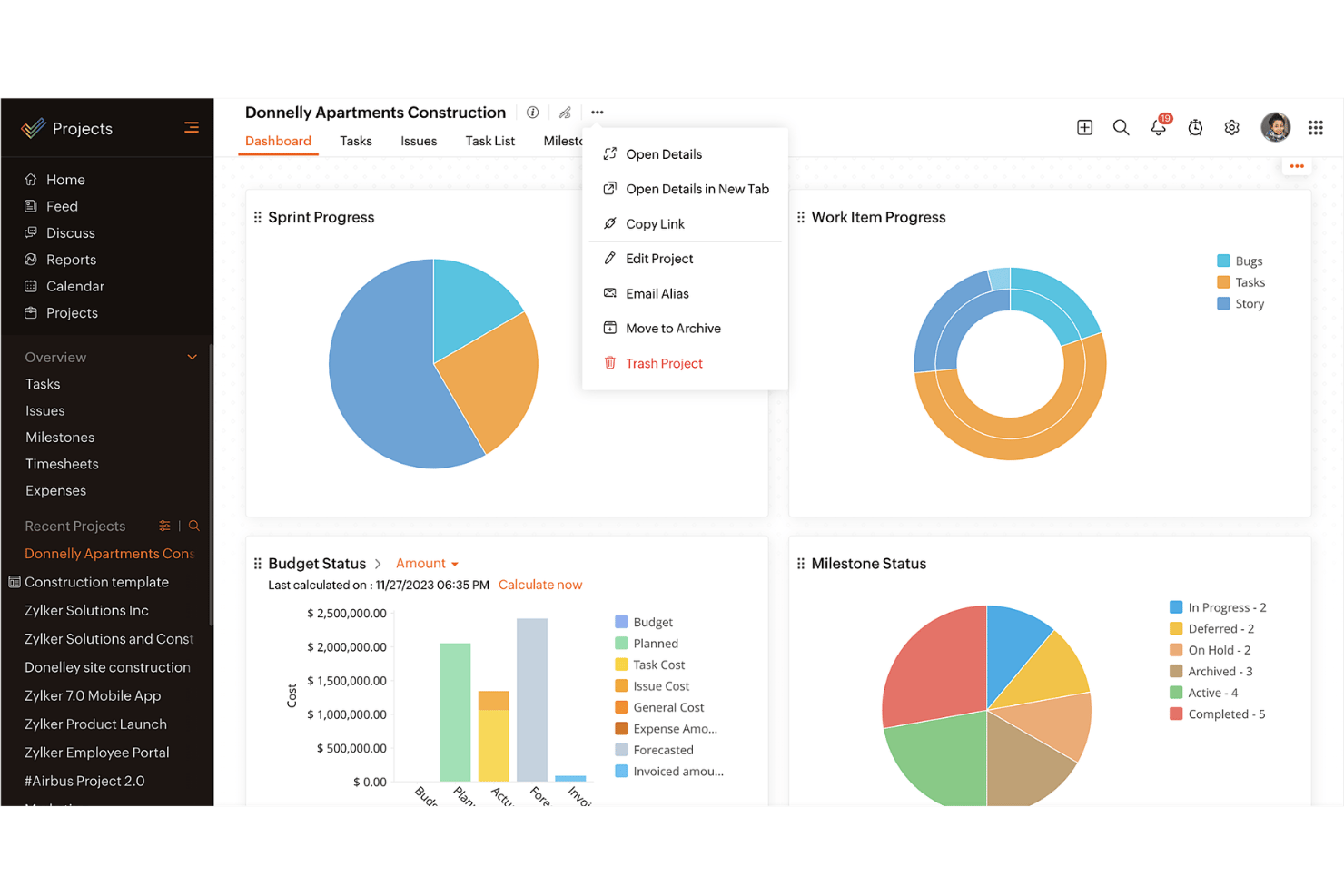
Zoho Projects
Jira

Perché fidarsi dei nostri consigli sui software
Il nostro team testa e recensisce software dal 2012. In quanto project manager noi stessi, sappiamo quanto sia difficile — e importante — scegliere il software giusto.
Per questa guida, abbiamo valutato gli strumenti attraverso test pratici e ricerche indipendenti, assegnando un punteggio agli strumenti in base ai nostri criteri di selezione. Ci basiamo inoltre sulle competenze di leader di pensiero del settore e di professionisti attivi nella gestione dei progetti.
Le nostre recensioni riflettono il nostro giudizio editoriale umano, non un discorso di vendita.
Revisori esperti:
Zoho Projects vs. Jira Pricing Comparison
| Zoho Projects | Jira | |
|---|---|---|
| Free Trial | Free plan available | Free plan + 14-day free trial available |
| Pricing | From $4/user/month (billed annually) | From $7.91/user/month |
Il prezzo di Zoho Projects prevede un modello di abbonamento a livelli che si adatta alle dimensioni del tuo team, ma occorre prestare attenzione a possibili costi aggiuntivi per componenti extra e funzionalità premium.
Il prezzo di Jira segue anch’esso un modello di abbonamento, con diversi livelli in base al numero di utenti e costi aggiuntivi per funzionalità avanzate o integrazioni.
Per selezionare la soluzione di project management più adatta al tuo budget, valuta la struttura dei prezzi di ciascun fornitore in relazione alle dimensioni e alle esigenze specifiche del tuo team, tenendo conto delle funzionalità e integrazioni indispensabili.
Zoho Projects vs. Jira Feature Comparison
Il diagramma di Gantt di Zoho Projects consente di tracciare visivamente le tempistiche e le dipendenze, particolarmente utile nella gestione di calendari complessi nei progetti di costruzione.
Le bacheche agili di Jira aiutano i team di sviluppo software a organizzare i backlog e pianificare gli sprint in modo efficace. Ogni strumento offre punti di forza adatti a diverse esigenze di project management.
| Zoho Projects | Jira | |
|---|---|---|
| API | ||
| Calendar Management | ||
| Collaboration Support | ||
| Dashboards | ||
| Data Export | ||
| Data Import | ||
| External Integrations | ||
| File Sharing | ||
| Gantt Charts | ||
| Kanban Boards | ||
| Multi-User | ||
| Notifications | ||
| Project Management | ||
| Task Scheduling/Tracking | ||
| Time Management |
Zoho Projects vs. Jira: integrazioni
| Integrazione | Zoho Projects | Jira |
| Slack | ✅ | ✅ |
| Microsoft Teams | ✅ | ✅ |
| Google Drive | ✅ | ✅ |
| Dropbox | ✅ | ✅ |
| Salesforce | ❌ | ✅ |
| GitHub | ❌ | ✅ |
| Trello | ✅ | ❌ |
| Asana | ❌ | ✅ |
| Figma | ❌ | ✅ |
| Zapier | ✅ | ✅ |
| API | ✅ | ✅ |
Zoho Projects si integra con Slack per tenere il tuo team aggiornato in tempo reale, rendendolo ideale per team remoti che dipendono da una comunicazione costante. Zoho Projects si integra inoltre con tutto l’ecosistema Zoho, inclusi Zoho CRM e Zoho One.
L’integrazione di Jira con Figma supporta i team di design e sviluppo consentendo una collaborazione fluida sulle interfacce dei prodotti. In modo simile a Zoho, anche Jira si integra perfettamente con l’intero ecosistema Atlassian, inclusi Bitbucket e Confluence.
Ciascuna integrazione offre vantaggi distinti e specifici per i diversi flussi di lavoro, stack di strumenti ed esigenze aziendali.
Zoho Projects vs. Jira Sicurezza, Conformità & Affidabilità
| Fattore | Zoho Projects | Jira |
| Privacy dei dati | Zoho Projects garantisce la privacy dei dati con controlli di accesso rigorosi e conformità al GDPR. | Jira offre una solida privacy dei dati tramite permessi personalizzabili e conformità al GDPR. |
| Crittografia | Zoho Projects utilizza la crittografia AES-256 per i dati a riposo, proteggendo le tue informazioni. | Jira impiega la crittografia TLS per proteggere i dati sia in transito che a riposo. |
| Affidabilità uptime | Zoho Projects garantisce una disponibilità del 99,9%, assicurando che i tuoi progetti siano sempre accessibili. | Jira si impegna per un'elevata disponibilità con un SLA di uptime del 99,9%. |
Sia Zoho Projects che Jira offrono solidi livelli di sicurezza e conformità, ma i loro approcci possono essere più adatti a diversi tipi di organizzazioni. Quando valuti questi strumenti, considera gli standard di crittografia, le politiche sulla privacy dei dati e le garanzie di uptime per assicurarti che soddisfino le esigenze specifiche del tuo team.
Zoho Projects vs. Jira Facilità d'Uso
| Fattore | Zoho Projects | Jira |
| Interfaccia utente | Zoho Projects offre un'interfaccia intuitiva, pulita e tutto-in-uno con un cruscotto personalizzabile per una navigazione rapida | Il layout di Jira è ricco di funzionalità ma può sembrare complicato per i nuovi utenti (soprattutto per chi non conosce la tassonomia di Jira, come milestones, epic, stories, ecc.). |
| Esperienza di onboarding | Zoho Projects offre un'interfaccia intuitiva, pulita, tutto-in-uno con un cruscotto personalizzabile per una navigazione rapida | Jira offre una documentazione completa, ma la configurazione iniziale può richiedere più tempo. |
| Configurazione | Zoho Projects consente una configurazione rapida con template preimpostati per avviare subito i progetti. | La configurazione di Jira è flessibile ma potrebbe prevedere una curva di apprendimento più ripida. |
| Assistenza | Zoho Projects include supporto 24/5 via chat ed email, garantendo aiuto quando necessario. | Jira offre assistenza clienti 24/7 con vasti materiali online e forum della community. |
Zoho Projects è più facile da usare grazie alla sua interfaccia intuitiva e alle guide di onboarding, risultando ideale per i team che cercano una configurazione semplice. Jira offre maggiore flessibilità e funzionalità avanzate, ma presenta una curva di apprendimento più impegnativa, soprattutto per chi è nuovo agli strumenti di gestione progetti.
Zoho Projects vs Jira: Pros & Cons
Zoho Projects
- Task dependencies are highly visual and easy to set up.
- Built-in time tracking integrates smoothly with billing features.
- Customizable project templates support repeatable workflows.
- Reporting customization can be limited for advanced needs.
- Mobile app notifications do not always sync in real time.
- Gantt chart drag-and-drop can feel sluggish with large projects.
Jira
- Agile workflow management supports Scrum and Kanban and can improve your teams' productivity.
- Automation rules are easy to set up, which helps your team speed up their work.
- Custom filters can be created and accessed quickly, which improves your team's efficiency.
- Field names can be confusing, which might slow down your team's workflow.
- The interface can be too crowded in Scrum projects, which can make it hard for your team to navigate.
- There's a lack of resource management capabilities, which could limit your team's planning.
Best Use Cases for Zoho Projects and Jira
Zoho Projects
- Small Agencies Kanban boards, time tracking, and client billing streamline project delivery and reporting for agency teams.
- IT Departments Issue tracking, blueprint automations, and strong permission controls provide what IT teams need for complex internal projects.
- Consulting Firms Time sheets, detailed reports, and project-level billing help consultants keep track of client hours and invoicing.
- Remote Teams Robust collaboration tools, document sharing, and project forums help distributed users stay connected.
- Marketing Teams Reusable templates, task dependencies, and timeline tracking make repeated campaigns run smoothly and transparently.
- Construction Projects Gantt charts, milestones, and resource allocation features support the scheduling needs of construction and field project managers.
Jira
- Software development Jira’s agile tools like Scrum and Kanban boards make it perfect for managing software projects.
- IT departments Its issue tracking capabilities help your team efficiently handle technical support and bug fixes.
- Tech startups Jira offers customization capabilities that allow your team to scale and adapt as your projects grow.
- Agile teams Sprint planning and backlog management features keep your agile processes organized and effective.
- Large enterprises Jira’s automation rules can streamline your complex workflows and improve team productivity.
- Project managers Its reporting and analytics provide insights that help you make informed decisions quickly.
Chi dovrebbe usare Zoho Projects e chi dovrebbe usare Jira?
A mio avviso, Zoho Projects è ideale per piccoli team (come startup) che necessitano di un'interfaccia intuitiva, funzionalità essenziali e che hanno un budget limitato. Funziona bene in settori come il marketing o la consulenza, dove la semplicità e una configurazione veloce sono priorità.
Jira, invece, è particolarmente indicato per team di sviluppo software che necessitano di una soluzione di project management agile con funzionalità avanzate di tracciamento dei problemi e ampie possibilità di personalizzazione. Se il tuo team valuta la flessibilità ed è in grado di affrontare una curva di apprendimento più ripida, Jira è la scelta migliore.
Differences Between Zoho Projects and Jira
| Zoho Projects | Jira | |
|---|---|---|
| Automation | Zoho Projects includes basic automation tools for task management. | Jira offers advanced automation options, especially suited for agile workflows. |
| Integrations | Zoho Projects integrates smoothly with tools like Slack and Google Drive. | Jira connects with a wide range of development tools, making it ideal for software teams. |
| Onboarding | Zoho Projects eases onboarding with step-by-step tutorials and guides. | Jira has detailed documentation but may require more time for initial setup. |
| Pricing | Zoho Projects offers a tiered subscription model with potential add-on costs. | Jira provides a subscription model based on user count with extra expenses for advanced features. |
| User Interface | Zoho Projects provides a clean, intuitive interface with customizable dashboards. | Jira’s interface is feature-rich but complex, requiring more time to learn. |
| Read Zoho Projects ReviewOpens new window | Read Jira ReviewOpens new window |
Similarities Between Zoho Projects and Jira
| Cloud-Based | Both tools are cloud-based, providing your team with access from anywhere with an internet connection. Zoho Projects is known for its ease of access, while Jira offers robust cloud solutions with enterprise-grade security. |
|---|---|
| Collaboration | Both platforms support team collaboration with shared calendars, document sharing, and real-time updates. Zoho Projects integrates well with communication tools like Slack, whereas Jira’s strong point is integration with development tools. |
| Customization | Both provide customizable workflows and dashboards, letting you tailor the software to fit your project’s needs. Zoho Projects offers user-friendly customization, while Jira allows for deep configuration options. |
| Reporting | Both Zoho Projects and Jira include comprehensive reporting features to help analyze project performance. Zoho Projects focus on visual simplicity, whereas Jira offers in-depth, technical reports ideal for software development metrics. |
| Task Management | Both Zoho Projects and Jira offer robust task management features, allowing you to assign tasks, set deadlines, and track progress. Zoho Projects excels in simplicity, while Jira provides detailed tracking suitable for complex projects. |
| Read Zoho Projects ReviewOpens new window Read Jira ReviewOpens new window | |