

I 10 migliori software per la gestione dei progetti sanitari nel 2026

Migliori software di gestione dei progetti sanitari: selezione


I progetti sanitari comportano grandi responsabilità, normative rigorose e nessun margine di errore. Che tu stia gestendo l'implementazione di apparecchiature, aggiornamenti IT o tempistiche di costruzione, è difficile mantenere tutto allineato.
Il software di gestione dei progetti sanitari può aiutarti offrendo una supervisione migliore di attività, tempistiche, budget e conformità. Mantiene il tuo team concentrato e riduce i ritardi che possono avere un impatto sull'assistenza.
In questo elenco ti illustrerò i migliori software di gestione dei progetti sanitari disponibili sul mercato. Li ho testati personalmente e analizzerò cosa fanno bene, dove potrebbero presentare dei limiti e per chi sono più adatti.
Perché fidarsi dei nostri consigli sui software
Il nostro team testa e recensisce software dal 2012. In quanto project manager noi stessi, sappiamo quanto sia difficile — e importante — scegliere il software giusto.
Per questa guida, abbiamo valutato gli strumenti attraverso test pratici e ricerche indipendenti, assegnando un punteggio agli strumenti in base ai nostri criteri di selezione. Ci basiamo inoltre sulle competenze di leader di pensiero del settore e di professionisti attivi nella gestione dei progetti.
Le nostre recensioni riflettono il nostro giudizio editoriale umano, non un discorso di vendita.
Revisori esperti:
Tabella comparativa dei software di gestione dei progetti sanitari
Questa tabella comparativa riassume i dettagli sui prezzi delle mie migliori selezioni di software di gestione dei progetti sanitari.
| Tool | Best For | Trial Info | Price | ||
|---|---|---|---|---|---|
| 1 | Ideale per workflow integrati di raccolta richieste di progetto | Prova gratuita + demo gratuita disponibile | Da $10/utente/mese (fatturazione annuale) | Website | |
| 2 | Ideale per la gestione end-to-end del lavoro nei servizi professionali | Prova gratuita di 14 giorni + demo gratuita disponibile | A partire da $19,90/utente/mese (fatturazione annuale) | Website | |
| 3 | Ideale per una programmazione solida dei progetti | Prova gratuita di 30 giorni | Da $10/utente/mese (fatturazione annuale) | Website | |
| 4 | Ideale per flussi di lavoro strutturati | Prova gratuita di 14 giorni + demo gratuita disponibile | Da $8/utente/mese (fatturazione annuale) | Website | |
| 5 | Ideale per i flussi di lavoro di marketing e creativi | Demo gratuita disponibile | Prezzo su richiesta | Website | |
| 6 | Ideale per la pianificazione di costruzioni su larga scala | Demo gratuita disponibile | Prezzo su richiesta | Website | |
| 7 | Ideale per integrare finanza e logistica | Demo gratuita disponibile | Prezzo su richiesta | Website | |
| 8 | Ideale per la gestione visiva dei progetti e la collaborazione di team | Not available | Da $17,50/utente/mese, con un minimo di 20 utenti richiesti (fatturazione annuale) | Website | |
| 9 | Ideale per allineare la strategia ai risultati aziendali | Not available | Il prezzo di ServiceNow Project Portfolio Management non è pubblicato e viene fornito su richiesta. | Website | |
| 10 | Ideale per la gestione di progetti e portafogli a livello enterprise | Not available | A partire da $45/utente/mese | Website |

Recensioni dei migliori software di gestione dei progetti sanitari
Di seguito trovi i miei riepiloghi dettagliati dei migliori software di gestione dei progetti sanitari inclusi nella mia selezione. Le mie recensioni offrono una panoramica approfondita delle funzionalità principali, dei pro & contro, delle integrazioni e dei casi d’uso ideali di ogni strumento, per aiutarti a trovare quello più adatto a te.

Celoxis
Ideale per workflow integrati di raccolta richieste di progetto

Celoxis è una piattaforma enterprise per la gestione di progetti e portafogli che copre la pianificazione dei progetti, l'assegnazione delle risorse, il monitoraggio dei rischi, la gestione del budget e la reportistica trasversale tra team su iniziative complesse e multi-dipartimentali.
Per chi è più adatto Celoxis?
Celoxis è particolarmente indicato per organizzazioni sanitarie di medie e grandi dimensioni che gestiscono più progetti simultanei tra reparti diversi, come IT, operazioni e programmi clinici.
Perché ho scelto Celoxis
Ho incluso Celoxis tra le mie migliori scelte perché il suo sistema di raccolta delle richieste di progetto è veramente pensato per PMO del settore sanitario che gestiscono un volume elevato di richieste in arrivo. Mi piace il fatto che si possano creare moduli personalizzati per la raccolta delle richieste con flussi di approvazione configurabili, e utilizzare KPI aziendali per dare priorità alle richieste prima ancora di iniziare la pianificazione. In pratica, questo significa che il mio team può valutare e classificare le richieste provenienti da reparti clinici, IT o operativi in un'unica pipeline centralizzata, senza dover gestire fogli di calcolo o caselle di posta elettronica.
Caratteristiche principali di Celoxis
- Assegnazione delle risorse basata sulle competenze: Assegna i membri del team ai compiti in base alle competenze, alla disponibilità e al carico di lavoro su più progetti simultanei.
- Gantt interattivi: Crea e modifica le timeline dei progetti con pianificazione drag-and-drop, dipendenze e monitoraggio delle milestone.
- Monitoraggio di budget e costi: Controlla in tempo reale la differenza tra i costi pianificati e quelli effettivi a livello di attività, progetto o portafoglio.
- Controlli di accesso basati sui ruoli: Imposta permessi dettagliati per ruolo utente e controlla chi può visualizzare o modificare i dati sensibili dei progetti.
Integrazioni di Celoxis
Celoxis offre integrazioni native con Google Drive, Microsoft Excel, Microsoft Project, Salesforce, Jira, Zendesk, Slack, QuickBooks Online e altri ancora. Si collega anche con Zapier e dispone di un'API per integrazioni personalizzate.
Pros and Cons
Pros:
- Simulazioni di scenari what-if integrate per i progetti
- Supporta sia il cloud che l'installazione locale
- Gestisce sia modelli a ore che a prezzo fisso
Cons:
- L'app mobile non offre tutte le funzionalità della versione desktop
- L'interfaccia appare datata e a volte poco intuitiva

Scoro
Ideale per la gestione end-to-end del lavoro nei servizi professionali

Scoro è una soluzione completa per gestire ogni aspetto di un'azienda di servizi professionali. È ideale per la gestione del lavoro end-to-end perché offre un insieme di funzionalità che coprono l'intero ciclo di vita dei processi aziendali.
Perché ho scelto Scoro:
Ho selezionato Scoro per il suo approccio olistico alla gestione del lavoro, particolarmente vantaggioso per i servizi professionali. La sua piattaforma unificata lo distingue dagli altri strumenti di project management, offrendo un flusso di lavoro senza interruzioni dall'inizio alla fine di un progetto. Ritengo che Scoro sia la scelta migliore per la gestione end-to-end, poiché integra efficacemente pianificazione dei progetti, monitoraggio del tempo, fatturazione e reportistica, elementi fondamentali per l'efficienza dei servizi professionali.
Funzionalità e integrazioni principali:
Le funzionalità chiave di Scoro includono una dashboard centralizzata per una panoramica completa dei progetti e delle attività, tracciamento del tempo e strumenti per la gestione finanziaria, essenziali per i servizi professionali. Il software offre inoltre un potente sistema CRM, capacità di gestione di progetti e attività, e funzionalità avanzate di reportistica e dashboard.
Scoro si integra nativamente con strumenti come Microsoft Outlook, Google Calendar, QuickBooks, Xero, Mailchimp, Dropbox, Toggl e Zapier, tra gli altri.
Pros and Cons
Pros:
- Piattaforma all-in-one per diversi processi aziendali
- Ampie capacità di reportistica e dashboard
- Personalizzabile in base alle esigenze specifiche dell'azienda
Cons:
- Barriera di costo elevata per i piccoli team a causa del numero minimo di utenti richiesto
- Le tariffe di onboarding possono risultare proibitive per alcune aziende
- La complessità delle funzionalità può richiedere un periodo di onboarding più lungo
New Product Updates from Scoro

Scoro Adds Time Mobile App and ELI Improvements
Scoro adds the Scoro Time mobile app for iOS/Android to track time anywhere and expands ELI with attachments, smarter filtering, and trigger-based actions. For more information, visit Scoro's official site.
Ideale per una programmazione solida dei progetti

Microsoft Project è uno strumento completo per le attività di gestione dei progetti. È ideale per una programmazione solida dei progetti grazie alle sue funzionalità avanzate che supportano cronoprogrammi dettagliati e complessi, particolarmente vantaggiosi nel settore sanitario dove precisione e affidabilità sono fondamentali.
Perché ho scelto Microsoft Project:
Ho scelto Microsoft Project per la sua comprovata esperienza nel fornire potenti capacità di pianificazione in grado di gestire la complessità della gestione dei progetti sanitari. La sua capacità di gestire in modo efficiente più cronoprogrammi e risorse lo distingue dagli altri software di project management. Ritengo sia il migliore per una programmazione robusta perché offre profondità e flessibilità necessarie per gestire i calendari intricati dei progetti sanitari, garantendo che ogni fase del progetto sia pianificata ed eseguita con precisione.
Funzionalità e integrazioni principali:
Le funzionalità di spicco di Microsoft Project includono i suoi strumenti di pianificazione avanzati, come i diagrammi di Gantt e i menu a discesa pre-popolati, che semplificano il processo di pianificazione. Offre inoltre modelli personalizzabili già integrati, che consentono di risparmiare tempo durante l'impostazione dei progetti. Le funzionalità di collaborazione in tempo reale dello strumento permettono aggiornamenti e comunicazioni senza interruzioni tra i membri del team.
Per quanto riguarda le integrazioni, Microsoft Project si integra nativamente con una suite di applicazioni Microsoft, tra cui, ma non solo, Microsoft Teams, SharePoint, Power BI e Office 365.
Pros and Cons
Pros:
- Pianificazione avanzata con diagrammi di Gantt
- Modelli di progetto personalizzabili
- Funzionalità di collaborazione in tempo reale
Cons:
- Può essere complesso per i principianti
- Costo più elevato per le funzionalità avanzate
- È necessario un impegno annuale per il miglior prezzo

Workzone
Ideale per flussi di lavoro strutturati
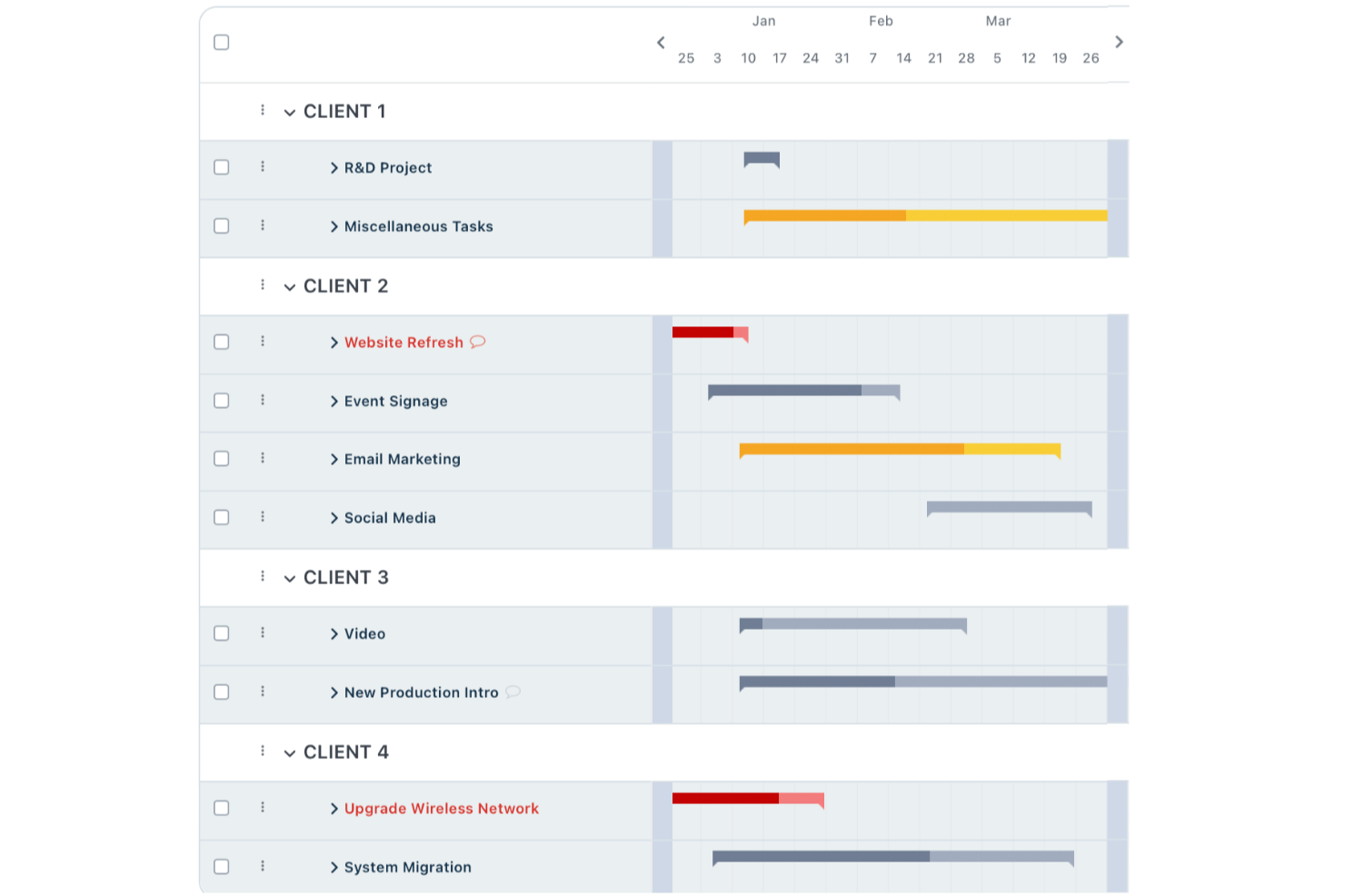
Workzone semplifica le complessità della gestione dei progetti sanitari, offrendo strumenti pensati per soddisfare le esigenze specifiche delle equipe sanitarie. Se lavori nel settore sanitario e desideri migliorare i flussi di lavoro dei tuoi progetti, Workzone potrebbe essere la soluzione che stavi cercando. Affronta problemi come l'organizzazione delle richieste di progetto e facilita la collaborazione tra i membri del team, garantendo che i progetti vengano completati in modo efficiente ed efficace.
Perché ho scelto Workzone
Ho scelto Workzone per la gestione dei progetti sanitari perché eccelle nel fornire flussi di lavoro strutturati e strumenti di collaborazione, fondamentali per le equipe sanitarie. La sua funzione di organizzazione delle richieste di progetto aiuta a ottimizzare il processo di raccolta delle richieste, fondamentale in un ambiente sanitario frenetico. Inoltre, le capacità di revisione documentale e organizzazione dei file migliorano la comunicazione nel team e riducono gli errori, rendendo più semplice la gestione di progetti sanitari complessi.
Caratteristiche principali di Workzone
Oltre alla sua potente organizzazione delle richieste di progetto, Workzone offre diverse altre funzionalità utili per la gestione dei progetti sanitari:
- Report predefiniti: Questi report forniscono informazioni su metriche chiave come pianificazione della capacità e budget, aiutandoti a gestire efficacemente le risorse.
- Modelli di progetto: Con oltre 1.000 modelli disponibili, il tuo team può avviare rapidamente i progetti senza partire da zero, risparmiando tempo e garantendo coerenza.
- Strumenti di standardizzazione: Questi strumenti favoriscono l'uniformità tra i reparti, migliorando la visibilità e il controllo su vari progetti.
- Formazione e assistenza illimitate: Workzone offre formazione e assistenza continue per garantire che il tuo team possa sfruttare al massimo le funzionalità della piattaforma.
Integrazioni Workzone
Attualmente Workzone non elenca integrazioni native.
Pros and Cons
Pros:
- Gestione rafforzata di flussi di lavoro strutturati
- Strumenti integrati per la revisione dei documenti
- Dashboard con visibilità chiara del carico di lavoro
Cons:
- Assenza di trasparenza pubblica sui prezzi
- Capacità limitate per la gestione avanzata del budget
New Product Updates from Workzone

Workzone Enterprise Adds Multi-Stage Approval Workflows
Workzone Enterprise now includes Approval Workflows, enabling multi-stage document approvals to standardize complex processes and reduce manual effort. For more information, visit Workzone's official site.
 .
.
Ideale per i flussi di lavoro di marketing e creativi

Adobe Workfront è una piattaforma versatile per la gestione del lavoro e l'automazione dei flussi di lavoro. Eccelle nei flussi di lavoro di marketing e creativi, offrendo strumenti specializzati per questi settori.
Perché ho scelto Workfront (Adobe):
Ho selezionato Workfront per la sua solida corrispondenza con i processi di marketing e creativi, che spesso richiedono funzionalità uniche per la collaborazione e l'esecuzione. La sua specializzazione in questi ambiti lo distingue dagli altri software di project management. Ritengo Workfront il migliore per i flussi di lavoro di marketing e creativi perché è progettato per gestire le complessità e le esigenze di questi settori, fornendo soluzioni mirate per la gestione di progetti e campagne creative.
Funzionalità e integrazioni di spicco:
Le funzionalità di punta di Workfront includono un'automazione robusta dei flussi di lavoro, la gestione delle risorse digitali e capacità avanzate di revisione, elementi essenziali per progetti di marketing e creativi. La piattaforma offre anche dashboard personalizzabili e strumenti di reportistica per informazioni in tempo reale.
Workfront si integra nativamente con Adobe Creative Cloud, Adobe Experience Manager, Salesforce, JIRA, Slack, Microsoft Teams, Box, Google Drive, Oracle e ServiceNow, facilitando un ambiente di lavoro coeso ed efficiente.
Pros and Cons
Pros:
- Personalizzabile per progetti complessi di marketing e creativi
- Ampie capacità di integrazione con prodotti Adobe e altri strumenti aziendali
- Reportistica e analisi avanzate per informazioni in tempo reale
Cons:
- Assenza di informazioni trasparenti sui prezzi
- Curva di apprendimento potenzialmente ripida per i nuovi utenti
- Potrebbe richiedere un significativo sforzo di configurazione e personalizzazione


Oracle Primavera P6 è una soluzione robusta per la gestione di progetti di costruzione complessi. Eccelle nella pianificazione di costruzioni su larga scala, offrendo un controllo dettagliato sui tempi, le risorse e i costi di progetto.
Perché ho scelto Oracle Primavera P6:
Ho selezionato Oracle Primavera P6 per le sue prestazioni senza eguali nella gestione di progetti di costruzione su larga scala. La sua gamma di funzionalità complete e la comprovata esperienza lo distinguono da altri strumenti di project management. L'ho giudicato il migliore per la pianificazione di costruzioni di grandi dimensioni perché offre capacità avanzate essenziali per supervisionare ampie iniziative edilizie, garantendo un'attenta pianificazione ed esecuzione.
Caratteristiche principali e integrazioni:
Oracle Primavera P6 è dotato di funzionalità fondamentali come la programmazione tramite il metodo del percorso critico (CPM), l'allocazione delle risorse e il controllo dei costi, tutti elementi essenziali per la gestione precisa di grandi progetti di costruzione. Supporta inoltre l'accesso multiutente, offrendo un ambiente collaborativo per i team di progetto. Lo strumento si integra con vari prodotti Oracle, sebbene nell’informazione disponibile non sia fornita una lista specifica di integrazioni native.
Pros and Cons
Pros:
- Specializzato nella gestione di progetti di costruzione su larga scala
- Funzionalità avanzate di pianificazione e gestione delle risorse
- Accesso multiutente per una migliore collaborazione
Cons:
- Informazioni sui prezzi non immediatamente disponibili
- Potenzialmente complesso per i nuovi utenti
- Potrebbe richiedere investimenti aggiuntivi in prodotti Oracle per la piena funzionalità


SAP Portfolio and Project Management semplifica la gestione dei progetti integrando gli aspetti finanziari e logistici. Eccelle nella fusione di queste aree critiche per migliorare la visibilità e il controllo dei progetti.
Perché ho scelto SAP Portfolio and Project Management:
Ho selezionato SAP Portfolio and Project Management per la sua straordinaria capacità di consolidare dati finanziari e logistici, qualità essenziale per un controllo completo del progetto. Questa integrazione lo rende la scelta migliore per le organizzazioni che desiderano mantenere una visione chiara della salute finanziaria e dello stato logistico dei loro progetti, garantendo che tutti i componenti siano sincronizzati e gestiti in modo efficiente.
Funzionalità e integrazioni distintive:
SAP Portfolio and Project Management si distingue per le sue potenti funzionalità che facilitano la pianificazione, l'esecuzione e il monitoraggio dei progetti, con una forte enfasi sull'integrazione finanziaria e logistica. Sfrutta analisi avanzate e apprendimento automatico per fornire informazioni utili, migliorando la capacità decisionale.
Le integrazioni includono altre piattaforme e strumenti SAP.
Pros and Cons
Pros:
- Integra la gestione dei progetti con dati finanziari e logistici
- Utilizza analisi avanzate e apprendimento automatico per insight sui progetti
- Centralizza le funzioni di project management per un migliore controllo
Cons:
- Mancanza di informazioni trasparenti sui prezzi nel sito ufficiale
- Curva di apprendimento potenzialmente ripida per utilizzare tutte le funzionalità
- Può risultare troppo complesso per progetti o organizzazioni di piccole dimensioni
Ideale per la gestione visiva dei progetti e la collaborazione di team

Trello Enterprise semplifica la gestione dei progetti grazie alle sue bacheche e schede visive. Eccelle nel favorire la collaborazione del team attraverso la sua interfaccia intuitiva.
Perché ho scelto Trello Enterprise:
Ho selezionato Trello Enterprise per la sua eccezionale interfaccia visiva di gestione dei progetti, che lo distingue dagli altri software di gestione progetti per il settore sanitario. Il suo design intuitivo facilita la collaborazione tra i membri del team, rendendolo ideale per gestire progetti sanitari complessi che richiedono una comunicazione chiara e un attento monitoraggio delle attività.
Caratteristiche e integrazioni principali:
Le funzionalità chiave di Trello Enterprise includono bacheche, schede ed elenchi personalizzabili, che permettono una rappresentazione visiva delle attività e dei flussi di lavoro del progetto. Le opzioni Power-Up ne estendono la funzionalità, consentendo agli utenti di integrare un'ampia gamma di applicazioni e servizi direttamente nel loro flusso di lavoro Trello.
Trello Enterprise si integra nativamente con Slack, Google Drive, Dropbox, Box, OneDrive, Salesforce, Evernote, GitHub, Mailchimp e SurveyMonkey.
Pros and Cons
Pros:
- Interfaccia visiva intuitiva
- Ampie opzioni di personalizzazione
- Solide capacità di integrazione
Cons:
- Costo elevato per team piccoli a causa del minimo di utenti richiesti
- Può risultare complesso con troppi Power-Up
- Funzionalità di reportistica limitate rispetto ad altre soluzioni enterprise

Ideale per allineare la strategia ai risultati aziendali
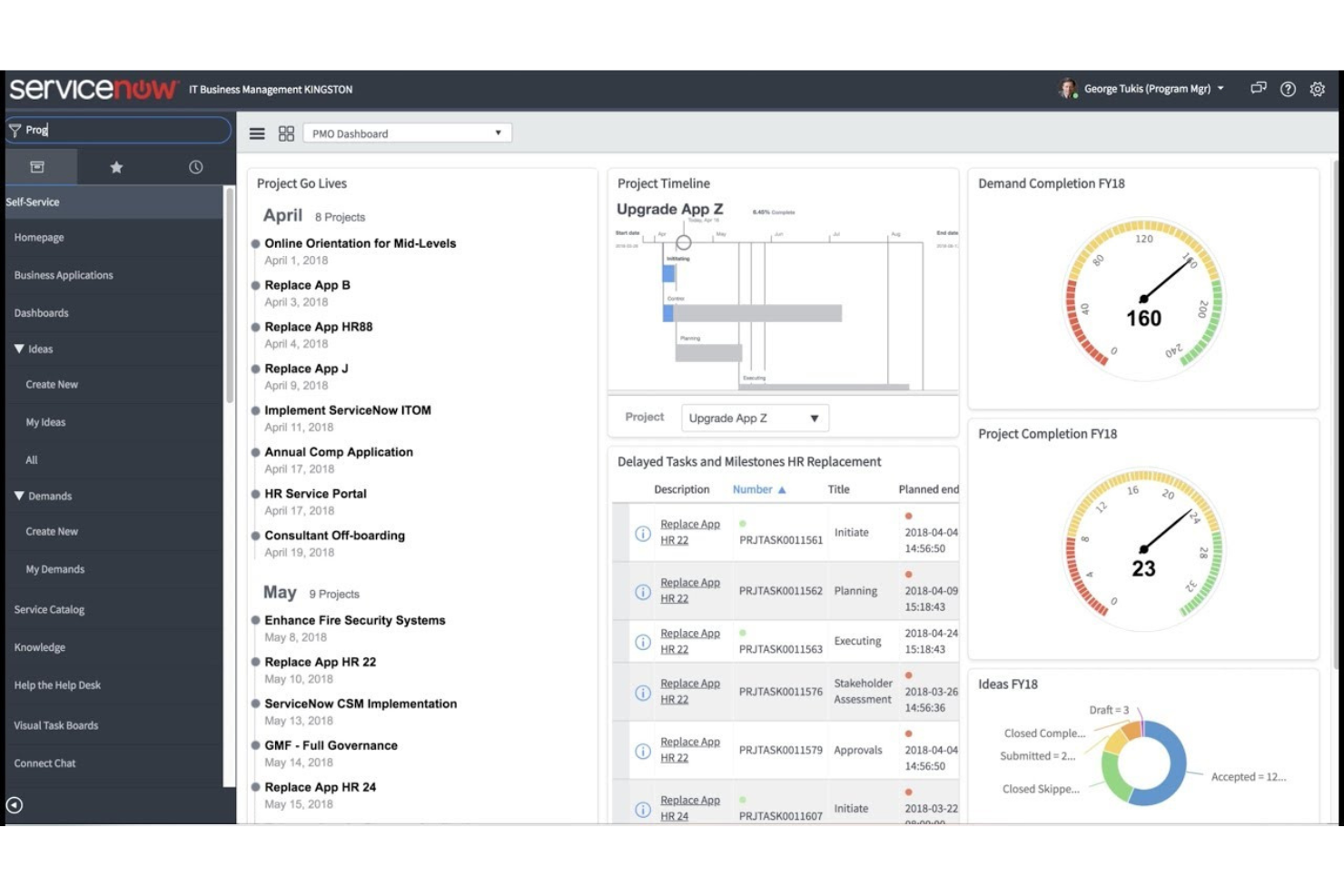
ServiceNow Project Portfolio Management semplifica l'esecuzione dei progetti per allinearla alle strategie aziendali, ottimizzando i risultati.
Perché ho scelto ServiceNow Project Portfolio Management:
Ho selezionato ServiceNow Project Portfolio Management per la sua straordinaria capacità di colmare il divario tra pianificazione strategica e risultati aziendali concreti. Questo strumento si distingue per il suo approccio completo alla gestione del portafoglio progetti, assicurando che gli obiettivi strategici non solo vengano definiti, ma anche raggiunti efficacemente tramite un'esecuzione meticolosa. Lo considero il migliore per allineare la strategia ai risultati aziendali grazie al suo solido framework che facilita la traduzione degli obiettivi di alto livello in risultati di progetto di successo.
Caratteristiche e integrazioni principali:
ServiceNow Project Portfolio Management offre una serie di funzionalità fondamentali per allineare i progetti alle strategie aziendali. Tra queste figurano la gestione strategica del portafoglio, la gestione delle risorse, la gestione della domanda e la modellizzazione finanziaria, tutte elementi che contribuiscono a una visione olistica delle prestazioni dei progetti e dell'allineamento con gli obiettivi aziendali.
Lo strumento si integra nativamente con altri moduli ServiceNow, come IT Business Management, IT Service Management e IT Operations Management, consentendo una gestione coesa tra le varie funzioni aziendali.
Pros and Cons
Pros:
- Allinea l'esecuzione dei progetti agli obiettivi strategici dell'azienda
- Offre un insieme completo di funzionalità di gestione
- Si integra con altri moduli ServiceNow per un'esperienza di gestione unificata
Cons:
- Mancanza di informazioni trasparenti sui prezzi
- Possibile complessità nell'implementazione per i nuovi utenti
- Il processo di preventivo personalizzato può ritardare la tempistica di approvvigionamento


Clarizen è uno strumento avanzato di project management pensato per la gestione di progetti complessi a livello aziendale. Eccelle nella gestione di gerarchie progettuali intricate e nel loro allineamento con la strategia aziendale.
Perché ho scelto Clarizen:
Ho selezionato Clarizen per il suo approccio completo alla gestione di progetti grandi e complessi, tipici del settore sanitario. La sua solidità nella gestione di strutture progettuali dettagliate e nella supervisione strategica del portafoglio è ciò che lo distingue. Ritengo che Clarizen sia il migliore per la gestione di progetti e portafogli a livello enterprise grazie alla sua capacità di facilitare la pianificazione dettagliata, l'esecuzione e il monitoraggio di molteplici progetti interconnessi — un requisito indispensabile per le grandi organizzazioni sanitarie.
Caratteristiche distintive e integrazioni:
Le caratteristiche distintive di Clarizen includono potenti strumenti di pianificazione ed esecuzione dei progetti, visibilità in tempo reale sullo stato dei progetti e funzionalità avanzate di tracciamento delle risorse e del budget. Questi aspetti sono particolarmente utili per i project manager del settore sanitario che devono assicurarsi che i progetti siano allineati agli obiettivi strategici e conformi alle normative di settore.
Clarizen si integra con una vasta gamma di altri software, come Salesforce, Jira, Box, Google Drive, Microsoft Excel, SharePoint, QuickBooks, SAP, Oracle e Slack, favorendo un flusso di lavoro coeso tra le diverse funzioni aziendali.
Pros and Cons
Pros:
- Capacità robuste di pianificazione ed esecuzione dei progetti
- Elevata visibilità e controllo sui portafogli progetti
- Ampie opzioni di integrazione con altri strumenti aziendali
Cons:
- Barriera di costo relativamente elevata per team più piccoli
- Può presentare una curva di apprendimento a causa della completezza delle funzionalità
- Richiede un impegno annuale, che potrebbe non adattarsi a tutti i cicli di budget
Altri software di gestione dei progetti sanitari
Ecco alcune ulteriori opzioni di software di gestione dei progetti sanitari che non sono state incluse nella mia selezione, ma che vale comunque la pena valutare:
- Smartsheet
Ideale per la creazione di progetti pronti per il settore sanitario
- Zoho Projects
Ideale per la gestione completa dei progetti con personalizzazione
- Planview
Ideale per la gestione dei portafogli


Come Valuto i Software di Project Management per la Sanità
Scompongo la mia valutazione in requisiti di base che ogni strumento deve soddisfare—come la conformità HIPAA e l'accesso basato sui ruoli—e nei fattori che distinguono i buoni dai migliori per i team di PMO clinici.
Funzionalità Principali (Requisiti Fondamentali per Questa Lista)
Quando seleziono gli strumenti per la mia lista, valuto ciascuno su una scala da 0 (non offre la funzionalità) a 5 (eccelle in quest'area) per ogni funzionalità principale elencata di seguito. Poi, calcolo il punteggio totale dello strumento in percentuale. Ogni strumento deve raggiungere un punteggio minimo del 65% per essere preso in considerazione.
- Sicurezza dei dati conforme alla HIPAA: Verifico che il fornitore offra un BAA firmato, crittografia a riposo e in transito, e misure di protezione documentate—soprattutto per progetti in cui i PHI risiedono in allegati di compiti o commenti.
- Modelli di Workflow Sanitario: Strutture predefinite per rollout EHR, preparazione per l'accreditamento o ampliamenti di strutture indicano che uno strumento è progettato appositamente piuttosto che una piattaforma generica di PM con etichetta sanitaria.
- Accesso granulare basato sui ruoli: Valuto come sono strutturati i permessi tra clinici, staff IT, dirigenti e fornitori esterni—soprattutto limiti a livello di campo su dati di progetto sensibili.
- Pianificazione delle Risorse e della Capacità: Per ambienti clinici dove la disponibilità del personale varia, cerco viste di allocazione tra progetti e previsioni di carico di lavoro tra dipartimenti e strutture.
- Compliance e Reportistica di Audit: Le tracce di audit e i report esportabili di compliance sono fondamentali quando il tuo PMO è soggetto a ispezioni Joint Commission o audit CMS e ha bisogno di documentazione pronta all'uso.
- Integrazioni con Sistemi Sanitari: Cerco connettori nativi o accesso livello API a piattaforme EHR/EMR, strumenti ITSM come ServiceNow e app collaborative come Microsoft Teams che costituiscono la maggior parte delle architetture tecnologiche sanitarie.
Una volta selezionati gli strumenti che soddisfano i criteri, considero cosa rende ogni piattaforma unica.
Fattori Differenzianti (Cosa Distingue i Fornitori)
Ecco come confronto e distinguo i diversi fornitori:
Caratteristiche Eccezionali
La gestione del portafoglio tra strutture diverse è un importante fattore distintivo per i sistemi sanitari che gestiscono progetti attraverso vari ospedali e cliniche. Cerco dashboard che aggregano stato, budget e tempistiche a livello aziendale. Gli strumenti per la preparazione all'accreditamento—come checklist Joint Commission precompilate e librerie di evidenze—fanno risparmiare settimane di preparazione ai team PMO. Valuto anche se una piattaforma collega i progetti agli esiti sui pazienti, aiutando i dirigenti a collegare le iniziative IT e operative agli obiettivi di erogazione delle cure.
Oltre le Caratteristiche
Il supporto all'implementazione è importante—cerco fornitori che offrano consulenti con esperienza sanitaria e onboarding specifico per ruolo per clinici, IT e personale operativo. Anche la scalabilità è un fattore di grande rilievo. Una piattaforma che funziona per un singolo PMO ospedaliero può non reggere in un sistema sanitario multi-struttura con governance decentralizzata. Valuto inoltre la flessibilità delle licenze, poiché i team sanitari spesso includono personale a rotazione, consulenti e fornitori terzi che necessitano di accessi temporanei senza far lievitare i costi.
Come scegliere un software di gestione dei progetti sanitari
È facile perdersi in lunghi elenchi di funzionalità e strutture tariffarie complesse. Per aiutarti a rimanere concentrato mentre affronti il tuo specifico processo di selezione del software, ecco un elenco di fattori da tenere presenti:
| Fattore | Cosa considerare |
| Scalabilità | Assicurati che lo strumento possa crescere insieme alla tua organizzazione e supportare più utenti, reparti o progetti senza richiedere una revisione significativa del sistema. |
| Integrazioni | Verifica se il software si connette al tuo sistema EHR, al software di pianificazione o agli strumenti di comunicazione interna per evitare duplicazioni del lavoro. |
| Personalizzazione | Cerca modelli di progetto flessibili, strumenti di reportistica e ruoli utente che puoi adattare ai flussi di lavoro del tuo team. |
| Facilità d’uso | Il sistema dovrebbe essere abbastanza semplice da poter essere utilizzato dal personale clinico e non clinico con una formazione minima. |
| Budget | Valuta i costi totali, inclusi i piani base, i componenti aggiuntivi e le tariffe per utente, per trovare una soluzione che non superi il budget del tuo reparto. |
| Misure di sicurezza | Verifica che il software soddisfi gli standard HIPAA o altri standard relativi ai dati sanitari e offra autorizzazioni utente, registri di controllo e crittografia. |
| Strumenti per la conformità | Assicurati che il software supporti la documentazione e il monitoraggio per contribuire al rispetto delle politiche interne o delle normative sanitarie esterne. |
| Accesso all’assistenza | Cerca fornitori che offrano assistenza dal vivo e supporto durante l’inserimento, così il tuo team non rimarrà bloccato quando si verificano dei problemi. |
Tendenze dei software per la gestione dei progetti sanitari
Nella mia ricerca ho raccolto innumerevoli aggiornamenti di prodotto, comunicati stampa e registri delle versioni di diversi fornitori di software per la gestione dei progetti sanitari. Ecco alcune delle tendenze emergenti che sto tenendo d’occhio:
- Visualizzazioni dei dati basate sui ruoli: Sempre più strumenti offrono dashboard filtrate in base alla funzione lavorativa, così amministratori, professionisti sanitari e project manager visualizzano solo ciò che è rilevante per loro.
- Dashboard per il monitoraggio della conformità: Analogamente ai software per la gestione dei progetti farmaceutici, gli strumenti sanitari stanno aggiungendo dashboard visive che segnalano le lacune nella conformità e monitorano la documentazione richiesta in tempo reale. Questo aiuta i team a evitare audit mancati e a mantenersi aggiornati sulle modifiche normative.
- Pianificazione dei progetti incentrata sul paziente: Alcune piattaforme stanno iniziando a tenere conto dell’esperienza e degli esiti dei pazienti durante la pianificazione e il monitoraggio dei progetti, soprattutto per le implementazioni cliniche o le modifiche alle strutture.
- Gestione integrata dei rischi: I registri dei rischi e gli avvisi vengono integrati nei flussi di lavoro dei progetti per aiutare i team a identificare e affrontare prima i rischi clinici, finanziari o operativi.
- Modelli specifici per il settore sanitario: I fornitori stanno rilasciando modelli pronti all’uso per progetti come le migrazioni degli EMR, l’ampliamento delle strutture e il miglioramento dell’erogazione delle cure, riducendo così i tempi di configurazione.
Che cos’è un software per la gestione dei progetti sanitari?
Il software per la gestione dei progetti sanitari è uno strumento specializzato progettato per supportare i requisiti specifici della gestione dei progetti legati al settore sanitario. Viene utilizzato da professionisti sanitari, tra cui amministratori ospedalieri, professionisti clinici, responsabili di cliniche, responsabili di studi medici e altri soggetti interessati, per ottimizzare le operazioni, garantire la conformità e migliorare l’assistenza ai pazienti.
Il software funge da piattaforma centralizzata per gestire progetti sanitari complessi, dalla costruzione di nuove strutture all’implementazione di sistemi di cartelle cliniche elettroniche, assicurando che i progetti vengano completati nei tempi previsti, rispettando il budget e gli standard di qualità richiesti. Il software per la gestione dei progetti sanitari comprende componenti come la pianificazione delle attività, la creazione di roadmap, l’allocazione delle risorse, il monitoraggio della conformità e la gestione dei dati dei pazienti.
Funzionalità dei software per la gestione dei progetti sanitari
Quando scegli un software per la gestione dei progetti sanitari, presta attenzione alle seguenti funzionalità chiave:
- Gestione delle attività: Ti consente di assegnare e monitorare le attività tra i vari reparti per mantenere tutti allineati.
- Visualizzazioni dei diagrammi di Gantt: Ti aiuta a pianificare visivamente le tempistiche dei progetti e ad adeguarle al variare del lavoro.
- Monitoraggio della conformità: Monitora la documentazione e le scadenze per contribuire al rispetto delle normative sanitarie.
- Monitoraggio del budget: Tiene traccia delle spese rispetto al piano, così puoi individuare tempestivamente gli sforamenti.
- Archiviazione dei documenti: Mantiene organizzati e accessibili in un unico luogo i file importanti e i piani di progetto.
- Accesso basato sui ruoli: Limita chi può visualizzare o modificare le informazioni in base alla propria funzione lavorativa.
- Strumenti di gestione dei rischi: Segnalano i problemi prima che si aggravino e aiutano ad assegnare le azioni necessarie per risolverli.
- Dashboard di reportistica: Forniscono una visione in tempo reale dell’avanzamento, dei ritardi e dei risultati dei progetti.
- Modelli specifici per il settore sanitario: Accelerano la configurazione dei progetti per iniziative cliniche, implementazioni tecnologiche o attività di costruzione.
- Monitoraggio delle richieste di modifica: Registra e gestisce le approvazioni delle modifiche per mantenere i registri chiari e aggiornati.
Vantaggi del software di gestione dei progetti sanitari
L'implementazione di un software di gestione dei progetti sanitari offre diversi vantaggi al tuo team e alla tua azienda. Eccone alcuni che puoi aspettarti:
- Maggiore responsabilità: L'assegnazione delle attività e i registri delle modifiche rendono chiaro chi è responsabile di cosa e quando.
- Meno ritardi: Tempistiche chiare e monitoraggio delle attività aiutano il tuo team a rispettare il programma.
- Maggiore conformità: Gli strumenti integrati di monitoraggio e documentazione semplificano il rispetto dei requisiti normativi.
- Comunicazione migliorata: Dashboard e liste di attività condivise mantengono i team clinici e amministrativi allineati.
- Maggiore controllo sui budget: Gli strumenti di monitoraggio delle spese e di reporting aiutano a individuare e correggere tempestivamente gli sforamenti dei costi.
- Configurazione più rapida dei progetti: I modelli specifici per il settore sanitario riducono il tempo necessario per pianificare e avviare nuove iniziative.
- Reporting più semplice: Dashboard e report esportabili forniscono ciò che serve per gli aggiornamenti alla dirigenza o per gli audit.
- Collaborazione conforme HIPAA: Gli strumenti di gestione dei progetti progettati per l'uso nel settore sanitario devono in genere rispettare gli standard di conformità alla sicurezza relativi all'assistenza sanitaria.
Costi e prezzi del software di gestione dei progetti sanitari
La scelta di un software di gestione dei progetti sanitari richiede la conoscenza dei vari modelli e piani tariffari disponibili. I costi variano in base alle funzionalità, alle dimensioni del team, ai componenti aggiuntivi e ad altri fattori. La tabella seguente riassume i piani più comuni, i relativi prezzi medi e le funzionalità generalmente incluse nelle soluzioni software di gestione dei progetti sanitari:
Tabella comparativa dei piani per il software di gestione dei progetti sanitari
| Tipo di piano | Prezzo medio | Funzionalità comuni |
| Opzione gratuita | $0 | Gestione di base delle attività, utenti limitati, reporting essenziale, standard di sicurezza dei dati |
| Piano base | $10 - $25/utente/mese | Monitoraggio di attività e progetti, strumenti di collaborazione tra utenti, reporting standard, assistenza clienti di base |
| Piano standard | $25 - $50/utente/mese | Reporting avanzato, maggiore spazio di archiviazione dei dati, funzionalità di conformità, sicurezza avanzata, accesso API |
| Piano premium | $50 - $100/utente/mese | Tutte le funzionalità del piano Standard, oltre a gestione delle risorse, gestione del portafoglio, assistenza clienti prioritaria |
| Piano aziendale | Prezzo personalizzato | Integrazioni personalizzate, progetti e utenti illimitati, assistenza dedicata, analisi avanzate |
Domande frequenti sul software di gestione dei progetti sanitari
Ecco alcune domande frequenti sul software di gestione dei progetti sanitari.
In che modo il software di gestione dei progetti sanitari differisce dagli strumenti generali di gestione dei progetti?
Il software di gestione dei progetti sanitari è progettato per soddisfare le esigenze specifiche del settore sanitario, inclusa la conformità alle normative sanitarie come HIPAA. Spesso include funzionalità per la gestione dei dati dei pazienti, l’ottimizzazione dei flussi di lavoro sanitari e l’integrazione con i sistemi di cartelle cliniche elettroniche (EHR). Gli strumenti generali di gestione dei progetti potrebbero non offrire queste funzionalità specializzate e sono progettati per un pubblico più ampio in diversi settori.
Cosa dovrei cercare in un software di gestione dei progetti sanitari?
Quando si seleziona un software di gestione dei progetti sanitari, è opportuno cercare funzionalità come la gestione delle attività, la pianificazione delle risorse, il monitoraggio del tempo, la gestione dei documenti, il monitoraggio della conformità e le funzionalità di reportistica. Sono inoltre importanti l’integrazione con i sistemi sanitari esistenti, interfacce intuitive e solide misure di sicurezza per proteggere i dati dei pazienti.
Il software di gestione dei progetti sanitari può migliorare gli esiti dei pazienti?
Sì, il software di gestione dei progetti sanitari può contribuire a migliorare gli esiti dei pazienti semplificando i flussi di lavoro, riducendo gli oneri amministrativi e garantendo che i progetti relativi all’assistenza ai pazienti siano realizzati in modo efficiente. Ciò può portare a una migliore allocazione delle risorse, interventi tempestivi e una comunicazione più efficace tra i professionisti sanitari.
Il software di gestione dei progetti sanitari è sicuro?
Un software affidabile di gestione dei progetti sanitari dovrebbe rispettare i protocolli di sicurezza standard del settore e le normative sanitarie, come HIPAA. Dovrebbe includere funzionalità come la crittografia dei dati, i controlli degli accessi e i registri di audit per garantire la riservatezza, l’integrità e la disponibilità delle informazioni sensibili sui pazienti.
In che modo il software di gestione dei progetti sanitari gestisce la conformità normativa?
Il software di gestione dei progetti sanitari include generalmente funzionalità che aiutano le organizzazioni a rispettare i requisiti normativi. Ciò può comprendere liste di controllo della conformità, reportistica automatizzata e strumenti di documentazione che assistono nella conservazione dei registri per audit e ispezioni. Il software può inoltre fornire aggiornamenti quando cambiano le normative, aiutando le organizzazioni a rimanere conformi.
Quali sono le difficoltà nell'implementazione di un software di gestione dei progetti sanitari?
Le difficoltà nell’implementazione di un software di gestione dei progetti sanitari possono includere la resistenza al cambiamento da parte del personale, la complessità dell’integrazione con i sistemi esistenti, i problemi di migrazione dei dati e la necessità di formare gli utenti. È inoltre fondamentale garantire che il software soddisfi tutti i requisiti normativi e sia in linea con i flussi di lavoro specifici dell’organizzazione sanitaria.
In che modo il software di gestione dei progetti sanitari può supportare i servizi a distanza o di telemedicina?
Il software di gestione dei progetti sanitari può supportare i servizi a distanza o di telemedicina fornendo strumenti per la collaborazione virtuale, la pianificazione degli appuntamenti dei pazienti e la gestione delle risorse. Può facilitare il coordinamento dei progetti di telemedicina, monitorare i progressi e garantire che i servizi a distanza siano erogati in modo efficace e conforme agli standard sanitari.