

I 10 migliori software di gestione dei progetti per architetti nel 2026

10 Elenco dei migliori software di gestione dei progetti di architettura
- 10. Monograph


Gestire progetti architettonici è un esercizio di equilibrio: bisogna conciliare la precisione del design, le aspettative dei clienti e i requisiti normativi. Senza gli strumenti giusti, è facile che le tempistiche subiscano ritardi, i budget aumentino a dismisura e le lacune nella comunicazione compromettano i progressi. È qui che entra in gioco un software di gestione dei progetti pensato per gli architetti. Tuttavia, con così tante opzioni disponibili, trovare quella più adatta al proprio studio può essere difficile.
Ho testato e analizzato i principali strumenti progettati per i team di architettura, valutandone funzionalità, usabilità e caratteristiche specifiche del settore. In questo elenco ti guiderò alla scoperta dei migliori software di gestione dei progetti per architetti, aiutandoti a scegliere la soluzione giusta per mantenere i tuoi progetti sempre in ordine.
Perché fidarsi dei nostri consigli sui software
Il nostro team testa e recensisce software dal 2012. In quanto project manager noi stessi, sappiamo quanto sia difficile — e importante — scegliere il software giusto.
Per questa guida, abbiamo valutato gli strumenti attraverso test pratici e ricerche indipendenti, assegnando un punteggio agli strumenti in base ai nostri criteri di selezione. Ci basiamo inoltre sulle competenze di leader di pensiero del settore e di professionisti attivi nella gestione dei progetti.
Le nostre recensioni riflettono il nostro giudizio editoriale umano, non un discorso di vendita.
Revisori esperti:
Tabella comparativa dei software di gestione dei progetti per architetti
Ecco una tabella che puoi utilizzare per confrontare tutti gli strumenti appena presentati nelle panoramiche.
| Tool | Best For | Trial Info | Price | ||
|---|---|---|---|---|---|
| 1 | Ideale per monitorare compensi e profitti fase per fase | Prova gratuita di 14 giorni | Da $19.90/utente/mese (fatturato annualmente) | Website | |
| 2 | Ideale per il monitoraggio dei compensi e la fatturazione | Prova gratuita di 14 giorni + demo gratuita disponibile | A partire da $10/utente/mese (con fatturazione annuale) | Website | |
| 3 | Ideale per una pianificazione dettagliata dei progetti | Demo gratuita disponibile | Prezzi su richiesta | Website | |
| 4 | Ideale per la collaborazione economica dei team su più progetti | Prova gratuita di 15 giorni + piano gratuito + demo gratuita disponibili | A partire da $4/utente/mese (fatturato annualmente) | Website | |
| 5 | Ideale per il monitoraggio del carico di lavoro e delle approvazioni tra squadre | Piano gratuito + prova gratuita di 14 giorni + demo gratuita disponibile | A partire da $10/utente/mese (con fatturazione annuale) | Website | |
| 6 | Ideale per la fatturazione a partire dalle ore monitorate | Piano gratuito disponibile; prova gratuita di 14 giorni; demo gratuita disponibile | A partire da $9.99/utente/mese (fatturato annualmente) | Website | |
| 7 | Ideale per monitorare tariffe e profitti per fase | Demo gratuita disponibile | Prezzi su richiesta | Website | |
| 8 | Ideale per la fatturazione e le approvazioni durante la fase di costruzione | Prova gratuita di 30 giorni + demo gratuita disponibile | A partire da 39 $/mese (con fatturazione annuale) | Website | |
| 9 | Ideale per il portale clienti e la fatturazione dei progetti | Prova gratuita e dimostrazione gratuita disponibili | A partire da $29/utente/mese (fatturato annualmente) | Website | |
| 10 | Dimostrazione gratuita disponibile | A partire da $45/mese | Website |


Panoramiche dei migliori software di gestione dei progetti per architetti
Ecco la mia valutazione delle funzionalità principali e del caso d’uso migliore per il mio elenco dei \u003ca href=\u0022https://thedigitalprojectmanager.com/tools/best-project-management-software/\u0022\u003emigliori software di gestione dei progetti\u003c/a\u003e per architetti.

Scoro
Ideale per monitorare compensi e profitti fase per fase
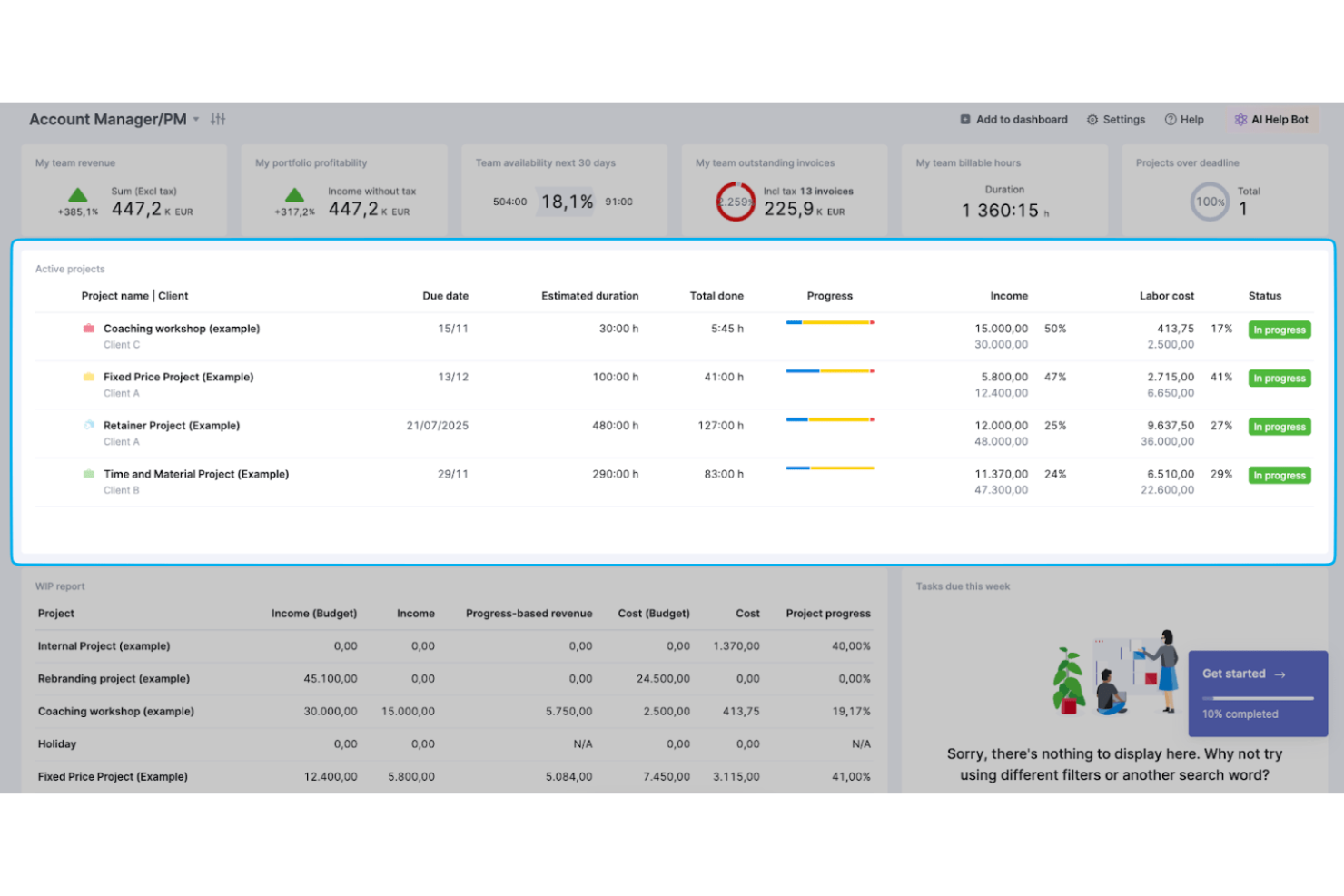
Scoro è una piattaforma di automazione dei servizi professionali che combina la pianificazione delle fasi dei progetti, il monitoraggio del tempo, la programmazione delle risorse, la gestione del budget e la fatturazione in un unico sistema.
A chi è più adatto Scoro?
Scoro è particolarmente adatto ai titolari di studi di architettura e ai responsabili delle operazioni che devono monitorare compensi, costi e redditività nelle diverse fasi dei progetti in un unico posto.
Perché ho scelto Scoro
Ho incluso Scoro tra le mie scelte principali perché è l'unico strumento di questo elenco che consente di definire il prezzo di ogni fase del progetto in base al ruolo e alla tariffa, monitorando poi il tempo e i costi effettivi rispetto a tale stima man mano che il lavoro procede. Quando una fase passa dalla Progettazione schematica ai Documenti costruttivi, posso visualizzare in un'unica schermata i ricavi maturati, il budget rimanente e il margine di profitto previsto. Scoro inoltre aggrega questi dati a livello di portafoglio, così i titolari possono individuare quali progetti stanno riducendo il margine prima che il danno sia fatto.
Caratteristiche principali di Scoro
- Mappe di calore della capacità delle risorse: Le mappe di calore visive del carico di lavoro mostrano chi è disponibile o sovraccarico in tutti i progetti attivi, consentendo di assegnare il personale senza creare colli di bottiglia.
- Modelli di progetto con gruppi di fasi: I modelli riutilizzabili includono fasi predefinite e gruppi di attività collegati, permettendo di avviare nuovi progetti con una struttura coerente.
- Analisi dell'utilizzo e del tempo: Il tempo viene suddiviso per cliente, progetto, attività e stato di fatturabilità, offrendo un quadro completo di come vengono impiegate le ore del team.
- Fatturazione suddivisa per milestone e ricorrente: Le fatture possono essere emesse in base alle milestone del progetto, suddivise su più periodi di fatturazione o impostate per la ricorrenza automatica negli incarichi a canone.
Integrazioni di Scoro
Scoro offre integrazioni native con Xero, QuickBooks, Sage Intacct, Exact Online, Google Drive, Dropbox, BambooHR, Slack, Jira e Stripe. Fornisce inoltre un'API REST, webhook, server MCP e Zapier per connessioni personalizzate.
Pros and Cons
Pros:
- Il monitoraggio dei compensi a livello di fase evidenzia le variazioni del margine
- Le registrazioni del tempo collegano i budget alla fatturazione dei clienti
- Le viste della capacità aiutano a bilanciare i carichi di lavoro dei progetti
Cons:
- Nessun collegamento BIM o CAD nativo
- La collaborazione tramite portale non offre flussi di lavoro formali per le approvazioni
New Product Updates from Scoro

Scoro Adds Time Mobile App and ELI Improvements
Scoro adds the Scoro Time mobile app for iOS/Android to track time anywhere and expands ELI with attachments, smarter filtering, and trigger-based actions. For more information, visit Scoro's official site.

Ideale per il monitoraggio dei compensi e la fatturazione
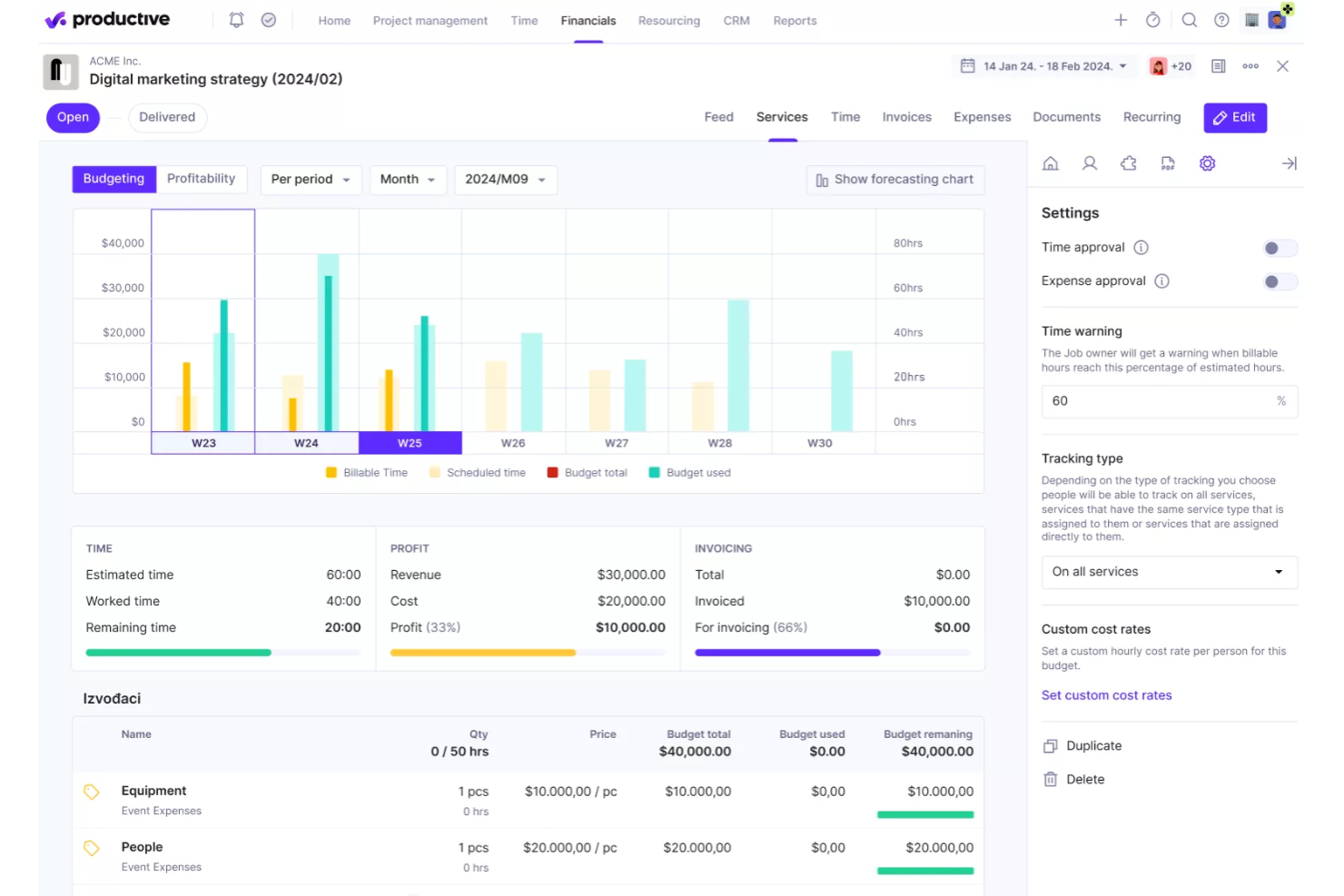
Productive è una piattaforma per la gestione dei servizi professionali che combina gestione di progetti e attività, monitoraggio del tempo, pianificazione delle risorse, monitoraggio del budget e fatturazione in un unico luogo.
Per chi è più adatto Productive?
Productive è particolarmente adatto agli studi di architettura e alle aziende di servizi professionali che necessitano di un controllo rigoroso su compensi, budget e fatturazione per più incarichi cliente contemporanei.
Perché ho scelto Productive
Ho scelto Productive come uno dei migliori strumenti perché mantiene il monitoraggio dei compensi e la fatturazione strettamente collegati al lavoro effettivamente svolto in un progetto. Mi piace il fatto che sia possibile impostare limiti per gli sforamenti del budget a livello di servizio, così il team viene bloccato (o riceve un avviso) prima che un incarico a compenso fisso superi silenziosamente l'ambito previsto. La fatturazione per milestone consente di creare fatture in bozza con data futura collegate a fasi specifiche, mentre la sincronizzazione dei pagamenti con strumenti come Xero o QuickBooks riflette quanto è stato incassato senza riconciliazioni manuali.
Caratteristiche principali di Productive
- Pianificatore delle risorse: Visualizza capacità, disponibilità e carico di lavoro del team su più progetti contemporanei in un'unica disposizione visiva.
- Layout della pianificazione del progetto: Visualizza il lavoro utilizzando viste Gantt, calendario o sequenza temporale, con milestone e dipendenze tra le attività.
- Accesso dei collaboratori clienti: Invita i clienti nelle attività e nei progetti senza costi aggiuntivi per postazione, con visibilità filtrata e controllata tramite autorizzazioni.
- Monitoraggio della redditività del budget: Monitora i ricavi pianificati, i costi effettivi e la redditività in tempo reale a livello di progetto e di servizio.
Integrazioni di Productive
Productive offre integrazioni native con Xero, QuickBooks, Google Calendar, Slack e Jira, oltre a collegamenti con Sage e NetSuite. Fornisce un'API in stile REST con webhook e si collega a oltre 1.000 app tramite Zapier.
Pros and Cons
Pros:
- Visibilità sulla capacità e sul carico di lavoro tra i progetti
- Tempo, compensi e redditività rimangono collegati
- I clienti possono partecipare alle discussioni sulle attività dei progetti
Cons:
- Nessun flusso di lavoro specifico per l'architettura nelle fasi di progettazione
- Nessun controllo delle versioni o annotazione focalizzato sui disegni
New Product Updates from Productive
Productive Adds Voice Dictation, Slack Connector, Proposals, and Overtime
Productive adds voice dictation, a Slack Connector, proposal controls, and overtime tracking. These updates support faster AI interactions, client proposals, and time management. For more information, visit Productive’s official site.

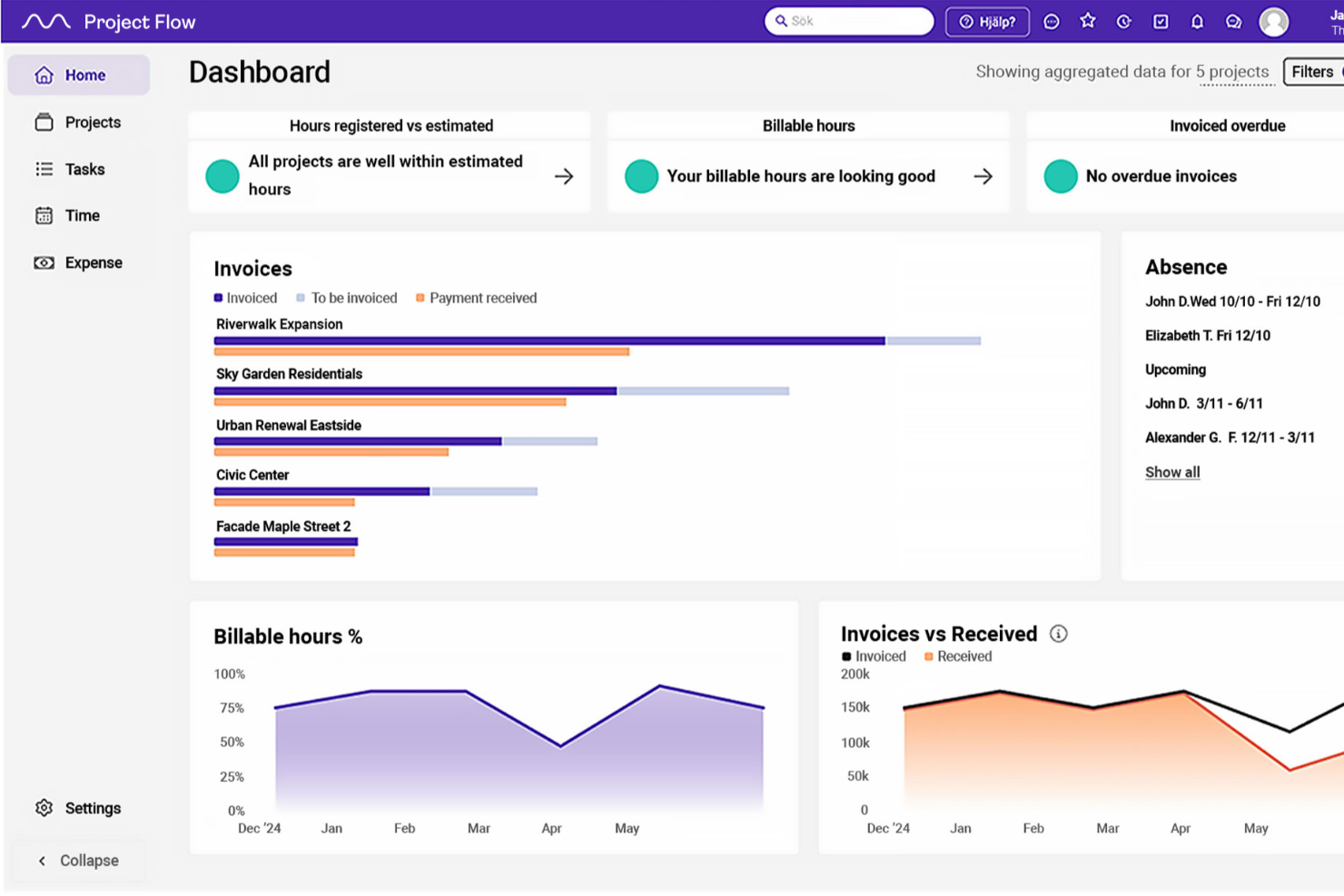
Project Flow by Milient è una piattaforma di gestione dei progetti pensata per studi di architettura e ingegneria, che combina pianificazione dei progetti, monitoraggio del tempo, pianificazione delle risorse, monitoraggio del budget e fatturazione in un unico sistema.
Per chi è più adatto Project Flow by Milient?
Project Flow è particolarmente adatto agli studi di architettura e ingegneria che necessitano di uno stretto controllo sulle ore fatturabili, sul monitoraggio degli onorari e sulla fatturazione di più progetti simultanei.
Perché ho scelto Project Flow by Milient
Ho incluso Project Flow by Milient tra le mie scelte principali perché gestisce l'aspetto finanziario del lavoro in architettura con un livello di dettaglio che la maggior parte degli strumenti di gestione dei progetti non riesce nemmeno ad avvicinare. La panoramica del progetto confronta in tempo reale le ore lavorate con quelle fatturabili, segnala automaticamente gli sforamenti e alimenta direttamente la fatturazione, così nulla viene trascurato al momento di emettere le fatture. Apprezzo anche il fatto che il calcolo degli onorari tenga conto del tipo di contratto, del tempo e dei costi, rispecchiando il modo in cui gli studi AEC definiscono effettivamente i prezzi dei lavori.
Funzionalità principali di Project Flow by Milient
- Visualizzazioni dell'allocazione delle risorse: Le visualizzazioni del carico di lavoro e dell'utilizzo basate sul calendario consentono di assegnare il lavoro in base al ruolo e alla disponibilità su più progetti simultanei.
- Registrazione mobile di tempi e spese: L'app mobile consente agli utenti di registrare le ore dedicate ai progetti e caricare le ricevute delle spese direttamente dal telefono.
- Sistema della qualità con liste di controllo: Le liste di controllo integrate, il monitoraggio delle non conformità e gli strumenti di valutazione dei rischi supportano i processi di qualità dei progetti.
- Cruscotto analitico: Fornisce report a livello di portafoglio su KPI aziendali, dati effettivi, ricavi potenziali e previsioni relativi ai progetti.
Integrazioni di Project Flow
Project Flow offre integrazioni native con Sage, Xero, AccountsIQ, QuickBooks e Access. Fornisce inoltre un'API REST aperta per integrazioni personalizzate.
Pros and Cons
Pros:
- Tiene traccia delle ore rispetto ai piani e agli onorari dei progetti
- Aiuta ad allocare il personale su più progetti simultanei
- Collega le ore dei progetti alla fatturazione e al monitoraggio
Cons:
- La rendicontazione delle ore può richiedere passaggi aggiuntivi
- Non è documentato alcun controllo delle versioni o alcuna condivisione dei disegni

Ideale per la collaborazione economica dei team su più progetti
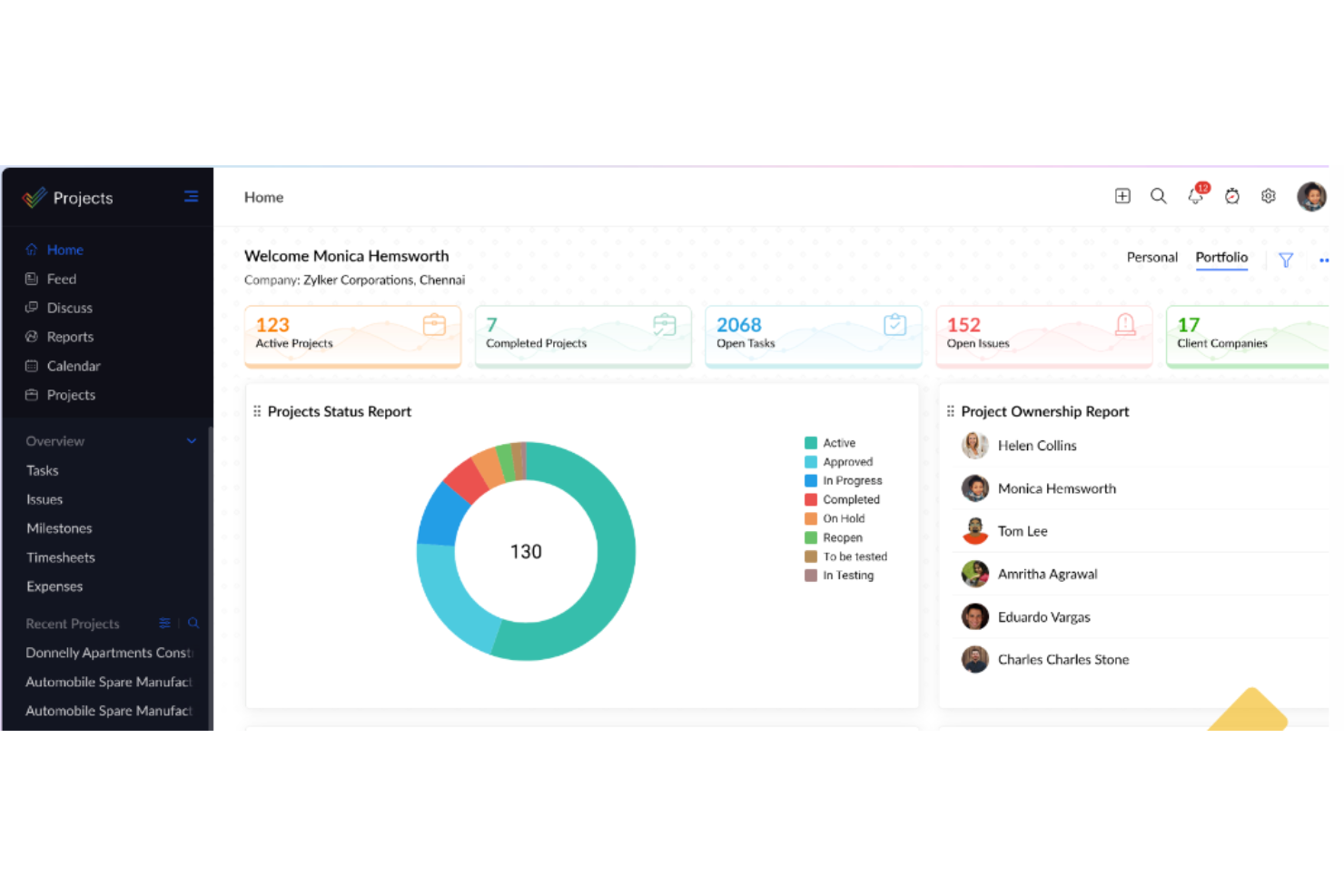
Zoho Projects è uno strumento di gestione dei progetti basato sul cloud che combina il monitoraggio delle attività, i diagrammi di Gantt, la gestione delle fasi, la pianificazione del carico di lavoro, la registrazione delle ore, il monitoraggio del budget e la gestione dei documenti per più progetti simultanei.
Per chi è più indicato Zoho Projects?
Zoho Projects è adatto alle aziende di piccole e medie dimensioni che gestiscono più progetti simultanei e hanno bisogno di un solido monitoraggio delle attività, della registrazione delle ore e dell'allocazione delle risorse senza un costo elevato per utente.
Perché ho scelto Zoho Projects
Ho incluso Zoho Projects tra le mie migliori scelte perché gestisce la pianificazione delle risorse su più progetti a un prezzo che mi sorprende davvero. Quando monitoro il personale su progetti simultanei, il rapporto globale del carico di lavoro mi offre visualizzazioni a barre, a mappa di calore e su linea temporale, così posso individuare immediatamente le sovrallocazioni e riassegnare le attività senza uscire dal rapporto. In combinazione con il monitoraggio del budget a livello di fase e gli avvisi sui costi pianificati rispetto a quelli effettivi, copre la visibilità finanziaria essenziale di cui gli architetti hanno bisogno senza richiedere uno strumento di fascia premium.
Caratteristiche principali di Zoho Projects
- Budget basato sulle fasi: Imposta i budget dei progetti a livello di fase e monitora i costi pianificati rispetto a quelli effettivi con avvisi al superamento delle soglie e notifiche di sforamento.
- Autorizzazioni per gli utenti clienti: Aggiungi utenti clienti esterni ai progetti con autorizzazioni personalizzabili per singolo utente che controllano l'accesso a fasi, file e forum specifici.
- Controllo delle versioni dei file: Carica, organizza e versiona i documenti dei progetti in cartelle con funzionalità di estrazione per impedire modifiche in conflitto.
- Automazione delle attività tramite modelli operativi: Progetta flussi di lavoro strutturati per le attività che assegnano automaticamente i membri del team, aggiornano i campi e notificano gli interessati quando cambiano gli stati delle attività.
Integrazioni di Zoho Projects
Zoho Projects dispone di oltre 50 integrazioni del catalogo, incluse integrazioni native con Zoho Books, Zoho Invoice, Zoho WorkDrive, Google Drive, Microsoft SharePoint, Microsoft Teams, Slack, Dropbox e Box. Offre inoltre un'API REST, webhook e Zapier.
Pros and Cons
Pros:
- Le visualizzazioni del carico di lavoro tra progetti evidenziano le lacune nell'allocazione
- I recensori elogiano il monitoraggio dei traguardi e i programmi Gantt
- I registri delle ore aiutano a monitorare il lavoro di progettazione fatturabile
Cons:
- Nessuna fase architettonica preimpostata o dipendenza tra le fasi
- La condivisione con i clienti non dispone di flussi di lavoro documentati per l'approvazione dei consulenti
New Product Updates from Zoho Projects
Zoho Projects Adds CodeX Scripts for Custom Modules
Zoho Projects now supports CodeX Scripts for custom modules, enabling conditional logic and rules for creating, updating, and deleting records. For more information, visit Zoho Projects' official site.
 .
.
Wrike
Ideale per il monitoraggio del carico di lavoro e delle approvazioni tra squadre
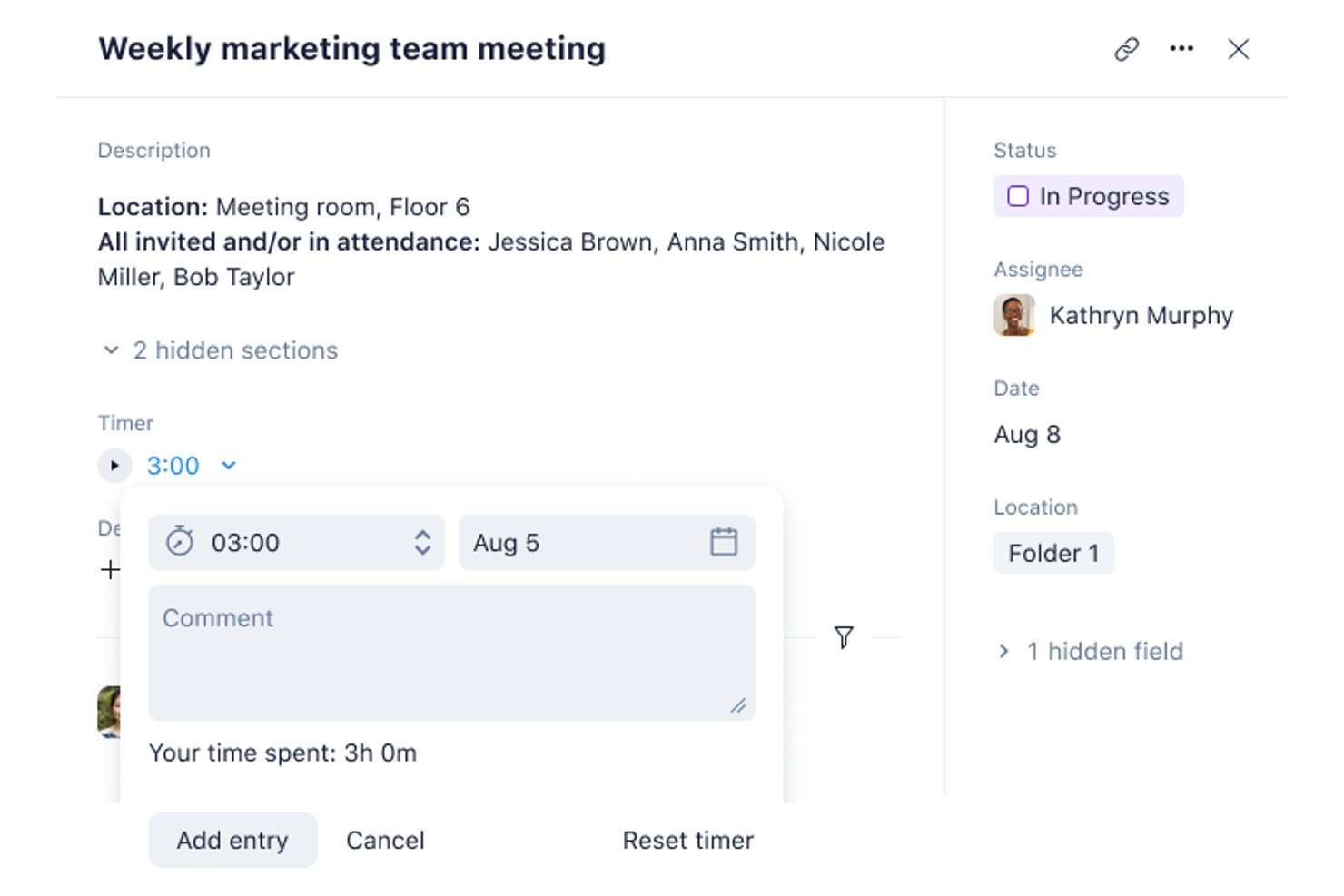
Wrike è una piattaforma di gestione del lavoro che combina la pianificazione dei progetti basata sui diagrammi di Gantt, la pianificazione del carico di lavoro e delle risorse, la revisione visiva e i flussi di lavoro di approvazione tra squadre per aiutare gli studi di architettura a coordinare la gestione di progetti multidisciplinari.
Per chi è più adatto Wrike?
Wrike è adatto ai responsabili operativi degli studi e alle squadre di progettazione multidisciplinari che devono coordinare carichi di lavoro, approvazioni e collaborazioni esterne su più progetti contemporaneamente.
Perché ho scelto Wrike
Ho incluso Wrike tra le mie scelte principali perché gestisce la visibilità del carico di lavoro tra squadre e l'instradamento strutturato delle approvazioni meglio della maggior parte degli strumenti generalisti che ho testato. Quando gestisci più progetti contemporaneamente, la vista Risorse mostra esattamente chi ha superato la propria capacità, per utente o ruolo professionale, nell'intero portafoglio. In combinazione con i flussi di lavoro di revisione per gli ospiti, che consentono ai clienti di approvare i file senza un account Wrike, mantiene attive le approvazioni senza coinvolgere i portatori di interesse esterni nel tuo spazio di lavoro.
Caratteristiche principali di Wrike
- Diagrammi di Gantt interattivi: Visualizza le tempistiche dei progetti, imposta le pietre miliari e mappa le dipendenze tra attività di tipo fine-inizio e di altro tipo nelle diverse fasi di progettazione.
- Modelli di progetto riutilizzabili: Salva strutture di cartelle, attività e progetti come modelli per standardizzare i flussi di lavoro ricorrenti tra i vari incarichi.
- Strumenti di revisione visiva: Aggiungi annotazioni e commenti direttamente ai file allegati e confronta le versioni originali con quelle aggiornate affiancandole.
- Moduli di richiesta dinamici: Inoltra le richieste di lavoro interne ed esterne a una posizione centrale, acquisendo al contempo i dettagli necessari per avviare un progetto.
Integrazioni di Wrike
Wrike elenca oltre 400 integrazioni, tra cui QuickBooks, NetSuite, Google Sheets, Microsoft Excel, OneDrive, Dropbox, Adobe Creative Cloud, Bynder e MediaValet. Offre inoltre un'API REST, webhook, OAuth 2.0 e un server MCP per connessioni personalizzate.
Pros and Cons
Pros:
- Visibilità del carico di lavoro tra progetti
- Le approvazioni degli ospiti mantengono attive le approvazioni dei clienti
- Le strutture di fase riutilizzabili supportano una gestione ripetibile
Cons:
- Budget e fatturazione richiedono sistemi separati
- La configurazione iniziale del flusso di lavoro richiede pianificazione
New Product Updates from Wrike
Wrike Adds Klaxoon MCP Integration
Wrike’s Klaxoon MCP integration is now generally available, enabling AI agents to navigate between Wrike tasks and attached whiteboards, read task context, and manage whiteboard attachments via API. For more information, visit Wrike's official site.

Ideale per la fatturazione a partire dalle ore monitorate
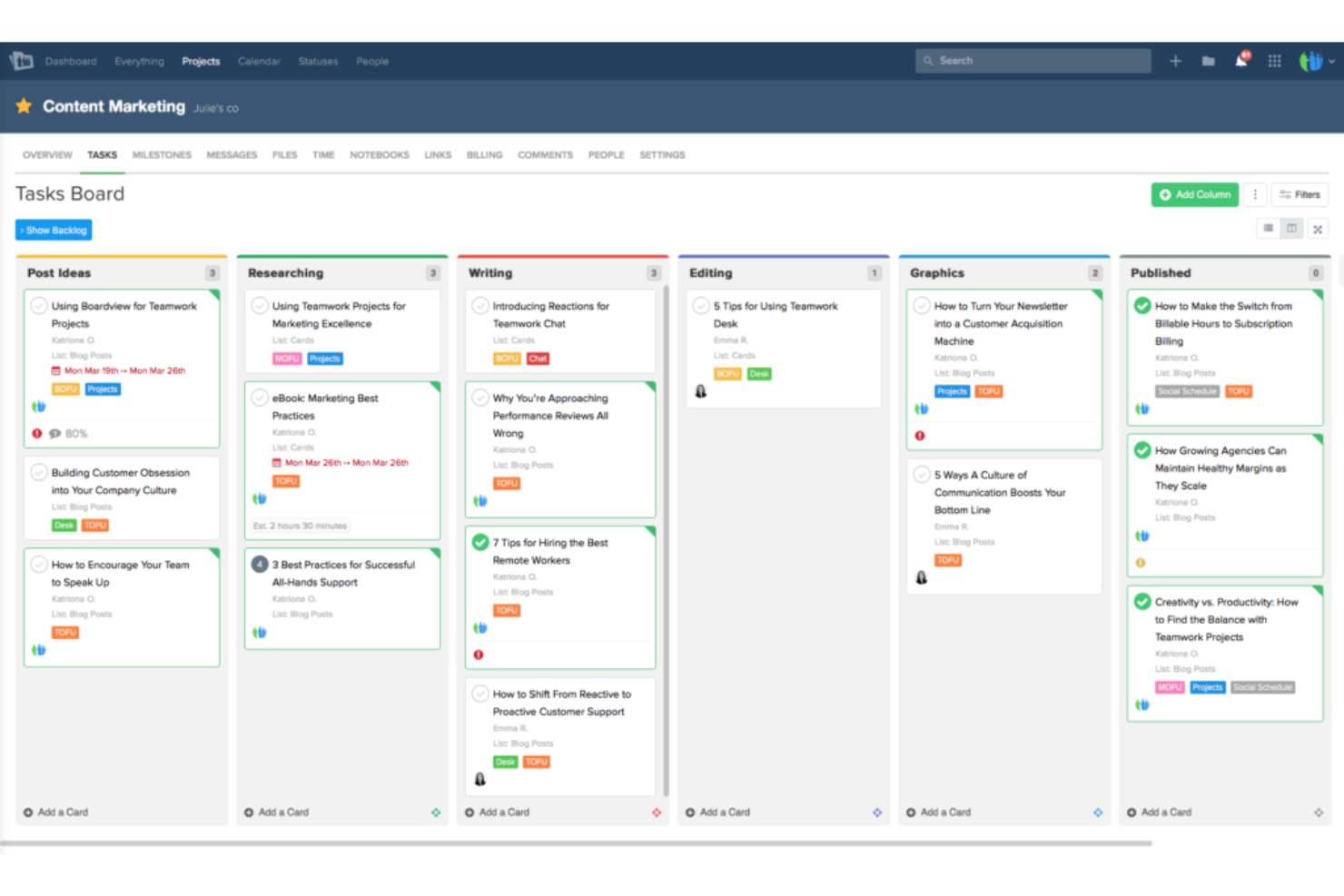
Teamwork.com è una piattaforma di gestione dei progetti progettata per il lavoro con i clienti, che combina pianificazione delle attività, monitoraggio del tempo, pianificazione delle risorse, definizione del budget e strumenti di collaborazione con i clienti in un unico luogo.
Per chi è più adatto Teamwork.com?
Teamwork.com è particolarmente adatto ai team che lavorano a contatto con i clienti e che hanno bisogno di trasformare direttamente le ore registrate in fatture senza passare da uno strumento all'altro.
Perché ho scelto Teamwork.com
Ho incluso Teamwork.com tra le mie scelte principali perché colma il divario tra le ore registrate e le fatture dei clienti meglio della maggior parte degli strumenti che ho testato. Quando il team registra il tempo fatturabile associandolo alle attività, è possibile generare una fattura direttamente da quelle ore senza riformattare i dati o passare a uno strumento di fatturazione separato. Mi piace anche il fatto che si possano impostare tariffe fatturabili diverse per persona, ruolo o progetto, un aspetto importante quando un architetto senior e uno junior fatturano entrambi lo stesso incarico.
Funzionalità principali di Teamwork.com
- Revisione e approvazione da parte dei clienti: Invita i clienti tramite e-mail a revisionare, annotare e approvare i materiali direttamente all'interno della piattaforma, senza richiedere un account a pagamento.
- Pianificazione delle risorse con segnaposto basati sui ruoli: Pianifica la capacità tra i progetti utilizzando segnaposto per i ruoli prima di assegnare membri specifici del team.
- Gestione del carico di lavoro e della capacità: Visualizza la disponibilità del team e individua il personale sovraccarico tra più progetti simultanei in un'unica vista di pianificazione.
- Gestione delle versioni dei file: Carica e monitora più versioni dei file di progetto, con commenti associati separatamente a ciascuna versione.
Integrazioni di Teamwork.com
Teamwork.com elenca oltre 150 integrazioni, tra cui QuickBooks, NetSuite, Xero, Google Drive, SharePoint, Dropbox, Slack e Microsoft Teams. Offre inoltre un'API, webhook, un server MCP e Zapier per collegamenti personalizzati.
Pros and Cons
Pros:
- Le ore fatturabili sono collegate direttamente alla fatturazione dei clienti
- La revisione mantiene le approvazioni dei clienti insieme ai materiali
- Le viste della capacità aiutano a bilanciare i progetti simultanei dello studio
Cons:
- Nessun modello integrato per le fasi di progettazione architettonica
- Nessun flusso di lavoro BIM o per i disegni dedicato

Accelo
Ideale per monitorare tariffe e profitti per fase
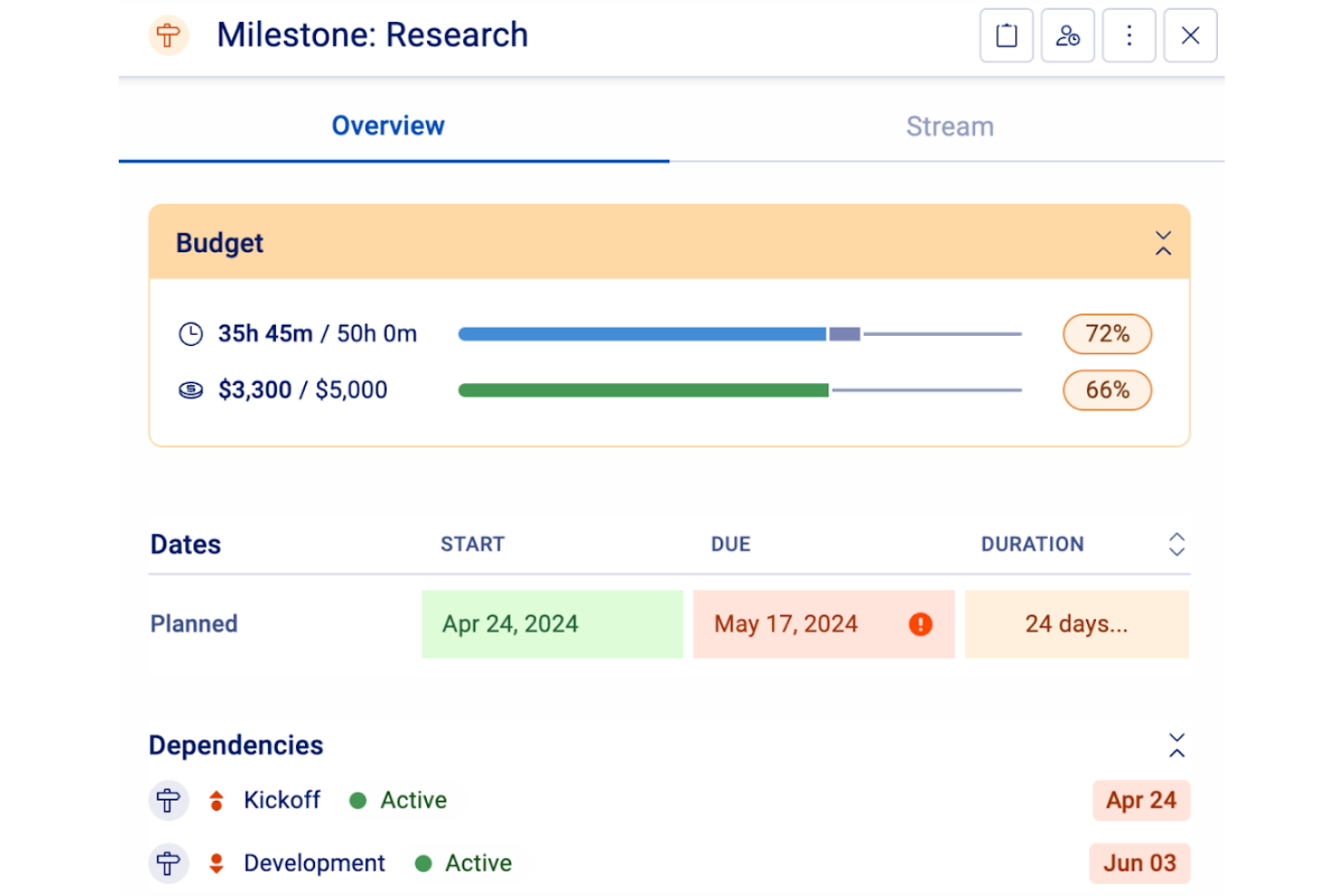
Accelo è una piattaforma di gestione del lavoro dei clienti pensata per le aziende di servizi professionali, inclusi gli studi di architettura. Offre strumenti per gestire la consegna dei progetti dal preventivo all'incasso.
I modelli di progetto personalizzabili di Accelo sono particolarmente vantaggiosi per gli architetti. È possibile creare modelli illimitati con budget, dipendenze e attività, consentendo al team di replicare rapidamente piani di progetto complessi. Questa funzionalità migliora l'efficienza riducendo il tempo dedicato alla configurazione di nuovi progetti. Un'altra caratteristica preziosa è il monitoraggio dettagliato e automatizzato del tempo di Accelo. I fogli presenze compilati manualmente possono essere imprecisi, ma con Accelo è possibile stimare il tempo effettivamente impiegato, fatturare il lavoro svolto e individuare opportunità per migliorare i flussi di lavoro e utilizzare le risorse in modo più efficiente.
Mi piace anche l'app mobile di Accelo, che consente di accedere facilmente a informazioni accurate mentre ci si trova in cantiere, offrendo sicurezza nelle comunicazioni con clienti e partner indipendentemente dalla posizione. Tra le integrazioni sono incluse Google Workspace, Microsoft 365, Microsoft Exchange & Microsoft Outlook, Xero, QuickBooks Online, HubSpot, Mailchimp, Salesforce, Zapier, Microsoft Power BI, Expensify, Gusto e Google Analytics.
New Product Updates from Accelo

Accelo Rebuilds Mobile App for Project and Time Management
Accelo rebuilds its mobile app with task management, new work creation, and mobile timesheets for Forecast customers. This helps teams keep project and time data current while working away from a desktop. For more information, visit Accelo’s official site.
Ideale per la fatturazione e le approvazioni durante la fase di costruzione

Contractor Foreman è una piattaforma di gestione delle costruzioni progettata per gli appaltatori, che copre la pianificazione dei progetti, il calcolo dei costi dei lavori, la comunicazione con i clienti, la gestione dei documenti, l'approvazione delle richieste di approvazione e la fatturazione in stile AIA.
Per chi è più adatto Contractor Foreman?
Contractor Foreman è una buona soluzione per gli architetti che svolgono un ruolo operativo durante l'amministrazione della costruzione e necessitano di approvazioni dei clienti, fatturazione in stile AIA e flussi di lavoro per le richieste di approvazione in un unico posto.
Perché ho scelto Contractor Foreman
Ho scelto Contractor Foreman come una delle migliori soluzioni perché gestisce i flussi di lavoro di fatturazione e approvazione che caratterizzano l'amministrazione della costruzione per gli architetti. Quando un appaltatore invia i disegni esecutivi, posso inoltrarli attraverso un portale di approvazione esterno dove ingegneri, consulenti e rappresentanti del proprietario possono esaminarli, approvarli o rifiutarli aggiungendo commenti, il tutto senza scambiarsi file via e-mail. Mi piace anche il fatto che la fatturazione progressiva in stile AIA sia collegata direttamente a un Elenco dei valori, così la fatturazione riflette le fasi effettive della costruzione anziché stime manuali.
Funzionalità principali di Contractor Foreman
- Pianificazione con diagramma di Gantt: Crea programmi di progetto con monitoraggio del percorso critico, confronti con la baseline e aggiornamenti sull'avanzamento utilizzando un'interfaccia visiva con diagramma di Gantt.
- Registri giornalieri: Registra le attività in cantiere, inclusa la presenza delle squadre, le condizioni meteorologiche, i materiali e le note sulla sicurezza, direttamente dal campo.
- Annotazioni e misurazioni dei PDF: Aggiungi annotazioni ai disegni, esegui misurazioni e salvale sulle planimetrie sia da desktop che da dispositivi mobili.
- Report di budget rispetto ai costi effettivi: Genera report dettagliati sui costi dei lavori confrontando gli importi contrattuali, i budget, i totali fatturati, i costi delle schede delle ore e le spese.
Integrazioni di Contractor Foreman
Contractor Foreman si connette a oltre 50 sistemi, incluse integrazioni native con QuickBooks Online, QuickBooks Desktop, Microsoft Project, Google Calendar, Outlook Calendar, Gusto, Stripe, CompanyCam e SweetPay. È supportato anche Zapier.
Pros and Cons
Pros:
- Il portale clienti riceve feedback positivi dai clienti
- Le approvazioni delle richieste di approvazione includono i commenti dei consulenti
- I report sui costi dei lavori confrontano budget e costi effettivi
Cons:
- La pianificazione manuale non include modelli per la fase architettonica
- La visibilità del personale tra i progetti suscita critiche da parte degli utenti

Ravetree
Ideale per il portale clienti e la fatturazione dei progetti

Ravetree è una piattaforma per la gestione del lavoro destinata agli studi di architettura, che riunisce in un unico sistema il monitoraggio delle fasi dei progetti, il monitoraggio di tempi e compensi, la pianificazione delle risorse, i portali per i clienti e la fatturazione.
Per chi è più adatto Ravetree?
Ravetree è particolarmente adatto agli studi di architettura e ai team AEC che necessitano di fatturazione ai clienti, monitoraggio dei compensi basato sulle fasi e collaborazione con i clienti in un'unica piattaforma.
Perché ho scelto Ravetree
Ho incluso Ravetree tra le mie migliori scelte perché gestisce la fatturazione ai clienti e gli aspetti finanziari dei progetti in un modo che sembra progettato specificamente per il lavoro di architettura. Posso emettere fatture per fase o in base a una percentuale del budget totale del progetto, e i registri delle ore sono collegati direttamente a tali fasi, così gli scostamenti tra stime e dati effettivi sono sempre visibili. Il portale per i clienti consente loro di esaminare i file, approvare i risultati e inviare richieste senza dover disporre di un proprio accesso, mantenendo così rapido il ciclo di approvazione senza aggiungere costi di gestione.
Funzionalità principali di Ravetree
- Cronologia delle risorse: Visualizza l'utilizzo del team per giorno, settimana o mese, tenendo conto di ferie e festività nei calcoli della disponibilità.
- Diagramma di Gantt con dipendenze: Visualizza le pianificazioni dei progetti e imposta dipendenze tra attività di tipo fine-inizio, inizio-fine e fine-fine.
- Automazione della fatturazione dei compensi ricorrenti: Genera automaticamente le fatture di rinnovo dei compensi ricorrenti e i modelli di progetto ricorrenti con cadenza settimanale, mensile o trimestrale.
- Vista del portafoglio: Raggruppa più progetti per visualizzare i budget aggregati, i registri delle ore e le metriche delle attività nell'insieme del tuo carico di lavoro.
Integrazioni di Ravetree
Le integrazioni native includono QuickBooks, Xero, Google Calendar, Outlook Calendar, Google Drive, Dropbox e Box. Ravetree fornisce inoltre un'API OpenAPI 3 per le integrazioni personalizzate.
Pros and Cons
Pros:
- I budget delle fasi collegano tempi, compensi e fatture
- Le approvazioni dei clienti mantengono le revisioni dei progetti in un unico luogo
- Le viste delle risorse chiariscono il carico di lavoro tra progetti simultanei
Cons:
- I flussi di lavoro sul campo da dispositivi mobili sono meno completi rispetto a quelli desktop
- Nessun markup documentato per disegni CAD o BIM

Monograph
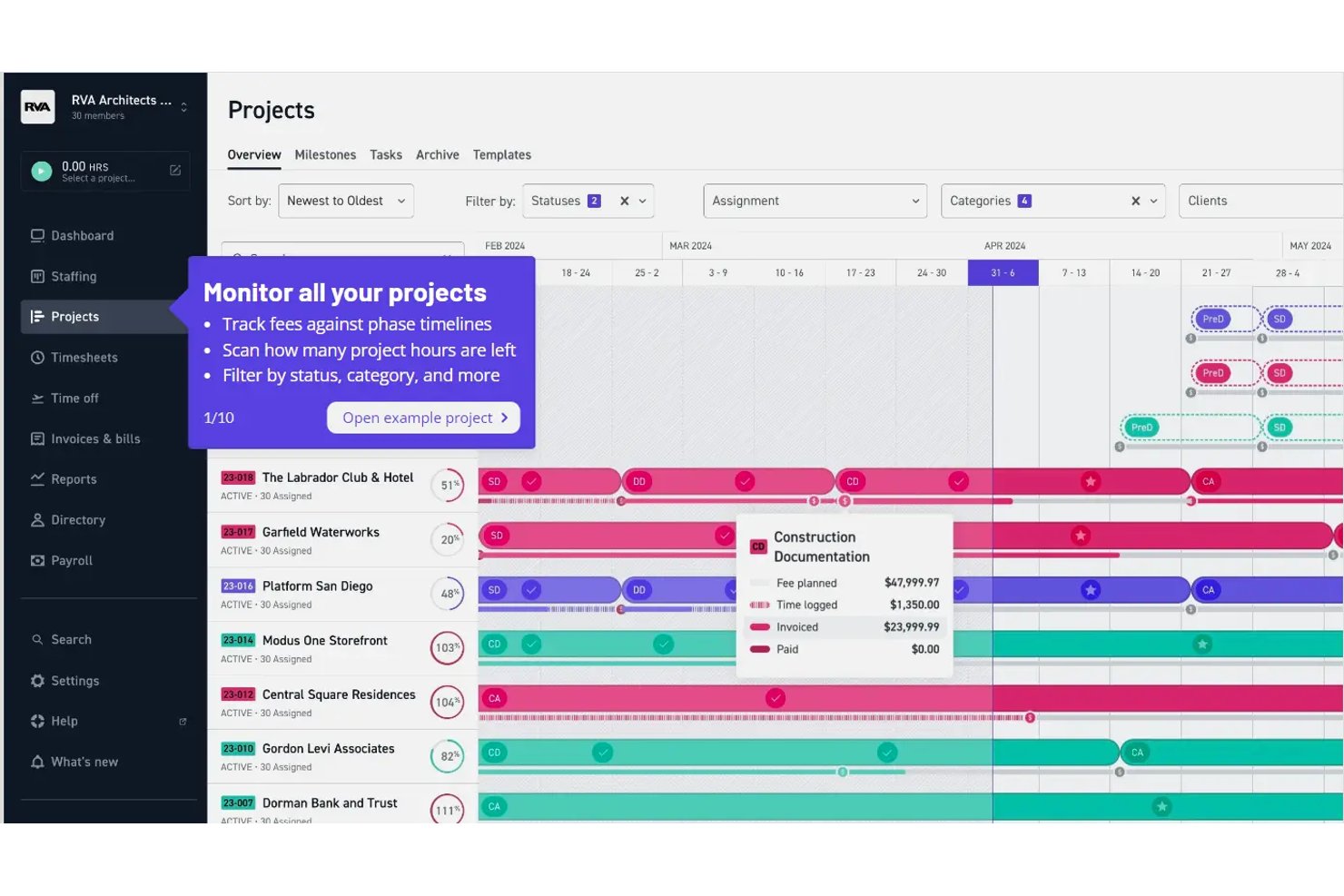
Monograph è un software per la gestione degli studi, sviluppato specificamente per studi di architettura e ingegneria, che combina pianificazione dei progetti, monitoraggio delle fasi, gestione del personale, registrazione delle ore, fatturazione e rapporti finanziari in un'unica piattaforma.
Per chi è più adatto Monograph?
Monograph è particolarmente adatto agli studi di architettura e ingegneria che hanno bisogno di monitorare in un unico luogo le fasi dei progetti, gli onorari e i carichi di lavoro del personale.
Perché ho scelto Monograph
Ho scelto Monograph come una delle soluzioni migliori perché è stato sviluppato appositamente intorno al modo in cui gli studi di architettura e ingegneria strutturano realmente il lavoro: per fase. Il diagramma finanziario di Gantt monitora in tempo reale le ore registrate rispetto al budget degli onorari di ciascuna fase, permettendomi di vedere se una fase di progettazione schematica sta consumando troppe risorse prima che diventi un problema di fatturazione. Il rapporto finanziario del progetto suddivide quindi i dati per ruolo e tariffa, mostrando il tempo fatturabile e non fatturabile e lo stato delle fatture, il tutto senza uscire dalla piattaforma.
Funzionalità principali di Monograph
- Pianificazione delle fasi collegate: Collega le fasi del progetto in modo che lo spostamento della data di fine di una fase modifichi automaticamente a cascata le date di tutte le fasi successive.
- Vista del personale: Visualizza le ore assegnate a ciascun membro del team rispetto alla sua capacità disponibile su base settimanale, mensile o trimestrale.
- Generatore di budget basato sull'intelligenza artificiale: Genera un budget proposto fase per fase, con tipi di onorari, ruoli e tariffe, direttamente dalle informazioni contrattuali.
- Portale per la vista cliente: Offri ai clienti una visualizzazione in sola lettura delle fasi del progetto, dell'avanzamento nel diagramma di Gantt, dello stato delle fatture e delle proposte, con accettazione delle proposte integrata.
Integrazioni di Monograph
Monograph offre un'integrazione nativa documentata con QuickBooks Online per la sincronizzazione di fatture, bollette, spese, pagamenti e costi dei progetti. Non sono documentate ulteriori integrazioni native né interfacce API pubbliche.
Pros and Cons
Pros:
- Le fasi collegate modificano automaticamente le date successive
- Il diagramma finanziario di Gantt collega le ore registrate ai budget
- Le viste del personale mostrano i carichi di lavoro tra i vari progetti
Cons:
- Il centro dei file non offre strumenti di annotazione dei disegni né controllo delle versioni
- Le ore del personale richiedono spesso un riequilibrio manuale
Altri software di gestione dei progetti per architetti
Ecco alcuni altri strumenti che non sono entrati nell’elenco principale, ma che vale comunque la pena prendere in considerazione.
- ArchiOffice
Ideale per il monitoraggio di tempi, fatturazione e onorari negli studi di architettura e ingegneria
- ProWorkflow
Ideale per il monitoraggio degli onorari e la reportistica ai clienti
- Workzone
Ideale per gestire contemporaneamente più progetti di clienti
- Projectworks
Ideale per la supervisione finanziaria negli studi di architettura
- Bonsai Agency Software
Ideale per la fatturazione dei clienti e il monitoraggio degli onorari
- GoodDay
Ideale per adattare i flussi di lavoro a qualsiasi fase della progettazione
- Deltek Ajera
Ideale per gestire progetti e fatturazione di studi di architettura e ingegneria in un unico luogo
- WorkflowMax
Ideale per il monitoraggio del tempo e delle tariffe per fase del lavoro


Come Valuto i Software di Project Management per Architetti
Divido la mia valutazione in criteri di base—come il monitoraggio delle tariffe per fase e i flussi di lavoro per RFI—e i fattori che distinguono una soluzione adatta da quella perfetta per uno studio di architettura.
Funzionalità Principali (Requisiti di Base per Questa Lista)
Quando seleziono gli strumenti per la mia lista, valuto ciascuno su una scala da 0 (non offre la funzionalità) a 5 (eccelle in quest'area) per ogni funzionalità principale elencata qui sotto. Poi, calcolo il punteggio totale dello strumento in percentuale. Ogni strumento deve ottenere un punteggio minimo totale del 55% per essere preso in considerazione per l'inclusione.
- Monitoraggio delle Fasi di Progetto AEC: Verifico se uno strumento struttura i progetti attorno a fasi architettoniche reali come SD, DD, CD e CA invece di costringerti a improvvisare con bacheche di attività generiche.
- Monitoraggio di Tempo e Tariffe: Ogni strumento dovrebbe permetterti di registrare le ore rispetto a specifiche fasi e tipi di tariffa, sia che il tuo studio fatturi a tariffa fissa, oraria o a percentuale sui lavori edili.
- Pianificazione e Allocazione delle Risorse: Cerco la programmazione dello staff che mostri chi è disponibile su progetti concomitanti, così i responsabili possono individuare i progettisti sovraccarichi prima che le scadenze vengano mancate.
- Gestione di Documenti e Tavole: Qui è importante il controllo delle versioni per set di tavole, specifiche e sottomissioni—valuto come ogni strumento gestisce le revisioni e impedisce che file superati causino errori di coordinamento.
- Collaborazione con Clienti e Consulenti: Gli stakeholder esterni come ingegneri strutturali e consulenti MEP devono poter condividere consegne e approvazioni senza richiedere una licenza utente completa.
- Report Finanziari e Fatturazione: Esamino se è possibile generare fatture per fase o in formato AIA e ottenere report di redditività a livello di progetto per individuare tempestivamente eventuali sforamenti di tariffa.
Una volta che dispongo di un elenco di strumenti che soddisfano i criteri, considero ciò che distingue ciascuna piattaforma.
Fattori Differenzianti (Cosa Distingue i Fornitori)
Ecco come confronto i diversi fornitori:
Caratteristiche Distintive
L'integrazione BIM e CAD è un grande elemento di differenziazione. Valuto se uno strumento si sincronizza con Revit o AutoCAD così che i dati delle tavole confluiscano nello spazio di lavoro di project management senza caricamenti manuali. Il coordinamento con i consulenti è altrettanto importante quando lo studio gestisce strutturale, MEP e consulenti civili su un singolo progetto. Cerco piattaforme che tengano traccia dell’ambito, delle consegne e delle tariffe di ogni consulente in un unico posto. Strumenti da campo per sopralluoghi e punch list sono anche un plus durante il CA, soprattutto per i team che compilano report di osservazione da mobile.
Oltre le Caratteristiche
La compatibilità con la dimensione dello studio influenza molto la mia valutazione. Uno studio di cinque persone ha bisogno di uno strumento diverso rispetto a una realtà da 200 persone con più sedi, quindi considero se ogni piattaforma si adatta senza obbligare team piccoli a costi eccessivi da enterprise. Anche le integrazioni nell’ecosistema AEC sono fondamentali—controllo le connessioni con QuickBooks, Deltek, Bluebeam e piattaforme cloud dove risiedono effettivamente i set di tavole. La trasparenza dei prezzi completa la mia recensione. Valuto se modelli a utente o a progetto sono coerenti con il modo in cui gli studi di architettura organizzano e fatturano il lavoro su carichi di progetto variabili.
Come scegliere un software di gestione dei progetti per architetti
È facile perdersi in lunghi elenchi di funzionalità e strutture tariffarie complesse. Per aiutarti a rimanere concentrato mentre affronti il tuo processo di selezione del software, unico per le tue esigenze, ecco un elenco di fattori da tenere presenti:
| Fattore | Cosa considerare |
|---|---|
| Scalabilità | Assicurati che lo strumento possa crescere insieme al tuo team. Cerca opzioni che supportino utenti e progetti aggiuntivi senza problemi. |
| Integrazioni | Verifica se il software si collega agli strumenti che già utilizzi, come programmi CAD, posta elettronica e archiviazione cloud. |
| Personalizzazione | Cerca opzioni che consentano di adattare flussi di lavoro, pannelli di controllo e report alle esigenze specifiche del tuo team. |
| Semplicità d'uso | Scegli uno strumento con un'interfaccia intuitiva che il tuo team possa imparare rapidamente, riducendo al minimo i tempi di inattività. |
| Budget | Considera il costo totale, comprese eventuali tariffe aggiuntive per funzionalità, utenti o assistenza extra. |
| Misure di sicurezza | Assicurati che il software disponga di solide misure di protezione dei dati per mantenere al sicuro i tuoi progetti e le informazioni dei clienti. |
| Accesso da dispositivi mobili | Se il tuo team lavora in cantiere, valuta strumenti con un'app mobile affidabile per accedere ai dati anche in movimento. |
| Servizi di assistenza | Cerca piattaforme che offrano un'assistenza completa, inclusi tutorial, chat dal vivo e supporto telefonico. |
Onestamente, c'è molto da assimilare e molta pressione per fare la scelta giusta, quindi ti suggerisco di utilizzare il nostro servizio di consulenza sui software di gestione dei progetti per aiutarti a selezionare gli strumenti di gestione dei progetti più adatti alle esigenze specifiche tue e della tua organizzazione.
Tendenze nei software di gestione dei progetti per architetti
Durante la mia ricerca, ho raccolto innumerevoli aggiornamenti di prodotto, comunicati stampa e registri delle versioni di diversi fornitori di software di gestione dei progetti per architetti. Ecco alcune delle tendenze emergenti che sto tenendo d'occhio:
- Integrazione BIM: L'integrazione della modellazione delle informazioni dell'edificio (BIM) sta diventando sempre più comune e consente agli architetti di lavorare direttamente con modelli 3D all'interno dei propri strumenti di gestione dei progetti. Questo aiuta i team a visualizzare meglio i progetti e a prendere decisioni più consapevoli.
- Monitoraggio della sostenibilità: Gli strumenti stanno iniziando a includere funzionalità per monitorare gli indicatori di sostenibilità, come il consumo energetico e l'approvvigionamento dei materiali. Questa tendenza è alimentata dalla crescente domanda di progetti e pratiche costruttive ecocompatibili.
- Supporto per la realtà aumentata (AR): Alcuni fornitori stanno integrando la realtà aumentata per consentire agli architetti di visualizzare i progetti in ambienti reali. Questo offre un nuovo modo per presentare le idee ai clienti e apportare modifiche prima dell'inizio della costruzione.
- Strumenti avanzati per la collaborazione: Le funzionalità avanzate per la collaborazione, come la modifica simultanea in tempo reale e le videoconferenze all'interno della piattaforma, stanno diventando uno standard. Queste funzionalità aiutano i team a lavorare insieme in modo efficiente, soprattutto quando si trovano in località diverse. Puoi anche consultare gli strumenti per la collaborazione in tempo reale per saperne di più sulle funzionalità standard del settore.
- Analisi e approfondimenti sui dati: Gli strumenti di gestione dei progetti offrono analisi più avanzate per aiutare i team a prendere decisioni basate sui dati. Ciò include il monitoraggio delle prestazioni del progetto e la previsione delle tendenze future, fornendo agli architetti informazioni preziose.
Che cos'è il software di gestione dei progetti per architetti?
Il software di gestione dei progetti per architetti è uno strumento specializzato, concepito per rispondere alle esigenze della pianificazione e dell'esecuzione dei progetti architettonici. Integra funzionalità per lo sviluppo del progetto, la gestione delle attività, l'assegnazione delle risorse, l'interazione con i clienti e la collaborazione con i vari portatori di interesse. Questo software si adatta agli aspetti peculiari del lavoro architettonico, dalla fase concettuale fino alla costruzione.
I vantaggi di questo software includono una maggiore efficienza nella gestione di progetti architettonici complessi, un migliore coordinamento tra i membri del team e comunicazioni più fluide con i clienti. Offre un monitoraggio efficace del budget, una gestione centralizzata dei documenti e funzionalità che consentono di risparmiare tempo. Utilizzando questo software, gli architetti possono mantenere elevati standard qualitativi, gestire i rischi in modo efficace e garantire il regolare avanzamento dei progetti dalla progettazione iniziale al completamento finale.
Funzionalità del software di gestione dei progetti per architetti
Quando scegli un software di gestione dei progetti per architetti, presta attenzione alle seguenti funzionalità principali:
- Integrazione BIM: Consente agli utenti di lavorare con modelli 3D direttamente all'interno dello strumento, favorendo la visualizzazione e un processo decisionale più consapevole.
- Monitoraggio della sostenibilità: Monitora indicatori ecologici come il consumo energetico e l'approvvigionamento dei materiali per sostenere pratiche di progettazione sostenibile.
- Strumenti avanzati per la collaborazione: Offre la modifica simultanea in tempo reale e le videoconferenze, migliorando la comunicazione e la produttività del team.
- Gestione delle attività: Aiuta a organizzare, assegnare e monitorare le attività per garantire che i progetti rispettino le scadenze.
- Monitoraggio del tempo: Sebbene sia possibile applicare le migliori pratiche per il monitoraggio del tempo, lo strumento giusto registra il tempo dedicato alle attività, facilitando la gestione delle risorse e la pianificazione dei progetti.
- Pannelli di controllo personalizzabili: Consente agli utenti di adattare il proprio spazio di lavoro alle esigenze e alle preferenze specifiche del progetto.
- Accesso da dispositivi mobili: Fornisce l'accesso alle informazioni del progetto anche in mobilità, risultando utile per i team che lavorano sul posto.
- Archiviazione delle risorse – Il software dovrebbe consentire di archiviare e raccogliere digitalmente diversi elementi visivi, video e testuali. In modo simile a un software per la gestione delle risorse digitali.
- Analisi e approfondimenti sui dati: Analizza le prestazioni del progetto e prevede le tendenze, offrendo informazioni preziose per il processo decisionale.
- Strumenti per la gestione della sicurezza: Garantisce la conformità alle normative di sicurezza, fondamentale per i progetti legati alla costruzione.
- Budget e contabilità – Fornisce strumenti per gestire la fatturazione, il monitoraggio delle ore fatturabili e i fogli presenze. Se le funzionalità sono limitate, può essere integrato con un software per la gestione del budget dei progetti.
- Portale clienti: Consente ai clienti di accedere agli aggiornamenti e ai documenti del progetto, migliorando trasparenza e comunicazione.
Domande frequenti sulla gestione dei progetti per architetti
Di seguito tratterò alcune domande e risposte essenziali sul software per la gestione dei progetti di architettura.
Quale software usano gli architetti?
Gli architetti degli studi di architettura e di altre aziende AEC utilizzano diversi tipi di software, come software per la pianificazione dei progetti (Trello, Asana, Basecamp), software di contabilità per architetti (Quickbooks, Sage) e/o software di progettazione (AutoCAD, Rino 3D, Sketchup).
Che cos'è la gestione dei progetti di architettura?
I progetti architettonici sono un mondo a sé: complessi e multidimensionali. Uniscono la precisione tecnica alla visione estetica, senza dimenticare la funzionalità. A differenza dei progetti più lineari, il lavoro architettonico si intreccia con le normative locali, l’impatto ambientale e il contesto della comunità. Richiede una stretta collaborazione con un team dalle competenze diverse, composto da architetti, ingegneri, appaltatori e clienti.
Ecco alcuni degli aspetti distintivi della gestione dei progetti di architettura:
\u003cul\u003e
\t\u003cli\u003e\u003cstrong\u003eBudget di progetto:\u003c/strong\u003e Naturalmente, i budget e gli ambiti dei progetti possono cambiare in qualsiasi settore. Tuttavia, gli studi di ingegneria devono considerare non solo i costi iniziali, ma anche i costi di manutenzione a lungo termine e le spese operative.\u003c/li\u003e
\t\u003cli\u003e\u003cstrong\u003eFlussi di lavoro complessi:\u003c/strong\u003e La capacità di ottimizzare i flussi di lavoro è essenziale, perché più persone con specializzazioni diverse dovranno entrare e uscire dal progetto in momenti differenti. Anche gli strumenti di collaborazione inclusi in una soluzione per la gestione dei progetti (come la condivisione dei file e le notifiche automatiche di Slack) sono molto utili a questo scopo.\u003c/li\u003e
\t\u003cli\u003e\u003cstrong\u003eConformità legale e normativa:\u003c/strong\u003e I progetti architettonici devono rispettare una complessa rete di codici edilizi, leggi urbanistiche e norme di sicurezza specifiche per ogni luogo. È importante tenerne conto dalla fase di pianificazione fino a ogni traguardo del progetto e considerare anche le future modifiche normative.\u003c/li\u003e
\u003c/ul\u003e
Qual è la differenza tra il software per la gestione dei progetti per architetti e il software per la gestione dei progetti di costruzione?
Il software per la gestione dei progetti per architetti si concentra sulla collaborazione alla progettazione, sulla condivisione dei documenti e sulla gestione dei flussi di lavoro specifici del processo architettonico. Il software per la gestione dei progetti di costruzione, invece, è orientato all’esecuzione dei progetti in cantiere, inclusi la pianificazione, l’allocazione delle risorse, il monitoraggio del budget e la conformità agli standard di sicurezza. La differenza principale risiede nel destinatario principale: gli architetti da una parte e i responsabili della costruzione dall’altra.
Qual è la differenza tra il software per la gestione dei progetti per architetti e il software per la gestione dei progetti di ingegneria?
Il software per la gestione dei progetti per architetti pone l’accento sulla collaborazione alla progettazione, sulla gestione dei disegni e sulle approvazioni dei clienti. Il software per la gestione dei progetti di ingegneria si concentra maggiormente sul monitoraggio delle attività tecniche, sui calcoli, sulla conformità e sul coordinamento tra team multidisciplinari. Sebbene entrambi gestiscano tempistiche e risorse, i loro strumenti sono adattati a flussi di lavoro diversi: progettazione creativa da una parte ed esecuzione tecnica dall’altra.
\u0026nbsp;
\u0026nbsp;
\u0026nbsp;
\u0026nbsp;