

I 10 migliori software di gestione dei flussi di lavoro con IA recensiti nel 2026

Elenco dei migliori software di gestione dei flussi di lavoro con IA


Gestire i progetti può essere un vero esercizio di equilibrismo. Ci sono scadenze da rispettare, risorse da assegnare e un team da mantenere sulla giusta rotta. I software di gestione dei flussi di lavoro con IA possono alleggerire il carico automatizzando le attività ripetitive e migliorando la collaborazione del team.
nnIn base alla mia esperienza, questi strumenti possono trasformare il tuo modo di lavorare, permettendoti di concentrarti su ciò che conta davvero. Sfruttando l'IA, puoi aumentare l'efficienza e ridurre gli errori nei tuoi progetti.
nnIn questo articolo condividerò le mie migliori scelte di software di gestione dei flussi di lavoro con IA. Ho testato e recensito in modo indipendente ciascuno di essi per aiutarti a prendere una decisione informata. Che tu voglia semplificare attività complesse o migliorare la comunicazione del team, troverai una soluzione adatta alle tue esigenze.
nPerché fidarsi dei nostri consigli sui software
Il nostro team testa e recensisce software dal 2012. In quanto project manager noi stessi, sappiamo quanto sia difficile — e importante — scegliere il software giusto.
Per questa guida, abbiamo valutato gli strumenti attraverso test pratici e ricerche indipendenti, assegnando un punteggio agli strumenti in base ai nostri criteri di selezione. Ci basiamo inoltre sulle competenze di leader di pensiero del settore e di professionisti attivi nella gestione dei progetti.
Le nostre recensioni riflettono il nostro giudizio editoriale umano, non un discorso di vendita.
Revisori esperti:
Tabella comparativa dei software di gestione dei flussi di lavoro con IA
Questa tabella comparativa riassume i dettagli dei prezzi delle mie migliori selezioni di software di gestione dei flussi di lavoro con IA.
| Tool | Best For | Trial Info | Price | ||
|---|---|---|---|---|---|
| 1 | Ideale per interazioni sicure con i clienti | Piano gratuito + prova gratuita + demo gratuita disponibili | A partire da $99/mese | Website | |
| 2 | Ideale per la generazione di flussi di lavoro AI senza codice | Prova gratuita di 14 giorni | Da $9/utente/mese (fatturazione annuale) | Website | |
| 3 | Ideale per team di marketing | Demo gratuita disponibile | Prezzi su richiesta | Website | |
| 4 | Ideale con connettori predefiniti per le principali app | Demo gratuita disponibile | Prezzi su richiesta | Website | |
| 5 | Ideale per l'orchestrazione AI | Piano gratuito disponibile | Da $19.99/mese (fatturato annualmente) | Website | |
| 6 | Ideale per l'automazione visiva | Piano gratuito + demo gratuita disponibile | A partire da $9/mese (fatturazione annuale) | Website | |
| 7 | Ideale per gli appassionati dell'open-source | Prova gratuita disponibile | A partire da $20/mese (fatturato annualmente) | Website | |
| 8 | Ideale per la gestione delle risorse digitali | Dimostrazione gratuita disponibile | Prezzi su richiesta | Website | |
| 9 | Ideale per la visualizzazione dei dati | Prova gratuita di 30 giorni + demo gratuita disponibile | Prezzi su richiesta | Website | |
| 10 | Ideale per capacità di integrazione | Prova gratuita di 30 giorni | Prezzo su richiesta | Website |


Recensioni dei migliori software di gestione dei flussi di lavoro con IA
Di seguito trovi le mie recensioni dettagliate dei migliori software di gestione dei flussi di lavoro con IA inclusi nel mio elenco. Le mie recensioni offrono un’analisi approfondita delle funzionalità principali, dei pro e dei contro, delle integrazioni e dei casi d’uso ideali di ogni strumento, per aiutarti a trovare quello più adatto a te.

Moxo
Ideale per interazioni sicure con i clienti
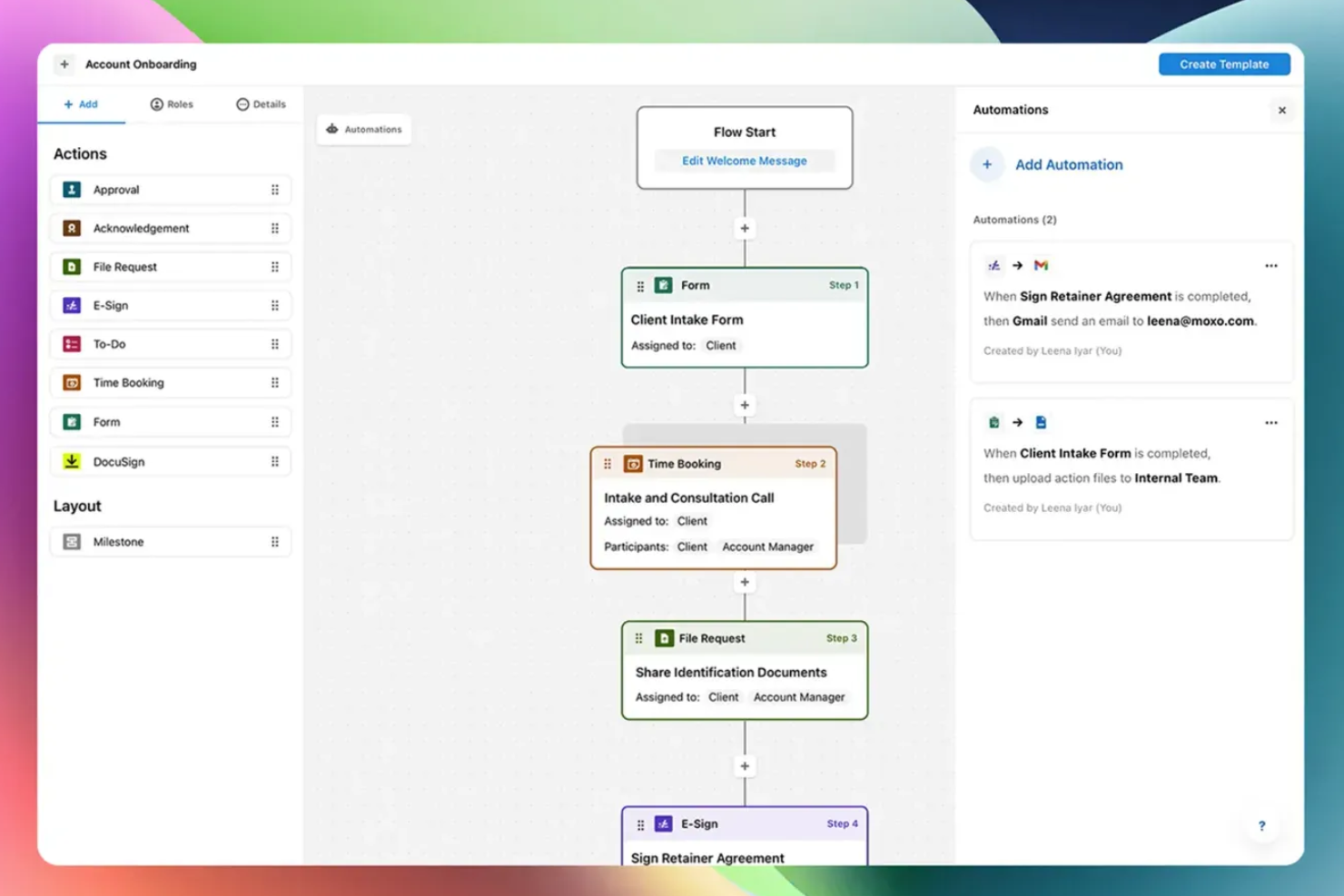
Moxo è una piattaforma di gestione dei flussi di lavoro basata su AI che orchestra i processi aziendali tra team interni, stakeholder esterni e agenti AI—gestendo instradamento, validazione, coordinamento dei documenti e interazioni con i clienti all'interno di un unico builder di workflow senza codice.
Per chi è ideale Moxo?
Moxo è particolarmente indicato per studi di servizi professionali—come finanziari, legali e di consulenza—che gestiscono workflow complessi e ricchi di documenti con clienti esterni.
Perché ho scelto Moxo
Ho inserito Moxo tra le mie scelte principali perché la sua architettura di sicurezza è integrata direttamente nel funzionamento dei workflow dei clienti, non applicata come componente aggiuntivo. Ogni interazione con il cliente avviene all'interno di uno spazio di lavoro crittografato e controllato negli accessi, con autorizzazioni granulari basate sui ruoli e un tracciamento completo degli audit. Apprezzo particolarmente che la conformità SOC 2 Type II e la crittografia end-to-end si applichino a messaggistica, condivisione di file e firme elettroniche all'interno dello stesso workflow, impedendo così fughe di dati verso canali non sicuri durante i processi.
Funzionalità principali di Moxo
- Builder di workflow AI: Progetta workflow multi-step con ramificazioni condizionali, percorsi paralleli e cicli tramite un editor visuale no-code.
- Agenti AI: Implementa agenti Assist, Automate e Amplify per gestire la preparazione delle attività, la validazione dei dati e il monitoraggio dei processi nei workflow attivi.
- Escalation basate su SLA: Imposta regole a tempo che reindirizzano o fanno scalare automaticamente i passaggi bloccati del workflow per mantenere i processi in movimento.
- Agent Foundry: Crea e configura agenti AI personalizzati per fasi specifiche dei flussi di lavoro utilizzando l'ambiente nativo di creazione agenti di Moxo.
Integrazioni di Moxo
Moxo offre connettori di sincronizzazione diretta dei dati con Salesforce, HubSpot, Microsoft Dynamics, Zoho, Wealthbox, Redtail, Filevine, Global Relay, Smarsh e Xero, oltre a integrazioni documentate per DocuSign, Stripe, Slack, Jira, Google Drive, Dropbox, Box, OneDrive, Zendesk e QuickBooks. Si collega anche con Zapier e fornisce una REST API e webhook per integrazioni personalizzate.
Pros and Cons
Pros:
- Firme elettroniche, moduli e approvazioni integrati
- Conforme SOC 2 Type II e GDPR
- Spazio di lavoro dedicato per cliente o progetto
Cons:
- L'app mobile è meno performante della versione desktop
- Nessun timer attività integrato per il tracciamento

Ideale per la generazione di flussi di lavoro AI senza codice
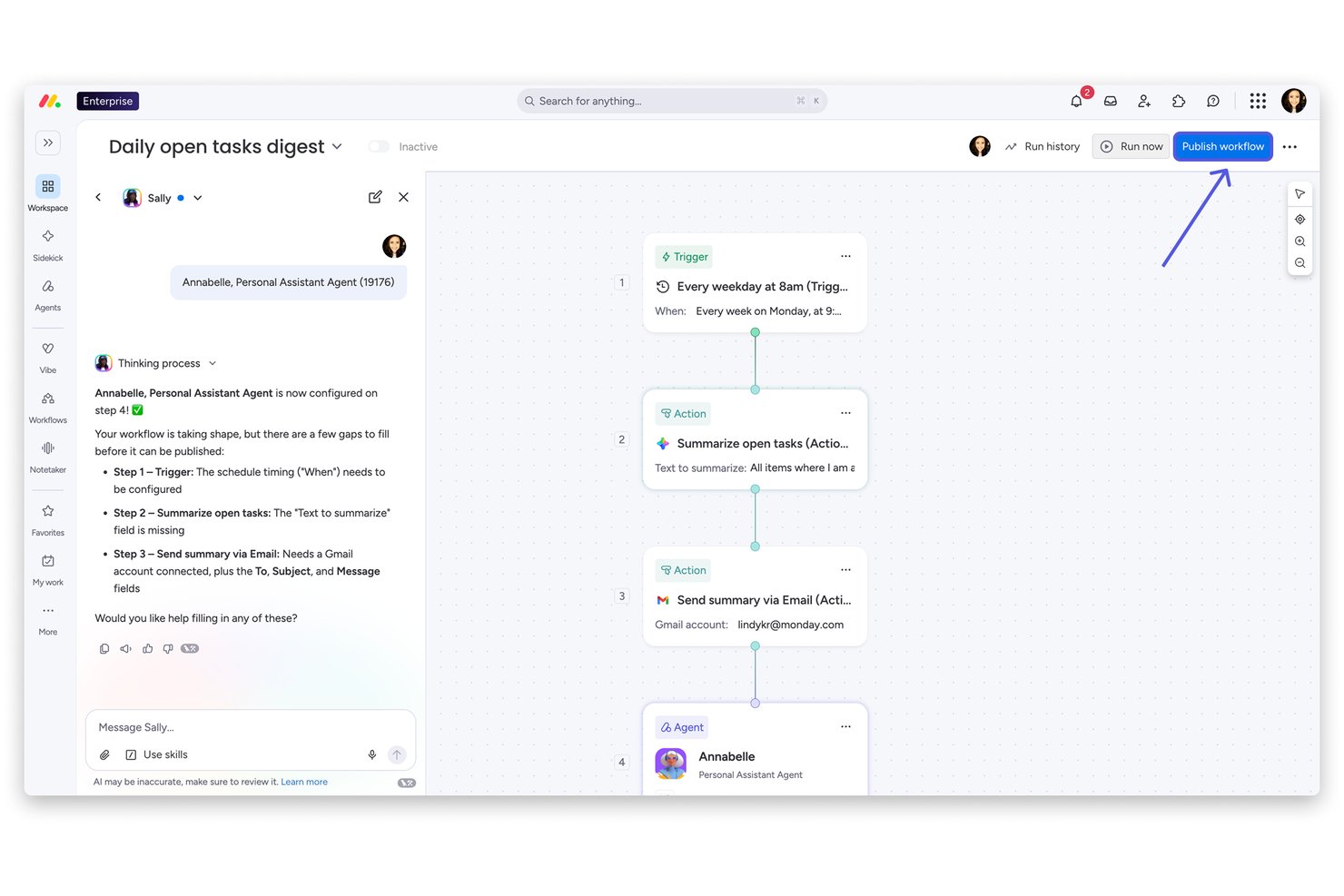
monday AI Workspace è una piattaforma di lavoro alimentata dall'intelligenza artificiale che combina automazione dei flussi di lavoro senza codice, orchestrazione di progetti multi-prodotto e uno strato di agenti AI integrato per la gestione del lavoro, CRM, sviluppo e casi d'uso nel servizio.
Per chi è ideale monday AI Workspace?
È particolarmente adatto per team di medie e grandi dimensioni nei reparti operativi, PMO, o ruoli di delivery trasversali che necessitano di un'orchestrazione flessibile e guidata dall'AI dei flussi di lavoro tra molteplici funzioni aziendali.
Perché ho scelto monday AI Workspace
monday AI Workspace si guadagna un posto d'onore nella mia lista dei migliori strumenti perché l'AI Workflow Builder mantiene davvero la promessa di generazione di flussi di lavoro senza codice. Posso descrivere un processo di approvazione o di passaggio di consegne multi-step in linguaggio naturale, e la piattaforma ne costruisce la logica, assegnando agenti AI per l'esecuzione di ogni passaggio e indirizzando automaticamente il lavoro tra i team. Il Vibe App Builder va oltre, permettendomi di creare un'app business personalizzata da un semplice prompt in italiano in pochi minuti.
Funzionalità principali di monday AI Workspace
- Forza lavoro di agenti AI: Distribuisci agenti AI per svolgere attività di progetto specializzate e supportare l'esecuzione automatizzata su larga scala.
- Modulo di gestione delle risorse: Assegna capacità al team, prevedi i carichi di lavoro e monitora l'utilizzo delle risorse su tutti i portafogli.
- AI per la presa di note in meeting: Trasforma le riunioni in appunti strutturati, punti d'azione e trigger di flusso di lavoro direttamente nello spazio di lavoro.
- Integrazione di più strumenti: Connetti strumenti come Jira, Salesforce, Slack, HubSpot e altri tramite integrazioni native e API aperta.
Integrazioni di monday AI Workspace
monday AI Workspace offre centinaia di integrazioni native, tra cui Slack, Jira, Salesforce, HubSpot, Google Workspace, Microsoft 365, GitHub, GitLab, Zendesk, Dropbox e Zoom. Supporta anche Zapier e fornisce un'API per integrazioni personalizzate.
Pros and Cons
Pros:
- Builder AI di workflow integrato e senza codice
- Agenti AI gestiscono autonomamente task multi-step
- Visibilità su tutto il portafoglio attraverso diversi flussi di lavoro
Cons:
- Le funzionalità AI avanzate richiedono piani di livello superiore
- L'ampiezza della piattaforma può essere dispersiva per i team più piccoli
New Product Updates from monday AI Workspace
monday AI Workspace Adds Human Approval Routing
monday AI Workspace adds a human-in-the-loop approval block to AI Workflows, sending approval requests and routing workflow paths based on responses. For more information, visit monday AI Workspace's official site.

Ideale per team di marketing
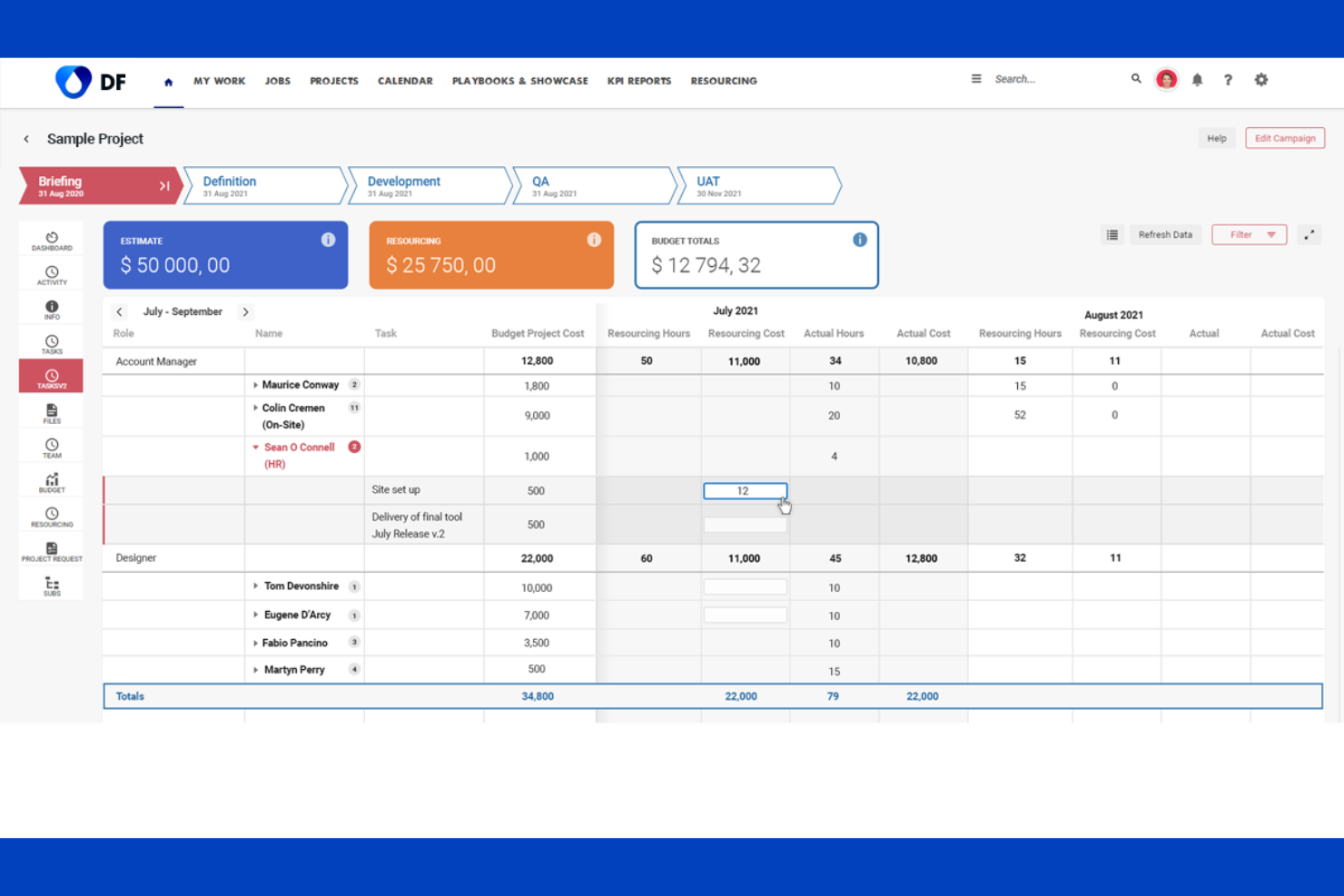
Screendragon è una piattaforma di produttività alimentata dall'IA progettata per team di marketing e agenzie, focalizzata sull'automazione dei flussi di lavoro. I suoi principali utilizzatori sono brand e agenzie globali che mirano a ottimizzare le risorse e migliorare la gestione dei progetti.
Perché ho scelto Screendragon: È pensato per i team di marketing che necessitano di gestire flussi di lavoro complessi in modo efficiente. La piattaforma offre funzionalità come la gestione delle attività di marketing e delle operazioni sui contenuti, concepite specificatamente per le esigenze del marketing. Grazie all'automazione basata sull'intelligenza artificiale, è possibile semplificare le attività e concentrarsi su progetti creativi. È particolarmente vantaggiosa per le agenzie che desiderano aumentare la redditività e la gestione delle risorse.
Caratteristiche principali & integrazioni:
Le funzionalità comprendono modelli avanzati di progetto che aiutano a gestire attività ricorrenti. È possibile usufruire di flussi di lavoro per l'approvazione dei contenuti per garantire il controllo di qualità. La piattaforma fornisce inoltre analisi in tempo reale per monitorare le prestazioni dei progetti.
Le integrazioni includono Microsoft Teams, Slack, Adobe Creative Cloud, Salesforce, SAP, Google Workspace, SharePoint, JIRA, Trello e Asana.
Pros and Cons
Pros:
- Modelli di progetto avanzati
- Automazione dei processi guidata dall'IA
- Flussi di lavoro personalizzabili
Cons:
- Focalizzato solo sul marketing
- Complesso per i nuovi utenti
New Product Updates from Screendragon
Screendragon Unveils New AI Hub
Screendragon introduced AI Hub, a new capability that lets teams build and manage AI agents directly within workflows. The update helps marketing teams automate tasks, maintain governance controls, and scale AI-driven operations more efficiently. For more information, visit Screendragon's official site.

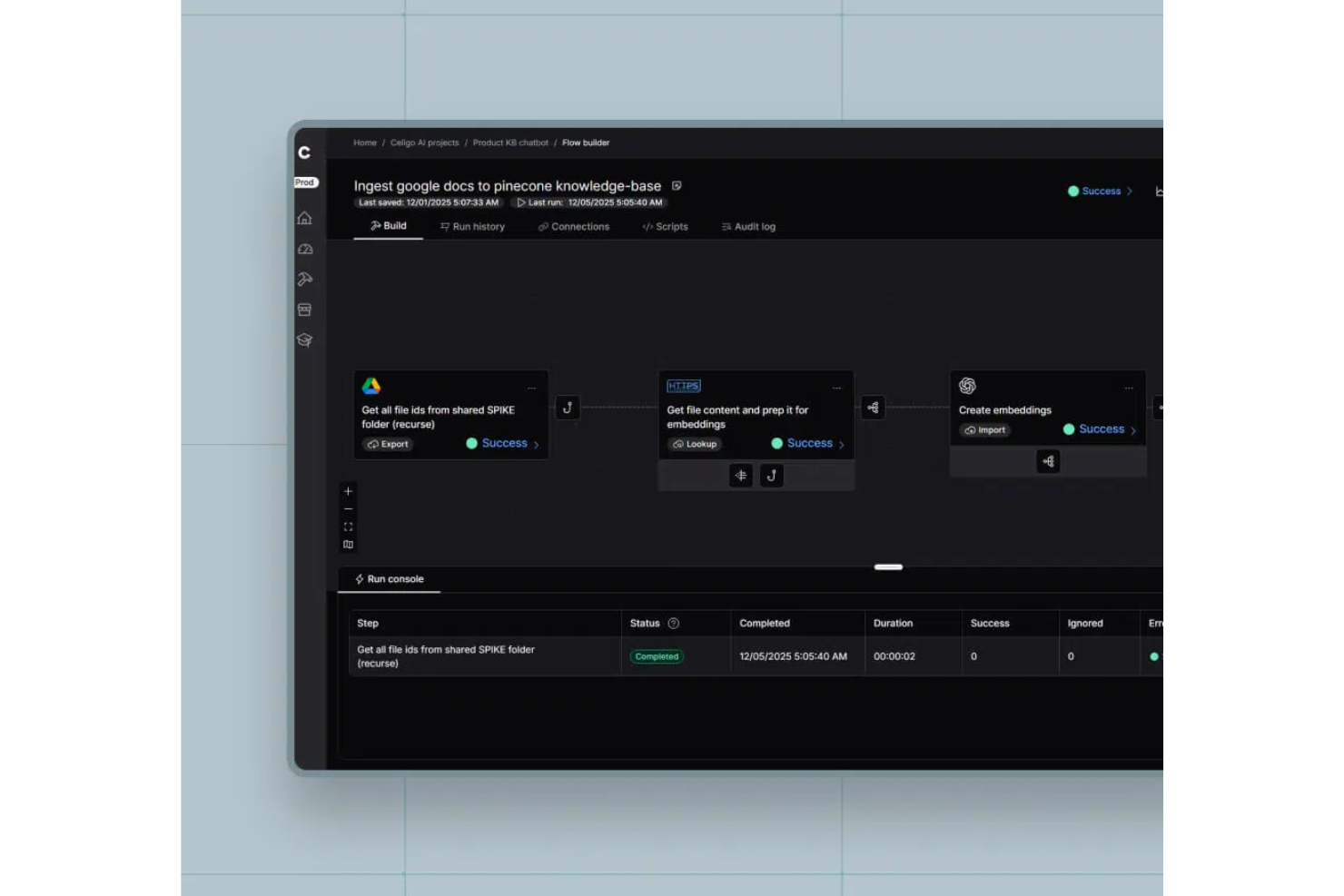
Celigo è una piattaforma di automazione dei flussi di lavoro potenziata dall'IA per i team che hanno bisogno di connettere, orchestrare e gestire processi aziendali tra più applicazioni SaaS ed enterprise.
Per chi è più indicato Celigo?
Celigo è una buona scelta per i team IT e operativi di aziende di medie e grandi dimensioni che necessitano di automatizzare e connettere flussi di lavoro attraverso molteplici applicazioni cloud.
Perché ho scelto Celigo
Ho scelto Celigo tra i migliori perché la sua libreria di connettori predefiniti copre una vasta gamma di principali app SaaS ed enterprise. Il mio team può collegare rapidamente Salesforce, NetSuite e ServiceNow senza sviluppo personalizzato. Mi piace che questi connettori includano una logica integrata per i processi aziendali comuni, così possiamo automatizzare i flussi di lavoro tra piattaforme immediatamente, senza configurazioni aggiuntive.
Caratteristiche principali di Celigo
- Gestione errori AI: Utilizza l'IA per individuare, diagnosticare e risolvere automaticamente gli errori di integrazione.
- Flow builder: Permette di progettare, personalizzare e automatizzare i flussi di lavoro con un'interfaccia visiva drag-and-drop.
- Dashboard di monitoraggio: Fornisce visibilità in tempo reale su stato, salute e performance delle integrazioni.
- Controlli di accesso basati sui ruoli: Consente di gestire i permessi e limitare l'accesso a flussi di lavoro e dati sensibili.
Integrazioni Celigo
Celigo offre oltre 1.000 connettori predefiniti nativi, tra cui Salesforce, NetSuite, ServiceNow, SAP, Microsoft Dynamics 365, Shopify, Amazon, Jira, Slack, Google Sheets e Snowflake. È disponibile un'API per integrazioni personalizzate.
Pros and Cons
Pros:
- Agent builder supporta flussi di lavoro autonomi e multi-step
- Dashboard di monitoraggio in tempo reale per lo stato delle integrazioni
- Controlli di accesso basati sui ruoli per la sicurezza dei flussi di lavoro
Cons:
- Opzioni limitate di implementazione offline o on-premises
- I tempi di risposta dell'assistenza possono variare in base al piano
New Product Updates from Celigo
Celigo Adds API Group Assignment During API Setup
Celigo adds API group assignment during create, clone, and move actions. This reduces extra setup steps by letting teams organize APIs before the relative URI is defined. For more information, visit Celigo’s official site.
 .
.
Zapier
Ideale per l'orchestrazione AI
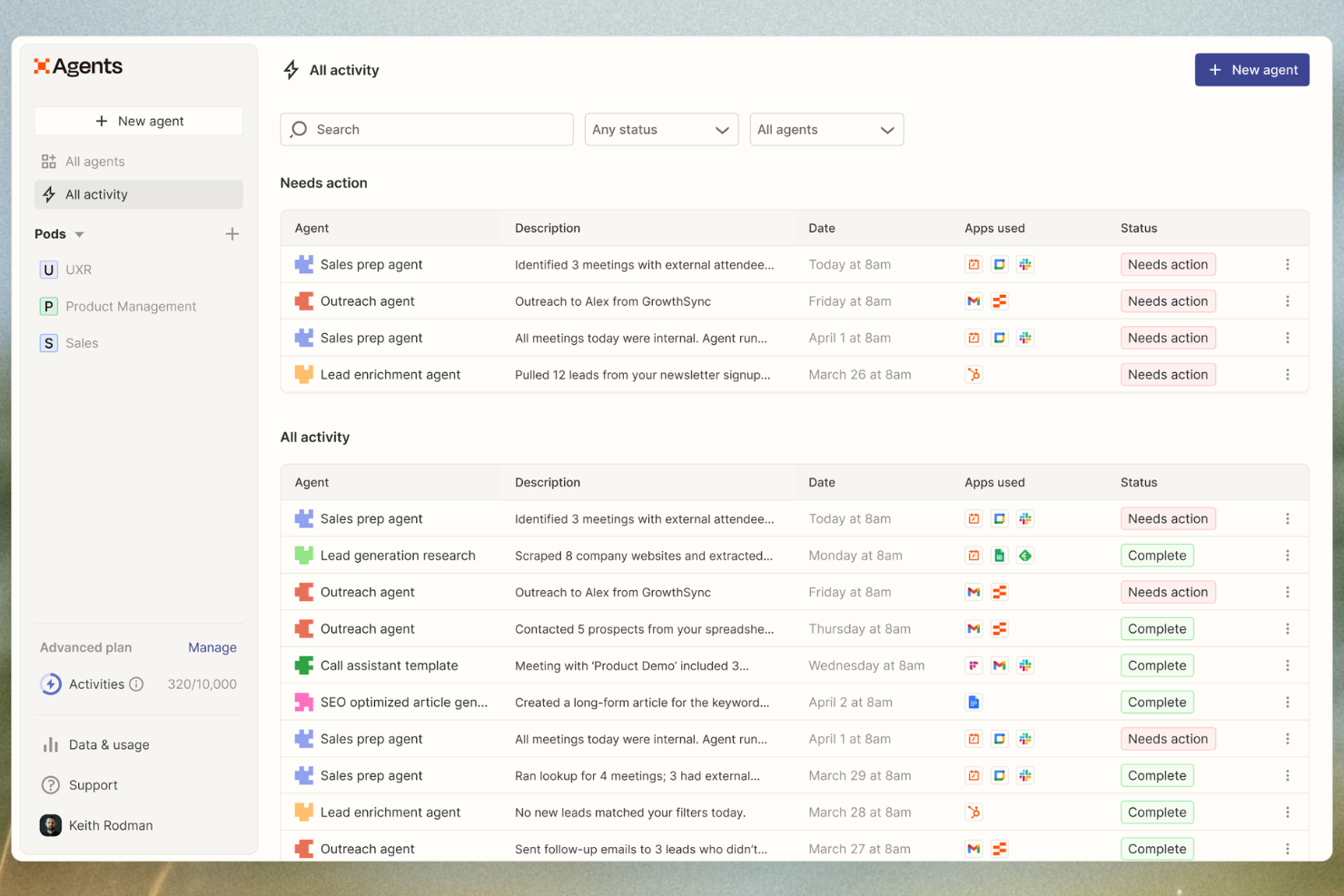
Zapier è una piattaforma di orchestrazione AI che collega migliaia di app e aiuta i team ad automatizzare flussi di lavoro multi-step senza codice. Viene utilizzata nei reparti marketing, vendite, RevOps, IT, risorse umane e operazioni per trasformare strumenti disconnessi in sistemi intelligenti alimentati dall'AI.
Perché ho scelto Zapier: Zapier si distingue per la sua combinazione di facilità d'uso e profondità. Gli utenti non tecnici possono costruire flussi di lavoro utilizzando il linguaggio naturale con Zapier Copilot, mentre i team avanzati possono aggiungere logiche complesse, azioni AI e controlli di governance. Con uno dei più grandi ecosistemi di integrazione disponibili, che include centinaia di app AI, Zapier si adatta facilmente da automazioni di compiti a due step a flussi di lavoro complessi tra team diversi.
Funzionalità e integrazioni principali:
Le funzionalità includono flussi di lavoro multi-step, logica condizionale, automazioni potenziate dall’AI, e strumenti integrati come Zapier Tables e Forms per la gestione di dati e input. I piani Enterprise aggiungono controlli amministrativi, log di audit e funzionalità di sicurezza.
Le integrazioni includono Google Sheets, Slack, Notion, HubSpot, Salesforce, Stripe, Mailchimp, Airtable, Typeform, Shopify, OpenAI, Trello e molte altre.
Pros and Cons
Pros:
- Database integrato, builder di moduli e mappatura dei processi
- Ecosistema di integrazioni di app e AI molto ampio
- Creazione di flussi di lavoro no-code e potenziati dall'AI
Cons:
- Nessuna app mobile
- Il piano gratuito è limitato a flussi di lavoro a due step

Make
Ideale per l'automazione visiva
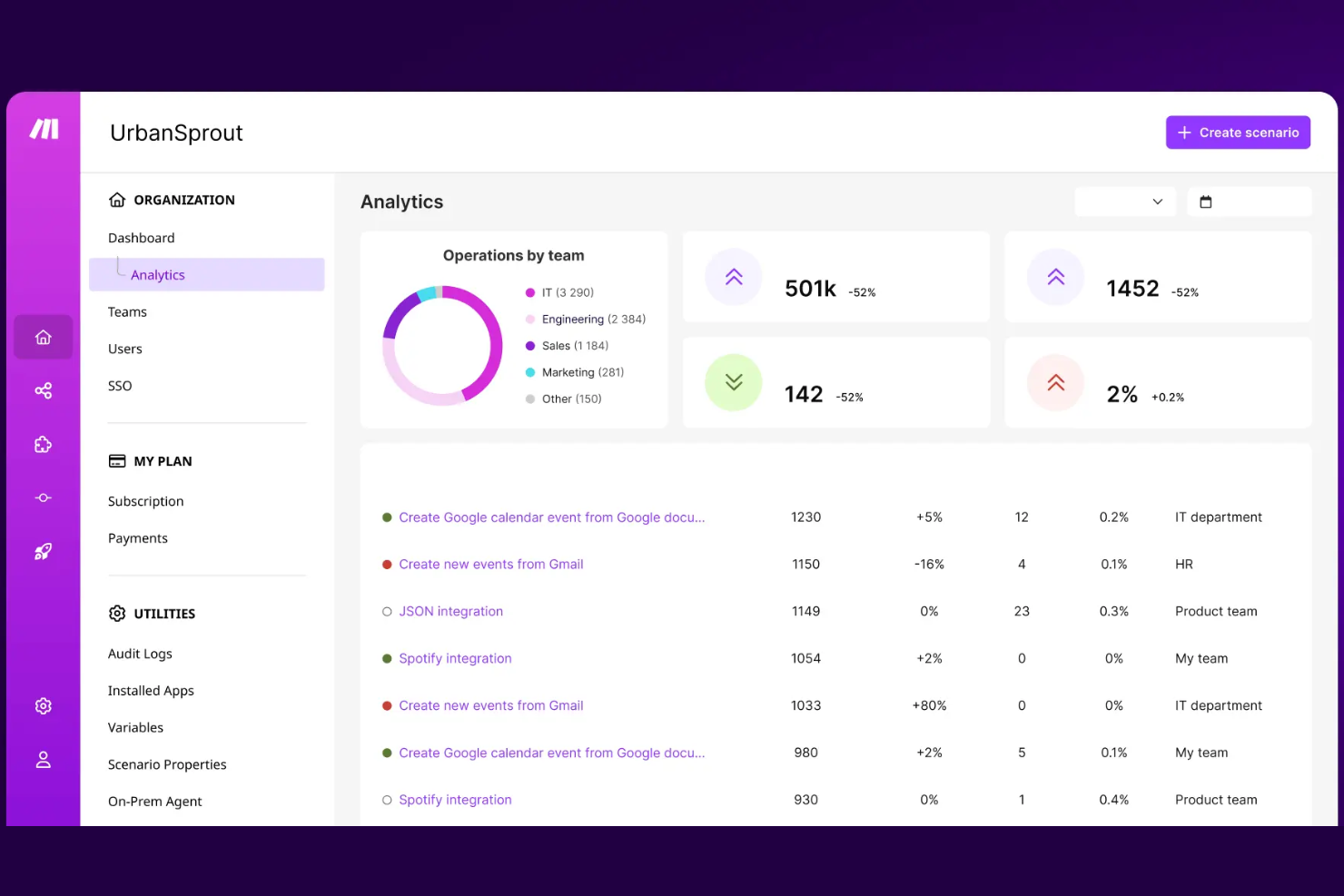
Make è una piattaforma di automazione visiva progettata per aziende e team che necessitano di automatizzare flussi di lavoro e processi senza la necessità di programmare. È adatta a una vasta gamma di utenti, dalle piccole imprese alle grandi aziende, consentendo loro di automatizzare attività ripetitive e migliorare l'efficienza.
Perché ho scelto Make: È ideale per l'automazione visiva, offrendo un'interfaccia intuitiva senza codice che permette al tuo team di progettare facilmente i flussi di lavoro. Grazie alla funzionalità drag-and-drop, puoi creare flussi di lavoro complessi senza bisogno di competenze tecniche. Make ti garantisce la flessibilità di automatizzare diversi tipi di attività su applicazioni differenti. Per i team che vogliono aumentare la produttività tramite strumenti visivi, Make propone una soluzione semplice da usare.
Funzionalità e integrazioni principali:
Le funzionalità includono un editor visivo che semplifica la creazione dei flussi di automazione. Puoi impostare trigger condizionali per personalizzare ulteriormente i tuoi flussi. La piattaforma offre anche un monitoraggio in tempo reale per seguire le prestazioni dei flussi e intervenire con modifiche quando necessario.
Le integrazioni comprendono Google Drive, Dropbox, Slack, HubSpot CRM, Salesforce, Mailchimp, Trello, Shopify, Microsoft Teams e Asana.
Pros and Cons
Pros:
- Monitoraggio in tempo reale dei processi
- Opzioni di automazione flessibili
- Adatto a diverse dimensioni aziendali
Cons:
- Funzionalità avanzate limitate
- Può richiedere molte risorse

n8n
Ideale per gli appassionati dell'open-source

n8n è uno strumento open-source per l'automazione dei flussi di lavoro progettato per sviluppatori e utenti esperti di tecnologia. Permette di creare flussi di lavoro complessi e automatizzare attività su diverse applicazioni.
Perché ho scelto n8n: È perfetto per gli appassionati del mondo open-source che desiderano avere il controllo sui propri processi di automazione. Puoi ospitarlo sul tuo server, ottenendo così flessibilità e opzioni di personalizzazione. L'editor di flussi di lavoro visuale di n8n rende facile progettare workflow senza bisogno di una programmazione avanzata. Per chi dà valore a trasparenza e adattabilità, offre una soluzione open-source unica.
Funzionalità principali & integrazioni:
Le funzionalità includono un editor visuale dei flussi di lavoro che semplifica la creazione delle attività di automazione. Offre logica condizionale per personalizzare i flussi in base a criteri specifici. È inoltre possibile accedere alla sua vasta community di supporto per assistenza e suggerimenti.
Le integrazioni comprendono Slack, Google Sheets, GitHub, Trello, Salesforce, Dropbox, X (Twitter), HubSpot, Zendesk e Airtable.
Pros and Cons
Pros:
- Opzione per l'hosting autonomo
- Editor visuale dei workflow
- Flessibilità open-source
Cons:
- Richiede conoscenze tecniche
- Può essere dispendioso in termini di risorse
Canto
Ideale per la gestione delle risorse digitali
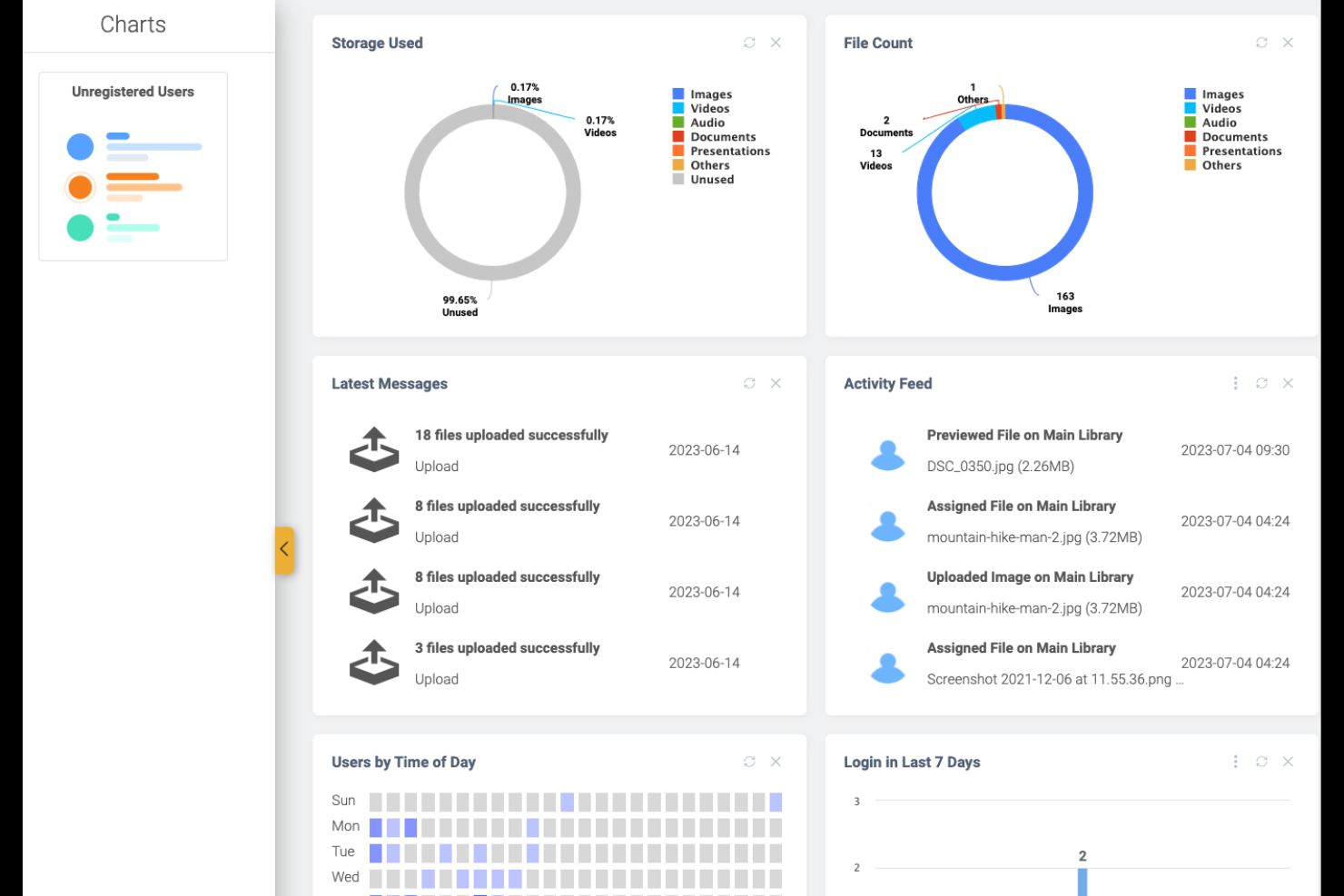
Canto è uno strumento di gestione delle risorse digitali progettato per le aziende che devono organizzare e distribuire i file multimediali in modo efficiente. Si rivolge alle squadre di marketing e ai reparti creativi, semplificando la gestione di immagini, video e altre risorse digitali.
Perché ho scelto Canto: È ideale per le squadre che richiedono una gestione strutturata delle risorse digitali. Canto offre una libreria centralizzata tutto-in-uno in cui è possibile archiviare e categorizzare facilmente i file multimediali. Le sue intuitive funzioni di ricerca consentono di trovare rapidamente le risorse, facendo risparmiare tempo prezioso alla squadra. Grazie alle opzioni di branding personalizzabili, aiuta a mantenere la coerenza dei contenuti digitali.
Funzionalità principali & integrazioni:
Funzionalità includono portali personalizzabili che consentono di condividere le risorse con partner esterni in modo sicuro. È possibile automatizzare l'etichettatura e l'organizzazione dei file per ridurre il lavoro manuale. Canto offre anche analisi per monitorare l'utilizzo e le prestazioni delle risorse.
Integrazioni includono Adobe Creative Cloud, Microsoft Office, Slack, WordPress, Hootsuite, Shopify, Box, Dropbox, Google Drive e Microsoft Teams.
Pros and Cons
Pros:
- Categorizzazione efficiente delle risorse
- Condivisione sicura con i partner
- Etichettatura e organizzazione automatizzate
Cons:
- Strumenti avanzati di modifica limitati
- Può risultare complesso per i nuovi utenti
Domo
Ideale per la visualizzazione dei dati
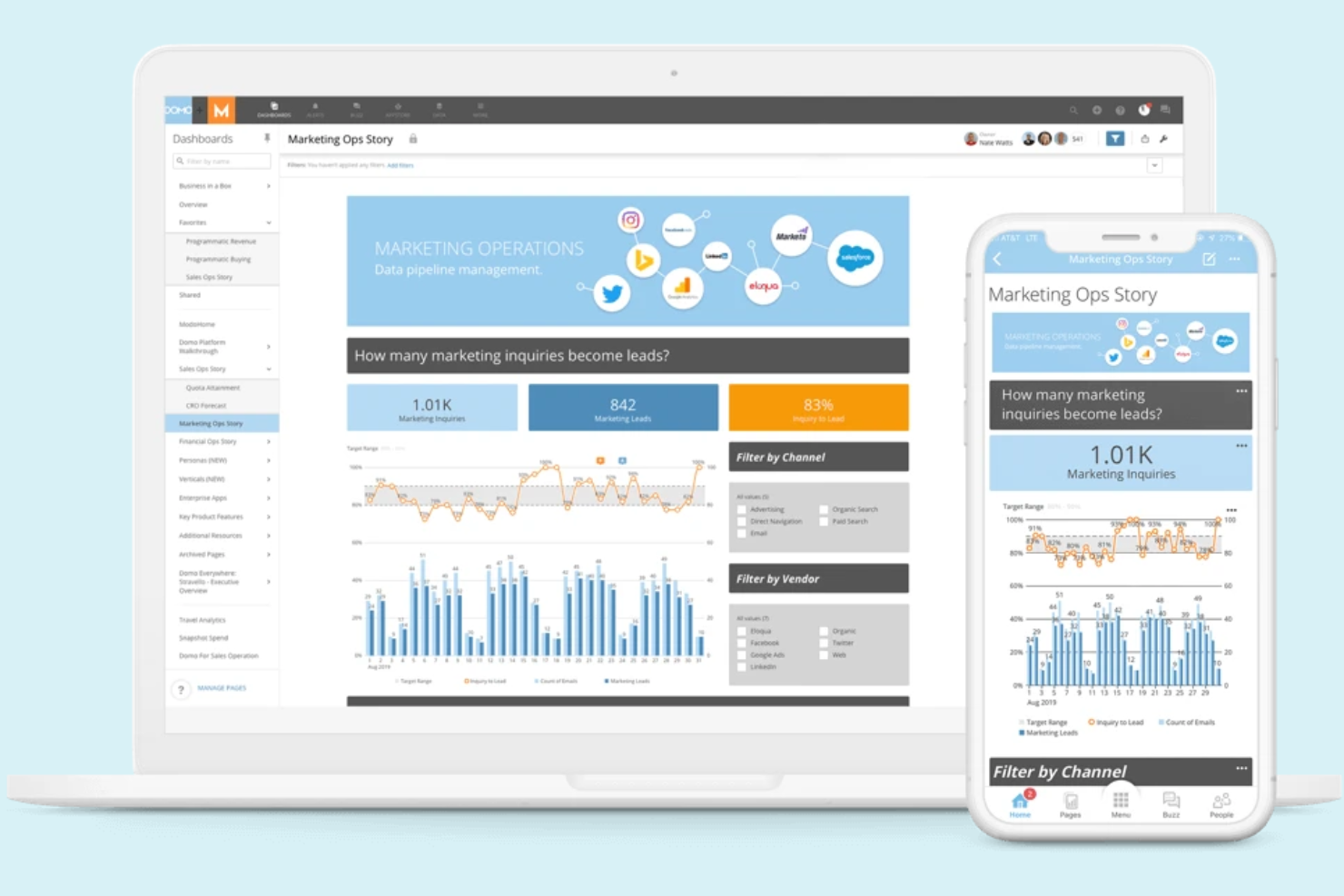
Domo è una piattaforma di business intelligence basata su cloud, progettata per le organizzazioni che necessitano di visualizzazioni dei dati e analisi approfondite. Serve una vasta gamma di settori utilizzando i propri LLM privati e strumenti con funzionalità AI per connettere, analizzare e visualizzare i dati, supportando decisioni informate.
Perché ho scelto Domo: È pensato per chi necessita di funzionalità avanzate di visualizzazione dei dati per prendere decisioni guidate dai dati. Domo offre un'interfaccia intuitiva con dashboard personalizzabili che ti permettono di visualizzare e interagire facilmente con i tuoi dati. Grazie agli aggiornamenti in tempo reale, il tuo team può rispondere rapidamente ai cambiamenti. Domo fornisce una potente piattaforma supportata da modelli AI per analisi predittive e decisioni informate.
Caratteristiche distintive e integrazioni:
Le funzionalità includono dashboard personalizzabili per visualizzare i dati secondo le proprie esigenze. Un assistente AI integrato aiuta ad analizzare le metriche, generare riepiloghi e mettere in evidenza gli approfondimenti principali. Gli aggiornamenti in tempo reale mantengono gli insight sempre aggiornati, mentre gli strumenti di collaborazione supportano le discussioni e le decisioni di squadra.
Le integrazioni includono Salesforce, Google Analytics, Facebook Ads, LinkedIn, Adobe Analytics, Shopify, QuickBooks, Microsoft Excel e Dropbox.
Pros and Cons
Pros:
- Visualizzazione avanzata dei dati
- Supporta la collaborazione in team
- Adatto a diversi settori
Cons:
- Capacità offline limitate
- Curva di apprendimento elevata per i principianti

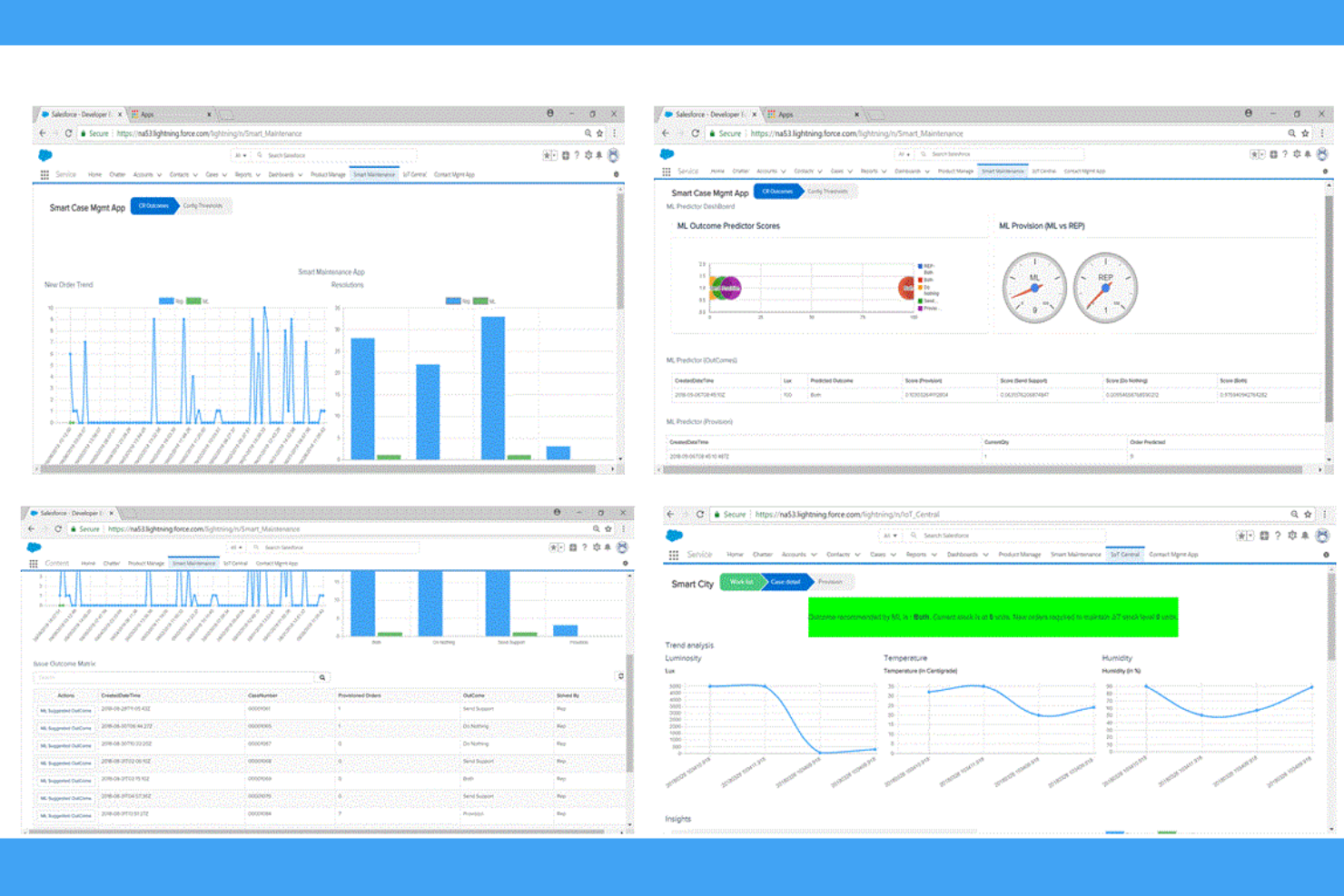
Boomi Flow è una piattaforma di sviluppo applicazioni basata sul cloud, pensata principalmente per le imprese che desiderano automatizzare i flussi di lavoro e integrare vari processi aziendali. Consente l'orchestrazione dei flussi di lavoro, collegando sistemi e gestendo compiti complessi in modo visivo e su larga scala.
Perché ho scelto Boomi Flow: È noto per le sue capacità di integrazione, rendendolo un'ottima scelta per i team che hanno bisogno di connettere più applicazioni. Puoi progettare flussi di lavoro utilizzando un ambiente low-code, il che semplifica lo sviluppo delle applicazioni. I suoi agenti AI potenziano l'automazione gestendo in modo intelligente i dati e l'esecuzione dei processi su diversi sistemi. Per le aziende, Boomi Flow offre scalabilità e flessibilità nella gestione di flussi di lavoro complessi.
Caratteristiche e integrazioni principali:
Le funzionalità includono un builder di flussi visivo che ti permette di creare workflow in modo intuitivo. La piattaforma supporta la collaborazione in tempo reale, consentendo al tuo team di lavorare insieme con efficienza. Puoi anche accedere ad analisi dettagliate per monitorare e migliorare le prestazioni dei flussi di lavoro.
Le integrazioni sono disponibili tramite le API di Boomi Flow.
Pros and Cons
Pros:
- Forti capacità di integrazione
- Ambiente di sviluppo low-code
- Analisi dettagliate disponibili
Cons:
- Potrebbe necessitare di competenze tecniche
- La personalizzazione può richiedere assistenza aggiuntiva
Altri software di gestione dei flussi di lavoro con IA
Ecco alcune altre opzioni di software di gestione dei flussi di lavoro con IA che non sono entrate nel mio elenco, ma che vale comunque la pena prendere in considerazione:


Come valuto i software di gestione dei flussi di lavoro con AI
Ogni strumento in questo elenco deve fare più che semplicemente aggiungere un'etichetta AI ad automazioni di base: deve offrire un reale valore, come prevedere rischi nella pianificazione o riassegnare attività quando cambiano le priorità. Suddivido la mia valutazione in due livelli: le funzionalità di base che uno strumento deve avere per qualificarsi e i fattori differenzianti che separano le buone opzioni da quelle eccellenti.
Funzionalità di base (requisiti minimi per questo elenco)
Quando seleziono gli strumenti per il mio elenco, valuto ciascuno su una scala da 0 (non offre la funzionalità) a 5 (eccelle in quest'area) per ogni funzionalità di base elencata di seguito. Successivamente, calcolo il punteggio totale dello strumento in percentuale. Ogni strumento deve raggiungere un punteggio minimo totale del 65% per essere considerato per l'inclusione.
- Automazione dei flussi di lavoro guidata dall'AI: Valuto se ogni strumento può automatizzare flussi di lavoro multi-step utilizzando logiche adattive di AI, come reindirizzare una catena di approvazione quando un responsabile non è disponibile.
- Intelligenza predittiva per i progetti: Ogni piattaforma dovrebbe evidenziare previsioni di rischi e ritardi, come segnalare uno sprint che probabilmente non rispetterà la scadenza in base all'andamento della velocità.
- Orchestrazione intelligente delle attività: Cerco l'assegnazione e la prioritizzazione delle attività assistite dall'AI, che considerano carico di lavoro, competenze e dipendenze tra i team.
- Interazione in linguaggio naturale: Lo strumento dovrebbe supportare query conversazionali e riepiloghi AI, come chiedere "cosa blocca il lancio Q3?" e ottenere una risposta utile.
- Raccomandazioni intelligenti per i flussi di lavoro: Sono importanti i suggerimenti proattivi di ottimizzazione, ad esempio la piattaforma che raccomanda un processo di passaggio di consegne ottimizzato in base a modelli di progetti passati.
- Integrazioni e base dati ottimizzata per l'AI: Controllo l'ampia connettività con strumenti come Jira, Slack e Smartsheet, oltre a una sincronizzazione strutturata dei dati che alimenti effettivamente le funzioni AI.
Una volta che ho una lista di strumenti che rispettano questi criteri, considero ciò che caratterizza ogni piattaforma.
Fattori differenzianti (Cosa distingue i fornitori)
Ecco come confronto e differenzio i vari fornitori:
Caratteristiche distintive
La previsione della capacità delle risorse è un elemento di grande differenziazione: cerco soluzioni AI che modellino scenari di staffing su progetti concomitanti, così da pianificare quando due lanci si sovrappongono. La mappatura delle dipendenze tra progetti è altrettanto importante, soprattutto per i program manager dove un ritardo in una area genera effetti a catena sull'intero portafoglio. Attribuisco valore anche ai builder AI no-code, che consentono ai project manager di progettare flussi di lavoro adattivi senza dover attendere il supporto degli sviluppatori.
Oltre le funzionalità
Attribuisco grande importanza alla trasparenza dell'AI: verifico se la piattaforma spiega perché ha fatto una determinata raccomandazione e se i project manager possono modificare le decisioni dell'AI in fasi di approvazione chiave. La governance dei dati è un altro aspetto fondamentale, in particolare il modo in cui i fornitori gestiscono i dati dei clienti nei loro modelli AI e se sono conformi a standard come SOC 2 o ISO 27001. Valuto anche il time-to-value: uno strumento con template di workflow PM preimpostati e onboarding guidato fa partire il team molto più rapidamente rispetto a soluzioni che richiedono settimane di configurazione personalizzata.
Come scegliere un software di gestione dei flussi di lavoro con IA
nnÈ facile perdersi in lunghi elenchi di funzionalità e strutture tariffarie complesse. Per aiutarti a rimanere concentrato mentre affronti il tuo processo di selezione del software, ecco un elenco dei fattori da tenere a mente:
nn| Fattore | Cosa considerare |
|---|---|
| Scalabilità | Il software crescerà insieme al tuo team? Considera le esigenze future e valuta se lo strumento è in grado di gestire un aumento degli utenti e dei flussi di lavoro senza problemi di prestazioni. |
| Integrazioni | Si collega agli strumenti che già utilizzi? Verifica la compatibilità con i software che usi già per evitare l'inserimento manuale dei dati e garantire flussi di lavoro fluidi. |
| Personalizzazione | Puoi adattarlo ai tuoi processi? Cerca opzioni che consentano di modificare flussi di lavoro, campi e pannelli di controllo in base alle tue esigenze specifiche. |
| Facilità d'uso | L'interfaccia è semplice e intuitiva? Assicurati che il tuo team possa adottarla rapidamente senza una formazione approfondita o frustrazioni. |
| Implementazione e avviamento | Quanto tempo sono necessari per la configurazione e la formazione? Considera il tempo e le risorse necessari per rendere operativo il tuo team, compresi il supporto disponibile e i materiali formativi. |
| Costo | Rientra nel tuo budget? Confronta i piani tariffari e il costo totale di proprietà, comprese eventuali commissioni nascoste o costi aggiuntivi per integrazioni o aggiornamenti. |
| Misure di sicurezza | I tuoi dati sono protetti? Cerca funzionalità di crittografia, controlli degli accessi e conformità alle normative sulla protezione dei dati per mantenere al sicuro le tue informazioni. |
| Disponibilità dell'assistenza | L'assistenza è disponibile quando ne hai bisogno? Verifica la presenza di supporto 24 ore su 24, 7 giorni su 7, diversi metodi di contatto e un team reattivo che possa aiutarti a risolvere eventuali problemi. |
Che cos'è un software di gestione dei flussi di lavoro con IA?
nIl software di gestione dei flussi di lavoro basato sull'intelligenza artificiale è uno strumento che automatizza e ottimizza i processi aziendali attraverso l'intelligenza artificiale. Questi strumenti vengono generalmente utilizzati dai project manager, dai team operativi e dai professionisti IT per aumentare l'efficienza e ridurre le attività manuali. Le funzionalità di automazione, integrazione e analisi aiutano nella gestione delle attività, nel flusso dei dati e nel processo decisionale. Nel complesso, questi strumenti aumentano la produttività e aiutano i team a lavorare in modo più intelligente.
Funzionalità
Quando selezioni un software di gestione dei flussi di lavoro basato sull'intelligenza artificiale, presta attenzione alle seguenti funzionalità principali:
- Automazione: automatizza le attività ripetitive, liberando tempo per attività più strategiche.
- Funzionalità di integrazione: si connette al software esistente per garantire un flusso di dati fluido tra le piattaforme.
- Flussi di lavoro personalizzabili: consente di adattare i processi alle esigenze specifiche della tua azienda.
- Analisi in tempo reale: fornisce informazioni sulle prestazioni dei flussi di lavoro per aiutare nel processo decisionale.
- Interfaccia intuitiva: garantisce facilità d'uso e una rapida adozione da parte del tuo team.
- Strumenti di collaborazione: facilitano la comunicazione e il lavoro di squadra all'interno dei reparti e tra di essi.
- Misure di sicurezza: proteggono i dati sensibili con la crittografia e i controlli degli accessi.
- Scalabilità: favorisce la crescita supportando un numero maggiore di utenti e una maggiore complessità dei flussi di lavoro.
- Logica condizionale: consente ai flussi di lavoro di adattarsi in base a criteri o attivatori specifici.
Vantaggi
L'implementazione di un software di gestione dei flussi di lavoro basato sull'intelligenza artificiale offre diversi vantaggi al tuo team e alla tua azienda. Ecco alcuni dei vantaggi che puoi aspettarti:
- Maggiore efficienza: automatizza le attività ripetitive, permettendo al tuo team di concentrarsi su attività più strategiche.
- Collaborazione migliorata: offre strumenti che migliorano la comunicazione e il lavoro di squadra tra i reparti.
- Processo decisionale migliorato: fornisce analisi in tempo reale per orientare decisioni basate sui dati.
- Flessibilità: offre flussi di lavoro personalizzabili, consentendo di adattare i processi alle proprie esigenze.
- Scalabilità: favorisce la crescita gestendo un numero maggiore di utenti e flussi di lavoro complessi.
- Sicurezza dei dati: garantisce la protezione delle informazioni sensibili con solide misure di sicurezza.
Costi e prezzi del software di gestione dei flussi di lavoro basato sull'intelligenza artificiale
La selezione di un software di gestione dei flussi di lavoro basato sull'intelligenza artificiale richiede la comprensione dei vari modelli e piani tariffari disponibili. I costi variano in base alle funzionalità, alle dimensioni del team, agli extra e ad altri fattori. La tabella seguente riassume i piani più comuni, i relativi prezzi medi e le funzionalità tipicamente incluse nelle soluzioni software di gestione dei flussi di lavoro basati sull'intelligenza artificiale:
Tabella comparativa dei piani per il software di gestione dei flussi di lavoro basato sull'intelligenza artificiale
| Tipo di piano | Prezzo medio | Funzionalità comuni |
|---|---|---|
| Piano gratuito | $0 | Gestione di base delle attività, integrazioni limitate e automazione di base. |
| Piano personale | $5-$25/utente/mese | Gestione delle attività, integrazioni di base, flussi di lavoro personalizzabili e assistenza via e-mail. |
| Piano aziendale | $30-$60/utente/mese | Automazione avanzata, integrazioni multiple, analisi e reportistica e assistenza clienti potenziata. |
| Piano per grandi aziende | $70-$150/utente/mese | Integrazioni illimitate, funzionalità di sicurezza avanzate, onboarding personalizzato e gestione dedicata dell'account. |
Domande frequenti sul software di gestione dei flussi di lavoro basati sull'IA
Ecco alcune risposte alle domande comuni sul software di gestione dei flussi di lavoro basati sull’IA:
Quali settori traggono maggiori vantaggi dal software di gestione dei flussi di lavoro basati sull'IA?
Il software di gestione dei flussi di lavoro basati sull’IA è vantaggioso in diversi settori, tra cui sanità, finanza, marketing e produzione. Nel settore sanitario, può automatizzare la pianificazione degli appuntamenti dei pazienti e la gestione dei documenti. I team finanziari lo utilizzano per la conformità normativa e la reportistica. I reparti marketing semplificano la gestione delle campagne, mentre le aziende manifatturiere automatizzano i processi della catena di approvvigionamento. Valuta le esigenze specifiche del tuo settore per capire come questi strumenti possono essere utili.
È necessaria una competenza tecnica per utilizzare il software di gestione dei flussi di lavoro basati sull'IA?
No, la maggior parte dei software di gestione dei flussi di lavoro basati sull’IA è progettata per essere intuitiva, con interfacce che consentono di trascinare e rilasciare gli elementi. Tuttavia, alcune automazioni complesse potrebbero richiedere competenze tecniche di base. Se il tuo team non dispone di competenze tecniche, cerca soluzioni con un’assistenza clienti efficace e risorse formative complete per facilitare la transizione.
In che modo il software di gestione dei flussi di lavoro basati sull'IA migliora la collaborazione tra i team?
Il software di gestione dei flussi di lavoro basati sull’IA migliora la collaborazione tra i team centralizzando le attività e la comunicazione. Offre dashboard condivise in cui i membri del team possono monitorare i progressi e aggiornarsi reciprocamente in tempo reale. Funzionalità come le notifiche automatiche e gli strumenti collaborativi garantiscono che tutti siano informati e allineati sugli obiettivi del progetto.