

10 migliori strumenti alternativi a Lucidchart per la creazione di diagrammi nel 2026

Selezione delle migliori alternative a Lucidchart


Nel corso dei miei anni nella gestione dei progetti, ho utilizzato frequentemente Lucidchart per la sua capacità di creare e condividere diagrammi visivi che semplificano i processi complessi e favoriscono la collaborazione del team. Tuttavia, ho spesso esplorato delle alternative quando avevo bisogno di funzionalità più personalizzate o di diverse opzioni di integrazione, più adatte alle dinamiche specifiche di un progetto.
In questo post, attingo alla mia esperienza personale nella gestione di centinaia di progetti e nell'utilizzo di molte piattaforme diverse per la gestione dei progetti, per condividere la mia selezione delle migliori alternative a Lucidchart.
Che cos'è Lucidchart?
Lucidchart è una piattaforma proprietaria basata sul web, progettata per disegnare diagrammi e creare flussi di lavoro visivi. Funge da spazio di lavoro collaborativo per i team che devono rappresentare sistemi complessi, progettare infrastrutture di rete e fare brainstorming di idee.
Perché utilizzare un'alternativa a Lucidchart
Sebbene Lucidchart sia uno strumento utile e apprezzato, potrebbe non essere la soluzione più adatta al tuo team. Potresti cercare un'alternativa per diversi motivi, tra cui:
- Problemi di costo: Sebbene Lucidchart sia relativamente economico, potresti cercare un'opzione più conveniente che si adatti meglio al tuo budget.
- Limitazioni delle funzionalità: Lucidchart offre diverse funzionalità, ma potrebbe non disporre di quelle di cui hai bisogno o che stai cercando.
- Interfaccia utente: Un'interfaccia semplice e intuitiva è fondamentale, soprattutto per i team che hanno meno dimestichezza con la tecnologia.
- Esigenze di integrazione: Più il software riesce a integrarsi con gli strumenti che già utilizzi, più è probabile che tu lo usi frequentemente.
- Funzionalità di collaborazione: Man mano che i team continuano ad adottare modalità di lavoro ibride e da remoto, la collaborazione diventa più importante che mai. Uno strumento che consente un'ampia collaborazione in tempo reale può fare davvero la differenza.
Le alternative a Lucidchart possono offrire funzionalità e strutture di prezzo uniche, più adatte alle tue esigenze specifiche. Possono inoltre garantire un'esperienza utente diversa, migliorando potenzialmente la produttività del tuo team e l'efficienza nella gestione dei progetti.
Perché fidarsi dei nostri consigli sui software
Il nostro team testa e recensisce software dal 2012. In quanto project manager noi stessi, sappiamo quanto sia difficile — e importante — scegliere il software giusto.
Per questa guida, abbiamo valutato gli strumenti attraverso test pratici e ricerche indipendenti, assegnando un punteggio agli strumenti in base ai nostri criteri di selezione. Ci basiamo inoltre sulle competenze di leader di pensiero del settore e di professionisti attivi nella gestione dei progetti.
Le nostre recensioni riflettono il nostro giudizio editoriale umano, non un discorso di vendita.
Revisori esperti:
Tabella di confronto delle alternative a Lucidchart
| Tool | Best For | Trial Info | Price | ||
|---|---|---|---|---|---|
| 1 | Ideale per creare presentazioni professionali | Prova gratuita di 14 giorni + piano gratuito disponibile | A partire da $12.25/utente/mese (fatturazione annuale) | Website | |
| 2 | Ideale per la diagrammazione automatizzata con modelli ricchi | Demo gratuita disponibile | Da $9,95/utente/mese (fatturazione annuale) | Website | |
| 3 | Ideale per il project management Agile | Versione di prova gratuita + demo gratuita disponibile | A partire da $29/utente/mese | Website | |
| 4 | Ideale per la diagrammazione integrata con Microsoft Office | Prova gratuita di 30 giorni | Da $5/utente/mese (fatturato annualmente) | Website | |
| 5 | Ideale per la creazione gratuita di diagrammi con integrazione Google Drive | Gratis | Gratis | Website | |
| 6 | Ideale per la creazione semplice e collaborativa di mappe mentali | Piano gratuito disponibile | A partire da $5/mese | Website | |
| 7 | Ideale per il brainstorming creativo | Piano gratuito disponibile | Da $4,92/mese | Website | |
| 8 | Ideale per l'integrazione con l'ecosistema Atlassian | Prova gratuita di 30 giorni disponibile | Da $2.80/mese (fatturazione annuale) | Website | |
| 9 | Ideale per la diagrammazione versatile su più piattaforme | Prova gratuita disponibile | Da $79 (fatturato semestralmente) | Website | |
| 10 | Ideale per la gestione di portafogli di progetti aziendali | Demo gratuita disponibile | Prezzo su richiesta | Website |
Recensioni delle migliori alternative a Lucidchart
Di seguito ti guiderò attraverso un’analisi e una panoramica dettagliate di ciascuna alternativa a Lucidchart, indicando i prezzi, le singole funzionalità e i principali vantaggi.

Visme
Ideale per creare presentazioni professionali

Visme è uno strumento potente progettato per creare presentazioni, infografiche e altri contenuti grafici visivamente accattivanti che catturano l’attenzione del pubblico. Può aiutare gli utenti a trasformare dati complessi in visual professionali e brandizzati, rendendolo una scelta valida per chi desidera elevare la qualità delle proprie presentazioni.
Perché è una buona alternativa a Lucidchart:
Visme va oltre la semplice creazione di diagrammi, offrendo funzionalità avanzate per realizzare visual pronti per la presentazione, raffinati e coinvolgenti. Questo strumento si distingue per l’attenzione al design e alla presentazione, risultando ideale per chi deve mostrare informazioni complesse in un formato esteticamente gradevole.
Caratteristiche e integrazioni principali:
Le funzionalità includono modelli personalizzabili, un editor drag-and-drop, strumenti di visualizzazione dei dati, creazione di contenuti interattivi, infografiche, presentazioni, grafici e tabelle, integrazione di video e audio, gestione del brand, collaborazione tra team, analisi, modalità offline e una libreria di foto stock, icone e font.
Le integrazioni includono Google Sheets, Dropbox, OneDrive, Slack, Mailchimp, YouTube, Salesforce e HubSpot.
Pros and Cons
Pros:
- Vasta collezione di modelli ed elementi di design
- Capacità di visualizzazione dei dati in tempo reale
- Consente un’ampia personalizzazione per mantenere la coerenza del brand
Cons:
- Curva di apprendimento più ripida a causa delle funzionalità avanzate
- Funzionalità di collaborazione limitate rispetto a piattaforme dedicate per il lavoro di squadra

Ideale per la diagrammazione automatizzata con modelli ricchi

SmartDraw è uno strumento di creazione di diagrammi che eccelle nell'automatizzare la realizzazione di diagrammi complessi grazie alla sua formattazione intelligente e alla vasta libreria di modelli. Questo lo rende ideale per professionisti e team che devono produrre rapidamente diagrammi di alta qualità senza compromettere dettaglio o design.
Perché è una valida alternativa a Lucidchart:
Le capacità di automazione di SmartDraw riducono in modo significativo il tempo e lo sforzo necessari per creare diagrammi dettagliati e curati. Questa efficienza, unita a una vasta gamma di modelli, lo rende un forte concorrente per chi desidera ottimizzare i processi di diagrammazione.
Funzionalità principali & integrazioni:
Le funzionalità includono modelli personalizzabili, formattazione intelligente, creazione automatica dei diagrammi, ampia libreria di forme e simboli, integrazione con applicazioni popolari come Microsoft Office e Google Workspace, supporto per diversi tipi di diagrammi come diagrammi di flusso, organigrammi, planimetrie e diagrammi di rete, collaborazione in tempo reale, accesso basato su cloud, compatibilità con diversi formati di file, importazione ed esportazione dati e strumenti di presentazione integrati.
Le integrazioni includono Microsoft Teams, Google Drive, AWS, Azure, SharePoint, Google Workspace, Confluence, Trello, Jira, Box e Dropbox.
Pros and Cons
Pros:
- Vasta libreria di modelli
- Funzionalità di diagrammazione automatizzata
- Si integra con le principali suite di produttività
Cons:
- Minimo di 3 utenti per la tariffa team
- Personalizzazione limitata per modelli e forme

Ravetree
Ideale per il project management Agile

Ravetree è uno stimato strumento di project management Agile progettato per supportare i team nell’organizzazione e nel monitoraggio del lavoro. Offre funzionalità complete che rispondono alle esigenze dei team Agile, come pianificazione degli sprint, assegnazione delle risorse e monitoraggio del progresso in tempo reale.
Perché è una valida alternativa a Lucidchart:
Ravetree va oltre la semplice creazione di diagrammi, offrendo una gamma completa di funzionalità di project management pensate per le metodologie Agile. Questo lo rende unico per i team che necessitano di strumenti dedicati alla gestione di progetti Agile, dove la gestione visiva delle attività è affiancata da una pianificazione e un monitoraggio dettagliati.
Funzionalità distintive & integrazioni:
Le funzionalità includono gestione dei progetti, gestione delle attività, monitoraggio del tempo, pianificazione delle risorse, condivisione dei file, gestione del budget e delle spese, dashboard personalizzabili, collaborazione in tempo reale, gestione clienti, bacheche Kanban, diagrammi di Gantt, reportistica e analisi avanzate, automazione del flusso di lavoro e accessibilità da mobile.
Le integrazioni includono Dropbox, Google Drive, One Drive, Outlook, Gmail, Quickbooks, Google Calendar, Stripe, Exchange, GitHub, Facebook, Instagram, Box, HubSpot, Slack e Xero.
Pros and Cons
Pros:
- Funzionalità complete di project management Agile
- Ampia gamma di integrazioni con app popolari
- Opzioni di prezzo flessibili con sconti per impegni a lungo termine
Cons:
- Funzionalità limitate dell'app mobile rispetto alla versione desktop
- Tempi di risposta dell'assistenza clienti più lenti

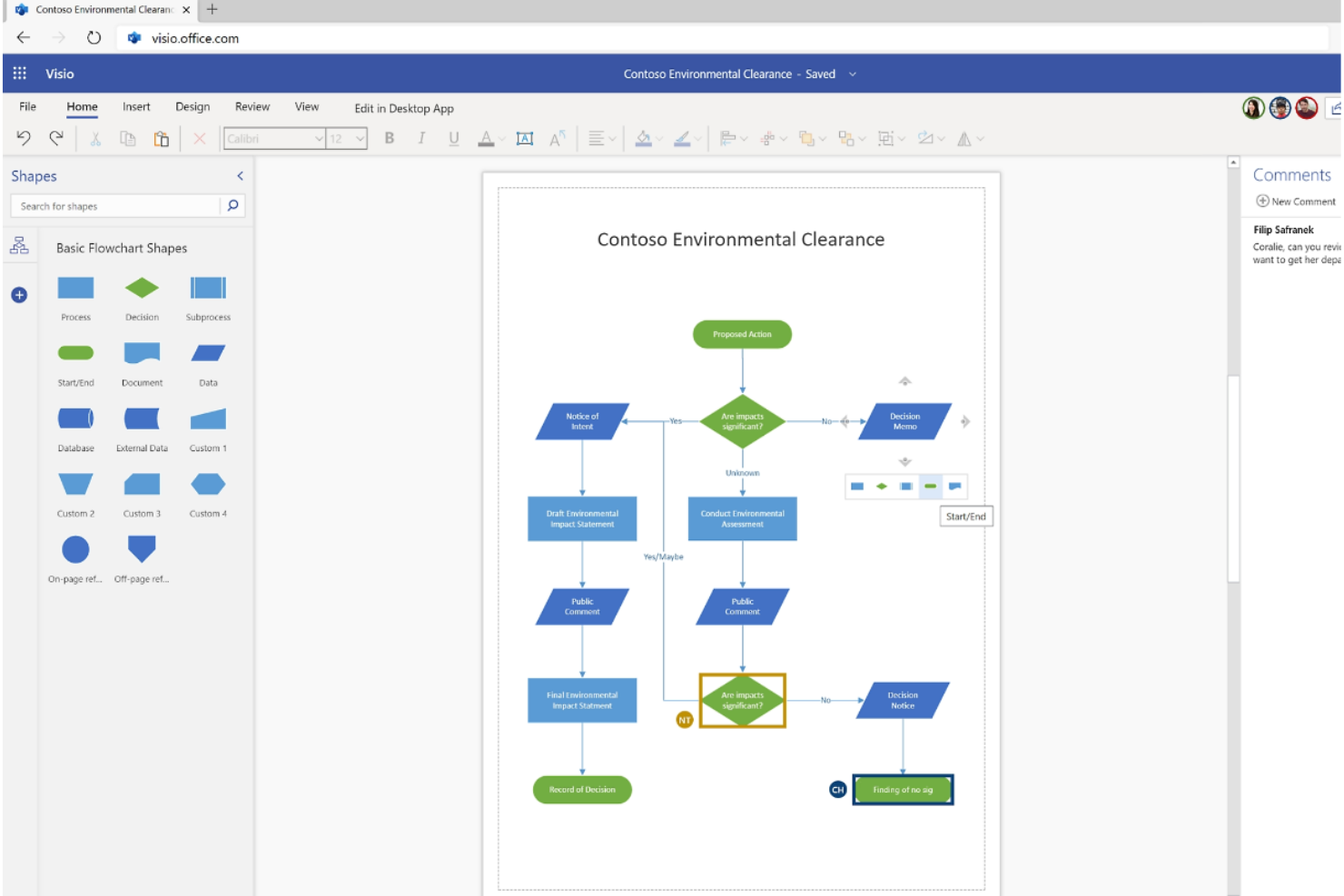
Microsoft Visio è una soluzione di diagrammazione che aiuta nella creazione di diagrammi complessi. La sua integrazione senza soluzione di continuità con Microsoft Office lo rende ideale per gli utenti che fanno affidamento su altre applicazioni Microsoft.
Perché è una valida alternativa a Lucidchart:
Microsoft Visio è una valida alternativa a Lucidchart grazie al suo insieme unico di strumenti per la creazione di diagrammi, una vasta libreria di modelli e l'integrazione facilitata con altre applicazioni Microsoft Office. Supporta la collaborazione in tempo reale, risultando adatto sia per l'uso individuale che di gruppo. Inoltre, la compatibilità di Visio con Microsoft 365 aumenta la produttività degli utenti già inseriti nell'ecosistema Microsoft.
Funzionalità e integrazioni principali:
Le funzionalità includono modelli personalizzabili, creazione di diagrammi con trascinamento, collegamento ai dati, strumenti avanzati di diagrammazione, collaborazione in tempo reale, diagrammi di flusso professionali, organigrammi, diagrammi di rete, planimetrie, mappe di processo, supporto agli standard di settore, accesso basato su cloud, e una grande varietà di forme e stencil.
Le integrazioni comprendono Microsoft Teams, Microsoft Power BI, Microsoft Excel, Microsoft PowerPoint, Microsoft SharePoint, Azure Active Directory, Microsoft SQL Server, Microsoft Exchange, OneDrive for Business e Microsoft Power Automate.
Pros and Cons
Pros:
- Libreria completa di modelli
- Capacità di collegamento dati in tempo reale
- Funzionalità di collaborazione avanzate
Cons:
- Può risultare complesso per utenti non tecnici
- Supporto rivolto principalmente all'ecosistema Microsoft

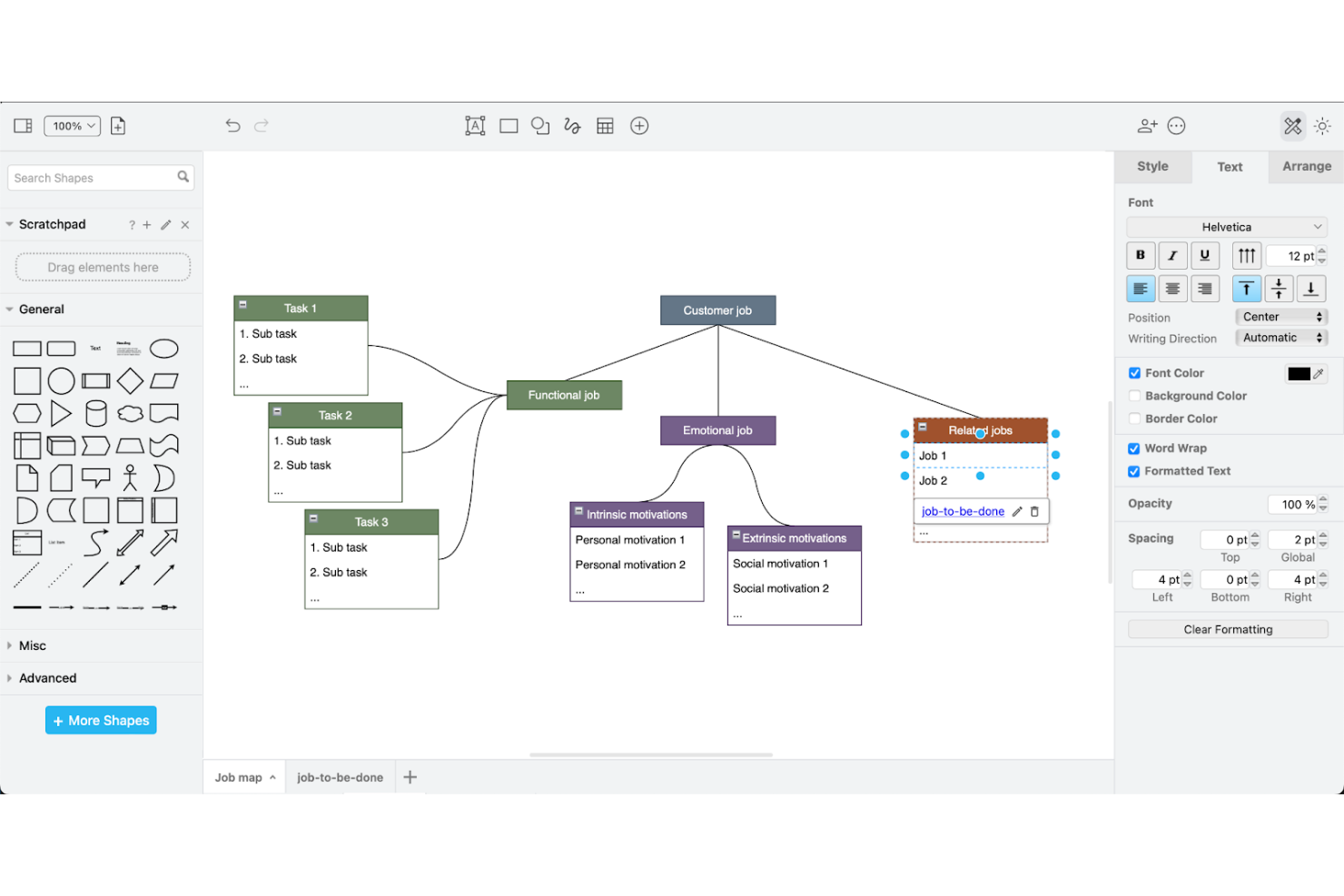
Draw.io è uno strumento versatile per la creazione di diagrammi che si integra perfettamente con Google Drive, permettendo agli utenti di creare, archiviare e condividere diagrammi direttamente all'interno del loro spazio Google. È ideale per chi si affida a Google Workspace per la collaborazione e la gestione dei documenti, offrendo una vasta gamma di strumenti per la realizzazione di diagrammi senza alcun costo.
Perché è una valida alternativa a Lucidchart:
Draw.io è una soluzione completamente gratuita che si integra senza sforzo con Google Drive, rendendolo accessibile e facile da utilizzare in ambienti fortemente integrati con i prodotti Google. Questo strumento si distingue per l’assenza totale di costi d’ingresso e per le sue forti caratteristiche di integrazione, rappresentando una valida alternativa per utenti e team attenti al budget.
Funzionalità e integrazioni principali:
Funzionalità includono diagrammi di flusso, diagrammi di processo, UML, ER diagrammi, diagrammi di rete, un’interfaccia drag-and-drop e una vasta libreria di forme e modelli.
Integrazioni includono Google Drive, Google Docs, Google Sheets, Google Slides, Dropbox e OneDrive.
Pros and Cons
Pros:
- Completamente gratuito senza costi nascosti
- Forte integrazione con Google Drive e altre app Google
- Ampie capacità di creazione di diagrammi con una grande varietà di modelli e forme
Cons:
- L’interfaccia può sembrare meno moderna rispetto alle applicazioni di diagrammi più recenti
- Supporto clienti limitato


Coggle è uno strumento basato sul web per creare e condividere mappe mentali e diagrammi di flusso. È ideale per la creazione collaborativa e semplice di mappe mentali grazie alla collaborazione in tempo reale e a un'interfaccia intuitiva che rende facile creare, condividere e modificare mappe mentali con altri utenti.
Perché è una buona alternativa a Lucidchart:
Coggle offre una piattaforma semplice e facile da usare per la mappatura mentale collaborativa. La sua semplicità e l'attenzione alle mappe mentali lo rendono una valida alternativa a Lucidchart per chi necessita di uno strumento dedicato a questo scopo. La funzione di collaborazione in tempo reale garantisce che i membri del team possano lavorare insieme senza sforzo, caratteristica essenziale per sessioni di brainstorming e pianificazione.
Funzionalità distintive e integrazioni:
Le funzionalità includono collaborazione in tempo reale, caricamenti di immagini illimitati, possibilità di creare collegamenti e unire rami e punti di partenza multipli per i diagrammi.
Le integrazioni includono Google Drive, TextRecruit, ClearCompany, Avionite, QuickBooks, Slack, MakeShift, ClockShark, Mastery, Docufree, Microsoft Teams, PlanSource, Oracle e Workday.
Pros and Cons
Pros:
- Interfaccia semplice e intuitiva pensata per la mappatura mentale
- Capacità di collaborazione in tempo reale
- Integrazione con Google Drive per una facile archiviazione e accesso
Cons:
- Limitato alla mappatura mentale, manca di versatilità per altri tipi di diagrammi
- Richiede una connessione internet per le funzionalità di collaborazione in tempo reale

Xmind è noto per i suoi strumenti avanzati di mappatura mentale e brainstorming, che facilitano l'organizzazione di pensieri e idee in diagrammi strutturati. Il suo aspetto visivo e la profondità delle funzionalità offerte lo rendono una scelta preferita tra i professionisti che necessitano di fare brainstorming in modo collaborativo e presentare le idee con chiarezza.
Perché è una valida alternativa a Lucidchart:
Xmind offre un approccio più focalizzato al brainstorming e alla mappatura mentale, con funzionalità specializzate che migliorano i processi creativi. La sua dedizione a creare un ambiente favorevole al brainstorming lo distingue da Lucidchart, rendendolo più adatto agli utenti che necessitano di capacità avanzate di creazione di mappe.
Caratteristiche e integrazioni distintive:
Caratteristiche includono mappatura mentale, modalità brainstorming, diagrammi di Gantt, diagrammi a lisca di pesce, organigrammi, modalità presentazione, modelli personalizzabili, interfaccia drag-and-drop, compatibilità multipiattaforma, collaborazione in tempo reale, sincronizzazione cloud, opzioni di esportazione in vari formati e una ricca libreria di icone e clipart.
Integrazioni includono Evernote, Dropbox, Google Drive, OneDrive, iCloud, Microsoft Word, PowerPoint, Excel e PDF.
Pros and Cons
Pros:
- Strumenti specializzati per la mappatura mentale
- Compatibilità multipiattaforma
- Numerose opzioni di esportazione
Cons:
- La fatturazione annuale potrebbe non essere gradita a tutti gli utenti
- Tempi di caricamento più lenti o rallentamenti con mappe mentali di grandi dimensioni


Gliffy è uno strumento di diagrammazione che semplifica la creazione e la condivisione di diagrammi di flusso, organigrammi e altri tipi di diagrammi. È ideale per l'integrazione nell'ecosistema Atlassian perché offre app specializzate per Confluence e Jira, migliorando la collaborazione all'interno di queste piattaforme.
Perché è una valida alternativa a Lucidchart:
Gliffy fornisce un'integrazione specializzata con i prodotti Atlassian, particolarmente preziosa per i team che si affidano a questi strumenti per la gestione dei progetti e la documentazione. La sua integrazione rende semplice incorporare i diagrammi nelle attività di Jira e nelle pagine di Confluence, offrendo un'esperienza utente coerente che Lucidchart non può eguagliare negli ambienti Atlassian.
Caratteristiche principali e integrazioni:
Funzionalità comprendono la creazione di diagrammi tramite trascinamento, modelli personalizzabili, un'ampia libreria di forme e simboli, supporto per diversi tipi di diagramma, collaborazione in tempo reale, accesso cloud, controllo delle versioni, facile condivisione e incorporamento dei diagrammi e compatibilità con vari formati di file.
Integrazioni includono Google Drive, Jira, Confluence e Microsoft Visio.
Pros and Cons
Pros:
- L'integrazione diretta con Jira e Confluence aumenta la produttività
- Funzionalità di controllo delle versioni all'interno delle app Atlassian
- Interfaccia intuitiva e facilità d'uso
Cons:
- Utile principalmente solo agli utenti dell'ecosistema Atlassian
- Funzionalità limitate rispetto ad altri strumenti di diagrammazione più completi


EdrawMax è uno strumento di diagrammazione completo che supporta un'ampia gamma di tipi di diagrammi su varie piattaforme, inclusi Windows, Mac e Linux. È pensato per soddisfare qualsiasi utente che abbia bisogno di creare diagrammi di flusso, mappe mentali, organigrammi, diagrammi di rete e planimetrie.
Perché è una buona alternativa a Lucidchart:
EdrawMax offre agli utenti versatilità nella creazione di diagrammi su diversi sistemi operativi, il che è ideale per i team che lavorano in ambienti informatici eterogenei. La sua capacità di funzionare su diverse piattaforme senza compromettere funzionalità o facilità d'uso lo rende una valida alternativa per chi cerca flessibilità rispetto a ciò che offre Lucidchart.
Funzionalità principali e integrazioni:
Le funzionalità includono modelli personalizzabili, interfaccia drag-and-drop, ampia libreria di forme e simboli, supporto per diversi tipi di diagrammi come diagrammi di flusso, mappe mentali, organigrammi, diagrammi di rete, collaborazione in tempo reale, importazione ed esportazione di dati, compatibilità, archiviazione su cloud, accessibilità multipiattaforma, grafica vettoriale e strumenti di presentazione integrati.
Le integrazioni comprendono Microsoft Office, Google Suite, Dropbox e Box.
Pros and Cons
Pros:
- Ampia libreria di simboli e modelli
- Supporto multipiattaforma
- Opzioni di esportazione flessibili
Cons:
- Curva di apprendimento moderata per i nuovi utenti
- Assistenza clienti limitata per le problematiche tecniche


Cora Systems è una soluzione approfondita di project portfolio management pensata per le grandi aziende che gestiscono più progetti in diversi settori. Fornisce ai dirigenti una visibilità e un controllo di alto livello sull'intero portafoglio, facilitando decisioni migliori e un'allocazione più efficace delle risorse.
Perché è una valida alternativa a Lucidchart:
Cora Systems si concentra sulla gestione di portafogli di progetti a livello strategico, fondamentale per le aziende che devono supervisionare numerosi progetti contemporaneamente. A differenza di Lucidchart, che è principalmente uno strumento di creazione di diagrammi, Cora Systems offre funzionalità avanzate per gestire budget, tempistiche e risorse su larga scala.
Funzionalità e integrazioni principali:
Funzionalità includono gestione di progetto, gestione del portafoglio, gestione delle risorse, gestione delle attività, rilevazione dei tempi di lavoro, gestione finanziaria, gestione dei rischi, collaborazione in tempo reale, dashboard personalizzabili, reportistica e analisi avanzate, diagrammi di Gantt, bacheche Kanban, automazione dei flussi di lavoro, accesso cloud e accessibilità mobile.
Integrazioni includono Salesforce, Jira, Microsoft Dynamics 365, Sage, Xero, Workday, SAP e Oracle NetSuite.
Pros and Cons
Pros:
- Configurabile secondo le esigenze specifiche dell'azienda
- Dati centralizzati e dashboard con visibilità
- Riduce la deviazione tra costi pianificati e costi effettivi
Cons:
- Può avere una curva di apprendimento per i nuovi utenti
- Interfaccia utente meno intuitiva
Altre alternative a Lucidchart
Di seguito è riportato un elenco di ulteriori alternative a Lucidchart che ho selezionato. Sebbene non siano rientrate nella top 10, sono comunque valide e meritano ulteriori approfondimenti.
- Miro
Ideale per whiteboarding online collaborativo
- Creately
Ideale per la collaborazione di gruppo su diagrammi
- Evernote Teams
Ideale per la presa di appunti collaborativa


Recensioni correlate di software per la gestione dei progetti
Se non hai ancora trovato quello che cerchi, dai un'occhiata a questi altri strumenti correlati che abbiamo testato e valutato:
- Software per la gestione dei progetti
- Software per la gestione delle risorse
- Software per l'automazione dei flussi di lavoro
- Software per il monitoraggio del tempo
- Software per la gestione delle attività
- Strumenti di collaborazione
- Creatore di diagrammi di Gantt
- Strumenti di produttività
- Software per il monitoraggio dei progetti
- Software per la pianificazione dei progetti
Come valuto le alternative a Lucidchart
Valuto le alternative a Lucidchart su due livelli: una base che ogni strumento deve superare, come la co-modifica in tempo reale, il supporto BPMN e l'integrazione con Jira, e gli elementi distintivi che determinano la scelta più adatta ai team di PM.
Funzionalità fondamentali (requisiti essenziali per questo elenco)
Quando seleziono gli strumenti per il mio elenco, assegno a ciascuno un punteggio su una scala da 0 (non offre la funzionalità) a 5 (eccelle in quest'area) per ogni funzionalità fondamentale elencata di seguito. Quindi, calcolo il punteggio totale dello strumento e lo converto in percentuale. Ogni strumento deve raggiungere un punteggio totale minimo del 65% per essere preso in considerazione.
- Libreria di forme per diagrammi: verifico se uno strumento supporta diagrammi di flusso, corsie, BPMN, UML e diagrammi ERD, ovvero i tipi di diagramma che i team di PM utilizzano effettivamente per documentare processi e dipendenze tra sistemi.
- Collaborazione in tempo reale: la co-modifica multiutente è importante quando il team è distribuito su più fusi orari, quindi cerco cursori in tempo reale, commenti in linea e cronologia delle versioni.
- Modelli e framework per il PM: una buona raccolta di modelli dovrebbe includere matrici RACI, bacheche per le retrospettive, organigrammi e mappe dei processi, non solo modelli generici per diagrammi di flusso.
- Integrazioni con gli strumenti di PM: valuto quanto bene ogni strumento si connette a piattaforme come Jira, Confluence, Asana e Microsoft Teams, poiché i diagrammi perdono valore quando risiedono al di fuori dell'ecosistema di PM.
- Diagrammi collegati ai dati: gli strumenti che estraggono dati in tempo reale da fogli di calcolo o piattaforme di PM per generare automaticamente organigrammi o diagrammi di flusso di lavoro fanno risparmiare ore di aggiornamenti manuali a ogni ciclo di sprint.
- Opzioni di esportazione e condivisione: cerco la possibilità di esportare in PDF, PNG, SVG e Visio, oltre a link di condivisione sicuri e al supporto per l'incorporamento, elementi essenziali per le revisioni con le parti interessate e la documentazione nei wiki.
Una volta ottenuto un elenco di strumenti che soddisfano questi criteri, considero ciò che distingue ogni piattaforma.
Fattori distintivi (ciò che differenzia i fornitori)
Ecco come confronto i diversi fornitori:
Funzionalità di rilievo
La generazione di diagrammi tramite IA è un importante elemento distintivo: alcuni strumenti possono trasformare gli appunti delle riunioni o le richieste testuali in flussi di processo, riducendo di ore il tempo necessario per documentare gli sprint. Cerco anche una modalità lavagna infinita che supporti i post-it e gli schizzi liberi durante le retrospettive o le sessioni di pianificazione. Anche la modalità presentazione è importante, poiché guidare le parti interessate attraverso una mappa dei processi senza esportarla in diapositive mantiene intatto il contesto e riduce il tempo di preparazione.
Oltre le funzionalità
La struttura dei prezzi è molto importante: verifico se un fornitore applica un costo per utente con permessi di modifica o per postazione, poiché i team di PM spesso devono coinvolgere decine di parti interessate con accesso di sola visualizzazione per la revisione dei diagrammi senza far lievitare i costi. Vale la pena valutare anche la sicurezza e la conformità, in particolare il provisioning SSO e SCIM per gli uffici PMO aziendali che gestiscono gli accessi tra team numerosi. Considero inoltre la scalabilità: quanto bene la piattaforma gestisce diagrammi complessi e multipagina con molti utenti con permessi di modifica simultanei durante le sessioni di pianificazione interfunzionale.
Caratteristiche principali da cercare in un'alternativa a Lucidchart
Ecco alcune caratteristiche chiave di Lucidchart che il software alternativo dovrebbe essere in grado di replicare o migliorare per essere adatto:
- Stilizzare facilmente le forme: caratteri, colori e stili delle linee personalizzati aiutano a mantenere un aspetto coerente in tutti i diagrammi. Questo consente un alto livello di personalizzazione, garantendo che i diagrammi siano visivamente gradevoli e in linea con gli standard del brand o del progetto.
- Creare diagrammi ordinati: l'uso di linee intelligenti per collegare in modo efficiente le forme, ridurre il disordine e migliorare la chiarezza dei diagrammi contribuisce a garantire che i collegamenti siano logici, rendendo i diagrammi più facili da comprendere.
- Scorciatoie da tastiera: le scorciatoie da tastiera contribuiscono ad accelerare il processo di creazione dei diagrammi e a svolgere rapidamente le attività comuni, migliorando la produttività e l'efficienza del flusso di lavoro.
- Tela ampliata: le tele di dimensioni maggiori permettono di gestire diagrammi più grandi, offrendo più spazio per lavorare a progetti complessi. Questa caratteristica è particolarmente utile per i diagrammi dettagliati che richiedono spazio aggiuntivo per visualizzare chiaramente tutti gli elementi.
- Organizzare con contenitori: l'uso di contenitori o corsie per organizzare i diagrammi in sezioni logiche aiuta a mantenere insieme gli elementi correlati, rendendo i diagrammi più strutturati e facili da consultare.
- Collaborazione in tempo reale: un approccio collaborativo garantisce che tutti siano aggiornati e possano fornire contributi e feedback in tempo reale.
- Creazione di presentazioni: questo strumento integrato semplifica il processo di creazione di presentazioni curate e d'impatto direttamente dai diagrammi.
- Importazione da Visio, Gliffy e Omnigraffle: la possibilità di importare diagrammi esistenti da altre piattaforme come Visio, Gliffy e Omnigraffle consente di continuare a lavorare sui progetti senza dover ricreare i diagrammi da zero.
- Creazione automatizzata di diagrammi: crea diagrammi automaticamente a partire dai dati, risparmiando tempo e garantendo la precisione. Questa caratteristica utilizza gli input dei dati per generare diagrammi, semplificando il processo e riducendo il lavoro manuale.
Scegliere una piattaforma con queste funzionalità migliorerà la capacità del tuo team di comunicare visivamente idee complesse e collaborare in modo efficace, favorendo decisioni migliori e risultati di progetto più soddisfacenti.