

Le 10 migliori alternative a Pipefy per la gestione dei flussi di lavoro nel 2026

Elenco delle migliori alternative a Pipefy


Pipefy è un potente strumento per la gestione dei flussi di lavoro che aiuta i team ad automatizzare i processi e migliorare l'efficienza, offrendo modelli personalizzabili e integrazioni. Tuttavia, alcuni utenti potrebbero cercare alternative a causa di esigenze specifiche relative alle funzionalità o di dubbi sui prezzi. Qui condividerò i miei suggerimenti sulle migliori alternative a Pipefy.
Perché fidarsi dei nostri consigli sui software
Il nostro team testa e recensisce software dal 2012. In quanto project manager noi stessi, sappiamo quanto sia difficile — e importante — scegliere il software giusto.
Per questa guida, abbiamo valutato gli strumenti attraverso test pratici e ricerche indipendenti, assegnando un punteggio agli strumenti in base ai nostri criteri di selezione. Ci basiamo inoltre sulle competenze di leader di pensiero del settore e di professionisti attivi nella gestione dei progetti.
Le nostre recensioni riflettono il nostro giudizio editoriale umano, non un discorso di vendita.
Revisori esperti:
Tabella comparativa delle alternative a Pipefy
Questa tabella comparativa riassume i dettagli sui prezzi delle mie principali alternative a Pipefy:
| Tool | Best For | Trial Info | Price | ||
|---|---|---|---|---|---|
| 1 | Ideale per uno spazio di lavoro tutto-in-uno | Piano gratuito disponibile | Da $10/utente/mese (fatturato annualmente) | Website | |
| 2 | Ideale per la gestione intuitiva delle attività | Prova gratuita + piano gratuito + demo gratuita disponibile | A partire da $13/utente/mese (fatturati annualmente) | Website | |
| 3 | Ideale per la gestione di progetti focalizzati sui clienti | Prova gratuita di 30 giorni + demo gratuita disponibile | Da $9.99/utente/mese (fatturato annualmente) | Website | |
| 4 | Ideale per team di sviluppo software | Prova gratuita di 7 giorni | Da $7.91/utente/mese | Website | |
| 5 | Ideale per l'integrazione della chat | Piano gratuito disponibile | Da $15/utente/mese (fatturato annualmente) | Website | |
| 6 | Ideale per aziende guidate dai risultati | Demo gratuita + prova gratuita di 14 giorni disponibile | Da $8/utente/mese (fatturato annualmente) | Website | |
| 7 | Ideale per la gestione visiva delle attività | Piano gratuito disponibile | A partire da $5/utente/mese (fatturato annualmente) | Website | |
| 8 | Ideale per flussi di lavoro personalizzabili | Prova gratuita di 14 giorni + piano gratuito disponibile | A partire da $10/utente/mese (fatturato annualmente) | Website | |
| 9 | Ideale per il monitoraggio completo dei progetti | Prova gratuita di 15 giorni + piano gratuito + demo gratuita disponibile | A partire da $4/utente/mese (fatturazione annuale) | Website | |
| 10 | Ideale per la gestione del portafoglio | Prova gratuita + demo gratuita disponibile | Prezzi su richiesta | Website |

Che cos'è Pipefy?
Pipefy è un software per la gestione dei flussi di lavoro progettato per aiutare i team ad automatizzare e ottimizzare i propri processi. Viene utilizzato da responsabili di progetto, team operativi e analisti aziendali per creare, gestire e ottimizzare i flussi di lavoro. Pipefy migliora l'efficienza, garantisce la coerenza e offre visibilità sui processi.
Recensioni delle migliori alternative a Pipefy
Ecco la mia analisi approfondita e la panoramica di ciascuna alternativa a Pipefy. Esaminerò i pro e i contro, le funzionalità e i casi d’uso migliori per ogni strumento.

Notion
Ideale per uno spazio di lavoro tutto-in-uno
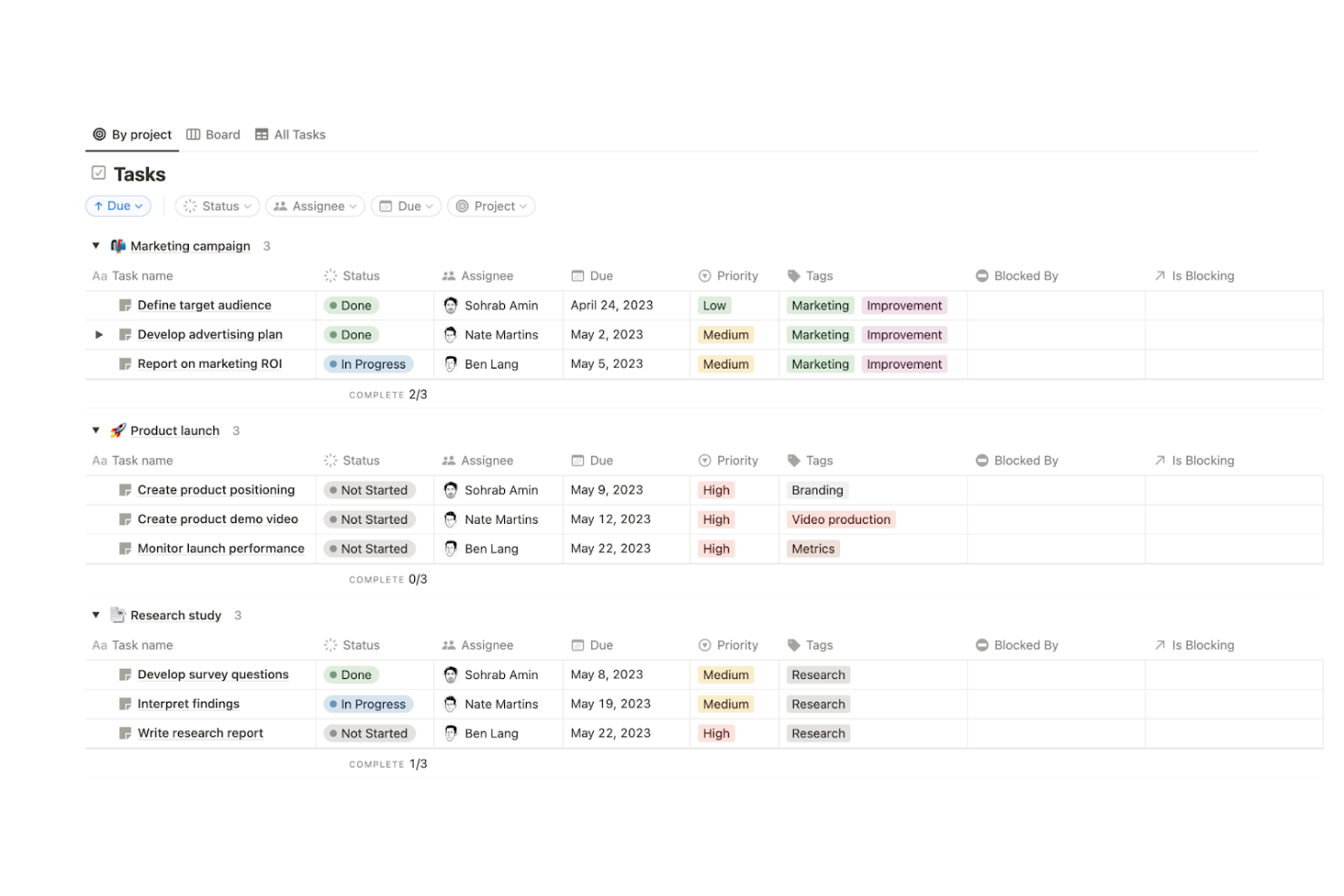
Notion è uno strumento versatile che offre uno spazio di lavoro connesso per wiki, documenti e progetti. Centralizza funzioni come la presa di appunti, la gestione dei progetti e la collaborazione su un'unica piattaforma.
Perché è una buona alternativa a Pipefy:
Ho scelto Notion per la lista perché fornisce uno spazio di lavoro completo che può sostituire diversi strumenti, proprio come Pipefy. Notion si distingue per la sua flessibilità e le vaste opzioni di personalizzazione, rendendolo un’eccellente alternativa per chi desidera ottimizzare il proprio flusso di lavoro, aumentare la produttività e ridurre la fatica derivante dall’uso di troppi strumenti diversi.
Funzionalità e integrazioni principali:
Funzionalità includono potenti blocchi di costruzione che permettono agli utenti di visualizzare, filtrare e ordinare le informazioni in vari modi, nonché la possibilità di creare etichette, tag e proprietari personalizzati per una migliore organizzazione. Inoltre, l’interfaccia drag-and-drop di Notion rende semplice creare e personalizzare le pagine.
Integrazioni includono Slack, Google Drive, Trello, Jira, GitHub, Asana, Figma, Typeform, Zapier e Intercom.
Pros and Cons
Pros:
- Interfaccia utente altamente personalizzabile e flessibile
- Centralizza più funzioni su un’unica piattaforma
- Ampia community e risorse di supporto
Cons:
- Può risultare complesso per i nuovi utenti
- Funzionalità offline limitate

Ideale per la gestione intuitiva delle attività

MeisterTask è uno strumento di gestione delle attività che offre bacheche Kanban, documentazione di progetto e integrazioni con altri strumenti per una collaborazione efficace in team. La sua interfaccia intuitiva e le funzionalità personalizzabili semplificano il monitoraggio delle attività e la gestione dei progetti.
Perché è una valida alternativa a Pipefy:
Ho scelto MeisterTask per il suo design intuitivo e la facilità d'uso, che lo rendono accessibile a team di tutte le dimensioni. Le sue bacheche in stile Kanban e i flussi di lavoro personalizzabili si distinguono come una valida alternativa a Pipefy, specialmente per i team che cercano una soluzione semplice per la gestione delle attività.
Funzionalità e integrazioni di rilievo:
Le funzionalità includono bacheche di progetto in stile Kanban, documentazione di progetto con MeisterNote e funzionalità avanzate di ricerca. Sono presenti anche opzioni di automazione per semplificare attività ripetitive e il monitoraggio del tempo integrato per il controllo della produttività.
Le integrazioni comprendono Slack, Microsoft Teams, Google Drive, Dropbox, GitHub, Zendesk, Bitbucket, Outlook, Zapier, MindMeister.
Pros and Cons
Pros:
- Interfaccia attraente e facile da usare
- Bacheche di gestione progetti personalizzabili
- Integrazione con app di terze parti più popolari
Cons:
- Prezzo iniziale più elevato rispetto ad alcuni concorrenti
- Funzionalità di reportistica limitate

Ideale per la gestione di progetti focalizzati sui clienti
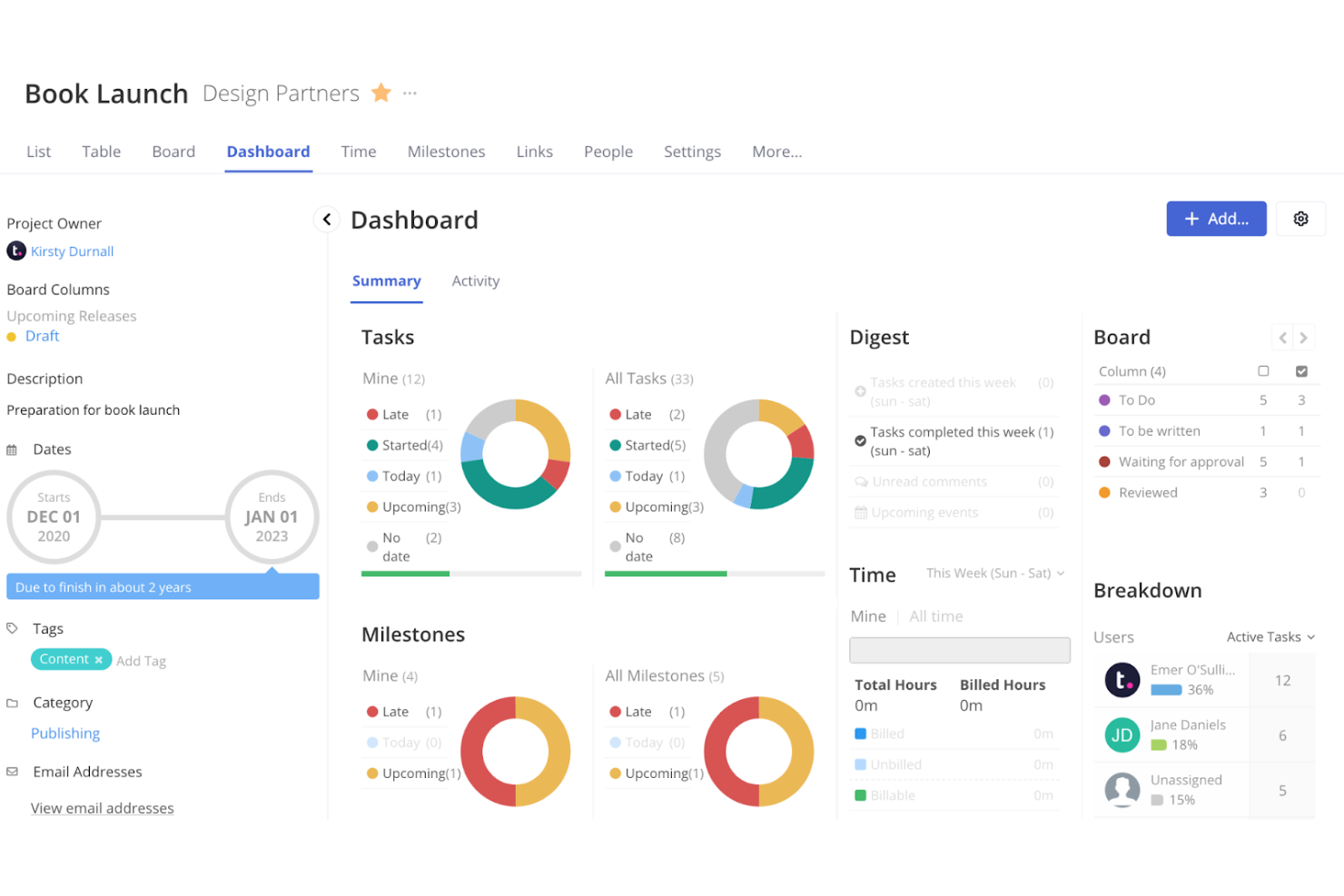
Teamwork è uno strumento di gestione dei progetti pensato per i team che lavorano con clienti, offrendo funzionalità come il monitoraggio del tempo e la gestione delle risorse. Fornisce strumenti completi per gestire le relazioni con i clienti, tracciare le ore fatturabili e ottimizzare l'allocazione delle risorse.
Perché è una valida alternativa a Pipefy:
Ho scelto Teamwork per questa lista perché offre funzionalità pensate per la gestione dei progetti focalizzata sul cliente, rendendolo una forte alternativa a Pipefy. Le sue solide funzionalità di gestione dei progetti, gli eccellenti strumenti di collaborazione con i clienti e le complete capacità di monitoraggio del tempo permettono di gestire progetti complessi per i clienti e ottimizzare i flussi di lavoro in modo efficace. Questa combinazione rende Teamwork un'opzione interessante per chi cerca di gestire e automatizzare i processi in modo efficiente.
Funzionalità e integrazioni principali:
Le funzionalità includono il monitoraggio del tempo, la gestione delle risorse e modelli di progetto personalizzabili. Queste funzioni aiutano i team a gestire il loro tempo in modo efficiente, evitare colli di bottiglia e consegnare i progetti nei tempi previsti.
Le integrazioni includono Slack, HubSpot, QuickBooks, Xero, Google Drive, Dropbox, Microsoft Teams, Zapier, Harvest e OneDrive.
Pros and Cons
Pros:
- Funzionalità complete di gestione clienti
- Monitoraggio del tempo e gestione delle risorse
- Modelli di progetto personalizzabili
Cons:
- Interfaccia complessa per i nuovi utenti
- Opzioni di personalizzazione dei report limitate

Jira
Ideale per team di sviluppo software

Jira è uno strumento di gestione dei progetti progettato per i team di sviluppo software per pianificare, monitorare e rilasciare software. Le sue funzionalità sono pensate per le metodologie agili, includendo flussi di lavoro personalizzabili, reportistica avanzata e integrazione con strumenti per sviluppatori.
Perché è una buona alternativa a Pipefy:
Ho scelto Jira per questa lista grazie alle sue funzionalità avanzate di automazione dei flussi di lavoro e gestione dei progetti, in particolare per i team di sviluppo. Si distingue nella gestione di progetti complessi grazie a un robusto sistema di tracciamento dei problemi, flussi di lavoro personalizzabili e capacità di reportistica complete. Inoltre, la sua integrazione con vari strumenti di sviluppo e il supporto per metodologie agili come Scrum e Kanban offrono la flessibilità e il controllo necessari per gestire in modo efficiente attività e problematiche.
Funzionalità principali e integrazioni:
Le funzionalità includono pianificazione avanzata e gestione delle dipendenze, flussi di lavoro personalizzabili e reportistica in tempo reale. Include anche Atlassian Intelligence (AI) per suggerimenti e approfondimenti sulle attività.
Integrazioni con Confluence, Bitbucket, Trello, Slack, GitHub, Microsoft Teams, Google Drive, Dropbox, Salesforce e Zendesk.
Pros and Cons
Pros:
- Flussi di lavoro altamente personalizzabili
- Forte integrazione con strumenti di sviluppo
- Reportistica e analisi avanzate
Cons:
- Personalizzazione limitata per utenti non tecnici
- Problemi di performance con progetti di grandi dimensioni
Ideale per l'integrazione della chat
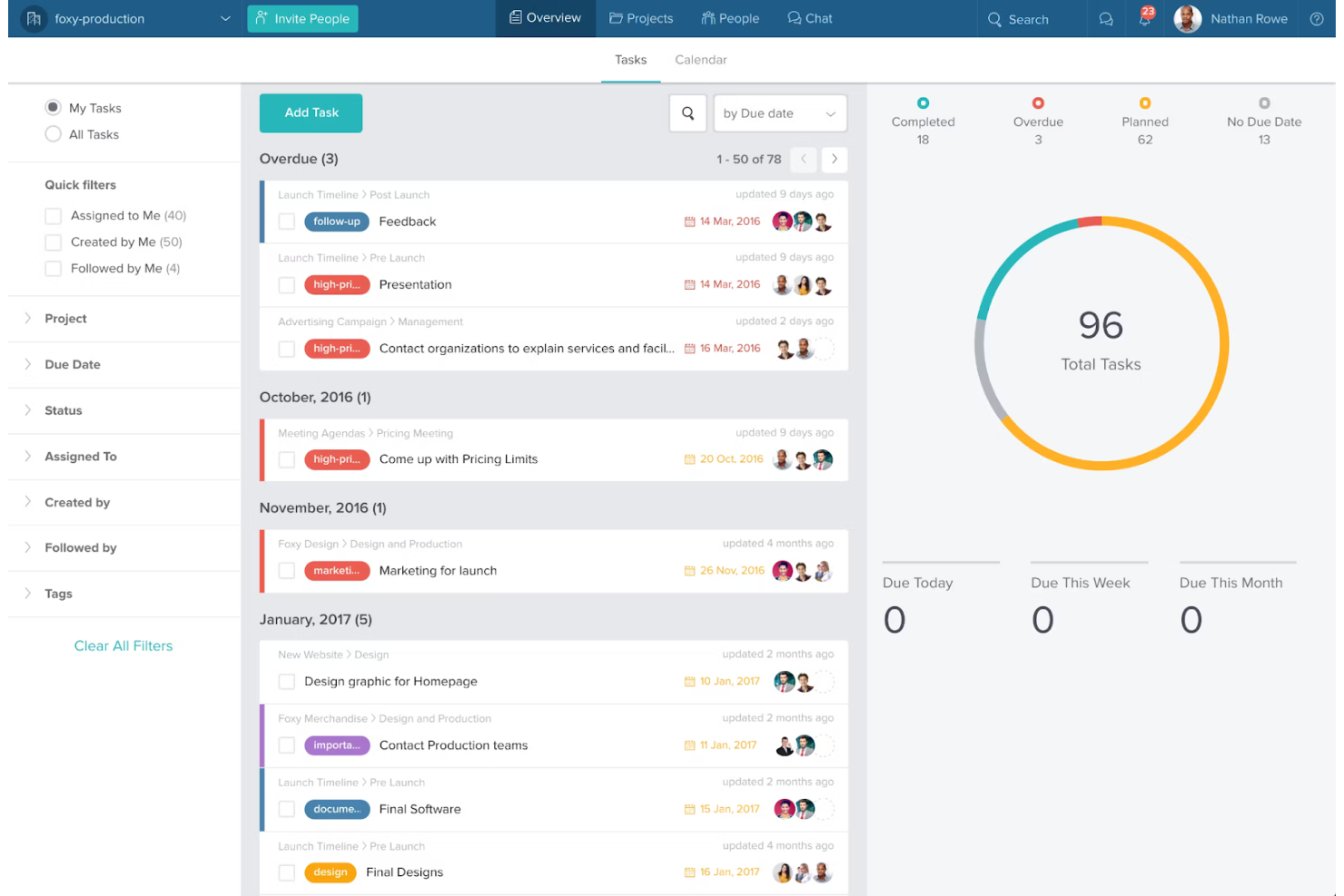
Taskworld è uno strumento di gestione dei progetti che combina la gestione delle attività con funzionalità di chat integrata. Consente una comunicazione fluida all'interno delle attività, migliorando la collaborazione e l'efficienza del team.
Perché è una buona alternativa a Pipefy:
Ho scelto Taskworld per questa lista perché offre una combinazione unica di gestione delle attività e chat integrata, essenziale per i team che necessitano di una comunicazione costante. Questo lo rende una valida alternativa a Pipefy, soprattutto per i team che danno priorità alla collaborazione in tempo reale.
Funzionalità e integrazioni distintive:
Le funzionalità includono bacheche Kanban, assegnazione delle attività, timeline, promemoria e chat integrata per una comunicazione diretta all'interno delle attività. Offre inoltre analisi delle prestazioni e diverse visualizzazioni per gestire i progetti in modo efficace.
Le integrazioni includono Slack, Google Drive, Dropbox, Microsoft Teams, Zapier, Trello, Asana, Jira, GitHub e OneDrive.
Pros and Cons
Pros:
- Chat integrata all'interno delle attività
- Diverse visualizzazioni di progetto
- Analisi delle prestazioni complete
Cons:
- Prezzo iniziale più alto rispetto ad alcuni concorrenti
- Opzioni di personalizzazione limitate

Ideale per aziende guidate dai risultati
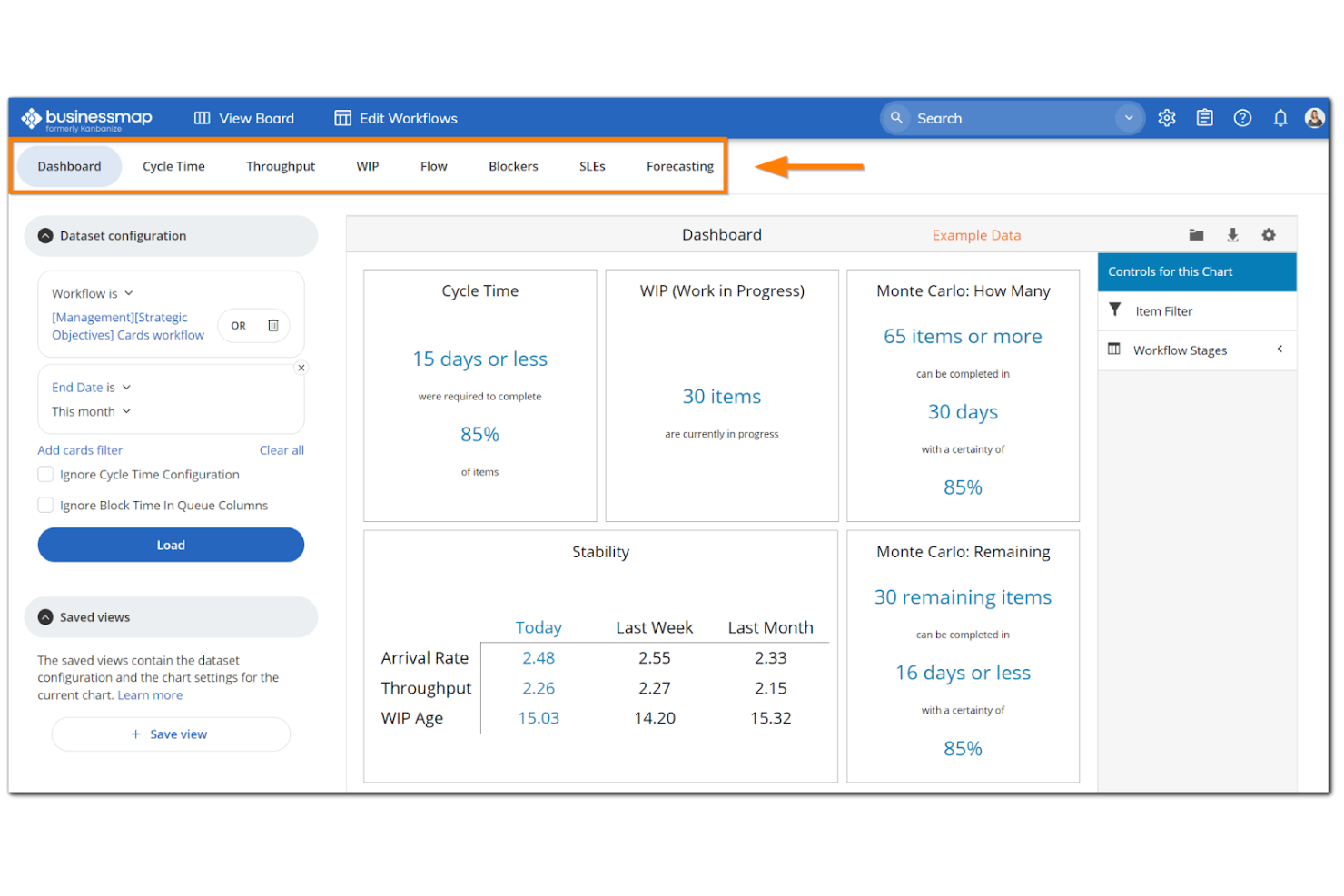
Businessmap è una piattaforma software che migliora l'agilità aziendale attraverso una gestione dei progetti orientata ai risultati. Allinea la strategia con l'esecuzione, rendendola ideale per le organizzazioni focalizzate sul raggiungimento di specifici obiettivi di business.
Perché è una valida alternativa a Pipefy:
Ho scelto Businessmap per le sue solide funzionalità che supportano l'agilità a livello aziendale e l'allineamento strategico. I suoi Kanban multilivello e gli strumenti avanzati di gestione del flusso di lavoro la rendono una forte concorrente per le organizzazioni che cercano un'alternativa a Pipefy.
Funzionalità e integrazioni principali:
Le funzionalità includono Kanban multilivello, dashboard di gestione e analisi dei flussi di lavoro. Supporta inoltre la gestione delle dipendenze e la previsione dei progetti, rendendolo uno strumento completo per la gestione di progetti aziendali.
Le integrazioni includono Jira, Trello, Asana, Slack, Microsoft Teams, Google Drive, Dropbox, GitHub, Zapier e Salesforce.
Pros and Cons
Pros:
- Gestione avanzata dei flussi di lavoro
- Forte attenzione all'allineamento strategico
- Analisi e reportistica complete
Cons:
- Comunità e risorse utente limitate
- Configurazione complessa per team più piccoli

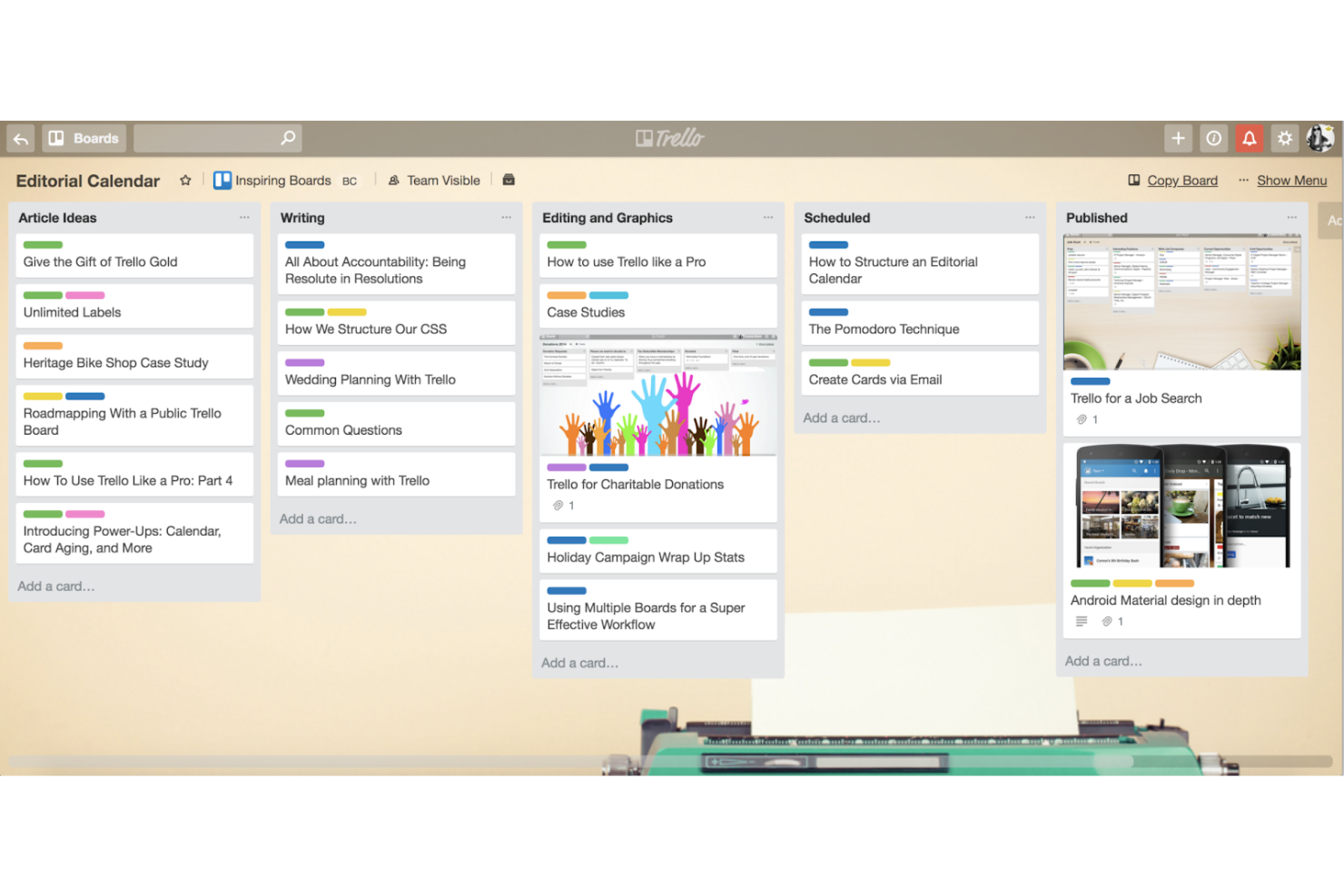
Trello è uno strumento di gestione dei progetti che utilizza bacheche, liste e schede per aiutare i team a organizzare visivamente le attività. Le sue bacheche intuitive in stile Kanban permettono agli utenti di vedere a colpo d'occhio lo stato delle attività.
Perché è una buona alternativa a Pipefy:
Ho scelto Trello perché offre una gestione visiva e intuitiva delle attività attraverso bacheche, liste e schede personalizzabili, rendendo semplice organizzare e monitorare i progetti. Le sue potenti capacità di integrazione e le funzionalità di collaborazione in tempo reale ottimizzano la gestione dei flussi di lavoro. Inoltre, la funzione di trascinamento e rilascio e l'automazione avanzata tramite Butler aumentano la produttività e l'efficienza, rendendolo ideale per i team che vogliono semplificare i loro processi di project management.
Funzionalità e integrazioni principali:
Le funzionalità includono bacheche di gestione visiva delle attività, funzione di trascinamento e rilascio, schede e liste personalizzabili, integrazione potente con numerose app, collaborazione in tempo reale, checklist e scadenze, assegnazione dei membri del team, etichette e filtri, accesso tramite app mobile e automazione avanzata con Butler.
Le integrazioni comprendono Slack, Google Drive, Salesforce, Microsoft 365, Jira, Dropbox, Evernote, GitHub, Mailchimp e Zendesk.
Pros and Cons
Pros:
- Bacheche, liste e schede personalizzabili
- Ampie opzioni di integrazione
- Piano gratuito molto completo
Cons:
- Funzionalità avanzate di project management limitate
- Reportistica e analisi di base

Wrike
Ideale per flussi di lavoro personalizzabili

Wrike è uno strumento di gestione dei progetti e collaborazione progettato per aiutare i team a organizzare le attività, gestire i progetti e aumentare la produttività. Offre una piattaforma centralizzata dove è possibile pianificare, eseguire e monitorare il lavoro, assicurando che tutti rimangano allineati e informati.
Perché è una buona alternativa a Pipefy:
I flussi di lavoro personalizzabili di Wrike consentono di adattare stati delle attività, campi e processi alle esigenze specifiche del tuo team. Questa flessibilità garantisce che i progetti si svolgano senza intoppi e si adattino a qualsiasi cambiamento o metodologia adottata dal team. Inoltre, i moduli dinamici di richiesta di Wrike permettono di raccogliere informazioni dettagliate in anticipo, semplificando il processo di raccolta richieste e riducendo le comunicazioni ripetitive.
Funzionalità principali e integrazioni:
Le funzionalità includono la priorità delle attività, la condivisione di file, il flusso di attività in tempo reale, la visualizzazione a foglio di calcolo, i diagrammi di Gantt, le bacheche Kanban, la vista calendario, i campi personalizzati, i modelli di progetto, il versionamento dei documenti e l'accesso tramite app mobile.
Le integrazioni includono Salesforce, Microsoft Teams, Zoom, Adobe Creative Cloud, Google Drive, Microsoft SharePoint, OneDrive, Wrike for Gmail, Google Sheets, Power BI, Miro e Trello.
Pros and Cons
Pros:
- Capacità di automazione dei flussi di lavoro
- Buone funzionalità di gestione delle risorse
- Varie visualizzazioni di progetto
Cons:
- Spazio di archiviazione limitato nei piani base
- La piattaforma può essere complicata da imparare
New Product Updates from Wrike

Wrike Adds Quick Search to Table View
Wrike adds Quick Search to Table View with full-table search across titles, descriptions, and fields, plus highlighted matches. This helps users find tasks faster in large tables. For more information, visit Wrike’s official site.

Ideale per il monitoraggio completo dei progetti

Zoho Projects è una piattaforma di project management online progettata per aiutare i team a pianificare, monitorare e collaborare sui progetti in modo efficiente. È l'ideale per un monitoraggio completo dei progetti grazie alle sue funzionalità estese come i diagrammi di Gantt, la rilevazione dei tempi e l'automazione delle attività.
Perché è una buona alternativa a Pipefy:
Ho scelto Zoho Projects per le sue potenti capacità di tracciamento dei progetti, che lo rendono una valida alternativa a Pipefy. La sua suite completa di strumenti, inclusi i diagrammi di Gantt e la rilevazione dei tempi, consente una supervisione dettagliata dei progetti e una gestione efficiente delle attività.
Funzionalità e integrazioni principali:
Le funzionalità includono diagrammi di Gantt per la pianificazione dei progetti, schede attività per monitorare le ore fatturabili e non fatturabili, e automazione delle attività per risparmiare tempo sulle attività di routine. La piattaforma permette inoltre un'ampia personalizzazione per adattarsi alle esigenze specifiche dei progetti.
Le integrazioni includono Zoho CRM, Zoho Invoice, Google Drive, Slack, Microsoft Teams, Dropbox, Zapier, GitHub, Bitbucket e Microsoft Office 365.
New Product Updates from Zoho Projects
Zoho Projects Adds CodeX Scripts for Custom Modules
Zoho Projects now supports CodeX Scripts for custom modules, enabling conditional logic and rules for creating, updating, and deleting records. For more information, visit Zoho Projects' official site.
 .
.
Planview
Ideale per la gestione del portafoglio

Planview è una soluzione per la gestione del portafoglio e del lavoro progettata per aiutare le organizzazioni a pianificare, eseguire e raggiungere i propri obiettivi strategici.
Perché è una valida alternativa a Pipefy:
Ho scelto Planview come alternativa a Pipefy per le sue capacità complete di gestione del portafoglio progetti. Con Planview, puoi supervisionare più progetti contemporaneamente, garantendo l'allineamento con gli obiettivi strategici della tua organizzazione. Le sue funzionalità di gestione delle risorse consentono di allocare e ottimizzare efficacemente le risorse, bilanciando i carichi di lavoro e massimizzando la produttività. Inoltre, gli strumenti di gestione della domanda di Planview ti aiutano a catturare, valutare e dare priorità alle richieste di lavoro in arrivo, assicurando che il tuo team si concentri sulle attività che offrono il massimo valore.
Caratteristiche distintive e integrazioni:
Le funzionalità includono pianificazione della capacità, pianificazione di scenari, gestione dei rischi, monitoraggio del tempo, programmazione dei progetti, tracciamento delle milestone, strumenti di collaborazione, gestione documentale, dashboard personalizzabili, automazione dei flussi di lavoro e ottimizzazione del portafoglio.
Le integrazioni includono Jira, IBM Engineering Workflow Management, MicroFocus ALM, Microsoft Power BI, Tableau e una gamma di prodotti Planview.
Pros and Cons
Pros:
- Analisi e reportistica avanzate
- Strumenti robusti di gestione finanziaria
- Capacità complete di gestione delle risorse
Cons:
- L'integrazione con altri strumenti può richiedere ulteriori sforzi
- La complessità può risultare opprimente per i team più piccoli
Altre alternative a Pipefy
Di seguito è riportato un elenco di ulteriori alternative a Pipefy che ho selezionato, ma che non sono rientrate nell’elenco principale. Vale la pena dar loro un’occhiata.
- TeamGantt
Ideale per gli appassionati dei diagrammi di Gantt
- monday.com
Ideale per il monitoraggio visivo dei progetti
- Clarizen
Ideale per la gestione dei progetti aziendali


Recensioni dei software correlati per la gestione dei progetti
Se non hai ancora trovato quello che cerchi, dai un'occhiata a queste altre recensioni di strumenti per la gestione dei progetti che abbiamo selezionato per te:
- Creazione di diagrammi di Gantt
- Strumenti per la produttività
- Software per il monitoraggio dei progetti
- Software per la pianificazione dei progetti
- Software per la gestione dei progetti
- Software per la gestione delle risorse
Come valuto le alternative a Pipefy
Divido la mia valutazione in due livelli: i requisiti di base che uno strumento deve soddisfare per essere preso in considerazione e gli elementi distintivi che cerco per trovare la soluzione più adatta ai team operativi che gestiscono flussi di lavoro per gli acquisti, le risorse umane o l'IT.
Funzionalità fondamentali (requisiti imprescindibili per questo elenco)
Quando seleziono gli strumenti da inserire nel mio elenco, assegno a ciascuno un punteggio su una scala da 0 (non offre la funzionalità) a 5 (eccelle in quest'area) per ogni funzionalità fondamentale elencata di seguito. Quindi, calcolo il punteggio totale dello strumento in percentuale. Ogni strumento deve ottenere un punteggio totale minimo del 65% per essere preso in considerazione.
- Creazione di flussi di lavoro senza codice: cerco un'interfaccia visiva con funzionalità di trascinamento che consenta ai team operativi di definire processi a più fasi, come l'inserimento dei dipendenti o la qualificazione dei fornitori, senza l'aiuto degli sviluppatori.
- Automazione dei processi e regole: ogni strumento dovrebbe consentire di impostare trigger condizionali e azioni automatiche, ad esempio indirizzare una richiesta di acquisto a un approvatore diverso in base alla soglia di importo.
- Moduli personalizzati e raccolta delle richieste: valuto se sia possibile creare moduli dinamici per la raccolta delle richieste con campi condizionali, come una richiesta di assistenza IT che adatta le domande in base alla categoria del problema selezionata.
- Gestione delle approvazioni e degli SLA: in questo caso sono importanti le catene di approvazione a più fasi con monitoraggio degli SLA: si pensi alle approvazioni parallele per la revisione di un contratto, con l'attivazione di un'escalation se una scadenza non viene rispettata.
- Integrazioni e API: verifico la presenza di connettori nativi per strumenti come Slack, Salesforce e SAP, oltre a un'API ben documentata e al supporto iPaaS tramite piattaforme come Zapier o Make.
- Reportistica e analisi dei processi: i dashboard dovrebbero mostrare i tempi di ciclo, le fasi con colli di bottiglia e il rispetto degli SLA, in modo che un responsabile dei processi possa individuare dove le richieste di acquisto si bloccano di settimana in settimana.
Una volta ottenuto un elenco di strumenti che soddisfano questi criteri, considero ciò che distingue ogni piattaforma.
Fattori distintivi (ciò che differenzia i fornitori)
Ecco come confronto i diversi fornitori:
Funzionalità distintive
I modelli di processo predefiniti fanno davvero la differenza quando si implementano flussi di lavoro nei reparti delle risorse umane, degli acquisti e della finanza: cerco raccolte che consentano ai team di essere operativi in pochi giorni anziché in settimane. Anche i portali pubblici e l'accesso degli ospiti sono importanti, soprattutto quando fornitori esterni o dipendenti devono inviare richieste e monitorarne lo stato senza disporre di una licenza a pagamento. Valuto inoltre se una piattaforma offra assistenza basata sull'intelligenza artificiale per i flussi di lavoro, ad esempio generando automaticamente un processo a partire da una richiesta testuale, così da ridurre i tempi di configurazione per gli sviluppatori non professionisti.
Oltre le funzionalità
La struttura dei prezzi è un aspetto importante: verifico se un fornitore applica costi per utente, per processo o in base al volume di automazioni, poiché i costi possono aumentare rapidamente quando si supera un singolo reparto. Anche la velocità di implementazione è importante. Una piattaforma che richiede settimane di servizi professionali prima di rendere operativo il primo flusso di lavoro potrebbe non essere adatta ai team operativi snelli. Per i settori regolamentati, valuto inoltre certificazioni di conformità come SOC 2 e ISO 27001, insieme alle autorizzazioni basate sui ruoli e alla registrazione degli audit.
Perché cercare un'alternativa a Pipefy?
Potresti cercare un'alternativa a Pipefy perché:
- Hai bisogno di opzioni di personalizzazione più flessibili e complete
- Preferisci un'interfaccia più intuitiva e facile da usare
- Hai bisogno di una migliore integrazione con altri strumenti e software
- Cerchi una soluzione più conveniente che rientri nel tuo budget
- Desideri funzionalità più avanzate e complete
Le alternative a Pipefy possono offrire una maggiore personalizzazione, un'esperienza utente più intuitiva e migliori opzioni di integrazione. Possono inoltre offrire funzionalità più avanzate e una struttura dei prezzi più adatta alle tue esigenze.
Funzionalità delle alternative a Pipefy
Ecco alcune funzionalità chiave di Pipefy che il software alternativo dovrebbe essere in grado di replicare o migliorare per risultare adatto.
- Automazione: Attiva automaticamente le azioni in base a eventi predefiniti
- Gestione degli SLA: Monitora e gestisci gli accordi sul livello di servizio per garantire il completamento tempestivo delle attività
- Report avanzati: Genera report dettagliati per analizzare l'efficienza dei flussi di lavoro e la produttività
- Database sicuro: Archivia i dati in modo sicuro con la crittografia a 256 bit e altre misure di sicurezza
- Flussi di lavoro personalizzati: Crea e personalizza i flussi di lavoro senza bisogno di competenze tecniche
- Integrazioni: Connettiti ad altre applicazioni tramite API aperte o Zapier per un flusso di dati continuo
- Comunicazione in tempo reale: Centralizza le conversazioni per evitare lunghi scambi di e-mail
- Gestione visiva: Utilizza schede in stile Kanban per una visione chiara delle fasi del processo e delle responsabilità
- Modelli predefiniti: Utilizza modelli per processi comuni come la gestione delle attività e delle pipeline di vendita
- Efficienza basata sull'IA: Sfrutta l'intelligenza artificiale per ottimizzare e automatizzare la gestione dei processi aziendali