



Microsoft Planner vs. Trello: Confronto e Recensioni Esperte per il 2026



Microsoft Planner offre un modo semplice per organizzare le attività e collaborare in team, mentre Trello propone un approccio flessibile e visivo alla gestione dei progetti. Entrambi gli strumenti puntano a migliorare la produttività, ma le loro funzionalità principali e l’esperienza utente differiscono notevolmente.
Ho testato e recensito ogni strumento, realizzando un confronto dettagliato tra funzionalità, pro e contro e prezzi per aiutarti a decidere quale software di project management si adatta meglio alle esigenze del tuo team.
Microsoft Planner vs. Trello: An Overview
Trello

Perché fidarsi dei nostri consigli sui software
Il nostro team testa e recensisce software dal 2012. In quanto project manager noi stessi, sappiamo quanto sia difficile — e importante — scegliere il software giusto.
Per questa guida, abbiamo valutato gli strumenti attraverso test pratici e ricerche indipendenti, assegnando un punteggio agli strumenti in base ai nostri criteri di selezione. Ci basiamo inoltre sulle competenze di leader di pensiero del settore e di professionisti attivi nella gestione dei progetti.
Le nostre recensioni riflettono il nostro giudizio editoriale umano, non un discorso di vendita.
Revisori esperti:
Microsoft Planner vs. Trello Pricing Comparison
| Microsoft Planner | Trello | |
|---|---|---|
| Free Trial | 30-day free trial | 14-day free trial |
| Pricing | From $10/user/month (billed annually) | From $5/user/month (billed annually) |
Microsoft Planner vs. Trello: Prezzi e Costi Nascosti
Il costo di Microsoft Planner è incluso in alcune sottoscrizioni Microsoft 365, il che significa che potresti dover sostenere costi aggiuntivi se devi aggiornare il tuo piano Microsoft 365 per accedervi. Il modello di prezzi di Trello prevede una struttura a livelli (che include una versione gratuita) e aumenta di prezzo con l’aggiunta di utenti o funzionalità avanzate.
Per scegliere lo strumento di project management più adatto, valuta le funzionalità specifiche necessarie per il tuo team e i piani di crescita, considerando eventuali costi di abbonamento o aggiornamento affinché il modello di prezzo sia in linea con gli obiettivi a lungo termine del progetto.
Microsoft Planner vs. Trello Feature Comparison
Microsoft Planner si integra con Microsoft 365 così puoi coordinare le attività del tuo team all’interno di un ecosistema familiare. Questo è ideale anche se già utilizzi strumenti Microsoft. Le bacheche Kanban di Trello consentono di visualizzare i flussi di lavoro, tenere il team allineato e monitorare i progressi. È particolarmente utile per i team che necessitano di un approccio visivo e flessibile.
| Microsoft Planner | Trello | |
|---|---|---|
| API | ||
| Collaboration Support | ||
| Dashboard | ||
| Dashboards | ||
| Data Export | ||
| Data Import | ||
| External Integrations | ||
| Gantt Charts | ||
| Multi-User | ||
| Notifications | ||
| Resource Management | ||
| Scheduling | ||
| Task Scheduling/Tracking |
Microsoft Planner vs. Trello: Integrazioni
| Integrazione | Microsoft Planner | Trello |
|---|---|---|
| Microsoft Teams | ✅ | ✅ |
| Slack | ❌ | ✅ |
| Google Drive | ❌ | ✅ |
| OneDrive | ✅ | ❌ |
| Dropbox | ❌ | ✅ |
| Jira | ❌ | ✅ |
| Asana | ❌ | ❌ |
| Outlook | ✅ | ✅ |
| API | ✅ | ✅ |
| Zapier | ❌ | ✅ |
L’integrazione di Microsoft Planner con Microsoft Teams ti permette di coordinare le attività all’interno dei canali di comunicazione già in uso (se il tuo team è già inserito nell’ecosistema Microsoft). L’integrazione di Trello con Slack è ideale per i team che devono mantenere tutti aggiornati con notifiche istantanee e collaborazione continua.
Microsoft Planner vs. Trello: Sicurezza, Conformità & Affidabilità
| Fattore | Microsoft Planner | Trello |
|---|---|---|
| Crittografia dei dati | Microsoft Planner utilizza crittografia durante il transito e a riposo per proteggere i tuoi dati. | Trello cripta i dati in transito e a riposo seguendo gli standard di settore. |
| Conformità normativa | MS Planner è conforme al GDPR e ad altri standard internazionali. | Trello è conforme a GDPR e CCPA per la protezione dei dati degli utenti. |
| Tutela della privacy dei dati | Microsoft Planner offre controlli di privacy avanzati all’interno della suite Microsoft 365. | Trello mette a disposizione impostazioni sulla privacy e report sulla trasparenza. |
Microsoft Planner sfrutta l’infrastruttura di sicurezza di Microsoft 365, mentre Trello offre una forte conformità alle principali leggi sulla protezione dei dati. Per scegliere lo strumento di gestione delle attività ideale, valuta quale dei due si allinea meglio ai requisiti normativi e alle esigenze di privacy della tua organizzazione e considera la possibilità di esaminare le certificazioni di sicurezza e le recensioni dei clienti.
Microsoft Planner vs. Trello Facilità d'uso
| Fattore | Microsoft Planner | Trello |
|---|---|---|
| Interfaccia utente | Microsoft Planner offre un layout pulito e organizzato, integrato con gli strumenti di Microsoft 365. | Trello offre un layout del Kanban board visivamente intuitivo e facile da usare, facile da navigare. |
| Esperienza di onboarding | L'onboarding di Microsoft Planner è semplice per chi ha già familiarità con i prodotti Microsoft. | Trello propone un tutorial con drag-and-drop per iniziare rapidamente e ridurre la curva di apprendimento. |
| Configurazione | La configurazione di Microsoft Planner è veloce e richiede poche impostazioni; ideale per piccoli team e principianti. | La configurazione di Trello è rapida, basta una semplice registrazione per iniziare a gestire i task. |
Microsoft Planner è più semplice per chi è già abituato a Microsoft 365, ma la configurazione è in generale semplice. Trello si distingue per la sua interfaccia intuitiva e la velocità di configurazione, anche se manca di alcune funzionalità di organizzazione strutturata offerte da Microsoft Planner.
Microsoft Planner vs Trello: Pros & Cons
Microsoft Planner
- You can easily assign and track tasks within your team.
- Its integration with Microsoft 365 enhances team collaboration
- The simple, user-friendly interface makes task management straightforward.
- It lacks advanced customization options for complex projects.
- The reporting features are not as robust as some competitors.
- It may not accommodate larger teams needing detailed task dependencies.
Trello
- You can easily visualize your tasks with Trello's board and card layout.
- It's simple to use, making it accessible for team members of all skill levels.
- Trello adapts to your team's workflow, offering flexibility in task management.
- Trello lacks advanced reporting features you might find in more complex tools.
- You can't create intricate task dependencies, which may limit complex project planning.
- Trello's simplicity might not suit large teams with detailed project management needs.
Best Use Cases for Microsoft Planner and Trello
Microsoft Planner
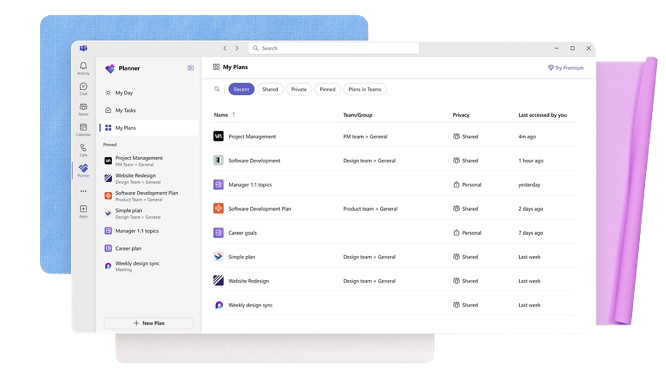
- Small Businesses Microsoft Planner's straightforward interface is perfect for small businesses that need to manage tasks without complex features.
- Marketing Teams It helps marketing teams track campaigns and collaborate effectively with its task assignment and tracking capabilities.
- Educational Institutions Schools and universities can use it to organize academic projects and coordinate activities across departments.
- IT Departments IT teams can benefit from its integration with Microsoft 365, making it easy to manage tech projects and resources.
- Remote Teams For remote teams needing a simple way to track tasks and collaborate, Microsoft Planner provides the necessary tools.
- Nonprofits Nonprofits can use it to manage volunteer tasks and projects efficiently, leveraging its easy-to-use interface.
Trello
- Creative Agencies Trello's visual task management makes it easy for you to track projects, ideas, and client feedback.
- Startups The flexibility Trello offers helps your team adapt quickly as you grow and change.
- Marketing Teams You can easily plan campaigns and track progress with Trello's board system.
- Design Departments Trello's simple interface allows you to manage design projects and revisions efficiently.
- Freelancers You can organize your tasks and deadlines without getting overwhelmed by complex features
- Product Development Trello's adaptability helps your team streamline workflows and manage product roadmaps effectively.
Chi dovrebbe usare Microsoft Planner e chi dovrebbe usare Trello?
A mio parere, Microsoft Planner è ideale per i team che lavorano in ambienti aziendali che già utilizzano Microsoft 365, poiché si integra facilmente con altri strumenti Microsoft.
Trello, invece, è perfetto per team creativi e startup che necessitano di flessibilità e gestione visiva delle attività senza essere legati a un ecosistema specifico. Se per te conta la semplicità e la configurazione rapida, Trello è la scelta giusta; ma se il tuo team preferisce soluzioni strutturate e integrate, Microsoft Planner è la soluzione migliore.
Differences Between Microsoft Planner and Trello
| Microsoft Planner | Trello | |
|---|---|---|
| Automation | Microsoft Planner has limited automation features within Microsoft 365. | Trello offers extensive automation options via a specific feature called Butler. |
| Integrations | Microsoft Planner integrates deeply with Microsoft 365 tools. | Trello offers broad integrations with various third-party apps. |
| Onboarding | Microsoft Planner is easier for those already using Microsoft products. | Trello provides a quick, intuitive onboarding experience with drag-and-drop. |
| Pricing | Microsoft Planner is included with Microsoft 365 subscriptions and paid plans. | Trello offers a tiered pricing model with a free plan. |
| User Interface | Microsoft Planner has a structured layout familiar to Microsoft users. | Trello features a visual, flexible Kanban board interface. |
| Read Microsoft Planner ReviewOpens new window | Read Trello ReviewOpens new window |
Similarities Between Microsoft Planner and Trello
| Cloud-Based | Microsoft Planner and Trello are cloud-based, so your data is accessible from anywhere. |
|---|---|
| Collaboration | Each tool supports team collaboration and helps with task assignment and sharing updates. |
| Customization | Both platforms provide options to customize your boards and lists to fit your team's workflow. |
| Mobile Usability | Microsoft Planner and Trello both offer mobile apps so you can manage projects on the go. |
| Task Management | Both Microsoft Planner and Trello let you organize tasks and subtasks into boards and checklists so you can help your team members stay on track. |
| Read Microsoft Planner ReviewOpens new window Read Trello ReviewOpens new window | |