



Jira vs. monday dev: Confronto e Recensioni degli Esperti per il 2026



Jira offre al tuo team solide soluzioni di gestione dei progetti, pensate appositamente per lo sviluppo software. monday dev, un prodotto di monday.com, propone una piattaforma versatile per gestire con facilità progetti di ogni tipo. Mentre Jira eccelle nella gestione di flussi di lavoro di sviluppo complessi, monday dev spicca per la sua flessibilità in diversi settori.
In questo articolo confronteremo gli strumenti e le loro funzionalità, i pro e contro, i prezzi e altro ancora, aiutandoti a trovare il software di project management più adatto alle tue esigenze.
Jira vs. monday dev: An Overview
Jira

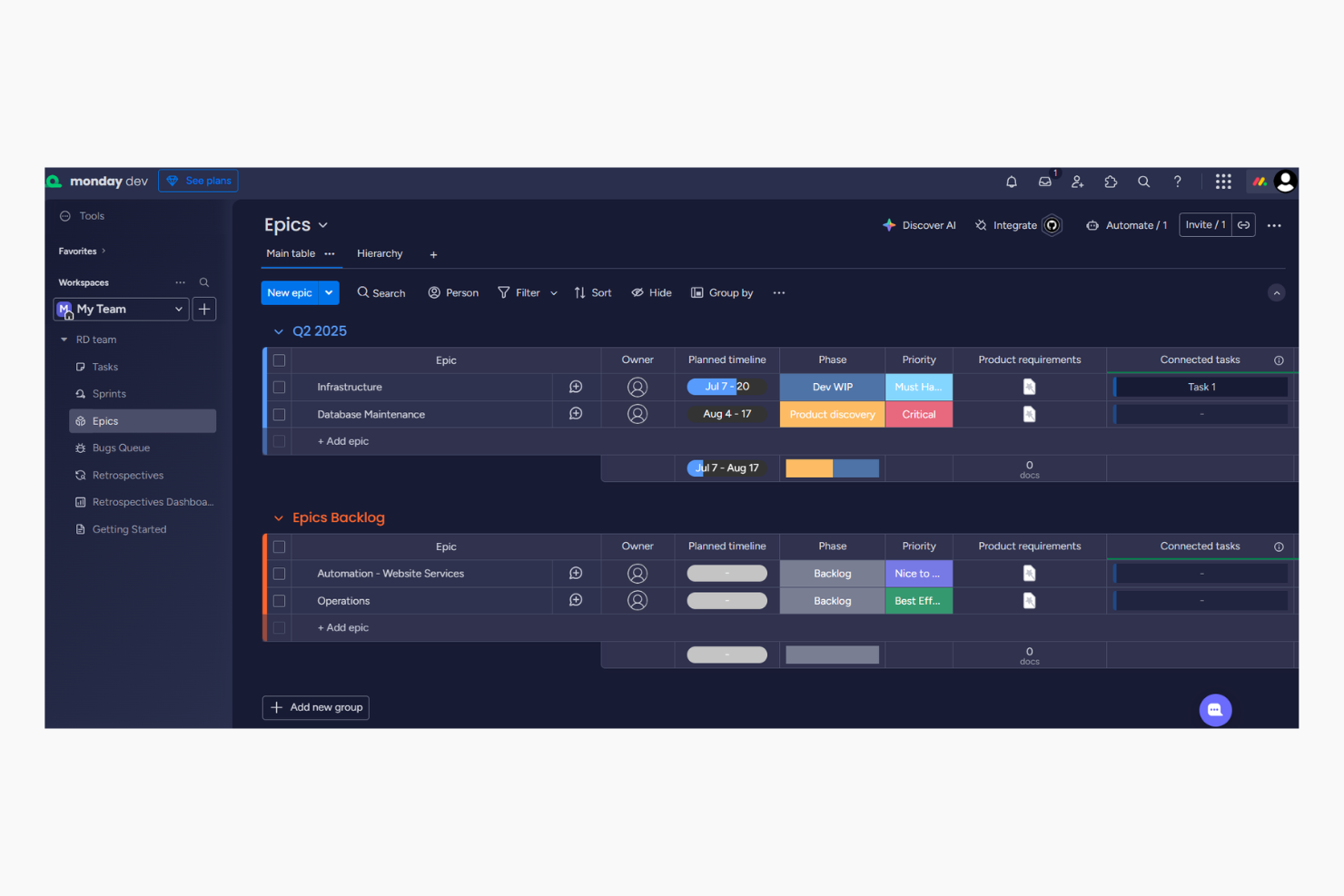
monday dev

Perché fidarsi dei nostri consigli sui software
Il nostro team testa e recensisce software dal 2012. In quanto project manager noi stessi, sappiamo quanto sia difficile — e importante — scegliere il software giusto.
Per questa guida, abbiamo valutato gli strumenti attraverso test pratici e ricerche indipendenti, assegnando un punteggio agli strumenti in base ai nostri criteri di selezione. Ci basiamo inoltre sulle competenze di leader di pensiero del settore e di professionisti attivi nella gestione dei progetti.
Le nostre recensioni riflettono il nostro giudizio editoriale umano, non un discorso di vendita.
Revisori esperti:
Jira vs. monday dev Pricing Comparison
| Jira | monday dev | |
|---|---|---|
| Free Trial | Free plan + 14-day free trial available | Free trial available |
| Pricing | From $8.48/user/month | From $9/month (billed annually) |
Jira vs. monday dev: Prezzi e costi nascosti
Il listino prezzi di Jira si basa su piani di abbonamento a livelli che partono da un piano gratuito. Tuttavia, ci possono essere costi extra per componenti aggiuntivi premium e maggiore spazio di archiviazione. Anche i prezzi di monday dev seguono un approccio a livelli, ma fai attenzione a eventuali costi aggiuntivi per funzionalità avanzate o integrazioni. Per scegliere lo strumento con il prezzo giusto per il tuo lavoro, valuta le funzionalità specifiche di cui hai bisogno e considera le prospettive di crescita a lungo termine. Valuta il costo reale includendo eventuali spese nascoste e assicurati che risponda ai piani di crescita del tuo team.
Jira vs. monday dev Feature Comparison
Con il supporto di Jira alle metodologie agili e con report e analisi dettagliate, puoi monitorare l’avanzamento dei progetti e l’adozione da parte degli utenti su Kanban board e Gantt chart, rendendolo fondamentale per i team impegnati in compiti complessi di sviluppo software. Allo stesso tempo, le funzionalità di automazione di monday dev lo rendono perfetto per snellire le attività ripetitive nei processi scrum all’interno di squadre agili. Se Jira permette di approfondire le analisi guidate dai dati, monday dev semplifica il flusso di lavoro grazie a semplici automazioni, andando a rispondere a necessità diverse nella gestione dei progetti.
| Jira | monday dev | |
|---|---|---|
| API | ||
| Collaboration Support | ||
| Data Export | ||
| Data Import | ||
| External Integrations | ||
| Multi-User | ||
| Notifications | ||
| Status Notifications |
Jira vs. monday dev: Integrazioni
| Integrazione | Jira | monday dev |
|---|---|---|
| GitHub | ✅ | ✅ |
| Figma | ✅ | ✅ |
| Slack | ✅ | ✅ |
| ❌ | ✅ | |
| HubSpot | ❌ | ✅ |
| Miro | ✅ | ✅ |
| Clockify | ✅ | ❌ |
| Jenkins | ✅ | ❌ |
| Sentry | ✅ | ❌ |
| Lucidchart | ✅ | ✅ |
| API | ✅ | ✅ |
| Zapier | ✅ | ✅ |
L’integrazione di Jira con GitHub permette di tracciare facilmente le modifiche al codice insieme alle attività di progetto, rendendolo ideale per i team di sviluppo software. L’integrazione di monday dev con LinkedIn è ottima per automatizzare attività di social media, come la pubblicazione automatica di aggiornamenti al raggiungimento di una milestone di progetto. Se da un lato Jira offre il meglio nel collegare strumenti di sviluppo, monday dev potenzia l’efficacia del marketing e delle attività di outreach.
Jira vs. monday dev Sicurezza, Conformità & Affidabilità
| Fattore | Jira | monday dev |
|---|---|---|
| Crittografia dei dati | Jira cripta i dati sia durante la trasmissione che a riposo utilizzando gli standard AES-256. | monday dev utilizza la crittografia AES-256 per proteggere i dati sia durante la trasmissione che a riposo. |
| Conformità normativa | Jira è conforme a GDPR, HIPAA e altri standard di settore. | monday dev aderisce a GDPR e dispone di certificazioni ISO per la protezione dei dati. |
| Controlli di accesso | Jira offre permessi di accesso personalizzabili per i ruoli utente. | monday dev fornisce controllo e permessi di accesso basati sui ruoli. |
| Affidabilità | Jira garantisce un SLA di disponibilità del 99,9% per un servizio affidabile. | monday dev assicura affidabilità con un impegno di uptime al 99,9%. |
Sia Jira che monday dev offrono solide funzionalità di sicurezza e conformità, ma la più ampia conformità normativa di Jira può risultare interessante per i settori più regolamentati. Per valutare questi strumenti, concentrati sulle specifiche esigenze di conformità del tuo settore e verifica come le misure di sicurezza di ciascuna piattaforma si allineino alle priorità della tua squadra riguardo la protezione dei dati.
Jira vs. monday dev Facilità d'Uso
| Fattore | Jira | monday dev |
|---|---|---|
| Interfaccia utente | L’interfaccia di Jira è potente ma può risultare complessa per i nuovi utenti, con molte funzionalità e impostazioni. | monday dev offre un'interfaccia pulita e intuitiva che semplifica la navigazione e la gestione delle attività. |
| Esperienza di onboarding | Jira fornisce tutorial dettagliati e documentazione per aiutare i nuovi utenti a iniziare. | monday dev propone tutorial interattivi e guide rapide per un processo di onboarding fluido. |
| Configurazione | Il processo di configurazione di Jira può essere lungo a causa delle molteplici opzioni di personalizzazione. | La configurazione di monday dev è rapida e semplice, consentendo ai team di iniziare subito a lavorare. |
| Supporto | Jira offre supporto esteso tramite forum della community e una documentazione completa. | monday dev offre un’assistenza clienti reattiva e una knowledge base completa. |
La curva di apprendimento di Jira, dovuta alle numerose funzionalità, può renderlo inizialmente impegnativo, ma le sue potenti capacità sono perfette per il monitoraggio dettagliato dei progetti e il supporto alla gestione agile. monday dev è più facile da utilizzare, ideale per i team che puntano a semplicità e configurazione rapida.
Jira vs monday dev: Pros & Cons
Jira
- Agile workflow management supports Scrum and Kanban and can improve your teams' productivity.
- Automation rules are easy to set up, which helps your team speed up their work.
- Custom filters can be created and accessed quickly, which improves your team's efficiency.
- Field names can be confusing, which might slow down your team's workflow.
- The interface can be too crowded in Scrum projects, which can make it hard for your team to navigate.
- There's a lack of resource management capabilities, which could limit your team's planning.
monday dev
- Easily customize workflows, including sprint planning and Kanban board configurations
- Visual project tracking keeps your team aligned and focused
- Automation features save time on repetitive tasks
- Gantt chart view is less intuitive than other tools
- Mobile app lacks full functionality for managing product roadmap tasks.
- Initial setup might be overwhelming for teams new to agile tools
Best Use Cases for Jira and monday dev
Jira
- Software development Jira’s agile tools like Scrum and Kanban boards make it perfect for managing software projects.
- IT departments Its issue tracking capabilities help your team efficiently handle technical support and bug fixes.
- Tech startups Jira offers customization capabilities that allow your team to scale and adapt as your projects grow.
- Agile teams Sprint planning and backlog management features keep your agile processes organized and effective.
- Large enterprises Jira’s automation rules can streamline your complex workflows and improve team productivity.
- Project managers Its reporting and analytics provide insights that help you make informed decisions quickly.
monday dev
- Tech startups Customizable workflows help your team adapt and grow rapidly in a dynamic environment, especially during fast-paced product development cycles.
- Software development Automation features and bug tracking streamline repetitive tasks, allowing your developers to focus on coding.
- Product management teams Roadmapping tools and backlog prioritization help your team align stakeholders and deliver product updates on schedule.
- IT departments Efficient task tracking and automation improve your team's response to issues and requests, especially when managing technical dependencies.
- Remote teams Collaboration tools keep your team members connected, no matter where they are working.
- Creative agencies Customizable dashboards provide your team with the flexibility needed for unique projects, backed by a centralized knowledge base and shared docs.
- Local nonprofits The setup complexity and feature set might be more than what your team requires.
Chi dovrebbe usare Jira e chi dovrebbe usare monday dev?
Secondo me, Jira è più adatto a team di sviluppo software e aziende tecnologiche che necessitano di funzionalità avanzate per la gestione dettagliata dei problemi, la gestione di sprint e backlog e l'integrazione con il codice. Se lavori in un ambiente tecnologico dinamico con flussi di lavoro complessi o utilizzi già altri prodotti Atlassian, come Confluence, le funzionalità di Jira ti saranno molto utili. Dal mio punto di vista, monday dev è ideale per team di vari settori che cercano una piattaforma flessibile e facile da usare per gestire i progetti senza la necessità di addentrarsi negli aspetti più tecnici. Se la tua squadra apprezza i modelli pronti, la semplicità e la rapidità di adattamento, monday dev è la scelta giusta.
Differences Between Jira and monday dev
| Jira | monday dev | |
|---|---|---|
| Automation | Jira supports complex automation for development workflows. | monday dev excels in automating repetitive tasks across various industries. |
| Compliance | Jira complies with numerous industry standards, ideal for regulated sectors. | monday dev focuses on GDPR and ISO certifications, suitable for general data protection needs. |
| Feature Depth | Jira offers advanced features for detailed project tracking and software development. | monday dev provides essential features with a focus on simplicity and ease of use. |
| Pricing | Jira uses a tiered subscription model with potential extra costs for add-ons. | monday dev also follows a tiered pricing approach with additional fees for premium features. |
| User Interface | Jira's interface is powerful but can be complex for beginners. | monday dev's interface is intuitive and easy to navigate for all users. |
| Read Jira ReviewOpens new window | Read monday dev ReviewOpens new window |
Similarities Between Jira and monday dev
| Collaboration | They both provide strong collaboration features like real-time updates and shared dashboards to keep your team aligned and informed. |
|---|---|
| Customization | Both platforms offer customization options to tailor workflows to your team's needs, whether you're in tech or marketing. |
| Integrations | Both Jira and monday dev integrate with popular tools like Slack and GitHub, allowing your team to connect existing workflows seamlessly. |
| Scalability | Both solutions are scalable, supporting growing teams and expanding projects with features that adapt to increasing demands. |
| Security | Jira and monday dev both use AES-256 encryption to protect data, ensuring your projects are secure and compliant with industry standards. |
| Read Jira ReviewOpens new window Read monday dev ReviewOpens new window | |