



ClickUp vs. Airtable: Confronto e Recensioni degli Esperti per il 2026



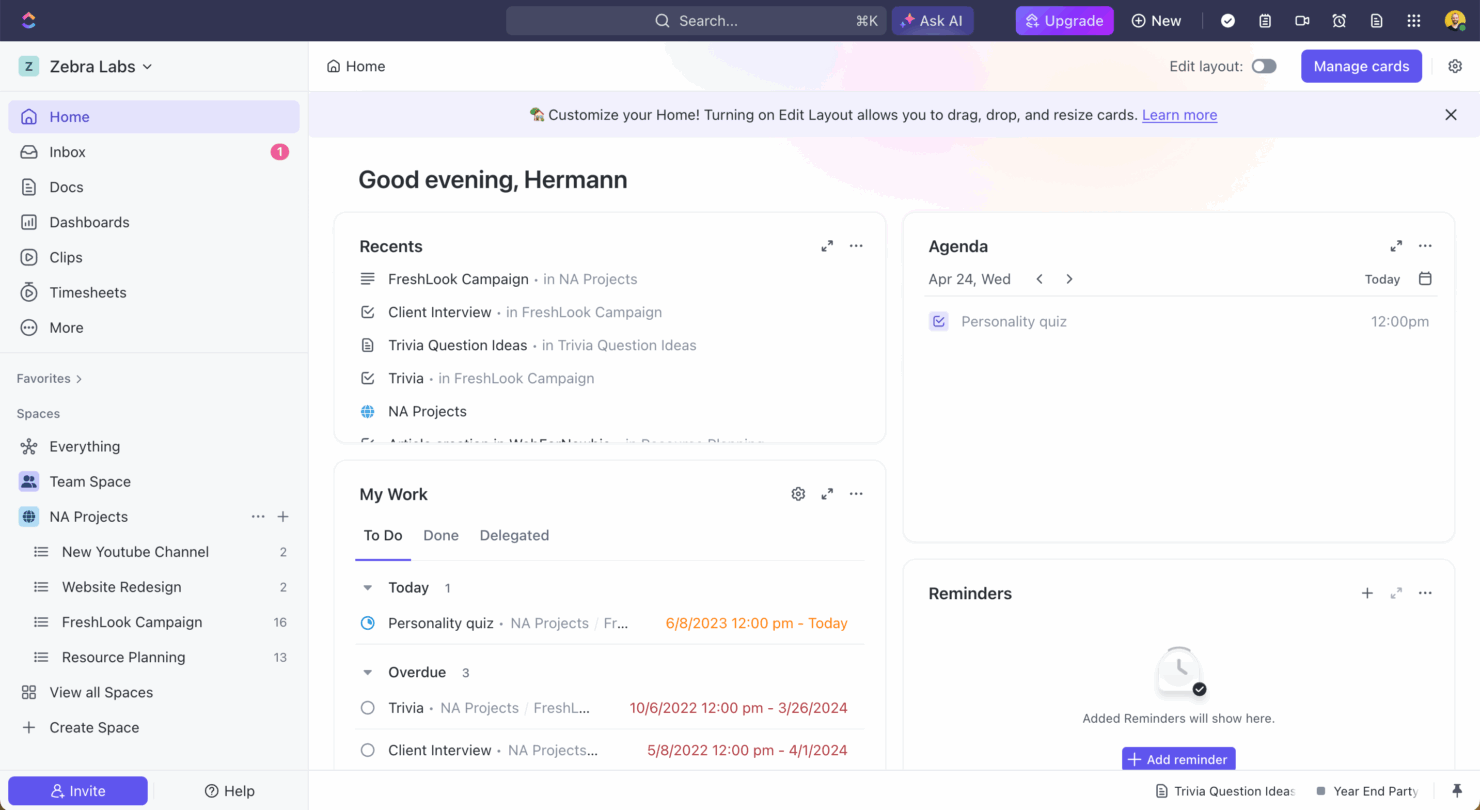
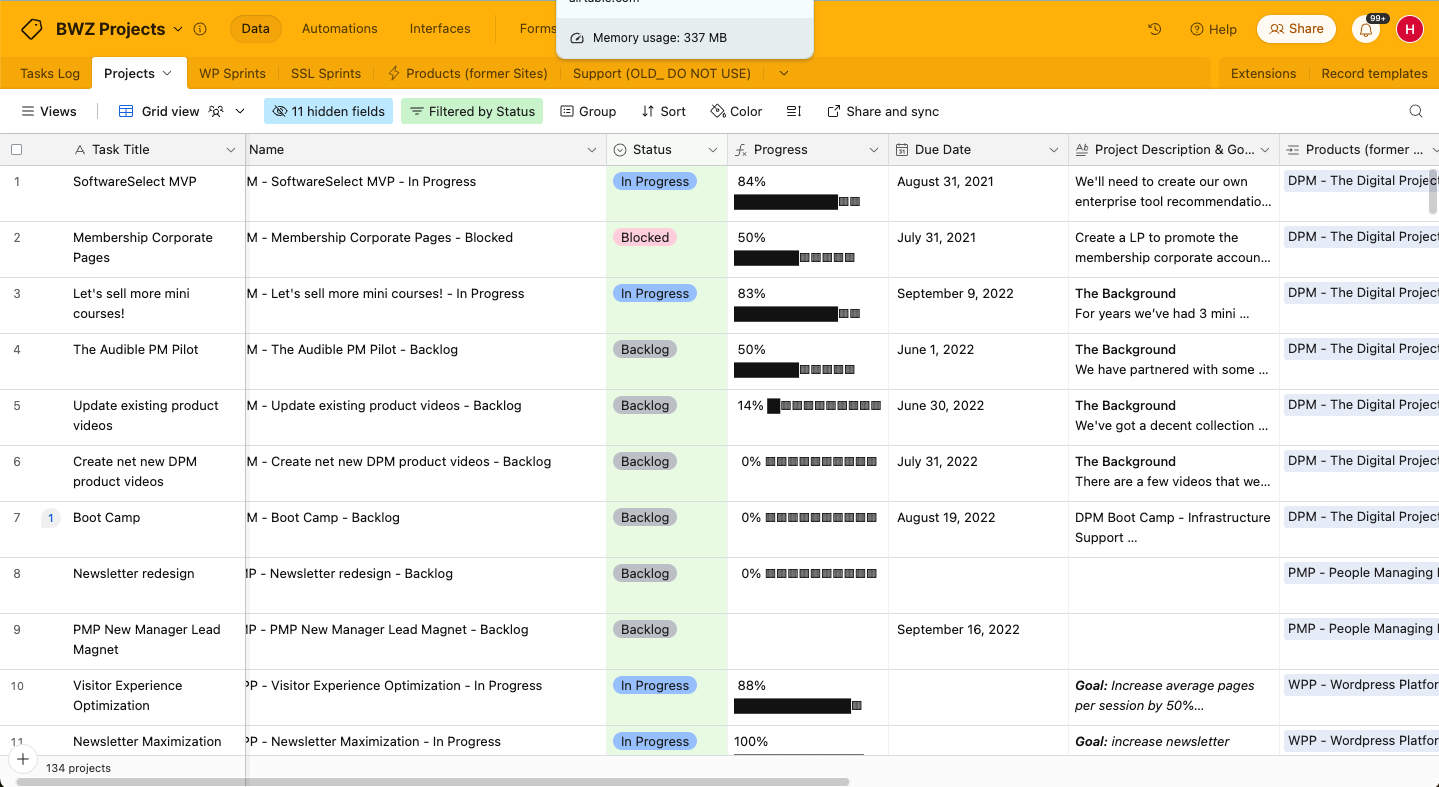
ClickUp offre una soluzione tradizionale di gestione dei progetti che ti permette di gestire facilmente i tuoi progetti, mentre Airtable fornisce una piattaforma flessibile basata su fogli di calcolo altamente personalizzabile. Entrambi gli strumenti mirano ad aumentare la produttività, ma si differenziano per le capacità di personalizzazione e integrazione.
Ho analizzato e valutato ciascuno strumento e le caratteristiche chiave, i pro e i contro, i prezzi e altro ancora per aiutarti a decidere quale software di gestione dei progetti si adatta meglio alle tue esigenze.
ClickUp vs. Airtable: An Overview
ClickUp
Airtable
Perché fidarsi dei nostri consigli sui software
Il nostro team testa e recensisce software dal 2012. In quanto project manager noi stessi, sappiamo quanto sia difficile — e importante — scegliere il software giusto.
Per questa guida, abbiamo valutato gli strumenti attraverso test pratici e ricerche indipendenti, assegnando un punteggio agli strumenti in base ai nostri criteri di selezione. Ci basiamo inoltre sulle competenze di leader di pensiero del settore e di professionisti attivi nella gestione dei progetti.
Le nostre recensioni riflettono il nostro giudizio editoriale umano, non un discorso di vendita.
Revisori esperti:
ClickUp vs. Airtable Pricing Comparison
| ClickUp | Airtable | |
|---|---|---|
| Free Trial | Free plan + free demo available | Free plan + free demo + 14-day trial available |
| Pricing | From $7/user/month (billed annually) | From $20/user/month |
Prezzi e costi nascosti di ClickUp vs. Airtable
Il pricing di ClickUp è strutturato su più livelli con piani gratuiti e a pagamento, e potresti incorrere in costi aggiuntivi per funzionalità avanzate o spazio di archiviazione maggiore. Anche il pricing di Airtable segue una struttura a livelli, con potenziali costi extra per funzionalità premium o maggiore capacità di automazione.
Per scegliere lo strumento giusto, valuta le esigenze specifiche del tuo team, le funzionalità richieste e la scala di utilizzo per assicurarti di scegliere un piano che offra il miglior rapporto qualità-prezzo senza spese impreviste.
ClickUp vs. Airtable Feature Comparison
Le funzionalità di gestione delle attività di ClickUp ti consentono di gestire progetti complessi con scadenze rigide e molte dipendenze. Puoi personalizzare le visualizzazioni delle attività e modificare le attività in blocco, il che è perfetto per gestire grandi team con flussi di lavoro variegati. I ricchi tipi di campo di Airtable e le visualizzazioni personalizzabili sono ideali anche per organizzare progetti orientati ai dati, e puoi passare facilmente dalla griglia al calendario, ai diagrammi di Gantt, alle visualizzazioni Kanban.
Ogni strumento di gestione progetti supporta le tue esigenze in modi unici—ClickUp eccelle negli ambienti incentrati sulle attività, mentre Airtable dà il meglio di sé nella gestione dei dati.
| ClickUp | Airtable | |
|---|---|---|
| API | ||
| Batch Permissions & Access | ||
| Budgeting | ||
| Calendar Management | ||
| Contact Management | ||
| Contact Sharing | ||
| Customer Management | ||
| Dashboard | ||
| Data Export | ||
| Data Import | ||
| Data Visualization | ||
| Expense Tracking | ||
| External Integrations | ||
| Gantt Charts | ||
| Multi-User | ||
| Notifications | ||
| Project Management | ||
| Resource Management | ||
| Scheduling | ||
| Task Scheduling/Tracking | ||
| Third-Party Plugins/Add-Ons | ||
| Travel Management |
ClickUp vs. Airtable Integrazioni
| Integrazione | ClickUp | Airtable |
|---|---|---|
| Slack | ✅ | ✅ |
| Google Drive | ✅ | ✅ |
| Microsoft Teams | ✅ | ❌ |
| Zoom | ✅ | ❌ |
| Dropbox | ✅ | ✅ |
| Figma | ✅ | ❌ |
| Jira | ✅ | ✅ |
| Salesforce | ✅ | ✅ |
| GitHub | ✅ | ✅ |
| Outlook | ✅ | ✅ |
| API | ✅ | ✅ |
| Zapier | ✅ | ✅ |
L'integrazione di ClickUp con Slack ti permette di inviare aggiornamenti sulle attività direttamente nei canali, migliorando la comunicazione del team e mantenendo tutti allineati. Airtable si integra con Salesforce per permetterti di sincronizzare i dati dei clienti con i flussi di lavoro di progetto e gestire in modo efficace le interazioni con i clienti.
Mentre ClickUp migliora la collaborazione interna del team, Airtable ti consente di creare un sistema personalizzato per integrare la gestione dei progetti e i sistemi di gestione delle relazioni con i clienti (CRM).
ClickUp vs. Airtable Sicurezza, Conformità & Affidabilità
| Fattore | ClickUp | Airtable |
|---|---|---|
| Crittografia dei dati | ClickUp utilizza la crittografia AES-256 per i dati a riposo. | Airtable cripta i dati in transito con TLS e a riposo con AES-256. |
| Conformità normativa | ClickUp è conforme a GDPR e CCPA e fornisce accordi di trattamento dei dati. | Anche Airtable è conforme a GDPR e offre accordi di trattamento dei dati per gli utenti. |
| Affidabilità | ClickUp garantisce il 99,9% di uptime con backup ridondanti dei dati. | Airtable mantiene il 99,9% di uptime con backup regolari dei dati. |
ClickUp e Airtable offrono entrambi solide funzionalità di sicurezza e conformità. Per scegliere il fornitore giusto, valuta i requisiti di conformità specifici del tuo settore e assicurati che le funzionalità dello strumento siano in linea con le esigenze di sicurezza del tuo team.
ClickUp vs. Airtable Facilità d'Uso
| Fattore | ClickUp | Airtable |
|---|---|---|
| Interfaccia utente | ClickUp offre un'interfaccia personalizzabile con funzionalità drag-and-drop. | Airtable ha un'interfaccia pulita, simile a un foglio di calcolo, che è personalizzabile, intuitiva e facile da navigare. |
| Esperienza di onboarding | ClickUp fornisce tutorial completi e modelli per aiutare i nuovi utenti a iniziare rapidamente e facilmente. | Airtable offre un processo di onboarding semplice con tour guidati e modelli. |
| Supporto | ClickUp ha assistenza clienti 24/7 e un forum comunitario molto attivo. | Airtable offre supporto via email e un'ampia gamma di risorse online. |
L'ampia gamma di funzionalità di ClickUp presenta inizialmente una curva di apprendimento ripida, ma include molte capacità di gestione progetti integrate che risultano molto utili una volta che ci si abitua. Al contrario, la semplicità e il design intuitivo di Airtable lo rendono più facile da utilizzare, anche se le opzioni di personalizzazione possono risultare impegnative per chi è alle prime armi.
ClickUp vs Airtable: Pros & Cons
ClickUp
- Extensive task management features keep your projects organized and on track
- Real-time collaboration makes team communication more effective
- Built-in automations reduce manual work and speed up your workflow
- Users often find the learning curve steep due to its rich feature set
- Some users report occasional performance lags when managing large projects
- Mobile app can be less intuitive than the desktop version
Airtable
- Its automation rules make it easy to notify stakeholders, even if they are outside the platform.
- Airtable's forms feature lets you efficiently gather information from external sources.
- You can connect and perform calculations across multiple bases.
- Customizing the templates requires a big time investment.
- It's not a traditional project management platform.
- The learning curve can be challenging for new users.
Best Use Cases for ClickUp and Airtable
ClickUp
- Creative agencies ClickUp's customizable dashboards and task automation features can help you manage client projects, track feedback and revisions, and keep creative teams aligned.
- Tech startups ClickUp supports agile development with sprints and real-time collaboration features that can help teams iterate quickly.
- Marketing teams You can streamline campaign planning and execution using ClickUp’s task dependencies and timelines.
- Remote teams ClickUp's real-time updates and collaboration tools keep everyone on the same page, no matter where they are.
- Product managers ClickUp’s roadmaps and goal-tracking features help you align development with business objectives.
- Freelancers You can track your tasks and deadlines efficiently with ClickUp’s simple task and time management tools.
Airtable
- Creative agencies Airtable lets your team design custom project pipelines to foster creativity and improve task management.
- Marketing teams You can track campaigns with Airtable’s flexible and visual database and make sure every detail is covered.
- Small businesses Airtable adapts to your unique business processes and can scale with you as your team grows.
- Event planners Its visual calendar and task management features help you coordinate every detail efficiently.
- Consulting firms Track client projects and deliverables with Airtable’s customizable views and data organization.
- Product development You can manage product roadmaps and feature backlogs with Airtable’s powerful database tools.
Chi dovrebbe usare ClickUp e Airtable?
Secondo me, ClickUp è ideale per i team che gestiscono progetti complessi con flussi di lavoro diversificati, così come per team esperti di tecnologia che danno valore alla flessibilità. D'altra parte, Airtable è perfetto per chi apprezza possibilità di personalizzazione avanzate e lavora su progetti ricchi di dati, ad esempio team marketing o creativi. Se il vostro team preferisce un design semplice e intuitivo, Airtable potrebbe essere la scelta giusta per voi.
Differences Between ClickUp and Airtable
| ClickUp | Airtable | |
|---|---|---|
| Automation | ClickUp supports advanced automation capabilities for repetitive tasks. | Airtable offers basic automations that are suitable for simple workflows. |
| Customization | ClickUp offers customization options for task views and workflows. | Airtable provides customizable views and has a strong focus on data organization. |
| Integrations | ClickUp integrates well with communication tools like Slack and Microsoft Teams. | Airtable can integrate with data-centric tools like Salesforce. |
| User Interface | ClickUp's interface is feature-rich but can be overwhelming at first. | Airtable's user-friendly interface is clean and intuitive, and resembles a spreadsheet. |
| Visit ClickUpOpens new window | Read Airtable ReviewOpens new window |
Similarities Between ClickUp and Airtable
| Collaboration | ClickUp and Airtable offer collaborative features, such as shared task lists and comments, that foster team member communication. |
|---|---|
| Flexible Views | Both tools let you switch between different views (e.g. Kanban and calendar), so you can visualize projects in various ways. ClickUp offers more task-centric views, whereas Airtable excels in data grid views. |
| Integrations | Both project management platforms support integrations through API and Zapier. |
| Pricing | Both use tiered pricing and provide different plans to suit different needs, including a free plan. Each offers unique features locked to the higher tiers—advanced integrations in ClickUp and increased automation in Airtable. |
| User Support | Both tools provide extensive online resources and tutorials for users. ClickUp offers 24/7 support, and Airtable offers guided tours and email assistance. |
| Visit ClickUpOpens new window Read Airtable ReviewOpens new window | |