



Asana vs. Zoho Projects: Confronto Esperto e Recensioni 2026



Asana offre un approccio semplificato per organizzare i flussi di lavoro del tuo team, mentre Zoho Projects mette a disposizione una piattaforma integrata per gestire i progetti con flessibilità. Entrambi gli strumenti mirano ad aumentare la produttività del team, ma differiscono per interfaccia utente e opzioni di personalizzazione.
Ho valutato e confrontato questi strumenti, le loro funzionalità principali, i pro e contro e i prezzi usando la mia esperienza di project manager. Leggi la mia comparazione qui sotto per scoprire quale software di project management è lo strumento giusto per i tuoi progetti e processi.
Asana vs. Zoho Projects: An Overview
Asana

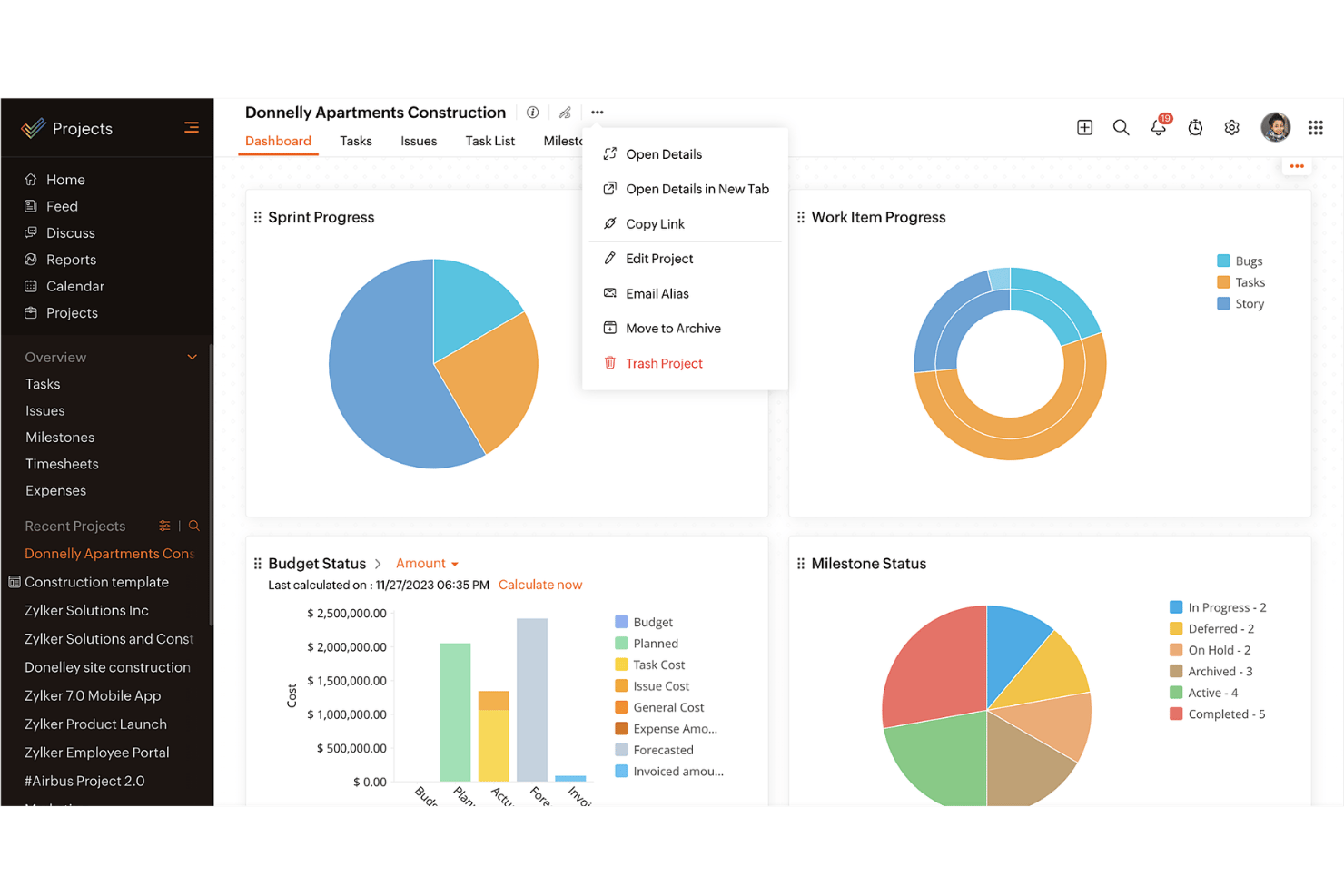
Zoho Projects
Perché fidarsi dei nostri consigli sui software
Il nostro team testa e recensisce software dal 2012. In quanto project manager noi stessi, sappiamo quanto sia difficile — e importante — scegliere il software giusto.
Per questa guida, abbiamo valutato gli strumenti attraverso test pratici e ricerche indipendenti, assegnando un punteggio agli strumenti in base ai nostri criteri di selezione. Ci basiamo inoltre sulle competenze di leader di pensiero del settore e di professionisti attivi nella gestione dei progetti.
Le nostre recensioni riflettono il nostro giudizio editoriale umano, non un discorso di vendita.
Revisori esperti:
Asana vs. Zoho Projects Pricing Comparison
| Asana | Zoho Projects | |
|---|---|---|
| Free Trial | Free plan available | 15-day free trial + free plan + free demo available |
| Pricing | From $10.99/user/month (billed annually) | From $4/user/month (billed annually) |
Prezzi di Asana vs. Zoho Projects & Costi Nascosti
I prezzi di Asana seguono un modello di abbonamento a livelli con una versione base gratuita e piani premium che aumentano di prezzo offrendo funzionalità aggiuntive e maggior supporto clienti. I prezzi di Zoho Projects seguono anch’essi un modello a livelli, con un piano gratuito e opzioni a pagamento che offrono più funzionalità e misure di sicurezza.
Per scegliere il miglior software di project management per te, valuta le esigenze specifiche della tua azienda, considera le funzionalità che userai realmente e prendi in considerazione eventuali costi nascosti per scegliere la soluzione più adatta al tuo budget e flusso di lavoro.
Asana vs. Zoho Projects Feature Comparison
Con la funzionalità di gestione delle attività di Asana, puoi facilmente organizzare attività e sotto-attività quotidiane e visualizzare le tempistiche dei progetti. Questo è perfetto per i team che hanno bisogno di strumenti per una chiara assegnazione dei compiti e delle scadenze. L’integrazione di Zoho Projects con le altre applicazioni Zoho è ideale per le aziende già presenti nell’ecosistema Zoho.
| Asana | Zoho Projects | |
|---|---|---|
| API | ||
| Batch Permissions & Access | ||
| Budgeting | ||
| Calendar Management | ||
| Collaboration Support | ||
| Contact Management | ||
| Contact Sharing | ||
| Customer Management | ||
| Dashboard | ||
| Dashboards | ||
| Data Export | ||
| Data Import | ||
| Data Visualization | ||
| Dependency Tracking | ||
| Document Sharing | ||
| Expense Tracking | ||
| External Integrations | ||
| File Sharing | ||
| Gantt Charts | ||
| Kanban Boards | ||
| Multi-User | ||
| Notifications | ||
| Project Management | ||
| Resource Management | ||
| Scheduling | ||
| Task Scheduling/Tracking | ||
| Third-Party Plugins/Add-Ons | ||
| Time Management | ||
| Travel Management | ||
| Workflow Management |
Asana vs. Zoho Projects Integrazioni
| Integrazione | Asana | Zoho Projects |
|---|---|---|
| Slack | ✅ | ✅ |
| Microsoft Teams | ✅ | ✅ |
| Google Drive | ✅ | ✅ |
| Dropbox | ✅ | ✅ |
| Salesforce | ✅ | ❌ |
| Zendesk | ✅ | ✅ |
| Evernote | ✅ | ❌ |
| QuickBooks | ❌ | ❌ |
| API | ✅ | ✅ |
| Zapier | ✅ | ✅ |
L’integrazione di Asana con Slack ti permette di convertire facilmente le conversazioni in attività, accelerando i flussi di lavoro e migliorando la comunicazione. L’integrazione di Zoho Projects con Zendesk consente di trasformare i ticket di supporto in task, utile per gestire i follow-up dopo un lancio.
Asana vs. Zoho Projects Sicurezza, Conformità & Affidabilità
| Fattore | Asana | Zoho Projects |
|---|---|---|
| Privacy dei Dati | Asana garantisce la privacy dei dati con conformità GDPR e audit regolari. | Zoho Projects offre privacy dei dati tramite rispetto del GDPR e crittografia. |
| Crittografia | Asana utilizza la crittografia AES-256 per i dati a riposo e TLS per i dati in transito. | Zoho Projects impiega la crittografia AES-256 e data center sicuri. |
| Uptime | Asana garantisce il 99,9% di uptime per i clienti enterprise. | Zoho Projects assicura il 99,9% di uptime con data center ridondanti. |
Sia Asana che Zoho Projects danno priorità a sicurezza e conformità. Considera le necessità specifiche del tuo team in termini di protezione dei dati, controlla le certificazioni di conformità del fornitore e dai priorità alle funzionalità in linea con le tue policy di sicurezza.
Asana vs. Zoho Projects Facilità d'Uso
| Fattore | Asana | Zoho Projects |
|---|---|---|
| Interfaccia utente | Asana offre un'interfaccia pulita e intuitiva, con funzionalità di trascinamento. | Zoho Projects presenta un'interfaccia personalizzabile ma con una curva di apprendimento più ripida. |
| Onboarding | Asana fornisce tutorial interattivi e guide rapide per la configurazione. | Zoho Projects offre video di onboarding completi e guide dettagliate. |
| Supporto | Asana propone ampie risorse online, oltre al supporto 24/7 per i clienti enterprise. | Zoho Projects mette a disposizione numerosi articoli di supporto e una knowledge base. |
Asana eccelle nella facilità d'uso grazie alla sua interfaccia semplice e al rapido processo di onboarding. Zoho Projects, pur essendo potente, può risultare più complesso a causa delle numerose opzioni di personalizzazione, che potrebbero richiedere un po' più di tempo per essere padroneggiate.
Asana vs Zoho Projects: Pros & Cons
Asana
- You can easily track tasks and deadlines using Asana's intuitive interface.
- Asana's collaboration tools help your team communicate effectively in real-time.
- There are extensive customization options so you can tailor workflows and views to your specific needs.
- The reporting capabilities are somewhat basic, which may not satisfy teams needing detailed analytics.
- It can feel overwhelming if your team is small or your projects are simple.
- You might find the notification system a bit excessive or distracting.
Zoho Projects
- Task dependencies are highly visual and easy to set up.
- Built-in time tracking integrates smoothly with billing features.
- Customizable project templates support repeatable workflows.
- Reporting customization can be limited for advanced needs.
- Mobile app notifications do not always sync in real time.
- Gantt chart drag-and-drop can feel sluggish with large projects.
Best Use Cases for Asana and Zoho Projects
Asana
- Creative agencies You can manage creative workflows and client projects with Asana’s visual boards and timeline features.
- Tech startups You can coordinate product development and team tasks using Asana’s real-time updates and goal-setting tools.
- Marketing teams You can plan campaigns and track progress with Asana’s clear timelines and task comments.
- Nonprofits Asana lets you manage volunteer tasks, events, and fundraising efforts with clear task assignments and timelines.
- Remote teams You can collaborate effectively with Asana’s real-time updates and communication features.
- Event planners You can organize events easily with Asana’s task management and timeline visualization features.
Zoho Projects
- Small Agencies Kanban boards, time tracking, and client billing streamline project delivery and reporting for agency teams.
- IT Departments Issue tracking, blueprint automations, and strong permission controls provide what IT teams need for complex internal projects.
- Consulting Firms Time sheets, detailed reports, and project-level billing help consultants keep track of client hours and invoicing.
- Remote Teams Robust collaboration tools, document sharing, and project forums help distributed users stay connected.
- Marketing Teams Reusable templates, task dependencies, and timeline tracking make repeated campaigns run smoothly and transparently.
- Construction Projects Gantt charts, milestones, and resource allocation features support the scheduling needs of construction and field project managers.
Chi dovrebbe usare Asana e chi dovrebbe scegliere Zoho Projects?
Secondo me, Asana è la scelta ideale per i team creativi e le startup che hanno bisogno di uno strumento semplice e intuitivo per gestire le attività e collaborare rapidamente. Se invece lavori in una grande organizzazione o in un settore che richiede personalizzazioni avanzate e integrazioni con altri strumenti aziendali, Zoho Projects è più adatto.
Dal mio punto di vista, Asana si adatta ai team che vogliono una gestione delle attività lineare, mentre Zoho Projects è perfetto per chi necessita di controllo dettagliato e un monitoraggio approfondito dei progetti. Zoho Projects offre anche funzionalità più complete a un prezzo competitivo.
Differences Between Asana and Zoho Projects
| Asana | Zoho Projects | |
|---|---|---|
| Automation | Asana provides basic automation for task management. | Zoho Projects offers more advanced automation features for more complex project workflows. |
| Customization | Asana has limited customization and focuses on simplicity. | Zoho Projects offers extensive customization to fit complex needs. |
| User Interface | Asana has a clean, intuitive interface that makes adoption quicker. | Zoho Projects offers a customizable interface that requires more setup. |
| Read Asana ReviewOpens new window | Read Zoho Projects ReviewOpens new window |
Similarities Between Asana and Zoho Projects
| Cloud-Access | Both are cloud-based, so you can access your projects from anywhere. This is essential for remote work setups. |
|---|---|
| Collaboration | Both project management platforms provide team collaboration tools so your team members can communicate and share updates within the platform efficiently. |
| Mobile Apps | Each tool offers a mobile app that helps you manage tasks, stay updated on the go, and be productive outside the office. |
| Reporting | They both include reporting features that let you generate insights and track project performance. |
| Task Management | Both Asana and Zoho Projects offer task management features that let you assign tasks, set deadlines, and track progress easily. |
| Read Asana ReviewOpens new window Read Zoho Projects ReviewOpens new window | |