

10 alternatives à Height.app pour la gestion de projet en 2026

10 Liste des meilleures alternatives à Height.app


Gérer des projets peut être un travail difficile. Vous devez jongler entre les délais, les ressources et la dynamique de l'équipe. Lorsque votre outil actuel manque de polyvalence pour répondre à vos besoins, il est peut-être temps d'explorer d'autres solutions. Height.app ne correspond peut-être pas au style ou au modèle économique de tout le monde.
J'ai consacré du temps à tester et à évaluer des outils de gestion de projet, et je comprends les défis uniques auxquels vous êtes confronté. Mon objectif est de vous orienter vers un logiciel qui prend véritablement en charge votre flux de travail.
Dans cet article, je vous présenterai les meilleures alternatives à Height.app. Vous découvrirez des options faciles à utiliser qui peuvent améliorer la collaboration et répondre aux besoins spécifiques de votre équipe. Trouvons ensemble l'outil qui vous convient.
Qu'est-ce que Height.app ?
Height.app est un outil de collaboration de projets conçu pour aider les équipes à gérer efficacement les étapes clés et les projets. Il est généralement utilisé par les chefs de projet, les responsables d'équipe et les coordinateurs qui doivent garder leurs équipes organisées et sur la bonne voie.
Des fonctionnalités telles que le suivi des tâches, la collaboration en temps réel et les flux de travail personnalisables contribuent à organiser vos projets, à améliorer la communication et à maintenir l'alignement de tous. Dans l'ensemble, Height.app offre une plateforme qui améliore la productivité des équipes et le suivi des projets.
Tableau comparatif des alternatives à Height.app
Ce tableau comparatif présente les informations tarifaires de mes meilleures alternatives à Height.app.
| Tool | Best For | Trial Info | Price | ||
|---|---|---|---|---|---|
| 1 | Idéal pour les flux de travail personnalisables | Forfait gratuit et essai gratuit de 14 jours disponibles | À partir de $9.99/utilisateur/mois | Website | |
| 2 | Idéal pour l'organisation visuelle des tâches | Essai gratuit de 14 jours | À partir de $5/utilisateur/mois (facturé annuellement) | Website | |
| 3 | Idéal pour la gestion du code | Essai gratuit de 30 jours + formule gratuite disponible | À partir de $30/mois (facturé annuellement) | Website | |
| 4 | Ideale per l'accesso remoto sicuro | Prova gratuita di 7 giorni | A partire da $1.84/utente/mese (con fatturazione annuale) | Website | |
| 5 | Idéal pour les équipes de développement de produits | Forfait gratuit disponible | À partir de $10/utilisateur/mois (facturé annuellement) | Website | |
| 6 | Idéal pour les outils avancés gratuits | Forfait gratuit + essai gratuit disponible | À partir de $69/organisation/mois | Website | |
| 7 | Idéal pour la gestion visuelle de projets à code source ouvert | Formule gratuite disponible | À partir de $4/utilisateur/mois (facturé annuellement) | Website | |
| 8 | Idéal pour l'intégration avec les outils de développement | Formule gratuite et essai gratuit de 14 jours disponibles | À partir de $3.67/utilisateur/mois | Website | |
| 9 | Idéal pour le suivi financier | Essai gratuit de 14 jours et démonstration gratuite disponibles | À partir de $20/utilisateur/mois | Website | |
| 10 | Idéal pour le suivi de projets complexes | Formule gratuite + essai gratuit de 14 jours disponible | À partir de $7.91/utilisateur/mois (facturé annuellement) | Website |
Pourquoi faire confiance à nos recommandations de logiciels
Notre équipe teste et évalue des logiciels depuis 2012. En tant que chefs de projet nous-mêmes, nous savons à quel point il est difficile — et important — de choisir le bon logiciel.
Pour ce guide, nous avons évalué les outils grâce à des tests pratiques et une recherche indépendante, en notant les outils selon nos critères de sélection. Nous nous appuyons également sur les enseignements de leaders d’opinion du secteur et de professionnels de la gestion de projet en activité.
Nos avis reflètent notre jugement éditorial humain, et non un argumentaire de vente.
Réviseurs experts:
Avis sur les meilleures alternatives à Height.app
Vous trouverez ci-dessous mes résumés détaillés des meilleures alternatives à Height.app qui ont retenu mon attention. Mes avis présentent les principales fonctionnalités, les avantages et les inconvénients, les intégrations et les cas d’utilisation idéaux de chaque outil afin de vous aider à trouver celui qui vous convient le mieux.

Bordio
Idéal pour les flux de travail personnalisables
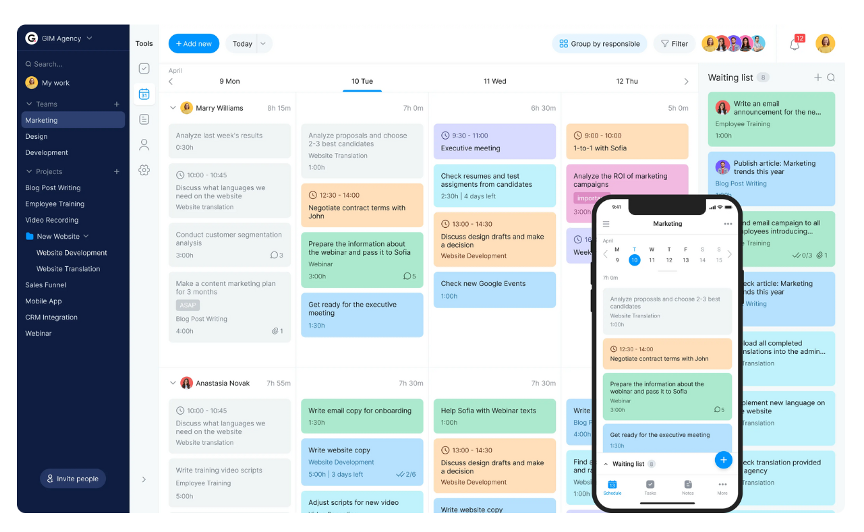
Bordio est une plateforme de gestion du travail conçue pour les équipes qui souhaitent améliorer leur productivité grâce à la gestion des projets, des tâches et du temps. Elle est utilisée par des équipes du marketing, du design, du développement et des ressources humaines pour organiser les projets, planifier les tâches et collaborer.
Pourquoi c'est une bonne alternative à Height.app : Bordio vous permet de configurer les flux de travail et les statuts des tâches selon les besoins de votre équipe, ce qui facilite la gestion des projets complexes. Vous pouvez utiliser des calendriers de planification et des tableaux Kanban pour visualiser clairement les tâches et mieux gérer votre temps. Comme il fonctionne avec les outils que vous utilisez déjà, votre équipe peut conserver ses flux de travail habituels. L'accent mis sur la personnalisation et l'intégration fait de Bordio une option flexible pour différentes configurations d'équipe.
Fonctionnalités et intégrations remarquables :
Les fonctionnalités comprennent une liste d'attente pour les tâches futures, ce qui vous aide à planifier à l'avance et à rester organisé. Vous pouvez planifier des réunions directement dans la plateforme, ce qui vous fait gagner du temps et centralise toutes les informations. Bordio propose également une application mobile, vous permettant de gérer les tâches et de communiquer avec votre équipe lors de vos déplacements.
Les intégrations comprennent Google Calendar, Slack, Microsoft Teams, Zoom et Zapier.
Pros and Cons
Pros:
- Statuts de tâches personnalisés pour des flux de travail sur mesure
- Possibilité d'inviter des clients ou des freelances à rejoindre des projets spécifiques
- Outil de notes dédié pouvant stocker des images de projet, des liens, des listes et des cases à cocher
Cons:
- L'accent mis sur la simplicité limite parfois les fonctionnalités
- Moins d'intégrations que les concurrents

Trello
Idéal pour l'organisation visuelle des tâches
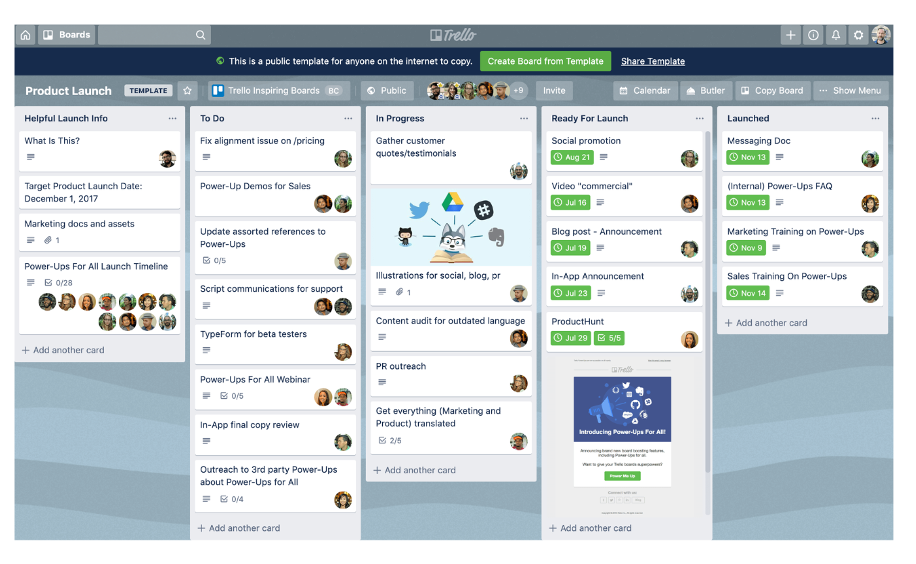
Trello est un outil visuel de gestion de projets qui utilise des tableaux, des listes et des cartes pour aider les équipes à organiser les tâches et les projets. Il est largement utilisé dans différents secteurs pour la gestion visuelle des tâches et la collaboration.
Pourquoi c'est une bonne alternative à Height.app : Trello vous propose des tableaux et des cartes qui facilitent l'organisation des tâches. Vous pouvez configurer les flux de travail selon les méthodes qui conviennent le mieux à votre équipe. La fonctionnalité de glisser-déposer et les visuels clairs permettent à chacun de rester sur la bonne voie. Si vous recherchez une gestion simple et visuelle des tâches, Trello aide votre équipe à avoir une vue d'ensemble du projet en un coup d'œil.
Fonctionnalités et intégrations remarquables :
Les fonctionnalités comprennent des tableaux, des listes et des cartes personnalisables pour organiser les tâches de la manière qui convient à votre équipe. Vous pouvez ajouter des échéances, des étiquettes et des listes de contrôle à chaque carte afin de suivre l'avancement. Trello propose également des fonctionnalités d'automatisation pour simplifier les tâches répétitives et améliorer l'efficacité.
Les intégrations comprennent Slack, Google Drive, Dropbox, Microsoft Teams, Jira Cloud, Confluence, Evernote, Salesforce, GitHub, GitLab et Zapier.
Pros and Cons
Pros:
- Système de tableaux Kanban hautement visuel pour la gestion des tâches
- Interface intuitive avec fonctionnalité de glisser-déposer
- Outil d'automatisation Butler intégré pour les tâches répétitives
Cons:
- Ne convient pas aux flux de travail de projets complexes
- Les règles d'automatisation avancées nécessitent un abonnement payant
Backlog
Idéal pour la gestion du code
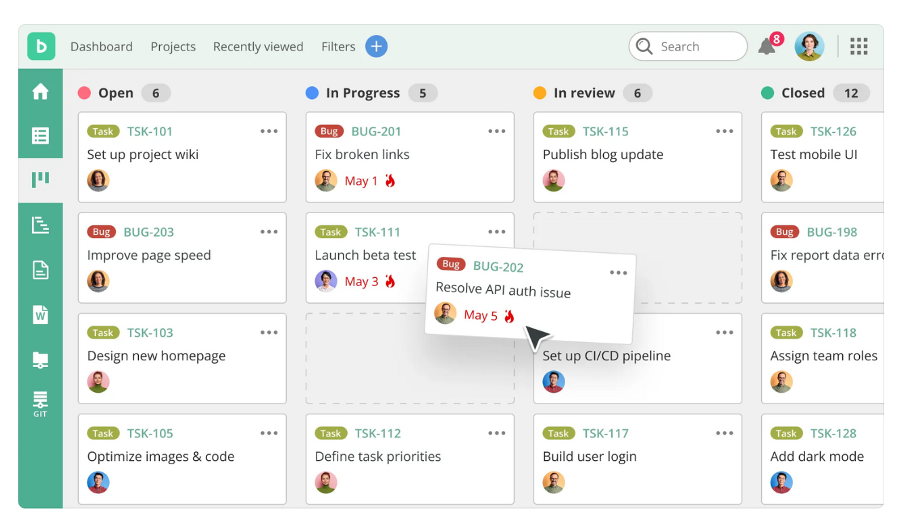
Backlog est un outil de gestion de projet et de collaboration conçu pour les développeurs et les équipes projet afin de gérer les tâches, de suivre les problèmes et de collaborer sur le code. Ses principaux utilisateurs sont les équipes de développement logiciel et les services informatiques, qui cherchent à améliorer la gestion des tâches et le contrôle des versions.
Pourquoi c'est une bonne alternative à Height.app : Backlog vous fournit des dépôts Git et SVN intégrés pour gérer le code et collaborer avec votre équipe. Vous pouvez suivre les problèmes et gérer les projets afin de rester organisé et de respecter les délais. Son interface simple permet à votre équipe de gérer facilement les projets, qu'ils soient petits ou complexes. Grâce à son orientation vers le code et le travail d'équipe, Backlog convient parfaitement aux équipes axées sur la technologie.
Fonctionnalités et intégrations remarquables :
Les fonctionnalités comprennent des diagrammes de Gantt pour visualiser les échéances et la progression des projets. Vous pouvez créer des flux de travail personnalisés adaptés aux processus de votre équipe et améliorer la gestion des tâches. Backlog propose également des wikis et le partage de fichiers afin de centraliser la documentation et les ressources des projets.
Les intégrations comprennent Slack, Redmine, Jenkins, Cacoo, Jira Importer, Google Drive, Microsoft Teams, Box et Dropbox.
Pros and Cons
Pros:
- Contrôle des versions intégré
- Gestion de projet unifiée, suivi des problèmes et des bugs, contrôle des versions et collaboration
- Les flux de travail personnalisables prennent en charge diverses méthodologies de gestion de projet
Cons:
- Fonctionnalités limitées dans les formules de base
- Nécessite des connaissances techniques

Shortcut
Ideale per l'accesso remoto sicuro
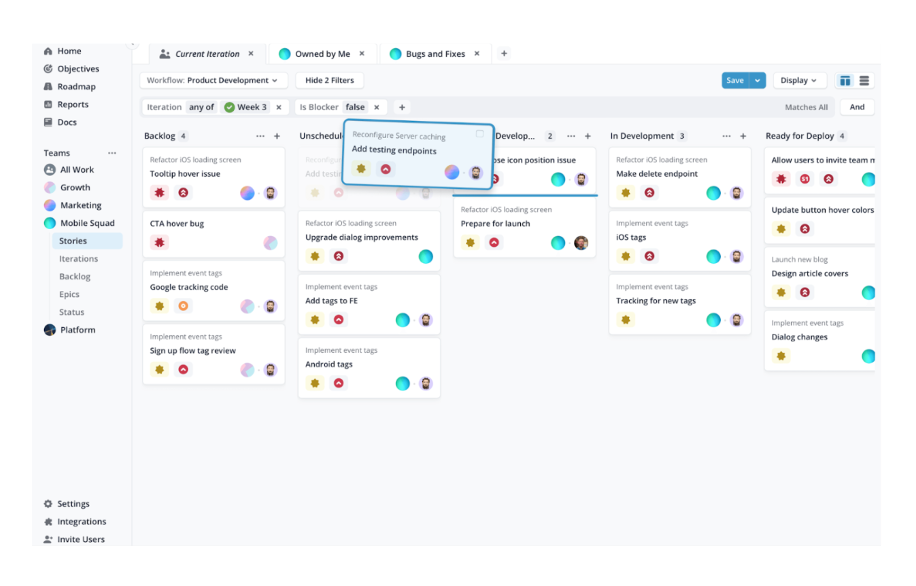
RemotePC è un software di accesso remoto sicuro, progettato per un'ampia gamma di utenti, tra cui privati, piccoli uffici, team e aziende. Svolge funzioni essenziali, tra cui l'accesso remoto a più computer, il trasferimento di file e la stampa da remoto.
Perché è una valida alternativa a Zoho Assist: RemotePC offre accesso illimitato agli utenti, una soluzione ideale se il tuo team necessita di ampie capacità di accesso remoto. Le sue funzionalità includono trasferimenti sicuri di file, strumenti di collaborazione e accesso assistito per l'assistenza clienti. La scalabilità e la facilità d'uso del software lo rendono una scelta pratica sia per applicazioni personali che aziendali. Le misure di sicurezza, come TLS v 1.2 con crittografia AES-256, ne aumentano l'attrattiva per le esigenze di assistenza IT.
Funzionalità e integrazioni principali:
Le funzionalità includono la stampa da remoto, una lavagna per la collaborazione e l'accesso da dispositivi mobili. Queste funzionalità aiutano il tuo team a lavorare in modo efficiente da qualsiasi luogo. Gli strumenti di gestione e monitoraggio degli utenti di RemotePC sono inoltre utili per le aziende che necessitano di supervisione.
Le integrazioni includono Zendesk, Freshdesk, Jira, Okta, G Suite, OneLogin e altro.
Pros and Cons
Pros:
- Licenze utente illimitate
- Trasferimenti sicuri di file
- Accesso da dispositivi mobili disponibile
Cons:
- Nessuna demo disponibile
- Nessun piano gratuito disponibile

Linear
Idéal pour les équipes de développement de produits
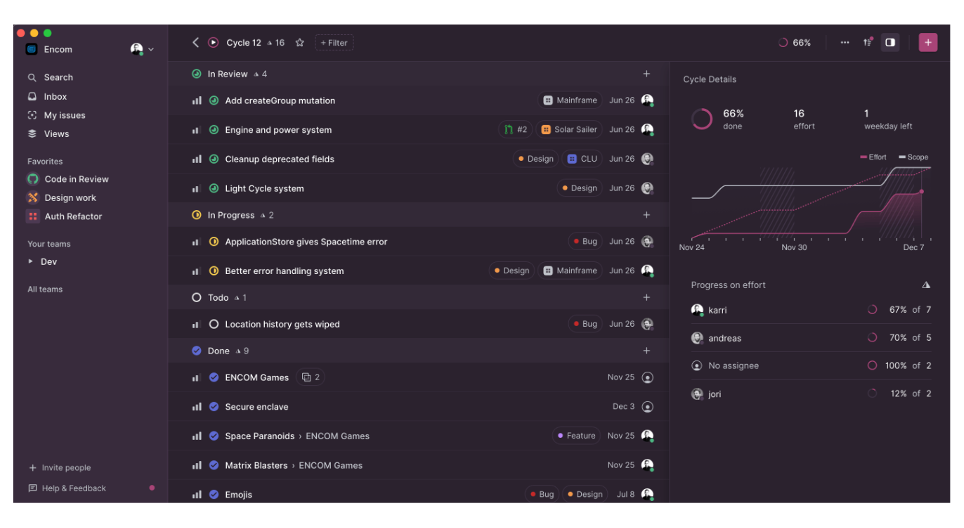
Linear est un outil de développement de produits conçu pour améliorer les flux de travail des équipes en gérant les problèmes, les projets et les feuilles de route des produits. Il s’adresse aussi bien aux startups qu’aux entreprises établies, en mettant l’accent sur l’amélioration de la productivité et de la qualité de l’exécution.
Pourquoi c’est une bonne alternative à Height.app : Les outils assistés par l’IA et les analyses en temps réel de Linear vous aident à gérer les tâches et à planifier les sprints plus efficacement. Vous pouvez configurer les flux de travail selon les besoins de votre équipe et utiliser des outils de projet conçus pour le développement de produits. Grâce à la collaboration en temps réel, tout le monde reste organisé et sur la même longueur d’onde. Linear évolue également avec votre équipe et protège vos données.
Fonctionnalités et intégrations remarquables :
Les fonctionnalités comprennent des analyses en temps réel pour suivre l’avancement des projets, des flux de travail personnalisables adaptés aux besoins de votre équipe et l’automatisation des flux de travail Git pour une intégration fluide. Le système de triage aide à gérer efficacement les travaux entrants, tels que les rapports de bogues et les demandes de fonctionnalités. Linear propose également un accès mobile pour garder votre équipe connectée lors de ses déplacements.
Les intégrations comprennent GitHub, GitLab, Slack, Figma, Notion, Google Sheets, Sentry Agent, Zapier et Jira.
Pros and Cons
Pros:
- Acheminement automatisé des problèmes
- Assistance intelligente au triage
- Fonctionnalités axées sur les développeurs
Cons:
- Moins d’options pour les modifications complexes des flux de travail
- Les équipes en dehors de l’ingénierie peuvent trouver l’interface moins intuitive

Bitrix24
Idéal pour les outils avancés gratuits
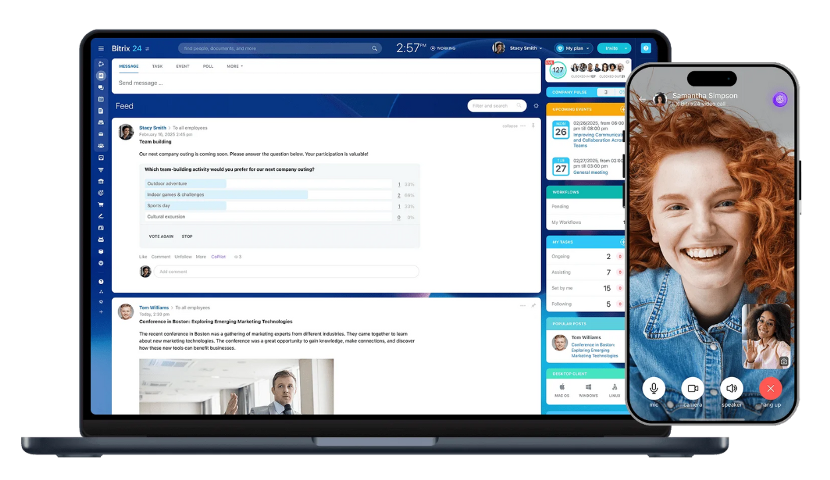
Bitrix24 est une plateforme de gestion d'entreprise qui propose une gamme d'outils pour la collaboration, la communication et la gestion de projets. Elle est conçue pour les entreprises de toutes tailles et fournit des fonctions essentielles telles que la gestion des tâches, le CRM et la communication d'équipe.
Pourquoi c'est une bonne alternative à Height.app : Bitrix24 vous offre un large éventail d'outils gratuitement, ce qui est utile si votre équipe dispose d'un budget limité. Vous pouvez suivre les tâches, utiliser des diagrammes de Gantt et enregistrer le temps consacré afin de garder vos projets organisés. Grâce au CRM intégré et aux outils de communication, vous pouvez gérer les interactions avec vos clients au même endroit. La réunion de tous ces outils fait de Bitrix24 une alternative remarquable à Height.app.
Fonctionnalités et intégrations remarquables :
Les fonctionnalités incluent la gestion des documents pour garder vos fichiers organisés et sécurisés. La plateforme propose également la visioconférence pour faciliter les réunions à distance avec votre équipe. Les outils RH de Bitrix24 vous aident à gérer les dossiers des employés et les évaluations de performance.
Les intégrations incluent Slack, Google Drive, Dropbox, Microsoft Office, Zoom, Mailchimp, QuickBooks et Zendesk.
Pros and Cons
Pros:
- Fonctionnalités CRM puissantes
- Personnalisation et flexibilité élevées pour créer des flux de travail adaptés
- Forfait gratuit permanent et options tarifaires forfaitaires
Cons:
- Vitesse d'exécution parfois inférieure à celle d'outils plus spécialisés
- L'interface peut sembler encombrée

GoodDay
Idéal pour la gestion visuelle de projets à code source ouvert
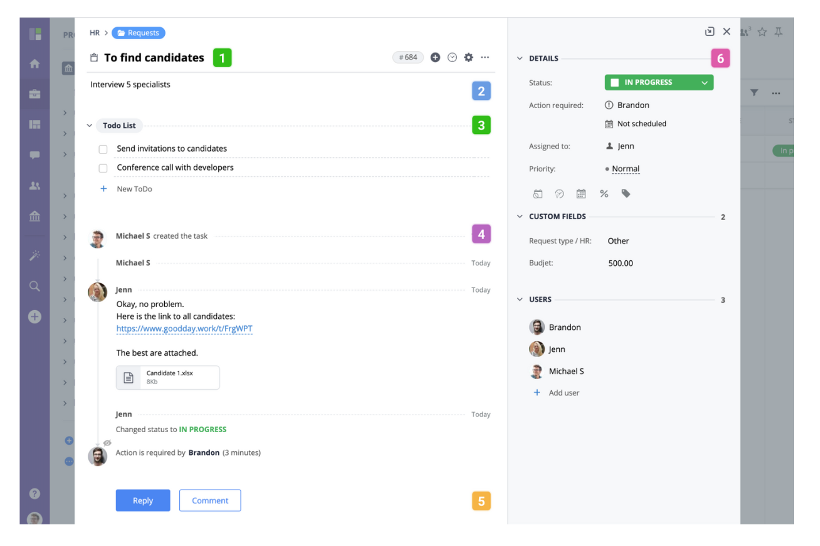
GoodDay est une plateforme de gestion de projets et de productivité à code source ouvert et auto-hébergée. Elle est conçue pour aider les équipes à améliorer leurs flux de travail liés aux projets et leur gestion des tâches. Elle est utilisée par des entreprises de toutes tailles pour organiser les tâches, suivre les progrès et renforcer la collaboration au sein des équipes.
Pourquoi c'est une bonne alternative à Height.app : GoodDay vous offre des vues chronologiques et des tableaux de tâches afin que votre équipe puisse avoir une vue d'ensemble. Vous pouvez configurer les flux de travail comme vous le souhaitez et planifier les projets en fonction de vos processus. Grâce aux analyses intégrées, votre équipe bénéficie d'informations sur les performances et la productivité. L'accent mis sur la gestion visuelle des tâches vous aide à rester organisé et à garder une vision claire.
Fonctionnalités et intégrations remarquables :
Les fonctionnalités comprennent des outils de rapports avancés qui vous aident à analyser les performances des projets et à prendre des décisions éclairées. Vous pouvez utiliser des champs personnalisés pour adapter la plateforme aux besoins spécifiques de votre équipe. GoodDay propose également des fonctionnalités de gestion des objectifs afin d'aligner les efforts de votre équipe sur les objectifs généraux de l'entreprise.
Les intégrations comprennent Google Calendar, Slack, Jira, Trello, Dropbox, GitHub, Asana, Zapier et GitLab.
Pros and Cons
Pros:
- Gestion visuelle des tâches
- Types de tâches, statuts, champs, tableaux de bord et rapports personnalisables
- Rapports et analyses avancés intégrés
Cons:
- Liste de fonctionnalités impressionnante pour les nouveaux utilisateurs
- Certaines fonctionnalités de sécurité sont uniquement disponibles dans les formules premium

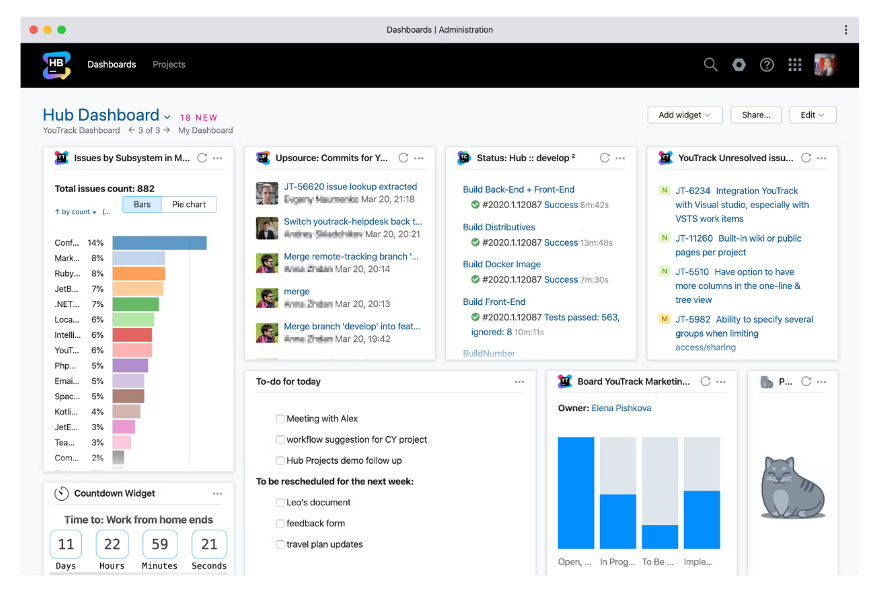
YouTrack est un outil de suivi des problèmes et de gestion de projets conçu pour les équipes de développement afin de gérer les projets, de suivre les tâches et de traiter les bogues. Il est principalement utilisé par les développeurs de logiciels et les chefs de projet pour optimiser leur flux de travail et améliorer la visibilité des projets.
Pourquoi c'est une bonne alternative à Height.app : YouTrack vous offre un suivi des problèmes, des tableaux agiles et une collaboration en temps réel conçus spécifiquement pour les développeurs. Vous pouvez suivre le temps et configurer des flux de travail adaptés à votre équipe. Comme il se connecte aux environnements de développement, il s'intègre parfaitement à votre configuration technique. Grâce à sa flexibilité, votre équipe peut ajuster ses processus au fur et à mesure que les projets évoluent.
Fonctionnalités et intégrations remarquables :
Les fonctionnalités comprennent un puissant moteur de recherche permettant de trouver rapidement les problèmes et les tâches. Vous pouvez créer des champs et des flux de travail personnalisés pour les adapter aux processus de votre équipe. YouTrack propose également des outils de gestion de projets agiles, tels que la planification des sprints et la gestion du carnet de tâches en attente, pour aider votre équipe à rester organisée.
Les intégrations comprennent Slack, GitHub, GitLab, Bitbucket, Compte Microsoft, Google Workspace, Zendesk, Confluence et Jira.
Pros and Cons
Pros:
- Personnalisation avancée des champs, des attributs des problèmes et des flux de travail complexes
- Fonction de recherche unique basée sur des requêtes
- Intégration approfondie avec les outils de développement
Cons:
- Documentation et configuration complexes
- Interface utilisateur obsolète par rapport aux outils axés sur la conception

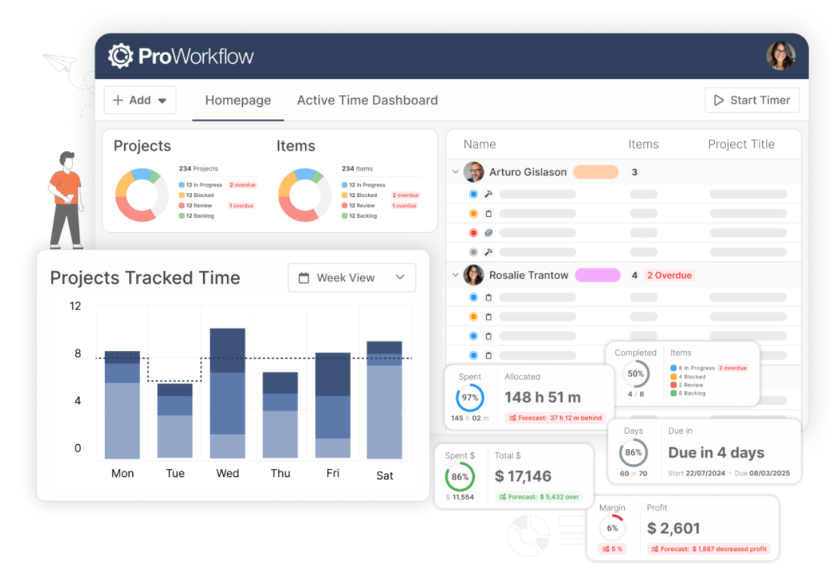
ProWorkflow est un outil de gestion de projets et de suivi du temps utilisé par les entreprises pour gérer les tâches, les projets et les feuilles de temps. Il est conçu pour les équipes ayant besoin de fonctions détaillées de suivi et de création de rapports afin d'améliorer leur productivité.
Pourquoi c'est une bonne alternative à Height.app : ProWorkflow propose des fonctionnalités de suivi du temps et de gestion financière, ce qui en fait une solution idéale pour les équipes qui doivent surveiller les budgets et les coûts des projets. Sa gestion des tâches et sa visualisation des échéances contribuent à maintenir les projets sur la bonne voie. Vous pouvez personnaliser les rapports afin d'obtenir des informations sur les performances des projets et l'allocation des ressources. L'accent mis par la plateforme sur le suivi financier détaillé apporte une valeur supplémentaire aux entreprises qui gèrent des budgets complexes.
Fonctionnalités et intégrations remarquables :
Les fonctionnalités comprennent un tableau de bord intuitif qui offre une vue d'ensemble claire de vos projets et de vos tâches. Vous pouvez utiliser la vue chronologique pour planifier et gérer directement les échéanciers des projets. ProWorkflow propose également le partage et le stockage de fichiers afin de conserver tous les documents liés aux projets dans un emplacement unique.
Les intégrations comprennent Xero, QuickBooks Online, FreshBooks, Dropbox, Google Drive, Microsoft OneDrive, Box et Zapier.
Pros and Cons
Pros:
- Gestion détaillée des dépenses et des matériaux
- Suivi intégré du temps et des coûts
- Service client très bien noté
Cons:
- Moins adapté à la facturation forfaitaire et à la facturation par étapes clées
- Fonctionnalités de l'application mobile limitées par rapport à celles de la version pour ordinateur

Jira
Idéal pour le suivi de projets complexes
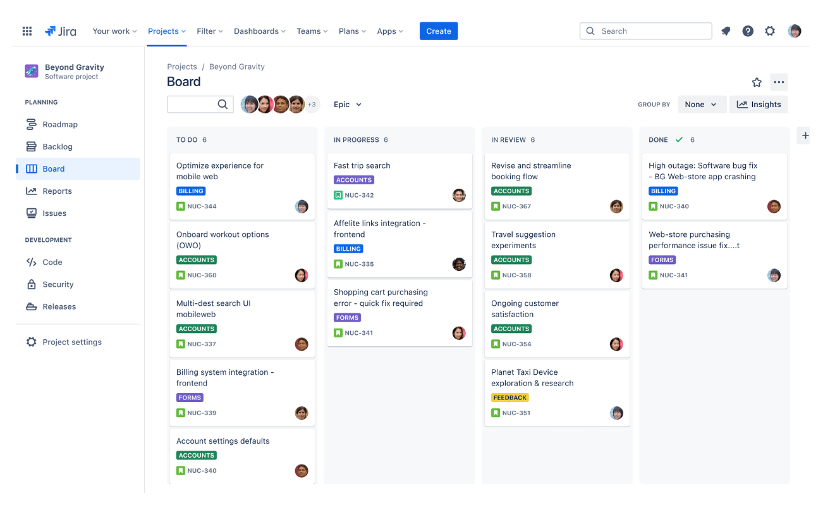
Jira est un outil de gestion de projets principalement utilisé par les équipes de développement logiciel pour suivre et gérer les projets, les bugs et les tâches. Ses principales fonctions comprennent la planification des projets, le suivi de leur progression et la mise en œuvre de méthodologies agiles comme Scrum et Kanban.
Pourquoi c'est une bonne alternative à Height.app : Jira excelle dans la gestion de projets complexes grâce à ses fonctionnalités de suivi des problèmes et de création de rapports. La personnalisation avancée des flux de travail vous permet d'adapter les processus de gestion de projets aux besoins spécifiques de votre équipe. Les tableaux adaptatifs et les outils de planification des sprints en font une solution idéale pour les équipes qui suivent des pratiques agiles. Les fonctionnalités de création de rapports de Jira fournissent des informations sur les performances des projets, vous permettant de prendre des décisions éclairées.
Fonctionnalités et intégrations remarquables :
Fonctionnalités comprennent des outils détaillés de création de rapports qui fournissent des informations sur les performances et la progression des projets. Vous pouvez personnaliser les flux de travail pour les adapter aux processus de votre équipe et garantir une gestion efficace des tâches. Jira propose également un vaste ensemble d'outils, notamment des tableaux Scrum et Kanban, pour les équipes qui suivent des méthodologies agiles.
Intégrations notamment Slack, GitHub, Microsoft Teams, Confluence, Bitbucket, Trello, Google Workspace, Zendesk, Zoom et Salesforce.
Pros and Cons
Pros:
- Personnalisation avancée des flux de travail pour les aligner sur les exigences de l'entreprise
- Suite complète de rapports et tableaux de bord personnalisables
- Vaste place de marché de modules complémentaires
Cons:
- Une configuration efficace nécessite des compétences en administration
- Interface visuellement encombrée
Autres alternatives à Height.app
Voici quelques alternatives supplémentaires à Height.app qui n’ont pas été retenues dans ma sélection, mais qui méritent tout de même votre attention :
- Zoho Sprints
Idéal pour une gestion axée sur la confidentialité
- Dart
Idéal pour la gestion des tâches pilotée par l’IA
- monday AI Workspace
Idéal pour les automatisations de flux de travail alimentées par l’IA
- Asana
Idéal pour la hiérarchisation des tâches


Comment j'évalue les alternatives à Height App
Je divise mon évaluation en deux niveaux : les critères de base que chaque outil doit remplir—prise en charge des sprints, gestion multi-vues des tâches, intégrations dev—et les éléments différenciateurs qui distinguent les meilleures options.
Fonctionnalités de base (Prérequis pour cette liste)
Lorsque je sélectionne des outils pour ma liste, j'évalue chacun sur une échelle de 0 (la fonctionnalité n'est pas proposée) à 5 (excellente maîtrise de ce domaine) pour chaque fonctionnalité essentielle listée ci-dessous. Ensuite, je calcule le score total de l'outil en pourcentage. Chaque outil doit atteindre un score total minimum de 65% pour être pris en compte.
- Gestion des tâches multi-vues : Je vérifie si un outil propose des vues en liste, kanban, Gantt, calendrier et tableur afin que les équipes puissent passer de la planification du backlog de sprint au suivi du calendrier de publication.
- Automatisation alimentée par l'IA : J'évalue la profondeur de l'IA d'une plateforme au-delà de la simple génération de texte—des outils comme Linear et ClickUp, par exemple, abordent la hiérarchisation automatique et les mises à jour intelligentes différemment.
- Collaboration en temps réel : Les équipes travaillant en asynchrone à travers différents fuseaux horaires nécessitent l'édition de tâches en direct, des commentaires filés et des indicateurs de présence. Je recherche donc une collaboration plus aboutie que de simples commentaires.
- Soutien aux sprints & à l'agilité : La gestion du backlog, les cycles de sprint, le suivi de vélocité et les graphiques d'avancement sont pris en compte—surtout pour les responsables techniques en cycles de deux semaines.
- Intégrations avec les outils de développement : Une alternative à Height doit proposer des connexions natives à GitHub ou GitLab, Slack et Figma au minimum, et j'examine si les synchronisations sont unidirectionnelles ou bidirectionnelles.
- Workflows personnalisables : Je regarde si vous pouvez définir vos propres statuts, types de tâches, champs personnalisés et règles d'automatisation pour refléter la manière dont votre équipe livre réellement le travail.
Une fois la liste d'outils répondant à ces critères établie, j'analyse ce qui distingue réellement chaque plateforme.
Facteurs de différenciation (Ce qui distingue les fournisseurs)
Voici comment je compare et différencie les différents fournisseurs :
Fonctionnalités remarquables
Des docs et wikis intégrés sont importants car ils permettent de lier directement un PRD ou une spécification de design aux tâches générées—pas besoin de passer sur Notion ou Confluence. J'évalue également le suivi du temps et les vues de charge de travail, car les responsables techniques gérant plusieurs équipes doivent repérer rapidement une surcharge avant qu'elle ne perturbe un sprint. Enfin, les tableaux de bord avancés d'analyse sont essentiels ; je privilégie des rapports inter-projets qui synthétisent la vélocité et le temps de cycle dans des vues partageables avec la direction.
Au-delà des fonctionnalités
La voie de migration est le premier point que je vérifie—si une plateforme propose un importateur Height direct conservant l'historique, les commentaires et champs personnalisés, cela économise des semaines de nettoyage manuel. La transparence tarifaire compte aussi : des équipes passant de 10 à 100 places ont besoin d'un coût par utilisateur prévisible sans surprises liées aux modules IA. Pour les équipes techniques qui gèrent des données client, j'examine aussi la conformité SOC 2 Type II et la prise en charge de l'authentification SSO, du provisioning SCIM et des journaux d'audit dans les forfaits standards.
Pourquoi chercher une alternative à Height.app ?
Bien que Height.app soit un bon choix d'outil de collaboration de projets, plusieurs raisons peuvent pousser certains utilisateurs à rechercher d'autres solutions. Vous cherchez peut-être une alternative à Height.app parce que…
- Vous avez besoin d'options de personnalisation plus avancées
- Votre équipe a besoin de meilleures fonctionnalités hors ligne
- Vous souhaitez un outil doté d'une interface plus simple
- Vos projets nécessitent des fonctionnalités de création de rapports plus approfondies
- Vous avez besoin d'une solution offrant davantage d'options d'intégration
- Votre équipe s'agrandit et a besoin d'une tarification évolutive
Si l'une de ces situations vous correspond, vous êtes au bon endroit. Ma liste comprend des outils de collaboration de projets mieux adaptés aux équipes confrontées à ces difficultés avec Height.app et à la recherche d'autres solutions.
Fonctionnalités principales de Height.app
Voici quelques-unes des principales fonctionnalités de Height.app, afin de vous aider à comparer les offres des autres solutions :
- Automatisation alimentée par l’IA : automatise les tâches courantes afin de libérer du temps pour votre équipe.
- Gestion des tâches : organise efficacement les tâches afin d’améliorer la productivité.
- Flux de travail personnalisés : permettent à votre équipe d’adapter les processus à ses besoins spécifiques.
- Collaboration en temps réel : permet une communication instantanée, la messagerie, les notifications et les mises à jour en temps réel entre les membres de l’équipe.
- Tableaux de bord complets : offrent une vue d’ensemble claire de l’état des projets et des indicateurs.
- Capacités d’intégration : se connectent à divers outils afin d’optimiser les flux de travail.
- Suivi du temps : surveille le temps consacré aux tâches afin de gérer efficacement les charges de travail.
- Tableaux Kanban : permettent de visualiser les tâches pour faciliter leur suivi et leur gestion.
- Diagrammes de Gantt : aident à planifier et à programmer les échéances des projets.
- Imbrication des sous-tâches : décompose les tâches complexes en éléments faciles à gérer.