



Microsoft Planner vs. Trello: Comparación y Reseñas de Expertos para 2026



Microsoft Planner ofrece una forma sencilla de organizar tareas y colaborar en equipo, mientras que Trello proporciona un enfoque flexible y visual para gestionar proyectos. Ambas herramientas buscan mejorar la productividad, pero sus funcionalidades principales y experiencias de usuario difieren significativamente.
He probado y analizado cada herramienta, y he realizado una comparación detallada de sus funciones, ventajas y desventajas, y precios para ayudarte a decidir qué software de gestión de proyectos se adapta mejor a las necesidades de tu equipo.
Microsoft Planner vs. Trello: An Overview
Trello

Por qué confiar en nuestras recomendaciones de software
Nuestro equipo lleva probando y evaluando software desde 2012. Como gestores de proyectos, sabemos lo difícil —y lo importante— que es elegir el software adecuado.
Para esta guía, evaluamos las herramientas mediante pruebas prácticas e investigación independiente, puntuando las herramientas según nuestros criterios de selección. También nos basamos en la experiencia de líderes de opinión del sector y de profesionales en activo de la gestión de proyectos.
Nuestras reseñas reflejan nuestro criterio editorial humano, no un discurso de ventas.
Revisores expertos:
Microsoft Planner vs. Trello Pricing Comparison
| Microsoft Planner | Trello | |
|---|---|---|
| Free Trial | 30-day free trial | 14-day free trial |
| Pricing | From $10/user/month (billed annually) | From $5/user/month (billed annually) |
Precios y costes ocultos de Microsoft Planner vs. Trello
El precio de Microsoft Planner está incluido con algunas suscripciones a Microsoft 365, lo que significa que podrías incurrir en costes adicionales si necesitas actualizar tu plan de Microsoft 365 para acceder a la herramienta. El modelo de precios de Trello utiliza una estructura por niveles (que incluye una versión gratuita) que aumenta a medida que necesitas más usuarios o funciones avanzadas.
Para elegir la herramienta de gestión de proyectos adecuada, evalúa las funciones específicas que necesita tu equipo y los planes de crecimiento, y considera cualquier coste asociado de suscripción o actualización para asegurarte de que el modelo de precios se ajusta a los objetivos de tu proyecto a largo plazo.
Microsoft Planner vs. Trello Feature Comparison
Microsoft Planner se integra con Microsoft 365, lo que permite coordinar las tareas del equipo dentro de un ecosistema ya conocido. Esto también resulta ideal si ya utilizas herramientas de Microsoft. Los tableros Kanban de Trello permiten visualizar flujos de trabajo, mantener alineado al equipo y seguir el avance. Esto es especialmente útil para equipos que necesitan un enfoque flexible y visual.
| Microsoft Planner | Trello | |
|---|---|---|
| API | ||
| Collaboration Support | ||
| Dashboard | ||
| Dashboards | ||
| Data Export | ||
| Data Import | ||
| External Integrations | ||
| Gantt Charts | ||
| Multi-User | ||
| Notifications | ||
| Resource Management | ||
| Scheduling | ||
| Task Scheduling/Tracking |
Integraciones de Microsoft Planner vs. Trello
| Integración | Microsoft Planner | Trello |
|---|---|---|
| Microsoft Teams | ✅ | ✅ |
| Slack | ❌ | ✅ |
| Google Drive | ❌ | ✅ |
| OneDrive | ✅ | ❌ |
| Dropbox | ❌ | ✅ |
| Jira | ❌ | ✅ |
| Asana | ❌ | ❌ |
| Outlook | ✅ | ✅ |
| API | ✅ | ✅ |
| Zapier | ❌ | ✅ |
La integración de Microsoft Planner con Microsoft Teams permite coordinar tareas dentro de los canales de comunicación existentes (si ya dependes del ecosistema de Microsoft). La integración de Trello con Slack es ideal para equipos que necesitan mantener a todos informados mediante actualizaciones instantáneas y trabajo colaborativo.
Seguridad, cumplimiento y fiabilidad de Microsoft Planner vs. Trello
| Factor | Microsoft Planner | Trello |
|---|---|---|
| Cifrado de datos | Microsoft Planner utiliza cifrado en tránsito y en reposo para proteger tus datos. | Trello cifra los datos en tránsito y en reposo utilizando estándares de la industria. |
| Conformidad regulatoria | MS Planner cumple con GDPR y otras normativas internacionales. | Trello cumple con GDPR y CCPA para la protección de datos de los usuarios. |
| Privacidad de los datos | Microsoft Planner ofrece sólidos controles de privacidad dentro del paquete Microsoft 365. | Trello proporciona ajustes de privacidad e informes de transparencia. |
Microsoft Planner aprovecha la infraestructura de seguridad de Microsoft 365, mientras que Trello destaca por su cumplimiento con las principales normativas de protección de datos. Para escoger la herramienta de gestión de tareas adecuada, valora cuál se ajusta mejor a los requisitos regulatorios y de privacidad de tu organización, y considera revisar sus certificaciones de seguridad y opiniones de clientes.
Comparación de Facilidad de Uso: Microsoft Planner vs. Trello
| Factor | Microsoft Planner | Trello |
|---|---|---|
| Interfaz de usuario | Microsoft Planner ofrece un diseño limpio y organizado integrado con las herramientas de Microsoft 365. | Trello proporciona un tablero Kanban visualmente intuitivo y fácil de usar que resulta sencillo de navegar. |
| Experiencia de incorporación | El inicio en Microsoft Planner es sencillo para quienes ya están familiarizados con los productos de Microsoft. | Trello ofrece un tutorial simple de arrastrar y soltar para que comiences rápidamente y reducir la curva de aprendizaje. |
| Configuración | La configuración de Microsoft Planner es rápida y requiere poca personalización, lo que lo hace ideal para equipos pequeños y principiantes. | La configuración de Trello es ágil, requiriendo solo un registro simple para comenzar a gestionar tareas. |
Microsoft Planner es más fácil para quienes ya conocen Microsoft 365, pero su configuración es en general sencilla. Trello destaca por su interfaz simple e intuitiva y su rápida puesta en marcha, aunque carece de algunas de las funciones de organización estructurada que ofrece Microsoft Planner.
Microsoft Planner vs Trello: Pros & Cons
Microsoft Planner
- You can easily assign and track tasks within your team.
- Its integration with Microsoft 365 enhances team collaboration
- The simple, user-friendly interface makes task management straightforward.
- It lacks advanced customization options for complex projects.
- The reporting features are not as robust as some competitors.
- It may not accommodate larger teams needing detailed task dependencies.
Trello
- You can easily visualize your tasks with Trello's board and card layout.
- It's simple to use, making it accessible for team members of all skill levels.
- Trello adapts to your team's workflow, offering flexibility in task management.
- Trello lacks advanced reporting features you might find in more complex tools.
- You can't create intricate task dependencies, which may limit complex project planning.
- Trello's simplicity might not suit large teams with detailed project management needs.
Best Use Cases for Microsoft Planner and Trello
Microsoft Planner
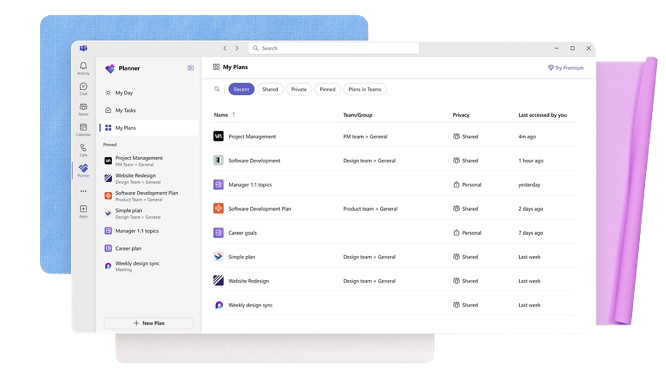
- Small Businesses Microsoft Planner's straightforward interface is perfect for small businesses that need to manage tasks without complex features.
- Marketing Teams It helps marketing teams track campaigns and collaborate effectively with its task assignment and tracking capabilities.
- Educational Institutions Schools and universities can use it to organize academic projects and coordinate activities across departments.
- IT Departments IT teams can benefit from its integration with Microsoft 365, making it easy to manage tech projects and resources.
- Remote Teams For remote teams needing a simple way to track tasks and collaborate, Microsoft Planner provides the necessary tools.
- Nonprofits Nonprofits can use it to manage volunteer tasks and projects efficiently, leveraging its easy-to-use interface.
Trello
- Creative Agencies Trello's visual task management makes it easy for you to track projects, ideas, and client feedback.
- Startups The flexibility Trello offers helps your team adapt quickly as you grow and change.
- Marketing Teams You can easily plan campaigns and track progress with Trello's board system.
- Design Departments Trello's simple interface allows you to manage design projects and revisions efficiently.
- Freelancers You can organize your tasks and deadlines without getting overwhelmed by complex features
- Product Development Trello's adaptability helps your team streamline workflows and manage product roadmaps effectively.
¿Quién debería usar Microsoft Planner y quién debería usar Trello?
En mi opinión, Microsoft Planner es la mejor opción para equipos en entornos corporativos que ya usan Microsoft 365, ya que se integra fácilmente con otras herramientas de Microsoft.
Trello, por otro lado, es perfecto para equipos creativos y startups que necesitan flexibilidad y gestión visual de tareas sin estar atados a un ecosistema específico. Si valoras la simplicidad y una configuración rápida, Trello es tu mejor opción, pero si tu equipo requiere soluciones estructuradas e integradas, Microsoft Planner tiene ventaja.
Differences Between Microsoft Planner and Trello
| Microsoft Planner | Trello | |
|---|---|---|
| Automation | Microsoft Planner has limited automation features within Microsoft 365. | Trello offers extensive automation options via a specific feature called Butler. |
| Integrations | Microsoft Planner integrates deeply with Microsoft 365 tools. | Trello offers broad integrations with various third-party apps. |
| Onboarding | Microsoft Planner is easier for those already using Microsoft products. | Trello provides a quick, intuitive onboarding experience with drag-and-drop. |
| Pricing | Microsoft Planner is included with Microsoft 365 subscriptions and paid plans. | Trello offers a tiered pricing model with a free plan. |
| User Interface | Microsoft Planner has a structured layout familiar to Microsoft users. | Trello features a visual, flexible Kanban board interface. |
| Read Microsoft Planner ReviewOpens new window | Read Trello ReviewOpens new window |
Similarities Between Microsoft Planner and Trello
| Cloud-Based | Microsoft Planner and Trello are cloud-based, so your data is accessible from anywhere. |
|---|---|
| Collaboration | Each tool supports team collaboration and helps with task assignment and sharing updates. |
| Customization | Both platforms provide options to customize your boards and lists to fit your team's workflow. |
| Mobile Usability | Microsoft Planner and Trello both offer mobile apps so you can manage projects on the go. |
| Task Management | Both Microsoft Planner and Trello let you organize tasks and subtasks into boards and checklists so you can help your team members stay on track. |
| Read Microsoft Planner ReviewOpens new window Read Trello ReviewOpens new window | |