

10 alternativas a Height.app para la gestión de proyectos en 2026

10 Lista de las mejores alternativas a Height.app


Gestionar proyectos puede ser una tarea difícil. Hay que coordinar plazos, recursos y dinámicas de equipo. Cuando tu herramienta actual carece de la versatilidad necesaria para satisfacer tus necesidades, puede ser el momento de explorar otras opciones. Puede que Height.app no se adapte al estilo o modelo de negocio de todo el mundo.
He dedicado tiempo a probar y analizar herramientas de gestión de proyectos, y comprendo los desafíos particulares a los que te enfrentas. Mi objetivo es guiarte hacia un software que realmente respalde tu flujo de trabajo.
En este artículo, compartiré información sobre las principales alternativas a Height.app. Encontrarás opciones fáciles de usar que pueden mejorar la colaboración y adaptarse a las necesidades específicas de tu equipo. Encontremos juntos la herramienta adecuada para ti.
¿Qué es Height.app?
Height.app es una herramienta de colaboración en proyectos diseñada para ayudar a los equipos a gestionar hitos y proyectos de forma eficiente. La utilizan habitualmente directores de proyectos, responsables de equipo y coordinadores que necesitan mantener sus equipos organizados y encaminados.
Funciones como el seguimiento de tareas, la colaboración en tiempo real y los flujos de trabajo personalizables ayudan a organizar tus proyectos, mejorar la comunicación y mantener a todo el mundo alineado. En general, Height.app ofrece una plataforma para aumentar la productividad del equipo y la supervisión de los proyectos.
Tabla comparativa de alternativas a Height.app
Esta tabla comparativa destaca los detalles de precios de mis principales alternativas a Height.app.
| Tool | Best For | Trial Info | Price | ||
|---|---|---|---|---|---|
| 1 | Ideal para flujos de trabajo personalizables | Plan gratuito y prueba gratuita de 14 días disponibles | Desde $9.99/usuario/mes | Website | |
| 2 | Ideal para la organización visual de tareas | Prueba gratuita de 14 días | Desde $5/usuario/mes (facturado anualmente) | Website | |
| 3 | Ideal para la gestión del código | Prueba gratuita de 30 días + plan gratuito disponible | Desde $30/mes (facturado anualmente) | Website | |
| 4 | Ideal para flujos de trabajo de ingeniería | Plan gratuito + prueba gratuita de 14 días + demostración gratuita disponible | Desde $8.50/usuario/mes (facturado anualmente) | Website | |
| 5 | Ideal para equipos de desarrollo de productos | Plan gratuito disponible | Desde $10/usuario/mes (facturado anualmente) | Website | |
| 6 | La mejor opción para herramientas avanzadas gratuitas | Plan gratuito + prueba gratuita disponible | Desde $69/organización/mes | Website | |
| 7 | Ideal para la gestión visual de proyectos de código abierto | Plan gratuito disponible | Desde $4/usuario/mes (facturado anualmente) | Website | |
| 8 | Ideal para la integración con herramientas de desarrollo | Plan gratuito y prueba gratuita de 14 días disponibles | Desde $3.67/usuario/mes | Website | |
| 9 | Ideal para el seguimiento financiero | Prueba gratuita de 14 días y demostración gratuita disponibles | Desde $20/usuario/mes | Website | |
| 10 | Ideal para el seguimiento de proyectos complejos | Plan gratuito + prueba gratuita de 14 días disponible | Desde $7.91/usuario/mes (facturado anualmente) | Website |
Por qué confiar en nuestras recomendaciones de software
Nuestro equipo lleva probando y evaluando software desde 2012. Como gestores de proyectos, sabemos lo difícil —y lo importante— que es elegir el software adecuado.
Para esta guía, evaluamos las herramientas mediante pruebas prácticas e investigación independiente, puntuando las herramientas según nuestros criterios de selección. También nos basamos en la experiencia de líderes de opinión del sector y de profesionales en activo de la gestión de proyectos.
Nuestras reseñas reflejan nuestro criterio editorial humano, no un discurso de ventas.
Revisores expertos:
Análisis de las mejores alternativas a Height.app
A continuación encontrarás mis resúmenes detallados de las mejores alternativas a Height.app que han llegado a mi lista. Mis análisis ofrecen una visión de las funciones principales, las ventajas y desventajas, las integraciones y los casos de uso ideales de cada herramienta para ayudarte a encontrar la mejor opción para ti.

Bordio
Ideal para flujos de trabajo personalizables
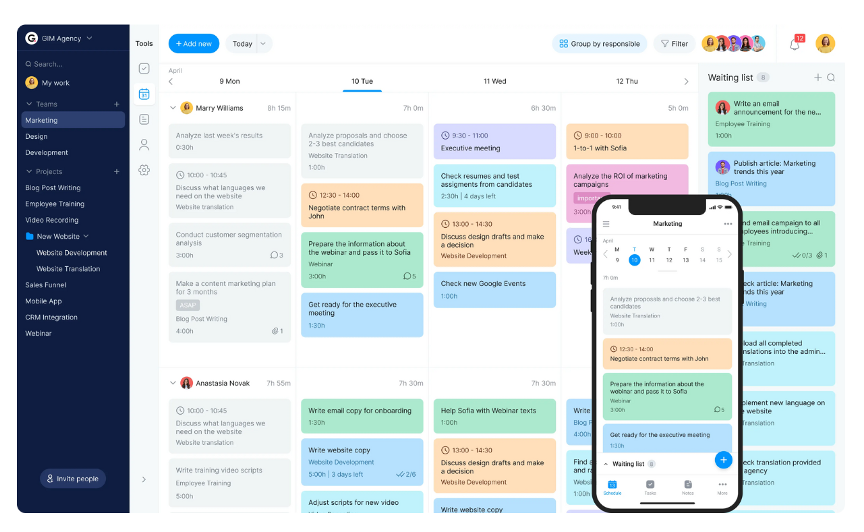
Bordio es una plataforma de gestión del trabajo diseñada para equipos que buscan mejorar la productividad mediante la gestión de proyectos, tareas y tiempo. La utilizan equipos de marketing, diseño, desarrollo y recursos humanos para organizar proyectos, programar tareas y colaborar.
Por qué es una buena alternativa a Height.app: Bordio te permite configurar flujos de trabajo y estados de tareas según las necesidades de tu equipo, lo que facilita la gestión de proyectos complejos. Puedes utilizar planificadores de calendario y tableros Kanban para ver las tareas con claridad y gestionar mejor el tiempo. Como funciona con las herramientas que ya utilizas, tu equipo puede mantener sus flujos de trabajo habituales. El enfoque en la personalización y la integración convierte a Bordio en una opción flexible para distintas configuraciones de equipos.
Características e integraciones destacadas:
Las características incluyen una lista de espera para tareas futuras, que te ayuda a planificar con antelación y mantenerte organizado. Puedes programar reuniones directamente dentro de la plataforma, ahorrando tiempo y manteniendo todo centralizado. Bordio también ofrece una aplicación móvil que te permite gestionar tareas y comunicarte con tu equipo estés donde estés.
Las integraciones incluyen Google Calendar, Slack, Microsoft Teams, Zoom y Zapier.
Pros and Cons
Pros:
- Estados de tareas personalizados para flujos de trabajo a medida
- Posibilidad de invitar a clientes o trabajadores autónomos a unirse a proyectos específicos
- Herramienta de notas específica que puede almacenar imágenes, enlaces, listas y casillas de verificación
Cons:
- El enfoque en la simplicidad a veces limita la funcionalidad
- Menos integraciones que la competencia

Trello
Ideal para la organización visual de tareas

Trello es una herramienta visual de gestión de proyectos que utiliza tableros, listas y tarjetas para ayudar a los equipos a organizar tareas y proyectos. Se utiliza ampliamente en distintos sectores para la gestión visual de tareas y la colaboración.
Por qué es una buena alternativa a Height.app: Trello te ofrece tableros y tarjetas que facilitan la organización de las tareas. Puedes configurar los flujos de trabajo de la manera que mejor funcione para tu equipo. La configuración de arrastrar y soltar y los elementos visuales claros ayudan a que todos sigan el rumbo. Si buscas una gestión de tareas sencilla y visual, Trello ayuda a tu equipo a ver todo el proyecto de un vistazo.
Funciones e integraciones destacadas:
Características incluyen tableros, listas y tarjetas personalizables para organizar las tareas de una manera que se adapte a tu equipo. Puedes añadir fechas de vencimiento, etiquetas y listas de comprobación a cada tarjeta para hacer un seguimiento del progreso. Trello también ofrece funciones de automatización para simplificar las tareas repetitivas y mejorar la eficiencia.
Integraciones incluyen Slack, Google Drive, Dropbox, Microsoft Teams, Jira Cloud, Confluence, Evernote, Salesforce, GitHub, GitLab y Zapier.
Pros and Cons
Pros:
- Sistema de tableros Kanban altamente visual para la gestión de tareas
- Interfaz intuitiva de arrastrar y soltar
- Herramienta de automatización Butler integrada para tareas repetitivas
Cons:
- No es ideal para flujos de trabajo de proyectos complejos
- Las reglas de automatización avanzadas requieren una suscripción de pago
Backlog
Ideal para la gestión del código
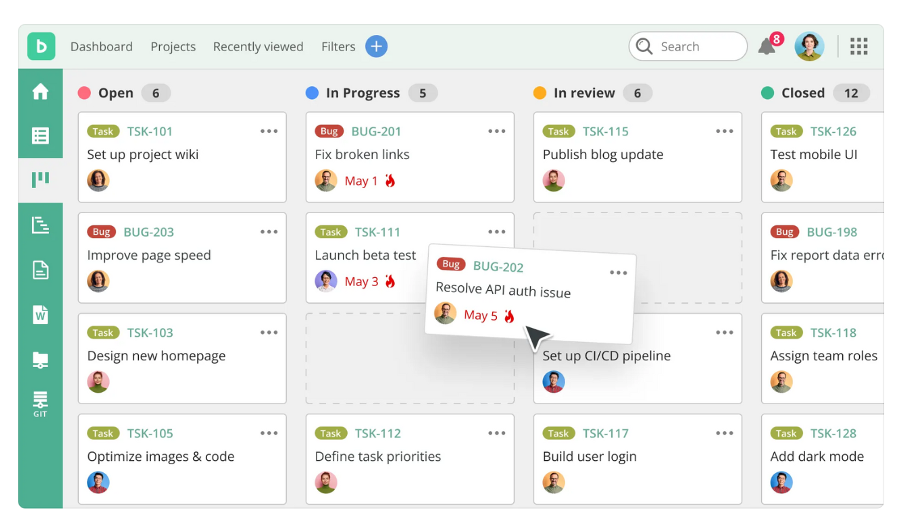
Backlog es una herramienta de gestión de proyectos y colaboración diseñada para desarrolladores y equipos de proyectos, que permite gestionar tareas, realizar un seguimiento de problemas y colaborar en el código. Sus principales usuarios son los equipos de desarrollo de software y los departamentos de TI, con un enfoque en mejorar la gestión de tareas y el control de versiones.
Por qué es una buena alternativa a Height.app: Backlog te ofrece repositorios integrados de Git y SVN para gestionar el código y colaborar con tu equipo. Puedes hacer un seguimiento de los problemas y gestionar proyectos para mantenerte organizado y cumplir con los plazos. Su interfaz sencilla facilita que tu equipo gestione tanto proyectos pequeños como complejos. Gracias a su enfoque en el código y el trabajo en equipo, Backlog funciona bien para equipos centrados en la tecnología.
Funciones e integraciones destacadas:
Las funciones incluyen diagramas de Gantt para visualizar los plazos y el progreso de los proyectos. Puedes crear flujos de trabajo personalizados que se adapten a los procesos de tu equipo y mejoren la gestión de tareas. Backlog también ofrece wikis y uso compartido de archivos para centralizar la documentación y los recursos del proyecto.
Las integraciones incluyen Slack, Redmine, Jenkins, Cacoo, Jira Importer, Google Drive, Microsoft Teams, Box y Dropbox.
Pros and Cons
Pros:
- Control de versiones integrado
- Gestión unificada de proyectos, seguimiento de problemas y errores, control de versiones y colaboración
- Los flujos de trabajo personalizables admiten diversas metodologías de gestión de proyectos
Cons:
- Funciones limitadas en los planes básicos
- Requiere conocimientos técnicos

Shortcut
Ideal para flujos de trabajo de ingeniería
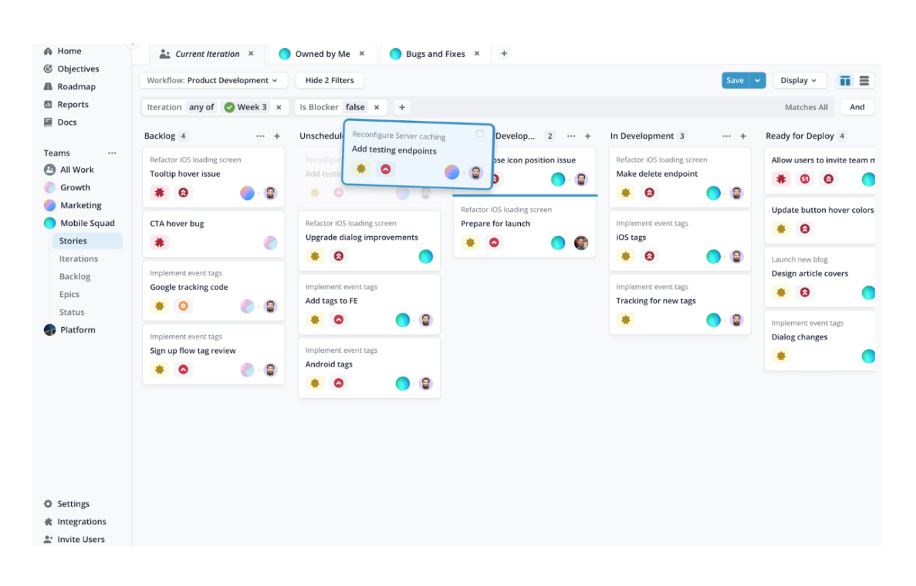
Shortcut es una herramienta de gestión de proyectos diseñada para equipos de software, centrada en tareas como la gestión de sprints y la planificación de proyectos. Los equipos de ingeniería la utilizan ampliamente para mantener los proyectos organizados y encaminados.
Por qué es una buena alternativa a Height.app: Shortcut ofrece gestión de sprints, tableros kanban y hojas de ruta que se adaptan bien al trabajo de ingeniería. Puedes realizar un seguimiento de las tareas, planificar proyectos y gestionar desarrollos complejos sin perder claridad. Tu equipo puede personalizar los flujos de trabajo, establecer objetivos y mantener el control de sus datos para que la información permanezca segura.
Características e integraciones destacadas:
Las características incluyen tableros kanban para la gestión visual de tareas, herramientas de planificación de sprints para mantener tus proyectos dentro del plazo previsto y detallados informes para realizar un seguimiento del progreso. La plataforma también ofrece flujos de trabajo personalizables que se adaptan a los procesos específicos de tu equipo. Puedes vincular los proyectos con los objetivos de la empresa, garantizando la alineación con metas más amplias.
Las integraciones incluyen GitHub, Slack, Figma, GitLab, Bitbucket, Google Drive, Claude Code, Miro y Devin.
Pros and Cons
Pros:
- Gestión eficaz de sprints
- Integración estrecha con GitHub y GitLab
- Informes para detectar tendencias e identificar bloqueos
Cons:
- No es ideal para equipos no técnicos
- Menos funciones avanzadas que algunos competidores

Linear
Ideal para equipos de desarrollo de productos
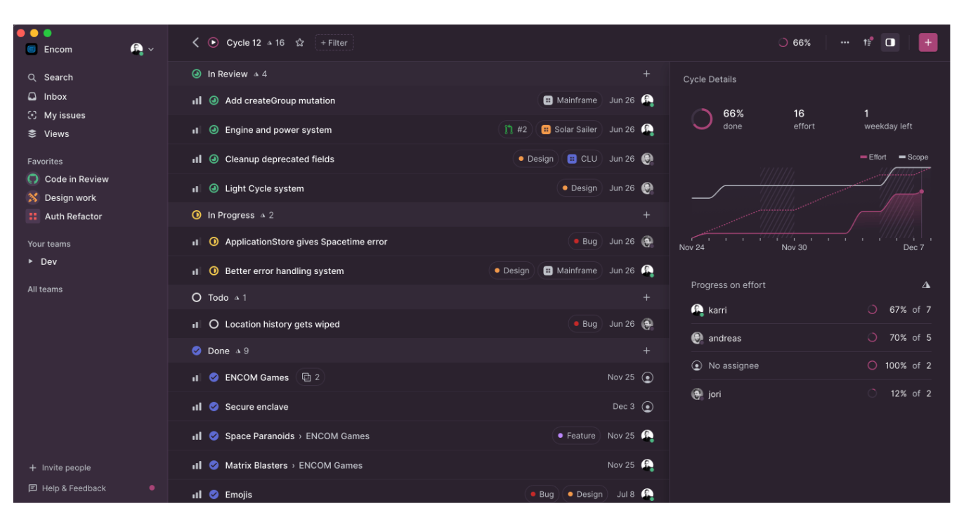
Linear es una herramienta de desarrollo de productos diseñada para mejorar los flujos de trabajo de los equipos mediante la gestión de incidencias, proyectos y hojas de ruta de productos. Está dirigida tanto a startups como a empresas consolidadas, con un enfoque en mejorar la productividad y la calidad de la ejecución.
Por qué es una buena alternativa a Height.app: Las herramientas asistidas por IA y los análisis en tiempo real de Linear te ayudan a gestionar tareas y planificar sprints de forma más eficiente. Puedes configurar los flujos de trabajo según las necesidades de tu equipo y utilizar herramientas de proyectos diseñadas para el desarrollo de productos. Gracias a la colaboración en tiempo real, todos se mantienen organizados y al tanto. Linear también se adapta al crecimiento de tu equipo y mantiene tus datos seguros.
Características e integraciones destacadas:
Características incluyen análisis en tiempo real para realizar un seguimiento del progreso de los proyectos, flujos de trabajo personalizables que se adaptan a las necesidades de tu equipo y automatización de los flujos de trabajo de Git para una integración fluida. El sistema de triaje ayuda a gestionar de forma eficiente el trabajo entrante, como informes de errores y solicitudes de funcionalidades. Linear también ofrece acceso móvil para mantener conectado a tu equipo desde cualquier lugar.
Integraciones incluyen GitHub, GitLab, Slack, Figma, Notion, Google Sheets, Sentry Agent, Zapier y Jira.
Pros and Cons
Pros:
- Enrutamiento automatizado de incidencias
- Asistencia inteligente para el triaje
- Funciones centradas en desarrolladores
Cons:
- Menos opciones para realizar modificaciones complejas en los flujos de trabajo
- Los equipos ajenos a ingeniería pueden considerar que la interfaz es menos intuitiva

Bitrix24
La mejor opción para herramientas avanzadas gratuitas
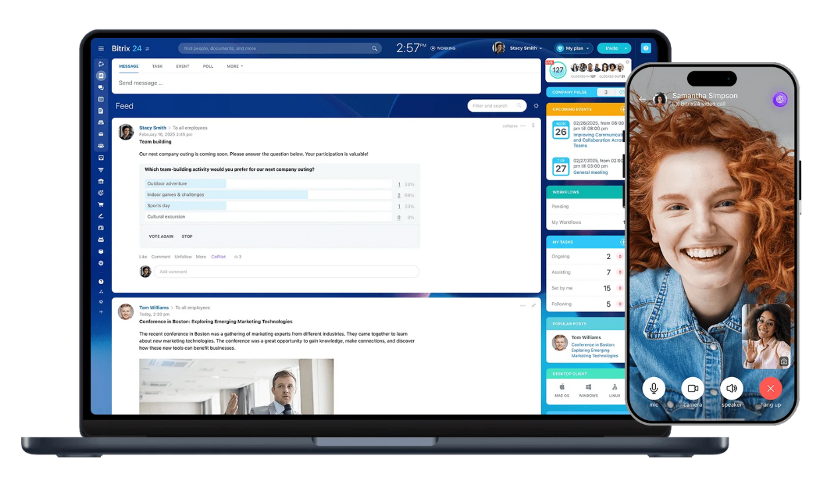
Bitrix24 es una plataforma de gestión empresarial que ofrece una variedad de herramientas para la colaboración, la comunicación y la gestión de proyectos. Está diseñada para empresas de todos los tamaños y proporciona funciones esenciales como la gestión de tareas, CRM y comunicación de equipos.
Por qué es una buena alternativa a Height.app: Bitrix24 te ofrece una amplia variedad de herramientas gratuitas, lo que resulta útil si tu equipo tiene un presupuesto limitado. Puedes hacer un seguimiento de las tareas, utilizar diagramas de Gantt y registrar el tiempo para mantener los proyectos organizados. Con el CRM y las herramientas de comunicación integrados, puedes gestionar las interacciones con los clientes en el mismo lugar. Tener todas estas herramientas juntas convierte a Bitrix24 en una alternativa destacada a Height.app.
Características destacadas e integraciones:
Características incluyen la gestión de documentos para mantener tus archivos organizados y seguros. La plataforma también ofrece videoconferencias para facilitar las reuniones remotas con tu equipo. Las herramientas de RR. HH. de Bitrix24 te ayudan a gestionar los registros de los empleados y las evaluaciones de desempeño.
Integraciones incluyen Slack, Google Drive, Dropbox, Microsoft Office, Zoom, Mailchimp, QuickBooks y Zendesk.
Pros and Cons
Pros:
- Potente funcionalidad de CRM
- Alta personalización y flexibilidad para crear flujos de trabajo adaptados
- Plan gratuito permanente y opciones de precios fijos
Cons:
- La velocidad de rendimiento puede ser inferior a la de herramientas más especializadas
- La interfaz puede parecer desordenada

GoodDay
Ideal para la gestión visual de proyectos de código abierto
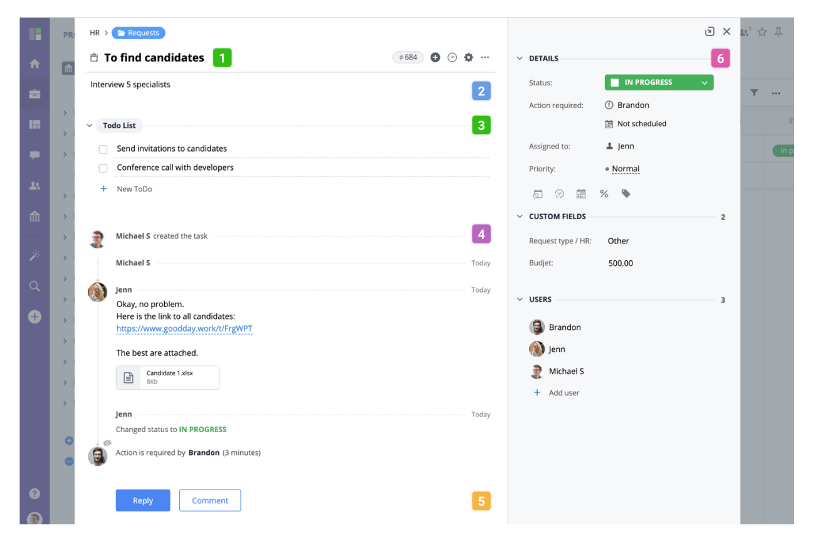
GoodDay es una plataforma de gestión de proyectos y productividad de código abierto y autoalojada. Está diseñada para que los equipos mejoren sus flujos de trabajo de proyectos y la gestión de tareas. La utilizan empresas de todos los tamaños para organizar tareas, supervisar el progreso y mejorar la colaboración del equipo.
Por qué es una buena alternativa a Height.app: GoodDay te ofrece vistas de cronograma y tableros de tareas para que tu equipo pueda ver el panorama general. Puedes configurar los flujos de trabajo según tus necesidades y planificar proyectos para adaptarlos a tus procesos. Con análisis integrados, tu equipo obtiene información sobre el rendimiento y la productividad. Su enfoque en la gestión visual de tareas te ayuda a mantener todo claro y organizado.
Características e integraciones destacadas:
Las características incluyen herramientas avanzadas de generación de informes que te ayudan a analizar el rendimiento de los proyectos y tomar decisiones fundamentadas. Puedes utilizar campos personalizados para adaptar la plataforma a las necesidades específicas de tu equipo. GoodDay también ofrece funciones de gestión de objetivos para alinear los esfuerzos de tu equipo con los objetivos generales de la empresa.
Las integraciones incluyen Google Calendar, Slack, Jira, Trello, Dropbox, GitHub, Asana, Zapier y GitLab.
Pros and Cons
Pros:
- Gestión visual de tareas
- Tipos de tareas, estados, campos, paneles e informes personalizables
- Generación de informes y análisis avanzados integrados
Cons:
- Lista de funciones abrumadora para los usuarios nuevos
- Algunas funciones de seguridad solo están disponibles en los planes premium

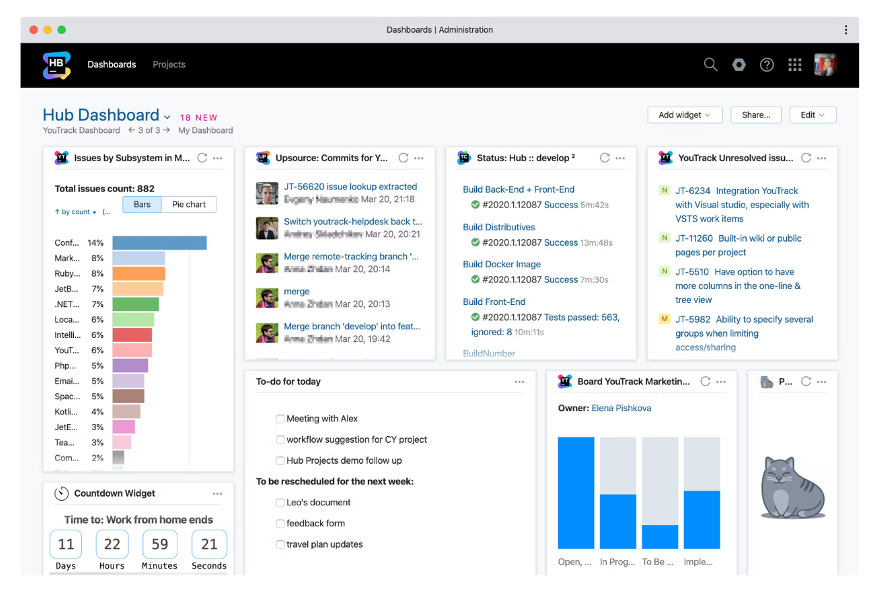
YouTrack es un rastreador de incidencias y una herramienta de gestión de proyectos diseñada para que los equipos de desarrollo gestionen proyectos, realicen un seguimiento de las tareas y gestionen errores. Lo utilizan principalmente desarrolladores de software y gestores de proyectos para perfeccionar su flujo de trabajo y mejorar la visibilidad de los proyectos.
Por qué es una buena alternativa a Height.app: YouTrack ofrece seguimiento de incidencias, tableros ágiles y colaboración en tiempo real diseñados específicamente para desarrolladores. Puedes realizar un seguimiento del tiempo y configurar flujos de trabajo que se adapten a tu equipo. Como se conecta con entornos de desarrollo, encaja perfectamente en tu configuración tecnológica. Gracias a su flexibilidad, tu equipo puede ajustar los procesos a medida que cambian los proyectos.
Funciones e integraciones destacadas:
Las funciones incluyen un potente motor de búsqueda para encontrar rápidamente incidencias y tareas. Puedes crear campos y flujos de trabajo personalizados que se adapten a los procesos de tu equipo. YouTrack también ofrece herramientas de gestión ágil de proyectos, como la planificación de sprints y la gestión de la lista de tareas pendientes, para ayudar a tu equipo a mantenerse organizado.
Las integraciones incluyen Slack, GitHub, GitLab, Bitbucket, Cuenta de Microsoft, Google Workspace, Zendesk, Confluence y Jira.
Pros and Cons
Pros:
- Personalización avanzada de campos, atributos de incidencias y flujos de trabajo complejos
- Función de búsqueda única basada en consultas
- Integración profunda con herramientas de desarrollo
Cons:
- Complejidad de la documentación y la configuración
- Interfaz de usuario desactualizada en comparación con las herramientas centradas en el diseño

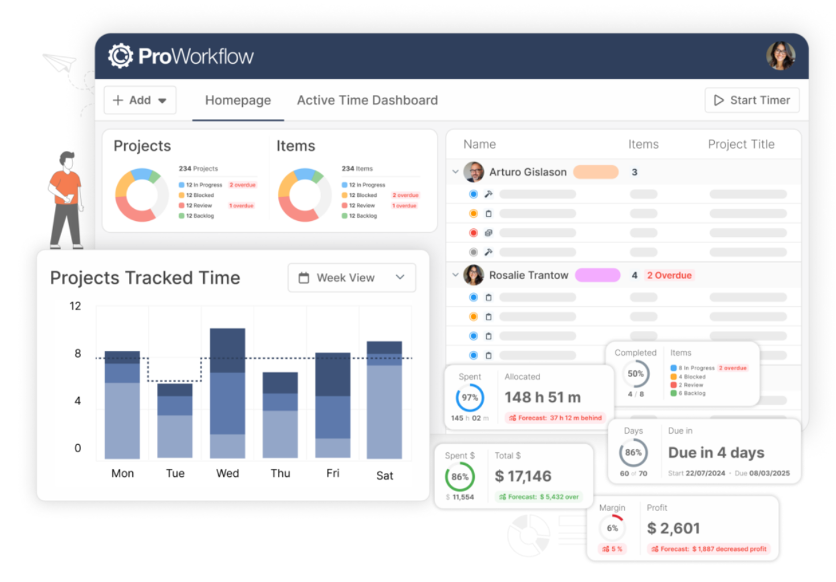
ProWorkflow es una herramienta de gestión de proyectos y seguimiento del tiempo que utilizan las empresas para gestionar tareas, proyectos y hojas de horas. Está diseñada para equipos que necesitan funciones detalladas de seguimiento y generación de informes para mejorar la productividad.
Por qué es una buena alternativa a Height.app: ProWorkflow ofrece funciones de seguimiento del tiempo y gestión financiera, por lo que es ideal para equipos que necesitan supervisar presupuestos y costes de proyectos. La gestión de tareas y la visualización de cronogramas ayudan a mantener los proyectos encaminados. Puedes personalizar los informes para obtener información sobre el rendimiento de los proyectos y la asignación de recursos. El enfoque de la plataforma en el seguimiento financiero detallado aporta un valor adicional a las empresas que gestionan presupuestos complejos.
Funciones e integraciones destacadas:
Las funciones incluyen un panel intuitivo que ofrece una visión clara de tus proyectos y tareas. Puedes utilizar la vista de cronograma para planificar y gestionar directamente los calendarios de los proyectos. ProWorkflow también ofrece uso compartido y almacenamiento de archivos para mantener accesibles en un solo lugar todos los documentos relacionados con los proyectos.
Las integraciones incluyen Xero, QuickBooks Online, FreshBooks, Dropbox, Google Drive, Microsoft OneDrive, Box y Zapier.
Pros and Cons
Pros:
- Gestión detallada de gastos y materiales
- Seguimiento integrado del tiempo y los costes
- Atención al cliente muy valorada
Cons:
- Menos preparado para la facturación de tarifas fijas y por hitos
- Funcionalidad limitada de la aplicación móvil en comparación con las funciones de escritorio

Jira
Ideal para el seguimiento de proyectos complejos
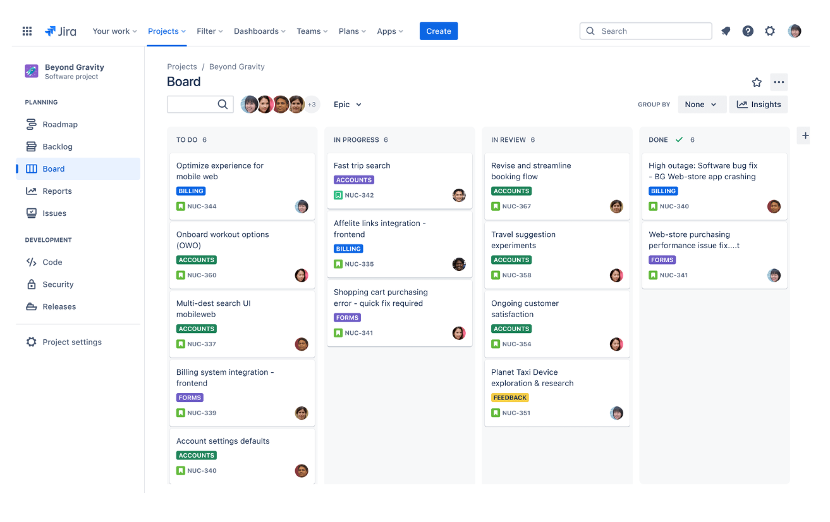
Jira es una herramienta de gestión de proyectos utilizada principalmente por equipos de desarrollo de software para realizar el seguimiento y gestionar proyectos, errores y tareas. Sus funciones principales incluyen la planificación de proyectos, el seguimiento del progreso y la facilitación de metodologías ágiles como Scrum y Kanban.
Por qué es una buena alternativa a Height.app: Jira destaca en la gestión de proyectos complejos gracias a sus capacidades de seguimiento de incidencias y generación de informes. Su avanzada personalización de flujos de trabajo permite adaptar los procesos de gestión de proyectos a las necesidades específicas de tu equipo. Los tableros adaptables y las herramientas de planificación de sprints lo convierten en una opción ideal para equipos que siguen prácticas ágiles. Las funciones de generación de informes de Jira proporcionan información sobre el rendimiento de los proyectos, lo que te permite tomar decisiones fundamentadas.
Características destacadas e integraciones:
Características incluyen herramientas detalladas de generación de informes que ofrecen información sobre el rendimiento y el progreso de los proyectos. Puedes personalizar los flujos de trabajo para adaptarlos a los procesos de tu equipo y garantizar una gestión eficiente de las tareas. Jira también ofrece un amplio conjunto de herramientas, incluidos tableros Scrum y Kanban, para equipos que siguen metodologías ágiles.
Integraciones incluyen Slack, GitHub, Microsoft Teams, Confluence, Bitbucket, Trello, Google Workspace, Zendesk, Zoom y Salesforce.
Pros and Cons
Pros:
- Personalización avanzada de flujos de trabajo para adaptarse a los requisitos empresariales
- Amplio conjunto de informes y paneles personalizables
- Amplio mercado de complementos
Cons:
- Una configuración eficaz requiere conocimientos administrativos
- Interfaz visualmente saturada
Otras alternativas a Height.app
Estas son algunas alternativas adicionales a Height.app que no llegaron a mi lista, pero que aún merece la pena conocer:
- Zoho Sprints
Ideal para una gestión centrada en la privacidad
- Dart
Ideal para la gestión de tareas impulsada por IA
- monday AI Workspace
Ideal para automatizaciones de flujos de trabajo basadas en IA
- Asana
Ideal para priorizar tareas


Cómo evalúo las alternativas a Height App
Divido mi evaluación en dos niveles: la base que toda herramienta debe cumplir—soporte para sprints, tareas en varias vistas, integraciones para desarrolladores—y los diferenciadores que distinguen a las mejores opciones.
Funcionalidades básicas (requisitos mínimos para esta lista)
Cuando selecciono herramientas para mi lista, califico cada una en una escala de 0 (no ofrece la funcionalidad) a 5 (destaca en este aspecto) para cada funcionalidad básica mencionada abajo. Luego, convierto la puntuación total de la herramienta en un porcentaje. Cada herramienta necesita alcanzar una puntuación total mínima del 65% para ser considerada para su inclusión.
- Gestión de tareas con múltiples vistas: Reviso si una herramienta ofrece vistas de lista, kanban, Gantt, calendario y hoja de cálculo, para que los equipos puedan alternar entre planificar el backlog de sprints y hacer seguimiento de una línea de tiempo de lanzamiento.
- Automatización impulsada por IA: Evalúo el alcance de la inteligencia artificial en la plataforma más allá de la simple generación de texto—herramientas como Linear y ClickUp, por ejemplo, abordan el auto-triaje y las actualizaciones inteligentes de manera diferente.
- Colaboración en tiempo real: Los equipos que trabajan de forma asíncrona en distintas zonas horarias necesitan edición de tareas en vivo, comentarios en hilos e indicadores de presencia, así que busco profundidad más allá de los comentarios simples.
- Soporte para sprints y metodologías ágiles: La gestión del backlog, los ciclos de sprints, el seguimiento de la velocidad y los diagramas de burndown son fundamentales—especialmente para líderes de ingeniería que dirigen iteraciones de dos semanas.
- Integraciones con herramientas de desarrollo: Una alternativa a Height necesita conexiones nativas con GitHub o GitLab, Slack y Figma como mínimo, y reviso si las sincronizaciones son unidireccionales o bidireccionales.
- Flujos de trabajo personalizables: Evalúo si es posible definir estados propios, tipos de tareas, campos personalizados y reglas de automatización para reflejar la forma real en que tu equipo entrega el trabajo.
Cuando tengo una lista de herramientas que cumplen estos criterios, considero lo que hace única a cada plataforma.
Factores diferenciadores (lo que distingue a los proveedores)
Así es como comparo y contrasto a los diferentes proveedores:
Características destacadas
La documentación y wikis integradas son importantes porque te permiten vincular una PRD o especificación de diseño directamente a las tareas que genera—sin cambiar de contexto a Notion o Confluence. También evalúo el seguimiento del tiempo y las vistas de carga de trabajo, ya que los líderes de ingeniería que manejan múltiples equipos deben detectar la sobreasignación antes de que descarrile un sprint. Los paneles avanzados de reportes completan la oferta; busco analíticas entre proyectos que agrupen velocidad y tiempo de ciclo en vistas que puedas compartir con la dirección.
Más allá de las características
El camino de migración es lo primero que reviso—si una plataforma ofrece un importador directo de Height que conserve el historial de tareas, comentarios y campos personalizados, se ahorran semanas de limpieza manual. La transparencia en los precios también es fundamental; los equipos que crecen de 10 a 100 usuarios necesitan costos predecibles por asiento, sin cargos sorpresa por complementos de IA. Para equipos de ingeniería que gestionan datos de clientes, también reviso el cumplimiento SOC 2 Tipo II y si la plataforma soporta SSO, provisión SCIM y registros de auditoría en sus planes estándar.
¿Por qué buscar una alternativa a Height.app?
Aunque Height.app es una buena opción como herramienta de colaboración en proyectos, hay varios motivos por los que algunos usuarios buscan soluciones alternativas. Puede que estés buscando una alternativa a Height.app porque…
- Necesitas opciones de personalización más avanzadas
- Tu equipo necesita mejores funciones sin conexión
- Quieres una herramienta con una interfaz más sencilla
- Tus proyectos requieren funciones de informes más detalladas
- Necesitas una solución con más opciones de integración
- Tu equipo está creciendo y necesita precios escalables
Si alguna de estas situaciones te resulta familiar, has llegado al lugar adecuado. Mi lista incluye opciones de herramientas de colaboración en proyectos más adecuadas para equipos que se enfrentan a estos desafíos con Height.app y buscan soluciones alternativas.
Funciones principales de Height.app
Estas son algunas de las funciones principales de Height.app, para ayudarte a contrastar y comparar lo que ofrecen las soluciones alternativas:
- Automatización impulsada por IA: Automatiza tareas rutinarias para liberar tiempo de tu equipo.
- Gestión de tareas: Organiza las tareas de forma eficiente para mejorar la productividad.
- Flujos de trabajo personalizados: Permiten a tu equipo adaptar los procesos a necesidades específicas.
- Colaboración en tiempo real: Permite la comunicación instantánea, la mensajería, las notificaciones y las actualizaciones en tiempo real entre los miembros del equipo.
- Paneles de control completos: Proporcionan una visión clara del estado y las métricas de los proyectos.
- Capacidades de integración: Se conectan con diversas herramientas para optimizar los flujos de trabajo.
- Seguimiento del tiempo: Supervisa el tiempo dedicado a las tareas para gestionar las cargas de trabajo de forma eficaz.
- Tableros Kanban: Permiten visualizar las tareas para facilitar su seguimiento y gestión.
- Diagramas de Gantt: Ayudan a planificar y programar los plazos de los proyectos.
- Anidamiento de subtareas: Divide las tareas complejas en partes manejables.