



Zoho Projects vs. Jira: Expertenvergleich & Bewertungen 2026



Zoho Projects bietet eine flexible Plattform, um Team-Workflows effizient zu verwalten. Jira ist darauf ausgelegt, komplexe Softwareentwicklungsprojekte mit fortschrittlichen Funktionen zu steuern.
Beide Tools unterstützen das Projektmanagement, verfolgen jedoch unterschiedliche Ansätze: Zoho Projects legt den Fokus auf allgemeine Teamzusammenarbeit, während Jira auf agile Methoden und entwicklungsorientierte Aufgaben spezialisiert ist (z. B. mit Fehler- und Problemverfolgung), insbesondere für Scrum-Teams.
In diesem Artikel finden Sie einen detaillierten Vergleich der Tools. Wir beleuchten deren Funktionen, Vor- und Nachteile, Preise und weitere Aspekte, um Ihnen die Auswahl der passenden Projektmanagement-Software für Ihr Team zu erleichtern.
Zoho Projects vs. Jira: An Overview
Zoho Projects
Jira

Warum Sie unseren Software-Empfehlungen vertrauen können
Unser Team testet und bewertet Software seit 2012. Als Projektmanager wissen wir selbst, wie schwierig – und wichtig – es ist, die richtige Software auszuwählen.
Für diesen Leitfaden haben wir Tools mithilfe von praktischen Tests und unabhängiger Recherche bewertet und dabei unsere Bewertungskriterien angewendet. Zudem greifen wir auf Erkenntnisse von Branchenvordenkern und praktizierenden Projektmanagement-Experten zurück.
Unsere Bewertungen spiegeln unser menschliches redaktionelles Urteilsvermögen wider, keine Verkaufsstrategie.
Expertenprüfer:
Zoho Projects vs. Jira Pricing Comparison
| Zoho Projects | Jira | |
|---|---|---|
| Free Trial | Free plan available | Free plan + 14-day free trial available |
| Pricing | From $4/user/month (billed annually) | From $7.91/user/month |
Zoho Projects Preise bieten ein gestaffeltes Abomodell, das mit der Teamgröße wächst. Beachten Sie jedoch mögliche Zusatzkosten für Add-ons und Premiumfunktionen.
Jira Preise folgen ebenfalls einem Abo-Modell mit verschiedenen Stufen je nach Nutzeranzahl und zusätzlichen Kosten für erweiterte Funktionen oder Integrationen.
Um die richtige Projektmanagement-Lösung für Ihr Budget zu finden, sollten Sie die Preisstruktur jedes Anbieters auf die Größe und die spezifischen Anforderungen Ihres Teams abstimmen. Berücksichtigen Sie dabei unbedingt alle benötigten Funktionen und Integrationen, auf die Sie nicht verzichten können.
Zoho Projects vs. Jira Feature Comparison
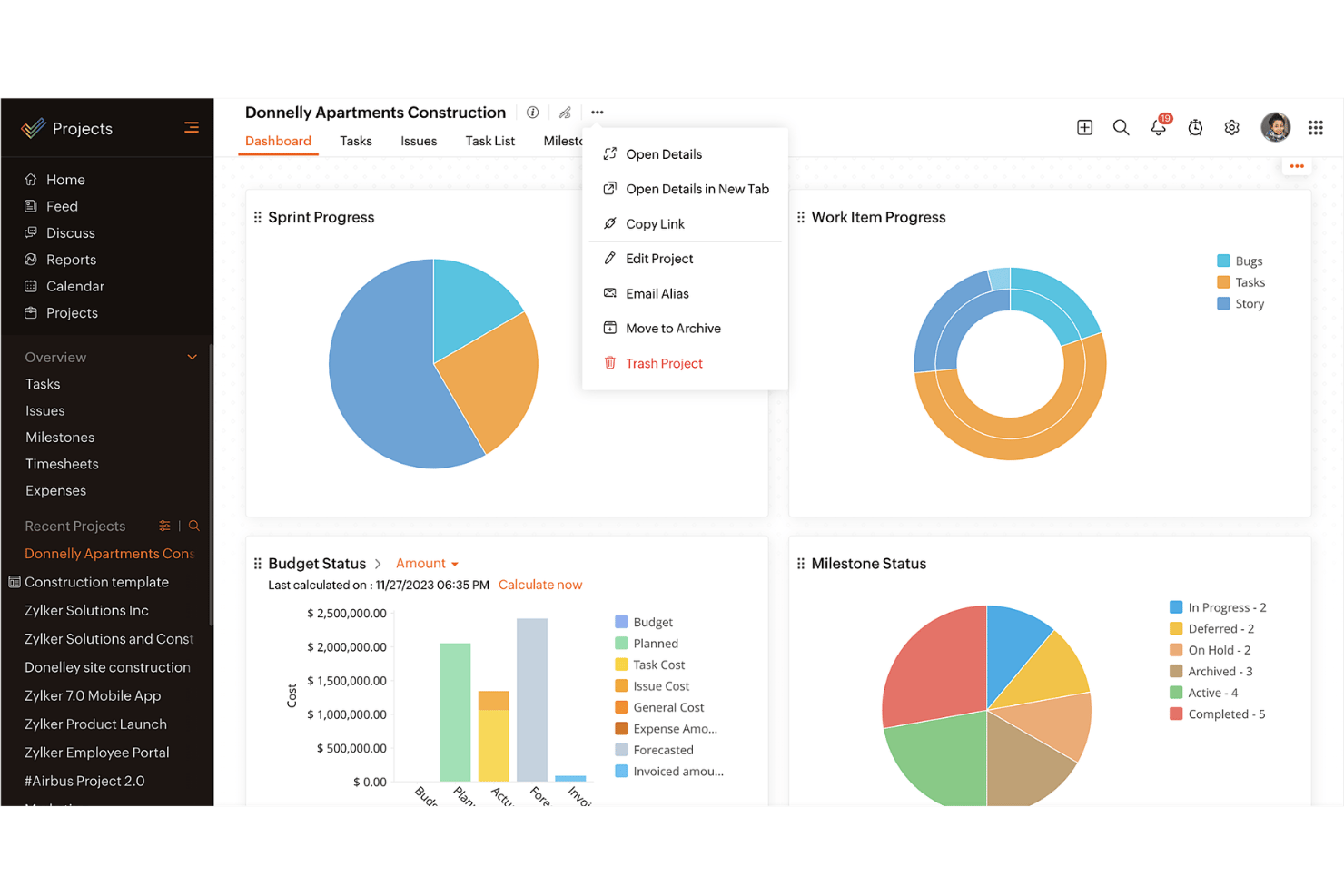
Das Gantt-Diagramm von Zoho Projects ermöglicht es Ihnen, Zeitpläne und Abhängigkeiten visuell zu verfolgen – besonders nützlich für das Management komplexer Zeitpläne in Bauprojekten.
Jiras agile Boards helfen Softwareentwicklungsteams, Backlogs zu organisieren und Sprints effektiv zu planen. Jedes Tool bringt Stärken mit, die auf unterschiedliche Bedürfnisse im Projektmanagement zugeschnitten sind.
| Zoho Projects | Jira | |
|---|---|---|
| API | ||
| Calendar Management | ||
| Collaboration Support | ||
| Dashboards | ||
| Data Export | ||
| Data Import | ||
| External Integrations | ||
| File Sharing | ||
| Gantt Charts | ||
| Kanban Boards | ||
| Multi-User | ||
| Notifications | ||
| Project Management | ||
| Task Scheduling/Tracking | ||
| Time Management |
Zoho Projects vs. Jira Integrationen
| Integration | Zoho Projects | Jira |
| Slack | ✅ | ✅ |
| Microsoft Teams | ✅ | ✅ |
| Google Drive | ✅ | ✅ |
| Dropbox | ✅ | ✅ |
| Salesforce | ❌ | ✅ |
| GitHub | ❌ | ✅ |
| Trello | ✅ | ❌ |
| Asana | ❌ | ✅ |
| Figma | ❌ | ✅ |
| Zapier | ✅ | ✅ |
| API | ✅ | ✅ |
Zoho Projects lässt sich mit Slack integrieren, damit Ihr Team in Echtzeit informiert bleibt – ideal für Remote-Teams, die auf ständige Kommunikation angewiesen sind. Zoho Projects integriert sich zudem nahtlos in das gesamte Zoho Ökosystem, etwa mit Zoho CRM und Zoho One.
Jiras Integration mit Figma unterstützt Design- und Entwicklungsteams und ermöglicht eine reibungslose Zusammenarbeit an Benutzeroberflächen. Ähnlich wie Zoho verbindet sich auch Jira nahtlos mit dem gesamten Atlassian-Ökosystem, darunter Bitbucket und Confluence.
Jede Integration bietet spezifische Vorteile, die auf verschiedene Team-Workflows, Tool-Stacks und geschäftliche Anforderungen zugeschnitten sind.
Zoho Projects vs. Jira Sicherheit, Compliance & Zuverlässigkeit
| Faktor | Zoho Projects | Jira |
| Datenschutz | Zoho Projects gewährleistet Datenschutz mit strikten Zugangskontrollen und Einhaltung der DSGVO. | Jira bietet starken Datenschutz durch anpassbare Berechtigungen und die Erfüllung der DSGVO-Anforderungen. |
| Verschlüsselung | Zoho Projects verwendet AES-256-Verschlüsselung für ruhende Daten und schützt so Ihre Informationen. | Jira nutzt TLS-Verschlüsselung, um Daten während der Übertragung und im Ruhezustand zu schützen. |
| Zuverlässigkeit der Verfügbarkeit | Zoho Projects garantiert 99,9% Verfügbarkeit, sodass Ihre Projekte immer erreichbar sind. | Jira verpflichtet sich zu einer hohen Verfügbarkeit mit einer 99,9% Uptime-SLA. |
Zoho Projects und Jira bieten beide starke Sicherheits- und Compliance-Funktionen, allerdings können ihre Ansätze besser zu unterschiedlichen Unternehmenstypen passen. Berücksichtigen Sie bei der Bewertung dieser Tools Verschlüsselungsstandards, Datenschutzrichtlinien und Verfügbarkeitszusagen, um sicherzustellen, dass sie die spezifischen Anforderungen Ihres Teams erfüllen.
Zoho Projects vs. Jira Benutzerfreundlichkeit
| Faktor | Zoho Projects | Jira |
| Benutzeroberfläche | Zoho Projects bietet eine übersichtliche, intuitive All-in-One-Oberfläche mit einem anpassbaren Dashboard für schnelle Navigation | Jiras Oberfläche ist funktionsreich, kann aber neue Nutzer (insbesondere ohne Erfahrung mit Jiras Taxonomie – d.h. Meilensteine, Epics, Stories etc.) überfordern. |
| Onboarding-Erlebnis | Zoho Projects bietet eine übersichtliche, intuitive All-in-One-Oberfläche mit einem anpassbaren Dashboard für schnelle Navigation | Jira bietet umfassende Dokumentation, aber der Einstieg kann mehr Zeit in Anspruch nehmen. |
| Einrichtung | Zoho Projects ermöglicht eine schnelle Einrichtung mit vorgefertigten Vorlagen, damit Projekte zügig starten können. | Jiras Einrichtung ist flexibel, kann jedoch mit einer steileren Lernkurve verbunden sein. |
| Support | Zoho Projects beinhaltet 24/5 Support via Chat und E-Mail, sodass im Bedarfsfall Hilfe verfügbar ist. | Jira bietet 24/7 Kundensupport mit umfangreichen Online-Ressourcen und Community-Foren. |
Zoho Projects ist dank seiner benutzerfreundlichen Oberfläche und hilfreichen Onboarding-Anleitungen leichter zu bedienen und eignet sich gut für Teams, die eine unkomplizierte Einrichtung wünschen. Jira bietet größere Flexibilität und fortgeschrittene Schlüsselfunktionen, hat aber eine steilere Lernkurve – besonders für Nutzer ohne Erfahrung mit Projektmanagement-Tools.
Zoho Projects vs Jira: Pros & Cons
Zoho Projects
- Task dependencies are highly visual and easy to set up.
- Built-in time tracking integrates smoothly with billing features.
- Customizable project templates support repeatable workflows.
- Reporting customization can be limited for advanced needs.
- Mobile app notifications do not always sync in real time.
- Gantt chart drag-and-drop can feel sluggish with large projects.
Jira
- Agile workflow management supports Scrum and Kanban and can improve your teams' productivity.
- Automation rules are easy to set up, which helps your team speed up their work.
- Custom filters can be created and accessed quickly, which improves your team's efficiency.
- Field names can be confusing, which might slow down your team's workflow.
- The interface can be too crowded in Scrum projects, which can make it hard for your team to navigate.
- There's a lack of resource management capabilities, which could limit your team's planning.
Best Use Cases for Zoho Projects and Jira
Zoho Projects
- Small Agencies Kanban boards, time tracking, and client billing streamline project delivery and reporting for agency teams.
- IT Departments Issue tracking, blueprint automations, and strong permission controls provide what IT teams need for complex internal projects.
- Consulting Firms Time sheets, detailed reports, and project-level billing help consultants keep track of client hours and invoicing.
- Remote Teams Robust collaboration tools, document sharing, and project forums help distributed users stay connected.
- Marketing Teams Reusable templates, task dependencies, and timeline tracking make repeated campaigns run smoothly and transparently.
- Construction Projects Gantt charts, milestones, and resource allocation features support the scheduling needs of construction and field project managers.
Jira
- Software development Jira’s agile tools like Scrum and Kanban boards make it perfect for managing software projects.
- IT departments Its issue tracking capabilities help your team efficiently handle technical support and bug fixes.
- Tech startups Jira offers customization capabilities that allow your team to scale and adapt as your projects grow.
- Agile teams Sprint planning and backlog management features keep your agile processes organized and effective.
- Large enterprises Jira’s automation rules can streamline your complex workflows and improve team productivity.
- Project managers Its reporting and analytics provide insights that help you make informed decisions quickly.
Wer sollte Zoho Projects nutzen und wer sollte Jira nutzen?
Meiner Meinung nach eignet sich Zoho Projects am besten für kleine Teams (wie etwa Start-ups), die eine benutzerfreundliche Oberfläche mit grundlegenden Funktionen und einem begrenzten Budget benötigen. Es funktioniert gut in Branchen wie Marketing oder Beratung, in denen Einfachheit und eine schnelle Inbetriebnahme im Vordergrund stehen.
Jira hingegen passt sehr gut zu Softwareentwicklungsteams, die eine agile Projektmanagement-Lösung mit fortgeschrittener Aufgabenverfolgung und umfangreichen Anpassungsmöglichkeiten benötigen. Wenn Ihr Team Wert auf Flexibilität legt und mit einer steileren Lernkurve umgehen kann, ist Jira die bessere Wahl.
Differences Between Zoho Projects and Jira
| Zoho Projects | Jira | |
|---|---|---|
| Automation | Zoho Projects includes basic automation tools for task management. | Jira offers advanced automation options, especially suited for agile workflows. |
| Integrations | Zoho Projects integrates smoothly with tools like Slack and Google Drive. | Jira connects with a wide range of development tools, making it ideal for software teams. |
| Onboarding | Zoho Projects eases onboarding with step-by-step tutorials and guides. | Jira has detailed documentation but may require more time for initial setup. |
| Pricing | Zoho Projects offers a tiered subscription model with potential add-on costs. | Jira provides a subscription model based on user count with extra expenses for advanced features. |
| User Interface | Zoho Projects provides a clean, intuitive interface with customizable dashboards. | Jira’s interface is feature-rich but complex, requiring more time to learn. |
| Read Zoho Projects ReviewOpens new window | Read Jira ReviewOpens new window |
Similarities Between Zoho Projects and Jira
| Cloud-Based | Both tools are cloud-based, providing your team with access from anywhere with an internet connection. Zoho Projects is known for its ease of access, while Jira offers robust cloud solutions with enterprise-grade security. |
|---|---|
| Collaboration | Both platforms support team collaboration with shared calendars, document sharing, and real-time updates. Zoho Projects integrates well with communication tools like Slack, whereas Jira’s strong point is integration with development tools. |
| Customization | Both provide customizable workflows and dashboards, letting you tailor the software to fit your project’s needs. Zoho Projects offers user-friendly customization, while Jira allows for deep configuration options. |
| Reporting | Both Zoho Projects and Jira include comprehensive reporting features to help analyze project performance. Zoho Projects focus on visual simplicity, whereas Jira offers in-depth, technical reports ideal for software development metrics. |
| Task Management | Both Zoho Projects and Jira offer robust task management features, allowing you to assign tasks, set deadlines, and track progress. Zoho Projects excels in simplicity, while Jira provides detailed tracking suitable for complex projects. |
| Read Zoho Projects ReviewOpens new window Read Jira ReviewOpens new window | |