



Smartsheet vs. ClickUp: Expertenvergleich & Bewertungen 2026



Smartsheet bietet eine vielseitige Plattform mit leistungsstarken Funktionen, um das Projektmanagement Ihres Teams zu optimieren. ClickUp hingegen stellt eine umfassende Suite zur Verfügung, die das Ressourcenmanagement, die Zeiterfassung und die Produktivität insgesamt verbessert. Während beide Tools darauf abzielen, Projektabläufe zu verbessern, unterscheiden sie sich in den Anpassungsoptionen und Integrationsmöglichkeiten, was die Effizienz Ihres Teams beeinflussen kann.
In diesem Artikel erfahren Sie, wie sich diese Projektmanagement-Software-Lösungen in Bezug auf Funktionen, Vor- und Nachteile, Preise und mehr vergleichen lassen.
Smartsheet vs. ClickUp: An Overview
Smartsheet


ClickUp
Darum können Sie uns vertrauen
Wir testen und bewerten Projektmanagement-Software seit 2012. Als Projektmanager wissen wir, wie kritisch und schwierig die richtige Auswahl von Software sein kann. Wir investieren in tiefgehende Recherche, um unseren Lesern bessere Entscheidungen beim Softwarekauf zu ermöglichen. Wir haben über 2.000 Tools für verschiedene Projektmanagement-Anwendungsfälle getestet und mehr als 1.000 umfassende Software-Reviews geschrieben. Erfahren Sie, wie wir Transparenz gewährleisten & unsere Software-Bewertungsmethodik.
Smartsheet vs. ClickUp Pricing Comparison
| Smartsheet | ClickUp | |
|---|---|---|
| Free Trial | 30-day free trial | Free plan available |
| Pricing | From $9/user/month (billed annually) | From $7/user/month (billed annually) |
Smartsheet vs. ClickUp Preise & versteckte Kosten
Die Preisgestaltung von Smartsheet folgt einem gestaffelten Abonnementmodell, wobei potenzielle versteckte Kosten für Premium-Add-ons und Integrationen entstehen können, die Sie überraschen könnten. ClickUp-Preise bieten hingegen eine flexible Preisstruktur, die mit einem kostenlosen Plan beginnt und zusätzliche Gebühren für erweiterte Funktionen und mehr Speicherplatz vorsieht. Um das richtige Tool für Ihr Projektbudget zu wählen, sollten Sie die spezifischen Bedürfnisse Ihres Teams analysieren, die Nutzung prognostizieren und die langfristige Skalierbarkeit der Funktionen in Betracht ziehen, die zu Ihren Arbeitszielen passen.
Smartsheet vs. ClickUp Feature Comparison
Mit den umfangreichen Berichtsfunktionen von Smartsheet können Sie komplexe Projekte effizient verfolgen, was besonders für großangelegte Vorhaben wertvoll ist, bei denen datenbasierte Entscheidungen entscheidend sind. Die anpassbare Aufgabenverwaltung und die kollaborativen Dokumente von ClickUp sind ideal für agile Teams, die Flexibilität beim Umgang mit dynamischen Arbeitsabläufen benötigen und eine schnelle Anpassung an wechselnde Projektanforderungen ermöglichen. Beide Tools bieten einzigartige Stärken, die unterschiedliche Projektmanagement-Stile unterstützen und Ihren Arbeitsalltag auf unterschiedliche Weise bereichern.
| Smartsheet | ClickUp | |
|---|---|---|
| API | ||
| Batch Permissions & Access | ||
| Budgeting | ||
| Calendar Management | ||
| Collaboration Support | ||
| Contact Management | ||
| Contact Sharing | ||
| Customer Management | ||
| Dashboard | ||
| Dashboards | ||
| Data Export | ||
| Data Import | ||
| Data Visualization | ||
| Dependency Tracking | ||
| Document Sharing | ||
| Expense Tracking | ||
| External Integrations | ||
| File Sharing | ||
| Gantt Charts | ||
| Kanban Boards | ||
| Multi-User | ||
| Notifications | ||
| Project Management | ||
| Resource Management | ||
| Scheduling | ||
| Task Scheduling/Tracking | ||
| Third-Party Plugins/Add-Ons | ||
| Time Management | ||
| Travel Management | ||
| Workflow Management |
Smartsheet vs. ClickUp Integrationen
| Integration | Smartsheet | ClickUp |
|---|---|---|
| Microsoft Office 365 | ✅ | ✅ |
| Google Workspace | ✅ | ✅ |
| Slack | ✅ | ✅ |
| Adobe Creative Cloud | ✅ | ❌ |
| Power BI | ✅ | ❌ |
| Tableau | ✅ | ❌ |
| Zoom | ❌ | ✅ |
| Microsoft Teams | ❌ | ✅ |
| API | ✅ | ✅ |
| Zapier | ✅ | ✅ |
Mit der Smartsheet-Integration mit Adobe Creative Cloud können Sie Design-Freigaben in Marketingprojekten optimieren – ideal für Kreativteams, die mehrere Assets verwalten. Die ClickUp-Integration mit Zoom wiederum eignet sich hervorragend für Remote-Teams, die nahtlose Videokonferenzen direkt im Projektmanagement-Prozess benötigen. Beide Integrationen steigern die Produktivität, indem sie essentielle Tools direkt in Ihren Arbeitsalltag einbinden.
Smartsheet vs. ClickUp Sicherheit, Compliance & Zuverlässigkeit
| Faktor | Smartsheet | ClickUp |
|---|---|---|
| Datenverschlüsselung | Smartsheet verschlüsselt Daten während der Übertragung und im Ruhezustand mit AES-256-Verschlüsselung. | ClickUp schützt Daten mit AES-256-Verschlüsselung sowohl bei der Übertragung als auch im Ruhezustand. |
| Regulatorische Compliance | Smartsheet erfüllt die Anforderungen der DSGVO und HIPAA und bietet Funktionen zum Datenschutz. | ClickUp entspricht den DSGVO-Standards und stellt Tools für das Datenschutzmanagement bereit. |
| Zuverlässigkeit (Betriebszeit) | Smartsheet garantiert 99,9 % Betriebszeit, unterstützt durch eine robuste Infrastruktur. | ClickUp gewährleistet 99,99 % Betriebszeit, abgesichert durch ein zuverlässiges Servernetzwerk. |
Sowohl Smartsheet als auch ClickUp legen großen Wert auf Sicherheit und Compliance, jedoch bietet ClickUp eine etwas höhere Zuverlässigkeit bei der Betriebszeit. Um diese Tools zu bewerten, sollten Sie den direkten Einfluss jeder Funktion auf Ihre Anforderungen an die Datensicherheit prüfen, die Einhaltung branchenspezifischer Vorschriften priorisieren und die Garantien zur Betriebszeit überprüfen, um einen konstanten Zugriff für Ihr Team sicherzustellen.
Smartsheet vs. ClickUp Benutzerfreundlichkeit
| Faktor | Smartsheet | ClickUp |
|---|---|---|
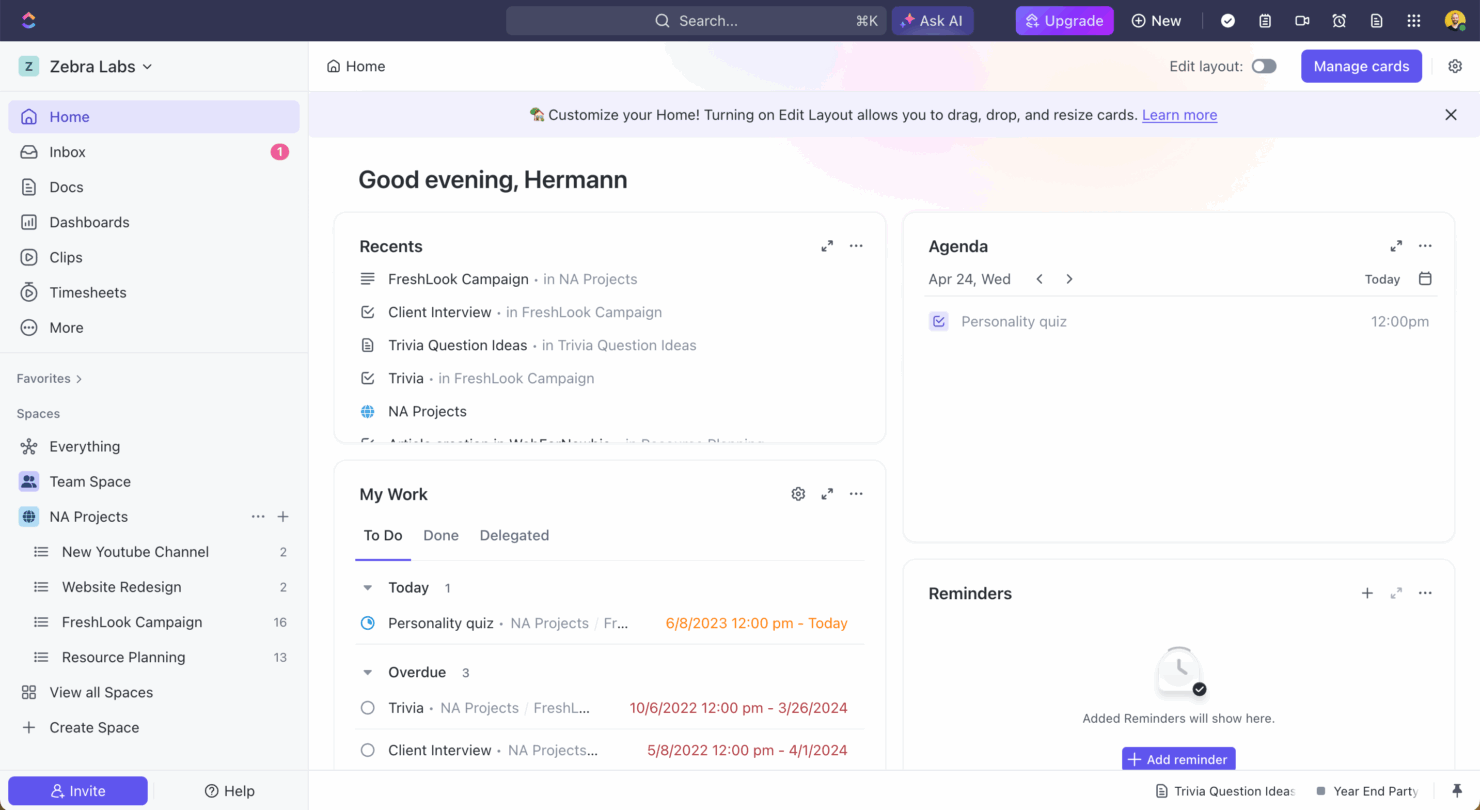
| Benutzeroberfläche | Smartsheet bietet eine vertraute, tabellenähnliche Oberfläche, die die Navigation für Excel-Nutzer erleichtert. | ClickUp stellt eine anpassbare Oberfläche zur Verfügung, mit der Sie Ansichten individuell an Ihren Arbeitsablauf anpassen können. |
| Onboarding-Erlebnis | Das Onboarding von Smartsheet beinhaltet geführte Tutorials und eine Wissensdatenbank für einen einfachen Einstieg. | ClickUp bietet interaktive Rundgänge und Vorlagen, um den Einführungsprozess zu erleichtern. |
| Einrichtung | Smartsheet erfordert nur eine minimale Einrichtung, wobei Vorlagen für einen schnellen Projektstart bereitstehen. | Die Einrichtung von ClickUp ist unkompliziert, mit Drag-and-Drop-Funktionen für eine einfache Aufgabenorganisation. |
Die tabellenähnliche Oberfläche von Smartsheet macht es für Nutzer, die bereits mit Excel vertraut sind, intuitiv, jedoch kann die Komplexität für neue Anwender eine Herausforderung darstellen. ClickUp bietet durch die anpassbare Oberfläche und die einfache Einrichtung viel Flexibilität, kann aber Nutzer, die Einfachheit suchen, womöglich überfordern.
Smartsheet vs ClickUp: Pros & Cons
Smartsheet
- Gives your team a lot of flexibility with how you set up sheets, dashboards, and workflows
- Proofing and approval tools can help you better collaborate with your team
- Handles complex projects and cross-team coordination better than most tools
- It takes time to set up and isn’t very intuitive for new users
- Interactive spreadsheets don’t automatically sync changes
- You can’t easily build simple task lists without doing extra setup
ClickUp
- Extensive task management features keep your projects organized and on track
- Real-time collaboration makes team communication more effective
- Built-in automations reduce manual work and speed up your workflow
- Users often find the learning curve steep due to its rich feature set
- Some users report occasional performance lags when managing large projects
- Mobile app can be less intuitive than the desktop version
Best Use Cases for Smartsheet and ClickUp
Smartsheet
- Marketing Teams You can manage campaign timelines, creative approvals, and content calendars in one place using built-in forms, reminders, and dashboards.
- Construction Projects Smartsheet is great for tracking tasks, permits, and inspections across vendors and crews using Gantt charts and status columns.
- PMO Departments You get a clear portfolio view of all your projects, timelines, and risks with built-in reports and resource views.
- Healthcare Operations Smartsheet helps you track compliance tasks, training, and onboarding with audit-ready logs and approval workflows.
- IT Teams Smartsheet is useful for managing system rollouts, support requests, and change logs with forms, automations, and sheet linking.
- Mid-Sized & Enterprise-Level Companies You get enough structure to handle complex operations and scale without needing a full custom solution.
ClickUp
- Creative agencies ClickUp's customizable dashboards and task automation features can help you manage client projects, track feedback and revisions, and keep creative teams aligned.
- Tech startups ClickUp supports agile development with sprints and real-time collaboration features that can help teams iterate quickly.
- Marketing teams You can streamline campaign planning and execution using ClickUp’s task dependencies and timelines.
- Remote teams ClickUp's real-time updates and collaboration tools keep everyone on the same page, no matter where they are.
- Product managers ClickUp’s roadmaps and goal-tracking features help you align development with business objectives.
- Freelancers You can track your tasks and deadlines efficiently with ClickUp’s simple task and time management tools.
Wer sollte Smartsheet nutzen und wer sollte ClickUp verwenden?
Meiner Meinung nach eignet sich Smartsheet ideal für Teams aus Branchen wie Bau oder Fertigung, die auf eine detaillierte Projektverfolgung angewiesen sind und eine tabellenbasierte Oberfläche bevorzugen. Ich finde, ClickUp passt besonders gut zu kreativen Teams oder Tech-Startups, die Flexibilität und eine breite Palette an anpassbaren Funktionen benötigen, um sich an dynamische Projekte anzupassen. Aus meiner Sicht ist Smartsheet besonders für diejenigen geeignet, die strukturiert arbeiten, während ClickUp perfekt für alle ist, die in einem agilen Umfeld erfolgreich sind.
Differences Between Smartsheet and ClickUp
| Smartsheet | ClickUp | |
|---|---|---|
| Automation | Smartsheet offers automation through workflows for repetitive tasks. | ClickUp provides automation features with customizable triggers and actions. |
| Integrations | Smartsheet integrates with Adobe and Power BI, useful for creative and data teams. | ClickUp integrates with Zoom and Microsoft Teams, ideal for remote collaboration. |
| Pricing | Smartsheet has a tiered subscription with additional costs for premium features. | ClickUp offers a flexible pricing structure with options for advanced features. |
| Reporting | Smartsheet provides extensive reporting capabilities for data-driven projects. | ClickUp includes basic reporting with a focus on customizable dashboards. |
| User Interface | Smartsheet uses a spreadsheet-like interface, familiar to Excel users. | ClickUp offers a customizable interface, allowing you to tailor your workspace. |
| Visit SmartsheetOpens new window | Read ClickUp ReviewOpens new window |
Similarities Between Smartsheet and ClickUp
| Cloud-Access | Smartsheet and ClickUp are cloud-based, ensuring you can access your projects from anywhere, with Smartsheet providing robust mobile app support and ClickUp offering a web app interface. |
|---|---|
| Collaboration | Both platforms support team collaboration with features like comments and file sharing; Smartsheet integrates with email notifications, while ClickUp offers real-time chat. |
| Customization | Both tools offer customization, letting you tailor dashboards and views. Smartsheet uses templates, while ClickUp provides drag-and-drop customization. As you can guess, this customization comes with a learning curve price. |
| Integrations | Smartsheet and ClickUp support multiple integrations through Zapier and APIs, enabling you to connect with other tools your team uses. |
| Task Management | Both Smartsheet and ClickUp allow you to create, assign, and track tasks, with Smartsheet focusing on grid-based task lists and ClickUp offering flexible views like lists and Kanban boards. |
| Visit SmartsheetOpens new window Read ClickUp ReviewOpens new window | |