



Monday.com vs ClickUp: Bewertungen & Vergleich für 2026



monday.com bietet eine flexible Plattform, um die Arbeitsabläufe und die Zusammenarbeit Ihres Teams zu optimieren. ClickUp stellt eine umfassende Suite von Tools bereit, um Ihre Produktivität und Projektverfolgung zu verbessern. Während beide leistungsstarke Projektmanagement-Lösungen sind, punktet monday.com mit umfangreichen Anpassungsmöglichkeiten, während ClickUp mit seinem umfangreichen Funktionsangebot überzeugt. In diesem Artikel finden Sie einen ausführlichen Vergleich der Tools, ihrer Funktionen, Vor- und Nachteile, Preisgestaltung und mehr, um Ihnen bei der Auswahl der idealen Projektmanagement-Software für Ihre Anforderungen zu helfen.
monday AI Workspace vs. ClickUp: An Overview
monday AI Workspace

ClickUp
Warum Sie unseren Software-Empfehlungen vertrauen können
Unser Team testet und bewertet Software seit 2012. Als Projektmanager wissen wir selbst, wie schwierig – und wichtig – es ist, die richtige Software auszuwählen.
Für diesen Leitfaden haben wir Tools mithilfe von praktischen Tests und unabhängiger Recherche bewertet und dabei unsere Bewertungskriterien angewendet. Zudem greifen wir auf Erkenntnisse von Branchenvordenkern und praktizierenden Projektmanagement-Experten zurück.
Unsere Bewertungen spiegeln unser menschliches redaktionelles Urteilsvermögen wider, keine Verkaufsstrategie.
Expertenprüfer:
monday AI Workspace vs. ClickUp Pricing Comparison
| monday AI Workspace | ClickUp | |
|---|---|---|
| Free Trial | Free plan available | Free plan + free demo available |
| Pricing | From $9/user/month (billed annually) | From $7/user/month (billed annually) |
monday.com vs. ClickUp – Preise & versteckte Kosten
Die Preisgestaltung von monday.com basiert auf einem gestaffelten Abonnementmodell, bei dem pro Nutzer abgerechnet wird und zusätzliche Kosten für Premium-Funktionen sowie höheren Speicherplatz anfallen können. ClickUps Preisstruktur folgt ebenfalls einem Stufenmodell und bietet einen kostenlosen Tarif mit Einschränkungen sowie kostenpflichtige Pläne, die mehr Funktionen und Integrationen ermöglichen. Um das Tool mit dem richtigen Preis-Leistungs-Verhältnis für Ihren Bedarf auszuwählen, bewerten Sie die von Ihrem Team benötigten Funktionen und berücksichtigen Sie die Skalierbarkeit jedes Tarifs, wenn Ihre Projekte und Ihr Team wachsen.
monday AI Workspace vs. ClickUp Feature Comparison
Mit den Automatisierungen von monday.com können Sie Arbeitsabläufe einrichten, die Zeit sparen, indem sie Aufgabenstatus automatisch aktualisieren und Teammitglieder benachrichtigen – besonders praktisch bei schnelllebigen Marketingprojekten. Das Aufgabenmanagement von ClickUp überzeugt durch detaillierte Aufgabenkarten und Möglichkeiten zur Massenbearbeitung, was es ideal für Softwareentwicklungsteams macht, die komplexe Aufgabenhierarchien effizient verwalten müssen. Während monday.com Projektabläufe durch Automatisierung vereinfacht, bietet ClickUp ein leistungsstarkes Aufgabenmanagement für komplexe Projektstrukturen.
| monday AI Workspace | ClickUp | |
|---|---|---|
| API | ||
| Batch Permissions & Access | ||
| Budgeting | ||
| Calendar Management | ||
| Collaboration Support | ||
| Contact Management | ||
| Contact Sharing | ||
| Customer Management | ||
| Dashboard | ||
| Dashboards | ||
| Data Export | ||
| Data Import | ||
| Data Visualization | ||
| Dependency Tracking | ||
| Document Sharing | ||
| Expense Tracking | ||
| External Integrations | ||
| File Sharing | ||
| Gantt Charts | ||
| Kanban Boards | ||
| Multi-User | ||
| Notifications | ||
| Project Management | ||
| Resource Management | ||
| Scheduling | ||
| Task Scheduling/Tracking | ||
| Third-Party Plugins/Add-Ons | ||
| Time Management | ||
| Travel Management | ||
| Workflow Management |
monday.com vs. ClickUp Integrationen
| Integration | monday.com | ClickUp |
|---|---|---|
| ✅ | ❌ | |
| HubSpot | ✅ | ✅ |
| Miro | ✅ | ❌ |
| Slack | ✅ | ✅ |
| Google Calendar | ✅ | ✅ |
| Zoom | ✅ | ✅ |
| Microsoft Teams | ❌ | ✅ |
| Figma | ❌ | ✅ |
| API | ✅ | ✅ |
| Zapier | ✅ | ✅ |
Mit monday.coms Integration für LinkedIn können Sie Social-Media-Aufgaben automatisieren, was besonders für Marketingteams nützlich ist, die mehrere Kampagnen effizient verwalten müssen. Die Integration von ClickUp mit Microsoft Teams eignet sich hervorragend für Teams, die auf Echtzeitkommunikation und Zusammenarbeit angewiesen sind und so nahtlose Updates und Interaktionen erhalten, ohne die Projektmanagement-Plattform zu verlassen. Während monday.com vor allem im Bereich Marketingautomatisierung überzeugt, stärkt ClickUp die Kommunikation in Teams über seine umfangreichen Integrationsmöglichkeiten.
monday.com vs. ClickUp Sicherheit, Compliance & Zuverlässigkeit
| Faktor | monday.com | ClickUp |
|---|---|---|
| Datenschutz | monday.com erfüllt die DSGVO und bietet Datenverschlüsselung zum Schutz der Nutzerinformationen. | ClickUp bietet Datenverschlüsselung und folgt den DSGVO-Standards beim Datenschutz. |
| Regulatorische Compliance | monday.com ist ISO 27001 zertifiziert und hält damit internationale Sicherheitsstandards ein. | ClickUp ist SOC 2 Typ II konform und demonstriert damit die Einhaltung von Sicherheitskontrollen. |
| Betriebszuverlässigkeit | monday.com garantiert 99,9 % Betriebszeit, unterstützt durch eine robuste Infrastruktur und Monitoring. | ClickUp bietet 99,99 % Betriebszeit und stellt so hohe Verfügbarkeit und Zuverlässigkeit sicher. |
monday.com und ClickUp bieten beide umfangreiche Sicherheits- und Compliance-Features, unterscheiden sich jedoch geringfügig in ihren Zertifizierungen und Verfügbarkeitsgarantien. Um das passende Tool zu wählen, prüfen Sie, welche Compliance-Zertifizierungen den Anforderungen Ihrer Branche entsprechen, und wie wichtig die Zuverlässigkeit der Betriebszeit für die Arbeitsabläufe Ihres Teams ist.
monday.com vs. ClickUp Benutzerfreundlichkeit
| Faktor | monday.com | ClickUp |
|---|---|---|
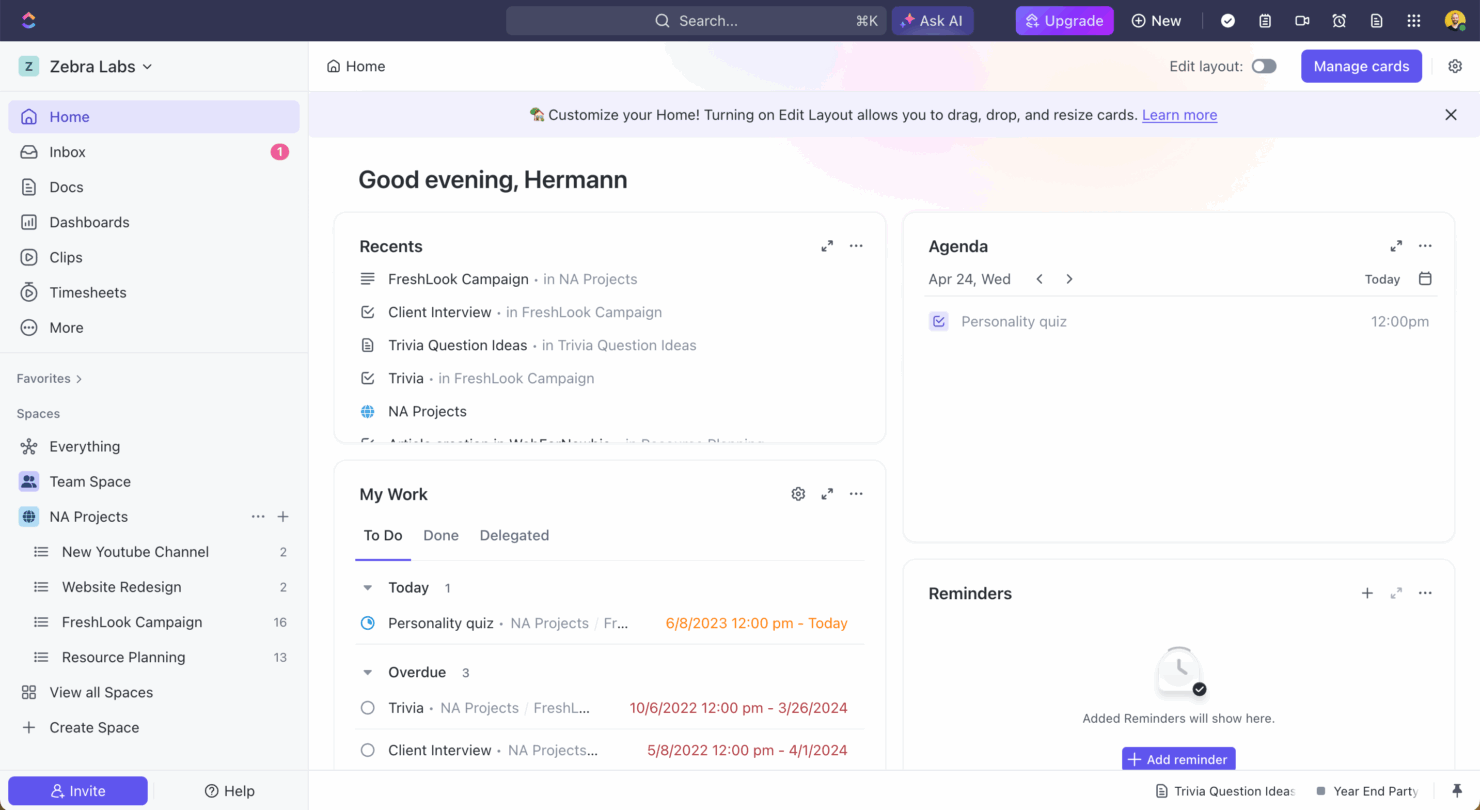
| Benutzeroberfläche | monday.com bietet eine visuell intuitive Oberfläche mit Drag-and-drop-Funktionen für eine einfache Anpassung. | ClickUp stellt eine flexible Oberfläche mit zahlreichen Anpassungsmöglichkeiten bereit, was für neue Nutzer überwältigend sein kann. |
| Onboarding-Erfahrung | monday.com stellt geführte Tutorials und Vorlagen zur Verfügung, damit neue Nutzer schnell starten können. | ClickUp bietet umfassende Dokumentationen und Videoanleitungen, aber aufgrund des großen Funktionsumfangs ist die Lernkurve steil. |
| Support | monday.com verfügt über einen reaktionsschnellen Kundensupport mit Live-Chat und E-Mail-Optionen. | ClickUp bietet 24/7 Support, jedoch überwiegend per E-Mail, was eine sofortige Hilfe verzögern kann. |
monday.com lässt sich dank seiner unkomplizierten Oberfläche und der schnellen Einarbeitung einfach bedienen und ist damit ideal für Teams, die nach Einfachheit suchen. ClickUp hingegen punktet mit umfangreichen Anpassungsmöglichkeiten, kann aber durch die Komplexität eine Herausforderung sein – besonders für Teams, die bereit sind, Zeit in das Erlernen der Funktionen zu investieren.
monday AI Workspace vs ClickUp: Pros & Cons
monday AI Workspace
- The interface is easy to use, with simple drag and drop timeline and charting mechanics.
- You can create forms that live within your project as a view.
- There is a long list of supported integrations
- The Gantt view isn't useful for building a project.
- Recurring tasks are considered automations and limited to higher tier plans.
- There is a steep learning curve for beginners.
ClickUp
- Extensive task management features keep your projects organized and on track
- Real-time collaboration makes team communication more effective
- Built-in automations reduce manual work and speed up your workflow
- Users often find the learning curve steep due to its rich feature set
- Some users report occasional performance lags when managing large projects
- Mobile app can be less intuitive than the desktop version
Best Use Cases for monday AI Workspace and ClickUp
monday AI Workspace
- Creative departments With features like collaborative docs and a proofing screen, creative teams can improve feedback loops and increase delivery speeds.
- Marketing teams Its customizable dashboards and automation features let you track campaigns and workflows efficiently.
- Content creation monday.com's file management and commenting capabilities let teams manage media files and improve collaboration.
- Event planners The platform’s timeline views and easy collaboration features make managing multiple events straightforward.
- Product development You can track progress and updates across teams to maintain alignment and meet deadlines.
- Remote teams With collaborative features and real-time updates, remote teams can maintain productivity and communication effortlessly.
ClickUp
- Creative agencies ClickUp's customizable dashboards and task automation features can help you manage client projects, track feedback and revisions, and keep creative teams aligned.
- Tech startups ClickUp supports agile development with sprints and real-time collaboration features that can help teams iterate quickly.
- Marketing teams You can streamline campaign planning and execution using ClickUp’s task dependencies and timelines.
- Remote teams ClickUp's real-time updates and collaboration tools keep everyone on the same page, no matter where they are.
- Product managers ClickUp’s roadmaps and goal-tracking features help you align development with business objectives.
- Freelancers You can track your tasks and deadlines efficiently with ClickUp’s simple task and time management tools.
Für wen eignet sich monday.com und für wen ClickUp?
Meiner Meinung nach ist monday.com perfekt für Teams, die eine benutzerfreundliche Plattform mit leichter Einarbeitung und visueller Aufgabenverwaltung suchen, besonders in kreativen Branchen wie Marketing oder Design. ClickUp hingegen eignet sich besonders für technikaffine Teams in der Softwareentwicklung oder IT, die vielfältige Anpassungen und einen umfassenden Funktionsumfang benötigen. Wenn Ihr Team Wert auf Einfachheit und einen schnellen Start legt, ist monday.com die richtige Wahl. Wer jedoch erweiterte Funktionen benötigt und eine steilere Lernkurve nicht scheut, sollte zu ClickUp greifen.
Differences Between monday AI Workspace and ClickUp
| monday AI Workspace | ClickUp | |
|---|---|---|
| Automation | monday.com allows you to automate routine tasks with customizable triggers. | ClickUp provides powerful automation tools, but they require more setup time. |
| Integrations | monday.com supports integrations with tools like LinkedIn and Miro. | ClickUp integrates well with Microsoft Teams and Figma, offering different options. |
| Onboarding | monday.com has guided tutorials and templates for a quick start. | ClickUp requires more time to learn due to its vast feature set and documentation. |
| Pricing | monday.com uses a tiered pricing model based on user count and features. | ClickUp offers a tiered model with a free plan, but charges for advanced features. |
| User Interface | monday.com offers a simple, drag-and-drop interface that's easy to navigate. | ClickUp provides a more complex interface with extensive customization options. |
| Visit monday AI WorkspaceOpens new window | Visit ClickUpOpens new window |
Similarities Between monday AI Workspace and ClickUp
| Collaboration | Each platform provides tools for team collaboration, such as file sharing and real-time updates, to keep your team aligned. |
|---|---|
| Customizable Workflows | monday.com and ClickUp let you create custom workflows to suit your team's unique processes, enhancing productivity and efficiency. |
| Data Visualization | Both tools provide data visualization features, such as dashboards and charts, to help you make informed decisions based on project data. |
| Integrations | Both solutions support a wide range of integrations with popular apps like Slack and Google Calendar, enhancing their functionality. |
| Task Management | Both monday.com and ClickUp offer robust task management features, allowing you to assign tasks, set deadlines, and track progress effectively. |
| Visit monday AI WorkspaceOpens new window Visit ClickUpOpens new window | |