



Microsoft Planner vs. Trello: Vergleich & Expertenbewertungen für 2026



Microsoft Planner bietet eine unkomplizierte Möglichkeit, Aufgaben zu organisieren und Teams die Zusammenarbeit zu erleichtern, während Trello einen flexiblen und visuellen Ansatz für das Projektmanagement bereitstellt. Beide Tools zielen darauf ab, die Produktivität zu steigern, unterscheiden sich jedoch deutlich in ihren Kernfunktionen und der Benutzererfahrung.
Ich habe beide Tools getestet und bewertet und einen detaillierten Vergleich ihrer Funktionen, Vor- und Nachteile sowie der Preise erstellt, um Ihnen bei der Entscheidung zu helfen, welche Projektmanagement-Software am besten zu den Anforderungen Ihres Teams passt.
Microsoft Planner vs. Trello: An Overview
Trello

Warum Sie unseren Software-Empfehlungen vertrauen können
Unser Team testet und bewertet Software seit 2012. Als Projektmanager wissen wir selbst, wie schwierig – und wichtig – es ist, die richtige Software auszuwählen.
Für diesen Leitfaden haben wir Tools mithilfe von praktischen Tests und unabhängiger Recherche bewertet und dabei unsere Bewertungskriterien angewendet. Zudem greifen wir auf Erkenntnisse von Branchenvordenkern und praktizierenden Projektmanagement-Experten zurück.
Unsere Bewertungen spiegeln unser menschliches redaktionelles Urteilsvermögen wider, keine Verkaufsstrategie.
Expertenprüfer:
Microsoft Planner vs. Trello Pricing Comparison
| Microsoft Planner | Trello | |
|---|---|---|
| Free Trial | 30-day free trial | 14-day free trial |
| Pricing | From $10/user/month (billed annually) | From $5/user/month (billed annually) |
Microsoft Planner vs. Trello: Preise & versteckte Kosten
Die Kosten für Microsoft Planner sind in bestimmten Microsoft 365-Abonnements enthalten, was bedeutet, dass zusätzliche Kosten anfallen können, wenn Sie Ihr Microsoft 365-Paket für den Zugriff erweitern müssen. Trellos Preismodell ist gestaffelt (inklusive einer kostenlosen Version) und steigt im Preis, wenn Sie mehr Nutzer oder erweiterte Funktionen benötigen.
Um das richtige Projektmanagement-Tool zu wählen, analysieren Sie die spezifischen Funktionsbedürfnisse und Wachstumspläne Ihres Teams und berücksichtigen Sie potenzielle Kosten für Abonnements oder Upgrades, um sicherzustellen, dass das Preismodell Ihren langfristigen Projektzielen entspricht.
Microsoft Planner vs. Trello Feature Comparison
Microsoft Planner integriert sich in Microsoft 365, sodass Sie die Aufgaben Ihres Teams innerhalb einer vertrauten Umgebung koordinieren können. Das ist auch ideal, wenn Sie bereits Microsoft-Tools nutzen. Trellos Kanban-Boards ermöglichen es Ihnen, Arbeitsabläufe visuell darzustellen, Ihr Team auf Kurs zu halten und den Fortschritt zu verfolgen. Dies ist besonders nützlich für Teams, die einen flexiblen, visuellen Ansatz benötigen.
| Microsoft Planner | Trello | |
|---|---|---|
| API | ||
| Collaboration Support | ||
| Dashboard | ||
| Dashboards | ||
| Data Export | ||
| Data Import | ||
| External Integrations | ||
| Gantt Charts | ||
| Multi-User | ||
| Notifications | ||
| Resource Management | ||
| Scheduling | ||
| Task Scheduling/Tracking |
Microsoft Planner vs. Trello Integrationen
| Integration | Microsoft Planner | Trello |
|---|---|---|
| Microsoft Teams | ✅ | ✅ |
| Slack | ❌ | ✅ |
| Google Drive | ❌ | ✅ |
| OneDrive | ✅ | ❌ |
| Dropbox | ❌ | ✅ |
| Jira | ❌ | ✅ |
| Asana | ❌ | ❌ |
| Outlook | ✅ | ✅ |
| API | ✅ | ✅ |
| Zapier | ❌ | ✅ |
Die Integration von Microsoft Planner mit Microsoft Teams ermöglicht es, Aufgaben direkt in bestehenden Kommunikationskanälen zu koordinieren (besonders praktisch, wenn Sie bereits stark auf das Microsoft-Ökosystem setzen). Trellos Integration mit Slack ist hervorragend für Teams geeignet, die mit Sofortbenachrichtigungen und gemeinsamer Teamarbeit alle Beteiligten auf dem Laufenden halten möchten.
Microsoft Planner vs. Trello Sicherheit, Compliance & Zuverlässigkeit
| Faktor | Microsoft Planner | Trello |
|---|---|---|
| Datenverschlüsselung | Microsoft Planner verwendet Verschlüsselung während der Übertragung und im Ruhezustand, um Ihre Daten zu schützen. | Trello verschlüsselt Daten während der Übertragung und im Ruhezustand nach Industriestandards. |
| Regulatorische Compliance | MS Planner ist konform mit der DSGVO und anderen internationalen Standards. | Trello ist konform mit DSGVO und CCPA zum Schutz der Nutzerdaten. |
| Datenschutz | Microsoft Planner bietet in der Microsoft 365-Suite umfassende Datenschutzeinstellungen. | Trello stellt Datenschutzeinstellungen und Transparenzberichte bereit. |
Microsoft Planner nutzt die Sicherheitsinfrastruktur von Microsoft 365, während Trello eine hohe Konformität mit wichtigen Datenschutzgesetzen bietet. Um das passende Aufgabenmanagement-Tool zu wählen, prüfen Sie, welches Angebot am besten mit den regulatorischen Anforderungen und Datenschutzbedürfnissen Ihrer Organisation übereinstimmt, und ziehen Sie die Überprüfung der Sicherheitszertifikate sowie Kundenfeedback in Betracht.
Microsoft Planner vs. Trello Benutzerfreundlichkeit
| Faktor | Microsoft Planner | Trello |
|---|---|---|
| Benutzeroberfläche | Microsoft Planner bietet eine übersichtliche, organisierte Oberfläche, die in die Microsoft 365-Tools integriert ist. | Trello stellt ein visuell intuitives, benutzerfreundliches Kanban-Board bereit, das leicht zu navigieren ist. |
| Onboarding-Erlebnis | Das Onboarding von Microsoft Planner ist für Nutzer, die bereits Microsoft-Produkte kennen, unkompliziert. | Trello bietet ein einfaches Drag-and-Drop-Tutorial, damit Sie schnell starten und die Lernkurve senken können. |
| Einrichtung | Die Einrichtung von Microsoft Planner ist schnell und erfordert wenig Konfiguration – ideal für kleine Teams und Einsteiger. | Die Einrichtung von Trello geht schnell, da lediglich eine einfache Registrierung notwendig ist, um Aufgaben zu verwalten. |
Microsoft Planner ist besonders einfach zu bedienen für Nutzer, die bereits mit Microsoft 365 vertraut sind, jedoch ist die Einrichtung generell unkompliziert. Trello punktet mit einer einfachen, intuitiven Oberfläche und einem schnellen Start, allerdings fehlen ihm manche strukturierte Organisationsfunktionen, die Microsoft Planner bereitstellt.
Microsoft Planner vs Trello: Pros & Cons
Microsoft Planner
- You can easily assign and track tasks within your team.
- Its integration with Microsoft 365 enhances team collaboration
- The simple, user-friendly interface makes task management straightforward.
- It lacks advanced customization options for complex projects.
- The reporting features are not as robust as some competitors.
- It may not accommodate larger teams needing detailed task dependencies.
Trello
- You can easily visualize your tasks with Trello's board and card layout.
- It's simple to use, making it accessible for team members of all skill levels.
- Trello adapts to your team's workflow, offering flexibility in task management.
- Trello lacks advanced reporting features you might find in more complex tools.
- You can't create intricate task dependencies, which may limit complex project planning.
- Trello's simplicity might not suit large teams with detailed project management needs.
Best Use Cases for Microsoft Planner and Trello
Microsoft Planner
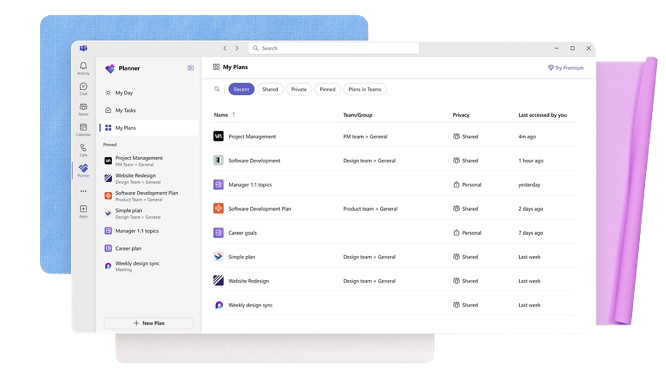
- Small Businesses Microsoft Planner's straightforward interface is perfect for small businesses that need to manage tasks without complex features.
- Marketing Teams It helps marketing teams track campaigns and collaborate effectively with its task assignment and tracking capabilities.
- Educational Institutions Schools and universities can use it to organize academic projects and coordinate activities across departments.
- IT Departments IT teams can benefit from its integration with Microsoft 365, making it easy to manage tech projects and resources.
- Remote Teams For remote teams needing a simple way to track tasks and collaborate, Microsoft Planner provides the necessary tools.
- Nonprofits Nonprofits can use it to manage volunteer tasks and projects efficiently, leveraging its easy-to-use interface.
Trello
- Creative Agencies Trello's visual task management makes it easy for you to track projects, ideas, and client feedback.
- Startups The flexibility Trello offers helps your team adapt quickly as you grow and change.
- Marketing Teams You can easily plan campaigns and track progress with Trello's board system.
- Design Departments Trello's simple interface allows you to manage design projects and revisions efficiently.
- Freelancers You can organize your tasks and deadlines without getting overwhelmed by complex features
- Product Development Trello's adaptability helps your team streamline workflows and manage product roadmaps effectively.
Wer sollte Microsoft Planner und wer sollte Trello nutzen?
Meiner Meinung nach eignet sich Microsoft Planner am besten für Teams im Unternehmensumfeld, die bereits Microsoft 365 verwenden, da es sich nahtlos mit anderen Microsoft-Tools integriert.
Trello hingegen ist ideal für kreative Teams und Start-ups, die Flexibilität und visuelles Aufgabenmanagement benötigen, ohne an ein bestimmtes Ökosystem gebunden zu sein. Wenn Sie Wert auf Einfachheit und eine schnelle Einrichtung legen, ist Trello die beste Wahl. Wenn Ihr Team hingegen auf strukturierte, integrierte Lösungen setzt, ist Microsoft Planner im Vorteil.
Differences Between Microsoft Planner and Trello
| Microsoft Planner | Trello | |
|---|---|---|
| Automation | Microsoft Planner has limited automation features within Microsoft 365. | Trello offers extensive automation options via a specific feature called Butler. |
| Integrations | Microsoft Planner integrates deeply with Microsoft 365 tools. | Trello offers broad integrations with various third-party apps. |
| Onboarding | Microsoft Planner is easier for those already using Microsoft products. | Trello provides a quick, intuitive onboarding experience with drag-and-drop. |
| Pricing | Microsoft Planner is included with Microsoft 365 subscriptions and paid plans. | Trello offers a tiered pricing model with a free plan. |
| User Interface | Microsoft Planner has a structured layout familiar to Microsoft users. | Trello features a visual, flexible Kanban board interface. |
| Read Microsoft Planner ReviewOpens new window | Read Trello ReviewOpens new window |
Similarities Between Microsoft Planner and Trello
| Cloud-Based | Microsoft Planner and Trello are cloud-based, so your data is accessible from anywhere. |
|---|---|
| Collaboration | Each tool supports team collaboration and helps with task assignment and sharing updates. |
| Customization | Both platforms provide options to customize your boards and lists to fit your team's workflow. |
| Mobile Usability | Microsoft Planner and Trello both offer mobile apps so you can manage projects on the go. |
| Task Management | Both Microsoft Planner and Trello let you organize tasks and subtasks into boards and checklists so you can help your team members stay on track. |
| Read Microsoft Planner ReviewOpens new window Read Trello ReviewOpens new window | |