



ClickUp vs. Jira: Vergleich & Expertenbewertungen für 2026



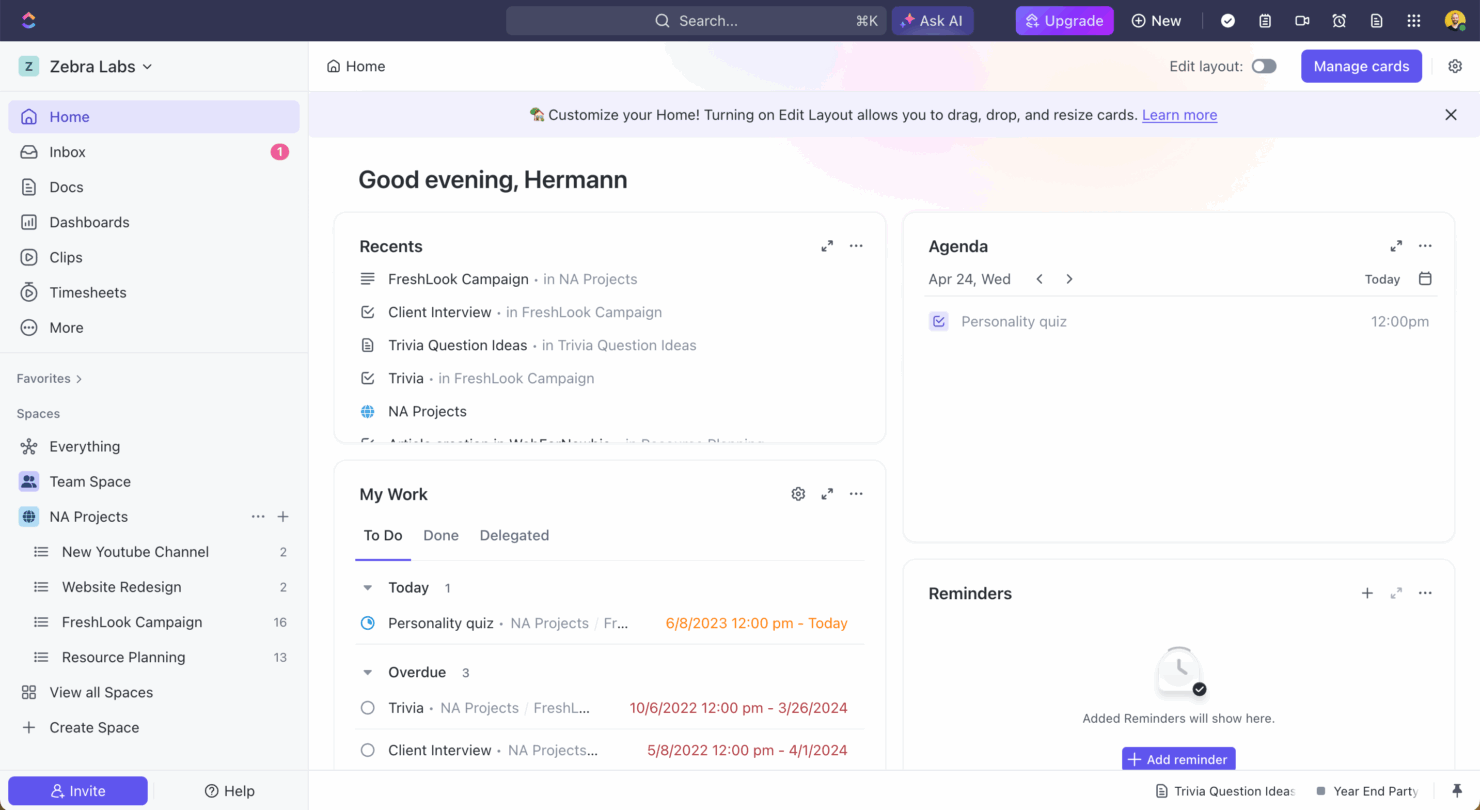
ClickUp bietet eine einheitliche Plattform für effizientes Projektmanagement in verschiedenen Branchen, während sich Jira auf Entwickler mit fortschrittlichen Nachverfolgungswerkzeugen konzentriert. Beide sind leistungsstark, aber ClickUp bietet mehr Vielseitigkeit, während Jira in der Softwareentwicklung glänzt.
In diesem Artikel finden Sie einen detaillierten Vergleich der Tools und ihrer Funktionen, Vor- und Nachteile sowie Preise, damit Sie die richtige Projektmanagement-Software für Ihre Bedürfnisse auswählen können.
ClickUp vs. Jira: An Overview
ClickUp
Jira

Warum Sie unseren Software-Empfehlungen vertrauen können
Unser Team testet und bewertet Software seit 2012. Als Projektmanager wissen wir selbst, wie schwierig – und wichtig – es ist, die richtige Software auszuwählen.
Für diesen Leitfaden haben wir Tools mithilfe von praktischen Tests und unabhängiger Recherche bewertet und dabei unsere Bewertungskriterien angewendet. Zudem greifen wir auf Erkenntnisse von Branchenvordenkern und praktizierenden Projektmanagement-Experten zurück.
Unsere Bewertungen spiegeln unser menschliches redaktionelles Urteilsvermögen wider, keine Verkaufsstrategie.
Expertenprüfer:
ClickUp vs. Jira Pricing Comparison
| ClickUp | Jira | |
|---|---|---|
| Free Trial | Free plan + free demo available | Free plan + 14-day free trial available |
| Pricing | From $7/user/month (billed annually) | From $7.91/user/month |
ClickUp vs. Jira Preise & Versteckte Kosten
ClickUp-Preise bieten eine flexible, gestaffelte Struktur mit kostenlosen und kostenpflichtigen Optionen, allerdings können für zusätzlichen Speicherplatz oder erweiterte Funktionen zusätzliche Kosten anfallen. Jira-Preise basieren auf einem Abonnementmodell pro Nutzer, das mit steigender Nutzerzahl oder zusätzlichen Premium-Funktionen teurer werden kann.
Um das richtige Tool zu wählen, sollten Sie die Teamgröße, Ihren Funktionsbedarf und die Möglichkeit zur Skalierung einschätzen; ziehen Sie eine Testphase in Erwägung, um herauszufinden, welcher Anbieter am besten zu Ihrem Arbeitsablauf und Budget passt.
ClickUp vs. Jira Feature Comparison
ClickUps anpassbare Aufgabenansichten ermöglichen Ihnen das Umschalten zwischen Listen-, Board- und Kalenderformaten – ideal für Teams, die mehrere Arbeitsabläufe verwalten. Jira bietet eine leistungsstarke Vorgangsverwaltung und einzigartige URLs für jede Aufgabe, damit Entwicklungsteams Bugtracking und Dokumentation optimieren können.
Während ClickUp Flexibilität über verschiedene Branchen hinweg erlaubt, ist Jira speziell auf das detaillierte Vorgangsmanagement in der Softwareentwicklung zugeschnitten.
| ClickUp | Jira | |
|---|---|---|
| API | ||
| Calendar Management | ||
| Collaboration Support | ||
| Dashboards | ||
| Data Export | ||
| Data Import | ||
| External Integrations | ||
| File Sharing | ||
| Gantt Charts | ||
| Kanban Boards | ||
| Multi-User | ||
| Notifications | ||
| Project Management | ||
| Task Scheduling/Tracking | ||
| Time Management |
ClickUp vs. Jira Integrationen
| Integration | ClickUp | Jira |
|---|---|---|
| Dropbox | ✅ | ❌ |
| Figma | ✅ | ✅ |
| GitHub | ✅ | ✅ |
| Slack | ✅ | ✅ |
| Google Kalender | ✅ | ❌ |
| Microsoft Teams | ✅ | ✅ |
| Zoom | ✅ | ✅ |
| Jenkins | ❌ | ✅ |
| Lucidchart | ❌ | ✅ |
| Adobe XD | ❌ | ✅ |
| API | ✅ | ✅ |
| Zapier | ✅ | ✅ |
ClickUp integriert sich mit Slack, um Kommunikation und Aufgabenaktualisierungen zu erleichtern – besonders wertvoll für Teams, die remote zusammenarbeiten. Jira lässt sich mit Jenkins verbinden, um Build- und Deployment-Prozesse zu automatisieren, was für Entwicklungsteams mit Fokus auf kontinuierliche Integration hilfreich ist.
Während ClickUp mit Kollaborations-Tools die Zusammenarbeit fördert, stärkt Jira mit seinen technischen Integrationen die Workflows in der Softwareentwicklung.
ClickUp vs. Jira Sicherheit, Compliance & Zuverlässigkeit
| Faktor | ClickUp | Jira |
|---|---|---|
| Datenverschlüsselung | ClickUp verwendet AES-256-Verschlüsselung, um Daten im Ruhezustand und bei der Übertragung zu schützen. | Jira setzt auf AES-256-Verschlüsselung und gewährleistet so Datensicherheit auf all seinen Plattformen. |
| Regulatorische Compliance | ClickUp ist DSGVO-konform und sichert den Datenschutz der Nutzer. | Jira erfüllt DSGVO sowie weitere internationale Standards zum Datenschutz. |
| Ausfallsicherheit/Uptime | ClickUp bietet ein 99,9% Uptime-SLA und sorgt somit für konstante Service-Zuverlässigkeit. | Jira stellt ein 99,9% Uptime-SLA bereit, abgesichert durch eine robuste globale Infrastruktur. |
ClickUp und Jira bieten beide starke Sicherheits- und Compliance-Funktionen, wobei das höhere Uptime-SLA von ClickUp insbesondere für Teams attraktiv ist, die Wert auf Zuverlässigkeit legen. Berücksichtigen Sie bei der Auswahl Ihre spezifischen Compliance-Anforderungen, wie z.B. die DSGVO, sowie Verschlüsselungsstandards und Uptime-Garantien, um sicherzustellen, dass die Lösung die Sicherheitsbedürfnisse Ihres Teams erfüllt.
ClickUp vs. Jira Benutzerfreundlichkeit
| Faktor | ClickUp | Jira |
|---|---|---|
| Benutzeroberfläche | ClickUp bietet eine übersichtliche und anpassbare Oberfläche mit Drag-and-Drop-Funktionen | Jiras Oberfläche ist leistungsstark, kann aber komplex sein und erfordert Einarbeitungszeit. |
| Onboarding-Erlebnis | ClickUp stellt Interface-Tutorials und Ressourcen für einen reibungslosen Einstieg bereit. | Jira bietet ausführliche Dokumentationen, kann aber für Anfänger überwältigend wirken. |
| Einrichtung | Die Einrichtung von ClickUp ist intuitiv und ermöglicht eine schnelle Projektanlage und Verwaltung. | Jiras Einrichtung kann aufwendig sein und erfordert oft Konfiguration für die optimale Nutzung. |
ClickUp lässt sich dank seines intuitiven Designs und einer hilfreichen Einführung leichter starten, während Jira anfangs aufgrund seiner komplexen Einrichtung und Oberfläche herausfordernd sein kann. Allerdings sind Jiras umfangreiche Funktionen und Anpassungsmöglichkeiten ein Vorteil für all jene, die bereit sind, sich intensiv damit auseinanderzusetzen.
ClickUp vs Jira: Pros & Cons
ClickUp
- Extensive task management features keep your projects organized and on track
- Real-time collaboration makes team communication more effective
- Built-in automations reduce manual work and speed up your workflow
- Users often find the learning curve steep due to its rich feature set
- Some users report occasional performance lags when managing large projects
- Mobile app can be less intuitive than the desktop version
Jira
- Agile workflow management supports Scrum and Kanban and can improve your teams' productivity.
- Automation rules are easy to set up, which helps your team speed up their work.
- Custom filters can be created and accessed quickly, which improves your team's efficiency.
- Field names can be confusing, which might slow down your team's workflow.
- The interface can be too crowded in Scrum projects, which can make it hard for your team to navigate.
- There's a lack of resource management capabilities, which could limit your team's planning.
Best Use Cases for ClickUp and Jira
ClickUp
- Creative agencies ClickUp's customizable dashboards and task automation features can help you manage client projects, track feedback and revisions, and keep creative teams aligned.
- Tech startups ClickUp supports agile development with sprints and real-time collaboration features that can help teams iterate quickly.
- Marketing teams You can streamline campaign planning and execution using ClickUp’s task dependencies and timelines.
- Remote teams ClickUp's real-time updates and collaboration tools keep everyone on the same page, no matter where they are.
- Product managers ClickUp’s roadmaps and goal-tracking features help you align development with business objectives.
- Freelancers You can track your tasks and deadlines efficiently with ClickUp’s simple task and time management tools.
Jira
- Software development Jira’s agile tools like Scrum and Kanban boards make it perfect for managing software projects.
- IT departments Its issue tracking capabilities help your team efficiently handle technical support and bug fixes.
- Tech startups Jira offers customization capabilities that allow your team to scale and adapt as your projects grow.
- Agile teams Sprint planning and backlog management features keep your agile processes organized and effective.
- Large enterprises Jira’s automation rules can streamline your complex workflows and improve team productivity.
- Project managers Its reporting and analytics provide insights that help you make informed decisions quickly.
Wer sollte ClickUp nutzen und wer sollte Jira nutzen?
Meiner Meinung nach ist ClickUp ideal für Teams, die ein vielseitiges Tool suchen, das verschiedene Branchen und Projekttypen unterstützt – insbesondere für jene, die Wert auf individuelle Anpassung und Benutzerfreundlichkeit legen. Für die Softwareentwicklung oder Teams mit Bedarf an fortschrittlichem Tracking und Integration ist Jira die bessere Wahl.
Ich finde, ClickUp eignet sich besonders für kreative und Marketing-Teams durch seine flexible Oberfläche, während Jira für technische Teams entwickelt wurde, die eine detaillierte Vorgangsverwaltung und strukturierte Workflows benötigen.
Differences Between ClickUp and Jira
| ClickUp | Jira | |
|---|---|---|
| Automation | ClickUp provides built-in automation for task management. | Jira offers advanced automation, especially suited for development workflows. |
| Customization | ClickUp allows various views and custom fields for different projects | Jira provides detailed customization options, ideal for technical teams. |
| Integrations | ClickUp integrates with communication tools like Slack and Zoom. | Jira integrates deeply with development tools like Jenkins and GitHub |
| Pricing | ClickUp offers a flexible tiered pricing structure with free options. | Jira uses a per-user subscription model that scales with user count. |
| User Interface | ClickUp features a customizable interface with drag-and-drop ease | Jira’s interface is powerful but can be complex for new users. |
| Visit ClickUpOpens new window | Read Jira ReviewOpens new window |
Similarities Between ClickUp and Jira
| API Access | Both platforms provide API access, allowing you to build custom integrations and automate workflows. ClickUp's API is user-friendly for general tasks, while Jira's API is robust for more complex development requirements. |
|---|---|
| Collaboration | Both tools support team collaboration with features like comments and file sharing. ClickUp integrates smoothly with Slack for communication, while Jira offers integrations with development tools to enhance team collaboration. |
| Project Tracking | Both ClickUp and Jira offer robust project tracking, allowing you to monitor tasks, deadlines, and progress easily. ClickUp uses customizable views, while Jira excels with detailed issue tracking for development projects. |
| Scalability | ClickUp and Jira both scale well with your team, supporting growing project demands and expanding user bases. ClickUp offers flexibility across various industries, while Jira is tailored for scaling software development teams. |
| Task Management | ClickUp and Jira both provide comprehensive task management, enabling you to assign, prioritize, and track tasks efficiently. ClickUp's task views are customizable, whereas Jira offers detailed workflows particularly suited to technical teams. |
| Visit ClickUpOpens new window Read Jira ReviewOpens new window | |