



Airtable vs. monday.com: Expert Comparison & Reviews 2026



Airtable provides a flexible, user-friendly platform for managing projects and organizing work efficiently, while monday.com offers a visual and intuitive approach to task management that helps teams coordinate and track work processes. Both tools are effective, but they support different workflows, so the right fit depends on your team's structure and goals.
I’ve personally tested and reviewed each tool and compared key features, pros and cons, and pricing. My detailed comparison will help you choose the right project management software for your team.
Airtable vs. monday AI Workspace: An Overview
Airtable
monday AI Workspace

Why Trust Our Software Recommendations
Our team has been testing and reviewing software since 2012. As project managers ourselves, we know how difficult—and important—it is to choose the right software.
For this guide, we evaluated tools using hands-on testing and independent research, scoring tools using our selection criteria. We also draw on insights from industry thought leaders and practicing project management experts.
Our reviews reflect our human editorial judgment, not a sales pitch.
Expert reviewers:
Airtable vs. monday AI Workspace Pricing Comparison
| Airtable | monday AI Workspace | |
|---|---|---|
| Free Trial | Free plan available; 14-day free trial | Free plan + 14-day trial available |
| Pricing | From $20/user/month (billed annually) | From $9/user/month (billed annually) |
Airtable’s pricing follows a subscription model and offers different levels of access and features per tier. monday.com’s pricing follows a similar tiered approach, with costs rising as you add more users or require specific advanced features. Both tools offer a free plan to start.
To choose the right tool for your team, assess your project needs and usage patterns, and calculate the total cost of ownership. Factor in expenses that might arise as your team grows.
Airtable vs. monday AI Workspace Feature Comparison
Airtable’s interface feature lets you create custom views for stakeholders. External stakeholders can view them without needing to login. This is useful for teams that need controlled visibility.
monday.com’s automation capabilities help eliminate repetitive tasks, and it can integrate with tools like LinkedIn or HubSpot to help improve team productivity.
| Airtable | monday AI Workspace | |
|---|---|---|
| API | ||
| Batch Permissions & Access | ||
| Budgeting | ||
| Calendar Management | ||
| Contact Management | ||
| Contact Sharing | ||
| Customer Management | ||
| Dashboard | ||
| Data Export | ||
| Data Import | ||
| Data Visualization | ||
| Expense Tracking | ||
| External Integrations | ||
| Gantt Charts | ||
| Multi-User | ||
| Notifications | ||
| Project Management | ||
| Resource Management | ||
| Scheduling | ||
| Task Scheduling/Tracking | ||
| Third-Party Plugins/Add-Ons | ||
| Travel Management |
Airtable vs. monday.com Integrations
| Integration | Airtable | monday.com |
|---|---|---|
| Slack | ✅ | ✅ |
| Google Drive | ✅ | ✅ |
| Microsoft Teams | ❌ | ✅ |
| Salesforce | ✅ | ❌ |
| ✅ | ✅ | |
| HubSpot | ❌ | ✅ |
| Trello | ❌ | ✅ |
| Dropbox | ✅ | ✅ |
| API | ✅ | ✅ |
| Zapier | ✅ | ✅ |
Airtable integrates with Google Workspace to sync your data easily, which makes it a strong choice if you depend on Google's tools for team collaboration. monday.com connects with LinkedIn to let you automate social media tasks and make it easier to manage posts and track engagement within their project management workflow.
Airtable vs. monday.com Security, Compliance & Reliability
| Factor | Airtable | monday.com |
|---|---|---|
| Data Privacy | Airtable is SOC 2 and ISO 27001 compliant and offers user-level permissions to protect data. | monday.com maintains data privacy with SOC 2 and ISO 27001 certifications, as well as granular permission settings. |
| Encryption | Airtable encrypts data in transit using TLS protocols and data at rest using AES-256. | monday.com uses AES-256 encryption for data at rest and TLS for data in transit. |
| Regulatory Compliance | Airtable complies with GDPR and CCPA to make sure its data handling meets legal standards. | monday.com adheres to GDPR, CCPA, and HIPAA to provide comprehensive regulatory compliance. |
| Uptime Reliability | Airtable promises 99.9% uptime with real-time systems status updates. | monday.com guarantees 99.9% uptime and offers a robust service level agreement. |
Airtable and monday.com both offer strong security and compliance features, but monday.com’s HIPAA compliance is useful if your organization is in the healthcare field. To choose the right project management platform, assess your team's specific compliance requirements and focus on features that directly impact data protection, such as encryption standards and uptime guarantees.
Airtable vs. monday.com Ease of Use
| Factor | Airtable | monday.com |
|---|---|---|
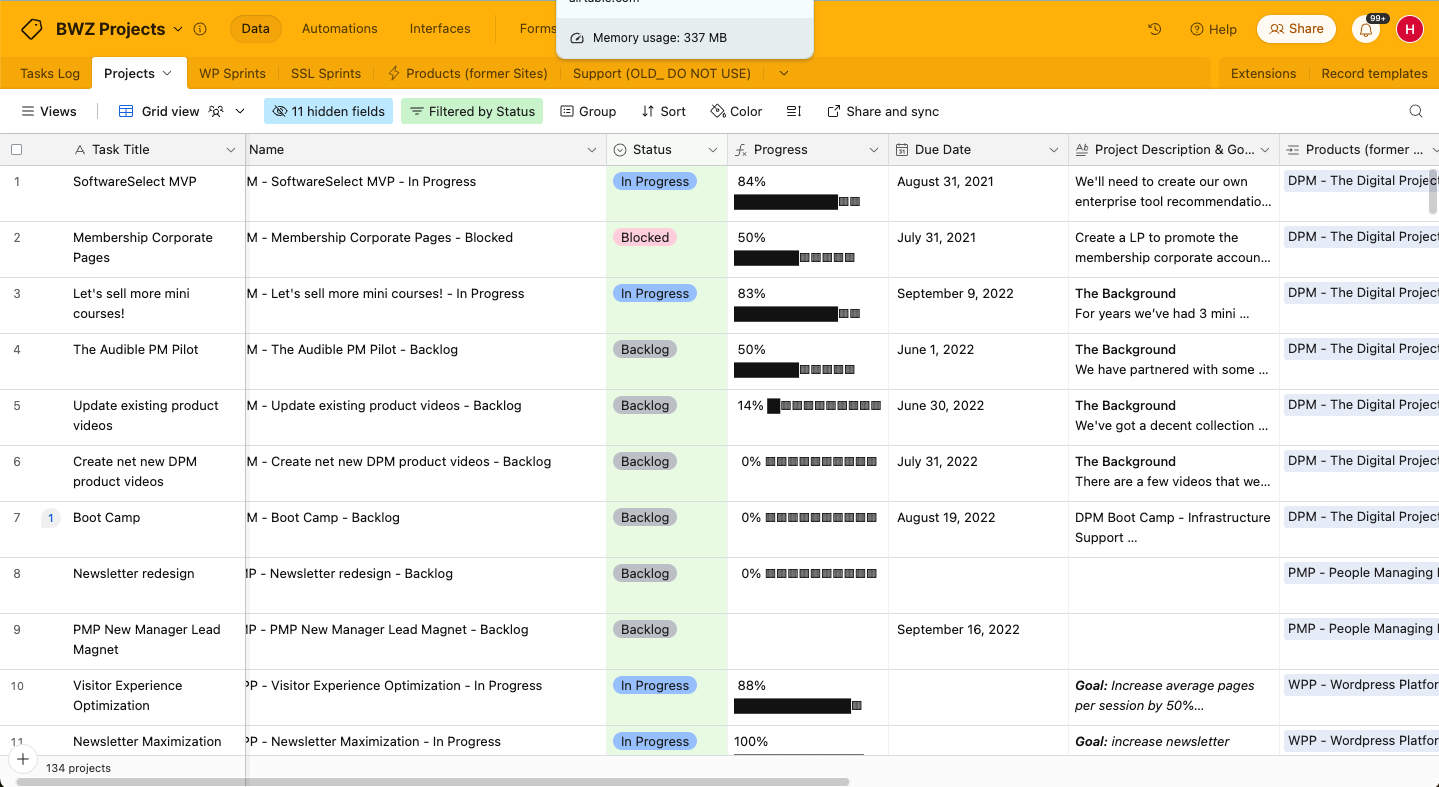
| User Interface | Airtable’s interface is clean and spreadsheet-like, which makes it intuitive for users familiar with Excel or Google Sheets. | monday.com offers a colorful, visual interface with drag-and-drop functionality and is ideal for visual learners. |
| Onboarding Experience | Airtable provides straightforward onboarding with interactive guides and templates. | monday.com offers a comprehensive onboarding process with tutorials and a dedicated customer success manager. |
| Setup Process | Airtable’s setup is quick, and the tool offers pre-built templates that require minimal customization. | monday.com allows for a more detailed setup with customizable workflows and integrations. |
| Customer Support | Airtable offers email support and a resourceful community forum for quick answers. | monday.com provides 24/7 support with live chat and a vast library of video tutorials. |
Airtable is easy to learn thanks to its familiar spreadsheet-style interface, though it may feel limited for complex projects. monday.com offers a highly visual interface with extensive customization options, but it can take more time to set up and use effectively.
Airtable vs monday AI Workspace: Pros & Cons
Airtable
- Its automation rules make it easy to notify stakeholders, even if they are outside the platform.
- Airtable's forms feature lets you efficiently gather information from external sources.
- You can connect and perform calculations across multiple bases.
- Customizing the templates requires a big time investment.
- It's not a traditional project management platform.
- The learning curve can be challenging for new users.
monday AI Workspace
- The interface is easy to use, with simple drag and drop timeline and charting mechanics.
- You can create forms that live within your project as a view.
- There is a long list of supported integrations
- The Gantt view isn't useful for building a project.
- Recurring tasks are considered automations and limited to higher tier plans.
- There is a steep learning curve for beginners.
Best Use Cases for Airtable and monday AI Workspace
Airtable
- Creative agencies Airtable lets your team design custom project pipelines to foster creativity and improve task management.
- Marketing teams You can track campaigns with Airtable’s flexible and visual database and make sure every detail is covered.
- Small businesses Airtable adapts to your unique business processes and can scale with you as your team grows.
- Event planners Its visual calendar and task management features help you coordinate every detail efficiently.
- Consulting firms Track client projects and deliverables with Airtable’s customizable views and data organization.
- Product development You can manage product roadmaps and feature backlogs with Airtable’s powerful database tools.
monday AI Workspace
- Creative departments With features like collaborative docs and a proofing screen, creative teams can improve feedback loops and increase delivery speeds.
- Marketing teams Its customizable dashboards and automation features let you track campaigns and workflows efficiently.
- Content creation monday.com's file management and commenting capabilities let teams manage media files and improve collaboration.
- Event planners The platform’s timeline views and easy collaboration features make managing multiple events straightforward.
- Product development You can track progress and updates across teams to maintain alignment and meet deadlines.
- Remote teams With collaborative features and real-time updates, remote teams can maintain productivity and communication effortlessly.
Who Should Use Airtable, and Who Should Use monday.com?
In my opinion, Airtable is a good fit for teams that need a flexible, spreadsheet-style tool and are working with a smaller budget, such as startups or creative agencies. It offers simplicity without losing key functionality.
On the other hand, monday.com suits use cases in larger organizations or project managers who need advanced customization and integration options. It's well-suited for teams that rely on visual project tracking and benefit from extensive support and training resources.
Differences Between Airtable and monday AI Workspace
| Airtable | monday AI Workspace | |
|---|---|---|
| Automation | Airtable provides basic workflow automations and integrates with Zapier to provide more options. | monday.com offers built-in automations, custom workflow options, and additional options via Zapier. |
| Customization | Airtable allows limited customization with templates and views. | monday.com provides extensive customization with flexible workflows. |
| Integrations | Airtable integrates well with tools like Google Workspace. | monday.com has more integration options that include Microsoft Teams and HubSpot. |
| User Interface | Airtable has a clean, spreadsheet-like interface familiar to Excel users. | monday.com offers a visual, intuitive interface with drag-and-drop elements. |
| Read Airtable ReviewOpens new window | Visit monday AI WorkspaceOpens new window |
Similarities Between Airtable and monday AI Workspace
| Collaboration | Both tools support real-time collaboration and let your team members work simultaneously on projects. Airtable uses shared views, while monday.com offers team dashboards. |
|---|---|
| Integrations | Both integrate with popular tools like Slack and Google Workspace, so you can connect them to your existing workflows. |
| Mobile Usability | Airtable and monday.com both provide mobile apps that let you manage projects on the go and keep your work accessible. |
| Reporting | Airtable and monday.com offer reporting and analytics features that let you track progress and make data-driven decisions. |
| User Permissions | Both platforms offer user permissions to control access, so your data is secure and only accessible to the right team members. |
| Read Airtable ReviewOpens new window Visit monday AI WorkspaceOpens new window | |