

Wrike Review 2026: Top Features, Expert Opinion, + Demo Video


Wrike is a project management software that helps teams collaborate, plan, and manage projects effectively. It’s ideal for marketing departments, creative teams, and IT professionals who need to coordinate complex projects and streamline workflows. Wrike’s value lies in its ability to bring your team together, improve communication, and boost productivity.
Wrike Evaluation Summary
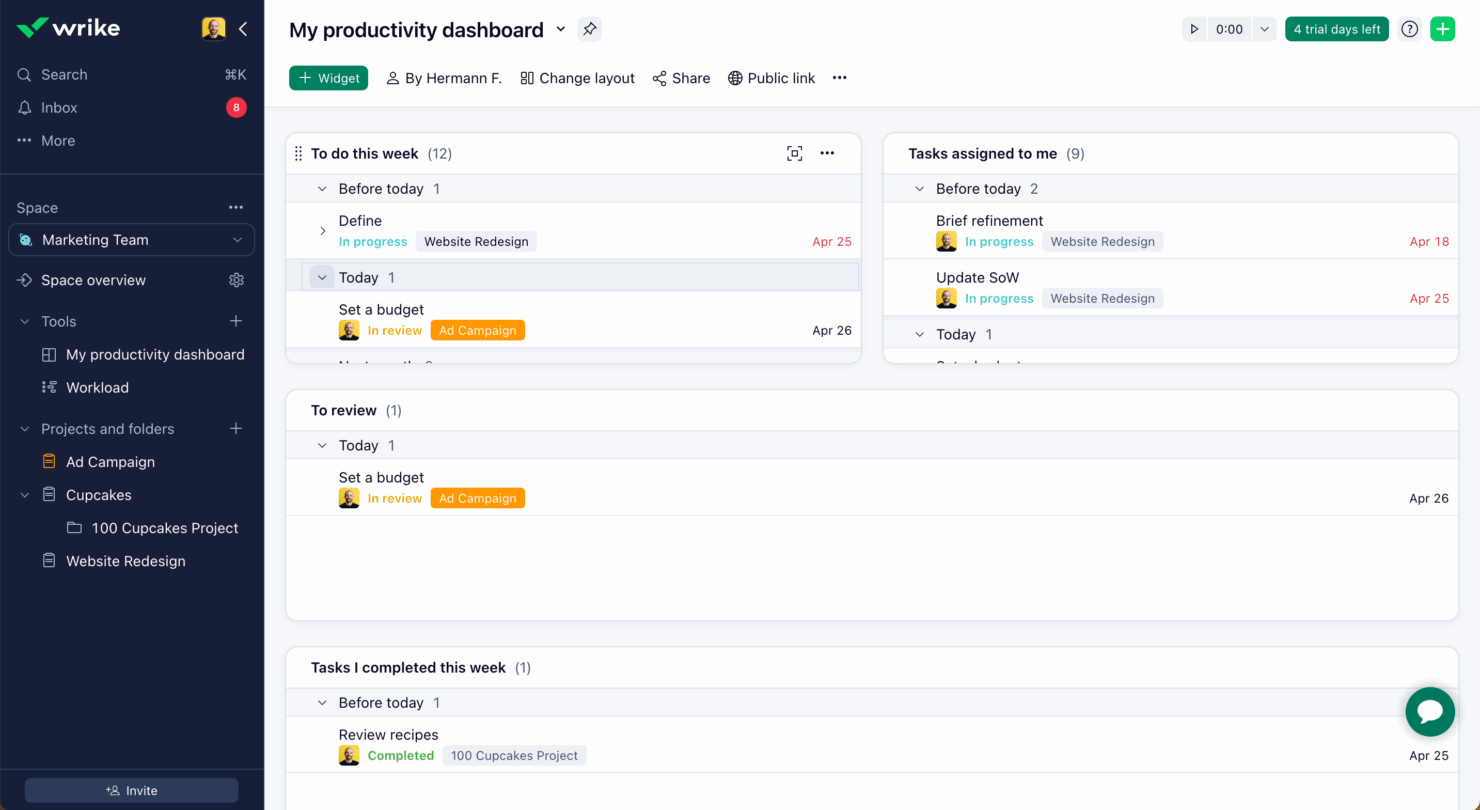
- From $10/user/month (billed annually)
- Free plan + free demo + 14-day free trial available
Why You Can Trust Us
Wrike Overview
Wrike excels with its robust features and user-friendly interface, making it ideal for large teams needing comprehensive project management solutions.
pros
-
Wrike's AI features are available in all plans at no extra cost.
-
The user-friendly interface ensures easy navigation for your team.
-
Wrike's proofing feature allows you to compare file versions dynamically.
cons
-
Two-factor authentication is only available with the enterprise plan.
-
Some integrations require an additional cost, regardless of the plan.
-
It can be unclear where form responses are stored within the tool.
Is Wrike Right For Your Needs?
Who Would be a Good Fit for Wrike?
Marketing teams and creative agencies would thrive with Wrike’s project management capabilities. Its proofing feature lets you compare file versions efficiently, streamlining your creative approval processes. IT departments benefit from its user-friendly interface, which simplifies complex project coordination. Wrike’s AI features, included in all plans, enhance productivity without extra costs, making it ideal for those focused on efficiency. If your team values clear communication and dynamic collaboration, Wrike is a strong contender.
-
Marketing Teams
Wrike’s proofing feature helps you streamline creative approval processes with ease.
-
Creative Agencies
Wrike’s dynamic file version comparison keeps your creative projects on track.
-
IT Departments
Wrike’s user-friendly interface simplifies complex project coordination for your team.
-
Product Development
Wrike’s AI features boost your team’s productivity without extra costs.
-
Event Management
Wrike’s task scheduling ensures your events are planned and executed flawlessly.
-
Construction Projects
Wrike’s robust project tracking keeps your construction timelines and budgets in check.
Who Would be a Bad Fit for Wrike?
Small businesses or startups with limited budgets might find Wrike less suitable due to its additional costs for certain integrations and advanced features. Teams that require basic project management without the need for complex features may feel overwhelmed by Wrike’s robust capabilities. If your projects don’t involve extensive file comparisons or require high-level tracking, Wrike’s feature set might be more than you need, leading to unnecessary complexity for your team.
-
Small Startups
Wrike’s additional costs for integrations might strain your limited budget.
-
Basic Task Tracking
Wrike’s robust features can overwhelm if you only need simple task management.
-
Freelancers
Wrike’s comprehensive tools might be excessive for your solo projects.
-
Non-Technical Teams
Wrike’s advanced capabilities might intimidate if your team prefers simplicity.
-
Budget-Conscious Teams
Wrike’s extra costs for certain features may not align with your financial constraints.
-
Simple Projects
Wrike’s extensive feature set can be too complex for straightforward project needs.
Our Review Methodology
How We Test & Score Tools
We’ve spent years building, refining, and improving our software testing and scoring system. The rubric is designed to capture the nuances of software selection and what makes a tool effective, focusing on critical aspects of the decision-making process.
Below, you can see exactly how our testing and scoring works across seven criteria. It allows us to provide an unbiased evaluation of the software based on core functionality, standout features, ease of use, onboarding, customer support, integrations, customer reviews, and value for money.
Core Functionality (25% of final scoring)
The starting point of our evaluation is always the core functionality of the tool. Does it have the basic features and functions that a user would expect to see? Are any of those core features locked to higher-tiered pricing plans? At its core, we expect a tool to stand up against the baseline capabilities of its competitors.
Standout Features (25% of final scoring)
Next, we evaluate uncommon standout features that go above and beyond the core functionality typically found in tools of its kind. A high score reflects specialized or unique features that make the product faster, more efficient, or offer additional value to the user.
We also evaluate how easy it is to integrate with other tools typically found in the tech stack to expand the functionality and utility of the software. Tools offering plentiful native integrations, 3rd party connections, and API access to build custom integrations score best.
Ease of Use (10% of final scoring)
We consider how quick and easy it is to execute the tasks defined in the core functionality using the tool. High scoring software is well designed, intuitive to use, offers mobile apps, provides templates, and makes relatively complex tasks seem simple.
Onboarding (10% of final scoring)
We know how important rapid team adoption is for a new platform, so we evaluate how easy it is to learn and use a tool with minimal training. We evaluate how quickly a team member can get set up and start using the tool with no experience. High scoring solutions indicate little or no support is required.
Customer Support (10% of final scoring)
We review how quick and easy it is to get unstuck and find help by phone, live chat, or knowledge base. Tools and companies that provide real-time support score best, while chatbots score worst.
Customer Reviews (10% of final scoring)
Beyond our own testing and evaluation, we consider the net promoter score from current and past customers. We review their likelihood, given the option, to choose the tool again for the core functionality. A high scoring software reflects a high net promoter score from current or past customers.
Value for Money (10% of final scoring)
Lastly, in consideration of all the other criteria, we review the average price of entry level plans against the core features and consider the value of the other evaluation criteria. Software that delivers more, for less, will score higher.
Core Features
Custom Workflows
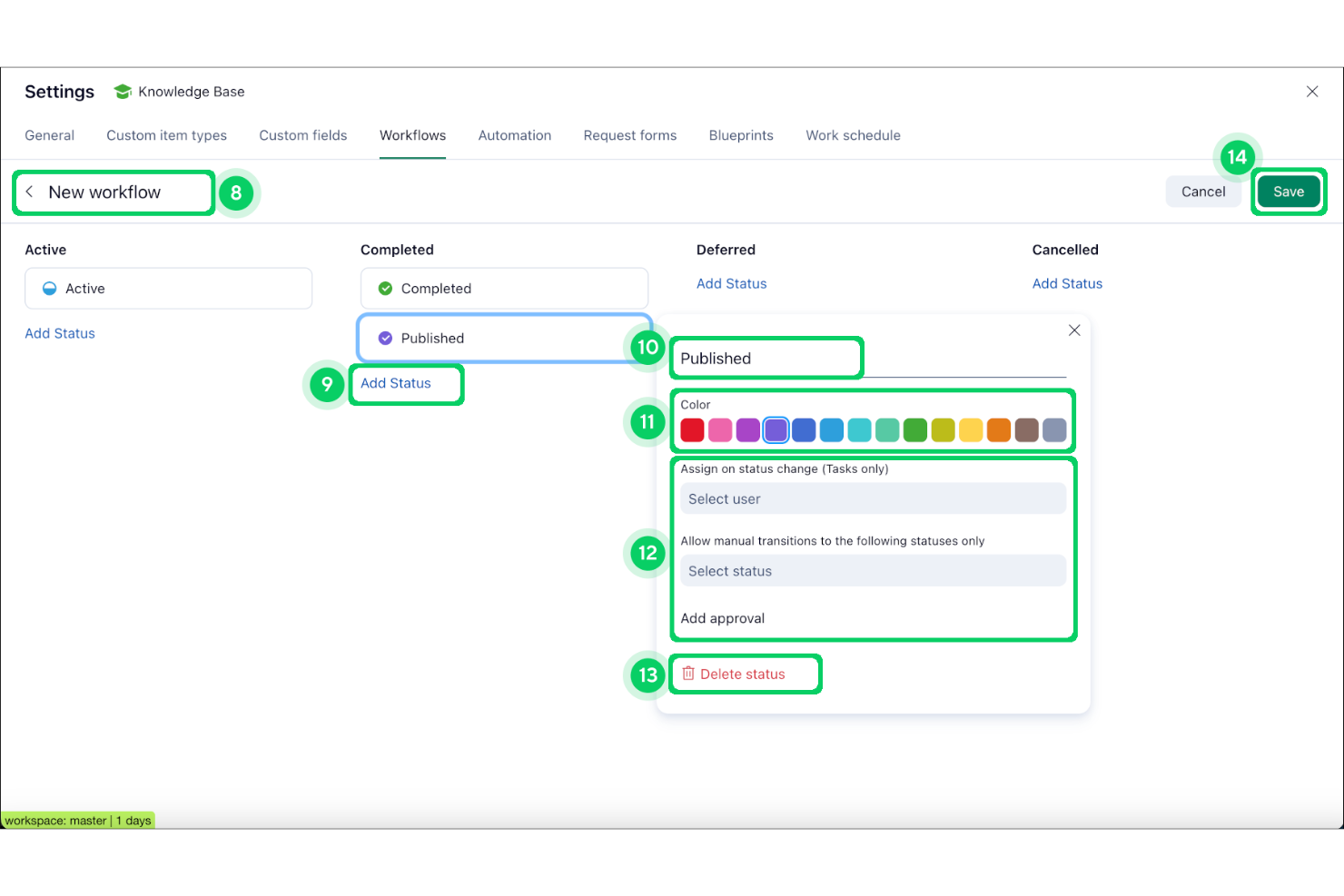
Design and automate multi-step processes tailored to your team’s needs. Trigger actions, assign tasks, due dates, and set approvals for any project type.
Task Dependencies
Link tasks to visualize and control project sequences. Prevent bottlenecks by ensuring work starts only when prerequisites are complete.
Dynamic Request Forms
Collect project requests with customizable forms that auto-route submissions. Standardize intake and reduce manual triage for new work.
Real-Time Collaboration
Comment, edit, and share files directly within tasks. Keep feedback and discussions centralized for easy reference.
Resource Management
Allocate team members, track workloads, and forecast capacity. Balance assignments to avoid overloading or underutilizing staff.
Advanced Reporting
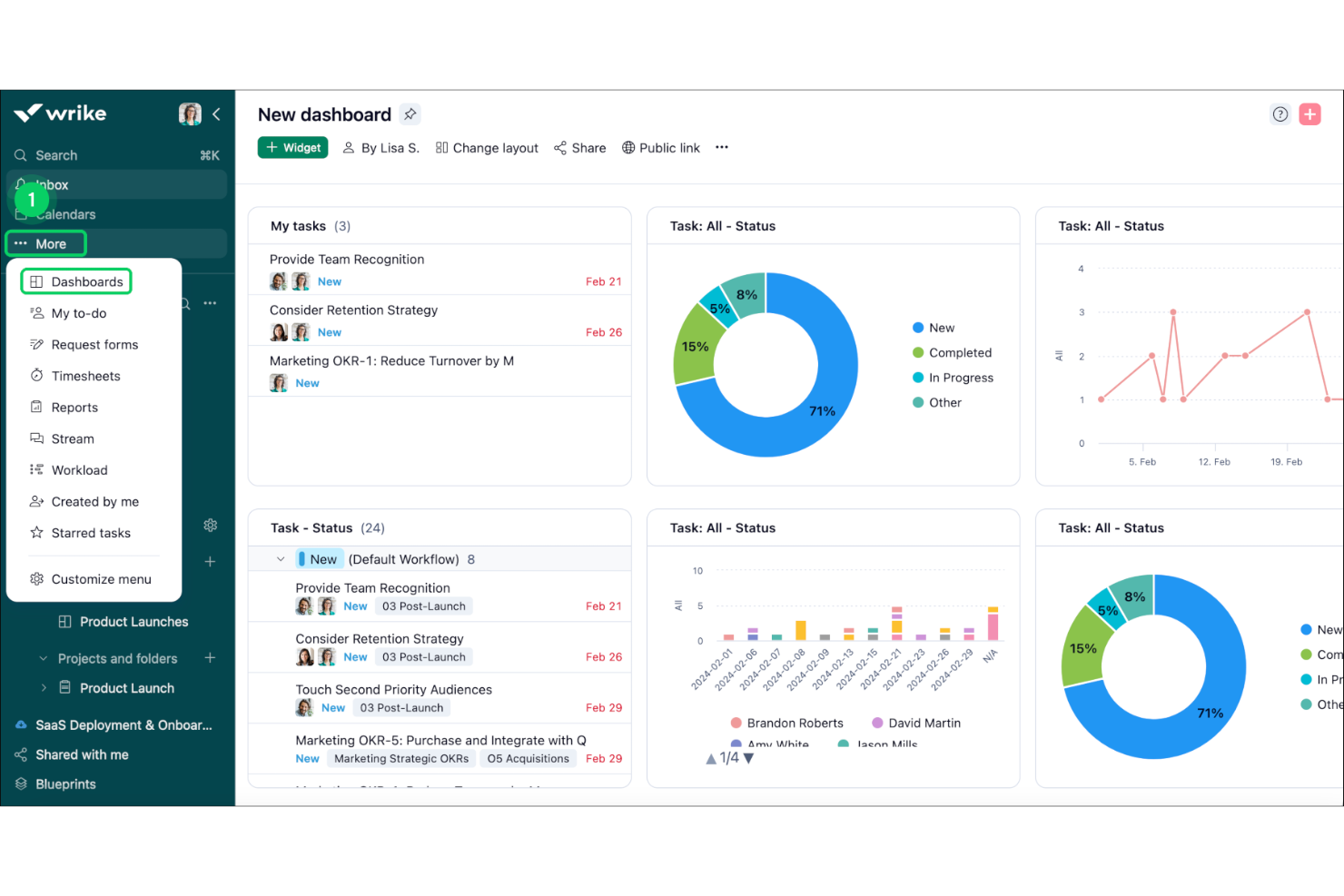
Build interactive dashboards and export detailed analytics. Monitor project health, team performance, and deadlines in one place.
Standout Features
Proofing and Approval Tools
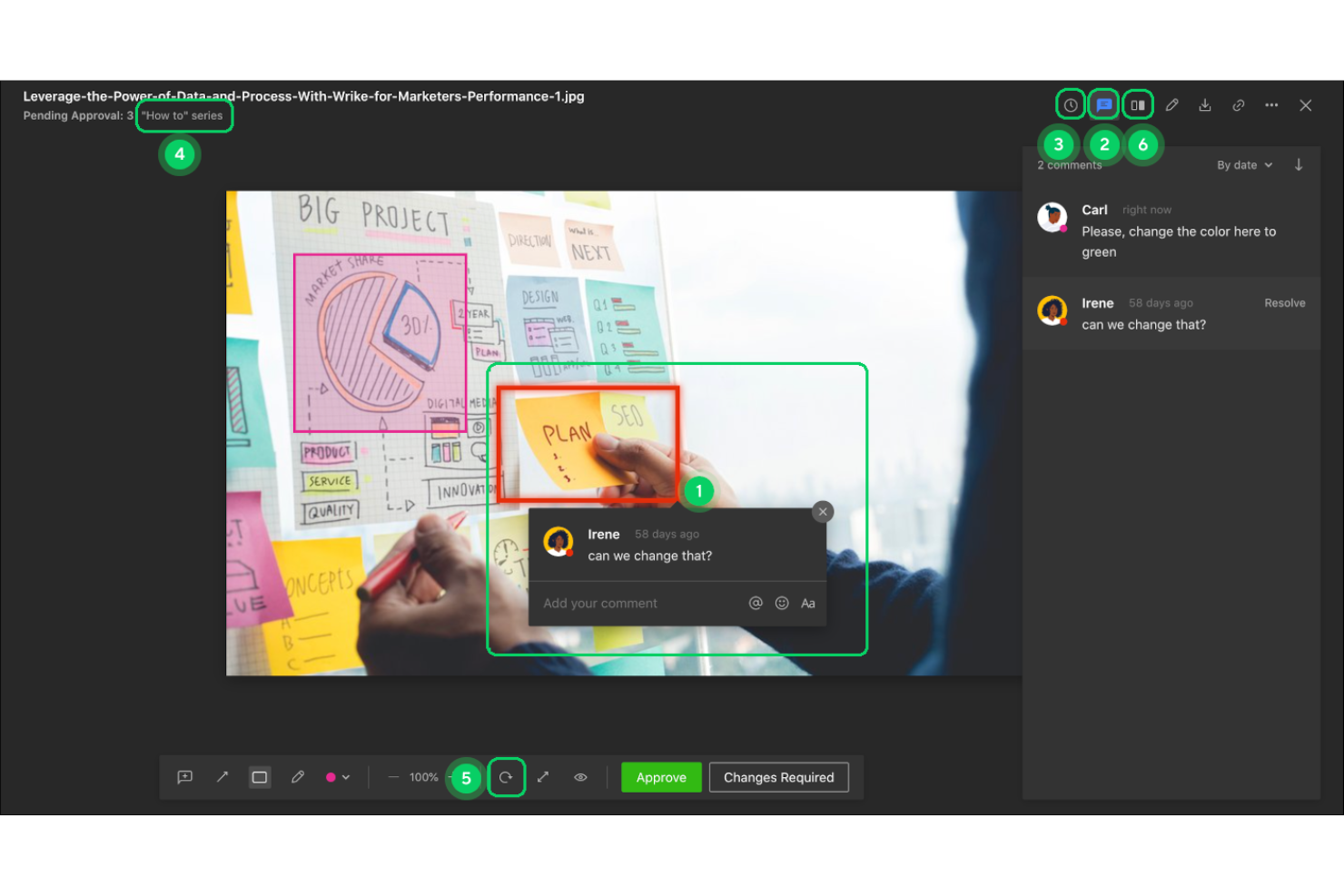
Wrike offers built-in markup and feedback tools for images, videos, and documents, allowing teams to review and approve assets without leaving the platform. This streamlines creative workflows.
Blueprints for Project Templates
Wrike’s Blueprints let you create reusable templates for projects, including pre-set assignees, timelines, and dependencies. This feature accelerates project setup and ensures consistency.
Ease of Use
Wrike offers a user-friendly interface with a slight learning curve, making it approachable for most teams. Its drag-and-drop functionality and clear layout help you organize tasks efficiently within a shared workspace, including visual kanban boards and Gantt charts. However, some users find the extensive features overwhelming initially. Once you get the hang of it, the customizable workflows and dashboards make managing projects intuitive. It's a solid choice if you're ready to invest a bit of time to unlock its full potential.
Onboarding
Wrike's onboarding process is straightforward, with ample resources to help your team get started quickly. The platform provides tutorials, webinars, and support to guide you through setup and feature use. Some users mention the initial learning curve, but Wrike's comprehensive support eases the transition. The onboarding experience ensures your team can start leveraging its features effectively, reducing time to value and helping you integrate the tool into your workflow efficiently.
Customer Support
Wrike offers reliable customer support with various channels like chat, email, and phone to assist your team. Users appreciate the prompt and helpful responses, which ensure any issues are resolved quickly. The availability of extensive online resources, including a knowledge base and community forums, enhances user experience by providing additional support options. This comprehensive support system ensures you can maximize Wrike's capabilities and address any challenges effectively.
Integrations
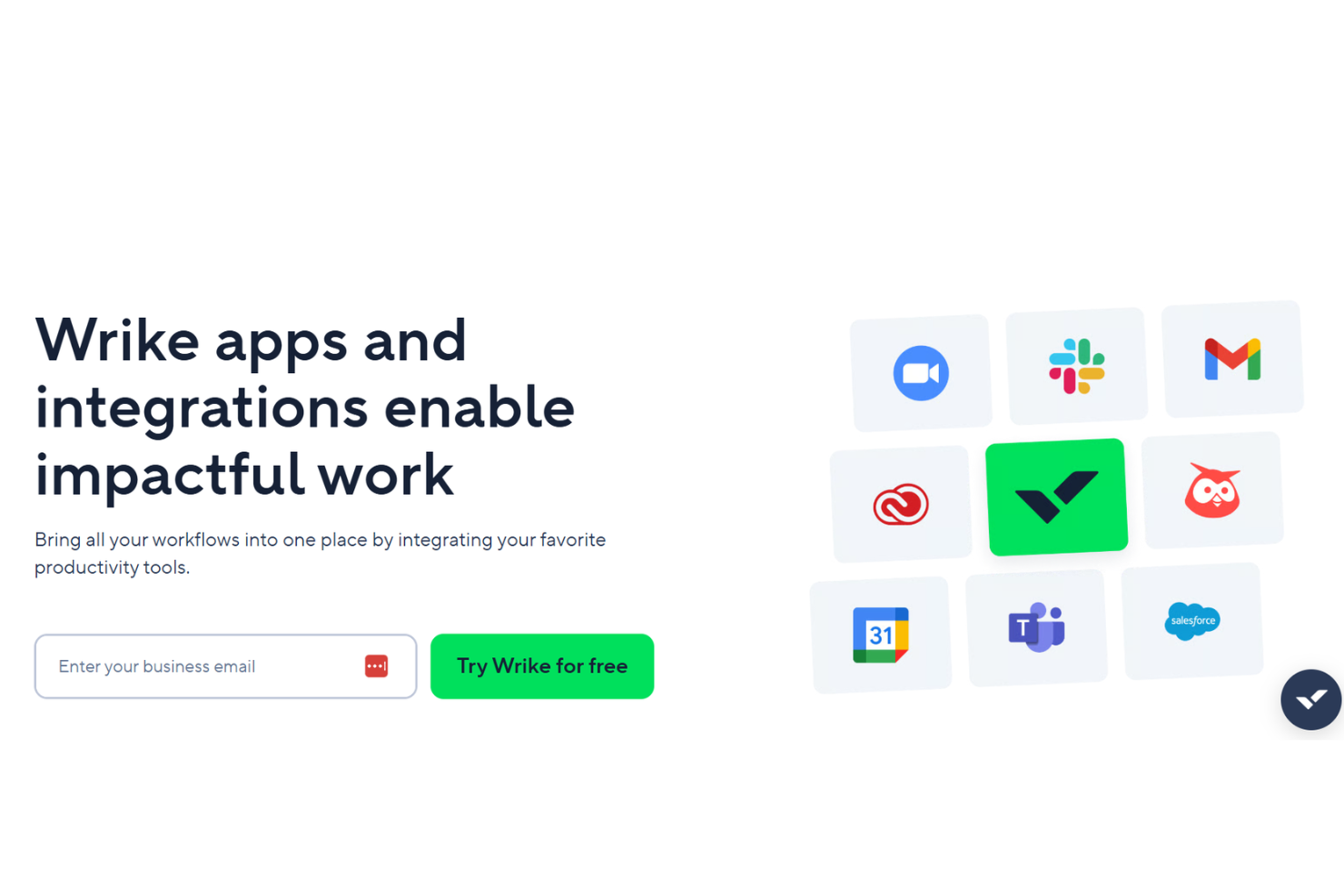
Wrike integrates with Microsoft Teams, Google Drive, Salesforce, Slack, Jira, Adobe Creative Cloud, Dropbox, Box, Outlook, and Zoom, among others.
Wrike also offers an open API and connects with third-party integration tools like Zapier for expanded connectivity.
Value for Money
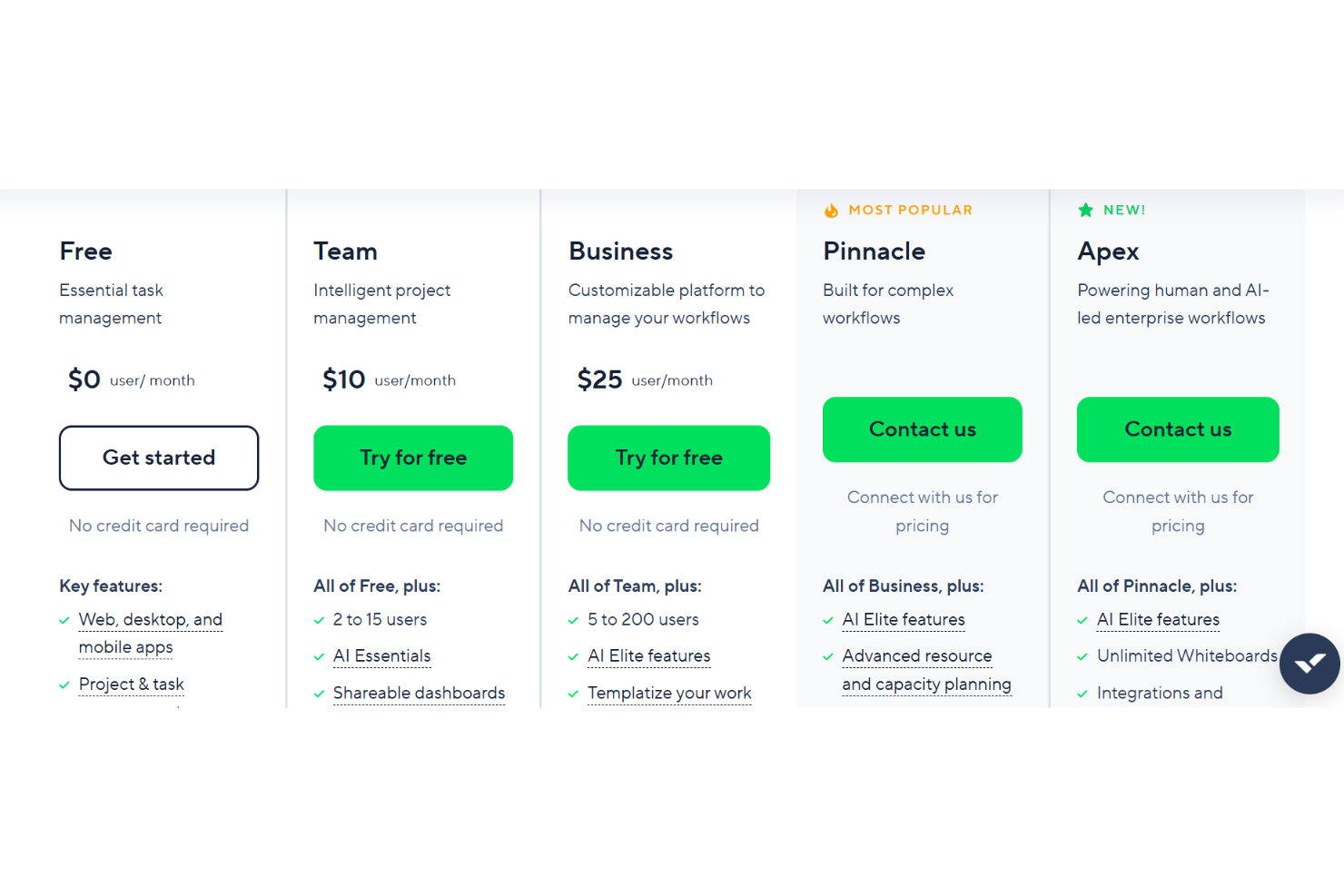
Wrike’s pricing reflects its advanced feature set, with many users finding strong value in its customization, automation, and reporting tools, especially at higher tiers. However, smaller teams or those with basic needs may find the cost high for features they won’t use, and some advanced capabilities are only available on premium plans. A free plan and trial is available to test out the features before committing to a paid plan.
- Free: No cost. Basic task and project management for small teams.
- Team: Adds dashboards, interactive Gantt charts, and up to 25 users.
- Business: Includes custom workflows, advanced reporting, and resource management.
- Enterprise: Offers advanced security, permissions, and scalability for large organizations.
- Apex: Top-tier for enterprise workflows with AI-led automation, unlimited whiteboards, with deeper automation and integration capabilities through Wrike add-ons.
New Product Updates from Wrike

Streamlining Workspaces with New Updates
Wrike has released an update to enhance workspace efficiency and project intelligence. Users can enjoy an optimized workspace setup through custom space templates and increased project insights thanks to AI Agents integrated into Wrike Labs. Some important aspects that were part of this update include:
- Custom Space Templates: Allows users to streamline the setup of their workspaces, ensuring a more organized and efficient start to projects.
- AI Agents in Wrike Labs: Enhances project intelligence, providing users with better insights and management capabilities.
- New Gauge Widget: Offers a new way to visualize key metrics, helping teams to monitor performance effectively.
Visit Wrike's official site for more details.
 for more details.
Wrike Specs
- API
- Batch Permissions & Access
- Budgeting
- Calendar Management
- Collaboration Support
- Contact Management
- Contact Sharing
- Customer Management
- Dashboard
- Dashboards
- Data Export
- Data Import
- Data Visualization
- Dependency Tracking
- Document Sharing
- Expense Tracking
- External Integrations
- File Sharing
- Gantt Charts
- Kanban Boards
- Multi-User
- Notifications
- Project Management
- Resource Management
- Scheduling
- Task Scheduling/Tracking
- Third-Party Plugins/Add-Ons
- Time Management
- Travel Management
- Workflow Management
Wrike FAQs
How does Wrike handle data security and compliance?
Can I customize Wrike to fit my team’s workflow?
How does Wrike support remote teams?
What kind of training and resources does Wrike offer?
How do I manage user permissions in Wrike?
Does Wrike offer reporting and analytics?
How reliable is Wrike’s performance and uptime?
Can I integrate Wrike with other tools my team uses?
Wrike Company Overview & History
Wrike is a collaborative work management platform founded in 2006 by Andrew Filev. Headquartered in San Jose, California, Wrike has expanded its global presence with offices in cities such as Dallas, Dublin, Prague, Tokyo, and Melbourne. The company employs over 1,000 people and serves more than 20,000 organizations across 140 countries.
In 2018, Wrike received a majority investment from Vista Equity Partners, a firm specializing in software, data, and technology-enabled businesses. Subsequently, in 2021, Citrix Systems acquired Wrike for $2.25 billion, integrating it into its portfolio to enhance its collaborative work solutions. Following this, Citrix merged with TIBCO Software to form the Cloud Software Group.
Wrike is recognized for its strong workplace culture, having been named a "Best Place to Work" by the San Francisco Business Times and the Silicon Valley Business Journal. The company emphasizes diversity and inclusion through various employee resource groups, such as Wrike with Pride, Wrikers of Color, and Women of Wrike.
Wrike Major Milestones
- 2006: Wrike was founded by Andrew Filev and released its beta version.
- 2013: Launched Wrike Enterprise platform.
- 2015: Raised $15 million in Series B funding led by Scale Venture Partners.
- 2016: Opened EMEA headquarters in Dublin and launched "Wrike for Marketers."
- 2018: Received majority investment from Vista Equity Partners.
- 2021: Acquired by Citrix Systems for $2.25 billion.
- 2022: Citrix merged with TIBCO Software to form Cloud Software Group