

Google Takvim Entegrasyonlu En İyi 10 Proje Yönetimi Aracı

10 Google Takvim Entegrasyonuna Sahip En İyi Proje Yönetimi Yazılımları Kısa Listesi


Proje zaman çizelgenizi takviminizle senkronize tutmak her zaman kolay değildir. Toplantılar, değişen teslim tarihleri ve son dakika güncellemeleri herkesin aynı doğrultuda kalmasını zorlaştırabilir.
Google Takvim entegrasyonuna sahip proje yönetimi yazılımları, görevlerinizi ve programlarınızı tek bir yerde birleştirerek yardımcı olur. Zamandan tasarruf etmenizi sağlar ve önemli bir şeyi kaçırma riskini azaltır.
Bu makalede test ettiğim en iyi araçları size anlatacağım. Her bir aracın gerçek proje iş akışlarına ne kadar iyi uyduğuna ve sizinle ekibinizin gerçekte çalışma biçimini ne ölçüde desteklediğine odaklandım.
Why Trust Our Software Recommendations
Our team has been testing and reviewing software since 2012. As project managers ourselves, we know how difficult—and important—it is to choose the right software.
For this guide, we evaluated tools using hands-on testing and independent research, scoring tools using our selection criteria. We also draw on insights from industry thought leaders and practicing project management experts.
Our reviews reflect our human editorial judgment, not a sales pitch.
Expert reviewers:
Google Takvim Entegrasyonuna Sahip Proje Yönetimi Yazılımları Karşılaştırma Tablosu
Google Takvim entegrasyonuna sahip en iyi proje yönetimi yazılımı seçimlerimin fiyatlandırma ayrıntılarını incelemek için bu karşılaştırma tablosunu kullanın.
| Tool | Starting Price | Website | |
|---|---|---|---|
| Best for Google Workspace task management | 4.5 out of 5 | $3/user/month 14-day free trial | Website |
| Best for automated workflows with real-time syncing | 4.3 out of 5 | $10/user/month Free plan + 14-day trial + demo available | Book Demo |
| Best for built-in calendar scheduling | 4.3 out of 5 | Pricing upon request Free plan + 15-day trial + demo available | Website |
| Best for email-driven team task coordination | 4.8 out of 5 | $14/user/month 30-day free trial available | Website |
| Best for breaking down complex tasks | 4.7 out of 5 | $7.65/user/month Free plan + 30-day free trial available | Website |
| Best for unlimited project storage | 4.7 out of 5 | $2.49/user/month Free plan + 14-day trial available | Website |
| Best for visual task organization | 4.5 out of 5 | $5/user/month Free plan + free trial available | Website |
| Best for client and project management in one | 4.4 out of 5 | $9/user/month 7-day free trial | Website |
| Best for product roadmap creation | 4.4 out of 5 | $59/user/month 30-day free trial + free demo available | Website |
| Best for all-in-one business management | — | $29/user/month | Website |
Google Takvim Entegrasyonuna Sahip En İyi Proje Yönetimi Yazılımları İncelemeleri
Aşağıda, kısa listeme giren Google Takvim entegrasyonuna sahip en iyi proje yönetimi yazılımlarının ayrıntılı özetlerini bulabilirsiniz. İncelemelerim, her aracın temel özelliklerine, avantajlarına & dezavantajlarına, entegrasyonlarına ve ideal kullanım alanlarına ayrıntılı bir bakış sunarak sizin için en uygun olanı bulmanıza yardımcı olur.

GQueues
Best for Google Workspace task management
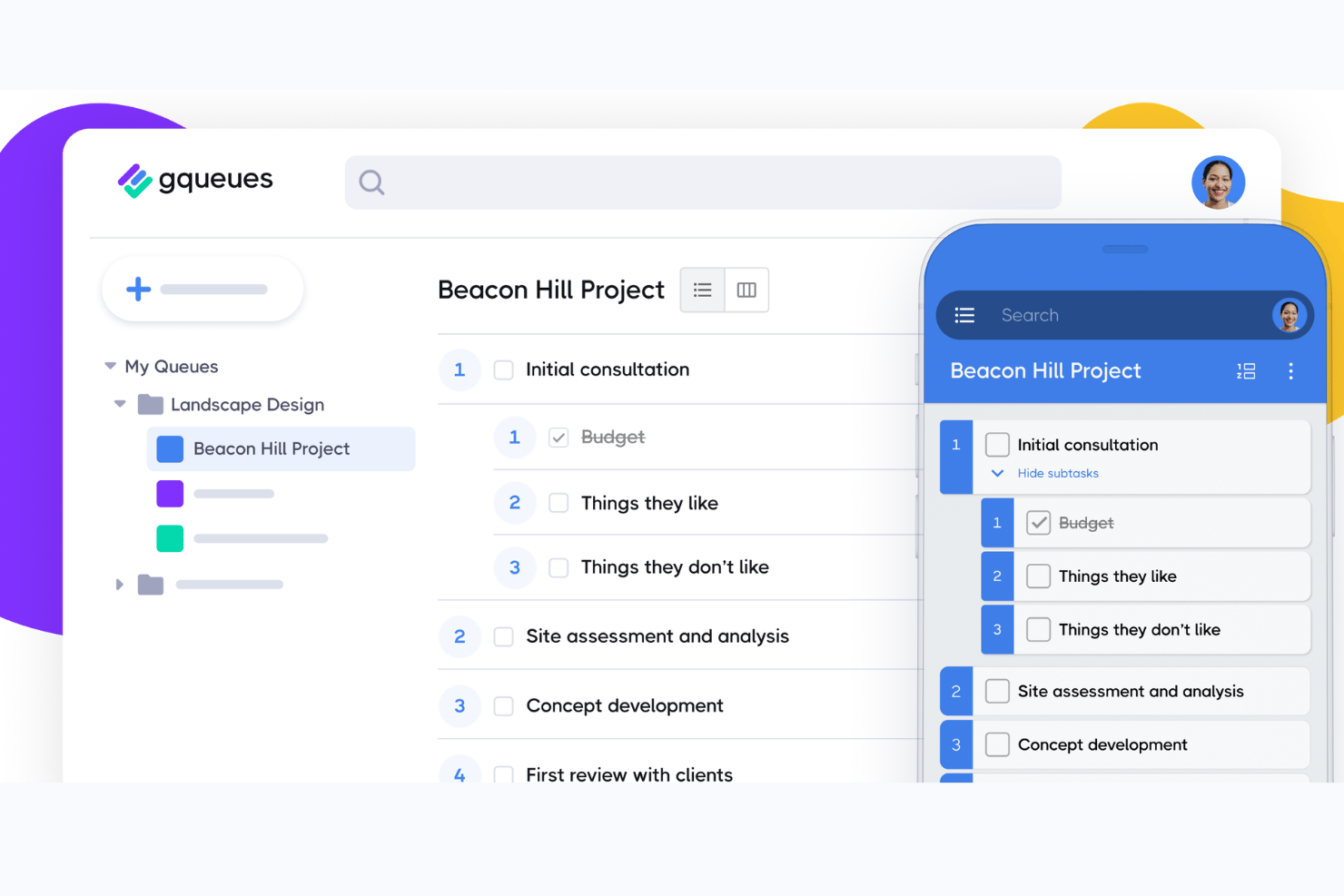
GQueues is a task management tool that integrates deeply with Google Workspace.
Why I Picked GQueues: I selected GQueues for its exceptional integration with Google Workspace, which sets it apart from other project management tools. It is best for Google Workspace task management because it is specifically designed to complement and enhance the Google tools that teams are already using, ensuring a cohesive workflow within the Google ecosystem.
Standout features & integrations:
GQueues shines with its ability to synchronize tasks with Google Calendar and its Gmail integration for turning emails into tasks. The tool also supports attachments from Google Drive and task capturing via a Google Chrome extension.
The tool integrates natively with Google Calendar, Gmail, Google Drive, Google Chrome, Google Contacts, Google Workspace, Google Sheets, Google Docs, Google Slides, and Google Forms.
Pros and Cons
Pros:
- No base fee or setup fee
- Two-way Google Calendar syncing
- Comprehensive Google Workspace integration
Cons:
- Volume discounts only available for 5+ licenses
- Free version has limited features
- Annual billing required

Wrike
Best for automated workflows with real-time syncing

Wrike is a project management software designed to facilitate collaboration, resource sharing, and progress monitoring within a single platform.
Why I Picked Wrike: Wrike's robust integration with Google Calendar allows for the automatic synchronization of workflows, deadlines, tasks, and project milestones directly into your calendar. This means that all project deadlines are visible alongside personal and other work-related events, reducing the chances of overbooking and missing deadlines. The bi-directional sync also updates in real-time, so any changes made in Wrike are immediately reflected in Google Calendar and vice versa, keeping everything consistently up-to-date. Additionally, Wrike enhances this integration by offering customizable workflows that can trigger notifications and automate task updates based on calendar events.
Standout features & integrations:
Wrike's key features include real-time collaboration and communication, interactive Gantt charts, customizable dashboards and workflows, and advanced reporting tools, providing detailed insights into project performance, resource allocation, and productivity metrics. Wrike also has integrated time tracking, approvals, and a document management system with version controls.
Wrike integrates with Slack, Salesforce, Microsoft Teams, Adobe Creative Cloud, Google Drive, Microsoft SharePoint, OneDrive, Zoom, Power BI, and Tableau. It also offers an open API and a tool called Wrike Integrate for creating custom integrations and automating workflows across different business applications.
Pros and Cons
Pros:
- Customizable dashboards
- Comprehensive reporting features
- Powerful proofing tool and approval workflows
Cons:
- Occasional slower platform loading times
- Feature-rich nature may be overwhelming for some users
New Product Updates from Wrike

Wrike Redesigns Workspace Search With New Filters
Wrike introduces a redesigned Workspace Search interface with recent search shortcuts, item type and location filters, and parent-task context. These updates help users find relevant work items and navigate search results efficiently. For more information, visit Wrike’s official site.
 .

Best for built-in calendar scheduling

Zoho Projects is a solid option for teams that want their project schedules to show up alongside meetings and deadlines in Google Calendar. It works well for teams juggling multiple projects at once, especially when you need a clear way to assign tasks, track progress, and keep everyone working on the same plan.
Why I Picked Zoho Projects
I picked Zoho Projects because its Google Calendar integration makes it easier to keep project work tied to real schedules. Instead of managing timelines in one place and meetings in another, your team can see key tasks and deadlines alongside upcoming calendar events. Zoho Projects also gives you the tools to break projects into clear task lists, assign ownership, and keep work moving with built-in collaboration features.
Zoho Projects Key Features
Along with the Google Calendar integration, these features stood out:
- Task Automation: Users can automate routine tasks using a drag-and-drop interface, saving time and reducing manual effort.
- Customizable Workflows: You can personalize fields, layouts, and statuses to tailor the project management process to your specific needs.
- Gantt Charts: These charts provide a visual timeline of your project, helping you track progress and adjust plans as needed.
- Mobile Access: Access project details and updates on the go with Zoho Projects' mobile capabilities, ensuring you're always connected.
Zoho Projects Integrations
Integrations include Google Drive, Microsoft Office 365, Microsoft Teams, Slack, Dropbox, GitHub, Bitbucket, Zoho CRM, Zoho Books, and Zoho Analytics.
Pros and Cons
Pros:
- Affordable pricing for growing teams
- Built-in time tracking and billing
- Strong automation and workflow customization
Cons:
- Mobile experience less fully featured
- Interface has steeper learning curve
New Product Updates from Zoho Projects
Zoho Projects Adds CodeX Scripts for Custom Modules
Zoho Projects now supports CodeX Scripts for custom modules, enabling conditional logic and rules for creating, updating, and deleting records. For more information, visit Zoho Projects' official site.
 .
Missive
Best for email-driven team task coordination
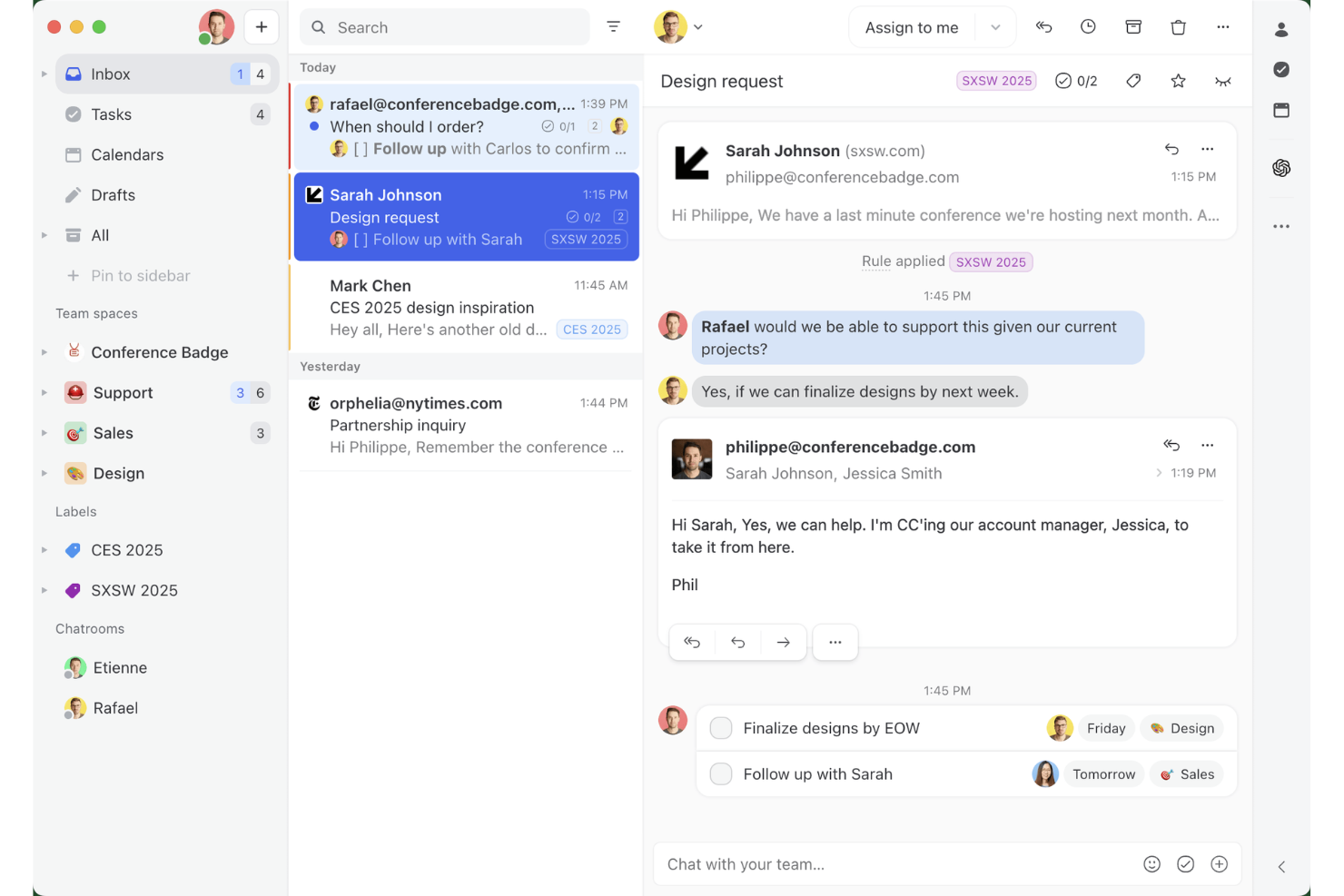
Missive is a shared inbox and email collaboration platform that combines multi-channel messaging, team task management, and native Google Calendar integration in a single workspace.
Who Is Missive Best For?
Missive suits teams whose project work flows primarily through email—like agencies and client-facing operations teams managing tasks directly from shared inboxes.
Why I Picked Missive
I picked Missive as one of the best because it's the only tool on my list built around the idea that project work lives inside email threads. I love how you can turn a client email into an assigned task with a due date, then see all of that sitting alongside your Google Calendar events in one view—without ever leaving your inbox. Missive's AI assistant can also create and update Google Calendar events directly from a conversation, which is a genuinely useful shortcut for email-driven teams.
Missive Key Features
- Shared inbox management: Multiple team members can view, reply to, and assign conversations from a single shared inbox without stepping on each other's work.
- Internal comments and tagging: Add private notes and tag teammates directly inside email threads to keep context in one place.
- Rules-based automation: Set up automated triggers to assign conversations, create tasks, or apply labels based on conditions you define.
- Multi-channel inbox: Connect email, SMS, and WhatsApp Business accounts into a single unified inbox for managing all client communication in one place.
- Missive MCP Server: Connect external AI tools (like Claude or ChatGPT) to query project threads, check calendars, and draft replies—while keeping team review required before sending.
Missive Integrations
Missive offers native integrations with Google Workspace, Microsoft 365, Asana, ClickUp, Trello, and Todoist. It also provides an open API for custom integrations, supports Zapier, and includes its new MCP Server on Productive and Business plans (requires admin activation).
Pros and Cons
Pros:
- AI can manage Google Calendar events
- Converts emails into assigned project tasks
- Shared inbox and calendar in one workspace
Cons:
- No timeline or Gantt project views
- Task deadlines don’t sync to Google Calendar
New Product Updates from Missive

Missive Adds Multi-Step Automations With Timed Rules
Missive adds time-based rule steps that let automations run through multiple stages on the same conversation. This helps teams build follow-ups and SLA escalations without creating separate rules. For more information, visit Missive’s official site.
 .
Quire
Best for breaking down complex tasks

Quire is a project management tool designed to help teams organize, plan, and execute their work more effectively. It offers a structured approach to managing tasks and projects and offers various views like Kanban boards, Gantt charts, and timelines, to suit different workflows.
Why I Picked Quire: I like its nested task list, which allows you to break down large and complex projects into smaller, more manageable tasks and subtasks. This hierarchical structure helps in organizing work logically, making it easier to track progress and maintain clarity throughout the project lifecycle. Additionally, Quire's Smart Folder feature enables you to view tasks from different projects in one place, providing a unified perspective that is particularly useful when managing multiple projects simultaneously.
Standout features & integrations:
Key features include a dynamic timeline view, which provides a visual representation of your project's schedule, helping you to plan and adjust timelines with a simple drag-and-drop interface. It also has custom fields that let you add specific data points to tasks, such as budget estimates or priority levels, helping you tailor the tool to your project's needs.
Integrations include Google Calendar, Gmail, Slack, Outlook, Zoho Flow, GitHub, Apple Calendar Sync, Box, Dropbox, Google Drive, and Microsoft Teams.
Pros and Cons
Pros:
- Easy to collaborate with team members
- Multiple project views, including lists, boards, and timelines
- Ability to create nested tasks and subtasks, allowing for detailed project breakdowns
Cons:
- The mobile version lacks some features available on the desktop
- Potential for notification overload, especially when working with large teams
New Product Updates from Quire
Quire Adds Custom Field Locking and Comment Reaction API Support
Quire adds custom field locking and API support for reading and setting emoji reactions on comments. These updates give teams more control over field data and expand comment interaction options for developers. For more information, visit Quire’s official site.
 .

Best for unlimited project storage

Freedcamp is a project management software designed to help teams collaborate effectively. It is recognized as the best for offering unlimited project storage, ensuring that teams never have to worry about space constraints.
Why I Picked Freedcamp: I selected Freedcamp for this list due to its robust set of features that cater to various project management requirements, distinguishing it from other tools. I determined that Freedcamp is best for unlimited project storage because it allows teams to store as much project data as needed, which is crucial for organizations that handle large volumes of information.
Standout features & integrations:
Freedcamp's key features include task lists, subtasks, Gantt charts, Kanban boards, a calendar view, issue tracking, time tracking, and invoicing. It also provides a CRM system, wiki, and discussion boards.
The tool integrates natively with Google Calendar, Google Drive, Dropbox, OneDrive, Zapier, Toggl, and more.
Pros and Cons
Pros:
- Flexible views including Kanban, Gantt, and calendar
- A diverse set of project management and collaboration tools
- Unlimited storage for files and projects
Cons:
- Limited third-party integrations compared to some competitors
- The interface can be overwhelming for new users
- Advanced features require a subscription to higher-tier plans
Trello
Best for visual task organization

Trello is a web-based project management application that facilitates organization through a visual interface. It is best for visual task organization because its card-based design allows for easy tracking and management of tasks.
Why I Picked Trello: I selected Trello for its distinctive visual card system that differentiates it from other project management software. I determined it to be best for visual task organization due to its ability to provide a clear, visual representation of tasks and workflows, which is particularly beneficial for teams that prioritize visual project tracking.
Standout features & integrations:
Trello's key features include its board and card system, which can be customized to fit any project or workflow. It also offers Power-Ups to extend its capabilities and Butler for automation.
Trello integrates with a variety of tools, including Slack, Google Drive, Dropbox, Box, OneDrive, Salesforce, Evernote, Mailchimp, Zapier, Clockify, and Confluence.
Pros and Cons
Pros:
- Extensive integration options
- Highly customizable boards
- Visual interface for easy task management
Cons:
- Power-ups may be necessary for advanced features, adding to costs
- Free version has limited functionality
- May be less suitable for complex project management needs
Best for client and project management in one

Bonsai is a business management platform for agencies. Its features help users streamline their workflows, manage their projects, and maintain client relations in a single platform.
Why I picked Bonsai: I decided to include this project management software on my list because of how it uniquely meets the needs of agencies and other professional service providers. In addition to its comprehensive suite of project management tools, it also has several calendar integrations (including Google Calendars) that allow for easier client meeting booking.
Users can assign tasks, projects, and clients to different team members and external collaborators. They can also set deadlines and track progress of their projects and tasks, ensuring projects stay on schedule. The software also has tools for drafting proposals, managing contracts, and processing client payments.
Bonsai Standout Features & Integrations
Features include multiple currency and tax settings, which supports agencies working with international clients. The software also has a built-in automated invoice generator, helping to speed up the billing process. It also offers time tracking and financial reporting features, helping agencies manage team member time and workloads effectively and keep an eye on profitability.
Integrations include Gmail, Google Calendar, Zapier, Slack, QuickBooks Online, Calendly, ClickUp, Trello, Google Drive, Google Sheets, Xero, HubSpot, and more.
Pros and Cons
Pros:
- Client portals available
- Designed specifically for agencies
- Automations to streamline repetitive tasks
Cons:
- Not all integrations are included in the entry-level plan
- May not be scalable for all use cases

Aha!
Best for product roadmap creation

Aha! is a tool designed for setting strategy, capturing ideas, scoring features, and sharing visual roadmaps. It stands out for its ability to help users build and share product roadmaps.
Why I Picked Aha!: I selected Aha! for its distinct approach to product roadmap creation, differentiating it from general project management tools. It excels in enabling strategic planning and visualization of product development processes. I determined Aha! to be best for product roadmap creation due to its comprehensive set of features that facilitate the linking of strategic goals to detailed implementation plans.
Standout features & integrations:
Aha! offers a range of features including strategy roadmaps, idea management, features prioritization, and release timelines. These tools are crucial for product managers to visualize the entire product lifecycle and manage it effectively.
Aha! integrates natively with several other tools, including Jira, Salesforce, Slack, GitHub, Trello, Zendesk, Microsoft Teams, Google Sheets, and more, enabling a connected workflow across different platforms.
Pros and Cons
Pros:
- Offers a suite of products tailored to different needs within product management
- Integrates with a wide array of other tools
- Dedicated to strategic product roadmap planning
Cons:
- Minimum seat requirement could be a barrier for smaller teams
- Annual billing may not be preferred by all organizations
- Higher starting price point compared to some other project management tools


Flowlu Tasks is positioned as an all-encompassing solution for business management. It is designed to streamline operations by integrating various business processes into one platform. Flowlu Tasks stands out as the best tool for all-in-one business management due to its comprehensive suite of features that cater to different aspects of running a business, from project management to finance.
Why I Picked Flowlu Tasks: I chose Flowlu Tasks for this list because it offers a unique combination of project management, CRM, invoicing, and financial management tools all in one place. This integration is what makes it different from other project management software. I believe it's best for all-in-one business management because it provides a holistic view of business operations, making it easier for managers to make informed decisions without having to switch between different software.
Standout features & integrations:
Flowlu Tasks boasts a robust set of features including project planning, task management, time tracking, and financial management tools. Its CRM functionality helps businesses manage customer relationships effectively, while the invoicing and financial reporting features ensure that financial management is integrated with other business processes.
The tool integrates natively with Google Calendar, Google Drive, Google Contacts, Google Mail, Zapier, QuickBooks, Xero, PayPal, Stripe, and Mailchimp.
Pros and Cons
Pros:
- Financial management and CRM included
- Native integrations with popular tools
- Comprehensive business management features
Cons:
- Annual billing may not be preferred by all businesses
- Minimum of 8 users required for the lowest-priced paid plan
- Higher starting price point compared to some competitors
Google Takvim Entegrasyonuna Sahip Diğer Proje Yönetimi Yazılımları
Google Takvim entegrasyonuna sahip, kısa listeme girmeyen ancak yine de göz atmaya değer bazı ek proje yönetimi yazılımı seçenekleri şunlardır:
- Qualtir
For simplicity
- Gantter
For Google Workspace Gantt charts
- Kanbanchi Team
For critical path highlighting
- forScale
For Google Workspace project planning
- GoodDay
For centralized resource coordination
- Kissflow
For low-code platform efficiency
- Smartsheet
Good for real-time collaboration
- Asana
For work management versatility
- Jira
Good for agile teams
- Teamwork.com
Good for client work management


How I Evaluate Project Management Software With Google Calendar Integration
I split my evaluation into what a tool must do—like syncing deadlines directly to Google Calendar—and what makes it the right fit for agencies or distributed teams.
Core Functionality (Table Stakes For This List)
When I'm selecting tools for my list, I rank each one on a scale from 0 (does not offer the functionality) to 5 (excels in this area) for each core functionality listed below. Then, I calculate the tool's total score into a percentage. Each tool needs to achieve a minimum total score of 65% to be considered for inclusion.
- Google Calendar Sync: I check whether the integration is native or requires a third-party connector like Zapier, since native connections tend to sync faster and break less often.
- Two-Way Sync Support: Updates to a task's due date should reflect in Google Calendar—and rescheduling a calendar event should push back to the PM tool.
- Task & Project Management: Every tool needs to cover assignment, due dates, statuses, and dependencies so you can manage real delivery work, not just simple to-do lists.
- Timeline & Scheduling Views: I look for calendar, Gantt, or timeline views that let you drag and drop tasks to reschedule—especially useful when sprint dates shift mid-cycle.
- Team Collaboration Features: Shared projects with comments, mentions, and notifications matter most for distributed teams coordinating across time zones.
- Deadline & Reminder Automation: I evaluate whether due dates and reminders automatically appear in Google Calendar so your team gets alerts where they already check their schedule.
Once I have a list of tools that meet the criteria, I consider what sets each platform apart.
Differentiating Factors (What Sets Vendors Apart)
Here's how I compare and contrast different vendors:
Standout Features
I look for calendar-based workload balancing that overlays Google Calendar events with assigned tasks, so you can spot when someone's sprint work collides with a day full of meetings. Multi-calendar support also matters—agency PMs juggling client, internal, and personal calendars need granular filtering to keep the right events visible per project. Tools that convert meeting notes or action items into trackable tasks save real time after weekly standups.
Beyond Features
Google Workspace ecosystem fit is one of the first things I evaluate—tools that connect to Drive, Gmail, and Meet alongside Calendar give teams a single sign-on experience with less context switching. Pricing structure matters too, especially for freelancers or small agencies who need a usable free tier before committing. I also check integration breadth beyond Google, since most teams rely on Slack, Jira, or a CRM alongside their PM tool, and gaps there create manual work fast.
Google Takvim Entegrasyonuna Sahip Proje Yönetimi Yazılımı Nasıl Seçilir?
Uzun özellik listeleri ve karmaşık fiyatlandırma yapıları içinde kaybolmak kolaydır. Kendinize özgü yazılım seçim sürecinizde ilerlerken odaklanmanızı sağlamak için göz önünde bulundurmanız gereken faktörlerin bir kontrol listesini burada bulabilirsiniz:
| Faktör | Dikkat Edilmesi Gerekenler |
| Ölçeklenebilirlik | Gelişmiş izinler, proje şablonları veya role dayalı gösterge panoları gibi özelliklerle aracın ekibiniz büyüdükçe ekibinizi destekleyebildiğinden emin olun. |
| Entegrasyonlar | Google Calendar ve Gmail, Drive, Slack veya Zoom gibi güvendiğiniz diğer uygulamalara kolayca bağlanan araçları tercih edin. |
| Özelleştirilebilirlik | Görev görünümlerini, iş akışlarını ve takvimleri ekibinizin sürecine uyacak şekilde özelleştirmenize olanak tanıyan yazılımları seçin; tersi geçerli olmasın. |
| Kullanım Kolaylığı | Ekibinizin temiz bir düzen, basit menüler ve görevlerle takvim etkinlikleri arasındaki net bağlantılar sayesinde hemen kullanmaya başlayabileceği bir araç seçin. |
| Bütçe | Gizli ücretlere dikkat edin ve farklı fiyatlandırma katmanlarında hangi özelliklerin sunulduğunu karşılaştırın. İhtiyaçlarınızı karşılamak için ücretsiz bir plan yeterli olabilir. |
| Güvenlik Önlemleri | Çalışmanızı ve takvim verilerinizi korumak için iki faktörlü kimlik doğrulama, role dayalı erişim ve veri şifreleme gibi özellikleri kontrol edin. |
| Takvim Senkronizasyonu | Entegrasyonun gerçek zamanlı güncellemeleri ve çift yönlü senkronizasyonu desteklediğini doğrulayın; böylece bir sistemdeki değişiklikler gecikme olmadan diğerinde görünür. |
| İş Birliği Araçları | Ekibinizin platform değiştirmeden takvimleri paylaşmasına, görevler hakkında yorum yapmasına ve güncellemeleri almasına olanak tanıyan araçları tercih edin. |
Proje Yönetimi Yazılımlarındaki Trendler
Araştırmam sırasında farklı proje yönetimi yazılımı sağlayıcılarından sayısız ürün güncellemesi, basın bülteni ve sürüm günlüğü derledim. Takip ettiğim yeni trendlerden bazıları şunlar:
- Yapay Zekâ Destekli Görev Önceliklendirme: Bazı araçlar artık aciliyet, iş yükü ve son teslim tarihlerine göre öncelikle hangi işe odaklanmanız gerektiğine karar vermenize yardımcı olmak için yapay zekâ kullanıyor. Bu, görev listelerini manuel olarak sıralamak zorunda kalmadan odağınızı yönetmenize yardımcı olur.
- Dahili Kaynak Tahmini: Daha fazla platform, ekip kapasitesini tahmin etmenize, saatleri tahsis etmenize ve kaynak çakışmalarını önceden tespit etmenize yardımcı olacak araçlar ekliyor. Bu özellikler, ayrı elektronik tablolara veya manuel takibe duyulan ihtiyacı ortadan kaldırıyor.
- Entegre İş Birliği Alanları: Proje görünümleri, paylaşılan belgeleri, dosya yorumlarını ve sohbet dizilerini doğrudan görev kartlarına eklemeye başlıyor. Bu, iletişimi tek bir yerde tutar ve araçlar arasında geçiş yapma ihtiyacını azaltır.
- Senaryo Planlama Özellikleri: Bazı sistemler, karar vermeden önce zaman çizelgelerini, bütçeleri veya personel planlamasını karşılaştırmak için bir proje planının farklı sürümlerini test etmenize olanak tanır. Bu, karmaşık veya sürekli değişen projeleri yöneten ekipler için yararlı olabilir.
- Sürdürülebilirlik Takibi: Bazı araçlar artık çevresel hedefleri kaydetme veya proje faaliyetlerinin karbon ayak izini takip etme yöntemleri sunuyor. Bu, sürdürülebilirlik hedeflerine ulaşmak için çalışan ekipler açısından giderek artan bir ihtiyaçtır.
Google Calendar Entegrasyonlu Proje Yönetimi Yazılımı Nedir?
Google Calendar entegrasyonlu proje yönetimi yazılımı, geleneksel proje yönetimi özelliklerini Google Calendar'ın sunduğu kolaylıkla birleştiren dijital bir araçtır. Proje yöneticileri, ekipler ve kuruluşlar tarafından proje zaman çizelgelerini, görevleri ve kilometre taşlarını Google Calendar ile senkronize etmek için kullanılır. Bu entegrasyon, programların ve kaynakların koordinasyonunu kolaylaştırarak proje son teslim tarihlerinin kişisel ve ekip takvimleriyle uyumlu olmasını sağlar.
Bu yazılımın bileşenleri arasında Google Calendar'a bağlı görev yönetimi, planlama, kaynak tahsisi ve iş birliği araçları bulunur. Kullanıcılar proje görevlerini kişisel veya ekip etkinliklerinin yanında görüntüleyebilir, hatırlatıcılar ayarlayabilir ve bildirimler alabilir; bu da proje takibini ve zaman yönetimini kolaylaştırır. Bu entegrasyon, proje zaman çizelgeleri ile kişisel programların birleşik bir görünümünü sunarak verimliliği artırmayı amaçlar.
Google Calendar Entegrasyonlu Proje Yönetimi Yazılımının Özellikleri
Google Calendar entegrasyonlu proje yönetimi yazılımı seçerken aşağıdaki temel özelliklere dikkat edin:
- İki yönlü takvim senkronizasyonu: Değişiklikleri kaçırmamanız için görevleri ve takvim etkinliklerini her iki sistemde de güncel tutar.
- Görevden takvime eşleme: Daha iyi planlama için görevleri, belirlenmiş saat ve tarihlerle takvim etkinliklerine dönüştürmenizi sağlar.
- Takvim görünümü seçeneği: Proje yönetimi aracı içinde görevlerin ve son teslim tarihlerinin takvim biçiminde görsel bir düzenini sunar.
- Etkinlik hatırlatıcıları ve uyarıları: Takipte kalmanız için toplantılardan veya görevlerin son teslim tarihlerinden önce otomatik bildirimler gönderir.
- Paylaşılan ekip takvimleri: Daha iyi iş birliği için ekibinizin programları tek bir yerden görüntülemesine ve koordine etmesine olanak tanır.
- Saat dilimi desteği: Uzaktan çalışan ekiplerin uyum içinde kalması için takvim kayıtlarını konuma göre ayarlar.
- Yinelenen görev planlaması: Google Calendar ile de senkronize edilen tekrarlayan görevleri planlamanızı sağlar.
- Sürükleyip bırakarak yeniden planlama: Son teslim tarihlerini hızlıca güncellemek için takvim görünümündeki görevleri taşımanıza olanak tanır.
- Takvim filtreleme seçenekleri: Daha net bir planlama için görevleri projeye, önceliğe veya ekip üyesine göre görüntülemenizi sağlar.
- Mobil takvim erişimi: Google Calendar üzerinden telefonunuzdan proje görevlerini kontrol etmenizi veya güncellemenizi sağlar.
Google Calendar Entegrasyonlu Proje Yönetimi Yazılımının Faydaları
Google Calendar entegrasyonlu proje yönetimi yazılımını uygulamak, ekibiniz ve işletmeniz için çeşitli faydalar sağlar. Yararlanabileceğiniz avantajlardan bazıları şunlardır:
- Daha kolay uzaktan koordinasyon: Takvim senkronizasyonu, farklı saat dilimlerinde bile herkesin uyum içinde kalmasını sağlar.
- Daha az kaçırılan son teslim tarihi: Takviminizle senkronize edilen görevler, neyin ne zaman teslim edilmesi gerektiğini takip etmenize yardımcı olur.
- Daha iyi toplantı hazırlığı: Görevleri takvim etkinliklerine bağlamak, toplantılara hazırlıklı ve düzenli katılmayı kolaylaştırır.
- Daha az bağlam değiştirme: Araçlar arasında geçiş yapmadan programınızı ve projelerinizi tek bir yerden yönetebilirsiniz.
- Daha net ekip programları: Paylaşılan takvimler, kimin ne zaman müsait olduğunu ve çalışmaların ne zaman yürütüldüğünü görmeyi kolaylaştırır.
- Daha hızlı yeniden planlama: Planlar değiştiğinde takvim görünümündeki sürükleyip bırakma yöntemiyle görev güncellemeleri zaman kazandırır.
- Geliştirilmiş planlama doğruluğu: Görevleri ve toplantıları yan yana görmek, gerçekte nelerin tamamlanabileceğini daha doğru tahmin etmenize yardımcı olur.
Google Calendar Entegrasyonlu Proje Yönetimi Yazılımı için Maliyetler & Fiyatlandırma
Google Calendar entegrasyonlu proje yönetimi yazılımını seçmek, mevcut çeşitli fiyatlandırma modellerinin ve planların anlaşılmasını gerektirir. Maliyetler özelliklere, ekip büyüklüğüne, eklentilere ve daha fazlasına göre değişir. Aşağıdaki tablo, Google Calendar entegrasyonlu proje yönetimi yazılımı çözümlerinde yaygın planları, ortalama fiyatlarını ve genellikle dahil edilen özellikleri özetlemektedir:
Google Calendar Entegrasyonlu Proje Yönetimi Yazılımı için Plan Karşılaştırma Tablosu
| Plan Türü | Ortalama Fiyat | Yaygın Özellikler |
| Ücretsiz Plan | $0 (Ücretsiz) | Temel görev yönetimi, sınırlı entegrasyonlar, temel takip özellikleri, sınırlı sayıda kullanıcı için erişim |
| Bireysel Plan | $5 - $10/kullanıcı/ay | Görev ve proje takibi, Google Calendar entegrasyonu, temel raporlama, sınırlı otomasyon özellikleri |
| Ekip Planı | $10 - $25/kullanıcı/ay | Gelişmiş görev yönetimi, ekip iş birliği araçları, paylaşılan takvimler, geliştirilmiş raporlama, bazı otomasyon özellikleri |
| İşletme Planı | $25 - $50/kullanıcı/ay | Tam kapsamlı proje planlama özellikleri, kaynak yönetimi, kapsamlı raporlama, geniş entegrasyon seçenekleri, gelişmiş otomasyon |
| Kurumsal Plan | Özel Fiyatlandırma | Özelleştirilebilir özellikler, özel destek, gelişmiş güvenlik seçenekleri, ihtiyaca göre uyarlanmış entegrasyonlar, tam otomasyon özellikleri |
Google Takvim Entegrasyonlu Proje Yönetimi Yazılımı SSS
Google Takvim entegrasyonlu proje yönetimi yazılımı hakkında bana sıkça sorulan sorulardan bazıları şunlardır.
Entegrasyondan sonra proje görevlerimi doğrudan Google Takvim'de görüntüleyebilir miyim?
Evet, proje yönetimi yazılımınızı Google Takvim ile entegre ettikten sonra proje görevlerinizi doğrudan Google Takvim’de görüntüleyebilirsiniz. Bu entegrasyon genellikle proje yönetimi yazılımındaki son teslim tarihleri olan görevlerin Google Takvim’de etkinlik olarak görüntülenmesini sağlar ve proje teslimatlarınızın görsel bir zaman çizelgesini sunar.
Google Takvim entegrasyonu kaynak yönetimine nasıl yardımcı olur?
Google Takvim entegrasyonu, ekip üyelerinin uygunluk durumları ve programları hakkında görünürlük sağlayarak kaynak yönetimine yardımcı olur. Yöneticiler, ekip üyelerinin müsait olduğu zamanlara göre görevleri ve toplantıları kolayca planlayabilir; böylece aşırı görevlendirme azalır ve dengeli bir iş yükü sağlanır. Bu görünürlük, kaynak tahsisini optimize etmeye ve verimliliği artırmaya yardımcı olur.
Google Takvim üzerinden proje güncellemeleri için bildirim almak mümkün mü?
Evet, proje yönetimi yazılımını Google Takvim ile entegre etmek, proje güncellemeleri için bildirim almanızı sağlar. Yaklaşan son teslim tarihleri veya toplantılar için hatırlatıcılar ayarlayabilir ve proje yönetimi aracınızdaki görevlerde veya programlarda yapılan değişiklikler hakkında uyarılar alabilirsiniz. Böylece en son proje gelişmelerinden haberdar olursunuz.
İyi bir Google Takvim entegrasyonu sağlamak için proje yönetimi yazılımında nelere dikkat etmeliyim?
Google Takvim entegrasyonlu proje yönetimi yazılımı ararken yazılımın, her iki sistemdeki güncellemelerin diğer sisteme yansıtılmasını sağlayan iki yönlü senkronizasyonu desteklediğinden emin olun. Ayrıca hangi görevleri ve projeleri senkronize etmek istediğinizi filtreleme, özelleştirilebilir bildirim ayarları ve entegrasyonu kolayca kurup yönetme olanağı arayın.
Entegrasyondan sonra Google Takvim üzerinden ekip üyelerine görev atayabilir miyim?
Google Takvim’in kendisi genellikle görev atamaya izin vermese de proje yönetimi yazılımıyla entegrasyon, görevleri yazılım içinde atamanıza ve bu görevlerin atanan ekip üyelerinin Google Takvimlerinde görünmesine olanak tanıyabilir. Bu, görev atamalarının etkili bir şekilde iletilmesini ve son teslim tarihlerinin ekip üyelerinin takvimlerinde görünür olmasını sağlar.
Google Takvim'de yapılan değişiklikler proje yönetimi yazılımına geri senkronize edilir mi?
Proje yönetimi yazılımı Google Takvim ile iki yönlü senkronizasyon sunuyorsa Google Takvim’de yapılan değişiklikler proje yönetimi yazılımına geri senkronize edilmelidir. Ancak hangi bilgilerin geri senkronize edildiği farklı yazılımlar arasında değişiklik gösterebilir. Bu nedenle sunulan entegrasyonun belirli özelliklerini kontrol etmek önemlidir.
Google Takvim entegrasyonunu proje yönetimi yazılımıyla kullanmanın herhangi bir sınırlaması var mı?
Proje yönetimi uygulamalarının entegrasyon özelliklerine bağlı olarak bazı sınırlamalar olabilir. Yaygın sınırlamalar arasında senkronize edilebilecek veri miktarına ilişkin kısıtlamalar, senkronizasyonda olası gecikmeler ve proje ayrıntılarını doğrudan Google Takvim’den düzenleme olanağının sınırlı olması bulunur. Proje yönetimi için bu entegrasyona güvenmeden önce entegrasyon özelliklerini ve olası sınırlamaları incelemek önemlidir.