

2026’da Yazılım Geliştirme Proje Yönetimi Araçları

En İyi Yazılım Geliştirme Proje Yönetimi Araçları Kısa Listesi


Çoğu proje yönetimi aracı geliştiriciler için oluşturulmamış, sonradan onların ihtiyaçlarına uyarlanmıştır. Bu nedenle pek çok ekip, uyum içinde çalışabilmek için iş akışlarını hâlâ sorun izleyicileri, kod depoları ve sohbet araçları arasında birleştirmek zorunda kalıyor.
Sprint planlamanız bir yerde, kodunuz başka bir yerde ve güncellemeleriniz tamamen farklı bir yerde olduğunda aksaklıklar yaşanır. Doğru yazılım geliştirme proje yönetimi aracı bu sorunu çözer. Planlama, takip ve iş birliğini, geliştirme çalışmalarının gerçekte nasıl yürütüldüğünü yansıtan tek bir sistemde bir araya getirir; ister Çevik sprintler yürütün, ister sürümleri yönetin, ister ürün ve mühendislik ekipleri arasında koordinasyon sağlayın.
Bu rehberde, iş akışlarını basitleştirmenize, bağlam değiştirmeyi azaltmanıza ve ekibinizin olağan aksaklıklar olmadan ilerlemesini sağlamanıza yardımcı olacak en iyi seçenekleri ayrıntılı olarak inceledim.
Why Trust Our Software Recommendations
Our team has been testing and reviewing software since 2012. As project managers ourselves, we know how difficult—and important—it is to choose the right software.
For this guide, we evaluated tools using hands-on testing and independent research, scoring tools using our selection criteria. We also draw on insights from industry thought leaders and practicing project management experts.
Our reviews reflect our human editorial judgment, not a sales pitch.
Expert reviewers:
Yazılım Geliştirme Proje Yönetimi Araçları Karşılaştırma Tablosu
Bu karşılaştırma tablosu, yazılım geliştirme için en iyi proje yönetimi yazılımı seçimlerimin fiyatlandırma ayrıntılarını özetler:
Score legend (out of 5)
- Excellent 4.5–5
- Good 4–4.4
- Average 3–3.9
- Below average 2–2.9
- Poor 1–1.9
| Tool | Starting Price | Website | |||||||
|---|---|---|---|---|---|---|---|---|---|
| Best for Agile teams avoiding enterprise complexity | 3.2 out of 5 | 4 | 3 | 4 | 3 | 2 | 3 | $7.65/user/month Free plan + 30-day free trial available | Website |
| Best for integrated client collaboration tools | 4.0 out of 5 | 4 | 3 | 5 | 4 | 4 | 4 | $10/user/month 14-day free trial | Website |
| Best for planning large-scale development initiatives | 3.5 out of 5 | 4 | 3 | 5 | 4 | 3 | 2 | £679.99 one-time purchase Not available | Website |
| Best for built-in team discussions | 3.7 out of 5 | 4 | 5 | 4 | 3 | 2 | 4 | $45/month 14-day free trial + free demo available | Website |
| Best for tracking billable hours and profitability | 3.8 out of 5 | 4 | 3 | 3 | 4 | 5 | 4 | Pricing upon request Free plan available | Website |
| Best for a customizable agile workflow engine | 3.5 out of 5 | 5 | 3 | 4 | 4 | 2 | 3 | $8.48/user/month Free plan + 7-day free trial available | Website |
| Best for all-in-one work management with AI | 3.7 out of 5 | 5 | 4 | 4 | 3 | 3 | 3 | $12/user/month Free plan + trial + demo available | Website |
| Best for creative agency project and client management | 3.8 out of 5 | 4 | 3 | 4 | 4 | 4 | 4 | $49/user/month Free demo available | Website |
| Best for agency resource and budget planning | 4.2 out of 5 | 4 | 3 | 4 | 5 | 5 | 4 | $10/user/month 14-day free trial + demo available | Book Demo |
| Best for portfolio-level dashboards and reporting | 3.7 out of 5 | 4 | 5 | 4 | 3 | 3 | 3 | $12/user/month 30-day free trial available | Website |

Yazılım Geliştirme Proje Yönetimi Araçları İncelemeleri
Aşağıda, kısa listeme giren en iyi yazılım geliştirme proje yönetimi araçlarının ayrıntılı özetlerini bulabilirsiniz. İncelemelerim, sizin için en uygun seçeneği bulmanıza yardımcı olmak amacıyla her platformun özelliklerine, entegrasyonlarına ve en iyi kullanım alanlarına ayrıntılı bir bakış sunar.

Quire
Best for Agile teams avoiding enterprise complexity
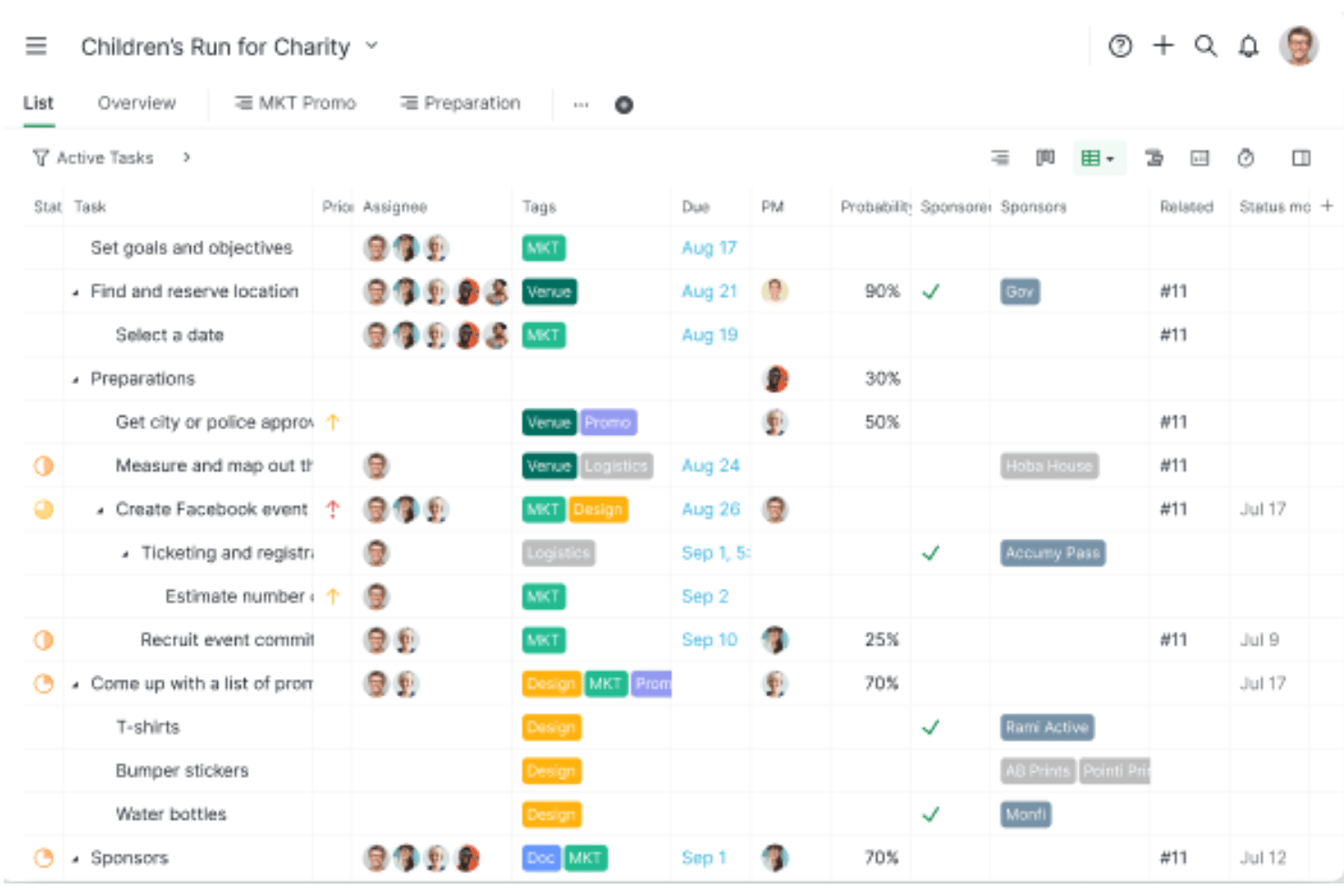
Quire is a project management tool built around a nested task hierarchy, offering Kanban boards, sprint sublists, Timeline (Gantt) views, and native GitHub integration for software teams.
Who Is Quire Best For?
Quire suits small dev teams and early-stage startups that want Agile-friendly task management without the overhead of enterprise tools like Jira.
Why I Picked Quire
I've included Quire in my top picks because it gives Agile teams a genuinely lightweight alternative to tools like Jira, without sacrificing the structural depth dev teams actually need. I particularly like how the nested task hierarchy maps naturally to epics, stories, and bugs, and how sprint sublists let you pull backlog items into a focused sprint board without any clunky setup. The native GitHub integration, available even on the free plan, means commits and issues stay linked to tasks from day one.
Quire Key Features
- Nested task hierarchy: Break down epics, stories, and bugs into unlimited levels of subtasks, keeping parent-child relationships visible across every project view.
- Timeline view: Schedule tasks and milestones on a Gantt-style timeline with dependency linking, giving you a clear picture of sprint pacing and delivery windows.
- Smart Folders: Aggregate multiple projects into a single portfolio view for cross-team tracking and reporting without duplicating work.
- MCP server: Connect AI assistants like Claude directly to Quire via a first-party Model Context Protocol server to create, update, and query tasks using natural language.
Quire Integrations
Quire offers native integrations with GitHub, Slack, Microsoft Teams, Google Drive, Google Calendar, and Dropbox. It also provides a REST API for custom integrations and supports Zapier.
Pros and Cons
Pros:
- Customizable statuses support varied development workflows
- Native GitHub integration for code traceability
- Nested task hierarchy for structuring epics and bugs
Cons:
- Lacks native CI/CD and DevOps integrations
- No built-in burndown or velocity charts
New Product Updates from Quire
Quire Adds Read Receipts for Comments
Quire now supports read receipts for comments, helping teams see who has viewed discussion updates and reducing missed responses. For more information, visit Quire's official site.
 .

Celoxis
Best for integrated client collaboration tools
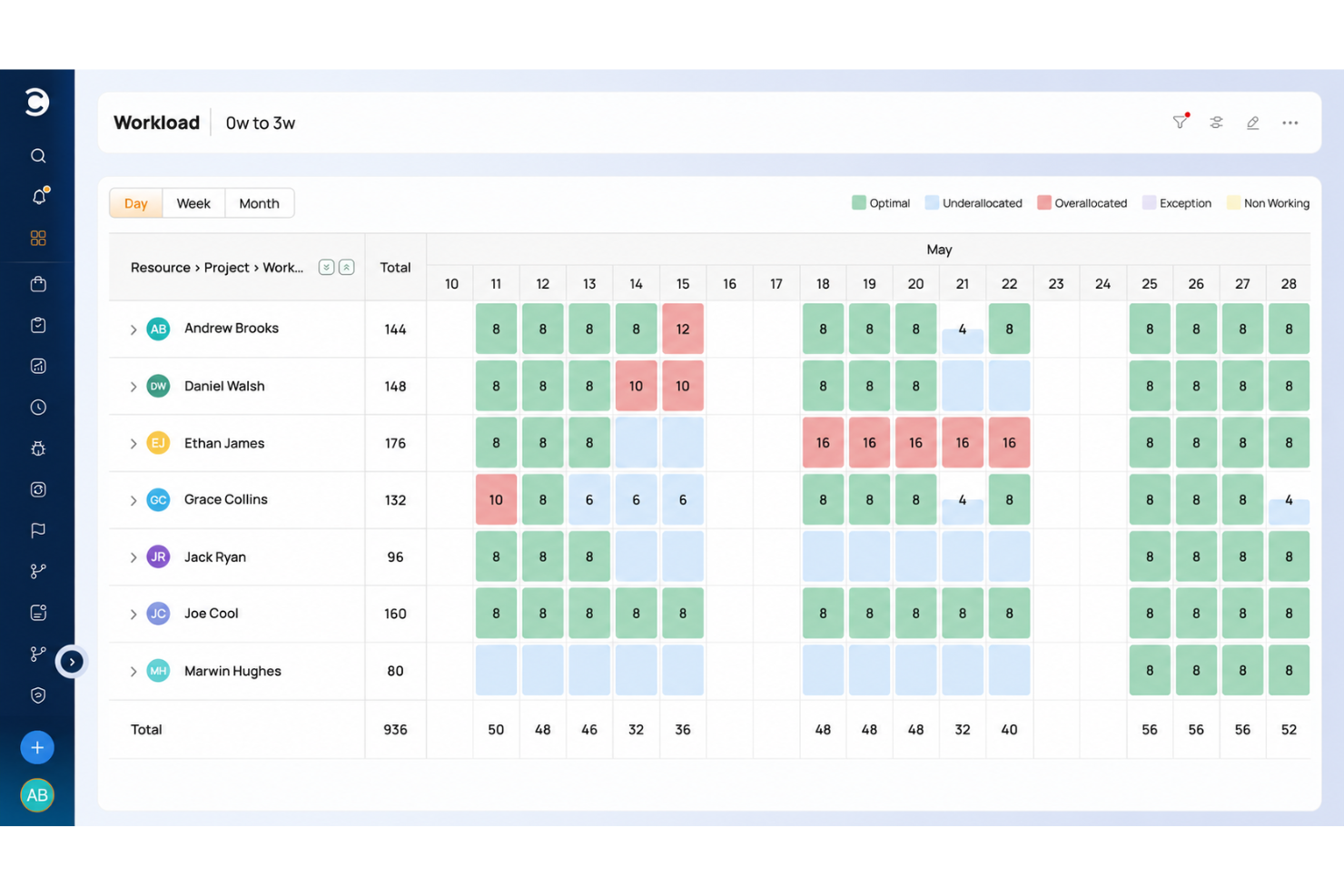
Celoxis is a project portfolio management platform that combines Gantt scheduling, resource management, request intake, budgeting, and portfolio tracking with native integrations for development tools like Jira, GitHub, and Azure DevOps.
Who Is Celoxis Best For?
Celoxis is a good fit for mid-size to enterprise project management offices (PMOs) that need to manage multiple projects, portfolios, and cross-functional teams from a single platform.
Why I Picked Celoxis
I picked Celoxis as one of the best because of how it handles client visibility without requiring additional seat licenses. The free, fully customizable client portal lets clients log in to their own personalized dashboards, where they can track progress, review reports, and exchange comments directly on tasks. I also like that you can share reports and schedule automated PDF delivery to clients on a recurring basis, which cuts down on the manual status update cycle that eats into a dev PM's time.
Celoxis Key Features
- Interactive Gantt charts: Build multi-project timelines with task dependencies, critical path highlighting, and automatic schedule recalculation.
- Resource workload management: View team capacity across projects using workload heatmaps, and reassign tasks directly from the chart.
- Time and expense tracking: Log hours against specific tasks and run multi-level approval workflows before billing.
- Bug and issue tracking app: Use a built-in workflow app to log, assign, and resolve bugs without leaving your project workspace.
Celoxis Integrations
Celoxis offers native integrations with Google Drive, Microsoft Excel, Microsoft Project, Salesforce, Jira, Zendesk, Slack, QuickBooks Online, and more. It also connects with Zapier, and an API is available for custom integrations.
Pros and Cons
Pros:
- On-premise and cloud deployment options
- Interactive Gantt charts with auto-rescheduling
- Built-in financial tracking with revenue forecasting
Cons:
- Dashboards slow with large project loads
- UI feels dated and menu-heavy
Best for planning large-scale development initiatives
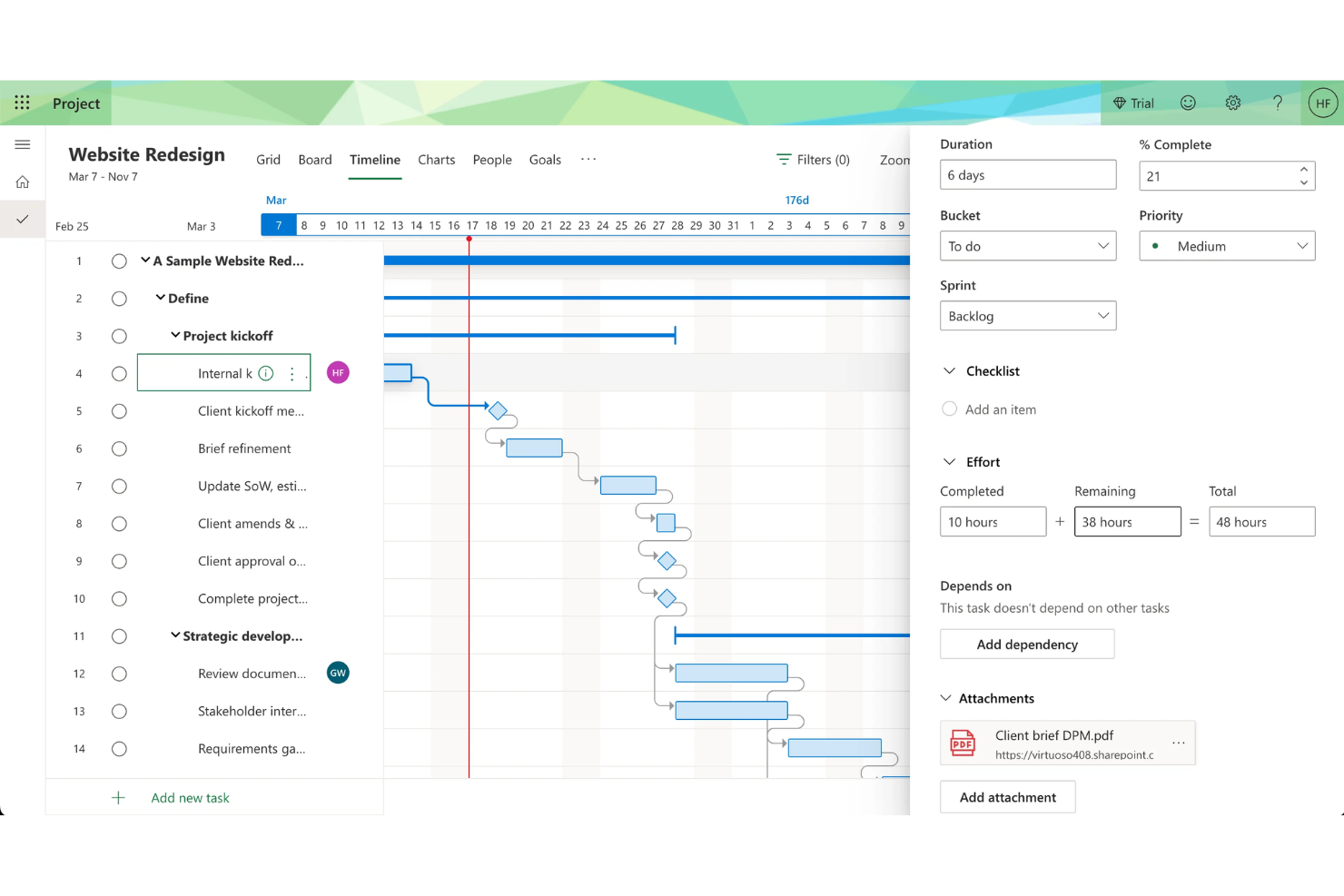
Microsoft Project is a project management platform for software teams that provides timeline planning, resource allocation, dependency mapping, and portfolio management in a single workspace.
Who Is Microsoft Project Best For?
Enterprise project managers and PMOs who need to coordinate complex, multi-team software development initiatives.
Why I Picked Microsoft Project
Microsoft Project is built for complexity. I picked Microsoft Project as one of the best because I rely on its Gantt charts and timeline views to map out dependencies and milestones for multi-phase software projects. My team uses its resource management features to allocate developer hours and balance workloads across overlapping initiatives. I like how the critical path analysis helps us spot bottlenecks before they impact delivery.
Microsoft Project Key Features
- Portfolio selection and optimization: Evaluate and prioritize multiple projects based on strategic impact.
- Built-in project templates: Start new projects quickly with pre-configured templates for common workflows.
- Timesheet submission: Track actual work hours and update progress directly within the platform.
- Integration with Microsoft 365: Sync tasks, calendars, and files with Microsoft Teams, Outlook, and SharePoint.
Microsoft Project Integrations
Microsoft Project has native integrations across the Microsoft ecosystem, including Microsoft 365, Teams, Outlook, SharePoint, Power BI, Power Apps, and Power Automate. An API is available for custom integrations.
Pros and Cons
Pros:
- Integrates natively with Microsoft 365 suite
- Offers advanced resource allocation tools
- Handles complex project dependencies and hierarchies
Cons:
- Steep pricing for smaller teams
- Lacks built-in Agile board views

ProofHub
Best for built-in team discussions
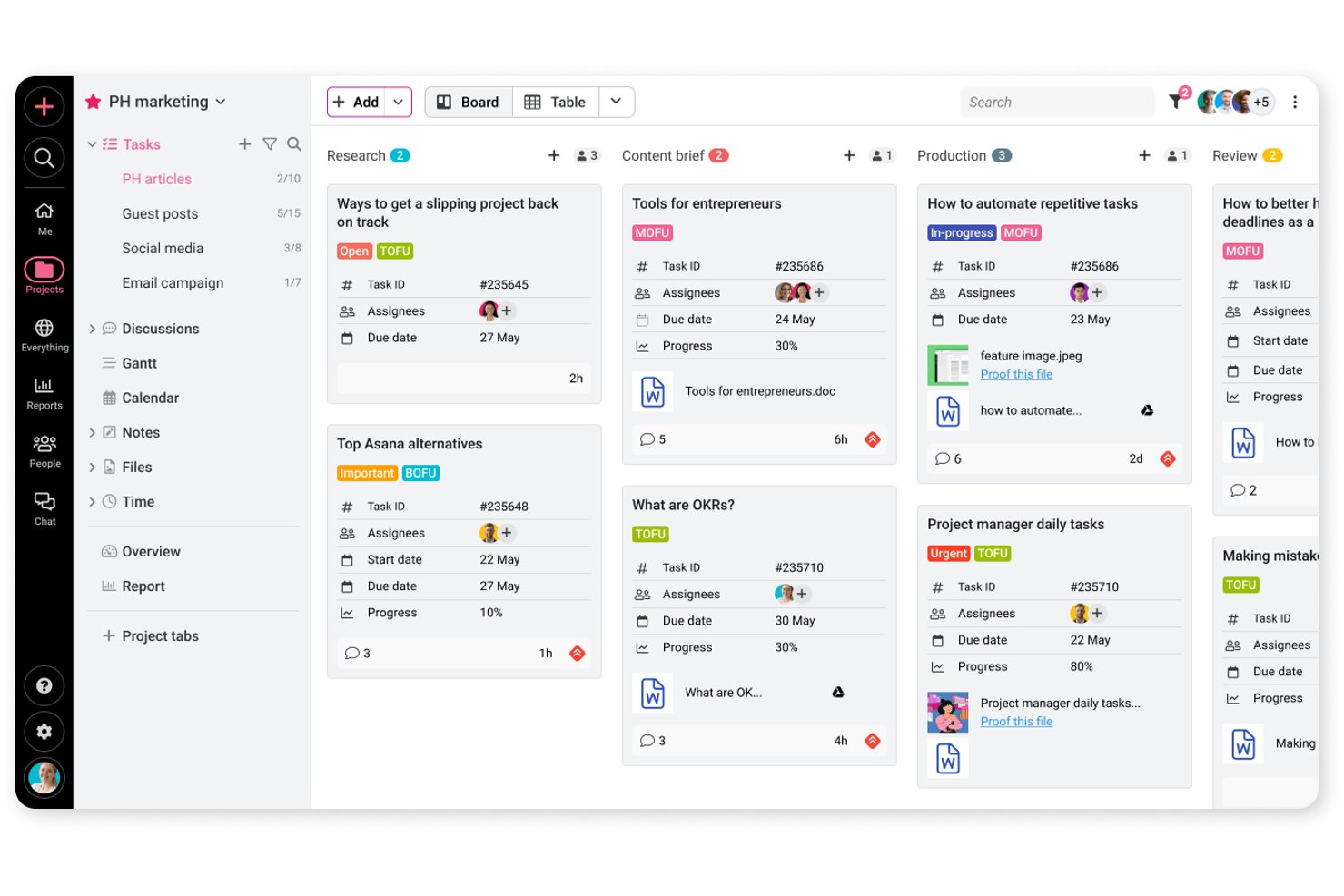
ProofHub is a project management and team collaboration platform that covers task tracking, Gantt scheduling, file proofing, and built-in discussions across Agile and Waterfall workflows.
Who Is ProofHub Best For?
ProofHub suits creative and marketing teams that need file proofing, threaded discussions, and task tracking in one place without paying per seat.
Why I Picked ProofHub
I've included ProofHub in my top picks because built-in team discussions aren't an afterthought here—they're threaded, tied directly to tasks and files, and keep feedback out of your inbox. I particularly like the proofing tools: you can annotate a design file, resolve comments, and formally approve the asset without leaving the project. When a client needs to review a deliverable, a shared proofing link lets them leave feedback without needing a ProofHub account.
ProofHub Key Features
- Agile and Waterfall workflows: ProofHub supports both Agile and Waterfall methodologies, including backlog planning, task dependencies, and release-progress tracking for development teams.
- Custom roles and permissions: Assign section-level access controls to team members, limiting visibility to assigned projects or specific areas like files, timesheets, and reports.
- Gantt chart with dependencies: Map tasks over time, set dependencies between them, and track completion progress directly within the Gantt view.
- Time tracking and timesheets: Log time manually or with timers, attach entries to specific tasks, and generate time reports across projects.
ProofHub Integrations
ProofHub offers nine documented native integrations, including Slack, Google Calendar, iCal, Box, Dropbox, OneDrive, QuickBooks, FreshBooks, and FreshBooks Classic. Ultimate Control includes API access for custom integrations, but native GitHub, GitLab, Jira, or Azure DevOps connections aren’t documented.
Pros and Cons
Pros:
- Proofing keeps design approvals in project context
- Gantt dependencies clarify delivery blockers
- Discussions keep development decisions with tasks
Cons:
- Timelines don’t recalculate automatically from dependencies
- Resource reports track time, not capacity
Best for tracking billable hours and profitability
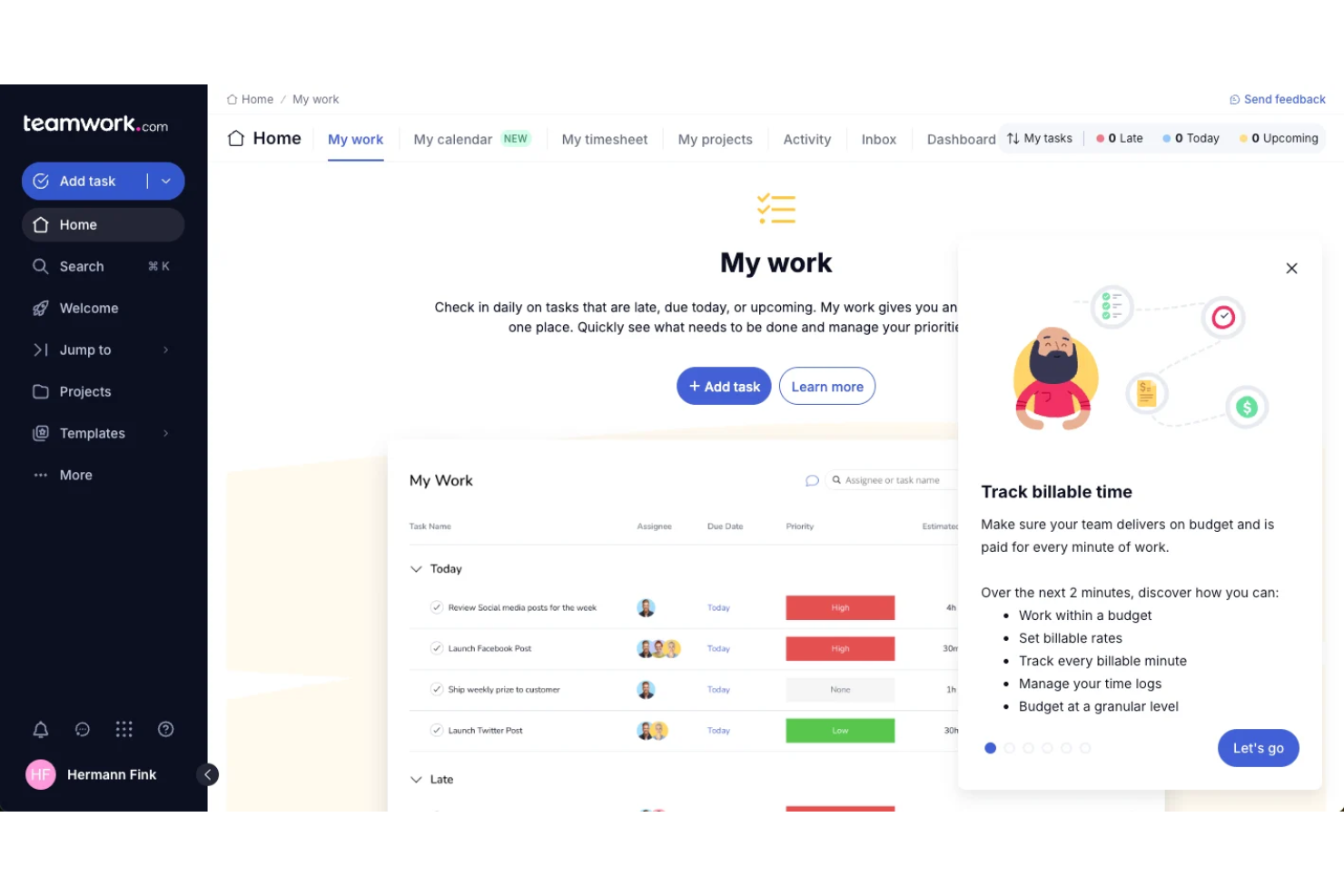
Teamwork.com is a project management platform for software teams that combines task management, time tracking, billing, resource scheduling, and client collaboration in one system.
Who Is Teamwork.com Best For?
Agencies and client services teams looking to track billable hours and project profitability.
Why I Picked Teamwork.com
Most tools treat time tracking as an add-on. Teamwork makes it central. I included it because it’s one of the few platforms that connects project execution directly to billable hours and profitability—making it a better fit for agencies and client-facing teams.
Teamwork.com Key Features
- Task dependencies: Set and visualize dependencies between tasks to manage project flow.
- Gantt chart view: Plan and adjust project timelines with interactive Gantt charts.
- Milestone tracking: Track key project milestones and deadlines in one place.
- Client portal: Give clients access to project updates, files, and communications.
Teamwork.com Integrations
Teamwork.com offers 150+ native integrations, including Slack, Microsoft Office, Harvest, Xero, BugHerd, HubSpot, Stripe, and ChatGPT, and connects with Zapier. An API is available for custom integrations.
Pros and Cons
Pros:
- Client portal supports external collaboration
- Profitability dashboard for project financials
- Built-in time tracking for billable work
Cons:
- Resource management is less advanced than peers
- Limited Agile board customization options

Jira
Best for a customizable agile workflow engine

Jira is a software development project management tool from Atlassian that provides issue tracking, sprint planning, backlog management, and customizable workflows for Agile teams.
Who Is Jira Best For?
Agile software development teams that need detailed sprint, backlog, and issue tracking.
Why I Picked Jira
If you need strict Agile processes, Jira still sets the standard. Compared to more flexible tools, it gives you deeper control over sprint structure, backlog grooming, and issue tracking. I chose it because it handles complexity better than most—especially for teams managing multiple squads, detailed workflows, and large backlogs.
Jira Key Features
- Advanced permissions: Control user access and project visibility at a granular level.
- Marketplace apps: Extend functionality with thousands of add-ons from the Atlassian Marketplace.
- Automation engine: Set up custom rules to automate repetitive project management tasks.
- Release management: Track, schedule, and manage software releases within your projects.
Jira Integrations
Jira offers native integrations with Confluence, Bitbucket, Trello, GitHub, Slack, Microsoft Teams, Google Drive, Dropbox, Zendesk, and Salesforce, and provides an API for custom integrations.
Pros and Cons
Pros:
- Detailed reporting and dashboard capabilities
- Highly customizable workflows for development teams
- Advanced sprint and backlog management tools
Cons:
- Can feel slow with large projects
- Complex setup for new users

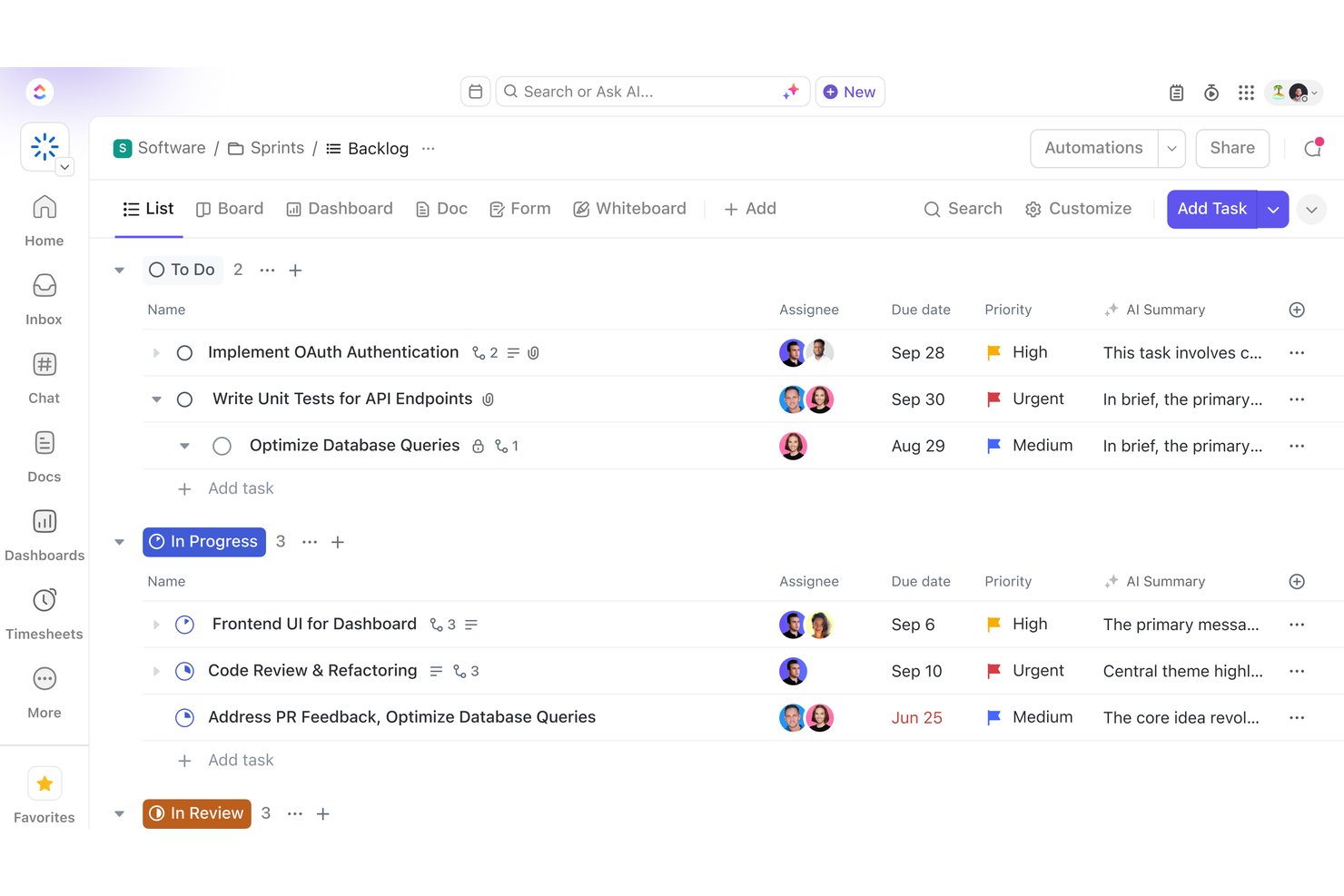
ClickUp is an all-in-one work management platform that combines task tracking, project scheduling, sprint planning, Docs, Dashboards, and built-in AI across software development and cross-functional team workflows.
Who Is ClickUp Best For?
ClickUp suits cross-functional teams that want to manage software development, creative work, and client delivery in a single workspace without stitching together multiple tools.
Why I Picked ClickUp
I've included ClickUp in my top picks because it's one of the few tools that genuinely consolidates software development and cross-functional project work without forcing you to stitch together separate apps. I especially like how ClickUp Brain sits across your entire workspace, so you can ask it to summarize sprint activity, draft a project update, or surface blockers from task comments in seconds. The GitHub and GitLab integrations automatically update linked task statuses when a pull request merges, which keeps your board accurate without any manual work.
ClickUp Key Features
- Sprint planning and reporting: Manage time-boxed sprints with backlogs, spillover handling, sprint points, and per-assignee reporting built directly into your workspace.
- Workload view: See each team member's daily, weekly, or monthly capacity alongside their assigned tasks so you can spot and fix over-allocation across projects.
- Proofing on images, videos, and PDFs: Pin timestamped comments directly to a specific frame or location in a file so reviewers can give precise, contextual feedback.
- Custom automations: Set trigger-and-condition rules to automatically change task statuses, reassign work, or post comments when defined events occur in your workflow.
ClickUp Integrations
ClickUp lists 1,000+ integrations, including native connections with GitHub, GitLab, Bitbucket, Jira, Sentry, Bugsnag, LambdaTest, Figma, and Slack. It supports a REST API, webhooks, OAuth, an MCP Server, and Zapier.
Pros and Cons
Pros:
- Proofing pins feedback to design assets
- Sprint reports connect effort with delivery
- Configurable statuses map software delivery stages
Cons:
- Specialized metrics may need reporting workarounds
- Dense workspaces can slow team adoption

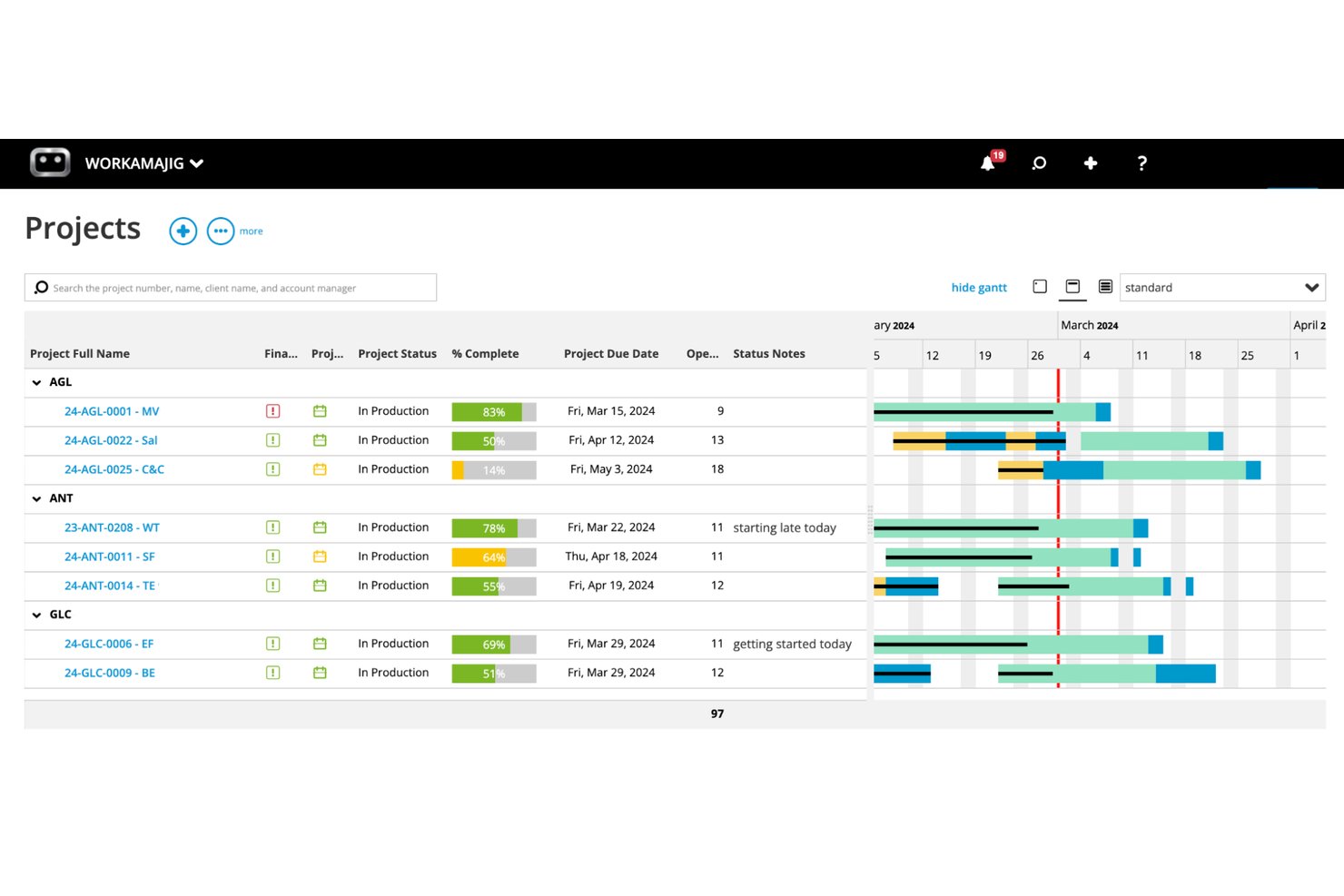
Workamajig is an all-in-one agency management platform that combines project management, resource scheduling, time tracking, client portals, and financial reporting for creative agencies and in-house marketing teams.
Who Is Workamajig Best For?
Workamajig is built for creative agencies and in-house marketing teams that need to manage client projects, creative reviews, and agency finances in one place.
Why I Picked Workamajig
I've included Workamajig in my top picks because it's purpose-built for creative agencies that need project management and client financials in one place. I particularly like its structured client approval workflows, where you can route deliverables through sequential reviewers so a project manager signs off before the account manager, keeping review cycles from going sideways. Time logged against tasks feeds directly into invoicing and budget-vs-actuals reporting, so I can see project profitability without jumping between systems.
Workamajig Key Features
- Resource scheduling dashboard: View employee hours, weekly allocations, and utilization across active projects, with workload rebalancing and capacity caps that account for PTO and holidays.
- Project budget vs. actuals tracking: Compare budgets against real costs with breakdowns by item, type, task, or person, pulling directly from logged time, materials, and expenses.
- Sales CRM with project estimation: Capture sales opportunities and convert them into detailed, branded estimates based on labor, resources, and expenses before turning them into live projects.
- Configurable security groups: Set role-based access controls for clients, vendors, and freelancers, with admin-level control over portal areas, file actions, session timeouts, and two-factor authentication.
Workamajig Integrations
Workamajig lists 11 integrations, including Jira, Slack, Google, Microsoft, and HubSpot. It also supports API-based custom integrations and Zapier.
Pros and Cons
Pros:
- Capacity views surface workload, availability, and PTO
- Logged hours connect project budgets to billing
- Sequential client approvals clarify stakeholder handoffs
Cons:
- Schedule changes can be cumbersome on shifting projects
- Technical tracking lacks depth for software teams

Best for agency resource and budget planning
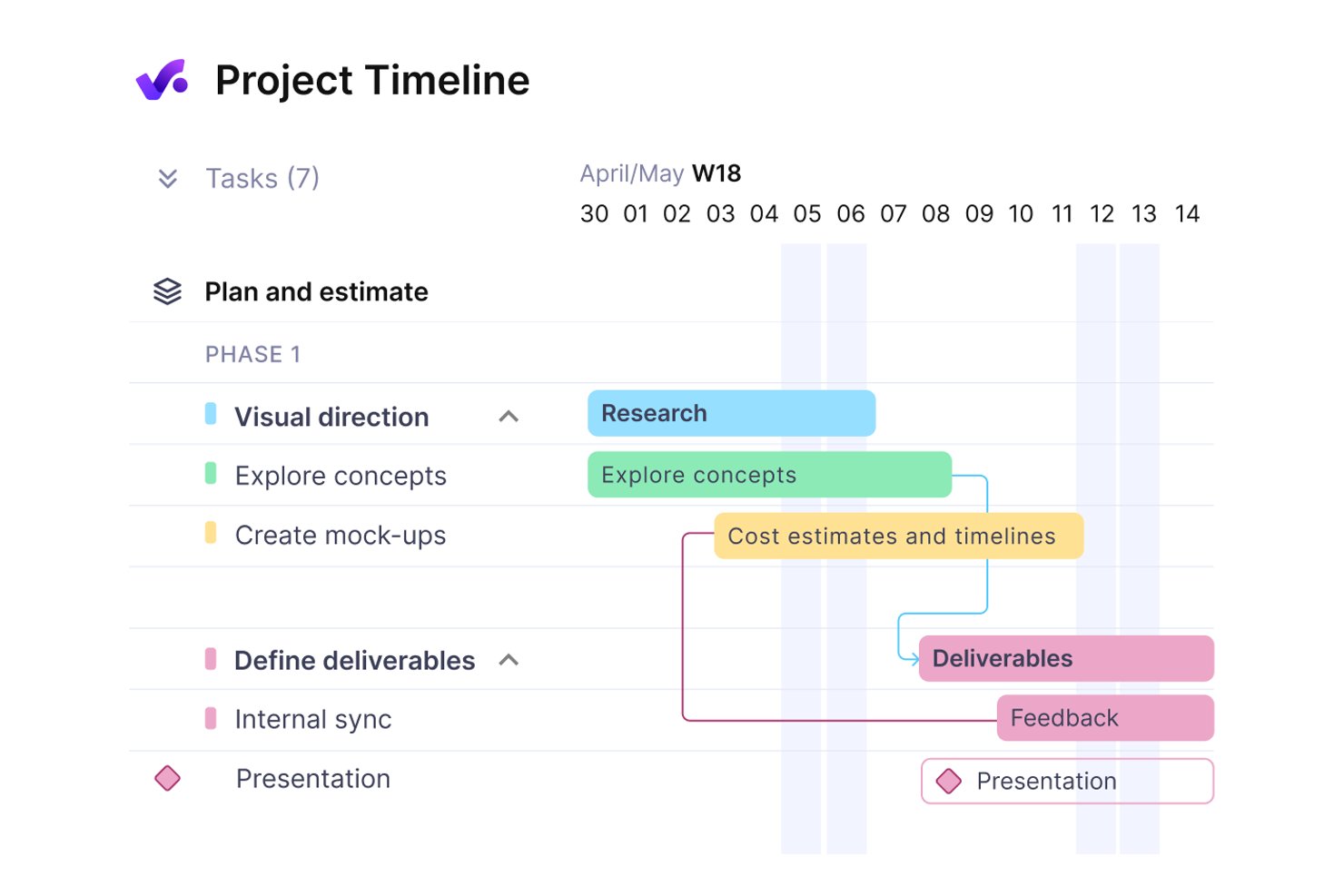
Productive is a professional services management platform that brings together project and task management, resource planning, time tracking, budgeting, and invoicing in a single workspace.
Who Is Productive Best For?
Productive is a strong fit for agency operations leads and client services directors who need resource planning, time tracking, and financial management in one place.
Why I Picked Productive
I picked Productive as one of the best because it handles resource planning and budget tracking in a way that's genuinely connected to project work. I love how the Resource Planner shows team capacity alongside bookings and time off, so you can see exactly who's available before committing to a scope. The budget-overrun controls are also a standout: time entries get blocked or flagged at the service limit, which keeps billable hours honest against client scopes without relying on manual checks.
Productive Key Features
- Client collaborator roles: Invite clients to projects with tiered permission levels that control what tasks, comments, budgets, and time entries they can view.
- Automated workflow triggers: Set up automations using object creation, time-based events, or Slack messages as triggers to create tasks, update fields, or add comments.
- Jira integration: Connect Jira with Productive so time entries update in sync with activity logged in Jira.
- AI-powered timesheet autofill: Analyze calendar events and past time entries to automatically populate team timesheets.
Productive Integrations
Productive offers native integrations with Jira, Slack, Google Calendar, Microsoft Outlook, and Gmail. It also provides an open API, webhooks, and Zapier for custom connectivity.
Pros and Cons
Pros:
- Client permissions keep project work visible
- Budgets connect tracked hours to client scopes
- Resource plans expose cross-project team capacity
Cons:
- Reports can require spreadsheet cleanup
- Task editing makes bulk updates cumbersome
New Product Updates from Productive
Productive Adds Email and Calendar Integrations for Agents
Productive adds Gmail, Outlook, Google Calendar, and Outlook Calendar connectors for its AI agents. These integrations let agents manage emails and create calendar events directly within Productive. For more information, visit Productive’s official site.

Smartsheet
Best for portfolio-level dashboards and reporting

Smartsheet is a collaborative work management platform for software teams that combines project tracking, resource management, reporting, and workflow automation in a spreadsheet-style interface.
Who Is Smartsheet Best For?
Portfolio managers and PMOs at mid-size to large organizations who need advanced reporting and dashboard capabilities.
Why I Picked Smartsheet
Smartsheet bridges the gap between spreadsheets and project management tools. It’s more structured than Excel but more flexible than traditional PM platforms. I picked it for teams managing multiple projects who need high-level reporting without fully committing to rigid Agile systems.
Smartsheet Key Features
- Automated workflows: Set up rule-based automations for approvals, alerts, and task assignments.
- Gantt chart view: Visualize project timelines and dependencies in a drag-and-drop interface.
- Form builder: Collect structured project requests or bug reports directly into sheets.
- Cell-level comments: Add context and discussion to specific tasks or deliverables.
Smartsheet Integrations
Smartsheet offers native integrations with Jira, Microsoft Teams, Slack, Google Drive, Salesforce, Docusign, ServiceNow, Box, and Tableau. It also connects with Zapier and provides an API for custom integrations.
Pros and Cons
Pros:
- Gantt charts visualize dependencies and timelines
- Automated workflows handle repetitive project tasks
- Portfolio dashboards show cross-project status clearly
Cons:
- Limited support for code repository integrations
- No built-in burndown or velocity charts
New Product Updates from Smartsheet

Smartsheet Adds Claude Sheets Export Integration
Smartsheet introduces Send to Smartsheet in Claude Sheets (beta), allowing users to transfer AI-generated plans into Smartsheet with rows, dates, numbers, and dropdowns preserved. This helps teams turn AI-generated plans into collaborative workflows. For more information, visit Smartsheet’s official site.
 .
Diğer Yazılım Geliştirme Proje Yönetimi Araçları
İşte kısa listeme giremeyen ancak yine de göz atmaya değer bazı ek yazılım geliştirme proje yönetimi aracı seçenekleri:
- Hive
For creative proofing and dev tool workflows
- Wrike
For advanced analytics and customization
- Zoho Projects
For time tracking with invoicing
- ProjectManager
For real-time workload management
- Airtable
For customizable workflow automation
- OpenProject
For self-hosted deployment options
- GoodDay
For multi-view project dashboards
- monday dev
For dev and product team sprint planning
- Notion
With AI agents for knowledge and tasks


How I Evaluate Software Development Project Management Tools
I split my evaluation into three parts, weighting core functionality most: assign tasks, track deadlines, and map dependencies. Next, I look for features like creative proofing and GitHub integrations. Finally, I consider onboarding, support, and pricing value for client teams.
Core Functionality (Table Stakes For This List)
When I'm selecting tools for my list, I score each one on a scale from 0 (does not offer the functionality) to 5 (excels in this area) for each core functionality listed below. I then convert the total into a percentage to help assess each tool's overall fit, with extra weight on any functionalities I’ve deemed essential.
- Task & Workflow Management (Essential): I look for assignable tasks, dependencies, subtasks, and configurable stages that can handle handoffs from design to development.
- Project Planning & Scheduling (Essential): I assess timeline views, milestones, and dependency mapping, including how clearly teams can reschedule phases when requirements shift.
- Resource & Capacity: I check whether workload views show allocation across projects, so leads can spot conflicts before assigning another deliverable.
- Collaboration & File Sharing: I look for task-level comments, notifications, and file sharing that keep design feedback and delivery discussions tied to the work.
- Client & Stakeholder Collaboration: I consider guest access, shared project views, and approval workflows for client reviews and deliverable sign-off.
- Time & Budget Tracking: I check whether teams can log time against tasks and compare it with estimates to monitor client scope and project budgets.
Once I have a list of tools that meet the criteria, I consider what sets each platform apart.
Differentiating Factors (What Sets Vendors Apart)
Here's how I compare and contrast different vendors:
Standout Features
I look for native dev tool integrations that sync with repositories and design platforms like GitHub or Figma. A two-way sync between a Kanban board and a repo's pull requests keeps developers from toggling between tools. I also evaluate creative proofing capabilities—markup, annotation, and version comparison built into the platform shorten review cycles that otherwise sprawl across email threads. Automated workflow triggers round out the picture; I check whether rules can move tasks between stages or notify stakeholders when a status changes, cutting manual upkeep on busy multi-project boards.
Beyond Features
I evaluate how well a platform handles hybrid teams—agencies and dev shops juggle internal staff, freelancers, and client stakeholders, so permission tiers and flexible seat licensing matter. Integration depth is equally important; a one-way Jira export is far less useful than a two-way sync that keeps both boards current. I also check onboarding support, since billable teams can't afford weeks of ramp-up when a new client engagement starts next Monday.
Yazılım Geliştirme Proje Yönetimi Araçları Nasıl Seçilir?
Uzun özellik listeleri ve karmaşık fiyatlandırma yapıları içinde kaybolmak kolaydır. Kendinize özgü yazılım seçimi sürecinizde ilerlerken odağınızı korumanıza yardımcı olmak için göz önünde bulundurmanız gereken faktörleri aşağıda bir kontrol listesi hâlinde bulabilirsiniz:
| Faktör | Dikkat Edilmesi Gerekenler |
| Ölçeklenebilirlik | Büyüdükçe araç ekip büyüklüğünüzü ve proje hacminizi yönetebilecek mi? Kullanıcı sınırlarını ve proje kotalarını kontrol edin. |
| Entegrasyonlar | Kod depoları, sohbet ve dokümantasyon platformları gibi mevcut araçlarınıza yerel olarak bağlanabiliyor mu? |
| Özelleştirilebilirlik | İş akışlarını, alanları ve izinleri ekibinizin süreçleriyle ve terminolojisiyle eşleşecek şekilde uyarlayabiliyor musunuz? |
| Kullanım kolaylığı | Ekibiniz aracı hızlıca benimseyecek mi, yoksa eğitim ve desteğe sürekli ihtiyaç duyulacak mı? |
| Uygulama ve işe alıştırma | Aracı kullanıma hazır hâle getirmek ne kadar sürecek? Taşıma araçları, şablonlar veya işe alıştırma desteği var mı? |
| Maliyet | İhtiyaçlarınız değiştikçe fiyatlandırma kademeleri açık ve öngörülebilir mi? Kullanıcı başına ücretlere ve eklenti maliyetlerine dikkat edin. |
| Güvenlik önlemleri | Araç, hassas proje verilerini korumak için SSO, veri şifreleme ve role dayalı erişim denetimleri sunuyor mu? |
| Destek erişilebilirliği | Özellikle kritik proje aşamalarında veya standart çalışma saatleri dışında ihtiyaç duyduğunuzda yardım alabiliyor musunuz? |
Yazılım Geliştirme için Proje Yönetimi Nedir?
Yazılım geliştirme için proje yönetimi, yazılım projelerini zamanında teslim etmek amacıyla görev listeleri, alt görevler ve yapılacaklar listeleri genelinde çalışmaları düzenleme, atama ve takip etme sürecidir. Proje yönetimi uygulamaları, ekiplerin çalışmaları koordine etmesine, proje portföyünü yönetmesine ve ölçümleri takip etmesine yardımcı olurken geliştirme görevlerini CRM sistemleri ve dosya depolama gibi daha geniş iş akışlarına bağlı tutar.
Bu araçlar, küçük ekipler ve daha büyük kuruluşlar tarafından basit projelerden karmaşık geliştirme çalışmalarına kadar her şeyi yönetmek için kullanılır. Ekipler bu araçları görev atamak, gösterge panoları ve bileşenler aracılığıyla ilerlemeyi izlemek ve mobil uygulama erişimi sayesinde bağlantıda kalmak için kullanır. Bazı platformların öğrenme süreci gerektirmesine rağmen çoğu, farklı geliştirme iş akışlarına uyum sağlayan sınırsız kullanıcı ve esnek kurulum seçeneklerini destekler.
Yazılım Geliştirme Proje Yönetimi Araçlarının Özellikleri
Yazılım geliştirme proje yönetimi araçlarını seçerken aşağıdaki temel özelliklere dikkat edin:
- Görev yönetimi: Görevler veya sorunlar oluşturmanıza, atamanıza ve takip etmenize olanak tanır; böylece herkes neyin yapılması gerektiğini ve bunun kimin sorumluluğunda olduğunu bilir.
- Gantt grafikleri: Proje zaman çizelgelerini, bağımlılıkları ve kilometre taşlarını görselleştirerek ekiplerin çalışmalara göre planlama yapmasına ve programları düzenlemesine yardımcı olur.
- Kanban veya Çevik panolar: Çalışmaları sütunlar halinde yönetmek için sürükleyip bırakma arayüzü sunar ve Scrum veya Kanban gibi Çevik iş akışlarını destekler.
- Kaynak tahsisi: Ekip üyelerinin iş yükünü ve uygunluk durumunu takip ederek görevleri dengelemeyi ve darboğazlardan kaçınmayı kolaylaştırır.
- Zaman takibi: Görevler veya projelerde harcanan saatleri kaydederek doğru faturalandırmayı, tahmin yapmayı ve performans analizini destekler.
- İş birliği araçları: İletişimi ve belgeleri merkezi bir yerde tutmak için yerleşik sohbet, yorum veya dosya paylaşımı özellikleri sunar.
- Raporlama ve analiz: İlerleme, hız ve proje durumu hakkında gerçek zamanlı raporlar oluşturarak ekiplerin ve paydaşların bilgi sahibi olmasına yardımcı olur.
- Entegrasyon özellikleri: Geliştirme iş akışlarını kolaylaştırmak için kod depolarına, CI/CD işlem hatlarına ve diğer araçlara bağlanır.
- İzin denetimleri: Kullanıcı rollerini ve erişim düzeylerini belirlemenize olanak tanıyarak hassas bilgileri korur ve uyumluluk gereksinimlerini destekler.
- Otomatik bildirimler: Son tarihler, durum değişiklikleri veya önemli güncellemeler için uyarılar ya da hatırlatıcılar göndererek manuel takip ihtiyacını azaltır.
Yazılım Geliştirme Proje Yönetimi Araçlarının Faydaları
Yazılım geliştirme proje yönetimi araçlarını uygulamak, ekibiniz ve işletmeniz için çeşitli faydalar sağlar. Yararlanabileceğiniz avantajlardan bazıları şunlardır:
- Geliştirilmiş proje görünürlüğü: Merkezi gösterge panoları ve raporlama özellikleri, ilerlemeyi, son tarihleri ve darboğazları gerçek zamanlı olarak takip etmeyi kolaylaştırır.
- Daha iyi ekip iş birliği: Yerleşik iletişim araçları ve paylaşılan çalışma alanları herkesin uyum içinde çalışmasını sağlar ve iletişim hatalarını azaltır.
- Sorunların daha hızlı çözülmesi: Görev takibi ve otomatik bildirimler, ekiplerin hataları veya engelleyicileri hızla belirlemesine, atamasına ve çözmesine yardımcı olur.
- Daha öngörülebilir teslimat: Zaman çizelgesi planlaması, kaynak tahsisi ve bağımlılık yönetimi projelerin zamanında tamamlanmasını destekler.
- Geliştirilmiş hesap verebilirlik: İzin denetimleri ve etkinlik günlükleri sorumlulukları netleştirir ve proje işlemlerini denetlemeyi kolaylaştırır.
- Kolaylaştırılmış iş akışları: Kod depoları ve CI/CD araçlarıyla yapılan entegrasyonlar manuel çalışmayı azaltır ve geliştirme süreçlerinin bağlantılı kalmasını sağlar.
- Veriye dayalı karar alma: Analiz ve raporlama özellikleri, ekiplerin çalışmaları önceliklendirmesine ve kaynakları etkili bir şekilde tahsis etmesine yardımcı olan içgörüler sunar.
Yazılım Geliştirme Proje Yönetimi Araçlarının Maliyetleri ve Fiyatlandırması
Yazılım geliştirme proje yönetimi araçlarını seçmek, mevcut çeşitli fiyatlandırma modellerini ve planları anlamayı gerektirir. Maliyetler özelliklere, ekip büyüklüğüne, eklentilere ve daha fazlasına göre değişir. Aşağıdaki tablo, yaygın planları, ortalama fiyatlarını ve yazılım geliştirme proje yönetimi aracı çözümlerinde genellikle sunulan özellikleri özetlemektedir:
Yazılım Geliştirme Proje Yönetimi Araçları için Plan Karşılaştırma Tablosu
| Plan Türü | Ortalama Fiyat | Yaygın Özellikler |
| Ücretsiz Plan | $0 | Temel görev yönetimi, sınırlı kullanıcı sayısı, basit raporlama ve topluluk desteği. |
| Kişisel Plan | $5-$15/kullanıcı/ay | Görev ve proje takibi, temel entegrasyonlar, sınırlı depolama ve e-posta desteği. |
| İşletme Planı | $15-$30/kullanıcı/ay | Gelişmiş raporlama, kaynak yönetimi, iş akışı otomasyonu, entegrasyonlar ve öncelikli destek. |
| Kurumsal Plan | $30-$60/kullanıcı/ay | Özel izinler, gelişmiş güvenlik, gelişmiş analizler, özel işe alıştırma süreci ve SLA destekli destek. |
Yazılım Geliştirme Proje Yönetimi Araçları Hakkında SSS
Yazılım geliştirme proje yönetimi araçları hakkında sık sorulan bazı soruların yanıtlarını burada bulabilirsiniz:
Yazılım geliştirme proje yönetimi araçları ile genel proje yönetimi araçları arasındaki fark nedir?
Yazılım geliştirme proje yönetimi araçları; sorun takibi, kod deposu entegrasyonları ve Çevik panolar gibi kodlama ekiplerine özel özellikler içerir. Genel proje yönetimi araçları ise bu geliştirmeye özgü yetenekler olmadan daha çok görev takibine ve zamanlamaya odaklanır.
Bu araçlar hem Çevik hem de şelale metodolojilerini destekleyebilir mi?
Evet, çoğu yazılım geliştirme proje yönetimi aracı hem Çevik hem de şelale yaklaşımlarını destekler. Ekibinizin tercih ettiği iş akışına uyum sağlamak için genellikle Kanban panoları, Scrum sprintleri ve Gantt şemaları arasında geçiş yapabilirsiniz.
Bu araçlar işlevler arası iş birliğine nasıl yardımcı olur?
Bu araçlar iletişimi, belgeleri ve görev atamalarını merkezileştirerek geliştiricilerin, tasarımcıların ve ürün yöneticilerinin uyum içinde kalmasını kolaylaştırır. Paylaşılan panolar, yorumlar ve dosya ekleri gibi özellikler herkesin aynı bilgilerden haberdar olmasını sağlar.
Bulut tabanlı proje yönetimi araçlarında güvenlik riskleri var mı?
Evet, bulut tabanlı araçlar doğru şekilde yapılandırılmadığında güvenlik riskleri oluşturabilir. Şifreleme, SSO ve role dayalı erişim denetimleri sunan çözümleri tercih edin; ayrıca sağlayıcının uyumluluk sertifikalarını ve veri işleme politikalarını mutlaka inceleyin.
Başka bir araçtan geçiş yaparken nelere dikkat etmeliyim?
Veri geçişini, kullanıcı eğitimini ve iş akışı düzenlemelerini planlayın. Yeni aracın, önemli proje geçmişini kaybetmeden ekibinizin sorunsuz şekilde geçiş yapmasına yardımcı olacak içe aktarma araçları, işe alıştırma desteği ve belgeler sunup sunmadığını kontrol edin.