

2026’da İncelenen En İyi 10 Yapay Zekâ İş Akışı Yönetimi Yazılımı

En İyi Yapay Zekâ İş Akışı Yönetimi Yazılımları Kısa Listesi


Projeleri yönetmek, aynı anda birçok işi yürütmeyi gerektirebilir. Uymanız gereken teslim tarihleri, tahsis etmeniz gereken kaynaklar ve yolunda tutmanız gereken bir ekibiniz var. Yapay zekâ iş akışı yönetimi yazılımı, tekrarlayan görevleri otomatikleştirerek ve ekip iş birliğini geliştirerek yükünüzü hafifletebilir.
Deneyimlerime göre bu araçlar çalışma şeklinizi dönüştürebilir ve gerçekten önemli olan konulara odaklanmanızı sağlayabilir. Yapay zekâdan yararlanarak verimliliği artırabilir ve projelerinizdeki hataları azaltabilirsiniz.
Bu yazıda, yapay zekâ iş akışı yönetimi yazılımları için en iyi seçimlerimi paylaşacağım. Bilinçli bir karar vermenize yardımcı olmak için her birini bağımsız olarak test edip inceledim. İster karmaşık görevleri basitleştirmek ister ekip iletişimini geliştirmek isteyin, ihtiyaçlarınıza uygun bir çözüm bulacaksınız.
Why Trust Our Software Recommendations
Our team has been testing and reviewing software since 2012. As project managers ourselves, we know how difficult—and important—it is to choose the right software.
For this guide, we evaluated tools using hands-on testing and independent research, scoring tools using our selection criteria. We also draw on insights from industry thought leaders and practicing project management experts.
Our reviews reflect our human editorial judgment, not a sales pitch.
Expert reviewers:
Yapay Zekâ İş Akışı Yönetimi Yazılımları Karşılaştırma Tablosu
Bu karşılaştırma tablosu, en iyi yapay zekâ iş akışı yönetimi yazılımı seçimlerim için fiyatlandırma ayrıntılarını özetlemektedir.
| Tool | Starting Price | Website | |
|---|---|---|---|
|
Best for secure client interactions |
4.4
out of 5
|
$5,000/year Free trial + free demo available |
Book Demo |
|
Best for no-code AI workflow generation |
4.6
out of 5
|
$9/user/month Free plan + 14-day free trial available |
Book Demo |
|
Best for marketing teams |
4.6
out of 5
|
Pricing upon request Not available |
Book Demo |
|
Best with prebuilt connectors for major apps |
—
|
Pricing upon request 30-day free trial available |
Website |
|
Best for AI orchestration |
4.7
out of 5
|
$19.99/month Free plan available; 14-day free trial |
Book Demo |
|
Best for visual automation |
4.7
out of 5
|
$9/month Free plan + free demo available |
Website |
|
Best for open-source enthusiasts |
4.7
out of 5
|
€20/month Free trial available |
Website |
|
Best for digital asset management |
4.4
out of 5
|
Pricing upon request Free demo available |
Website |
|
Best for data visualization |
4.4
out of 5
|
Pricing upon request 30-day free trial |
Website |
|
Best for integration capabilities |
—
|
Pricing upon request 30-day free trial |
Website |
En İyi Yapay Zekâ İş Akışı Yönetimi Yazılımları İncelemeleri
Aşağıda, kısa listeme giren en iyi yapay zekâ iş akışı yönetimi yazılımlarının ayrıntılı özetlerini bulabilirsiniz. İncelemelerim, size en uygun olanı bulmanıza yardımcı olmak için her aracın temel özelliklerine, avantajlarına & dezavantajlarına, entegrasyonlarına ve ideal kullanım alanlarına ayrıntılı bir bakış sunmaktadır.

Moxo
Best for secure client interactions
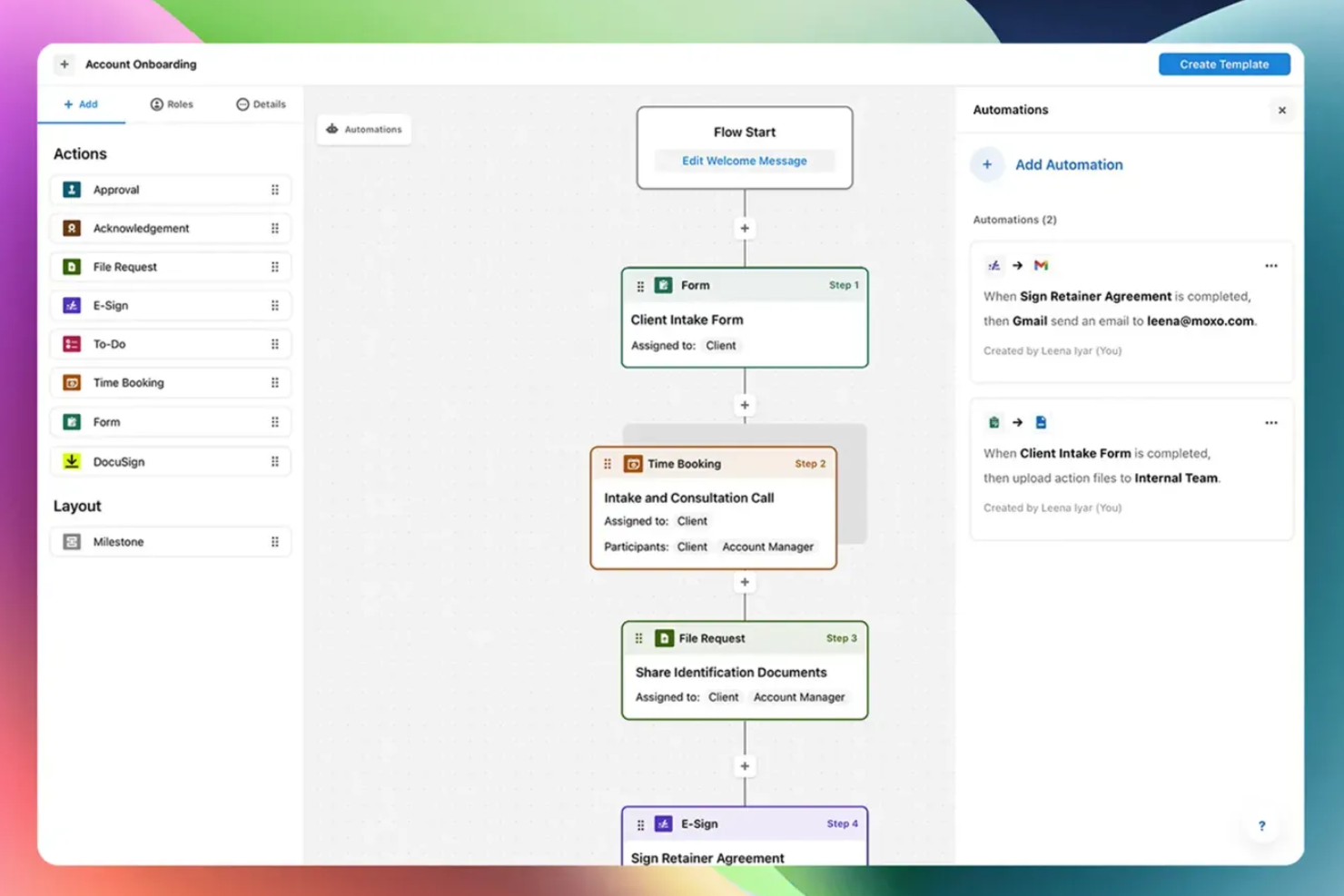
Moxo is an AI workflow management platform that orchestrates business processes across internal teams, external stakeholders, and AI agents—handling routing, validation, document coordination, and client interactions within a single no-code workflow builder.
Who Is Moxo Best For?
Moxo is a strong fit for professional services firms—like financial services, legal, and consulting—that manage complex, document-heavy workflows with external clients.
Why I Picked Moxo
I've included Moxo in my top picks because its security architecture is built directly into how client workflows run, not bolted on as an afterthought. Every client interaction happens inside an encrypted, access-controlled workspace with granular role-based permissions and a full audit trail. I especially like that SOC 2 Type II compliance and end-to-end encryption apply across messaging, file sharing, and eSignatures within the same workflow, so nothing leaks out to unsecured channels mid-process.
Moxo Key Features
- AI workflow builder: Design multi-step workflows with conditional branching, parallel paths, and looping using a no-code visual editor.
- AI agents: Deploy Assist, Automate, and Amplify agents to handle task preparation, data validation, and process monitoring within live workflows.
- SLA-based escalations: Set time-bound rules that automatically reroute or escalate stalled workflow steps to keep processes moving.
- Agent Foundry: Build and configure custom AI agents tailored to specific workflow stages using Moxo's native agent creation environment.
Moxo Integrations
Moxo offers direct data sync connectors with Salesforce, HubSpot, Microsoft Dynamics, Zoho, Wealthbox, Redtail, Filevine, Global Relay, Smarsh, and Xero, along with documented integrations for DocuSign, Stripe, Slack, Jira, Google Drive, Dropbox, Box, OneDrive, Zendesk, and QuickBooks. It also connects with Zapier and provides a REST API and webhooks for custom integrations.
Pros and Cons
Pros:
- Dedicated workspace per client or project
- SOC 2 Type II and GDPR compliant
- Built-in eSignatures, forms, and approvals
Cons:
- No built-in task timer for tracking
- Mobile app less capable than desktop

Best for no-code AI workflow generation
monday AI Workspace is an AI work platform that combines no-code workflow automation, multi-product project orchestration, and a built-in AI agent layer across work management, CRM, dev, and service use cases.
Who Is monday AI Workspace Best For?
It's a strong fit for mid-market and enterprise teams in operations, PMO, or cross-functional delivery roles who need flexible, AI-driven workflow orchestration across multiple business functions.
Why I Picked monday AI Workspace
monday AI Workspace earns its spot as one of the best on my shortlist because the AI Workflow Builder genuinely delivers on no-code workflow generation. I can describe a multi-step approval or handoff process in plain language, and the platform assembles the logic, assigns AI agents to execute each step, and routes work across teams automatically. The Vibe App Builder takes this further, letting me spin up a custom business app from a plain-English prompt in minutes.
monday AI Workspace Key Features
- AI agent workforce: Deploy AI agents to take on specialized project tasks and support automated execution at scale.
- Resource management module: Allocate team capacity, forecast workloads, and monitor resource utilization across portfolios.
- Meeting notetaker AI: Transform meetings into structured notes, action items, and workflow triggers directly within your workspace.
- Multi-tool integrations: Connect with tools like Jira, Salesforce, Slack, HubSpot, and more through native integrations and open API.
monday AI Workspace Integrations
monday AI Workspace offers hundreds of native integrations, including Slack, Jira, Salesforce, HubSpot, Google Workspace, Microsoft 365, GitHub, GitLab, Zendesk, Dropbox, and Zoom. It also supports Zapier and provides an API for custom integrations.
Pros and Cons
Pros:
- Portfolio-wide visibility across multiple workstreams
- AI agents autonomously handle multi-step tasks
- No-code AI workflow builder included natively
Cons:
- Platform breadth can overwhelm smaller teams
- Advanced AI features require higher-tier plans
New Product Updates from monday AI Workspace
monday AI Workspace Adds Human Approval Routing
monday AI Workspace adds a human-in-the-loop approval block to AI Workflows, sending approval requests and routing workflow paths based on responses. For more information, visit monday AI Workspace's official site.
 .

Best for marketing teams
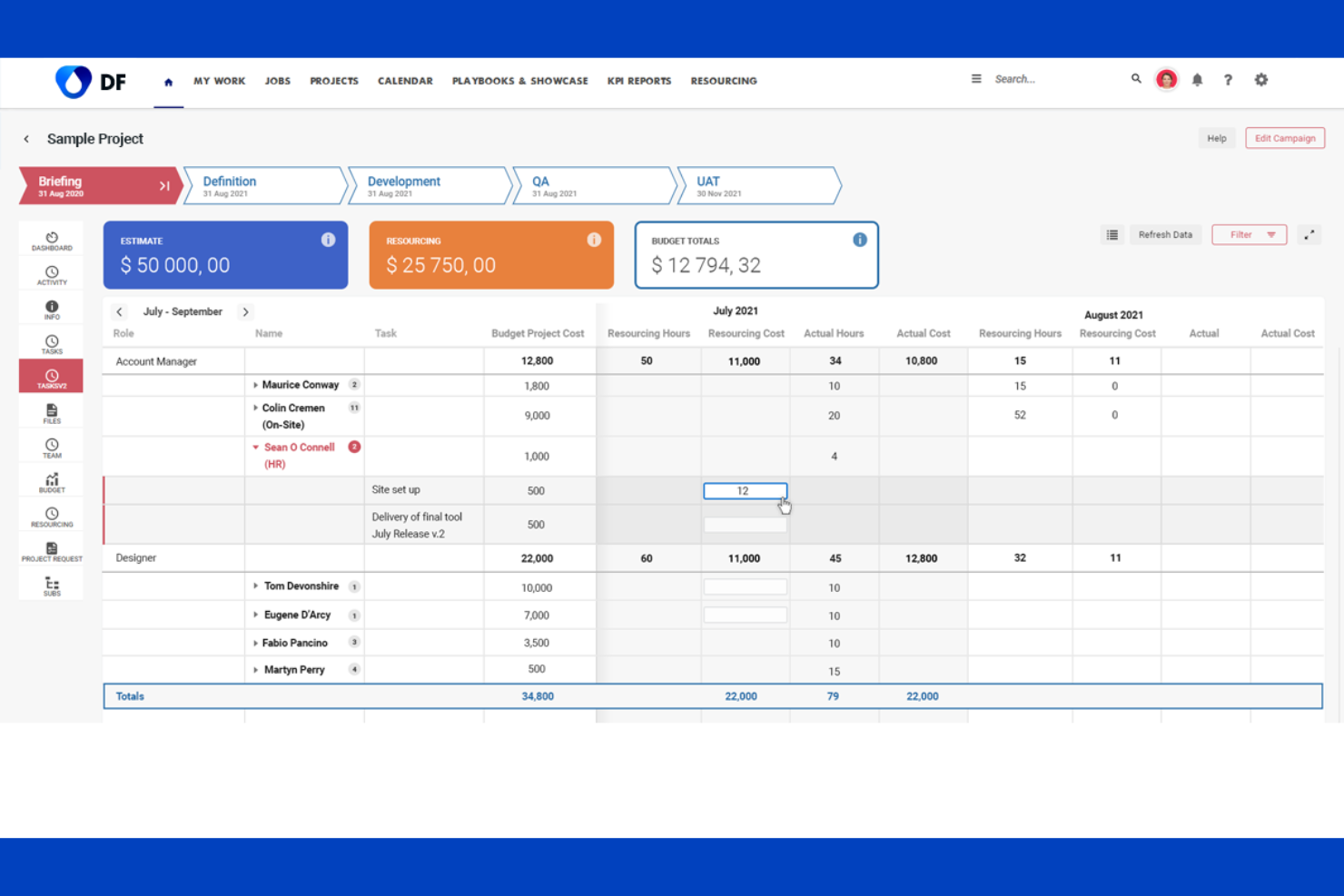
Screendragon is an AI-powered productivity platform designed for marketing teams and agencies, focusing on workflow automation. Its main users are global brands and agencies aiming to optimize resources and enhance project management.
Why I picked Screendragon: It's tailored for marketing teams needing to manage complex workflows efficiently. The platform offers features like marketing work management and content operations that cater specifically to marketing needs. With AI-powered automation, you can streamline tasks and focus on creative projects. It's particularly beneficial for agencies looking to improve profitability and resource management.
Standout features & integrations:
Features include advanced project templates that help you manage recurring tasks. You can benefit from content approval workflows to ensure quality control. The platform also provides real-time analytics to track project performance.
Integrations include Microsoft Teams, Slack, Adobe Creative Cloud, Salesforce, SAP, Google Workspace, SharePoint, JIRA, Trello, and Asana.
Pros and Cons
Pros:
- Customizable workflows
- AI-driven process automation
- Advanced project templates
Cons:
- Complex for new users
- Limited to marketing focus

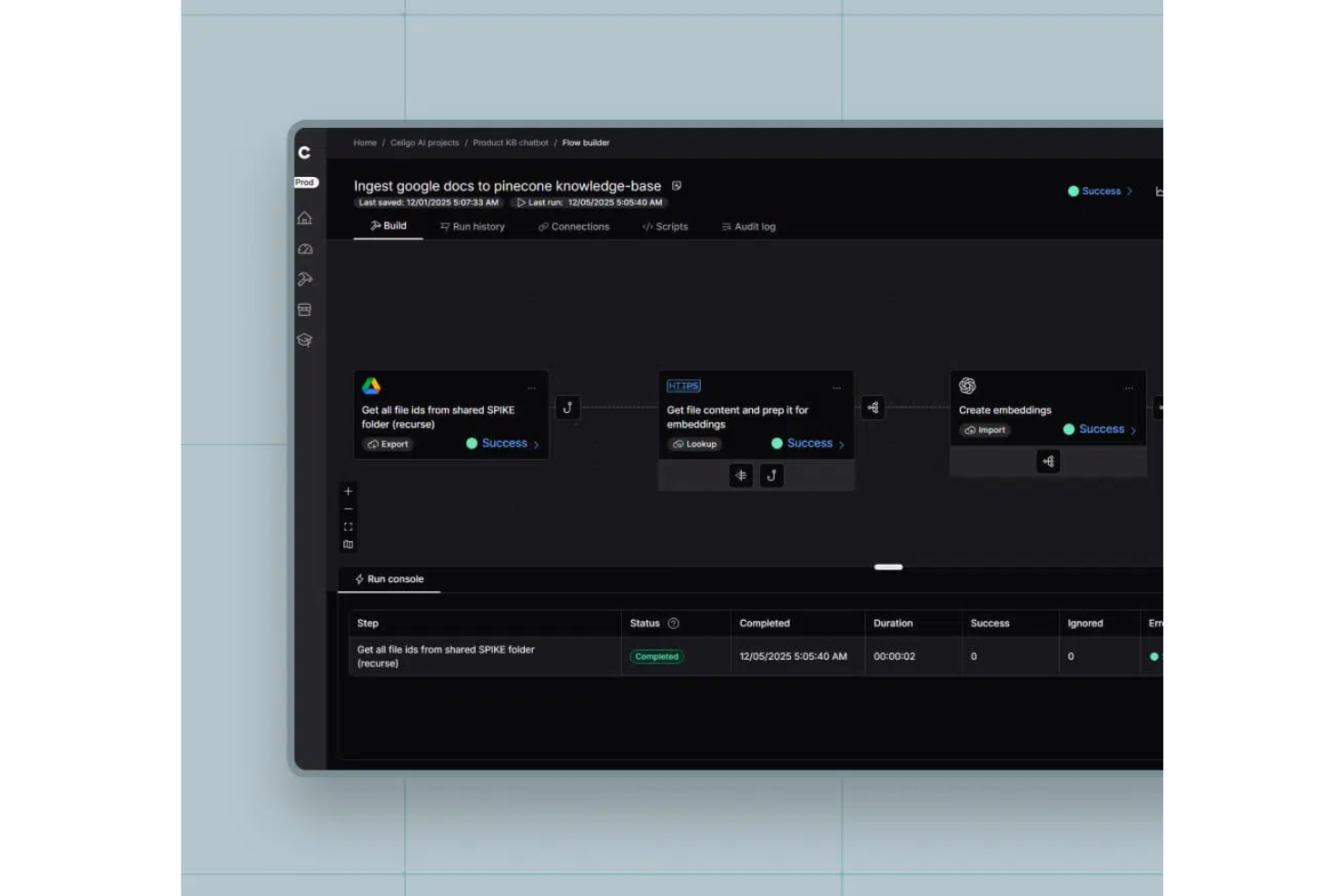
Celigo is an AI-powered workflow automation platform for teams who need to connect, orchestrate, and manage business processes across multiple SaaS and enterprise applications.
Who Is Celigo Best For?
Celigo is a good fit for IT and operations teams at mid-sized to large businesses that need to automate and connect workflows across multiple cloud applications.
Why I Picked Celigo
I picked Celigo as one of the best because its library of prebuilt connectors covers a huge range of major SaaS and enterprise apps. My team is able to quickly connect Salesforce, NetSuite, and ServiceNow without custom development. I like that these connectors come with built-in logic for common business processes, so we can automate workflows across platforms right out of the box.
Celigo Key Features
- AI error management: Uses AI to detect, diagnose, and resolve integration errors automatically.
- Flow builder: Lets you design, customize, and automate workflows with a visual drag-and-drop interface.
- Monitoring dashboard: Provides real-time visibility into integration health, status, and performance.
- Role-based access controls: Allows you to manage permissions and restrict access to sensitive workflows and data.
Celigo Integrations
Celigo offers 1,000+ native prebuilt connectors, including Salesforce, NetSuite, ServiceNow, SAP, Microsoft Dynamics 365, Shopify, Amazon, Jira, Slack, Google Sheets, and Snowflake. An API is available for custom integrations.
Pros and Cons
Pros:
- Role-based access controls for workflow security
- Real-time monitoring dashboard for integration health
- Agent builder supports autonomous, multi-step workflows
Cons:
- Support response times can vary by plan
- Limited offline or on-premises deployment options
New Product Updates from Celigo
Celigo Expands Storage, Data Imports, and Connection Management
Celigo adds a standalone storage connector, optimized Azure Synapse imports, NetSuite OAuth 2.0, flexible file templates, and expanded MCP access controls. These updates help teams manage files, process data, and secure integrations. For more information, visit Celigo’s official site.
 .

Zapier
Best for AI orchestration
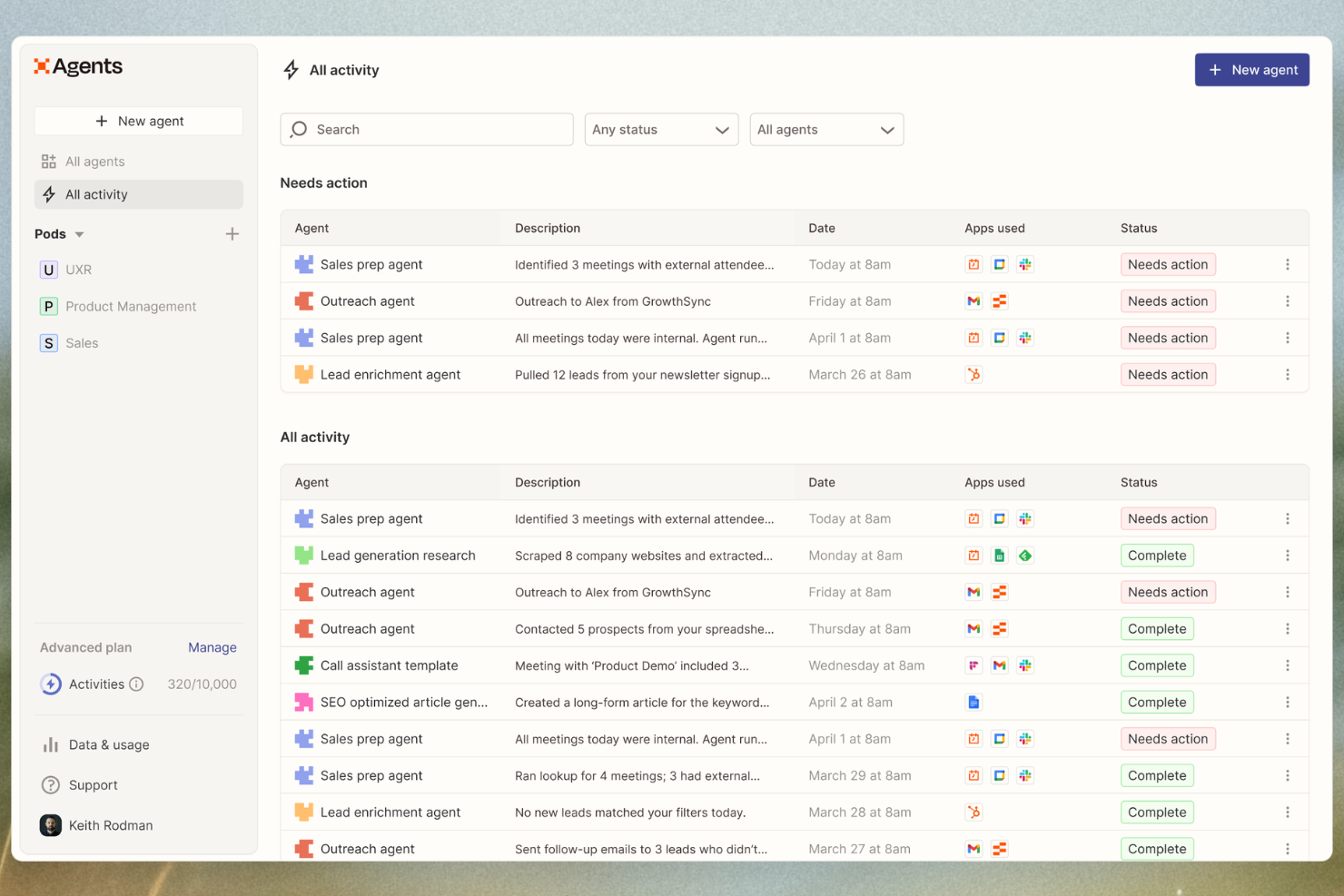
Zapier is an AI orchestration platform that connects thousands of apps and helps teams automate multi-step workflows without code. It's used across marketing, sales, RevOps, IT, HR, and operations teams to turn disconnected tools into intelligent, AI-powered systems.
Why I picked Zapier: Zapier stands out for its combination of ease of use and depth. Non-technical users can build workflows using natural language with Zapier Copilot, while advanced teams can layer in multi-step logic, AI actions, and governance controls. With one of the largest integration ecosystems available, including hundreds of AI apps, Zapier scales well from two-step task automations to complex, cross-team workflows.
Standout features & integrations:
Features include multi-step workflows, conditional logic, AI-powered automation steps, and built-in tools like Zapier Tables and Forms for managing data and inputs. Enterprise plans add admin controls, audit logs, and security features.
Integrations include Google Sheets, Slack, Notion, HubSpot, Salesforce, Stripe, Mailchimp, Airtable, Typeform, Shopify, OpenAI, Trello, and more.
Pros and Cons
Pros:
- No-code, AI-powered workflow creation
- Massive app and AI integration ecosystem
- Built-in database, forms builder, and process mapping
Cons:
- Free plan limited to two-step workflows
- No mobile app

Make
Best for visual automation
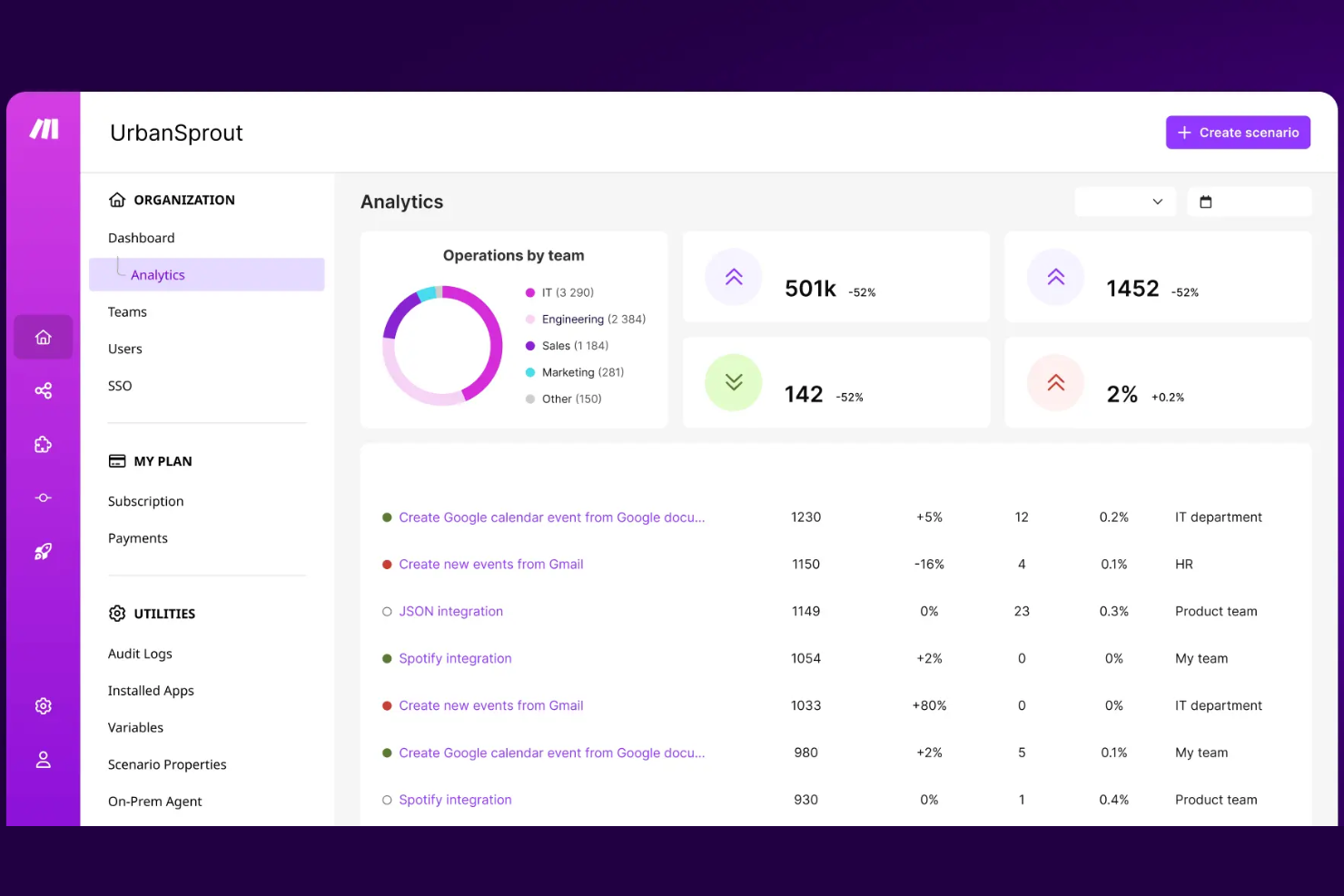
Make is a visual automation platform designed for businesses and teams that need to automate workflows and processes without coding. It caters to a wide range of users, from small businesses to large enterprises, enabling them to automate repetitive tasks and improve efficiency.
Why I picked Make: It's ideal for visual automation, offering a no-code, intuitive interface that lets your team design workflows easily. With its drag-and-drop functionality, you can create complex workflows without needing technical expertise. Make provides you the flexibility to automate a variety of tasks across different applications. For teams looking to enhance productivity through visual tools, Make offers a user-friendly solution.
Standout features & integrations:
Features include a visual editor that simplifies the creation of automation workflows. You can set conditional triggers to customize your workflows further. The platform also provides real-time monitoring to track workflow performance and make adjustments as needed.
Integrations include Google Drive, Dropbox, Slack, HubSpot CRM, Salesforce, Mailchimp, Trello, Shopify, Microsoft Teams, and Asana.
Pros and Cons
Pros:
- Suitable for various business sizes
- Flexible automation options
- Real-time workflow monitoring
Cons:
- Can be resource-intensive
- Limited advanced features

n8n
Best for open-source enthusiasts
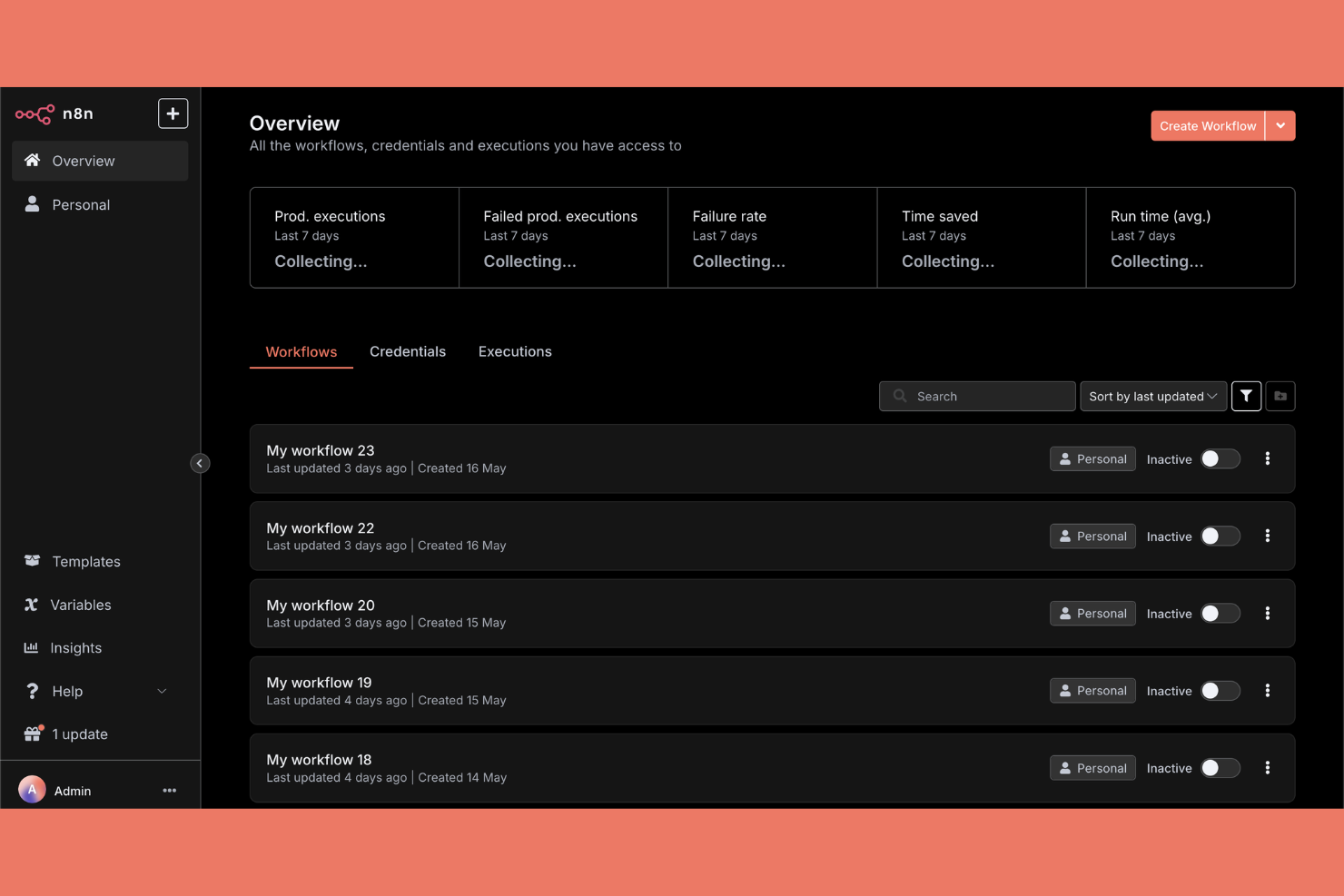
n8n is an open-source workflow automation tool designed for developers and tech-savvy users. It allows you to create complex workflows and automate tasks across various applications.
Why I picked n8n: It's perfect for open-source enthusiasts who want control over their automation processes. You can host it on your own server, providing flexibility and customization options. n8n's visual workflow editor makes it easy to design workflows without extensive coding. For those who value transparency and adaptability, it offers a unique open-source solution.
Standout features & integrations:
Features include a visual workflow editor that simplifies the creation of automation tasks. It provides conditional logic to customize workflows based on specific criteria. You can also access its extensive community support for troubleshooting and ideas.
Integrations include Slack, Google Sheets, GitHub, Trello, Salesforce, Dropbox, X (Twitter), HubSpot, Zendesk, and Airtable.
Pros and Cons
Pros:
- Open-source flexibility
- Visual workflow editor
- Self-hosting option
Cons:
- Can be resource-intensive
- Requires technical knowledge

Canto
Best for digital asset management
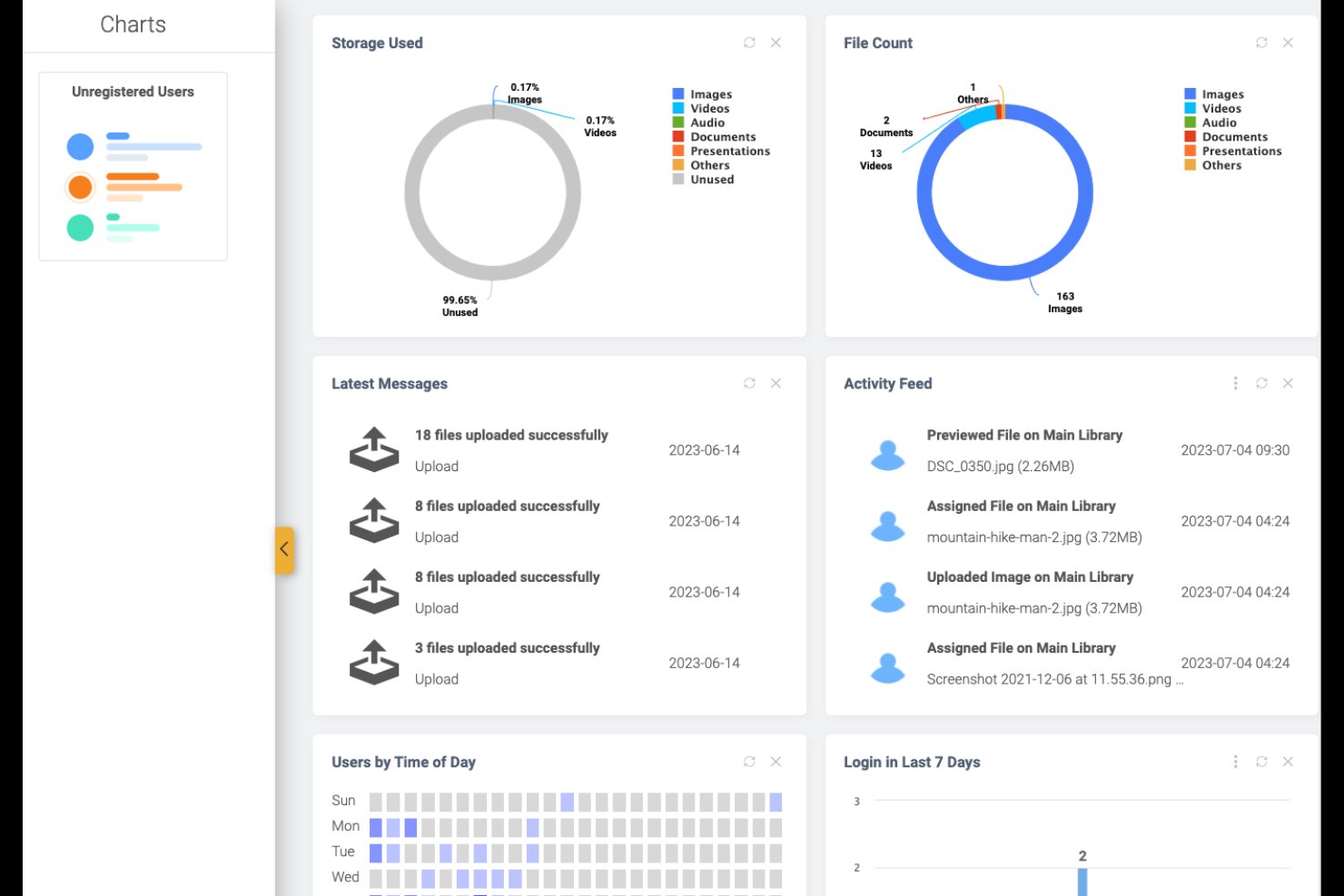
Canto is a digital asset management tool designed for businesses that need to organize and distribute media files efficiently. It serves marketing teams and creative departments by streamlining the management of images, videos, and other digital assets.
Why I picked Canto: It's ideal for teams that require structured digital asset management. Canto offers an all-in-one centralized library where you can store and categorize media files easily. Its intuitive search functions allow you to find assets quickly, saving your team valuable time. With customizable branding options, it helps maintain consistency across your digital content.
Standout features & integrations:
Features include customizable portals that allow you to share assets with external partners securely. You can automate tagging and file organization to reduce manual work. Canto also provides analytics to track asset usage and performance.
Integrations include Adobe Creative Cloud, Microsoft Office, Slack, WordPress, Hootsuite, Shopify, Box, Dropbox, Google Drive, and Microsoft Teams.
Pros and Cons
Pros:
- Automated tagging and organization
- Secure sharing with partners
- Efficient asset categorization
Cons:
- Can be complex for new users
- Limited advanced editing tools

Domo
Best for data visualization
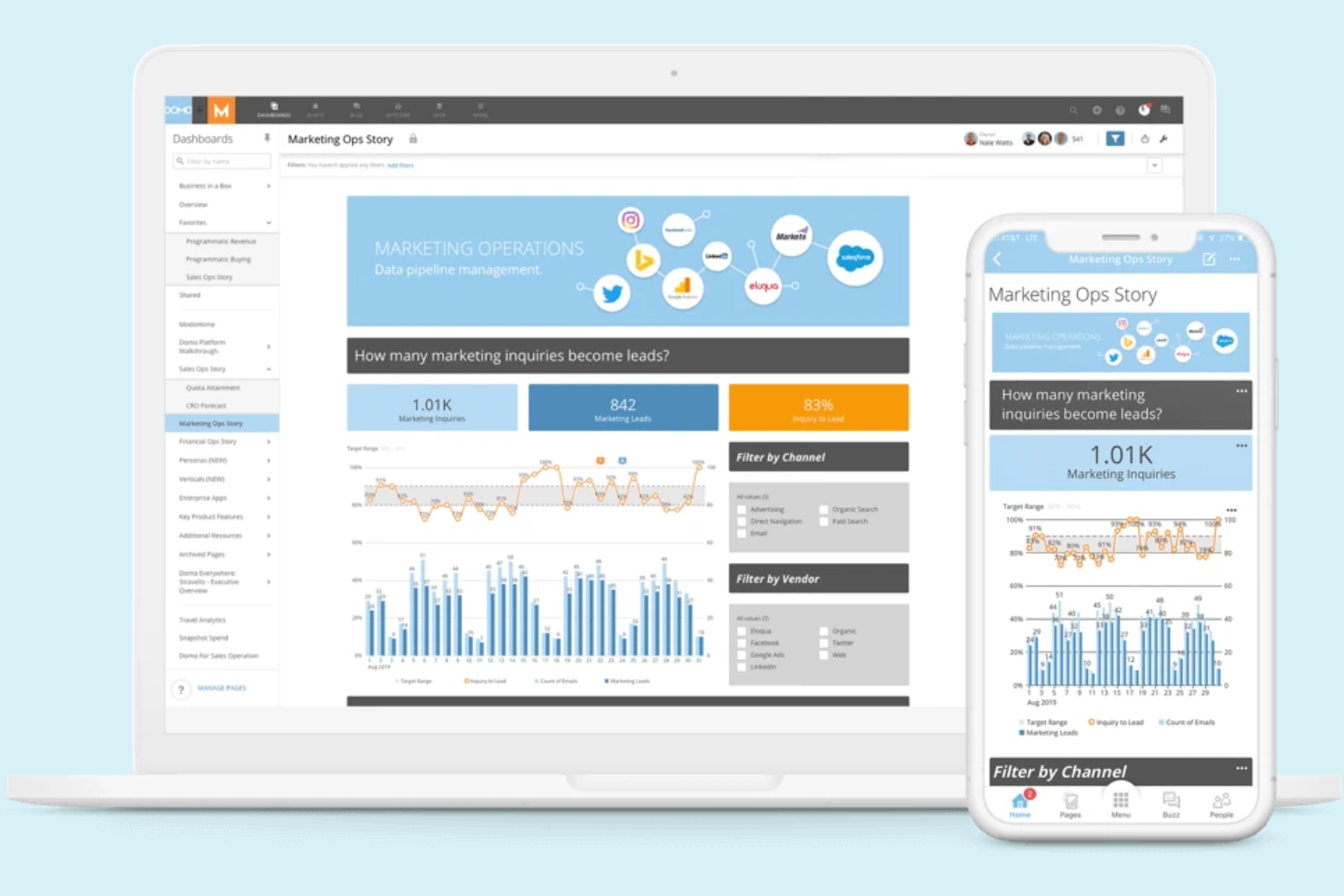
Domo is a cloud-based business intelligence platform designed for organizations that need in-depth data visualization and analytics. It serves a wide range of industries by using its private LLMs and AI features tools to connect, analyze, and visualize data for informed decision-making.
Why I picked Domo: It's tailored for those who need advanced data visualization capabilities to make data-driven decisions. Domo offers a user-friendly interface with customizable dashboards that enable you to view and interact with your data easily. With its real-time data updates, your team can respond quickly to changes. Domo provides a powerful platform supported by AI models for predictive analysis and informed decision-making.
Standout features & integrations:
Features include customizable dashboards to visualize data your way. An integrated AI assistant helps analyze metrics, generate summaries, and highlight key insights. Real-time updates keep insights current, while collaboration tools support team discussions and decisions.
Integrations include Salesforce, Google Analytics, Facebook Ads, LinkedIn, Adobe Analytics, Shopify, QuickBooks, Microsoft Excel, and Dropbox.
Pros and Cons
Pros:
- Suitable for various industries
- Supports team collaboration
- Advanced data visualization
Cons:
- High learning curve for beginners
- Limited offline capabilities

Boomi Flow is a cloud-based application development platform that primarily serves enterprises looking to automate workflows and integrate various business processes. Enables workflow orchestration, connecting systems and managing complex tasks visually and at scale.
Why I picked Boomi Flow: It's known for its integration capabilities, making it a great choice for teams needing to connect multiple applications. You can design workflows using a low-code environment, which simplifies app development. Its AI agents enhance automation by intelligently managing data and process execution across systems. For enterprises, Boomi Flow provides scalability and flexibility in handling complex workflows.
Standout features & integrations:
Features include a visual flow builder that allows you to create workflows intuitively. The platform supports real-time collaboration, enabling your team to work together efficiently. You can also access detailed analytics to monitor and improve workflow performance.
Integrations are available through Boomi Flow’s API.
Pros and Cons
Pros:
- Detailed analytics available
- Low-code development environment
- Strong integration capabilities
Cons:
- Customization may need additional support
- May require technical expertise
Diğer Yapay Zekâ İş Akışı Yönetimi Yazılımları
Kısa listeme giremeyen ancak yine de göz atmaya değer bazı ek yapay zekâ iş akışı yönetimi yazılımı seçenekleri şunlardır:


How I Evaluate AI Workflow Management Software
Every tool on this list needs to do more than slap an AI label on basic automations—it has to deliver real value, like predicting schedule risks or reassigning tasks when priorities shift. I split my evaluation into two layers: the core functionality a tool must have to qualify and the differentiating factors that separate good options from great ones.
Core Functionality (Table Stakes For This List)
When I'm selecting tools for my list, I rank each one on a scale from 0 (does not offer the functionality) to 5 (excels in this area) for each core functionality listed below. Then, I calculate the tool's total score into a percentage. Each tool needs to achieve a minimum total score of 65% to be considered for inclusion.
- AI-Driven Workflow Automation: I evaluate whether each tool can automate multi-step workflows using adaptive AI logic, like re-routing an approval chain when a stakeholder is OOO.
- Predictive Project Intelligence: Each platform should surface risk and delay forecasts, such as flagging a sprint likely to miss its deadline based on velocity trends.
- Intelligent Task Orchestration: I look for AI-assisted task assignment and prioritization that accounts for workload, skills, and dependencies across teams.
- Natural Language Interaction: The tool should support conversational queries and AI summaries, like asking "what's blocking the Q3 launch?" and getting a usable answer.
- Smart Workflow Recommendations: Proactive optimization suggestions matter here, such as the platform recommending a streamlined handoff process based on past project patterns.
- Integrations & AI-Ready Data Layer: I check for broad connectivity with tools like Jira, Slack, and Smartsheet, plus structured data sync that actually feeds the AI features.
Once I have a list of tools that meet this criteria, I consider what sets each platform apart.
Differentiating Factors (What Sets Vendors Apart)
Here's how I compare and contrast different vendors:
Standout Features
Resource capacity forecasting is a big differentiator—I look for AI that models staffing scenarios across concurrent projects so you can plan ahead when two launches overlap. Cross-project dependency mapping matters just as much, especially for program managers where a delay in one workstream creates ripple effects across a portfolio. I also value no-code AI workflow builders that let PMs design adaptive workflows without waiting on engineering support.
Beyond Features
AI transparency is something I weigh heavily—I check whether the platform explains why it made a recommendation and whether PMs can override AI decisions at key approval stages. Data governance matters too, particularly how vendors handle customer data in their AI models and whether they meet SOC 2 or ISO 27001 standards. I also evaluate time-to-value: a tool with prebuilt PM workflow templates and guided onboarding gets teams running far sooner than one that requires weeks of custom configuration.
Yapay Zekâ İş Akışı Yönetimi Yazılımı Nasıl Seçilir?
Uzun özellik listeleri ve karmaşık fiyatlandırma yapıları arasında kaybolmak kolaydır. Benzersiz yazılım seçimi sürecinizde ilerlerken odaklanmanızı korumanıza yardımcı olmak için aklınızda bulundurmanız gereken faktörlerin bir kontrol listesini burada bulabilirsiniz:
| Faktör | Dikkate Alınması Gerekenler |
|---|---|
| Ölçeklenebilirlik | Yazılım ekibinizle birlikte büyüyecek mi? Gelecekteki ihtiyaçları ve aracın performans sorunları yaşamadan artan kullanıcı ve iş akışlarını yönetip yönetemeyeceğini değerlendirin. |
| Entegrasyonlar | Mevcut araçlarınıza bağlanabiliyor mu? Manuel veri girişinden kaçınmak ve sorunsuz iş akışları sağlamak için hâlihazırda kullandığınız yazılımlarla uyumluluğunu kontrol edin. |
| Özelleştirilebilirlik | Aracı süreçlerinize göre uyarlayabilir misiniz? İş akışlarını, alanları ve gösterge panolarını özel ihtiyaçlarınıza uygun şekilde ayarlamanıza olanak tanıyan seçenekleri arayın. |
| Kullanım kolaylığı | Arayüz basit ve sezgisel mi? Ekibinizin kapsamlı bir eğitim veya hayal kırıklığı yaşamadan hızlıca benimseyebilmesini sağlayın. |
| Uygulama ve işe alışma | Kurulum ve eğitim ne kadar sürer? Mevcut destek ve eğitim materyalleri de dâhil olmak üzere ekibinizi çalışır duruma getirmek için gereken zamanı ve kaynakları değerlendirin. |
| Maliyet | Bütçenize uygun mu? Entegrasyonlar veya yükseltmeler için alınabilecek gizli ücretler ya da ek maliyetler de dâhil olmak üzere fiyatlandırma planlarını ve toplam sahip olma maliyetini karşılaştırın. |
| Güvenlik önlemleri | Verileriniz korunuyor mu? Bilgilerinizi güvende tutmak için şifreleme, erişim denetimleri ve veri koruma düzenlemelerine uyum gibi özellikleri arayın. |
| Destek kullanılabilirliği | İhtiyaç duyduğunuzda yardım alabiliyor musunuz? Ortaya çıkan sorunlarda yardımcı olacak 7/24 destek, birden fazla iletişim yöntemi ve hızlı yanıt veren bir ekip olup olmadığını kontrol edin. |
Yapay Zekâ İş Akışı Yönetimi Yazılımı Nedir?
Yapay zekâ iş akışı yönetimi yazılımı, iş süreçlerini yapay zekâ aracılığıyla otomatikleştiren ve optimize eden bir araçtır. Bu araçlar genellikle verimliliği artırmak ve manuel görevleri azaltmak için proje yöneticileri, operasyon ekipleri ve BT profesyonelleri tarafından kullanılır. Otomasyon, entegrasyon ve analiz özellikleri; görev yönetimine, veri akışına ve karar alma süreçlerine yardımcı olur. Genel olarak bu araçlar üretkenliği artırır ve ekiplerin daha akıllı çalışmasına yardımcı olur.
Özellikler
Yapay zekâ iş akışı yönetimi yazılımı seçerken aşağıdaki temel özelliklere dikkat edin:
- Otomasyon: Tekrarlayan görevleri otomatikleştirerek daha stratejik çalışmalar için zaman kazandırır.
- Entegrasyon özellikleri: Platformlar arasında sorunsuz veri akışı sağlamak için mevcut yazılımlara bağlanır.
- Özelleştirilebilir iş akışları: Süreçleri işletmenizin özel ihtiyaçlarına uyacak şekilde düzenlemenize olanak tanır.
- Gerçek zamanlı analizler: Karar alma süreçlerine yardımcı olmak için iş akışı performansına ilişkin içgörüler sağlar.
- Kullanıcı dostu arayüz: Ekibinizin kolayca kullanmasını ve hızlı bir şekilde benimsemesini sağlar.
- İş birliği araçları: Departmanlar içinde ve departmanlar arasında iletişimi ve ekip çalışmasını kolaylaştırır.
- Güvenlik önlemleri: Hassas verileri şifreleme ve erişim denetimleriyle korur.
- Ölçeklenebilirlik: Artan kullanıcı sayısını ve iş akışı karmaşıklığını destekleyerek büyümeye olanak tanır.
- Koşullu mantık: İş akışlarının belirli ölçütlere veya tetikleyicilere göre uyarlanmasını sağlar.
Faydalar
Yapay zekâ iş akışı yönetimi yazılımının uygulanması ekibiniz ve işletmeniz için çeşitli faydalar sağlar. Yararlanabileceğiniz faydalardan bazıları şunlardır:
- Artan verimlilik: Tekrarlayan görevleri otomatikleştirerek ekibinizin daha stratejik çalışmalara odaklanmasını sağlar.
- Gelişmiş iş birliği: Departmanlar arasındaki iletişimi ve ekip çalışmasını güçlendiren araçlar sunar.
- Geliştirilmiş karar alma: Veriye dayalı kararları yönlendirmek için gerçek zamanlı analizler sağlar.
- Esneklik: Süreçleri ihtiyaçlarınıza uyacak şekilde uyarlamanıza olanak tanıyan özelleştirilebilir iş akışları sunar.
- Ölçeklenebilirlik: Daha fazla kullanıcıyı ve karmaşık iş akışlarını destekleyerek büyümeye olanak tanır.
- Veri güvenliği: Hassas bilgilerin güçlü güvenlik önlemleriyle korunmasını sağlar.
Yapay Zekâ İş Akışı Yönetimi Yazılımının Maliyetleri ve Fiyatlandırması
Yapay zekâ iş akışı yönetimi yazılımı seçmek, mevcut çeşitli fiyatlandırma modellerinin ve planların anlaşılmasını gerektirir. Maliyetler özelliklere, ekip büyüklüğüne, eklentilere ve daha fazlasına göre değişir. Aşağıdaki tabloda yaygın planlar, bunların ortalama fiyatları ve yapay zekâ iş akışı yönetimi yazılımı çözümlerinde genellikle sunulan özellikler özetlenmektedir:
Yapay Zekâ İş Akışı Yönetimi Yazılımı İçin Plan Karşılaştırma Tablosu
| Plan Türü | Ortalama Fiyat | Yaygın Özellikler |
|---|---|---|
| Ücretsiz Plan | $0 | Temel görev yönetimi, sınırlı entegrasyonlar ve temel otomasyon. |
| Kişisel Plan | $5-$25/kullanıcı/ay | Görev yönetimi, temel entegrasyonlar, özelleştirilebilir iş akışları ve e-posta desteği. |
| İşletme Planı | $30-$60/kullanıcı/ay | Gelişmiş otomasyon, birden fazla entegrasyon, analiz ve raporlama ile geliştirilmiş müşteri desteği. |
| Kurumsal Plan | $70-$150/kullanıcı/ay | Sınırsız entegrasyon, gelişmiş güvenlik özellikleri, kişiselleştirilmiş başlangıç süreci ve özel hesap yönetimi. |
AI İş Akışı Yönetim Yazılımı SSS
AI iş akışı yönetim yazılımı hakkında sık sorulan bazı soruların yanıtları:
AI iş akışı yönetim yazılımından en çok hangi sektörler yararlanır?
AI iş akışı yönetim yazılımı sağlık, finans, pazarlama ve üretim gibi çeşitli sektörlerde fayda sağlar. Sağlık sektöründe hasta randevularını ve kayıt tutma işlemlerini otomatikleştirebilir. Finans ekipleri bunu uyumluluk ve raporlama için kullanır. Pazarlama departmanları kampanya yönetimini kolaylaştırırken üreticiler tedarik zinciri süreçlerini otomatikleştirir. Bu araçların nasıl yardımcı olabileceğini görmek için sektörünüze özgü ihtiyaçlarınızı değerlendirin.
AI iş akışı yönetim yazılımını kullanmak için teknik uzmanlık gerekir mi?
Hayır, çoğu AI iş akışı yönetim yazılımı sürükle ve bırak arayüzleriyle kullanıcı dostu olacak şekilde tasarlanmıştır. Ancak bazı karmaşık otomasyonlar temel teknik beceriler gerektirebilir. Ekibinizde teknik uzmanlık eksikse geçişi kolaylaştırmak için güçlü müşteri desteği ve eğitim kaynakları sunan çözümleri tercih edin.
AI iş akışı yönetim yazılımı ekip iş birliğini nasıl geliştirir?
AI iş akışı yönetim yazılımı, görevleri ve iletişimi merkezileştirerek ekip iş birliğini geliştirir. Ekip üyelerinin ilerlemeyi takip edebileceği ve birbirlerini gerçek zamanlı olarak bilgilendirebileceği ortak panolar sunar. Otomatik bildirimler ve iş birliğine dayalı araçlar gibi özellikler, herkesin proje hedefleri hakkında bilgi sahibi olmasını ve hedeflerle uyumlu kalmasını sağlar.