

2026’da İncelenen En İyi 10 Süreç Belgeleme Yazılımı

En İyi Süreç Dokümantasyonu Yazılımları Kısa Listesi


Süreçler belgelenmediğinde projeleri yönetmek sinir bozucu olabilir. İletişim sorunları, gecikmeler ve boşa harcanan zaman ekibinizin bunalmış hissetmesine neden olabilir. Süreç dokümantasyonu yazılımı tam da bu noktada devreye girerek iş akışlarını düzenlemenize yardımcı olur; böylece herkes neyi, ne zaman yapacağını tam olarak bilir.
Deneyimlerime göre doğru yazılım, ekibinizin operasyonlarını tamamen dönüştürebilir. Gerçek ihtiyaçlarınıza göre uyarlanmış tarafsız öneriler sunmak için önde gelen araçları inceledim ve test ettim.
Mevcut en iyi seçenekleri ele alırken okumaya devam edin; her birinin ekibinizin uyum içinde çalışmasına, zaman kazanmasına ve en büyük proje yönetimi zorluklarınızın üstesinden gelmesine nasıl yardımcı olabileceğini açıklıyorum.
Why Trust Our Software Recommendations
Our team has been testing and reviewing software since 2012. As project managers ourselves, we know how difficult—and important—it is to choose the right software.
For this guide, we evaluated tools using hands-on testing and independent research, scoring tools using our selection criteria. We also draw on insights from industry thought leaders and practicing project management experts.
Our reviews reflect our human editorial judgment, not a sales pitch.
Expert reviewers:
Süreç Dokümantasyonu Yazılımları Karşılaştırma Tablosu
Bu karşılaştırma tablosu, en iyi Süreç dokümantasyonu yazılımı seçimlerim için fiyatlandırma ayrıntılarını özetlemektedir:
| Tool | Starting Price | Website | |
|---|---|---|---|
| Best for AI‑guided process writing | 4.7 out of 5 | Pricing upon request 14-day free trial + free demo available | Website |
| Best for AI-powered script generation | — | $40/month 10-day free trial + free demo available | Website |
| Best for capturing step-by-step workflows | — | $29/month 7-day free trial + free demo available | Website |
| Best for turning documents into live tasks | 4.6 out of 5 | $9/user/month Free plan + 14-day trial available | Book Demo |
| Best for automating document creation | 4.8 out of 5 | $12/seat/month Free plan + free demo available | Website |
| Best for recurring workflows | 4.7 out of 5 | Pricing upon request 14-day free trial; free demo available | Website |
| Best for user onboarding | 4.6 out of 5 | Pricing upon request Free trial available | Website |
| Best for diagram-based documentation | 4.4 out of 5 | $8/user/month Free plan + 30-day free trial available | Website |
| Best with secure, role-based document workspaces | 4.5 out of 5 | $19.99/user/month 7-day free trial | Website |
| Best for team collaboration | 4.3 out of 5 | $5.78/user/month Free plan + 7-day trial available | Website |
En İyi Süreç Dokümantasyonu Yazılımları İncelemeleri
Aşağıda, kısa listeme giren en iyi Süreç dokümantasyonu yazılımlarıyla ilgili ayrıntılı özetlerimi bulabilirsiniz. İncelemelerim, sizin için en uygun aracı bulmanıza yardımcı olmak amacıyla her bir aracın temel özelliklerine, artılarına & eksilerine, entegrasyonlarına ve ideal kullanım alanlarına ayrıntılı bir bakış sunuyor.

Best for AI‑guided process writing

Document360 is a cloud-based platform that helps teams create and manage process documentation, SOPs, and user guides.
Who Is Document360 Best For?
Document360 suits technical writers, product teams, and customer support teams at mid-size to enterprise SaaS companies that need a dedicated platform for structured knowledge base and process documentation.
Why I Picked Document360
Document360 earns its spot on my shortlist because of how far its AI writing tools go beyond basic autocomplete. I particularly like the AI Writing Agent, which I use to turn video walkthroughs, audio files, or a simple prompt into fully structured documentation—complete with formatting, internal links, and SEO metadata. It also includes a style guide feature that lets my team define tone, formatting rules, and editorial standards so the AI generates content that matches how we write. The SOP generator is another standout for process documentation, producing step-by-step procedures with compliance guidelines built in.
Document360 Key Features
- Version control: Track and manage every revision of a document, with the ability to restore previous versions at any point.
- Category manager: Organize documentation into a hierarchical structure with up to six levels of nested categories.
- Content reuse (snippets): Create reusable content blocks that can be inserted across multiple articles without duplicating edits.
- Analytics dashboard: Monitor article performance, search queries, and reader engagement to identify gaps in your documentation.
Document360 Integrations
Document360 integrates with tools like Slack, Microsoft Teams, Zendesk, Freshdesk, Intercom, Google Analytics, Disqus, and Segment. It also supports additional integrations via Zapier and offers an API for custom connections.
Pros and Cons
Pros:
- Allows for creating personalized workflows to fit organizational needs
- Supports markdown and WYSIWYG editors for technical content
- Fast, robust search capability supports quick retrieval of SOPs
Cons:
- Occasional performance hiccups when loading large projects
- Limited offline access
New Product Updates from Document360

Document360 Adds Feedback APIs, MCP Tools, and Zendesk Authentication
Document360 adds feedback APIs, expanded MCP tools, Zendesk account authentication, and the ability to reopen closed feedback. These updates help teams manage feedback, automate knowledge base tasks, and control integration access. For more information, visit Document360’s official site.
 .

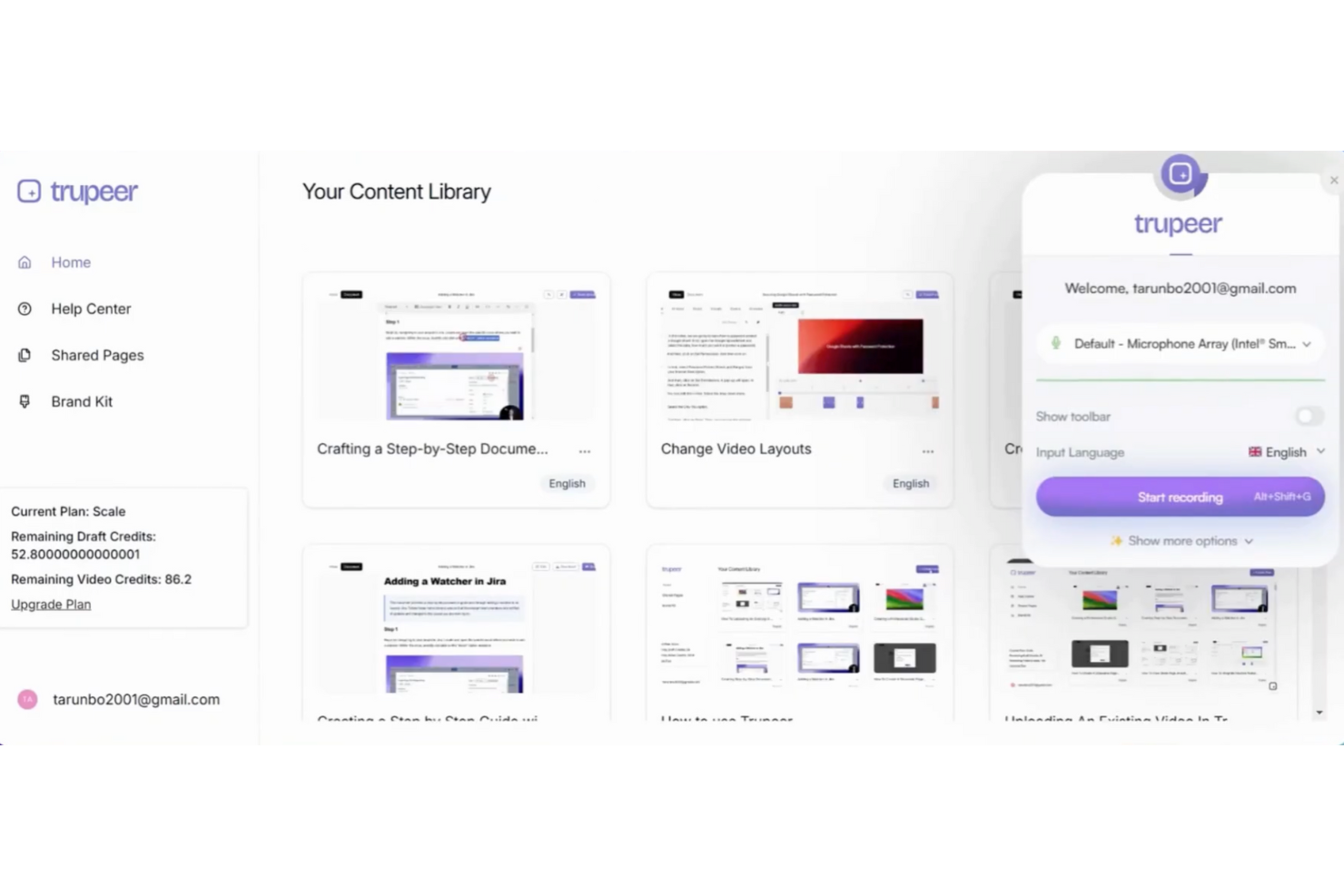
TruPeer is a process documentation platform that uses AI to generate, organize, and manage scripts and workflows for teams looking to standardize their operational procedures.
Who Is TruPeer Best For?
TruPeer is a good fit for operations and enablement teams that need to document and scale repeatable processes across distributed or growing organizations.
Why I Picked TruPeer
TruPeer earns its spot on my shortlist because of how it handles AI script generation directly from screen recordings. Rather than asking you to write documentation from scratch, TruPeer watches what you do on screen and auto-generates a refined, context-aware script—removing filler words, correcting grammar, and adapting tone to match your intended style. I also like that the AI syncs the generated script back to the video timeline, so edits you make to the text automatically update the corresponding video segment. TruPeer also converts those scripts into structured step-by-step written guides, so a single recording yields a polished video and a usable process document.
TruPeer Key Features
- Multi-language translation: Translate any video or written guide into 65+ languages directly within the platform, without re-recording.
- Brand mirroring: Upload an existing company document and TruPeer reverse-engineers its structure, fonts, colors, and layout to apply to every new guide.
- Vision-based action detection: TruPeer analyzes click metadata and screen transitions from any recording to accurately identify and describe each step in a process.
- Centralized knowledge base: Store all SOPs, articles, and videos in one searchable hub with AI-assisted search and sharing controls.
TruPeer Integrations
TruPeer offers native integrations with Slack, Google Drive, Confluence, Notion, and Zapier. An API is available for custom integrations.
Pros and Cons
Pros:
- Searchable video timestamps help users find exact steps quickly
- Supports multilingual voiceovers for diverse audiences
- Converts screen recordings into structured video and written guides
Cons:
- Limited workflow tracking compared to dedicated process tools
- Lacks built-in ticketing or support case linkage
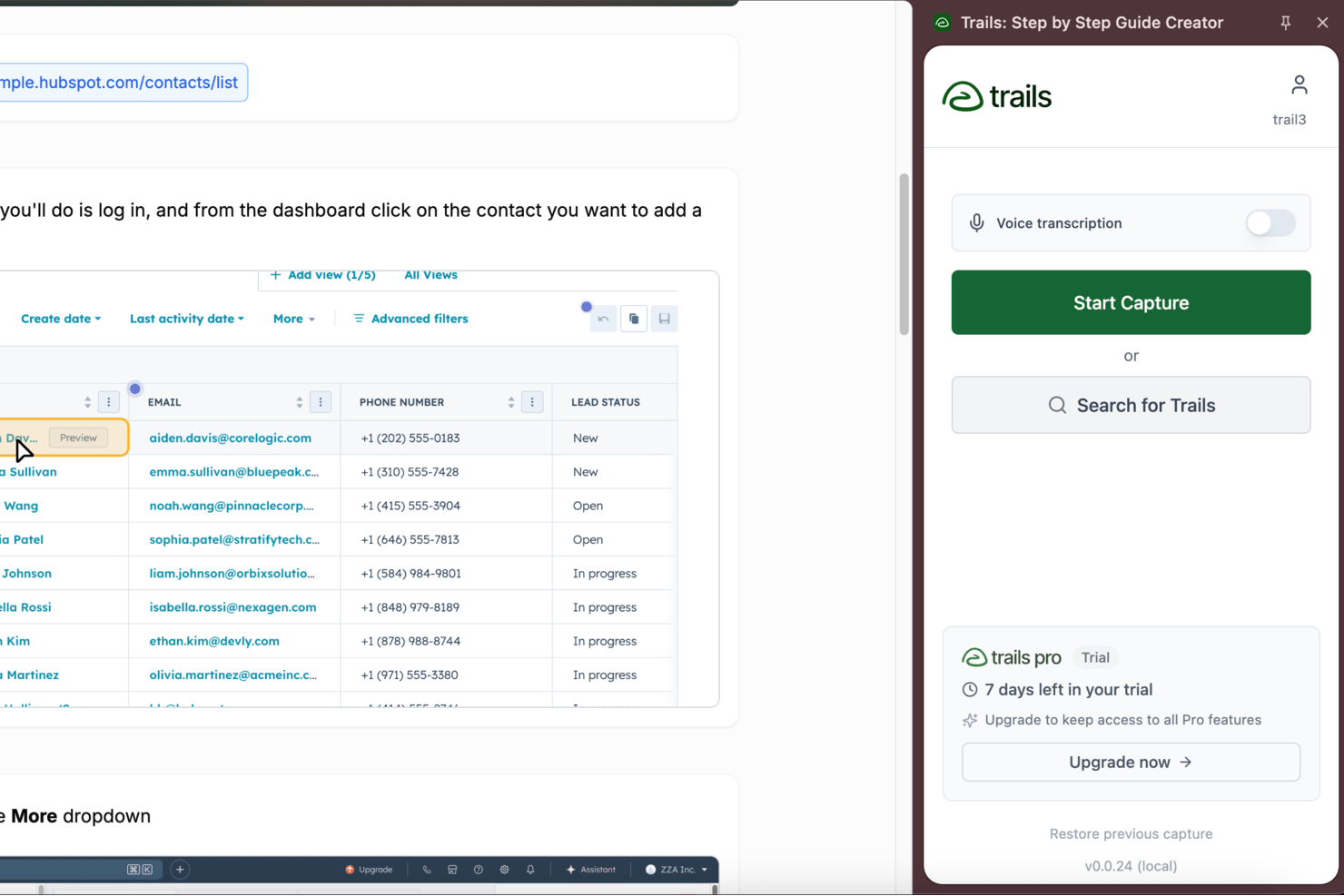
Trails is a process documentation platform built for capturing, organizing, and sharing detailed step-by-step workflows using screen recording, annotations, and knowledge libraries.
Who Is Trails Best For?
Trails is a good fit for operations, L&D, and enablement teams at growing companies who need to create and maintain SOPs, employee onboarding materials, and internal training documentation.
Why I Picked Trails
Trails earns its spot on my shortlist because of how well it handles step-by-step workflow capture. I record a rough run-through using the Trails Chrome Extension, and it automatically generates a structured, numbered guide with annotated screenshots. What I like most is that editing the text in the guide simultaneously updates the video, so my team isn't managing two separate assets. The AI also cleans up mistakes from the original recording, which means we're not re-recording just because someone clicked the wrong thing.
Trails Key Features
- PDF and multi-format export: Export any guide as a PDF, HTML, or Markdown file to share documentation outside of Trails.
- Sensitive information blurring: Automatically blur confidential data in screenshots and screen recordings before sharing guides.
- Version history: Restore any previous version of a guide, so your team always has a reliable record of changes.
- Enterprise security and access controls: SOC 2 Type II compliant, with SAML SSO, role-based permissions, and department workspaces for managing documentation securely across teams.
Trails Integrations
Native integrations are not clearly documented. An API is available for custom integrations.
Pros and Cons
Pros:
- Existing recordings can be uploaded to create guides
- Chrome Extension and desktop app capture workflows
- In-editor video trimming without external tools needed
Cons:
- Lacks manual timeline video editing tools
- Lacks workflow analytics or usage reporting features

Best for turning documents into live tasks
monday AI Workspace is a work management platform with built-in AI-powered docs that connect directly to boards, tasks, and workflows, letting teams create, store, and execute process documentation without switching tools.
Who Is monday AI Workspace Best For?
It's a strong fit for mid-market operations teams and PMOs that manage multiple workstreams and need process documentation tied directly to project execution.
Why I Picked monday AI Workspace
monday AI Workspace earns its spot on my shortlist because of how tightly workdocs connects documentation to live project work. I can write an SOP inside a workdoc and convert any line of text into a board item, complete with an assigned owner and due date, in a single click. The AI meeting notetaker adds another layer, automatically turning meeting notes into actionable tasks so process decisions made in calls don't get buried in a doc no one revisits.
monday AI Workspace Key Features
- Workdoc version history: Track document changes over time and revert to previous versions as needed.
- Document-level permissions: Set viewing and editing permissions for individuals, teams, or guests within each document or folder.
- Real-time co-editing: Multiple users can collaborate on documents at the same time with instant updates and inline comments.
- Full-text search and tagging: Search across all docs and use tags to organize and quickly find process documentation within workspaces.
monday AI Workspace Integrations
monday AI Workspace offers native integrations with Slack, Google Drive, Dropbox, Box, OneDrive, GitHub, Gmail, Outlook, and Microsoft Excel. It also supports Zapier and provides an API for custom integrations.
Pros and Cons
Pros:
- Process docs linked directly to project boards
- Real-time multi-user document collaboration
- Turn any doc step into actionable task
Cons:
- Advanced permission settings require higher-tier plans
- No native diagram or flowchart tool
New Product Updates from monday AI Workspace
monday AI Workspace Adds Human Approval Routing
monday AI Workspace adds a human-in-the-loop approval block to AI Workflows, sending approval requests and routing workflow paths based on responses. For more information, visit monday AI Workspace's official site.
 .

Scribe
Best for automating document creation

Scribe is a process documentation platform that captures workflows, generates step-by-step guides with screenshots, and lets teams create and share detailed process documents.
Who Is Scribe Best For?
Scribe is a good fit for operations and enablement teams that need to document processes without relying on technical writers.
Why I Picked Scribe
Scribe earns its spot on my shortlist because of how it handles document creation—you just run through a process once, and Scribe captures every click and keystroke to generate a formatted, screenshot-annotated guide. I picked it specifically for its browser extension, which works in the background without interrupting your workflow. I also like the AI-generated text feature, which drafts step descriptions so my team isn't writing from scratch. For teams documenting repetitive processes like onboarding or software walkthroughs, that combination reduces documentation time.
Scribe Key Features
- Pages: Combine multiple Scribe guides into a single, organized process document with added text, videos, screenshots, and links.
- Sensitive data redaction: Automatically or manually blur sensitive information from captured screenshots before sharing guides.
- Viewer insights: Track who has viewed and completed a guide, and collect feedback to flag outdated content.
- Company branding: Upload your logo, brand colors, and website URL to apply consistent styling across all published guides.
Scribe Integrations
Scribe primarily works through a browser extension that captures workflows and lets users embed or share guides across tools. It allows content to be embedded in platforms like Confluence, Notion, and Google Docs, but does not offer a broad set of native integrations. Zapier and API support are not clearly documented.
Pros and Cons
Pros:
- Redacts sensitive information
- Easy customization options
- Fast documentation creation
Cons:
- Requires internet for full functionality
- Limited offline access

Best for recurring workflows

Process Street is a process documentation platform designed for teams to create, organize, and manage detailed workflows and checklists with automation and collaboration features.
Who Is Process Street Best For?
Process Street suits operations and process-focused teams in small to mid-sized businesses that need a structured way to document and run repeatable procedures.
Why I Picked Process Street
Process Street earns its spot on my shortlist because of how well it handles recurring workflows through a structured, checklist-driven approach. I like that you can build workflow templates once and then run them as individual instances—so each time a process repeats, it gets its own tracked run with assignees, due dates, and conditional logic intact. My team uses the scheduled workflow feature to automatically trigger recurring processes on a set cadence, which removes the manual overhead of remembering to kick things off. The approval steps built into each workflow also make it easy to document who signed off on what, which matters when you're running the same process across a team.
Process Street Key Features
- Role assignments: Assign specific tasks within a workflow to different team members based on their role.
- Conditional logic: Set rules that show or hide tasks depending on how previous steps are completed.
- Form fields: Embed data-capture fields directly into workflow tasks to collect structured information as work progresses.
- Audit trail: Track a timestamped record of every action taken within a workflow run for accountability and review.
Process Street Integrations
Process Street integrates with tools like Slack, Google Sheets, Salesforce, Jira, DocuSign, Dropbox, Airtable, and Trello. It also connects via Zapier for additional integrations and offers an API for custom setups.
Pros and Cons
Pros:
- Offers Process AI
- Supports complex workflows
- Easy process creation
Cons:
- It can be complex to set up
- Limited offline features

Whatfix
Best for user onboarding

Whatfix is a digital adoption platform for process documentation that lets you create interactive guides, in-app walkthroughs, and knowledge bases to document and deliver process instructions within your software tools.
Who Is Whatfix Best For?
Whatfix is a strong fit for mid-size to enterprise teams that need to document and deliver process guidance directly inside the software their employees or customers use every day.
Why I Picked Whatfix
I picked Whatfix as one of the best because of how it handles user onboarding documentation in a way that's genuinely different from static wikis or PDFs. Instead of asking new users to read a process doc and then figure out the application themselves, Whatfix lets me embed role-specific Flows and Task Lists directly inside the app they're learning. A new hire working in a CRM or ERP sees step-by-step guidance appear in context, right at the moment they need it. I also like the in-app survey feature, which lets me collect onboarding feedback without pulling users out of their workflow to fill out a separate form.
Whatfix Key Features
- No-code content editor: Create and update in-app guidance across any application without writing code or relying on developers.
- Multi-format content exporting: Export Whatfix content as videos, PDFs, slide decks, or how-to articles to embed in your LMS or knowledge base.
- Self Help widget: Give users an in-app help center with AI-powered conversational search that pulls answers from your existing knowledge repositories.
- Cross-application workflow support: Guide users through processes that span multiple applications without interrupting their workflow.
Whatfix Integrations
Whatfix offers native integrations with Salesforce, Oracle CX, SAP S/4HANA, NetSuite, and Bullhorn, and the Microsoft ecosystem, including Microsoft 365 and Azure. An API is available for custom integrations.
Pros and Cons
Pros:
- Real-time user analytics
- Customizable learning paths
- Effective in-app guidance
Cons:
- Requires initial training
- Complex setup process

Creately
Best for diagram-based documentation

Creately is a process documentation platform that lets you create, organize, and collaborate on diagrams, flowcharts, and visual process maps in a shared workspace.
Who Is Creately Best For?
Creately is a good fit for cross-functional teams in tech and product organizations who need to document and communicate processes visually.
Why I Picked Creately
Creately earns its spot on my shortlist because it goes deeper on diagram-based documentation than most tools in this category. I particularly like the BPMN support—when my team needs to document a multi-step approval workflow or a cross-functional handoff process, we can map it out using proper BPMN notation with swimlanes, decision gateways, and event triggers, all within the same canvas. Creately also supports 70 diagram types with 1,000+ purpose-built shapes, so you're not forcing a flowchart to do the job of a UML sequence diagram or a data flow diagram. The per-item docs feature lets you attach rich notes and context directly to individual shapes, which keeps the diagram and its supporting documentation in one place.
Creately Key Features
- Real-time editing: Multiple team members can work on the same canvas simultaneously, with live cursor tracking to see who's changing what.
- 8,000+ templates: Pre-built templates spanning process maps, org charts, and more, so you're not starting from scratch.
- Presentation mode: Present diagrams directly from the canvas by selecting shapes and adding them to slides, with content that updates automatically as the canvas changes.
- Full version history: Item-level change history and a per-item status feed let you track how a process document has evolved over time.
Creately Integrations
Creately offers native integrations with Google Drive, Slack, Microsoft Teams, Confluence, and Jira, and connects with Zapier. An API is available for custom integrations.
Pros and Cons
Pros:
- Real-time collaboration features
- Supports multi-page documents
- Extensive template library
Cons:
- Requires a stable internet connection
- It can be overwhelming for beginners

Best with secure, role-based document workspaces
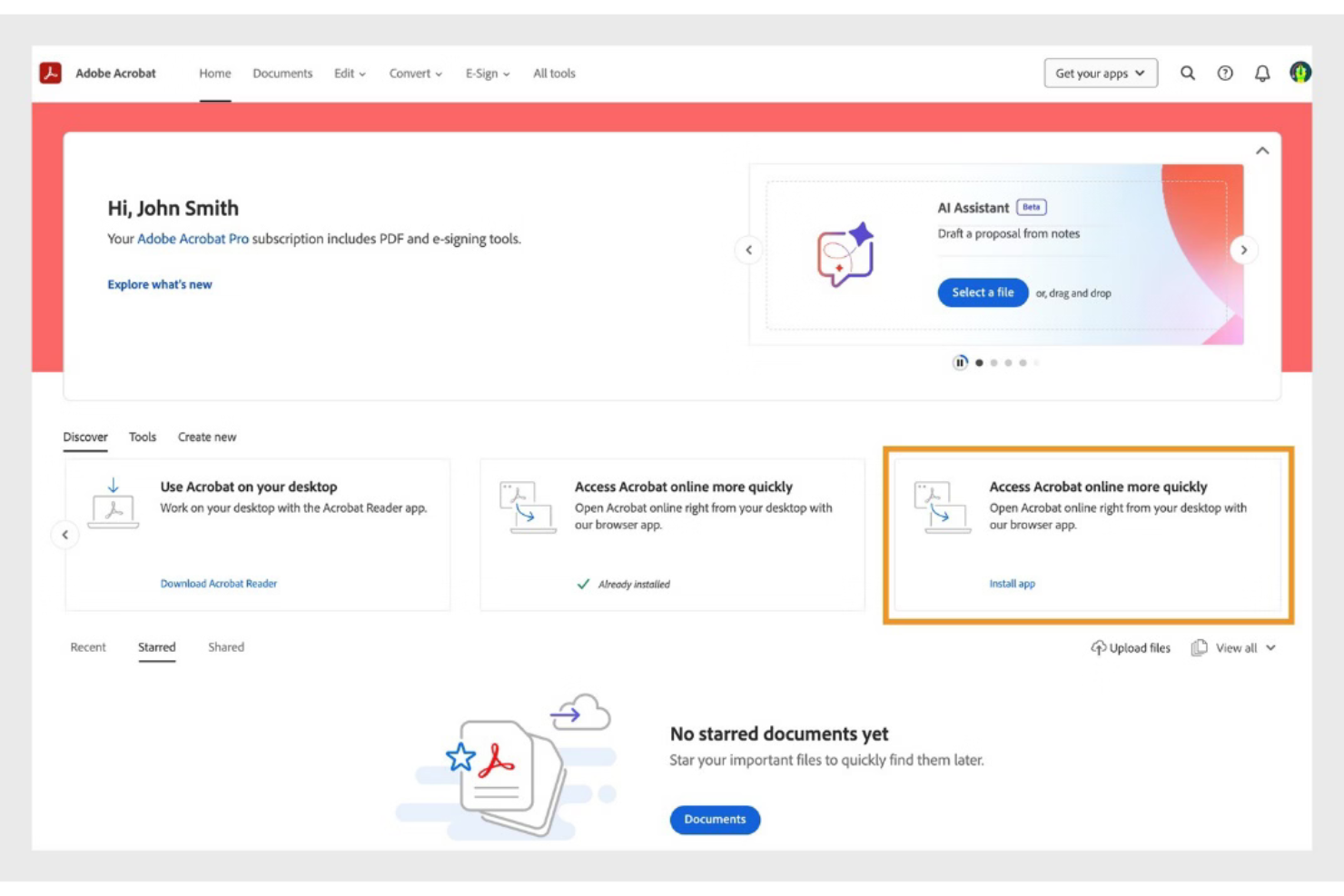
Adobe Acrobat is a document management platform that supports creating, editing, organizing, and securing process documentation in PDF format. It enables teams to manage documentation workflows, collaborate on files, and maintain controlled access to sensitive documents.
Who Is Adobe Acrobat Best For?
Adobe Acrobat is best suited for teams in regulated industries and large organizations that require secure document control, audit tracking, and structured collaboration on process documentation.
Why I Picked Adobe Acrobat
I picked Adobe Acrobat because it provides secure, role-based document controls that help manage access to sensitive process documentation. Teams can assign permissions to restrict editing, commenting, or viewing rights. Audit trails and activity tracking support accountability and compliance across documentation workflows.
Adobe Acrobat Key Features
- PDF editing tools: Edit text, images, and formatting directly within PDF documents.
- Template management: Create reusable document templates for consistent process documentation.
- E-signature workflows: Collect legally binding electronic signatures on process documents.
- Commenting and markup: Add annotations, highlights, and comments for collaborative review.
- OCR technology: Convert scanned documents into searchable, editable text.
Adobe Acrobat Integrations
Adobe Acrobat integrates with Microsoft 365, Google Workspace, Microsoft Teams, SharePoint, Box, Salesforce, and Workday. APIs are available for custom integrations.
Pros and Cons
Pros:
- Advanced PDF editing and redaction tools
- Deep integration with Microsoft 365 and Google Workspace
- Supports secure, role-based access for documents
Cons:
- Workflow automation features are basic compared to peers
- No free-forever business plan available
Confluence
Best for team collaboration

Confluence is a process documentation platform from Atlassian that lets you create, organize, and manage collaborative documentation, knowledge bases, and project pages for teams.
Who Is Confluence Best For?
Confluence is a strong fit for mid-size to enterprise tech teams that need a centralized space to document processes, share knowledge, and collaborate across product, engineering, and design.
Why I Picked Confluence
Confluence earns its spot on my shortlist because of how well it supports real-time collaboration on process documentation. I like that multiple team members can edit the same page simultaneously, leave inline comments, and tag each other directly in the content—so feedback loops happen inside the document, not across a separate thread. I also use Confluence's live docs feature when my team needs to co-author something in the moment, like a sprint retrospective or a process update after an incident. The structured spaces and content hierarchy make it easy to keep documentation organized as the team scales.
Confluence Key Features
- Page templates: Choose from a library of pre-built templates for process docs, runbooks, meeting notes, and more to standardize documentation across your team.
- Version history: Track every change made to a page, compare past versions, and restore previous content when needed.
- Spaces: Organize documentation into dedicated spaces by team, project, or department to keep content structured and easy to navigate.
- Macros: Embed dynamic content like tables of contents, status labels, and task lists directly into pages to add structure and interactivity.
Confluence Integrations
Confluence offers 3,000+ native integrations through the Atlassian Marketplace, including Jira, Trello, Loom, Slack, Microsoft 365, Google Drive, Figma, Dropbox, Salesforce, and GitHub, and it connects with Zapier. An API is available for custom integrations.
Pros and Cons
Pros:
- Extensive template library
- Real-time collaboration features
- Centralized content management
Cons:
- Requires setup time
- Can be overwhelming for new users
Diğer Süreç Dokümantasyonu Yazılımları
Kısa listeme giremeyen ancak yine de göz atmaya değer bazı ek Süreç dokümantasyonu yazılımı seçeneklerini burada bulabilirsiniz:
- Tettra
For internal knowledge sharing
- Floik
For visual process mapping
- Tallyfy
For non-technical users
- SweetProcess
For small business processes
- Heflo
For process modeling
- Miro
For creative visual teamwork
- Tango
For AI-driven insights
- Lucidchart
For diagramming and visualization
- ProcessMaker
For low-code process management
- Nintex
For enterprise-level automation


How I Evaluate Process Documentation Software
I split my evaluation into baseline must-haves—like structured step capture and version control—and the differentiators that separate tools built for PMOs from glorified wikis.
Core Functionality (Table Stakes For This List)
When I'm selecting tools for my list, I rank each one on a scale from 0 (does not offer the functionality) to 5 (excels in this area) for each core functionality listed below. Then, I calculate the tool's total score into a percentage. Each tool needs to achieve a minimum total score of 65% to be considered for inclusion.
- Step-by-Step Process Capture: I evaluate whether the tool supports structured, sequential steps with assigned owners—like documenting a sprint retrospective SOP with clear task holders per phase.
- Rich Media & Visual Documentation: Screenshots, screen recordings, and embedded diagrams make or break adoption, so I check for native media tools beyond basic image uploads.
- Centralized Document Repository: Every tool gets evaluated on how it organizes and surfaces documents at scale—tagging, folder hierarchies, and search quality across hundreds of SOPs.
- Version Control & Revision History: I look for full revision timelines with author attribution and rollback, especially for teams that update release management or change control procedures frequently.
- Collaborative Editing & Review: Real-time co-editing, threaded comments, and formal approval workflows matter here—particularly for cross-functional teams aligning on shared delivery playbooks.
- Access Controls & Sharing Permissions: Granular role-based permissions are key, so I check whether the tool lets you separate viewer and editor access at the document level for stakeholders outside your core team.
Once I have a list of tools that meet this criteria, I consider what sets each platform apart.
Differentiating Factors (What Sets Vendors Apart)
Here's how I compare and contrast different vendors:
Standout Features
Automatic process capture is a big one—tools like Scribe and Tango can record your clicks and auto-generate annotated guides, which saves hours when documenting onboarding or deployment workflows. I also look for AI-assisted documentation that drafts or refines SOPs from rough inputs. Analytics and usage insights help PMOs spot stale playbooks nobody's reading. Finally, embedded process execution lets teams run documented steps as live checklists, turning static SOPs into trackable tasks.
Beyond Features
Integration depth matters—I check whether a tool connects natively with Jira, Confluence, Slack, or Microsoft Teams, so process docs stay where project work actually happens. Pricing structure is another consideration, particularly whether viewer-only seats are free or discounted, since project stakeholders who just need to reference an SOP shouldn't inflate your licensing costs. I also evaluate time-to-value by looking at pre-built templates, import options from Google Docs or Word, and onboarding resources that help teams start documenting within days, not weeks.
Süreç Dokümantasyonu Yazılımı Nasıl Seçilir
Uzun özellik listeleri ve karmaşık fiyatlandırma yapıları arasında kaybolmak kolaydır. Kendinize özgü yazılım seçim sürecinizi yürütürken odağınızı korumanıza yardımcı olmak için aklınızda bulundurmanız gereken faktörleri içeren bir kontrol listesi hazırladım:
| Faktör | Dikkat Edilmesi Gerekenler |
|---|---|
| Ölçeklenebilirlik | Yazılımın ekibinizle birlikte büyüyebildiğinden emin olun. Performanstan ödün vermeden veya sık sık yükseltme gerektirmeden artan kullanıcı ve veri miktarını işleyip işleyemeyeceğini değerlendirin |
| Entegrasyonlar | Yazılımın ekibinizin hâlihazırda kullandığı Slack, Google Workspace veya Trello gibi araçlarla entegre olup olmadığını kontrol edin. Bu, daha sorunsuz bir iş akışı ve veri tutarlılığı sağlar |
| Özelleştirilebilirlik | Yazılımı ekibinizin ihtiyaçlarına göre uyarlayabileceğiniz seçenekleri arayın. Özelleştirilebilir şablonlar ve iş akışları verimliliği artırabilir ve belirli proje gereksinimlerini karşılayabilir |
| Kullanım Kolaylığı | Kullanıcı arayüzünü ve öğrenme eğrisini değerlendirin. Araç sezgisel olmalı ve ekibinizin kapsamlı bir eğitim almadan hızlıca kullanmaya başlamasına olanak tanımalıdır |
| Bütçe | Maliyeti bütçenize göre değerlendirin. Fiyat-performans açısından değer sunan esnek fiyatlandırma planlarını arayın ve gizli ücretler ya da uzun vadeli sözleşmeler olup olmadığını kontrol edin |
| Güvenlik Önlemleri | Hassas bilgilerinizi korumak için yazılımda veri şifreleme ve kullanıcı erişim denetimleri gibi güçlü güvenlik önlemleri bulunduğunu doğrulayın. |
| Destek Hizmetleri | Hızlı yanıt veren müşteri desteğinin mevcut olduğundan emin olun. Canlı sohbet, telefon desteği ve kapsamlı bir yardım merkezine erişim, kurulum ve sorun giderme sırasında büyük önem taşıyabilir |
| İş Birliği Özellikleri | Ekip çalışmasını ve iletişimi geliştirmek için gerçek zamanlı düzenleme, yorum yapma ve sürüm denetimi gibi ekip iş birliğini kolaylaştıran özellikleri arayın |
Süreç Belgeleme Yazılımındaki Trendler
Araştırmam sırasında farklı süreç belgeleme yazılımı sağlayıcılarından sayısız ürün güncellemesi, basın bülteni ve sürüm günlüğü inceledim. Takip ettiğim yeni trendlerden bazıları şunlar:
- Yapay Zekâ Destekli İçgörüler: Sağlayıcılar, iş akışı verimliliği ve kullanıcı davranışı hakkında içgörüler sunmak için yapay zekâyı entegre ediyor. Bu, ekiplerin darboğazları belirlemesine ve süreçleri optimize etmesine yardımcı oluyor. Bazı araçlar artık gelecekteki iş akışı ihtiyaçlarını öngörmek için tahmine dayalı analizler de sunuyor.
- Gerçek Zamanlı İş Birliği: Daha fazla araç, birden fazla kullanıcının belgeleri aynı anda düzenlemesine ve yorumlamasına olanak tanıyan gerçek zamanlı iş birliğini destekliyor. Bu özellik, uzaktan çalışan ekiplerin verimliliğini koruması ve herkesin aynı doğrultuda ilerlemesini sağlaması açısından giderek daha önemli hâle geliyor.
- Etkileşimli Kılavuzlar: Kullanıcıların öğrenmesini ve işe alıştırılmasını geliştirmek için etkileşimli, adım adım kılavuzlar geliştiriliyor. Bu kılavuzlar, kullanıcıların karmaşık süreçleri daha sezgisel bir şekilde anlamasına yardımcı olarak kapsamlı eğitim oturumlarına duyulan ihtiyacı azaltıyor.
- Gelişmiş Güvenlik Özellikleri: Veri koruma daha önemli hâle geldikçe sağlayıcılar, şifreleme ve role dayalı erişim denetimleri gibi gelişmiş güvenlik özelliklerine odaklanıyor. Bu, hassas bilgilerin korunmasını sağlıyor ve birçok sektörde uyumluluk açısından büyük önem taşıyor.
- Özelleştirilebilir İş Akışları: Belirli iş ihtiyaçlarına uygun özelleştirilebilir iş akışlarına yönelik talep giderek artıyor. Sağlayıcılar, süreçlerin yapılandırılma ve yürütülme biçiminde daha fazla esneklik sunarak işletmelerin yazılımı kendilerine özgü gereksinimlere göre uyarlamasına olanak tanıyor.
Süreç Belgeleme Yazılımı Nedir?
Süreç belgeleme yazılımı, ekibinizin işlerin nasıl yapıldığını oluşturmasına, düzenlemesine ve yönetmesine yardımcı olan bir araçtır. Proje yöneticileri, operasyon ekipleri ve insan kaynakları tarafından günlük görevleri netleştirmek ve işleyişi iyileştirmek için kullanılır.
Gerçek zamanlı iş birliği, yapay zekâ içgörüleri ve özelleştirilebilir iş akışları gibi özellikler sayesinde ekibiniz bilgileri düzenleyebilir, birlikte daha verimli çalışabilir ve iyileştirme fırsatlarını belirleyebilir. Bu araçlar, süreçlerinizi belgelemek ve güncellemek için net ve yapılandırılmış bir yöntem sunar.
Süreç Belgeleme Yazılımının Özellikleri
Süreç belgeleme yazılımı seçerken aşağıdaki temel özelliklere dikkat edin:
- Gerçek zamanlı iş birliği: Birden fazla kullanıcının belgeleri aynı anda düzenlemesine ve yorum yapmasına olanak tanıyarak ekip çalışmasını ve iletişimi geliştirir.
- Yapay zekâ destekli içgörüler: İş akışı verimliliği ve kullanıcı davranışları hakkında analizler sunarak ekiplerin süreçleri optimize etmesine ve darboğazları belirlemesine yardımcı olur.
- Özelleştirilebilir iş akışları: Süreçlerin belirli iş ihtiyaçlarına uygun şekilde yapılandırılmasında esneklik sunarak kişiye özel çözümler oluşturulmasına olanak tanır.
- Etkileşimli kılavuzlar: Karmaşık süreçleri basitleştiren ve kapsamlı eğitim gereksinimini azaltan adım adım öğreticilerin oluşturulmasını sağlar.
- Güvenlik önlemleri: Hassas bilgileri korumak ve uyumluluğu sağlamak için şifreleme ve role dayalı erişim denetimleri gibi özellikleri içerir.
- Entegrasyon özellikleri: Ekibinizin kullandığı diğer araçlara bağlanarak sorunsuz veri akışı sağlar ve genel üretkenliği artırır.
- Görev yönetimi: Ekibin düzenli kalmasına ve programa uygun ilerlemesine yardımcı olmak için görevlerin atanmasını ve izlenmesini sağlar.
- Şablon kütüphanesi: Hızlı kurulum ve belgelerde tutarlılık için kullanıma hazır şablonlar sunar.
- Sürüm denetimi: Değişiklikleri ve revizyonları izleyerek ekiplerin doğru ve güncel bir belge geçmişi tutmasını sağlar.
- Sürükle ve bırak arayüzü: Süreç öğelerinin oluşturulmasını ve düzenlenmesini basitleştirerek kullanımı kolay ve verimli hâle getirir.
Süreç Belgeleme Yazılımının Faydaları
Süreç belgeleme yazılımını uygulamak, ekibiniz ve işletmeniz için çeşitli faydalar sağlar. Yararlanabileceğiniz birkaç fayda şunlardır:
- Geliştirilmiş verimlilik: İş akışlarını kolaylaştırır ve gereksiz tekrarları azaltır; görev yönetimi ve özelleştirilebilir iş akışları gibi özelliklerle ekibinizin daha verimli çalışmasına yardımcı olur.
- Geliştirilmiş iş birliği: Gerçek zamanlı iş birliği araçları, ekip üyelerinin sorunsuz şekilde birlikte çalışmasını sağlayarak iletişimi ve ekip çalışmasını geliştirir.
- Daha iyi süreç netliği: Etkileşimli kılavuzlar ve şablonlar, herkesin süreçleri açıkça anlamasını sağlayarak hataları azaltır ve tutarlılığı geliştirir.
- Veri güvenliği: Gelişmiş güvenlik önlemleri hassas bilgileri koruyarak veri uyumluluğu ve güvenliği konusunda içinizin rahat olmasını sağlar.
- Bilinçli karar alma: Yapay zekâ destekli içgörüler değerli analizler sunarak süreçleri optimize etmek için verilere dayalı kararlar almanıza yardımcı olur.
- Zaman tasarrufu: Tekrarlayan görevlerin otomatikleştirilmesi, ekibinizin daha yüksek değerli faaliyetlere odaklanması için zaman kazandırarak genel üretkenliği artırır.
- Ölçeklenebilirlik: Süreçleri işletmenizle birlikte ayarlama ve büyütme olanağı, uzun vadeli uyarlanabilirlik ve başarı sağlar.
Süreç Belgeleme Yazılımının Maliyetleri ve Fiyatlandırması
Süreç belgeleme yazılımını seçmek, mevcut çeşitli fiyatlandırma modellerinin ve planların anlaşılmasını gerektirir. Maliyetler özelliklere, ekip büyüklüğüne, eklentilere ve daha fazlasına göre değişir. Aşağıdaki tablo, yaygın planları, ortalama fiyatlarını ve süreç belgeleme yazılımı çözümlerinde bulunan tipik özellikleri özetlemektedir:
Süreç Belgeleme Yazılımı İçin Plan Karşılaştırma Tablosu
| Plan Türü | Ortalama Fiyat | Yaygın Özellikler |
|---|---|---|
| Ücretsiz Plan | $0 | Temel belgeleme aracı, sınırlı depolama alanı ve topluluk desteği |
| Kişisel Plan | $5 - $15/kullanıcı/ay | Ek depolama alanı, temel entegrasyonlar ve bazı özelleştirme seçenekleri |
| İşletme Planı | $20 - $50/kullanıcı/ay | Gelişmiş entegrasyonlar, geliştirilmiş güvenlik özellikleri ve iş birliği araçları |
| Kurumsal Plan | $60 - $100/kullanıcı/ay | Özelleştirilebilir iş akışları, özel destek, kapsamlı analizler ve raporlama özellikleri |
Süreç Dokümantasyon Yazılımı Hakkında SSS
Süreç dokümantasyon yazılımı hakkında sık sorulan bazı soruların yanıtları:
Bir süreci belgelerken hangi sorular sorulmalı?
Bir süreci belgelerken işe, sürecin en son ne zaman güncellendiğini gözden geçirerek başlayın. Her adımı ve ne kadar sürdüğünü belirleyin. Hangi adımların sorunlu veya zaman alıcı olduğunu tespit edin. Ayrıca hangi ekip üyelerinin sürece dahil olduğunu ve süreci nasıl etkilediklerini değerlendirin. Bu sorular, tüm unsurları ele almanıza yardımcı olur.
Süreç dokümantasyonuna neler dahil edilmelidir?
Etkili süreç dokümantasyonu; net bir başlangıç ve bitiş noktası, beklenen sonuçlar ve ayrıntılı girdiler içerir. Her adımı doğru şekilde kaydetmek için sürecin tamamını gözden geçirin. Sürece kimlerin dahil olduğunu belirleyin ve bu bilgileri düzenlemek için dokümantasyon sisteminizi kullanın. Bu, tüm kullanıcılar için netlik ve tutarlılık sağlar.
Süreç dokümantasyonu için en kullanışlı araç hangisidir?
Süreç dokümantasyonu için popüler araçlar arasında Lucidchart ve Microsoft Visio gibi süreç haritalama yazılımları bulunur. Bu araçlar, iş akışlarını net bir şekilde görselleştirmeye yardımcı olur. İş süreçleri yönetimi araçları ve bilgi yönetimi sistemleri de değerlidir. Dokümantasyonu kolaylaştırır ve ekip üyelerinin bilgilere kolayca erişmesini sağlarlar.
Süreç dokümantasyonu eksikliğinin riskleri nelerdir?
Uygun süreç dokümantasyonu olmadan tutarsız performans ve yeni çalışanları eğitmede zorluklarla karşılaşma riski taşırsınız. Uyum sorunları ve verimsizlikler ortaya çıkabilir ve bu durum genel üretkenliği etkileyebilir. Süreçleri belgelemek bu riskleri azaltmaya ve operasyonların daha sorunsuz yürütülmesini sağlamaya yardımcı olur.
Süreç dokümantasyon yazılımı verimliliği nasıl artırabilir?
Süreç dokümantasyon yazılımı, tüm süreçler için merkezi bir konum sağlayarak verimliliği artırır. Ekip üyeleri arasında kolayca güncelleme ve paylaşım yapılmasına olanak tanır. Gerçek zamanlı iş birliği ve görev yönetimi gibi özellikler iş akışlarını kolaylaştırır, gereksiz tekrarları azaltır ve zamandan ve kaynaklardan tasarruf sağlar.
Ekibim için doğru süreç dokümantasyon yazılımını nasıl seçerim?
Doğru yazılımı seçmek için ekibinizin özel ihtiyaçlarını ve gerekli özellikleri göz önünde bulundurun. Ölçeklenebilirlik, mevcut sistemlerle entegrasyon ve kullanıcı dostu arayüzler sunan araçları tercih edin. Fiyatlandırma planlarının bütçenize uygun olduğundan emin olmak için bunları değerlendirin ve sürekli destek için müşteri hizmetleri seçeneklerini inceleyin.