2026’da Ekipler İçin En İyi 10 Çevrim İçi İletişim Aracı

10 En İyi İletişim Araçları Kısa Listesi


Ekipler için o kadar çok farklı çevrim içi iletişim aracı var ki en iyilerden bir kısa liste oluşturmak zor olabilir. Ekibiniz nerede bulunursa bulunsun iletişimi ve iş birliğini kolaylaştırmak istiyor ve bunun için doğru araca ihtiyaç duyuyorsunuz. Size yardımcı olabilirim! Bu yazıda, büyük uzaktan çalışan ekiplerde iletişimi güçlendirme konusundaki kişisel deneyimimi paylaşıyor ve ekipler için en iyi çevrim içi iletişim araçları arasından seçtiklerimi aktarıyorum.
Why Trust Our Software Recommendations
Our team has been testing and reviewing software since 2012. As project managers ourselves, we know how difficult—and important—it is to choose the right software.
For this guide, we evaluated tools using hands-on testing and independent research, scoring tools using our selection criteria. We also draw on insights from industry thought leaders and practicing project management experts.
Our reviews reflect our human editorial judgment, not a sales pitch.
Expert reviewers:
İletişim Araçları Karşılaştırma Tablosu
Bu karşılaştırma tablosu, en iyi iletişim aracı seçimlerimdeki fiyatlandırma ayrıntılarını özetlemektedir:
| Tool | Starting Price | Website | |
|---|---|---|---|
| Best for updates, team chats, and employee surveys | 4.6 out of 5 | Pricing upon request Free plan + 14-day free trial available | Website |
| Best for project management communication | 4.6 out of 5 | $9/user/month Free plan + 14-day trial available | Book Demo |
| Best for team collaboration | 4.6 out of 5 | $7.25/user/month Free plan available | Website |
| Best for growing teams and SMEs | 4.5 out of 5 | £3.75/user/month Free demo available | Website |
| Best collaborative whiteboard for hybrid teams | 4.8 out of 5 | $8/user/month Free plan + 14-day trial available | Book Demo |
| Best range of communication options | 4.8 out of 5 | Pricing upon request Free demo available | Website |
| Best for unlimited search history | 4.8 out of 5 | $2.50/user/month 30-day free trial + free demo available | Website |
| Best for deskless employees | 4.7 out of 5 | $3.75/user/month 14-day free trial + free demo available | Website |
| Best for unlimited users and message history | 4.7 out of 5 | $2.49/seat/month 7-day free trial + free plan + free demo available | Website |
| Best for organizing communication using channels | 4.5 out of 5 | $4.50/user/month 30-day free trial + free plan available | Website |
En İyi İletişim Araçlarına Genel Bakış
Her iletişim platformunun ayrıntılarına ve bu ilk 10 listesindeki yerini hak etmesini sağlayan özelliklere bakalım.

Best for updates, team chats, and employee surveys

Connecteam offers a communications platform for businesses as well as an operations platform and an HR and training platform. The communication software facilitates company updates and announcements and live chat and messaging. It also stores a company directory and knowledge base for your workers.
You can set up team chats, individual chats, and broadcast channels in the app to keep communications segmented however makes sense for your company. People can share images and videos, files, and even locations through the system, making it a helpful tool for remote and hybrid teams.
The knowledge base is another cool feature for ensuring all staff have access to things like company policies and procedures. You can also add training material, forms, and other files people may need to access. Employee surveys can also be sent out through the platform, so you can gather feedback on important topics to your organization.
Integrations include Paychex, Xero, Gusto, QuickBooks Payroll (online + desktop), Google Calendar and others.
New Product Updates from Connecteam

Connecteam Adds Automatic Paid Break Actions and Manual Break Windows
Connecteam adds automatic paid break actions and configurable start windows for manual breaks. These updates help teams manage break schedules and maintain accurate timesheets. For more information, visit Connecteam’s official site.
 .

Best for project management communication
monday AI Workspace is a work management platform that embeds team communication directly into project workflows through task-level updates, AI-assisted meeting notes, real-time document co-editing, and integrations with tools like Slack and Microsoft Teams.
Who Is monday AI Workspace Best For?
Project managers and cross-functional teams at mid-size to enterprise organizations who need communication and project tracking in a single workspace.
Why I Picked monday AI Workspace
I picked monday AI Workspace because it ties communication directly to the work itself, not to a separate inbox or channel. When my team discusses a task, the update thread lives on that item, so context never gets lost in a side conversation. I also rely on the AI Notetaker, which captures meeting discussions and turns them into tasks automatically, cutting out the manual handoff between meeting notes and the project board.
monday AI Workspace Key Features
- Real-time document co-editing: Multiple users can simultaneously edit monday Docs and embed boards within documents.
- Automation builder: Set up custom workflows using triggers and actions for tasks, notifications, and reminders.
- Board view options: Choose from Gantt, calendar, timeline, Kanban, and table views to visualize project information.
- Extensive integrations: Connect with 200+ external apps like Zoom, Slack, GitHub, Google Workspace, and Jira.
monday AI Workspace Integrations
monday AI Workspace offers hundreds of native integrations through its built-in integrations and marketplace, including Slack, Microsoft Teams, Google Workspace, Zoom, Jira, Salesforce, HubSpot, GitHub, Dropbox, and OneDrive. It also supports Zapier and provides an API for custom integrations.
Pros and Cons
Pros:
- Async updates reduce unnecessary team meetings
- AI meeting notes auto-generate action items
- Communication lives inside project tasks
Cons:
- Notification overload on busy project boards
- Chat functionality less mature than Slack
New Product Updates from monday AI Workspace
monday AI Workspace Adds Human Approval Routing
monday AI Workspace adds a human-in-the-loop approval block to AI Workflows, sending approval requests and routing workflow paths based on responses. For more information, visit monday AI Workspace's official site.
 .

Slack
Best for team collaboration

Slack is a communication platform designed to centralize team interactions, offering real-time messaging, file sharing, and integration with various tools and services. It aims to improve team collaboration and productivity by providing organized spaces for conversations, known as channels, and features for audio and video meetings.
Slack offers various features, including channels for organizing teams and work, Slack Connect for working with external partners, messaging for chatting with team members, huddles for audio and video meetings, and clips for recording and sharing updates. Additionally, Slack's knowledge management features include a search function for shared knowledge, Canvas for creating rich, flexible documents, and file sharing capabilities to integrate files into the workflow.
The platform also includes automation tools like Workflow Builder to automate everyday tasks and integrations to bring external tools into Slack. Overall, Slack's features are aimed at improving communication and productivity within organizations, and it includes enterprise-level features such as AI, security, and knowledge management.
Slack natively integrates with several tools, including Luchidchart, Asana, monday.com, Zoom, Google Calendar, Microsoft Teams, Google Drive, Hubspot, and Qualtrics.

Hub
Best for growing teams and SMEs

Hub is an intranet-style tool designed to enhance internal communications for growing teams and SMEs. It offers a centralized platform where your team can access company news and resources and collaborate effectively. With features like news feeds, people directories, and polls, Hub aims to keep everyone connected and informed.
One standout feature of Hub is its news module, which allows you to share company updates and announcements effortlessly. You can organize news into channels, ensuring that relevant information reaches the right team members. This targeted communication helps keep your team informed without overwhelming them with unnecessary details.
Another valuable aspect is the forms with smart workflows. This feature lets you create online forms to gather information, manage submissions, and assign tasks based on responses. It simplifies processes like feedback collection and approval workflows, reducing the need for manual paperwork and enhancing efficiency.
Integrations include Microsoft Entra ID, Google, OKTA, OneLogin, Office 365, SharePoint, OneDrive, GDrive, BOX, Slack, MS Teams, and Active Directory.

Miro
Best collaborative whiteboard for hybrid teams
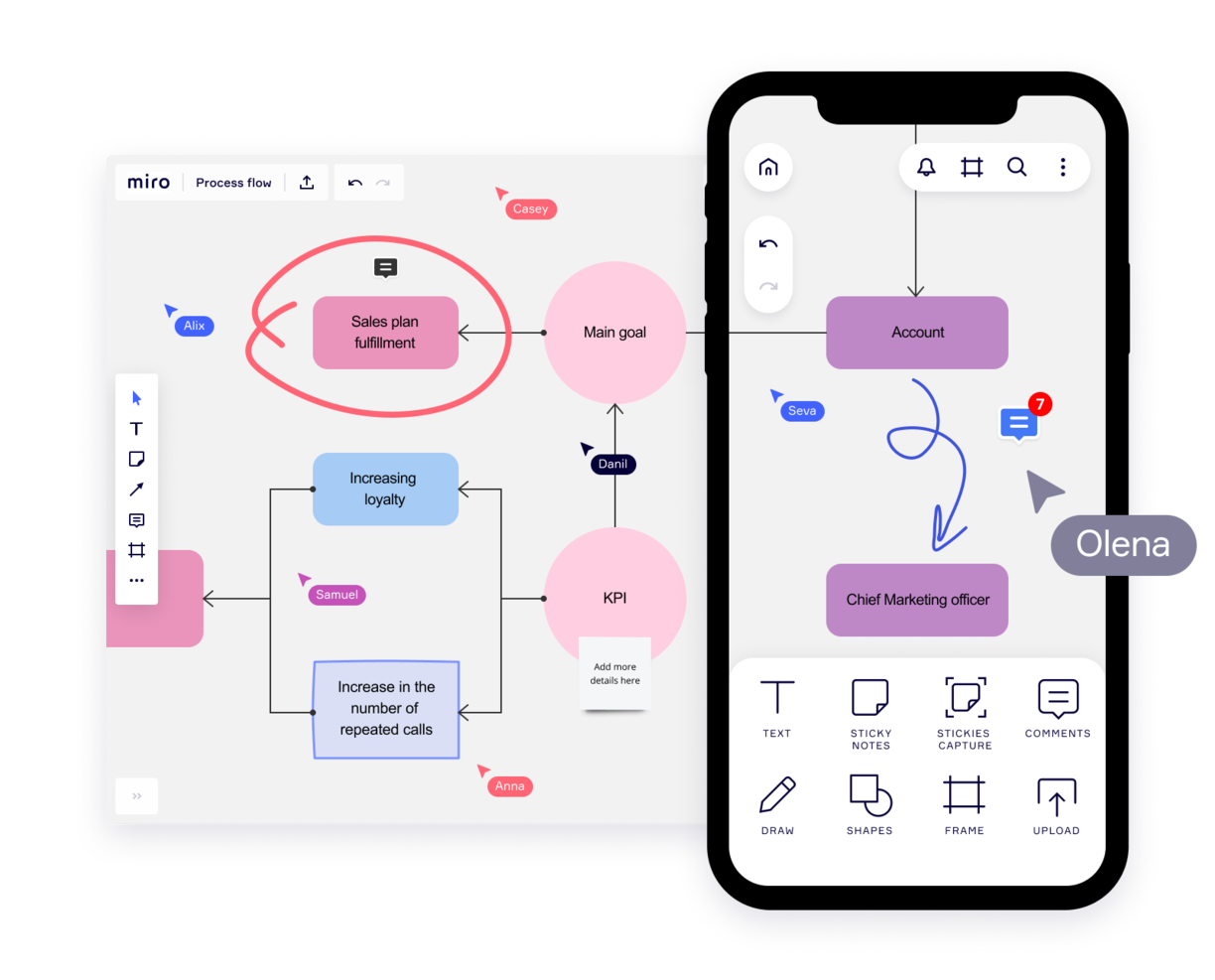
Miro is a collaborative whiteboard designed for hybrid teams, offering over 1,000 templates for diverse planning and brainstorming needs. Valued by top Fortune 100 companies, it supports teams at organizations like TransUnion and Cisco with a platform that suits the hybrid work model.
Key features of Miro include an infinite canvas for limitless project mapping and the flexibility to express ideas through various media. Its asynchronous collaboration tools, such as comments and reactions, enable productive teamwork across time zones. The TalkTrack feature also allows team members to record and share video explanations of process maps, fostering clearer communication.
With integrations including project management tools like Jira and Asana, Miro connects different project facets in one platform, making it a comprehensive tool for today's varied team dynamics.
Miro also integrates with a whole suite of tools, including Zoom, Figma, Monday.com Microsoft Teams, Slack, Google Drive, Box, Airtable, Notion, Azure, and Webex. Some integrations are limited to paid plans only.
Miro is free to use for unlimited members with up to 3 editable boards. Paid plans start at $8/user/month (billed annually).
Pros and Cons
Pros:
- Built-in communication features for streamlined collaboration
- Intuitive and easy setup
- Free forever plan available
Cons:
- Free version does not allow high-quality export to pdf
- Zooming can be jumpy on larger projects
- Visitor/guest accounts locked to paid plans only
New Product Updates from Miro
Miro Adds Japan Data Residency for Enterprise Customers
Miro has introduced Japan data residency for enterprise customers, offering in-region storage for production data, backups, and metadata, plus in-region compute infrastructure. For more information, visit Miro's official site.
 .

Workvivo
Best range of communication options

Workvivo is an online employee communication platform that allows teams to communicate and collaborate in real time. It provides a single location for each team’s projects, tasks, and conversations—enabling them to stay in sync no matter where they are located.
The platform offers features like chat groups, team calendars, task boards, and social media integration, making it easy for your teams to stay connected and up-to-date on their projects so they can move forward quickly and efficiently. Workvivo helps everyone stay connected by providing a central hub for all communications. Instead of having multiple conversations via emails or text messages, everything is kept organized within the platform so that all members can see what’s going on with their team’s work.
Workvivo’s group chats allow teams to converse without switching between different applications or platforms. Team members can easily join group chats and share their thoughts quickly and efficiently. This helps ensure that everyone is on the same page when it comes to project deadlines and goals. Notifications provide users with updates relevant to them, giving them a single point of reference for the most current information about work progress.
Additionally, its project management tools allow users to create tasks, assign them to team members, set deadlines, track progress, and monitor task completion in one place. This makes project management easier for everyone involved by providing visibility into tasks and progress across all levels of the organization. Workvivo allows you to easily track employee performance by monitoring activity logs within the platform or running advanced analytics reports that provide insights into how well employees are completing tasks or meeting deadlines.
Finally, integrations with software like Slack, Zoom, and MS Teams and live video functions allow your team to communicate through a wide range of channels. These include streaming, video, text, podcast, and news updates.
Best for unlimited search history

Troop Messenger is far more than a simple chat interface. It was designed to improve the communication of internal teams of all sizes, from small teams to large corporations, and it delivers a robust feature set for doing so.
Overall this tool does a standout job with its feature offering and hits all of the criteria I look for in a communication tool, plus more. The main features include instant messaging, voice-video calling, video conferencing, file sharing, and desktop sharing.
But something I find especially useful in this tool are its more advanced messaging features. I like both the "respond later" option as well as the "burnout" option which lets you set a message to send at a later time. The self-messaging feature is also unique—a simple but useful feature that lets you send reminders and notes to yourself. Finally, there's a way to send bulk text messages and files to multiple users at once, using the "forkout" feature. And the advanced search in this tool is really good, too.
Troop Messenger supports many native and third-party integration such as employee monitoring and tracking apps, attendance management systems, Google Drive, Dropbox, and LDAP. It's available across Windows, Linux, Mac, Android, and iOS.
Troop Messenger costs from $2.50/user/month. It's worth noting that although it’s a SaaS model, it offers the delivery models of self-hosting, API, and custom application.
Blink
Best for deskless employees

Blink is a communication tool for the unique needs of deskless workers, who, until now, didn’t have the same quality technology as their colleagues in HQ. In just one app, it includes workplace messaging, a social media style company Feed for top-down communications, directory, cloud storage, workplace analytics, polls, and more.
Blink is built around the concept of workplace messaging as the central functionality so peer-to-peer direct messaging, group Chats, and top-down communications via the company Feed, all play an important role. Moderators and admins who post in the company Feed also have the option of turning on and off push notification for each post depending on importance. Blink also features polls, powerful integrations, and digital forms for reporting.
Analytics for admins features prominently through the app: post by post analytics, Org-wide and Team analytics within the Admin Portal, and Hub analytics that measures interactions and adoption within the document storage and reporting section of the app.
Blink is a straight-out-of-the box Saas communication software; no technical knowledge is necessary to get started and to invite colleagues to the platform. Its user-friendly, brandable interface is designed with familiar social media style features (think emojis and like buttons) that encourages engagement from employees—even less tech-savvy ones.
You can use existing integrations with 3rd party systems such as Jira, Trello, Office 365 and G-suite or build new integrations to your existing systems using Blink’s public APIs. Blink supports Android, iOS, Windows, and Mac, and you can access Blink via your browser.
Blink costs from $3.40 user/month. They offer a free 14-day trial and you can book a demo through the homepage.

Pumble
Best for unlimited users and message history
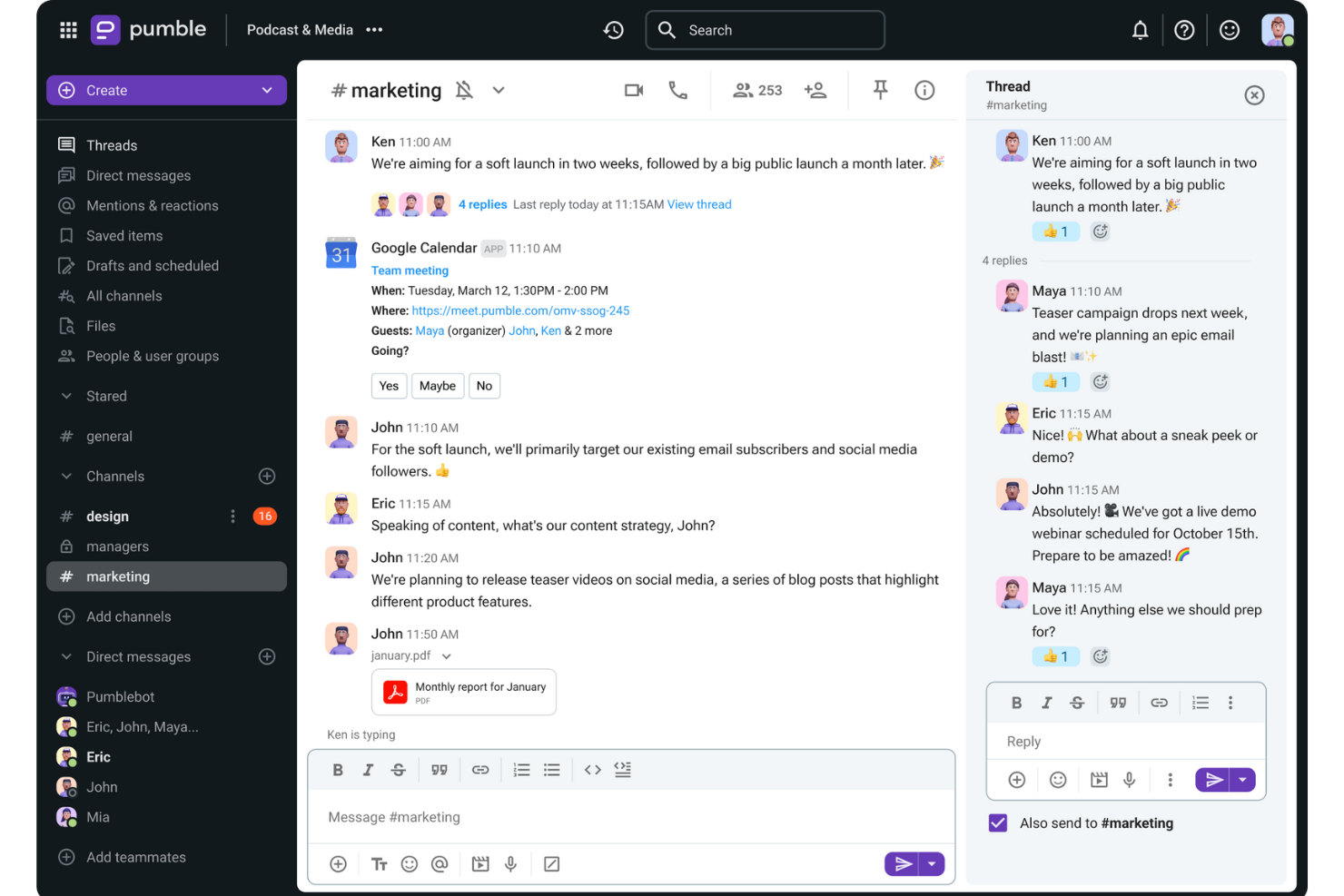
Pumble is a collaboration and communication tool designed to facilitate team interactions across desktop, mobile, and web platforms. The versatile platform is ideal for a wide range of teams, including sales, marketing, HR, product planning, and fully remote teams.
This tool provides channels for organized discussions, direct messaging for individual conversations, and threads for specific topics within a channel. The platform also includes video and voice calls, screen sharing, and file sharing to support comprehensive communication needs.
Furthermore, Pumble enables collaboration with external guests by inviting them to a Pumble meeting, even if they do not have an account. The platform even offers a free plan with unlimited users and message history, ensuring that important information is always retrievable and well-organized while supporting businesses and teams as they scale.
Integrations include Clockify for time tracking, Plaky for project management, and Zapier for connecting to over 3000 apps. Other important integrations include Google Drive, OneDrive, Outlook, Trello, and Zoom, as well as the ability to create custom integrations using the Pumble API.

Flock
Best for organizing communication using channels

Flock is one of the most robust communication apps, going far beyond a simple messaging system. This communication app stands out with its chat module which is designed to streamline and centralize communication from different groups and across different teams. Going a step beyond “back and forth” communication, Flock enables you to turn messages into useful resources with bookmarks, and convert discussions into tasks.
Flock’s features include video and audio calls, group and individual chats, and an intuitive screen sharing module. It also includes many nice-to-have communication tools, like the ability to create an anonymous poll, share it with your team, and download the results. You can also use tags in conversations to indicate high priority info. Another useful feature is the ability to automatically generate email lists of members in a particular discussion board, allowing you to quickly send out group emails to the right people.
Flock integrations include Trello, Airtable, Paperform, Slack, Asana,GitHub, Facebook Lead Ads, Twitter, Reddit, Evernote, Dropbox, Google Doc and Google Calendar, Office 365, and many more.
Flock costs from $6/user/month and offers a 30-day free trial. They also have a free plan with limited features to get started as well.
İşinize Yarayabilecek Diğer İletişim Yazılımları
Piyasada pek çok proje yönetimi iletişim aracı bulunuyor—işte bu incelemeye dahil etmediğimiz birkaç iyi seçenek. Bunlara göz atın!
- Livestorm
For hosting online events
- TalkRoute
For unified communications on any device
- Zoho Cliq
For small enterprises
- Teamwork.com
Marketing communication tool
- FLEEP
User interface and UX
- Microsoft Teams
For live communication on Microsoft
- MyHub
For mobile intranet access
- Nutcache
For internal team communications
- Rocket.Chat
Free communication software
- Workmates
With native engagement functionality


How I Evaluate Communication Tools
I split my evaluation into two layers: baseline capabilities like threaded channels and PM integrations, and the differentiators that make one tool a better fit for your team than another.
Core Functionality (Table Stakes For This List)
When I'm selecting tools for my list, I rank each one on a scale from 0 (does not offer the functionality) to 5 (excels in this area) for each core functionality listed below. Then, I calculate the tool's total score into a percentage. Each tool needs to achieve a minimum total score of 65% to be considered for inclusion.
- Real-Time Messaging: I check for reliable group and 1:1 chat with presence indicators, mentions, and reactions—the basics your team needs for quick decisions between standups.
- Channels & Threads: Organized, topic-based channels with threaded replies keep sprint discussions separate from general chatter, so I evaluate how each tool structures conversations.
- File Sharing & Collaboration: Teams constantly pass around specs, mockups, and docs, so I look for inline previews, version history, and cloud storage integrations like Google Drive or OneDrive.
- Video & Voice Conferencing: I evaluate built-in or deeply integrated video meetings with screen sharing and recording—features that replace the need for a separate tool during sprint reviews.
- PM Tool Integrations: Native connections with tools like Jira, Asana, and Monday matter here. I look for in-channel notifications, task creation, and bi-directional status syncing.
- Searchable Message History: When you need to trace a scope decision from three months ago, search has to deliver. I evaluate filter options, archive depth, and history limits across plan tiers.
Once I have a list of tools that meet this criteria, I consider what sets each platform apart.
Differentiating Factors (What Sets Vendors Apart)
Here's how I compare and contrast different vendors:
Standout Features
AI-powered channel summaries and meeting recaps are a big deal for PMs juggling multiple workstreams—I look for tools that extract action items and key decisions automatically. Workflow automation is another differentiator; the ability to trigger reminders, approvals, or status updates from project events saves real time. I also evaluate guest access options, since most projects involve external stakeholders who need visibility without requiring a full license.
Beyond Features
Integration depth matters here. I check whether a tool connects natively with the PM platforms your team already runs on and whether its API supports custom automations. Security and compliance weigh heavily too—I evaluate SSO support, encryption standards, and certifications like SOC 2 Type II, especially for teams handling sensitive project data. Pricing structure also plays a role; I look at how guest seat costs and message history limits scale as your team grows.
Çevrim içi iletişim araçları nedir?
Proje yönetimindeki çevrim içi iletişim araçları, insanların konumlarından bağımsız olarak etkileşim kurmasına, bilgi paylaşmasına ve etkili bir şekilde iş birliği yapmasına yardımcı olan yazılımlardır. Bu araçlar genellikle anlık mesajlaşma, video konferans, dosya paylaşımı ve belgeler üzerinde gerçek zamanlı iş birliği özelliklerini içerir.
Çevrim içi iletişim yazılımları, modern iş yerlerinin verimliliği ve başarısı için kritik önem taşıyan ekip üyeleri arasındaki iş birliğini ve iletişimi geliştirir. Coğrafi engellerin ortadan kaldırılmasına yardımcı olarak uzaktan ve dağınık ekiplerin aynı odadaymış gibi birlikte çalışmasını sağlar. Bu yalnızca üretkenliği artırmakla kalmaz, aynı zamanda esnek çalışma düzenlerini de destekler.
İletişim Araçları Hakkında SSS
Bu konu hakkında diğer insanların sorduğu yaygın sorulardan bazılarını bulun.
İletişim Araçları Nedir?
İletişim araçları, ekip üyeleri için sanal, çevrim içi toplantı odaları görevi gören ve uzaktan ekip iş birliğini mümkün kılan uygulamalardır. Ekibinizin sohbet etmesine, önemli proje verilerini paylaşmasına, ilerleme hakkında diğerlerini bilgilendirmesine ve dosya paylaşmasına yardımcı olarak uzaktan çalışmayı neredeyse her şirket için bir seçenek hâline getirirler.
İletişim araçları, başkalarını anlamanıza ve kendinizi anlaşılır kılmanıza yardımcı olan çevrim dışı veya çevrim içi her türlü aracı kapsar. Ekip içi veya ofisler arası iletişim araçları arasında posta, e-posta ve telefon gibi bilinen araçların yanı sıra web konferansı (Skype), \u003ca href=\u0022https://thedigitalprojectmanager.com/tools/best-screen-sharing-software/\u0022\u003eekran paylaşımı\u003c/a\u003e, dosya paylaşımı, grup mesajlaşması ve iş birliğine dayalı iş yönetimi için uygulamalar ve yazılımlar da bulunur.
İşletmelerde Yaygın Olarak Hangi Tür İletişim Araçları Kullanılır?
Yaygın işletme iletişim araçları şunları içerir: belge iş birliği araçları, dosya paylaşım araçları, sohbet ve mesajlaşma araçları, bilgi tabanı araçları, sesli ve \u003ca href=\u0022https://thedigitalprojectmanager.com/tools/video-conferencing-software/\u0022\u003evideo konferans araçları\u003c/a\u003e ve \u003ca href=\u0022https://thedigitalprojectmanager.com/tools/best-project-management-software/\u0022\u003eproje yönetimi yazılımı\u003c/a\u003e.
Küçük Ekipler İçin En İyi İletişim Araçları Hangileridir?
Ücretsiz bir plan sundukları için bunları küçük ekipler için en iyi iletişim araçları olarak seçtik.
\u003cul\u003e
\t\u003cli\u003e\u003ca href=\u0022https://www.zoho.com/cliq/?r=cmt\u0022 rel=\u0022noreferrer noopener\u0022 target=\u0022_blank\u0022\u003eZoho Cliq\u003c/a\u003e\u003c/li\u003e
\t\u003cli\u003e\u003ca href=\u0022https://gmelius.com/?utm_source=thedigitalprojectmanager\u0026utm_medium=paid\u0026utm_campaign=directories\u0026utm_term=communication_tools\u0022 rel=\u0022noreferrer noopener\u0022 target=\u0022_blank\u0022\u003eGmelius\u003c/a\u003e\u003c/li\u003e
\t\u003cli\u003e\u003ca href=\u0022https://slenke.com/?r=cmt\u0022 rel=\u0022noreferrer noopener\u0022 target=\u0022_blank\u0022\u003eSlenke\u003c/a\u003e\u003c/li\u003e
\t\u003cli\u003e\u003ca href=\u0022https://flock.com/?r=cmt\u0022 rel=\u0022noreferrer noopener\u0022 target=\u0022_blank\u0022\u003eFlock\u003c/a\u003e\u003c/li\u003e
\t\u003cli\u003e\u003ca href=\u0022https://rocket.chat/?r=cmt\u0022 rel=\u0022noreferrer noopener\u0022 target=\u0022_blank\u0022\u003eRocket Chat\u003c/a\u003e\u003c/li\u003e
\t\u003cli\u003e\u003ca href=\u0022https://www.teamwork.com/?partner=pz7aj1mr84\u0022 rel=\u0022noreferrer noopener\u0022 target=\u0022_blank\u0022\u003eTeamwork\u003c/a\u003e\u003c/li\u003e
\u003c/ul\u003e
Ajanslar İçin En İyi İletişim Araçları Hangileridir?
Standart mesajlaşma özelliklerinin yanı sıra kullanışlı dosya paylaşımı, yönetim ve kullanıcı izinleri denetimi sundukları için ajanslar açısından en iyi iletişim araçlarından bazıları şunlardır: \u003ca href=\u0022https://monday.com/lp/mb/dpm/communication/?utm_source=mb\u0026utm_campaign=dpm\u0026utm_medium=communication\u0022 rel=\u0022nofollow noopener\u0022 target=\u0022_blank\u0022\u003emonday.com\u003c/a\u003e, \u003ca href=\u0022https://ryver.com/?r=cmt\u0022 rel=\u0022nofollow noopener\u0022 target=\u0022_blank\u0022\u003eRyver\u003c/a\u003e, \u003ca href=\u0022https://fleep.io/?r=cmt\u0022 rel=\u0022nofollow noopener\u0022 target=\u0022_blank\u0022\u003eFleep\u003c/a\u003e, \u003ca href=\u0022https://slenke.com/?r=cmt\u0022 rel=\u0022nofollow noopener\u0022 target=\u0022_blank\u0022\u003eSlenke\u003c/a\u003e, \u003ca href=\u0022https://flock.com/?r=cmt\u0022 rel=\u0022nofollow noopener\u0022 target=\u0022_blank\u0022\u003eFlock\u003c/a\u003e ve \u003ca href=\u0022https://teamwork.grsm.io/communication-tools\u0022 rel=\u0022nofollow noopener\u0022 target=\u0022_blank\u0022\u003eTeamwork\u003c/a\u003e.
İşletme İletişimi Nedir?
İşletme iletişimi; mesajlaşma, e-postalar, aramalar ve toplantılar gibi etkileşimli iletişimin yanı sıra departmanlar arası iletişim, müşteri iletişimi ve hatta müşteri yönetimi, pazarlama ve halkla ilişkiler gibi unsurları da kapsayabilen geniş kapsamlı bir terimdir.
İletişim İşletmelerde Neden Önemlidir?
İletişim işletmelerde önemlidir; çünkü sağlıklı ilişkiler işletmelerin can damarıdır ve ilişkiler iletişim yoluyla kurulur ve sürdürülür. İşletmelerde iyi iletişimin önemi küçümsenemez!
\u0026nbsp;
Bu \u003ca href=\u0022https://thedigitalprojectmanager.com/projects/communication/communication-strategies-project-management/\u0022\u003eiletişim stratejileri\u003c/a\u003e ile iletişiminizi geliştirmeye başlayın.
İletişim Araçlarının 7 Faydası Nelerdir?
Çevrim içi iletişim araçlarının faydaları şunları içerir:
\u003col\u003e
\t\u003cli\u003eSohbetleri düzenler\u003c/li\u003e
\t\u003cli\u003eTartışmalar için bağlam sağlar\u003c/li\u003e
\t\u003cli\u003eEş zamansız iletişimi ve uzaktan çalışmayı mümkün kılar\u003c/li\u003e
\t\u003cli\u003eGerçek zamanlı çalışmanızı sağlar\u003c/li\u003e
\t\u003cli\u003eMaliyetli hataları en aza indirir\u003c/li\u003e
\t\u003cli\u003eDaha iyi yönetim sağlar\u003c/li\u003e
\t\u003cli\u003eSorumluluk duygusunu güçlendirir\u003c/li\u003e
\u003c/ol\u003e
İletişim yazılımının bu faydaları hakkında aşağıda daha fazla bilgi edinebilirsiniz.
Bir günlüğüne bile olsa proje yönetimi işindeyseniz, iyi iletişimin bir ekip içinde oynadığı önemli rolü bilirsiniz. Piyasadaki daha kapsamlı proje yönetimi araçlarından bazıları ekip iletişimi için gerekli işlevleri zaten içerir; ancak burada iletişim konusunda uzmanlaşmış, sınıfının en iyisi araçları inceliyoruz. Günümüzde her ekip üyesiyle çevrim içi ve bağlantıda olmak bir lüks değil, standarttır ve üstelik iyi bir standarttır.
Günümüzün modern iş yerinde birçok iletişim uygulaması ucuzdur (veya ücretsizdir); bu da dağınık ekipler tarafından yürütülen hızlı tempolu projelerde çabaları koordine etmesi gereken ajanslar, stüdyolar ve girişimler için son derece mantıklıdır. Aslında birçok genç şirket, ölçeklenmeye ve daha kapsamlı bir çözüme geçmeye hazır olana kadar anlık mesajlaşma iletişimi uygulamalarına büyük ölçüde güvenir.
İletişim Araçları Satın Alma Rehberi
Ekibiniz için en iyi iletişim araçlarını nasıl seçersiniz? İletişim araçları arasında seçim yaparken nelere dikkat etmeniz gerektiği hakkında konuşalım.
İletişim Yazılımına Ne İçin İhtiyacınız Var?
Mevcut verileri içe aktarmanız gereken eski bir iletişim sisteminden mi geçiş yapıyorsunuz, yoksa sıfırdan mı başlıyorsunuz? Ayrıca ekibinizin ihtiyaçları neler? Dahili proje iletişimi araçlarını mı değerlendirdiğinizi, yoksa müşterilere yönelik bir yazılıma mı ihtiyaç duyduğunuzu düşünün. Video aracılığıyla iletişim kuruyorsanız Slack'i veya Flock ya da Ryver gibi popüler Slack alternatiflerini değerlendirin.
Ekibinizin Büyüklüğü Ne Kadar?
Özellikle ekibiniz teknik bilgi düzeyi, konum, proje ve diğer açılardan büyük ve çeşitli olduğunda herkesin aynı uygulamayı kullanmasını sağlamak zor olabilir. Microsoft Teams gibi farklı kullanıcı izinleri düzeylerine ve konuk erişimine sahip kapsamlı araçlar, büyük ve dağınık ekipler için uygundur.
İş Akışınıza Nasıl Uyacak?
Bu genellikle entegrasyonla ilgilidir. Projeleri tamamlamak için kullandığınız araçların bir listesini oluşturun. Zaten bir dizi zaman takibi uygulamanız, faturalama uygulamanız ve başka araçlarınız varsa, geniş bir hazır entegrasyon kütüphanesine sahip olan Fleep veya Zoho Cliq'i değerlendirin. Öte yandan, araç setiniz şu anda sınırlıysa ancak operasyonlarınızın ölçekleneceğini öngörebiliyorsanız, ölçek büyüttükçe size yardımcı olacak proje yönetimi ve görev yönetimi özellikleri sunan Slenke gibi bir çözümü deneyin. Entegrasyon gereksinimlerinizin bir listesini oluşturun ve iki kez kontrol edin—ekip üyelerinize hangi ek yazılımları kullandıklarını ve hangilerini tercih ettiklerini sormanın da bir sakıncası yoktur.
Kurulumu Ne Kadar Sürer?
Çoğu iletişim aracının kullanımı kolaydır ve çevrimiçi bir uygulama olarak kurulabilir. Ancak kendi sunucularınızda barındırmayı tercih ederseniz bu biraz daha fazla zaman alır. Rocket Chat size yardımcı olacak profesyonel bir ekibe sahiptir ve Slack iyi desteğiyle popüler bir tercihtir. Her iki durumda da bu, verilerin hassasiyetine ve ekibinizin beklediği veri trafiği miktarına bağlıdır.
Öğrenme Eğrisi Nasıl?
İster yeni bir iletişim sistemi ediniyor ister eski bir sistemden geçiş yapıyor olun, sürece dahil olan herkesin değişikliklere alışması gerekir. Değişim yönetimi, kullanımı kolay arayüzlerle genellikle daha kolay hale gelir.
Teamwork Chat, görsel açıdan sade ve öğrenmesi kolay bir araca örnektir. Bunu kullanan tek kişi ekibiniz değil; video konferanslara erişmesi gereken müşterileriniz veya günlük süreçlerinizin parçası olmayan kişiler olabilir. Durum buysa sezgisel bir müşteri portalı olduğundan emin olun.
Maliyeti Ne Kadar?
Bir iletişim aracı için bütçeniz ne kadar? Proje yönetimi iletişim yazılımına yatırım yapmak iyi bir fikirdir, ancak daha azının çoğu zaman daha fazla olduğunu unutmayın—iyi haber şu ki birçok iletişim aracının sınırlı işlevlere sahip “sonsuza kadar ücretsiz” bir sürümü vardır. Ücretsiz iletişim araçları sürümü, “olsa iyi olur” özellikleriyle gereğinden fazla karmaşık hale gelmeden tüm “olmazsa olmazları” sunarak ekibinizin ihtiyaçlarını gayet iyi karşılayabilir.