

2026’da Danışmanlar İçin En İyi 10 Kaynak Yönetimi Yazılımı

Danışmanlar İçin En İyi Kaynak Yönetimi Yazılımları Kısa Listesi


Doğru kaynak yönetimi yazılımını seçmek; danışmanların ekip zamanını ve uzmanlığını takip edip tahsis etmesine, iş yükleri ve uygunluk konusunda görünürlüğü artırmasına, projeler arasındaki planlama karmaşıklıklarını çözmesine ve karar alma ile planlamayı iyileştirmesine yardımcı olabilir. Tüm bu işlevleri sizin için uygun bir şekilde yerine getirebilen bir araç bulmak hem zaman alıcı hem de yorucu olabilir. Deneyimli bir dijital proje yöneticisi olarak seçim sürecinde size rehberlik edebilir, uzman araç önerileri sunabilir ve ihtiyaçlarınıza en uygun kaynak yönetimi yazılımını bulmanıza yardımcı olabilirim.
Why Trust Our Software Recommendations
Our team has been testing and reviewing software since 2012. As project managers ourselves, we know how difficult—and important—it is to choose the right software.
For this guide, we evaluated tools using hands-on testing and independent research, scoring tools using our selection criteria. We also draw on insights from industry thought leaders and practicing project management experts.
Our reviews reflect our human editorial judgment, not a sales pitch.
Expert reviewers:
Danışmanlar İçin Kaynak Yönetimi Yazılımları Karşılaştırma Tablosu
| Tool | Best For | Trial Info | Price | ||
|---|---|---|---|---|---|
| 1 | Best for agency profitability tracking | 14-day free trial | From $10/user/month (billed annually) | Website | |
| 2 | Best for capacity management with margin view | Free trial available | From $7/scheduled user/month | Website | |
| 3 | Best for skills-based resource matching | Free demo available | Pricing upon request | Website | |
| 4 | Best for comprehensive utilization reports | 14-day free trial | From $17/user/month | Website | |
| 5 | Best for real-time resource visibility | Free plan + 14-day trial + demo available | From $10/user/month (billed annually) | Website | |
| 6 | Best for planning tentative project demand | Free trial available | From $5/user/month | Website | |
| 7 | Best for people-centric resourcing | Not available | Pricing upon request | Website | |
| 8 | Best for pursuit-to-margin staffing plans | Free demo available | Pricing upon request | Website | |
| 9 | Best for Salesforce-based consulting firms | Free demo available | Pricing upon request | Website | |
| 10 | Best for staffing checks before committing | 14-day free trial + free demo available | From $9/user/month (billed annually) | Website |


Danışmanlar İçin En İyi Kaynak Yönetimi Yazılımları İncelemeleri
Burada, her bir aracın güçlü yönlerini ve sınırlamalarını keşfetmenize yardımcı olmak için danışmanlara yönelik en iyi 10 kaynak yönetimi yazılımına dair genel değerlendirmeleri derledim. Her genel değerlendirme, ekibiniz için mükemmel aracı bulmanıza yardımcı olmak üzere aracın temel özellikleri, işlevleri ve ideal kullanım senaryoları hakkında bilgiler sunar.

Best for agency profitability tracking

Productive is a resource management platform for consultants that brings together project planning, resource scheduling, time tracking, budgeting, and invoicing in one system.
Who Is Productive Best For?
Productive is a good fit for consulting agencies and professional services firms that need to manage resources, track billable time, and monitor project profitability in one place.
Why I Picked Productive
Productive earns its spot on my shortlist because of how tightly it connects resource allocation to financial outcomes. I love that when my team logs time against a project, those hours feed directly into the budget view—so I can see profit margins in real time rather than waiting for end-of-month reports. The budgeting module lets you set up custom alerts before a project burns through its budget, which helps catch overruns before they become a problem. The AI-powered reporting generates profitability-per-project breakdowns on demand, so I'm not spending hours pulling numbers from spreadsheets.
Productive Key Features
- Workload view: See each team member's task load at a glance and reassign work directly from the same view.
- Revenue forecasting: Project upcoming revenue based on active sales deals and current resource plans, with utilization breakdowns by person or team.
- Scenario builder: Model different financial outcomes by adjusting pricing, expenses, and resource allocation before committing to a plan.
- Time approval workflow: Review submitted time entries, mark hours as billable or non-billable, and request changes from team members before entries are finalized.
Productive Integrations
Productive offers native integrations with Jira, HubSpot, Xero, Google Calendar, Sage, Gmail, Microsoft Outlook, Slack, BugHerd, and QuickBooks. It also connects with Zapier and provides an open API for custom integrations.
Pros and Cons
Pros:
- Client portal accessibility
- Customizable dashboards
- User-friendly interface
Cons:
- Archiving limitations
- Complex reporting interface
New Product Updates from Productive
Productive Adds Email and Calendar Integrations for Agents
Productive adds Gmail, Outlook, Google Calendar, and Outlook Calendar connectors for its AI agents. These integrations let agents manage emails and create calendar events directly within Productive. For more information, visit Productive’s official site.

Best for capacity management with margin view

Float is a resource management platform for consultants that combines visual scheduling, capacity planning, and real-time workload tracking in one interface.
Who Is Float Best For?
Float is a good fit for consulting teams and agencies that need to manage people across multiple projects simultaneously.
Why I Picked Float
Float earns its spot on my shortlist because of how directly it connects capacity planning to project margin visibility. I use Float's reports to track profitability in real time—not just at project close—so I can see margin impact while work is still happening and adjust staffing before a project drifts off budget. The capacity planning view layers in utilization indicators and over-capacity alerts alongside each person's actual availability, including time off, which means I'm not accidentally booking someone at 120% just because they show up on the schedule. I also like that Float lets me set cost and bill rates per role, so every resourcing decision I make carries financial weight I can actually see.
Float Key Features
- Drag-and-drop schedule: Allocate work by hours or percentages and adjust assignments directly on a visual timeline without rebuilding your plan from scratch.
- Tentative scheduling: Mark allocations as tentative to hold capacity for unconfirmed work without blocking confirmed project assignments.
- Pre-filled timesheets: Float pulls scheduled allocations into timesheets automatically, so your team confirms or adjusts rather than logging time from scratch.
- Custom tags and saved views: Filter your schedule by role, skill, or project using custom tags, then save those views for quick access during resourcing reviews.
Float Integrations
Float offers native integrations with Asana, Jira, Google Calendar, Karbon, and Aprimo Productivity Management, and connects with Zapier. An API is available for custom integrations.
Pros and Cons
Pros:
- Custom settings support flexible workflows
- Real-time tracking enhances profitability insights
- Visual scheduling improves resource planning
Cons:
- No built-in task management
- Limited native mobile app access
New Product Updates from Float.com

Float Adds Rate Cards and Multi-Currency Billing
Float introduced centralized rate cards to standardize bill rates across projects and added multi-currency support to bill clients consistently across regions. For more information, visit Float's official site.

Retain is a resource planning platform built for professional services firms that combines skills-based staffing, capacity planning, utilisation tracking, and multi-location scheduling in a single interface.
Who Is Retain Best For?
Retain is a strong fit for mid-size to large professional services firms in consulting, accounting, or technology that manage complex staffing across multiple teams.
Why I Picked Retain
I picked Retain as one of the best because its Skills+ module gives consulting teams a genuinely structured way to match people to projects. It connects to a Lightcast-powered library of 30,000+ industry skills, so I'm not manually building a taxonomy from scratch. The AI suitability matching then surfaces the best-fit consultant based on those skills, with explainable results I can actually trust when staffing a client engagement.
Retain Key Features
- Availability heatmap: View each consultant's capacity over time with color-coded indicators for overallocated, fully booked, and available resources.
- Utilisation dashboards: Track billable and non-billable hours across your team to monitor utilisation goals and spot capacity gaps.
- Built-in timesheets: Log and approve time directly within the platform, keeping actuals tied to resource plans.
- Revenue forecasting: Connect resource allocations to projected revenue and delivery costs across active engagements.
Retain Integrations
Retain offers technology-agnostic integrations that connect resource planning data across HR, CRM, and finance systems, with native integrations including BambooHR, Salesforce, SAP, Oracle, Oracle NetSuite OpenAir, Workday, Microsoft Dynamics 365, and SugarCRM. It also supports workflow orchestration through platforms like Microsoft Logic Apps, and an open API is available for custom integrations.
Pros and Cons
Pros:
- Color-coded booking types aid scheduling clarity
- Skills search for matching consultants to engagements
- Multi-office visibility across the workforce
Cons:
- Session timeouts interrupt active planning work
- Built-in reporting needs manual data manipulation

Scoro
Best for comprehensive utilization reports

Scoro is a resource management platform for consultants that brings together project planning, time tracking, resource scheduling, and financial management in one system.
Who Is Scoro Best For?
Scoro is a good fit for consulting firms and professional services teams that need to manage projects, track billable time, and monitor resource utilization in one place.
Why I Picked Scoro
Scoro earns its spot on my shortlist because of how far its utilization reporting goes beyond a simple percentage on a dashboard. The utilization report shows a heatmap of each team member's hours—color-coded so you can immediately see who's overbooked in red and who has capacity in green. I can hover over any individual's summary to get a granular breakdown of exactly what they're working on, which makes it easy to spot overservicing on a specific client before it eats into margins. Scoro also ties utilization directly to revenue forecasting, so I can see how current bookings and upcoming projects will affect both capacity and profitability at the same time.
Scoro Key Features
- Gantt chart scheduling: Visualize project timelines and task dependencies with drag-and-drop Gantt charts that update in real time.
- Quoted vs. actual budget tracking: Compare planned budgets against live labor costs and expenses as projects progress.
- Retainer management: Track recurring client work, monitor retainer budgets, and log time against monthly allocations.
- Customizable dashboards: Build role-specific dashboards that surface the project health metrics most relevant to each team member.
Scoro Integrations
Scoro offers native integrations with Google Workspace, Microsoft 365, Xero, QuickBooks, Sage, and Exact, and provides an API for custom integrations. Additional integrations are available through the Scoro Marketplace.
Pros and Cons
Pros:
- Good financial management capabilities
- Integrated CRM function
- Real-time project and resource tracking
Cons:
- May take time to learn how to customize the platform
- Mobile app is less robust than web version
New Product Updates from Scoro

Scoro Adds Time Mobile App and ELI Improvements
Scoro adds the Scoro Time mobile app for iOS/Android to track time anywhere and expands ELI with attachments, smarter filtering, and trigger-based actions. For more information, visit Scoro's official site.

Wrike
Best for real-time resource visibility

Wrike is a project and resource management platform for consultants that combines project planning, workload tracking, time logging, and team collaboration in one workspace.
Who Is Wrike Best For?
Wrike is a good fit for mid-size to large consulting teams managing multiple concurrent client projects who need centralized visibility into workloads and timelines.
Why I Picked Wrike
I've included Wrike in my top picks because of how well its resource bookings and workload views work together to give consulting teams a live picture of who's doing what across every active project. When I'm looking at a team running five client engagements at once, I can use resource bookings to reserve hours from a specific team member or job role, check their availability against estimated effort, and spot conflicts before they become delivery problems. The effort management feature lets me set expected hours at the task level, which makes it much easier to forecast when a project will wrap and whether the assigned consultant actually has the bandwidth. That combination of booking, effort tracking, and real-time dashboards is what makes Wrike genuinely useful for resource visibility—not just project tracking.
Wrike Key Features
- Custom project views: Toggle between Gantt, Board, Table, Calendar, and Chart views to visualize project timelines and task status across client engagements.
- Scrum boards: Manage Agile workflows with backlog prioritization, sprint planning, and real-time progress tracking on shared Scrum boards.
- User activity reports: Generate on-demand audit reports that log each user's actions, so you can track task ownership and accountability across your team.
- AI agents: Deploy no-code AI agents to handle tasks like auto-resource assignment and status update summaries across active projects.
Wrike Integrations
Wrike offers hundreds of integrations through its built-in integrations and marketplace, including tools like Google Workspace, Microsoft 365, Salesforce, and Slack. It also supports Zapier and provides an API for custom integrations.
Pros and Cons
Pros:
- Many integrations available
- Highly customizable dashboards
- Robust task management capabilities
Cons:
- Advanced resource planning features limited to higher tier plans
- Can be tricky to learn how to customize the platform
New Product Updates from Wrike

Wrike Redesigns Workspace Search With New Filters
Wrike introduces a redesigned Workspace Search interface with recent search shortcuts, item type and location filters, and parent-task context. These updates help users find relevant work items and navigate search results efficiently. For more information, visit Wrike’s official site.

Best for planning tentative project demand
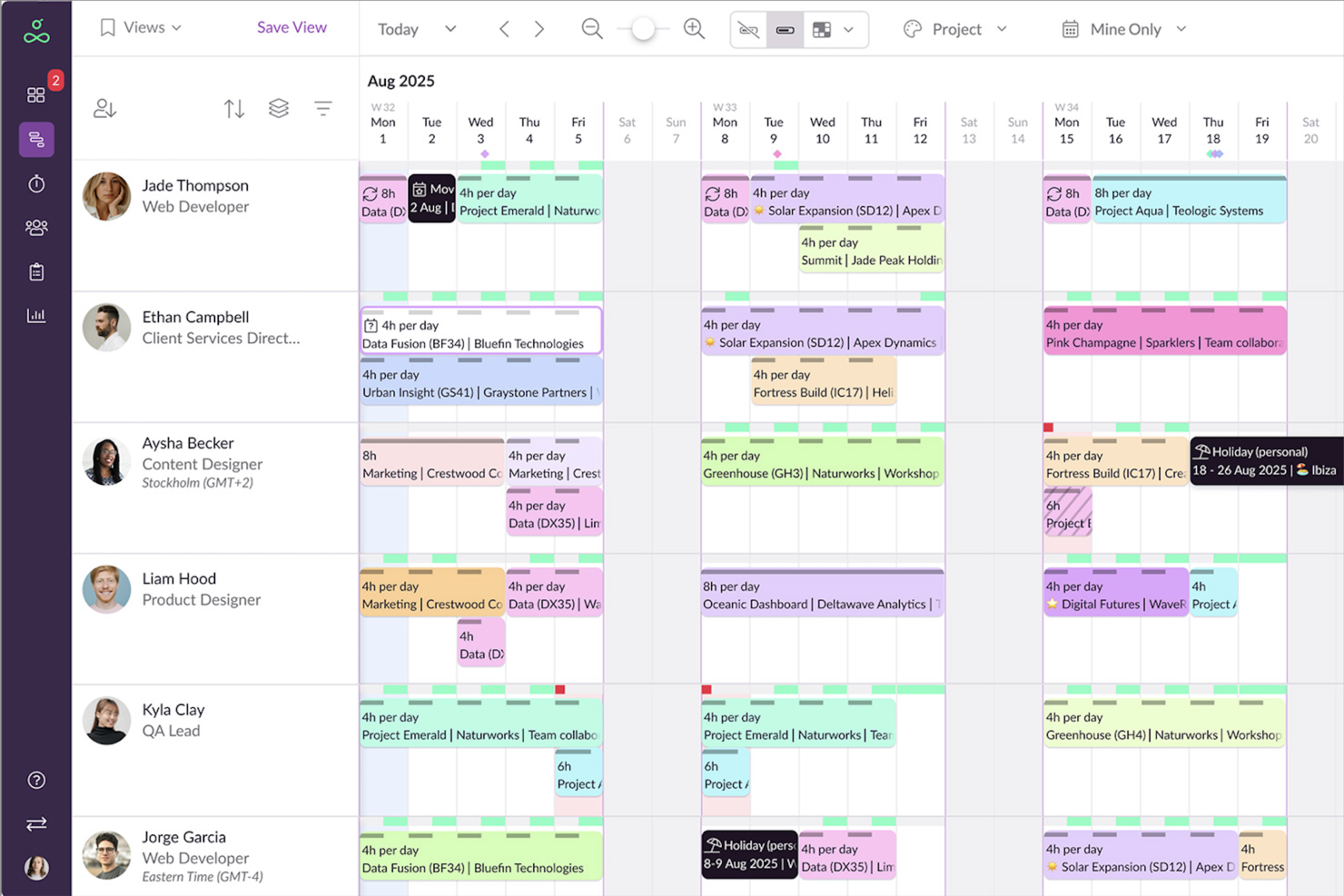
Resource Guru is a resource scheduling and capacity planning tool that lets you book people, manage availability, track utilization, and plan project pipelines across your team.
Who Is Resource Guru Best For?
Resource Guru is a strong fit for project and operations teams that need clear visibility into who's available, what's tentatively booked, and where capacity gaps are forming across active and upcoming engagements.
Why I Picked Resource Guru
I picked Resource Guru as one of the best because it handles tentative project demand better than almost any other scheduling tool I've used. When a potential engagement is still being scoped, I can create placeholder bookings with skills and role attributes attached, then toggle those tentative bookings in or out of capacity reports to see best- and worst-case staffing scenarios side by side. That means my team can spot gaps before a project is even confirmed, not scramble to fill them after the contract is signed.
Resource Guru Key Features
- Drag-and-drop scheduling: Create, move, and reassign bookings across people and projects directly on a shared calendar.
- Billable vs. non-billable reporting: The Capacity & Utilization report separates used capacity into billable and non-billable time for each person or team.
- Skills-based resource filtering: Tag people and placeholders with skills and custom fields, then filter the schedule to find the right resource for a project.
- Weekly timesheets: Log project time against scheduled work and compare actual hours to forecasted bookings by person, project, or client.
Resource Guru Integrations
Resource Guru offers native integrations with Jira, Asana, monday.com, ClickUp, Google Calendar, Outlook Calendar, Salesforce, Workday, QuickBooks, and Slack. It also provides a REST-style API with webhooks and OAuth2, plus Zapier connectivity.
Pros and Cons
Pros:
- Tentative bookings help forecast upcoming demand
- Clash warnings help prevent double-booking
- Visual scheduling clarifies consultant availability
Cons:
- Busy schedules can become hard to scan
- Reporting offers limited deeper utilization analysis
New Product Updates from Resource Guru

Resource Guru Adds More Control Over Calendar Sync
Resource Guru adds more control over Google and Outlook Calendar sync, including source calendar selection and destination calendar options. These updates help users manage external events and Resource Guru bookings with less clutter. For more information, visit Resource Guru’s official site.
 .

Kantata
Best for people-centric resourcing

Kantata is a resource management platform for consultants that brings together project planning, resource allocation, forecasting, and time tracking in one system.
Who Is Kantata Best For?
Kantata is a good fit for mid-to-large professional services firms that need to manage complex resource planning across multiple projects and teams.
Why I Picked Kantata
Kantata earns its spot as one of the best on my shortlist because it's one of the few PSA platforms built around the idea that your people are the product. What I like most is the skill-based resource matching—you can search your talent network by specific skills, certifications, or past project experience to find the right person for a role, rather than just filling a seat based on availability. Pair that with real-time capacity visibility across your entire team, and you can see exactly who's overloaded, who has bandwidth, and where demand is outpacing supply before it becomes a problem. The AI Expertise Engine learns from past engagements to surface smarter staffing recommendations over time, which is particularly useful when managing a large bench of consultants across multiple concurrent projects.
Kantata Key Features
- Project financial management: Track project costs, margins, and invoicing in one connected view alongside your delivery data.
- Kantata Pulse: Collect real-time client and employee sentiment data directly within the platform to monitor project health.
- Generative AI project assistant: Automatically draft status reports, executive updates, and project case studies from live project data.
- Estimating and scoping tools: Build accurate project estimates and connect scoping data to resourcing and financials before a project kicks off.
Kantata Integrations
Kantata offers native integrations with Avalara, NetSuite, Slack, Sage, Microsoft 365, Xero, HubSpot, Expensify, Jira, Bamboo HR, and Concur.
Pros and Cons
Pros:
- Automated resource planning and scheduling
- Capacity management features
- Customizable reports and metrics
Cons:
- Potential learning curve for advanced features
- Setup process may require assistance
New Product Updates from Kantata

Kantata Adds Access Group Change History
Kantata adds Access Groups History, letting account administrators track changes to group details, membership, and permissions in Recent History. The update also makes these events available through the Subscribed Events API for broader monitoring. For more information, visit Kantata’s official site.
 .
Best for pursuit-to-margin staffing plans
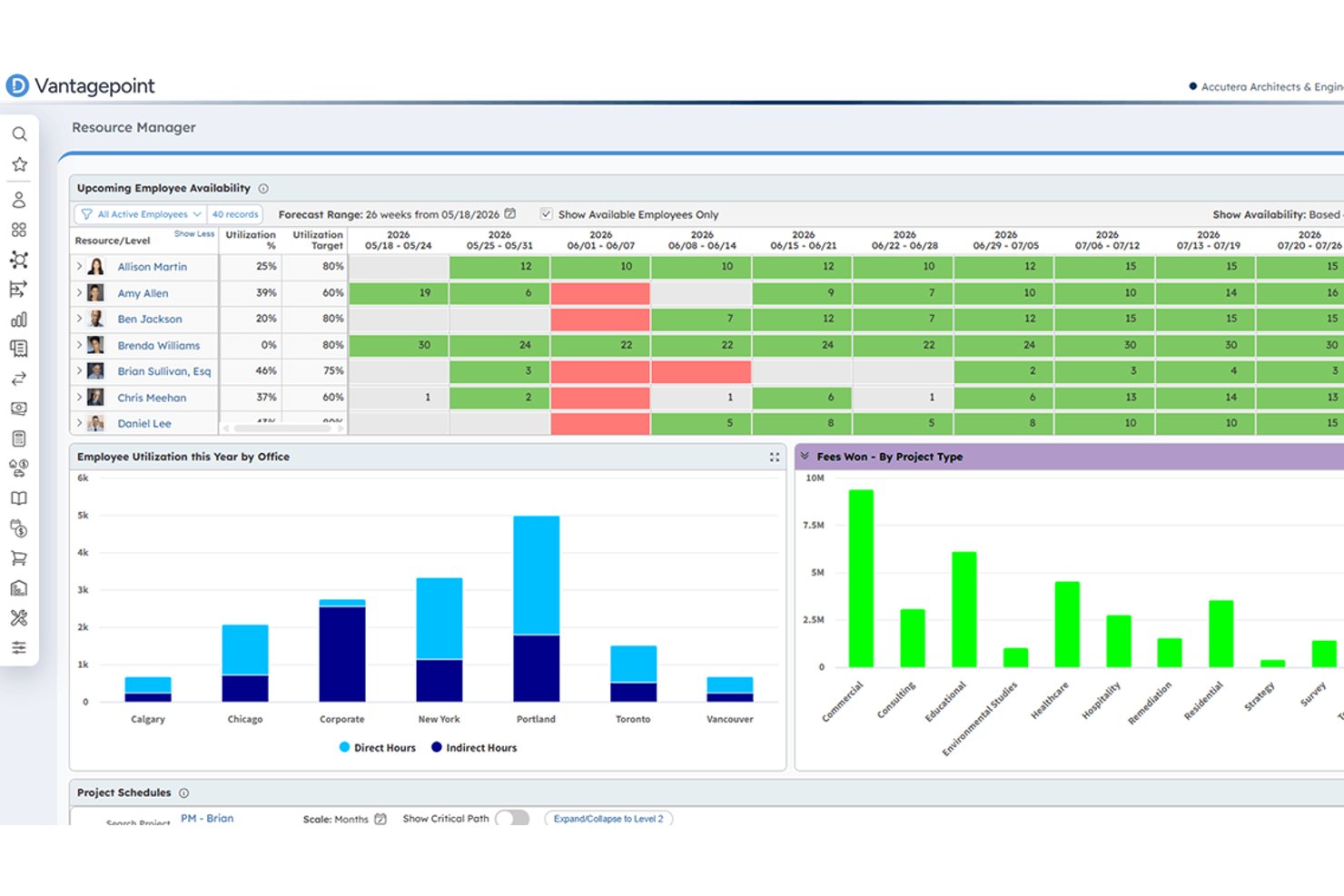
Deltek Vantagepoint is an ERP platform built for consulting and professional services firms that connects resource planning, project management, pipeline tracking, and financial management in a single system.
Who Is Deltek Vantagepoint Best For?
Deltek Vantagepoint is a strong fit for consulting firms that need to connect CRM pipeline data with resource planning and project financials in one system.
Why I Picked Deltek Vantagepoint
Deltek Vantagepoint earns its spot on my shortlist because it's one of the few tools that connects CRM pipeline data directly to resource planning, so you can soft-book staff against in-pursuit projects and harden those assignments as deals close. I particularly like how the Labor Resource Forecast report ties forecast hours, costs, and billing amounts together by project plan and employee, giving you a clear read on margin before work even begins. The scenario planning tools let you model scope, team, and schedule changes against a live plan without disrupting it, which is exactly what you need when a pursuit shifts mid-proposal.
Deltek Vantagepoint Key Features
- Skills search: Lets you find available staff by skill, title, labor category, or supervisor to match people to specific project needs.
- Workload balancing: Surfaces over- and underutilized staff through color-coded views and supports quick reassignment across projects.
- Resource Planning API: Provides programmatic access to employee and generic-resource assignments, planned hours, and project hierarchy data.
- Mobile time and expense tracking: Lets consultants view, enter, and submit timesheets and expense reports from their mobile device.
Deltek Vantagepoint Integrations
Deltek Vantagepoint has documented native integrations with GovWin IQ, Deltek PIM, Deltek ArchiSnapper, Microsoft Outlook, and Gmail, plus an integration with UKG. It also connects through Deltek Marketplace and offers a REST API for custom integrations.
Pros and Cons
Pros:
- Models staffing scenarios against live project plans
- Tracks utilization alongside billable project work
- Connects pursuit staffing with project margins
Cons:
- Some teams find forecasting and staffing rough
- Reports can require extra steps and Excel

Certinia
Best for Salesforce-based consulting firms
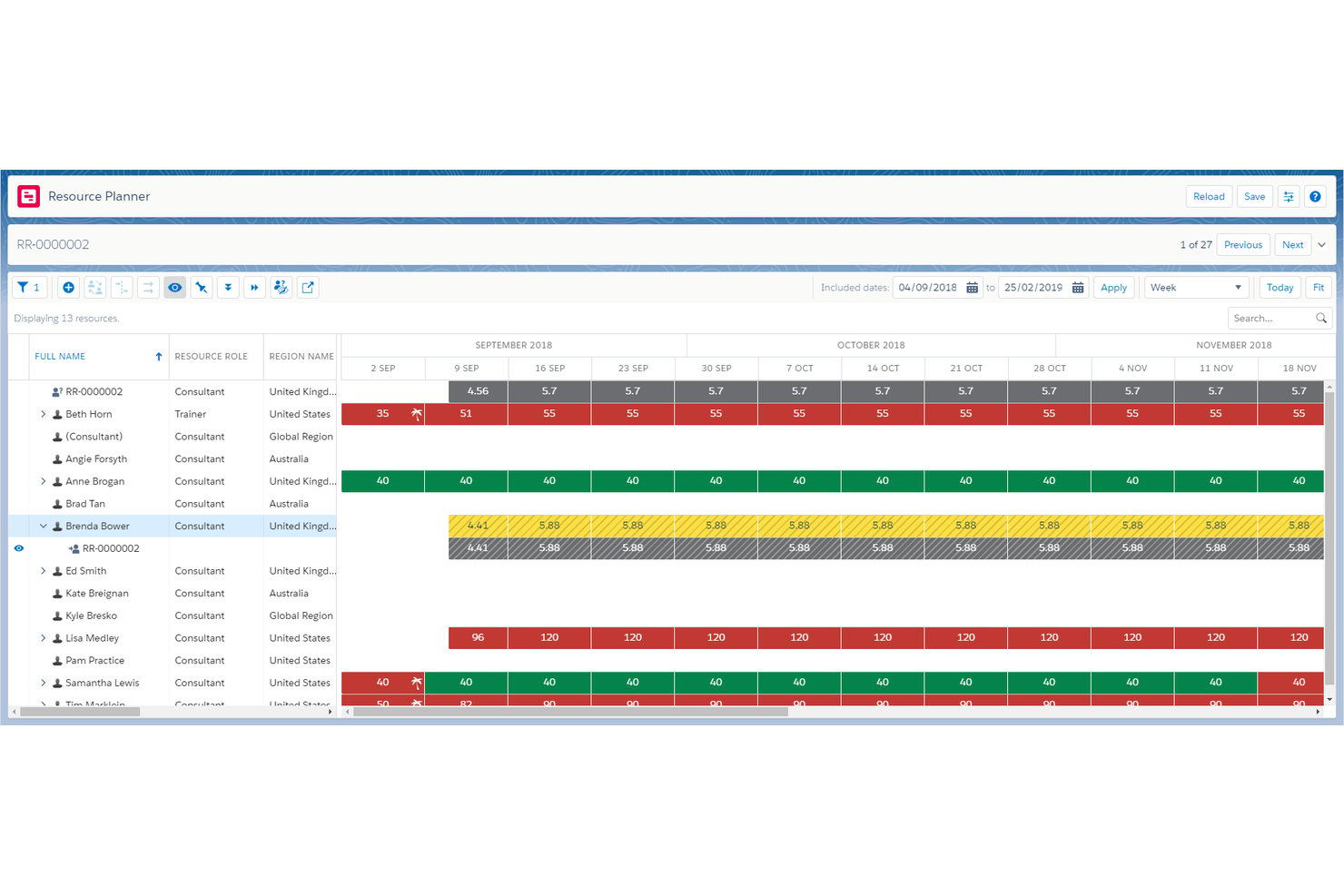
Certinia Professional Services Cloud is a Salesforce-native PSA platform that covers resource scheduling, skills-based matching, utilization tracking, capacity planning, project financials, and services billing in a single connected system.
Who Is Certinia Best For?
Certinia Professional Services Cloud is a strong fit for consulting firms already running on Salesforce that want resource scheduling, utilization tracking, and project financials in one connected system.
Why I Picked Certinia
Certinia earns its spot on my shortlist because it's built natively on Salesforce, meaning your resource scheduling, project financials, and client pipeline data all live in one connected system without any stitching together. I especially like its skills-based matching engine, which ranks candidates by essential and desirable skills, certifications, and availability in a single request workflow. The utilization dashboards let me compare targets, scheduled hours, and actual hours across regions, practices, or individual resources in real time.
Certinia Key Features
- Sales-to-project handoff: Converts Salesforce opportunities directly into projects, linking pipeline data to resource forecasts and revenue tracking from the start.
- Multi-model services billing: Handles time-and-materials, fixed-fee, subscription, and product-sales billing within a single connected billing workflow.
- Mobile resource management workspace: Gives managers access to alert cards, weekly summaries, time entry, and expense submission from any device.
- PSA Timecard API: Sends approved timecard data to third-party payroll or HCM systems in batches, with options to filter by resource, date range, or earnings code.
Certinia Integrations
Certinia lists integrations including Concur, Expensify, XCD, Avalara, Plaid, and Storecove. Its RESTful and SOAP APIs support custom connections, including approved timecard transfers to payroll or HCM systems.
Pros and Cons
Pros:
- Compares utilization across practices and teams
- Ranks consultants by skills and availability
- Connects Salesforce pipeline with staffing
Cons:
- Work Planner caps views at 2,000 resources
- Services forecasting remains in beta

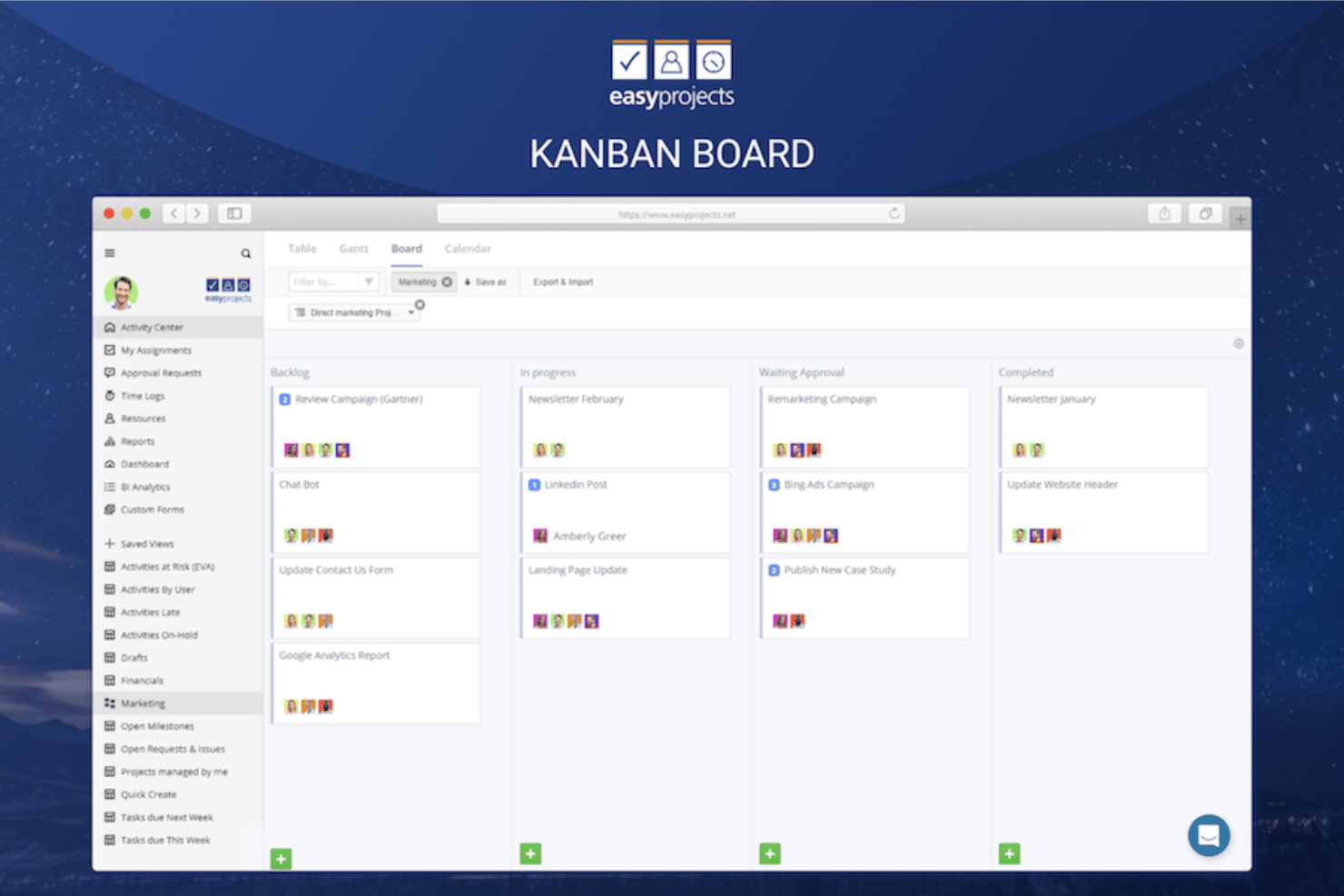
Birdview PSA is a professional services automation platform that connects resource planning, capacity management, project delivery, time tracking, and billing into a single AI-assisted workflow for services firms.
Who Is Birdview PSA Best For?
Birdview PSA is a strong fit for growing professional services firms that need to check staffing feasibility before committing to new client engagements.
Why I Picked Birdview PSA
Birdview PSA earns its spot on my shortlist because of how well it handles staffing feasibility before a single commitment is made. I particularly like the Simulation screen, which matches a proposed project's skill requirements and timeline against actual team availability, returning the earliest viable start date and a list of qualifying people. Soft allocations let me tentatively reserve consultants without locking their capacity, so I can explore staffing options across multiple pipeline opportunities simultaneously.
Birdview PSA Key Features
- Capacity-aware quoting: Check how a proposed engagement affects team availability, workload, resource demand, and delivery timelines before you commit to a quote.
- Demand forecasting: View pipeline opportunities, planned projects, and active delivery together to assess future resource demand and spot gaps.
- Client portal: Share project progress, timelines, deliverables, and approvals directly with clients through a controlled access view.
- Power BI dashboards: Analyze utilization, margin, budget burn, and portfolio performance using prebuilt dashboards connected to live project data.
Birdview PSA Integrations
Birdview PSA offers native integrations with Jira, ServiceNow, QuickBooks, Microsoft Project, SharePoint, Microsoft Excel, and TimeControl, plus Salesforce and HubSpot connections. It supports REST API, MCP access, Zapier, and Workato.
Pros and Cons
Pros:
- Soft bookings preserve options across pipeline work
- Utilization views expose consultant overload early
- Visual timelines clarify overlapping client engagements
Cons:
- Finding assigned activities can slow logging
- Time entry takes extra steps
Danışmanlar İçin Diğer Kaynak Yönetimi Yazılımları
Aşağıda, en iyi listeye giremeyen ancak yine de kesinlikle göz atmaya değer olan danışmanlara yönelik ek kaynak yönetimi yazılımlarının bir listesi yer alıyor.
- Screendragon
For multi-market, mixed-team resourcing
- Saviom
For staffing unconfirmed projects
- Runn
For modeling tentative project pipelines
- Smartsheet
For resourcing in Smartsheet projects
- Celoxis
For on-premise consultant staffing
- Teamwork.com
For staffing unconfirmed client work
- Mosaic
For planning alongside consulting ERPs
- Parallax
For auto-generated resource plans
- Tempus Resource
For sales-pipeline staffing forecasts
- Bridgit
For construction bid staffing forecasts


İlgili Proje Yönetimi Yazılımları
Aradığınızı burada hâlâ bulamadıysanız, test edip değerlendirdiğimiz şu diğer ilgili araçlara göz atın:
- Proje Yönetimi Yazılımları
- Kaynak Yönetimi Yazılımları
- İş Akışı Otomasyonu Yazılımları
- Görev Yönetimi Yazılımları
- Gantt Şeması Oluşturucuları
- Proje Planlama Yazılımları
- Resource Guru Alternatifleri
How I Evaluate Resource Management Software
I split my evaluation into three parts, with core functionality carrying the most weight: schedule people across projects, see available capacity, and balance workloads. Next, I consider differentiators such as scenario planning and skills-based matching. Finally, I look beyond features at onboarding, support, and pricing fit.
Core Functionality (Table Stakes For This List)
When I'm selecting tools for my list, I score each one on a scale from 0 (does not offer the functionality) to 5 (excels in this area) for each core functionality listed below. I then convert the total into a percentage to help assess each tool's overall fit, with extra weight on any functionalities I’ve deemed essential.
- Resource Scheduling (Essential): I look for a visual schedule that assigns people to projects over time and reveals clashes when two plans need the same specialist.
- Capacity Visibility (Essential): The view should compare each person’s available capacity with committed work, so I can spot a team-wide shortfall before a project starts.
- Workload Management: I check whether managers can rebalance assignments when a launch slips or one designer carries several urgent deliverables.
- Utilization Tracking: I assess whether reports compare planned with actual time and separate billable from non-billable work across projects.
- Demand Forecasting: I look for forecasts that use project plans or pipeline data to flag staffing gaps before likely work enters delivery.
- Skills Matching: I consider whether filters connect skills and roles to availability, such as finding an available engineer with the right platform experience.
Once I have a list of tools that meet the criteria, I consider what sets each platform apart.
Differentiating Factors (What Sets Vendors Apart)
Here's how I compare and contrast different vendors:
Standout Features
Scenario modeling is the first thing I check. When a client project slips or a new deal closes early, I need to compare two or three staffing plans side by side before moving anyone. I also look at how well a tool surfaces bench time alongside financial reporting—knowing who's underutilized only helps if I can see the margin impact of reassigning them to a billable project.
Beyond Features
I check whether a tool connects to the PM, HRIS, and financial systems a team already runs on. If resource data lives in a silo, planners end up re-keying rates and availability into spreadsheets—exactly what the software should replace. I also evaluate how well each platform scales. A ten-person studio and a multi-department consultancy need different permission models and licensing structures, so I look at role-based access controls and whether pricing grows predictably as headcount rises.
Danışmanlar İçin Kaynak Yönetimi Yazılımı Nasıl Seçilir?
Kendinize özgü yazılım seçim sürecinizi yürütürken aşağıdaki noktaları göz önünde bulundurun:
- Belirli İhtiyaçları Anlama: Kaynak yönetimi yazılımını seçmeden önce belirli ihtiyaçlarınızı tanımlayın. Buna ekibinizin büyüklüğünü, projelerinizin karmaşıklığını ve yönetmeniz gereken kaynak türlerini anlamak dahildir. Örneğin, çeşitli konumlarda birden fazla ekibi yöneten bir danışman, planlama ve kaynak tahsisi için kapsamlı özelliklere sahip bir yazılıma ihtiyaç duyacaktır.
- Entegrasyon Yetenekleri: CRM sistemleri, muhasebe yazılımları veya iletişim platformları gibi mevcut araçlarınıza kolayca bağlanabilen yazılımları tercih edin. Bu husus, bir araçlar paketine güvenen ve bunlar arasında veri tutarlılığını sağlaması gereken danışmanlar için özellikle önemlidir.
- Ölçeklenebilirlik: Danışmanlık işletmeniz büyüdükçe yazılımınız da bu büyümeye ayak uydurabilmelidir. Performansta düşüş yaşanmadan daha fazla kaynağı, projeyi ve kullanıcıyı destekleyebilen, işletmenizle birlikte ölçeklenebilecek bir çözüm seçmek önemlidir. Örneğin, önümüzdeki birkaç yıl içinde büyümeyi planlayan küçük bir danışmanlık firması, artan iş yükünü kaldırabilecek bir yazılımdan yararlanacaktır.
- Kullanıcı Deneyimi: Tüm ekip üyelerinin yazılımı etkili şekilde kullanabilmesini sağlamak için yazılım kullanıcı dostu olmalıdır. Danışmanlar genellikle farklı ekiplerle çalıştığından, sezgisel bir arayüze sahip yazılım hızlı benimsemeyi kolaylaştırır ve eğitim süresini en aza indirir. Bunun aksine, karmaşık bir sistem dik bir öğrenme eğrisine ve ekipte dirence yol açabilir.
- Müşteri Desteği ve Eğitim: İyi müşteri desteği ve kapsamlı eğitim materyalleri, yazılımın başarılı şekilde uygulanmasını ve kullanılmasını büyük ölçüde etkileyebilir. Kullanılabilirlik ve yanıt verme hızı da dahil olmak üzere yazılım sağlayıcısının sunduğu destek düzeyini değerlendirin. Bu, müşteri ihtiyaçlarını veya proje teslim tarihlerini karşılamak için acil yardıma ihtiyaç duyabilecek danışmanlar açısından özellikle önemlidir.
Danışmanlar İçin Kaynak Yönetimi Yazılımındaki Trendler
Danışmanlık sektörü gelişmeye devam ederken kaynak yönetimi yazılımı, verimli çalışmayı kolaylaştırmak için giderek daha önemli hale geliyor. Birkaç temel trend, kaynak yönetimi teknolojisini şekillendirerek danışmanlara kaynaklarını daha etkili şekilde yönetmeleri için yenilikçi çözümler sunuyor.
- Öngörücü Analizler İçin Yapay Zekâ ile Entegrasyon: Kaynak yönetimi yazılımı, öngörücü analizler sunmak için yapay zekâyı giderek daha fazla entegre ediyor. Bu, danışmanlara yönelik yapay zekâ araçlarının danışmanların proje ihtiyaçlarını öngörmesine ve kaynakları daha etkili şekilde tahsis etmesine nasıl yardımcı olabileceğinin bir örneğidir.
- Gerçek Zamanlı İş Birliğine Vurgu: Günümüzde birçok yazılım, ekipler arasında gerçek zamanlı iş birliğini destekleyen özelliklere önem veriyor. Bu trend, konumdan bağımsız olarak eş zamanlı çalışması gereken danışmanların ihtiyaçlarından kaynaklanıyor.
- Geliştirilmiş Özelleştirme ve Esneklik: Ayrıca daha özelleştirilebilir ve esnek kaynak yönetimi çözümlerine yönelim var; bu da danışmanların yazılımı belirli proje gereksinimlerine ve iş akışlarına uyacak şekilde düzenleyebileceği anlamına geliyor.
- Mobil Erişilebilirlik ve Bulut Entegrasyonu: Kaynak yönetimi araçları, mobil erişilebilirliğe ve bulut entegrasyonuna giderek daha fazla odaklanıyor. Bu sayede danışmanlar kaynakları her zaman ve her yerden yönetebiliyor.
- Sürdürülebilirlik ve Kaynak Optimizasyonu: Ayrıca yazılımlar artık sürdürülebilirlik ve kaynak optimizasyonu için özellikler sunuyor; danışmanların israfı azaltmasına ve verimliliği artırmasına yardımcı olmaya odaklanıyor.
Danışmanlar İçin Kaynak Yönetimi Yazılımı Nedir?
Danışmanlara yönelik kaynak yönetimi yazılımı, kullanıcıların kaynaklarını verimli şekilde yönetmesine ve tahsis etmesine yardımcı olmak üzere tasarlanmıştır. Danışmanlık firmaları ve bağımsız danışmanlar bu yazılımı genellikle birden fazla proje genelindeki insan ve maddi kaynakları planlamak, izlemek ve yönetmek için kullanır. Temel yetenekler arasında kaynak ihtiyaçlarını öngörme, proje personelini planlama, kaynakların kullanılabilirliğini ve kullanım oranını izleme ve gelecekteki kaynak planlamasını optimize etmek için performans verilerini analiz etme yer alır. Bu yazılım, birden fazla müşterinin taleplerini dengelemesi ve kaynakların verimli kullanılmasını sağlaması gereken danışmanlar için vazgeçilmez olabilir.
Danışmanlar İçin Kaynak Yönetimi Yazılımının Özellikleri
Danışmanlar için doğru kaynak yönetimi yazılımını seçerken, danışmanlık hizmetlerinin özel gereksinimlerini de karşılayan ve etkili proje denetimi ile kaynak tahsisi sağlayan bir araç seçmek önemlidir. Aşağıda aranması gereken temel kaynak yönetimi özellikleri yer almaktadır:
- Gerçek Zamanlı Görünürlük: Bu özellik, kullanılabilir kaynaklar hakkında anında içgörüler elde etmenizi sağlayabilir. Bu özellik, bilinçli kararlar almak ve proje taleplerindeki değişikliklere hızlı bir şekilde yanıt vermek için hayati önem taşır.
- Yetenek Takibi: Bu özellik, ekibinizin yetkinliklerini anlamanıza yardımcı olabilir. Kullanabileceğiniz yetenekleri bilmek, proje gereksinimlerini doğru kişilerle etkili bir şekilde eşleştirmenizi sağlar.
- Öngörü: Bu özellik, gelecekteki projeler için kaynak ihtiyaçlarını öngörmenize yardımcı olabilir. Doğru öngörü, iş yükünün dengeli olmasını sağlayarak darboğazların ve personelin aşırı veya yetersiz kullanımının önlenmesine yardımcı olur.
- Kapasite Planlaması: Bu özellik, ekibinizin iş yükünü yönetmenize yardımcı olur. Bu, tükenmişliğe ve verimliliğin azalmasına yol açabilecek aşırı iş yükünü önlemenizi sağlar.
- Proje Yönetimi Entegrasyonu: Bu özellik, kaynak planlamasını proje zaman çizelgelerine bağlamanıza yardımcı olur. Bu entegrasyon, kaynak tahsisinin proje kilometre taşları ve son teslim tarihleriyle uyumlu hale getirilmesi için gereklidir.
- Zaman Takibi: Zaman çizelgeleri gibi zaman takip araçları, çeşitli görev ve projelere harcanan zamanı izlemenize yardımcı olabilir. Zaman takibi, faturalandırma doğruluğu, faturalandırılabilir ve faturalandırılamaz saatlerin takibi ve proje kârlılığının anlaşılması için kritik öneme sahiptir.
- Raporlama ve Analiz: Bu özellik, ayrıntılı raporlara ve performans analizlerine erişmenize yardımcı olabilir. Bu içgörüler, kaynak kullanımının verimliliğini değerlendirmek ve verilere dayalı kararlar almak için gereklidir.
- İş Birliği Araçları: Bu özellik, danışmanlar arasındaki iletişimi ve ekip çalışmasını kolaylaştırmanıza yardımcı olabilir. Etkili iş birliği, tüm ekip üyelerinin aynı anlayışta olmasını sağlayarak her projenin başarısının temelini oluşturur.
- Mobil Erişilebilirlik: Bu özellik, kaynakları hareket halindeyken yönetmenize yardımcı olabilir. Mobil erişim, danışmanların kaynak durumlarını herhangi bir yerden güncellemelerine ve kontrol etmelerine de olanak tanır; bu, özellikle sık seyahat eden kişiler için oldukça kullanışlıdır.
- Özelleştirme: Bu özellik, yazılımı firmanızın özel ihtiyaçlarına göre uyarlamanıza yardımcı olabilir. Özelleştirme, yazılımın danışmanlık uygulamanızın benzersiz süreçlerine ve iş akışlarına uyum sağlamasını güvence altına alır.
Danışmanlar için Kaynak Yönetimi Yazılımının Faydaları
Kaynak yönetimi yazılımı, kaynak optimizasyonu ve proje planlaması için birleştirilmiş bir platform sunar; bu da danışmanların operasyonel verimliliklerini artırmalarına yardımcı olabilir. Danışmanlar için kaynak yönetimi yazılımı kullanmanın başlıca faydaları şunlardır:
- Kaynakların Etkili Planlanması: Yazılım, çalışanların iş yükleri ve uygunluk durumları hakkında gerçek zamanlı görünürlük sağlayarak görevlerin etkili bir şekilde dağıtılmasına ve danışmanların hem aşırı görevlendirilmesinin hem de yeterince kullanılmamasının önlenmesine olanak tanıyabilir.
- Doğru Öngörü ve Kapasite Planlaması: Danışmanlar, gelecekteki kaynak gereksinimlerini öngörebilir ve olası proje engellerini belirleyebilir. Bu sayede kuruluşlar, iş gücünü piyasa dalgalanmalarına yanıt verecek şekilde ayarlayabilir ve projenin ivmesini koruyabilir.
- Geliştirilmiş Kaynak Tahsisi: Yazılım içindeki gerçek zamanlı yetkinlik matrisi, danışmanların beceri setlerine göre projelere atanmasını güvence altına alır; böylece proje kalitesini artırır ve başarılı sonuç elde etme olasılığını yükseltir.
- Değerli İş Zekâsı: Zengin verileri ve ölçümleriyle kaynak yönetimi yazılımı, yöneticilerin düzensizlikleri fark etmesine ve proje maliyetlerini proaktif bir şekilde yönetmesine olanak tanıyan içgörüler sunar; stratejik karar almayı teşvik eder ve proje yönetimini geliştirir.
- Diğer Sistemler ve İş Akışlarıyla Entegrasyon: Diğer sistemlerle entegre olabilme özelliği, veri toplama ve analizini merkezileştirerek idari iş yükünü basitleştirir; böylece bordro ve faturalandırma süreçlerini kolaylaştırır ve idari gecikmeleri azaltır.
Kapsamlı özelliklere sahip kaynak yönetimi yazılımına yatırım yapan danışmanlar, kaynak kullanımını, stratejik planlamayı ve genel proje başarısını geliştirebilir.
Danışmanlar için Kaynak Yönetimi Yazılımının Maliyetleri ve Fiyatlandırması
Kaynak yönetimi yazılımının maliyetlerini ve fiyatlandırmasını anlamak, yatırım getirisini en üst düzeye çıkarmak isteyen danışmanlar için kritik öneme sahiptir. Piyasada çok çeşitli fiyatlandırma modelleri bulunduğundan, her seçeneğin özellikler ve ölçeklenebilirlik açısından neler sunduğunu değerlendirmek önemlidir. Burada, bütçeniz ve ihtiyaçlarınız için doğru çözümü seçmenize yardımcı olmak amacıyla kaynak yönetimi yazılımına yönelik çeşitli fiyatlandırma planları ve maliyet unsurları hakkında kısa bir genel bakış sunuyorum.
Danışmanlar için kaynak yönetimi yazılımında yaygın olarak kullanılan fiyatlandırma planlarının dökümü aşağıda verilmiştir.
Danışmanlar için Kaynak Yönetimi Yazılımı Planları Karşılaştırma Tablosu
| Plan Türü | Ortalama Fiyat | Yaygın Özellikler |
| Ücretsiz | $0 | Temel kaynak planlama, Sınırlı sayıda proje, Temel raporlama |
| Temel | $10 - $20/kullanıcı/ay | Gelişmiş planlama, Zaman takibi, Temel analizler |
| Profesyonel | $20 - $40/kullanıcı/ay | Gelişmiş kaynak planlaması, Gerçek zamanlı iş birliği, Eksiksiz proje yönetimi paketi |
| Kurumsal | Özel Fiyatlandırma | Özel entegrasyonlar, Gelişmiş güvenlik özellikleri, Kişiselleştirilmiş işe alıştırma ve destek |
Bir plan seçerken kullanıcı sayınız, projelerinizin karmaşıklığı ve ihtiyaç duyduğunuz destek düzeyi gibi danışmanlık uygulamanızın özel ihtiyaçlarını dikkate almanız önemlidir. Tam olarak karar vermeden önce seçtiğiniz yazılımı değerlendirmek için ücretsiz deneme sürümü sunan seçeneklere yönelmek genellikle akıllıca olacaktır. İhtiyaçlarınıza bağlı olarak maliyetleri azaltmak için temel bir planla veya daha kapsamlı özellikler için profesyonel bir planla başlayabilirsiniz.