

2026 İçin İncelenen En İyi 10 Proje Tahmin Yazılımı

En İyi Proje Tahmin Yazılımları Kısa Listesi


Proje tahmin yazılımları, proje sonuçlarını daha doğru tahmin etmenize, beklentileri etkili bir şekilde yönetmenize ve mevcut veriler ile trendlere dayanarak gelecekteki proje performansını tahmin etmenize yardımcı olabilir; ancak ideal aracı seçmek zordur.
Bir yazılım uzmanı ve proje yöneticisi olarak sahip olduğum kapsamlı deneyimden yararlanarak, zaman ve para yatırmaya değer çeşitli araçları inceledim ve kısa listeye aldım. Her birini neden seçtiğime ve avantajları ile dezavantajlarının neler olduğuna dair açıklamalarla birlikte seçimlerimi aşağıda görebilirsiniz.
Why Trust Our Software Recommendations
Our team has been testing and reviewing software since 2012. As project managers ourselves, we know how difficult—and important—it is to choose the right software.
For this guide, we evaluated tools using hands-on testing and independent research, scoring tools using our selection criteria. We also draw on insights from industry thought leaders and practicing project management experts.
Our reviews reflect our human editorial judgment, not a sales pitch.
Expert reviewers:
Proje Tahmin Yazılımları Karşılaştırma Tablosu
En iyi proje tahmin yazılımı seçimlerimin fiyatlandırma ayrıntılarını bu karşılaştırma tablosunda özetledim:
| Tool | Starting Price | Website | |
|---|---|---|---|
| Best for professional services revenue forecasting | 4.5 out of 5 | $17/user/month 14-day free trial | Book Demo |
| Best for agency resource forecasting | 4.6 out of 5 | Pricing upon request Not available | Book Demo |
| Best for AI-driven project forecasting | 4.3 out of 5 | $10/user/month Free plan + 14-day trial + demo available | Book Demo |
| Best for familiar project management tools | 4.7 out of 5 | £679.99 one-time purchase Not available | Website |
| Best for cross-functional decision making | 4.5 out of 5 | Pricing upon request Free demo available | Website |
| Best for integrated planning solutions | 4.4 out of 5 | Pricing upon request Free demo available | Website |
| Best for workforce planning | 4.4 out of 5 | Pricing upon request Free demo available | Website |
| Best for real-time financial modeling | — | Price upon request Free demo available | Website |
| Best for complex scenario modeling | — | Pricing upon request 30-day free trial | Website |
| Best for advanced analytics in large enterprises | — | Pricing upon request. | Website |
En İyi 10 Proje Tahmin Yazılımına Genel Bakış
Her bir proje tahmin yazılımına ilişkin derinlemesine analizlerim ve kapsamlı genel bakışlarım burada yer alıyor. Doğru seçeneği bulmanıza yardımcı olmak için avantajları ve dezavantajları, temel özellikleri ve en uygun kullanım alanlarını ele aldım.

Scoro
Best for professional services revenue forecasting
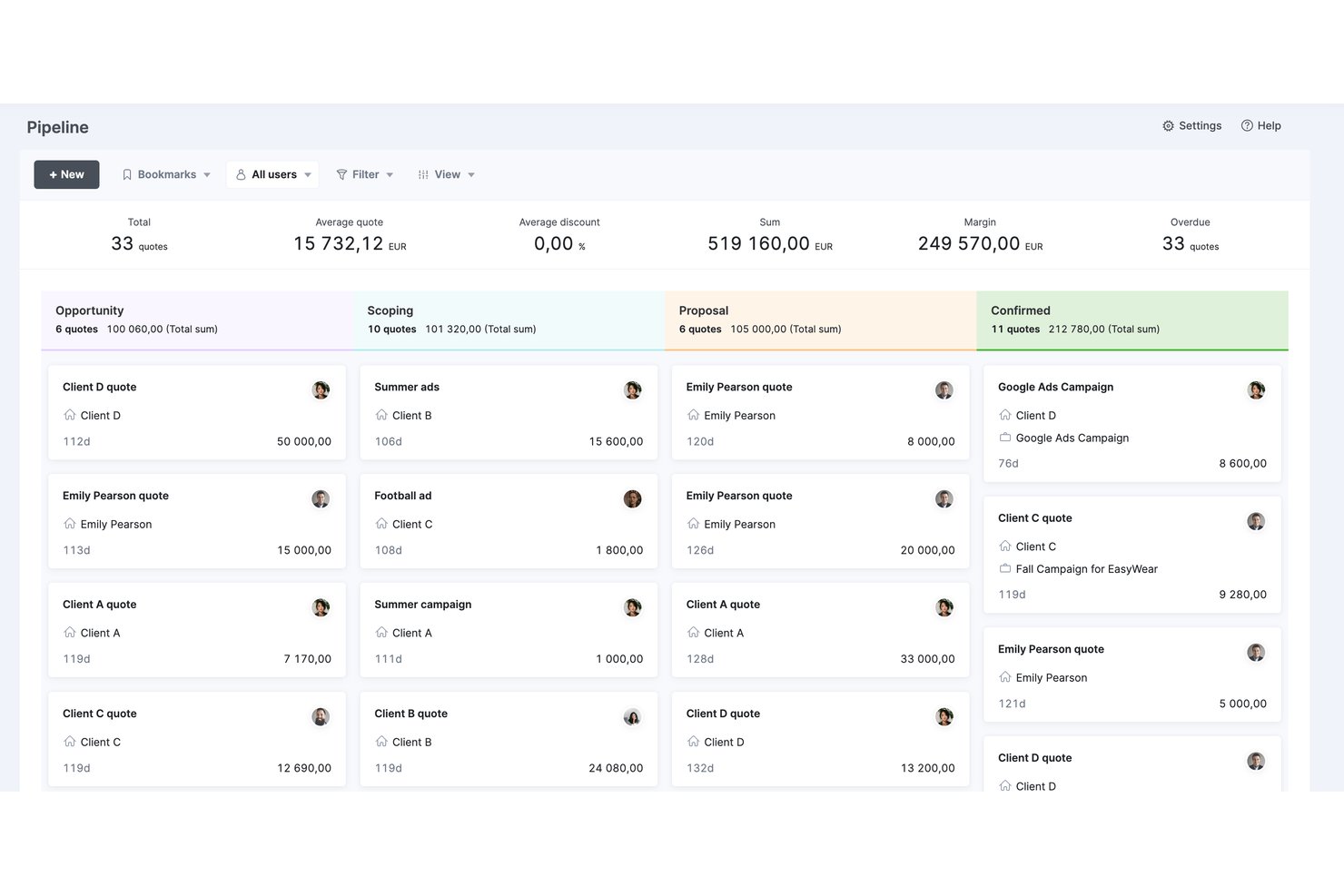
Scoro is a professional services automation (PSA) platform that integrates project delivery, resource planning, time tracking, budget forecasting, and revenue reporting in a single tool.
Who Is Scoro Best For?
Scoro is a strong fit for professional services firms—consultancies, agencies, and IT service providers—that need to connect pipeline revenue, resource capacity, and project profitability in one place.
Why I Picked Scoro
I've included Scoro in my top picks because it connects pipeline revenue to resource capacity in a way most project forecasting tools don't. Specifically, the pipeline view links CRM-stage opportunities to staffing forecasts before a contract is signed, so you're never caught scrambling when a deal closes. Pair that with real-time profitability tracking at the project and service-line level, and you get revenue forecasting that's genuinely useful for professional services firms managing multiple client engagements at once.
Scoro Key Features
- Utilization heatmaps: Visual maps of individual and role-level workload help you spot overloaded or underutilized team members across projects.
- Quoted vs. actuals reporting: Side-by-side comparison of estimated versus recorded hours and costs on past projects to sharpen future estimates.
- Tentative bookings: Soft-reserve team capacity for unconfirmed pipeline work, then convert to fixed allocations once a deal closes.
- ELI AI assistant: Natural language queries surface project financials, billable hours, and utilization data on demand without manual report building.
Scoro Integrations
Scoro offers native integrations with Xero, QuickBooks, Sage Intacct, Exact Online, HubSpot, Salesforce, Jira, BambooHR, Google Workspace, Microsoft 365, and Slack. It also supports 80+ marketplace apps, Zapier, and an Open API for custom integrations.
Pros and Cons
Pros:
- AI-powered assistant for instant report generation
- Real-time profitability and budget burn tracking
- Pipeline-linked forecasting from CRM to delivery
Cons:
- No formal earned value management metrics
- No dedicated scenario or what-if modeling
New Product Updates from Scoro

Scoro Adds Time Mobile App and ELI Improvements
Scoro adds the Scoro Time mobile app for iOS/Android to track time anywhere and expands ELI with attachments, smarter filtering, and trigger-based actions. For more information, visit Scoro's official site.
 .

Best for agency resource forecasting
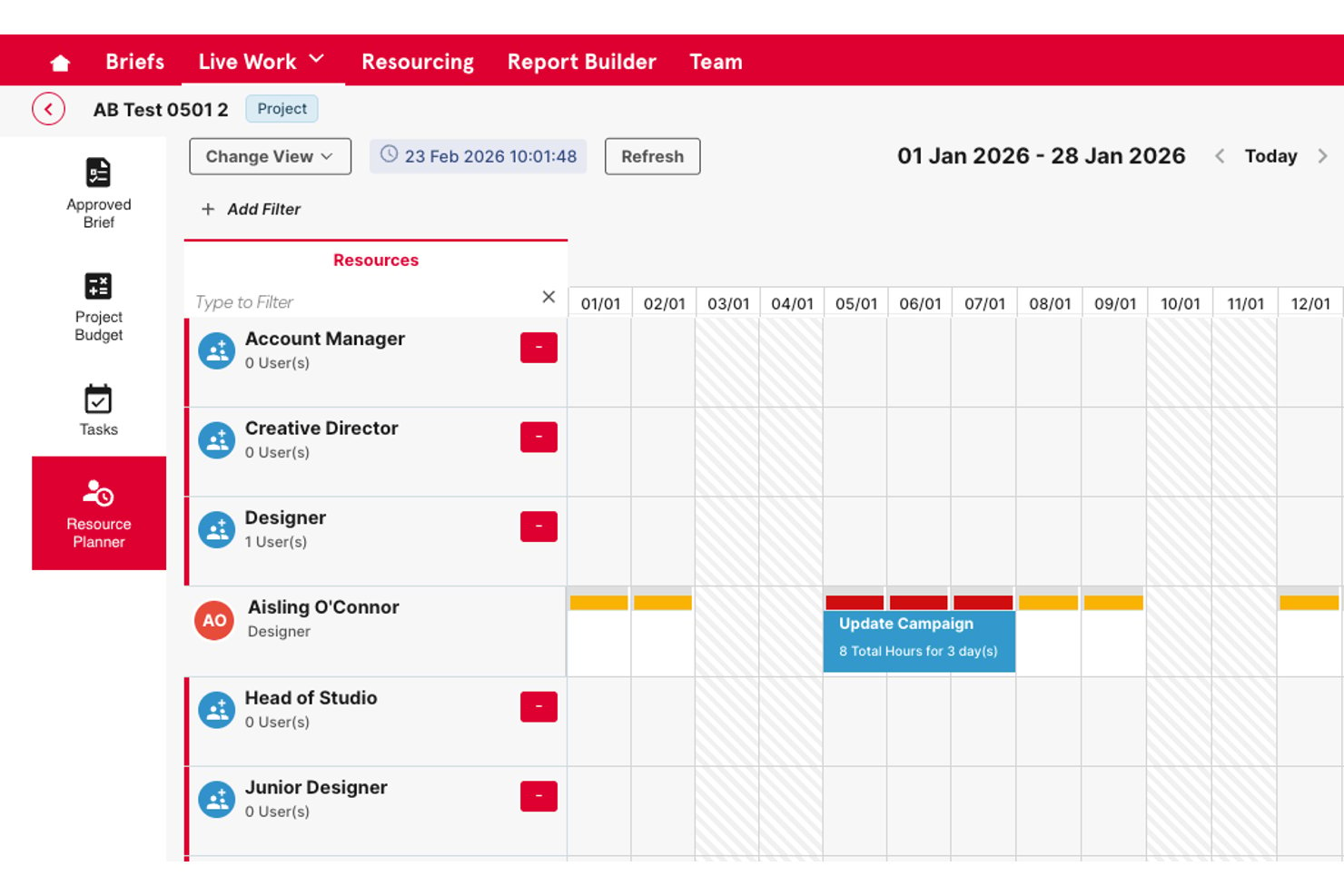
Screendragon is an enterprise work management platform for marketing teams and agencies that combines resource capacity planning, budget tracking, workflow automation, and approval management in one system.
Who Is Screendragon Best For?
It's a strong fit for mid-to-large creative agencies and enterprise in-house marketing teams managing high volumes of work across multiple clients or brand portfolios.
Why I Picked Screendragon
Screendragon earns its spot on my shortlist because of how it handles resource forecasting at the agency level. I like that it gives resource managers a forward-looking capacity view across every active project, so you can spot staffing gaps before they become delivery problems. The budget tracking layer ties directly into resource planning, meaning I can see utilization and cost burn in the same view rather than toggling between disconnected tools.
Screendragon Key Features
- No-code workflow builder: Lets you design and automate project workflows without technical expertise.
- Granular permissions: Provides role-based access controls down to the field level for sensitive data management.
- Embedded approval workflows: Streamlines asset approvals with markup tools, side-by-side versioning, and centralized audit trails.
- Custom reporting dashboards: Enables building real-time, personalized dashboards to report on project and portfolio data.
Screendragon Integrations
Screendragon offers native integrations with HubSpot, Microsoft Power BI, Ziflow, Brandfolder, Workato, and Smartsheet. An API is available for custom integrations.
Pros and Cons
Pros:
- Configurable approval workflows for complex structures
- Budget tracking tied directly to resource planning
- Forward-looking capacity view across active projects
Cons:
- Reporting customization requires setup time
- Forecasting depth limited

Wrike
Best for AI-driven project forecasting

Wrike is a project management platform that helps teams plan, manage, and track projects with tools for task management, collaboration, and reporting. Its AI-powered features and forecasting tools make it particularly effective for teams needing visibility into project performance and future outcomes.
Why I Picked Wrike:
Wrike supports project forecasting through its Work Intelligence tool, which analyzes project data to predict risks and suggest next steps. Real-time dashboards and reporting provide insights into project performance, helping teams forecast timelines, budgets, and resource needs more accurately. Wrike’s flexibility with project views, including Gantt charts and Kanban boards, also helps visualize project progress and anticipate future requirements.
Wrike Standout Features & Integrations:
Features include AI-powered forecasting through predictive analytics, real-time dashboards for monitoring KPIs, and project views that support visualizing timelines and workloads. Wrike’s centralized Datahub integrates information from various sources, while mobile apps allow access to project data from anywhere.
Integrations include 400+ pre-built native connections, including Microsoft, Google, Dropbox, Salesforce, and Marketo.
Pros and Cons
Pros:
- Easily visualize workflow performance
- Individuals and teams can track workloads
- In-app chat to reduce switch cost for collaboration
Cons:
- Limited to 10 workflows per space
- Not suitable for small organizations
New Product Updates from Wrike

Wrike Redesigns Workspace Search With New Filters
Wrike introduces a redesigned Workspace Search interface with recent search shortcuts, item type and location filters, and parent-task context. These updates help users find relevant work items and navigate search results efficiently. For more information, visit Wrike’s official site.
 .
Best for familiar project management tools

Microsoft Project offers comprehensive tools for project scheduling, portfolio management, and resource management. It is best for users seeking familiar, robust project management tools integrated within the Microsoft ecosystem.
Why I Picked Microsoft Project:
I selected Microsoft Project for this list due to its widespread recognition and integration within the Microsoft ecosystem, making it a go-to choice for many organizations already using Microsoft products. Its familiarity and depth in project management functionalities make it ideal for users looking for a comprehensive, integrated solution.
Microsoft Project Standout features & integrations:
Features include detailed project scheduling features, resource allocation tools, and built-in templates that help streamline project setup and tracking. The software's deep integration with Microsoft 365 enhances collaboration and reporting capabilities, making it easy to manage projects within a familiar framework.
Integrations include Microsoft Teams, Microsoft Excel, Microsoft Power BI, SharePoint, OneDrive, Azure DevOps, Dynamics 365, Outlook, PowerApps, and Yammer.
Pros and Cons
Pros:
- Familiar interface to many users
- Comprehensive project management features
- Deep integration with Microsoft 365
Cons:
- Annual commitment required
- Can be complex for small teams or simple projects
- Mainly suitable for users deep in the Microsoft ecosystem

Anaplan
Best for cross-functional decision making

Anaplan offers a cloud-based planning platform that connects data, people, and plans across any business. It excels in cross-functional decision making with its collaborative approach.
Why I Picked Anaplan:
I selected Anaplan for this list because of its strong capabilities in connecting various functions within an organization to streamline planning and decision-making processes. Its platform supports a collaborative approach, making it ideal for businesses that rely on synchronized decision making across multiple departments.
Anaplan Standout features & integrations:
Features include Hyperblock technology, which allows for real-time calculations and adjustments across large datasets, facilitating rapid scenario planning and forecasting. Its extensive integration capabilities ensure that it can connect seamlessly with existing business systems, enhancing data accuracy and decision quality.
Integrations include Salesforce, Google Sheets, Microsoft Excel, Oracle, SAP, Tableau, Power BI, Slack, Workday, and ServiceNow.
Pros and Cons
Pros:
- Extensive integration options
- Robust scenario planning and forecasting capabilities
- Enables real-time cross-functional collaboration
Cons:
- Pricing details are not transparent
- May require substantial training
- Can be complex to implement
Jedox
Best for integrated planning solutions
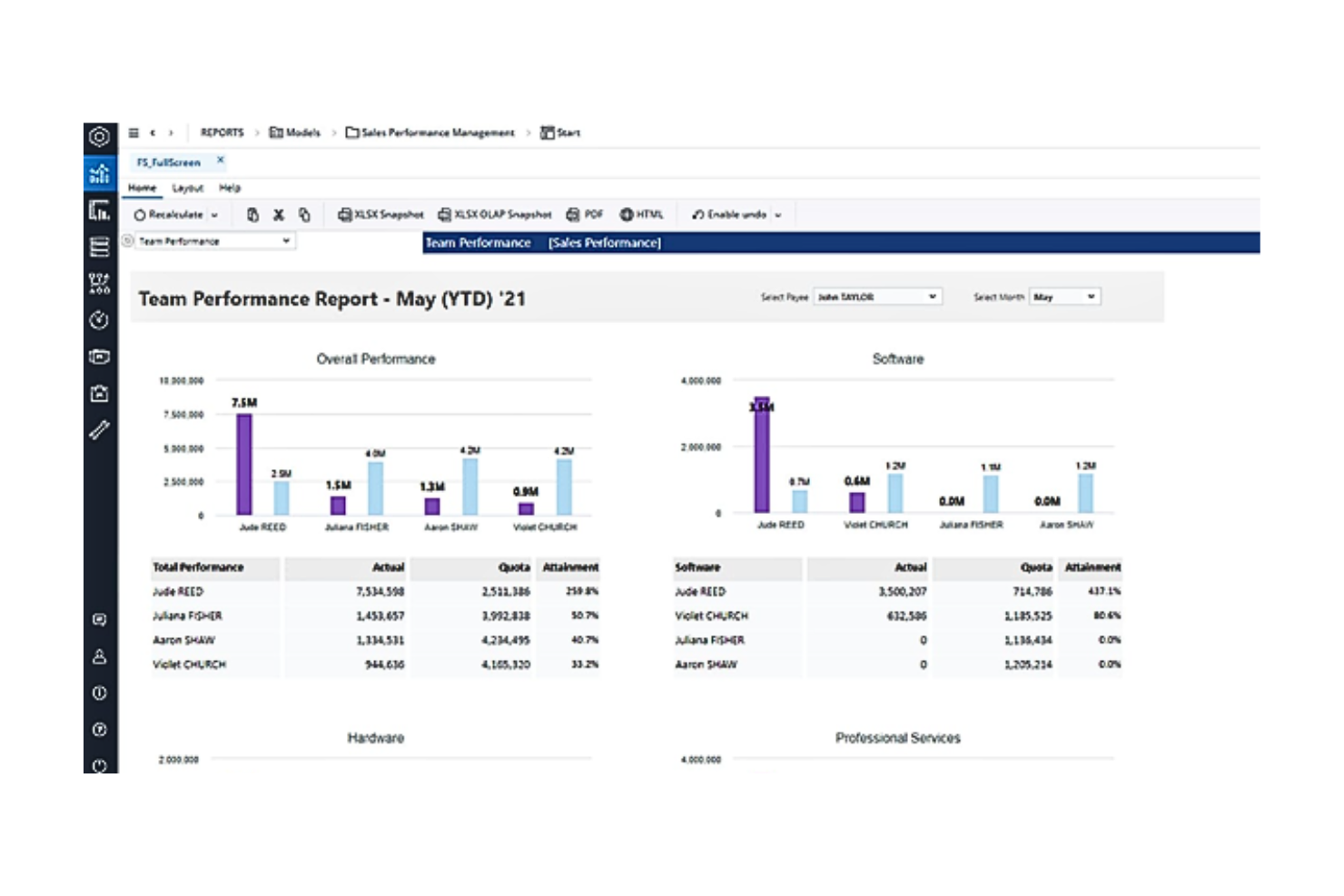
Jedox streamlines enterprise performance management with robust integrated planning and analytics tools. It excels in offering a unified solution for complex, multi-departmental planning needs.
Why I Picked Jedox:
I chose Jedox for this list because it provides a comprehensive suite of tools that facilitate integrated planning across various business functions, making it stand out from other project forecasting software. It's particularly effective for organizations that require a seamless flow of data across departments to inform strategic decisions and forecasting.
Jedox Standout features & integrations:
Features include strong capabilities in data integration, collaboration, and reporting. The platform supports scenario planning and what-if analyses, which are essential for dynamic and uncertain environments. Its robust integration with major IT systems simplifies the complexity of enterprise-wide planning processes.
Integrations include Microsoft Excel, Salesforce, SAP, Oracle, Qlik, Tableau, Power BI, Google Sheets, Microsoft Dynamics, and IBM Cognos.
Pros and Cons
Pros:
- Strong collaborative planning tools
- Powerful what-if analysis features
- Extensive integration capabilities
Cons:
- Setup may require significant IT resources
- Pricing information not transparent
- High learning curve for new users

Best for workforce planning

Workday Adaptive Planning provides cloud-based software for business planning, including sophisticated tools for budgeting, forecasting, and particularly, workforce planning. It excels in workforce planning through its ability to model and manage personnel expenses deeply integrated with operational plans.
Why I Picked Workday Adaptive Planning:
I chose Workday Adaptive Planning for this list because of its comprehensive workforce planning features that are deeply integrated with financial and business planning capabilities. Its strong focus on managing personnel resources and costs makes it the best option for companies that need detailed and dynamic workforce management.
Workday Adaptive Planning Standout features & integrations:
Features include robust modeling capabilities that allow organizations to forecast and plan for hiring needs, salary increases, and other workforce-related expenses. It integrates seamlessly with major HR and financial systems, providing a unified view of workforce analytics.
Integrations include Workday HCM, Microsoft Excel, Salesforce, SAP, Oracle, NetSuite, Slack, Google Cloud, Tableau, and Power BI.
Pros and Cons
Pros:
- Comprehensive modeling tools for various scenarios
- Seamless integration with HR and financial systems
- Detailed workforce planning capabilities
Cons:
- Setup and customization can be resource-intensive
- Pricing can be on the higher side
- May require a steep learning curve


Cube Software simplifies financial planning, analysis, and reporting. Cube is distinguished for real-time financial modeling due to its robust integration with existing data sources and immediate update capabilities.
Why I Picked Cube Software:
I chose Cube Software for this list because it stands out in delivering real-time data capabilities, crucial for dynamic and fast-paced financial environments. Its strength in seamlessly integrating with multiple data systems makes it ideal for real-time financial modeling. This capability ensures financial teams can rely on the most current data for making strategic decisions.
Cube Software Standout features & integrations:
Features include user-friendly interface and powerful data consolidation features, which simplify complex financial processes. The platform's capability to integrate data in real-time allows for more accurate forecasting and budgeting. Notably, its direct integrations with commonly used financial systems enhance its utility.
Integrations include Salesforce, QuickBooks, Xero, NetSuite, Microsoft Excel, Google Sheets, Oracle, SAP, Slack, and Workday.
Pros and Cons
Pros:
- Robust data consolidation tools
- User-friendly interface
- Real-time data integration
Cons:
- Limited customization options for smaller businesses
- May require initial setup assistance
- Pricing transparency is lacking


IBM Planning Analytics automates planning, budgeting, forecasting, and analysis processes, enhancing the precision of financial insights. It is best for complex scenario modeling due to its powerful analytics and simulation capabilities.
Why I Picked IBM Planning Analytics:
I selected IBM Planning Analytics for its advanced analytical tools and flexibility in handling complex financial and operational data. Its ability to perform multi-dimensional scenario analysis makes it ideal for organizations that face complex planning challenges and require detailed forecasting and modeling.
IBM Planning Analytics Standout features & integrations:
Features include a powerful in-memory database that allows for instant scenario analysis and what-if modeling, helping organizations plan for various outcomes. It also offers a user-friendly workspace that supports drag-and-drop functionality for easy modeling. Integration with various data sources is streamlined, enabling effective data consolidation and management.
Integrations include IBM Cognos, Microsoft Excel, Salesforce, SAP, Oracle, Microsoft SQL Server, Google Cloud, Amazon Redshift, Tableau, and Power BI.
Pros and Cons
Pros:
- User-friendly interface for complex analytics
- Real-time data processing with in-memory technology
- In-depth scenario modeling capabilities
Cons:
- Complexity of features requires a learning curve
- Minimum seat requirement may exclude smaller teams
- Higher cost compared to some competitors


SAP Cloud Analytics provides comprehensive data solutions, enabling deep insights and decision-making support across large enterprises. It excels in managing complex data environments and delivering sophisticated analytical capabilities.
Why I Picked SAP Cloud Analytics:
I selected SAP Cloud Analytics for its robust data processing and analytics capabilities, which are ideal for large enterprises with complex data needs. It stands out due to its powerful integration with SAP’s ecosystem and its ability to handle massive datasets, making it the best choice for organizations requiring advanced analytics.
SAP Cloud Analytics Standout features & integrations:
Features include advanced data visualization, real-time analytics, and machine learning capabilities, which empower businesses to transform raw data into actionable insights. It integrates deeply within the SAP ecosystem, enhancing its utility by leveraging existing business systems for seamless data flow and analysis.
Integrations include SAP ERP, SAP S/4HANA, SAP BW, SAP HANA, Microsoft Office, Salesforce, Google BigQuery, Oracle Database, IBM DB2, and Amazon Redshift.
Pros and Cons
Pros:
- Suitable for handling complex, large-scale data sets
- Robust integration with SAP products
- Comprehensive advanced analytics capabilities
Cons:
- Requires familiarity with SAP products for best use
- Higher cost likely reflective of advanced features
- Can be complex to implement
Değerlendirilebilecek Diğer Proje Tahmin Yazılımları
Kısa listeye aldığım ancak en üst sıralamadaki listeye giremeyen birkaç seçenek daha var. Bunlar da kesinlikle göz atmaya değer.
- 4castplus
For construction budget tracking
- Runn
For agency project forecasting
- Planview
For enterprise portfolio management
- Smartsheet
Good for spreadsheet-like project management
- Zoho Projects
Good for comprehensive small business management
- Forecast
For AI-driven project automation
- Domo
Good for business intelligence integrations
- Prophix
Good for automated financial processes
- ClickUp
Good for one-app productivity solution
- Jira
Good for agile software development teams
- Asana
Good for task visualization and tracking
- monday.com
Good for workflow customization across teams


How I Evaluate Project Forecasting Software
I split my evaluation into two layers: the core forecasting capabilities—like EAC tracking and capacity modeling—every tool must offer, and the differentiators that set the best platforms apart.
Core Functionality (Table Stakes For This List)
When I'm selecting tools for my list, I rank each one on a scale from 0 (does not offer the functionality) to 5 (excels in this area) for each core functionality listed below. Then, I calculate the tool's total score into a percentage. Each tool needs to achieve a minimum total score of 65% to be considered for inclusion.
- Timeline & Schedule Forecasting: I evaluate whether the tool can project milestone and completion dates forward based on live progress, not just a static Gantt chart you manually re-baseline every week.
- Resource Capacity Forecasting: The tool should forecast future resource demand against available capacity so you can spot staffing gaps before a new sprint or project phase kicks off.
- Cost & Budget Forecasting: I look for EAC, ETC, and margin projections that update as actuals flow in, giving finance and PMO leads a real-time view of where a project's budget is heading.
- Scenario & What-If Modeling: I check whether you can model trade-offs like shifting a launch date or reallocating headcount and compare outcomes side by side before committing to a path.
- Historical Data & Trend Analysis: Past velocity, burn rates, and estimation accuracy should feed into current forecasts so each new project benefits from lessons the organization has already learned.
- Forecast Dashboards & Reporting: I look for configurable, role-based dashboards that let a PMO director view portfolio-level forecast roll-ups while a project lead drills into task-level variance.
Once I have a list of tools that meet the criteria, I consider what sets each platform apart.
Differentiating Factors (What Sets Vendors Apart)
Here's how I compare and contrast different vendors:
Standout Features
Monte Carlo simulation support is a major differentiator. Tools that run probabilistic models give you confidence-weighted delivery dates instead of a single optimistic target. I also evaluate AI-driven risk prediction, where the platform flags projects trending toward overrun before you'd catch it in a status meeting. For professional services teams, pipeline forecasting matters. Being able to layer weighted pre-sales deals into your capacity plan helps you staff proactively rather than scrambling once contracts close.
Beyond Features
Integrations matter a lot here. A forecasting tool that doesn't sync with your PM platform—whether that's Jira, MS Project, or Smartsheet—forces manual data entry that erodes forecast accuracy fast. I also evaluate industry fit, since a tool built for construction CPM scheduling works very differently from one designed for agile software delivery. Implementation complexity is worth checking too. Forecasting tools often require configuring rate cards, resource pools, and baseline rules, so I look at how much setup effort is realistic for your team size.
Proje Tahmin Yazılımı Nasıl Seçilir?
Kendinize özgü yazılım seçim sürecinizi yürütürken aşağıdaki noktaları göz önünde bulundurun:
- Ölçeklenebilirlik: Proje tahmin yazılımı işletmenizle birlikte büyüyebilmelidir. Kuruluşunuz büyüdükçe artan miktarda veriyi ve daha karmaşık proje portföylerini işleyebilir mi?
- Entegrasyon Yetenekleri: Yazılımın mevcut sistemlerinizle (ör. ERP'niz, CRM'niz ve diğer proje yönetimi araçlarınız) entegre olduğundan emin olun. Bu, veri tutarlılığını korumanıza ve iş akışı süreçlerinizi düzenlemenize yardımcı olur.
- Özelleştirme Seçenekleri: Sektörünüzün ve şirketinizin özel ihtiyaçlarını karşılayacak şekilde özelleştirilebilen yazılımları arayın. Raporlama biçimleri ve gösterge tablosu görünümleri gibi özellikleri ihtiyaçlarınıza göre uyarlayabilmelisiniz.
- Gerçek Zamanlı Veriler: Yazılım, zamanında kararlar almanızı sağlayacak gerçek zamanlı içgörüler sunmalıdır. Bu, koşulların hızla değiştiği (ör. teknoloji ve üretim) ve gecikmelerin maliyetli olup proje başarısını etkileyebildiği sektörlerde çok önemlidir.
- Kullanıcı Deneyimi: Yazılımın öğrenme eğrisini ve kullanılabilirliğini değerlendirin. Proje yöneticisinden ekip üyelerine kadar herkes yazılımı erişilebilir ve kullanımı kolay bulmalıdır. Bu, benimseme oranlarını artırabilir ve veri girişlerinin daha doğru yapılmasına yardımcı olabilir.
2026 İçin Proje Tahmin Yazılımı Trendleri
Projelerin artan karmaşıklığı ve daha dinamik ve hassas planlama araçlarına duyulan ihtiyaç nedeniyle proje tahmin yazılımları hızla gelişmeye devam ediyor. Temel trendlerin özeti aşağıda yer alıyor:
Yapay Zekâ ve Makine Öğrenimi Entegrasyonu
- Eğilim: Yapay zekâ ve makine öğrenimi algoritmalarını kullanan tahmine dayalı analiz özellikleri giderek yaygınlaşıyor; bu da daha doğru tahminler ve risk değerlendirmeleri sunabiliyor.
- İyileştirilen işlevsellik: Bu teknolojiler, yazılımın geçmiş proje verilerinden öğrenmesine olanak tanır; bu da kaynak tahsisini ve zaman çizelgesi tahminlerini iyileştirmeye yardımcı olur. IBM Planning Analytics gibi araçlar, gelişmiş senaryo modelleme özellikleri sunarak bu alanda öncülük ediyor.
Sürdürülebilirliğe Odaklanma
- Eğilim: Sürdürülebilirlik bir öncelik hâline geldikçe, şirketlerin projelerinin çevresel etkilerini takip etmelerine ve yönetmelerine yardımcı olan yeni özellikler ortaya çıkıyor.
- İyileştirilen işlevsellik: Bu yeni işlevsellik, kuruluşların hem verimli hem de çevre dostu projeler planlayarak mevzuat gerekliliklerini karşılamasına ve kurumsal sürdürülebilirlik hedeflerine ulaşmasına yardımcı olur.
Manuel Veri Girişi Özelliklerinin Azalan Önemi
- Eğilim: Otomasyon ve yapay zekâ aracılığıyla veri entegrasyonu özellikleri geliştikçe manuel veri girişine duyulan ihtiyaç azalıyor.
- İyileştirilen işlevsellik: Bu değişim, proje yöneticilerinin veri girmek yerine stratejik karar alma süreçlerine daha fazla odaklanmasını sağlar.
Proje Tahmin Yazılımı Nedir?
Proje tahmin yazılımı, geçmiş verilere ve devam eden proje ölçümlerine dayanarak projelerin gelecekteki sonuçlarını ve performansını tahmin etmek için tasarlanmış bir araçtır. Proje yöneticileri bu aracı proje maliyetlerini, zaman çizelgelerini ve kaynak ihtiyaçlarını tahmin etmek için kullanır.
Bu bilgiler, bilinçli kararlar almanıza, olası aksaklıkları öngörmenize ve projenizi kuruluşunuzun daha geniş kapsamlı hedefleriyle uyumlu hâle getirmenize yardımcı olur. Daha gelişmiş özellikler arasında tahmine dayalı modelleme, senaryo simülasyonu ve veri görselleştirme bulunur.
Özellikler
Proje tahmin yazılımında aranması gereken en önemli özellikler şunlardır:
- Veri entegrasyonu: Araç, çeşitli kaynaklardan gelen verileri birleştirebilmeli ve ilgili tüm verilerin hesaba katılmasını ve erişilebilir olmasını sağlayan, proje ortamının bütünsel bir görünümünü sunmalıdır.
- Tahmine dayalı analiz: Geçmiş verileri kullanarak proje sonuçlarını tahmin etmenize yardımcı olan gelişmiş algoritmaları arayın. Bu, sorunları öngörmenize ve bilinçli kararlar almanıza yardımcı olur.
- Risk analizi: Araç, proje risklerini belirlemeye ve değerlendirmeye yönelik özellikler içermelidir. Olası riskleri anlamak, proaktif kalmanıza ve azaltma stratejileri uygulamanıza yardımcı olur.
- Kaynak tahsisi: Personeli ve kaynakları yönetebilmeniz gerekir. Bu, kaynakların verimli kullanılmasını sağlamanıza, maliyetleri azaltmanıza ve gecikmeleri önlemenize yardımcı olur.
- Senaryo planlama: Araç, farklı proje senaryolarını simüle etmenize olanak tanımalıdır. Böylece çeşitli yaklaşımları test edebilir ve ilerlemek için en uygun yolu seçebilirsiniz.
- Maliyet tahmini: Ayrıntılı finansal öngörüler oluşturma özelliklerini arayın. Doğru maliyet tahminleri, bütçe yönetimi ve finansal aşımların önlenmesi için büyük önem taşır.
- Gerçek zamanlı raporlama: Araç, projeleri planlandığı şekilde sürdürmenize, paydaşları bilgilendirmenize ve gerektiğinde hızlı ayarlamalar yapmanıza yardımcı olabilecek proje ilerlemesi ve diğer veriler hakkında içgörüler sunmalıdır.
- Panolar ve görselleştirmeler: Proje ölçümlerini sezgisel biçimde görüntüleyen araçları arayın. Görsel araçlar, karmaşık verileri uygulanabilir içgörülere dönüştürmeye yardımcı olur.
- İş birliği araçları: Ekip iletişimini ve iş birliğini kolaylaştıran özellikleri arayın. Bunlar, ekip üyelerinin uyum içinde çalışmasına ve proje hedeflerine katkıda bulunmasına yardımcı olur.
- Özelleştirilebilirlik: Yazılımı belirli proje ihtiyaçlarınıza göre uyarlama olanağına sahip olduğunuzdan emin olun.
Faydalar
Proje tahmin yazılımının beş temel faydası şunlardır:
- Tahminlerde daha iyi doğruluk: Proje tahmin yazılımı, proje aşımlarına ilişkin riski azaltan daha doğru öngörüler oluşturmak için geçmiş verileri ve tahmine dayalı analizleri kullanmanızı sağlar.
- Geliştirilmiş kaynak yönetimi: Bu yazılım, insan ve malzeme kaynaklarının verimli bir şekilde kullanılmasını sağlamanıza yardımcı olur; böylece proje yaşam döngüsü boyunca israf azalır ve verimlilik artar.
- Artan çeviklik: Gerçek zamanlı verilere ve senaryo planlama araçlarına erişim sayesinde proje kapsamı, kaynaklar veya dış etkenlerdeki değişikliklere yanıt olarak stratejilerinizi hızla ayarlayabilirsiniz.
- Daha iyi risk azaltma: Proje tahmin yazılımı, risk analizi ve değerlendirmesi için araçlar sunar. Bu araçlar, sizin ve ekibinizin olası sorunları önceden görmesine ve bunlar projeyi etkilemeden önce etkilerini azaltacak stratejiler uygulamasına yardımcı olur.
- Veriye dayalı karar alma: Bu tür yazılımlar, proje verilerini merkezileştirip gelişmiş raporlama ve gösterge paneli özellikleri sunarak sizin ve paydaşlarınızın kapsamlı ve güncel bilgilere dayalı kararlar almasına yardımcı olur.
Maliyet ve Fiyatlandırma
Aşağıda proje tahmin yazılımı için tipik fiyatlandırma ve planları içeren bir tablo yer almaktadır:
| Plan Türü | Ortalama Fiyat | Yaygın Özellikler |
|---|---|---|
| Ücretsiz | $0 | Temel tahmin, sınırlı sayıda proje, minimum destek |
| Standart | $25/kullanıcı/ay | Proje takibi, bütçe tahmini, temel analiz |
| Profesyonel | $50/kullanıcı/ay | Gelişmiş analiz, entegrasyonlar, kapsamlı destek |
| Kurumsal | Özel fiyatlandırma | Özel özellikler, tam entegrasyon, özel destek |
Yalnızca abonelik ücretlerini değil, uygulama ve eğitim için oluşabilecek maliyetleri de kapsayacak şekilde toplam sahip olma maliyetini değerlendirdiğinizden emin olun. Doğru planı seçmek çoğu zaman gerekli özellikleri mevcut bütçenizle dengelemek anlamına gelir.
Sıkça Sorulan Sorular
\u003cp\u003eProje tahmin yazılımı hakkında sıkça aldığım bazı sorular burada yer almaktadır.\u003c/p\u003e
Proje tahmin yazılımını kimler kullanır?
\u003cp\u003eBu tür yazılımlar genellikle çeşitli sektörlerdeki proje yöneticileri, finansal analistler, operasyon yöneticileri ve işletme yöneticileri tarafından kullanılır.\u003c/p\u003e
Proje tahmin yazılımı diğer iş araçlarıyla entegre olabilir mi?
Evet, çoğu proje tahmin yazılımı ERP, CRM, İKY ve diğerleri gibi iş sistemleriyle entegre olabilir. Bu, veri akışınızı ve genel proje doğruluğu ile verimliliğini artırmanıza yardımcı olur.
Proje tahmin yazılımının ücretsiz bir sürümü mevcut mu?
Evet, çoğu sağlayıcı sınırlı özelliklere sahip ücretsiz denemeler veya \u0022ücretsiz/ücretli karma\u0022 sürümler sunar.