

2026 İçin En İyi 10 Şelale Proje Yönetimi Yazılımı

10 En İyi Şelale Proje Yönetimi Yazılımları Kısa Listesi


Şelale proje yönetimi; yapıya, sabit teslim tarihlerine ve açıkça tanımlanmış çıktılara ihtiyaç duyan ekipler için en iyi sonucu verir. Ancak bu tür bir planlamayı destekleyecek doğru yazılımı bulmak her zaman kolay değildir. Bazı araçlar şelale yöntemini desteklediğini iddia eder, ancak gerçek bir zaman çizelgesi oluşturma veya aşama aşama ilerlemeyi takip etme zamanı geldiğinde yetersiz kalır.
Proje yönetimi araçlarını test edip incelerken edindiğim deneyime göre, en iyi şelale yazılımı sizi çevik bir iş akışına zorlamadan her adımı baştan sona planlamanıza olanak tanır.
Bu makalede, bugün kullanılabilen en iyi şelale proje yönetimi araçlarını inceleyeceğim. Her bir aracın en iyi yaptığı işleri, görev bağımlılıklarını ve Gantt grafiklerini nasıl ele aldığını ve hangisinin ekibinizin ihtiyaçlarına uygun olabileceğini göreceksiniz.
Why Trust Our Software Recommendations
Our team has been testing and reviewing software since 2012. As project managers ourselves, we know how difficult—and important—it is to choose the right software.
For this guide, we evaluated tools using hands-on testing and independent research, scoring tools using our selection criteria. We also draw on insights from industry thought leaders and practicing project management experts.
Our reviews reflect our human editorial judgment, not a sales pitch.
Expert reviewers:
Şelale Proje Yönetimi Yazılımları Karşılaştırma Tablosu
Bu karşılaştırma tablosu, en iyi şelale proje yönetimi yazılımı seçimlerimdeki fiyatlandırma ayrıntılarını özetlemektedir.
| Tool | Starting Price | Website | |
|---|---|---|---|
| Best for PowerPoint stakeholder reporting | 4.5 out of 5 | $9/user/month Free plan available | Website |
| Best for end-to-end visual project management | 4.3 out of 5 | $10/user/month Free plan + 14-day trial available | Book Demo |
| Best for centralizing project communication | 4.6 out of 5 | $10/user/month Free plan + 14-day trial + demo available | Website |
| Best for phase-based project management | 4.7 out of 5 | $8/user/month 14-day free trial + demo available | Website |
| Best for flat-rate pricing models | 4.5 out of 5 | $45/month 14-day free trial + free demo available | Website |
| Best for strategic work execution | 4.3 out of 5 | Pricing upon request Not available | Website |
| Best for real-time project data | 4.2 out of 5 | $15/user/month 30-day free trial + demo available | Website |
| Best for portfolio visibility | 4.4 out of 5 | $3/user/month Free plan available; 14-day free trial | Website |
| Best for dynamic project forecasting | 4.1 out of 5 | Pricing upon request Free plan + 7-day trial + demo available | Website |
| Best for user-friendly project management | 4.1 out of 5 | $24/user/month Free trial available | Website |

En İyi Şelale Proje Yönetimi Yazılımları İncelemeleri
Aşağıda, kısa listeme giren en iyi şelale proje yönetimi yazılımlarının ayrıntılı özetlerini bulabilirsiniz. İncelemelerim, sizin için en iyi aracı bulmanıza yardımcı olmak amacıyla her bir aracın temel özelliklerini, artılarını & eksilerini, entegrasyonlarını ve ideal kullanım alanlarını ayrıntılı biçimde ele almaktadır.

Best for PowerPoint stakeholder reporting
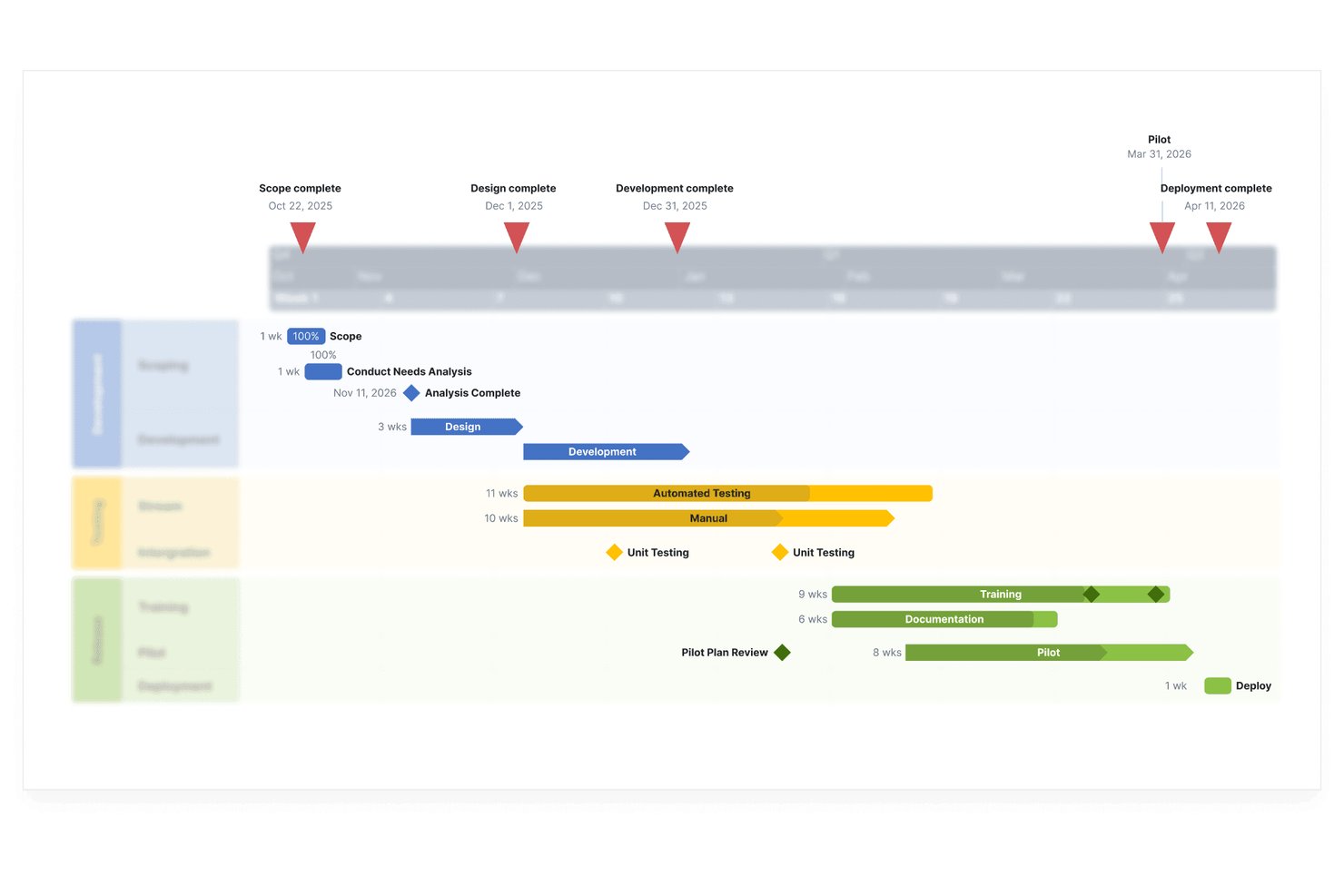
Lucen Timeline is a PowerPoint add-in and browser-based tool that turns project data into presentation-ready Gantt charts, roadmaps, and timelines, with support for milestones, swimlanes, dependencies, and planned-vs-actual tracking.
Who Is Lucen Timeline Best For?
Lucen Timeline is a good fit for project managers who already use PowerPoint for stakeholder reporting and need a faster way to build polished Gantt charts and timelines for executive audiences.
Why I Picked Lucen Timeline
I've included Lucen Timeline in my top picks because it's the only tool here built specifically to turn Gantt data into presentation-ready PowerPoint slides without manual rebuilding. I like that you can import from Jira, Smartsheet, or MS Project and refresh the visual while keeping your formatting intact. The planned-vs-actual view on the Expert tier is what makes it genuinely useful for waterfall reporting, letting you show stakeholders exactly where slippage occurred against the original baseline.
Lucen Timeline Key Features
- Swimlanes: Organize project phases, teams, or workstreams into separate visual rows within a single timeline slide.
- Dependencies and critical path: Display task relationships and highlight the critical path to surface scheduling risks.
- Data import and refresh: Pull in project data from Jira, Smartsheet, MS Project, or Excel and update the timeline without losing your formatting.
- Ready-made templates: Start from pre-built Gantt and timeline templates to speed up recurring stakeholder reports.
Lucen Timeline Integrations
Lucen Timeline offers native integrations with Microsoft Project, Excel, Smartsheet, Jira, and Wrike, plus PowerPoint for presentation-ready reporting.
Pros and Cons
Pros:
- Milestones make project progress easier to explain
- Templates speed recurring timeline reports
- Polished Gantt slides clarify stakeholder updates
Cons:
- Large project timelines can become cluttered
- No resource or workload planning

Wrike
Best for end-to-end visual project management

Wrike is a project management and collaboration tool designed for businesses of all sizes, offering a range of features to manage both one-time projects and ongoing tasks.
Why I Picked Wrike: I like that Wrike offers various features that support the linear and sequential nature of the waterfall methodology. Its interactive Gantt charts are essential for planning and visualizing project timelines, dependencies, and critical paths. These charts allow project managers to adjust tasks easily, ensuring each phase of the project is completed before the next begins. Additionally, Wrike’s comprehensive project templates and detailed reporting capabilities help in maintaining meticulous documentation throughout the project lifecycle.
Standout features & integrations:
Wrike's standout features include team calendars, custom workflows, real-time dashboards, time tracking, automated approvals, task prioritization, resource allocation, budget management, file sharing, project templates, and advanced security controls.
Wrike integrates with a variety of tools such as Slack, Microsoft, Google, Adobe, Salesforce, Zoom, Tableau, MS Teams, OneDrive, GitHub, Gmail, Dropbox, Okta, OneLogin, HubSpot, Jira, and NetSuite.
Pros and Cons
Pros:
- Good visual task management capabilities
- Comprehensive project analytics
- Extensive workflow customization options
Cons:
- Advanced reporting limited to higher tier plans
- Can be tricky to learn how to fully customize the platform
New Product Updates from Wrike

Wrike Adds Advanced Filters to Chart View
Wrike introduces new default filters in Chart view, including relative dates, exclusion conditions, multiple filters per field, and status group filtering. These updates help teams refine project data and reporting. For more information, visit Wrike’s official site.
Nifty
Best for centralizing project communication

Nifty is a project management tool that streamlines workflow and enhances team collaboration. It excels in centralizing project communication, integrating discussions, tasks, and files in one place.
Why I Picked Nifty: I selected Nifty for its robust communication features that distinguish it from other project management software. Its centralized communication hub is particularly effective for keeping teams aligned and informed. I determined Nifty to be best for centralizing project communication because it consolidates all project-related discussions, which is crucial for maintaining clear and consistent communication across various project stages.
Standout features & integrations:
Nifty's most important features include its project milestones, task assignments, and collaborative document editor. These tools are essential for maintaining project organization and ensuring team members are working effectively towards common goals.
Nifty integrates with key productivity tools such as Google Drive, Slack, Zoom, Dropbox, GitHub, Trello, Asana, Bitbucket, HubSpot, and Microsoft Teams.
Pros and Cons
Pros:
- Free plan available for small teams or individual use
- Integration with popular productivity tools
- Centralized communication for all project aspects
Cons:
- Free plan may be too limited for larger projects
- Higher tiers required for full feature access
- Annual billing may not be flexible for all budgets

Workzone
Best for phase-based project management

Workzone serves as an ideal solution for those seeking waterfall project management software by offering a structured approach to managing projects across various industries. Designed for teams in marketing, healthcare, education, and financial services, Workzone provides the necessary tools to streamline project visibility and collaboration. You can tackle challenges like project intake organization and resource allocation, ensuring your projects stay on track and within budget.
Why I Picked Workzone
I picked Workzone because it aligns seamlessly with the waterfall project management approach through its emphasis on structured workflows and clear project visibility. With features like pre-built reports for workload management and resource allocation, your team can maintain control over project timelines and budgets. Additionally, Workzone's project lifecycle management allows for a comprehensive view of each phase, ensuring that nothing slips through the cracks. It's these specific functionalities that make Workzone a strong candidate for any team committed to a waterfall methodology.
Workzone Key Features
In addition to its structured workflow capabilities, Workzone offers several other features to support your project management needs:
- Task Dependencies: Manage and visualize task sequences to ensure smooth project progression.
- Customizable Templates: Utilize over 1,000 templates to quickly set up projects tailored to your specific needs.
- Creative Proofing: Streamline the review process with built-in proofing tools for documents and creative assets.
- Unlimited Training and Support: Benefit from comprehensive training and support to facilitate quick adoption and ongoing assistance.
Workzone Integrations
Integrations include Slack, Microsoft Teams, Google Drive, Salesforce, and Box.
Pros and Cons
Pros:
- Structured request and workload management
- Built-in document proofing and approvals
- Strong project visibility and tracking
Cons:
- Mobile experience weaker than desktop
- Smaller integration ecosystem than competitors
New Product Updates from Workzone

Workzone Enterprise Adds Multi-Stage Approval Workflows
Workzone Enterprise now includes Approval Workflows, enabling multi-stage document approvals to standardize complex processes and reduce manual effort. For more information, visit Workzone's official site.
 .

ProofHub
Best for flat-rate pricing models

ProofHub is a comprehensive project management platform. It's recognized as best for its flat-rate pricing model, which is ideal for teams seeking cost predictability.
Why I Picked ProofHub: I selected ProofHub for its standout approach to pricing, which sets it apart from other project management tools that typically charge per user. This tool is best for flat-rate pricing models because it offers a single, fixed price for unlimited users, making it a cost-effective solution for businesses of any size, particularly those that are scaling.
Standout features & integrations:
ProofHub, a waterfall project management software, offers key features including task management with Kanban boards and Gantt charts, time tracking for individual and team projects, file sharing for easy collaboration, note-taking capabilities, discussion threads for communication, role-based access controls, project templates for standard workflows, reporting and analytics tools for tracking progress.
ProofHub integrates natively with the following tools such as Google Drive, Dropbox, Box, OneDrive, Slack, Zapier, Freshbooks, iCalendar, GitHub, and Bitbucket.
Pros and Cons
Pros:
- Simplifies budgeting for project management software
- No additional cost per user
- Fixed monthly rate for unlimited users
Cons:
- Additional storage comes at extra cost
- Limited project count in the Essential plan
- Annual commitment required for the best rate

Best for strategic work execution
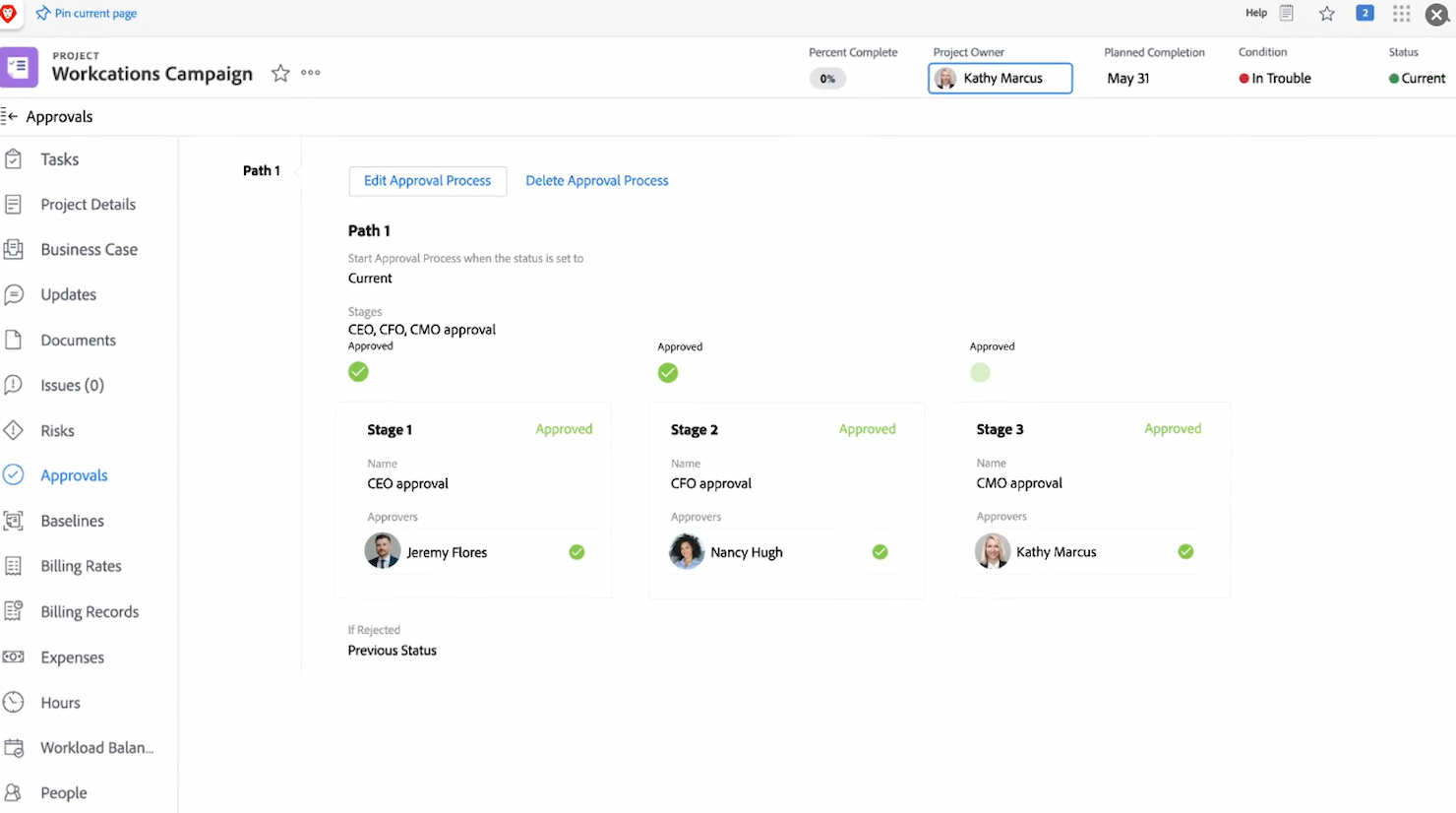
Workfront is a waterfall project management software designed to manage and streamline projects from start to finish. It helps organizations strategically plan, execute, and track their project workflows, enhancing overall productivity.
Why I Picked Workfront: I chose Workfront for its comprehensive approach to managing projects, offering a clear structure from initiation to completion. Workfront stands out by providing robust tools for strategic planning and execution, along with a focus on workflow efficiency. This makes it ideal for businesses seeking to streamline their strategic project execution.
Standout features & integrations:
Workfront offers powerful project planning tools, including Gantt charts and resource management features. It also provides advanced analytics and reporting, offering insights into project performance. Additionally, Workfront includes collaboration tools, enabling team communication and feedback directly within the platform.
Workfront integrates natively with tools, including Microsoft Teams, Slack, Salesforce, Google Drive, Jira, Box, ServiceNow, Tableau, Dropbox, and Asana.
Pros and Cons
Pros:
- Collaboration tools for communication and feedback
- Robust analytics and reporting features
- Comprehensive project management and strategic planning tools
Cons:
- Additional integrations may require setup time
- Learning curve for some users
- Minimum seat requirement can be a barrier for smaller teams
Best for real-time project data

ProjectManager.com is a comprehensive project management tool designed to help teams plan, monitor, and report on their work with real-time data. It stands out as the best for real-time project data because it provides live dashboards and reporting features that allow teams to make informed decisions quickly.
Why I Picked ProjectManager.com: I chose ProjectManager.com for this list because it offers a unique combination of user-friendly design and powerful, real-time data tracking capabilities. Its standout difference from other project management software is its ability to provide live insights into project performance, which is essential for managing complex projects effectively.
Standout features & integrations:
ProjectManager.com's most important features include real-time dashboards, online Gantt charts, workload management, and time tracking. These tools are crucial for project planning, scheduling, and tracking progress. Additionally, the software offers collaboration features that allow team members to communicate and share documents seamlessly.
The tool integrates natively with Google Apps, Microsoft Office, Microsoft Project, and offers API access for custom integrations.
Pros and Cons
Pros:
- Customizable reports for performance analysis
- Comprehensive feature set for project planning and execution
- Real-time data tracking for immediate project insights
Cons:
- Limited integrations compared to some competitors
- Some features may have a learning curve for new users
- Higher cost for small teams or individual users

Best for portfolio visibility

Project Insight is a waterfall project management software designed to help businesses manage and oversee their projects comprehensively. It provides tools for tracking progress, managing resources, and ensuring effective project delivery.
Why I Picked Project Insight: I chose Project Insight for its ability to provide comprehensive visibility into project portfolios, allowing businesses to oversee their projects from a macro perspective. This makes it distinct from other software by focusing on overall portfolio management and ensuring that individual projects contribute to strategic goals. It is ideal for organizations that need detailed insights into their projects and resources.
Standout features & integrations:
Project Insight offers Gantt chart views for effective project planning and management. It also includes a robust reporting system, providing insights into key performance indicators. Furthermore, it offers portfolio management tools, allowing businesses to track multiple projects and align them with company goals.
Project Insight, a waterfall project management software, integrates natively with tools, including Jira, Slack, Google Drive, Microsoft Teams, Dropbox, Salesforce, QuickBooks, ServiceNow, Smartsheet, Box, and more, providing comprehensive project oversight and effective collaboration.
Pros and Cons
Pros:
- Integration with various project and business tools
- Robust reporting features for tracking key metrics.
- Comprehensive portfolio management tools.
Cons:
- Interface may be overwhelming for new users.
- Some integrations may require additional setup.
- Pricing information is not immediately available.
Best for dynamic project forecasting

LiquidPlanner is a project management tool that specializes in dynamic project forecasting. It is recognized for its ability to adapt to change and manage uncertainty, helping teams plan, predict, and perform with confidence.
Why I Picked LiquidPlanner: I chose LiquidPlanner for this list because of its unique approach to project management, which includes dynamic scheduling and predictive analysis. This tool stands out due to its focus on handling project uncertainty and providing realistic forecasting. I think LiquidPlanner is best for dynamic project forecasting because it uses ranged estimates to predict project completion dates, which can help teams manage expectations and adjust to changes more effectively.
Standout features & integrations:
LiquidPlanner's standout features include its dynamic scheduling engine, which automatically updates project timelines as conditions change, and its predictive analysis capabilities, which use ranged estimates to forecast project completion dates. LiquidPlanner also offers integrated time tracking, resource management, and collaboration features.
LiquidPlanner integrates natively with a variety of tools, including Salesforce, Dropbox, Box,Google Drive, Zapier, JIRA, Slack, Trello, Zendesk, QuickBooks, among others.
Pros and Cons
Pros:
- Native integrations with popular tools like Salesforce and Slack
- Predictive analysis using ranged estimates for realistic forecasting
- Dynamic scheduling engine that updates timelines automatically
Cons:
- Minimum seat requirement could be a barrier for smaller teams
- Annual billing required, which may not suit all budgets
- Higher starting price point compared to some competitors

Best for user-friendly project management

Easy Projects is a platform designed to simplify project management. It is acclaimed for its user-friendly interface that facilitates project management for professionals at all levels.
Why I Picked Easy Projects: I selected Easy Projects for inclusion in this list due to its focus on ease of use, which is evident in its design and functionality. This tool differentiates itself by providing a straightforward user experience that is often lacking in other project management software. I judge Easy Projects to be best for user-friendly project management as it successfully balances simplicity with comprehensive project management features, making it accessible to a wide range of users.
Standout features & integrations:
Easy Projects boasts key features that are crucial for effective project management, such as interactive Gantt charts, project tracking, resource planning, and advanced reporting.
Easy Projects integrates seamlessly with a variety of tools, including Microsoft Outlook, QuickBooks, Slack, Google Drive, Microsoft Teams, Zapier, Salesforce, Zendesk, Xero, and Jira.
Pros and Cons
Pros:
- Extensive integration capabilities with popular business tools
- Comprehensive feature set that addresses a wide range of project management needs
- Intuitive interface that caters to users with varying levels of project management expertise
Cons:
- Onboarding fee adds an extra cost to initial setup
- Minimum seat requirement may not be suitable for very small teams or individual users
- Higher starting price point compared to some other project management tools
Diğer Şelale Proje Yönetimi Yazılımları
İşte kısa listeme girmeyen ancak yine de göz atmaya değer bazı ek şelale proje yönetimi yazılımı seçenekleri:
- Zoho Projects
For versatile project customization
- GoodDay
For visualizing project timelines
- Kantata
For resource optimization
- Planview
For enterprise work management
- Smartsheet
Good for spreadsheet-like interface
- Asana
Good for workflow customization
- Basecamp
For straightforward project collaboration
- Microsoft Project
Good for robust project planning
- ClickUp
Good for versatile task management
- GanttPRO
Good for intuitive Gantt charts


How I Evaluate Waterfall Project Management Software
My evaluation runs two layers deep: the baseline Gantt, CPM, and dependency features a fixed-scope project can't run without, and the differentiators that separate stronger options from the rest.
Core Functionality (Table Stakes For This List)
When I'm selecting tools for my list, I rank each one on a scale from 0 (does not offer the functionality) to 5 (excels in this area) for each core functionality listed below. Then, I calculate the tool's total score into a percentage. Each tool needs to achieve a minimum total score of 65% to be considered for inclusion.
- Gantt Chart Scheduling: I evaluate whether the Gantt view supports interactive editing, auto-scheduling, and multi-level task hierarchies—the kind of detail a 200-task construction timeline demands.
- Task Dependency Management: Each tool should support all four dependency types (FS, SS, FF, SF) with lag and lead time, so a delayed procurement phase properly cascades downstream.
- Critical Path Calculation: I look for automatic CPM that recalculates in real time and visually flags critical tasks, giving project leads instant clarity on schedule risk.
- Baseline & Milestone Tracking: The ability to save baseline snapshots and compare them against actuals matters—especially on government contracts where schedule variance reporting is standard.
- Resource Allocation & Levelling: I check whether the tool lets you assign resources, view workload capacity, and resolve over-allocations across tasks without manually reshuffling the entire schedule.
- Phase-Gated Workflows: Structured stage progression with approval gates is key. Engineering teams, for example, need formal sign-off before moving from design into fabrication.
Once I have a list of tools that meet the criteria, I consider what sets each platform apart.
Differentiating Factors (What Sets Vendors Apart)
Here's how I compare and contrast different vendors:
Standout Features
Earned value management is a major differentiator—tools that calculate CPI and SPI inline give project leads real cost and schedule performance data instead of rough estimates. I also evaluate risk registers with probability and impact scoring, since a civil engineering PM needs to quantify risk before breaking ground. Custom reporting dashboards round things out, especially when stakeholders expect executive-ready variance reports at every phase gate.
Beyond Features
Integration depth matters—I check whether a tool connects natively with MS Project, Primavera P6, and ERP systems like SAP or Oracle, since waterfall teams rarely work in a single platform. Compliance is another factor I weigh, particularly SOC 2 and FedRAMP certifications for teams managing defence or public sector contracts. I also evaluate deployment flexibility, because some organizations require on-premises hosting to meet internal data residency policies while others need cloud scalability for distributed project teams.
Şelale Proje Yönetimi Yazılımı Nasıl Seçilir?
Uzun özellik listeleri ve karmaşık fiyatlandırma yapıları içinde kaybolmak kolaydır. Kendinize özgü yazılım seçim sürecinizi yürütürken odaklanmanıza yardımcı olmak için aklınızda bulundurmanız gereken faktörleri içeren bir kontrol listesi hazırladım:
| Faktör | Dikkat Edilmesi Gerekenler |
| Ölçeklenebilirlik | Aracın ekibinizle birlikte büyüyebildiğinden emin olun. Kullanıcı izinleri, role dayalı erişim ve birden fazla ekip için proje şablonları gibi özellikleri arayın. |
| Entegrasyonlar | Yazılımın ekibinizin hâlihazırda kullandığı Slack, Microsoft Teams veya Google Drive ya da SharePoint gibi dosya depolama platformlarıyla bağlantı kurabildiğini kontrol edin. |
| Özelleştirilebilirlik | Aşamaları, zaman çizelgelerini ve iş akışlarını nasıl yapılandırdığınız konusunda esneklik arayın. Görünümleri, alanları ve etiketleri sürecinize uyacak şekilde ayarlayabilmelisiniz. |
| Kullanım Kolaylığı | Sizin ve ekibinizin saatlerce eğitim alması gerekmemeli. Sezgisel gezinmeye, sürükleyip bırakma özelliğiyle planlamaya ve sade bir arayüze öncelik verin. |
| Bütçe | Fiyatlandırmayı ekip büyüklüğünüze ve özellik ihtiyaçlarınıza göre inceleyin. Premium özellikler, kullanıcı lisansları veya depolama alanıyla ilişkili gizli maliyetlere dikkat edin. |
| Güvenlik Önlemleri | Role dayalı izinler, denetim günlükleri, şifreleme ve SOC 2 ya da ISO 27001 gibi standartlara uygunluk özelliklerine sahip bir platform seçin. |
| Gantt Şeması Kalitesi | Aracın Gantt şeması görünümünün bağımlılıkları, kilometre taşlarını ve kolay zaman çizelgesi düzenlemelerini desteklediğini doğrulayın. Yakınlaştırabilmeli, süreleri ayarlayabilmeli ve ilerlemeyi takip edebilmelisiniz. |
| Destek Seçenekleri | Canlı sohbet veya e-posta gibi erişilebilir yardım kanallarının yanı sıra eğitimler, web seminerleri veya aranabilir bir bilgi tabanı gibi kendi kendine hizmet seçeneklerini arayın. |
Şelale Proje Yönetimi Yazılımındaki Trendler
Araştırmam sırasında farklı şelale proje yönetimi yazılımı sağlayıcılarının sayısız ürün güncellemesini, basın bültenini ve sürüm günlüğünü inceledim. Takip ettiğim yeni trendlerden bazıları şunlar:
- Hibrit Planlama Modları: Daha fazla araç, şelale ve çevik yöntemleri tek bir çalışma alanında birleştiriyor. Bu, katı aşamaları takip eden ancak Gantt görünümlerinin yanında panolar veya sprintler kullanarak görev düzeyindeki ayarlamaları yönetmek için biraz esneklik isteyen ekiplere yardımcı oluyor.
- Yerleşik Risk Takibi: Sağlayıcılar, proje zaman çizelgesi içindeki riskleri işaretlemek ve yönetmek için özellikler ekliyor. Ekipler, ayrı bir araca ihtiyaç duymadan risk olasılığını belgeleyebilir, sorumlular atayabilir ve azaltma adımlarını takip edebilir.
- Yapay Zekâ Destekli Zamanlama: Yapay zekâ, bir gecikme veya kaynak sorunu ortaya çıktığında zaman çizelgelerini otomatik olarak ayarlayarak görev planlamasını desteklemeye başlıyor. Bu, manuel güncellemeleri azaltmaya ve sürekli gözetim gerektirmeden bağımlılıkları uyumlu tutmaya yardımcı oluyor.
- Temel Plan ve Sapma Takibi: Temel planları kaydetmek ve bunları mevcut ilerlemeyle karşılaştırmak giderek yaygınlaşıyor. Bu, ekiplerin gerçek zaman çizelgesinin plandan ne kadar saptığını görmesine ve buna göre yön değiştirmesine olanak tanıyor.
- Yerleşik Uyumluluk Araçları: Bazı araçlar artık ekiplerin sektör standartlarına veya düzenleyici gerekliliklere uymasına yardımcı olmak için şablonlar, kontrol listeleri ve onay akışları içeriyor. Bu özellik inşaat, sağlık hizmetleri ve finans gibi sektörlerde kullanışlıdır.
Şelale Proje Yönetimi Yazılımı Nedir?
Şelale proje yönetimi yazılımı, doğrusal ve ardışık bir tasarımı izleyen yapılandırılmış bir proje yönetimi aracıdır. Öncelikle iyi tanımlanmış ve geliştirme sürecinde değişikliğe uğrama olasılığı düşük projeler üzerinde çalışan ekipler tarafından kullanılır. Yazılım, proje planlama ve yürütmeye aşama aşama yaklaşımın fayda sağladığı sektörlere ve kuruluşlara hizmet eder; bu yaklaşımda bir sonraki aşama başlamadan önce her aşamanın tamamlanması gerekir.
Şelale Proje Yönetimi Yazılımının Özellikleri
Şelale proje yönetimi yazılımı seçerken aşağıdaki temel özelliklere dikkat edin:
- Raporlama ve gösterge panoları: Proje metriklerinin görsel özetlerini sunarak performansı hızlıca kontrol etmenize ve sorunları belirlemenize yardımcı olur.
- Gantt şeması görünümü: Proje aşamalarını, görev sürelerini ve bağımlılıkları görsel bir zaman çizelgesinde göstererek ilerlemeyi kolayca planlamanızı ve takip etmenizi sağlar.
- Görev bağımlılıkları: Görevleri birbirine bağlamanızı ve bir görevin diğeri tamamlanana kadar başlamamasını sağlayarak proje akışının mantıklı ve plan doğrultusunda ilerlemesine yardımcı olur.
- Kilometre taşı takibi: Önemli proje kontrol noktalarını öne çıkararak ilerlemeyi temel hedeflere ve son teslim tarihlerine göre ölçmenizi sağlar.
- Temel plan karşılaştırması: Özgün proje planını kaydetmenize ve gecikmeleri ya da kapsam değişikliklerini tespit etmek için gerçek ilerlemeyle karşılaştırmanıza olanak tanır.
- Aşama tabanlı yapı: Çalışmaları ardışık aşamalar hâlinde düzenleyerek açık ve adım adım ilerleyen bir planı takip etmeyi kolaylaştırır.
- Kaynak tahsisi araçları: Ekip üyelerini görevlere atamanıza ve aşırı görevlendirmeyi önlemek için iş yüklerini izlemenize yardımcı olur.
- İlerleme takibi: Görevlerin tamamlanması ve genel proje durumu hakkında gerçek zamanlı güncellemeler sağlayarak bilgi sahibi olmanızı sağlar.
- Belge paylaşımı: Ekibinizin önemli dosyaları tek bir yerde depolamasına ve bunlara erişmesine olanak tanıyarak herkesin aynı bilgiler doğrultusunda çalışmasını sağlar.
- Zaman takibi: Görevlerin ne kadar sürdüğünü kaydederek harcanan zamanı yönetmenize ve bunu özgün tahminlerinizle karşılaştırmanıza yardımcı olur.
Şelale Proje Yönetimi Yazılımının Faydaları
Şelale proje yönetimi yazılımını uygulamak, ekibiniz ve işletmeniz için çeşitli faydalar sağlar. Yararlanabileceğiniz birkaç fayda şunlardır:
- Net zaman çizelgeleri: Gantt grafikleri ve görev bağımlılıkları, neyin ne zaman gerçekleşmesi gerektiğini görmeyi kolaylaştırır.
- Daha iyi planlama: Aşamalara dayalı yapı, çalışma başlamadan önce tüm proje adımlarını önceden tanımlamanıza yardımcı olur.
- Sorumluluk: Görev atamaları ve son teslim tarihleri, kimin neden sorumlu olduğunu netleştirir.
- İlerleme görünürlüğü: Yerleşik takip araçları, ne kadar ilerlediğinizi ve gecikmelerin nerede yaşanabileceğini gösterir.
- Paydaş güncellemelerini kolaylaştırma: Gösterge panelleri ve raporlar, durum güncellemelerini paylaşmanız için basit yollar sunar.
- Geliştirilmiş risk yönetimi: Temel çizgi karşılaştırmaları ve risk günlükleri, sorunları erken fark etmeye yardımcı olur.
- Kaynak kontrolü: Kaynak tahsis araçları, kimlerin müsait olduğunu görmenizi ve ekibinize aşırı yük bindirmekten kaçınmanızı sağlar.
Şelale Proje Yönetimi Yazılımının Maliyetleri & Fiyatlandırması
Şelale proje yönetimi yazılımını seçmek, mevcut çeşitli fiyatlandırma modellerinin ve planların anlaşılmasını gerektirir. Maliyetler özelliklere, ekip büyüklüğüne, eklentilere ve daha fazlasına göre değişir. Aşağıdaki tabloda, yaygın planlar, bu planların ortalama fiyatları ve şelale proje yönetimi yazılımı çözümlerinde genellikle bulunan özellikler özetlenmektedir:
Şelale Proje Yönetimi Yazılımı İçin Plan Karşılaştırma Tablosu
| Plan Türü | Ortalama Fiyat | Yaygın Özellikler |
| Ücretsiz Plan | $0 | Görev sıralama ve bağımlılıkları, kaynak yönetimi, Gantt grafikleri, ekip iş birliği |
| Bireysel/Temel | $7 - $12 kullanıcı başına/aylık | Özelleştirilebilir iş akışları, gelişmiş raporlama ve analiz, diğer araçlarla entegrasyon |
| Standart | $8.99 - $14 kullanıcı başına/aylık | Geliştirilmiş iş birliği araçları, birden fazla proje görünümü, otomasyon özellikleri |
| Profesyonel/İşletme | $12 - $24.80 kullanıcı başına/aylık | Gelişmiş raporlama ve analiz, hedef ve kilometre taşı takibi, ek özelleştirme seçenekleri |
| Kurumsal | Fiyatlandırma için iletişime geçin | Kurumsal düzeyde veri güvenliği araçları, kapsamlı entegrasyon seçenekleri, özel destek |
Şelale Proje Yönetimi Yazılımı SSS
Şelale Proje Yönetimi Yazılımı, Çevik araçlardan nasıl farklıdır?
Şelale proje yönetimi yazılımı, proje planlama ve yürütme yaklaşımı açısından Çevik araçlardan temelde farklıdır. Çevik araçlar yinelemeli ve esnek bir süreci desteklerken Şelale yazılımı, doğrusal ve ardışık bir iş akışını destekleyecek şekilde yapılandırılmıştır. Çevik yaklaşım sürekli gözden geçirmeyi ve uyarlamayı teşvik ederken Şelale yaklaşımı daha katıdır ve bir sonraki aşamaya geçmeden önce her proje aşamasının tamamen tamamlanmasını gerektirir.
Şelale Proje Yönetimi Yazılımı karmaşık projeleri yönetebilir mi?
Evet, Şelale proje yönetimi yazılımı, gereksinimleri iyi tanımlanmış ve sık sık değişiklik yapılması beklenmeyen karmaşık projeler için oldukça uygundur. Yazılımın doğrusal izleme sistemi, her aşamanın ayrıntılı şekilde planlanmasına ve yürütülmesine olanak tanır. Bu özellik, öngörülebilirlik ve kontrolün büyük önem taşıdığı, geniş kapsamlı ve yüksek riskli projeler için özellikle yararlı olabilir.
Popüler Şelale Proje Yönetimi Yazılımı seçenekleri nelerdir?
Popüler Şelale proje yönetimi yazılımı seçenekleri arasında güçlü zamanlama ve planlama özellikleri sunan Microsoft Project ve kullanıcı dostu arayüzü ile kapsamlı proje izleme özellikleriyle bilinen Zoho Projects yer alır. Diğer dikkat çekici seçenekler arasında basit proje düzenleme araçları sunan Basecamp ve hem Şelale hem de Çevik proje yönetimine uygun çeşitli özellikler sağlayan Wrike bulunur.
Şelale Proje Yönetimi Yazılımı küçük ekipler için uygun mudur?
Şelale proje yönetimi yazılımı, özellikle söz konusu projenin açık ve değişmeyen gereksinimleri ile belirlenmiş bir nihai hedefi varsa küçük ekipler için uygun olabilir. Ancak küçük ekipler, Şelale yaklaşımının katı yapısını küçük projelerin veya yeni girişimlerin hızlı ilerleyen ve sıklıkla değişen gereksinimlerine daha az uyumlu bulabilir.
Şelale Proje Yönetimi Yazılımı iş birliğini destekler mi?
Şelale proje yönetimi yazılımı bazı Çevik araçlar kadar iş birliğine odaklı olmasa da birçok Şelale aracı ekip içi iş birliğini destekleyen özellikler sunar. Bu özellikler arasında görev atama, ilerleme takibi, belge paylaşımı ve iletişim araçları bulunabilir. İş birliği desteğinin düzeyi, seçilen yazılıma göre değişir.